display MERCEDES-BENZ GL 2014 Repair Manual
[x] Cancel search | Manufacturer: MERCEDES-BENZ, Model Year: 2014, Model line: GL, Model: MERCEDES-BENZ GL 2014Pages: 462, PDF Size: 8.98 MB
Page 230 of 462
Active Parking Assist will only detect parking
spaces:
Rthat are parallel to the direction of travel
Rthat are at least 59 in (1.5 m) wide
Rthat are at least 51 in (1.3 m) longer than
your vehicle
When driving at speeds below 19 mph
(30 km/h), you will see parking symbol as a
status indicator in the instrument cluster.
When a parking space has been detected, an
arrow towards the right or the left also
appears. By default, Active Parking Assist
only displays parking spaces on the front-
passenger side. Parking spaces on the
driver's side are displayed as soon as the turn
signal on the driver's side is activated. When
parking on the driver's side, this must remain
switched on until you acknowledge the use of
Active Parking Assist by pressing thev
button on the multifunction steering wheel.
A parking space is displayed while you are
driving past it, and until you are
approximately 50 ft (15 m) away from it.
Parking
GWARNING
Active Parking Assist merely aids you by
intervening actively in the steering. If you do
not brake there is a risk of an accident.
Always apply the brakes yourself when
maneuvering and parking.
XStop the vehicle when the parking space
symbol shows the desired parking space in
the instrument cluster.
XShift the transmission to positionR.
TheStart Park Assist? Yes: OK No:Start Park Assist? Yes: OK No:
8message appears in the multifunction
display.
XTo cancel the procedure:press the
8button on the multifunction steering
wheel or pull away.
or
XTo park using Active Parking Assist:
press thevbutton on the multifunction
steering wheel.
ThePark Assist Active AcceleratePark Assist Active Accelerate
and Brake Observe Surroundingsand Brake Observe Surroundings
message appears in the multifunction
display.
XLet go of the multifunction steering wheel.
XBack up the vehicle, being ready to brake
at all times. When backing up, drive at a
speed below approximately 6 mph
(10 km/h). Otherwise Active Parking Assist
will be canceled.
iIn tight parking spaces, you will achieve
the best parking results by backing up as
far as possible. When doing so, also
observe the PARKTRONIC messages.
XStop as soon as PARKTRONIC sounds the
continuous warning tone, if not before.
Maneuvering may be required in tight
parking spaces.
ThePark Assist active Select DPark Assist active Select D
ObserveObservesurroundingssurroundingsmessage appears in
the multifunction display.
XShift the transmission to positionDwhile
the vehicle is stationary.
Active Parking Assist immediately steers in
the other direction.
ThePark Assist active AcceleratePark Assist active Accelerate
and brake Observe surroundingsand brake Observe surroundings
message appears in the multifunction
display.
iYou will achieve the best results by
waiting for the steering procedure to
complete before pulling away.
XDrive forwards and be ready to brake at all
times.
XStop as soon as PARKTRONIC sounds the
continuous warning tone, if not before.
228Driving systems
Driving an d parking
Page 231 of 462
ThePark Assist active Select RPark Assist active Select R
ObserveObservesurroundingssurroundingsmessage appears in
the multifunction display.
As soon as the parking procedure is
complete, thePark Assist switched offPark Assist switched off
message appears and a warning tone sounds.
Active Parking Assist no longer supports you
with steering interventions. When Active
Parking Assist is finished, you must steer
again yourself. PARKTRONIC is still available.
Parking tips:
RThe way your vehicle is positioned in the
parking space after parking is dependent
on various factors. These include the
position and shape of the vehicles parked
in front and behind it and the conditions of
the location. It may be the case that Active
Parking Assist guides you too far into a
parking space, or not far enough into it. In
some cases, it may also lead you across or
onto the curb. If necessary, you should
cancel the parking procedure with Active
Parking Assist.
RYou can also select preselect transmission
positionD. The vehicle redirects and does
not drive as far into the parking space.
Should the gear change occur too soon to
achieve a sensible parking position, the
parking procedure will be aborted.
Exiting a parking space
In order that Active Parking Assist can
support you when you exit the parking space:
Ryou need to have parked using Active
Parking Assist.
Rthe border of the parking space must be
high enough at the front and the rear. A
curb stone is too small, for example.
Rthe border of the parking space must not
be too wide, as the position of the vehicle
must not exceed an angle of 45° to the
starting position as it is maneuvered into
the parking space.
Ra maneuvering distance of at least 3.3 ft
(1.0 m) must be available.
XStart the engine.
XSwitch on the turn signal in the direction
you are pulling away.
XShift the transmission to positionDorR.
TheStart Park Assist? Yes: OK No:Start Park Assist? Yes: OK No:
8message appears in the multifunction
display.
XTo cancel the procedure:press the
8button on the multifunction steering
wheel or pull away.
or
XTo exit a parking space using Active
Parking Assist:press thevbutton on
the multifunction steering wheel.
ThePark Assist active AcceleratePark Assist active Accelerate
and brake Observe surroundingsand brake Observe surroundings
message appears in the multifunction
display.
XLet go of the multifunction steering wheel.
XReverse the vehicle or drive forwards, being
ready to brake at all times. Do not exceed
a maximum speed of approximately
6 mph (10 km/h) when exiting a parking
space. Otherwise Active Parking Assist will
be canceled.
XStop as soon as PARKTRONIC sounds the
continuous warning tone, if not before.
XShift the transmission to positionDorRas
required while the vehicle is stationary.
Active Parking Assist immediately steers in
the other direction.
iYou will achieve the best results by
waiting for the steering procedure to
complete before pulling away.
If you back up after activation, the steering
wheel is moved to the straight-ahead
position.
XDrive forwards or back up the vehicle, being
ready to brake at all times.
XStop as soon as PARKTRONIC sounds the
continuous warning tone, if not before.
XDrive forwards and back up as prompted by
the PARKTRONIC warning displays, several
times if necessary.
Driving systems229
Driving and parking
Z
Page 232 of 462
Once you have exited the parking space
completely, the steering wheel is moved to
the straight-ahead position. You hear a tone
and thePark Assist FinishedPark Assist Finishedmessage
appears in the multifunction display. You will
then have to steer and merge into traffic on
your own. PARKTRONIC is still available. You
can take over the steering, before the vehicle
has exited the parking space completely. This
is useful, for example when you recognize
that it is already possible to pull out of the
parking space.
Canceling Active Parking Assist
XStop the movement of the multifunction
steering wheel or steer yourself.
Active Parking Assist will be canceled at
once. ThePark Assist CanceledPark Assist Canceled
message appears in the multifunction
display.
or
XPress the PARKTRONIC button on the
center console (Ypage 224).
PARKTRONIC is switched off and Active
Parking Assist is immediately canceled.
ThePark Assist CanceledPark Assist Canceledmessage
appears in the multifunction display.
Active Parking Assist is canceled
automatically if:
Rthe electric parking brake is engaged
Rtransmission positionPis selected
Rparking using Active Parking Assist is no
longer possible
Ryou are driving faster than 6 mph
(10 km/h)
Ra wheel spins, ESP®intervenes or fails. The
Page 233 of 462
parking. When maneuvering or parking, make
sure that there are no persons, animals or
objects in the area in which you are
maneuvering.
Under the following circumstances, the rear
view camera will not function, or will function
in a limited manner:
Rthe tailgate is open
Rin heavy rain, snow or fog
Rat night or in very dark places
Rif the camera is exposed to very bright light
Rif the area is lit by fluorescent light or LED
lighting (the display may flicker)
Rif there is a sudden change in temperature,
e.g. when driving into a heated garage in
winter
Rif the camera lens is dirty or obstructed
Rif the rear of your vehicle is damaged. In
this event, have the camera position and
setting checked at a qualified specialist
workshop
Activating/deactivating the rear view
camera
XTo activate:make sure that the SmartKey
is in position2in the ignition lock.
XMake sure that the function "show rear
view camera display" is selected in
COMAND.
XEngage reverse gear.
The area behind the vehicle is shown in the
COMAND display with guide lines.
XTo change the function mode for
vehicles with trailer tow hitch:using the
COMAND controller, select symbolCfor
the "Reverse parking" function or
symbolDfor "Coupling up a trailer" (see
the separate COMAND operating
instructions).
The symbol of the selected function is
highlighted.
To deactivate:the rear view camera is
deactivated if you:
Rshift the transmission to positionP
Rdrive 33 ft (10 m) forwards
Rshift the transmission fromRto another
position after 15 seconds
Rdrive forwards at a speed of over 5 mph
(10 km/h)
Displays in the COMAND display
The rear view camera may show a distorted
view of obstacles, show them incorrectly or
not at all. The rear view camera does not show
objects in the following positions:
Rvery close to the rear bumper
Runder the rear bumper
Rin the area immediately above the tailgate
handle
!Objects not at ground level may appear to
be further away than they actually are, e.g.:
Rthe bumper of a parked vehicle
Rthe drawbar of a trailer
Rthe ball coupling of a trailer tow hitch
Rthe rear section of an HGV
Ra slanted post
Use the guidelines only for orientation.
Approach objects no further than the
bottom-most guideline.
Driving systems231
Driving and parking
Z
Page 238 of 462
could otherwise endanger yourself and
others.
The 360° camera will not function or will
function in a limited manner:
Rif the doors are open
Rif the exterior mirrors are folded in
Rif the trunk lid is open
Rin heavy rain, snow or fog
Rat night or in very dark places
Rif the cameras are exposed to very bright
light
Rif the area is lit by fluorescent light or LED
lighting (the display may flicker)
Rif you exit a heated garage in winter,
resulting in a rapid change in temperature
Rif the camera lenses are dirty or covered
Rif the vehicle components in which the
cameras are installed are damaged. In this
event, have the camera position and setting
checked at a qualified specialist workshop.
Do not use the 360° camera in this case. You
can otherwise injure others or cause damage
to objects or the vehicle.
Activation conditions
The 360° camera image can be displayed if:
Ryour vehicle is equipped with a 360°
camera
RCOMAND is switched on, see the separate
COMAND operating instructions
Rthe360° Camera360° Camerafunction is activated
Activating the 360° camera using the
SYS button
XPress and hold thefbutton for longer
than 2 seconds, see the separate COMAND
operating instructions.
Depending on whether positionDorRis
engaged, the following is shown:
Rfull screen display with the image from
the front camera
Rfull screen display with the image from
the rear camera
Activating the 360° camera with
COMAND
XPress thefbutton, see the separate
COMAND operating instructions.
XSelectSystemSystemby turningyRzthe
COMAND controller and press
Page 241 of 462
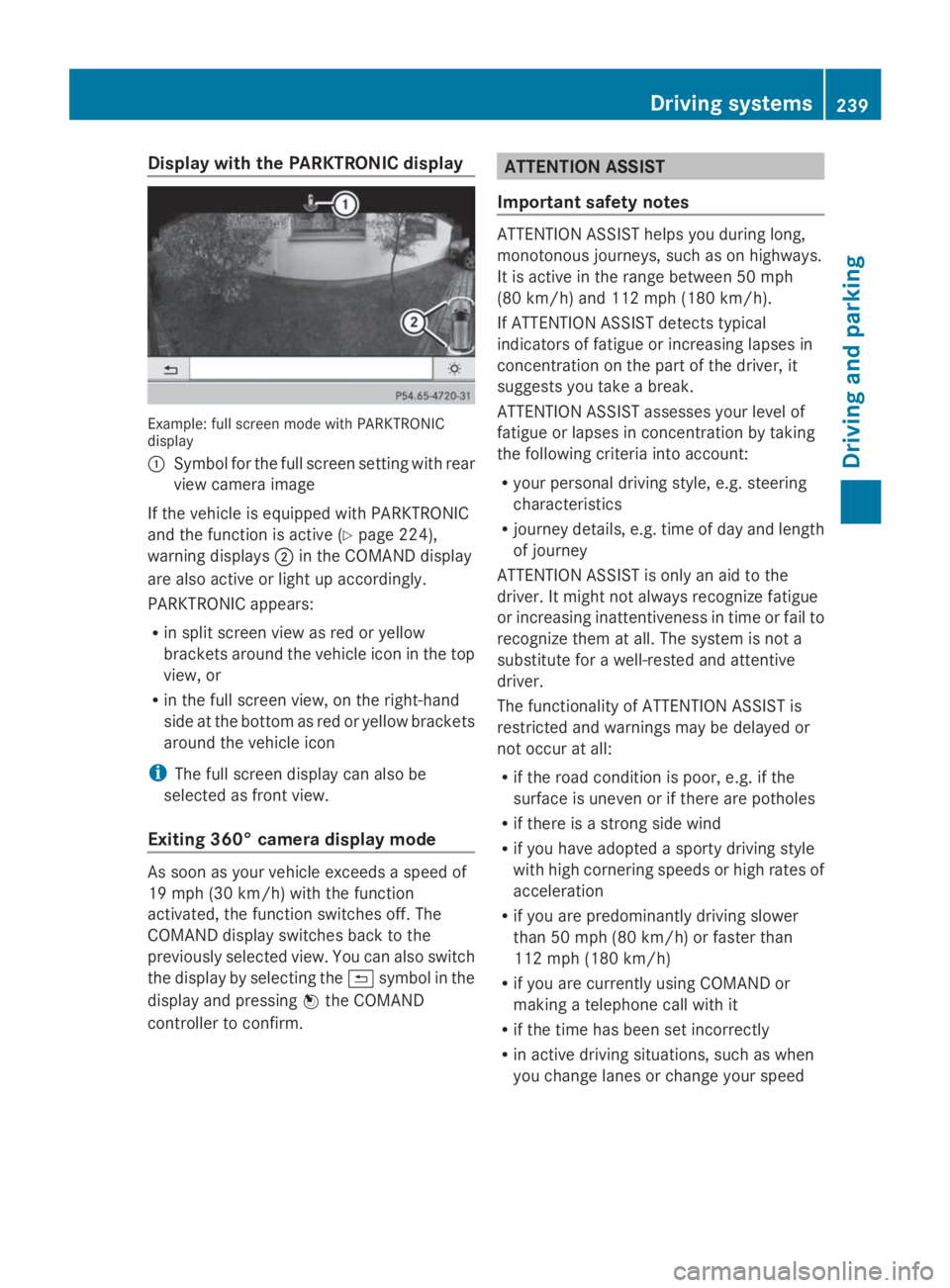
Display with the PARKTRONIC display
Example: full screen mode with PARKTRONICdisplay
CSymbol for the full screen setting with rear
view camera image
If the vehicle is equipped with PARKTRONIC
and the function is active (Ypage 224),
warning displaysDin the COMAND display
are also active or light up accordingly.
PARKTRONIC appears:
Rin split screen view as red or yellow
brackets around the vehicle icon in the top
view, or
Rin the full screen view, on the right-hand
side at the bottom as red or yellow brackets
around the vehicle icon
iThe full screen display can also be
selected as front view.
Exiting 360° camera display mode
As soon as your vehicle exceeds a speed of
19 mph (30 km/h) with the function
activated, the function switches off. The
COMAND display switches back to the
previously selected view. You can also switch
the display by selecting the9symbol in the
display and pressing
Page 242 of 462
Warning and display messages in the
multifunction display
XActivate ATTENTION ASSIST using the on-
board computer (Ypage 281).
XIf ATTENTION ASSIST is active, it will not
warn you until at least 20 minutes after
your journey has begun. You then hear an
intermittent warning tone twice and the
Attention Assist: Take a Break!Attention Assist: Take a Break!
message appears in the multifunction
display.
If necessary, take a break.
XPress thevor8button to confirm
the message.
On long journeys, take regular breaks in good
time to allow yourself to rest properly. If you
do not take a break and ATTENTION ASSIST
still detects increasing lapses in
concentration, you will be warned again after
15 minutes at the earliest.
ATTENTION ASSIST is reset when you
continue your journey and starts assessing
your tiredness again if:
Ryou switch off the engine.
Ryou take off your seat belt and open the
driver's door, e.g. for a change of drivers or
to take a break.
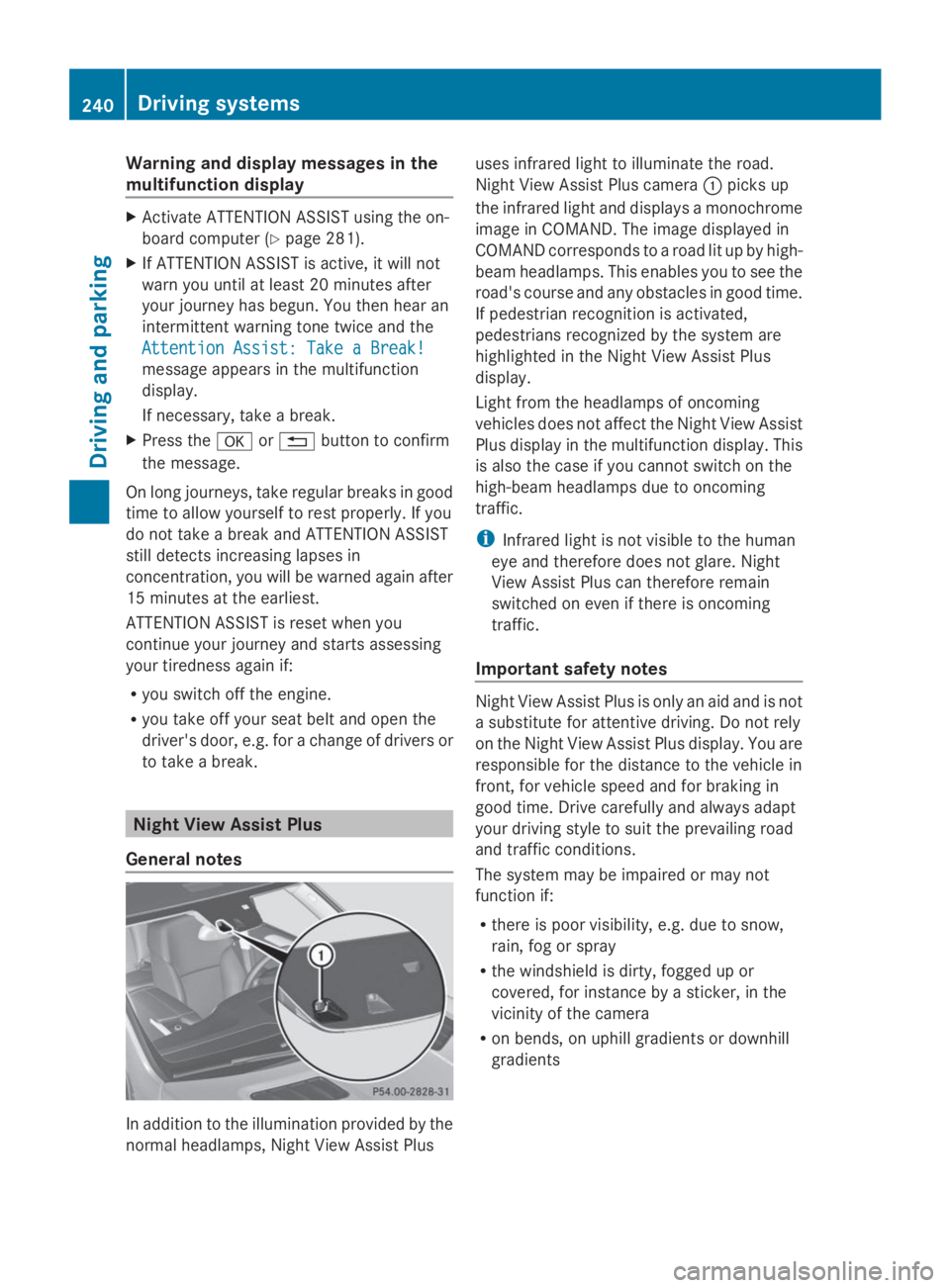
Night View Assist Plus
General notes
In addition to the illumination provided by the
normal headlamps, Night View Assist Plus
uses infrared light to illuminate the road.
Night View Assist Plus cameraCpicks up
the infrared light and displays a monochrome
image in COMAND. The image displayed in
COMAND corresponds to a road lit up by high-
beam headlamps. This enables you to see the
road's course and any obstacles in good time.
If pedestrian recognition is activated,
pedestrians recognized by the system are
highlighted in the Night View Assist Plus
display.
Light from the headlamps of oncoming
vehicles does not affect the Night View Assist
Plus display in the multifunction display. This
is also the case if you cannot switch on the
high-beam headlamps due to oncoming
traffic.
iInfrared light is not visible to the human
eye and therefore does not glare. Night
View Assist Plus can therefore remain
switched on even if there is oncoming
traffic.
Important safety notes
Night View Assist Plus is only an aid and is not
a substitute for attentive driving. Do not rely
on the Night View Assist Plus display. You are
responsible for the distance to the vehicle in
front, for vehicle speed and for braking in
good time. Drive carefully and always adapt
your driving style to suit the prevailing road
and traffic conditions.
The system may be impaired or may not
function if:
Rthere is poor visibility, e.g. due to snow,
rain, fog or spray
Rthe windshield is dirty, fogged up or
covered, for instance by a sticker, in the
vicinity of the camera
Ron bends, on uphill gradients or downhill
gradients
240Driving systems
Driving and parking
Page 243 of 462
Pedestrian recognition may be impaired or
inoperative if:
Rpedestrians are partially or entirely
obscured by objects, e.g. parked vehicles
Rthe silhouette of the pedestrian in the Night
View Assist Plus display is incomplete or
interrupted, e.g. by powerful light
reflections
Rpedestrians do not contrast adequately
from the background
Rpedestrians are not in an upright position,
e.g. sitting, squatting or lying
Activating Night View Assist Plus
Activation conditions
You can only activate Night View Assist Plus
if:
Rthe SmartKey is in position2in the ignition
lock.
Rit is dark.
Rthe light switch is in theXorX
position.
Rreverse gear has not been engaged.
Activating Night View Assist Plus
XMake sure that COMAND is switched on.
XPress buttonC.
The Night View Assist Plus display appears
in the COMAND display.
You can read about how to adjust the
brightness of the COMAND display in the
COMAND operating instructions.
iThe infrared headlamps only switch on
when the vehicle is being driven at speeds
of approximately 6 mph (10 km/h). This
means that you do not have the full visual
range while the vehicle is stationary and
cannot check whether Night View Assist
Plus is working.
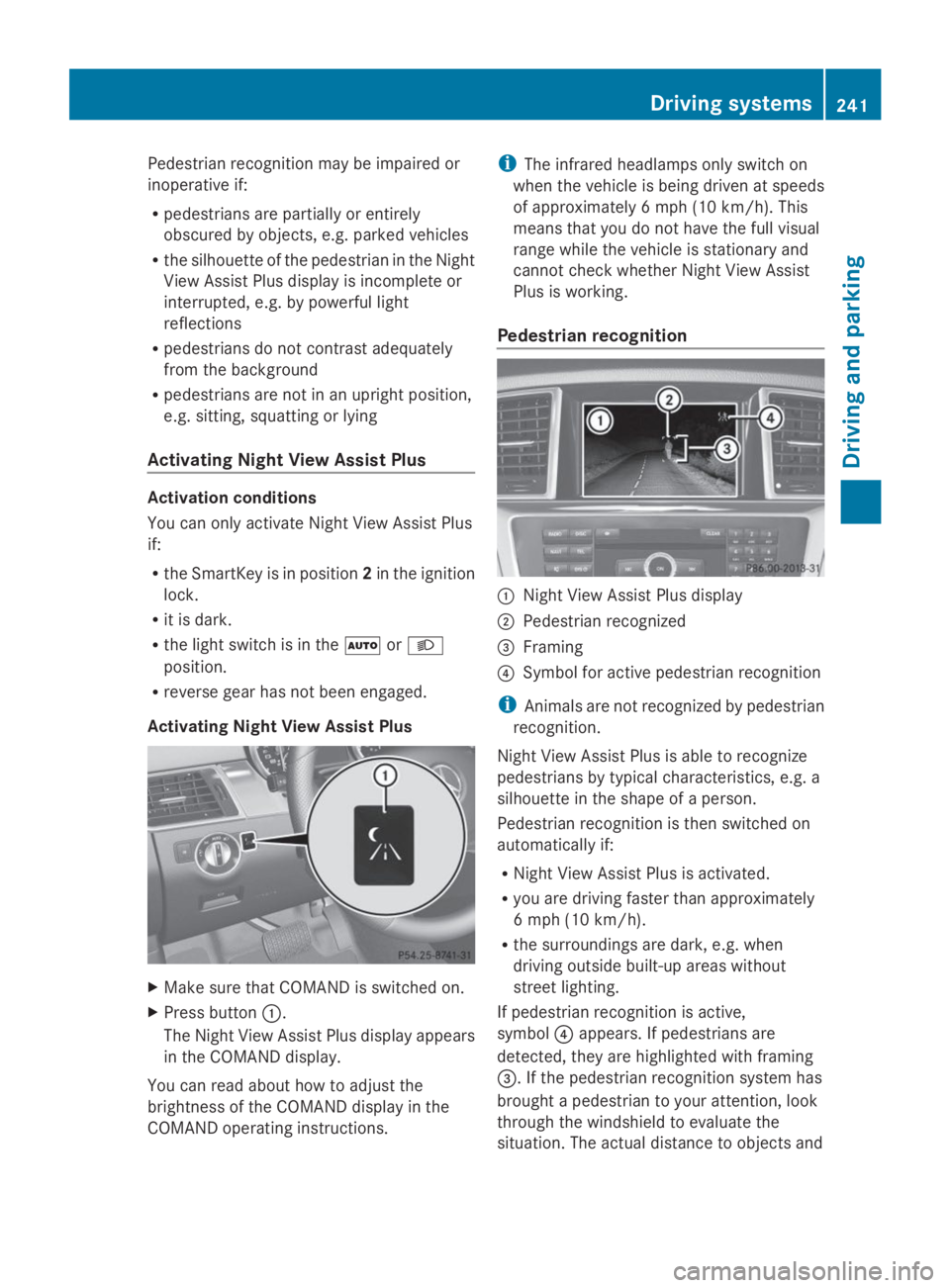
Pedestrian recognition
CNight View Assist Plus display
DPedestrian recognized
Page 244 of 462
pedestrians cannot be gaged accurately by
looking at a screen.
It may be the case that objects are highlighted
as well as pedestrians.
Fogged up or dirty windshield
If the windshield in front of the camera is
fogged up or dirty on the inside or outside, the
Night View Assist Plus display is affected.
XTo defrost:check the automatic air
conditioning settings (Ypage 160)and fold
down the camera cover (Ypage 381).
XTo defrost the inside of the windshield:
fold down the camera cover (Ypage 381)
and clean the windshield (Ypage 379).
242Driving systems
Driving an d parking
Page 245 of 462
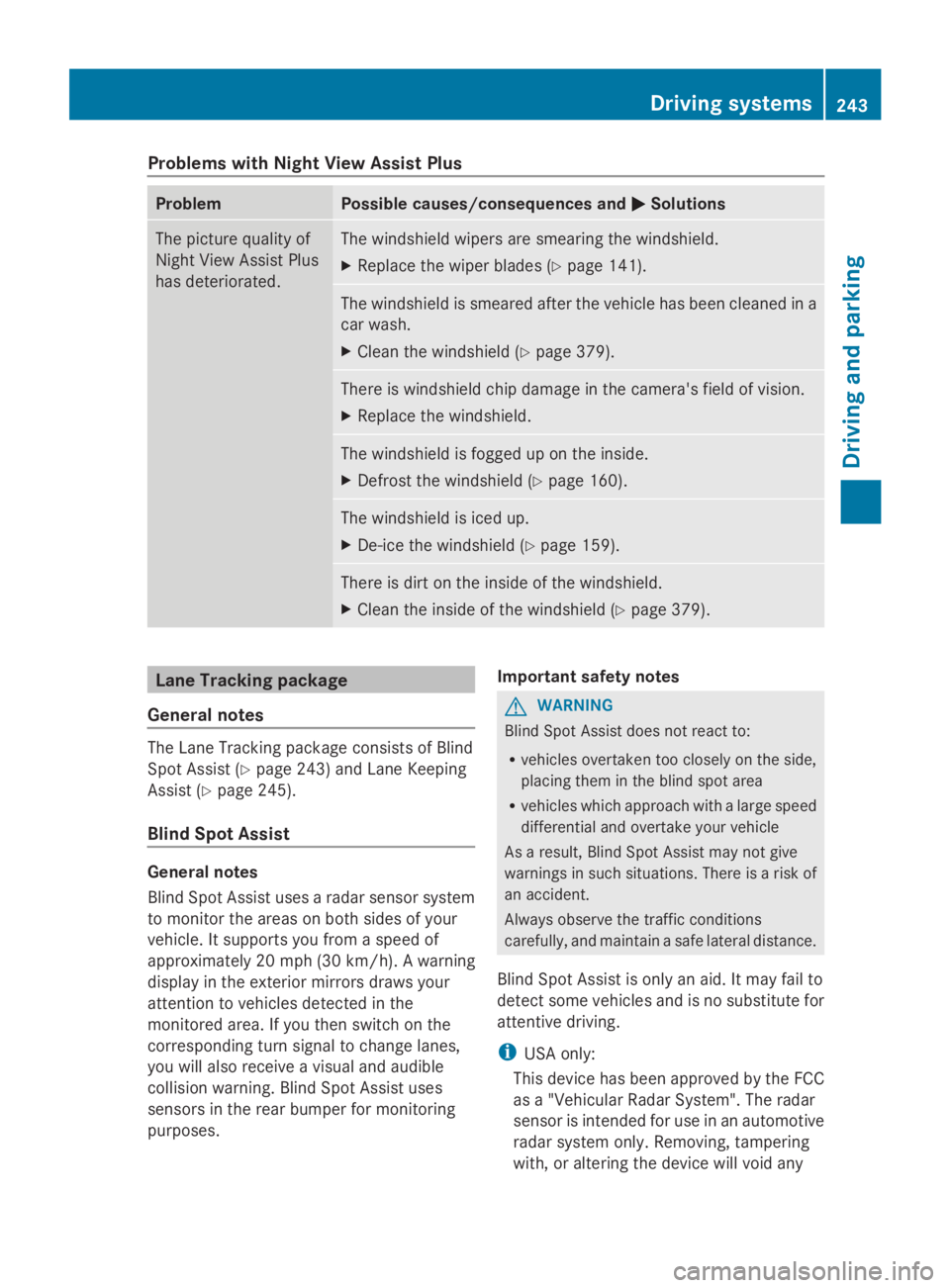
Problems with Night View Assist Plus
ProblemPossible causes/consequences andPPSolutions
The picture quality of
Night View Assist Plus
has deteriorated.
The windshield wipers are smearing the windshield.
XReplace the wiper blades (Ypage 141).
The windshield is smeared after the vehicle has been cleaned in a
car wash.
XClean the windshield (Ypage 379).
There is windshield chip damage in the camera's field of vision.
XReplace the windshield.
The windshield is fogged up on the inside.
XDefrost the windshield (Ypage 160).
The windshield is iced up.
XDe-ice the windshield (Ypage 159).
There is dirt on the inside of the windshield.
XClean the inside of the windshield (Ypage 379).
Lane Tracking package
General notes
The Lane Tracking package consists of Blind
Spot Assist (Ypage 243) and Lane Keeping
Assist (Ypage 245).
Blind Spot Assist
General notes
Blind Spot Assist uses a radar sensor system
to monitor the areas on both sides of your
vehicle. It supports you from a speed of
approximately 20 mph(30 km/h). A warning
display in the exterior mirrors draws your
attention to vehicles detected in the
monitored area. If you then switch on the
corresponding turn signal to change lanes,
you will also receive a visual and audible
collision warning. Blind Spot Assist uses
sensors in the rear bumper for monitoring
purposes.
Important safety notes
GWARNING
Blind Spot Assist does not react to:
Rvehicles overtaken too closely on the side,
placing them in the blind spot area
Rvehicles which approach with a large speed
differential and overtake your vehicle
As a result, Blind Spot Assist may not give
warnings in such situations. There is a risk of
an accident.
Always observe the traffic conditions
carefully, and maintain a safe lateral distance.
Blind Spot Assist is only an aid. It may fail to
detect some vehicles and is no substitute for
attentive driving.
iUSA only:
This device has been approved by the FCC
as a "Vehicular Radar System". The radar
sensor is intended for use in an automotive
radar system only. Removing, tampering
with, or altering the device will void any
Driving systems243
Driving and parking
Z