display MERCEDES-BENZ GL 2016 Repair Manual
[x] Cancel search | Manufacturer: MERCEDES-BENZ, Model Year: 2016, Model line: GL, Model: MERCEDES-BENZ GL 2016Pages: 462, PDF Size: 12.66 MB
Page 234 of 462
R
if there is a sudden change in temperature,
e.g. when driving into a heated garage in
winter R
if the camera lens is dirty or obstructed.
Observe the notes on cleaning
( Y
page 380) R
if the rear of your vehicle is damaged. In this
event, have the camera position and setting
checked at a qualified specialist workshop
The field of vision and other functions of the
rear view camera may be restricted due to
additional accessories on the rear of the vehi-
cle (e.g. license plate holder, bicycle rack).
For technical reasons, leaving the standard
height can result in inaccuracies in the guide
lines on vehicles with a height-adjustable
chassis.
Activating/deactivating the rear view
camera
X
To activate: make sure that the SmartKey
is in position 2 in the ignition lock.X
Make sure that the "Show rear view camera
display" function is selected in COMAND
(see the Digital Operator's Manual). X
Engage reverse gear.
The area behind the vehicle is shown in the
COMAND display with guide lines. X
To change the function mode for vehi-
cles with trailer tow hitch: using the
COMAND controller, select symbol C for
the "Reverse parking" function or sym- bol D for "Coupling up a trailer" (see the
separate COMAND operating instructions).
The symbol of the selected function is high-
lighted.
To deactivate: the rear view camera deacti-
vates if you shift the transmission to P or after
driving forwards a short distance.
Displays in the COMAND display The rear view camera may show a distorted
view of obstacles, show them incorrectly or
not at all. The rear view camera does not show
objects in the following positions: R
very close to the rear bumper R
under the rear bumper R
in the area immediately above the tailgate
handle
! Objects not at ground level may appear to
be further away than they actually are, e.g.: R
the bumper of a parked vehicle R
the drawbar of a trailer R
the ball coupling of a trailer tow hitch R
the rear section of an HGV R
a slanted post
Use the guidelines only for orientation.
Approach objects no further than the bot-
tom-most guideline.
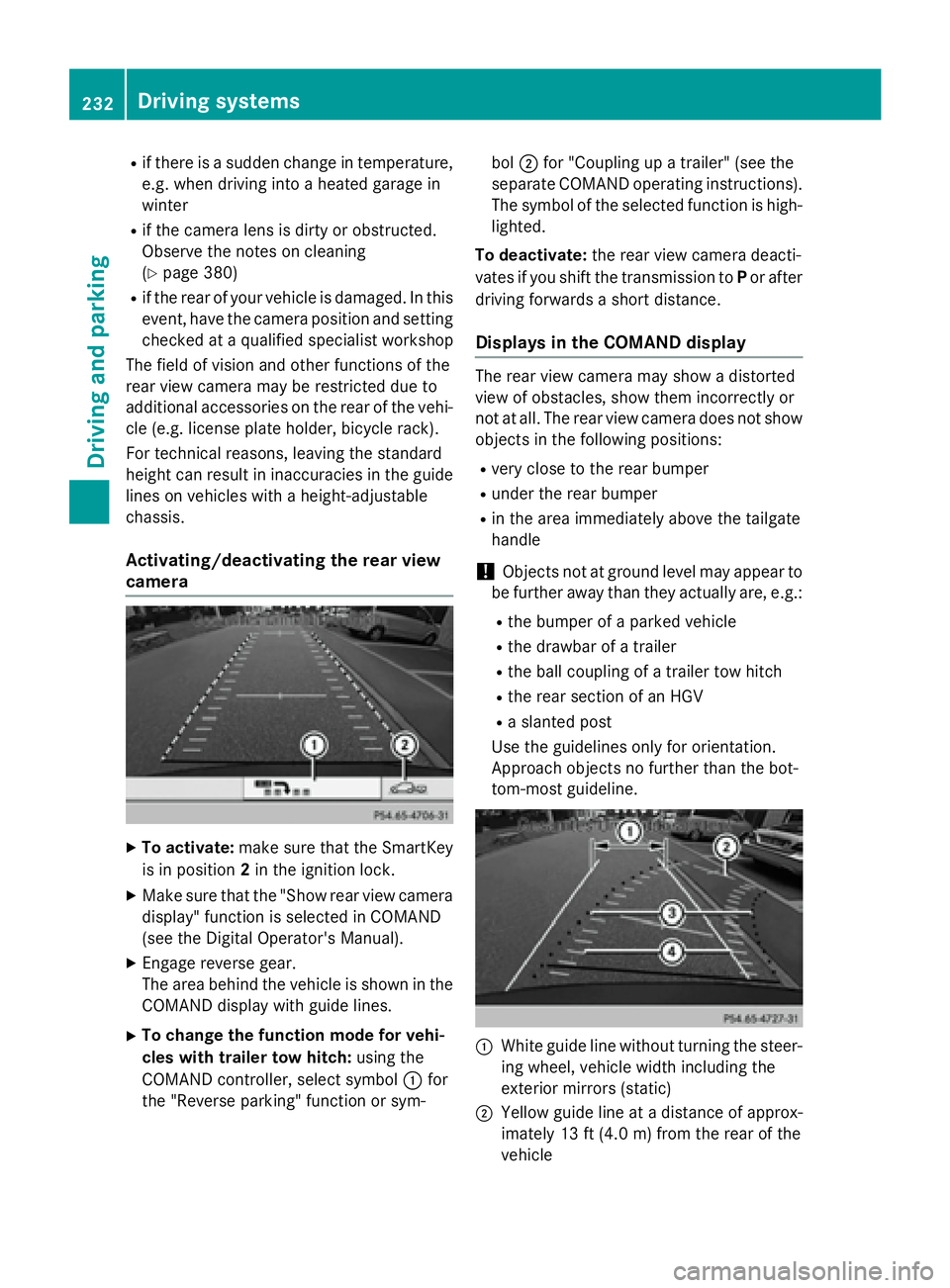
C
White guide line without turning the steer-
ing wheel, vehicle width including the
exterior mirrors (static)
D
Yellow guide line at a distance of approx-
imately 13 ft (4.0 m) from the rear of the
vehicle232
Driving system s
Dr ivi ng an d parking
Page 239 of 462
R
if the tailgate is open R
in heavy rain, snow or fog R
at night or in very dark places R
if the cameras are exposed to very bright
light R
if the area is lit by fluorescent bulbs or LED
lighting (the display may flicker) R
if there is a sudden change in temperature,
e.g. when driving into a heated garage in
winter R
if the camera lenses are dirty or covered R
if the vehicle components in which the
cameras are installed are damaged. In this
event, have the camera position and setting
checked at a qualified specialist workshop.
Do not use the 360° camera in this case. You
can otherwise injure others or cause damage
to objects or the vehicle.
Activation conditions The 360° camera image can be displayed if: R
your vehicle is equipped with a 360° cam-
era R
COMAND is switched on, see the separate
COMAND operating instructions R
the 360° Camera function is activated
Activating the 360° camera using the
SYS button X
Press and hold the f button for longer
than 2 seconds, see the separate COMAND
operating instructions.
Depending on whether position D or R is
engaged, the following is shown: R
full screen display with the image from
the front camera R
full screen display with the image from
the rear view camera Activating the 360° camera with
COMAND X
Press the f button, see the separate
COMAND operating instructions. X
Select System by turning yRz the
COMAND controller and press
Page 242 of 462
Wide-angle function
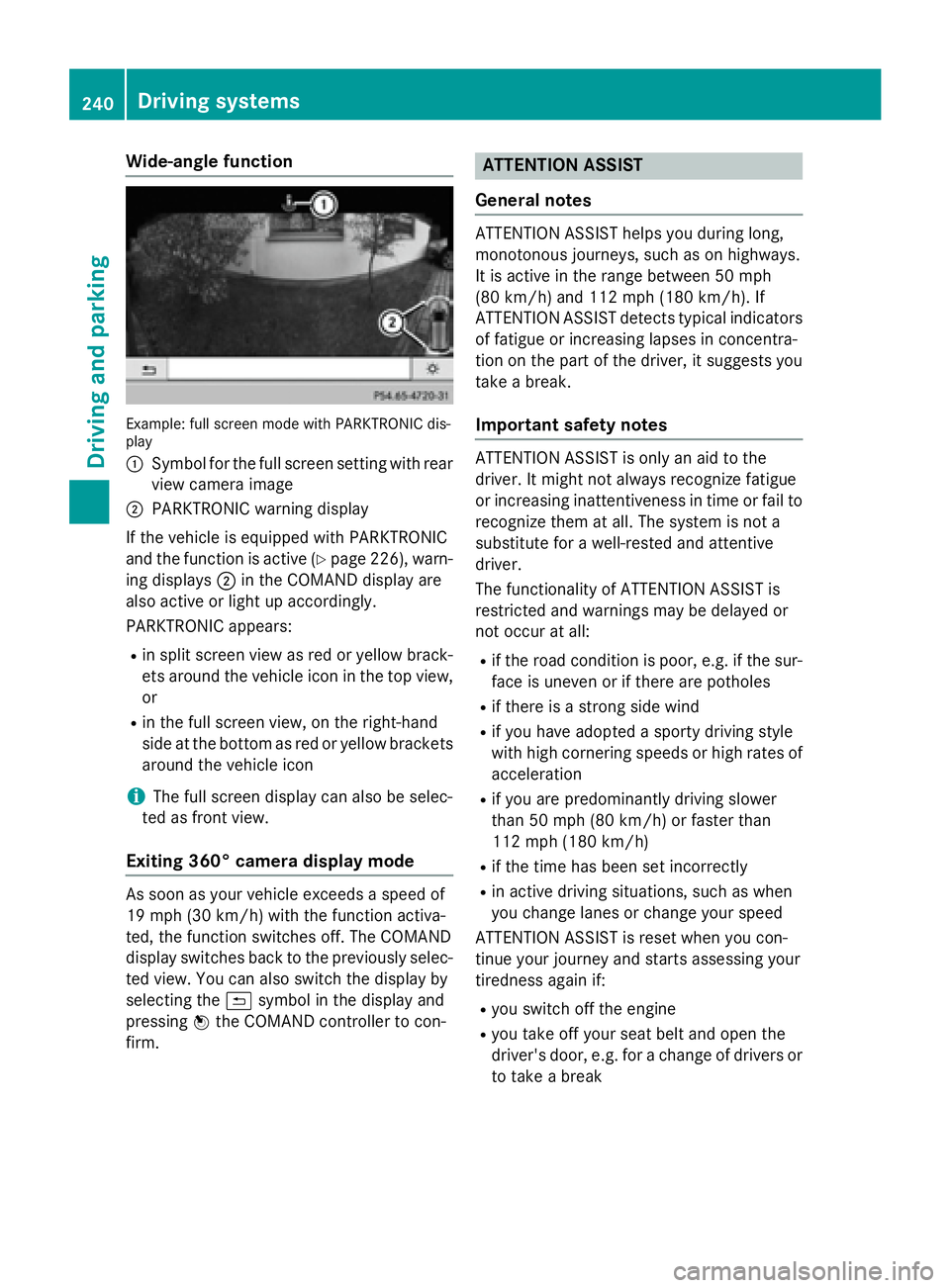
Example: full screen mode with PARKTRONIC dis-
play
C
Symbol for the full screen setting with rear
view camera imageD
PARKTRONIC warning display
If the vehicle is equipped with PARKTRONIC
and the function is active ( Y
page 226), warn-
ing displays D in the COMAND display are
also active or light up accordingly.
PARKTRONIC appears: R
in split screen view as red or yellow brack-
ets around the vehicle icon in the top view,
or R
in the full screen view, on the right-hand
side at the bottom as red or yellow brackets
around the vehicle icon
i The full screen display can also be selec-
ted as front view.
Exiting 360° camera display mode
As soon as your vehicle exceeds a speed of
19 mph (30 km/h) with the function activa-
ted, the function switches off. The COMAND
display switches back to the previously selec-
ted view. You can also switch the display by
selecting the 9 symbol in the display and
pressing
Page 244 of 462
Pedestrian recognition may be impaired or
inoperative if: R
pedestrians are partially or entirely
obscured by objects, e.g. parked vehicles R
the silhouette of the pedestrian in the Night
View Assist Plus display is incomplete or
interrupted, e.g. by powerful light reflec-
tions R
pedestrians do not contrast adequately
from the background R
pedestrians are not in an upright position,
e.g. sitting, squatting or lying
Activating Night View Assist Plus Activation conditions
You can only activate Night View Assist Plus
if: R
the SmartKey is in position 2 in the ignition
lock. R
it is dark. R
the light switch is in the X or X posi-
tion. R
reverse gear has not been engaged.
Activating Night View Assist Plus
X
Make sure that COMAND is switched on. X
Press button C .
The Night View Assist Plus display appears
in the COMAND display.
You can read about how to adjust the bright-
ness of the COMAND display in the COMAND
operating instructions. i The infrared headlamps only switch on
when the vehicle is being driven at speeds
of approximately 6 mph (10 km/h). This
means that you do not have the full visual
range while the vehicle is stationary and
cannot check whether Night View Assist
Plus is working.
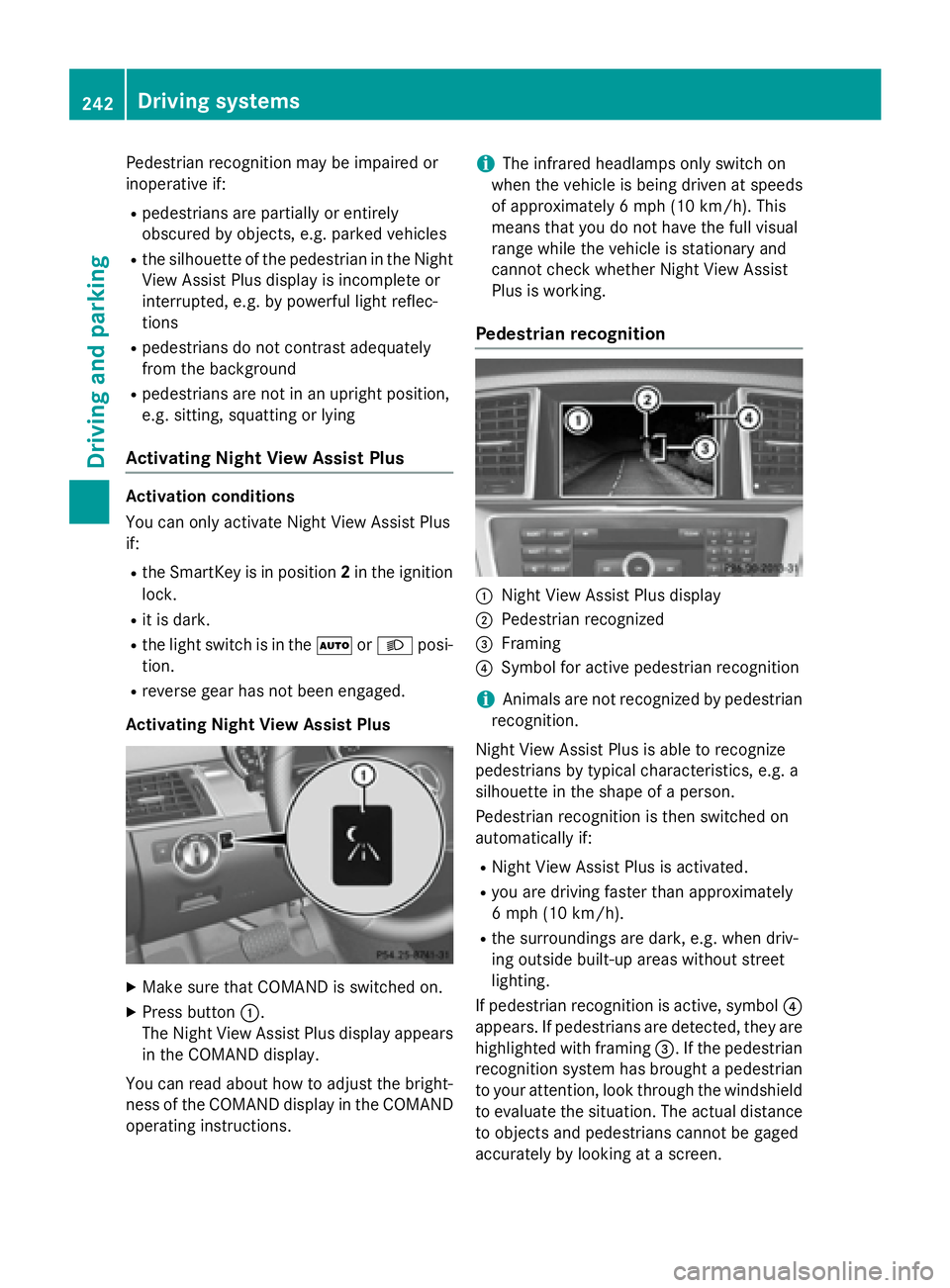
Pedestrian recognition
C
Night View Assist Plus display D
Pedestrian recognized
Page 245 of 462
It may be the case that objects are highlighted
as well as pedestrians.
Fogged up or dirty windshield If the windshield in front of the camera is fog-
ged up or dirty on the inside or outside, the
Night View Assist Plus display is affected. X
To defrost: check the automatic air condi-
tioning settings ( Y
page 158) and fold down
the camera cover ( Y
page 382).X
To defrost the inside of the windshield:
fold down the camera cover ( Y
page 382)
and clean the windshield ( Y
page 379). Driving systems 243
Driving and parking Z
Page 246 of 462
Problems with Night View Assist Plus Problem
Possible causes/consequences and P Solutions
The picture quality of
Night View Assist Plus
has deteriorated. The windshield wipers are smearing the windshield. X
Replace the wiper blades ( Y
page 140).
The windshield is smeared after the vehicle has been cleaned in a
car wash. X
Clean the windshield ( Y
page 379).
There is windshield chip damage in the camera's field of vision. X
Replace the windshield.
The windshield is fogged up on the inside. X
Defrost the windshield ( Y
page 158).
The windshield is iced up. X
De-ice the windshield ( Y
page 157).
There is dirt on the inside of the windshield. X
Clean the inside of the windshield ( Y
page 379).
Lane Tracking package
General notes
The Lane Tracking package consists of Blind
Spot Assist ( Y
page 244) and Lane Keeping
Assist ( Y
page 246).
Blind Spot Assist
General notes
Blind Spot Assist monitors the areas on either
side of the vehicle that are not visible to the
driver with two lateral, rear-facing radar sen-
sors. A warning display in the exterior mirrors
draws your attention to vehicles detected in
the monitored area. If you then switch on the
corresponding turn signal to change lanes,
you will also receive a visual and audible col-
lision warning.
Blind Spot Assist supports you from a speed
of approximately 20 mph (30 km/ h) . Important safety notes
G WARNING
Blin d Spot Assist does not react to: R
vehicles overtaken too closely on the side,
placing them in the blind spot area R
vehicles which appr oach with a large speed
differential and overtake your vehicle
As a result, Blin d Spot Assist may not give
warnings in such situations. There is a risk of
an accident.
Always observe the traffic conditions care-
fully, and maintain a safe lateral distance.
Blind Spot Assist is only an aid. It may fail to
detect some vehicles and is no substitute for
attentive driving. Always ensure that there is
sufficient distance to the side for other road
users and obstacles.
i USA only:
This device has been approved by the FCC
as a "Vehicular Radar System". The radar
sensor is intended for use in an automotive244
Driving systems
Driving and parking
Page 247 of 462
radar system only. Removing, tampering
with, or altering the device will void any
warranties, and is not permitted by the
FCC. Do not tamper with, alter, or use in
any non-approved way.
Any unauthorized modification to this
device could void the user’s authority to
operate the equipment.
Radar sensors
The radar sensors for Blind Spot Assist are
integrated into the rear bumper. Make sure
that the bumpers are free from dirt, ice or
slush. The sensors must not be covered, for
example by cycle racks or overhanging loads.
Following a severe impact or in the event of
damage to the bumpers, have the function of
the radar sensors checked at a qualified spe-
cialist workshop. Blind Spot Assist may no
longer work properly.
Monitoring range of the sensors
In particular, the detection of obstacles can
be impaired if: R
there is dirt on the sensors or anything else
covering the sensors R
there is poor visibility, e.g. due to fog, heavy
rain or snow R
narrow vehicles, e.g. motorcycles or bicy-
cles R
the road has very wide lanes R
the road has narrow lanes R
you are not driving in the middle of the lane R
there are barriers or similar lane borders
Vehicles in the monitoring range are then not
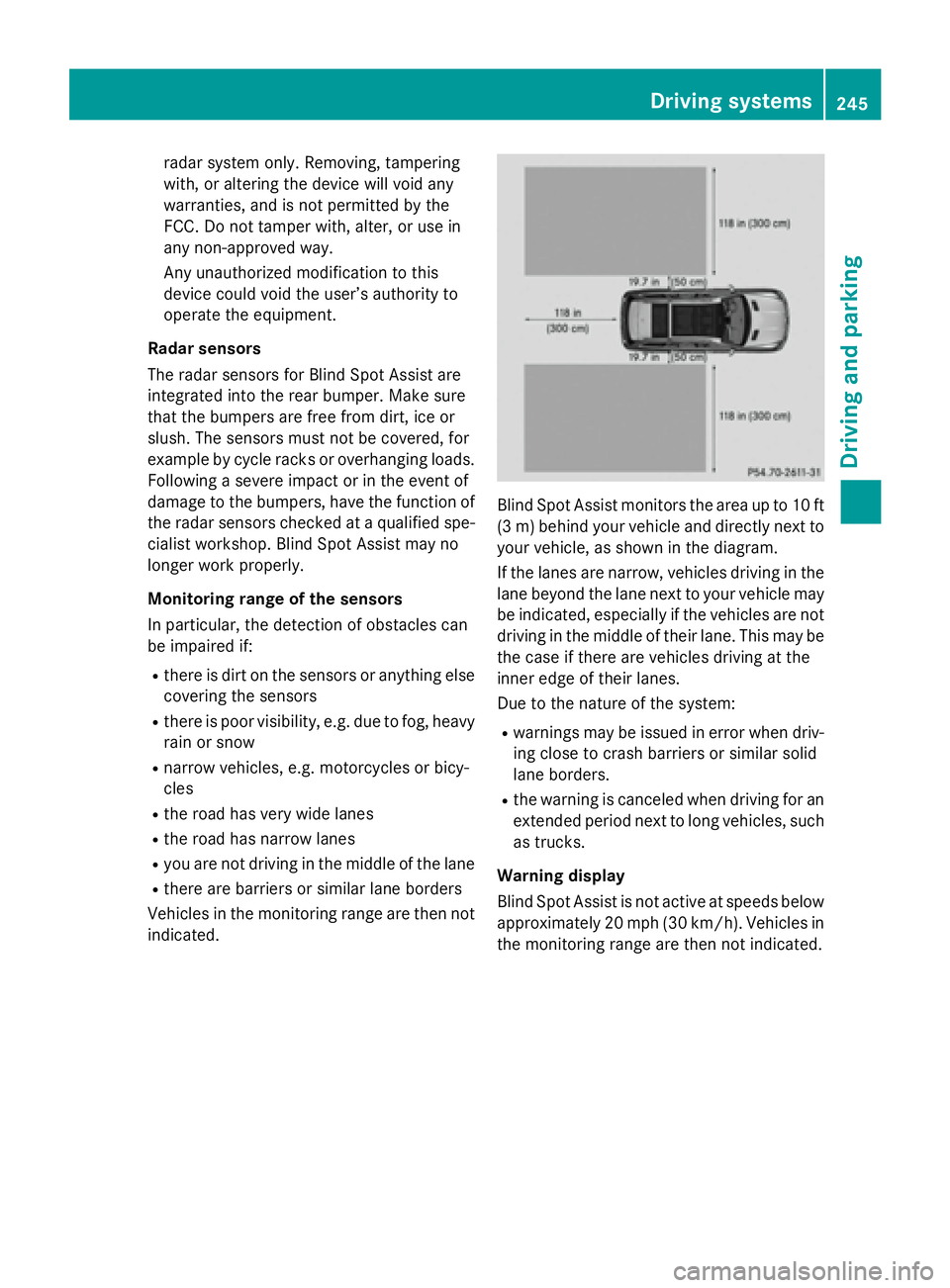
indicated. Blind Spot Assist monitors the area up to 10 ft
(3 m) behind your vehicle and directly next to
your vehicle, as shown in the diagram.
If the lanes are narrow, vehicles driving in the
lane beyond the lane next to your vehicle may
be indicated, especially if the vehicles are not
driving in the middle of their lane. This may be
the case if there are vehicles driving at the
inner edge of their lanes.
Due to the nature of the system: R
warnings may be issued in error when driv-
ing close to crash barriers or similar solid
lane borders. R
the warning is canceled when driving for an
extended period next to long vehicles, such
as trucks.
Warning display
Blind Spot Assist is not active at speeds below
approximately 20 mph (30 km/h). Vehicles in
the monitoring range are then not indicated. Driving systems 245
Driving and parking Z
Page 248 of 462
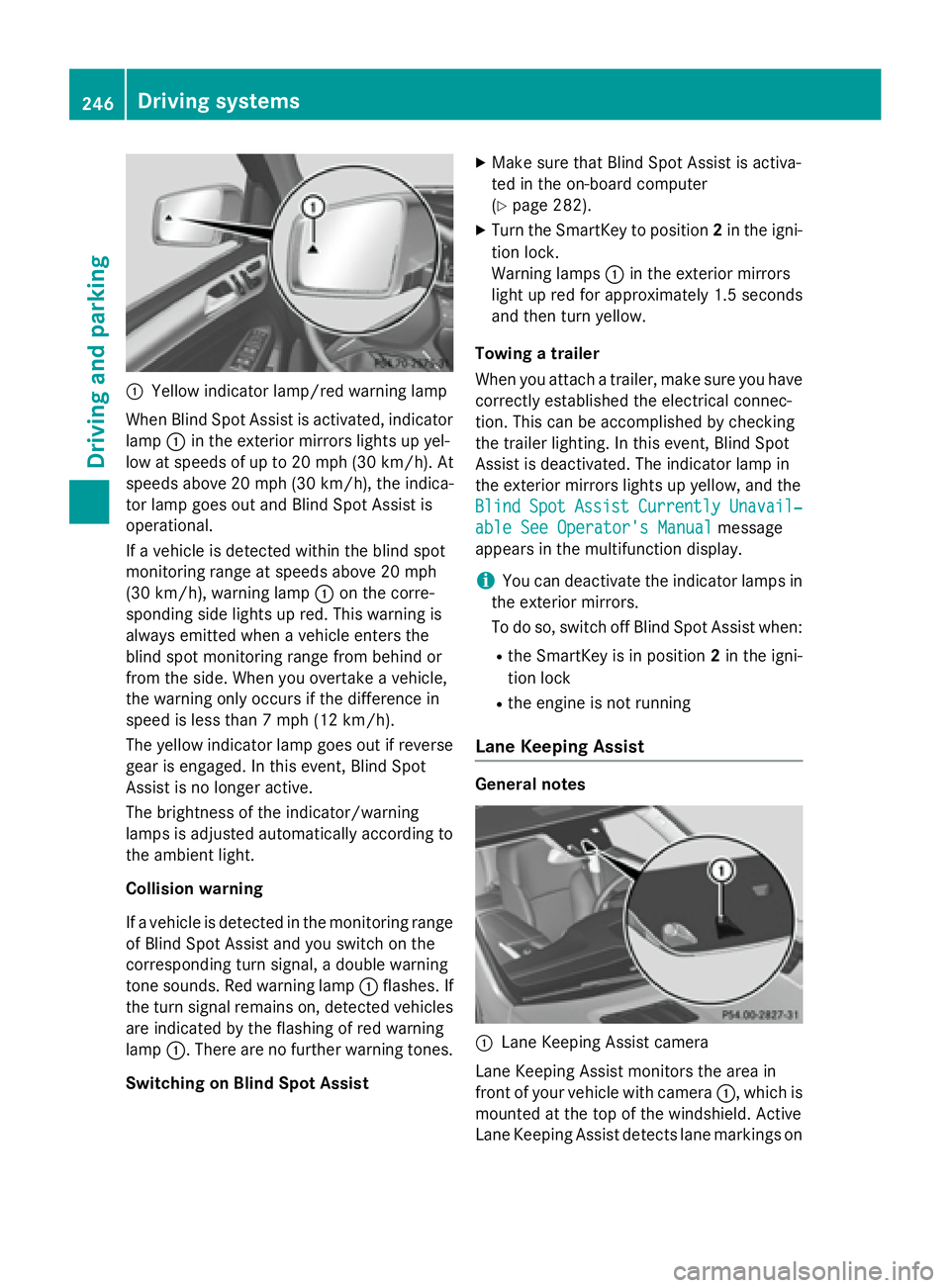
C
Yellow indicator lamp/red warning lamp
When Blind Spot Assist is activated, indicator
lamp C in the exterior mirrors lights up yel-
low at speeds of up to 20 mph (30 km/h). At
speeds above 20 mph (30 km/h), the indica-
tor lamp goes out and Blind Spot Assist is
operational.
If a vehicle is detected within the blind spot
monitoring range at speeds above 20 mph
(30 km/h), warning lamp C on the corre-
sponding side lights up red. This warning is
always emitted when a vehicle enters the
blind spot monitoring range from behind or
from the side. When you overtake a vehicle,
the warning only occurs if the difference in
speed is less than 7 mph (12 km/h).
The yellow indicator lamp goes out if reverse
gear is engaged. In this event, Blind Spot
Assist is no longer active.
The brightness of the indicator/warning
lamps is adjusted automatically according to
the ambient light.
Collision warning
If a vehicle is detected in the monitoring range
of Blind Spot Assist and you switch on the
corresponding turn signal, a double warning
tone sounds. Red warning lamp C flashes. If
the turn signal remains on, detected vehicles
are indicated by the flashing of red warning
lamp C . There are no further warning tones.
Switching on Blind Spot Assist X
Make sure that Blind Spot Assist is activa-
ted in the on-board computer
( Y
page 282). X
Turn the SmartKey to position 2 in the igni-
tion lock.
Warning lamps C in the exterior mirrors
light up red for approximately 1.5 seconds
and then turn yellow.
Towing a trailer
When you attach a trailer, make sure you have
cor rectly established the electrical connec-
t ion . This can be accomplished by checking
the trailer lighting. In this event, Blind Spot
Assist is deactivated. The indicator lamp in
the exterior mirrors lights up yellow, and the
Blind Spot Assist Currently Unavail‐
able See Operator's Manual message
appears in the multifunction display.
i You can deactivate the indicator lamps in
the exterior mirrors.
To do so, switch off Blind Spot Assist when: R
the SmartKey is in position 2 in the igni-
tion lock R
the engine is not running
Lane Keeping Assist
General notes
C
Lane Keeping Assist camera
Lane Keeping Assist monitors the area in
front of your vehicle with camera C , which is
mounted at the top of the windshield. Active
Lane Keeping Assist detects lane markings on246
Driving systems
Driving and parking
Page 249 of 462
the road and can warn you before you leave
your lane unintentionally.
This function is available in the range between
40 mph and 120 mph (60 km/h and
200 km/h).
A warning may be given if a front wheel
passes over a lane marking. It will warn you by
means of intermittent vibration in the steer-
ing wheel for up to 1.5 second s.
Im portant safety notes
G WARNING
Lane Keeping Assist may not always clearly
recognize lane markings.
In this case, Lane Keeping Assist may: R
give an unnecessary warning R
not give a warning
There is a risk of an accident.
Always pay particular attention to the traffic
situation and stay in lane, in particular if
warned by Lane Keeping Assist.
G WARNING
The Lane Keeping Assist warning does not
return the vehicle to the original lane. There is
a risk of an accident.
You should always steer, brake or accelerate
yourself, in particular if warned by Lane Keep-
ing Assist.
If you fail to adapt your driving style, Lane
Keeping Assist can neither reduce the risk of
an accident nor override the laws of physics.
Lane Keeping Assist cannot take into account
the road, traffic and weather conditions. Lane
Keeping Assist is merely an aid. You are
responsible for the distance to the vehicle in
front, for vehicle speed, for braking in good
time and for staying in your lane.
The Lane Keeping Assist does not keep the
vehicle in the lane. The system may be impaired or may not func-
tion if: R
there is poor visibility, e.g. due to insuffi-
cient illumination of the road, or due to
snow, rain, fog or spray R
there is glare, e.g. from oncoming traffic,
the sun or reflections (e.g. when the road
surface is wet) R
the windshield is dirty, fogged up, damaged
or covered, for instance by a sticker, in the
vicinity of the camera R
there are no, several or unclear lane mark-
ings for a lane, e.g. in areas with road con-
struction work R
the lane markings are worn away, dark or
covered up, e.g. by dirt or snow R
the distance to the vehicle in front is too
small and the lane markings thus cannot be
d e tected R
the lane markings change quickly, e.g.
lanes branch off, cross one another or
merge R
the road is narrow and winding R
there are strong shadows cast on the road
Switching on Lane Keeping Assist X
Switch on Active Lane Keeping Assist using
the on-board computer; to do so, select
Standard
or Adaptive ( Y
page 282).
If you drive at speeds above 40 mph
(60 km/h) and lane markings are detected,
the lines in the assistance graphics display
( Y
page 281) are shown in green. Lane
Keeping Assist is ready for use.
Standard
If Standard is selected, no warning vibration
occurs if: R
you switch on the turn signals. In this event,
the warnings are suppressed for a certain
period of time. R
a driving safety system intervenes, such as
ABS, BAS or ESP ®
.Driving systems 247
Driving and parking Z
Page 252 of 462
Indicator and warning display
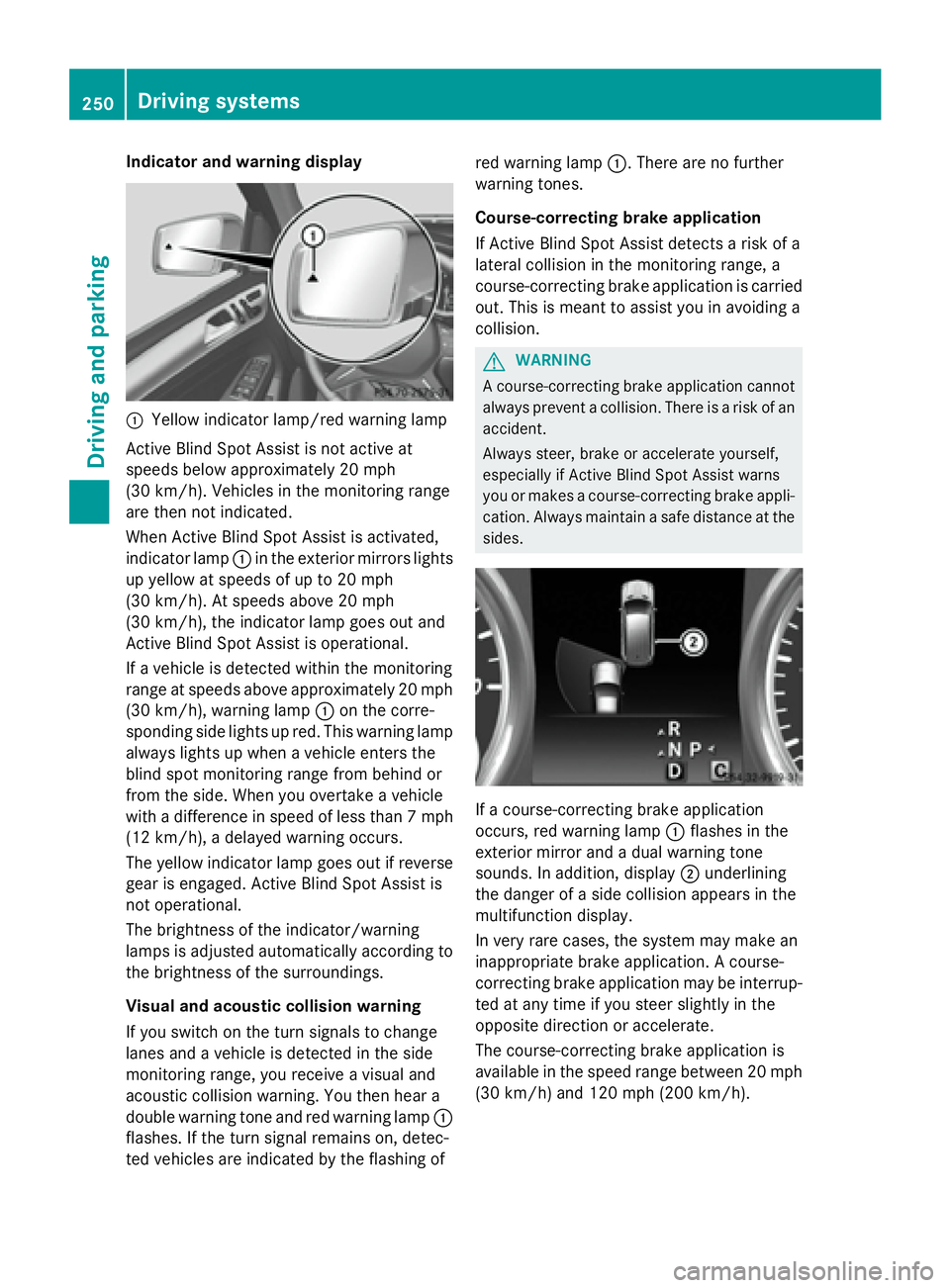
C
Yellow indicator lamp/red warning lamp
Active Blind Spot Assist is not active at
speeds below approximately 20 mph
(30 km/h). Vehicles in the monitoring range
are then not indicated.
When Active Blind Spot Assist is activated,
indicator lamp C in the exterior mirrors lights
up yellow at speeds of up to 20 mph
(30 km/h). At speeds above 20 mph
(30 km/h), the indicator lamp goes out and
Active Blind Spot Assist is operational.
If a vehicle is detected within the monitoring
range at speeds above approximately 20 mph
(30 km/h), warning lamp C on the corre-
sponding side lights up red. This warning lamp
always lights up when a vehicle enters the
blind spot monitoring range from behind or
from the side. When you overtake a vehicle
with a difference in speed of less than 7 mph
(12 km/h), a delayed warning occurs.
The yellow indicator lamp goes out if reverse
gear is engaged. Active Blind Spot Assist is
not operational.
The brightness of the indicator/warning
lamps is adjusted automatically according to
the brightness of the surroundings.
Visual and acoustic collision warning
If you switch on the turn signals to change
lanes and a vehicle is detected in the side
monitoring range, you receive a visual and
acoustic collision warning. You then hear a
double warning tone and red warning lamp C
flas hes. If the turn signal remains on, detec-
ted vehicles are indicated by the flashing of red warning lamp C . There are no further
warning tones.
Course-correcting brake application
If Active Blind Spot Assist detects a risk of a
lateral collision in the monitoring range, a
course-correcting brake application is carried
out. This is meant to assist you in avoiding a
collision.
G WARNING
A course-correcting brake application cannot
always prevent a collision. There is a risk of an
accident.
Always steer, brake or accelerate yourself,
especially if Active Blin d Spot Assist warns
you or makes a course-correcting brake appli-
cation. Always maintain a safe distance at the
sides.
If a course-correcting brake application
occurs, red warning lamp C flashes in the
exterior mirror and a dual warning tone
sounds. In addition, display D underlining
the danger of a side collision appears in the
multifunction display.
In very rare cases, the system may make an
inappropriate brake application. A course-
correcting brake application may be interrup-
ted at any time if you steer slightly in the
opposite direction or accelerate.
The course-correcting brake application is
available in the speed range between 20 mph
(30 km/h) and 120 mph (200 km/h).250
Driving systems
Driving and parking