light MERCEDES-BENZ GL-Class 2016 X166 Comand Manual
[x] Cancel search | Manufacturer: MERCEDES-BENZ, Model Year: 2016, Model line: GL-Class, Model: MERCEDES-BENZ GL-Class 2016 X166Pages: 246, PDF Size: 6.72 MB
Page 6 of 246
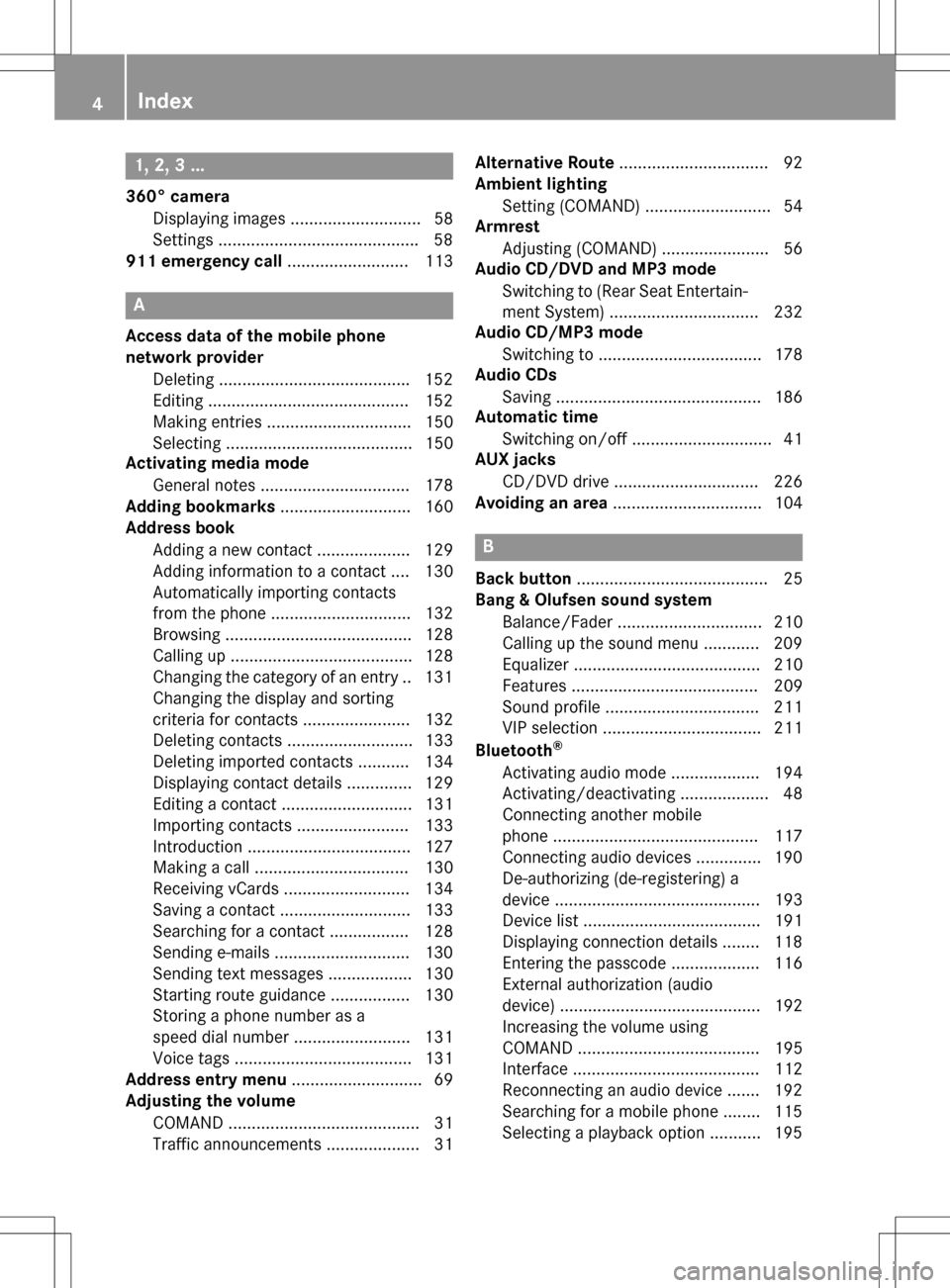
1, 2, 3 ...
360° cameraDisplaying images ............................ 58
Settings .......................................... .58
911 emergency call .......................... 113
A
Access data of the mobile phone
network provider
Deleting ........................................ .152
Editing ...........................................1 52
Making entries ............................... 150
Selecting ........................................ 150
Activating media mode
General notes ................................ 178
Adding bookmarks ............................ 160
Address book
Adding a new contact .................... 129
Adding information to a contact .... 130
Automatically importing contacts
from the phone .............................. 132
Browsing ........................................ 128
Calling up ....................................... 128
Changing the category of an entry .. 131
Changing the display and sorting
criteria for contacts ....................... 132
Deleting contacts ........................... 133
Deleting imported contacts ........... 134
Displaying contact details .............. 129
Editing a contact ............................ 131
Importing contacts ........................ 133
Introduction ................................... 127
Making a call ................................. 130
Receiving vCards ........................... 134
Saving a contact ............................ 133
Searching for a contact ................. 128
Sending e-mails .............................1 30
Sending text messages .................. 130
Starting route guidance ................. 130
Storing a phone number as a
speed dial number ......................... 131
Voice tags ...................................... 131
Address entry menu ............................ 69
Adjusting the volume
COMAND ......................................... 31
Traffic announcements .................... 31 Alternative Route
................................ 92
Ambient lighting
Setting (COMAND) ........................... 54
Armrest
Adjusting (COMAND) ....................... 56
Audio CD/DVD and MP3 mode
Switching to (Rear Seat Entertain-
ment System) ................................ 232
Audio CD/MP3 mode
Switching to ................................... 178
Audio CDs
Saving ............................................ 186
Automatic time
Switching on/off .............................. 41
AU X jac
ks
CD/DVD drive ............................... 226
Avoiding an area ................................ 104
B
Back button......................................... 25
Bang & Olufsen sound system
Balance/Fader ............................... 210
Calling up the sound menu ............ 209
Equalizer ........................................ 210
Features ........................................ 209
Sound profile ................................. 211
VIP selection .................................. 211
Bluetooth
®
Activating audio mode ................... 194
Activating/deactivating ................... 48
Connecting another mobile
phone ............................................ 117
Connecting audio devices .............. 190
De-authorizing (de-registering) a
device ............................................ 193
Device list ...................................... 191
Displaying connection details ........ 118
Entering the passcode ................... 116
External authorization (audio
device) ........................................... 192
Increasing the volume using
COMAND ....................................... 195
Interface ........................................ 112
Reconnecting an audio device ....... 192
Searching for a mobile phone ........ 115
Selecting a playback option ........... 195
4Index
Page 7 of 246
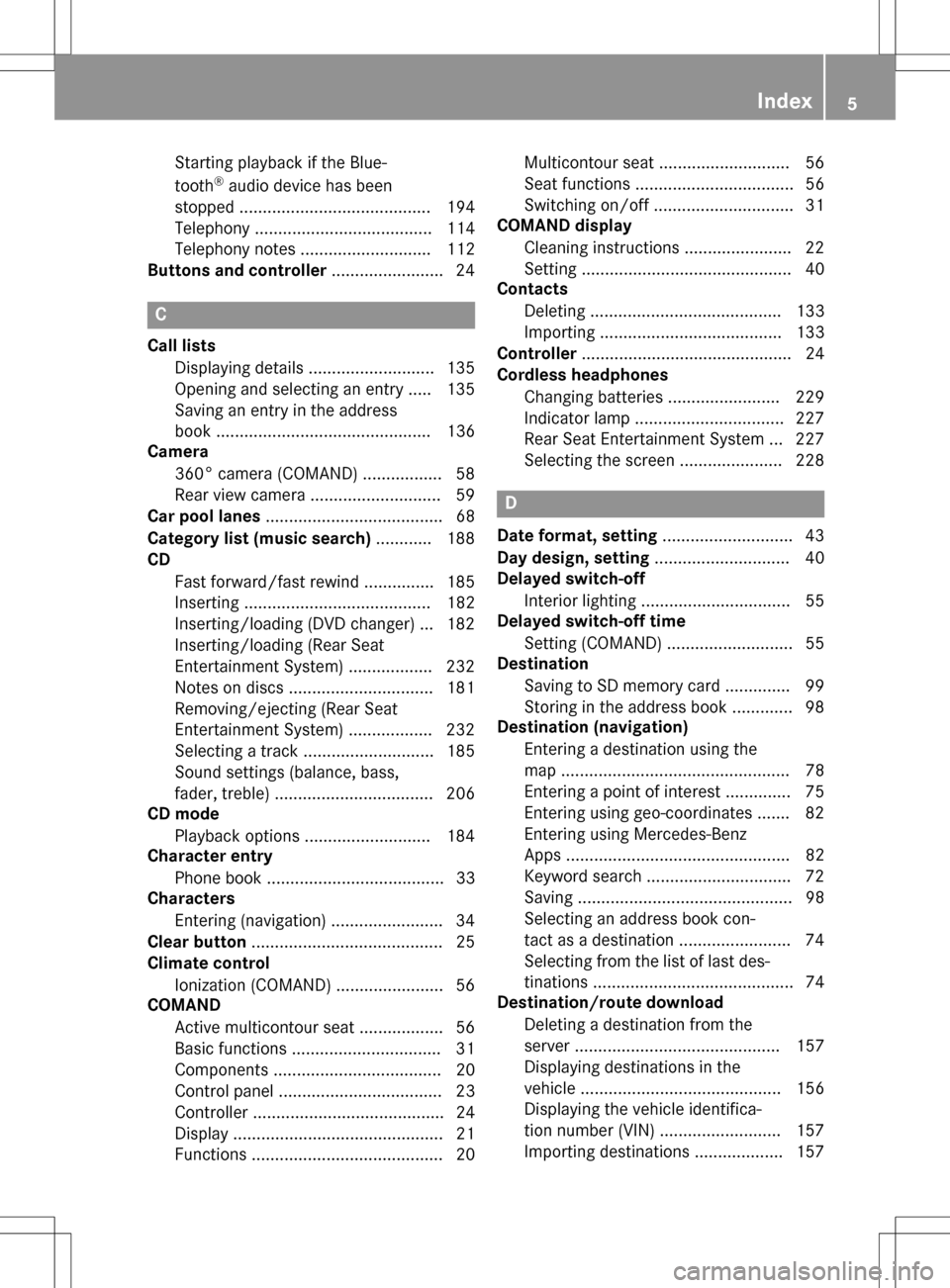
Starting playback if the Blue-
tooth®audio device has been
stopped ......................................... 194
Telephony ...................................... 114
Telephony notes ............................ 112
Buttons and controller ........................ 24
C
Call lists
Displaying details ........................... 135
Opening and selecting an entry ..... 135
Saving an entry in the address
book .............................................. 136
Camera
360° camera (COMAND) ................. 58
Rear view camera ............................ 59
Car pool lanes ...................................... 68
Category list (music search) ............ 188
CD
Fast forward/fast rewind ............... 185
Inserting ........................................ 182
Inserting/loading (DVD changer) ... 182
Inserting/loading (Rear Seat
Entertainment System) .................. 232
Notes on discs ............................... 181
Removing/ejecting (Rear Seat
Entertainment System) .................. 232
Selecting a track ............................ 185
Sound settings (balance, bass,
fader, treble) .................................. 206
CD mode
Playback options ........................... 184
Character entry
Phone book ...................................... 33
Characters
Entering (navigation) ........................ 34
Clear button ......................................... 25
Climate control
Ionization (COMAND) ....................... 56
COMAND
Active multicontour seat .................. 56
Basic functions ................................ 31
Components .................................... 20
Control panel ................................... 23
Controller ......................................... 24
Display ............................................. 21
Functions ......................................... 20 Multicontour seat ............................ 56
Seat functions .................................. 56
Switching on/off .............................. 31
COMAND display
Cleaning instructions ....................... 22
Setting ............................................. 40
Contacts
Deleting ......................................... 133
Importing ....................................... 133
Controller ............................................. 24
Cordless headphones
Changing batteries ........................ 229
Indicator lamp ................................ 227
Rear Seat Entertainment System ... 227
Selecting the screen ...................... 228
D
Date format, setting ............................ 43
Day design, setting ............................. 40
Delayed switch-off
Interior lighting ................................ 55
Delayed switch-off time
Setting (COMAND) ........................... 55
Destination
Saving to SD memory card .............. 99
Storing in the address book ............. 98
Destination (navigation)
Entering a destination using the
map ................................................. 78
Entering a point of interest .............. 75
Entering using geo-coordinates ....... 82
Entering using Mercedes-Benz
Apps ................................................ 82
Keyword search ............................... 72
Saving .............................................. 98
Selecting an address book con-
tact as a destination ........................ 74
Selecting from the list of last des-
tinations ........................................... 74
Destination/route download
Deleting a destination from the
server ............................................ 157
Displaying destinations in the
vehicle ........................................... 156
Displaying the vehicle identifica-
tion number (VIN) .......................... 157
Importing destinations ................... 157
Index5
Page 9 of 246
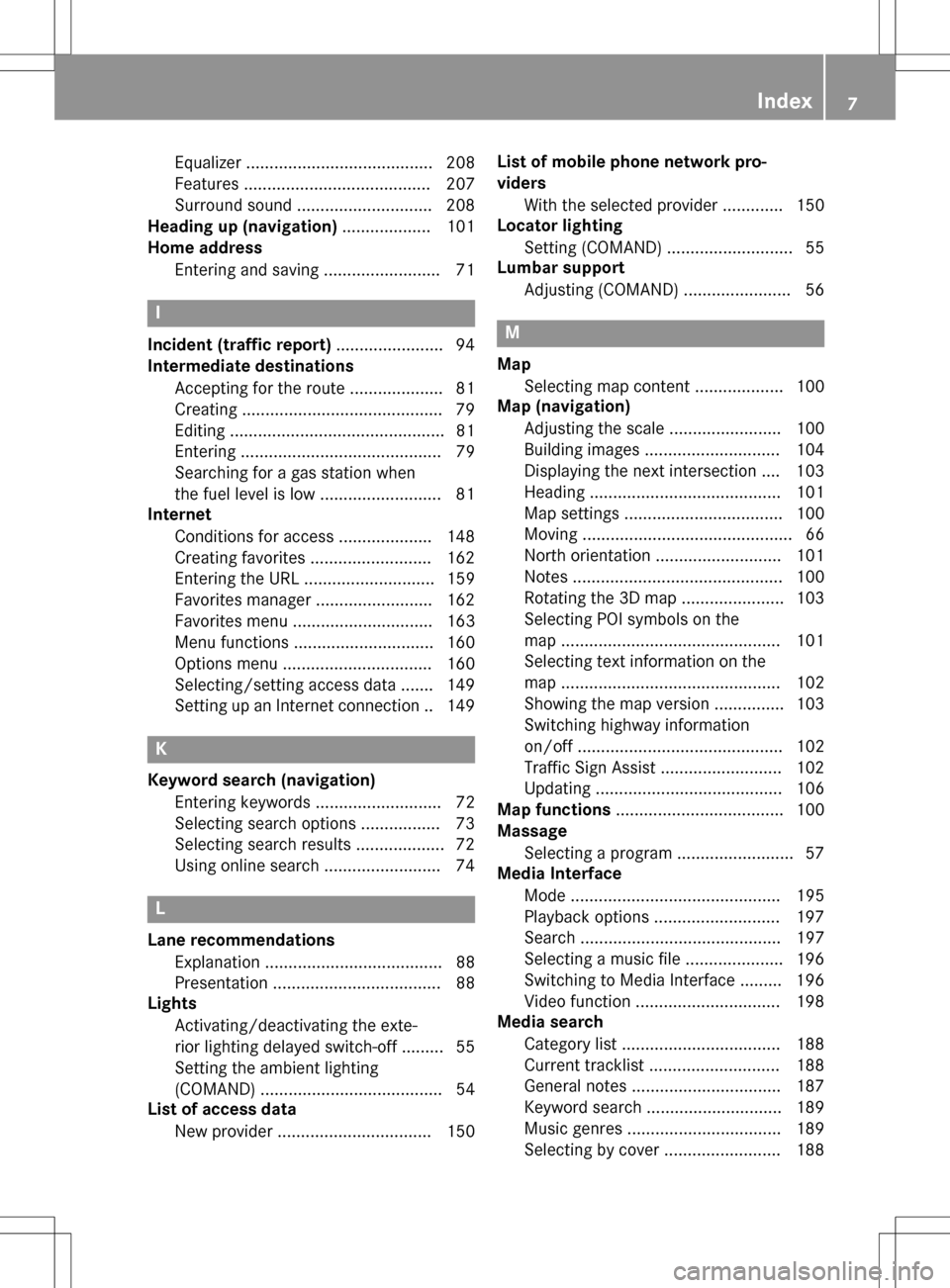
Equalizer ........................................ 208
Features ........................................ 207
Surround sound ............................. 208
Heading up (navigation) ................... 101
Home address
Entering and saving .........................7 1
I
Incident (traffic report).......................94
Intermediate destinations
Accepting for the route .................... 81
Creating .......................................... .79
Editing .............................................. 81
Entering ........................................... 79
Searching for a gas station when
the fuel level is low .......................... 81
Internet
Conditions for access .................... 148
Creating favorites .......................... 162
Entering the URL ............................ 159
Favorites manager ......................... 162
Favorites menu .............................. 163
Menu functions .............................. 160
Options menu ................................ 160
Selecting/setting access data ....... 149
Setting up an Internet connection .. 149
K
Keyword search (navigation)Entering keywords ........................... 72
Selecting search options ................. 73
Selecting search results ................... 72
Using online search ......................... 74
L
Lane recommendationsExplanation ...................................... 88
Presentation .................................... 88
Lights
Activating/deactivating the exte-
rior lighting delayed switch-off ......... 55
Setting the ambient lighting
(COMAND) ....................................... 54
List of access data
New provider ................................. 150 List of mobile phone network pro-
viders
With the selected provider ............. 150
Locator lighting
Setting (COMAND) ........................... 55
Lumbar support
Adjusting (COMAND) ....................... 56
M
MapSelecting map content ................... 100
Map (navigation)
Adjusting the scale ........................ 100
Building images ............................. 104
Displaying the next intersection .... 103
Heading ......................................... 101
Map settings .................................. 100
Moving ............................................. 66
North orientation ........................... 101
Notes ............................................. 100
Rotating the 3D map ...................... 103
Selecting POI symbols on the
map ............................................... 101
Selecting text information on the
map ............................................... 102
Showing the map version ............... 103
Switching highway information
on/off ............................................ 102
Traffic Sign Assist .......................... 102
Updating ........................................ 106
Map functions .................................... 100
Massage
Selecting a program ......................... 57
Media Interface
Mode ............................................. 195
Playback options ........................... 197
Search ........................................... 197
Selecting a music file ..................... 196
Switching to Media Interface ......... 196
Video function ............................... 198
Media search
Category list .................................. 188
Current tracklist ............................ 188
General notes ................................ 187
Keyword search ............................. 189
Music genres ................................. 189
Selecting by cover ......................... 188
Index7
Page 11 of 246
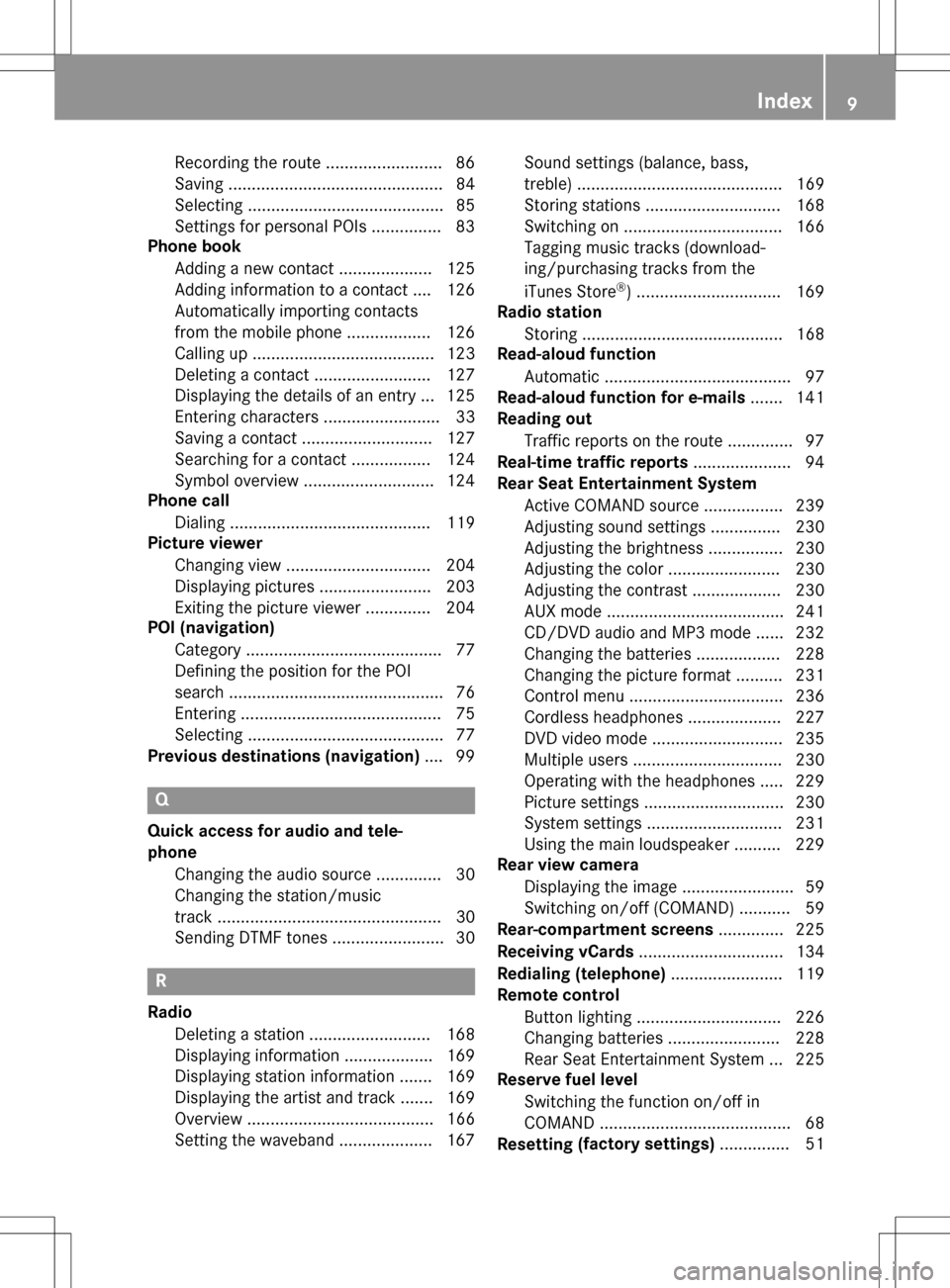
Recordingth erout e........................ .86
Saving .............................................. 84
Selecting .......................................... 85
Settings for personal POIs ............... 83
Phone book
Adding a new contact .................... 125
Adding information to a contact .... 126
Automatically importing contacts
from the mobile phone .................. 126
Calling up ....................................... 123
Deleting a contact ......................... 127
Displaying the details of an entry ... 125
Entering characters ......................... 33
Saving a contact ............................ 127
Searching for a contact ................. 124
Symbol overview ............................ 124
Phone call
Dialing ........................................... 119
Picture viewer
Changing view ............................... 204
Displaying pictures ........................ 203
Exiting the picture viewer .............. 204
POI (navigation)
Category .......................................... 77
Defining the position for the POI
search .............................................. 76
Entering ........................................... 75
Selecting .......................................... 77
Previous destinations (navigation) .... 99
Q
Quick access for audio and tele-
phone
Changing the audio source .............. 30
Changing the station/music
track ................................................ 30
Sending DTMF tones ........................ 30
R
RadioDeleting a station .......................... 168
Displaying information ................... 169
Displaying station information ....... 169
Displaying the artist and track ....... 169
Overview ........................................ 166
Setting the waveband .................... 167 Sound settings (balance, bass,
treble) ............................................ 169
Storing stations ............................. 168
Switching on .................................. 166
Tagging music tracks (download-
ing/purchasing tracks from the
iTunes Store
®) ............................... 169
Radio station
Storing ........................................... 168
Read-aloud function
Automatic ........................................ 97
Read-aloud function for e-mails ....... 141
Reading out
Traffic reports on the route .............. 97
Real-time traffic reports ..................... 94
Rear Seat Entertainment System
Active COMAND source ................. 239
Adjusting sound settings ............... 230
Adjusting the brightness ................ 230
Adjusting the color ........................ 230
Adjusting the contrast ................... 230
AUX mode ...................................... 241
CD/DVD audio and MP3 mode ...... 232
Changing the batteries .................. 228
Changing the picture format .......... 231
Control menu ................................. 236
Cordless headphones .................... 227
DVD video mode ............................ 235
Multiple users ................................ 230
Operating with the headphones ..... 229
Picture settings .............................. 230
System settings ............................. 231
Using the main loudspeaker .......... 229
Rear view camera
Displaying the image ........................ 59
Switching on/off (COMAND) ........... 59
Rear-compartment screens .............. 225
Receiving vCards ............................... 134
Redialing (telephone) ........................ 119
Remote control
Button lighting ............................... 226
Changing batteries ........................ 228
Rear Seat Entertainment System ... 225
Reserve fuel level
Switching the function on/off in
COMAND ......................................... 68
Resetting (fac
tory settings)
............... 51
Index9
Page 16 of 246
Operating safety
Important safety notes
GWARNING
Modifications to electronic components, their software as well as wiring can impair their
function and/or the function of other net-
worked components. In particular, systems
relevant to safety could also be affected. As a
result, these may no longer function as inten-
ded and/or jeopardize the operating safety of
the vehicle. There is an increased risk of an
accident and injury.
Never tamper with the wiring as well as elec-
tronic components or their software. You
should have all work to electrical and elec-
tronic equipment carried out at a qualified
specialist workshop.
If you make any changes to the vehicle elec-
tronics, the general operating permit is ren-
dered invalid.
GWARNING
If you operate information systems and com-
munication equipment integrated in the vehi-
cle while driving, you will be distracted from
traffic conditions. You could also lose control
of the vehicle. There is a risk of an accident.
Only operate the equipment when the traffic
situation permits. If you are not sure that this
is possible, park the vehicle paying attention
to traffic conditions and operate the equip-
ment when the vehicle is stationary.
You must observe the legal requirements for
the country in which you are currently driving
when operating COMAND.
COMAND calculates the route to the destina-
tion without taking account of the following,
for example:
Rtraffic lights
Rstop and yield signs
Rmerging lanes
Rparking or stopping in a no parking/no
stopping zone
Rother road and traffic rules and regulations
Rnarrow bridges
COMAND can give incorrect navigation com-
mands if the actual street/traffic situation
does not correspond with the digital map's
data. Digital maps do not cover all areas nor
all routes in an area. For example, a route may
have been diverted or the direction of a one-
way street may have changed.
For this reason, you must always observe
road and traffic rules and regulations during
your journey. Road and traffic rules and reg-
ulations always have priority over the sys-
tem's driving recommendations.
Navigation announcements are intended to
direct you while driving without diverting your
attention from the road and driving.
Please always use this feature instead of con-
sulting the map display for directions. Look-
ing at the icons or map display can distract
you from traffic conditions and driving, and
increase the risk of an accident.
Bear in mind that at a speed of only 30 mph
(approximately 50 km/h) your vehicle covers
a distance of 44 feet (approximately 14 m)
per second.
This equipment complies with FCC radiation
exposure limits set forth for uncontrolled
equipment and meets the FCC radio fre-
quency (RF) Exposure Guidelines in Supple-
men
t C to OET65.
This equipment has very low levels of RF
energy that is deemed to comply without
maximum permissive exposure evaluation
(MPE). But it is desirable that it should be
installed and operated with at least 8inches
(20 cm) and more between the radiator and a
person's body (excluding extremities: hands,
wrists, feet and legs.)
14Introduction
Page 29 of 246
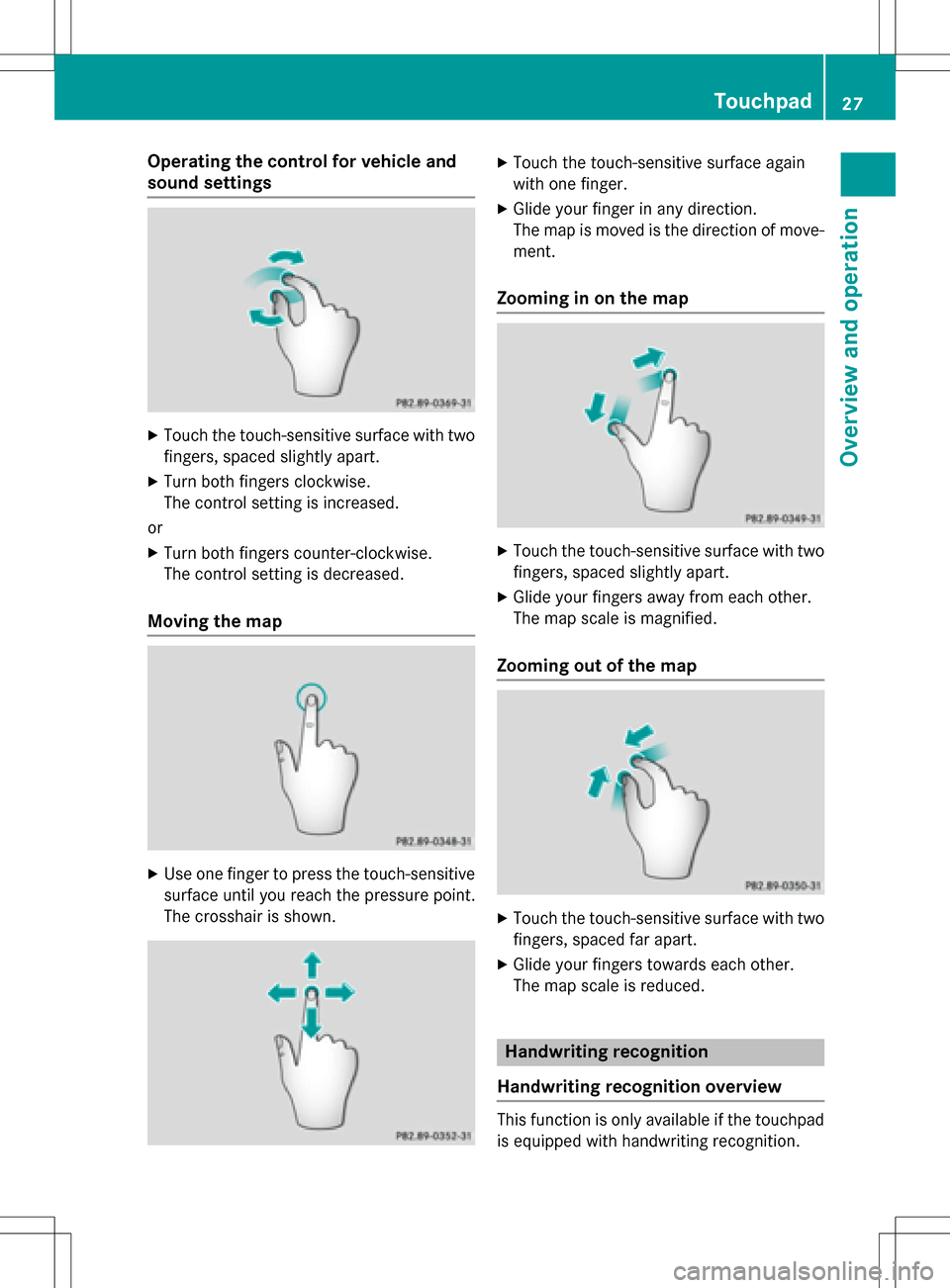
Operating the control for vehicle and
sound settings
XTouch the touch-sensitive surface with two
fingers, spaced slightly apart.
XTurn both fingers clockwise.
The control setting is increased.
or
XTurn both fingers counter-clockwise.
The control setting is decreased.
Moving the map
XUse one finger to press the touch-sensitive
surface until you reach the pressure point.
The crosshair is shown.
XTouch the touch-sensitive surface again
with one finger.
XGlide your finger in any direction.
The map is moved is the direction of move-
ment.
Zooming in on the map
XTouch the touch-sensitive surface with two fingers, spaced slightly apart.
XGlide your fingers away from each other.
The map scale is magnified.
Zooming out of the map
XTouch the touch-sensitive surface with twofingers, spaced far apart.
XGlide your fingers towards each other.
The map scale is reduced.
Handwriting recognition
Handwriting recognition overview
This function is only available if the touchpad
is equipped with handwriting recognition.
Touchpad27
Overview and operation
Page 31 of 246

XTo select a character suggestion: turn the
controller.
The selected character is entered instead
of the automatically recognized character.
Character entry can be continued.
Entering a space
Prerequisite: an input line for text, numbers or
characters has been selected.
XUse your finger to touch the touch-sensi-
tive surface and glide to the right.
A space is entered into the input line.
Deletes characters
Prerequisite: an input line for text, numbers or
characters has been selected.
XUse your finger to touch the touch-sensi-
tive surface and glide to the left.
The character last entered is deleted.
Switching input line
XPress the touchpad.
A symbol is shown.
XTo selectp: glide your finger to the left
or right and press.
XTo select the desired input line: glide up or
down and press.
The selected input line is active and char-
acter entry can be continued.
Moving the cursor within the input line
XPress the touchpad.
A symbol is shown.
XTo select p: glide your finger to the left
or right and press.
XTo move the cursor: glide to the left or right.
Changing the input language for hand-
writing recognition
Prerequisite: an input line for text, numbers or
characters has been selected.
XPress the touchpad.
A symbol is shown.
XTo select B: glide your finger to the left
or right and press.
The list of available input languages
appears.
XTo select a language: glide up or down and
press.
The input language for handwriting recog-
nition has been changed.
Searching in lists
The phone book search is used as an exam-
ple.
You determine the first letter of the contact
you are looking for with the first character you
enter.
XDraw the letter on the touchpad surface.
The first contact with the selected first
character is highlighted in the phone book.
Touchpad29
Overview and operation
Page 36 of 246
SymbolFunction
%Cancels input
SInserts a paragraph
Entering characters using the number
keypad
If an input line for text or numbers is selected,
the number keypad is used for the character
entry.
XFor example, to enter the letterc: press the
l number key briefly three times in suc-
cession.
An additional display area is shown with all
the available characters. Press the key
repeatedly to go through the characters
until c
is highlighted.
XWait until the character display goes out.
The letter c
is entered in the input line.
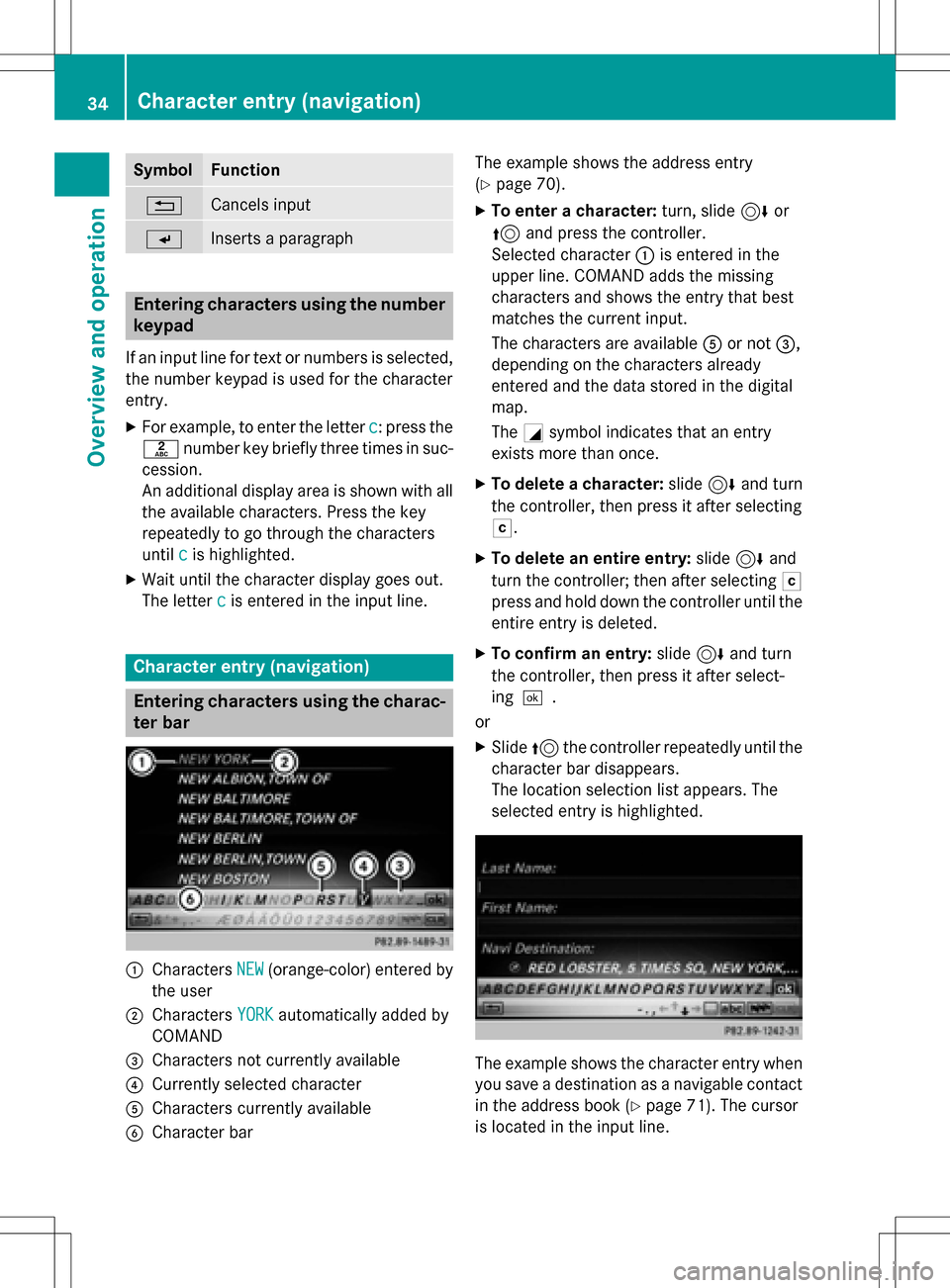
Character entry (navigation)
Entering characters using the charac-
ter bar
:Characters NEW(orange-color) entered by
the user
;Characters YORKautomatically added by
COMAND
=Characters not currently available
?Currently selected character
ACharacters currently available
BCharacter bar The example shows the address entry
(
Ypage 70).
XTo enter a character:
turn, slide6or
5 and press the controller.
Selected character :is entered in the
upper line. COMAND adds the missing
characters and shows the entry that best
matches the current input.
The characters are available Aor not =,
depending on the characters already
entered and the data stored in the digital
map.
The Gsymbol indicates that an entry
exists more than once.
XTo delete a character: slide6and turn
the controller, then press it after selecting
F.
XTo delete an entire entry: slide6and
turn the controller; then after selecting F
press and hold down the controller until the
entire entry is deleted.
XTo confirm an entry: slide6and turn
the controller, then press it after select-
ing¬.
or
XSlide 5the controller repeatedly until the
character bar disappears.
The location selection list appears. The
selected entry is highlighted.
The example shows the character entry when
you save a destination as a navigable contact
in the address book (
Ypage 71). The cursor
is located in the input line.
34Character entry (navigation)
Overview and operation
Page 37 of 246
XTo select an input line:slide6and turn
the controller, then press it after selecting
4 or5.
or
XSlide 5the controller repeatedly until the
character bar disappears.
XTurn and press the controller.
XTo move the cursor: select the input line.
XSlide6and turn the controller, then
press it after selecting 2or3.
XTo change the character bar language:
slide 6and turn the controller, then
press it after selecting B.
A menu appears.
XTurn and press the controller.
The character set for the selected language
is set.
The character bar entry functions are listed in
the table.
SymbolFunction
ÄSwitches between digits and
symbols
*Switches the character bar from
uppercase to lowercase letters
BChanges the character bar lan-
guage
FDeletes a character or an entry
èSwitches to keyword search
(
Ypage 72)
4, 5Selects the input line
SymbolFunction
2,3Moves the cursor within the
input line
¬Confirms an entry
&Cancels input
Entering characters using the number
keypad
XPress one of the number keypad buttons,
e.g. l, once or repeatedly in quick suc-
cession.
The character appears at the bottom of the
display when the key is pressed. The first
available letter is highlighted.
You see which characters you can enter
with that key. Each time the key is pressed,
the next character is selected.
XWait until the character display goes out.
The entries matching your input are shown in the list.
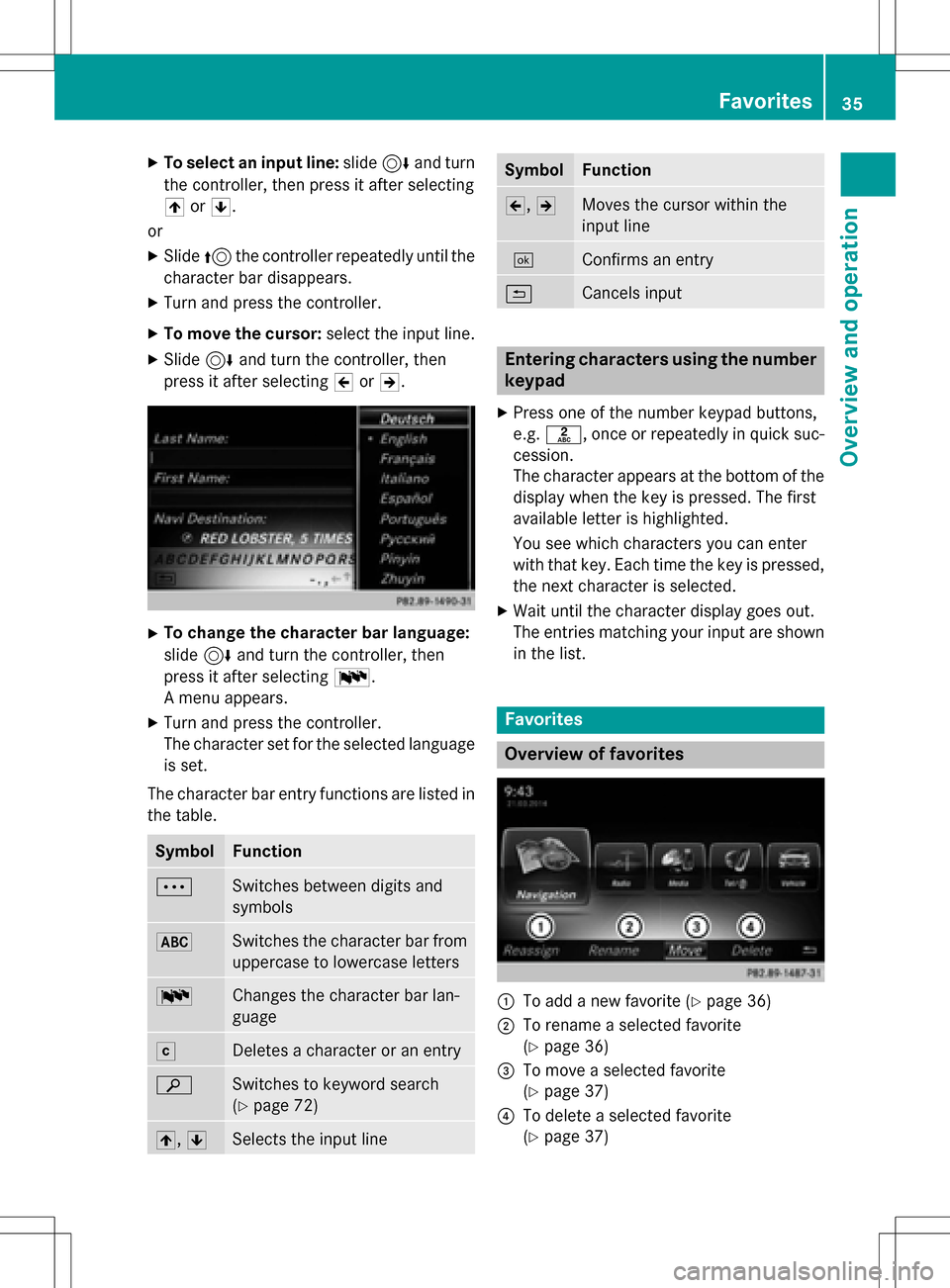
Favorites
Overview of favorites
:To add a new favorite (Ypage 36)
;To rename a selected favorite
(
Ypage 36)
=To move a selected favorite
(
Ypage 37)
?To delete a selected favorite
(
Ypage 37)
Favorites35
Overview and operation
Page 43 of 246

XTo selectSystem Settings: slide6,
turn and press the controller.
A menu appears.
XTo select Display: turn and press the con-
troller.
A menu appears.
XTo select Day Mode,Night Modeor Auto:
turn and press the controller.
The #dot indicates the current setting.
DesignExplanation
Day ModeThe display is set perma-
nently to day design.
Night ModeThe display is set perma-
nently to night design.
AutoIf the Autosetting is
selected, COMAND eval-
uates the readings from
the automatic vehicle
light sensor and auto-
matically switches
between the display
designs.
Switching the display on/off
XPress the Øbutton on the COMAND
control panel.
XTo select DisplayOff: slide6, turn and
press the controller to confirm.
The display goes out.
or
XPress the _button on the controller.
The display goes out.
XTo switch the display on again: press the
controller.
Time settings
General information
COMAND can automatically set the time and
date. The following navigation system functions
require the time, time zone and summer/
standard time to be set correctly in order to
work properly:
Rroute guidance on routes with time-
dependent traffic guidance
Rcalculation of expected time of arrival
Switching automatic time on and off
The
Automatic Time Settingsfunction is
used to activate or deactivate the automatic
setting of the time and date. This function is
activated when the vehicle leaves the factory.
XPress the Øbutton on the COMAND
control panel.
or
XPress Vehiclein the main function bar.
The vehicle menu is displayed.
XTo select Time: slide6, turn and press
the controller to confirm.
A menu appears.
XTo select Automatic Time Settings:
press the controller.
XTo switch the function on Oor off ª:
press the controller.
Setting the time zone
To set the time zone, the Automatic Time
Settingsfunction must be activated.
XPress theØbutton on the COMAND
control panel.
or
XPress Vehiclein the main function bar.
The vehicle menu is displayed.
XTo select Time: slide6, turn and press
the controller to confirm.
A menu appears.
XTo select Time Zone:: turn and press the
controller.
A list of countries appears. The #dot indi-
cates the current setting.
Time settings41
System settings
Z