display MERCEDES-BENZ GL SUV 2009 Owner's Manual
[x] Cancel search | Manufacturer: MERCEDES-BENZ, Model Year: 2009, Model line: GL SUV, Model: MERCEDES-BENZ GL SUV 2009Pages: 309, PDF Size: 10.27 MB
Page 70 of 309
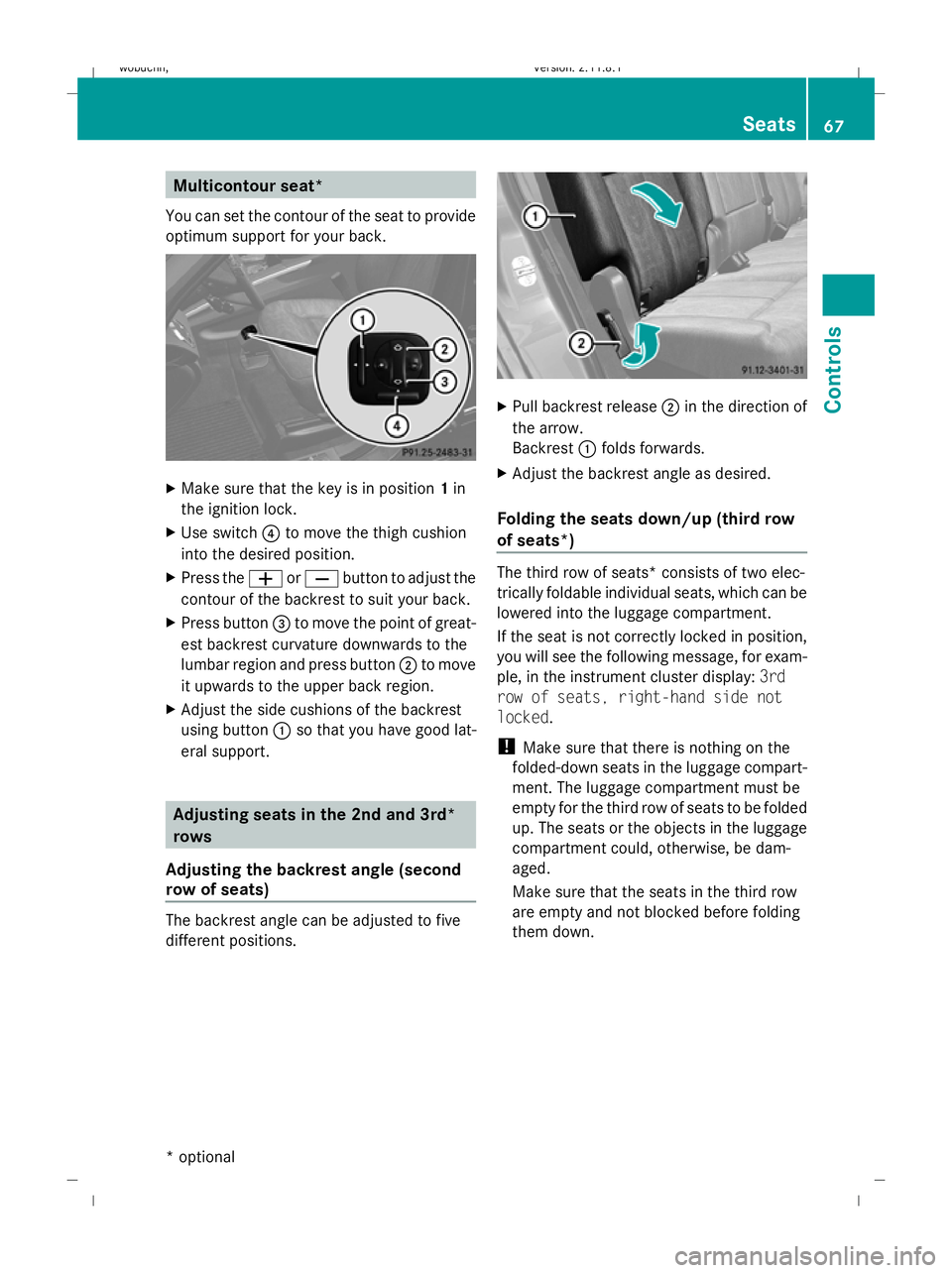
Multicontour seat*
You can set the contour of the seat to provide
optimum support for your back. X
Make sure that the key is in position 1in
the ignition lock.
X Use switch ?to move the thigh cushion
into the desired position.
X Press the WorX button to adjust the
contour of the backrest to suit your back.
X Press button =to move the point of great-
est backrest curvature downwards to the
lumbar region and press button ;to move
it upwards to the upper back region.
X Adjust the side cushions of the backrest
using button :so that you have good lat-
eral support. Adjusting seats in the 2nd and 3rd*
rows
Adjusting the backrest angle (second
row of seats) The backrest angle can be adjusted to five
different positions. X
Pull backrest release ;in the direction of
the arrow.
Backrest :folds forwards.
X Adjust the backrest angle as desired.
Folding the seats down/up (third row
of seats*) The third row of seats* consists of two elec-
trically foldable individual seats, which can be
lowered into the luggage compartment.
If the seat is not correctly locked in position,
you will see the following message, for exam-
ple, in the instrument cluster display:
3rd
row of seats, right-hand side not
locked.
! Make sure that there is nothing on the
folded-down seats in the luggage compart-
ment. The luggage compartment must be
empty for the third row of seats to be folded
up. The seats or the objects in the luggage
compartment could, otherwise, be dam-
aged.
Make sure that the seats in the third row
are empty and not blocked before folding
them down. Seats
67Controls
* optional
X164_AKB; 2; 3, en-GB
wobuchh,
Version: 2.11.8.1 2009-03-31T14:14:58+02:00 - Seite 67 Z
Dateiname: 6515431202_buchblock.pdf; erzeugt am 01. Apr 2009 00:16:58; WK
Page 74 of 309
However, the steerability of the vehicle is not
affected.
When you adjust the steering wheel, make
sure that:
R the steering wheel can be reached with
your arms slightly bent
R you can move your legs freely
R you can see all the displays in the instru-
ment cluster clearly Adjusting the steering wheel man-
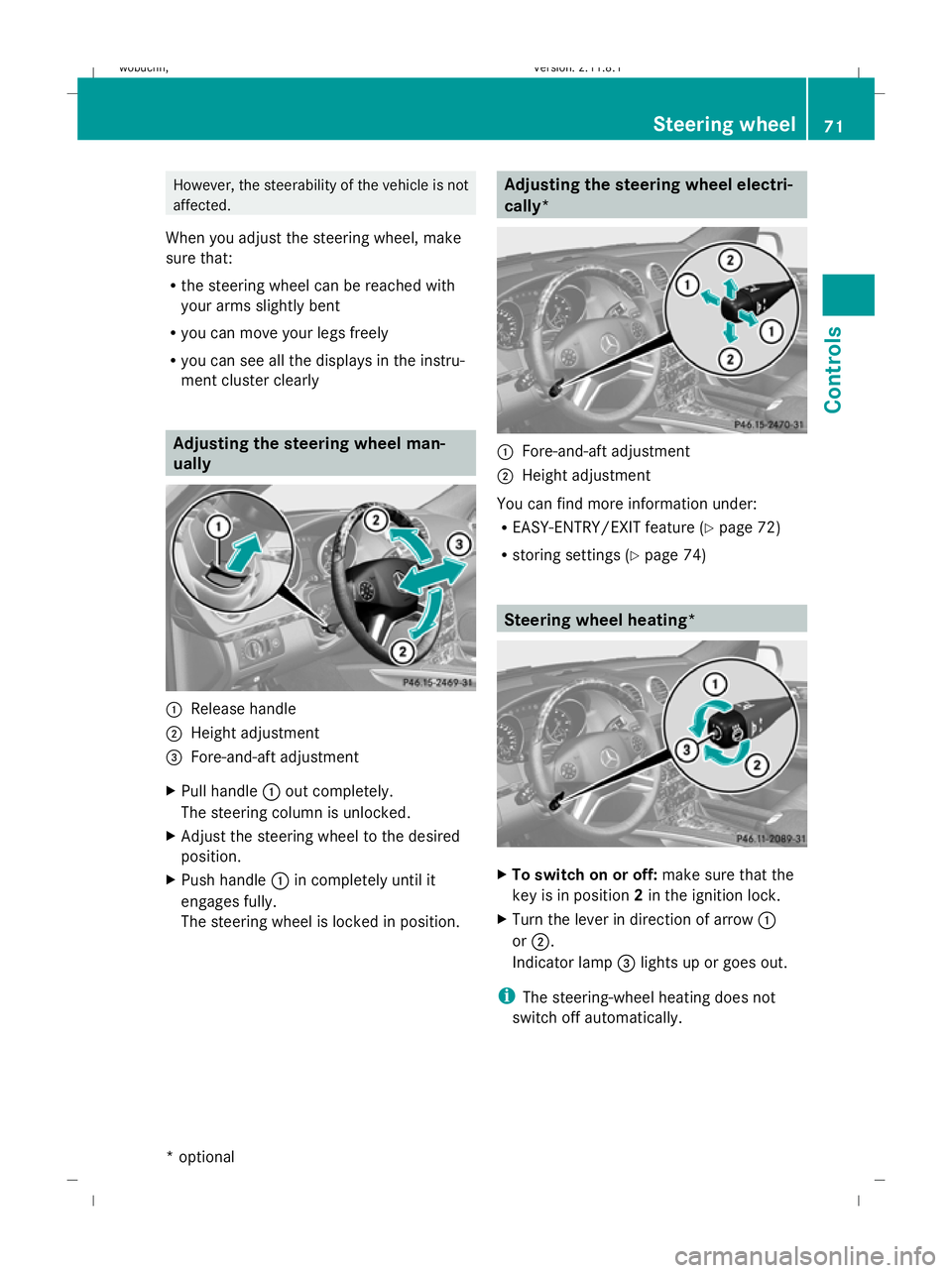
ually
:
Release handle
; Height adjustment
= Fore-and-aft adjustment
X Pull handle :out completely.
The steering column is unlocked.
X Adjust the steering wheel to the desired
position.
X Push handle :in completely until it
engages fully.
The steering wheel is locked in position. Adjusting the steering wheel electri-
cally*
:
Fore-and-aft adjustment
; Height adjustment
You can find more information under:
R EASY-ENTRY/EXIT feature (Y page 72)
R storing settings (Y page 74) Steering wheel heating*
X
To switch on or off: make sure that the
key is in position 2in the ignition lock.
X Turn the lever in direction of arrow :
or ;.
Indicator lamp =lights up or goes out.
i The steering-wheel heating does not
switch off automatically. Steering wheel
71Controls
* optional
X164_AKB; 2; 3, en-GB
wobuchh
,V ersion: 2.11.8.1
2009-03-31T14:14:58+02:00 - Seite 71 Z
Dateiname: 6515431202_buchblock.pdf; erzeugt am 01. Apr 2009 00:17:02; WK
Page 81 of 309
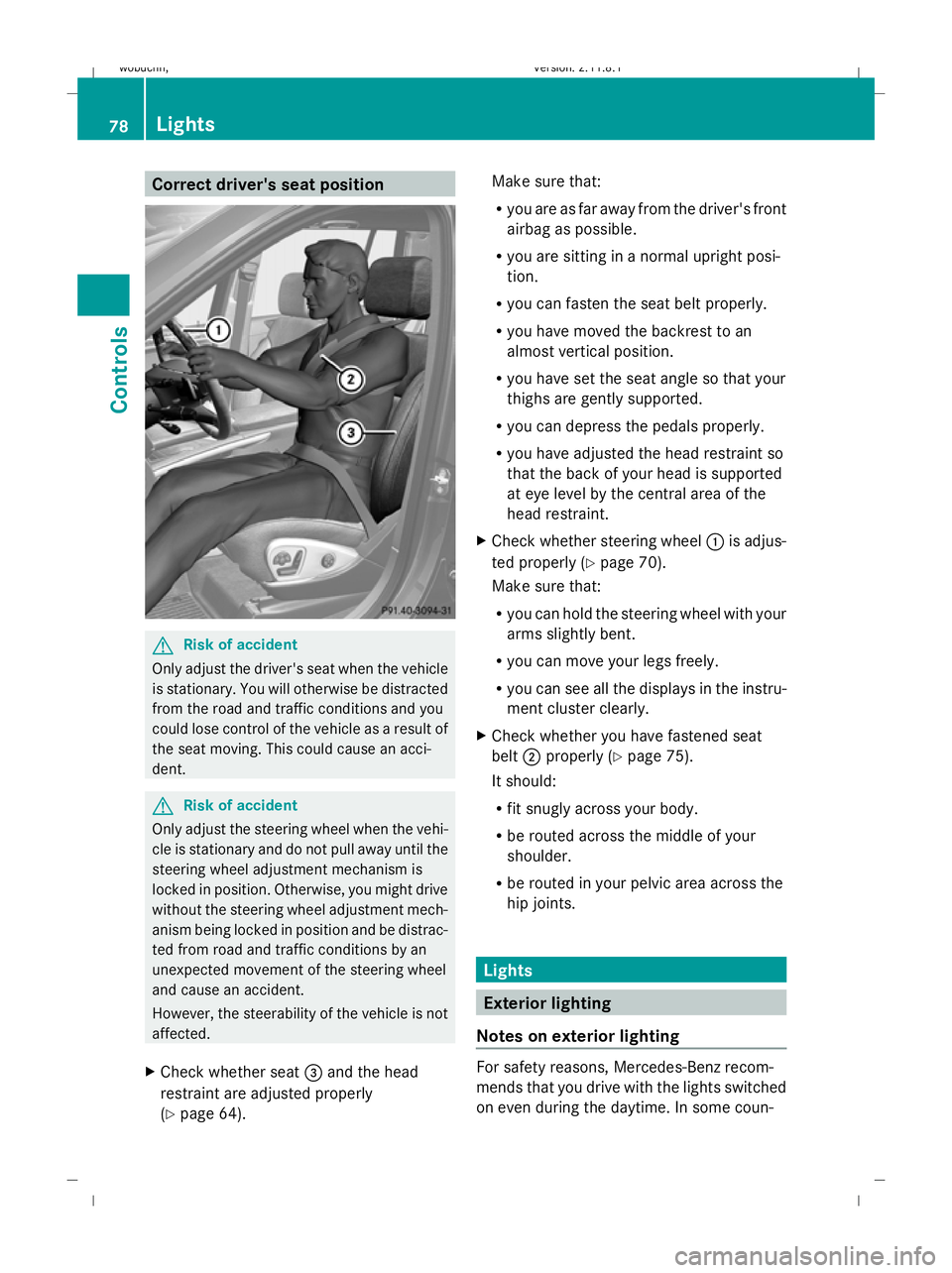
Correct driver's seat position
G
Risk of accident
Only adjust the driver's seat when the vehicle
is stationary. You will otherwise be distracted
from the road and traffic conditions and you
could lose control of the vehicle as a result of
the seat moving. This could cause an acci-
dent. G
Risk of accident
Only adjust the steering wheel when the vehi-
cle is stationary and do not pull away until the
steering wheel adjustment mechanism is
locked in position. Otherwise, you might drive
without the steering wheel adjustment mech-
anism being locked in position and be distrac-
ted from road and traffic conditions by an
unexpected movement of the steering wheel
and cause an accident.
However, the steerability of the vehicle is not
affected.
X Check whether seat =and the head
restraint are adjusted properly
(Y page 64). Make sure that:
R
you are as far away from the driver's front
airbag as possible.
R you are sitting in a normal upright posi-
tion.
R you can fasten the seat belt properly.
R you have moved the backrest to an
almost vertical position.
R you have set the seat angle so that your
thighs are gently supported.
R you can depress the pedals properly.
R you have adjusted the head restraint so
that the back of your head is supported
at eye level by the central area of the
head restraint.
X Check whether steering wheel :is adjus-
ted properly (Y page 70).
Make sure that:
R you can hold the steering wheel with your
arms slightly bent.
R you can move your legs freely.
R you can see all the displays in the instru-
ment cluster clearly.
X Check whether you have fastened seat
belt ;properly (Y page 75).
It should:
R fit snugly across your body.
R be routed across the middle of your
shoulder.
R be routed in your pelvic area across the
hip joints. Lights
Exterior lighting
Notes on exterior lighting For safety reasons, Mercedes-Benz recom-
mends that you drive with the lights switched
on even during the daytime. In some coun-78
LightsControls
X164_AKB; 2; 3, en-GB
wobuchh,
Version: 2.11.8.1 2009-03-31T14:14:58+02:00 - Seite 78
Dateiname: 6515431202_buchblock.pdf; erzeugt am 01. Apr 2009 00:17:06; WK
Page 95 of 309
to lose control of your vehicle and cause an
accident. Automatic transmission
! Warm up the engine quickly. Do not use
the engine's full performance until it has
reached operating temperature.
Only set the automatic transmission to the
respective drive positions when the vehicle
is stationary.
Where possible, avoid spinning the drive
wheels when pulling away on slippery
roads. Otherwise, you could damage the
drive train.
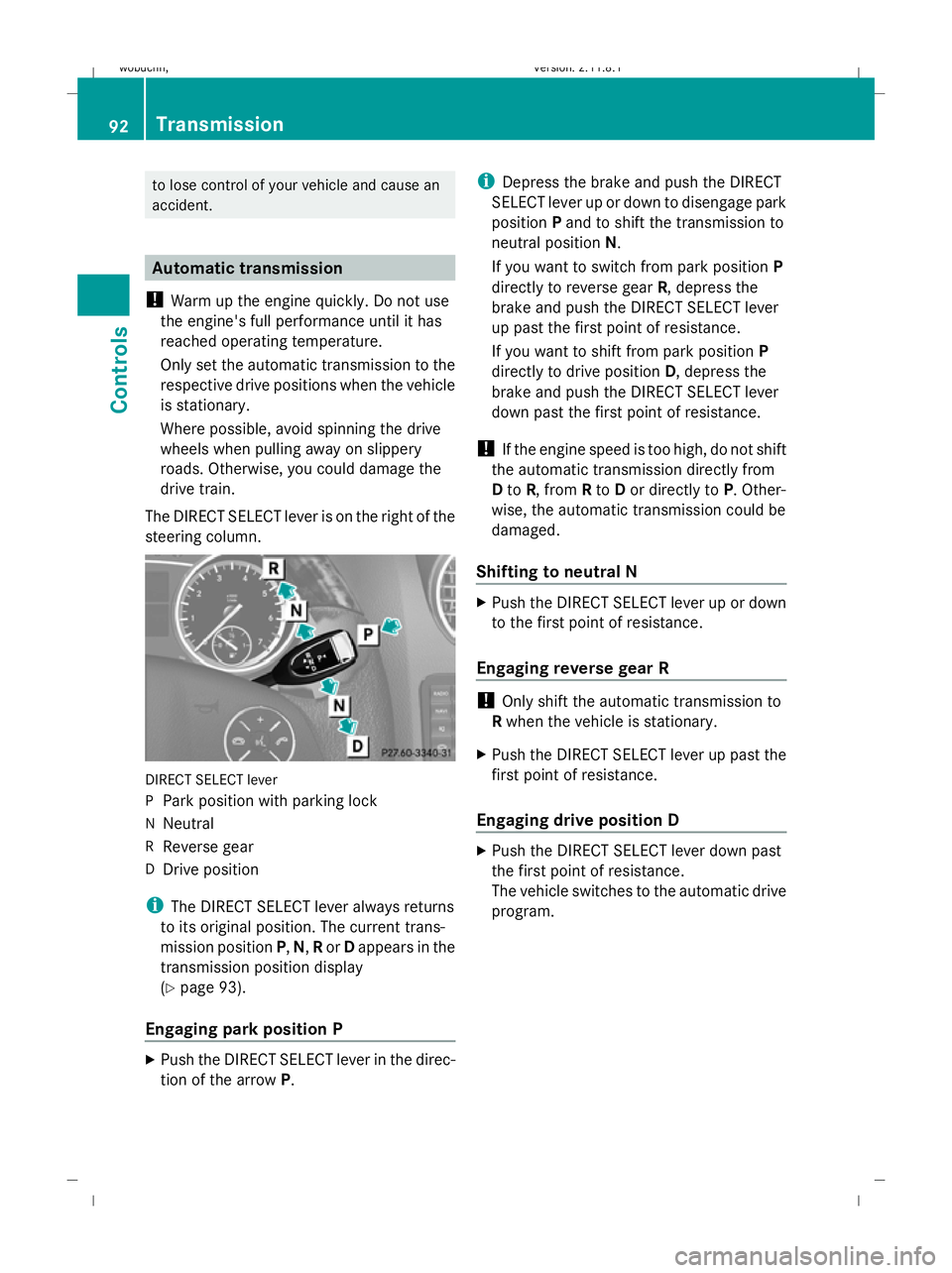
The DIRECT SELECT lever is on the right of the
steering column. DIRECT SELECT lever
P
Park position with parking lock
N Neutral
R Reverse gear
D Drive position
i The DIRECT SELECT lever always returns
to its original position. The current trans-
mission position P,N, Ror Dappears in the
transmission position display
(Y page 93).
Engaging park position P X
Push the DIRECT SELECT lever in the direc-
tion of the arrow P. i
Depress the brake and push the DIRECT
SELECT lever up or down to disengage park
position Pand to shift the transmission to
neutral position N.
If you want to switch from park position P
directly to reverse gear R, depress the
brake and push the DIRECT SELECT lever
up past the first point of resistance.
If you want to shift from park position P
directly to drive position D, depress the
brake and push the DIRECT SELECT lever
down past the first point of resistance.
! If the engine speed is too high, do not shift
the automatic transmission directly from
D to R, from Rto Dor directly to P. Other-
wise, the automatic transmission could be
damaged.
Shifting to neutral N X
Push the DIRECT SELECT lever up or down
to the first point of resistance.
Engaging reverse gear R !
Only shift the automatic transmission to
R when the vehicle is stationary.
X Push the DIRECT SELECT lever up past the
first point of resistance.
Engaging drive position D X
Push the DIRECT SELECT lever down past
the first point of resistance.
The vehicle switches to the automatic drive
program. 92
TransmissionControls
X164_AKB; 2; 3, en-GB
wobuchh
,V ersion: 2.11.8.1
2009-03-31T14:14:58+02:00 - Seite 92
Dateiname: 6515431202_buchblock.pdf; erzeugt am 01. Apr 2009 00:17:12; WK
Page 96 of 309
Changing gears
The automatic transmission shifts into indi-
vidual gears automatically. This automatic
gearshifting behaviour is determined by:
R
drive position D(Y page 93) with shift
ranges 6,5,4,3,2and 1(Y page 94)
R the selected drive program
(S/M) (Ypage 95)
R the position of the accelerator pedal
(Y page 94)
R the road speed
R select a possible shift range restriction
In drive position D, you can use the DIRECT
SELECT steering wheel gearshift paddle
(Y page 94) to influence the gearshifts
made by the automatic transmission and shift
gear yourself.
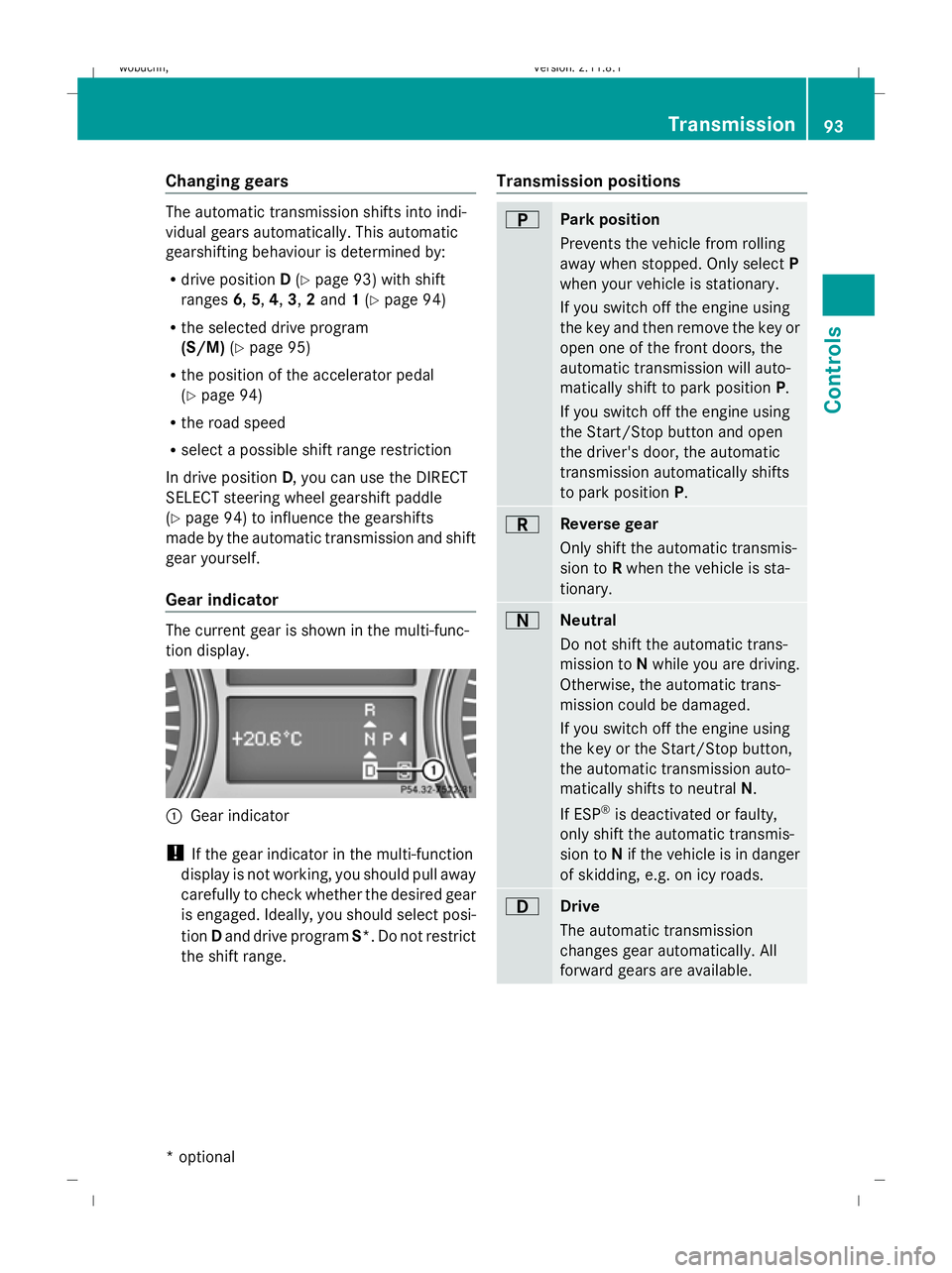
Gear indicator The current gear is shown in the multi-func-
tion display.
:
Gear indicator
! If the gear indicator in the multi-function
display is not working, you should pull away
carefully to check whether the desired gear
is engaged. Ideally, you should select posi-
tion Dand drive program S*. Do not restrict
the shift range. Transmission positions B
Park position
Prevents the vehicle from rolling
away when stopped. Only select
P
when your vehicle is stationary.
If you switch off the engine using
the key and then remove the key or
open one of the front doors, the
automatic transmission will auto-
matically shift to park position P.
If you switch off the engine using
the Start/Stop button and open
the driver's door, the automatic
transmission automatically shifts
to park position P. C
Reverse gear
Only shift the automatic transmis-
sion to
Rwhen the vehicle is sta-
tionary. A
Neutral
Do not shift the automatic trans-
mission to
Nwhile you are driving.
Otherwise, the automatic trans-
mission could be damaged.
If you switch off the engine using
the key or the Start/Stop button,
the automatic transmission auto-
matically shifts to neutral N.
If ESP ®
is deactivated or faulty,
only shift the automatic transmis-
sion to Nif the vehicle is in danger
of skidding, e.g. on icy roads. 7
Drive
The automatic transmission
changes gear automatically. All
forward gears are available. Transmission
93Controls
* optional
X164_AKB; 2; 3, en-GB
wobuchh,
Version: 2.11.8.1 2009-03-31T14:14:58+02:00 - Seite 93 Z
Dateiname: 6515431202_buchblock.pdf; erzeugt am 01. Apr 2009 00:17:12; WK
Page 97 of 309
Driving tips
Accelerator pedal position
Your style of driving influences how the auto-
matic transmission shifts gear:
R little throttle: early upshifts
R more throttle: late upshifts
Kickdown
Use kickdown for maximum acceleration.
X Depress the accelerator pedal beyond the
pressure point.
The transmission shifts to a lower gear
depending on the engine speed.
X Ease off the accelerator pedal once the
desired speed is reached.
The automatic transmission shifts back up.
Trailer towing
X Drive in the middle of the engine speed
range on uphill gradients.
X Shift down to shift range 3or 2depending
on the incline of the uphill or downhill gra-
dient (Y page 94), even if cruise control
is activated. Steering wheel gearshift paddles*
and manual drive program*
You can restrict or derestrict the shift range
by using the steering wheel gearshift paddle.
You can change gear yourself by using the
steering wheel gearshift paddle in the manual
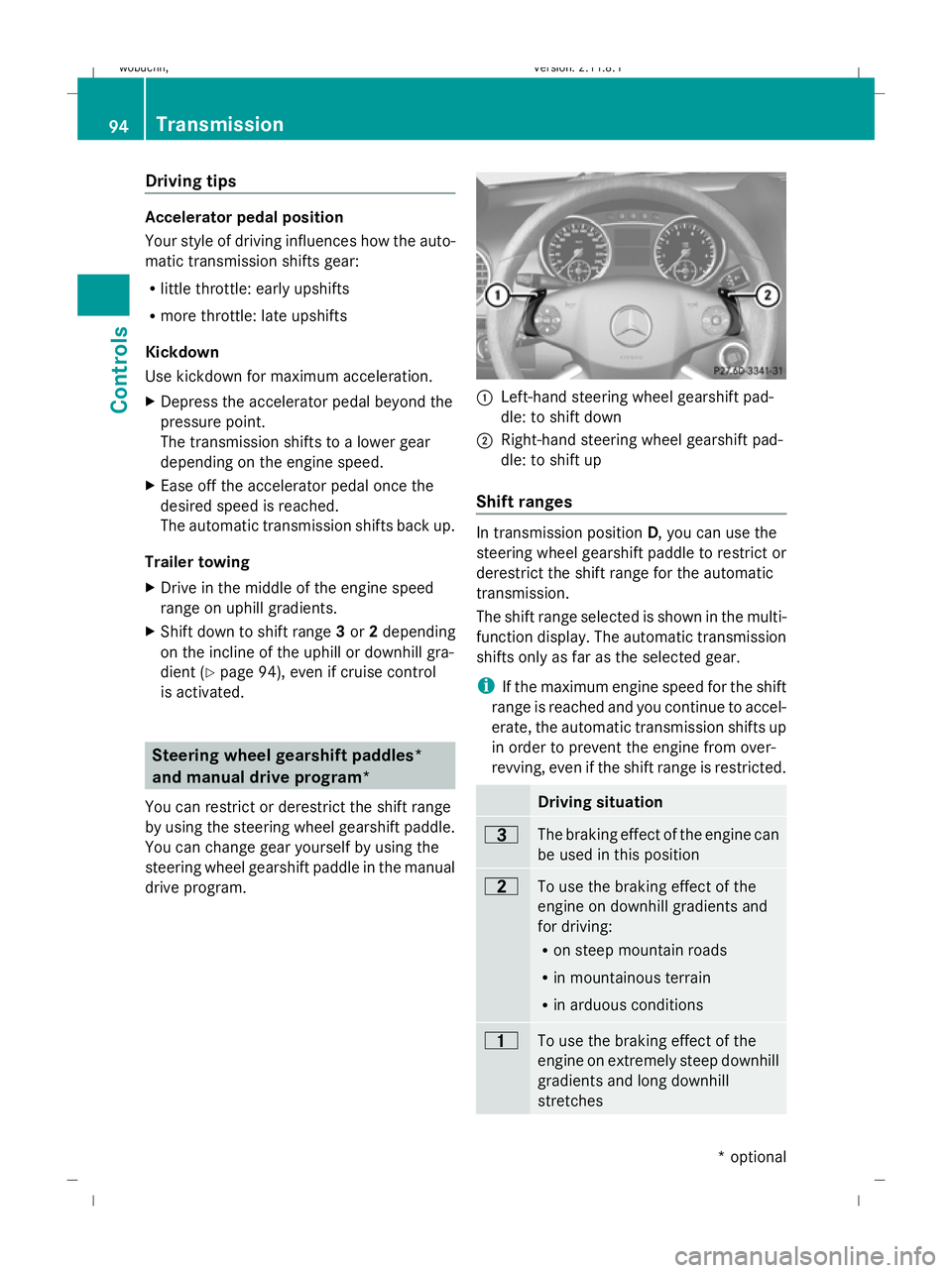
drive program. :
Left-hand steering wheel gearshift pad-
dle: to shift down
; Right-hand steering wheel gearshift pad-
dle: to shift up
Shift ranges In transmission position
D, you can use the
steering wheel gearshift paddle to restrict or
derestrict the shift range for the automatic
transmission.
The shift range selected is shown in the multi-
function display. The automatic transmission
shifts only as far as the selected gear.
i If the maximum engine speed for the shift
range is reached and you continue to accel-
erate, the automatic transmission shifts up
in order to prevent the engine from over-
revving, even if the shift range is restricted. Driving situation
=
The braking effect of the engine can
be used in this position
5
To use the braking effect of the
engine on downhill gradients and
for driving:
R on steep mountain roads
R in mountainous terrain
R in arduous conditions 4
To use the braking effect of the
engine on extremely steep downhill
gradients and long downhill
stretches 94
TransmissionCont
rols
* optional
X164_AKB; 2; 3, en-GB
wobuchh,
Version: 2.11.8.1
2009-03-31T14:14:58+02:00 - Seite 94
Dateiname: 6515431202_buchblock.pdf; erzeugt am 01. Apr 2009 00:17:12; WK
Page 98 of 309
Extending the shift range/shifting up
X
Pull right-hand steering wheel gearshift
paddle.
The shift range is derestricted. If you are
driving in manual drive program M, the
automatic transmission shifts up to the
next gear.
i If the maximum engine speed for the shift
range is reached and you continue to accel-
erate, the automatic transmission shifts up,
even if the shift range is restricted.
Restricting the shift range/shifting
down G
Risk of accident
Do not change down for additional engine
braking on a slippery road surface. This could
cause the drive wheels to lose their grip and
the vehicle could skid.
X Pull left-hand steering wheel gearshift pad-
dle.
The automatic transmission shifts down
one gear and restricts the shift range to this
gear.
If you are driving in manual drive program
M, the automatic transmission shifts down
to the next gear.
i In order to prevent the engine from over-
revving, the automatic transmission does
not shift down when the engine speed is
too high.
Derestricting the shift range X
Pull the right-hand steering wheel gearshift
paddle until the number for the gear disap-
pears from the multi-function display.
or
X Move the DIRECT SELECT lever to position
D.
The automatic transmission shifts from the
current shift range directly to D.Selecting the ideal shift range X
Pull the left-hand steering wheel gearshift
paddle repeatedly until the optimum gear
is reached.
The automatic transmission shifts to the
gear which allows ideal acceleration and
deceleration. To do this, the automatic
transmission shifts down one or more
gears.
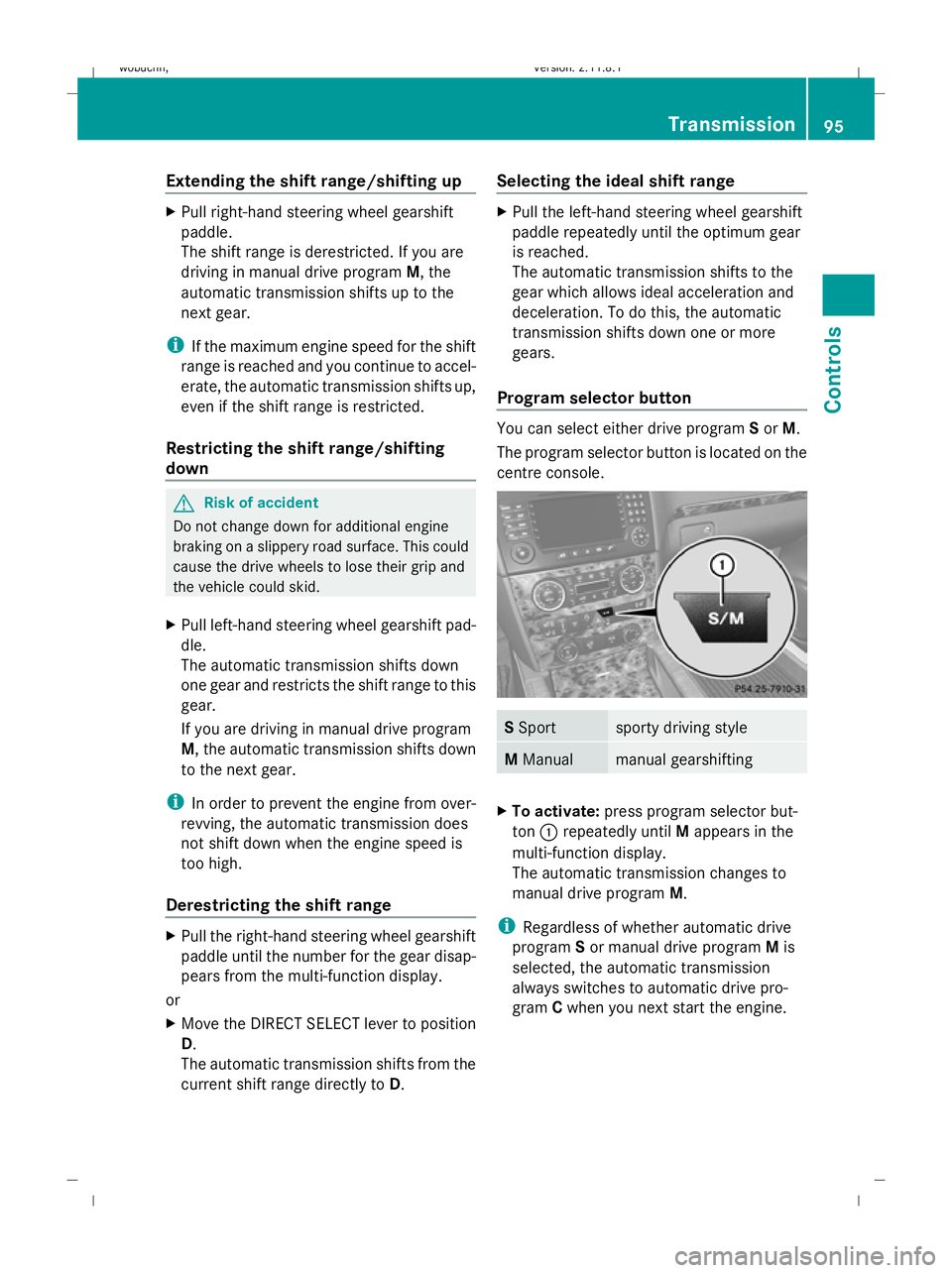
Program selector button You can select either drive program
Sor M.
The program selector button is located on the
centre console. S
Sport sporty driving style
M
Manual manual gearshifting
X
To activate: press program selector but-
ton :repeatedly until Mappears in the
multi-function display.
The automatic transmission changes to
manual drive program M.
i Regardless of whether automatic drive
program Sor manual drive program Mis
selected, the automatic transmission
always switches to automatic drive pro-
gram Cwhen you next start the engine. Transmission
95Controls
X164_AKB; 2; 3, en-GB
wobuchh, Version: 2.11.8.1 2009-03-31T14:14:58+02:00 - Seite 95 Z
Dateiname: 6515431202_buchblock.pdf; erzeugt am 01. Apr 2009 00:17:13; WK
Page 99 of 309
Drive program
Sis characterised by the fol-
lowing:
R sporty engine and suspension configura-
tion
R the vehicle pulling away in first gear
R the automatic transmission shifting up
later
R the late shift point of the automatic trans-
mission can lead to higher fuel consump-
tion
If you have selected transmission position D,
you can activate the manual drive program
and shift up or down through the individual
gears. The gear currently selected and
engaged is shown in the multi-function dis-
play.
X To deactivate: press program selector
button :repeatedly until Sor Mappears
in the multi-function display.
or
X Restart the engine.
The automatic transmission then switches
to the automatic drive program.
Upshifting
X Pull right-hand steering wheel gearshift
paddle (Y page 94).
The automatic transmission shifts up to the
next gear.
Downshifting G
Risk of accident
Do not change down for additional engine
braking on a slippery road surface. This could
cause the drive wheels to lose their grip and
the vehicle could skid.
X Pull left-hand steering wheel gearshift pad-
dle (Y page 95).
The automatic transmission shifts down to
the next gear.
i If you brake the vehicle or stop without
shifting down, the automatic transmission will shift down to a gear that will allow the
vehicle to accelerate or pull away again.
Kickdown
You can also use kickdown for maximum
acceleration in manual drive program M.
X Depress the accelerator pedal beyond the
pressure point.
The transmission shifts to a lower gear
depending on the engine speed.
X Shift back up once the desired speed is
reached.
i If you apply full throttle, the automatic
transmission shifts up to the next gear
when the maximum engine speed is
reached. This prevents the engine from
overrevving. Instrument cluster
Points to remember
You will find an illustration of the instrument
cluster in the "At a glance" section
(Y page 25). G
Risk of accident
No further messages can be displayed if the
instrument cluster and/or the multi-function
display fails.
This means that you will not see information
about the driving situation, such as the speed,
outside temperature, warning/indicator
lamps, display messages or system failures.
The vehicle's handling characteristics may be
affected. Adjust your driving style and speed
accordingly.
Immediately consult a qualified specialist
workshop which has the necessary specialist
knowledge and tools to carry out the work
required. Mercedes-Benz recommends that
you use a Mercedes-Benz Service Centre for
this purpose. In particular, work relevant to
safety or on safety-related systems must be
carried out at a qualified specialist workshop. 96
Instrument clusterControls
X164_AKB; 2; 3, en-GB
wobuchh
,V ersion: 2.11.8.1
2009-03-31T14:14:58+02:00 - Seite 96
Dateiname: 6515431202_buchblock.pdf; erzeugt am 01. Apr 2009 00:17:13; WK
Page 100 of 309
Speedometer with segments
The segments in the speedometer indicate
which speed range is available.
Distronic* mode:
One or two segments around the stored
speed light up. Rev counter
The red band in the rev counter indicates the
engine's overrevving range. The fuel supply is
interrupted to protect the engine when the
red band is reached.
! Do not drive in the overrevving range.
Doing so will damage the engine. Outside temperature display
G
Risk of accident
At temperatures just above freezing point, the
road could be icy, particularly in wooded areas
or on bridges. The vehicle could start skidding
if you fail to adapt your driving style. You
should therefore always adapt your driving
style and speed to suit the weather condi-
tions.
Changes in the outside temperature are dis-
played after a short delay. On-board computer
Points to remember
The on-board computer is activated as soon
as you turn the key to position 1in the ignition
lock. G
Risk of accident
Only use the on-board computer when road
and traffic conditions permit. You would oth-
erwise be distracted and unable to concen-
trate properly on driving, and could cause an
accident. Multi-function steering wheel
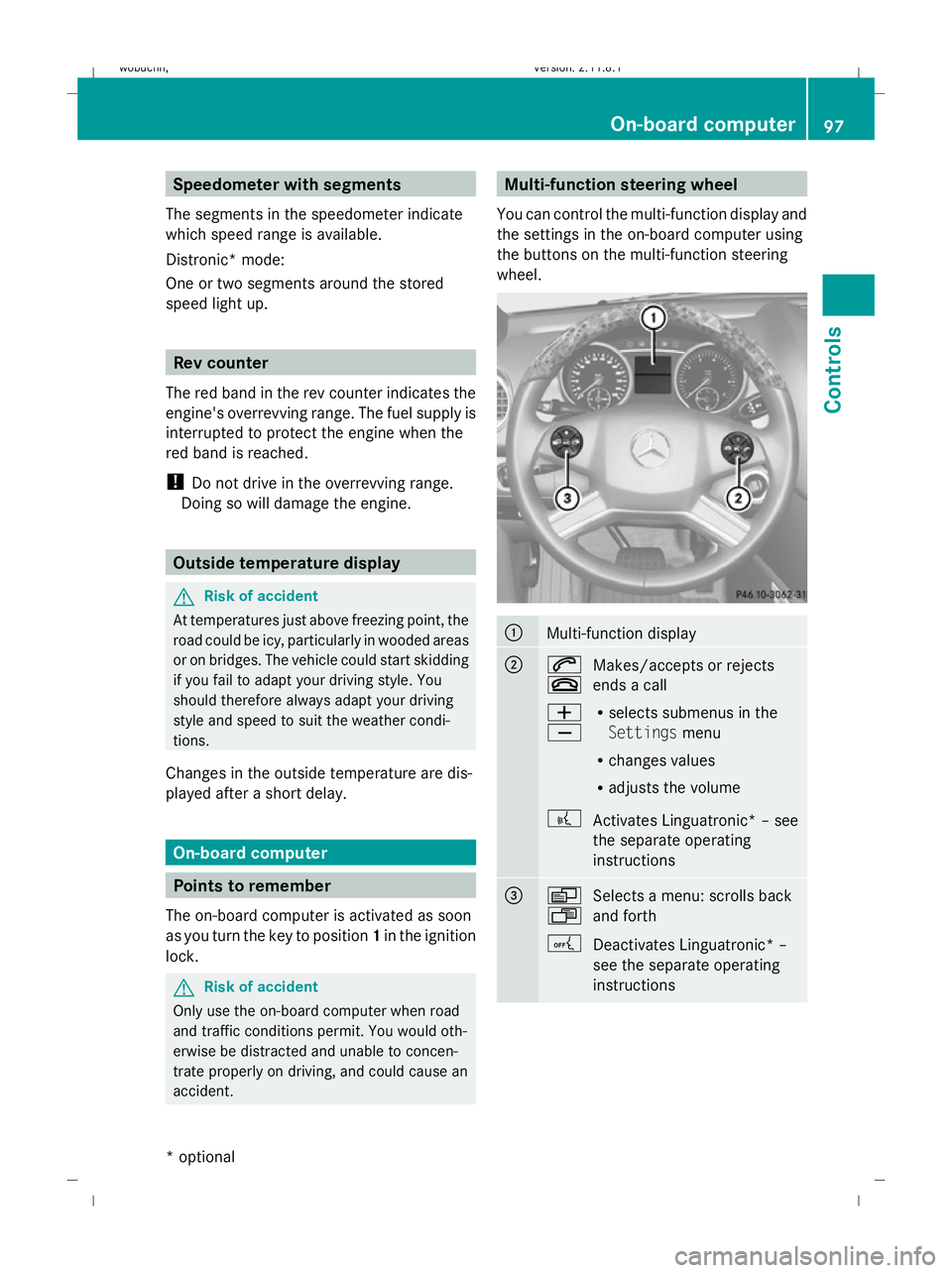
You can control the multi-function display and
the settings in the on-board computer using
the buttons on the multi-function steering
wheel. :
Multi-function display
;
6
~
Makes/accepts or rejects
ends a call
W
X R
selects submenus in the
Settings menu
R changes values
R adjusts the volume
? Activates Linguatronic* – see
the separate operating
instructions =
V
U
Selects a menu: scrolls back
and forth
A Deactivates Linguatronic* –
see the separate operating
instructions On-board computer
97Controls
* optional
X164_AKB; 2; 3, en-GB
wobuchh,
Version: 2.11.8.1 2009-03-31T14:14:58+02:00 - Seite 97 Z
Dateiname: 6515431202_buchblock.pdf; erzeugt am 01. Apr 2009 00:17:14; WK
Page 101 of 309
&
*
Press briefly:
scrolls back
and forth within a menu
In the Audio/TV*/DVD*
menu: selects a stored sta-
tion, an audio track or a video
scene
In the Telephone menu,
switches to the phone book
and selects a name or a tele-
phone number &
* Press and hold:
in the
Audio/TV*/DVD* menu,
selects the next/previous sta-
tion or selects an audio track
using rapid scrolling
In the Telephone menu,
starts rapid scrolling through
the phone book Multi-function display
To activate the multi-function display:
R switch on the ignition.
R switch on the lights. R
open a front door.
R press the .reset button in the instrument
panel.
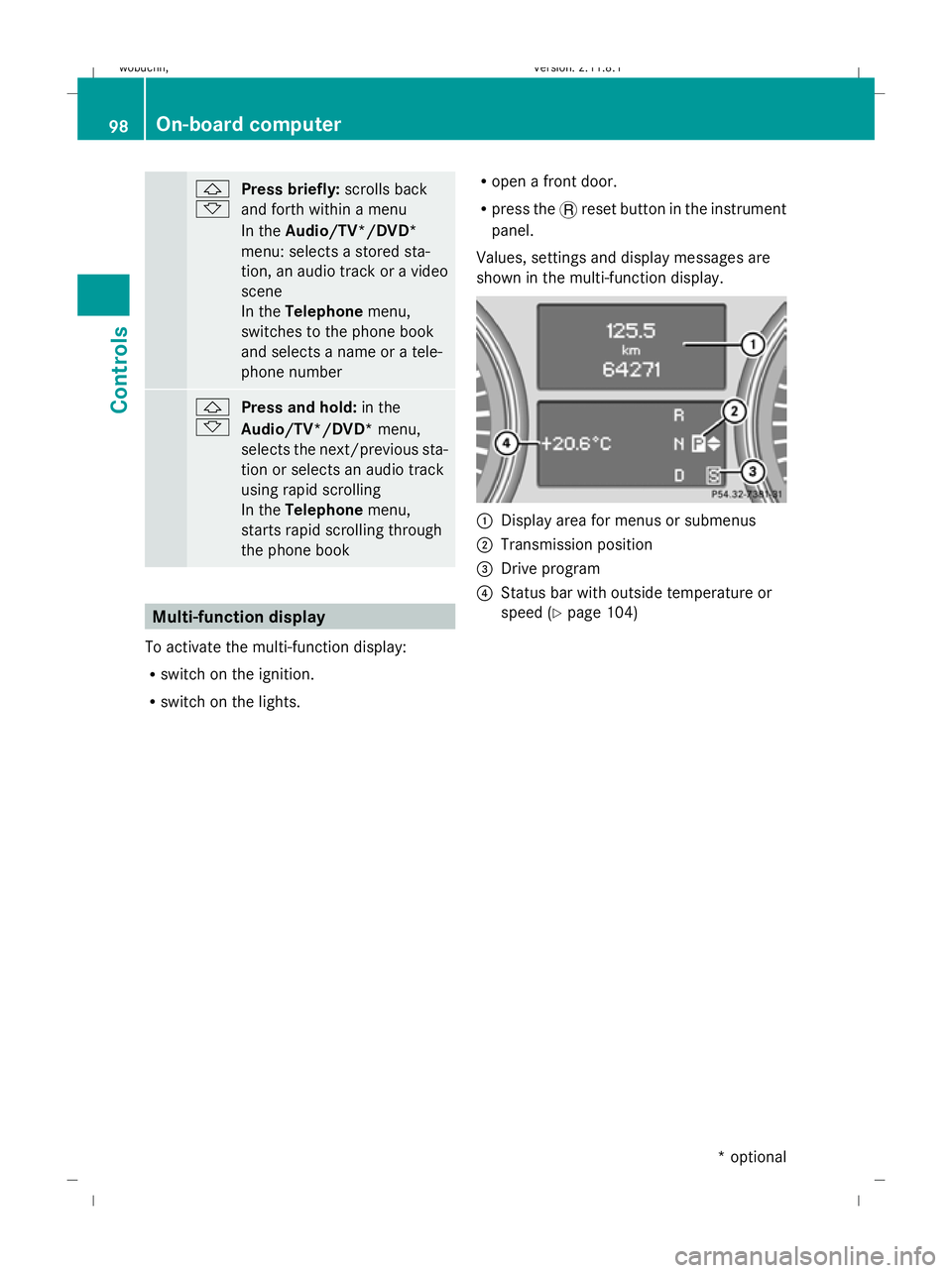
Values, settings and display messages are
shown in the multi-function display. :
Display area for menus or submenus
; Transmission position
= Drive program
? Status bar with outside temperature or
speed (Y page 104) 98
On-board computerControls
* optional
X164_AKB; 2; 3, en-GB
wobuchh,
Version: 2.11.8.1 2009-03-31T14:14:58+02:00 - Seite 98
Dateiname: 6515431202_buchblock.pdf; erzeugt am 01. Apr 2009 00:17:14; WK