display MERCEDES-BENZ GL SUV 2009 User Guide
[x] Cancel search | Manufacturer: MERCEDES-BENZ, Model Year: 2009, Model line: GL SUV, Model: MERCEDES-BENZ GL SUV 2009Pages: 309, PDF Size: 10.27 MB
Page 17 of 309
Socket
................................................ 163
Cockpit .......................................... 163
Luggage compartment ...................164
Rear compartment .........................163
Spare wheel
Fitting ............................................ 268
Storage location ............................ 209
Technical data ............................... 297
Spare wheel bracket ...........................60
Emergency release ........................251
Speed limiter
Speedtronic ................................... 126
Speedometer
Additional speedometer (on-
board computer) ............................ 100
Segments ......................................... 97
Setting the unit (on-board com-
puter) ............................................. 103
Speedtronic ....................................... 126
Display message ............................ 218
Permanent ..................................... 128
Variabl e......................................... 126
SRS (Supplemental Restraint Sys-
tem) ...................................................... 35
Display message ............................ 221
Warning lamp ........................... 35, 236
Standard display (on-board com-
puter) .................................................... 99
Station see Radio ....................................... 100
Status line (on-board computer) ........98
Selecting the display ..................... .104
Steering
Display message ............................ 225
Steering wheel
Adjusting ................................... 70, 71
Buttons (on-board computer) ...........97
Storing settings ............................... 74
Steering wheel boss
Cleaning ......................................... 204
Steering wheel heating .......................71
Malfunction indicator lamp ............233
Stowage compartments ...................152
Armrest (under) ............................. 153
Centre console .............................. 152
Centre console (rear) .....................153Cup holder
..................................... 153
Glove compartment .......................152
Submenu (on-board computer)
Convenience .................................. 108
Heating .......................................... 107
Instrument cluster .........................103
Lighting .......................................... 105
Time/Date ..................................... 104
Vehicle .......................................... .106
Summer opening
see Convenience opening
Sun visor ............................................ 161
Supplemental Restraint System See SRS ........................................... 35
Surround lighting
Switching on/off (on-board com-
puter) ............................................. 105
Switching off the alarm
ATA .................................................. 54 T
Tailgate Display message ............................ 219
Limiting the opening angle ...............63
Tail lamps
Display message ............................ 228
Tail pipes
Cleaning ......................................... 203
Tank
see Fuel tank
Tank capacity .................................... 287
Technical data GL 350 BlueTEC ............................. 293
GL 350 CDI 4MATIC BlueEFFI-
CIENCY .......................................... 293
GL 450 4MATIC ............................. 292
GL 450 CDI 4MATIC ......................294
GL 500 4MATIC ............................. 292
Trailer loads ................................... 298
Tyres ...................................... 296, 297
Wheels ................................... 296, 297
Telescopic lever ................................ 193
Telescopic rod (Easy-Pack fix kit) ....160
Temperature Outside temperature ........................ 97
Thermatic
Malfunction indicator lamp ............234 14
Index X164_AKB; 2; 3, en-GB
wobuchh,
Version: 2.11.8.1 2009-03-31T14:14:58+02:00 - Seite 14Dateiname: 6515431202_buchblock.pdf; erzeugt am 01. Apr 2009 00:16:30; WK
Page 18 of 309
Thermotronic
Malfunction indicator lamp ............234
Third brake lamp
Display message ............................ 226
Tightening torque .............................. 271
Time Setting (on-board computer) .......... 104
Setting the time (on-board com-
puter) ............................................. 104
TIREFIT kit
Using ............................................. 263
TopTether ............................................. 48
Total distance recorder ....................100
Tow-away protection ..........................55
Switching on/off (on-board com-
puter) ............................................. 109
Towing ................................................ 279
Towing eye Fitting ............................................ 278
Removing ....................................... 279
Trailer
7-pin connector ............................. 199
Coupling up .................................. 195
Decoupling ..................................... 196
Display message .................... 225, 226
Power supply ................................. 199
Trailer coupling
see Trailer tow hitch
Trailer loads
Technical data ............................... 298
Trailer tow hitch ................................ 193
Cleaning ......................................... 203
Trailer towing
Driving tips .................................... 196
ESP ®
................................................ 51
Malfunction ................................... .248
Mounting dimensions ....................297
Parktroni c...................................... 135
Transmission
Display message ............................ 216
Transmission output (maximum)
Telephone/two-way radio ..............285
Transmission positions ....................... 93
Transport (vehicle) ............................279
Travelling uphill ................................. 190
Trim strips Cleaning ......................................... 205 Trip computer
Menu (on-board computer) ............110
Trip computer (on-board com-
puter) ................................................. .110
Trip meter ............................................ 99
Resetting (on-board computer) ......110
Turn signal lamps
Display message ............................ 226
TV
Operating (on-board computer) .....101
Two-way radio
Installation ..................................... 285
Type identification plate
see vehicle identification plate ......286
Tyre
Direction of rotatio n...................... 180
Tyre grip ............................................. 188
Tyre pressure ................................... .180
Calling up (on-board computer) ....183
Display message ...........217, 218, 229
Tyre pressure loss warning system
............................................................ 182
Tyre pressure monitor
Warning lamp ................................. 237
Tyres
General notes ................................ 179
Technical data ....................... 296, 297
Tyre tread .......................................... .180 U
Unlocking Emergency unlocking ..................... 250
From the inside (central unlocking
button) ............................................. 59 V
Vanity mirror Sun visor ........................................ 162
Variable Speedtronic ........................126
Vehicle Emergency unlocking ............250, 251
Individual settings (on-board com-
puter) ............................................. 103
Leaving parked up .........................249
Towing ........................................... 279
Transporting .................................. 279 Index
15 X164_AKB; 2; 3, en-GB
wobuchh,
Version: 2.11.8.1
2009-03-31T14:14:58+02:00 - Seite 15Dateiname: 6515431202_buchblock.pdf; erzeugt am 01. Apr 2009 00:16:30; WK
Page 19 of 309
Vehicle battery
.................................. 272
Vehicle dimensions ...........................295
Vehicle electronics ...........................284
Vehicle identification number
(VIN) .................................................. 286
Vehicle identification plate ..............286
Vehicle level Display mes-
sage.............................................. 221, 222
Vehicle tool kit .................................. 209W
Warning and indicator lamps ABS (yellow) ................................... 235
ESP ®
........................................ 51, 236
LIM (cruise control) ........................ 118
LIM (Distronic) ............................... 121
LIM (variable Speedtronic) .............126
Malfunction indicator lamp ............234
Tyre pressure monitor ...................237
Warning tone ..................................... 239
Warning triangle ................................ 208
Washer fluid Display message ............................ 232
Washer fluid reservoir ..............178, 291
Filling capacity ............................... 291
Wearing seat belts .............................. 75
Wheel bolts Tightening torque ........................... 271
Wheel chock
Use ................................................ 268
Wheels
Cleaning ......................................... 202
General notes ................................ 179
Interchanging ................................. 184
Technical data ....................... 296, 297
Windowbag .......................................... 39
Windows Cleaning ......................................... 202
see Side windows
Windscreen
Infrared reflective .......................... 168
Windscreen washer fluid ..................291
Topping up ..................................... 178
Windscreen washer system .....178, 291 Windscreen wipers
.............................84
Malfunction ................................... .245
Replacing the wiper blades ............261
Winter diesel ..................................... 174
Winter driving ............................ 185, 186
Winter tyres ....................................... 185
Limiting the speed (on-board com-
puter) ............................................. 128
Wiper blades
Cleaning ......................................... 202
Replacing ....................................... 261
Wooden trim
Cleaning ......................................... 205 16
Index X164_AKB; 2; 3, en-GB
wobuchh,
Version: 2.11.8.1 2009-03-31T14:14:58+02:00 - Seite 16Dateiname: 6515431202_buchblock.pdf; erzeugt am 01. Apr 2009 00:16:30; WK
Page 28 of 309
Instrument cluster
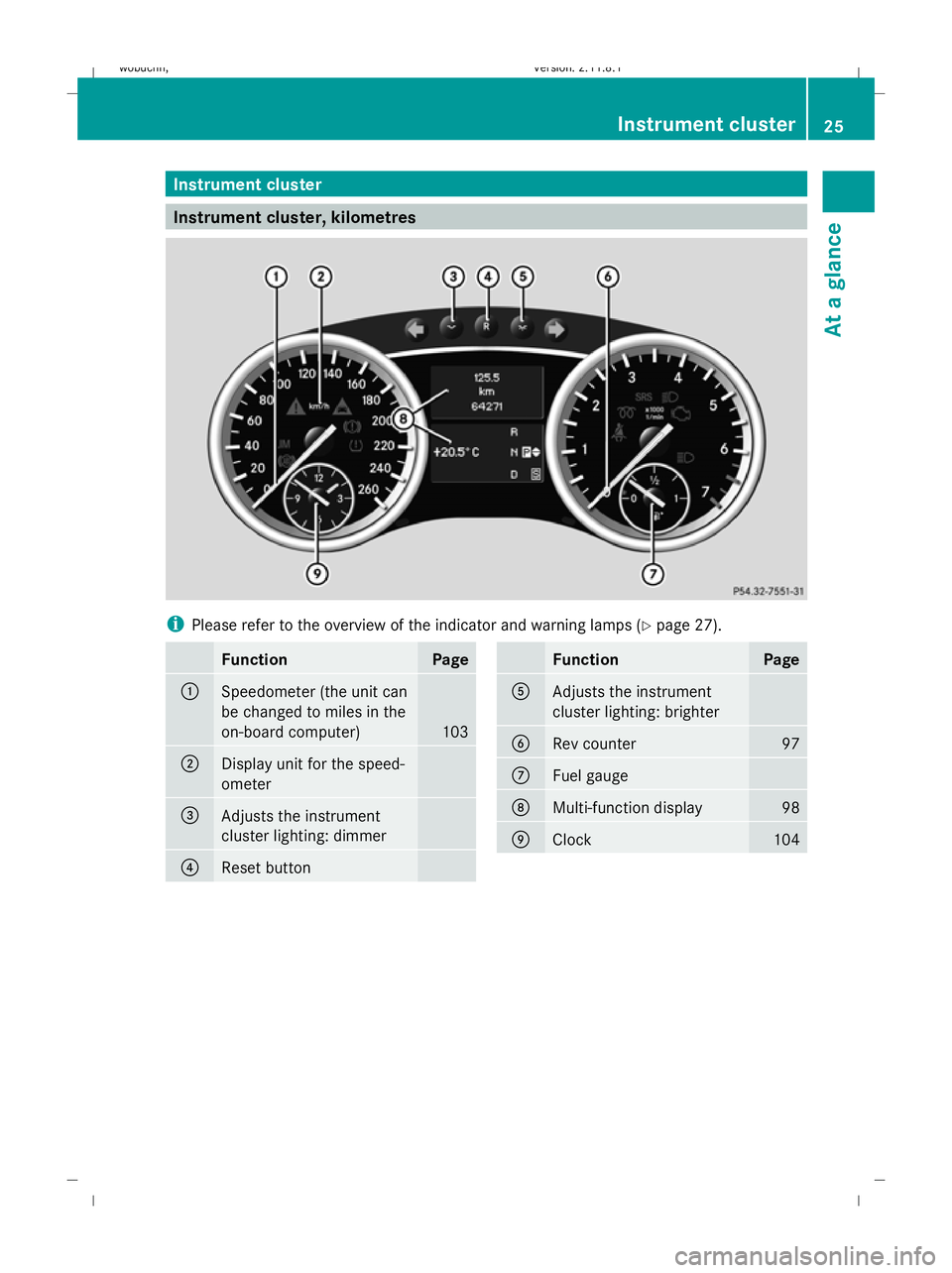
Instrument cluster, kilometres
i
Please refer to the overview of the indicator and warning lamps ( Ypage 27). Function Page
:
Speedometer (the unit can
be changed to miles in the
on-board computer)
103
;
Display unit for the speed-
ometer
=
Adjusts the instrument
cluster lighting: dimmer
?
Reset button Function Page
A
Adjusts the instrument
cluster lighting: brighter
B
Rev counter 97
C
Fuel gauge
D
Multi-function display 98
E
Clock 104Instrument cluster
25At a glance
X164_AKB; 2; 3, en-GB
wobuchh, Version: 2.11.8.1 2009-03-31T14:14:58+02:00 - Seite 25 Z
Dateiname: 6515431202_buchblock.pdf; erzeugt am 01. Apr 2009 00:16:35; WK
Page 29 of 309
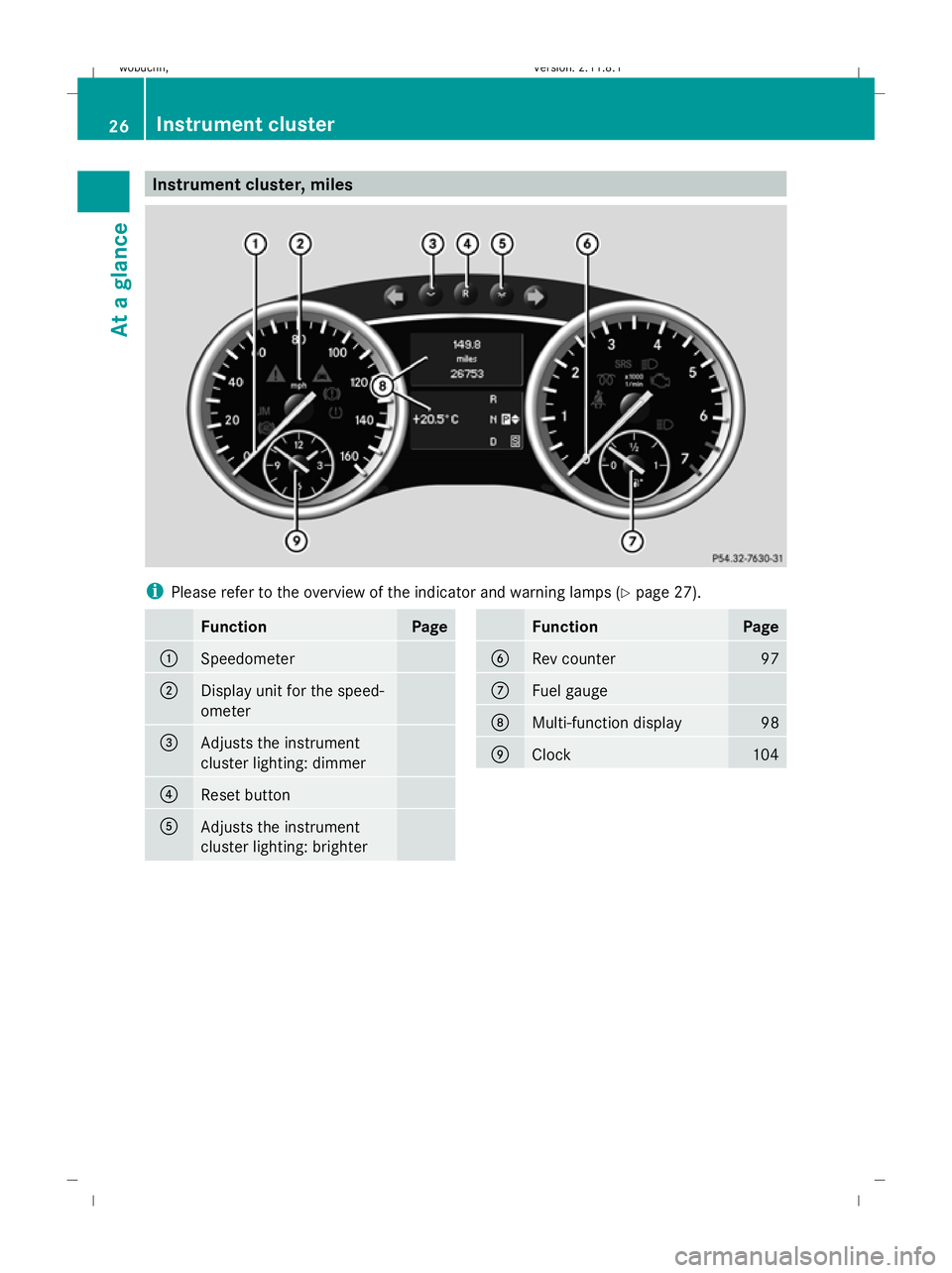
Instrument cluster, miles
i
Please refer to the overview of the indicator and warning lamps ( Ypage 27). Function Page
:
Speedometer
;
Display unit for the speed-
ometer
=
Adjusts the instrument
cluster lighting: dimmer
?
Reset button
A
Adjusts the instrument
cluster lighting: brighter Function Page
B
Rev counter 97
C
Fuel gauge
D
Multi-function display 98
E
Clock 10426
Instrument clusterAt a glance
X164_AKB; 2; 3, en-GB
wobuchh,
Version: 2.11.8.1 2009-03-31T14:14:58+02:00 - Seite 26
Dateiname: 6515431202_buchblock.pdf; erzeugt am 01. Apr 2009 00:16:36; WK
Page 31 of 309
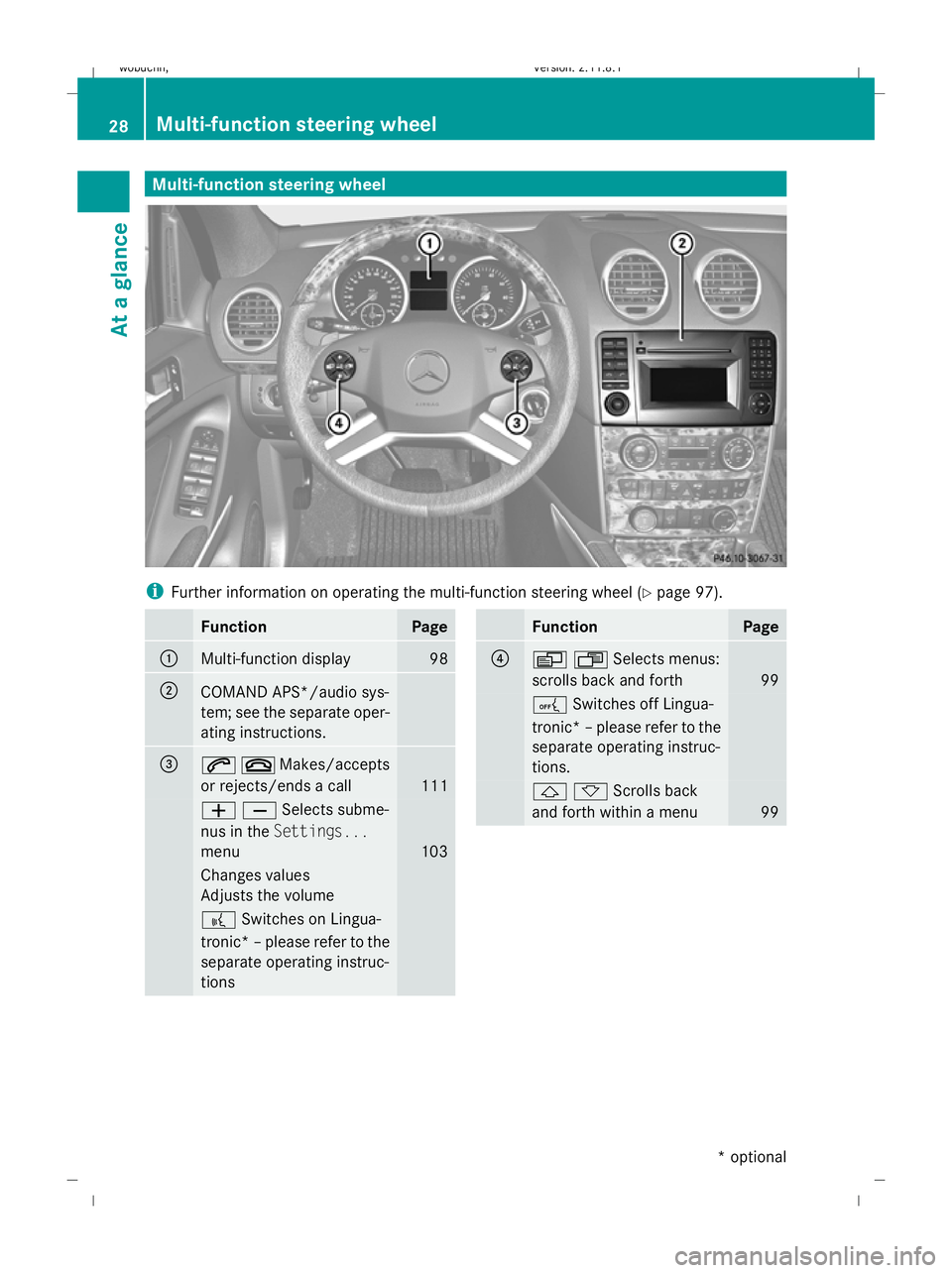
Multi-function steering wheel
i
Further information on operating the multi-function steering wheel (Y page 97).Function Page
:
Multi-function display 98
;
COMAND APS*/audio sys-
tem; see the separate oper-
ating instructions.
=
6~Makes/accepts
or rejects/ends a call
111
WXSelects subme-
nus in the
Settings...
menu 103
Changes values
Adjusts the volume
?
Switches on Lingua-
tronic* –please refer to the
separate operating instruc-
tions Function Page
?
VUSelects menus:
scrolls back and forth
99
A
Switches off Lingua-
tronic* –please refer to the
separate operating instruc-
tions. &*Scrolls back
and forth within a menu
9928
Multi-function steering wheelAt a glance
* optional
X164_AKB; 2; 3, en-GB
wobuchh,
Version: 2.11.8.1 2009-03-31T14:14:58+02:00 - Seite 28
Dateiname: 6515431202_buchblock.pdf; erzeugt am 01. Apr 2009 00:16:38; WK
Page 56 of 309
G
Risk of accident
If EBV is malfunctioning, the brake system is
still available with full brake boosting effect.
However, the rear wheels can still lock, e.g.
under full braking. This could cause you to
lose control of your vehicle and cause an acci-
dent. You should therefore adapt your driving
style to the different handling characteristics. 4ETS (Electronic Traction System)
4ETS makes it possible to pull away or accel-
erate on a slippery surface. It brakes the
wheels individually if they start to spin.
The d warning lamp in the instrument
cluster lights up briefly when the engine is
started. This indicates that the warning lamp
is operational.
X Activate the LOW RANGE off-road gear
(Y page 114) if appropriate to driving con-
ditions.
The d warning lamp in the instrument
cluster flashes at any speed if at least one tyre
has exceeded its tyre grip limit. G
Risk of accident
If the d warning lamp in the instrument
cluster flashes, proceed as follows:
R only depress the accelerator pedal as far as
necessary when pulling away.
R accelerate less when driving.
R adapt your driving style to suit the prevail-
ing road and weather conditions.
Otherwise, the vehicle could skid.
If you drive too fast, 4ETS cannot reduce the
risk of an accident. 4ETS cannot override the
laws of physics.
! Only operate the vehicle briefly (for a max-
imum of ten seconds) on a brake dyna-
mometer. Turn the key in the ignition lock
to position 0or 1. You could otherwise
damage the drive train or the brake system. !
A function or performance test should
only be carried out on a twin-axle dyna-
mometer. If you wish to operate the vehicle
on such a dynamometer, please consult a
Mercedes-Benz Service Centre in advance.
You could otherwise damage the drive train
or the brake system.
i If the brakes are subjected to heavy loads,
4ETS switches off automatically for a brief
period so that the brakes do not heat up
further. If, for this reason, 4ETS does not
engage, the dwarning lamp in the
instrument cluster lights up. The message
ABS, ESP unavailable see Owner's
Manual also appears in the multi-function
display.
! The engine must be off when the parking
brake is being checked on the brake dyna-
mometer. Application of the brakes via
4ETS may otherwise destroy the braking
system.
Off-road terrain-4ETS (Electronic Trac-
tion System) A 4ETS system specifically suited to off-road
terrain is activated automatically if the LOW
RANGE* off-road gear is selected
(Y page 114). Distance warning function* (vehicles
with Distronic*)
This function will issue a warning at speeds of
around 30 km/h or more if:
R for a period of several seconds, the dis-
tance to the vehicle in front is too short for
the speed at which you are travelling. The
· distance warning lamp in the instru-
ment cluster will light up.
R you are approaching the vehicle in front too
rapidly. An intermittent warning tone will
then sound and the ·distance warning
lamp will light up in the instrument cluster. Driving safety systems
53Safety
* optional
X164_AKB; 2; 3, en-GB
wobuchh,
Version: 2.11.8.1 2009-03-31T14:14:58+02:00 - Seite 53 Z
Dateiname: 6515431202_buchblock.pdf; erzeugt am 01. Apr 2009 00:16:49; WK
Page 57 of 309
In order to maintain the appropriate distance
to the vehicle in front and thus prevent a
crash, you must apply the brakes yourself. G
Risk of accident
Pay particular attention to the traffic condi-
tions if the distance warning lamp ·in the
instrument cluster lights up or an intermittent
warning tone sounds.
If necessary, brake or manoeuvre to avoid an
obstacle.
X To activate/deactivate: activate or deac-
tivate the distance warning function in the
on-board computer (Y page 109).
After activation, the Äsymbol is dis-
played in the lower multi-function display.
For more information on the distance warning
function, see the Distronic section*
(Y page 119). Anti-theft systems
Immobiliser
The immobiliser prevents your vehicle from
being started without the correct key.
Activating the immobiliser X
With the key: remove the key from the
ignition lock.
X With KEYLESS GO*: press the start/stop
button on the dashboard.
The engine switches off.
Deactivating the immobiliser X
With the key: turn the key to position 2in
the ignition lock.
X With KEYLESS GO*: press the start/stop
button on the dashboard twice without
depressing the brake.
i The immobiliser is always deactivated
when you start the engine. ATA* (anti-theft alarm system)
A visual and audible alarm is triggered when
the alarm system is primed and you open:
R a door
R a door using the emergency key element
R the tailgate
R the bonnet
The alarm is not switched off even if you close
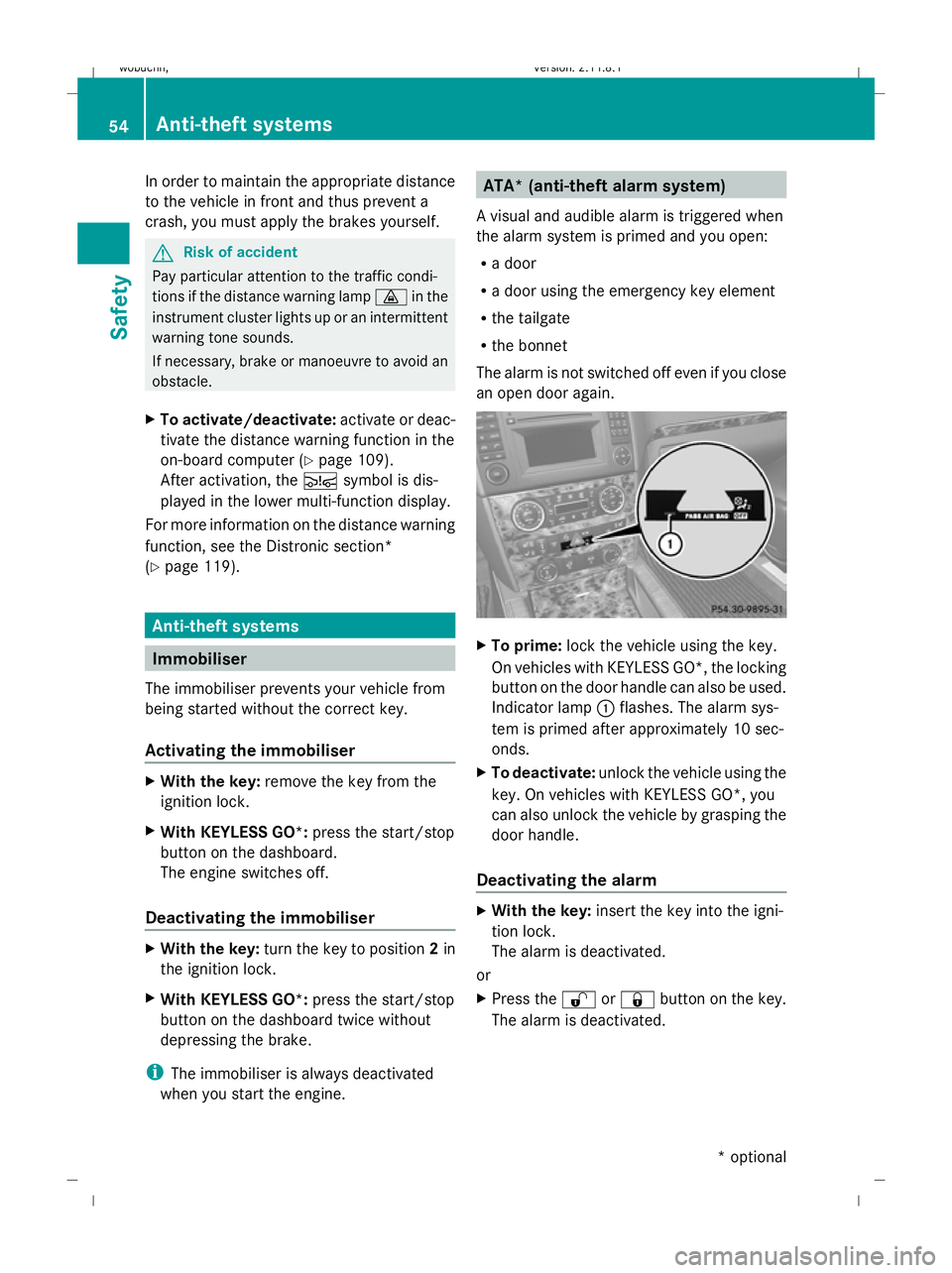
an open door again. X
To prime: lock the vehicle using the key.
On vehicles with KEYLESS GO*, the locking
button on the door handle can also be used.
Indicator lamp :flashes. The alarm sys-
tem is primed after approximately 10 sec-
onds.
X To deactivate: unlock the vehicle using the
key. On vehicles with KEYLESS GO*, you
can also unlock the vehicle by grasping the
door handle.
Deactivating the alarm X
With the key: insert the key into the igni-
tion lock.
The alarm is deactivated.
or
X Press the %or& button on the key.
The alarm is deactivated. 54
Anti-theft systemsSafety
* optional
X164_AKB; 2; 3, en-GB
wobuchh,
Version: 2.11.8.1 2009-03-31T14:14:58+02:00 - Seite 54
Dateiname: 6515431202_buchblock.pdf; erzeugt am 01. Apr 2009 00:16:49; WK
Page 58 of 309
X
With KEYLESS GO*: grasp the door han-
dle. The key must be outside the vehicle.
The alarm is deactivated.
or
X Press the Start/Stop button on the dash-
board. The key must be inside the vehicle.
The alarm is deactivated. Tow-away protection*
An audible and visual alarm is triggered if the
vehicle's angle of inclination is altered while
tow-away protection is primed. For example,
this occurs if the vehicle is jacked up on one
side.
Priming tow-away protection X
Make sure that all the doors and the tail-
gate are closed.
X Lock the vehicle with the key or, on vehicles
with KEYLESS GO*, with the locking button
on the door handle.
Tow-away protection is primed after
approximately 30 seconds.
Deactivating tow-away protection When you unlock your vehicle using the key
or KEYLESS GO*, tow-away protection is
automatically deactivated.
Deactivate tow-away protection manually to
prevent a false alarm if your vehicle:
R is being transported
R is being loaded, e.g. onto a ferry or car
transporter
R is parked on a movable surface, e.g. split-
level garages
It is possible to switch off tow-away protec-
tion on the on-board computer for the next
time the vehicle is locked (Y page 109). Tow-
away protection remains deactivated until
you unlock and lock the vehicle again.
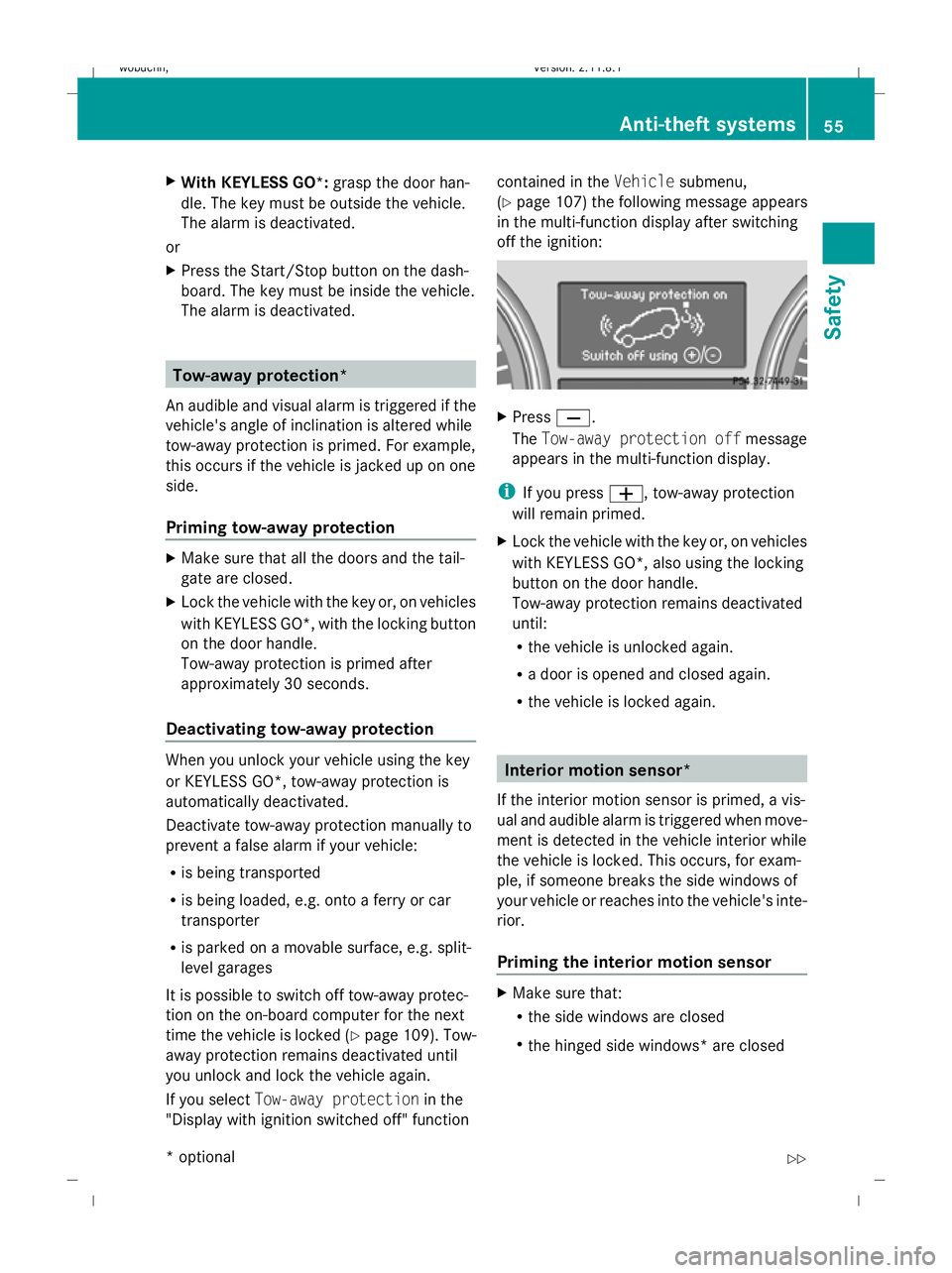
If you select Tow-away protection in the
"Display with ignition switched off" function contained in the
Vehiclesubmenu,
(Y page 107) the following message appears
in the multi-function display after switching
off the ignition: X
Press X.
The Tow-away protection off message
appears in the multi-function display.
i If you press W, tow-away protection
will remain primed.
X Lock the vehicle with the key or, on vehicles
with KEYLESS GO*, also using the locking
button on the door handle.
Tow-away protection remains deactivated
until:
R the vehicle is unlocked again.
R a door is opened and closed again.
R the vehicle is locked again. Interior motion sensor*
If the interior motion sensor is primed, a vis-
ual and audible alarm is triggered when move-
ment is detected in the vehicle interior while
the vehicle is locked. This occurs, for exam-
ple, if someone breaks the side windows of
your vehicle or reaches into the vehicle's inte-
rior.
Priming the interior motion sensor X
Make sure that:
R
the side windows are closed
R the hinged side windows* are closed Anti-theft systems
55Safety
* optional
X164_AKB; 2; 3, en-GB
wobuchh,
Version: 2.11.8.1 2009-03-31T14:14:58+02:00 - Seite 55 Z
Dateiname: 6515431202_buchblock.pdf; erzeugt am 01. Apr 2009 00:16:50; WK
Page 59 of 309
R
the sliding/tilting sunroof* is closed.
R there are no objects, e.g. mascots, hang-
ing on the rear-view mirror or on the grab
handles on the roof trim.
This will prevent false alarms.
X Make sure that all the doors and the tail-
gate are closed.
X Lock the vehicle with the key or, on vehicles
with KEYLESS GO*, also using the locking
button on the door handle.
The interior motion sensor is primed after
approximately 40 seconds.
Deactivating the interior motion sensor When you unlock your vehicle using the key
or KEYLESS GO *,the interior motion sensor
is automatically deactivated.
To prevent a false alarm, deactivate the inte-
rior motion sensor if you lock your vehicle
and:
R people or animals remain in the vehicle.
R a side window remains open.
R a hinged side window* remains open.
R the sliding/tilting sunroof* remains open.
It is possible to deactivate the interior motion
sensor using the on-board computer for the
next time the vehicle is locked
(Y page 109). The interior motion sensor
remains deactivated until you unlock and lock
the vehicle again.
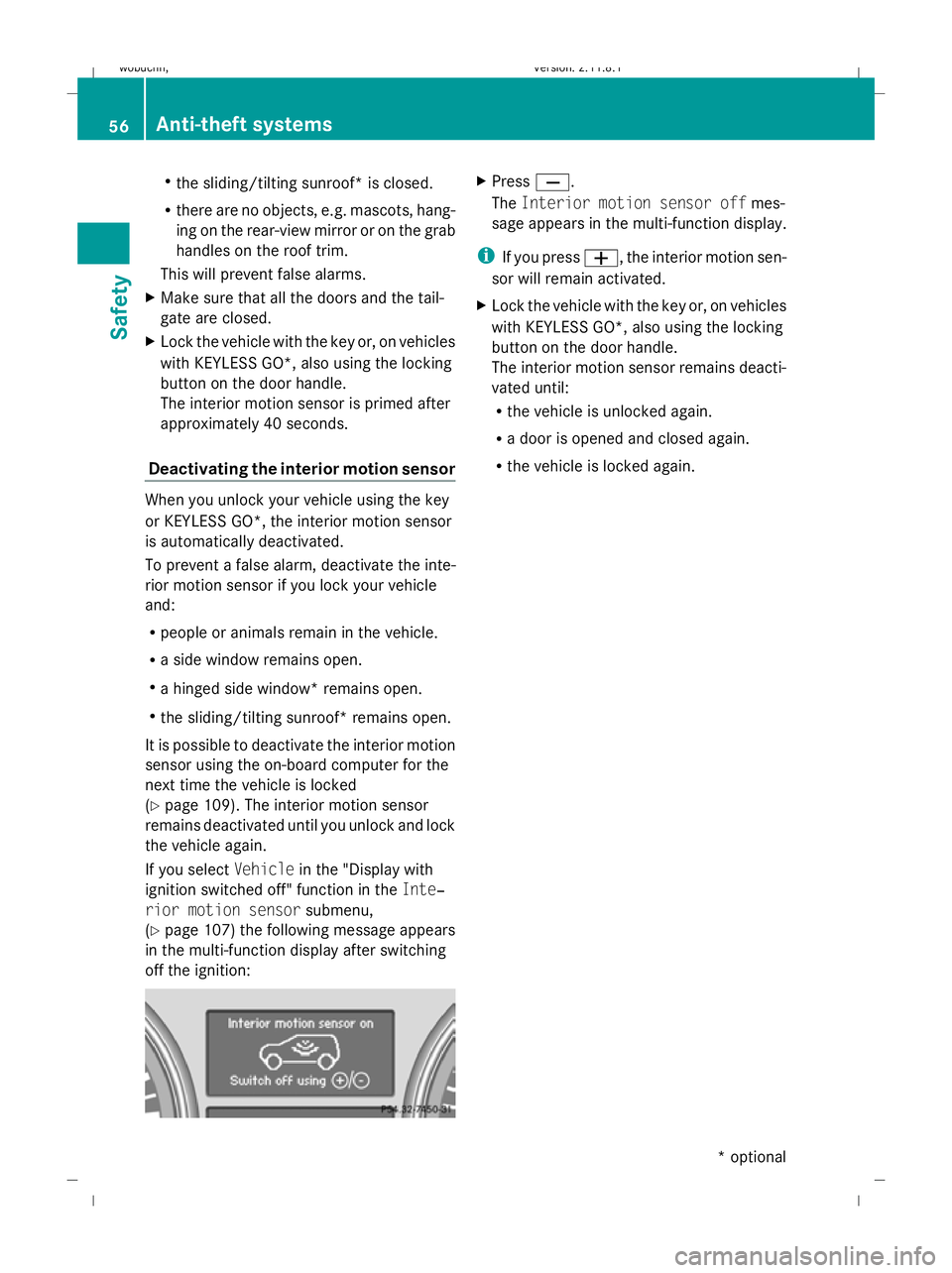
If you select Vehiclein the "Display with
ignition switched off" function in the Inte‐
rior motion sensor submenu,
(Y page 107) the following message appears
in the multi-function display after switching
off the ignition: X
Press X.
The Interior motion sensor off mes-
sage appears in the multi-function display.
i If you press W, the interior motion sen-
sor will remain activated.
X Lock the vehicle with the key or, on vehicles
with KEYLESS GO*, also using the locking
button on the door handle.
The interior motion sensor remains deacti-
vated until:
R
the vehicle is unlocked again.
R a door is opened and closed again.
R the vehicle is locked again. 56
Anti-theft systemsSafety
* optional
X164_AKB; 2; 3, en-GB
wobuchh
,V ersion: 2.11.8.1
2009-03-31T14:14:58+02:00 - Seite 56
Dateiname: 6515431202_buchblock.pdf; erzeugt am 01. Apr 2009 00:16:50; WK