display MERCEDES-BENZ GL SUV 2009 Service Manual
[x] Cancel search | Manufacturer: MERCEDES-BENZ, Model Year: 2009, Model line: GL SUV, Model: MERCEDES-BENZ GL SUV 2009Pages: 309, PDF Size: 10.27 MB
Page 112 of 309
X
Press the &button to select Belt
adjustment.
X Press the WorX button to activate
or deactivate Belt adjustment.
Switching the fold in mirrors when lock-
ing* function on/off
When you activate the Fold in mirrors
when locking function, the exterior mirrors
are folded in when the vehicle is locked. When
you switch on the ignition, the exterior mir-
rors fold out again.
If the function is activated and you fold in the
exterior mirrors using the button on the door
(Y page 73), the exterior mirrors do not fold
out automatically. The exterior mirrors can
then only be folded out using the button on
the door.
X Press VorU on the steering wheel
to select the Settings... menu.
X Press the &button to select submenus.
X Press the WorX button to select the
Convenience submenu.
X Press the &button to select Fold in
mirrors when locking.
X Press the WorX button to activate
or deactivate the Fold in mirrors when
locking feature.
X Press the &,VorU button to
select a different display. Additional functions menu
In the Additional functions menu, you can:
R activate/deactivate the distance warning
function*
R set DSR (Y page 109)
R prime/deactivate tow-away protec-
tion* (Y page 109)
R prime/deactivate the interior motion sen-
sor* (Y page 110) Activating/deactivating the distance
warning function* This function is only available with Dis-
tronic* (Y
page 119).
X Press VorU on the steering wheel
to select the Additional functions menu.
X If the Distance warning function is not
displayed, press the &or* button
to select the Distance warning system.
X Press the WorX button to activate
or deactivate the Distance warning sys-
tem.
When the distance warning function is acti-
vated, the Äsymbol is shown in the
lower multi-function display.
X Press &, VorU to select a dif-
ferent display.
Setting DSR The
DSR Speed function allows you to set the
threshold speed (vehicle speed for driving
downhill) of the DSR (Y page 113) to a value
between 4 km/h and 18 km/h. The adjust-
ment is carried out in increments of 2 km/h.
X Press VorU on the steering wheel
to select the Additional functions menu.
X If the DSR Speed function is not displayed,
press the &or* button to select the
DSR.
X Press the WorX button to set the
desired threshold speed.
X Press &, VorU to select a dif-
ferent display.
Priming/deactivating tow-away protec-
tion* If you deactivate
Tow-away protection, it
will not be primed when you next lock the
vehicle. On-board computer
109Controls
* optional
X164_AKB; 2; 3, en-GB
wobuchh,
Version: 2.11.8.1 2009-03-31T14:14:58+02:00 - Seite 109 Z
Dateiname: 6515431202_buchblock.pdf; erzeugt am 01. Apr 2009 00:17:17; WK
Page 113 of 309
X
Press VorU on the steering wheel
to select the Additional functions menu.
X IfTow-away protection is not displayed,
press the &or* button to select
Tow-away protection.
X Press the WorX button to prime or
deactivate Tow-away protection.
X Press &, VorU to select a dif-
ferent display.
Priming/deactivating the interior
motion sensor* If you deactivate the
Interior motion sen‐
sor, it will not be primed when you next lock
the vehicle.
X Press VorU on the steering wheel
to select the Additional functions menu.
X If the Interior motion sensor function
is not displayed, press the &or*
button to select the Interior motion
sensor.
X Press the WorX button to prime or
deactivate the Interior motion sensor .
X Press &, VorU to select a dif-
ferent display. Trip computer menu
You can use the Trip computermenu to call
up or reset statistical data for your vehicle.
You can select kmormiles as the unit of
measurement for distance (Y page 103).
Trip computer "From start" or "From
reset" The values in the
From startsubmenu are
calculated from the start of a journey whilst
the values in the From resetsubmenu are
calculated from the last time the submenu
was reset. X
Press VorU on the steering wheel
to select the trip computer menu.
X Press &or* to select From start
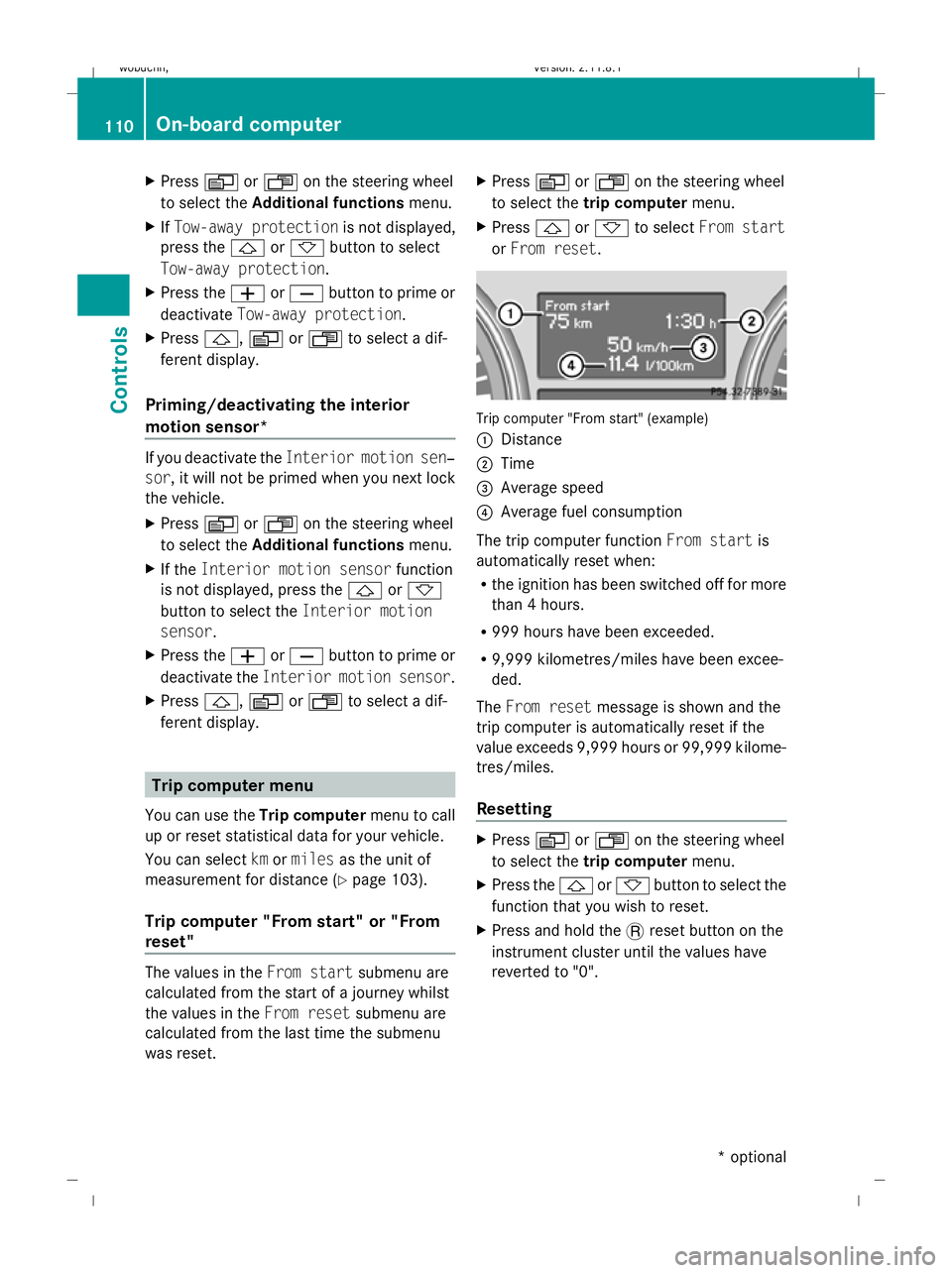
or From reset. Trip computer "From start" (example)
:
Distance
; Time
= Average speed
? Average fuel consumption
The trip computer function From startis
automatically reset when:
R the ignition has been switched off for more
than 4 hours.
R 999 hours have been exceeded.
R 9,999 kilometres/miles have been excee-
ded.
The From reset message is shown and the
trip computer is automatically reset if the
value exceeds 9,999 hours or 99,999 kilome-
tres/miles.
Resetting X
Press VorU on the steering wheel
to select the trip computer menu.
X Press the &or* button to select the
function that you wish to reset.
X Press and hold the .reset button on the
instrument cluster until the values have
reverted to "0". 110
On-board computerControls
* optional
X164_AKB; 2; 3, en-GB
wobuchh,
Version: 2.11.8.1 2009-03-31T14:14:58+02:00 - Seite 110
Dateiname: 6515431202_buchblock.pdf; erzeugt am 01. Apr 2009 00:17:17; WK
Page 114 of 309
Calling up the range
X
Press VorU on the steering wheel
to select the trip computer menu.
X Press &or* to select Range:
The multi-function display shows the esti-
mated range of the vehicle, based on the
current driving style and the fuel level. If
there is only a small amount of fuel remain-
ing in the fuel tank, a vehicle refuelling
C appears instead of the range.
Displaying current fuel consumption X
Press VorU to select the Trip com-
puter menu.
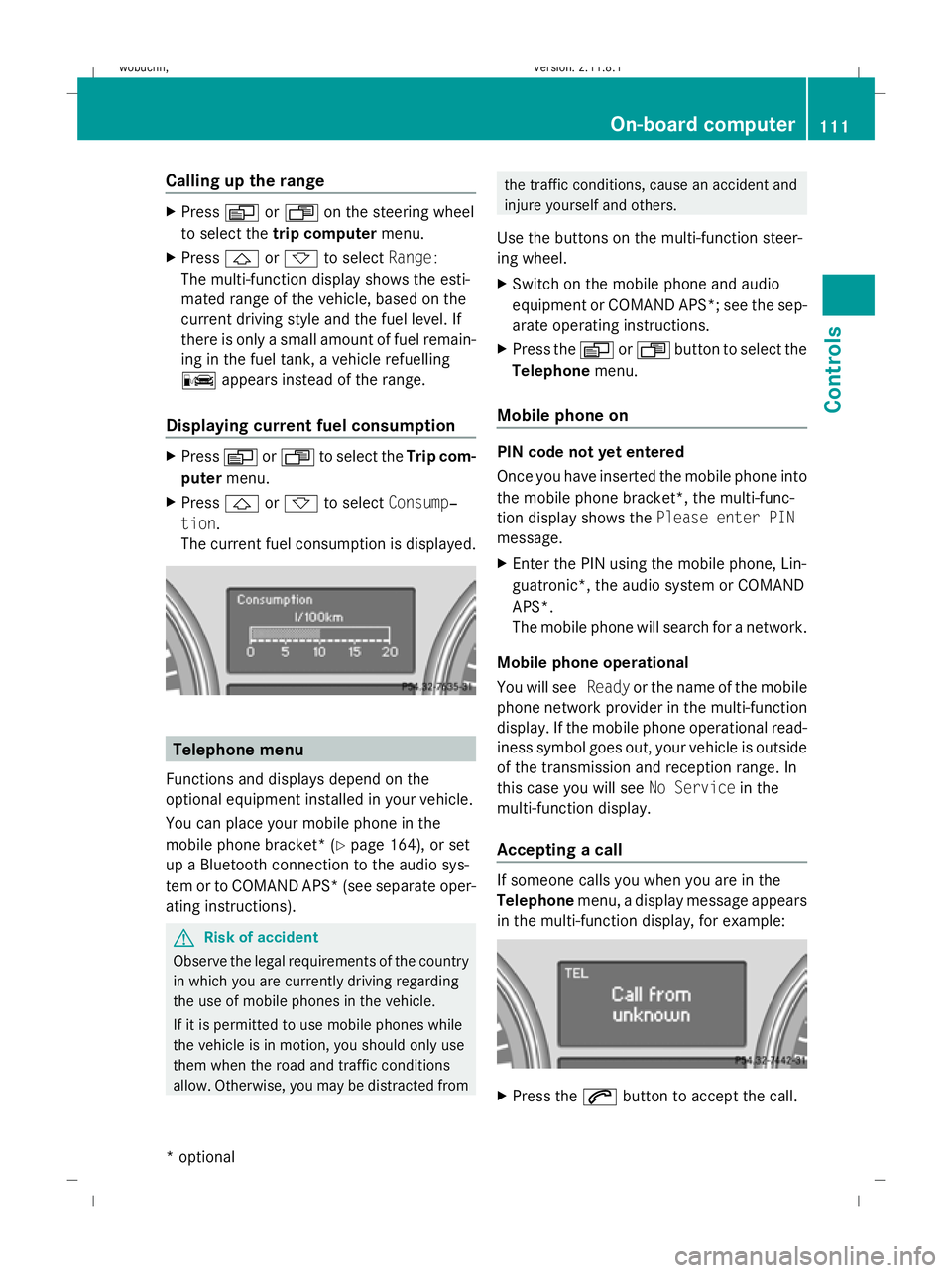
X Press &or* to select Consump‐
tion.
The current fuel consumption is displayed. Telephone menu
Functions and displays depend on the
optional equipment installed in your vehicle.
You can place your mobile phone in the
mobile phone bracket* (Y page 164), or set
up a Bluetooth connection to the audio sys-
tem or to COMAND APS* (see separate oper-
ating instructions). G
Risk of accident
Observe the legal requirements of the country
in which you are currently driving regarding
the use of mobile phones in the vehicle.
If it is permitted to use mobile phones while
the vehicle is in motion, you should only use
them when the road and traffic conditions
allow. Otherwise, you may be distracted from the traffic conditions, cause an accident and
injure yourself and others.
Use the buttons on the multi-function steer-
ing wheel.
X Switch on the mobile phone and audio
equipment or COMAND APS*; see the sep-
arate operating instructions.
X Press the VorU button to select the
Telephone menu.
Mobile phone on PIN code not yet entered
Once you have inserted the mobile phone into
the mobile phone bracket*, the multi-func-
tion display shows the Please enter PIN
message.
X Enter the PIN using the mobile phone, Lin-
guatronic*, the audio system or COMAND
APS*.
The mobile phone will search for a network.
Mobile phone operational
You will see Readyor the name of the mobile
phone network provider in the multi-function
display. If the mobile phone operational read-
iness symbol goes out, your vehicle is outside
of the transmission and reception range. In
this case you will see No Servicein the
multi-function display.
Accepting a call If someone calls you when you are in the
Telephone
menu, a display message appears
in the multi-function display, for example: X
Press the 6button to accept the call. On-board computer
111Controls
* optional
X164_AKB; 2; 3, en-GB
wobuchh,
Version: 2.11.8.1 2009-03-31T14:14:58+02:00 - Seite 111 Z
Dateiname: 6515431202_buchblock.pdf; erzeugt am 01. Apr 2009 00:17:18; WK
Page 116 of 309
0
or 1in the ignition. Failure to do this can
cause damage to the drive train or the
brake system.
! A function or performance test should
only be carried out on a twin-axle dyna-
mometer. If you wish to operate the vehicle
on such a dynamometer, please consult a
Mercedes-Benz Service Centre in advance.
You could otherwise damage the drive train
or the brake system. DSR (Downhill Speed Regulation)
You will find information about driving off-
road in the "Operation" section
(Y page 188).
DSR is an aid to assist you when driving down-
hill. It keeps the speed of travel at the speed
set on the on-board computer (Y page 109).
The steeper the downhill gradient, the greater
the DSR braking effect on the vehicle. When
driving on flat stretches of road or on an uphill
gradient, the DSR braking effect is minimal or
non-existent. G
Risk of accident
DSR is only an aid designed to assist you when
driving downhill. You are responsible for keep-
ing control of the vehicle and for assessing
whether the downhill gradient can be man-
aged.
When activating DSR the vehicle may brake
suddenly due to DSR intervening. This is
dependent on the downhill gradient and the
difference between the current speed and the
speed set. DSR may not always be able to
keep to the set speed, depending on road sur-
face and tyre conditions. You could lose con-
trol of the vehicle and cause an accident.
Select a set speed suitable for the prevailing
conditions and when necessary, apply the
brakes manually.
DSR controls the vehicle’s speed when
DIRECT SELECT lever positions D,Rand Nare
selected. You can drive at a higher or a lower speed than that set on the on-board computer
at any time by braking or accelerating. G
Risk of accident
If you depress the accelerator pedal with DSR
activated, then the set speed can be excee-
ded. Drive downhill with special care and
always keep in mind that DSR brakes the vehi-
cle as soon as you remove your foot from the
accelerator pedal. The vehicle may be heavily
braked by DSR depending on the gradient and
the difference between the vehicle's road
speed and the set speed. You could lose con-
trol of the vehicle and cause an accident.
The speed is set to 6 km/h at the factory.
Activating/deactivating DSR Activating
You can only activate DSR when driving at a
speeds below 30 km/h.
X
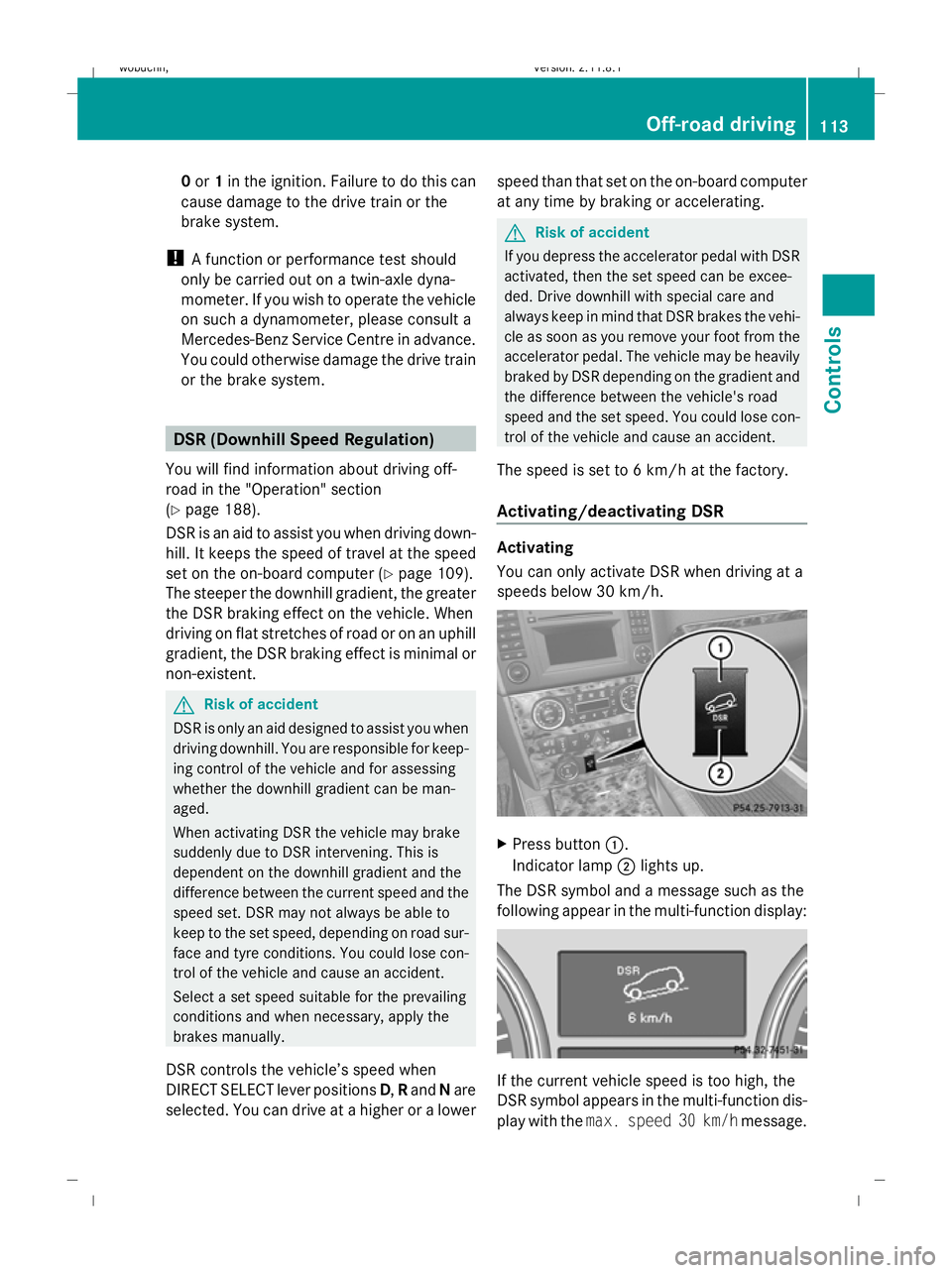
Press button :.
Indicator lamp ;lights up.
The DSR symbol and a message such as the
following appear in the multi-function display: If the current vehicle speed is too high, the
DSR symbol appears in the multi-function dis-
play with the
max. speed 30 km/h message. Off-road driving
113Controls
X164_AKB; 2; 3, en-GB
wobuchh, Version: 2.11.8.1 2009-03-31T14:14:58+02:00 - Seite 113 Z
Dateiname: 6515431202_buchblock.pdf; erzeugt am 01. Apr 2009 00:17:18; WK
Page 117 of 309
Deactivating
X
Press button :.
Indicator lamp ;goes out.
The DSR symbol appears in the multi-func-
tion display with the Offmessage.
DSR switches off automatically if you drive
faster than 35 km/h. The DSR symbol
appears in the multi-function display with the
Off message. You also hear a warning tone.
Changing the set speed while the vehi-
cle is in motion When DSR is activated, you can change the
set speed to a value between 4 km/h and
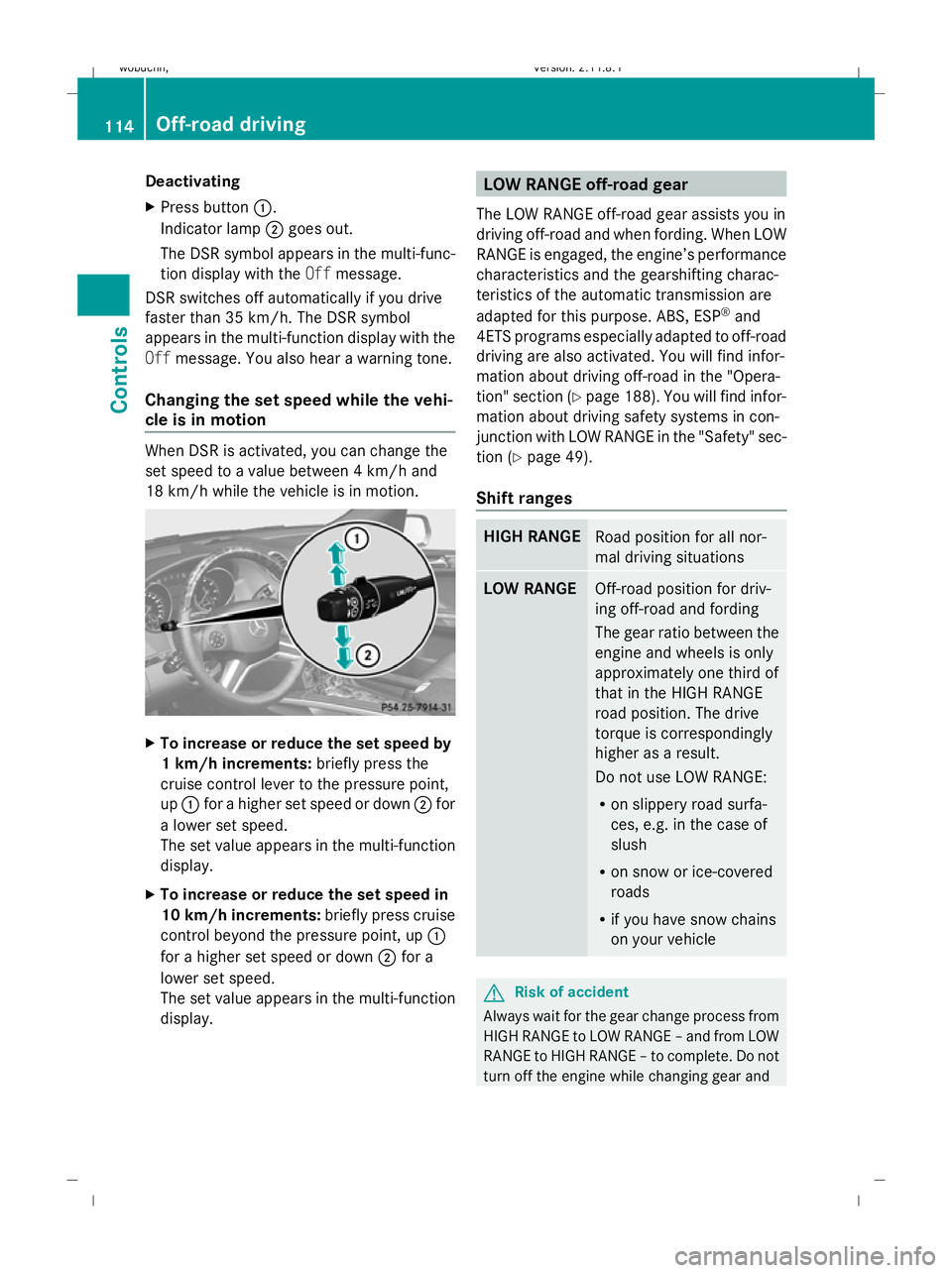
18 km/h while the vehicle is in motion. X
To increase or reduce the set speed by
1 km/h increments: briefly press the
cruise control lever to the pressure point,
up : for a higher set speed or down ;for
a lower set speed.
The set value appears in the multi-function
display.
X To increase or reduce the set speed in
10 km/h increments: briefly press cruise
control beyond the pressure point, up :
for a higher set speed or down ;for a
lower set speed.
The set value appears in the multi-function
display. LOW RANGE off-road gear
The LOW RANGE off-road gear assists you in
driving off-road and when fording. When LOW
RANGE is engaged, the engine’s performance
characteristics and the gearshifting charac-
teristics of the automatic transmission are
adapted for this purpose. ABS, ESP ®
and
4ETS programs especially adapted to off-road
driving are also activated. You will find infor-
mation about driving off-road in the "Opera-
tion" section (Y page 188). You will find infor-
mation about driving safety systems in con-
junction with LOW RANGE in the "Safety" sec-
tion (Y page 49).
Shift ranges HIGH RANGE
Road position for all nor-
mal driving situations
LOW RANGE
Off-road position for driv-
ing off-road and fording
The gear ratio between the
engine and wheels is only
approximately one third of
that in the HIGH RANGE
road position. The drive
torque is correspondingly
higher as a result.
Do not use LOW RANGE:
R on slippery road surfa-
ces, e.g. in the case of
slush
R on snow or ice-covered
roads
R if you have snow chains
on your vehicle G
Risk of accident
Always wait for the gear change process from
HIGH RANGE to LOW RANGE – and from LOW
RANGE to HIGH RANGE – to complete. Do not
turn off the engine while changing gear and 114
Off-road drivingCont
rols
X164_AKB; 2; 3, en-GB
wobuchh, Version: 2.11.8.1 2009-03-31T14:14:58+02:00 - Seite 114
Dateiname: 6515431202_buchblock.pdf; erzeugt am 01. Apr 2009 00:17:19; WK
Page 118 of 309
do not switch the automatic transmission to
another gear.
If you do not wait for the gear change process
to complete, it may not be correctly imple-
mented. The transfer case may then be in
neutral and the connection between the
engine and the drive axles may be disen-
gaged. The vehicle could then move freely,
even if a gear is engaged, and could inadver-
tently start moving, particularly if it is on a
slope.
Observe the messages in the multi-function
display.
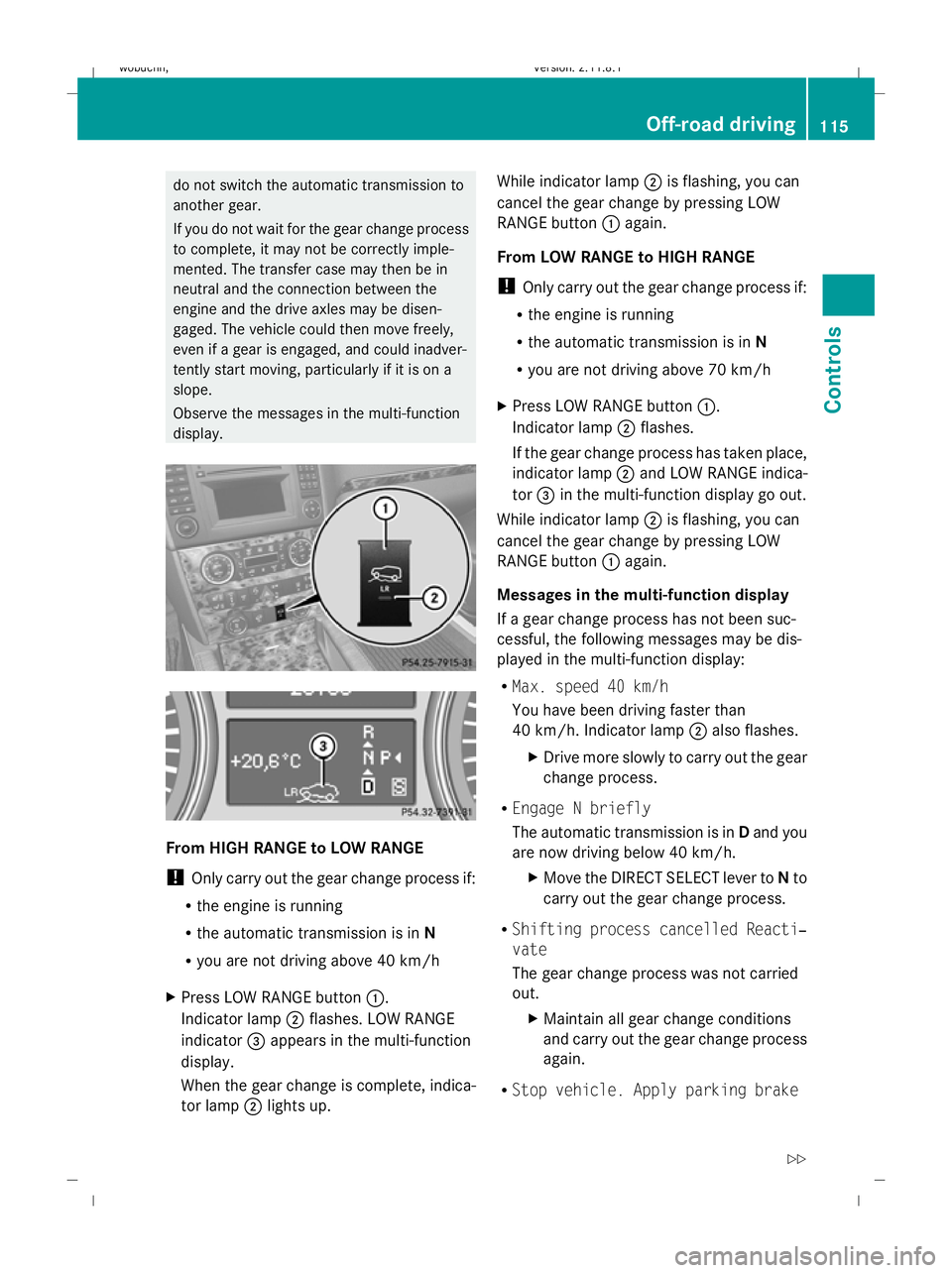
From HIGH RANGE to LOW RANGE
! Only carry out the gear change process if:
R the engine is running
R the automatic transmission is in N
R you are not driving above 40 km/h
X Press LOW RANGE button :.
Indicator lamp ;flashes. LOW RANGE
indicator =appears in the multi-function
display.
When the gear change is complete, indica-
tor lamp ;lights up. While indicator lamp
;is flashing, you can
cancel the gear change by pressing LOW
RANGE button :again.
From LOW RANGE to HIGH RANGE
! Only carry out the gear change process if:
R the engine is running
R the automatic transmission is in N
R you are not driving above 70 km/h
X Press LOW RANGE button :.
Indicator lamp ;flashes.
If the gear change process has taken place,
indicator lamp ;and LOW RANGE indica-
tor =in the multi-function display go out.
While indicator lamp ;is flashing, you can
cancel the gear change by pressing LOW
RANGE button :again.
Messages in the multi-function display
If a gear change process has not been suc-
cessful, the following messages may be dis-
played in the multi-function display:
R Max. speed 40 km/h
You have been driving faster than
40 km/h. Indicator lamp ;also flashes.
X Drive more slowly to carry out the gear
change process.
R Engage N briefly
The automatic transmission is in Dand you
are now driving below 40 km/h.
XMove the DIRECT SELECT lever to Nto
carry out the gear change process.
R Shifting process cancelled Reacti‐
vate
The gear change process was not carried
out.
XMaintain all gear change conditions
and carry out the gear change process
again.
R Stop vehicle. Apply parking brake Off-road driving
115Controls
X164_AKB; 2; 3, en-GB
wobuchh, Version: 2.11.8.1 2009-03-31T14:14:58+02:00 - Seite 115 Z
Dateiname: 6515431202_buchblock.pdf; erzeugt am 01. Apr 2009 00:17:19; WK
Page 120 of 309
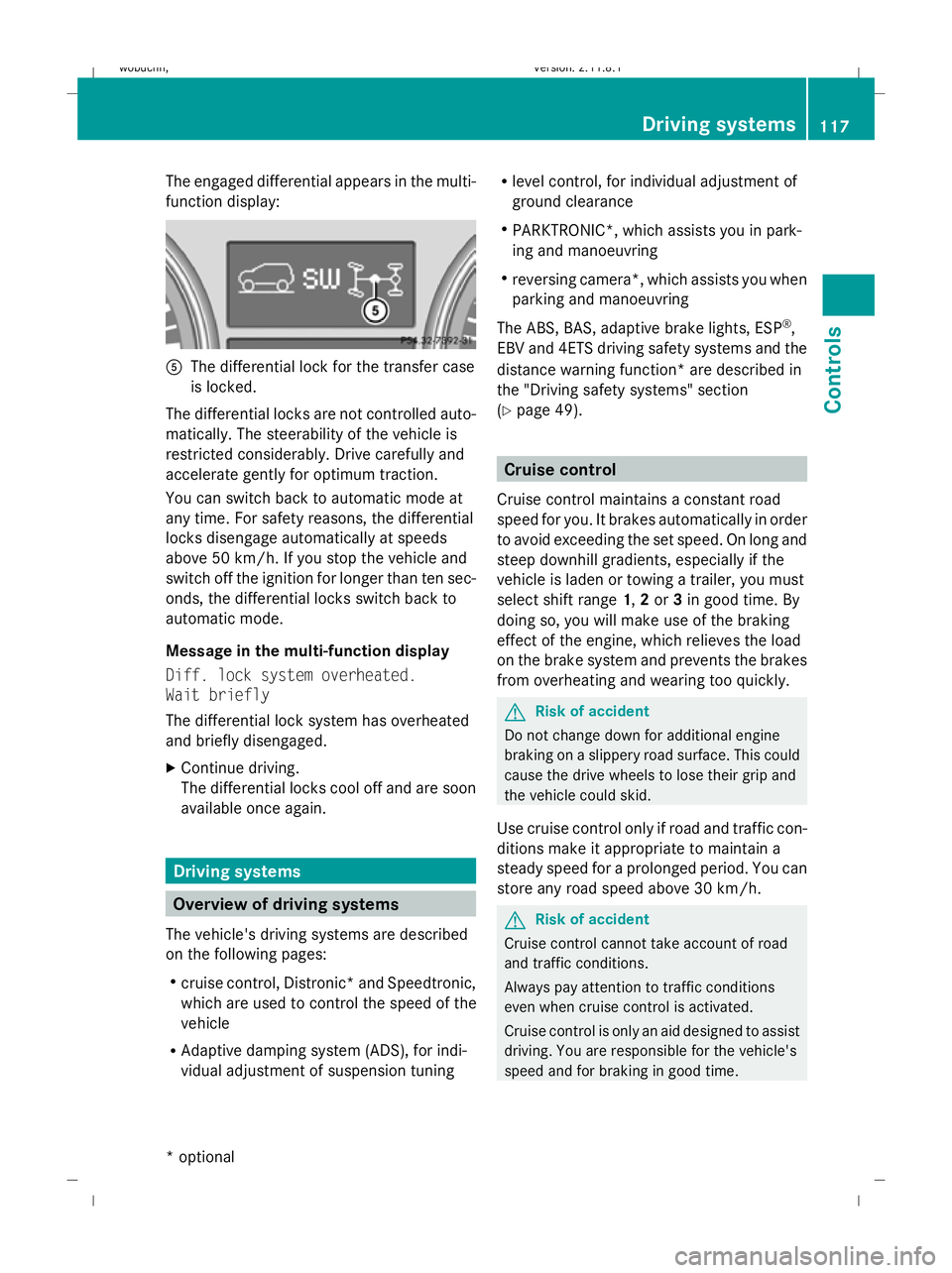
The engaged differential appears in the multi-
function display:
A
The differential lock for the transfer case
is locked.
The differential locks are not controlled auto-
matically. The steerability of the vehicle is
restricted considerably. Drive carefully and
accelerate gently for optimum traction.
You can switch back to automatic mode at
any time. For safety reasons, the differential
locks disengage automatically at speeds
above 50 km/h. If you stop the vehicle and
switch off the ignition for longer than ten sec-
onds, the differential locks switch back to
automatic mode.
Message in the multi-function display
Diff. lock system overheated.
Wait briefly
The differential lock system has overheated
and briefly disengaged.
X Continue driving.
The differential locks cool off and are soon
available once again. Driving systems
Overview of driving systems
The vehicle's driving systems are described
on the following pages:
R cruise control, Distronic *and Speedtronic,
which are used to control the speed of the
vehicle
R Adaptive damping system (ADS), for indi-
vidual adjustment of suspension tuning R
level control, for individual adjustment of
ground clearance
R PARKTRONIC*, which assists you in park-
ing and manoeuvring
R reversing camera*, which assists you when
parking and manoeuvring
The ABS, BAS, adaptive brake lights, ESP ®
,
EBV and 4ETS driving safety systems and the
distance warning function* are described in
the "Driving safety systems" section
(Y page 49). Cruise control
Cruise control maintains a constant road
speed for you. It brakes automatically in order
to avoid exceeding the set speed. On long and
steep downhill gradients, especially if the
vehicle is laden or towing a trailer, you must
select shift range 1,2or 3in good time. By
doing so, you will make use of the braking
effect of the engine, which relieves the load
on the brake system and prevents the brakes
from overheating and wearing too quickly. G
Risk of accident
Do not change down for additional engine
braking on a slippery road surface. This could
cause the drive wheels to lose their grip and
the vehicle could skid.
Use cruise control only if road and traffic con-
ditions make it appropriate to maintain a
steady speed for a prolonged period. You can
store any road speed above 30 km/h. G
Risk of accident
Cruise control cannot take account of road
and traffic conditions.
Always pay attention to traffic conditions
even when cruise control is activated.
Cruise control is only an aid designed to assist
driving. You are responsible for the vehicle's
speed and for braking in good time. Driving systems
117Controls
* optional
X164_AKB; 2; 3, en-GB
wobuchh
,V ersion: 2.11.8.1
2009-03-31T14:14:58+02:00 - Seite 117 Z
Dateiname: 6515431202_buchblock.pdf; erzeugt am 01. Apr 2009 00:17:20; WK
Page 121 of 309
G
Risk of accident
Do not use cruise control:
R in road and traffic conditions which do not
allow you to maintain a constant speed (e.g.
heavy traffic or winding roads). You could
otherwise cause an accident.
R on slippery roads. Braking or accelerating
could cause the drive wheels to lose trac-
tion and the vehicle could then skid.
R when there is poor visibility, e.g. due to fog,
heavy rain or snow
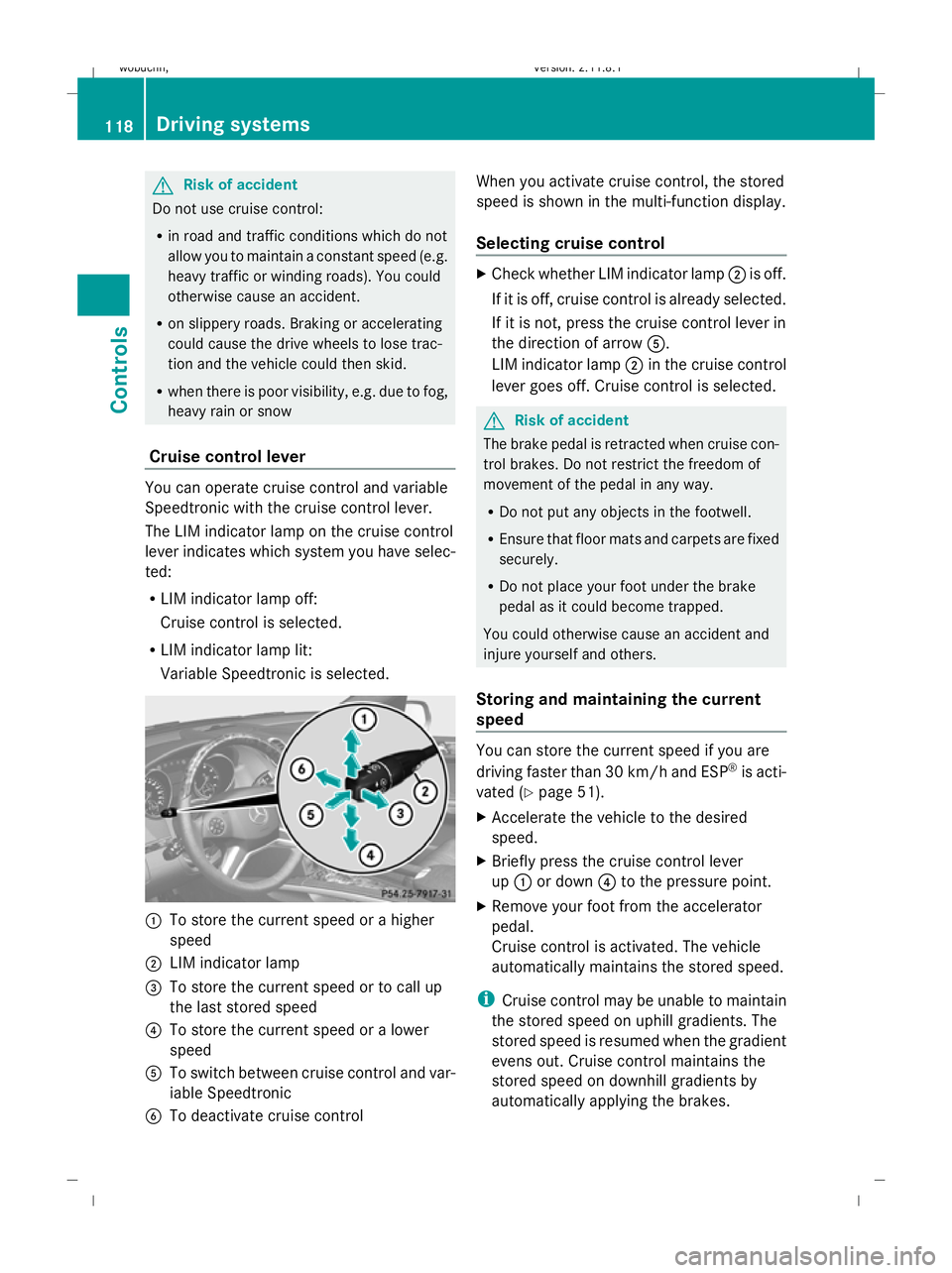
Cruise control lever You can operate cruise control and variable
Speedtronic with the cruise control lever.
The LIM indicator lamp on the cruise control
lever indicates which system you have selec-
ted:
R LIM indicator lamp off:
Cruise control is selected.
R LIM indicator lamp lit:
Variable Speedtronic is selected. :
To store the current speed or a higher
speed
; LIM indicator lamp
= To store the current speed or to call up
the last stored speed
? To store the current speed or a lower
speed
A To switch between cruise control and var-
iable Speedtronic
B To deactivate cruise control When you activate cruise control, the stored
speed is shown in the multi-function display.
Selecting cruise control X
Check whether LIM indicator lamp ;is off.
If it is off, cruise control is already selected.
If it is not, press the cruise control lever in
the direction of arrow A.
LIM indicator lamp ;in the cruise control
lever goes off. Cruise control is selected. G
Risk of accident
The brake pedal is retracted when cruise con-
trol brakes. Do not restrict the freedom of
movement of the pedal in any way.
R Do not put any objects in the footwell.
R Ensure that floor mats and carpets are fixed
securely.
R Do not place your foot under the brake
pedal as it could become trapped.
You could otherwise cause an accident and
injure yourself and others.
Storing and maintaining the current
speed You can store the current speed if you are
driving faster than 30 km/h and ESP ®
is acti-
vated (Y page 51).
X Accelerate the vehicle to the desired
speed.
X Briefly press the cruise control lever
up : or down ?to the pressure point.
X Remove your foot from the accelerator
pedal.
Cruise control is activated. The vehicle
automatically maintains the stored speed.
i Cruise control may be unable to maintain
the stored speed on uphill gradients. The
stored speed is resumed when the gradient
evens out. Cruise control maintains the
stored speed on downhill gradients by
automatically applying the brakes. 118
Driving systemsControls
X164_AKB; 2; 3, en-GB
wobuchh,
Version: 2.11.8.1 2009-03-31T14:14:58+02:00 - Seite 118
Dateiname: 6515431202_buchblock.pdf; erzeugt am 01. Apr 2009 00:17:20; WK
Page 122 of 309
Storing the current speed or calling up
the last stored speed
G
Risk of accident
Only select a stored speed if you know what
that speed is and whether it is suitable for the
current situation. Otherwise, sudden acceler-
ation or braking could endanger you or others.
X Briefly pull the cruise control lever towards
you =.
X Remove your foot from the accelerator
pedal.
The first time cruise control is activated, it
stores the current speed or regulates the
speed of the vehicle to the previously
stored speed.
Setting a speed X
Press the cruise control lever to the pres-
sure point, up :for a higher speed or
down ?for a lower speed.
X Keep the cruise control lever pressed until
the desired speed is reached.
X Release the cruise control lever.
The new speed is stored.
i Cruise control is not deactivated if you
depress the accelerator pedal. For exam-
ple, if you accelerate briefly to overtake,
cruise control adjusts the vehicle's speed
to the last speed stored after you have fin-
ished overtaking.
Making fine adjustments in 1 km/h
increments X
Briefly press the cruise control lever to the
pressure point, up :for a higher speed or
down ?for a lower speed.
The last speed stored is increased or
reduced. Adjustment in 10 km/h increments X
Briefly press the cruise control lever
beyond the pressure point, up :for a
higher speed or down ?for a lower speed.
The last speed stored is increased or
reduced.
Deactivating cruise control There are several ways to deactivate cruise
control:
X
Briefly press the cruise control lever for-
wards B.
or
X Brake.
or
X Briefly press the cruise control lever in the
direction of arrow A.
Variable Speedtronic is selected. LIM indi-
cator lamp ;in the cruise control lever
lights up.
Cruise control is automatically deactivated if:
R you depress the parking brake.
R you drive at less than 30 km/h
R ESP ®
intervenes or you deactivate ESP ®
R you shift the automatic transmission to N
while driving
If cruise control is deactivated, you will hear
a warning tone. You will see the Cruise
control Off message in the multi-function
display for approximately five seconds.
i The last speed stored is cleared when you
switch off the engine. Distronic*
i Distronic is not available in all countries.
Distronic regulates the speed and automati-
cally maintains the distance to the vehicle in
front. It brakes automatically in order to avoid
exceeding the set speed. On long and steep
downhill gradients, especially if the vehicle is Driving systems
119Controls
* optional
X164_AKB; 2; 3, en-GB
wobuchh,
Version: 2.11.8.1 2009-03-31T14:14:58+02:00 - Seite 119 Z
Dateiname: 6515431202_buchblock.pdf; erzeugt am 01. Apr 2009 00:17:21; WK
Page 124 of 309
G
Risk of accident
Distronic brakes your vehicle at a maximum
of 4m /s2
, depending on its speed. This cor-
responds to approximately 40% of your vehi-
cle's maximum brake force. You must also
apply the brakes yourself if this braking power
is not sufficient.
If Distronic detects a risk of collision with a
vehicle in front, an intermittent warning tone
sounds. In addition, the ·distance warn-
ing lamp in the instrument cluster lights up.
Brake to avoid a collision.
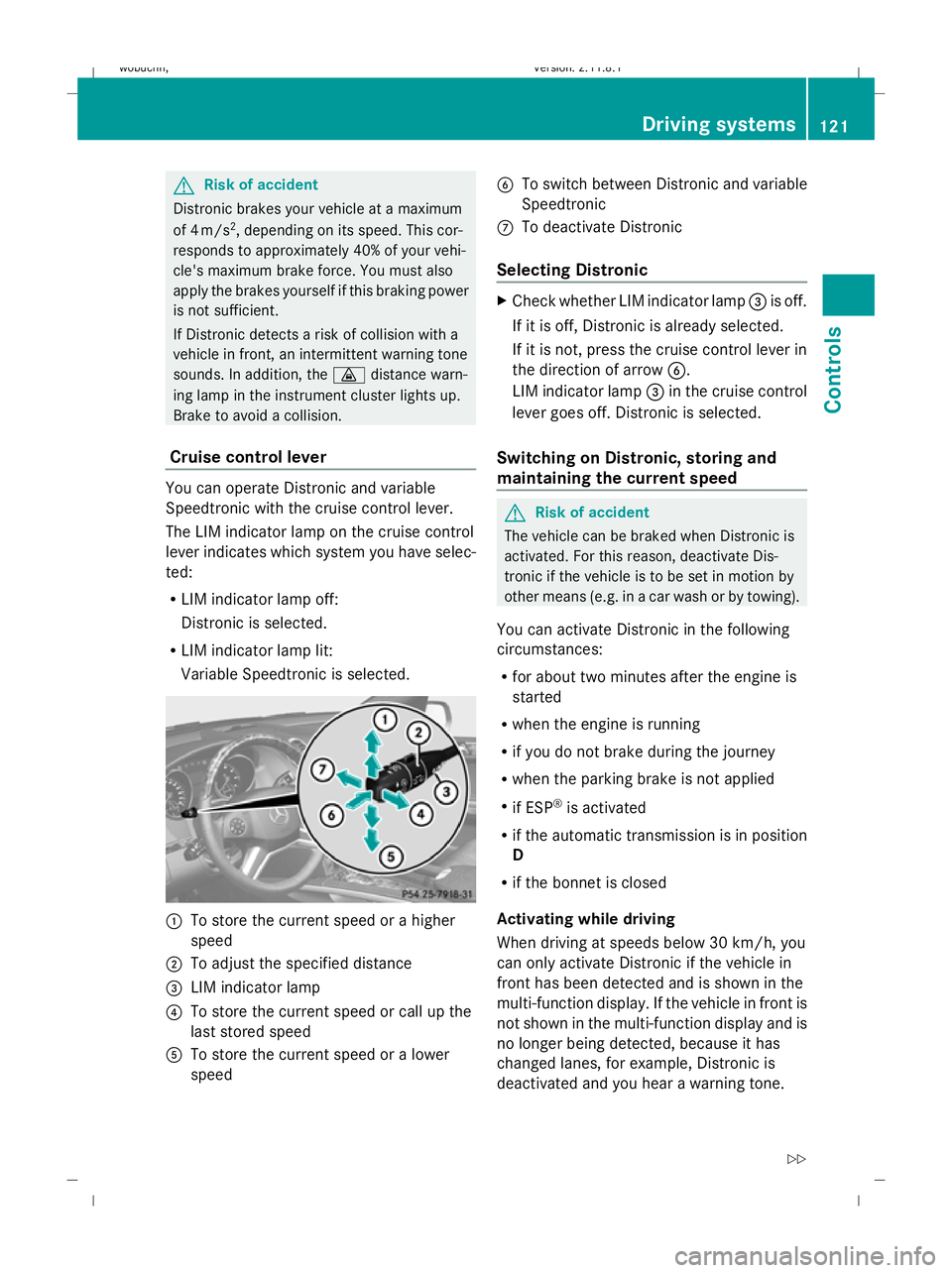
Cruise control lever You can operate Distronic and variable
Speedtronic with the cruise control lever.
The LIM indicator lamp on the cruise control
lever indicates which system you have selec-
ted:
R LIM indicator lamp off:
Distronic is selected.
R LIM indicator lamp lit:
Variable Speedtronic is selected. :
To store the current speed or a higher
speed
; To adjust the specified distance
= LIM indicator lamp
? To store the current speed or call up the
last stored speed
A To store the current speed or a lower
speed B
To switch between Distronic and variable
Speedtronic
C To deactivate Distronic
Selecting Distronic X
Check whether LIM indicator lamp =is off.
If it is off, Distronic is already selected.
If it is not, press the cruise control lever in
the direction of arrow B.
LIM indicator lamp =in the cruise control
lever goes off. Distronic is selected.
Switching on Distronic, storing and
maintaining the current speed G
Risk of accident
The vehicle can be braked when Distronic is
activated. For this reason, deactivate Dis-
tronic if the vehicle is to be set in motion by
other means (e.g. in a car wash or by towing).
You can activate Distronic in the following
circumstances:
R for about two minutes after the engine is
started
R when the engine is running
R if you do not brake during the journey
R when the parking brake is not applied
R if ESP ®
is activated
R if the automatic transmission is in position
D
R if the bonnet is closed
Activating while driving
When driving at speeds below 30 km/h, you
can only activate Distronic if the vehicle in
front has been detected and is shown in the
multi-function display. If the vehicle in front is
not shown in the multi-function display and is
no longer being detected, because it has
changed lanes, for example, Distronic is
deactivated and you hear a warning tone. Driving systems
121Controls
X164_AKB; 2; 3, en-GB
wobuchh,V ersion: 2.11.8.1
2009-03-31T14:14:58+02:00 - Seite 121 Z
Dateiname: 6515431202_buchblock.pdf; erzeugt am 01. Apr 2009 00:17:21; WK