display MERCEDES-BENZ GL SUV 2009 Manual Online
[x] Cancel search | Manufacturer: MERCEDES-BENZ, Model Year: 2009, Model line: GL SUV, Model: MERCEDES-BENZ GL SUV 2009Pages: 309, PDF Size: 10.27 MB
Page 202 of 309
G
Risk of accident
Do not carry the ball coupling in the vehicle
interior if it is not secured.
Otherwise, you and others could be injured by
the ball coupling being thrown around if you:
R brake sharply
R change direction suddenly
R are involved in an accident
Information on cleaning and care of the trailer
coupling can be found at (Y page 203).Trailer power supply
When it leaves the factory, your vehicle's
trailer socket outlet is equipped with a per-
manent power supply and a power supply that
is switched on via the ignition lock.
The permanent power supply is supplied via
trailer socket pin 9.
The power supply that is switched on via the
ignition lock is supplied via trailer socket
pin 10.
! You can connect consumers with a power
rating of up to 240 W to the permanent
power supply and up to 180 W to the power
supply that is switched on via the ignition
lock.
You must not charge a trailer battery using
the power supply.
The trailer's turn signal lamps are only guar-
anteed to function when bulbs are used.
You can obtain further information about
installing the trailer electrics from a qualified
specialist workshop, e.g. a Mercedes-Benz
Service Centre.
X To switch the connected power supply
on or off: turn the key in the ignition lock
to position 2or 0, respectively. Trailer with 7-pin connector
If your trailer has a 7-pin connector, you can
connect it to the 13-pin socket on the ball
coupling using an adapter or, if necessary, an
adapter cable. Both of these can be obtained
at a qualified specialist workshop, e.g. at a
Mercedes-Benz Service Centre.
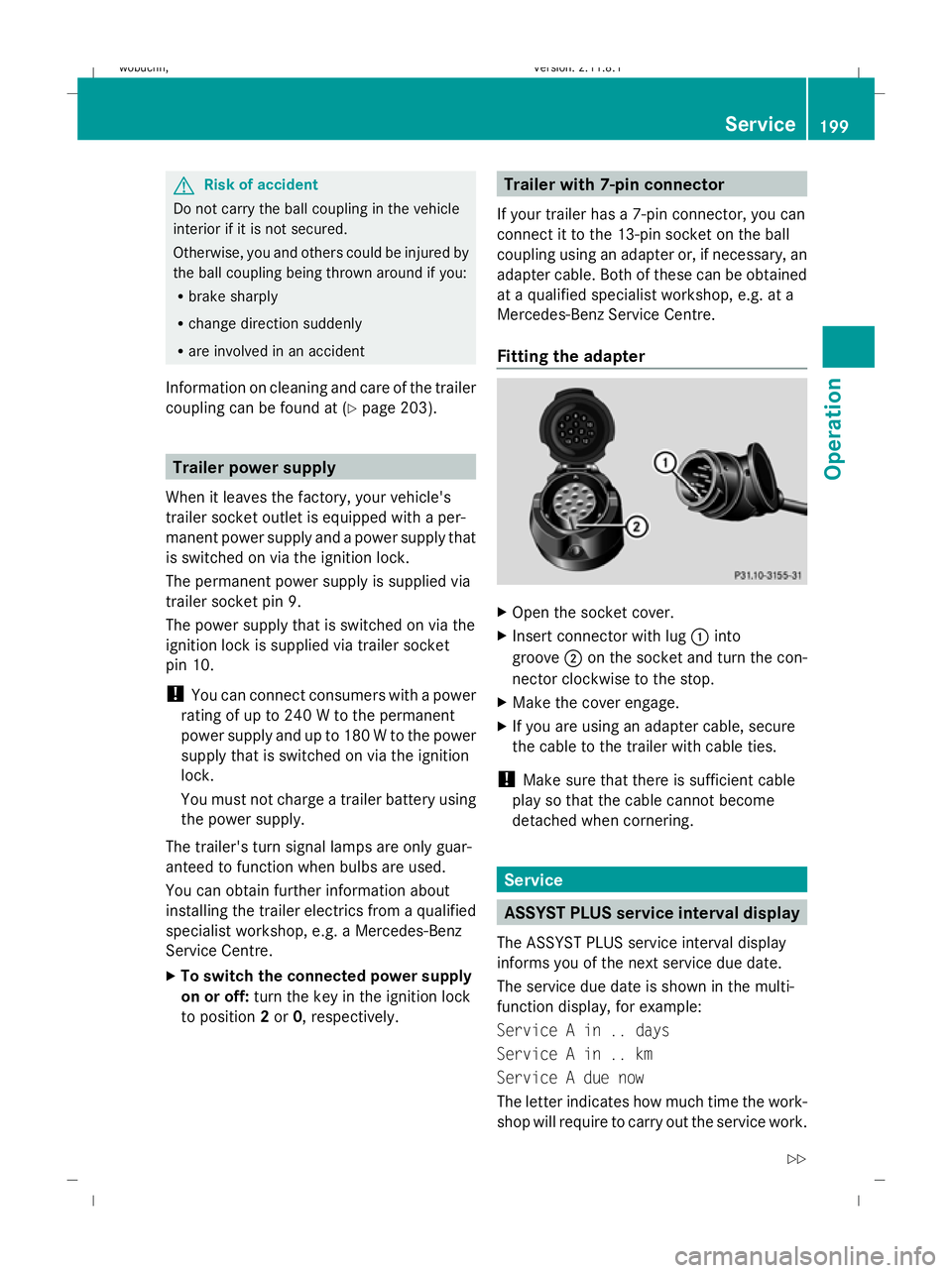
Fitting the adapter X
Open the socket cover.
X Insert connector with lug :into
groove ;on the socket and turn the con-
nector clockwise to the stop.
X Make the cover engage.
X If you are using an adapter cable, secure
the cable to the trailer with cable ties.
! Make sure that there is sufficient cable
play so that the cable cannot become
detached when cornering. Service
ASSYST PLUS service interval display
The ASSYST PLUS service interval display
informs you of the next service due date.
The service due date is shown in the multi-
function display, for example:
Service A in .. days
Service A in .. km
Service A due now
The letter indicates how much time the work-
shop will require to carry out the service work. Service
199Operation
X164_AKB; 2; 3, en-GB
wobuchh, Version: 2.11.8.1 2009-03-31T14:14:58+02:00 - Seite 199 Z
Dateiname: 6515431202_buchblock.pdf; erzeugt am 01. Apr 2009 00:17:52; WK
Page 203 of 309
The letters displayed range from
Afor a short
service duration (approx. 1 hour) to Hfor a
long service duration (approx. 8 hours).
The ASSYST PLUS service interval display
does not take into account any periods of
time during which the battery is disconnec-
ted.
Maintaining the time-dependent service
schedule:
X Note down the service due date displayed
before disconnecting the battery.
or
X Subtract the battery disconnection periods
from the service date shown on the display
after reconnecting the battery.
Hiding a service message X
Press the .reset button on the instru-
ment cluster (Y page 25).
Service overdue A display message is shown in the multi-func-
tion display, for example:
Service A exceeded by .. days
Service A exceeded by .. km
You will also hear a warning tone.
i If you fail to have the service performed
by the specified date, you may be violating
applicable laws. Your warranty may be inva-
lidated and goodwill settlements may be
refused.
Calling up a service due date X
Switch on the ignition.
X Press VorU to select the standard
display menu on the steering wheel
(Y page 99).
X Press &or* to select the service
information.
The multi-function display shows the
¯ symbol and the service due date. AdBlue
®
service indicator
i For Blue-TEC vehicles only.
The BlueTEC exhaust gas aftertreatment
must be operated with a reducing agent
(AdBlue ®
) in order for it to function correctly.
AdBlue ®
is topped up as part of maintenance
work. Under normal operating conditions, a
full tank of AdBlue ®
should last until the next
service due date.
Depending on how and where the vehicle is
used, there may be an increase in the
AdBlue ®
consumption. If the AdBlue ®
supply
does not last until the next service, it will be
necessary to top it up sooner.
The following messages tell you about the
AdBlue ®
supply:
Refill AdBlue at workshop See Own‐
er's Manual
Refill AdBlue at workshop No start
in: ... km
Before taking a trip with your vehicle outside
Europe, have the AdBlue ®
supply checked
and, if necessary, topped up at a qualified
specialist workshop. Before using your vehi-
cle for an extended period in countries out-
side Europe, contact a qualified specialist
workshop.
! Have the AdBlue ®
tank topped up at a
qualified specialist workshop only. The
vehicle may otherwise be damaged or
soiled.
Damage or consequential damage is not
covered by the Mercedes-Benz implied
warranty.
You can obtain general information about
BlueTEC exhaust gas aftertreatment and
AdBlue ®
from any Mercedes-Benz Service
Centre.
Further information about AdBlue ®
(Y page 288). 200
ServiceOperation
X164_AKB; 2; 3, en-GB
wobuchh,
Version: 2.11.8.1 2009-03-31T14:14:58+02:00 - Seite 200
Dateiname: 6515431202_buchblock.pdf; erzeugt am 01. Apr 2009 00:17:53; WK
Page 207 of 309
!
Do not clean the ball coupling with a high-
pressure cleaner. Do not use solvents. :
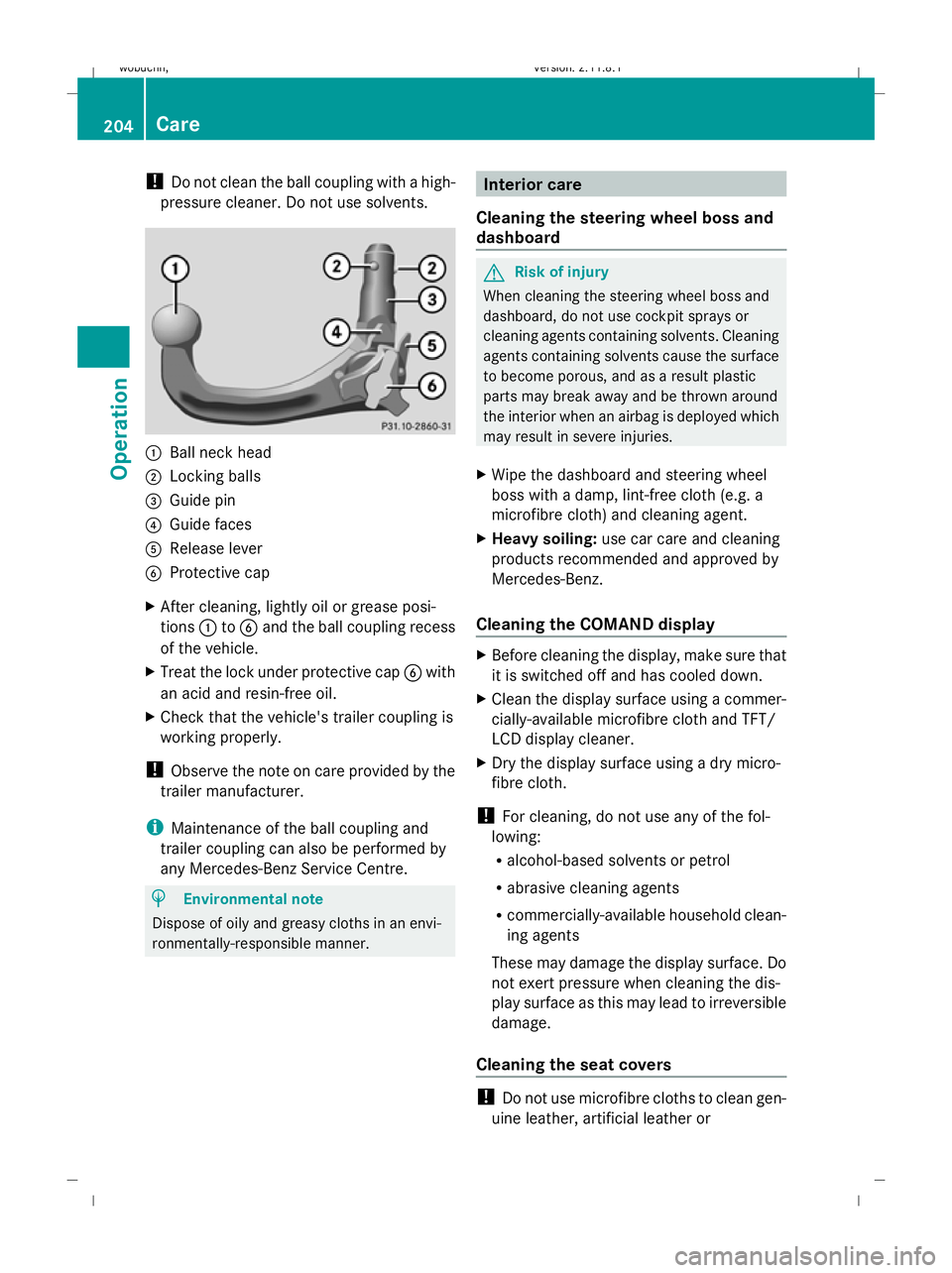
Ball neck head
; Locking balls
= Guide pin
? Guide faces
A Release lever
B Protective cap
X After cleaning, lightly oil or grease posi-
tions :toB and the ball coupling recess
of the vehicle.
X Treat the lock under protective cap Bwith
an acid and resin-free oil.
X Check that the vehicle's trailer coupling is
working properly.
! Observe the note on care provided by the
trailer manufacturer.
i Maintenance of the ball coupling and
trailer coupling can also be performed by
any Mercedes-Benz Service Centre. H
Environmental note
Dispose of oily and greasy cloths in an envi-
ronmentally-responsible manner. Interior care
Cleaning the steering wheel boss and
dashboard G
Risk of injury
When cleaning the steering wheel boss and
dashboard, do not use cockpit sprays or
cleaning agents containing solvents. Cleaning
agents containing solvents cause the surface
to become porous, and as a result plastic
parts may break away and be thrown around
the interior when an airbag is deployed which
may result in severe injuries.
X Wipe the dashboard and steering wheel
boss with a damp, lint-free cloth (e.g. a
microfibre cloth) and cleaning agent.
X Heavy soiling: use car care and cleaning
products recommended and approved by
Mercedes-Benz.
Cleaning the COMAND display X
Before cleaning the display, make sure that
it is switched off and has cooled down.
X Clean the display surface using a commer-
cially-available microfibre cloth and TFT/
LCD display cleaner.
X Dry the display surface using a dry micro-
fibre cloth.
! For cleaning, do not use any of the fol-
lowing:
R alcohol-based solvents or petrol
R abrasive cleaning agents
R commercially-available household clean-
ing agents
These may damage the display surface. Do
not exert pressure when cleaning the dis-
play surface as this may lead to irreversible
damage.
Cleaning the seat covers !
Do not use microfibre cloths to clean gen-
uine leather, artificial leather or 204
CareOperation
X164_AKB; 2; 3, en-GB
wobuchh,
Version: 2.11.8.1 2009-03-31T14:14:58+02:00 - Seite 204
Dateiname: 6515431202_buchblock.pdf; erzeugt am 01. Apr 2009 00:17:54; WK
Page 210 of 309
Where will I find...?
...........................208
Display messages ............................. 211
Troubleshooting ................................ 233
Locking/unlocking in an emer-
gency ................................................. 250
Resetting triggered NECK-PRO
head restraints .................................. 252
Replacing batteries (key and
remote control) ................................. 253
Changing bulbs ................................. 254
Replacing the wiper blades ..............261
Flat tyre ............................................. 262
Battery ............................................... 272
Jump-starting .................................... 276
Towing and tow-starting ..................277
Fuses .................................................. 280 207Practical advice
X164_AKB; 2; 3, en-GB
wobuchh,
Version: 2.11.8.1 2009-03-31T14:14:58+02:00 - Seite 207
Dateiname: 6515431202_buchblock.pdf; erzeugt am 01. Apr 2009 00:17:55; WK
Page 214 of 309
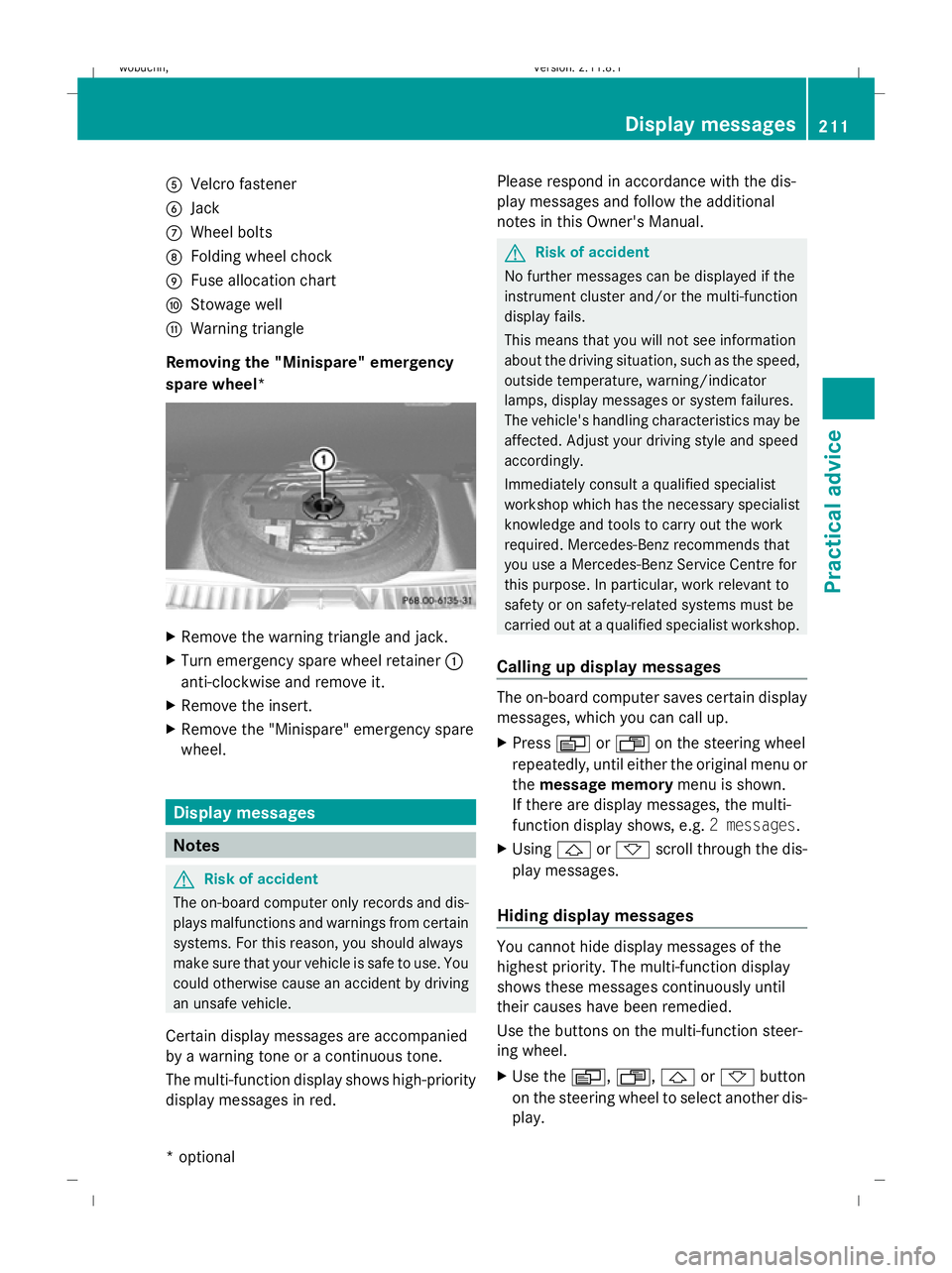
A
Velcro fastener
B Jack
C Wheel bolts
D Folding wheel chock
E Fuse allocation chart
F Stowage well
G Warning triangle
Removing the "Minispare" emergency
spare wheel* X
Remove the warning triangle and jack.
X Turn emergency spare wheel retainer :
anti-clockwise and remove it.
X Remove the insert.
X Remove the "Minispare" emergency spare
wheel. Display messages
Notes
G
Risk of accident
The on-board computer only records and dis-
plays malfunctions and warnings from certain
systems. For this reason, you should always
make sure that your vehicle is safe to use. You
could otherwise cause an accident by driving
an unsafe vehicle.
Certain display messages are accompanied
by a warning tone or a continuous tone.
The multi-function display shows high-priority
display messages in red. Please respond in accordance with the dis-
play messages and follow the additional
notes in this Owner's Manual. G
Risk of accident
No further messages can be displayed if the
instrument cluster and/or the multi-function
display fails.
This means that you will not see information
about the driving situation, such as the speed,
outside temperature, warning/indicator
lamps, display messages or system failures.
The vehicle's handling characteristics may be
affected. Adjust your driving style and speed
accordingly.
Immediately consult a qualified specialist
workshop which has the necessary specialist
knowledge and tools to carry out the work
required. Mercedes-Benz recommends that
you use a Mercedes-Benz Service Centre for
this purpose. In particular, work relevant to
safety or on safety-related systems must be
carried out at a qualified specialist workshop.
Calling up display messages The on-board computer saves certain display
messages, which you can call up.
X
Press VorU on the steering wheel
repeatedly, until either the original menu or
the message memory menu is shown.
If there are display messages, the multi-
function display shows, e.g. 2 messages.
X Using &or* scroll through the dis-
play messages.
Hiding display messages You cannot hide display messages of the
highest priority. The multi-function display
shows these messages continuously until
their causes have been remedied.
Use the buttons on the multi-function steer-
ing wheel.
X
Use the V,U,&or* button
on the steering wheel to select another dis-
play. Display messages
211Practical advice
* optional
X164_AKB; 2; 3, en-GB
wobuchh,
Version: 2.11.8.1 2009-03-31T14:14:58+02:00 - Seite 211 Z
Dateiname: 6515431202_buchblock.pdf; erzeugt am 01. Apr 2009 00:17:58; WK
Page 215 of 309
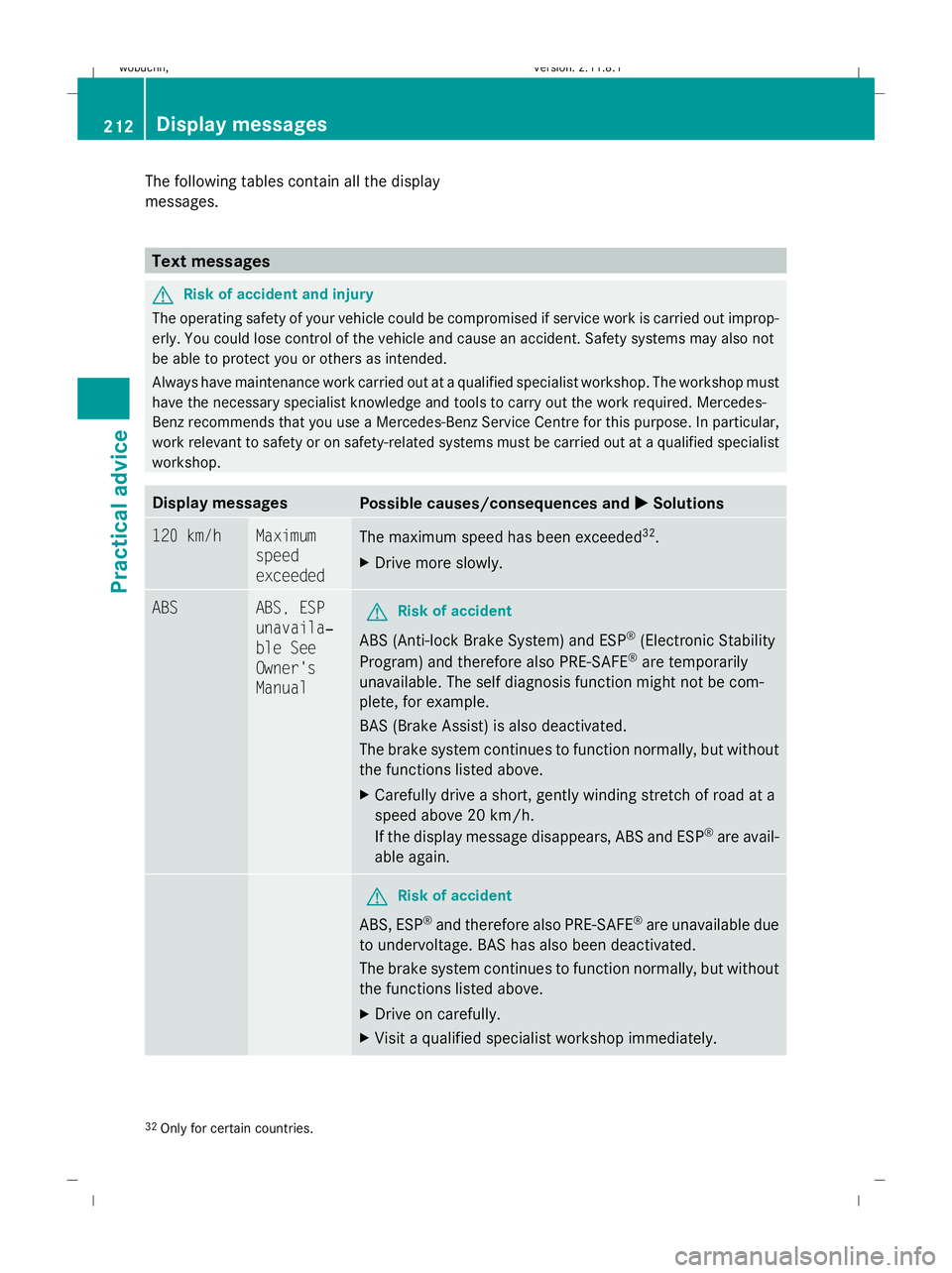
The following tables contain all the display
messages. Text messages
G
Risk of accident and injury
The operating safety of your vehicle could be compromised if service work is carried out improp-
erly. You could lose control of the vehicle and cause an accident. Safety systems may also not
be able to protect you or others as intended.
Always have maintenance work carried out at a qualified specialist workshop. The workshop must
have the necessary specialist knowledge and tools to carry out the work required. Mercedes-
Benz recommends that you use a Mercedes-Benz Service Centre for this purpose. In particular,
work relevant to safety or on safety-related systems must be carried out at a qualified specialist
workshop. Display messages
Possible causes/consequences and
X
X Solutions 120 km/h Maximum
speed
exceeded
The maximum speed has been exceeded
32
.
X Drive more slowly. ABS ABS, ESP
unavaila‐
ble See
Owner's
Manual
G
Risk of accident
ABS (Anti-lock Brake System) and ESP ®
(Electronic Stability
Program) and therefore also PRE-SAFE ®
are temporarily
unavailable. The self diagnosis function might not be com-
plete, for example.
BAS (Brake Assist) is also deactivated.
The brake system continues to function normally, but without
the functions listed above.
X Carefully drive a short, gently winding stretch of road at a
speed above 20 km/h.
If the display message disappears, ABS and ESP ®
are avail-
able again. G
Risk of accident
ABS, ESP ®
and therefore also PRE-SAFE ®
are unavailable due
to undervoltage. BAS has also been deactivated.
The brake system continues to function normally, but without
the functions listed above.
X Drive on carefully.
X Visit a qualified specialist workshop immediately. 32
Only for certain countries. 212
Display messagesPractical advice
X164_AKB; 2; 3, en-GB
wobuchh,
Version: 2.11.8.1 2009-03-31T14:14:58+02:00 - Seite 212
Dateiname: 6515431202_buchblock.pdf; erzeugt am 01. Apr 2009 00:17:58; WK
Page 216 of 309
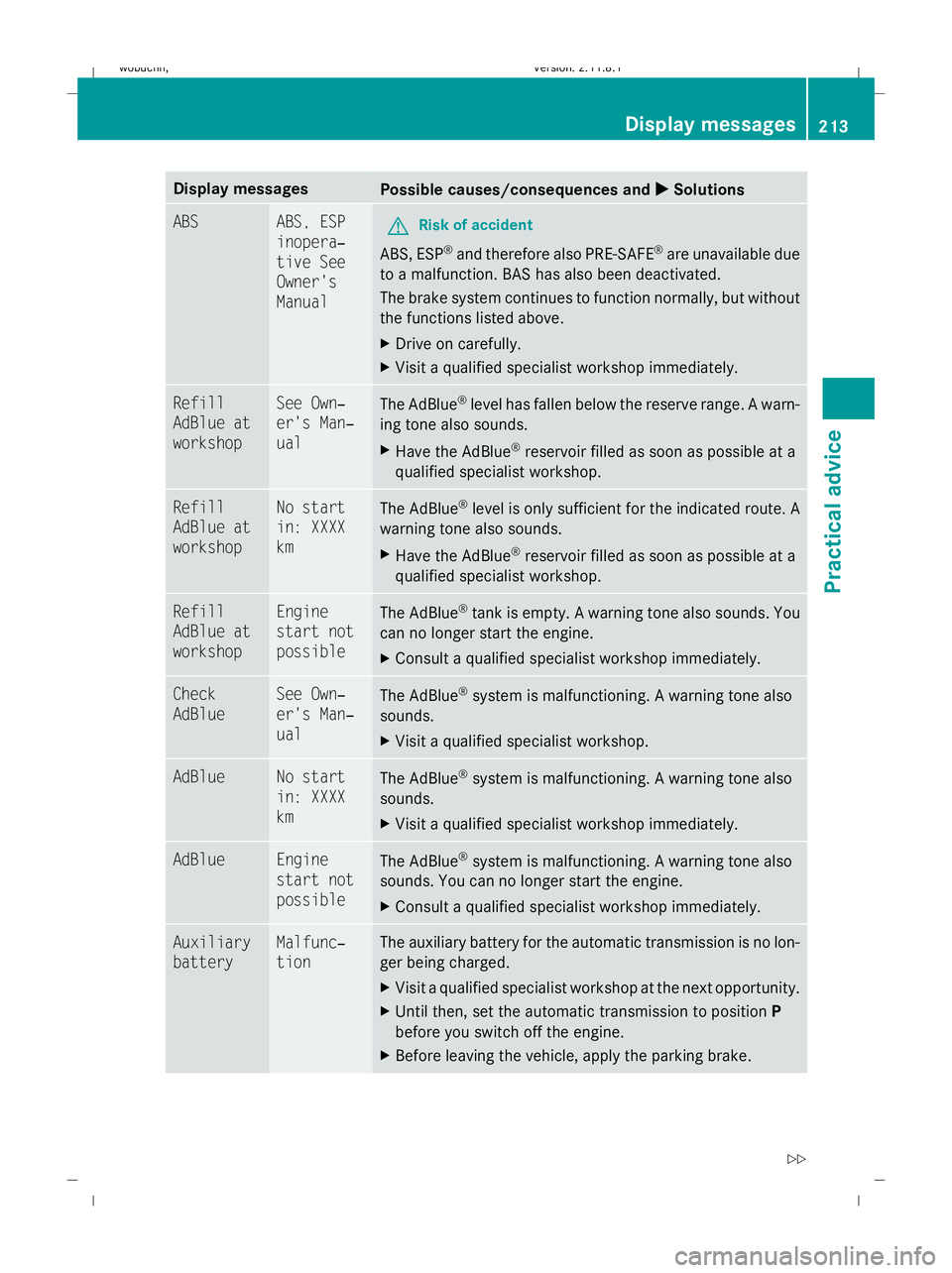
Display messages
Possible causes/consequences and
X
X Solutions ABS ABS, ESP
inopera‐
tive See
Owner's
Manual
G
Risk of accident
ABS, ESP ®
and therefore also PRE-SAFE ®
are unavailable due
to a malfunction. BAS has also been deactivated.
The brake system continues to function normally, but without
the functions listed above.
X Drive on carefully.
X Visit a qualified specialist workshop immediately. Refill
AdBlue at
workshop See Own‐
er's Man‐
ual
The AdBlue
®
level has fallen below the reserve range. A warn-
ing tone also sounds.
X Have the AdBlue ®
reservoir filled as soon as possible at a
qualified specialist workshop. Refill
AdBlue at
workshop No start
in: XXXX
km
The AdBlue
®
level is only sufficient for the indicated route. A
warning tone also sounds.
X Have the AdBlue ®
reservoir filled as soon as possible at a
qualified specialist workshop. Refill
AdBlue at
workshop Engine
start not
possible
The AdBlue
®
tank is empty. A warning tone also sounds. You
can no longer start the engine.
X Consult a qualified specialist workshop immediately. Check
AdBlue See Own‐
er's Man‐
ual
The AdBlue
®
system is malfunctioning. A warning tone also
sounds.
X Visit a qualified specialist workshop. AdBlue No start
in: XXXX
km
The AdBlue
®
system is malfunctioning. A warning tone also
sounds.
X Visit a qualified specialist workshop immediately. AdBlue Engine
start not
possible
The AdBlue
®
system is malfunctioning. A warning tone also
sounds. You can no longer start the engine.
X Consult a qualified specialist workshop immediately. Auxiliary
battery Malfunc‐
tion The auxiliary battery for the automatic transmission is no lon-
ger being charged.
X
Visit a qualified specialist workshop at the next opportunity.
X Until then, set the automatic transmission to position P
before you switch off the engine.
X Before leaving the vehicle, apply the parking brake. Display
messages
213Practical advice
X164_AKB; 2; 3, en-GB
wobuchh,V ersion: 2.11.8.1
2009-03-31T14:14:58+02:00 - Seite 213 Z
Dateiname: 6515431202_buchblock.pdf; erzeugt am 01. Apr 2009 00:17:58; WK
Page 217 of 309
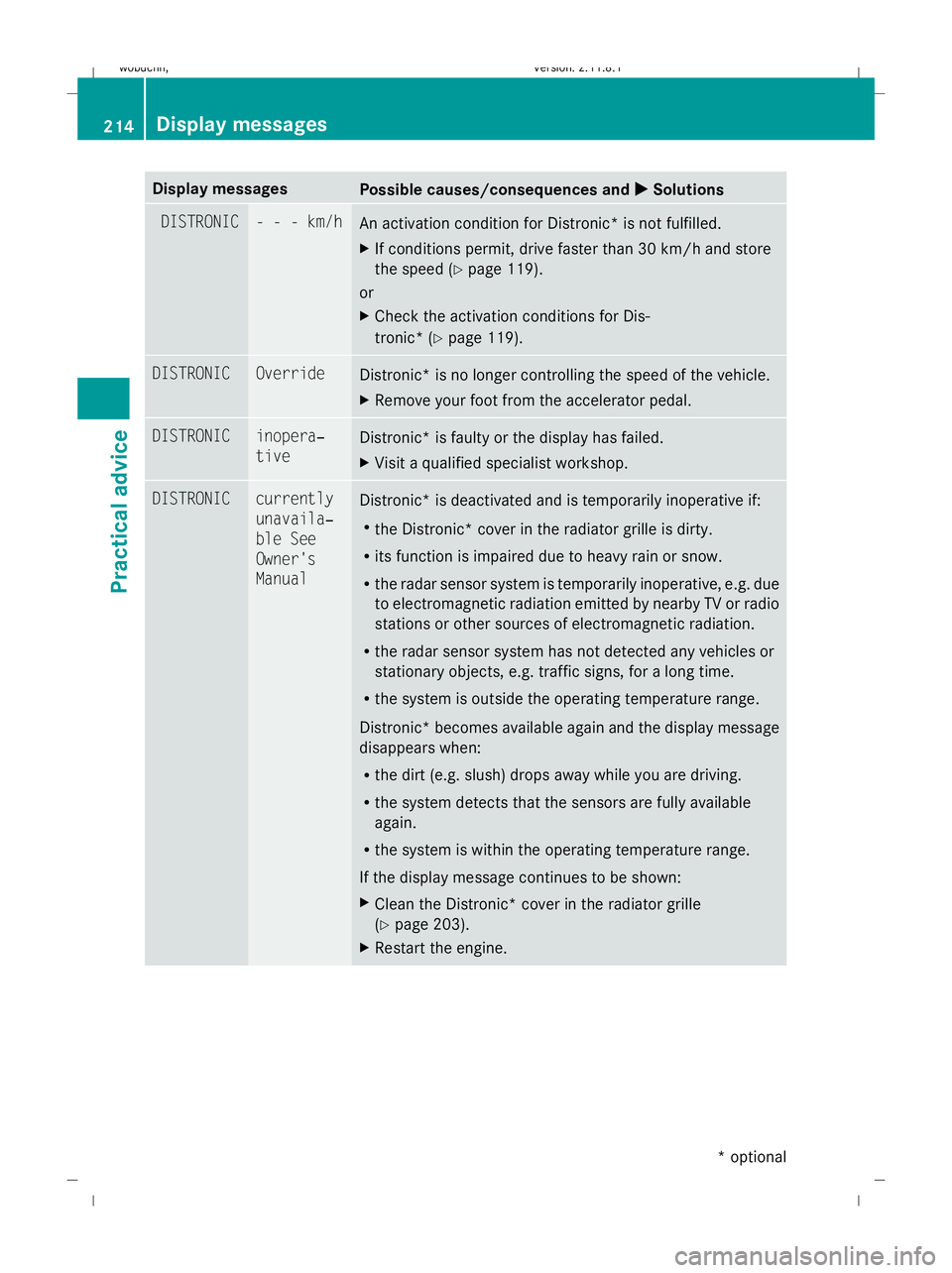
Display messages
Possible causes/consequences and
X
X Solutions DISTRONIC - - - km/h
An activation condition for Distronic* is not fulfilled.
X
If conditions permit, drive faster than 30 km/h and store
the speed (Y page 119).
or
X Check the activation conditions for Dis-
tronic* (Y page 119). DISTRONIC Override
Distronic* is no longer controlling the speed of the vehicle.
X
Remove your foot from the accelerator pedal. DISTRONIC inopera‐
tive
Distronic* is faulty or the display has failed.
X
Visit a qualified specialist workshop. DISTRONIC currently
unavaila‐
ble See
Owner's
Manual
Distronic* is deactivated and is temporarily inoperative if:
R
the Distronic* cover in the radiator grille is dirty.
R its function is impaired due to heavy rain or snow.
R the radar sensor system is temporarily inoperative, e.g. due
to electromagnetic radiation emitted by nearby TV or radio
stations or other sources of electromagnetic radiation.
R the radar sensor system has not detected any vehicles or
stationary objects, e.g. traffic signs, for a long time.
R the system is outside the operating temperature range.
Distronic* becomes available again and the display message
disappears when:
R the dirt (e.g. slush) drops away while you are driving.
R the system detects that the sensors are fully available
again.
R the system is within the operating temperature range.
If the display message continues to be shown:
X Clean the Distronic* cover in the radiator grille
(Y page 203).
X Restart the engine. 214
Display
messagesPractical advice
* optional
X164_AKB; 2; 3, en-GB
wobuchh
,V ersion: 2.11.8.1
2009-03-31T14:14:58+02:00 - Seite 214
Dateiname: 6515431202_buchblock.pdf; erzeugt am 01. Apr 2009 00:17:59; WK
Page 218 of 309
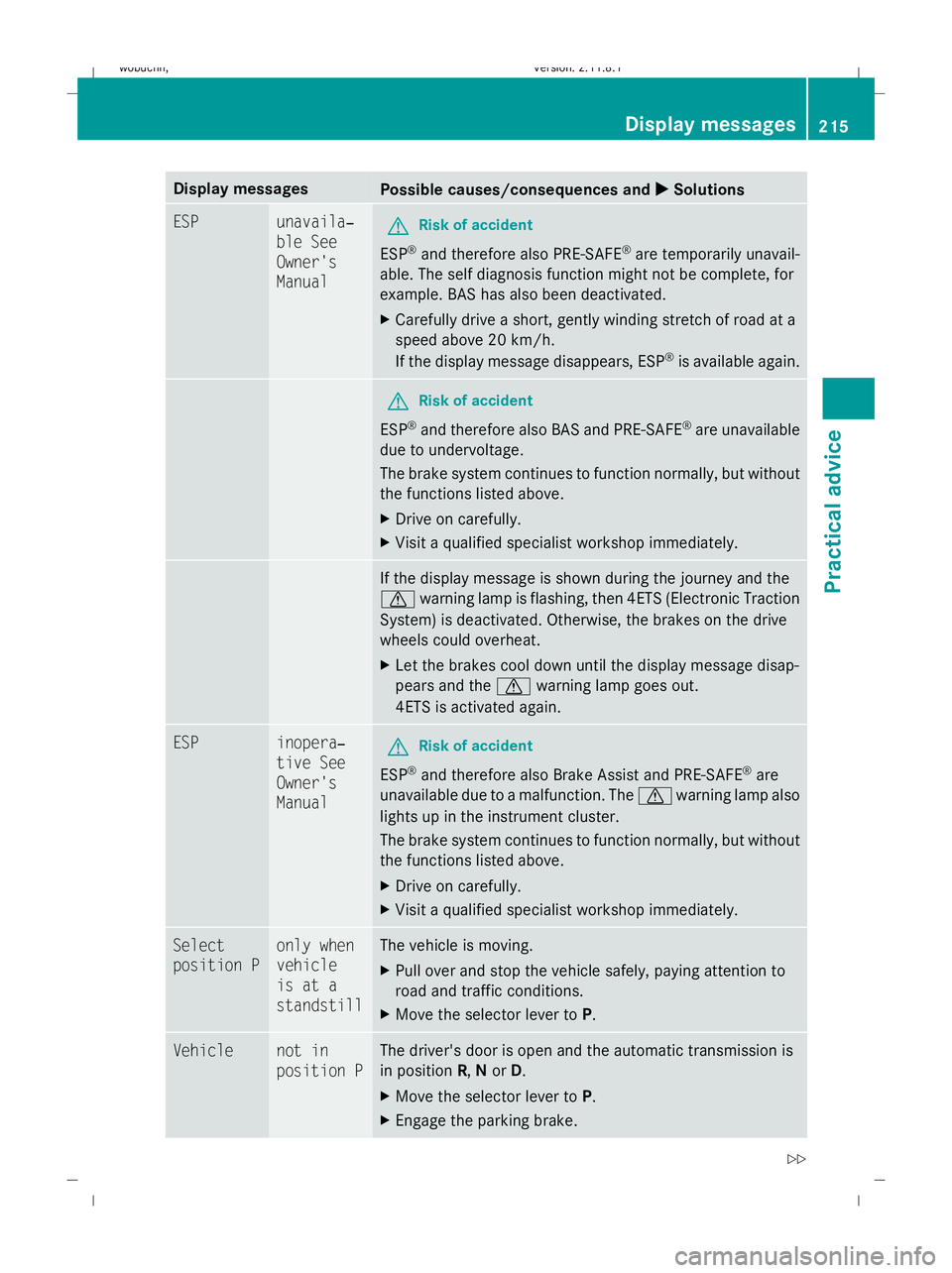
Display messages
Possible causes/consequences and
X
X Solutions ESP unavaila‐
ble See
Owner's
Manual
G
Risk of accident
ESP ®
and therefore also PRE-SAFE ®
are temporarily unavail-
able. The self diagnosis function might not be complete, for
example. BAS has also been deactivated.
X Carefully drive a short, gently winding stretch of road at a
speed above 20 km/h.
If the display message disappears, ESP ®
is available again. G
Risk of accident
ESP ®
and therefore also BAS and PRE-SAFE ®
are unavailable
due to undervoltage.
The brake system continues to function normally, but without
the functions listed above.
X Drive on carefully.
X Visit a qualified specialist workshop immediately. If the display message is shown during the journey and the
d
warning lamp is flashing, then 4ETS (Electronic Traction
System) is deactivated. Otherwise, the brakes on the drive
wheels could overheat.
X Let the brakes cool down until the display message disap-
pears and the dwarning lamp goes out.
4ETS is activated again. ESP inopera‐
tive See
Owner's
Manual
G
Risk of accident
ESP ®
and therefore also Brake Assist and PRE-SAFE ®
are
unavailable due to a malfunction. The dwarning lamp also
lights up in the instrument cluster.
The brake system continues to function normally, but without
the functions listed above.
X Drive on carefully.
X Visit a qualified specialist workshop immediately. Select
position P only when
vehicle
is at a
standstill The vehicle is moving.
X
Pull over and stop the vehicle safely, paying attention to
road and traffic conditions.
X Move the selector lever to P.Vehicle not in
position P The driver's door is open and the automatic transmission is
in position R,Nor D.
X Move the selector lever to P.
X Engage the parking brake. Display
messages
215Practical advice
X164_AKB; 2; 3, en-GB
wobuchh,V ersion: 2.11.8.1
2009-03-31T14:14:58+02:00 - Seite 215 Z
Dateiname: 6515431202_buchblock.pdf; erzeugt am 01. Apr 2009 00:17:59; WK
Page 219 of 309
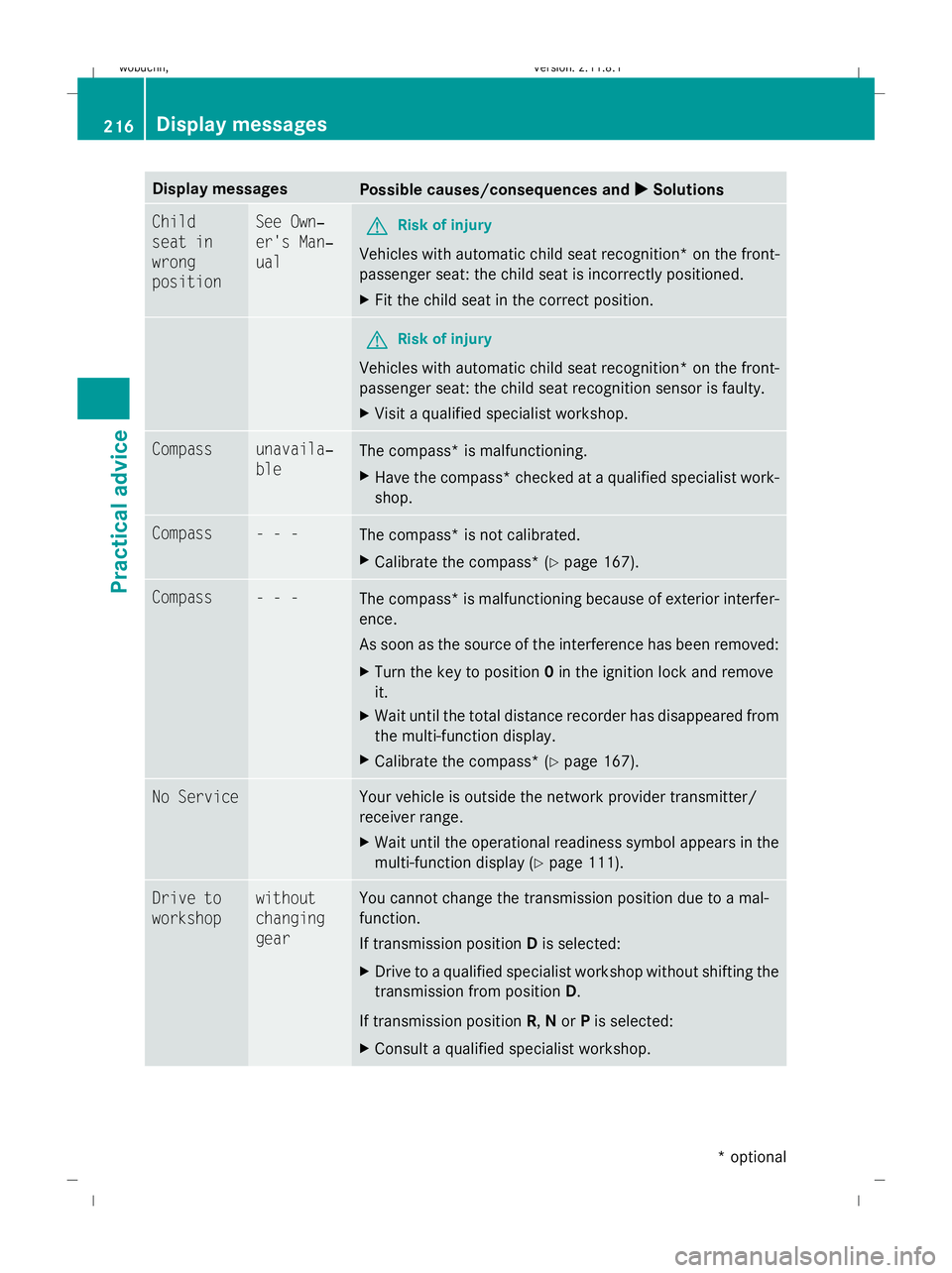
Display messages
Possible causes/consequences and
X
X Solutions Child
seat in
wrong
position See Own‐
er's Man‐
ual
G
Risk of injury
Vehicles with automatic child seat recognition *on the front-
passenger seat: the child seat is incorrectly positioned.
X Fit the child seat in the correct position. G
Risk of injury
Vehicles with automatic child seat recognition* on the front-
passenger seat: the child seat recognition sensor is faulty.
X Visit a qualified specialist workshop. Compass unavaila‐
ble
The compass* is malfunctioning.
X
Have the compass* checked at a qualified specialist work-
shop. Compass - - -
The compass* is not calibrated.
X
Calibrate the compass* (Y page 167).Compass - - -
The compass* is malfunctioning because of exterior interfer-
ence.
As soon as the source of the interference has been removed:
X
Turn the key to position 0in the ignition lock and remove
it.
X Wait until the total distance recorder has disappeared from
the multi-function display.
X Calibrate the compass* (Y page 167).No Service Your vehicle is outside the network provider transmitter/
receiver range.
X
Wait until the operational readiness symbol appears in the
multi-function display (Y page 111).Drive to
workshop without
changing
gear You cannot change the transmission position due to a mal-
function.
If transmission position
Dis selected:
X Drive to a qualified specialist workshop without shifting the
transmission from position D.
If transmission position R,Nor Pis selected:
X Consult a qualified specialist workshop. 216
Display messagesPractical advice
* optional
X164_AKB; 2; 3, en-GB
wobuchh,
Version: 2.11.8.1 2009-03-31T14:14:58+02:00 - Seite 216
Dateiname: 6515431202_buchblock.pdf; erzeugt am 01. Apr 2009 00:17:59; WK