lock MERCEDES-BENZ GL SUV 2012 Owners Manual
[x] Cancel search | Manufacturer: MERCEDES-BENZ, Model Year: 2012, Model line: GL SUV, Model: MERCEDES-BENZ GL SUV 2012Pages: 441, PDF Size: 10.66 MB
Page 259 of 441
Mes
sages in the multifunction display
If ag ear change process has not been successful, the following messages may be displayed
in the multifunction display: Display messages Possibl
ecauses/ consequence sand M Solutions
LO
WR ANGE max. speed 40 km/h Yo
uh ave been driving faster than 40 km/h .Additionally, the indi-
cato rlamp on the button in the centre console blinks.
X Driv emore slowly to carry out the gear chan ge process. LOW RANGE Shift to
position
Nbriefly Th
et ransmission is in position Dand yo uare driving at below
40 km/h.
X Shift th etransmission to Nto comple tethe gear change proc-
ess. LOW RANGE Shifting
cancelled Please
reactivate The gear change process was not carried out.
X
Maintain all gear change conditions and carry out the gear
change process again. LOW RANGE Stop
Apply parking brake Aw
arning ton ealso sounds. The gear chang eprocess has not been
comple ted. LOW RANGE is in the neutral position .There is no
con nectio nbetween the engine and the driv ewheels.
! Do not drive any further. You could otherwise damage the
vehicle’ sdrive train.
X Sto pthe vehicle. Take int oaccount the road and traffic condi-
tions whe ndoing so.
X Apply the electric parkin gbrake (Y page 182).
X Repe atthe gear change process.
If th egear change process has been carried out, the LOW RANGE
Stop Appl
yparking brake message disapp
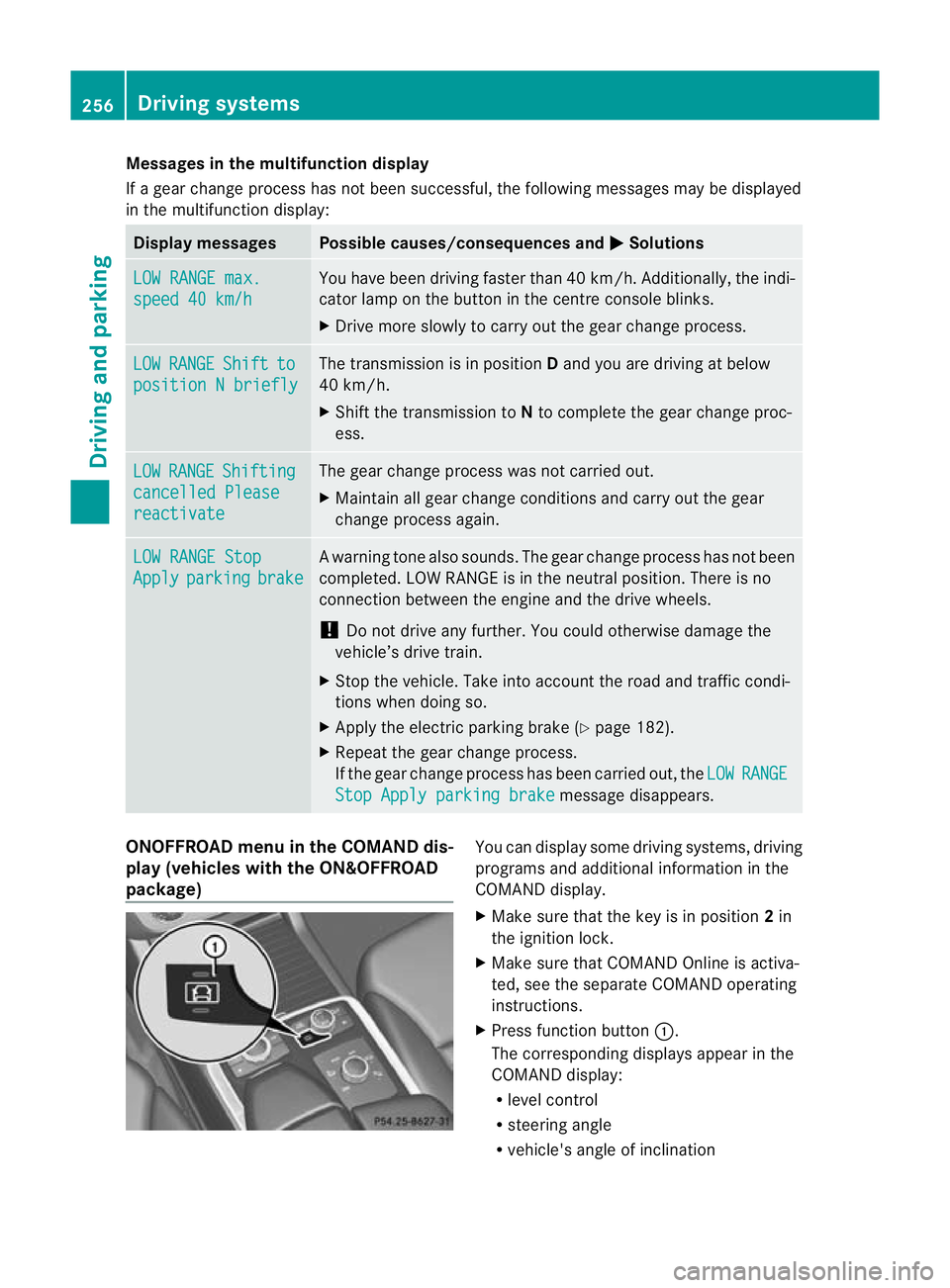
ears. ONOFFROAD men
uint he COMAND dis-
play (vehicles wit hthe ON&OFFROAD
package) Yo
uc an displ ay some driving systems ,driving
programs and additional information in the
COMAND display.
X Make sure that th ekey is in position 2in
the ignition lock.
X Make sure that COMAN DOnline is activa-
ted, see the separate COMAND operating
instructions.
X Pres sfunction button :.
The corresponding displays appea rinthe
COMAN Ddisplay:
R level control
R steering angle
R vehicle' sangle of inclination 256
Drivin
gsystemsDrivin gand pa rking
Page 260 of 441
R
uphill or downhill gradien tinpercentage
R on-road/off-road program selected
R condition of the differential lock for the
transfer case
R the LOW RANGE off -road gear is selected
R condition of the LOW RANGE off -road
gear
R the on-roa dtrailer progra misselected Towing
atrailer Note
sont owingatrailer
Important safety notes G
WARNING
Veh icle sw ithl evel control:
Th ev ehicle level can be change dinadver-
tently, e.g. whe nchanged by anot her person.
If yo uare coupling up or uncoupling atrailer
when this happens ,you coul dbecom etrap-
ped. Bod yparts can also become trapped
between the vehicle body and tyres, or under-
neath the vehicle. This pose sarisk of injury.
When coupling up or uncoupling, make sure
that no-one:
R opens or closes the doors or tailgate
R initiates the level control or presses the
AD Ss witch
R locks or unlock sthe vehicle. G
WARNING
The brakin gsystem can overheat if you leave
your foot on the brake pedal while driving.
This increase sthe brakin gdistanc eand could
even cause the braking system to fail. There
is ar isk of an accident.
Never use the brake pedal as afootrest. Do
not simultaneously depress both the brake
pedal and the accelera torp edal while driving. G
WAR
NING
You could los econtrol of the vehicle/trailer
combination if it begins to swerve. The vehi- cle/
trailer combination could even overturn.
There is arisk of an accident.
On no account should you attempt to
straighten out the vehicle/trailer combina-
tion by increasing speed. Decrease your
speed and do not countersteer .Brake if nec-
essary. G
WARNING
If you excee dthe permissible noseweight
while carrying aload, the carrier system could
detac hfrom th evehicle and fall on the road.
There is arisk of an acciden tand injury.
Always maintain the permissible noseweight
whe ncarrying loads. G
WARNING
If the ball coupling is not correctly engaged ,it
coul ddetac hwhile drivin gand fall on the road.
There is arisk of an acciden tand injury.
Engag ethe ball coupling as described. G
WARNING
If the ball coupling is not cor rectly engaged,
the traile rcan detach. There is arisk of an
accident.
Always engage the ball coupling as described.
! Depressing the brake pedal constantly
results in excessive and premature wear to
the brake pads.
You can use carrier systems, e.g. bicycle
rack sorload-bearing implements, on the ball
coupling. The maximum noseweight of
75 kg applies when using carrier system son
the ball coupling.
Whe nreversin gthe vehicle towards the
trailer ,make sure there is nobody between
the trailer and the vehicle.
Couple and uncouple the trailer carefully. If
you do not couple the trailer to the towing
vehicle correctly, the trailer could become
detached. Towin
gatrailer
257Driving an dparking Z
Page 263 of 441
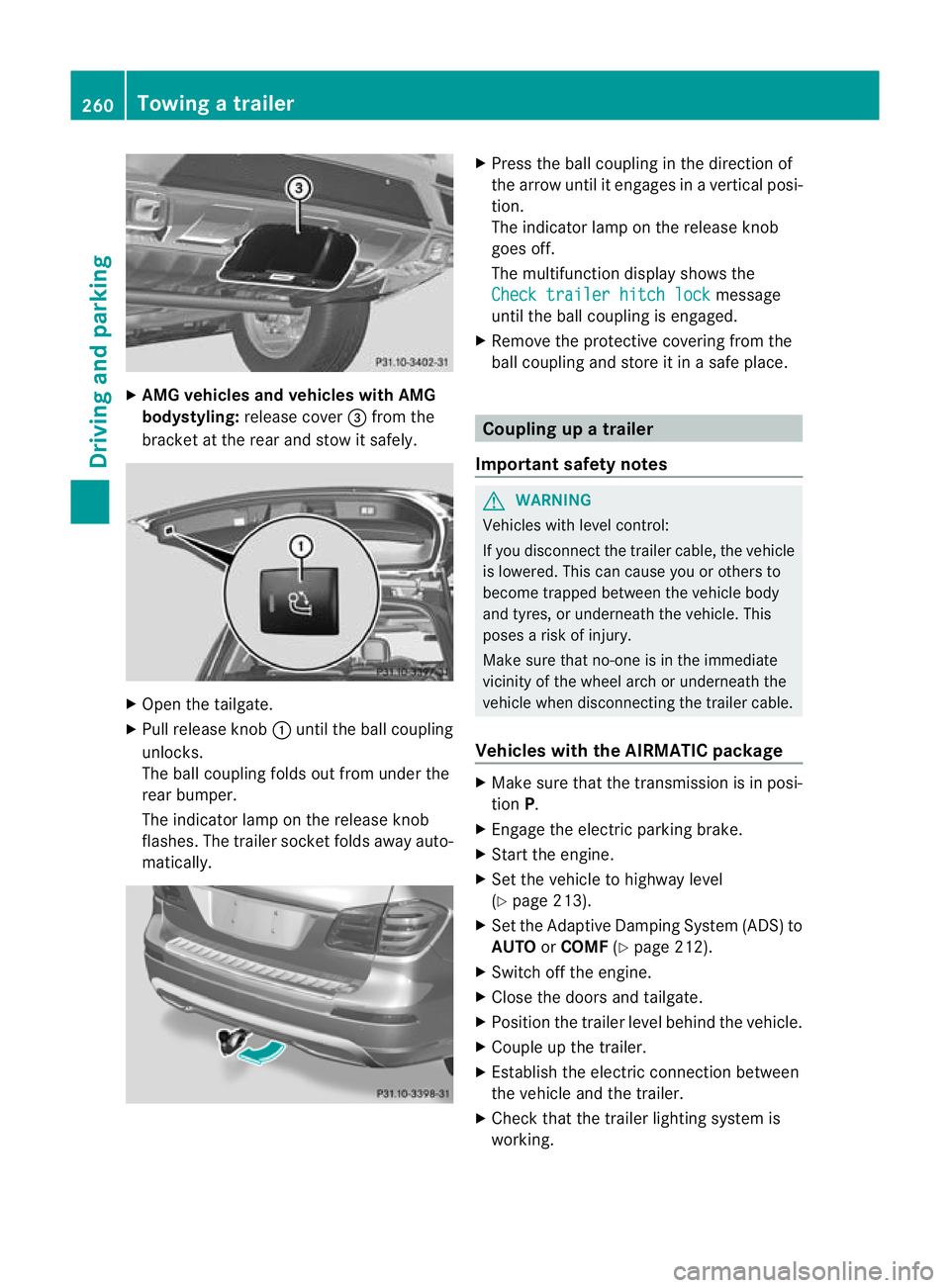
X
AMG vehicles and vehicles with AMG
bodystyling: release cover =from the
bracket at the rea rand sto witsafely. X
Open the tailgate.
X Pull release knob :until the ball coupling
unlocks.
The ball coupling folds out from under the
rear bumper.
The indicator lamp on the release knob
flashes .The trailer socket folds away auto-
matically. X
Press the ball couplin ginthe direction of
the arrow until it engages in avertical posi-
tion.
The indicator lam ponthe release knob
goes off.
The multifunction display shows the
Chec ktrailer hitch lock message
until th eball coupling is engaged.
X Remove the protective covering from the
ball coupling and store it in asafe place. Coupling up
atrailer
Important safety notes G
WARNING
Vehicles with level control:
If you disconnec tthe trailer cable, the vehicle
is lowered. This can cause you or other sto
become trapped between the vehicl ebody
and tyres, or underneat hthe vehicle. This
poses arisk of injury.
Make sure that no-on eisinthe immediate
vicinit yofthe wheel arch or underneath the
vehicle when disconnectin gthe trailer cable.
Vehicles with th eAIRMATIC package X
Make sure that the transmission is in posi-
tion P.
X Engage the electric parking brake.
X Start the engine.
X Set the vehicle to highway level
(Y page 213).
X Set the Adaptive Damping System (ADS )to
AUTO orCOMF (Ypage 212).
X Switch off the engine.
X Close the doors and tailgate.
X Position the trailer level behind the vehicle.
X Coupl eupthe trailer.
X Establish the electric con nectio nbetween
the vehicle and the trailer.
X Check that the trailer lighting system is
working. 260
Towing
atrailerDriving an dparking
Page 265 of 441
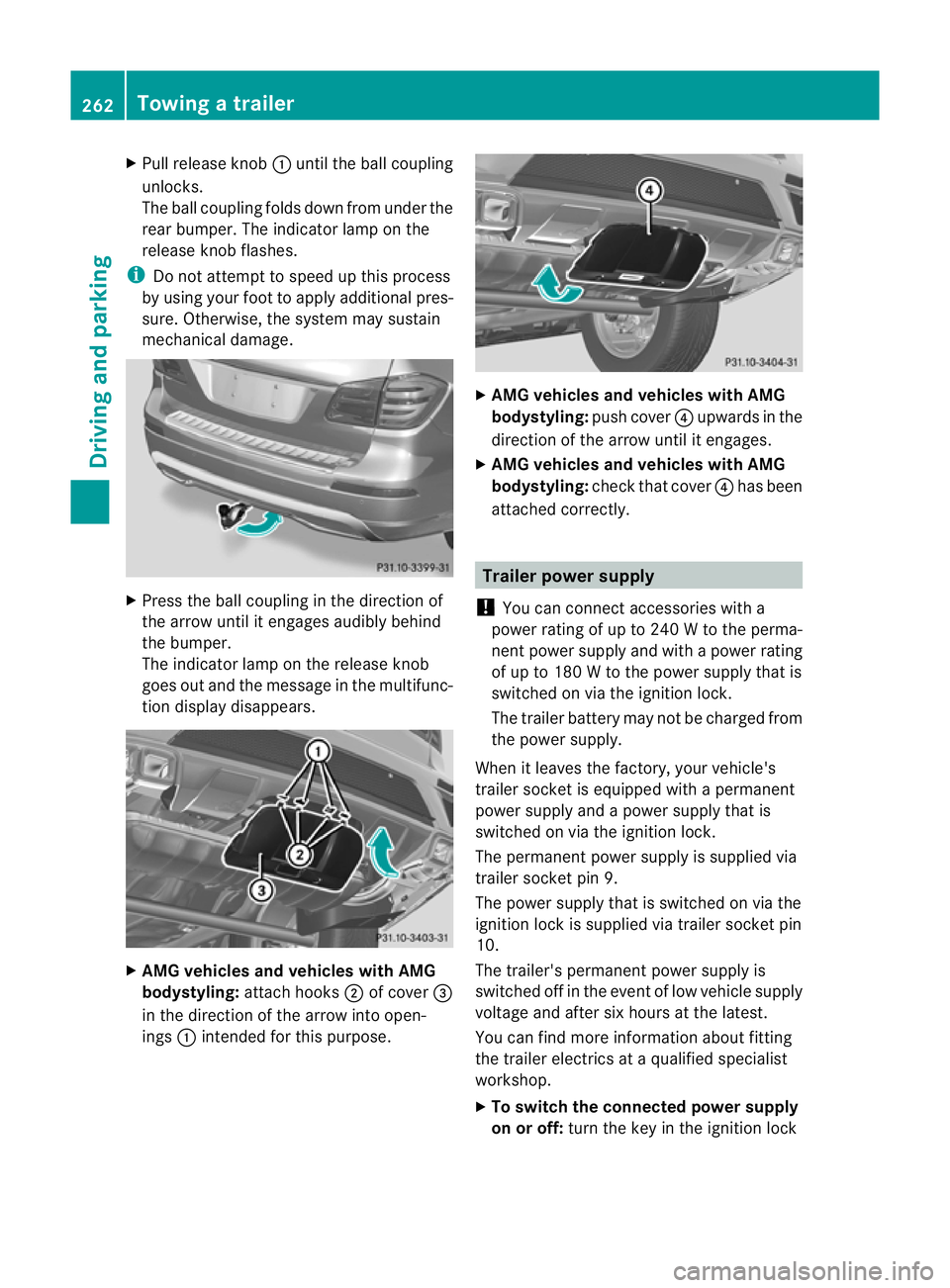
X
Pull release knob :until the ball coupling
unloc ks.
The ball coupling folds down from under the
rea rbumper. The indicator lamp on the
release knob flashes.
i Do not attempt to spee dupthis process
by usin gyour foot to apply additional pres-
sure .Otherwise, the syste mmay sustain
mechanical damage. X
Press the ball coupling in the direction of
the arrow until it engages audibl ybehind
the bumper.
The indicator lam ponthe release knob
goes out and the message in the multifunc-
tion displa ydisappears. X
AMG vehicles and vehicles with AMG
bodystyling: attachhooks ;of cover =
in the direction of the arrow int oopen-
ings :intended for this purpose. X
AMG vehicle sand vehicles with AMG
bodystyling: push cover?upwards in the
direction of the arrow until it engages.
X AMG vehicles and vehicles with AMG
bodystyling: check that cover ?has been
atta ched correctly. Trailer powe
rsupply
! Youc an connect accessories with a
power rating of up to 240 Wtothe perma-
nen tpower supply and with apower rating
of up to 18 0Wto the powe rsupply that is
switched on via the ignition lock.
The trailer batter ymay not be charged from
the power supply.
When it leaves the factory, your vehicle's
trailer socket is equippe dwithapermanent
power supply and apower supply that is
switched on via the ignition lock.
The permanen tpower supply is supplied via
trailer socket pin 9.
The power supply that is switched on via the
ignition lock is supplied via trailer socket pin
10.
The trailer's permanen tpower supply is
switched off in the even toflow vehicle supply
voltage and after six hour satthe latest.
You can fin dmore information about fit ting
the trailer electric sataqualified specialist
workshop.
X To switch the connected power supply
on or off: turn the key in the ignition lock 262
Towin
gatrailerDriving an dparking
Page 267 of 441
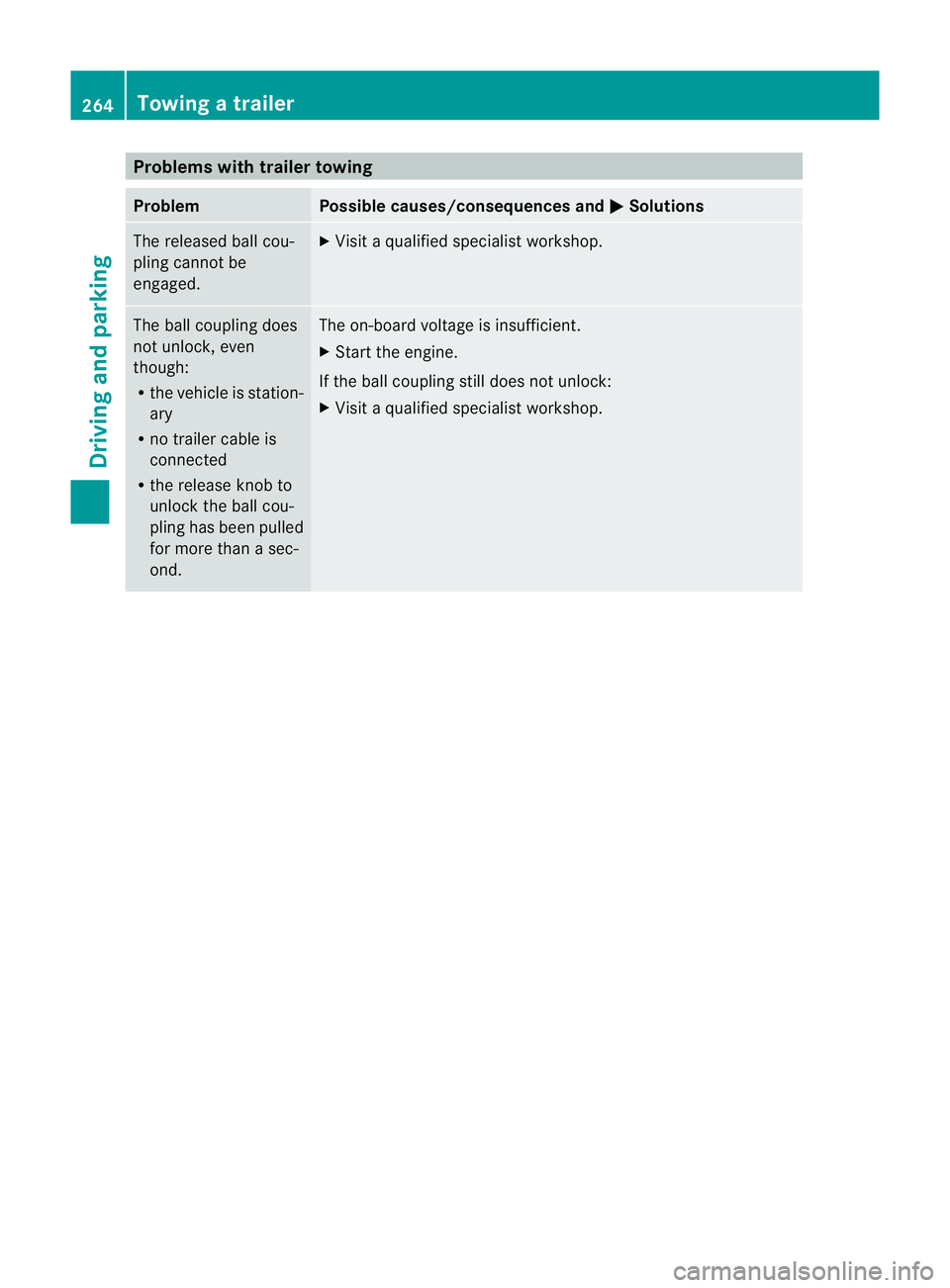
Problems wit
htrailer towing Problem Possible causes/consequences and
M Solutions
The released ball cou-
pling cannot be
engaged. X
Visit aqualified specialist workshop. The ball coupling does
not unlock, even
though:
R
the vehicle is station-
ary
R no trailer cable is
connected
R the release knob to
unlock the ball cou-
pling has been pulled
for more than asec-
ond. The on-boar
dvoltage is insufficient.
X Start the engine.
If the ball coupling still does not unlock:
X Visit aqualified specialist workshop. 264
Towin
gatrailerDriving an dparking
Page 271 of 441
=
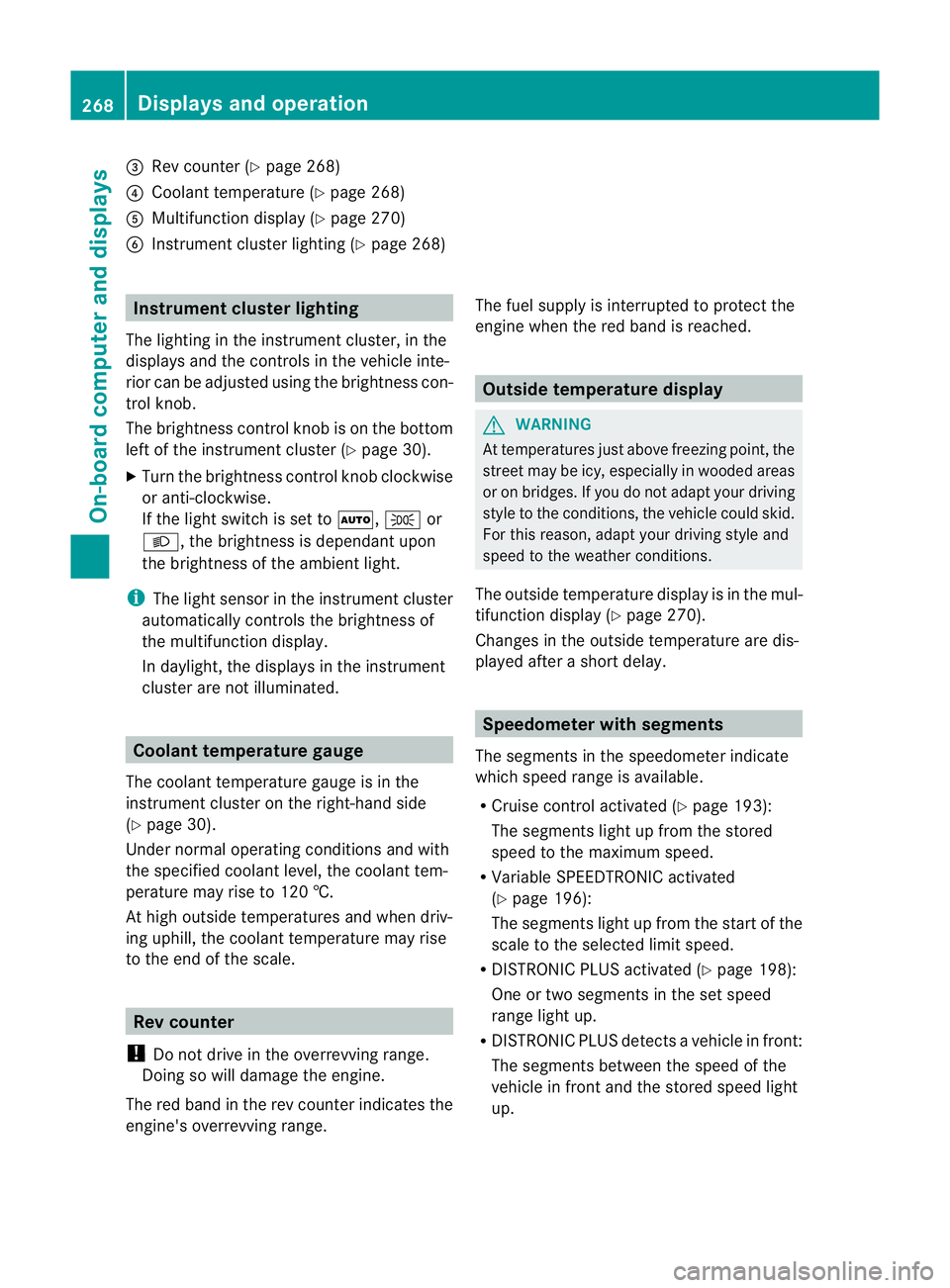
Rev coun ter( Ypage 268)
? Coolan ttemperatur e(Ypage 26 8)
A Multifunction displa y(Ypage 27 0)
B Instrumen tcluster lighting (Y page 268) Instrument cluster lighting
The lighting in the instrument cluster ,inthe
displays and the controls in the vehicle inte-
rior can be adjusted usin gthe brightness con-
trol knob.
The brightness control knob is on the bottom
lef toft he instrumen tcluster (Y page 30).
X Turn the brightness control knob clockwise
or anti-clockwise.
If the light switch is set to Ã,Tor
L,t he brightness is dependant upon
the brightness of the ambient light.
i The light sensor in the instrumen tcluster
automatically controls the brightness of
the multifunction display.
In daylight, the displays in the instrument
cluster are not illuminated. Coolant temperature gauge
The coolant temperature gauge is in the
instrument cluster on the right-hand side
(Y page 30).
Under normal operatin gcondition sand with
the specified coolant level ,the coolant tem-
perature ma yrise to 120 †.
At high outside temperatures and when driv-
ing uphill, the coolant temperature may rise
to the end of the scale. Rev counter
! Do not drive in the overrevving range.
Doin gsow ill damage the engine.
The red band in the rev counter indicates the
engine's overrevving range. The fuel supply is interrupted to protec
tthe
engin ewhen the red band is reached. Outside tem
perature display G
WARNING
At temperatures just above freezing point, the
street may be icy, especially in wooded areas
or on bridges. If you do not adapt your driving
style to the conditio ns,the vehicle coul dskid.
For this reason, adapt your driving style and
speed to the weather conditions.
The outside temperature displa yisinthe mul-
tifunc tion display (Y page 270).
Changes in the outside temperatur eare dis-
played afte rashort delay. Speedomete
rwith segments
The segments in the speedometer indicate
which speed range is avai lable.
R Cruise control activated (Y page 193):
The segment slight up from the stored
speed to the maximum speed.
R Variabl eSPEEDTRONIC activated
(Y page 196):
The segments light up from the star tofthe
scal etot he selected limit speed.
R DISTRONI CPLUS activate d(Ypage 198):
One or two segment sinthe set speed
range light up.
R DISTRONI CPLUS detects avehicle in front:
The segments between the speed of the
vehicle in fron tand the store dspeed light
up. 268
Display
sand operationOn-board computer and displays
Page 272 of 441
Oper
ating the on-board compu ter
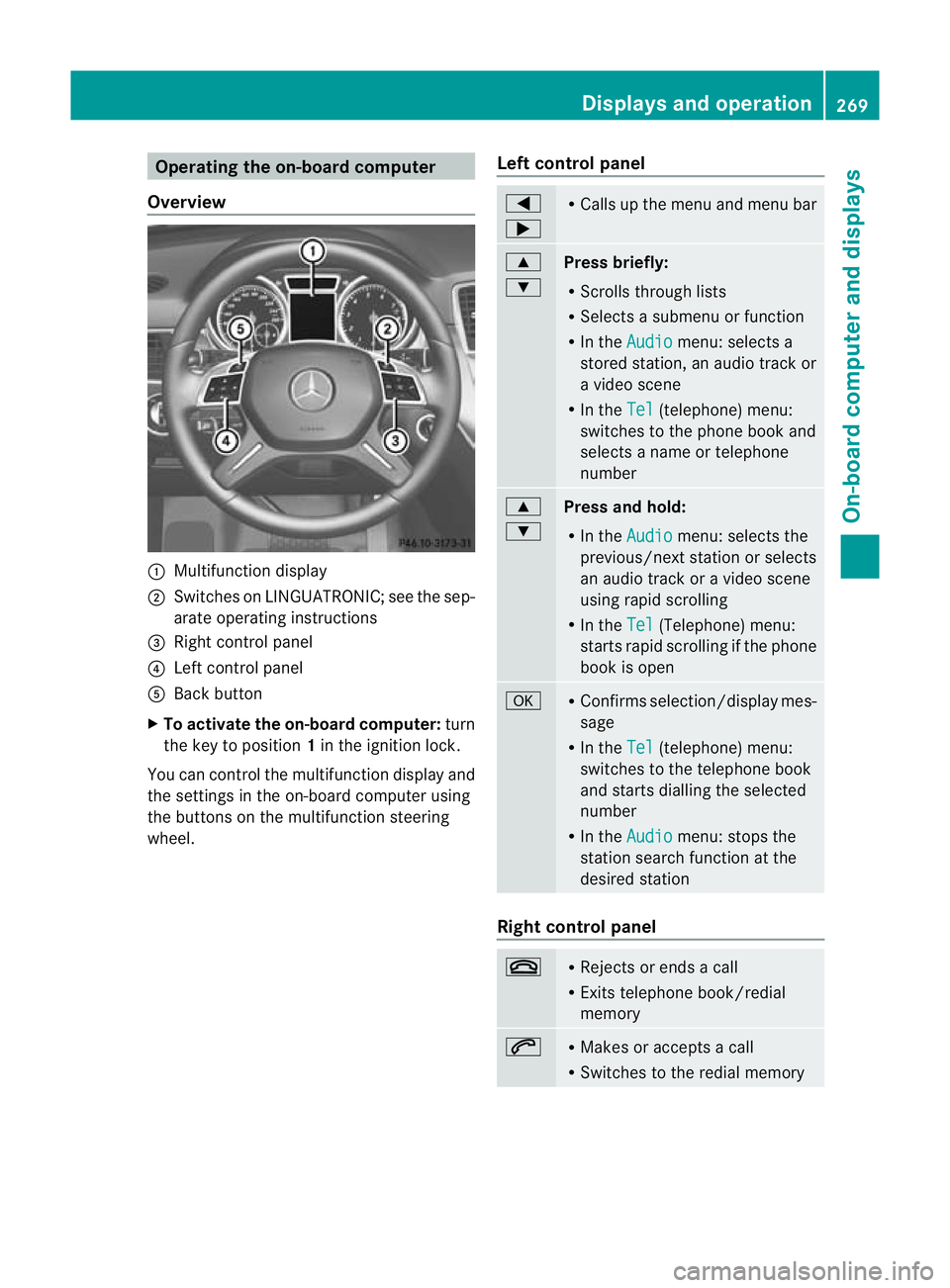
Overview :
Multifunction display
; Swit ches on LINGU ATRONIC; see the sep-
arate operating instructions
= Right control panel
? Left control panel
A Back button
X To activate the on-board computer: turn
the key to position 1in the ignitio nlock.
You can control the multifunction display and
the settings in the on-boar dcompu teru sing
the button sonthe multifunction steering
wheel. Lef
tcontrol panel =
; R
Calls up the menu and menu bar 9
:
Press briefly:
R
Scrolls through lists
R Select sasubmenu or function
R In the Audio menu: select
sa
stored station, an audi otrack or
av ideo scene
R In the Tel (telephone) menu:
switches to th ephon ebook and
selects anam eo rtele phone
number 9
:
Press and hold:
R In the Audio menu: sele
ctst he
previous/next statio norselects
an audio trac koravideoscene
using rapi dscrolling
R In the Tel (Te
lephone) menu:
starts rapid scrolling if the phone
book is open a R
Confirm sselection/display mes-
sage
R In the Tel (telephone) menu:
switches to the telephone book
and starts dialling the selected
number
R In the Audio menu: stops the
station searc hfunction at the
desired station Right control panel
~ R
Rejects or ends acall
R Exits telephone book/redial
memory 6 R
Makes or accepts acall
R Switches to the redial memory Displays and operation
269On-board computer and displays Z
Page 285 of 441
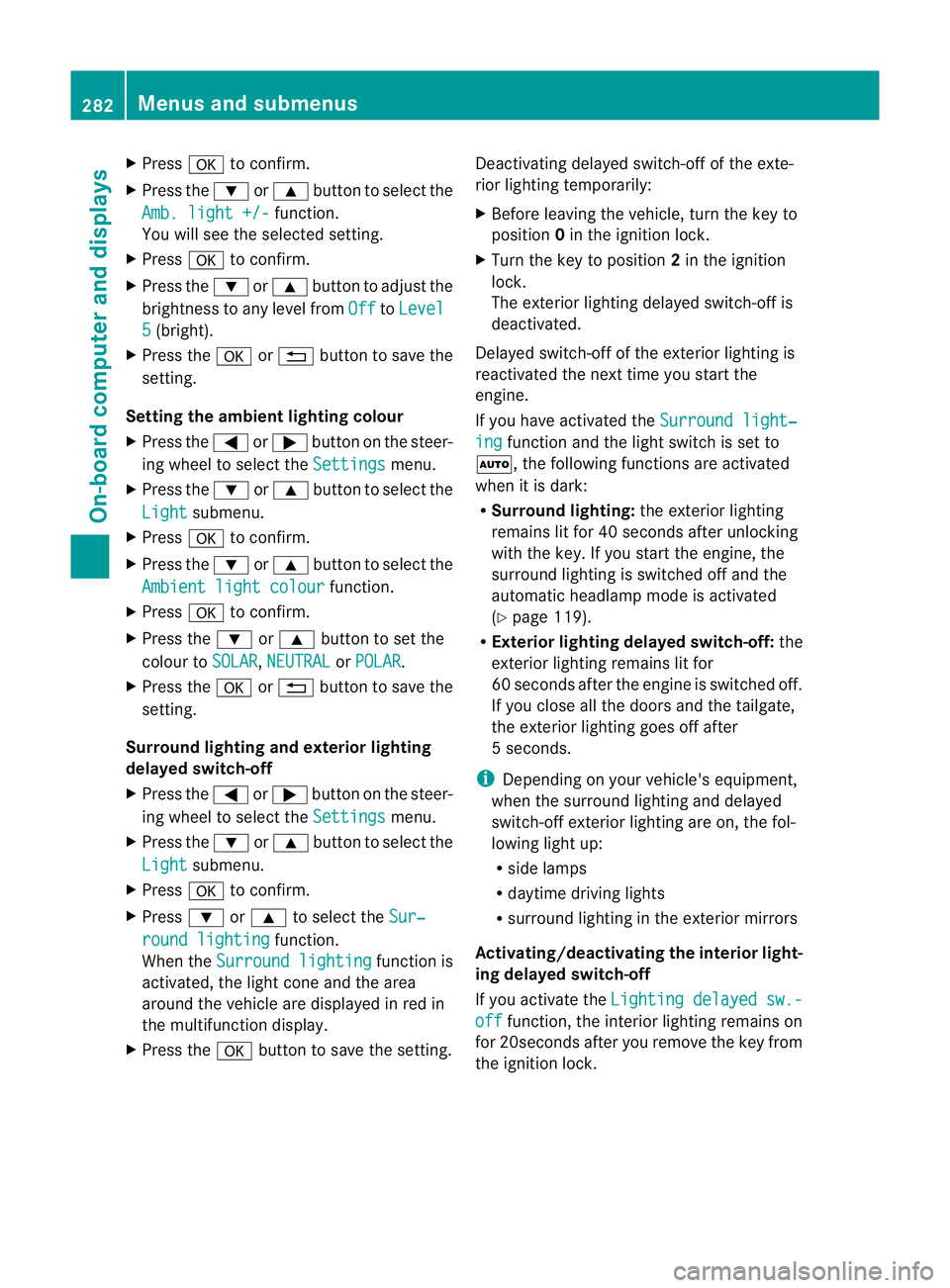
X
Press ato confirm.
X Press the :or9 button to select the
Amb. ligh t+/- function.
Yo uw ill see the selected setting.
X Press ato confirm.
X Press the :or9 button to adjust the
brightness to any level from Off to
Level 5 (bright).
X Press the aor% button to save the
setting.
Setting the ambient lighting colour
X Press the =or; button on the steer-
ing wheel to select the Settings menu.
X Press the :or9 button to select the
Light submenu.
X Press ato confirm.
X Press the :or9 button to select the
Ambien tlight colour function.
X Press ato confirm.
X Press the :or9 buttontos et the
colour to SOLAR ,
NEUTRAL or
POLAR .
X Press the aor% button to save the
setting.
Surround lighting and exterior lighting
delayed switch-off
X Press the =or; button on the steer-
ing wheel to select the Settings menu.
X Press the :or9 button to select the
Light submenu.
X Press ato confirm.
X Press :or9 to select the Sur‐ roun
dlighting function.
When the Surround lighting function is
activated, th elight cone and the area
around the vehicle are displaye dinred in
the multifunction display.
X Press the abutton to save the setting. Deac
tivating delayed switch -off of th eexte-
rior lighting tempo rarily:
X Befor eleaving the vehicle, tur nthe key to
position 0in the ignition lock.
X Tur nthe key to position 2in the ignition
lock.
The exterior lighting delayed switch-off is
deactivated.
Delayed switch-off of the exterior lighting is
reactivated the nex ttime you start the
engine.
If you have activated the Surround light‐ ing func
tion and the light switc hisset to
Ã,t he followin gfunctions are activated
when it is dark:
R Surround lighting: the exterior lighting
remains lit for 40 seconds after unlocking
with the key. If you start the engine, the
surround lighting is switched off and the
automatic headlamp mode is activated
(Y page 119).
R Exterior lighting delayed switch-off: the
exterior lighting remains lit for
60 seconds after the engine is switched off.
If you close all the doors and the tailgate,
the exterior lighting goes off after
5s econds.
i Depending on your vehicle's equipment,
when the surround lighting and delayed
switch-off exterior lighting are on, the fol-
lowing light up:
R side lamps
R daytime driving lights
R surround lighting in the exterior mirrors
Activating/deactivating th einterior light-
ing delayed switch-off
If you activa tethe Lighti ngdelayed sw.- off function, th
einterior lighting remains on
for 20seconds after you remove the key from
the ignition lock. 282
Menus and submenusOn-boar
dcomputer and displays
Page 286 of 441
X
Press the =or; button on the steer-
ing wheel to select the Settings menu.
X Press the :or9 button to select the
Light submenu.
X Press ato confirm.
X Press :or9 to select the Light‐ in
gd elayed sw.-off function.
When the Lighting delayed sw.-off function is activated, th
evehicle interior is
displayed in red in the multifunction dis-
play.
X Press the abutton to save the setting.
Vehicle submenu Setting per
manent SPEEDTRONIC
X Press the =or; button on the steer-
ing wheel to select the Settings menu.
X Press :or9 to select the Vehicle submenu.
X Press ato confirm.
X Press the :or9 button to select the
Limit speed (winter tyres): function.
You will see the curren tsetting.
X Press ato confirm.
X Press the :or9 button to adjust
permanen tSPEEDTRONI Cinincrements of
ten (23 0km/h to
160 km/h ). The
Off set-
ting switches permanent SPEED TRONIC
off.
X Press the abuttontos tore the entry.
For furth erinformation on perm anent SPEED-
TRONIC (Y page 198).
Switchin gthe automati clocking feature
on/off
If yo uactivate the Automatic door locks function, the vehicl
eiscentrally locked above
as peed of around 15 km/h.
X Press the =or; button on the steer-
ing whee ltoselectthe Settings men
u.
X Press :or9 to select the Vehicle submenu. X
Press ato confirm.
X Press :or9 to select the Auto‐ matic door locks function.
When the Automaticdoorl ocks func-
ti on is activated, the vehicle doors are dis-
played in red in the multifunction displ ay.
X Press the abutton to save the setting.
For further information on the automatic lock-
ing feature, see (Y page 84).
Activating/deactivating th eacoustic
lockin gconfirmation
If you switch on the Acoustic Lock function,
an acoustic signal sounds when you lock the
vehicle.
X Press the =or; button on the steer-
ing wheel to select the Settings menu.
X Press :or9 to select the Vehicle submenu.
X Press ato confirm.
X Press the :or9 button to select the
Acoustic Lock function.
If the Acoustic Lock function is activated,
the & symbol in the multifunction dis-
play lights up red.
X Press the abutton to save the setting.
Activating/deactivating the radar sensor
system
X Press the =or; button on the steer-
ing wheel to select the Settings menu.
X Press :or9 to select the Vehicle submenu.
X Press ato confirm.
X Press the 9or: button to select
Rada rsensor (See Owner's Man.): .
Yo uw ill see the selected setting: on or
off .
X Press the abutton to save the setting.
i You must deactivate the radar sensor sys-
tem in certain countries and near radio
telescope facilities. For further informa-
tion, see (Y page 433). Menus and submenus
283On-board computer and displays Z
Page 288 of 441
X
Press the :or9 button to select A ,
B or
Change C .
X Press ato confirm.
You can now change the departur etime.
X Press the =or; button to select the
display to be changed: hours, minutes.
X Press the :or9 button to set the
selected display.
X Press the abutton to store the entry.
The yellow indicator lamp on the auxiliary
heating button lights up.
Convenience submenu Activating/deactivating the EASY-
ENTRY/EXIT feature
G
WARNING
The steerin gwheel moves when the EASY-
ENTRY/ EXIT feature is active. There is arisk
of occupant sbecoming trapped. Before acti-
vating the EASY-ENTRY/EXI Tfeature, make
sure that nobody can becom etrapped.
Do not leave children unsupervised in the
vehicle, eve nifthey ar esecured in achild
rest raint system. The children could open the
driver's door and thereby unintentionally acti-
vate the EASY-ENTRY/EXIT featur eand
become trapped.
X Pres sthe = or; button on the steer-
ing wheel to selec tthe Settings menu.
X Press the :or9 button to selec tthe
Convenie nce submenu.
X Press ato con firm.
X Press :or9 to select the Easy Entry/Ex
it function.
If the Easy Entry/Exit function is activa-
ted ,the vehicle steerin gwheel is displayed
in red in the multifunction display.
X Press the abutton to sav ethe setting.
Further information on the EASY- ENTRY/EXIT
feature (Y page 111). Switching the belt adjustment on/off
X
Press the =or; button on the steer-
ing whee ltoselect the Settings menu.
X Press the :or9 button to select the
Convenie nce submenu.
X Press ato con firm.
X Press the :or9 buttontos elect the
Belt adjustme nt function.
When the Belt adjustment function is
activated, th evehicle seat belt is displayed
in red in the multifunction display.
X Press the abutton to save the setting.
For further information on belt adjustment,
see (Y page 48).
Switching th eFold in mirrors when lock-
ing function on/off
This func tion is only available on vehicles with
Memor yFunction (Y page 115).
When you activat ethe Auto. fold-in mir‐
rors func
tion, the exterior mirror sare folded
in when th evehicle is locked. When you
unloc kthe vehicle and then open adoor, the
exterior mirror sfold out again.
X Press the =or; button on the steer-
ing wheel to select the Settings menu.
X Press the :or9 button to select the
Convenie nce submenu.
X Press ato con firm.
X Press :or9 to select the Auto. fold-in mirrors function.
If the Auto. fold-in mirrors function is
activated, th evehicle' sexterior mirror is
displaye dinred in the multifunction dis-
play.
X Press the abutton to save the setting. Menus and submenus
285On-board computera nd displays Z