radio MERCEDES-BENZ GL SUV 2012 User Guide
[x] Cancel search | Manufacturer: MERCEDES-BENZ, Model Year: 2012, Model line: GL SUV, Model: MERCEDES-BENZ GL SUV 2012Pages: 441, PDF Size: 10.66 MB
Page 202 of 441
G
WARNING
DISTRONIC PLUS canno ttake account of road
and traffic conditions. If DISTRONI Cdoes not
recognise or no longer recognises the vehicle
in front, do not activate DISTRONIC or, if it is
alr eady active, deactivate it. This is especially
the case:
R befor ecorners
R on filter lanes
R when changing to alane with faster moving
traffic
R in comple xdriving situations or where lanes
are diverte d,e.g. at roadworks on amotor-
way
DISTRONIC PLU Sotherwise maintains the
current spe ed setbyyou or accelerates up to
the set speed.
DISTRONIC PLU Scannot take account of
weather conditions. Deactivate, or do not
activate, DISTRONI CPLUS:
R if th eroads are slippery, snow-covered or
icy .The wheels coul dlose their grip when
brakin goraccelerating .The vehicle could
star ttos kid.
R if the sensors are dirty or there is poo rvis-
ibility, e.g. due to snow, rain or fog. Dis-
tance control may be impaired.
Always pay attention to traffic conditions
even when DISTRONIC PLU Sisactivate d.
Otherwise, you ma yfail to recognise dangers
in time, caus eanaccident and injure yourself
and others. G
WARNING
DISTRONIC PLUS brake syourvehicle up to a
maximu mof4m /s2
depending on its speed.
This corresponds to approximately 40% of
your vehicle's maximum braking power. You
must als oapply the brakes yourself if this
braking power is not sufficient.
If DISTRONI CPLUS detect sarisk of collision
with avehicle in front, an intermit tent warning
tone sounds. In addition, the ·distance
warning lamp in the instrument cluste rlights
up. Brak etoavoidac ollision. G
WAR
NING
The vehicle can be braked when DISTRONIC
PLUS is activated. For this reason, deactivate
DISTRONIC PLUS if the vehicle is to be set in
motion by othe rmeans (e.g. in acar wash or
by towing).
The radar senso rsystem is switched off auto-
matically in the vicinity of radio teles cope
facilities (Y page 433).
If you want DISTRONIC PLUS to assist you,
the radar sensor syste mmust be activated
(Y page 283 )and operational.
General notes DISTRONIC PLUS regulates the speed and
automati
cally helps you maintain the dis-
tanc etot he vehicle detected in front. DI S-
TRONIC PLU Sbrake sautomatically so that
the set spee disnot exceeded.
On long and steep downhil lgradients, espe-
ciall yifthe vehicle is laden or towing atrailer,
yo um ust select shift range 1,2or 3in good
time. By doing so, you will make use of the
braking effec tofthe engine. This relieves the
load on the brake system and prevents the
brakes from overheating and wearing too
quickly.
If DI STRONIC PLUS detects aslower-moving
vehicle in front ,your vehicle is braked in order
to maintain the preset distance to the vehicle
in front.
If ther eisnov ehicle in front ,DISTRONIC
PLUS operate sinthe sam eway as cruise
control in the spee drange between
30 km/h and 200 km/h. If avehicle is driving
in fron tofyou, DI STRONIC operates in the
speed range betwee n0km/h and
200 km/h.
Do not us eDISTRONIC PLUS on roa dswith
steep gradients. Driving systems
199Drivinga nd parking Z
Page 208 of 441
i
The last speed store dremains stored until
you switc hoff th eengine.
i DISTRONIC PLUS is not deactivated if you
depress the accelerator pedal. If you accel-
erate to overtake, DISTRONIC PLUS
adjusts the vehicle's speed to the last
speed stored after you have finished over-
taking.
DISTRONIC PLUS is automatically deactiva-
ted if:
R you engage the electric parking brake or if
the vehicl eisautomatically secured with
the electric parking brake.
R you are driving slowe rthan 25 km /hand
there is no vehicle in front, or if the vehicle
in fron tisnol onger detec ted.
R ESP ®
intervenes or you deactivat eESP®
.
R the transmission is in the P,Ror Nposition.
R the vehicle is near aradio telescop efacility
(Y page 433).
R you switch off the radar senso rsystem
(Y page 283).
R you pull the cruise control lever towards
you in order to pull away ,and the front-
passenger doo rorone of the rear doors is
open.
R you activate DSR.
R you activate off-road program 2onvehicles
with the ON&OFFROA Dpackage.
R the vehicle has skidded.
If DISTRONIC PLUS is deactivated, you will
hear awarning tone. You will see the DIS‐TRONIC PLUS off message in the multifunc-
tion display for approximately five seconds. Displays in the instrument cluster Displays in the speedometer
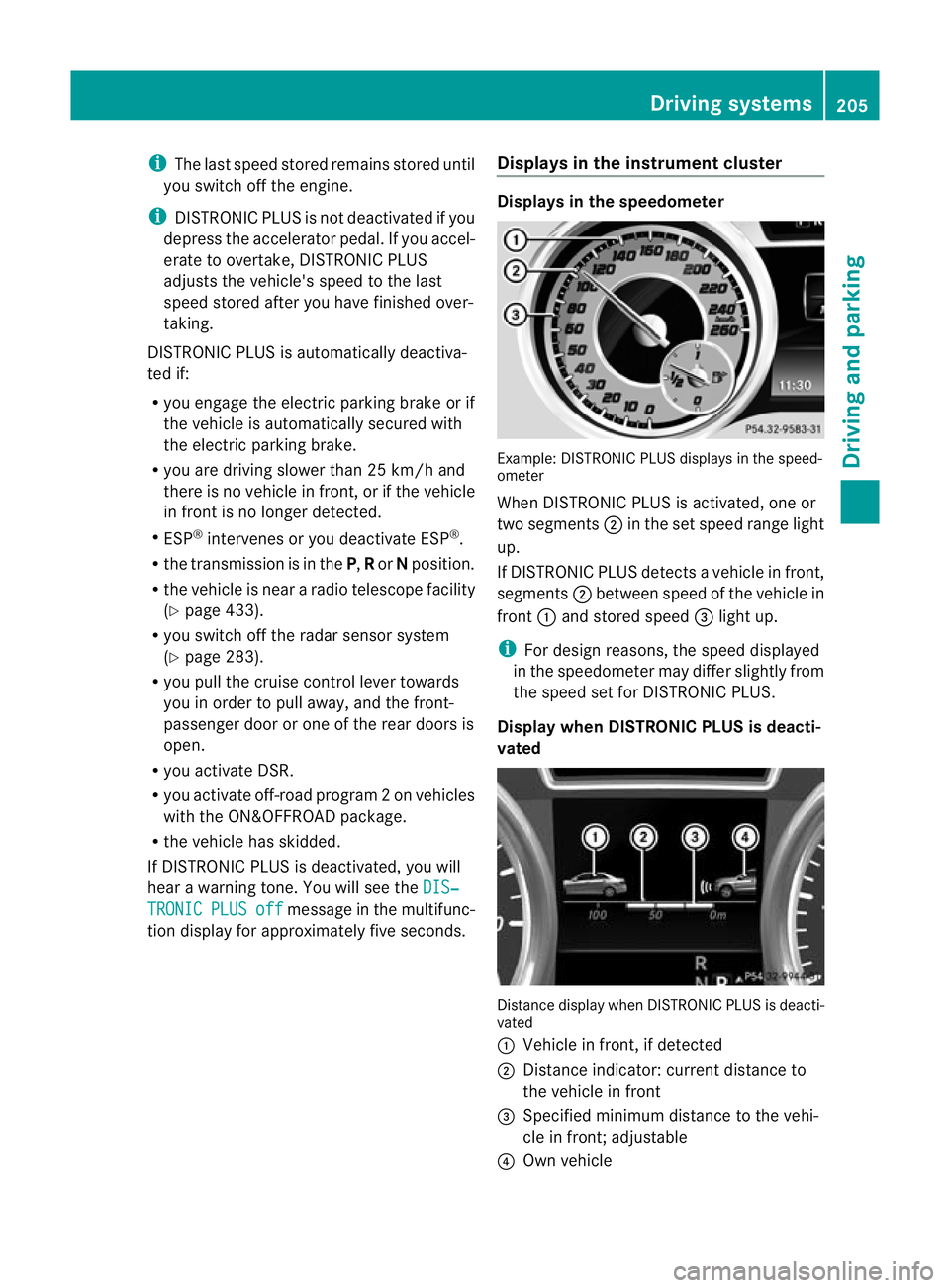
Example: DISTRONIC PLUS displays in the speed-
ometer
When DISTRONIC PLUS is activated, one or
two segments
;in the set spee drange light
up.
If DISTRONIC PLUS detects avehicle in front,
segments ;between speed of the vehicle in
front :and stored speed =light up.
i For design reasons, the speed displayed
in the speedometer may differ slightly from
the speed set for DI STRONIC PLUS.
Display when DISTRONIC PLUS is deacti-
vated Distance display when DISTRONIC PLUS is deacti-
vated
:
Vehicle in front, if detected
; Distance indicator: curren tdistanc eto
the vehicle in front
= Specified minimum distanc etothe vehi-
cle in front; adjustable
? Own vehicle Driving systems
205Driving and parking Z
Page 222 of 441
Problems wit
hPARKTRONIC Problem Possible causes/consequences and
M Solutions
Only the red segments
in the PARKTRONIC
warning display
sare lit.
Yo ua lso hear awarning
tone for approximately
two seconds.
PARKTRONIC is deacti-
vated after approx-
imately five seconds,
and the indicator lamp
in the PARKTRONIC
button lights up. PARKTRONIC has malfunctioned and has switched off.
X
If problems persist, have PARKTRONIC checked at aqualified
specialist workshop. Only the red segments
in the PARKTRONIC
warning display
sare lit.
PARKTRONIC is deacti-
vate dafter approx-
imatel yfive seconds. The PARKTRONIC sensors are dirty or there is interference.
X
Clean the PARKTRONIC sensors (Y page 370).
X Switc hthe ignition bac kon. The problem may be cause
dbyanexternal source of radio or
ultrasound waves.
X See if PARKTRONIC functions in adifferent location. Active Parking Assist
Important safet ynotes G
WARNING
Active Parkin gAssist is merely an aid and may
sometimes recommen dparking spaces that
are not suitable for parking. For example,
these might be spaces where parking is pro-
hibited ,driveways, unsuitabl esurfaces, etc.
Active Parking Assis tmeasures the parking
space as you driv epast it. Any later changes
to the parking space are not taken into
account. For instance, this may be the case
when the vehicle parked in front of or behind
the space changes its positio norwhen an
obstacle is moved int othe parkin gspace.
Active Parking Assist does not reliev eyou of
the responsibilit yofpaying attention. If you
rely solel yonA ctive Parkin gAssist, you could cause an acciden
tand injure yourself and oth-
ers.
You are always responsible for safety and
must continue to pay attention to your imme-
diate surroundings whe nparking and
manoeuvring. G
WARNING
Objects located above the heigh trange of
Active Parking Assis twill not be detected
when the parking space is measured. These
are not taken into account when the parking
procedure is calculated, e. g. overhanging
loads, tail sections or loading ramps of goods
vehicles. In some circumstances, Active Park-
ing Assist may therefor eguide you into the
parking space too early. This may lead to a
collision. For this reason, you should avoid
using Active Parking Assis tinsuch situations. Driving systems
219Drivingand pa rking Z
Page 242 of 441
change lane, yo
uwilla lsor eceive an optical
and audible collisio nwarning. For monitoring,
Active Blin dSpot Assist uses sensors in the
rear bumper.
For Blin dSpot Assist to assist you when driv-
ing, the rada rsensor system must be activa-
ted (Y page 283) and operational.
The rada rsensor system is switched off auto-
maticall yinthe vicinit yofradio telescope
facilities (Y page 433).
Monitoring range of the sensors G
WARNING
Blind Spot Assist monitors certain areas in the
immediate vicinit yofyour vehicle. Vehicles
that approach and driv epast at high speeds
are not detected. There is no display and no
warning.
If the lanes are very wide, it may not be pos-
sible to monitor the complete width of the
neighbouring lane. For this reason, vehicles in
the next lane may not be detected, especially
if they are driving in astaggered formation in
different lanes .This ma ybethe case if vehi-
cles ar edriving at th eedge of their lane that
is furthest away from your vehicle.
Alway spay attention to traffic conditions and
your surroundings. Otherwise ,you may fai lto
recognis edangers in time, cause an accident
and injure yourself and others. Blind Spot Assis
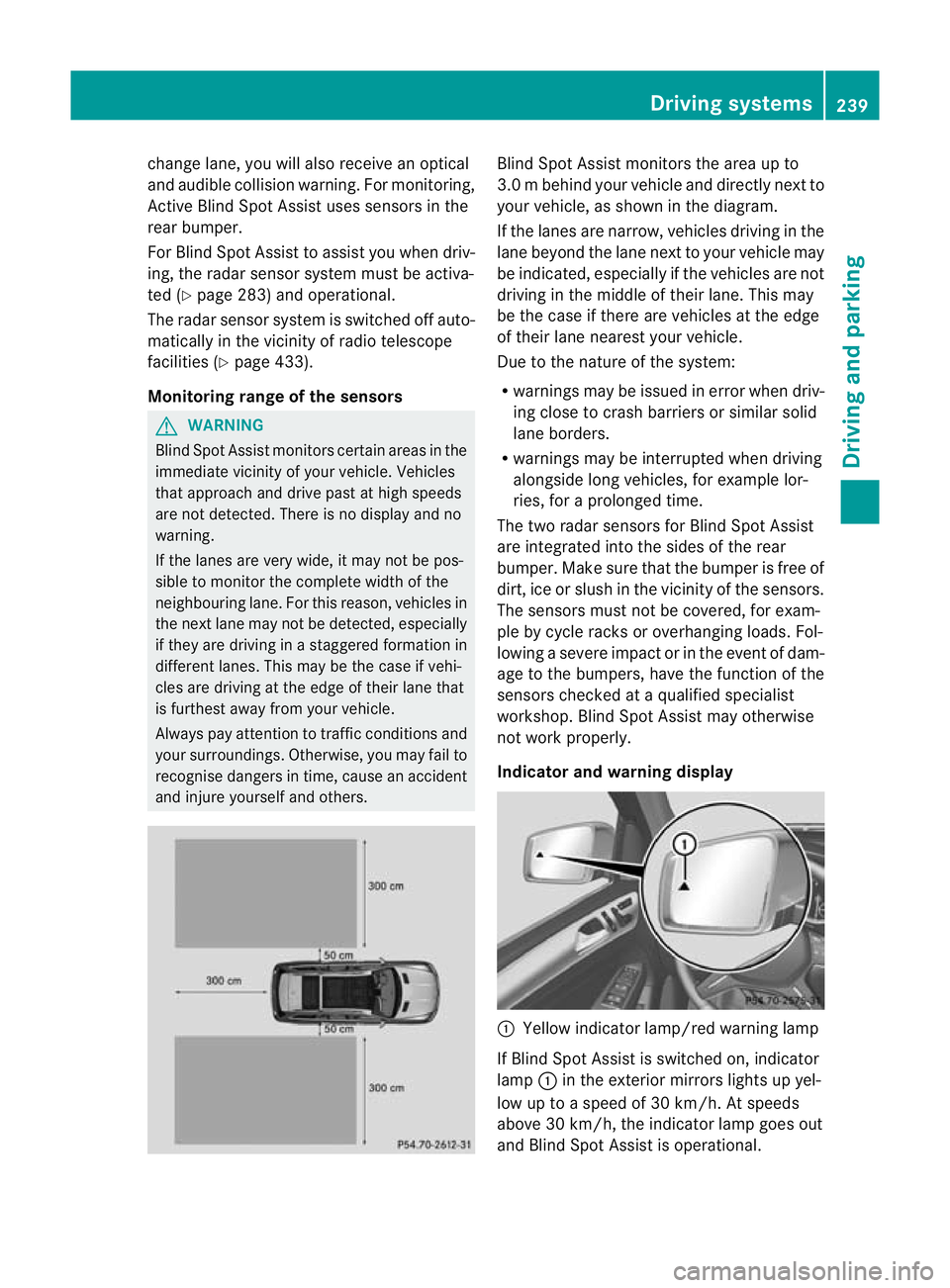
tmonitors the area up to
3. 0mb ehind your vehicle and direc tlyn extto
your vehicle, as shown in the diagram.
If the lanes are narrow, vehicles drivin gint he
lan ebeyond th elan en ext to your vehicle may
be indicated, especially if th evehicles are not
drivin gint he midd le of their lane. This may
be th ecase if there are vehicles at th eedge
of their lan eneares tyour vehicle.
Due to th enature of th esystem:
R warnings may be issued in error when driv-
ing close to crash barriers or similar solid
lane borders.
R warnings may be interrupted when driving
alongside long vehicles, for example lor-
ries, for aprolonged time.
Th et wo radar sensors for Blin dSpot Assist
are integrated int othe sides of the rear
bumper .Make sure that the bumper is free of
dirt, ice or slush in the vicinity of the sensors.
The sensor smust not be covered, for exam-
ple by cycle racks or overhanging loads .Fol-
lowin gasevereimpact or in th eevent of dam-
ag etot he bumpers, hav ethe function of the
sensor schecked at aqualified special ist
workshop. Blind Spot Assist may otherwise
not work properly.
Indicator and warning display :
Yello windicato rlamp/red warning lamp
If Blind Spot Assis tiss witched on, indicator
lamp :in the exterior mirrors lights up yel-
low up to aspeed of 30 km/h. At speeds
above 30 km/h, the indicator lamp goes out
and Blin dSpot Assist is operational. Driving systems
239Driving and parking Z
Page 245 of 441
marking
,the system recognises certai ncon-
ditions and warns you accordingly.
The warning vibration occur searlier if:
R you approach the outer lane markin gona
bend.
R the road has ver ywidel anes ,e.g. am otor-
way.
R the system recognises solid lane markings.
The warning vibration occur slater if:
R the road has narrow lanes.
R you cut the corner on abend. Active Driving Assistance package
General notes The Active Drivin
gAssistanc epackag econ-
sists of DISTRONIC PLU S(Ypa ge198), Active
Blind Spo tAssist (Y page 242) and Active
Lane Keeping Assist (Y page 246).
Active Blind Spot Assist Importan
tsafety notes G
WARNING
Active Blind Spo tAssist is only an aid and may
detect vehicles/obstacles incorrectly or not
at all.
The system ma ybeimpaired or may not func-
tio nif:
R there is po orvisibility ,e.g. due to snow,
rain, fog or spray.
R the rear and/or front sensors are dirty.
Active Blind Spot Assist may not detect nar-
row vehi cles, such as motorcycles or bicycles,
or only detect the mtoo late. It can notd etect
vehicles which are overtaken at asmall dis-
tance and then enter th eblind spot area.
Active Blind Spot Assist cannot detect road
and traffic conditions. It is not asubstitute for
attentive driving. You are responsible for the
vehicle's speed, braking in good time, and
steering correctly. Always adapt your driving
style to suit the prevailing road and weather conditions. Always pay attention to traffic
conditions and your surroundings. Otherwise,
you may fail to recognise dangers in time,
cause an accident and injure yourself and oth-
ers.
The radar sensor syste misautomatically
deactivated near radio telescope facilities
(Y page 433).
For Active Blind Spot Assis ttoassist you
when driving, the radar sensor syste mmust
be activated (Y page 283)and operational.
General notes
Active Blind Spot Assist use saradar sensor
system to monitor the area to the sides of
your vehicle which are behind the driver. A
warning display in the exterior mirrors draws
your attention to vehicles detected in the
monitored area. If you then switch on the cor-
responding turn signal to change lane, you
will also receive an optical and audible warn-
ing. If arisk of lateral collision is detected,
corrective brakin gmay help you avoid acol-
lision. To suppor tthe course- correcting brake
application ,Active Blind Spo tAssist uses the
forward-facin gradar senso rsystem. The free
space in the direction of travel is then evalu-
ated.
Active Blind Spot Assist supports you from a
speed of approximatel y30km/h.
Monitorin grange G
WARNING
Active Blin dSpot Assist monitors cer tain
areas in the immediate vicinit yofyour vehicle.
Vehicles that approach and driv epast at high
speeds are not detected. No visual nor audi-
ble warnings are emitted and the system does
not brake the vehicle to correc tyour course.
If the lanes are ver ywide, it may not be pos-
sible to monitor the complete width of the
neighbouring lane. For this reason, vehicles in
the next lane may not be detected, especially
if they are drivin ginastaggered formation.
Thi sm ay be the case if vehicles are driving at 242
Driving systemsDrivin
gand pa rking
Page 277 of 441
Audio menu
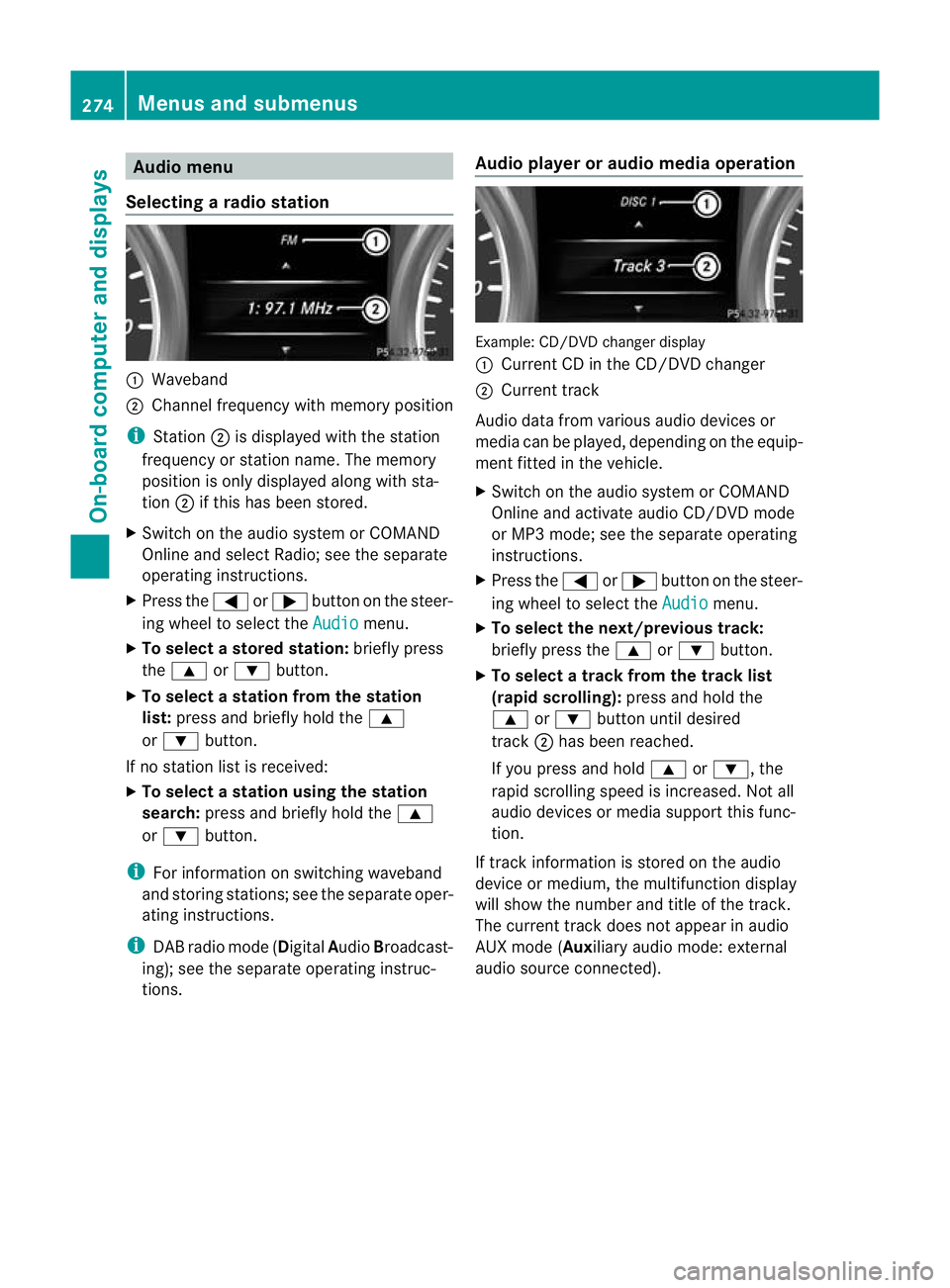
Selecting aradio station :
Waveb and
; Channel frequency with memory position
i Station ;is displaye dwitht he station
frequency or station name. The memory
position is only displayed along with sta-
tion ;if this has been stor ed.
X Switch on the audi osystem or COM AND
Online and select Radio; see the separate
operating instructions.
X Pres sthe = or; button on the steer-
ing wheel to selec tthe Audio menu.
X To select astore dstation: brieflypress
the 9 or: button.
X To select astation from the station
list: press and briefl yholdt he 9
or : button.
If no station lis tisr eceived:
X To select astatio nusing th estation
search: press and briefl yholdt he 9
or : button.
i For inf ormatio nons witching waveband
and storin gstations ;see th eseparate oper-
atin ginstructions.
i DABradio mode ( DigitalAudioBroadcast-
ing); see the separat eoperatin ginstruc-
tions. Audio player or audio media operation Example: CD/DV
Dchange rdisplay
: Curren tCDint he CD/DV Dchanger
; Curren ttrack
Audi odata from various audio devices or
media can be played, depending on the equip-
men tfitted in the vehicle.
X Switch on the audio system or COMAND
Onlin eand activate audi oCD/DVD mode
or MP3 mode; see the separate operating
instructions.
X Press the =or; button on the steer-
ing whee ltos elect the Audio menu.
X To select th enext/previous track:
briefly press the 9or: button.
X To select atrack from the track list
(rapid scroll ing): press and hold the
9 or: button until desired
track ;has been reached.
If you press and hold 9or:,t he
rapid scrollin gspeed is increased. Not all
audio devices or media support this func-
tion.
If track information is stored on the audio
devic eorm edium,the multifunction display
will show the number and title of the track.
The curren ttrack does not appe ar inaudio
AU Xm ode( Aux iliary audio mode: exter nal
audio source con nected). 274
Menu
sand submenusOn-boar dcomputer and displays
Page 278 of 441
Vide
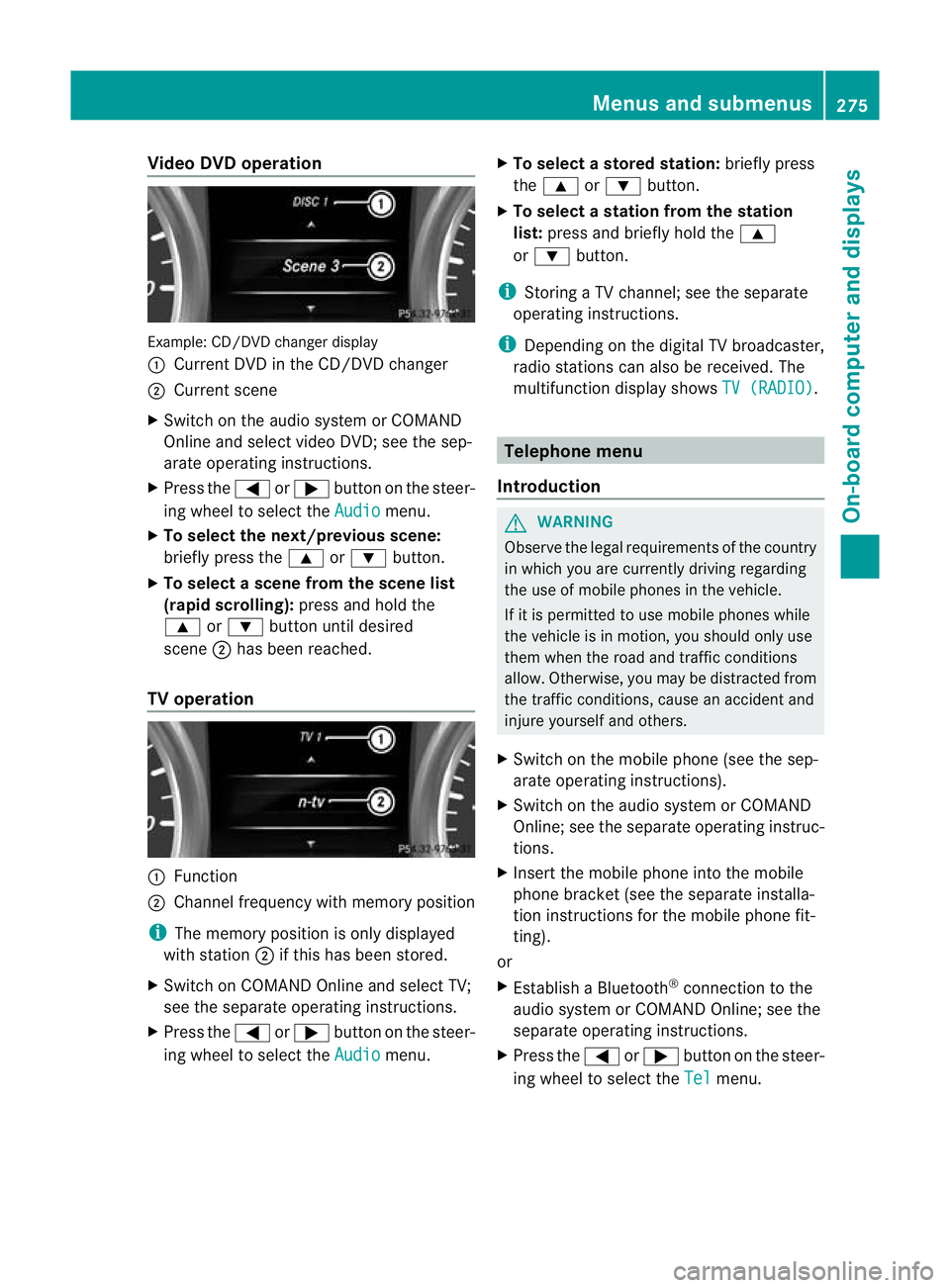
oDVD operation Example
:CD/DVD change rdisplay
: Curren tDVD in th eCD/DVD changer
; Curren tscene
X Switch on the audi osystem or COMAND
Online and select video DVD ;see the sep-
arate operating instructions.
X Press the =or; button on the steer-
ing wheel to select the Audio menu.
X To select th enext/previous scene:
briefly press the 9or: button.
X To select ascene from th escene list
(rapid scrolling): press and hold the
9 or: button until desired
scene ;has been reached.
TV operati on :
Function
; Channe lfrequenc ywithm emory position
i The memory position is only displayed
with station ;if this has bee nstored.
X Switch on COMAND Online and select TV;
see the separate operating instructions.
X Press the =or; button on the steer-
ing whee ltos elect the Audio menu.X
To select astore dstation: brieflypress
the 9 or: button.
X To select astation from the station
list: press and briefl yholdt he 9
or : button.
i Storing aTVchannel; see the separate
operatin ginstructi ons.
i Depending on the digital TV broadca ster,
radi ostations can also be received. The
multifunctio ndisplay shows TV (RADIO) .
Telephone menu
Introduction G
WAR
NING
Observe the lega lrequir ements of the country
in which you are cur rently drivin gregarding
the use of mobile phones in the vehicle.
If it is permitted to use mobile phones while
the vehicle is in motion, you should only use
the mw hen the roa dand traffic conditions
allow. Otherwise ,you may be distrac tedf rom
th et raffic conditions, caus eanaccident and
injure yourself and others.
X Switch on the mobile phone (see the sep-
arate operating ins tructions).
X Switch on the audio system or COMAND
Online; see the separate operating instruc-
tions.
X Insert the mobile phone int othe mobile
phon ebracket (see th esepara teinstalla-
tion instruc tions for the mobile phon efit-
ting).
or
X Establish aBluetooth ®
connection to the
audio system or COMAN DOnline; see the
separat eoperating instruc tions.
X Press the =or; button on the steer-
ing wheel to selec tthe Tel menu.Menu
sand submenus
275On-board computer and displays Z
Page 286 of 441
X
Press the =or; button on the steer-
ing wheel to select the Settings menu.
X Press the :or9 button to select the
Light submenu.
X Press ato confirm.
X Press :or9 to select the Light‐ in
gd elayed sw.-off function.
When the Lighting delayed sw.-off function is activated, th
evehicle interior is
displayed in red in the multifunction dis-
play.
X Press the abutton to save the setting.
Vehicle submenu Setting per
manent SPEEDTRONIC
X Press the =or; button on the steer-
ing wheel to select the Settings menu.
X Press :or9 to select the Vehicle submenu.
X Press ato confirm.
X Press the :or9 button to select the
Limit speed (winter tyres): function.
You will see the curren tsetting.
X Press ato confirm.
X Press the :or9 button to adjust
permanen tSPEEDTRONI Cinincrements of
ten (23 0km/h to
160 km/h ). The
Off set-
ting switches permanent SPEED TRONIC
off.
X Press the abuttontos tore the entry.
For furth erinformation on perm anent SPEED-
TRONIC (Y page 198).
Switchin gthe automati clocking feature
on/off
If yo uactivate the Automatic door locks function, the vehicl
eiscentrally locked above
as peed of around 15 km/h.
X Press the =or; button on the steer-
ing whee ltoselectthe Settings men
u.
X Press :or9 to select the Vehicle submenu. X
Press ato confirm.
X Press :or9 to select the Auto‐ matic door locks function.
When the Automaticdoorl ocks func-
ti on is activated, the vehicle doors are dis-
played in red in the multifunction displ ay.
X Press the abutton to save the setting.
For further information on the automatic lock-
ing feature, see (Y page 84).
Activating/deactivating th eacoustic
lockin gconfirmation
If you switch on the Acoustic Lock function,
an acoustic signal sounds when you lock the
vehicle.
X Press the =or; button on the steer-
ing wheel to select the Settings menu.
X Press :or9 to select the Vehicle submenu.
X Press ato confirm.
X Press the :or9 button to select the
Acoustic Lock function.
If the Acoustic Lock function is activated,
the & symbol in the multifunction dis-
play lights up red.
X Press the abutton to save the setting.
Activating/deactivating the radar sensor
system
X Press the =or; button on the steer-
ing wheel to select the Settings menu.
X Press :or9 to select the Vehicle submenu.
X Press ato confirm.
X Press the 9or: button to select
Rada rsensor (See Owner's Man.): .
Yo uw ill see the selected setting: on or
off .
X Press the abutton to save the setting.
i You must deactivate the radar sensor sys-
tem in certain countries and near radio
telescope facilities. For further informa-
tion, see (Y page 433). Menus and submenus
283On-board computer and displays Z
Page 313 of 441
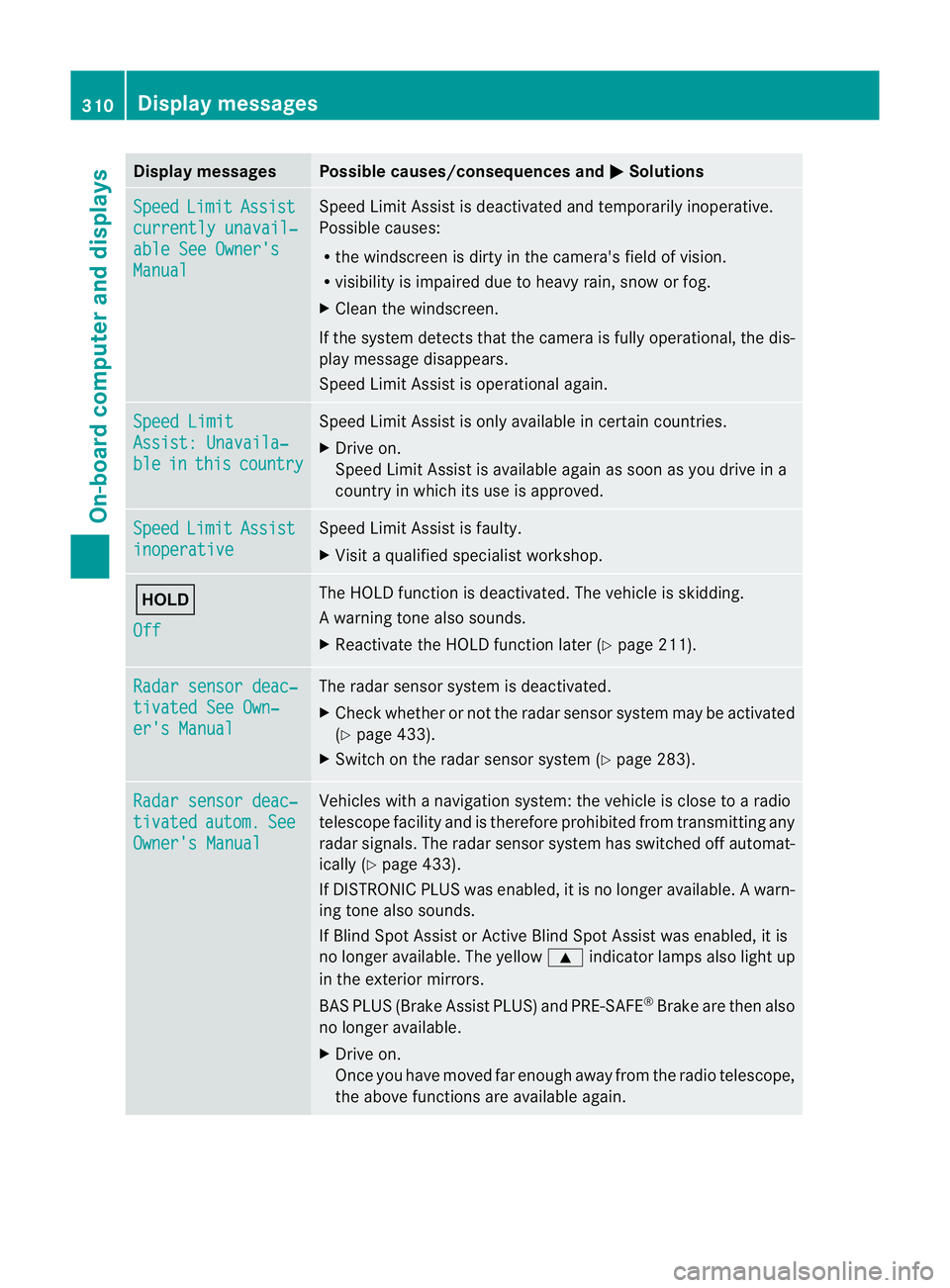
Displa
ymessages Possible causes/consequences and
M Solutions
Sp
eed Limit Assist
currently unavail‐
abl
eS ee Owner's Manual Spee
dLimit Assist is deactivated an dtemporarily inoperative.
Possible causes:
R the windscreen is dirt yinthe camera's field of vision.
R visibility is impaired due to heav yrain, snow or fog.
X Clea nthe windscreen.
If the system detec tsthat the camera is fully operational, the dis-
play message disappears.
Speed Limit Assist is operational again. Speed Limit
Assist
:Unavaila‐ ble in this country Spee
dLimit Assist is only available in certain countries.
X Driv eon.
Spee dLimit Assist is available again as soon as you drive in a
countr yinwhich its use is approved. Speed Limit Assist
inoperative Speed Limi
tAssist is faulty.
X Visit aqualified specialist workshop. ë
Off The HOLD function is deactivated. The vehicle is skidding.
Aw
arning ton ealso sounds.
X Reactivat ethe HOL Dfunction later (Y page 211). Ra
dars ensor deac‐ tivate
dSee Own‐ er'
sM anual Th
er adar sensor system is deactivated.
X Check whether or not the radar sensor system ma ybeactivated
(Y pag e433).
X Switch on the rada rsensor system (Y page 283). Rada
rsensor deac‐ tivated autom. See
Owner's Manual Vehicles with
anavigation system: the vehicle is close to aradio
telescop efacility and is therefore prohibite dfrom transmitting any
radar signals .The radar sensor system has switched off automat-
ically (Y page 433).
If DI STRONIC PLUS was enabled, it is no longe ravail able. Aw arn-
ing ton ealso sounds.
If Blin dSpotA ssist or Ac tiveBlind Spo tAssist was enabled, it is
no longe ravailable .The yellow 9indicator lamps also light up
in the exterior mirrors.
BA SP LUS (Brake Assist PLUS) and PRE-SAFE ®
Brak eare then also
no longe ravailable.
X Drive on.
Once yo uhave moved far enough awa yfrom th eradio telescope,
the above function sare avai lable again. 310
Display messagesOn-board computer and displays
Page 315 of 441
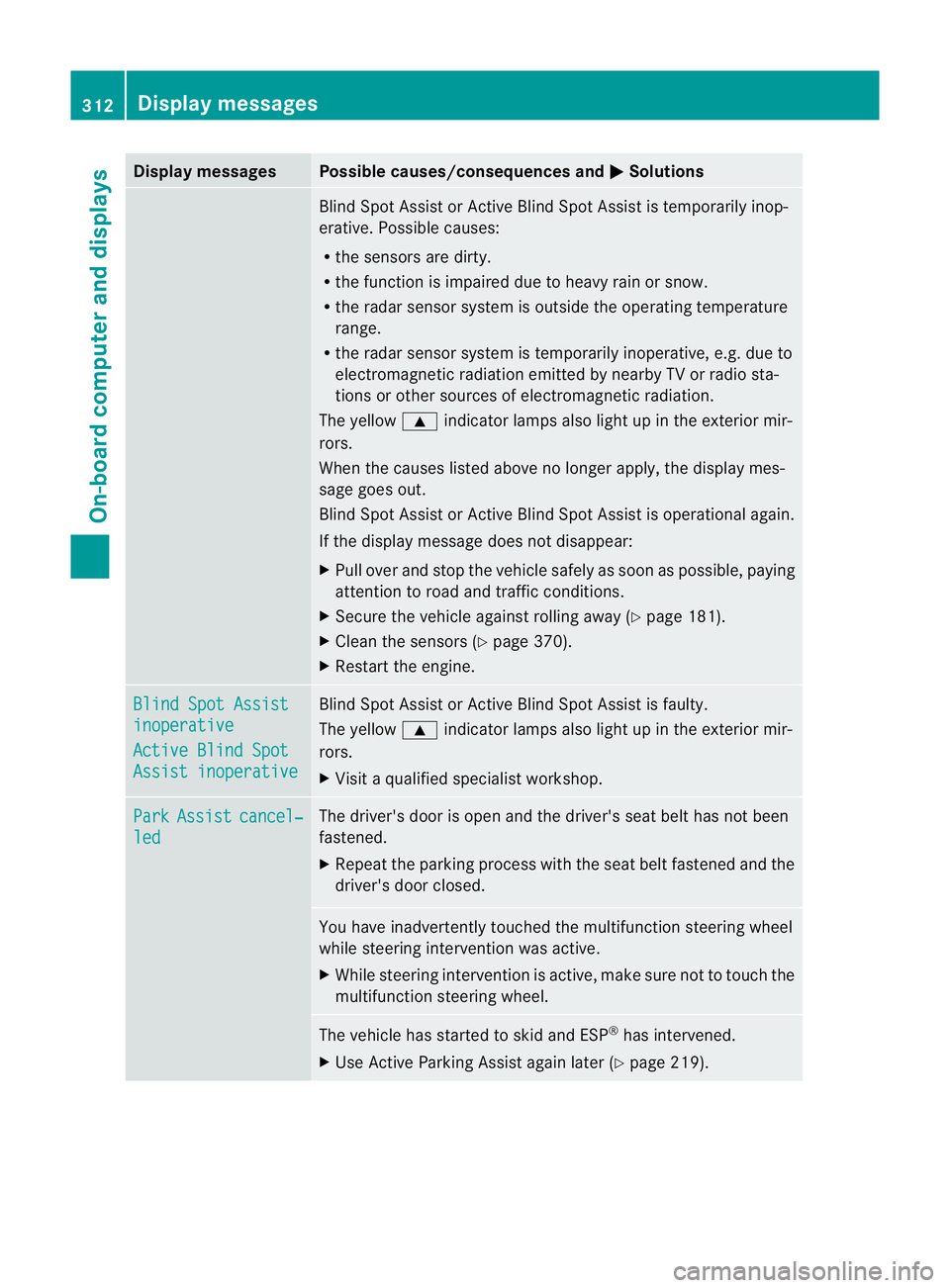
Displa
ymessages Possible causes/consequences and
M Solutions
Blind Spot Assis
torActive Blind Spo tAssist is temporarily inop-
erative. Possible causes:
R the sensors are dirty.
R the function is impaired due to heavy rain or snow.
R the radar senso rsystem is outside the operating temperature
range.
R the radar sensor syste mistemporarily inoperative, e.g. due to
electromagneti cradiation emitted by nearby TV or radio sta-
tions or other sources of electromagnetic radiation.
The yellow 9indicator lamps also light up in the exterior mir-
rors.
When the causes listed above no longer apply ,the displa ymes-
sage goes out.
Blin dSpot Assist or Active Blin dSpot Assist is operational again.
If the display message does not disappear:
X Pull over and stop the vehicle safely as soon as possible, paying
attention to road and traffic conditions.
X Secure the vehicle against rollin gaway (Y page 181).
X Clean the sensors (Y page 370).
X Restart the engine. Blin
dSpot Assist inoperative
Active Blind Spot
Assist inoperative Blind Spot Assist or Active Blind Spot Assist is faulty.
Th
ey ellow 9indicator lamps also light up in the exterior mir-
rors.
X Visit aqualified specialist workshop. Park Assist cancel‐
led The driver'
sdoor is open and the driver's seat belt has not been
fastened.
X Repeat the parkin gprocess wit hthe seat belt fastened and the
driver's door closed. You hav
einadvertently touched the multifunction steerin gwheel
while steerin gintervention was active.
X While steerin gintervention is active, make sure not to touch the
multifunction steerin gwheel. The vehicle has star
tedtos kid and ESP ®
has intervened.
X Use Active Parking Assist again later (Y page 219).312
Display messagesOn-board computer and displays