radio MERCEDES-BENZ GL SUV 2012 Owners Manual
[x] Cancel search | Manufacturer: MERCEDES-BENZ, Model Year: 2012, Model line: GL SUV, Model: MERCEDES-BENZ GL SUV 2012Pages: 441, PDF Size: 10.66 MB
Page 14 of 441
Removin
g....................................... 415
Storage locatio n............................ 415
Techn ical data ............................... 417
Emergency unl ocking
Ta ilgate ............................................ 88
Veh icle ............................................ .84
Engine
Display message ............................ 304
ECO start/stop function ................163
Engine numb er............................... 423
Jump-starting ................................. 386
Runnin girregularl y......................... 166
Starting pro blems .......................... 166
Starting the engine wit hthe key ....161
Starting with KEYLESS GO .............161
Stopp ing. ....................................... 182
To w-st arting (vehicle )..................... 391
Warning lamp (eng ined iagnos-
tics) ............................................... 333
En gine electronics
Notes ............................................. 421
Pro blem (fault) ............................... 166
En gine oil
Additives ........................................ 429
Checking the oil level ...... ............... 362
Checking the oil leve lusing the
dipstick .......................................... 362
Display message ............................ 305
Fil ling capacity ............................... 428
Note sabout oil grades ...... ............. 428
Notes on oil level/cons umption.... 362
Temperat ure( on-board computer) .286
Topping up ..................................... 362
Viscosity ........................................ 429
En vironmental protection
Returning an end-of-life vehicle .......23
ESP ®
(Electronic Stability Pro-
gram) 4ETS ................................................ 66
AMG menu (on-bo ardc omputer )... 287
Deactivating/activating ...................67
Display message ............................ 291
Function/notes ................................ 66
Important safety gu idelines ............. 66
Traile rstabilisatio n.......................... 67
Warn ingl am p................................. 329
Exhaus tpipe (cleaning instruc-
tions) .................................................. 371Exterio
rlighting
see Lights
Exterior mirrors
Adjustin g....................................... 112
Anti-dazzle mod e(automatic) ........114
Fol ding in/ou t(automatically )....... 113
Fol ding in/ou t(electrically) ...........113
Fol ding in whe nlocki ng(on-board
computer) ...................................... 285
Ou tofp osition (troubleshooting) ...113
Parking positio n............................. 114
Resetting ....................................... 113
Storing settings (memory func-
tion) ............................................... 115 F
Faul tmessage
see Display messages
Filler cap
see Fuel filler flap
Fire extinguisher ............................... 377
First-aid kit ......................................... 376
Fittin gawheel
Removin gawheel .......................... 407
Fitting wheels
Fittin gaw heel............................... 408
Lowering the veh icle ...................... 409
Rais ingt he vehicle ......................... 406
Securing the veh icle against roll-
ing away ........................................ 405
Flat tyre
MOExtende dtyres ......................... 378
Pre paring th evehicle ..................... 378
TIREFIT kit ...................................... 379
Floormat ............................................ .358
Foglamps (extende drang e).............. 124
Foldin gthe rear be nchs eat for-
wards/back ....................................... 341
Fording Off-road ......................................... 186
On flo oded roads ........................... 186
Frequencies
Garage door op ener ....................... 354
Mobile phone ................................. 421
Tw o-way radio ................................ 421 Index
11
Page 20 of 441
Radio
Selectin gastation ......................... 274
se es eparat eoperating instructions
Radio- controlled device s(fitting) ....358
Rain clos ingf eature
Panorama sliding sunroo f................ 95
Sli ding sunroo f................................. 94
Readi nglamp ..................................... 126
Rear compartment Exit/entry positio n(3rd row of
se ats) ............................................ .106
Setting the ai rvent s...................... 155
Rear-c ompartment seat bel tsta-
tus indicator ........................................ 49
Rear foglamp Display message ............................ 302
Switch ingo n/off ........................... 120
Rear seat
Adjusting ....................................... 104
Display message ............................ 320
Rear-vie wmirror
Anti-dazzle mode (automatic) ........114
Dipping (manual) ........................... 112
Rear windo wheating
Problem (fault) ............................... 146
Switch ingo n/off ........................... 146
Rear windo wwiper
Replacing the wiper blade .............. 133
Switching on/off ........................... 132
Refuell ing
Fuel gauge ............................... 30, 267
Important safety notes ..................174
Note sfor AMG vehicles .................425
Refuellin gproce ss......................... 175
se eF uel
Remote control
Auxiliary heating/ventilatio n.......... 149
Changing the batteries (auxiliary
heating) ......................................... 151
Programming (g arage door
opener) .......................................... 352
Replacin gthe battery (aux iliary
heating remot econt rol) .................... 151
Reserve (fuel tank) see Fuel Reserve fuel
Disp laym essage ............................ 305
Warn ingl am p................................. 333
Residual heat (climate control) ........147
Restrain tsyst em
se eS RS (Supplemental Restraint
System)
Rev counter ........................................ 268
Reversing camera Cleaning instructions .....................370
Function/notes ............................. 223
Switch ingo n/off ........................... 224
Rev ersing lamp (display message) ..302
Rol lers unbli nd
Panoram asliding sunroof ................95
Roof carri er........................................ 345
Roof li ning and carpet s(cle aning
in st ructions) ...................................... 373
Roof load (maximum) ........................431
Route (navigation) seeR oute guidance (nav igation)
Route guidance (navigation) ............272 S
Safety Children in the vehicle .....................50
Ch ildr estra ints ystems .................... 50
Safety system
seeD riving safety sy stem
Seat belt
Adjusting the driv er's and front-
pa ssenger sea tbelt ......................... 48
Adjusting the he ight......................... 48
Belt force limiter .............................. 49
Bel ttensioner .................................. 49
Clean ing. ........................................ 373
Disp laym essage ............................ 298
Fasten ing. ........................................ 47
Important safety gu idelines ............. 46
Rea rseat belt status indicator .........49
Releasing ......................................... 48
Switch ingb elta djustment on/off
(on-board computer) ......................285
Warn ingl am p................................. 325
Warning lamp (function) ................... 48 Index
17
Page 23 of 441
Menu (on-boar
dcomputer )............ 275
Number from the phone book ........ 276
Redialling ....................................... 276
Rej ecting/end ingac all................. 276
Te lephon ecompartmen t................ 339
Temperature
Coolan t.......................................... 268
Co olan t(on-board computer) ...... ...2 86
Engine oi l(on-board computer) ...... 286
Outside temperatur e..................... .268
Setting (cl imate control) ................143
TEMPOMAT
Function/notes ............................. 193
Theft-deterren tsyst em
ATA (Anti-Theft Alarm system) .........71
Immob iliser ...................................... 71
Through-loading ................................ 341
Time seeS eparate Owner's manual
Timing (RACETIMER) .........................287
TIRE FITk it.......................................... 379
Top Tether ............................................ 55
Total distanc erecorder .................... 271
Tow-away protection ..........................71
Towing Important safety notes ..................388
Towing atrailer
Active Blind Sp ot Assist................. 245
Active Lane Kee ping Assist ............248
Active Parking Assis t..................... 223
Axle lo ad,p erm issible .................... 433
Bulb failure ind icator for LED
lamps ............................................. 263
ESP ®
(Electroni cStability Pro-
gram) ............................................... 67
Pullin gawayw ithat railer .............. 162
Traile rdrive program ..................... 250
Towing away
Fitting the tow inge ye.................... 390
Removing the tow inge ye............... 390
With both axl eson the ground .......390
Tow-starting
Emergency engine starting ............391
Important safety notes ..................388
Trailer
Display message ............................ 321Trailer coupli
ng
se eT owing atrailer
Traile rtowing
7-pin connector ............................. 263
Blind Spo tAssist ...... ...................... 240
Cleaning the trailer tow hitch ......... 371
Coupling up atrailer ...................... 260
Decouplin gatrailer ....................... 261
Driving tip s.................................... 257
Fol ding in the bal lcoupling ............ 261
Fol ding out the bal lcoupling .......... 259
Important safety notes ..................257
Mo unting dimensions ....................432
Parktroni c...................................... 218
Po wer suppl y................................. 262
Pro blem (fault) ............................... 264
Shift rang e..................................... 170
Traile rloads ................................... 433
Transmission
seeA utomati ctransmission
Transmissio nposition display .........168
Transmission pos ition display
(DIRECT SELECT lever) ......................168
Transportin gthe vehicle .................. 391
Travellin guphill
Brow of hil l..................................... 192
Driving downhil l............................. 192
Maximum gradient-cl imbing capa-
bility .............................................. .192
Trim pie ces( cle anin ginstructions) .372
Trip computer (on-b oard com-
puter) ................................................. .271
Trip meter Calling up ....................................... 271
Resetting (on-bo ardc omputer )...... 272
Turn si gnal
se eT urn signals
Turn signals
Switching on/off ........................... 121
TV
Operating (on-bo ardc omputer )..... 275
se eS eparate operating instructions
Two- wayradio
Freq uencies ................................... 421
Installati on .................................... .421
Transmission output (maximum ).... 421 20
Index
Page 28 of 441
functions in systems wh
ichh ave not been
modified .Malfunctions such as these can
seriously jeopardise the vehicle' soperating
safety and therefore your own safety.
You shoul dthere fore have all work and mod-
ifi ca tions to electronic component scarried
out at aqualified specialist workshop. Declarations of conformity
Wireless vehicle components The followin
ginformation applies to all com-
ponent softhe vehicle and the COMAN Dsys-
tem which receiv eand/or transmit radio
waves:
The component softhis vehicle whic hreceive
and/or transmit radi owaves are compliant
with the basic requirements and other rele-
vant provisions of Directive 1999/5/EC. You
can obtain further information from any
Mercedes-Benz Servic eCentre.
Electromagnetic compatibility The electromagneti
ccompatibility of the vehi-
cle components has been checked and certi-
fied according to the currently valid version
of Directive 72/245/EE Corthe equivalent
ECE Regulation ECE-R 10. Diagnostics connection
G
WARNING
If you connec tequipment to adiagnostics
connection, it can affect the operation of the
vehicle systems. This could compromis ethe
operating safety of your vehicle while driving.
There is arisk of an accident.
Do not connect any equipment to adiagnos-
tics connection. G
WARNING
Loose equipment or cables hanging from a
device which are connected to adiagnostic
connection could impede pedal clearan ce. The equipment or cables could get caught
between the pedals when driving and braking
suddenly
.This coul dimpair th efunction of the
pedals .There is arisk of accident.
Do not attac hany equipment or cable sinthe
driver's footwell.
! If the engin eiss witched off and equip-
ment on the diagnostics connection is
used, the starter batter ymay discharge.
The diagnostics con nection is only intended
for the connection of diagnostic equipmen tat
aq ualified specialist workshop.
Connecting equipmen ttothe diagnostics
con nectio ncan lead to emissions monitoring
information being reset, for example. This
may lead to the vehicle failing to meet the
requirements of the next emissions test dur-
ing the main inspection. Qualified specialist workshop
Aq ualified specialist workshop has the nec-
essary special skills, tools and qualifications
to cor rectly carry out any necessary work on
your vehicle. This particularly applies to work
relevan ttosafety.
Observe the notes in the Servic eBooklet.
Always have the following work carried out at
aq ualified specialist workshop:
R work relevant to safety
R service and maintenance work
R repair work
R modifications, installations and conver-
sions
R work on electronic components
Mercedes-Benz recommends that you use a
Mercedes-Benz Servic eCentre. Vehicle registration
Mercedes-Benz may ask its Servic eCentres
to carry out technical inspections on cer tain Introduction
25 Z
Page 65 of 441
BAS (Brak
eAssis tSystem)
i Observet he "Imp ortant safety notes "sec-
tion (Y page 61). G
WARNING
If BAS is malfunctioning, the braking distance
in an emergency braking situation is
increased .There is arisk of accident.
In an emergenc ybraking situa tion, depress
the bra kepedal with full force. AB Sprevents
th ew heels fr om locking.
BAS operate sinemergency brakin gsitua-
tions. If you depress the brake pedal quickly,
BAS automatically boosts the brakin gforce,
thus shortening the stoppin gdistance.
The brakes will func tion as usual onc eyou
release the brake pedal. BA Sisd eactivated. BAS PLUS (Brake Assist Syste
mPlus)
i Observe the "Importan tsafety notes" sec-
tion (Y page 61).
BAS PLUS is only available on vehicles with
DISTRONIC PLUS.
BAS PLUS provides braking assistance in haz-
ardous situations at speeds greater than
7k m/h and uses rad ar sensortechnology to
assess the traffic situation.
With the help of the rada rsensor system ,BAS
PLU Scan detect obstacles that are in the
path of your vehicle for an extended period of
time.
At speeds up to approximately 70 km/ h,BAS
PLUS may also det ects tationar yobstacles,
for example, stopped or parked vehicles.
To prevent afront-en dcollision, BA SPLUS
calculate sthe brake force necessary if:
R you approach an obstacle, and
R BA SP LUS ha sdetected arisk of collision
If you ar edriving at aspeed over
30 km/h:ify ou depress the brake sharply,
BA SP LUS automatically raise sthe brake
pressur etoavalue adapted to the traffic sit-
uation. If you are driving at
aspeed under
30 km/h:ify ou depress the brake, BA SPLUS
is activated. Braking will be carried ou tatthe
last possible moment.
If BA SPLUS demand sparticularly high brak-
ing force, preventative passenger protection
measures (PRE-SAFE ®
)a re activate dsimul-
taneously.
X Keep the brake pedal depressed until the
emergenc ybraking situatio niso ver.
ABS prevents th ewheels from locking.
BA SP LUS is deactivate dand the brakes func-
tion as usual ,if:
R you release th ebrake pedal.
R there is no longe rany danger of arear-end
collision.
R no obstacl eisdetected in front of your
vehicle.
If you have activated DSR (Y page 251), BAS
PLU Sisa lso deactivated.
The radar sensor system is switched off auto-
matically in the vicinit yofradio telescope
facilities in the following vehicles:
R vehicles with COMAND Online and naviga-
tion
R vehicles with Audio 20 and Becker ®
MAP
PILOT
Becker ®
MAP PILOT must be connected;
see the separate operating instructions.
The radar senso rsystem must be switched off
using the on-board computer in the vicinit yof
radio telescop efacilities in the following vehi-
cles:
R vehicles without COMAND Online and nav-
igation
R vehicles without Audio 20 and Becker ®
MAP PILOT
R vehicles for Australia
For information on switching off the radar
senso rsystem using the on-board computer,
see (Y page 283). 62
Driving safety systemsSafety
Page 73 of 441
G
WARNING
PRE-SAFE ®
Brake does not react:
R to people or animals
R to oncoming vehicles
R to crossing traffic
R when cornering
As aresult, PRE-SAFE ®
Brake may neither
give warnings nor intervene in all critical sit-
uations. There is arisk of an accident.
Always pay caref ulattention to the traffic sit-
uation and be read ytobrake.
In order to maintai nthe appropriate distance
to the vehicle in front and thus preven tacol-
lision, you must apply the brake syourself.
X To activate/deactiva te:activate or deac-
tivate PRE-SAFE ®
Brake in the on-board
computer (Y page 278).
When PRE-SAFE ®
Brake is activated, the
Ä symbol appears in multifunction dis-
play ,asl ong as the HOL Dfunction is deac-
tivated (Y page 211). On vehicles with the
Active Parking Assis tdriving system, the
Ä symbo lisdisplayed when position P
is engaged or you are drivin gfaster than
35 km/h.
For PRE-SAFE ®
Brake to assis tyou when driv-
ing, the radar sensor system must be
switched on (Y page 283) and be opera-
tional.
The radar sensor system is switched off auto-
matically in the vicinit yofradio telescope
facilities in the following vehicles:
R vehicles with COMAND Online and naviga-
tion
R vehicles with Audio 20 and Becker ®
MAP
PILOT
Becker ®
MAP PILOT must be connected;
see the separate operating instructions. The radar senso
rsystem must be switched off
using the on-board computer in the vicinity of
radio telescope facilities in the following vehi-
cles:
R vehicles without COMAND Online and nav-
igation
R vehicles without Audio 20 and Becker ®
MAP PILOT
R vehicles for Australia
For information on switching off the radar
sensor syste musing the on-boar dcomputer,
see (Y page 283).
Following damage to the front end of the vehi-
cle, have the configuration and operation of
the radar sensor schecked at aqualified spe-
cialist workshop. This also applies to colli-
sions at slow speeds where there is no visible
damage to the front of the vehicle. STEER CONTROL
i Observe the "Important safety notes" sec-
tion (Y page 61).
STEE RCONTROL helps you by transmittin ga
noticeable steering force to the steering
wheel in the direction require dfor vehicle
stabilisation.
This steering suppor tisprovide dinparticular
if:
R both right wheel sorboth left wheels ar eon
aw et or slippery road surface when you
brake.
R the vehicle starts to skid.
If there is an ESP ®
malfunction ,you will not
receive any steering suppor tfrom STEER
CONTROL. Powe rsteering will ,however, con-
tinue to func tion. 70
Driving safety systemsSafety
Page 80 of 441
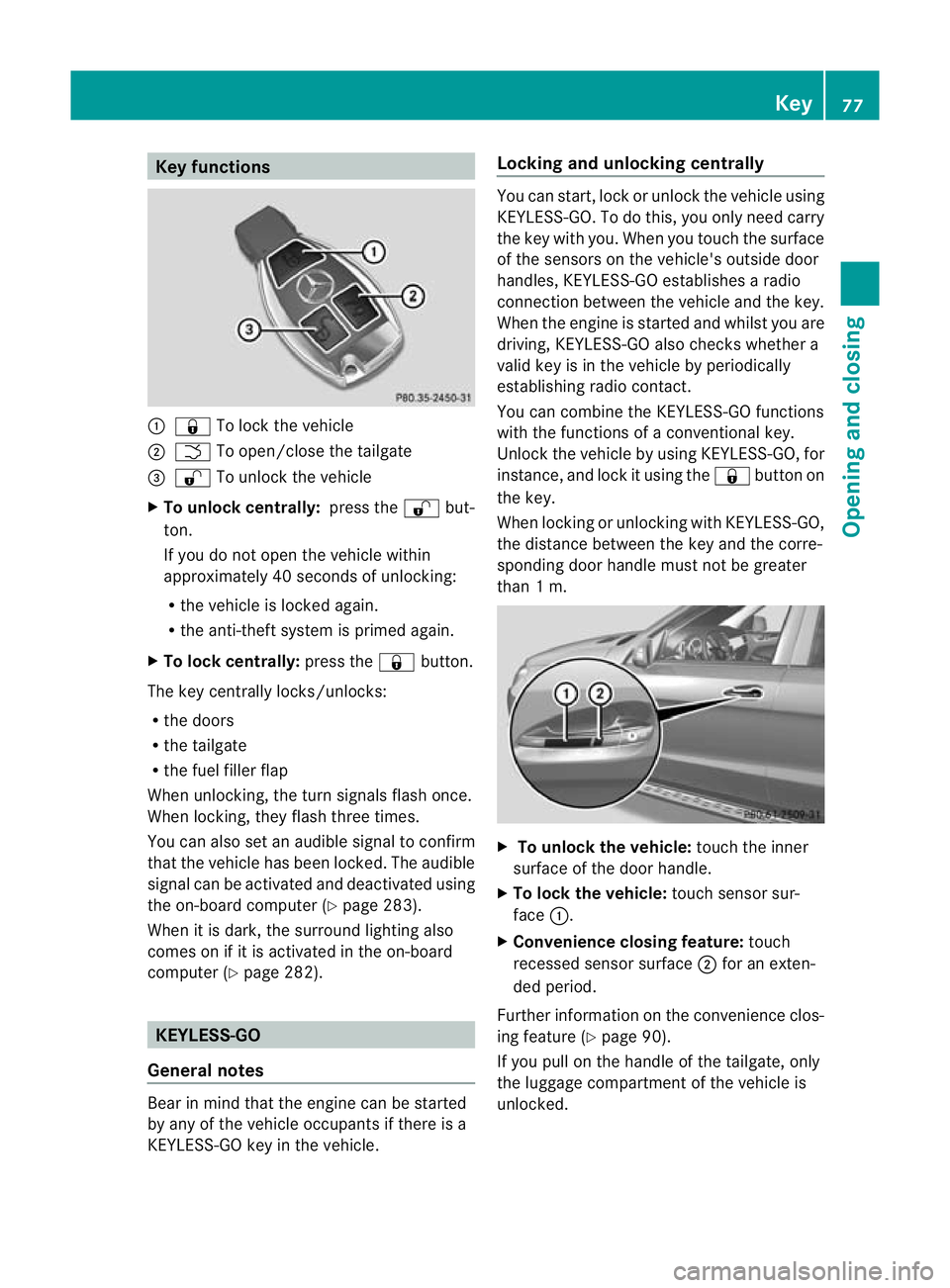
Key functions
:
& To loc kthe vehicle
; F To open/close the tailgate
= % To unlock the vehicle
X To unlock centrally: press the%but-
ton.
If you do not open the vehicle within
approximatel y40seconds of unlocking:
R the vehicle is locked again.
R the anti-theft system is primed again.
X To lock centrally: press the&button.
The key centrally locks/unlocks:
R the doors
R the tailgate
R the fuel filler flap
When unlocking, the tur nsignals flash once.
When locking, they flash three times.
You can also set an audible signal to confirm
that the vehicle has been locked. The audible
signal can be activated and deactivated using
the on-board computer (Y page 283).
When it is dark, the surroun dlighting also
comes on if it is activated in the on-board
computer (Y page 282). KEYLESS-GO
Genera lnotes Bear in mind that the engine can be started
by any of the vehicle occupants if there is a
KEYL ESS-GO key in the vehicle. Locking and unlockin
gcentrally You can start, lock or unlock the vehicle using
KEYL
ESS-GO .Todot his, you only need carry
the key with you. When you touc hthe surface
of the sensor sonthe vehicle' soutside door
handles ,KEYLESS-GO establishes aradio
connection between the vehicle and the key.
When the engine is started and whils tyou are
driving, KEYLESS -GOa lso check swhether a
valid key is in the vehicle by periodically
establishin gradio contact.
You can combine the KEYLESS-GO functions
with the functions of aconventional key.
Unlock the vehicle by using KEYLESS -GO, for
instance, and lock it usin gthe & button on
the key.
When locking or unlocking with KEYL ESS-GO,
the distance between the key and the corre-
sponding doo rhandle must not be greater
than 1m. X
To unlock the vehicl e:touch the inner
surface of the doo rhandle.
X To lock the vehicle: touch sensorsur-
face :.
X Convenience closing featu re:touch
recessed sensor surface ;for an exten-
ded period.
Further information on the convenience clos-
ing feature (Y page 90).
If you pull on the handl eofthe tailgate, only
the luggage compartmen tofthe vehicle is
unlocked. Key
77Opening and closing Z
Page 84 of 441
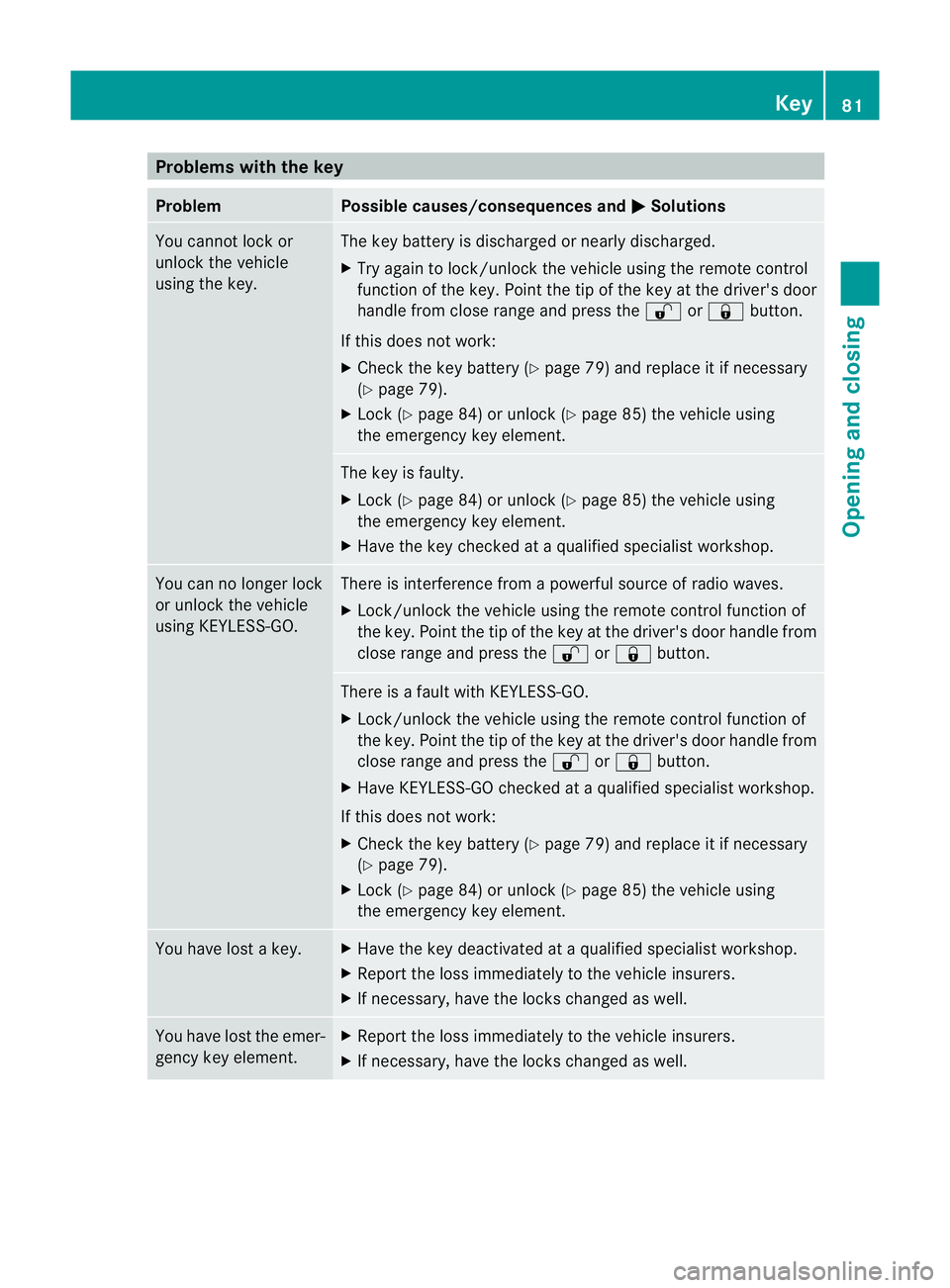
Problems wit
hthe key Problem Possible causes/consequences and
M Solutions
Yo
uc annot lock or
unlock the vehicle
using the key. The key battery is discharged or nearly discharged.
X
Try again to lock/unlock the vehicle using the remote control
function of the key. Point the tip of the key at the driver' sdoor
handl efrom close rang eand pres sthe % or& button.
If this does not work:
X Chec kthe key battery (Y page 79)and replace it if necessary
(Y pag e79).
X Lock (Y page84) or unlock (Y page85) the vehicl eusing
the emergenc ykey element. The key is faulty.
X
Loc k(Ypage 84 )orunlock (Y page85) the vehicl eusing
the emergenc ykey element.
X Hav ethe key chec kedataq ualified specialist workshop. You can no longer lock
or unlock the vehicle
using KEYLESS-GO. There is interference from
apowerfu lsource of radio waves.
X Lock/unloc kthe vehicle usin gthe remote con trol func tion of
the key. Point the tip of the key at the driver' sdoor handl efrom
close rang eand pres sthe % or& button. There is
afault with KEYLESS-GO.
X Lock/unlock the vehicle using the remote control function of
the key. Point the tip of the key at the driver' sdoor handl efrom
close rang eand pres sthe % or& button.
X Hav eKEYLESS-GO checked at aqualified specialist workshop.
If this does not work:
X Check the key battery (Y page 79) and replace it if necessary
(Y page 79).
X Lock (Y page 84) or unlock (Y page 85) the vehicle using
the emergency key element. You have lost
akey. X
Hav ethe key deactivated at aqualified specialist workshop.
X Report the loss immediately to the vehicle insurers.
X If necessary, have the locks changed as well. You have lost the emer-
gency key element. X
Report the loss immediately to the vehicle insurers.
X If necessary, have the locks changed as well. Key
81Openin gand closing Z
Page 85 of 441
Problem Possible causes/consequences and
M Solutions
The engin
ecannot be
started using the key. The on-board voltage is too low.
X
Switch off non-essential consumers, e.g. seat heating or interior
lighting ,and try to start the engine again.
If this doe snot work:
X Check the starter battery and charge it if necessary
(Y page 384).
or
X Jump-start the vehicle (Y page 386).
or
X Consult aqualified specialist workshop. The engine cannot be
started using KEYLESS-
GO. The key is in the
vehicle. Ad
oor is open. Therefore, the key can notb ed etected as easily.
X Close the door and tr ytostart the vehicle again. There is interferenc
efrom apowerfu lsource of radio waves.
X Start your vehicle with the key in the ignition lock. Doors
Important safety notes
G
WARNING
Only fo rthe Unite dKingdom: if the vehicle
has been locked with the key or with KEY-
LESS-GO, the double lock func tion is activa-
ted as standard. It is then not possible to open
the doors from inside the vehicle.
Therefore, do not leav eany people behind in
the vehicle, particularly children, elderly peo-
ple or people requiring special assistance .As
ar esult, they may not be able to free them-
selves in the event of an emergency. They
could be seriously or even fatally injured by
prolonged exposur etoextremely hig horlow
tempera tures, for example. In this case ,res-
cuin gpeople from outside the vehicle is diffi-
cult.
Deac tivate the interior motion sensor before
you lock the vehicle .The doors can then be
opened from the insid eafter the vehicl ehas
been locked from the outside. G
WARNING
If children are left unsupervised in the vehicle,
they could:
R open adoor from inside the vehicle at any
time, even if it has been locked
R star tthe vehicle usin gakey which has been
left in the vehicle
R release the electric parking brake
They could thereby endanger themselves and
others. Never leave children unsupervised in
the vehicle. Alway stake the key with you
when leaving the vehicle, even if you are only
leaving it for ashort time. Unlocking and opening th
edoors
from the inside
For all countries except the United King-
dom: you can open adoor from inside the
vehicle even if it has been locked.
If the vehicle has been locked with the key or
with KEYLESS -GO, opening adoor from the
inside will trigger the anti-thef talarm system.
Switch off the alarm (Y page 71).82
DoorsOpening and closing
Page 152 of 441
manu
al.O ptimum comfor tcan be attained
when the system is set to automatic mode.
Set the temperature to 22 †.
The auxiliary heating/ventilatio ncan be acti-
vated or deactivated using the remote con trol
or th ebutton on the centr econsole.
Th eo n-bo ard computer can be used to spec-
ify up to three departur etimes, one of which
may be preselec ted( Ypage 28 4).
Switching th eauxiliary heating/ven ti-
lation on/off usin gthe centr econsole
button The colours of th
eindicator lamps on the but-
ton have the following meanings:
Blue Auxiliary ventilation switched on
Red Auxiliary hea ting swi tche don
Yellow Departure tim epreselected
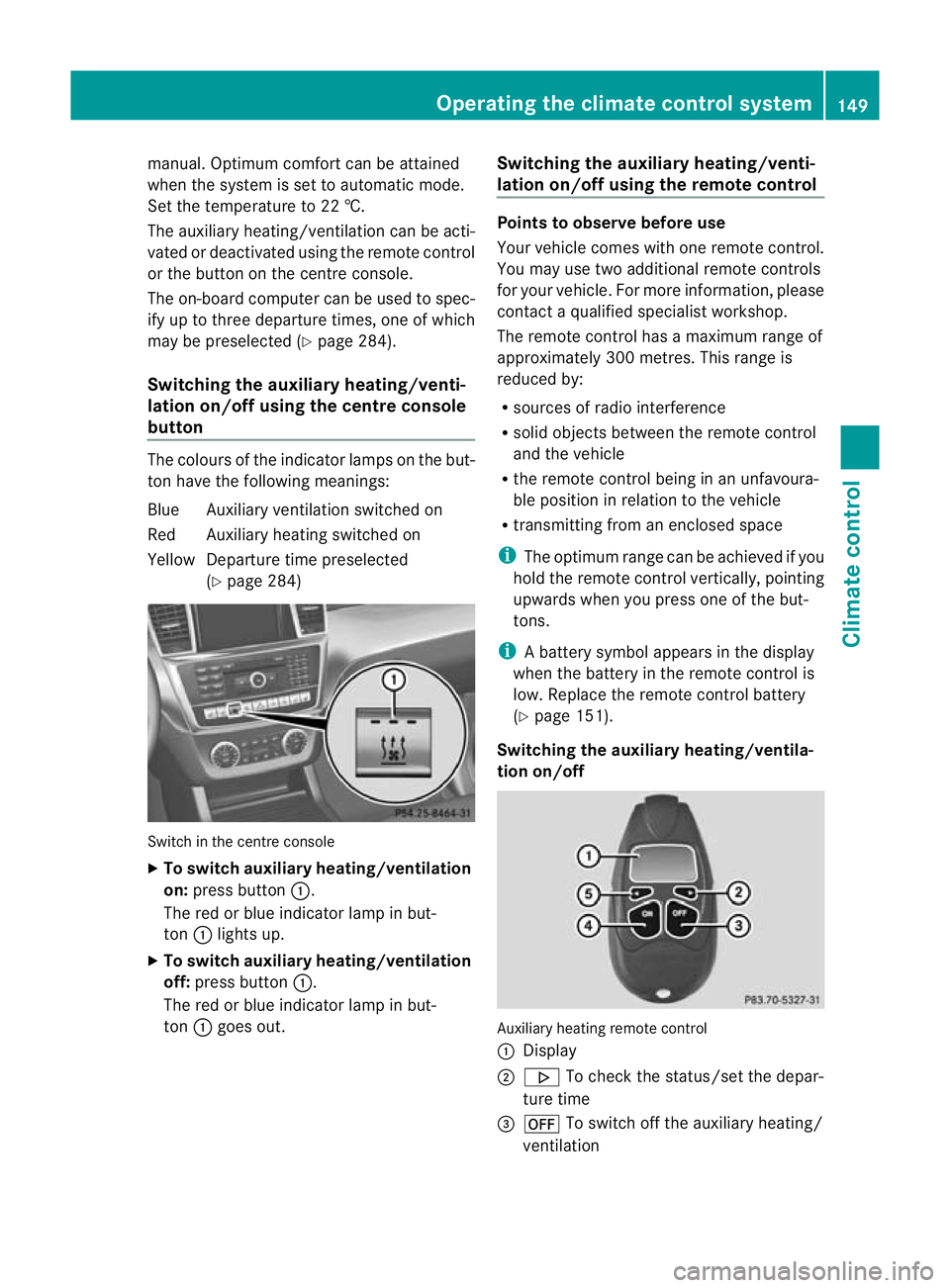
(Y page 284) Swi
tchint he centr econsole
X To switch auxiliary heating/ventilation
on: pres sbutton :.
The red or blue indicator lamp in but-
ton :lights up.
X To switch auxiliary heating/ventilation
off: press button :.
The red or blue indicator lamp in but-
ton :goes out. Switching th
eauxiliary heating/venti-
lation on/off using th eremote control Point
stoo bserve befo reuse
Your vehicle comes wit hone remote control.
You may use two addi tional remot econtrols
for your vehicle. For mor einformation, please
contac taqualifieds pecialist workshop.
The remot econtr olhas amaximum range of
approximately 300 metres. This range is
reduced by:
R sources of radio interference
R solid objects between the remot econtr ol
an dt he vehicle
R the remot econtr ol bein ginanu nfavoura-
ble positio ninrelation to the vehicle
R transmit ting from an enclosed space
i The optimum range can be achieved if you
hol dthe remot econtr ol vertically, pointing
upward swhen you press one of the but-
tons.
i Abattery symbol appears in the display
when the batter yinthe remote control is
low. Re placethe remote control battery
(Y page 151).
Switching th eauxiliary heating/ventila-
tion on/off Auxiliar
yheating remot econtrol
: Display
; . To check th estatus/set the depa r-
tur etime
= ^ To switch off th eauxiliar yheating/
ventilation Operatin
gthe clima tecontrol system
149Climatecontrol Z