climate control MERCEDES-BENZ GL SUV 2012 Owner's Manual
[x] Cancel search | Manufacturer: MERCEDES-BENZ, Model Year: 2012, Model line: GL SUV, Model: MERCEDES-BENZ GL SUV 2012Pages: 441, PDF Size: 10.66 MB
Page 153 of 441
?
u To switc honthe auxiliary heating/
ven tilation
A , To check the status/set the depar-
ture time
X To switch on: press theubutton.
ON is shown in the remote control display.
X To deactivate: press the^button.
OFF is shown in the remot
econtrol display.
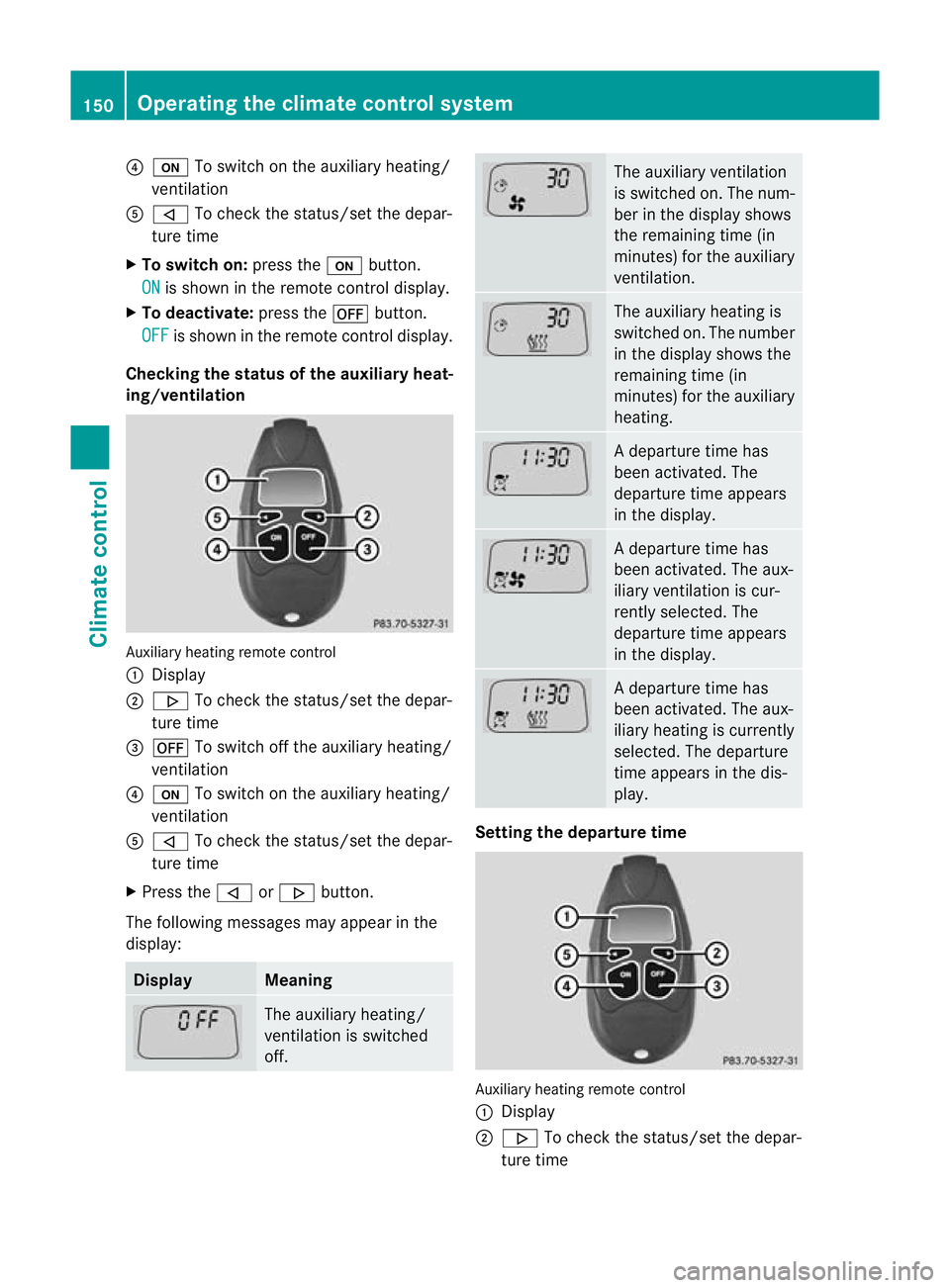
Checking th estatus of the auxiliary heat-
ing/ventilation Auxiliary heating remote control
:
Display
; . To check the status /set the depar-
tur etime
= ^ To switch off the auxiliar yheating/
ven tilation
? u To switch on the auxiliar yheating/
ven tilation
A , To check the status/set the depar-
ture time
X Press the ,or. button.
The following messages may appear in the
display: Display Meaning
The auxiliar
yheating/
ven tilation is switched
off. The auxiliar
yventilation
is switched on. The num-
ber in the display shows
the remainin gtime (in
minutes) for the auxiliary
ventilation. The auxiliar
yheatin gis
switched on. The number
in the displa yshows the
remaining tim e(in
minutes) for the auxiliary
heating. Ad
eparture tim ehas
been activated. The
departure time appears
in the display. Ad
eparture tim ehas
been activated. The aux-
iliary ventilation is cur-
rently selected. The
departure time appears
in the display. Ad
eparture tim ehas
been activated. The aux-
iliary heating is currently
selected. The departure
time appears in the dis-
play. Setting the departure time
Auxiliary heating remot
econtrol
: Display
; . To chec kthe status/se tthe depar-
tur etime 150
Operating the climate control systemClimat
econtrol
Page 154 of 441
=
^ To switc hoff th eauxiliary heating/
ventilation
? u To switch on the auxiliary heating/
ventilation
A , To check the status/set the depar-
ture time
X Press the ,or. button repeatedly
until the time to be changed appears in the
display.
X Press the uand^ buttons simulta-
neously.
The Îsymbol in the remote control dis-
play flashes.
X Press the ,or. button to set the
desired departure time.
i The longer you press the ,or.
button, the faster the time changes.
X Press the uand^ buttons simulta-
neously.
The new departure time is stored.
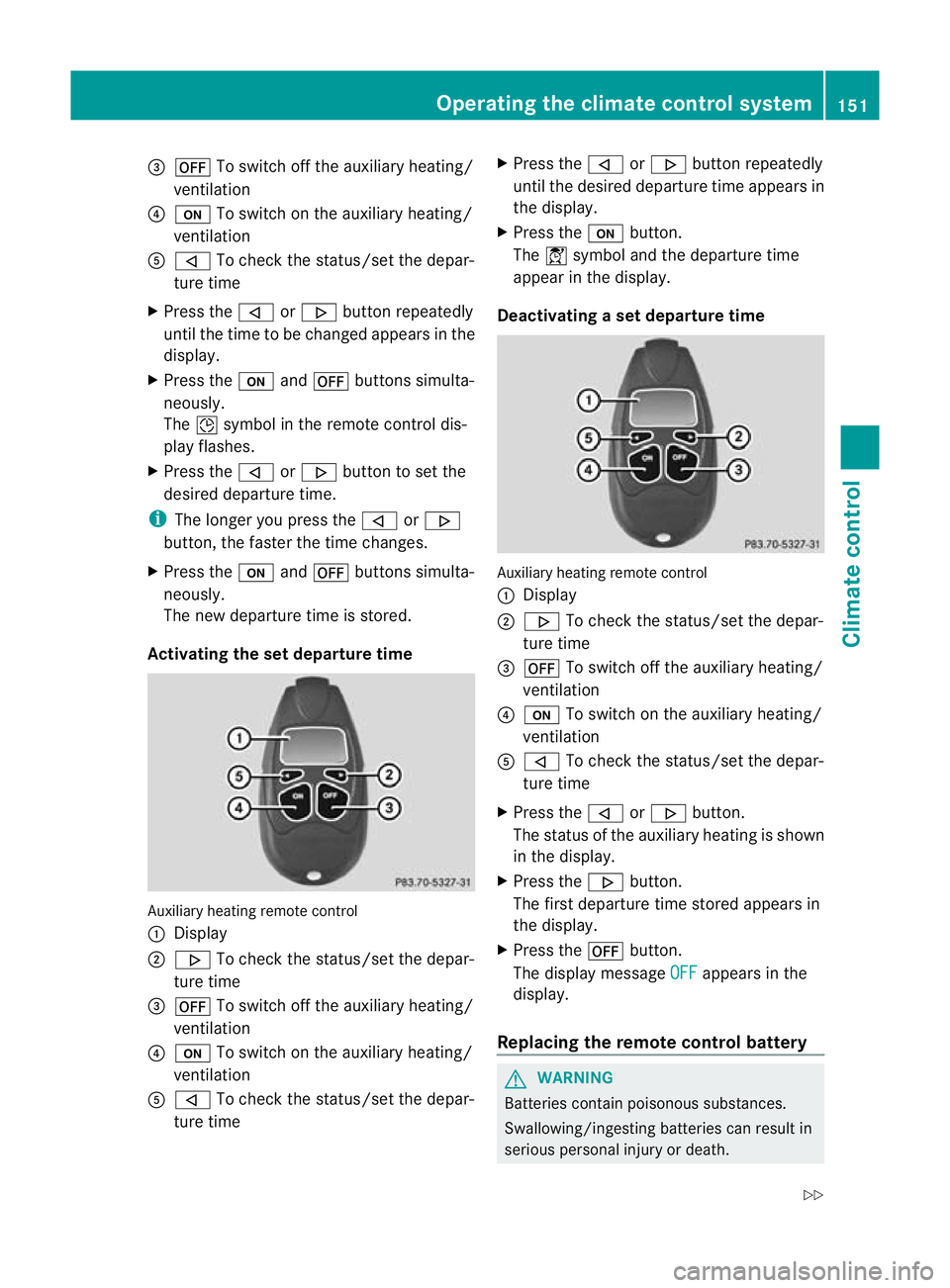
Activating the set departur etime Auxiliary heating remote control
:
Display
; . To check the status/set the depar-
ture time
= ^ To switch off the auxiliar yheating/
ven tilation
? u To switch on the auxiliar yheating/
ven tilation
A , To check the status/set the depar-
ture time X
Press the ,or. button repeatedly
until the desired departur etime appears in
the display.
X Press the ubutton.
The Ísymbol and the departur etime
appear in the display.
Deactivating aset depa rtur et ime Auxiliary heating remote control
:
Display
; . To check the status/set the depar-
ture time
= ^ To switch off the auxiliar yheating/
ven tilation
? u To switch on the auxiliar yheating/
ven tilation
A , To check the status/set the depar-
ture time
X Press the ,or. button.
The status of the auxiliar yheatin gisshown
in the display.
X Press the .button.
The first departur etime stored appears in
the display.
X Press the ^button.
The display message OFF appears in the
display.
Replacing the remot econtrol battery G
WARNING
Batteries contain poisonous substances.
Swallowing/ingestin gbatteries can result in
serious personal injury or death. Operating the climate contro
lsystem
151Climate co ntrol
Z
Page 155 of 441
Alway
skeepb atteries away from children. If
ab attery is swallowed, see kimmediate med-
ica lattention. H
Environmental note Batteries contain pollutants.
It is illegal to dispose of them
with the househo
ldrubbish.
They mus tbecollected sep-
arately and disposed of in an
environmentally responsible
recycl ings ystem. Dispose of batterie
sinan
environmental lyresponsible
manner. Take disch arged
batteries to aqualified spe-
cialist workshop or to acol-
lection point for used batter-
ies. One
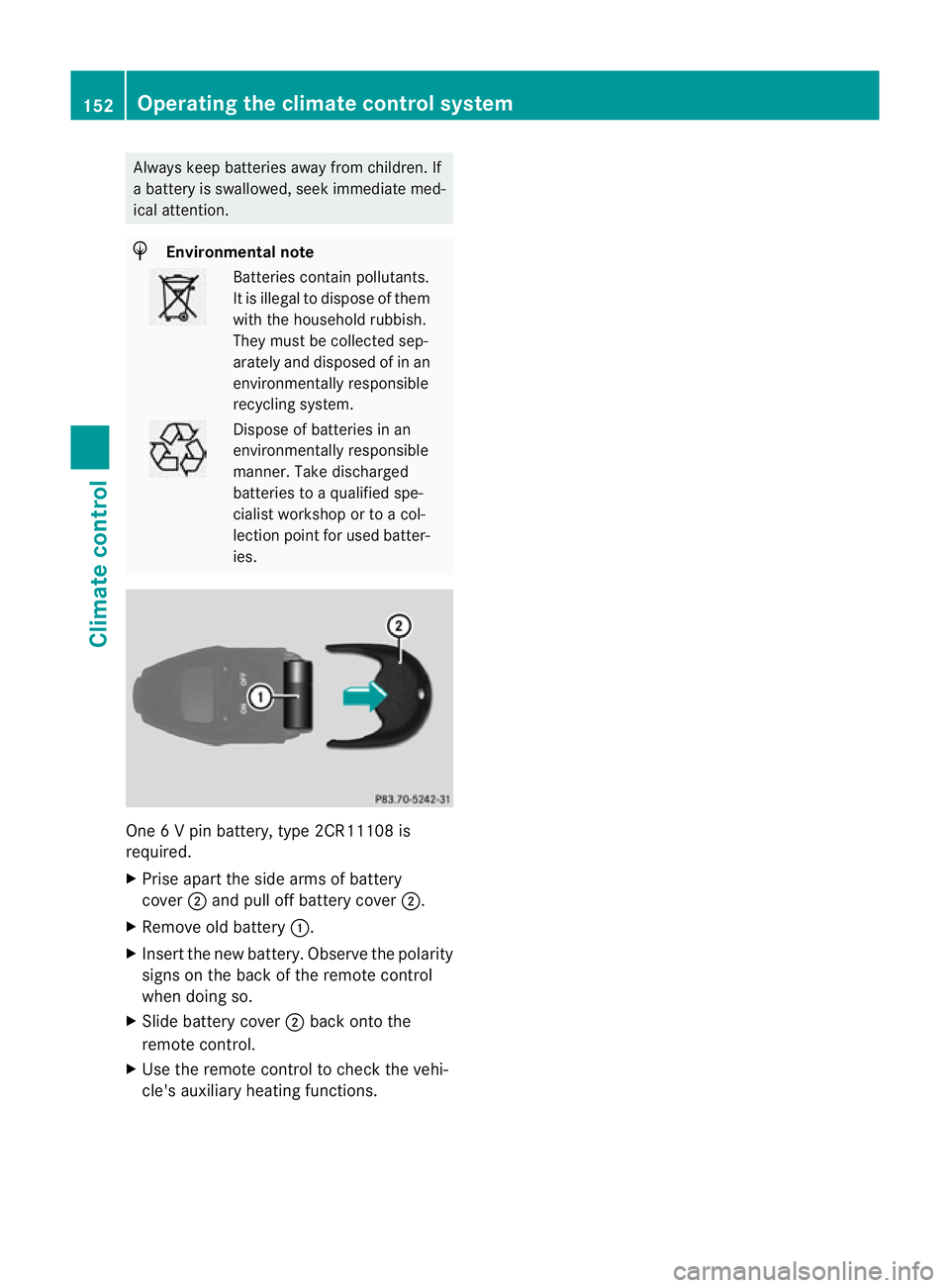
6Vp in battery, type 2CR11108 is
required.
X Prise apart the side arm sofbattery
cover ;and pul loff battery cover ;.
X Remove ol dbattery :.
X Insert the new battery. Observe the polarity
signs on the back of the remote control
when doing so.
X Slid ebattery cover ;back ont othe
remot econtr ol.
X Us ethe remot econtr ol to chec kthe vehi-
cle' sauxiliary heating functions. 152
Operating the climate contro
lsystemClimate co ntrol
Page 156 of 441
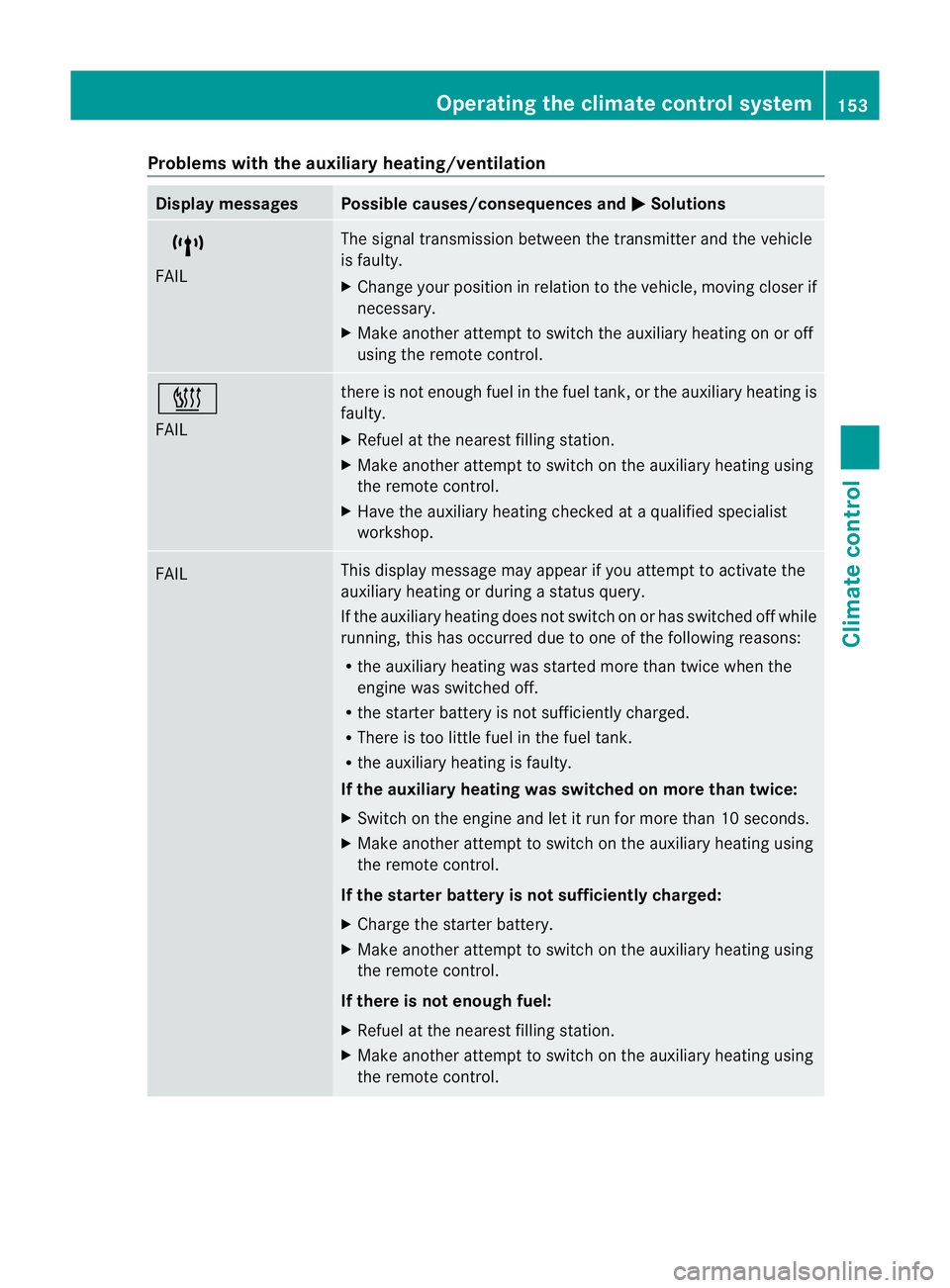
Problems wit
hthe auxiliary heating/ventilation Display messages Possible causes/consequences and
M Solutions
$
FAIL Th
es ignal transmission between the transmitter and the vehicle
is faulty.
X Change your position in relation to the vehicle, movin gcloser if
necessary.
X Make another attempt to switch the auxiliary heating on or off
using the remote control. ©
FAIL there is not enough fuel in the fuel tank
,orthe auxiliary heating is
faulty.
X Refuel at the nearest filling station.
X Make another attemp ttos witch on the auxiliary heating using
the remote control.
X Have the auxiliary heating checked at aqualified specialist
workshop. FAIL This display messag
emay appear if you attempt to activate the
auxiliary heating or during astatus query.
If the auxiliary heating doe snot switc honorh as switched off while
running, this has occurred due to one of the following reasons:
R the auxiliary heating was started more than twice when the
engine was switched off.
R the starter battery is not sufficiently charged.
R There is too little fuel in the fuel tank.
R the auxiliary heating is faulty.
If the auxiliary heating was switched on more than twice:
X Switch on the engine and let it run for more than 10 seconds.
X Make another attempt to switch on the auxiliary heating using
the remote control.
If the starter battery is not sufficiently charged:
X Charge the starter battery.
X Make another attempt to switch on the auxiliary heating using
the remote control.
If there is not enough fuel:
X Refuel at the nearest filling station.
X Make another attempt to switch on the auxiliary heating using
the remote control. Operating the climate control system
153Climate control Z
Page 158 of 441
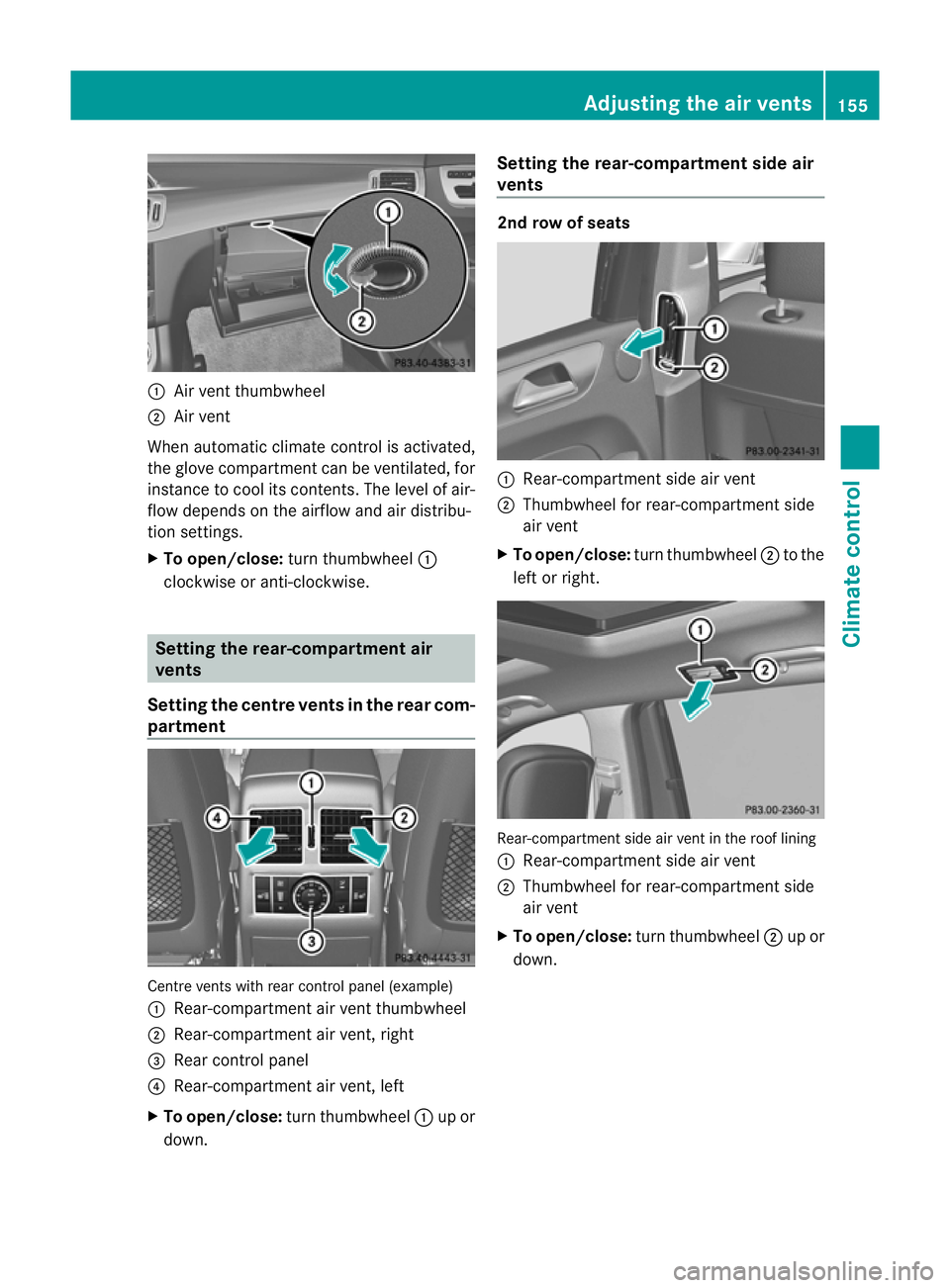
:
Air vent thumbwheel
; Air vent
Whe nautomatic climat econtrol is activated,
the glov ecompartment can be ventilated, for
insta ncetoc oolits contents .The level of air-
flo wd epends on the airflow and air distribu-
tion settings.
X To open/close: turnthumbwheel :
clockwise or anti-clockwise. Setting th
erear-compar tment air
vents
Setting the centre vents in the rear com-
partment Centr
events with rear control panel (example)
: Rear-compartmen tair vent thumbwheel
; Rear-compartment air vent ,right
= Rear control panel
? Rear-compartment air vent ,left
X To open/close: turnthumbwheel :up or
down. Setting th
erear-compar tment side air
vents 2nd row of seats
:
Rear-compartment side air vent
; Thumbwheel for rear-compar tmentside
air vent
X To open/close: turnthumbwheel ;to the
lef torr ight. Rear-compartmen
tside air vent in the roof lining
: Rear-compartment side air vent
; Thumbwheel for rear-compartment side
air vent
X To open/close: turn thumbwheel ;up or
down. Adjusting the air vents
155Climatecontrol Z