ESP MERCEDES-BENZ GL SUV 2012 Workshop Manual
[x] Cancel search | Manufacturer: MERCEDES-BENZ, Model Year: 2012, Model line: GL SUV, Model: MERCEDES-BENZ GL SUV 2012Pages: 441, PDF Size: 10.66 MB
Page 178 of 441
G
WARNING
Electrostati ccharge can lead to the creation
of sparks and to fuel vapours igniting. There
is ar isk of fire and explosion.
Touch the vehicle bodywork just before open-
ing the fuel filler cap. This wil ldischarge a
possible electrostatic charge.
! Do not use petrol to refuel vehicle swith a
diesel engine. Do not use diesel to refu el
vehicles wit hapetrol engine. Do not switch
on the igniti on if youaccidentally refuel
with the wrong fuel. Otherwise, the fuel will
ente rthe fuel system .Even small amounts
of th ewrong fue lcould result in damage to
the fuel system and the engine. The repair
cost sare high .Notif yaq ualified specialist
workshop and have the fuel tan kand fuel
lines draine dcompletely.
! Overfilling the fuel tan kcould damage the
fuel system.
! Take care not to spill any fuel on painted
surfaces .You coul dotherwis edamage the
paintwork.
! Use afilter when adding fuel from afuel
can. The fuel lines and/or the diesel injec-
tion system could otherwis ebeblocked by
particles from the fuel can.
If you overfill the fuel tank ,fuel could spray
out when the fuel pump nozzle is removed.
Further information on fuel and on fuel grades
can be found in the "Fuel" section
(Y page 423). Refuelling
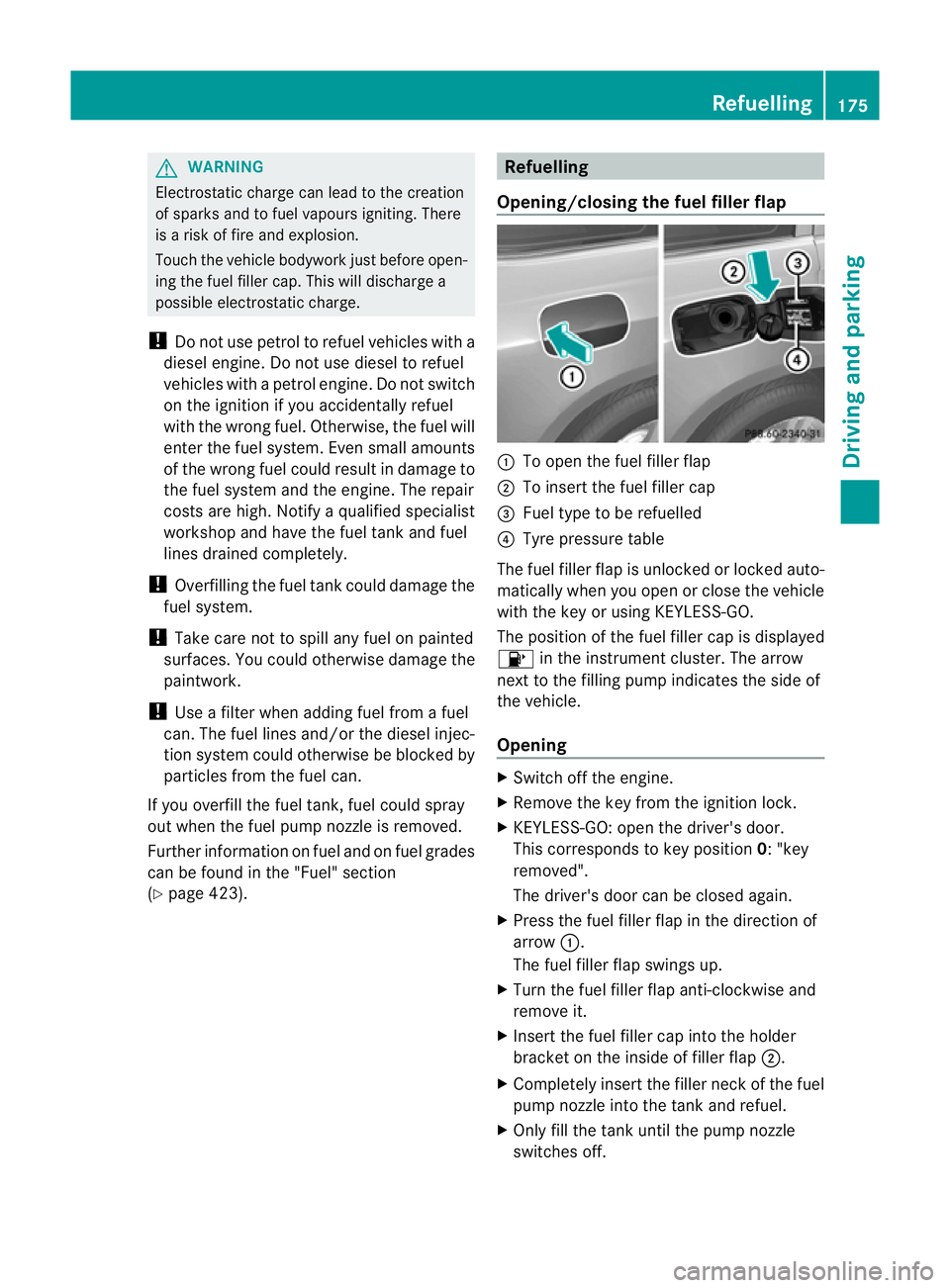
Opening/closing the fuel filler flap :
To open the fuel filler flap
; To insert the fuel filler cap
= Fuel type to be refuelled
? Tyre pressure table
The fuel filler flap is unlocked or locked auto-
matically when you open or close the vehicle
with the key or using KEYLESS-GO.
The position of the fuel filler cap is displayed
8 in the instrument cluster. The arrow
next to the filling pump indicates the side of
the vehicle.
Opening X
Switch off the engine.
X Remove the key from the ignition lock.
X KEYLESS-GO: open the driver' sdoor.
This corresponds to key position 0:"key
removed".
The driver's doo rcan be closed again.
X Press the fuel filler flap in the direction of
arrow :.
The fuel filler flap swings up.
X Turn the fuel filler flap anti-clockwise and
remove it.
X Insert the fuel filler cap into the holder
bracket on the inside of filler flap ;.
X Completely insert the filler neck of the fuel
pump nozzle into the tank and refuel.
X Only fill the tank until the pump nozzle
switches off. Refuelling
175Driving and parking Z
Page 189 of 441
approved for Mercedes-Ben
zvehicles or
which cor respond to an equivalen tquality
standard. Brak epads/linings which have not
been approved for Mercedes -Benz vehicles or
whic hare not of an equivalent quality could
affect your vehicle's operating safety.
High-performance brak esystem for
AMG vehicles Th
eh igh-performan cebrak esystem is
designed for hig hloads. This ma ylead to
noise when braking. This is dependen ton:
R speed
R braking force
R environmenta lconditions, such as tem per-
ature and humidity
Th ew earofi ndividual brake system compo-
nents such as the brake pads/lining sorbrake
discs depends on individual driving st ylea nd
operating conditions.
For thi sreason, it is impossible to state a
mileage (service life) that will be valid under
all circumstances .Anaggressive drivin gstyle
will lead to high wear. You can obtain fur ther
information about this fr om your Mercedes-
Benz Service Centre.
New brake pads/brak epads and discs that
have been replaced only achieve optimum
braking effect after several hundred kilome-
tres of driving. Compensate for the reduced
braking effect by applying greater force to the
brake pedal. Always be aware of this and
adapt your driving and braking accordingly
during the running-in period.
Excessive heavy braking results in corre-
spondingly high brake wear. Observe the
# brake wear warning lamp in the instru-
ment cluster and note any brake status mes-
sages in the multifunc tion display. If you reg-
ularly drive at high speeds, it is particularly
important to have the brake system chec ked
and maintained regularly. Driving on wet roads
Aquaplaning If water has accumulated to
acertain depth
on the road surface, there is adanger of aqua-
planing occurring, even if:
R you are driving at low speeds
R the tyres have adequate tread depth.
For this reason, do not drive in tyre ruts, and
brake carefully.
Driving on flooded roads !
Bear in mind that vehicles travelling in
front or in the opposite direction create
waves. This may cause the maximum per-
missible water depth to be exceeded.
Thes enotes must be observed under all
circumstances. You coul dotherwis edam-
age the engine, the electronics or the trans-
mission.
If you have to drive on stretches of road on
which water has collected, please bear in
mind that:
R the maximum permissible fording depth in
still water depends on the vehicle equip-
ment.
R you should drive no faster than walking
pace.
Off-road fording !
The depth of water must not exceed the
value specified in the table. Note that the
possible fording depth is less in flowing
water.
! Under no circumstances should you
accelerate before entering the water. The
bow wave could cause water to enter and
damage the engine and neighbouring
assemblies.
! Do not open any of the vehicle's doors
while fording. Otherwise, water could get
into the vehicle interior and damage the 186
Driving tipsDriving and parking
Page 190 of 441
vehicle's el
ectronics and interior equip-
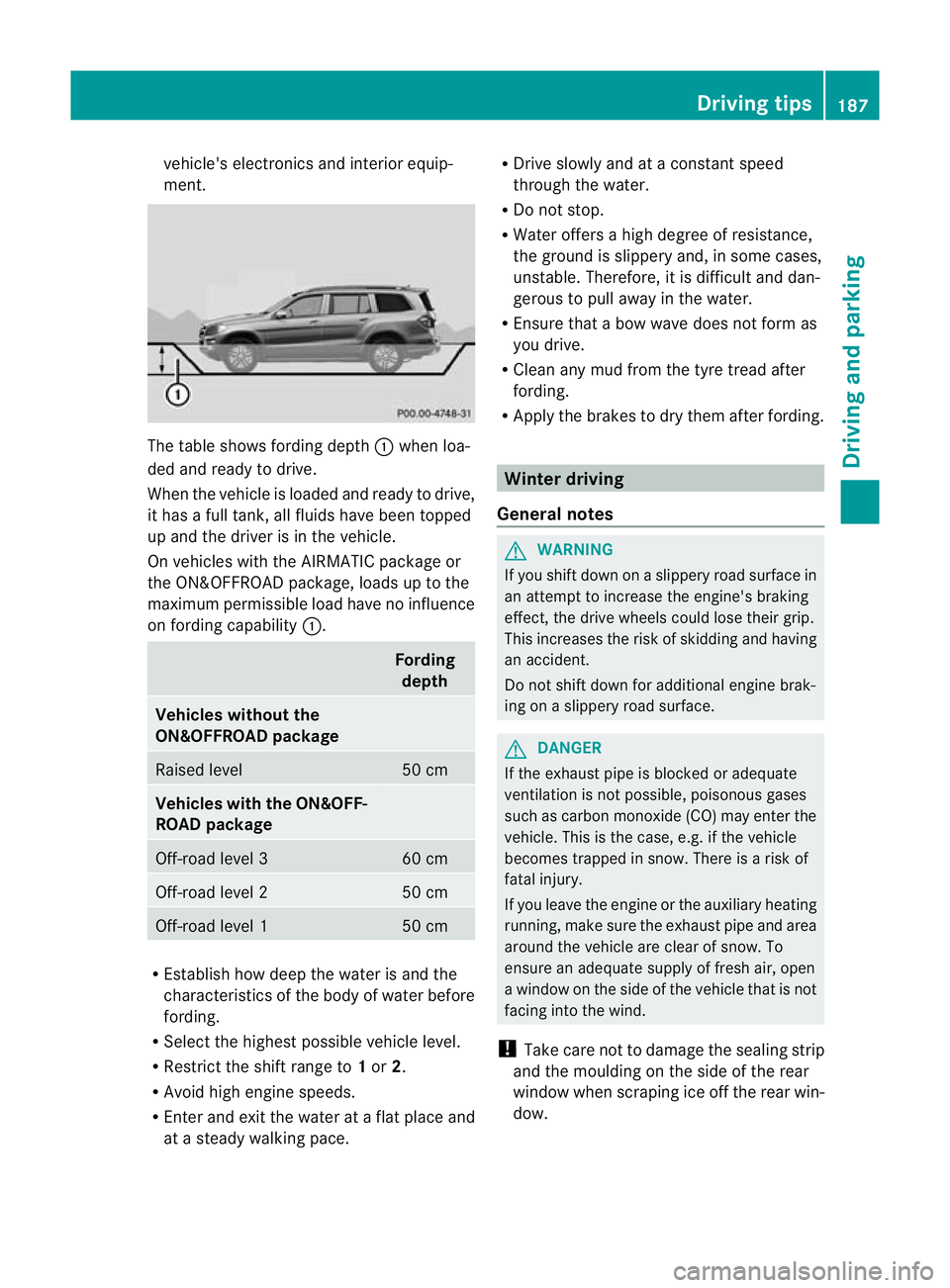
ment. The table sho
wsfording depth :when lo a-
de da nd read ytodrive.
When th evehicle is loaded and ready to driv e,
it has afull tank, all fluids have been topped
up and the driver is in the vehicle.
On vehicles with the AIRMATIC packag eor
the ON&OFFROAD package ,loads up to the
maximum permissible load have no influence
on fording capability :. Fording
depth Vehicles without the
ON&OFFROAD package
Raised level 50 cm
Vehicles with th
eON&OFF-
ROAD package Off-road level 3 60 cm
Off-road level 2 50 cm
Off-road level 1 50 cm
R
Establish how dee pthe water is and the
characteristic softhe body of water before
fording.
R Select the highest possible vehicle level.
R Restrict the shift range to 1or 2.
R Avoid high engin espeeds.
R Enter and exit the water at aflat place and
at as teady walking pace. R
Drive slowly and at aconstant speed
through the water.
R Do not stop.
R Water offers ahigh degree of resistance,
the ground is slippery and, in some cases,
unstable. Therefore, it is difficult and dan-
gerous to pull away in the water.
R Ensure that abow wav edoes not for mas
you drive.
R Clea nany mud from the tyre tread after
fording.
R Appl ythe brakes to dry them after fording. Winter driving
Genera lnotes G
WARNING
If you shift down on aslippery road surfac ein
an attempt to increase the engine's braking
effect, the drive wheels could lose their grip.
This increases the risk of skidding and having
an accident.
Do not shift down for additional engine brak-
ing on aslippery road surface. G
DANGER
If the exhaust pipe is blocked or adequate
ventilation is not possible ,poisonous gases
such as carbon monoxide (CO) may enter the
vehicle. This is the case, e.g. if the vehicle
becomes trapped in snow. There is arisk of
fatal injury.
If you leave the engine or the auxiliary heating
running, make sure the exhaust pipe and area
around the vehicle are clear of snow. To
ensure an adequate supply of fresh air, open
aw indow on the side of the vehicle that is not
facin ginto the wind.
! Take care not to damage the sealing strip
and the mould ingont he side of the rear
window when scrapin gice off the rear win-
dow. Driving tips
187Driving and parking Z
Page 191 of 441
At the onse
tofwinter, have your vehicle win-
terproofed at aqualified specialist workshop.
Vehicles with th eON&OFFROAD pack-
age: if drivin ginsnow or with snow chains,
select the snow program (Y page 249)with
the off- road program selector wheel in the
centre console.
Observe the notes in the "Winter operation"
section (Y page 398).
Driving with summer tyres Observe the notes in the "Winter operation"
section (Y
page 398).
Slippery road surfaces G
WARNING
If you shift down on aslippery road surfac ein
an attempt to increase the engine's braking
effect ,the drive wheels coul dlose their grip.
This increases the risk of skiddin gand having
an accident.
Do not shift down for additional engine brak-
ing on aslippery road surface.
If the vehicle threaten stoskid or cannot be
stopped whe nmovin gatl ow speed:
X Move the transmission to position N.
X Try to bring the vehicle under con trolby
using corrective steering.
i For more information on driving with
snow chains, see (Y page 399).
You should drive particularly carefully on slip-
pery road surfaces. Avoid sudde naccelera-
tion, steering and brakin gmanoeuvres. Off-road driving
Important safety notes G
WARNING
If you drive up asteep incline at an angle or
turn on asteep incline, the vehicle could slip sideways, tip and overturn. There is
arisk of
an accident.
When drivin gupanincline, drive into the line
of fall (upw ards or downwards in astraight
line) and do not turn. G
WARNING
If the vehicle level is high, the vehicle centre
of gravity is raised .This coul dcause the vehi-
cle to tip over more easily on uphill or downhill
gradients. There is arisk of an accident.
Select the lowest possible vehicle level.
When drivin goff-road, sand, mud and water,
possibly mixe dwith oil, for example, could get
into the brakes. This could result in areduced
braking effect or in total brak efailure and also
in increased wear and tear. The braking char-
acteristic schange depending on the material
ingressing the brakes. Clean the brakes after
driving off-road. If you detec tareduce dbrak-
ing effect or grinding noises, have th ebrake
system checked in aqualified specialist work-
sho pass oon as possible. Adapt your driving
style to the differen tbraking characteristics.
Driving off- road increases the likelihood of
damage to the vehicle, which, in turn, can lead
to failure of the mechanical assembly or sys-
tems. Adapt your driving style to suit the ter-
rain conditions. Drive carefully. Have damage
to the vehicle rectified immediately at aquali-
fied specialist workshop.
Do not switch to transmission position N
when driving off-road. You could lose control
of the vehicle if you attempt to brake using
the service brake. If the gradient is too steep,
drive backwards in reverse gear.
General notes H
Environmental note
Protection of the environment is of primary
importance. Treat nature with respect.
Observe all prohibiting signs. 188
Driving tipsDrivin
gand pa rking
Page 192 of 441
Read this section before drivin
gyour vehicle
off-road. Pra ctisebyt ravelling over more gen-
tle off-road terrain first.
The following driving systems are specially
adapted to off-road driving:
R Off-road program (vehicles without the
ON&OFFROAD package) (Y page 252)
R Off-road program 1and 2(vehicles wit hthe
ON&OFFROAD package) (Y page 253)
R LOW RANGE off-road gear (vehicles with
the ON&OFFROAD package)
(Y page 254)
R Differential lock (vehicles with the
ON&OFFROAD package) (Y page 254)
R Off-road AB S(Ypage 61)
R Off-road 4ETS (Y page 66)
R Off-road ESP ®
(Y page 67)
R AIRMATI Cpackag e(veh icle level)
(Y pag e212)
R DSR (Downh illS peed Regulation)
(Y page 251)
Observe the following notes:
R Stop your vehicle and, if necessary, select
the off-road program (Y page 252)orthe
LOW RANGE off -road gear (Y page 254)
befor edriving off-road.
R Select avehicle level suitable for the off-
road ter rain. To avoid damaging the vehicle,
make sure ther eisalways sufficien tground
cle arance.
R Check that items of luggage and loads are
stowed safel yand are wel lsecur ed
( Y page 343).
R Always keep the engine running and in gear
when driv ingonad ownhill gradient. Acti-
vate DSR (Y page 251).
R Drive slowly and evenly, if necessary at
walking pace.
R Ensure that the wheels ar einc ontact with
the ground at all times.
R Drive with extreme car eonu nknown off-
road routes where visibility is poor. For
safety reasons, get out of the vehicl efirst
and survey the off-road route. R
Check the depth of water before fording
rivers and streams.
R Look out for obstacles such as rocks, holes,
tree stumps and furrows.
R Take care when turning on an uphill or
downhill slop eorwhen driving across a
slope. The vehicle could otherwise tip over.
R Always keep the side windows and the pan-
orama sliding sunroof closed dur ingt he
journey.
R Do not stray from marked routes or paths.
i Information about retrofitting special all-
terrain tyres is available from any qualified
specialist workshop.
i Do not use the HOL Dfunction when driv-
ing off-road, on steep uphill or downhill gra-
dients or on slippery or loos esurfaces. The
HOLD function cannot hold the vehicl eon
suc hsurfaces.
Checklis tbefor edriving off-road X
Engine oil level: check theengine oil and
top it up if necessary.
Whe ndriving on stee pgradients, the
engin eoil level must be sufficiently high to
ensure acorrec toil supply in the vehicle.
X AdBlue ®
tank (BlueTEC vehicles): check
the fluid level and, if necessary, refill to the
maximum (13 l) (Y page 178).
X Tyre-ch ange tool kit: checkthat the jack
is wor king and mak esure you have the
wheelbrace, arobust tow cabl eand afold-
ing spade in the vehicle.
X Wheels and ty res: chec kthe tyr etread
depth and tyre pressure.
X Check for damage and remove any foreign
objects, e.g. small stones, fro mthe
wheels/tyres.
X Replace any missing valv ecaps.
X Replace dented or damaged wheels.
X Wheels: dented or bent wheel scan lead to
al oss of tyr epressure and damag etot he
tyr eb ead. Before driving off-road, check
the wheels and replace them if necessary. Driving tips
189Driving and parking Z
Page 195 of 441
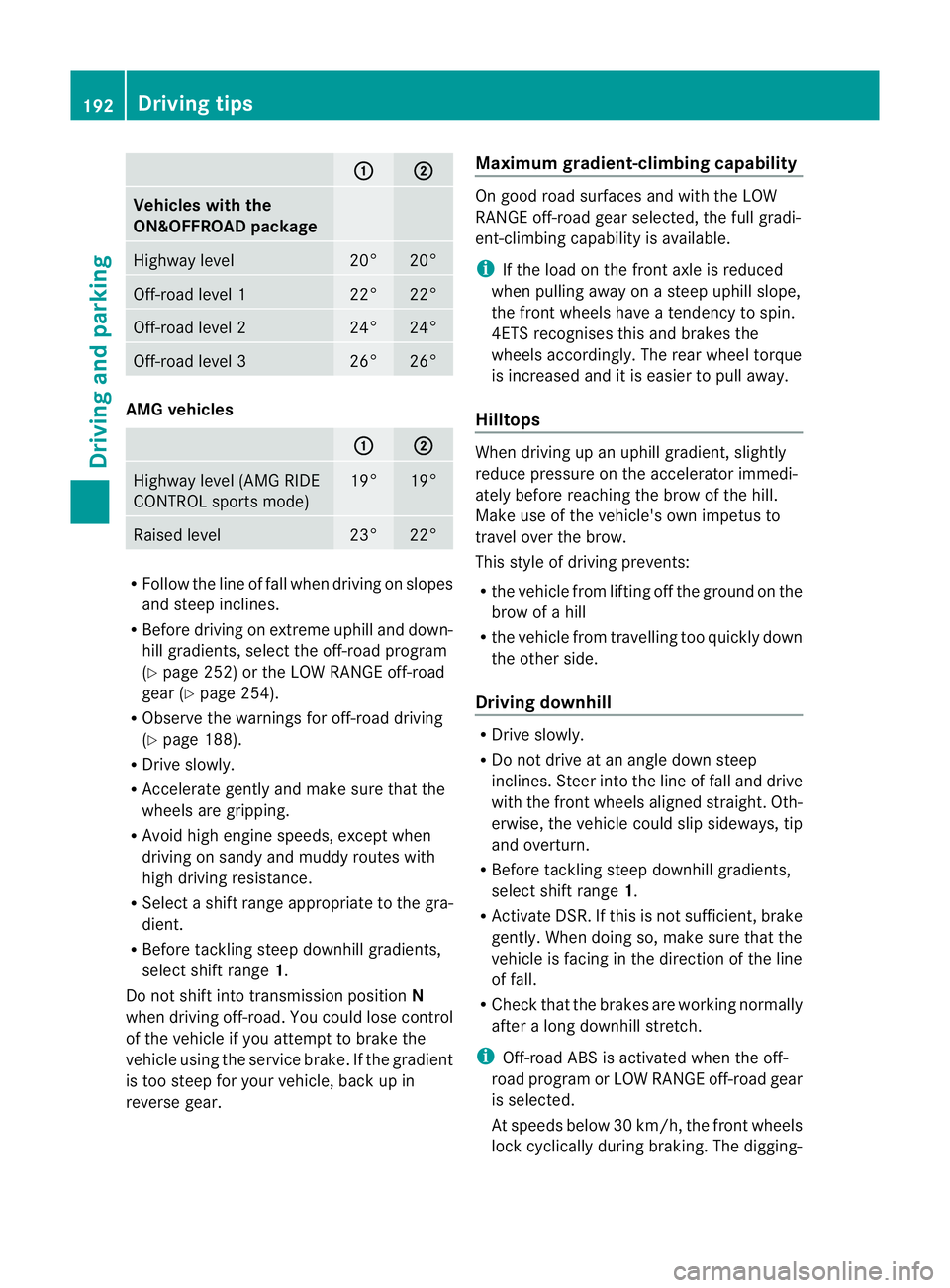
: ;
Vehicles with the
ON&OFFROA
Dpackage Highway level 20° 20°
Off-road level 1 22° 22°
Off-road level 2 24° 24°
Off-road level 3 26° 26°
AMG vehicles
: ;
Highway level (AM
GRIDE
CONTROL sport smode) 19° 19°
Raised level 23° 22°
R
Follo wthe line of fa llwhen driving on slopes
and stee pinclines.
R Before driving on extreme uphill and down-
hill gradients, select the off-road program
(Y page 252) or the LOW RANGE off-road
gea r(Ypage 25 4).
R Obser vethe warnings for off-road driving
(Y page 188).
R Driv eslowly.
R Accelerat egently and mak esure that the
wheel sare gripping.
R Avoi dhigh engin espeeds, except when
drivin gonsandy and muddy routes with
high drivin gresistance.
R Selec tashif trange appropriate to the gra-
dient.
R Befor etackling steep downhill gradients,
select shift range 1.
Do not shift int otransmission position N
when driving off-road .You coul dlose contr ol
of the vehicle if you attempt to brake the
vehicle using the servic ebrake .Ifthe gradient
is too steep for your vehicle, bac kupin
reve rseg ear. Maximum gradient-climbing cap
ability On good road surfaces and with the LOW
RANGE off
-road gear selected, the full gradi-
ent-climbing capabilit yisavailable.
i If th eload on the fron taxle is reduced
whe npulling away on asteep uphill slope,
the fron twheels hav eatendency to spin.
4ETS recognises this and brakes the
wheels accordingly. The rear wheel torque
is increased and it is easier to pull away.
Hilltops When driving up an uphill gradient, slightly
reduc
epressure on th eaccelerator immedi-
atel ybefor ereachin gthe brow of the hill.
Make use of the vehicle' sown impetus to
travel over the brow.
This style of driving prevents:
R the vehicle from lifting off the ground on the
brow of ahill
R the vehicle from travelling too quickly down
the other side.
Driving downhill R
Driv eslowly.
R Do not drive at an angle down steep
inclines. Steer into the line of fall and drive
with the front wheels aligned straight. Oth-
erwise, the vehicle could slip sideways, tip
and overturn.
R Befor etackling steep downhill gradients,
select shift range 1.
R Activate DSR. If this is not sufficient, brake
gently. When doing so, make sure that the
vehicle is facing in the direction of the line
of fall.
R Check that the brakes are working normally
after along downhil lstretch.
i Off-road ABS is activated when the off-
road program or LOW RANGE off-road gear
is selected.
At speeds belo w30km/h, th efront wheels
lock cyclicall yduring braking. The digging- 192
Driving tipsDrivin
gand pa rking
Page 196 of 441
in effect achieved in the process reduces
the stoppin gdistanc ewhen drivin goff-
road. Th esteerabilit yofthe vehi cleisc on-
siderably redu cedift he wheels lock. Driving systems
Cruise cont
rol
Important safety notes G
WARNING
Do not change down for additional engine
braking on aslipper yroad surface. This could
cause the driv ewheels to lose their grip and
the vehi clec ould skid. G
WAR
NING
Cruise control cannot tak eaccount of road
and traffic conditions.
Alway spay attention to traffic conditions
even when cruis econtrol is activa ted.
Cruise control is only an aid designed to assist
driving. You are responsible for the vehicle's
speed and for braking in good time. G
WAR
NING
Do not use cruise control
R in traffic conditions that do not allow you to
drive at aconstan tspeed (e.g. heavy tra ffic
or winding roads). You may otherwise
cause an accident.
R on slippery roads. The drive wheels may
lose their grip when brakin goraccelerating
and the vehicle may skid.
R whe nther eisl ow visibility ,e.g. due to fog,
heavy rain or snow.
General notes Cruis
econtr ol maintains aconstan troad
speed for you. It brakes automatically in order
to avoid exceeding the set speed. On long and
steep downhil lgradients, especiall yifthe
vehicle is laden or towing atrailer, yo umust
select shift range 1,2or 3in good time. By doing so, you will make use of the braking
effec
tofthe engine. This relieves the load on
the brake system and prevents the brakes
from overheating and wearing too quickly.
Use cruise con trolonly if road and traffic con-
ditions make it appropriate to maintain a
steady speed for aprolonged period. Yo ucan
store any road spee dabove 30 km/h.
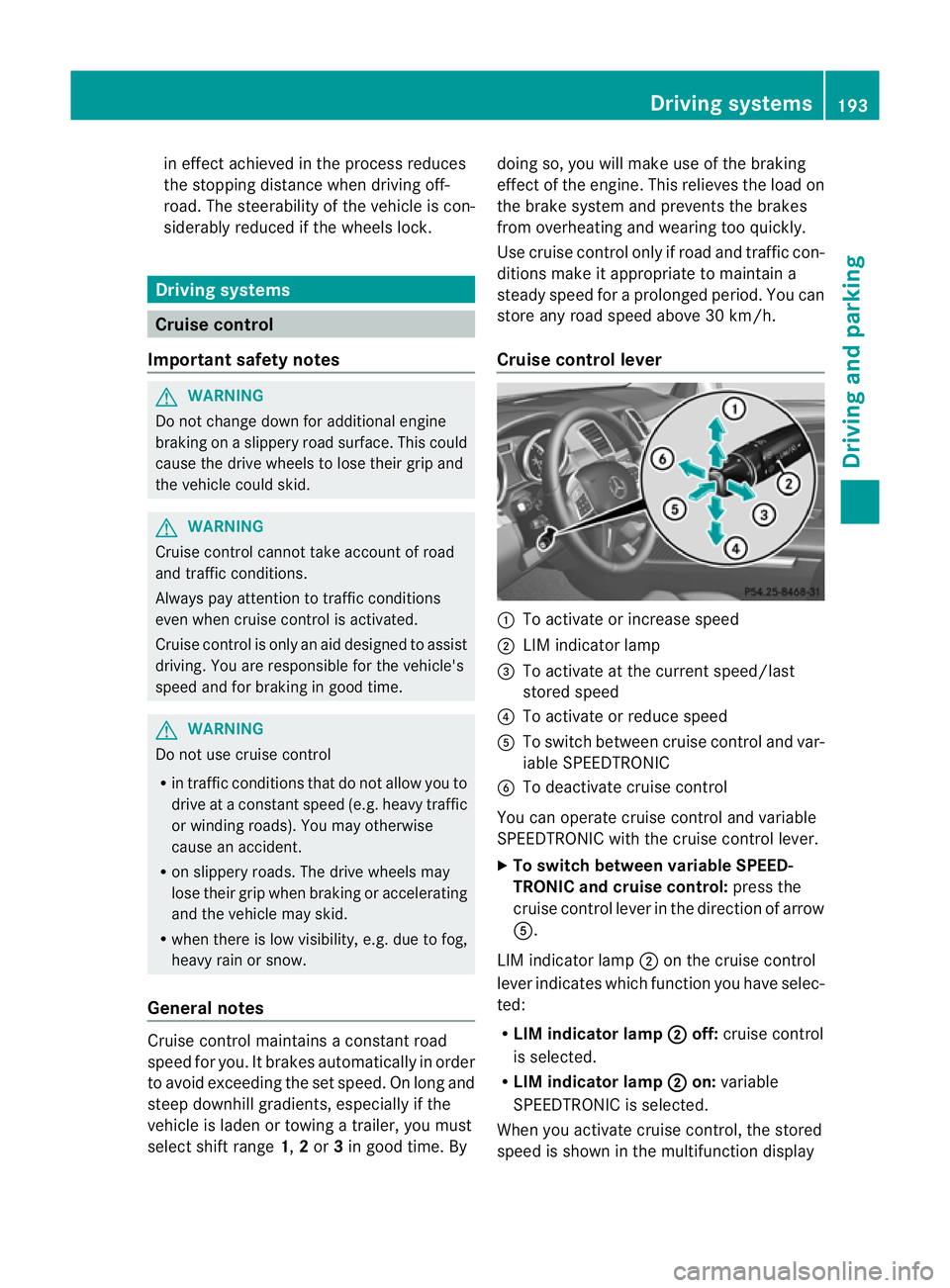
Cruise contro llever :
To activate or increase speed
; LIMi ndicato rlamp
= To activate at the current speed/last
stored speed
? To activate or reduce speed
A To switch between cruise control and var-
iable SPEEDTRONIC
B To deactivate cruise control
You can operate cruise control and variable
SPEEDTRONIC with the cruise control lever.
X To switch between variable SPEED-
TRONIC and cruise control: press the
cruise control lever in the direction of arrow
A.
LIM indicator lamp ;on the cruise control
lever indicates which function you have selec-
ted:
R LIM indicator lamp ; off:
cruise control
is selected.
R LIM indicator lamp ; on:
variable
SPEEDTRONIC is selected.
When you activate cruise control, the stored
spee diss hown in the multifunction display Driving systems
193Driving and parking Z
Page 197 of 441
for five seconds
.Inthe multifunction display,
the segments between the stored speed and
the maxim um speedlight up.
Activation conditions To activate cruise control, all of the following
activation condition
smust be fulfilled:
R the electric parkin gbrake mus tbe
released.
R yo ua re driving faster than 30 km/h.
R ESP ®
mus tbes witched on, but not inter-
vening.
R the transmission must be in position D.
R DS Rm ust be deactivated.
R off-road program 2must be deactivated
(vehicles with the ON&OFFROA Dpackage).
R the cruise con trol fu nction must be selec-
te d( Ypage 193).
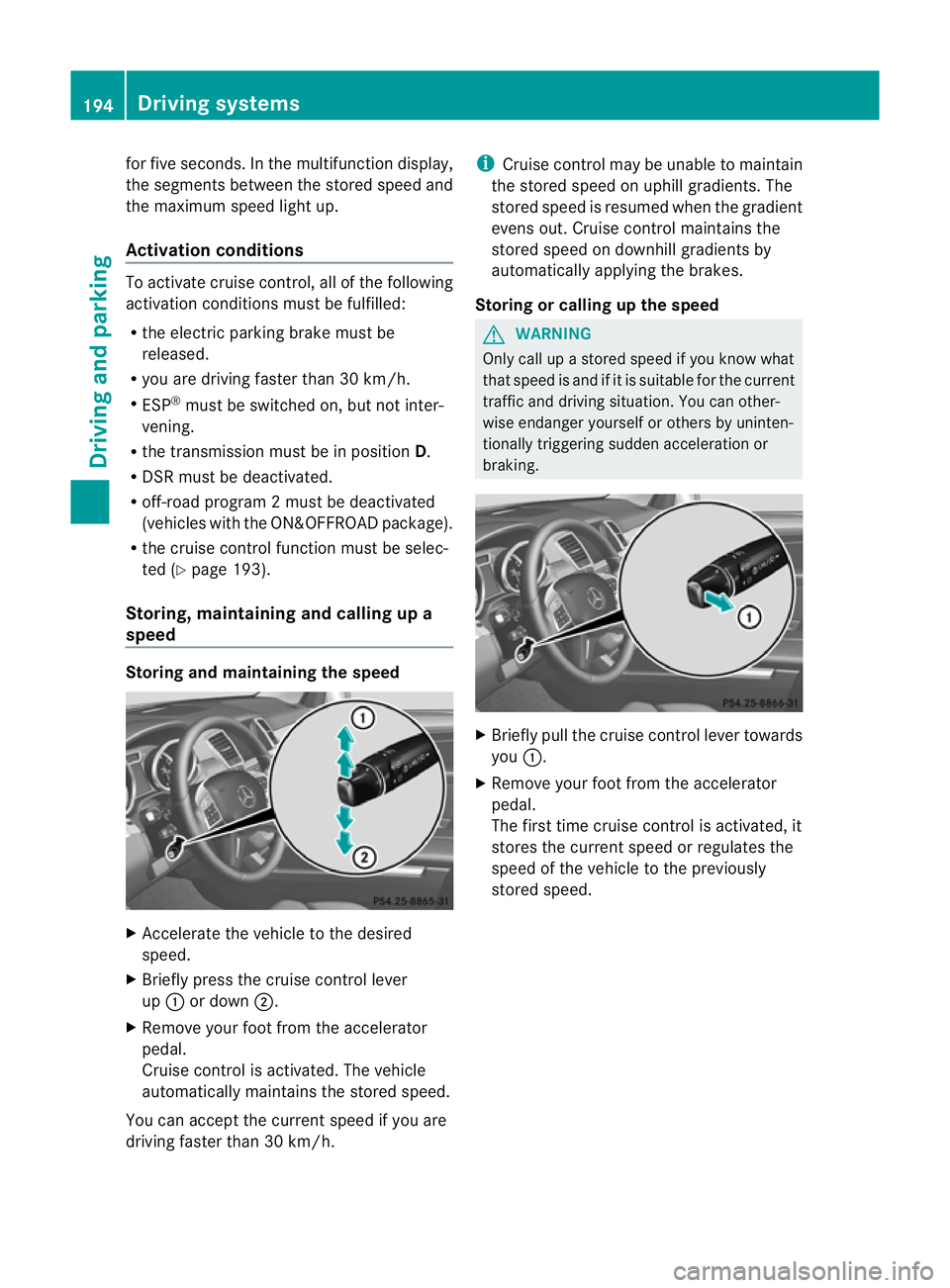
Storing, maintaining and callin gupa
speed Storing and maintaining th
espeed X
Accelerate the vehicl etothe desir ed
speed.
X Briefly press the cruise control lever
up : or down ;.
X Remov eyourfoot from the acc elerator
pedal.
Cruise control is activated. The vehicle
automaticall ymaintains the store dspeed.
Yo uc an accep tthe current speed if you are
drivin gfaster than 30 km/h. i
Cruise control may be unabl etomaintain
the store dspeed on uphil lgradients. The
store dspeed is resumed when the gradient
evens out. Cruise control maintains the
stored speed on downhil lgradient sby
automaticall yapplyin gthe brakes.
Stor ingorc alling up the speed G
WARNING
Onl ycallupas toredspeed if you know what
that speed is and if it is suitable for the current
traffic and driving situation. You can other-
wis eendanger yoursel forothers by uninten-
tionally triggering sudden acce leratio nor
braking. X
Briefly pull the cruise contro llever towards
you :.
X Remov eyour foot from the accelerator
pedal.
The first tim ecruis econtr ol is activated, it
stores the curren tspeed or regulates the
speed of the vehicle to the previously
stored speed. 194
Driving systemsDriving and parking
Page 198 of 441
Setting
aspeed X
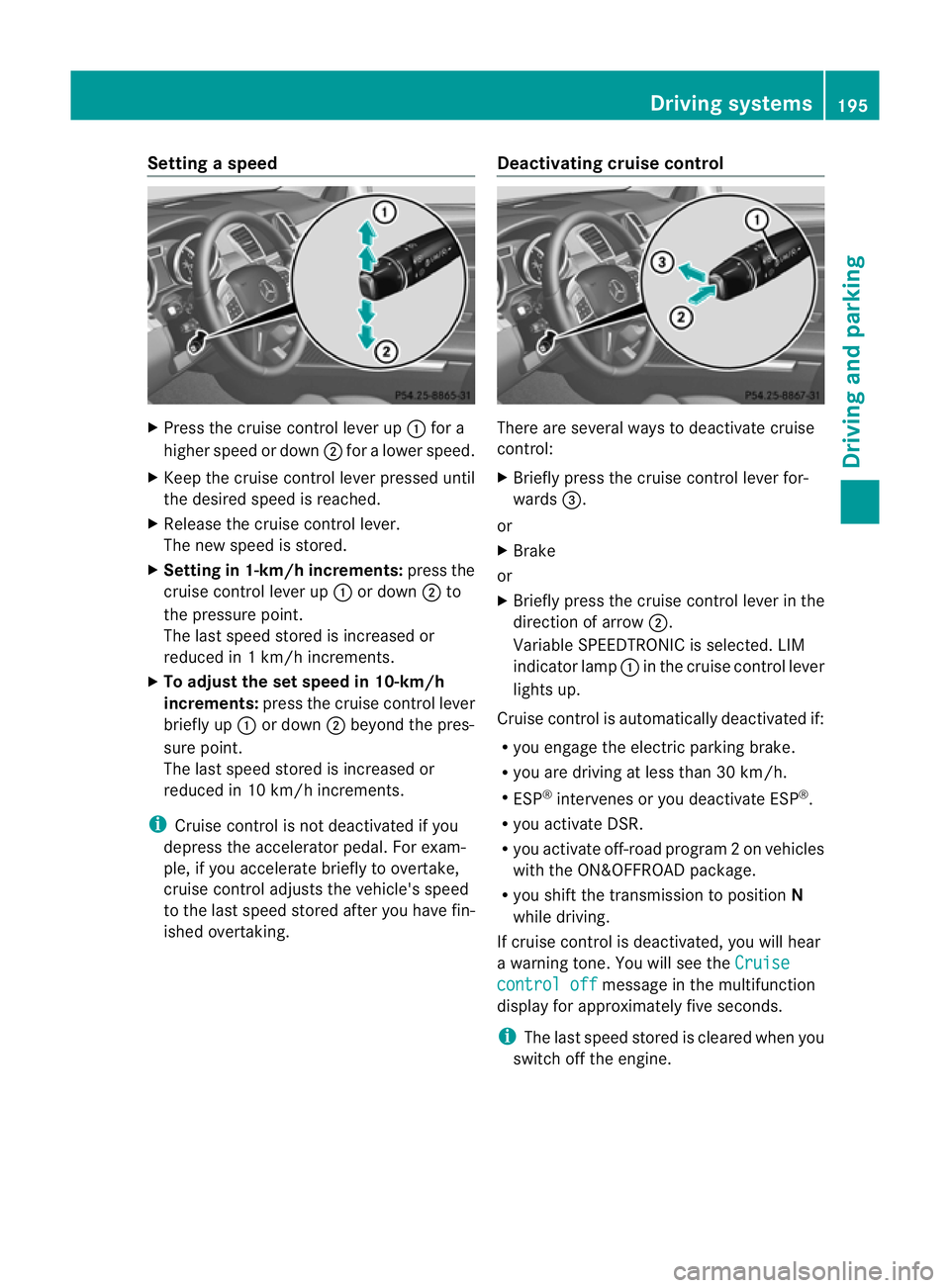
Press the cruise control lever up :for a
high er spee dordown;for alower speed.
X Keep the cruise contr ol leverpresse duntil
the desired speed is reached.
X Release the cruise contro llever.
The new speed is stored.
X Setting in 1-k m/hincrements: press the
cruise control lever up :or down ;to
the pressur epoint.
The last speed stored is inc reased or
reduced in 1km/ hincrements.
X To adjust the set speed in 10-km/h
increments: pressthe cruise contr ol lever
briefl yup: or down ;beyon dthe pres-
sur epoint.
The last speed stored is inc reased or
reduced in 10 km/ hincrements.
i Cruise contro lisnot deactivated if you
depress the accelerator pedal. For exam-
ple, if you accelerate briefly to over take,
cruise control adjusts the vehicle's speed
to the last speed stored after you have fin-
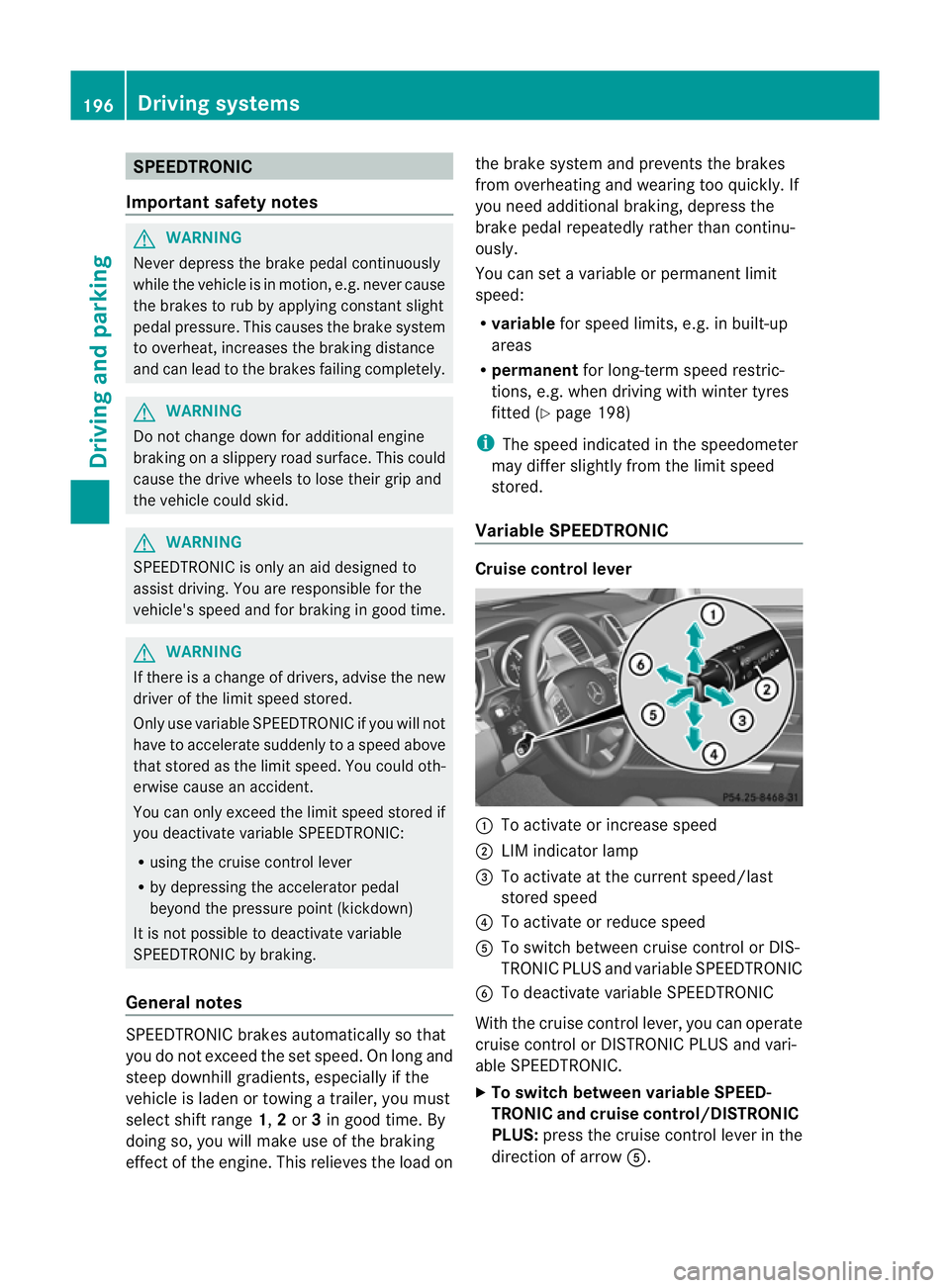
ished overtaking. Deactivating cruise control There are several ways to deacti
vate cruise
control:
X Briefly press the cruise control lever for-
wards =.
or
X Brake
or
X Briefly press the cruise control lever in the
direction of arrow ;.
Variable SPEEDTRONIC is selected. LIM
indicator lamp :in the cruise control lever
lights up.
Cruise control is automatically deactivated if:
R you engag ethe electric parkin gbrake.
R yo ua re driving at less than 30 km/h.
R ESP ®
intervenes or yo udeactiva teESP ®
.
R you activate DSR.
R you activate off-road program 2onvehicles
with the ON&OFFROA Dpackage.
R you shift the transmissio ntoposition N
while driving.
If cruise control is deactivated, you will hear
aw arning tone. You will see the Cruise contro
loff message in th
emultifunction
display for approximately five seconds.
i The last spee dstored is cleared when you
switch off the engine. Drivin
gsystems
195Drivingand parking Z
Page 199 of 441
SPEEDTRONIC
Important safety notes G
WARNING
Never depress the brake peda lcontinuously
while the vehicle is in motion, e.g. never cause
the brakes to rub by applying constant slight
pedal pressure. This causes the brake system
to overheat, increases the brakin gdistance
and can lead to the brakes failing completely. G
WARNING
Do not change down for additional engine
braking on aslippery road surface. This could
cause the drive wheels to lose their grip and
the vehicle could skid. G
WARNING
SPEEDTRONI Cisonly an aid designe dto
assis tdriving. Yo uare responsibl efor the
vehicle' sspeed and for braking in good time. G
WARNING
If there is achange of drivers, advise the new
driver of the limit speed stored.
Only use variable SPE EDTRONI Cifyou will not
have to accelerate suddenl ytoaspeed above
that stored as the limit speed. You could oth-
erwise cause an accident.
You can only exceed the limit speed stored if
you deactivate variable SPE EDTRONIC:
R using the cruise control lever
R by depressin gthe accelerator pedal
beyon dthe pressure point (kickdown)
It is not possible to deactivate variable
SPE EDTRONI Cbybraking.
General notes SPE
EDTRONIC brakes automatically so that
you do not exceed the set speed. On long and
steep downhil lgradients ,especially if the
vehicle is laden or towing atrailer, yo umust
select shift range 1,2or 3in good time. By
doing so, you will make use of the braking
effect of the engine. This relieves the load on the brake system and prevent
sthe brakes
from overheating and wearing too quickly .If
you need additional braking, depres sthe
brake pedal repeatedly rather than con tinu-
ously.
You can set avariable or permanent limit
speed:
R variable for speedlimits, e.g. in built-up
areas
R permanent for long-term speed restric-
tions, e.g. when drivin gwith winter tyres
fitted (Y page 198)
i The speed indicated in the speedometer
may differ slightly from the limit speed
stored.
Variable SPEEDTRONIC Cruise control lever
:
To activate or increase speed
; LIMi ndicato rlamp
= To activate at the current speed/last
stored speed
? To activate or reduce speed
A To switch between cruise control or DIS-
TRONIC PLUS and variable SPEEDTRONIC
B To deactivate variable SPEEDTRONIC
With the cruise control lever, you can operate
cruise control or DISTRONIC PLUS and vari-
able SPEEDTRONIC.
X To switch between variable SPEED-
TRONIC and cruise control/DISTRONIC
PLUS: press the cruise control lever in the
direction of arrow A.196
Driving systemsDriving and parking