ESP MERCEDES-BENZ GL SUV 2012 Owners Manual
[x] Cancel search | Manufacturer: MERCEDES-BENZ, Model Year: 2012, Model line: GL SUV, Model: MERCEDES-BENZ GL SUV 2012Pages: 441, PDF Size: 10.66 MB
Page 246 of 441
the edge of their lane tha
tisfurthest away
from your vehicle.
Always pay attention to traffic conditions and
your surroundings. Otherwise, you may fail to
recognise dangers in time, cause an accident
and injure yoursel fand others. Active Blind Spo
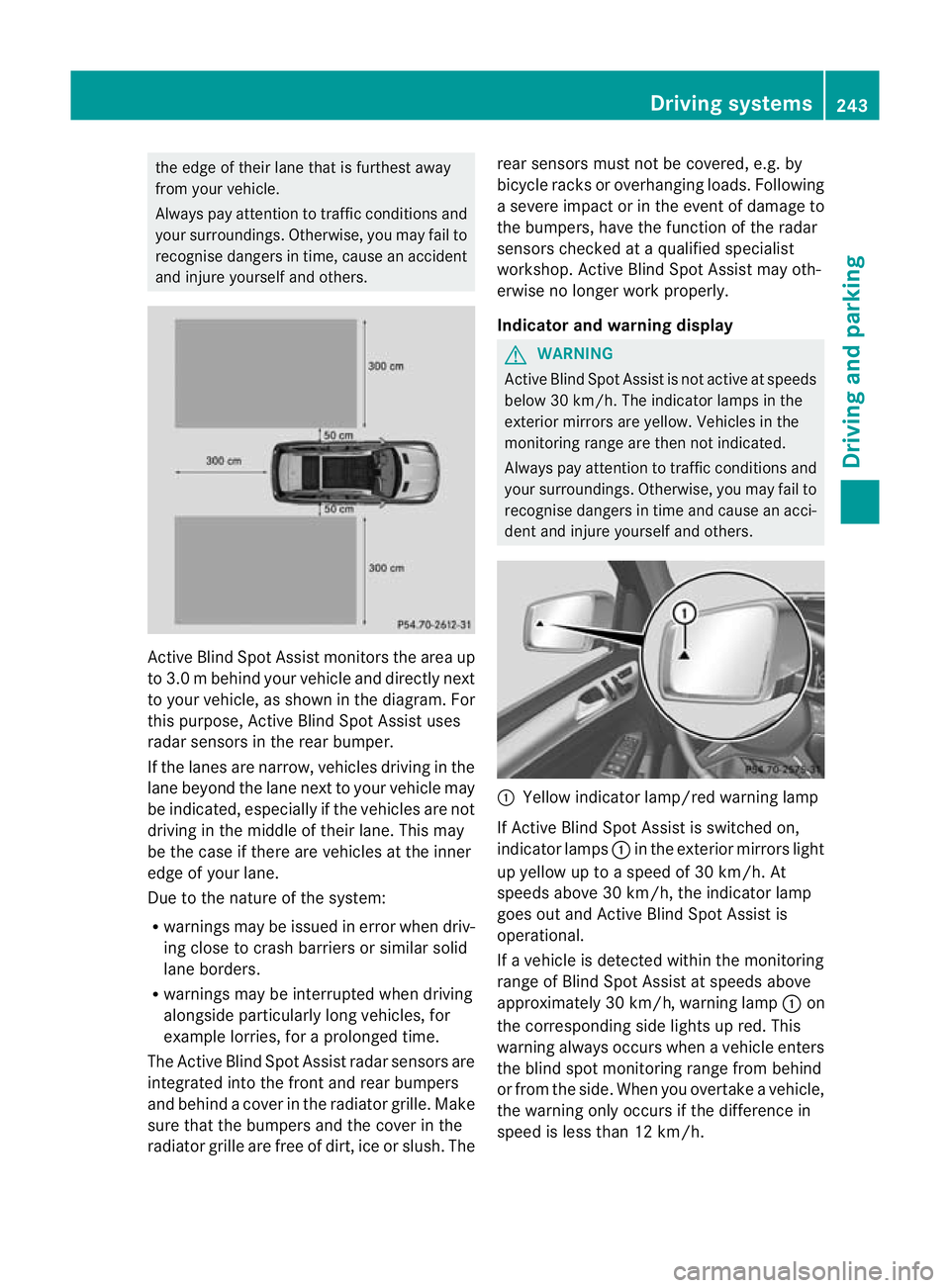
tAssist monitor sthe area up
to 3. 0mbehind your vehicle and directly next
to your vehicle, as shown in the diagram. For
this purpose, Active Blin dSpot Assist uses
rada rsensors in the rear bumper.
If the lanes are narrow, vehicles driving in the
lane beyond the lane next to your vehicle may
be indicated, especially if the vehicles are not
driving in the middle of their lane. This may
be the case if there are vehicles at the inner
edge of your lane.
Due to the nature of the system:
R warnings may be issued in error when driv-
ing close to crash barriers or similar solid
lane borders.
R warnings may be inter rupted when driving
alongside particularly long vehicles, for
example lorries, for aprolonged time.
Th eA ctive Blind Spo tAssist radar sensor sare
integ rated into the front and rear bumpers
and behind acover in the radiator grille. Make
sure that the bumpers and the cover in the
radiator grille ar efree of dirt, ice or slush. The rea
rsensors must not be covered, e.g. by
bicycle racks or overhanging loads. Following
as ever eimpact or in th eevent of damag eto
the bumpers, have the function of the radar
sensors checked at aqualified specialist
workshop. Active Blind Spot Assis tmay oth-
erwise no longer work properly.
Indicator and warning display G
WARNING
Active Blind Spot Assist is not active at speeds
below 30 km/h. The indicator lamps in the
exterior mirrors are yellow .Vehicles in the
moni toring range are then not indicated.
Always pay attention to traffic conditions and
your surroundings. Otherwise, you may fail to
recognise dangers in time and cause an acci-
dent and injure yourself and othe rs. :
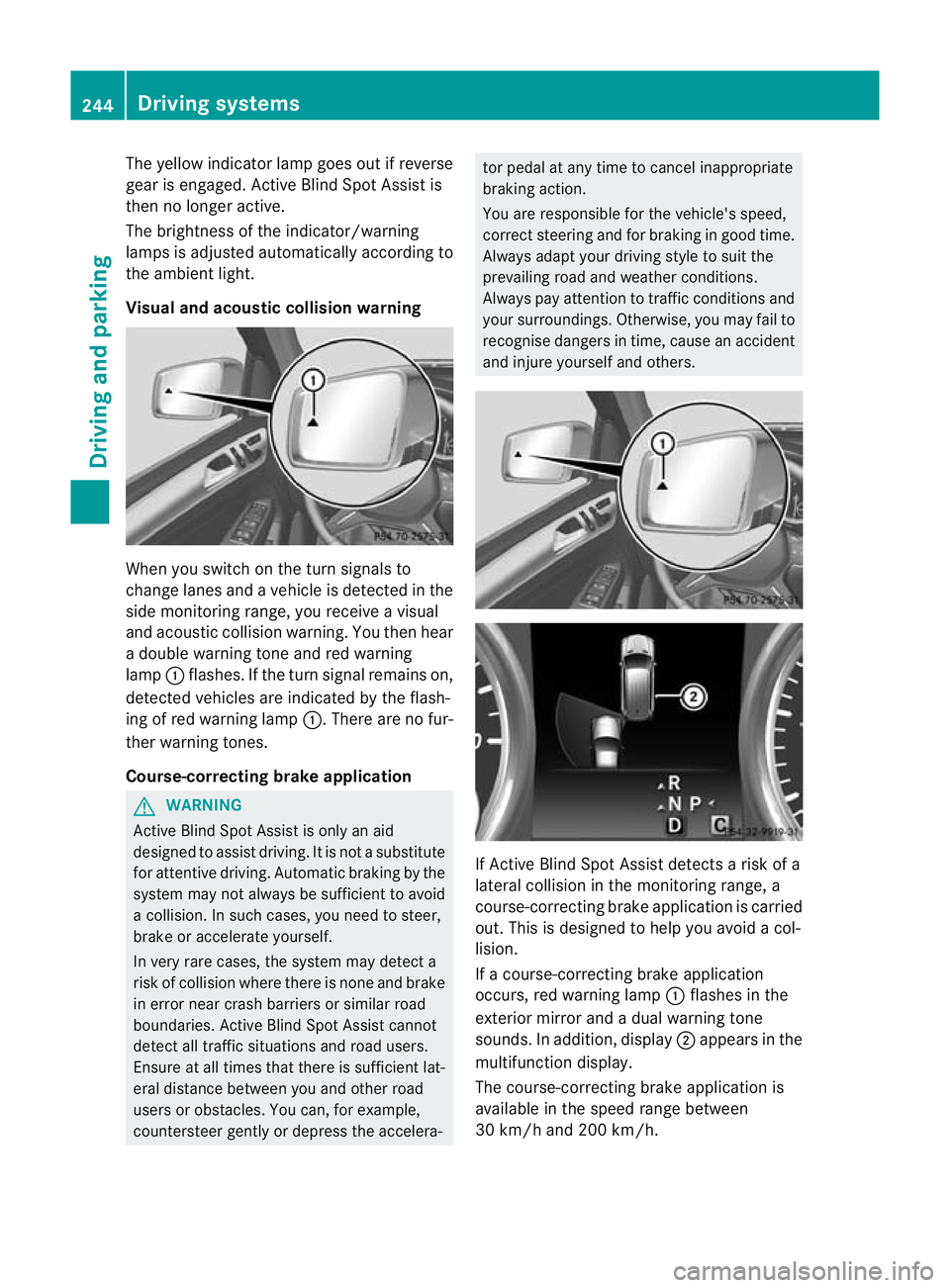
Yellow indicator lamp/red warning lamp
If Active Blind Spot Assist is switched on,
indicator lamps :in the exterior mirror slight
up yellow up to aspeed of 30 km/h. At
speeds above 30 km/h, the indicator lamp
goes out and Activ eBlind Spot Assist is
operational.
If av ehicle is detected within the monitoring
range of Blin dSpot Assist at speeds above
approximately 30 km/ h,warning lamp :on
the corresponding side lights up red. This
warning always occurs when avehicle enters
th eb linds pot monitorin grange fro mbehind
or from the side. When you over take avehicle,
the warning only occu rsif the difference in
speed is less than 12 km/h. Drivin
gsystems
243Drivingand parking Z
Page 247 of 441
The yellow indicator lam
pgoes out if reverse
gear is engaged. Active Blin dSpot Assist is
then no longer active.
The brightness of the indicator/warning
lamps is adjusted automatically accordin gto
the ambient light.
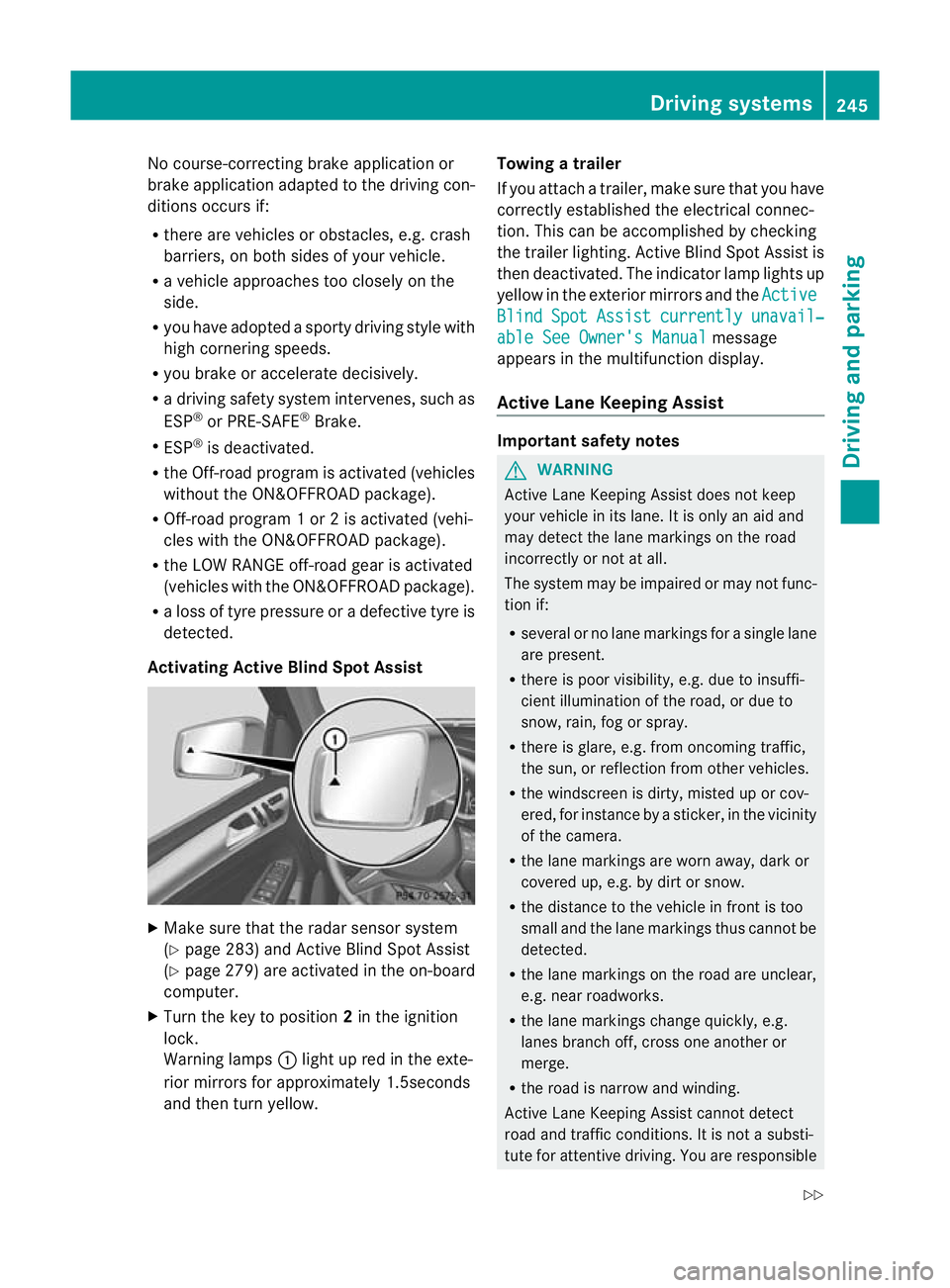
Visual and acoustic collision warning Whe
nyou switc honthe tur nsignals to
change lanes and avehicle is detected in the
side monitorin grange, you receive avisual
and acoustic collision warning. You then hear
ad ouble warnin gtonea nd red warning
lamp :flashes. If the turn signal remains on,
detected vehicles are indicated by the flash-
ing of red warning lamp :.There ar enofur-
ther warning tones.
Course-correcting brake application G
WARNING
Active Blind Spot Assis tiso nly an aid
designe dtoassist driving. It is not asubstitute
for attentive driving. Automatic braking by the
system may not always be sufficient to avoid
ac ollision .Insuch cases, you need to steer,
brake or accelerate yourself.
In very rare cases, the system may detect a
risk of collision where there is none and brake
in error near crash barriers or similar road
boundaries .Active Blind Spot Assist cannot
detect all traffic situations and road users.
Ensure at all times that there is sufficient lat-
eral distance betwee nyou and other road
users or obstacles. You can ,for example,
countersteer gentl yordepress the accelera- tor pedal at any tim
etocancel inappropriate
braking action.
You are responsible for the vehicle's speed,
correct steering and for braking in good time.
Always adapt your driving style to suit the
prevailing road and weather conditions.
Always pay attention to traffic conditions and
your surroundings. Otherwise ,you may fai lto
recognise dangers in time ,cause an accident
and injure yourself and others. If Active Blind Spot Assis
tdetect sarisk of a
lateral collision in the monitorin grange, a
course-correcting brake application is carried
out. This is designed to help you avoid acol-
lision.
If ac ourse-cor recting brake application
occurs ,red warning lamp :flashes in the
exterior mirror and adual warning tone
sounds .Inaddition, display ;appears in the
multifunction display.
The course-cor recting brake applicatio nis
available in the spee drange between
30 km/h and 200 km/h. 244
Driving systemsDriving and parking
Page 248 of 441
No course-correctin
gbrake applicatio nor
brak eapplication adapted to the driving con-
ditions occurs if:
R there are vehicles or obstacles, e.g. crash
barriers, on both sides of your vehicle.
R av ehicle approaches too closely on the
side.
R you have adopted asport ydriving style with
high cornerin gspeeds.
R you brak eoraccelerat edecisively.
R ad riving safety system intervenes, such as
ESP ®
or PRE-SAFE ®
Brake.
R ESP ®
is deactivated.
R theO ff-roa dprogram is activated (vehicles
without th eON&O FFROAD package).
R Off-road program 1or2isactivated (vehi-
cles with the ON&OFFROAD package).
R the LOW RANGE off-road gear is activated
(vehicle swith the ON&OFFROAD package).
R al oss of tyr epressure or adefec tive tyre is
detected.
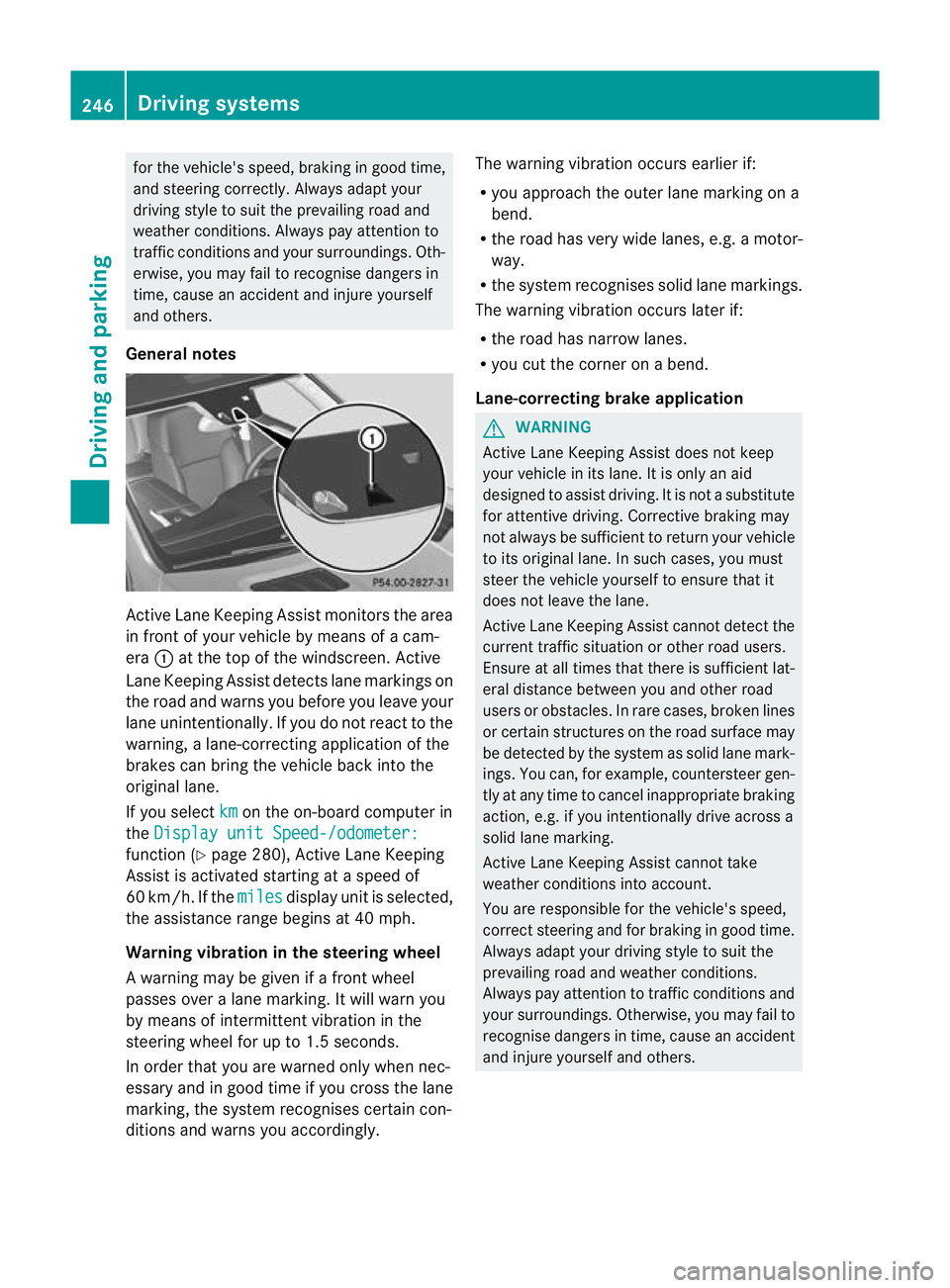
Activatin gActive Blind Spot Assist X
Make sure that the radar senso rsystem
(Y page 283 )and Active Blind Spot Assist
(Y pag e279)are activate dint he on-board
computer.
X Tur nthe key to position 2in the ignition
lock.
Warnin glamps :light up red in the exte-
rior mirrors for approximately 1.5seconds
and then tur nyellow. Towin
gatrailer
If yo uattach atrailer, make sure th at you have
corre ctly established the electrical connec-
tion. This can be accomplished by checking
the trailer lighting. Active Blind Spot Assist is
then deactivated. The indicator lamp lights up
yellow in the exterior mirrors and the Active Blind Spot Assist currently unavail‐
able Se
eOwner's Manual message
appears in th emultifunction display.
Active Lane Keeping Assist Important safety notes
G
WARNING
Active Lane Keeping Assis tdoes not keep
your vehicle in its lane. It is only an aid and
may detec tthe lan emarkings on the road
incorrectly or not at all.
The system may be impaired or may not func-
tion if:
R several or no lane markings for asingle lane
are present.
R there is poor visibility, e.g. due to insuffi-
cient illumination of the road, or due to
snow, rain, fog or spray.
R there is glare, e.g. from oncoming traffic,
the sun, or reflec tion from other vehicles.
R the windscreen is dirty, misted up or cov-
ered, for insta ncebyasticker, in the vicinity
of the camera.
R the lane markings are worn away ,dark or
covered up, e.g. by dirt or snow.
R the distance to the vehicle in front is too
small and the lane markings thus cannot be
detected.
R the lane markings on the road are unclear,
e.g. near roadworks.
R the lane markings change quickly, e.g.
lanes branch off, cross one another or
merge.
R the road is narrow and winding.
Active Lane Keeping Assis tcannot detect
road and traffic conditions. It is not asubsti-
tute for attentive driving. You are responsible Driving systems
245Drivingand pa rking
Z
Page 249 of 441
for the vehicle's speed, brak
inging ood time,
and steering correctly. Always adapt your
drivin gstyle to suit the prevailing road and
weather conditions .Always pay attention to
traffic condition sand your surroundings. Oth-
erwise, you may fail to recognise dange rsin
time, cause an accident and injure yourself
and others.
General notes Activ
eLane Keepin gAssist monitor sthe area
in fr ontof your vehicle by mea nsofac am-
era :at the top of the windscreen .Active
Lane Keepin gAssist detect slane markings on
the road and warn syou before you leav eyour
lane unintentionally .Ifyou do no treact to the
warning, alane-correctin gapplication of the
brakes can brin gthe vehicle bac kinto the
original lane.
If you select km on the on-board computer in
the Displa yunit Speed-/odometer: functio
n(Ypage 28 0),A ctive Lane Keeping
Assist is activated starting at aspeed of
60 km/h. If the miles display unit is selected,
the assistanc erange begins at 40 mph.
Warning vibration in the steering wheel
Aw arning may be given if afront wheel
passes ove ralane marking. It will warn you
by means of intermitten tvibration in the
steering wheel for up to 1.5 seconds.
In order that you are warned only when nec-
essary and in good time if you cross the lane
marking, the system recognises certain con-
ditions and warns you accordingly. The warnin
gvibration occur searlier if:
R you approach the outer lane markin gona
bend.
R the road has ver ywide lanes, e.g. amotor-
way.
R the system recognises solid lane markings.
The warnin gvibration occur slater if:
R the road has narrow lanes.
R you cut the corner on abend.
Lane-correcting brak eapplication G
WARNING
Active Lane Keeping Assist doe snot keep
your vehicle in its lane. It is only an aid
designed to assist driving. It is not asubstitute
for attentive driving. Corrective brakin gmay
not alway sbesufficien ttoreturnyour vehicle
to its original lane. In such cases, you must
steer the vehicle yourself to ensur ethat it
does not leav ethe lane.
Ac tive Lane Keeping Assist cannot detec tthe
curren ttraffic situatio norother road users.
Ensure at all times that there is sufficient lat-
eral distance between you and othe rroad
users or obstacles. In rar ecases, broken lines
or certain structures on the road surface may
be detected by the system as solid lane mark-
ings. You can, for example, countersteer gen-
tly at any time to cancel inappropriate braking
action, e.g. if you intentionally drive across a
solid lane marking.
Active Lane Keeping Assis tcannot take
weather conditions into account.
You are responsible for the vehicle's speed,
correc tsteering and for braking in good time.
Alway sadapt yo ur driving style to suit the
prevailing road and weather conditions.
Always pay attention to traffic conditions and
your surroundings. Otherwise, you may fail to
recognise dangers in time, cause an accident
and injure yourself and others. 246
Driving systemsDrivin
gand pa rking
Page 250 of 441
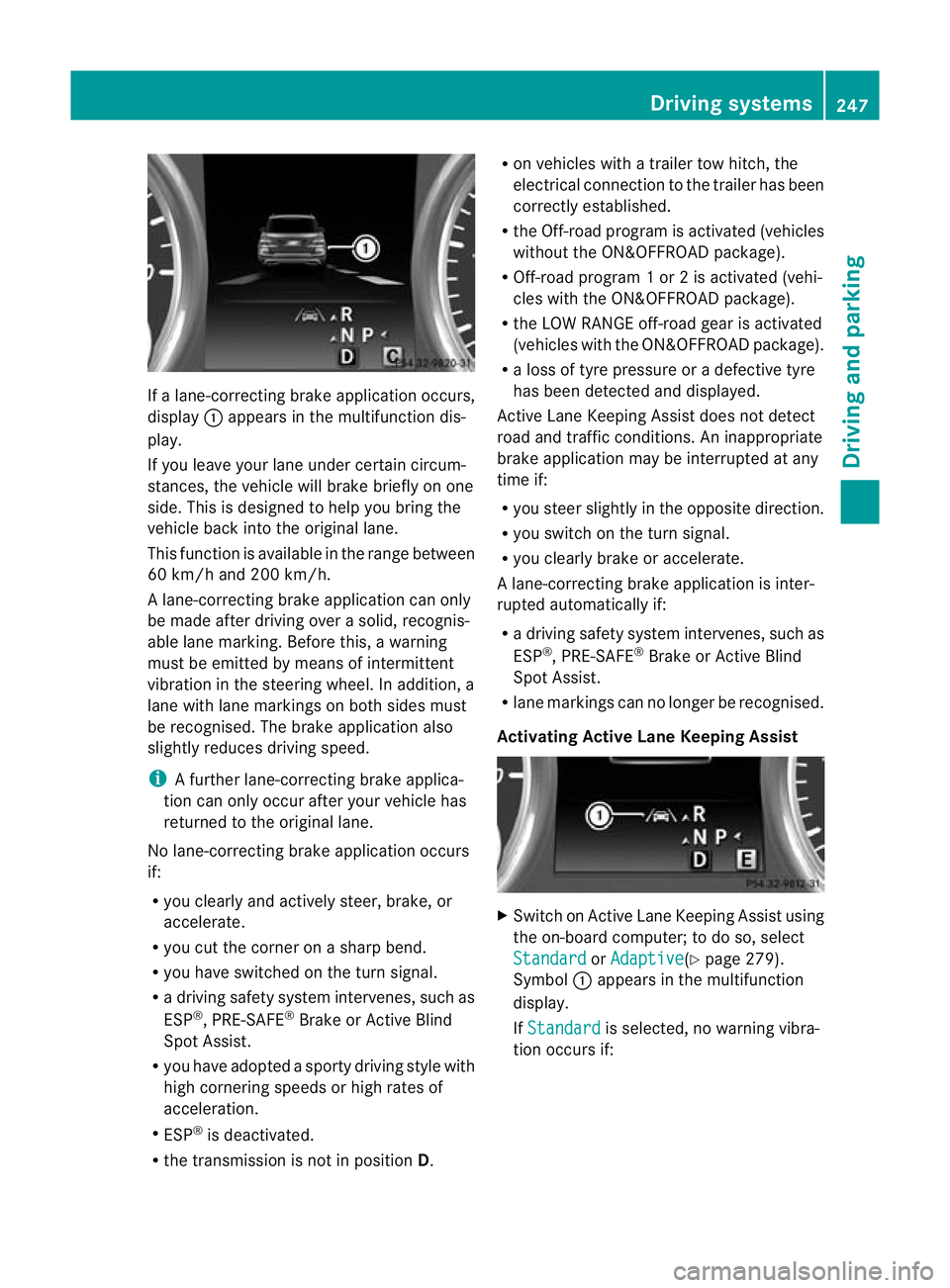
If
al ane-correctin gbrake ap plication occurs,
display :appears in the multif unctio ndis-
play.
If you leave you rlane under certain circum-
stances, the vehicle wil lbrake briefl yonone
side. Thi sisdesigned to help you brin gthe
vehicle bac kinto the original lane.
Thi sfunction is available in the range between
60 km/h and 200 km/h.
Al ane-correctin gbrake ap plication can only
be made after drivin gover asolid, recognis-
able lane marking. Before this, awarning
must be emitted by means of intermittent
vibration in the steering wheel. In addition, a
lane with lane markings on both sides must
be recognised. The brake applicatio nalso
slightly reduces drivin gspeed.
i Afurther lane-correcting brake applica-
tion can only occur after you rvehicle has
returned to the original lane.
No lane-correcting brak eapplication occurs
if:
R you clear lyand actively steer, brake, or
accelerate.
R you cut the corner on ashar pbend.
R you have switched on the tur nsignal.
R ad riving safety system intervenes ,such as
ESP ®
,P RE-SAFE ®
Brake or Active Blind
Spot Assist.
R you have adopted asporty driving style with
high cornering speed sorhigh rates of
acceler ation.
R ESP ®
is deactivated.
R the transmission is not in position D.R
on vehicles with atrail ertow hitch ,the
electrical con nectio ntot he trailer has been
correctly established.
R the Off -road program is activated (vehicles
without the ON&OFFROAD package).
R Off-road program 1or2isactivate d(vehi-
cle sw ith the ON&OFFROAD package).
R the LOW RANGE off-road gear is activated
(vehicles with the ON&OFFROAD package).
R al oss of tyr epressure or adefectiv etyre
has been detected and displayed.
Active Lane Keeping Assist doe snot detect
roa dand traffic condi tions. An inappropriate
brake application ma ybeinterrupted at any
time if:
R you stee rslightly in the opposite direction.
R you switch on the turn signal.
R you clearly brake or accelerate.
Al ane- correcting bra keapplication is inter-
rupted automatically if:
R ad riving safet ysystem intervenes, such as
ESP ®
,P RE-SAFE ®
Brake or Active Blind
Spot Assist.
R lane markings can no longe rberecognised.
Activating Active Lane Keeping Assist X
Switch on Active Lan eKeeping Assist using
the on-boar dcomputer ;todoso, select
Standard or
Adaptive (Y
page 279).
Symbol :appears in the multifunction
display.
If Standard is selected, no warnin
gvibra-
tion occur sif: Dri
ving systems
247Driving and pa rking Z
Page 251 of 441
R
you have switched on the tur nsignals. In
this event ,the warnings are suppressed
for acertai nperio doft ime.
R ad riving safety syst em intervenes, such
as ABS, BAS or ESP ®
.
If Adaptive is selected, no warning vibra-
tio no ccurs if:
R yo uh aves witched on the turn si gnals.In
thi se vent, th ewarnings ar esuppr essed
for acertai nperio doft ime.
R ad riving safety syst em intervenes, such
as ABS, BAS or ESP ®
.
R yo ua ccelerate hard, e.g .kickdown.
R you brak ehard.
R you steer actively, e.g. swerv etoavoid
an obstacle or cha ngelane quickly.
R you cut the corner on ashar pbend.
Towing atrailer
If yo uattach atrailer, make sure th at you have
corre ctly established the electrical connec-
tion. This can be accomplished by checking
the trailer lighting. On-road programs (vehicles with the
ON&OFFROAD package)
Genera lnotes The on-road program
ssupport you when driv-
ing on roads and the off-road programs sup-
port you when driving off-road (Y page 253).
The following program messages remain in
the multifunction display until the corre-
sponding vehicle level has been set. Up to off-
road level 2, you can hide the program mes-
sage susing the %ora button on the
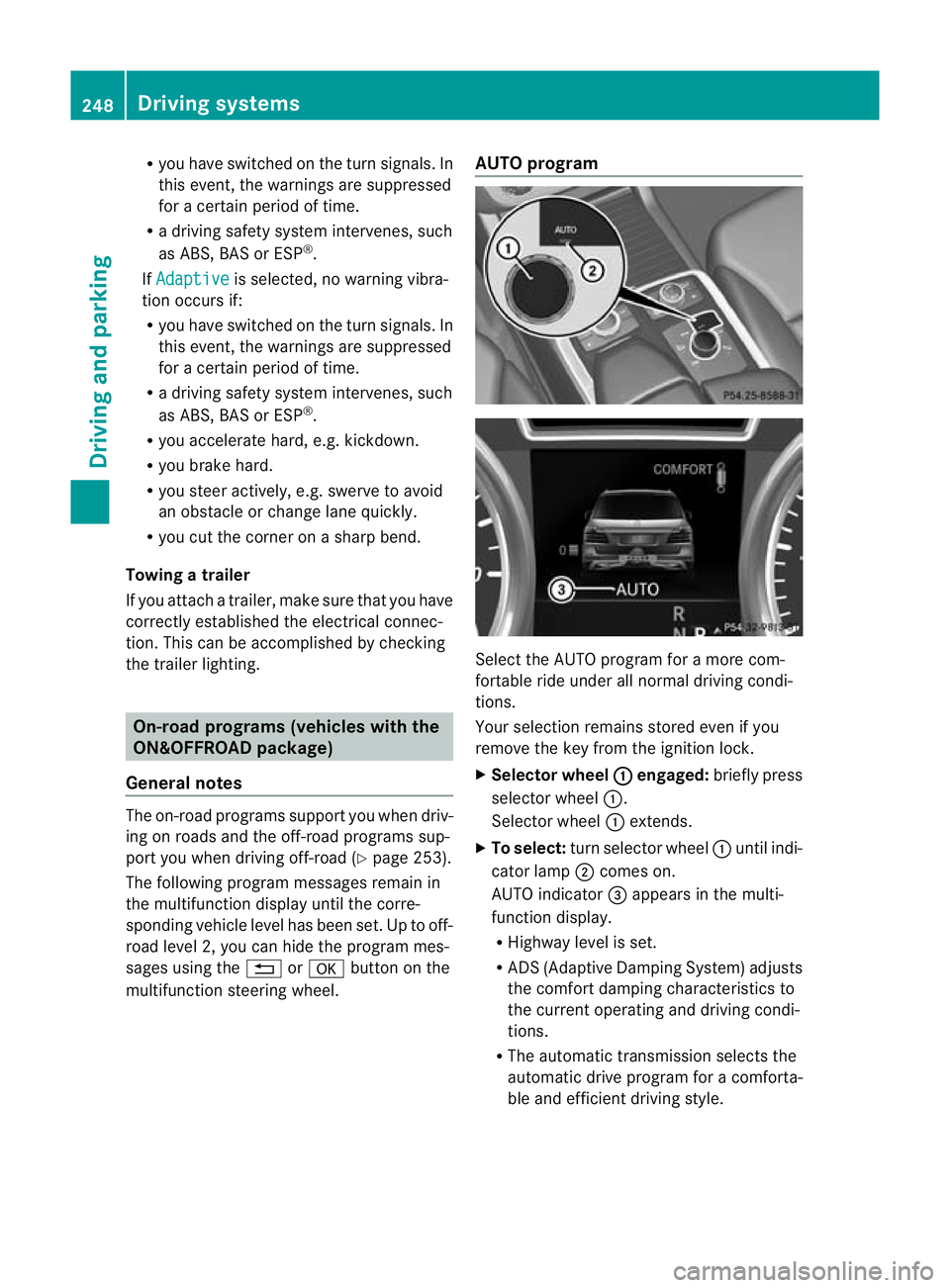
multifunc tion steerin gwheel. AUTO program
Select the AUTO program for
amore com-
for table ride under all normal driving condi-
tions.
Your selection remains stored even if you
remove the key from the ignition lock.
X Selecto rwheel : engaged:
brieflypress
selecto rwheel :.
Selector wheel :extends.
X To select: turnselector wheel :until indi-
cator lamp ;comes on.
AUTO indicator =appear sint he multi-
func tion display.
R Highwa ylevel is set.
R AD S(Adaptive Damp ingS ystem) adjusts
the comfort damping characteristics to
the current operating and driving condi-
tions.
R The automatic transmission selects the
automatic drive progra mforac omforta-
ble and efficien tdriving style. 248
Dri
ving systemsDriving and pa rking
Page 254 of 441
on such
adynamometer, pleas econsult a
qualified workshop. You coul dotherwise
damage the drive train or the brake system.
4MATIC ensures that all four wheels are per-
manently driven. Togethe rwith ESP ®
and
4ETS, it improves the trac tion of your vehicle
whenever adrive whee lspins due to insuffi-
cient grip.
i In wintr ydriving conditions ,the maximum
effect of 4MATIC can only be achieved if
you use winter tyres (M+ Styres), with snow
chain sifn eces sary.
Fo rfurther information on "Driving off-road",
see (Y page 188).
DSR (Downhill Speed Regulation) Important safet
ynotes G
WARNING
DS Riso nlyana id designed to assist you when
drivin gdownhill .You are responsible for keep-
ing control of the vehicle and for assessing
whether the downhil lgradient can be man-
aged.
When activating DSR th evehicle may brake
suddenly due to DSR inter vening. Thi sis
dependent on the downhill gradien tand the
difference between the current speed and the
speed set. DSR may not alway sbeable to
keep to the set speed, depending on road sur-
fac eand tyre conditions .You coul dlose con-
trol of the vehicle and cause an accident.
Selec taset speed suitable for the prevailing
conditions and when necessary, apply the
brakes manually. G
WARNING
If you depress the accelerator pedal wit hDSR
activated, the nthe set speed can be excee-
ded. Drive downhill with specia lcare and
alway skeep in min dthat DSR brakes the vehi-
cle as soon as you remove your foot from the
accelerator pedal. The vehicle ma ybrake sud-
denly due to DSR intervening, depending on
th ed ownhill gradient and the differen ce between the current speed and the set speed.
You could lose control of the vehicl
eand
cause an accident.
DSR assists you whe ndriving downhill. It
keeps th espeed of travel at the speed set on
the on-boar dcomputer .The steeper the
downhill gradient ,the greater the DS Rbrak-
ing effect on th evehicle. When driving on flat
stretches of road or on an uphill gradient, the
DSR braking effect is minima lornon-existent.
DSR con trols the set speed when it is active
and the automatic transmission is in the D,
R or Nposition .Bya ccelerating or braking,
you can always drive at ahigher or alower
speed than that set on the on-boar dcom-
puter.
Further information about "Driving off-road"
(Y page 188).
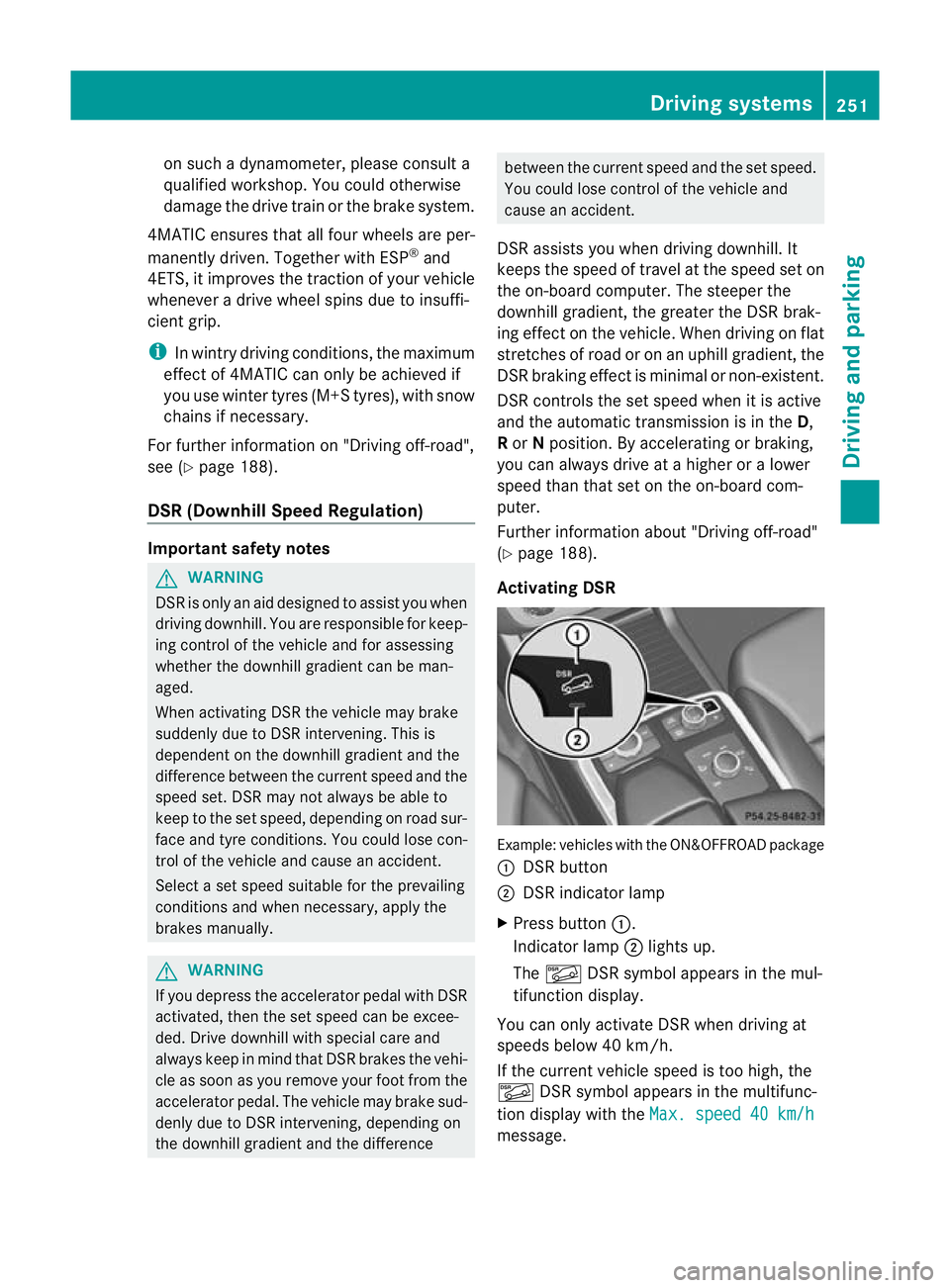
Activating DSR Example: vehicles wit
hthe ON&OFFROAD package
: DSR button
; DSR indicator lamp
X Press button :.
Indicator lamp ;lights up.
The à DSR symbol appear sint he mul-
tifunction display.
You can only activate DS Rwhen drivin gat
speeds below 40 km /h.
If the current vehicle speed is too high, the
à DSR symbol appears in the multifunc-
tion display with the Max.speed 40 km/h message. Drivin
gsystems
251Drivingand pa rking Z
Page 255 of 441
i
You cannot activate DS Rifthe SPORT on-
roa dprogram is activated. The ÃDSR
symbo land the Not in drive program SPORT message then appe
ar inthem ulti-
function display.
Deactivating DSR
X Press button :.
Indicator lamp ;goes out.
The à DSR symbol appears in the mul-
tifunction displa ywith the off message.
DSR switches off automatically if you drive
faster than 45 km/h. The ÃDSR symbol
appears in the multifunction displa ywith the
off message. The status indicator in the mul-
tifunction displa ygoes out. You also hear a
warnin gtone. On vehicles with the ON&OFF-
ROAD package, if you select adifferent on-
road/off-road program ,DSR is als odeactiva-
ted.
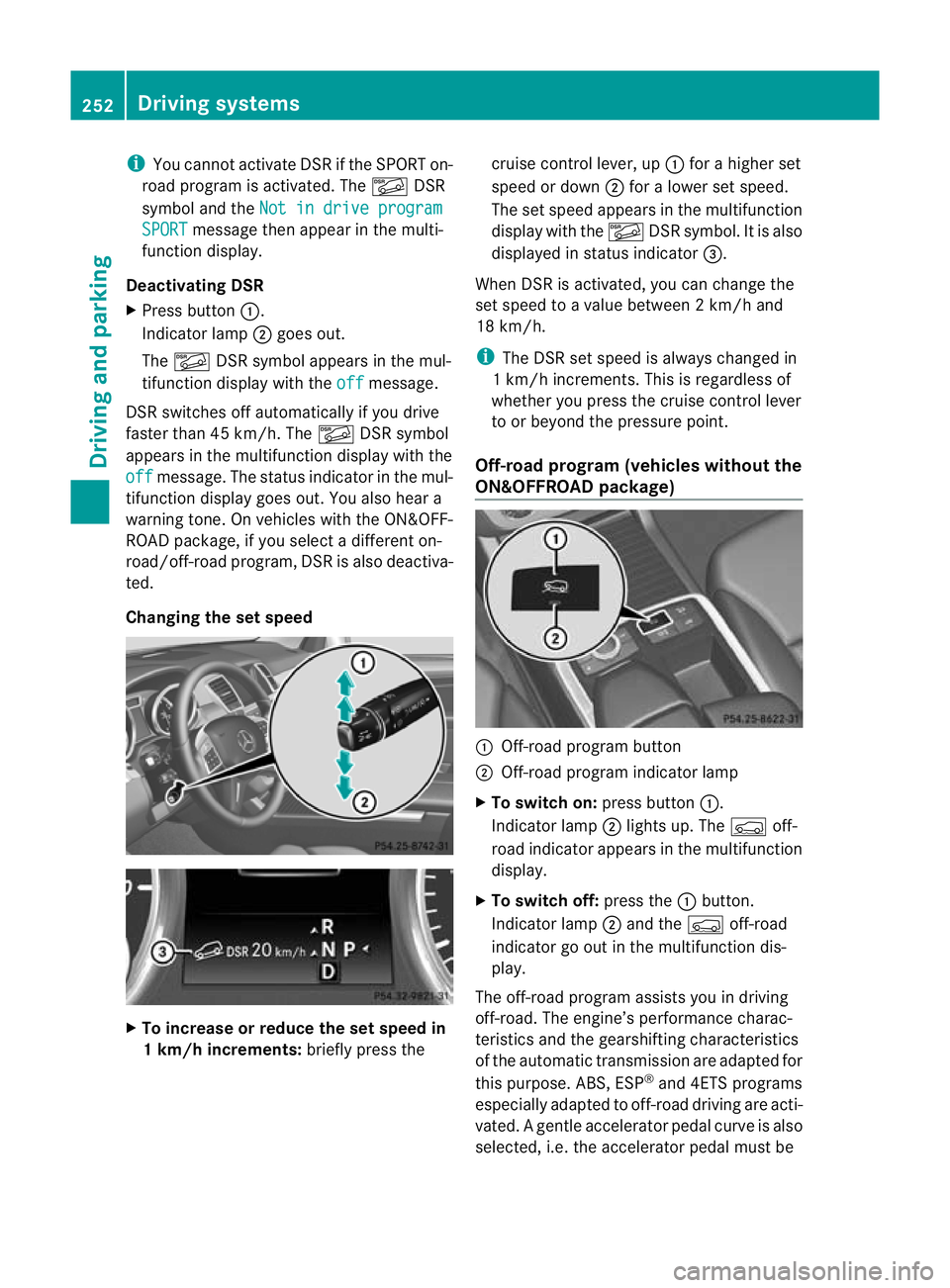
Changing th eset speed X
To increase or reduce the set speed in
1k m/h increments: briefly press the cruise control lever, up
:for ahigher set
speed or down ;for alower set speed.
The set speed appears in the multifunction
display with the ÃDSR symbol. It is also
displayed in status indicator =.
When DSR is activated, you can change the
set speed to avalue between 2km/h and
18 km/h.
i TheD SR se tspee disa lways changed in
1k m/h increments .This is regardless of
whether you press the cruise control lever
to or beyond the pressure point.
Off- road program (vehicle swithou tthe
ON&OFFROAD package) :
Off-road progra mbutton
; Off-road program indicator lamp
X To switch on: press button:.
Indicator lamp ;lights up. The Çoff-
road indicator appears in the multifunction
display.
X To switch off: press the:button.
Indicator lamp ;and the Çoff-road
indicator go out in the multifunction dis-
play.
The off-road program assists you in driving
off-road. The engine’s performanc echarac-
teristics and the gearshifting characteristics
of the automatic transmission ar eadapted for
this purpose. ABS ,ESP ®
and 4ETS programs
es pe cially adapted to off-road driving are acti-
vated. Agentle accelera torp edal curve is also
selected, i.e. the accelera torp edal must be 252
Driving systemsDriving and parking
Page 256 of 441
depressed muc
hfurther in order to acceler-
ate.
Do not use the off-road program on roads that
are snow-covered or icy or if you have fitted
your vehicle with snow chains.
For information about drivin goff-road, see
(Y pag e188).
Off-road programs (vehicle swith the
ON&OFFROAD package) Gener
alnotes
The off -road program sassist you in drivi ng
off -road. The engine’s performanc echarac-
teristic sand the gearshifting characteristics
of the automati ctransmission are adapted for
this purpose .ABS ,ESP ®
and 4ET Sprograms
especiall yadapted to off -road drivin gare acti-
vated. An accele rator peda lcurve suitable for
the terrain is selected, i.e. the accelerator
pedal must be depressed further to acceler-
ate.
Do not use the off-road programs on roads
that are snow-covered or icy or if you have
fitted your vehicle with snow chains.
For information about drivin goff-road, see
(Y pag e188).
Th ef ollowin gprogram message sremai nin
the multifunction display until the corre-
sponding vehicle level has bee nset. Up to off-
road level 2, you can hide the program mes-
sages using the %or the abutton on
the multifunction steering wheel. Off
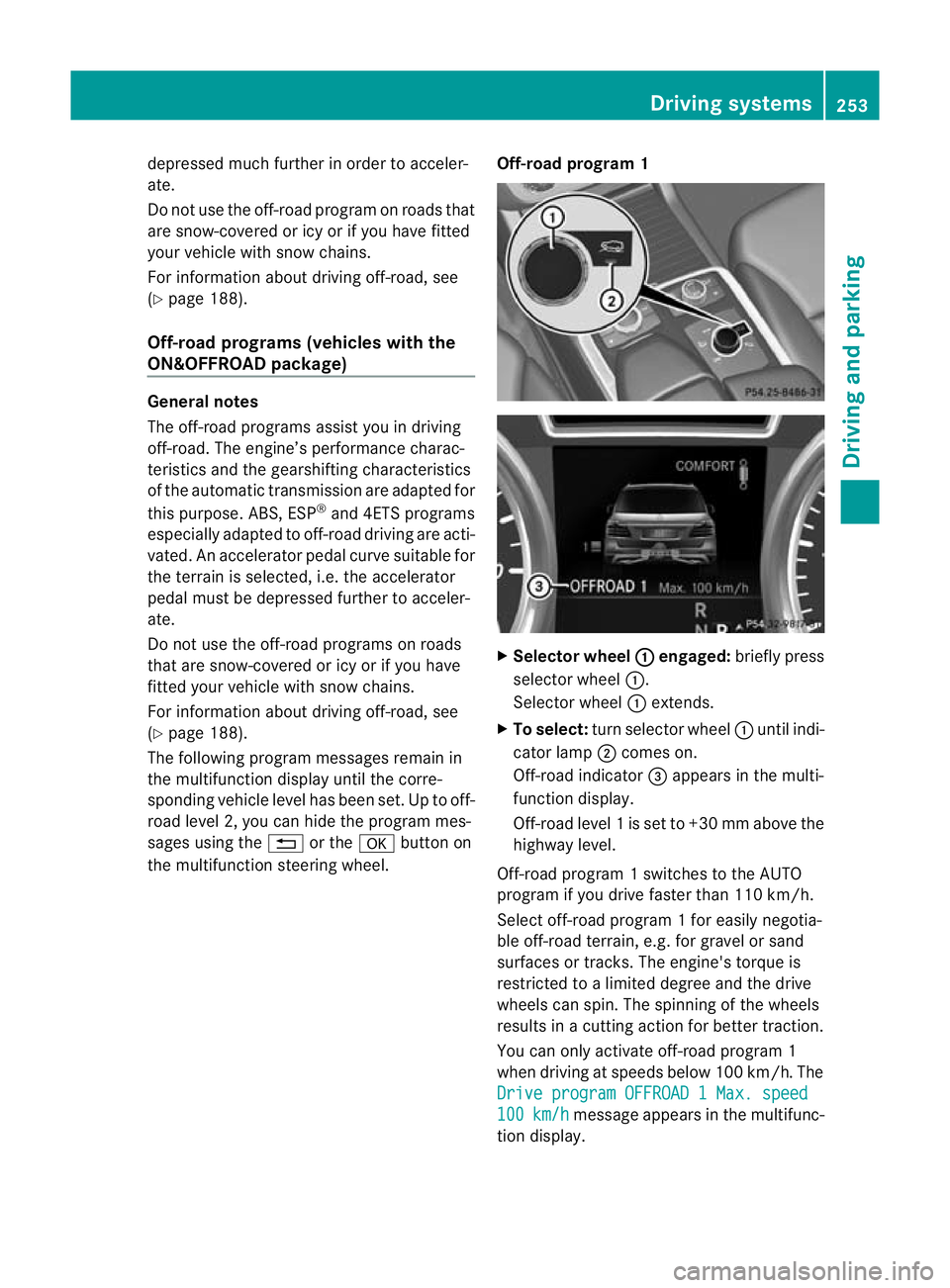
-road program 1 X
Selector wheel : engaged:
briefly press
selector wheel :.
Selector wheel :extends.
X To select: turn selector wheel :until indi-
cator lamp ;comes on.
Off-road indicator =appears in the multi-
function display.
Off-road level 1isset to +3 0mmabove the
highwa ylevel.
Off-road program 1switches to the AUTO
program if you drive faster than 110 km/h.
Select off-road program 1for easily negotia-
ble off -road terrain, e.g. for gravel or sand
surfaces or tracks. The engine's torque is
restricted to alimited degree and the drive
wheels can spin. The spinnin gofthe wheels
results in acutting action for better traction.
You can only activate off-road program 1
when driving at speeds below 100 km/ h.The
Driv eprogram OFFROAD 1Max. speed 100 km/h message appears in th
emultifunc-
tion display. Driving systems
253Drivingand pa rking Z
Page 258 of 441
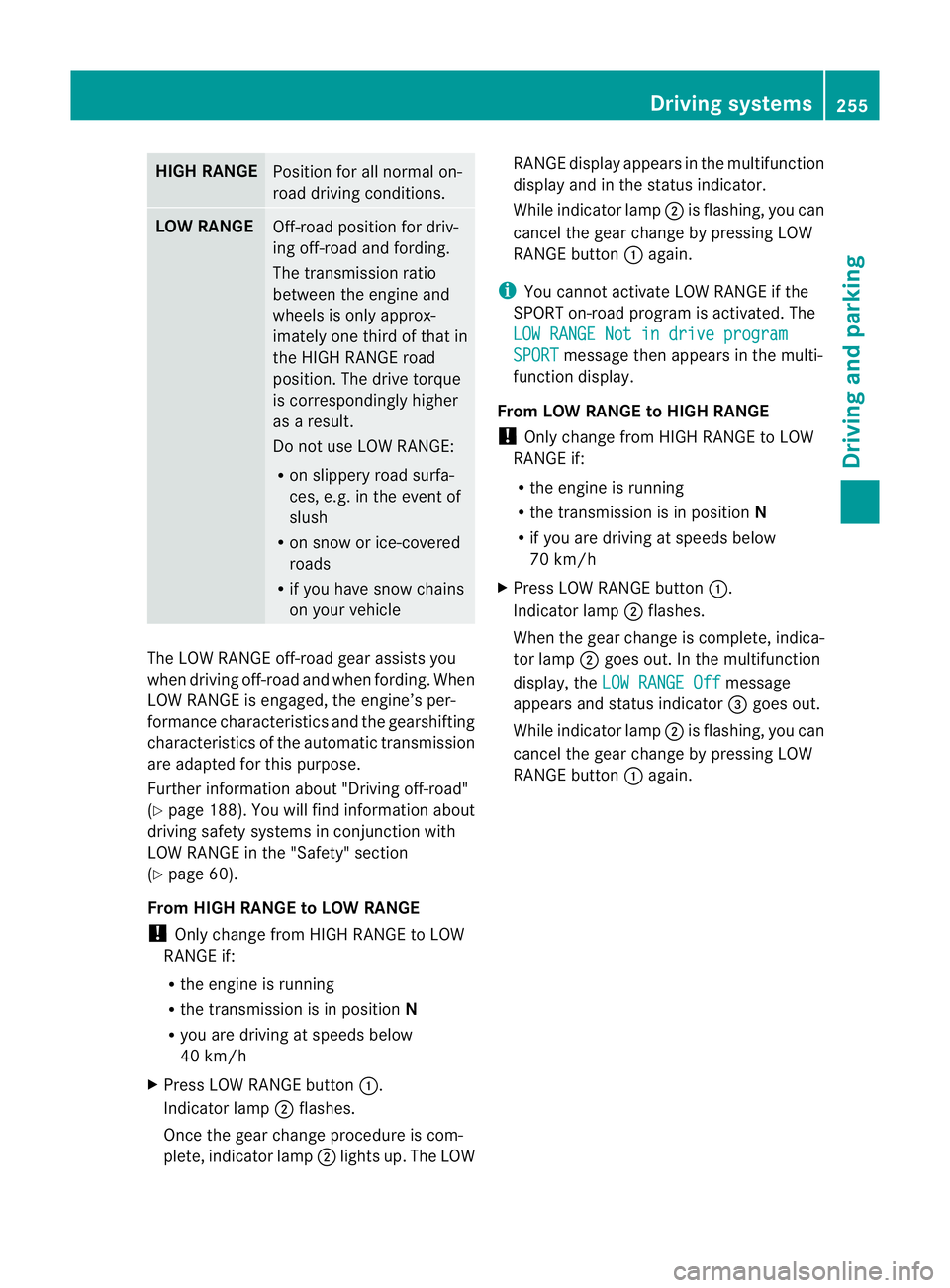
HIGH RANGE
Positio
nfor all norma lon-
road driving conditions. LOW RANGE
Off-road pos
ition for driv-
ing off-road and fording.
The transmission ratio
between the engine and
wheels is only approx-
imately one third of that in
the HIG HRANGE road
pos ition. The drive torque
is correspondingly higher
as aresult.
Do not use LOW RANGE:
R on slippery road surfa-
ces, e.g. in the even tof
slush
R on snow or ice-covered
roads
R if you hav esnow chains
on you rvehicle The LOW RANGE off
-road gear assists you
when drivin goff-roa dand whe nfordi ng.W hen
LOW RANGE is engaged, the engine’s per-
forma ncec haracteristic sand the gearshifting
characteristic softhe automatic transmission
ar ea dapted for this purpose.
Fur ther information about "Drivin goff-road"
(Y pag e188). Yo uwill find information about
drivin gsafety systems in conjunction with
LOW RANGE in the "Safety" section
(Y page 60).
From HIGH RANG EtoLOW RAN GE
! Only change from HIGH RANGE to LOW
RANGE if:
R the engi neis running
R the transmission is in position N
R you are drivin gatspeeds below
40 km/h
X Press LOW RANGE button :.
Indicator lamp ;flashes.
Onc ethe gear change procedur eiscom-
plete, indicator lamp ;lights up. The LOW RANGE display appear
sint he multifunction
displa yand in the status indicator.
While indicator lamp ;is flashing, you can
cancel the gea rchange by pressing LOW
RANGE button :again.
i You can nota ctivate LOW RANGE if the
SPORT on-road program is activated. The
LOW RANG ENot in drive program SPORT message then appears in th
emulti-
function display.
From LOW RANG EtoHIGH RANGE
! Only change from HIGH RANGE to LOW
RANGE if:
R the engine is running
R the transmission is in position N
R if you are driving at speeds below
70 km/h
X Press LOW RANGE button :.
Indicator lamp ;flashes.
When the gear change is complete, indica-
tor lamp ;goes out. In the multifunction
display, the LOWR ANGE Off message
appears and status indicator =goes out.
Whil eindicator lamp ;is flashing, you can
cancel the gea rchange by pressing LOW
RANGE button :again. Driving systems
255Driving and parking Z