key MERCEDES-BENZ GL SUV 2012 Manual Online
[x] Cancel search | Manufacturer: MERCEDES-BENZ, Model Year: 2012, Model line: GL SUV, Model: MERCEDES-BENZ GL SUV 2012Pages: 441, PDF Size: 10.66 MB
Page 238 of 441
You are responsible for safet
yand must drive
in accordanc ewith traffic conditions. You
could otherwise endanger yourself and oth-
ers.
The system may be impaired or may not func-
tion if:
R there is poor visibility, e.g. due to snow,
rain ,fog or spray.
R thew indscree nisdirty, misted up or cov-
ered, for instance by asticker, in the vicinity
of the camera.
R on bends ,onuphillgradient sordownhill
gradients. G
WARNING
Night Vie wAssist Plus is only an aid designed
to assist driving and does not reliev eyou of
the responsibility to pay attention. Continue
to look through the windscreen instea dof
relyin gonthe Night View Assist Plus display.
You ar eresponsible for safet yand must drive
in accordance with traffic conditions .You
coul dotherwis eendange ryourself and oth-
ers.
The syste mmay be impaired or may not func-
tio nif:
R the re is poor visibility,e.g.d ue to snow,
rain ,fog or spray.
R thew indscree nisdirty, misted up or cov-
ered, for instance by asticker, in the vicinity
of the camera.
R on bends ,onuphillgradient sordownhill
gradients. General notes In addition to the illumination provided by the
normal headlamps, Night View Assist Plus
uses infrared light to illuminate the road.
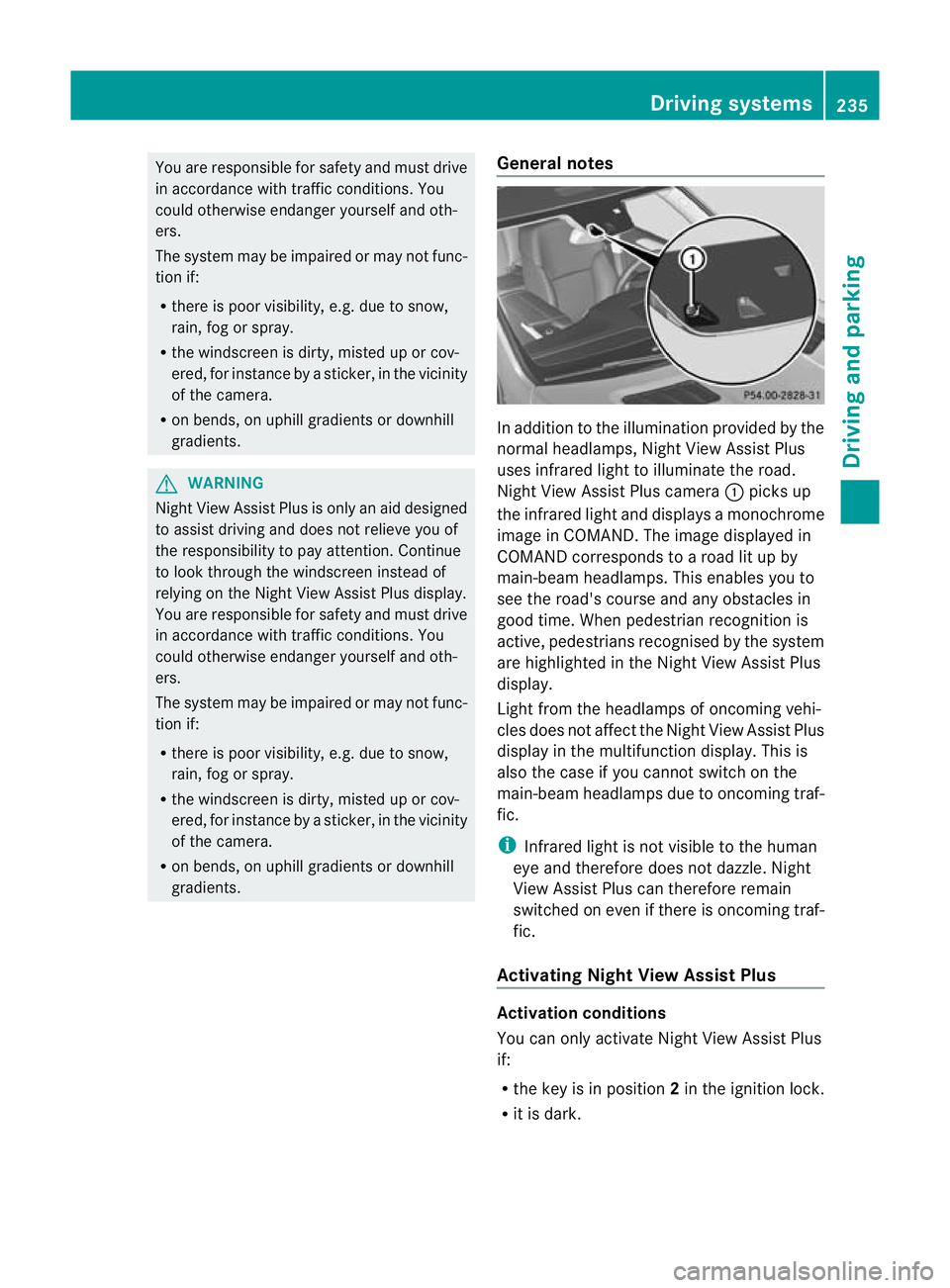
Night View Assist Plus camera
:pick sup
the infrared ligh tand displays amonochrome
image in COMAND. The image displayed in
COMAN Dcorresponds to aroad lit up by
main-beam headlamps. This enables you to
see the road's course and any obstacles in
good time. When pedestrian recognition is
active, pedestrians recognised by the system
ar eh ighlighted in the Night View Assist Plus
display.
Light from the headlamps of oncomin gvehi-
cles does not affect the Night View Assist Plus
display in the multifunction display. This is
also the case if you cannot switch on the
main-bea mheadlamps due to oncoming traf-
fic.
i Infrared light is not visible to the human
eye and therefore does not dazzle. Night
View Assist Plus can therefore remain
switched on even if there is oncoming traf-
fic.
Activating Nigh tView Assis tPlus Activation conditions
You can only activat
eNight View Assist Plus
if:
R the key is in position 2in the ignition lock.
R it is dark. Drivin
gsystems
235Drivingand parking Z
Page 243 of 441
If
av ehicle is detected within the monitoring
range of Blin dSpot Assist at speed sabove
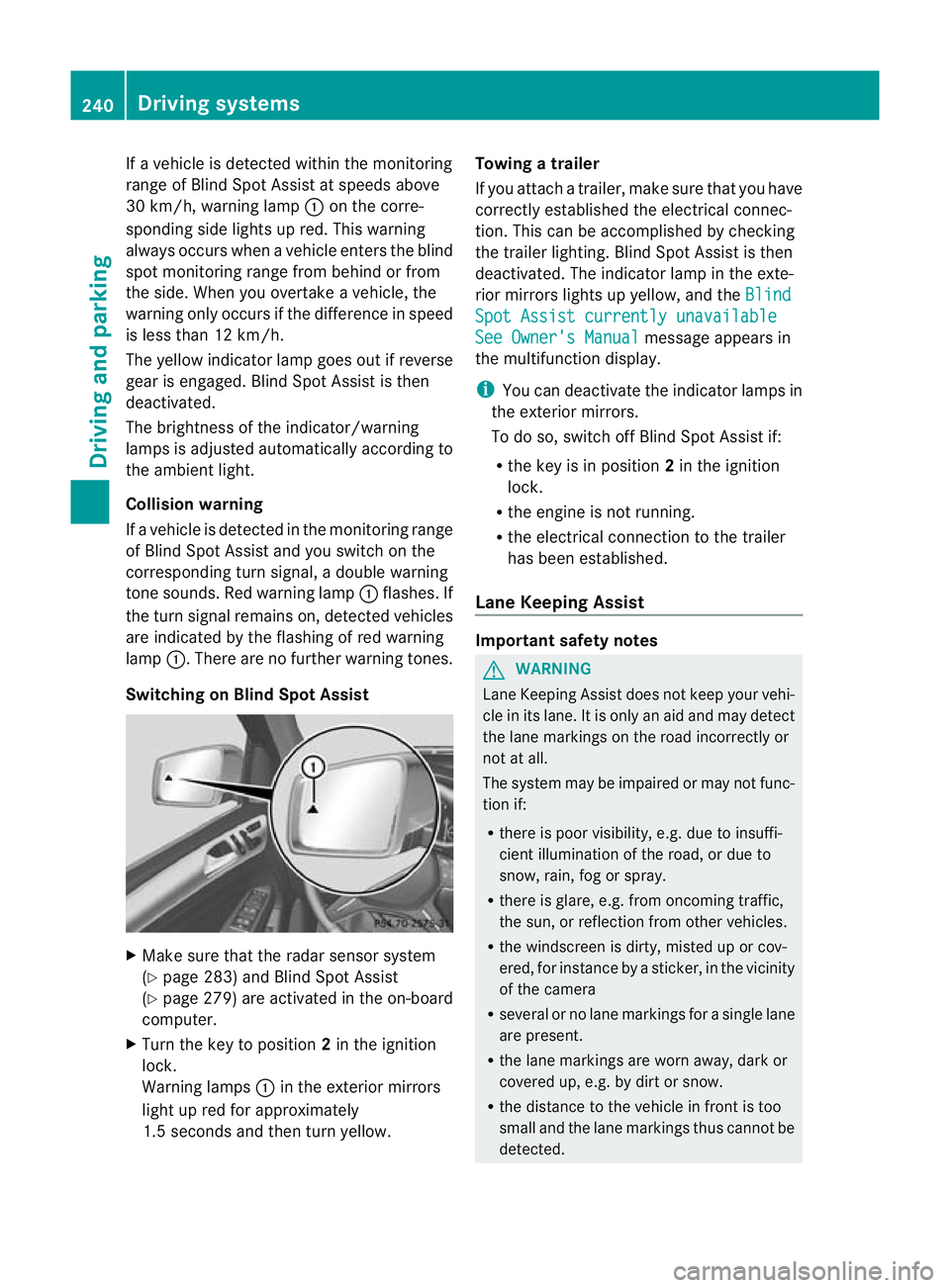
30 km/h, warning lamp :on the corre-
sponding side lights up red. This warning
alway soccurs whe navehicle enter sthe blind
spot monitoring range from behind or from
the side. When you overtak eavehicle, the
warning only occurs if the difference in speed
is less than 12 km/h.
The yellow indicator lam pgoes out if reverse
gear is engaged. Blin dSpot Assist is then
deactivated.
The brightness of the indicator/warning
lamps is adjusted autom atically according to
the ambient light.
Collision warning
If av ehicle is detected in the monitoring range
of Blin dSpot Assist and you switch on the
correspondin gturn signal ,adouble warning
tone sounds. Red warnin glamp :flashes. If
the turn signal remains on, detected vehicles
are indicated by the flashing of red warning
lamp :.There ar enofurther warning tones.
Switching on Blind Spot Assist X
Make sure that the radar senso rsystem
(Y page 283) and Blind Spot Assist
(Y page 279) are activated in the on-board
computer.
X Turn the key to position 2in the ignition
lock.
Warning lamps :in the exterior mirrors
ligh tupr ed for approximately
1. 5s econds and then tur nyellow. Towing
atrailer
If yo uattach atrailer, make sure th at you have
corre ctly established the electrical connec-
tion. This can be accomplished by checking
the trailer lighting. Blind Spot Assist is then
deactivated. The indicator lamp in the exte-
rior mirrors lights up yellow ,and the Blind Spo
tAssist currently unavailable See Owner's Manual message appears in
th em ultifunction display.
i You can deactivate the indicator lamps in
the exterior mirrors.
To do so, switch off Blind Spot Assis tif:
R thek ey is in position 2in the ignition
lock.
R the engine is not running.
R the electrical connection to the trailer
has been established.
Lane Keeping Assist Important safety notes
G
WARNING
Lan eKeeping Assist does not keep your vehi-
cle in its lane. It is only an aid and may detect
the lane markings on the road incor rectly or
not at all.
Th es ystem may be impaired or may not func-
tion if:
R there is poo rvisibility, e.g. due to insuffi-
cient illumination of the road, or due to
snow, rain, fog or spray.
R there is glare, e.g. from oncoming traffic,
the sun, or reflec tion from other vehicles.
R the windscreen is dirty, misted up or cov-
ered, for insta ncebyasticker, in the vicinity
of the camera
R several or no lane markings for asingle lane
are present.
R the lane markings are worn away, dark or
covered up, e.g. by dirt or snow.
R the distance to the vehicle in fron tist oo
smal land the lane markings thus cannot be
detected. 240
Drivin
gsystemsDrivin gand pa rking
Page 248 of 441
No course-correctin
gbrake applicatio nor
brak eapplication adapted to the driving con-
ditions occurs if:
R there are vehicles or obstacles, e.g. crash
barriers, on both sides of your vehicle.
R av ehicle approaches too closely on the
side.
R you have adopted asport ydriving style with
high cornerin gspeeds.
R you brak eoraccelerat edecisively.
R ad riving safety system intervenes, such as
ESP ®
or PRE-SAFE ®
Brake.
R ESP ®
is deactivated.
R theO ff-roa dprogram is activated (vehicles
without th eON&O FFROAD package).
R Off-road program 1or2isactivated (vehi-
cles with the ON&OFFROAD package).
R the LOW RANGE off-road gear is activated
(vehicle swith the ON&OFFROAD package).
R al oss of tyr epressure or adefec tive tyre is
detected.
Activatin gActive Blind Spot Assist X
Make sure that the radar senso rsystem
(Y page 283 )and Active Blind Spot Assist
(Y pag e279)are activate dint he on-board
computer.
X Tur nthe key to position 2in the ignition
lock.
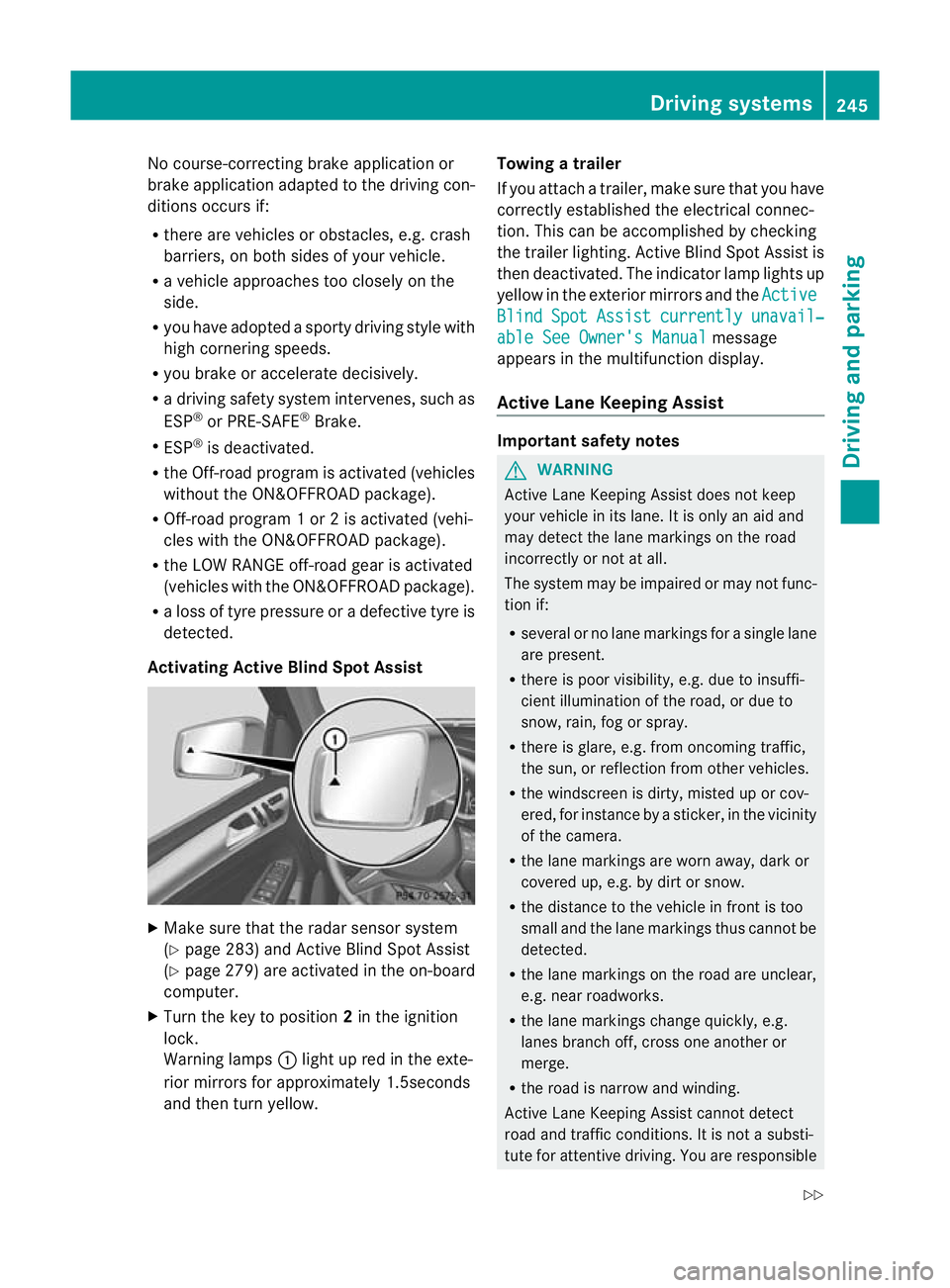
Warnin glamps :light up red in the exte-
rior mirrors for approximately 1.5seconds
and then tur nyellow. Towin
gatrailer
If yo uattach atrailer, make sure th at you have
corre ctly established the electrical connec-
tion. This can be accomplished by checking
the trailer lighting. Active Blind Spot Assist is
then deactivated. The indicator lamp lights up
yellow in the exterior mirrors and the Active Blind Spot Assist currently unavail‐
able Se
eOwner's Manual message
appears in th emultifunction display.
Active Lane Keeping Assist Important safety notes
G
WARNING
Active Lane Keeping Assis tdoes not keep
your vehicle in its lane. It is only an aid and
may detec tthe lan emarkings on the road
incorrectly or not at all.
The system may be impaired or may not func-
tion if:
R several or no lane markings for asingle lane
are present.
R there is poor visibility, e.g. due to insuffi-
cient illumination of the road, or due to
snow, rain, fog or spray.
R there is glare, e.g. from oncoming traffic,
the sun, or reflec tion from other vehicles.
R the windscreen is dirty, misted up or cov-
ered, for insta ncebyasticker, in the vicinity
of the camera.
R the lane markings are worn away ,dark or
covered up, e.g. by dirt or snow.
R the distance to the vehicle in front is too
small and the lane markings thus cannot be
detected.
R the lane markings on the road are unclear,
e.g. near roadworks.
R the lane markings change quickly, e.g.
lanes branch off, cross one another or
merge.
R the road is narrow and winding.
Active Lane Keeping Assis tcannot detect
road and traffic conditions. It is not asubsti-
tute for attentive driving. You are responsible Driving systems
245Drivingand pa rking
Z
Page 251 of 441
R
you have switched on the tur nsignals. In
this event ,the warnings are suppressed
for acertai nperio doft ime.
R ad riving safety syst em intervenes, such
as ABS, BAS or ESP ®
.
If Adaptive is selected, no warning vibra-
tio no ccurs if:
R yo uh aves witched on the turn si gnals.In
thi se vent, th ewarnings ar esuppr essed
for acertai nperio doft ime.
R ad riving safety syst em intervenes, such
as ABS, BAS or ESP ®
.
R yo ua ccelerate hard, e.g .kickdown.
R you brak ehard.
R you steer actively, e.g. swerv etoavoid
an obstacle or cha ngelane quickly.
R you cut the corner on ashar pbend.
Towing atrailer
If yo uattach atrailer, make sure th at you have
corre ctly established the electrical connec-
tion. This can be accomplished by checking
the trailer lighting. On-road programs (vehicles with the
ON&OFFROAD package)
Genera lnotes The on-road program
ssupport you when driv-
ing on roads and the off-road programs sup-
port you when driving off-road (Y page 253).
The following program messages remain in
the multifunction display until the corre-
sponding vehicle level has been set. Up to off-
road level 2, you can hide the program mes-
sage susing the %ora button on the
multifunc tion steerin gwheel. AUTO program
Select the AUTO program for
amore com-
for table ride under all normal driving condi-
tions.
Your selection remains stored even if you
remove the key from the ignition lock.
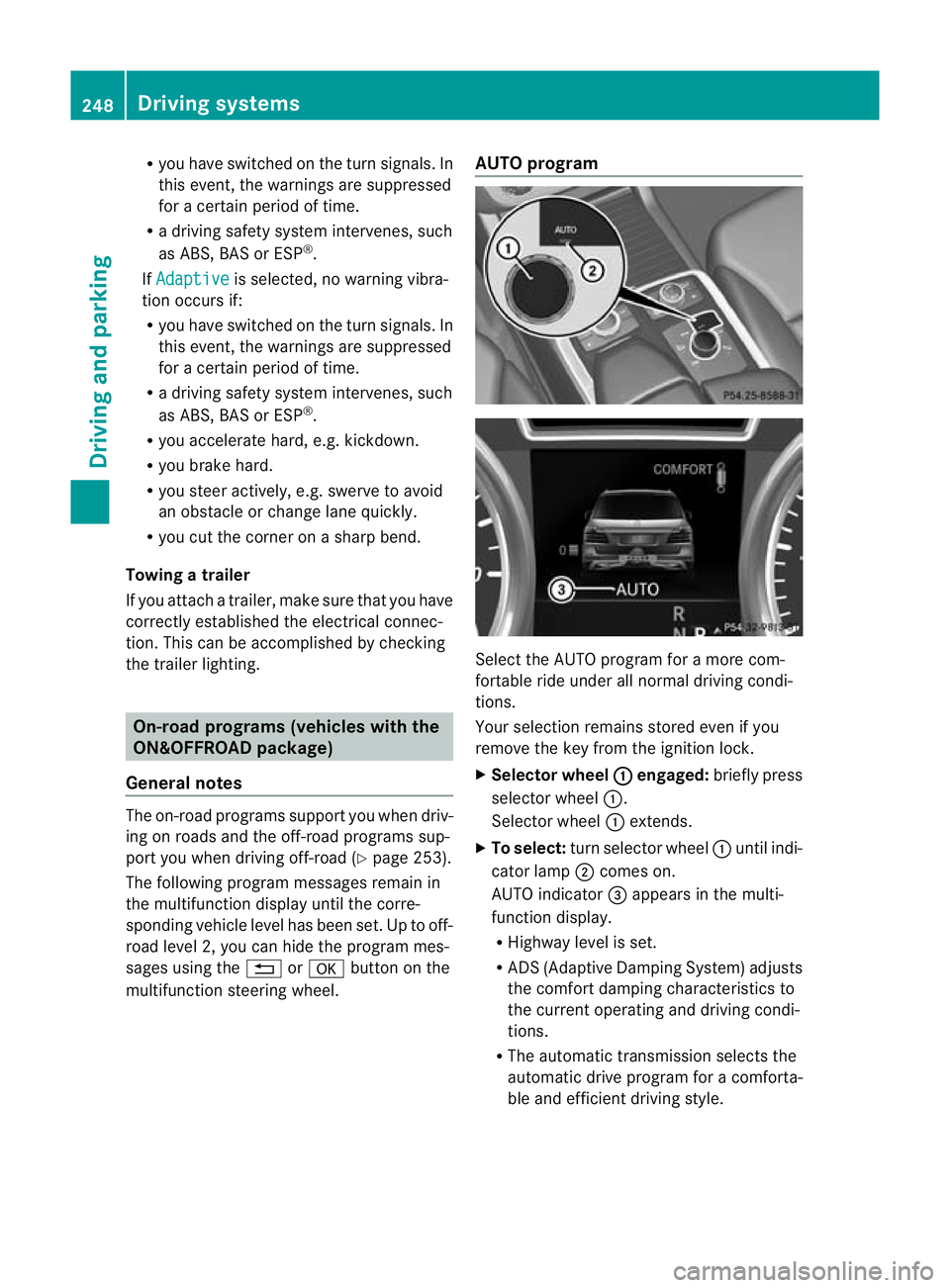
X Selecto rwheel : engaged:
brieflypress
selecto rwheel :.
Selector wheel :extends.
X To select: turnselector wheel :until indi-
cator lamp ;comes on.
AUTO indicator =appear sint he multi-
func tion display.
R Highwa ylevel is set.
R AD S(Adaptive Damp ingS ystem) adjusts
the comfort damping characteristics to
the current operating and driving condi-
tions.
R The automatic transmission selects the
automatic drive progra mforac omforta-
ble and efficien tdriving style. 248
Dri
ving systemsDriving and pa rking
Page 252 of 441
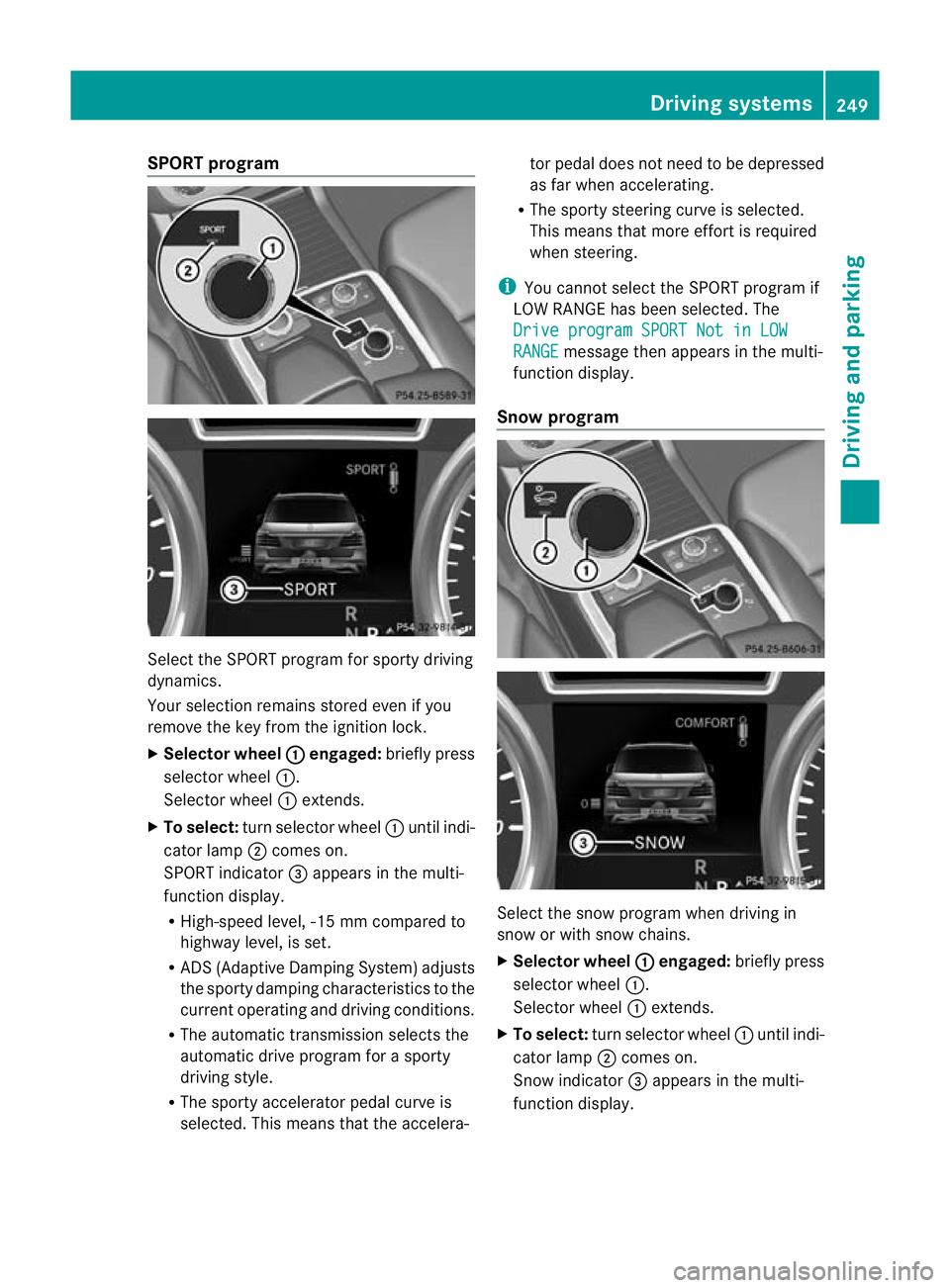
SPORT program
Select the SPOR
Tprogram for sport ydriving
dynamics.
Your selection remains store deven if you
remove th ekey from the ignition lock.
X Selector wheel : engaged:
briefly press
selector wheel :.
Selector wheel :extends.
X To select: turnselector wheel :until indi-
cator lamp ;comes on.
SPORT indicator =appear sint he multi-
func tion display.
R High-speed level, -1 5mmcompared to
highway level, is set.
R ADS (Adaptiv eDamping System) adjusts
the sporty damping characteristics to the
current operating and driving conditions.
R The automatic transmissio nselects the
automatic driv eprogram for asporty
driving style.
R The sporty accelerator pedal curve is
selected. This mean sthat the accelera- tor pedal does not need to be depressed
as fa
rwhen accelerating.
R The sport ysteering curve is selected.
Thi sm eans that mor eeffort is required
when steering.
i Youc annot select the SPORT program if
LOW RANGE has been selected .The
Driv eprogram SPORT Not in LOW RANGE message then appears in th
emulti-
function display.
Snow program Select the snow program when driving in
snow or with snow chains.
X
Selector wheel : engaged:
briefly press
selector wheel :.
Selector wheel :extends.
X To select: turn selector wheel :until indi-
cator lamp ;comes on.
Snow indicator =appears in the multi-
function display. Driving systems
249Drivingand pa rking Z
Page 259 of 441
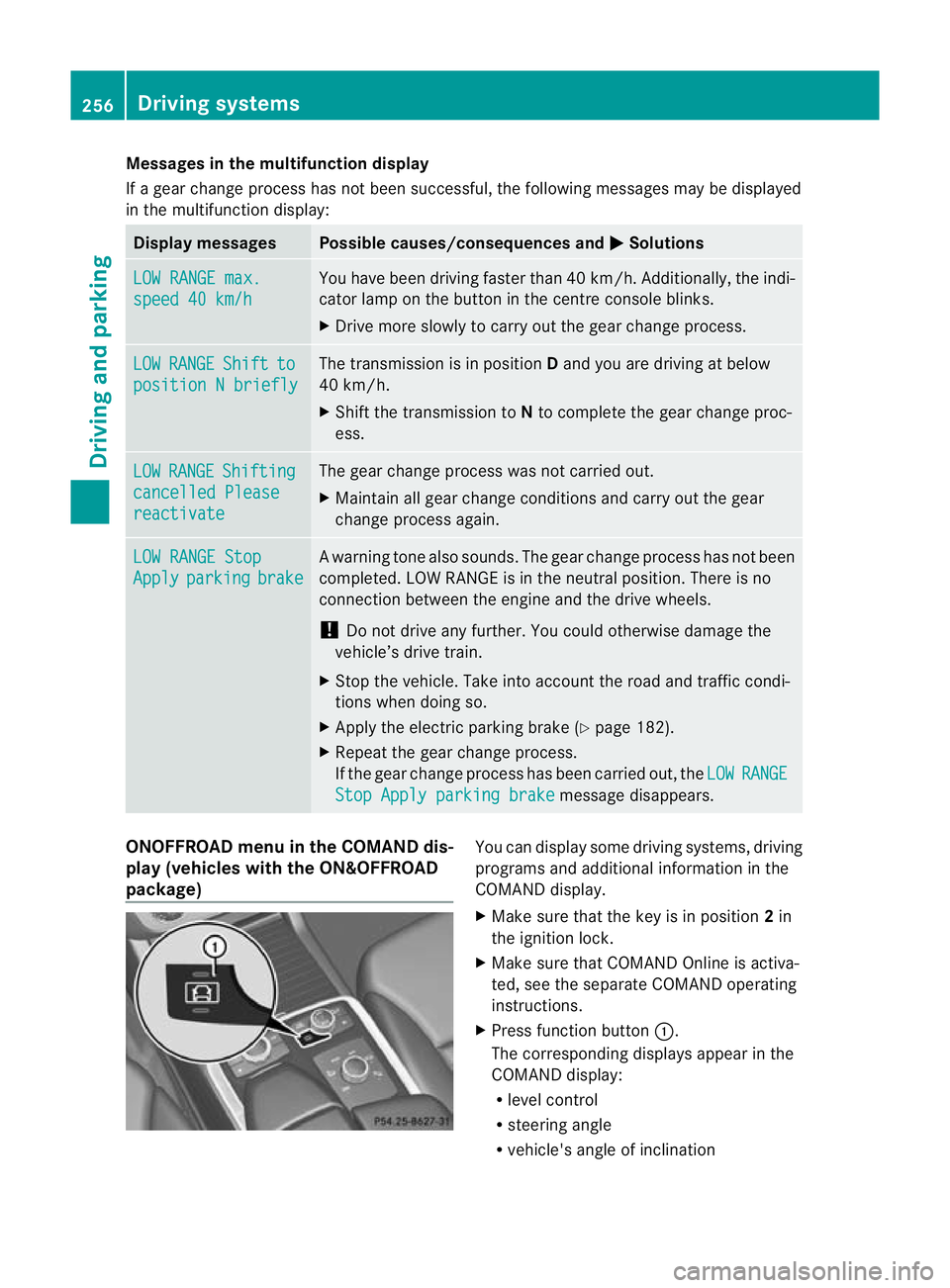
Mes
sages in the multifunction display
If ag ear change process has not been successful, the following messages may be displayed
in the multifunction display: Display messages Possibl
ecauses/ consequence sand M Solutions
LO
WR ANGE max. speed 40 km/h Yo
uh ave been driving faster than 40 km/h .Additionally, the indi-
cato rlamp on the button in the centre console blinks.
X Driv emore slowly to carry out the gear chan ge process. LOW RANGE Shift to
position
Nbriefly Th
et ransmission is in position Dand yo uare driving at below
40 km/h.
X Shift th etransmission to Nto comple tethe gear change proc-
ess. LOW RANGE Shifting
cancelled Please
reactivate The gear change process was not carried out.
X
Maintain all gear change conditions and carry out the gear
change process again. LOW RANGE Stop
Apply parking brake Aw
arning ton ealso sounds. The gear chang eprocess has not been
comple ted. LOW RANGE is in the neutral position .There is no
con nectio nbetween the engine and the driv ewheels.
! Do not drive any further. You could otherwise damage the
vehicle’ sdrive train.
X Sto pthe vehicle. Take int oaccount the road and traffic condi-
tions whe ndoing so.
X Apply the electric parkin gbrake (Y page 182).
X Repe atthe gear change process.
If th egear change process has been carried out, the LOW RANGE
Stop Appl
yparking brake message disapp
ears. ONOFFROAD men
uint he COMAND dis-
play (vehicles wit hthe ON&OFFROAD
package) Yo
uc an displ ay some driving systems ,driving
programs and additional information in the
COMAND display.
X Make sure that th ekey is in position 2in
the ignition lock.
X Make sure that COMAN DOnline is activa-
ted, see the separate COMAND operating
instructions.
X Pres sfunction button :.
The corresponding displays appea rinthe
COMAN Ddisplay:
R level control
R steering angle
R vehicle' sangle of inclination 256
Drivin
gsystemsDrivin gand pa rking
Page 265 of 441
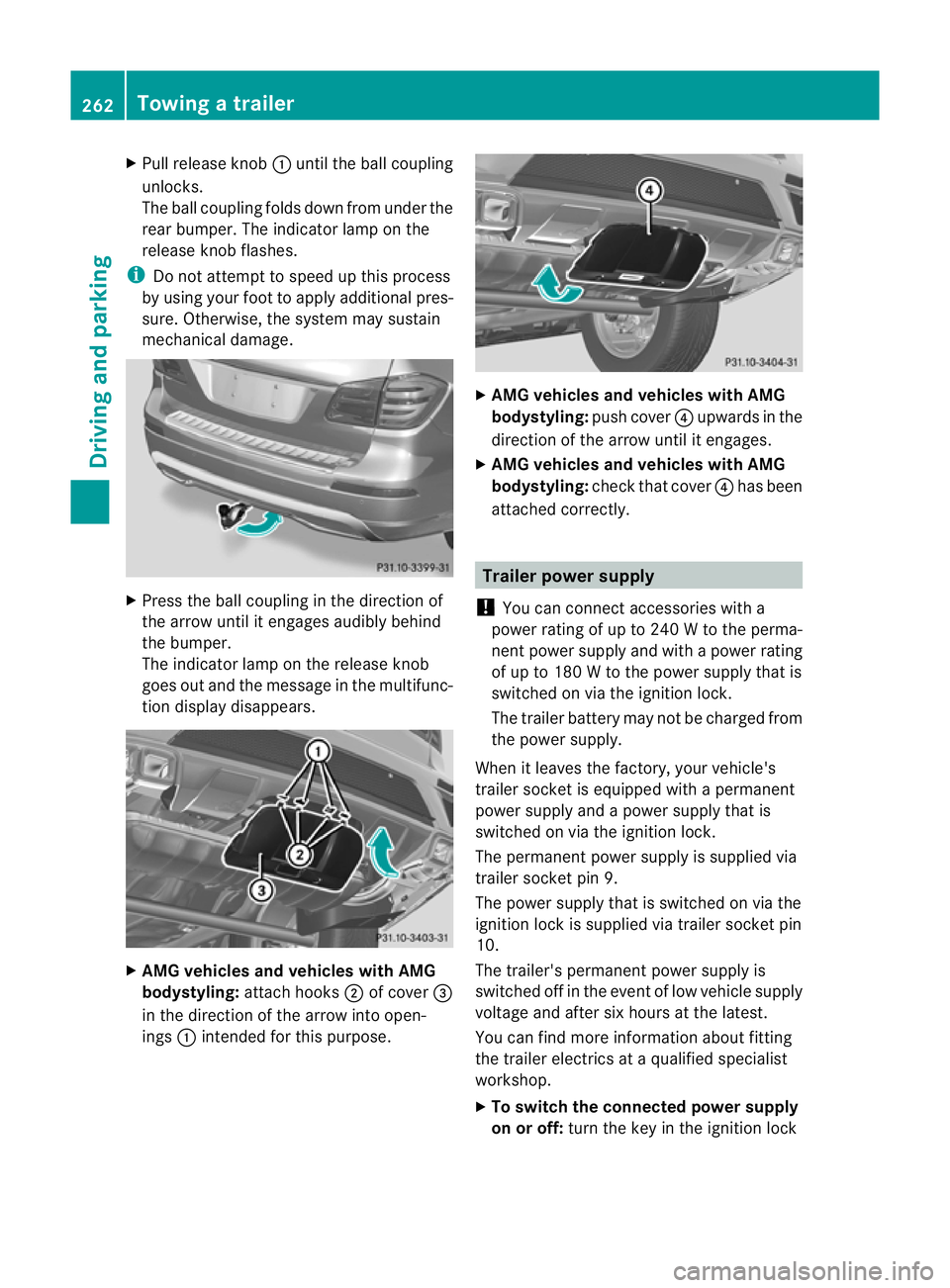
X
Pull release knob :until the ball coupling
unloc ks.
The ball coupling folds down from under the
rea rbumper. The indicator lamp on the
release knob flashes.
i Do not attempt to spee dupthis process
by usin gyour foot to apply additional pres-
sure .Otherwise, the syste mmay sustain
mechanical damage. X
Press the ball coupling in the direction of
the arrow until it engages audibl ybehind
the bumper.
The indicator lam ponthe release knob
goes out and the message in the multifunc-
tion displa ydisappears. X
AMG vehicles and vehicles with AMG
bodystyling: attachhooks ;of cover =
in the direction of the arrow int oopen-
ings :intended for this purpose. X
AMG vehicle sand vehicles with AMG
bodystyling: push cover?upwards in the
direction of the arrow until it engages.
X AMG vehicles and vehicles with AMG
bodystyling: check that cover ?has been
atta ched correctly. Trailer powe
rsupply
! Youc an connect accessories with a
power rating of up to 240 Wtothe perma-
nen tpower supply and with apower rating
of up to 18 0Wto the powe rsupply that is
switched on via the ignition lock.
The trailer batter ymay not be charged from
the power supply.
When it leaves the factory, your vehicle's
trailer socket is equippe dwithapermanent
power supply and apower supply that is
switched on via the ignition lock.
The permanen tpower supply is supplied via
trailer socket pin 9.
The power supply that is switched on via the
ignition lock is supplied via trailer socket pin
10.
The trailer's permanen tpower supply is
switched off in the even toflow vehicle supply
voltage and after six hour satthe latest.
You can fin dmore information about fit ting
the trailer electric sataqualified specialist
workshop.
X To switch the connected power supply
on or off: turn the key in the ignition lock 262
Towin
gatrailerDriving an dparking
Page 272 of 441
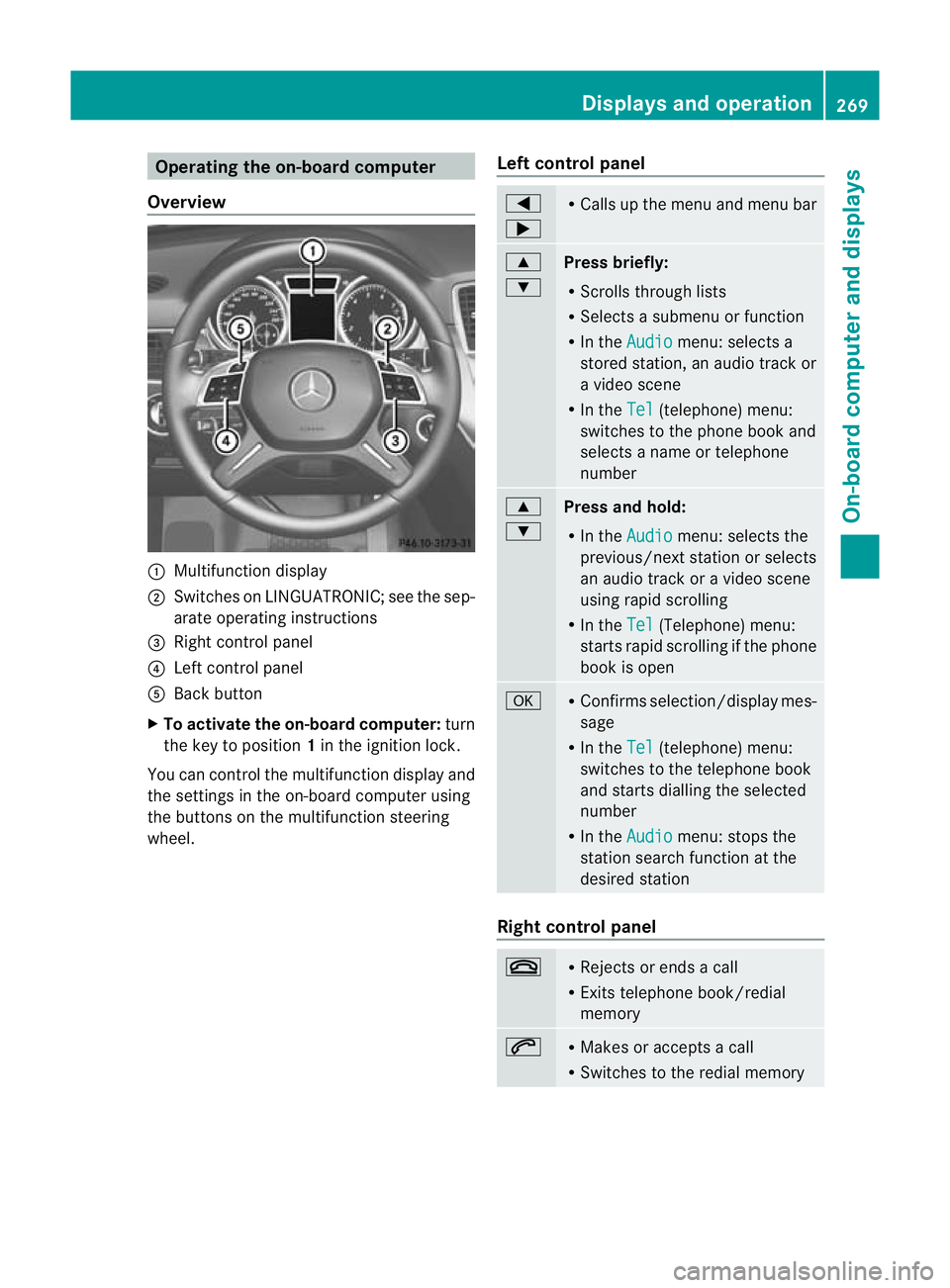
Oper
ating the on-board compu ter
Overview :
Multifunction display
; Swit ches on LINGU ATRONIC; see the sep-
arate operating instructions
= Right control panel
? Left control panel
A Back button
X To activate the on-board computer: turn
the key to position 1in the ignitio nlock.
You can control the multifunction display and
the settings in the on-boar dcompu teru sing
the button sonthe multifunction steering
wheel. Lef
tcontrol panel =
; R
Calls up the menu and menu bar 9
:
Press briefly:
R
Scrolls through lists
R Select sasubmenu or function
R In the Audio menu: select
sa
stored station, an audi otrack or
av ideo scene
R In the Tel (telephone) menu:
switches to th ephon ebook and
selects anam eo rtele phone
number 9
:
Press and hold:
R In the Audio menu: sele
ctst he
previous/next statio norselects
an audio trac koravideoscene
using rapi dscrolling
R In the Tel (Te
lephone) menu:
starts rapid scrolling if the phone
book is open a R
Confirm sselection/display mes-
sage
R In the Tel (telephone) menu:
switches to the telephone book
and starts dialling the selected
number
R In the Audio menu: stops the
station searc hfunction at the
desired station Right control panel
~ R
Rejects or ends acall
R Exits telephone book/redial
memory 6 R
Makes or accepts acall
R Switches to the redial memory Displays and operation
269On-board computer and displays Z
Page 285 of 441
X
Press ato confirm.
X Press the :or9 button to select the
Amb. ligh t+/- function.
Yo uw ill see the selected setting.
X Press ato confirm.
X Press the :or9 button to adjust the
brightness to any level from Off to
Level 5 (bright).
X Press the aor% button to save the
setting.
Setting the ambient lighting colour
X Press the =or; button on the steer-
ing wheel to select the Settings menu.
X Press the :or9 button to select the
Light submenu.
X Press ato confirm.
X Press the :or9 button to select the
Ambien tlight colour function.
X Press ato confirm.
X Press the :or9 buttontos et the
colour to SOLAR ,
NEUTRAL or
POLAR .
X Press the aor% button to save the
setting.
Surround lighting and exterior lighting
delayed switch-off
X Press the =or; button on the steer-
ing wheel to select the Settings menu.
X Press the :or9 button to select the
Light submenu.
X Press ato confirm.
X Press :or9 to select the Sur‐ roun
dlighting function.
When the Surround lighting function is
activated, th elight cone and the area
around the vehicle are displaye dinred in
the multifunction display.
X Press the abutton to save the setting. Deac
tivating delayed switch -off of th eexte-
rior lighting tempo rarily:
X Befor eleaving the vehicle, tur nthe key to
position 0in the ignition lock.
X Tur nthe key to position 2in the ignition
lock.
The exterior lighting delayed switch-off is
deactivated.
Delayed switch-off of the exterior lighting is
reactivated the nex ttime you start the
engine.
If you have activated the Surround light‐ ing func
tion and the light switc hisset to
Ã,t he followin gfunctions are activated
when it is dark:
R Surround lighting: the exterior lighting
remains lit for 40 seconds after unlocking
with the key. If you start the engine, the
surround lighting is switched off and the
automatic headlamp mode is activated
(Y page 119).
R Exterior lighting delayed switch-off: the
exterior lighting remains lit for
60 seconds after the engine is switched off.
If you close all the doors and the tailgate,
the exterior lighting goes off after
5s econds.
i Depending on your vehicle's equipment,
when the surround lighting and delayed
switch-off exterior lighting are on, the fol-
lowing light up:
R side lamps
R daytime driving lights
R surround lighting in the exterior mirrors
Activating/deactivating th einterior light-
ing delayed switch-off
If you activa tethe Lighti ngdelayed sw.- off function, th
einterior lighting remains on
for 20seconds after you remove the key from
the ignition lock. 282
Menus and submenusOn-boar
dcomputer and displays
Page 289 of 441
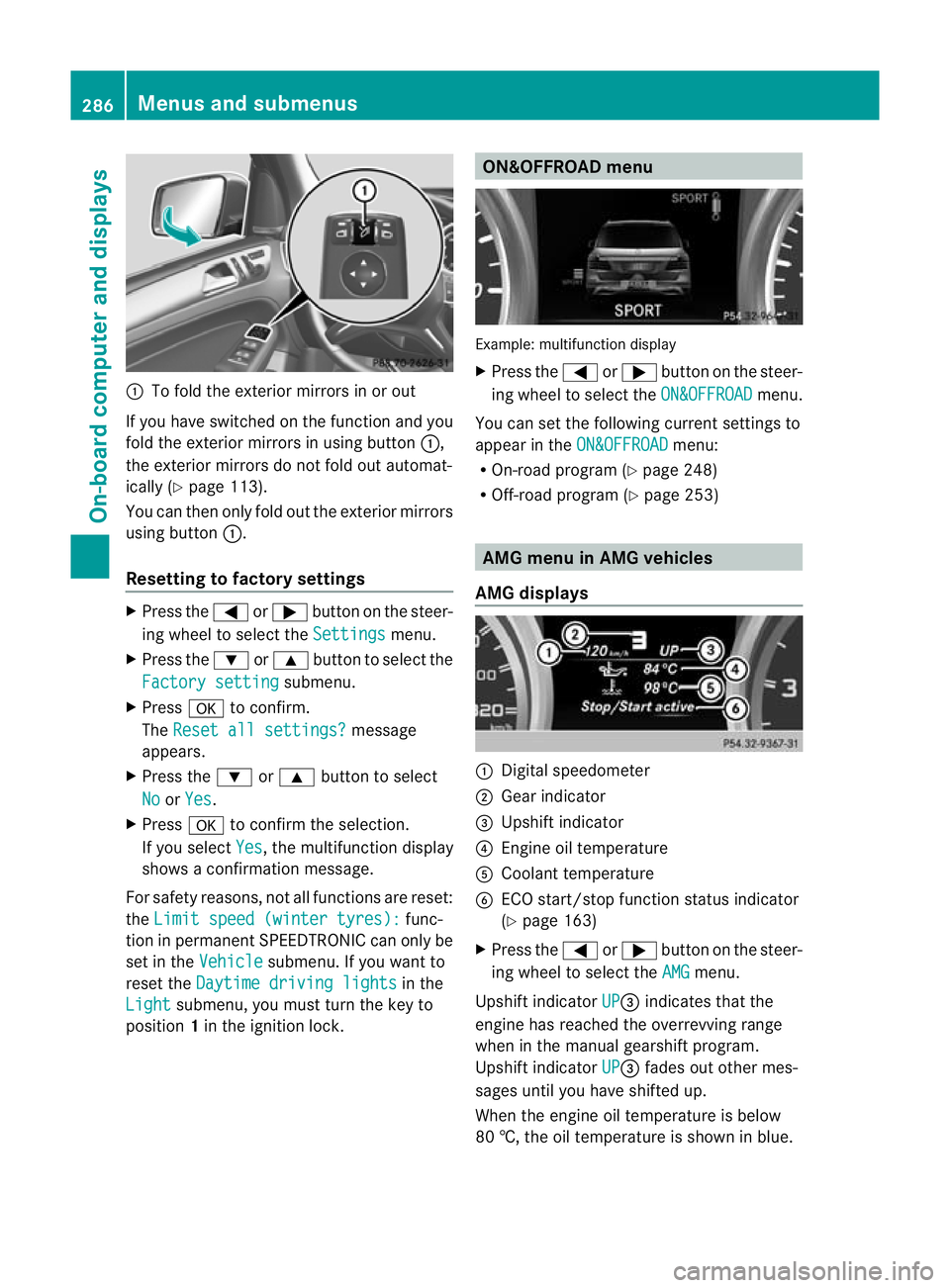
:
To fold the exterior mirror sinorout
If you have switched on the function and you
fold the exterior mirrors in using button :,
the exterior mirrors do not fold out automat-
ically (Y page 113).
You can then only fold out the exterior mirrors
using button :.
Resetting to factor ysettings X
Pres sthe = or; button on th esteer-
ing wheel to selec tthe Settings menu.
X Press the :or9 button to selec tthe
Factor ysetting submenu.
X Press ato confirm.
The Reset all settings? message
appe ars.
X Pres sthe : or9 button to select
No or
Yes .
X Press ato confir mthe selection.
If you select Yes ,t
he multifunction display
shows aconfirmation message.
For safet yreasons, not all functions are reset:
the Limi tspeed (winter tyres): func-
tion in permanen tSPEEDTRONIC can only be
set in the Vehicle submenu. If you want to
reset the Daytimedriving lights in the
Light submenu, yo
umust turn the key to
position 1in the ignition lock. ON&OFFROAD menu
Example: multifunction display
X
Press the =or; button on the steer-
ing wheel to select the ON&OFFROAD menu.
You can set the following current settings to
appea rintheON&OFFROAD menu:
R On-road program (Y page 248)
R Off-road program (Y page 253) AM
Gm enu in AMG vehicles
AMG displays :
Digital speedometer
; Gear indicator
= Upshift indicator
? Engin eoil temperature
A Coolant temperature
B ECO start/stop func tion status indicator
(Y page 163)
X Press the =or; button on the steer-
ing wheel to select the AMG menu.
Upshift indicator UP =
indicates that the
engin ehas reached the overrevving range
when in the manual gearshift program.
Upshift indicator UP =
fades out other mes-
sages until you have shifted up.
When the engine oil temperature is below
80 †, the oil temperature is shown in blue. 286
Menus and submenusOn-board computer and displays