phone MERCEDES-BENZ GL SUV 2012 Owners Manual
[x] Cancel search | Manufacturer: MERCEDES-BENZ, Model Year: 2012, Model line: GL SUV, Model: MERCEDES-BENZ GL SUV 2012Pages: 441, PDF Size: 10.66 MB
Page 14 of 441
Removin
g....................................... 415
Storage locatio n............................ 415
Techn ical data ............................... 417
Emergency unl ocking
Ta ilgate ............................................ 88
Veh icle ............................................ .84
Engine
Display message ............................ 304
ECO start/stop function ................163
Engine numb er............................... 423
Jump-starting ................................. 386
Runnin girregularl y......................... 166
Starting pro blems .......................... 166
Starting the engine wit hthe key ....161
Starting with KEYLESS GO .............161
Stopp ing. ....................................... 182
To w-st arting (vehicle )..................... 391
Warning lamp (eng ined iagnos-
tics) ............................................... 333
En gine electronics
Notes ............................................. 421
Pro blem (fault) ............................... 166
En gine oil
Additives ........................................ 429
Checking the oil level ...... ............... 362
Checking the oil leve lusing the
dipstick .......................................... 362
Display message ............................ 305
Fil ling capacity ............................... 428
Note sabout oil grades ...... ............. 428
Notes on oil level/cons umption.... 362
Temperat ure( on-board computer) .286
Topping up ..................................... 362
Viscosity ........................................ 429
En vironmental protection
Returning an end-of-life vehicle .......23
ESP ®
(Electronic Stability Pro-
gram) 4ETS ................................................ 66
AMG menu (on-bo ardc omputer )... 287
Deactivating/activating ...................67
Display message ............................ 291
Function/notes ................................ 66
Important safety gu idelines ............. 66
Traile rstabilisatio n.......................... 67
Warn ingl am p................................. 329
Exhaus tpipe (cleaning instruc-
tions) .................................................. 371Exterio
rlighting
see Lights
Exterior mirrors
Adjustin g....................................... 112
Anti-dazzle mod e(automatic) ........114
Fol ding in/ou t(automatically )....... 113
Fol ding in/ou t(electrically) ...........113
Fol ding in whe nlocki ng(on-board
computer) ...................................... 285
Ou tofp osition (troubleshooting) ...113
Parking positio n............................. 114
Resetting ....................................... 113
Storing settings (memory func-
tion) ............................................... 115 F
Faul tmessage
see Display messages
Filler cap
see Fuel filler flap
Fire extinguisher ............................... 377
First-aid kit ......................................... 376
Fittin gawheel
Removin gawheel .......................... 407
Fitting wheels
Fittin gaw heel............................... 408
Lowering the veh icle ...................... 409
Rais ingt he vehicle ......................... 406
Securing the veh icle against roll-
ing away ........................................ 405
Flat tyre
MOExtende dtyres ......................... 378
Pre paring th evehicle ..................... 378
TIREFIT kit ...................................... 379
Floormat ............................................ .358
Foglamps (extende drang e).............. 124
Foldin gthe rear be nchs eat for-
wards/back ....................................... 341
Fording Off-road ......................................... 186
On flo oded roads ........................... 186
Frequencies
Garage door op ener ....................... 354
Mobile phone ................................. 421
Tw o-way radio ................................ 421 Index
11
Page 17 of 441
Activating/deactivating the inte-
rio
rlightin gdelayed switch-off .......282
Active light function .......................123
Automatic he adlampmode ............ 119
Cornering light function .................123
Dipped-bea mheadlamps ............... 120
Driving abroa d............................... 118
Foglamps (extende drange )........... 124
Hazard warning lamps ...................122
Hea dlam pflasher ........................... 122
Light switc h................................... 119
Ma in-beam headlamps ................... 122
Motorway mode ............................. 124
Off-road lights ................................ 124
Parking lamps ................................ 121
Rea rfoglam p................................. 120
Setting the ambient lighting
bri ghtness (on-bo ardc omputer ).... 281
Setting the ambient lighting col-
ou r(on-board computer) ...... .......... 282
Side lamps ..................................... 120
Switch ingA daptive Highbeam
Assist on/of f................................. 281
Switch ingt he daytime driving
lights on/off (on-board computer) .280
Switch ingt he exteri or lighting
delayed switch-off on/off (on-
board computer) ............................ 282
Switch ingt he surround lighting
on/off (on-board computer) ..........282
Turn signals ................................... 121
se eC hangin gbulbs
see Interior lighting
Light sensor (display message) .......303
LI Mi ndicator lamp
Cruise control ................................ 193
DISTRONI CPLUS ........................... 200
Variabl eSPEEDTRONIC .................196
Lim iting the speed
see SPEEDTRONIC
Loading guidelines ............................338
Locking seeC entral locking
Locking (doors)
Automatic ........................................ 84
Emergency lockin g........................... 85
From insi de(central lockin gbut-
ton) .................................................. 83Locking centrally
seeC entral locking
Locking verification signal (on-
board computer) ............................... 283
LO WR ANGE
Display message ............................ 309
Off-road ge ar................................. 254
LO WR ANGE off-road gear ................254
Luggage compartmen tcover
Notes/function .............................. 344
Luggage compartmen tenlarge-
ment Important safety notes ..................341
Luggage compartmen tfloor
opening/closing ............................ 344
stow agew ell, under ....................... 344
Lumbar support
Adjusting (o nthe seat) .................. 108
Luxury head restraint .......................103 M
M+S tyres ........................................... 398
Main-beam headlamps Changing bulbs .............................. 130
Display message ............................ 302
Switch ingA daptive Highbeam
Assist on/of f................................. 125
Switch ingo n/off ........................... 122
Matt fin ish( cle anin ginstructions) ..368
Memory card (audi o)......................... 274
Memory function ............................... 115
Mercedes-Benz Service Centre seeQ ualified specialist workshop
Message memory (on-board com-
puter) ................................................. .290
Mes sages
see Display messages
Mirror
see Vanity mirror (in sun visor)
Mirrors
see Exterior mirrors
see Rear-view mirror
Mobile phone
Frequencies ................................... 421
Installati on .................................... .421
Menu (on-bo ardc omputer )............ 275 14
Index
Page 22 of 441
Segments
...................................... 268
Sel ecting the unit of measure-
ment .............................................. 280
se eI nstrument cluster
SPEEDTRONIC
Activating variabl e......................... 197
Deactivating variabl e..................... 198
Display message ............................ 314
Function/notes ............................. 196
Important safety notes ..................196
LIM ind icator lamp ......................... 196
Permanen t..................................... 198
Sel ecting ........................................ 196
Storing the current spe ed.............. 196
Variabl e......................................... 196
SRS (Supplemental Restrain tSys-
tem) Disp laym essage ............................ 299
Introduction ..................................... 41
Warn ingl am p................................. 332
Warning lamp (function) ................... 41
Startin g(engine) ................................ 161
STEE RCONTROL .................................. 70
Ste ering (display message) ..............321
Ste ering wheel
Adjustin g(electrically )................... 110
Adjusting (manually )...................... 110
Butto noverview ............................... 33
Buttons (on-bo ardc omputer )......... 269
Cleaning ......................................... 372
Gearshift paddle s........................... 171
Important safety note s.................. 110
Steering wh eelh eating .................. 111
Storing settings (memory func-
tion) ............................................... 115
Ste ering wheel gearshift paddles ....171
Ste ering wheel heating
Problem (malfunction) ...................111
Switch ingo n/off ........................... 111
Stopwatch (RACETIMER) ................... 287
Sto wage areas ................................... 338
Sto wage compartment
Spectacle scompartmen t............... 340
Sto wage compartments
Armrest (under) ............................. 339
Centre consol e.............................. 340
Centre consol e(rear) ..................... 340
Cu ph older ..................................... 346Glove comp
artment ....................... 339
Important safety informatio n......... 338
Sto wage net ...................................... .340
Sto wage sp ace
Stowag enet ...... ............................. 340
Summer tyres .................................... 398
Sun bl ind
Rea rside windows ......................... 348
Sun visor ............................................ 347
Supplement Restrain tSyst em
se eS RS (Supplemental Restraint
System)
Surround lighting (on-board com-
puter) ................................................. .282
Suspensi ontuning
AMG RIDE CONTROL sports sus-
pens ion .......................................... 215
SETUP (on-bo ardc omputer ).......... 287
Switchi ngoff the alarm (ATA) ............71 T
Tail gate
Disp laym essage ............................ 320
Emergency unl ocking ....................... 88
Important safety notes ....................85
Limiting the opening ang le ...............88
Opening/closing (automatically
from insi de)...................................... 87
Opening/closing (automatically
from outs ide) ................................... 86
Opening/closing (fro moutside) .......86
Opening dimensions ......................431
Po wer closing. ................................. 84
Tail lamps
Display message ............................ 301
Tank
seeF uel tank
Technical data
Capacities ...................................... 423
Emergency sp arew heel ................. 417
Informat ion.................................... 420
Traile rloads ................................... 433
Tyres/whee ls................................. 409
Vehicle data ................................... 431
Tel ephone
Accepting acall............................. 276
Display message ............................ 322 Index
19
Page 23 of 441
Menu (on-boar
dcomputer )............ 275
Number from the phone book ........ 276
Redialling ....................................... 276
Rej ecting/end ingac all................. 276
Te lephon ecompartmen t................ 339
Temperature
Coolan t.......................................... 268
Co olan t(on-board computer) ...... ...2 86
Engine oi l(on-board computer) ...... 286
Outside temperatur e..................... .268
Setting (cl imate control) ................143
TEMPOMAT
Function/notes ............................. 193
Theft-deterren tsyst em
ATA (Anti-Theft Alarm system) .........71
Immob iliser ...................................... 71
Through-loading ................................ 341
Time seeS eparate Owner's manual
Timing (RACETIMER) .........................287
TIRE FITk it.......................................... 379
Top Tether ............................................ 55
Total distanc erecorder .................... 271
Tow-away protection ..........................71
Towing Important safety notes ..................388
Towing atrailer
Active Blind Sp ot Assist................. 245
Active Lane Kee ping Assist ............248
Active Parking Assis t..................... 223
Axle lo ad,p erm issible .................... 433
Bulb failure ind icator for LED
lamps ............................................. 263
ESP ®
(Electroni cStability Pro-
gram) ............................................... 67
Pullin gawayw ithat railer .............. 162
Traile rdrive program ..................... 250
Towing away
Fitting the tow inge ye.................... 390
Removing the tow inge ye............... 390
With both axl eson the ground .......390
Tow-starting
Emergency engine starting ............391
Important safety notes ..................388
Trailer
Display message ............................ 321Trailer coupli
ng
se eT owing atrailer
Traile rtowing
7-pin connector ............................. 263
Blind Spo tAssist ...... ...................... 240
Cleaning the trailer tow hitch ......... 371
Coupling up atrailer ...................... 260
Decouplin gatrailer ....................... 261
Driving tip s.................................... 257
Fol ding in the bal lcoupling ............ 261
Fol ding out the bal lcoupling .......... 259
Important safety notes ..................257
Mo unting dimensions ....................432
Parktroni c...................................... 218
Po wer suppl y................................. 262
Pro blem (fault) ............................... 264
Shift rang e..................................... 170
Traile rloads ................................... 433
Transmission
seeA utomati ctransmission
Transmissio nposition display .........168
Transmission pos ition display
(DIRECT SELECT lever) ......................168
Transportin gthe vehicle .................. 391
Travellin guphill
Brow of hil l..................................... 192
Driving downhil l............................. 192
Maximum gradient-cl imbing capa-
bility .............................................. .192
Trim pie ces( cle anin ginstructions) .372
Trip computer (on-b oard com-
puter) ................................................. .271
Trip meter Calling up ....................................... 271
Resetting (on-bo ardc omputer )...... 272
Turn si gnal
se eT urn signals
Turn signals
Switching on/off ........................... 121
TV
Operating (on-bo ardc omputer )..... 275
se eS eparate operating instructions
Two- wayradio
Freq uencies ................................... 421
Installati on .................................... .421
Transmission output (maximum ).... 421 20
Index
Page 29 of 441
vehicles
.The quality or safety of the vehicle
is improved as aresult of the inspection.
Mercedes-Ben zcan only inform you about
vehicl echeck sifith as yourregistra tion data.
It is possible that your vehicle has not yet
been registered in your nam einthe following
cases:
R if your vehicle was not purchase datan
authorised specialis tdealer.
R if your vehicle has not yet been examined
at aM ercedes-Benz Ser vice Centre.
It is advisabl etoregister your vehicle with a
Mercedes-Benz Ser vice Centre.
Inform Mercedes-Benz as soo naspossible
about any change in address or vehicleown-
ership. Correct use
G
WARNING
Variou swarning sticker sare affixed to your
vehicle. Thei rpurpose is to draw your atten-
tion, and the attention of others, to various
dangers. Therefore, do not remove any warn-
ing stickers unless the sticker clearly states
that you may do so.
If you remove the warning stickers, you or
others could be injured by failing to recognise
certain dangers.
Observe the following information when driv-
ing your vehicle:
R the safety notes in this manual
R the Technical Data section in this manual
R traffic rules and regulations
R laws and safety standards pertainin gto
motor vehicles Implie
dwarranty
! Follo wthe instructions in this manual
about the proper operation of your vehicle
as well as about possible vehicle damage.
Damage to your vehicle that arises from culpable contravention
sagainst these
instructions ar enot covered either by
Mercedes-Ben zimplie dwarrant yorbythe
New or Used-Vehicle Warranty. Data stored in th
evehicle Fault data
Components which are critical for vehicle
operation are equipped with fault data mem-
ories as standard. There are also data storage
devices which recor dhow vehicle compo-
nents have reacted in cer tain drivin gsitua-
tion s(e.g. airbag deployment or ESP ®
inter-
ven tion).
This data is used exclusively to:
R assist in the rec tificatio noffaults and
defects
R help Mercedes -Benz optimise and develop
vehicle fun ctions
The data cannot be used to trac ethe vehicle's
movements.
When your vehicle is serviced by Mercedes-
Ben z,this technical information can be read
out from the fault memory. Thi sisperformed
by authorised employees of the Mercedes-
Benz service network using special diagnos-
tic computers.
Af teraf ault has been rectified, the informa-
tion is deleted from the memory. Other mem-
ory data is constantly overwritten. Other devices tha
tstore data
Depe nding on the equipment level, your vehi-
cle may featur ecommunication sand/or
entertainment systems (e.g .navigation devi-
ces, telephone systems). Thes eallow you to
save and edit data required for the operation
of the respective device.
Fur ther information on operation (e.g. on
deletin gdata) can be found in the separate
operating instructions. 26
Introduction
Page 36 of 441

Multifunctio
nsteering wheel Function Page
:
Multifunction dis
play 270
;
Audio/COMAND display;
see the separate operating
instructions
=
?
Switches on LINGUA-
TRONIC; see the separate
operating instructions
?
~
Rejects or ends
acall 275
Exits telephone book/
redial memory
6
Makes or accepts
acall Switches to the redial mem-
ory
WX
Adjusts the volume
8
Mute Function Page
A
=;
Selects
amenu 269
9:
Selects
asubmenu or
scroll sthrough lists 269
a
Confirms your selection 269
Hides display messages 290
B
%
Back 269
Switches off LINGU
A-
TRONIC ;see the separate
operatin ginstructions Multifunction steering wheel
33Atag lance
Page 55 of 441
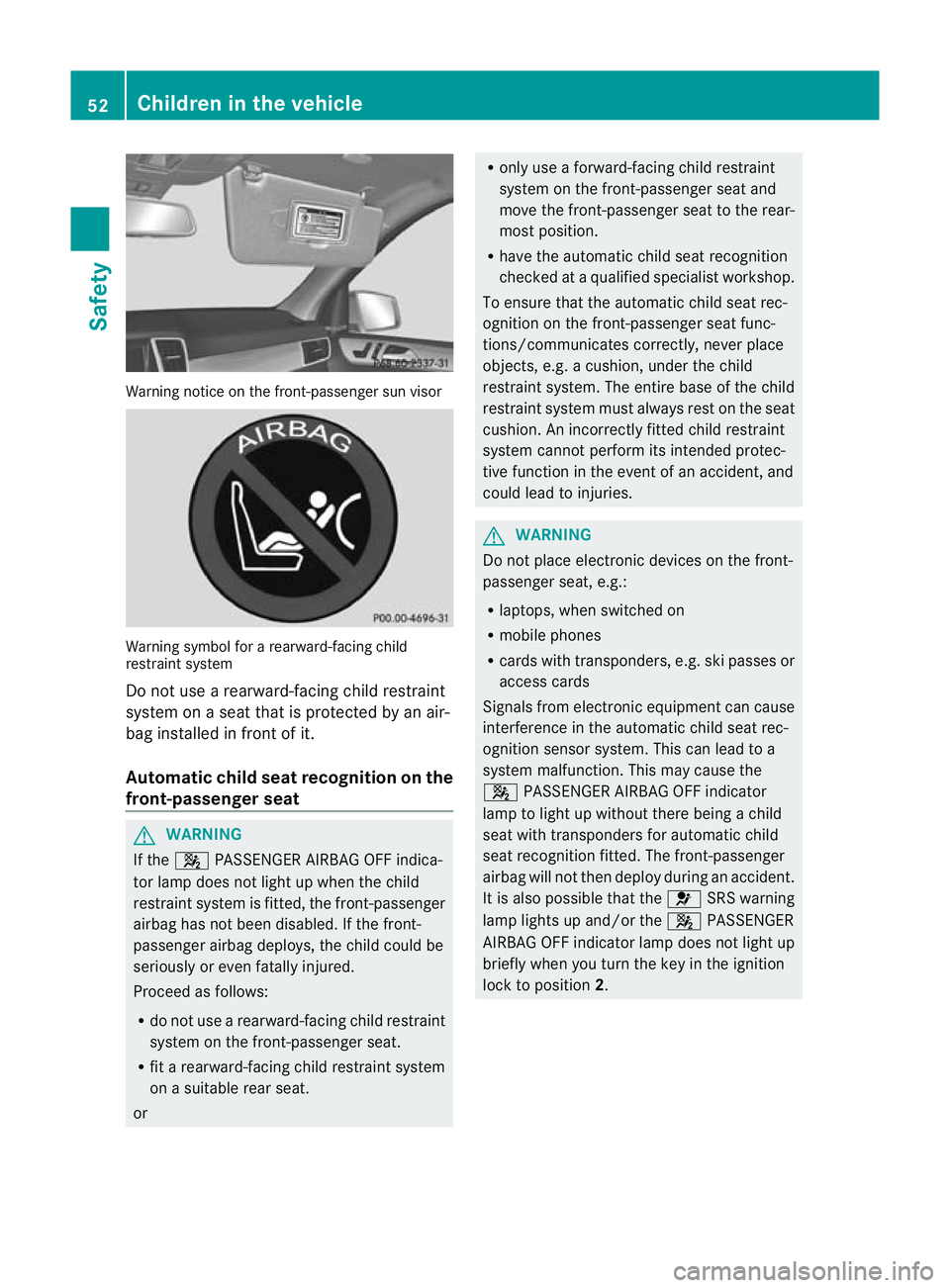
Warning notice on the front-passenger sun visor
Warning symbol for
arearward-facin gchild
rest raint system
Do not use arearward-facin gchild rest raint
system on aseat that is protected by an air-
bag installed in fron tofit.
Automatic chil dseat recognition on the
front-passenger seat G
WARNING
If the 4 PASSENGE RAIRBA GO FF indica-
tor lamp does not light up whe nthe child
restraint system is fitted, the fr ont-passenger
airbag has not been disabled. If the fr ont-
pa ssenger airbag deploys, the chil dcould be
seriou slyor even fatally injured.
Proceed as follows:
R do not use arearward-facin gchild restraint
system on the fr ont-passengers eat.
R fit arearward-facing child restraint system
on asuitable rear seat.
or R
only use aforward-facing child rest raint
system on the front-passenger seat and
move the front-passenger seat to the rear-
most position.
R have the automatic child seat recognition
checked at aqualified specialist workshop.
To ensure that the automatic child seat rec-
ognition on the front-passenger seat func-
tions/communicates correctly, never place
objects, e.g. acushion, under the child
restraint system. The entire base of the child
restraint system must alway srest on the seat
cushion. An incorrec tlyf itted child restraint
system cannot perfor mits intended protec-
tive function in the event of an accident, and
could lead to injuries. G
WARNING
Do not place electronic devices on the front-
passenger seat, e.g.:
R laptops, when switched on
R mobile phones
R cards with transponders, e.g. ski passes or
access cards
Signals from electronic equipment can cause
interference in the automatic child seat rec-
ognition sensor system. Thi scan lead to a
system malfunc tion. This may cause the
4 PASSENGER AIRBA GOFF indicator
lamp to light up without there being achild
seat with transponder sfor automatic child
seat recognition fit ted. The front-passenger
airba gwill not then deploy during an accident.
It is also possible that the 6SRS warning
lamp lights up and/or the 4PASSENGER
AIRB AGOFF indicator lam pdoes not light up
briefly when you tur nthe key in the ignition
lock to position 2.52
Children in th
evehicleSafety
Page 59 of 441
Problems wit
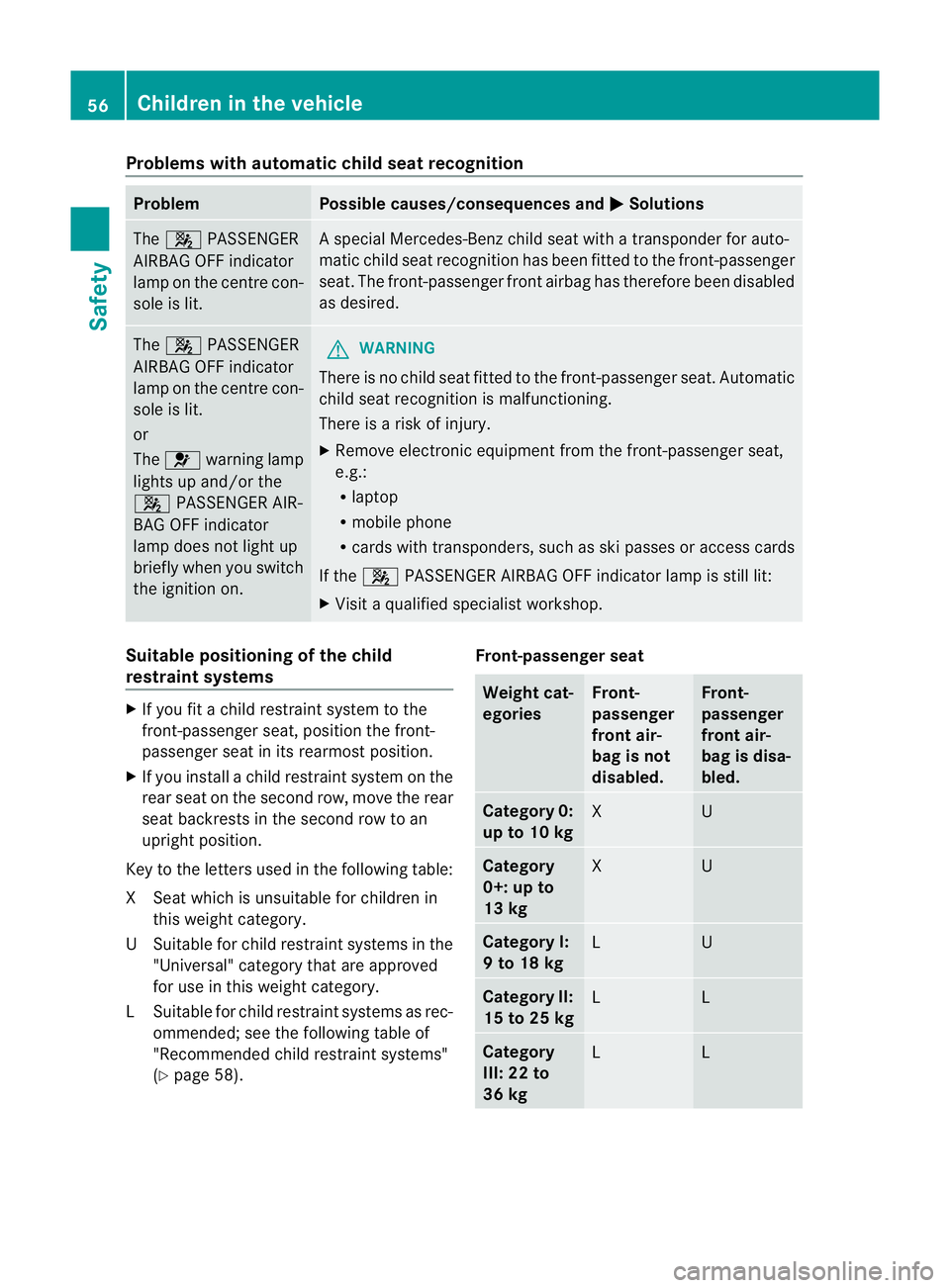
hautomatic chil dseat recognition Problem Possible causes/consequences and
M Solutions
The
4 PASSENGER
AIRB AGOFF indicator
lam ponthe cen trecon-
sole is lit. As
pecial Mercedes-Benz child seat with atransponde rfor auto-
matic child seat recognition has been fit tedtot he front-passenger
seat. The front-passenger fron tairbag has therefore been disabled
as desired. The
4 PASSENGER
AIRBA GOFF indi cator
lamp on the centr econ-
sole is lit.
or
The 6 warnin glamp
lights up and/or the
4 PASSENGER AIR-
BA GO FF indi cator
lamp doe snot light up
briefly when you switch
the ignition on. G
WARNING
There is no child seat fitted to the fr ont-passengerseat .Automatic
child seat recognition is malfunctioning.
There is arisk of injur y.
X Remove electronic equipment from the front-passenger seat,
e.g.:
R
laptop
R mobil ephone
R card switht ransponders, such as sk ipasses or accessc ards
If the 4 PASSENGER AIRBAG OFF indicator lamp is still lit:
X Vis itaq uali fieds pecialist workshop. Suitable positioning of the child
restraint syste
ms X
Ifyou fit achild restraint system to the
front-passenger seat, position the front-
passenger seat in its rearmos tposition.
X If you install achild rest raint system on the
rear seat on the second row, move the rear
seat backrest sinthe secon drow to an
upright position.
Key to the letters used in the following table:
XS eat which is unsuitable for children in
this weight category.
US uitable for child rest raint systems in the
"Universal" categor ythat ar eapproved
for use in this weigh tcategory.
LS uitable for child rest raint systems as rec-
ommended; see th efollowin gtable of
"Recommended child restraint systems"
(Y page 58). Front-passenger seat Weight cat-
egories Front-
passenger
front air-
bag is not
disabled. Front-
passenger
front air-
bag is disa-
bled.
Categor
y0:
up to 10 kg X U
Cate
gory
0+: up to
13 kg X U
Category I:
9to18kg
L U
Category II:
15 to 25 kg
L L
Category
III: 22 to
36 kg
L L56
Children in the vehicleSafety
Page 79 of 441
Usefu
linfor mati on
i This Owner's Manual describes all mod-
els, series and optional equipment for your
vehicle that were available at the time of
going to press. National variation sare pos-
sible. Note that your vehicl emay not be
equippe dwith all of the function sdescri-
bed. This is also the case for system sand
functions relevant to safety.
i Read the information on qualified special-
ist workshops: (Y page25). Key
Impo
rtantsafety notes G
WARNING
Only for the Unite dKingdom: if the vehicle
has been locked with the key or with KEY-
LESS-GO, the double lock function is activa-
ted as standard. It is then not possible to open
the doors from inside the vehicle.
Therefore, do not leave any people behind in
the vehicle, particularly children ,elderly peo-
ple or people requirin gspecial assistance. As
ar esult, they may not be able to free them-
selves in the even tofanemergency. They
could be seriously or eve nfatally injured by
prolonged exposure to extremely high or low
temperatures, for example. In this case, res-
cuing peopl efrom outsid ethe vehicle is diffi-
cult.
Deac tivate th einterior motion sensor before
you lock the vehicle. The doors can then be
opened from the inside after the vehicl ehas
been locked from the outside. G
WARNING
If children are left unsupervised in the vehicle,
they could: R
open adoor from inside the vehicle at any
time, even if it has been locked
R star tthe vehicle usin gakey which has been
left in the vehicle
R release the electric parking brake
They could thereby endanger themselves and
others. Never leave children unsupervised in
the vehicle. Alway stake the key with you
when leaving the vehicle, even if you are only
leaving it for ashort time. G
WARNING
If ak ey rin gistoo heavy or too large, the
weight actin gonthe key coul dcause it to turn
in the ignition lock or catc honthe steering
wheel. This coul dcause the engine to be
switched off suddenly. You may lose control
of the vehicle and cause an accident. Do not
attac hany heavy or large key rings to the key
that is inserted in the ignition.
R Do not keep the key:
-electronic devices, e.g. amobile phone
or anothe rkey
- metallic objects, e.g. coins or metal film
- metallic objects, e.g. ametal case.
This can affect the key' sfunctionality.
Do not keep the KEYLESS-GO key in the tem-
perature-controlled cup holder. Otherwise,
the KEYLESS-GO key will not be detected.
Keep the key away from strong magnetic
fields. Otherwise, the remot econtrol function
coul dbea ffected. 76
KeyOpenin
gand closing
Page 162 of 441
boostin
geffect. Yo uwill require considerably
more effor ttosteer and brake. There is arisk
of an accident.
Do not switch off the ignition while driving. G
WARNING
If the parking brake has not been fully
released when driving, the parking brake can:
R overheat and cause afire
R lose its hold func tion.
There is arisk of fire and an accident .Release
the parking brak efully before driving off.
! Warm up the engine quickly. Do not use
the engine's full performance until it has
reached operating temperature.
Only set the automatic transmission to the
respective drive positions when the vehicle
is stationary.
Where possible, avoid spinning the drive
wheels when pulling away on slippery
roads. Othe rwise, you could damage the
drive train.
! AMG vehicles: at low engine oil temper-
atures (below +20 †), the maximum
engine speed is restricted in order to pro-
tec tthe engine. To protec tthe engin eand
maintain smoo thengine operation ,avoid
driving at full throttle when th eengine is
cold. Key positions
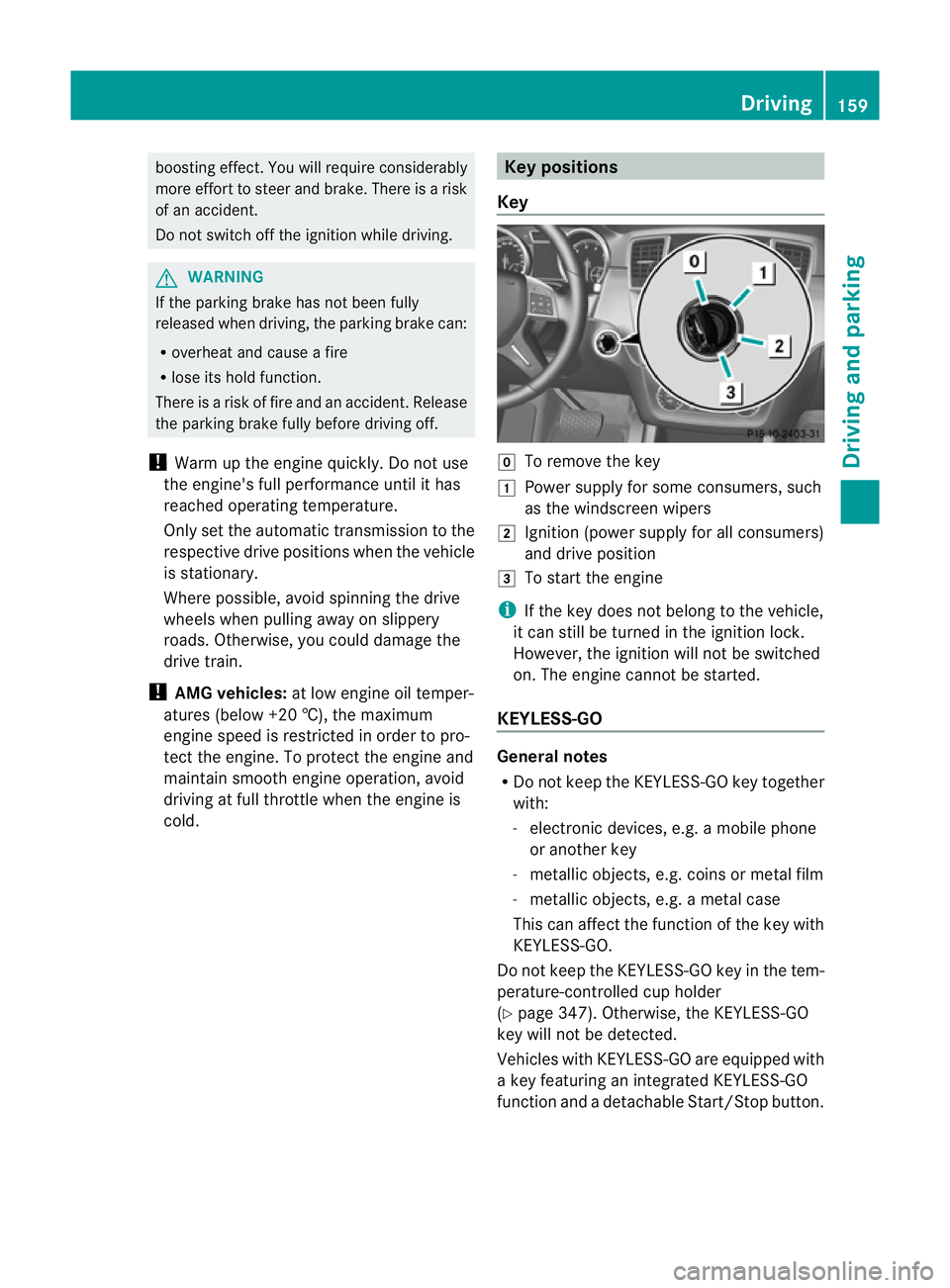
Key g
To remove the key
1 Power supply for some consumers, such
as the windscreen wipers
2 Ignition (power supply for all consumers)
and drive position
3 To start the engine
i If the key doe snot belong to the vehicle,
it can still be tur nedint he ignition lock.
However ,the ignition will not be switched
on. The engin ecannot be started.
KEYLESS-GO General notes
R
Do not keep the KEYLESS-GO key together
with:
- electronic devices, e.g. amobile phone
or anothe rkey
- metallic objects, e.g. coins or metal film
- metallic objects, e.g. ametal case
This can affect the fun ction of the key with
KEYL ESS-GO.
Do not keep the KEYLESS-GO key in the tem-
perature-controlled cup holder
(Y pag e347). Othe rwise, the KEYL ESS-GO
key will not be dete cted.
Vehicles with KEYLESS-GO are equipped with
ak ey featuri ngan integrated KEYLESS-GO
function and adetachable Start /Stopbutton. Driving
159Drivingand parking Z