Brake light switch MERCEDES-BENZ GLA 2016 Owners Manual
[x] Cancel search | Manufacturer: MERCEDES-BENZ, Model Year: 2016, Model line: GLA, Model: MERCEDES-BENZ GLA 2016Pages: 390, PDF Size: 10.2 MB
Page 7 of 390
ATA (Anti-Theft Alarm system)
Activating/deactivating .................. .7 3
Function ........................................... 73
Switching off the alarm .................... 73
ATTENTION ASSIST
Activating/deactivating ................ .2 28
Display message ............................ 253
Function/notes ............................ .2 11
Audio 20
Driving dynamics display ............... 200
Audio menu (on-board computer) .... 225
Audio system
see separate operating instructions
Authorized Mercedes-Benz Center
see Qualified specialist workshop
Authorized workshop
see Qualified specialist workshop
AUTO lights
Display message ............................ 250
see Lights
Automatic car wash (care) ............... 314
Automatic engine start (ECO start/
stop function) .................................... 154
Automatic engine switch-off (ECO
start/stop function) .......................... 154
Automatic headlamp mode .............. 116
Automatic transmission
Accelerator pedal position ............. 163
Changing gear ............................... 163
DIRECT SELECT lever ..................... 159
Drive program ................................ 164
Drive program display .................... 159
Driving tips .................................... 163
DYNAMIC SELECT button (all vehi-
cles except Mercedes-AMG vehi-
cles) ............................................... 157
DYNAMIC SELECT controller
(Mercedes-AMG vehicles) .............. 158
Emergency running mode .............. 169
Engaging drive position .................. 161
Engaging neutral ............................ 160
Engaging park position
(Mercedes-AMG vehicles) .............. 162
Engaging park position automati-
cally ............................................... 160
Engaging reverse gear ................... 160
Engaging the park position ............ 159 Holding the vehicle stationary on
uphill gradients .............................. 163
Kickd own ....................................... 163
Ma nu
al shifting .............................. 166
Oil temperature (on-board com-
puter, Mercedes-AMG vehicles) ..... 231
Overview ........................................ 159
Problem (malfunction) ................... 169
Pulling away ................................... 152
Selector lever ................................ 161
Starting the engine ........................ 151
Steering wheel paddle shifters ...... 166
Transmission position display ........ 161
Transmission position display
(DIRECT SELECT lever) ................... 159
Transmission positions .................. 162
Automatic transmission emer-
gency mode ....................................... 169
B Backup lamp
Display message ............................ 249
Bag hook ............................................ 286
BAS (Brake Assist System) ................. 66
Basic settings
see Settings
Battery (SmartKey)
Checking .......................................... 80
Important safety notes .................... 79
Replacing ......................................... 80
Battery (vehicle)
Charging ........................................ 329
Display message ............................ 252
Important safety notes .................. 327
Jump starting ................................. 331
Belt
see Seat belts
Blind Spot Assist
Activating/deactivating (on-
board computer) ............................ 228
Display message ............................ 254
Notes/function .............................. 213
Blower
see Climate control
Brake Assist
see BAS (Brake Assist System) Index 5
Page 12 of 390
Emergency
Automatic measures after an acci-
dent ................................................ .5 8
Emergency braking
see BAS (Brake Assist System)
Emergency release
Driver's door .................................... 84
Vehicle ............................................ .8 4
Emergency Tensioning Devices
Activation ........................................ .5 6
Emergency unlocking
Tailgate ............................................ 89
Engine
Check Engine warning lamp .......... .2 75
Display message ............................ 251
ECO start/stop function ................ 153
Engine number ............................... 377
Irregular running ............................ 156
Jump-starting ................................. 331
Starting (important safety notes) ... 151
Starting problems .......................... 156
Starting the engine with the
SmartKey ....................................... 151
Starting with the Start/Stop but-
ton ................................................. 152
Switching off .................................. 172
Tow-starting (vehicle) ..................... 337
Engine electronics
Problem (malfunction) ................... 156
Engine oil
Adding .......................................... .3 10
Additives ........................................ 380
Checking the oil level ..................... 309
Checking the oil level using the
dipstick .......................................... 310
Display message ............................ 252
Filling capacity ............................... 380
Notes about oil grades ................... 379
Notes on oil level/consumption .... 309
Temperature (on-board computer,
Mercedes-AMG vehicles) .............. .2 31
Viscosity .............. .......................... 380
E ng
ine, starting
see Starting (engine)
ESC (Electronic Stability Control)
see ESP ®
(Electronic Stability Program) ESP ®
(Electronic Stability Pro-
gram)
AMG menu (on-board computer) ... 232
Characteristics ................................. 69
Deactivating/activating (button
in Mercedes-AMG vehicles) ............. 70
Deactivating/activating (except
Mercedes ‑ AMG vehicles) ................. 70
Deactivating/activating (on-
board computer, except
Mercedes-AMG vehicles) .............. .2 27
Display message ............................ 236
Function/notes ................................ 69
General notes .................................. 69
Important safety information ........... 69
Trailer stabilization ........................... 72
Warning lamp ................................. 271
ETS/4ETS (Electronic Traction Sys-
tem) ...................................................... 69
Exhaust
see Exhaust pipe
Exhaust check ................................... 175
Exhaust pipe
Cleaning ......................................... 318
Exterior lighting
Cleaning ......................................... 317
see Lights
Exterior mirrors
Adjusting ....................................... 109
Dipping (automatic) ....................... 110
Folding in when locking (on-board
computer) ...................................... 231
Folding in/out (automatically) ....... 110
Folding in/out (electrically) ........... 109
Out of position (troubleshooting) ... 110
Storing settings (memory func-
tion) ............................................... 112
Storing the parking position .......... 111
Eyeglasses compartment ................. 281
F
Filler cap
see Refueling
Flat tire
MOExtended tires .......................... 323
Preparing the vehicle ..................... 322
TIREFIT kit ...................................... 32410
Index
Page 17 of 390
Position of exterior mirror, front-
passenger side .............................. .1 11
Rear view camera .......................... 208
see Active Parking Assist
see PARKTRONIC
Parking aid
Active Parking Assist ..................... 203
see Exterior mirrors
see PARKTRONIC
Parking assistance
see PARKTRONIC
Parking brake
Display message ............................ 239
Electric parking brake .................... 173
Warning lamp ................................. 274
Parking lamps
Switching on/off ........................... 118
PARKTRONIC
Deactivating/activating ................. 202
Driving system ............................... 200
Function/notes ............................ .2 00
Important safety notes .................. 200
Problem (malfunction) ................... 203
Range of the sensors ..................... 201
Warning display ............................. 202
PASSENGER AIR BAG
Display message ............................ 246
Indicator lamps ................................ 43
Problem (malfunction) ................... 246
Pets in the vehicle ............................... 64
Plastic trim (cleaning instruc-
tions) .................................................. 318
Power washers .................................. 315
Power windows
see Side windows
Protection against theft
ATA (Anti-Theft Alarm system) ......... 73
Immobilizer ...................................... 73
Protection of the environment
General notes .................................. 23
Pulling away
Automatic transmission ................. 152
General notes ................................ 152
Hill start assist ............................... 153 Q QR code
Mercedes-Benz Guide App ................. 1
Rescue card ..................................... 26
Qualified specialist workshop ........... 25
R RACE START
Important safety notes .................. 195
RACE START (AMG vehicles) ............. 195
RACETIMER (on-board computer) .... 232
Radio
Selecting a station ......................... 225
see separate operating instructions
Radio-wave reception/transmis-
sion in the vehicle
Declaration of conformity ................ 25
Rain closing feature (panorama
roof with power tilt/sliding panel) .... 96
Reading lamp ..................................... 120
Rear compartment
Setting the air vents ...................... 145
Rear fog lamp
Changing bulbs .............................. 124
Display message ............................ 249
Switching on/off ........................... 118
Rear lamps
see Lights
Rear seat
Adjusting the angle of the backr-
ests ................................................ 285
Rear seats
Folding the backrest forwards/
back ............................................... 284
Rear view camera
Cleaning instructions ..................... 318
Displays in the Audio display ......... 208
Displays in the COMAND display ... 208
Function/notes ............................. 208
Switching on/off ........................... 208
Rear window defroster
Problem (malfunction) ................... 143
Switching on/off ........................... 142
Rear window wiper
Replacing the wiper blade .............. 128
Switching on/off ........................... 126 Index 15
Page 60 of 390
How the air bag system works is deter-
mined by the severity of the accident detec-
ted, especially the vehicle deceleration or
acceleration and the apparent type of acci-
dent: R
frontal collision R
side impact R
rollover
Automatic measures after an acci-
dentImmediately after an accident, the following
measures are implemented, depending on
the type and severity of the impact: R
the hazard warning lamps are activated R
the emergency lighting is activated R
the vehicle doors are unlocked R
the front side windows are lowered R
the engine is switched off and the fuel sup-
ply is cut off R
vehicles with mbrace: automatic emer-
gency call
Children in the vehicle
Important safety notes
Accident statistics show that children
secured in the rear seats are safer than chil-
dren secured in the front-passenger seat. For
this reason, Mercedes-Benz strongly advises
that you install a child restraint system on a
rear seat. Children are generally better pro-
tected there.
If a child younger than twelve years old and
under 5 ft (1.50 m) in height is traveling in the
vehicle: R
always secure the child in a child restraint
system suitable for Mercedes-Benz vehi-
cles. The child restraint system must be appropriate to the age, weight and size of
the child R
be sure to observe the instructions and
safety notes in this section in addition to
the child restraint system manufacturer's
installation instructions R
be sure to observe the instructions and
safety notes on the "Occupant Classifica-
tion System (OCS)" ( Y
page 51)
G WARNING
If you leave children unsupervised in the vehi-
cle, they could set it in motion by, for example: R
release the parking brake. R
shift the automatic transmission out of the
parking position P .R
start the engine.
In addition, they may operate vehicle equip-
ment and become trapped. There is a risk of
an accident and injury.
When leaving the vehicle, always take the
SmartKey with you and lock the vehicle. Never
leave children unsupervised in the vehicle.
G WARNING
If persons, particularly children are subjected
to prolonged exposure to extreme heat or
cold, there is a risk of injury, possibly even
fatal. Never leave children unattended in the
vehicle.
G WARNING
If the child restraint system is subjected to
direct sunlight, parts may get very hot. Chil-
dren may burn themselves on these parts,
particularly on the metal parts of the child
restraint system. There is a risk of injury.
If you leave the vehicle, taking the child with
you, always ensure that the child restraint
system is not exposed to direct sunlight. Pro-
tect it with a blanket, for example. If the child
restraint system has been exposed to direct
sunlight, let it cool down before securing the
child in it. Never leave children unattended in
the vehicle.58
Children in the vehicle
Safety
Page 67 of 390
Drivin g safet y systems
Overview of drivin g safet y systemsIn this section , you will fin d information about
th e following drivin g safet y systems :R
AB S ( A nti-loc k B rakin g S ystem)
( Y
page 65) R
BA S ( B rake A ssist S ystem) ( Y
page 66 )R
COLLISION PREVENTION ASSIST PLU S
( Y
page 66 )R
ES P ®
( E lectronic S t ability P rogram)
( Y
page 69 )R
EB D ( E lectroni c B r ak e forc e D i stribution )
( Y
page 72) R
ADAPTIV E BRAKE ( Y
page 73 )R
STEE R CONTROL ( Y
page 73 )
Important safet y notesIf you fail to adapt your drivin g style or if you
are inattentive , th e drivin g safet y systems can
neither reduce th e ris k of an acciden t no r
override th e laws of physics. Driving safet y
systems are merely aids designed to assist
driving. You are responsible fo r maintainin g
th e distanc e to th e vehicle in front, fo r vehicle
speed, fo r braking in goo d time, and fo r stay-
in g in lane. Always adapt your drivin g style to
suit th e prevailin g road and weather condi-
tion s and maintain a saf e distanc e from th e
vehicle in front. Drive carefully.
The drivin g safet y systems described only
wor k as effectively as possible when there is
adequat e contact between th e tires and th e
road surface. Please pay special attention to
th e note s on tires , recommended minimum
tire tread depths, etc. ( Y
page 340).
In wintr y drivin g conditions, always use winte r
tires (M+ S tires ) and if necessary, snow
chains. Only in this way will th e drivin g safet y
systems described in this section wor k as
effectively as possible. ABS (Anti-lock Braking System)
General information AB S regulates brake pressure in suc h a way
that th e wheels do no t loc k when you brake .
Thi s allow s you to continue steerin g th e vehi-
cl e when braking .
The % AB S warnin g lamp in th e instrumen t
cluster lights up when th e ignition is switched
on . It goe s out when th e engin e is running .
AB S works from a speed of about 5 mph
(8 km/h), regardles s of road-surfac e condi-
tions. AB S works on slipper y surfaces, eve n
when you only brake gently.
Important safet y notes
i Observ e th e "Important safet y notes" sec -
tion ( Y
page 65).
G WARNING
If AB S is faulty, th e wheels could loc k when
braking . The steerability and braking charac -
teristics may be severely impaired. Addition -
ally, further drivin g safet y systems are deac -
tivated. There is an increase d danger of skid-
din g and accidents .
Drive on carefully. Hav e AB S checke d imme-
diately at a qualified specialis t workshop .
Whe n AB S is malfunctioning, other systems ,
includin g drivin g safet y systems , will also
becom e inoperative . Observ e th e information
on th e AB S warnin g lamp ( Y
page 269) and
display message s whic h may be shown in th e
instrumen t cluster ( Y
page 236).
Braking X
If ABS intervenes: continue to depress th e
brake peda l vigorousl y until th e braking sit -
uation is over. X
To make a full brak e application:
depress th e brake peda l wit h full force.
If AB S intervenes when braking , you will feel a
pulsin g in th e brake pedal.Driving safety systems 65
Safety Z
Page 75 of 390
ADAPTIVE BRAKE ADAPTIV E BRAKE enhance s braking safet y
and offers increased braking comfort . In addi-
tion to th e braking function , ADAPTIV E BRAKE
also has th e HOLD function ( Y
page 193) and
hill start assist ( Y
page 153).
STEER CONTROL
Gene ra l inf orm ationSTEE R CONT ROL help s you by transmitting a
noticeable steering force to th e steering
whee l in th e direction require d for vehicl e
stabilization .
This steering assistanc e is provide d in partic-
ular if: R
bot h right wheels or bot h lef t wheels are on
a wet or slippery road surfac e when you
brake. R
th e vehicl e start s to skid.
Import ant safety notes
i Obs erv e th e "Importan t safet y notes" sec -
tion ( Y
page 65).
No steering assistanc e is provide d from
STEE R CONTROL, if: R
ES P ®
is malfunctioning .R
th e lighting is faulty.
If ES P ®
is malfunctioning , you will be assisted
further by th e electrical power steering .
Protecti on against theft
Imm obilizer
The immobilize r prevents your vehicl e from
bein g started without th e correc t SmartKey. X
To act iva te wit h th e SmartKey : remove
th e SmartKey from th e ignition lock.X
To act iva te wit h KEYLESS-GO start-
fu nction or KEYLESS-GO: switch th e igni-
tion off and open th e driver' s door .X
To deacti va te: switch on th e ignition .
When leaving th e vehicle, always tak e th e
SmartKey wit h you and loc k th e vehicle. Any-
on e can start th e engin e if a valid SmartKey
has been lef t inside th e vehicle.
i The immobilize r is always deactivated
when you st art th e engine.
In th e event that th e engin e canno t be star-
te d (yet th e vehicle's battery is charged),
th e system is no t operational. Contac t an
authorize d Mercedes-Benz Cente r or call
1-800-FOR-MERCedes (in th e USA) or
1-800-387-0100 (in Canada).
ATA (anti-theft ala rm system)
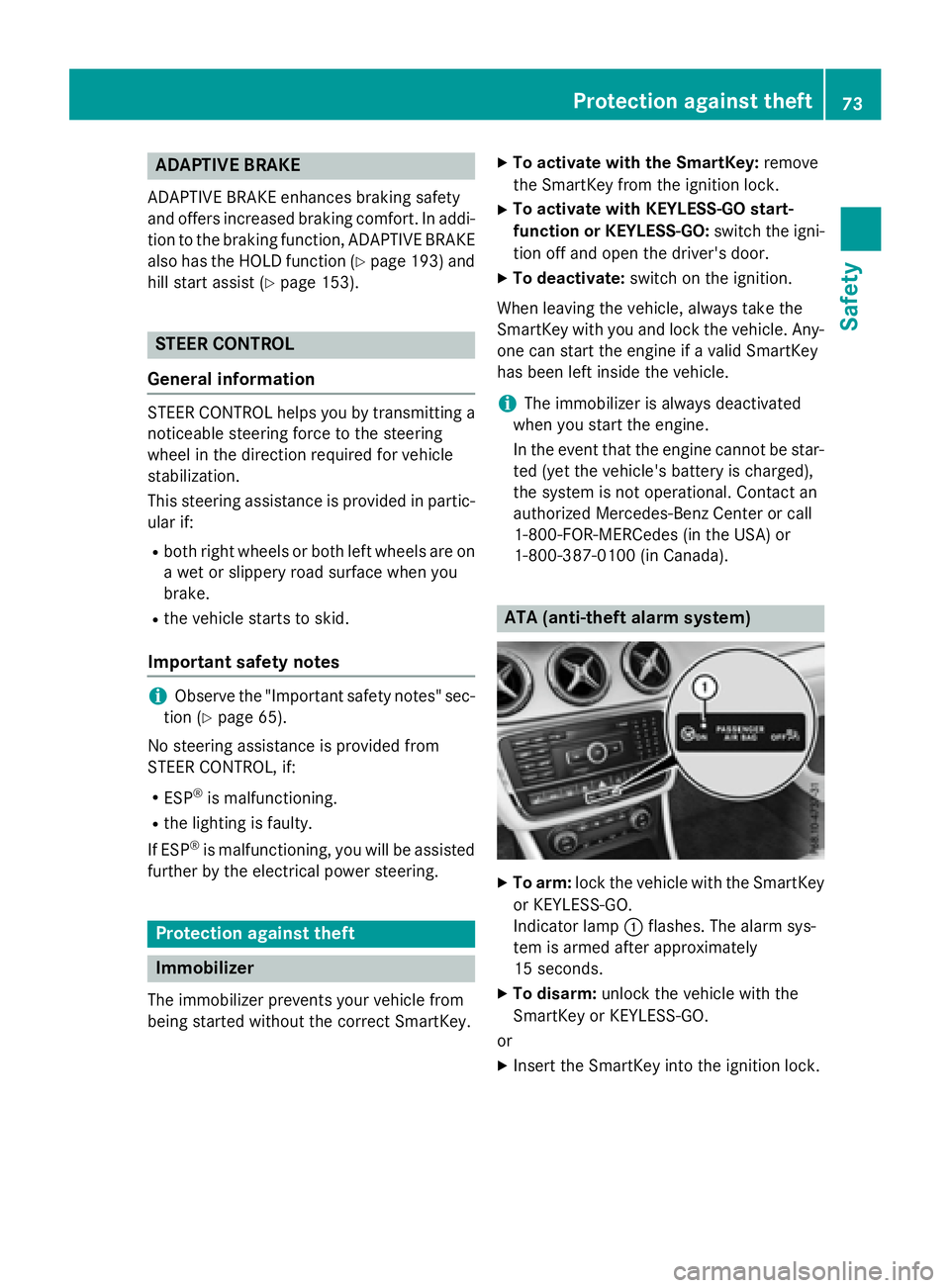
X
To arm: loc k th e vehicl e wit h th e SmartKey
or KE YLE SS-GO .
Indicato r lamp C flashes . The alarm sys-
te m is armed after approximately
15 sec onds. X
To disarm: unloc k th e vehicl e wit h th e
SmartKey or KEYLESS-GO .
or X
Inser t th e SmartKey int o th e ignition lock.Protection against theft 73
Safety Z
Page 152 of 390
Pressing the Start/Stop button several times
in succession corresponds to the different
key positions in the ignition lock. This is only
the case if you are not depressing the brake
pedal.
If you depress the brake pedal and press the
Start/Stop button, the engine starts immedi-
ately.
To start the vehicle without actively using the
SmartKey: R
the Start/Stop button must be inserted in
the ignition lock. R
the SmartKey must be in the vehicle. R
the vehicle must not be locked with the
SmartKey or KEYLESS-GO ( Y
page 77).
Do not keep the KEYLESS-GO key: R
with electronic devices, e.g. a mobile
phone or another SmartKey. R
with metallic objects, e.g. coins or metal
foil. R
inside metallic objects, e.g. a metal case.
This can affect the functionality of KEYLESS-
GO.
If you lock the vehicle with the SmartKey's
remote control or with KEYLESS-GO, after a
short time: R
you will not be able to switch on the ignition
with the Start/Stop button. R
you will not be able to start the engine with
the Start/Stop button until the vehicle is
unlocked again.
If you lock the vehicle centrally using the but-
ton on the front door ( Y
page 84), you can
continue to start the engine with the Start/
Stop button.
The engine can be switched off while the vehi-
cle is in motion by pressing and holding the
Start/Stop button for three seconds. This
function operates independently of the ECO
start/stop automatic engine switch-off func-
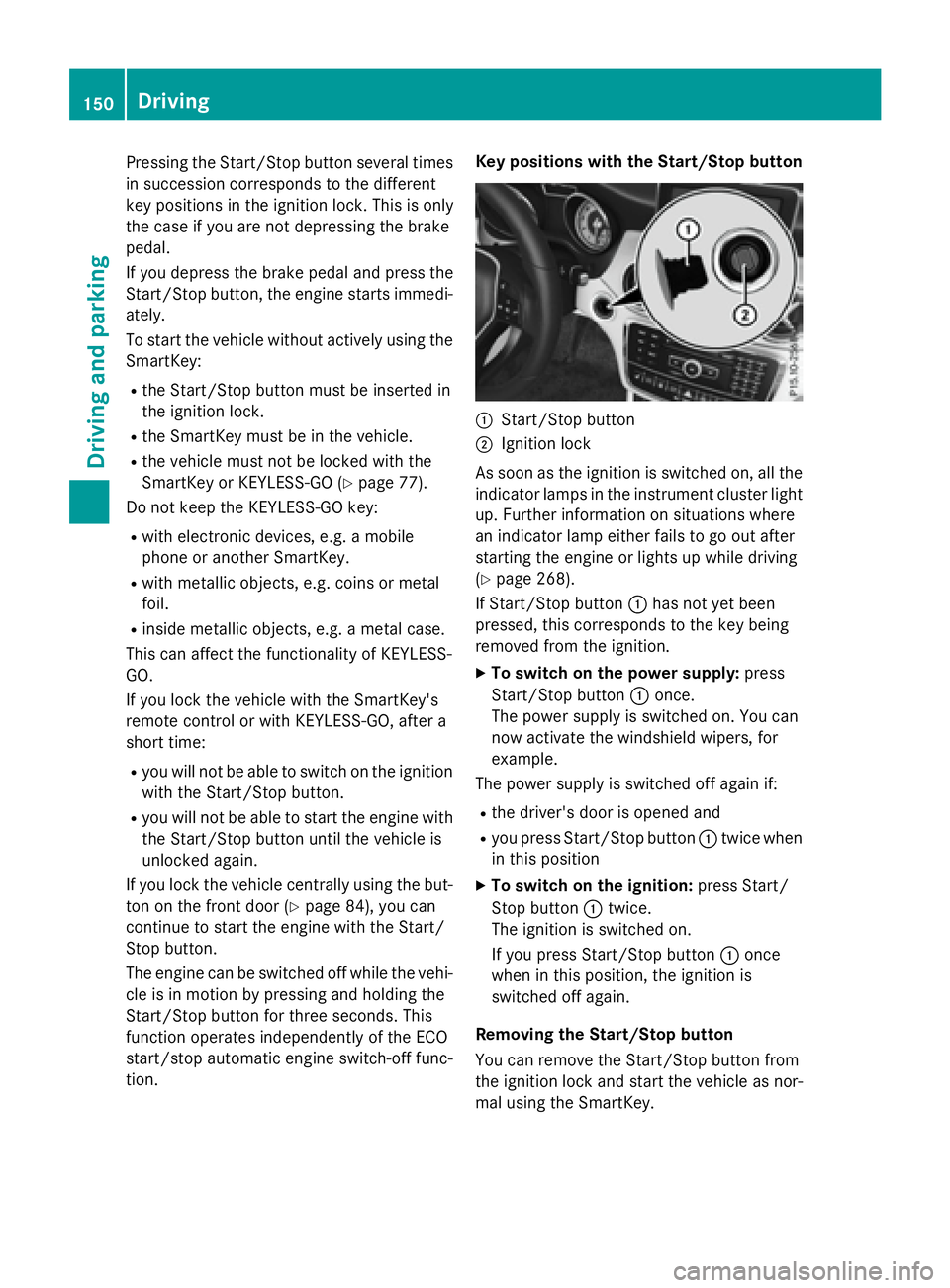
tion. Key positions with the Start/Stop button
C
Start/Stop button D
Ignition lock
As soon as the ignition is switched on, all the
indicator lamps in the instrument cluster light
up. Further information on situations where
an indicator lamp either fails to go out after
starting the engine or lights up while driving
( Y
page 268).
If Start/Stop button C has not yet been
pressed, this corresponds to the key being
removed from the ignition. X
To switch on the power supply: press
Start/Stop button C once.
The power supply is switched on. You can
now activate the windshield wipers, for
example.
The power supply is switched off again if: R
the driver's door is opened and R
you press Start/Stop button C twice when
in this position X
To switch on the ignition: press Start/
Stop button C twice.
The ignition is switched on.
If you press Start/Stop button C once
when in this position, the ignition is
switched off again.
Removing the Start/Stop button
You can remove the Start/Stop button from
the ignition lock and start the vehicle as nor-
mal using the SmartKey.150
Driving
Driving and parking
Page 175 of 390
Electric parking brake
General notes
G WARNING
If you leave children unsupervised in the vehi-
cle, they could set it in motion by, for example: R
release the parking brake. R
shift the automatic transmission out of the
parking position P .R
start the engine.
In addition, they may operate vehicle equip-
ment and become trapped. There is a risk of
an accident and injury.
When leaving the vehicle, always take the
SmartKey with you and lock the vehicle. Never
leave children unsupervised in the vehicle.
The function of the electric parking brake is
dependent on the on-board voltage. If the on-
board voltage is low or there is a malfunction
in the system, it may not be possible to apply
the released parking brake. X
If this is the case, only park the vehicle on
level ground and secure it to prevent it roll-
ing away. X
Shift the automatic transmission to posi-
tion P .
It may not be possible to release an applied
parking brake if the on-board voltage is low or
there is a malfunction in the system. Contact
a qualified specialist workshop.
The electric parking brake performs a func-
tion test at regular intervals while the engine
is switched off. The sounds that can be heard
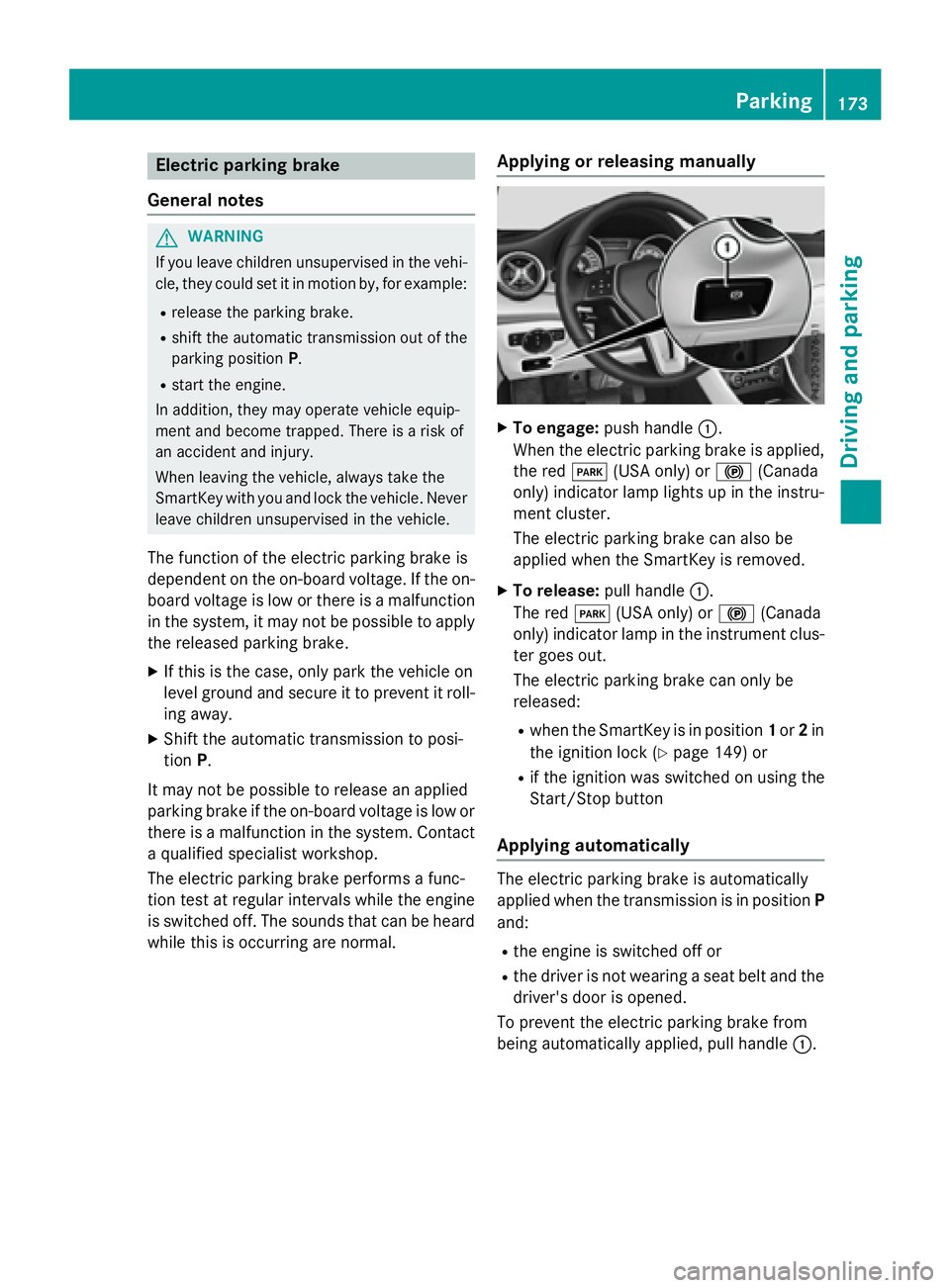
while this is occurring are normal. Applying or releasing manually X
To engage: push handle C .
When the electric parking brake is applied,
the red I (USA only) or $ (Canada
only) indicator lamp lights up in the instru-
ment cluster.
The electric parking brake can also be
applied when the SmartKey is removed. X
To release: pull handle C .
The red I (USA only) or $ (Canada
only) indicator lamp in the instrument clus-
ter goes out.
The electric parking brake can only be
released: R
when the SmartKey is in position 1 or 2 in
the ignition lock ( Y
page 149) or R
if the ignition was switched on using the
Start/Stop button
Applying automatically
The electric parking brake is automatically
applied when the transmission is in position P
and: R
the engine is switched off or R
the driver is not wearing a seat belt and the
driver's door is opened.
To prevent the electric parking brake from
being automatically applied, pull handle C .Parking 173
Driving and parking Z
Page 179 of 390
Braking
Important safety notes
G WARNING
If you shift down on a slippery road surface in
an attempt to increase the engine's braking
effect, the drive wheels could lose their grip.
There is an increased danger of skidding and
accidents.
Do not shift down for additional engine brak-
ing on a slippery road surface.
Downhill gradients
! On long and steep gradients, you must
reduce the load on the brakes by shifting to
a lower gear in good time. This allows you to
take advantage of the engine's braking
effect. For this, you need to have selected
manual drive program M . This helps you to
avoid overheating the brakes and wearing
them out excessively.
When you take advantage of the engine's
braking effect, a drive wheel may not turn
for some time, e.g. on a slippery road sur-
face. This could cause damage to the drive
train. This type of damage is not covered by
the Mercedes-Benz warranty.
Briefly depressing the accelerator pedal on
downhill gradients while the manual drive
program M is temporarily activated: the auto-
matic transmission may switch to the last
active automatic drive program E or S . The
automatic transmission may shift to a higher
gear. This can reduce the engine's braking
effect.
Heavy and light loads
G WARNING
If you rest your foot on the brake pedal while
driving, the braking system can overheat. This
increases the stopping distance and can even
cause the braking system to fail. There is a
risk of an accident. Never use the brake pedal as a footrest. Never
depress the brake pedal and the accelerator
pedal at the same time.
! Depressing the brake pedal constantly
results in excessive and premature wear to
the brake pads.
If the brakes have been subjected to a heavy
load, do not stop the vehicle immediately.
Drive on for a short while. This allows the air-
flow to cool the brakes more quickly.
Wet roads If you have driven for a long time in heavy rain
without braking, there may be a delayed reac-
tion from the brakes when braking for the first
time. This may also occur after the vehicle has
been washed or driven through deep water.
You have to depress the brake pedal more
firmly. Maintain a greater distance from the
vehicle in front.
After driving on a wet road or having the vehi-
cle washed, brake firmly while paying atten-
tion to the traffic conditions. This will warm up
the brake discs, thereby drying them more
quickly and protecting them against corro-
sion.
Limited braking performance on salt-
treated roads
If you drive on salted roads, a layer of salt
residue may form on the brake discs and
brake pads. This can result in a significantly
longer braking distance. R
In order to prevent any salt build-up, apply
the brakes occasionally while paying atten-
tion to the traffic conditions. R
Carefully depress the brake pedal and the
beginning and end of a journey. R
Maintain a greater distance to the vehicle
ahead. Driving tips 177
Driving an d parking Z
Page 180 of 390
Servicing the brakes
! The brake fluid level may be too low, if: R
if the red brake warning lamp lights up in
the instrument cluster and R
you hear a warning tone while the engine
is running
Observe additional warning messages in
the multifunction display.
The brake fluid level may be too low due to
brake pad wear or leaking brake lines.
Have the brake system checked immedi-
ately. Consult a qualified specialist work-
shop to arrange this.
! A function or performance test should
only be carried out on a 2-axle dynamom-
eter. If you wish to operate the vehicle on
such a dynamometer, please consult a
qualified specialist workshop in advance.
You could otherwise damage the drive train
or the brake system.
! As the ESP ®
system operates automati-
cally, the engine and the ignition must be
switched off (the SmartKey must be in posi-
tion 0 or 1 in the ignition lock) if:R
the electric parking brake is tested on a
brake dynamometer (for a maximum of
ten seconds) R
the vehicle is towed with the front axle
raised.
Braking triggered automatically by ESP ®
may seriously damage the brake system.
All checks and maintenance work on the
brake system must be carried out at a quali-
fied specialist workshop.
Have brake pads installed and brake fluid
replaced at a qualified specialist workshop.
If the brake system has only been subject to
moderate loads, you should test the function-
ality of your brakes at regular intervals.
You can find a description of Brake Assist
(BAS) on ( Y
page 66).
Mercedes-Benz recommends that you only
have brake pads/linings installed on your vehicle which have been approved for
Mercedes-Benz vehicles or which correspond
to an equivalent quality standard. Brake
pads/linings which have not been approved
for Mercedes-Benz vehicles or which are not
of an equivalent quality could affect your vehi-
cle's operating safety.
Mercedes-Benz recommends that you only
use brake fluid that has been specially
approved for your vehicle by Mercedes-Benz,
or which corresponds to an equivalent quality
standard. Brake fluid which has not been
approved for Mercedes-Benz vehicles or
which is not of an equivalent quality could
affect your vehicle's operating safety.
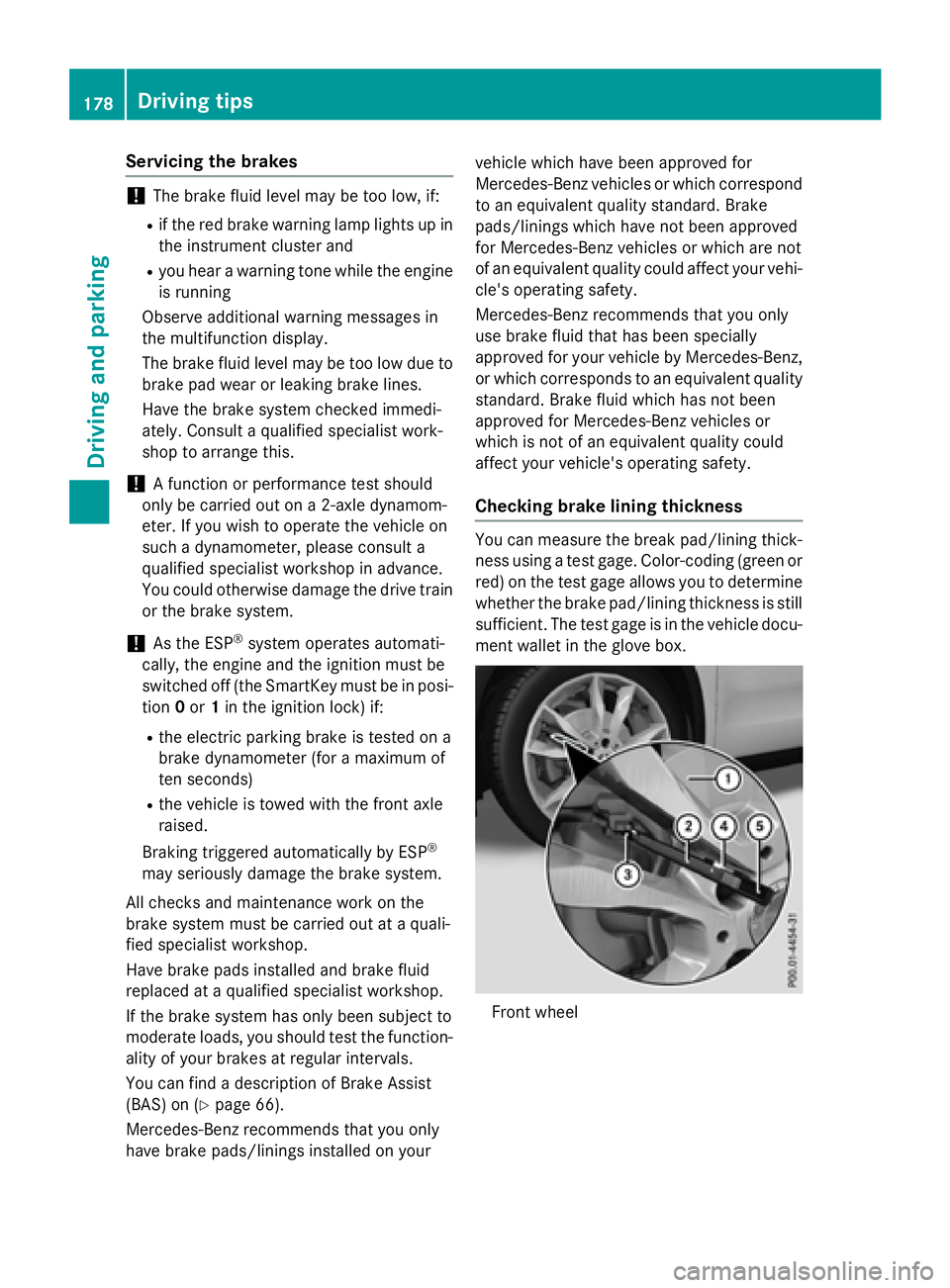
Checking brake lining thickness You can measure the break pad/lining thick-
ness using a test gage. Color-coding (green or
red) on the test gage allows you to determine
whether the brake pad/lining thickness is still
sufficient. The test gage is in the vehicle docu-
ment wallet in the glove box.
Front wheel178
Driving tips
Driving and parking