ESP MERCEDES-BENZ GLA 2019 Owners Manual
[x] Cancel search | Manufacturer: MERCEDES-BENZ, Model Year: 2019, Model line: GLA, Model: MERCEDES-BENZ GLA 2019Pages: 346, PDF Size: 16.66 MB
Page 247 of 346
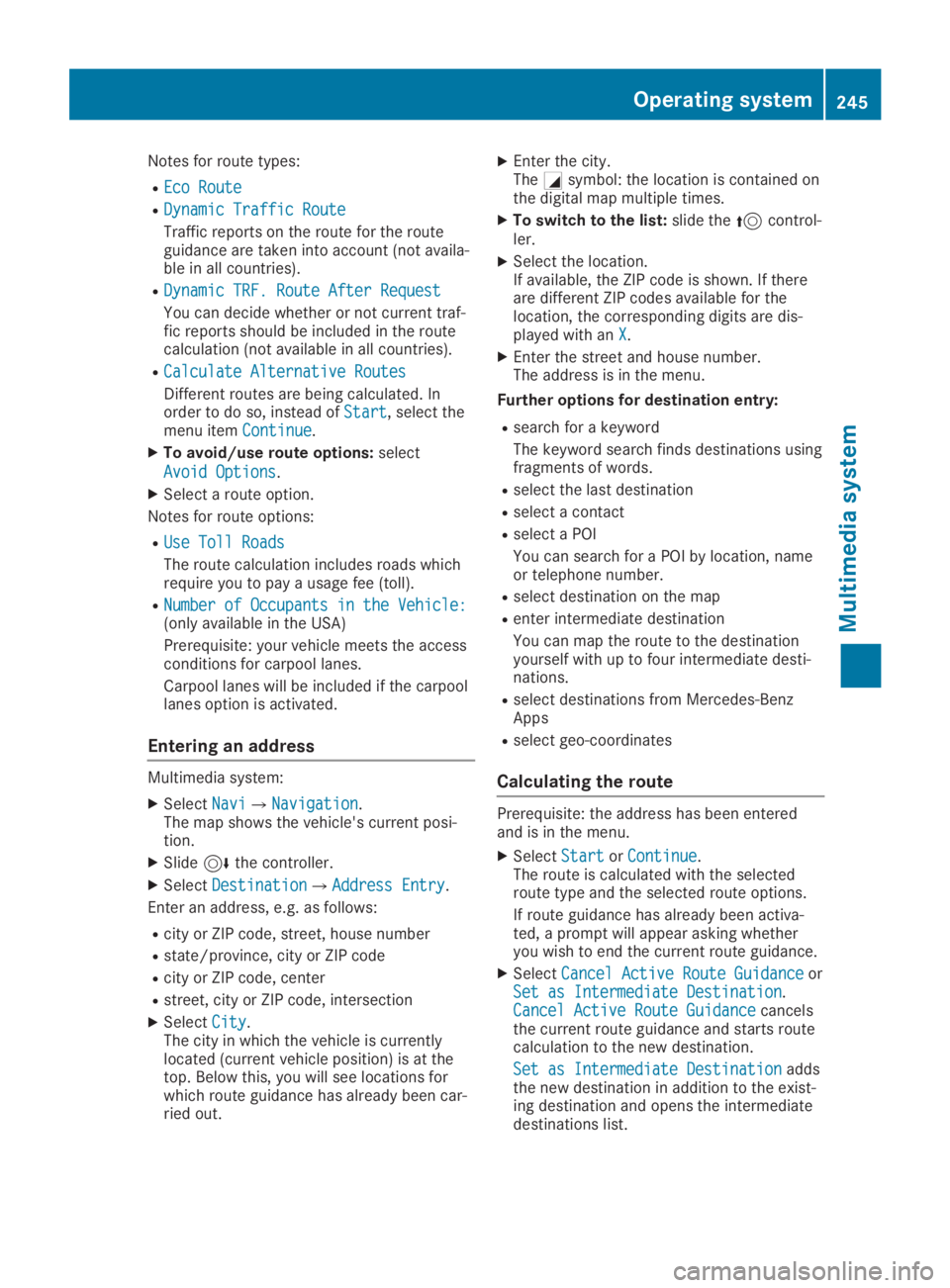
Notes for route types:
REco RouteEco Route
RDynamic Traffic RouteDynamic Traffic Route
Traffic reports on the route for the routeguidance are taken into account (not availa-ble in all countries).
RDynamic TRF. Route After RequestDynamic TRF. Route After Request
You can decide whether or not current traf-fic reports should be included in the routecalculation (not available in all countries).
RCalculate Alternative RoutesCalculate Alternative Routes
Different routes are being calculated. Inorder to do so, instead ofStartStart, select themenu itemContinueContinue.
XTo avoid/use route options:select
Avoid OptionsAvoid Options.
XSelect a route option.
Notes for route options:
RUse Toll RoadsUse Toll Roads
The route calculation includes roads whichrequire you to pay a usage fee (toll).
RNumber of Occupants in the Vehicle:Number of Occupants in the Vehicle:(only available in the USA)
Prerequisite: your vehicle meets the accessconditions for carpool lanes.
Carpool lanes will be included if the carpoollanes option is activated.
Entering an address
Multimedia system:
XSelectNaviNavi{NavigationNavigation.The map shows the vehicle's current posi-tion.
XSlide6the controller.
XSelectDestinationDestination{Address EntryAddress Entry.
Enter an address, e.g. as follows:
Rcity or ZIP code, street, house number
Rstate/province, city or ZIP code
Rcity or ZIP code, center
Rstreet, city or ZIP code, intersection
XSelectCityCity.The city in which the vehicle is currentlylocated (current vehicle position) is at thetop. Below this, you will see locations forwhich route guidance has already been car-ried out.
XEnter the city.TheCsymbol: the location is contained onthe digital map multiple times.
XTo switch to the list:slide the5control-ler.
XSelect the location.If available, the ZIP code is shown. If thereare different ZIP codes available for thelocation, the corresponding digits are dis-played with anXX.
XEnter the street and house number.The address is in the menu.
Further options for destination entry:
Rsearch for a keyword
The keyword search finds destinations usingfragments of words.
Rselect the last destination
Rselect a contact
Rselect a POI
You can search for a POI by location, nameor telephone number.
Rselect destination on the map
Renter intermediate destination
You can map the route to the destinationyourself with up to four intermediate desti-nations.
Rselect destinations from Mercedes-BenzApps
Rselect geo-coordinates
Calculating the route
Prerequisite: the address has been enteredand is in the menu.
XSelectStartStartorContinueContinue.The route is calculated with the selectedroute type and the selected route options.
If route guidance has already been activa-ted, a prompt will appear asking whetheryou wish to end the current route guidance.
XSelectCancel Active Route GuidanceCancel Active Route GuidanceorSet as Intermediate DestinationSet as Intermediate Destination.Cancel Active Route GuidanceCancel Active Route Guidancecancelsthe current route guidance and starts routecalculation to the new destination.
Set as Intermediate DestinationSet as Intermediate Destinationaddsthe new destination in addition to the exist-ing destination and opens the intermediatedestinations list.
Operating system245
Multimedia system
Z
Page 251 of 346
Inserting an SD card
The SD card slot is located on the controlpanel.
XInsert the SD card into the SD card slot untilthe SD card engages. The side with the con-tacts must face down.
Removing an SD card
XPress the SD card.The SD card is ejected.
XRemove the SD card.
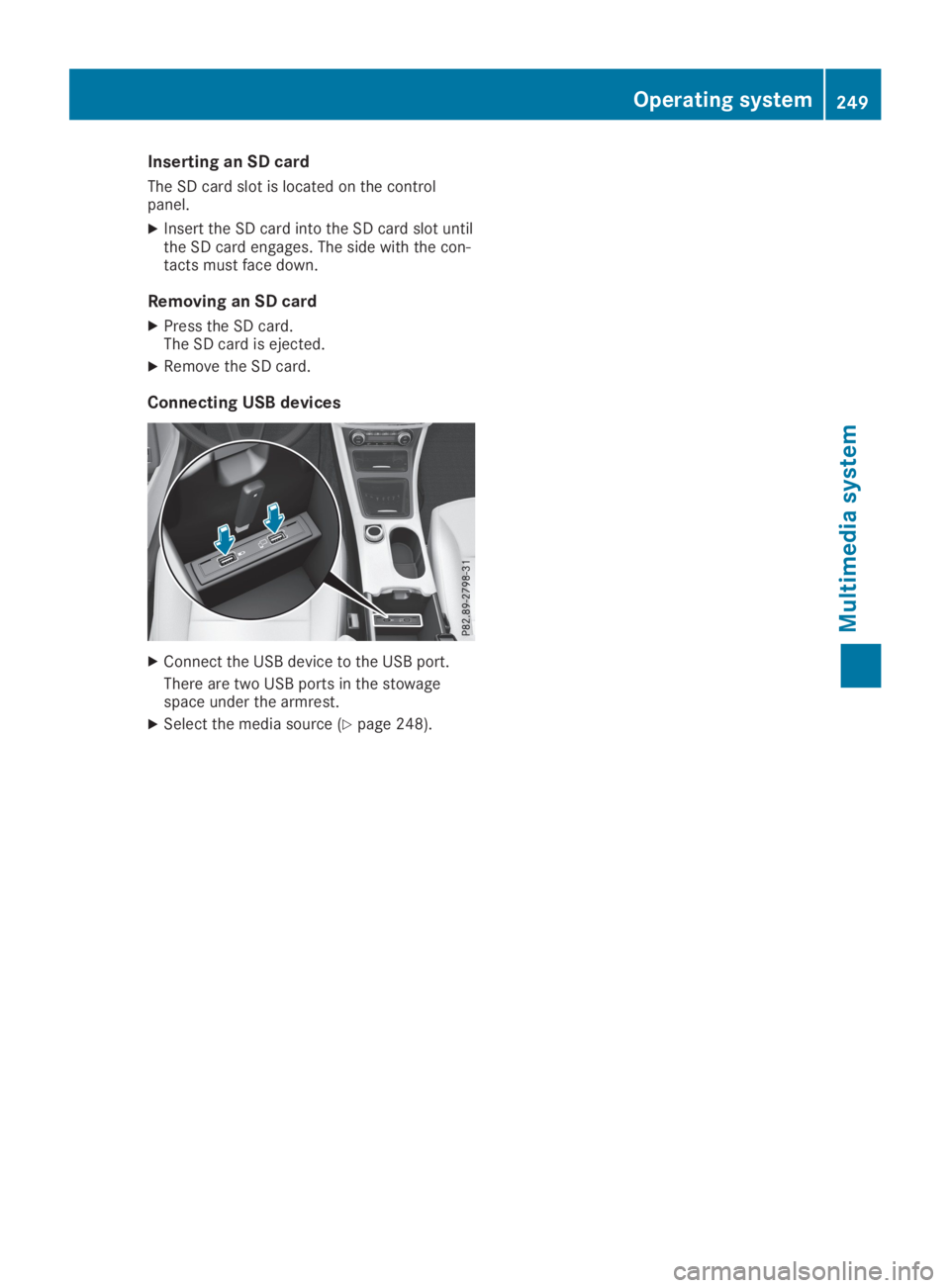
Connecting USB devices
XConnect the USB device to the USB port.
There are two USB ports in the stowagespace under the armrest.
XSelect the media source (Ypage 248).
Operating system249
Multimedia system
Z
Page 252 of 346
Loading guidelines
GWARNING
If objects, luggage or loads are not secured
or not secured sufficiently, they could slip,
tip over or be flung around and thereby hit
vehicle occupants. There is a risk of injury,
particularly in the event of sudden braking
or a sudden change in direction.
Always store objects so that they cannot be
flung around. Secure objects, luggage or
loads against slipping or tipping before the
journey.
GDANGER
Combustion engines emit poisonous
exhaust gases such as carbon monoxide.
Exhaust gases can enter the vehicle interior
if the tailgate is open while the engine is
running, especially if the vehicle is in
motion. There is a risk of poisoning.
Always switch off the engine before opening
the tailgate. Never drive with the tailgate
open.
GWARNING
The exhaust tail pipe and tail pipe trim can
become very hot. If you come into contact
with these parts of the vehicle, you could
burn yourself. There is a risk of burns.
Always be particularly careful and supervise
children closely around the exhaust pipe and
the exhaust pipe trims. Allow these compo-
nents to cool down before touching them.
The handling characteristics of a laden vehicleare dependent on the distribution of the loadwithin the vehicle.
Observe the following notes when loading andtransporting a load:
RNever exceed the maximum permissiblegross vehicle mass or the gross axle weightrating for the vehicle (including occupants).The values are specified on the vehicle iden-
tification plate on the B-pillar of the driver'sdoor.
RThe cargo compartment is the preferredplace to carry objects.
RPosition heavy loads as far forward as possi-ble and as low down in the cargo compart-ment as possible.
RThe load must not protrude above the upperedge of the seat backrests.
RAlways place the load against the rear orfront seat backrests. Make sure that theseat backrests are securely locked intoplace.
RAlways place the load behind unoccupiedseats if possible.
RUse the cargo tie-down rings and the parcelnets to transport loads and luggage.
RUse cargo tie-down rings and fasteningmaterials appropriate for the weight andsize of the load.
RThe maximum load capacity of the stowagewell under the cargo compartment floor is55 lbs(25 kg).
RSecure the load with sufficiently strong andwear-resistant tie-downs. Pad sharp edgesfor protection.
!Do not position the load on one part of thefolding cargo compartment floor only. Themaximum load capacity of the folding cargocompartment floor is 220 lbs(100 kg). Dis-tribute theweight evenly to avoid damagingthe cargo compartment floor. Place a solidboard under the load if necessary. Pleasenote that the load on the cargo compart-ment floor will be increased when the loadis lashed down.
Stowage areas
Stowage spaces
Important safety notes
GWARNING
If you transport objects in the vehicle inte-
rior and these are not adequately secured,
they could slip or be flung around and
thereby strike vehicle occupants. In addi-
tion, cup holders, open stowage spaces and
mobile phone brackets may not always be
250Stowage areas
Stowage and features
Page 254 of 346
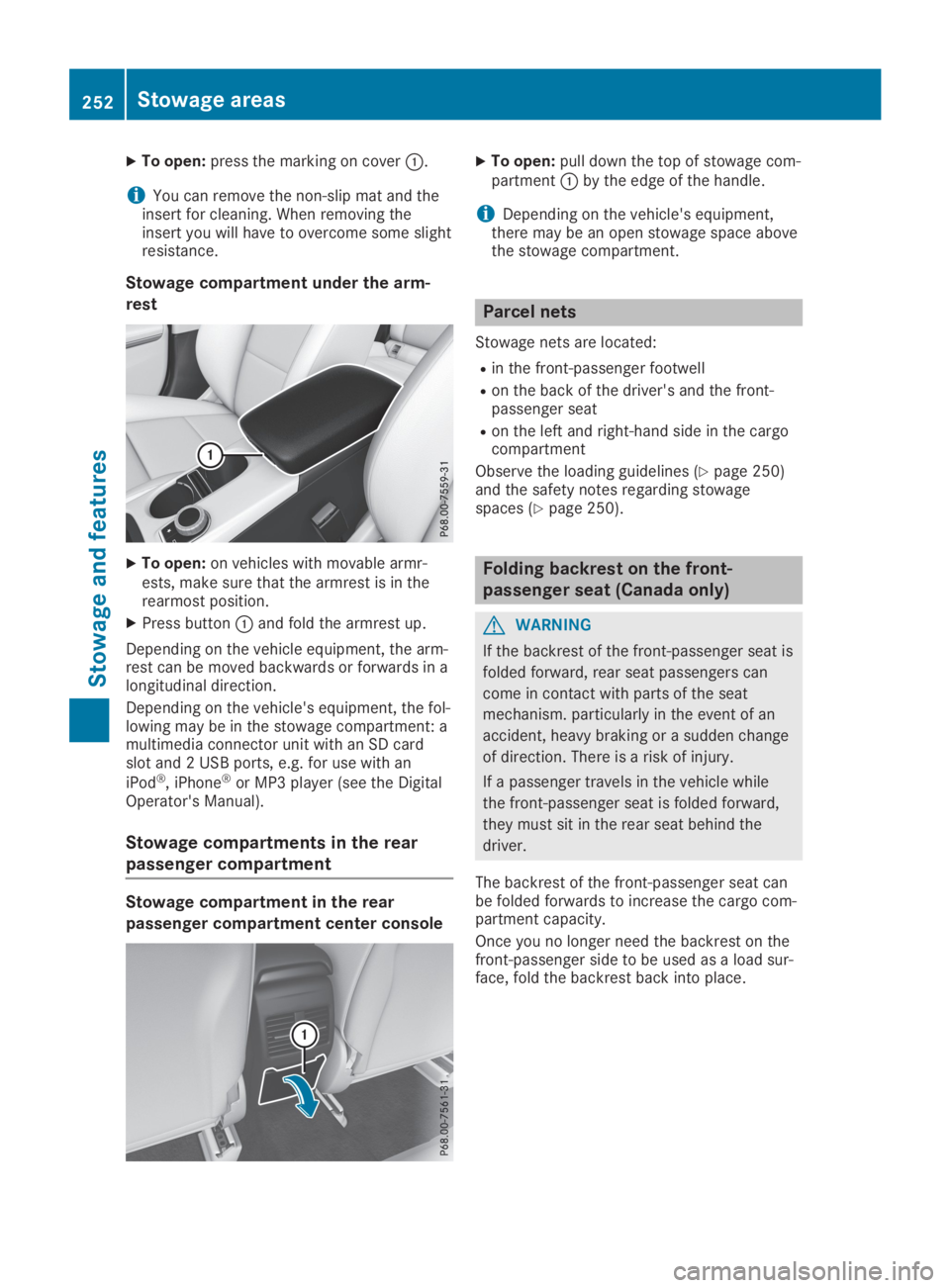
XTo open:press the marking on coverC.
iYou can remove the non-slip mat and theinsert for cleaning. When removing theinsert you will have to overcome some slightresistance.
Stowage compartment under the arm-
rest
XTo open:on vehicles with movable armr-ests, make sure that the armrest is in therearmost position.
XPress buttonCand fold the armrest up.
Depending on the vehicle equipment, the arm-rest can be moved backwards or forwards in alongitudinal direction.
Depending on the vehicle's equipment, the fol-lowing may be in the stowage compartment: amultimedia connector unit with an SD cardslot and 2 USB ports, e.g. for use with an
iPod®, iPhone®or MP3 player (see the DigitalOperator's Manual).
Stowage compartments in the rear
passenger compartment
Stowage compartment in the rear
passenger compartment center console
XTo open:pull down the top of stowage com-partmentCby the edge of the handle.
iDepending on the vehicle's equipment,there may be an open stowage space abovethe stowage compartment.
Parcel nets
Stowage nets are located:
Rin the front-passenger footwell
Ron the back of the driver's and the front-passenger seat
Ron the left and right-hand side in the cargocompartment
Observe the loading guidelines (Ypage 250)and the safety notes regarding stowagespaces (Ypage 250).
Folding backrest on the front-
passenger seat (Canada only)
GWARNING
If the backrest of the front-passenger seat is
folded forward, rear seat passengers can
come in contact with parts of the seat
mechanism. particularly in the event of an
accident, heavy braking or a sudden change
of direction. There is a risk of injury.
If a passenger travels in the vehicle while
the front-passenger seat is folded forward,
they must sit in the rear seat behind the
driver.
The backrest of the front-passenger seat canbe folded forwards to increase the cargo com-partment capacity.
Once you no longer need the backrest on thefront-passenger side to be used as a load sur-face, fold the backrest back into place.
252Stowage areas
Sto wage an d features
Page 256 of 346
Notes on using the cargo compart-
ment
Making the best use of your cargo compart-ment:
RYou can increase the load capacity byadjusting the backrest to the cargo position(Ypage 254).
RThe load area can be lengthened by foldingforward the folding backrest of the front-passenger seat (Ypage 252) and the corre-sponding backrest in the rear.
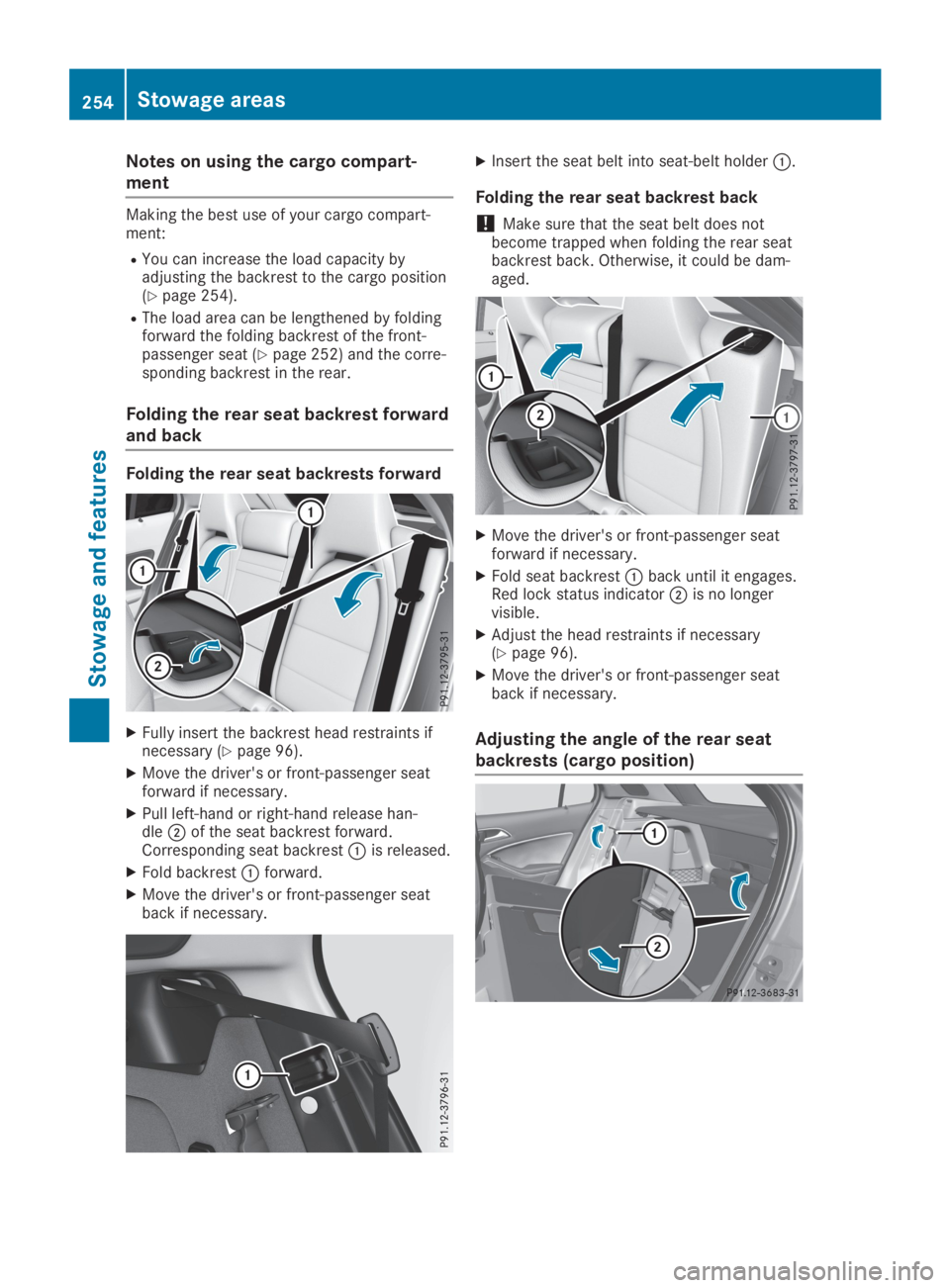
Folding the rear seat backrest forward
and back
Folding the rear seat backrests forward
XFully insert the backrest head restraints ifnecessary (Ypage 96).
XMove the driver's or front-passenger seatforward if necessary.
XPull left-hand or right-hand release han-dleDof the seat backrest forward.Corresponding seat backrestCis released.
XFold backrestCforward.
XMove the driver's or front-passenger seatback if necessary.
XInsert the seat belt into seat-belt holderC.
Folding the rear seat backrest back
!Make sure that the seat belt does notbecome trapped when folding the rear seatbackrest back. Otherwise, it could be dam-aged.
XMove the driver's or front-passenger seatforward if necessary.
XFold seat backrestCback until it engages.Red lock status indicatorDis no longervisible.
XAdjust the head restraints if necessary(Ypage 96).
XMove the driver's or front-passenger seatback if necessary.
Adjusting the angle of the rear seat
backrests (cargo position)
254Stowage areas
Stowage an d features
Page 263 of 346
The system is available if:
Rit has been activated and is operational
Rthe corresponding mobile phone network isavailable for transmitting data to the Cus-tomer Center
Ra service subscription is available
Rthe starter battery is sufficiently charged
iDetermining the location of the vehicle ona map is only possible if:
RGPS reception is available
Rthe vehicle position can be forwarded tothe Customer Assistance Center
The Mercedes me connect system
To adjust the volume during a call, proceed asfollows:
XPress the
Page 265 of 346
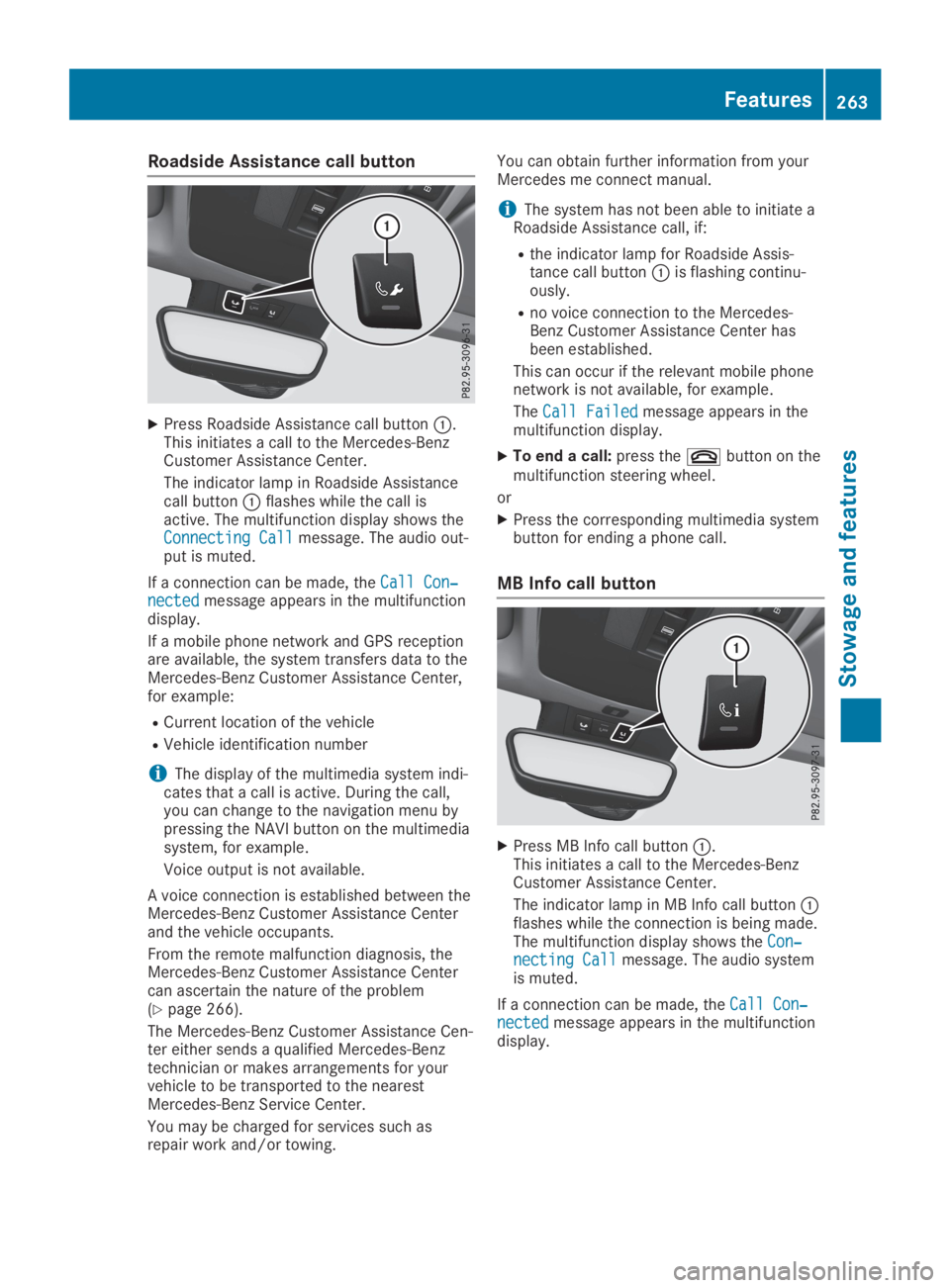
Roadside Assistance call button
XPress Roadside Assistance call buttonC.This initiates a call to the Mercedes-BenzCustomer Assistance Center.
The indicator lamp in Roadside Assistancecall buttonCflashes while the call isactive. The multifunction display shows theConnecting CallConnecting Callmessage. The audio out-put is muted.
If a connection can be made, theCall Con‐Call Con‐nectednectedmessage appears in the multifunctiondisplay.
If a mobile phone network and GPS receptionare available, the system transfers data to theMercedes-Benz Customer Assistance Center,for example:
RCurrent location of the vehicle
RVehicle identification number
iThe display of the multimedia system indi-cates that a call is active. During the call,you can change to the navigation menu bypressing the NAVI button on the multimediasystem, for example.
Voice output is not available.
A voice connection is established between theMercedes-Benz Customer Assistance Centerand the vehicle occupants.
From the remote malfunction diagnosis, theMercedes-Benz Customer Assistance Centercan ascertain the nature of the problem(Ypage 266).
The Mercedes-Benz Customer Assistance Cen-ter either sends a qualified Mercedes-Benztechnician or makes arrangements for yourvehicle to be transported to the nearestMercedes-Benz Service Center.
You may be charged for services such asrepair work and/or towing.
You can obtain further information from yourMercedes me connect manual.
iThe system has not been able to initiate aRoadside Assistance call, if:
Rthe indicator lamp for Roadside Assis-tance call buttonCis flashing continu-ously.
Rno voice connection to the Mercedes-Benz Customer Assistance Center hasbeen established.
This can occur if the relevant mobile phonenetwork is not available, for example.
TheCall FailedCall Failedmessage appears in themultifunction display.
XTo end a call:press thevbutton on themultifunction steering wheel.
or
XPress the corresponding multimedia systembutton for ending a phone call.
MB Info call button
XPress MB Info call buttonC.This initiates a call to the Mercedes-BenzCustomer Assistance Center.
The indicator lamp in MB Info call buttonCflashes while the connection is being made.The multifunction display shows theCon‐Con‐necting Callnecting Callmessage. The audio systemis muted.
If a connection can be made, theCall Con‐Call Con‐nectednectedmessage appears in the multifunctiondisplay.
Features263
Stowage and features
Z
Page 266 of 346
If a mobile phone network and GPS receptionare available, the system transfers data to theMercedes-Benz Customer Assistance Center,for example:
RCurrent location of the vehicle
RVehicle identification number
iThe display of the multimedia system indi-cates that a call is active. During the call,you can change to the navigation menu bypressing the NAVI button on the multimediasystem, for example.
Voice output is not available.
A voice connection is established between theMercedes-Benz Customer Assistance Centerand the vehicle occupants.
You receive information about operating yourvehicle, about the nearest Mercedes-Benz Ser-vice Center and about other products andservices from Mercedes-Benz.
USA only: you can find further information onthe Mercedes me connect system under "Own-ers Online" at http://www.mbusa.com.
iThe system has not been able to initiate anMB Info call, if:
Rthe indicator lamp in MB Info call but-tonCis flashing continuously.
Rno voice connection to the Mercedes-Benz Customer Assistance Center hasbeen established.
This can occur if the relevant mobile phonenetwork is not available, for example.
TheCall FailedCall Failedmessage appears in themultifunction display.
XTo end a call:press thevbutton on themultifunction steering wheel.
or
XPress the corresponding multimedia systembutton for ending a phone call.
Call priority
When service calls are active, e.g. RoadsideAssistance or MB Info calls, an emergency callcan still be initiated. In this case, an emer-gency call will take priority and override allother active calls.
The indicator lamp of the respective buttonflashes until the call is ended.
An emergency call can only be terminated bythe Mercedes-Benz Customer Assistance Cen-ter.
All other calls can be ended by pressing:
Rthevbutton on the multifunction steer-ing wheel
Rthe corresponding button in the multimediasystem to end the voice call
iWhen a call is initiated, the audio systemis muted. The mobile phone is no longerconnected to the multimedia system. How-ever, if you want to use your mobile phone,do so only when the vehicle is stationaryand in a safe location.
Downloading destinations in COMAND
Downloading destinations
Downloading destinations gives you access toa database with over 15 million points of inter-est (POIs). These can be downloaded on thenavigation system in your vehicle. If you knowthe destination, the address can be downloa-ded. Alternatively, you can obtain the locationof Points of Interest (POIs)/important destina-tions in the vicinity.
Furthermore, you can download routes with upto 20 way points.
You are prompted to confirm route guidanceto the address entered.
The system calculates the route and subse-quently starts the route guidance with theaddress entered.
iIf you selectNoNo, the address can be savedin the address book.
iThe Destination Download function isavailable if the relevant mobile phone net-work is available and data transfer is possi-ble.
iThe Destination Download function canonly be used if the vehicle is equipped witha navigation system.
Route Assistance
This service is part of the Mercedes me con-nect PLUS Package and cannot be obtainedseparately.
iYou can also use the Route Assistancefunction if your vehicle is not equipped witha navigation system.
264Features
Stowage and features
Page 267 of 346
Within the framework of this service, youreceive a professional and reliable form of nav-igation support without having to leave yourvehicle.
The customer service representative finds asuitable route depending on your vehicle's cur-rent position and the desired destination. Youwill then be guided live through the currentroute section.
Search and Send
General notes
iTo use "Search & Send", your vehicle mustbe equipped with Mercedes me connect anda navigation system. Additionally, aMercedes me connect service subscriptionmust be completed.
"Search & Send" is a destination entry service.A destination address found on Google Maps™can be transferred via Mercedes me connectdirectly to your vehicle's navigation system.
Specifying and sending the destination
address
XGo to the website http://www.maps.google.com and enter a destina-tion address into the entry field.
XTo send the destination address to the e-mail address of your Mercedes me con-nect account:click the corresponding but-ton on the website.
iExample:
If you select 'Send to vehicle' and then'Mercedes-Benz', the destination addresswill be sent to your vehicle.
XIf the "Send" dialog window appears:inthe corresponding field enter the e-mailaddress that you specified when setting upyour Mercedes me connect account.
XClick "Send".
iInformation on specific commands such as"Address entry" or "Send" can be found onthe website.
Calling up destination addresses
XSwitch on the ignition.The destination address is loaded into thevehicle's navigation system.
A display message appears, asking whethernavigation should be started.
XSelectYesYesby turningyRzor sliding
Page 268 of 346
USA only: alternatively, the vehicle can beopened via:
Rthe Internet, under the "Owners Online" sec-tion
Rtelephone applications (e.g. for iPhone®,
Android®)
To do this, you will need your identificationnumber and password.
iVehicle remote opening is only possible ifthe corresponding mobile phone network isaccessible.
Vehicle remote closing
The vehicle valet locking feature can be usedwhen you have forgotten to lock the vehicleand you are no longer nearby.
The vehicle can then be locked by theMercedes-Benz Customer Assistance Center.
The vehicle can be immediately lockedremotely up to four days after the ignition waslast switched off. After this time, valet lockingmay be delayed by 15 to 60 minutes. After30 days the vehicle can no longer be lockedremotely.
XContact the following service hotlines:
RUSA:Mercedes-Benz Customer Assis-tance Center at 1-800-FOR-MERCedes(1-800-367-6372) or 1-866-990-9007
RCanada:Customer Service at1-888-923-8367You will be asked for your password.
The next time you are inside the vehicle andyou switch on the ignition, theDoors LockedDoors LockedRemotelyRemotelymessage will appear on the multi-function display.
USA only: alternatively, the vehicle can belocked via:
Rthe Internet, under the "Owners Online" sec-tion
Rtelephone applications (e.g. for iPhone®,
Android®)
To do this, you will need your identificationnumber and password.
iThe vehicle valet locking feature is availa-ble when the relevant mobile phone networkis available and data connection is possible.
Stolen vehicle recovery service
If your vehicle has been stolen:
XNotify the police.The police will issue a numbered incidentreport.
XThis number will be forwarded to theMercedes-Benz Customer Assistance Centertogether with your PIN.The Mercedes-Benz Customer AssistanceCenter then tries to locate the system. TheMercedes-Benz Customer Assistance Centercontacts you and the local law enforcementagency if the vehicle is located.
However, only the law enforcement agencyis informed of the location of the vehicle.
iIf the anti-theft alarm system is activatedfor longer than 30 seconds, Mercedes meconnect automatically notifies theMercedes-Benz Customer Assistance Cen-ter.
Vehicle Health Check
With the Vehicle Health Check, the CustomerAssistance Center can provide improved sup-port for problems with your vehicle. During anexisting call, vehicle data is transferred to theCustomer Assistance Center. The customerservice representative can use the receiveddata to decide what kind of assistance isrequired. You are then, for example, guided tothe nearest Mercedes-Benz Service Center ora recovery vehicle is called.
If vehicle data needs to be transferred duringan MB Info call or a Roadside Assistance call,this is initiated by the Customer AssistanceCenter. You will see theRoadside Assis‐Roadside Assis‐tance Connectedtance Connectedmessage on the multimediasystem display. If the vehicle remote malfunc-tion diagnosis can be started, theRequestRequestfor vehicle diagnosis received.for vehicle diagnosis received.Start vehicle diagnosis?Start vehicle diagnosis?messageappears in the display.
XConfirm the message withYesYes.
XWhen theVehicle diagnosis: PleaseVehicle diagnosis: Pleasestart ignitionstart ignitionmessage appears, turnthe SmartKey to position2in the ignitionlock (Ypage 125).
XWhen thePlease follow the instruc‐Please follow the instruc‐tions received by phone and movetions received by phone and moveyour vehicle to a safe positionyour vehicle to a safe positionmes-
266Features
Stowage and features