key MERCEDES-BENZ GLA 2019 User Guide
[x] Cancel search | Manufacturer: MERCEDES-BENZ, Model Year: 2019, Model line: GLA, Model: MERCEDES-BENZ GLA 2019Pages: 346, PDF Size: 16.66 MB
Page 24 of 346
Type identification plate
see Vehicle identification plate
U
Unlocking
Emergency unlocking ....................... 76
From inside the vehicle (central
unlocking button) ............................. 75
Upshift indicator (on-board com-
puter, Mercedes-AMG vehicles)....... 200
USB devices
Connecting to the Media Inter-
face ...............................................249
V
Vanity mirror (in the sun visor)........259
Vehicle
Correct use ...................................... 27
Data acquisition ............................... 28
Display message ............................ 225
Equipment ....................................... 26
Individual settings .......................... 198
Limited Warranty .............................28
Loading .......................................... 316
Locking (in an emergency) ............... 77
Locking (SmartKey) .......................... 69
Lowering ........................................ 329
Maintenance .................................... 26
Parking for a long period ................ 148
Pulling away................................... 128
Raising ........................................... 327
REACH Regulation ........................... 28
Reporting problems ......................... 28
Securing from rolling away ............ 326
Transporting .................................. 300
Unlocking (in an emergency) ........... 76
Unlocking (SmartKey)...................... 69
Vehicle data ................................... 339
Vehicle battery
see Battery (vehicle)
Vehicle data
Roof load (maximum) ..................... 339
Vehicle data (off-road driving)
Approach/departure angle ............ 340
Maximum gradient climbing abil-
ity .................................................. 340
Vehicle dimensions........................... 339
Vehicle emergency locking................ 77
Vehicle identification number
see VIN
Vehicle identification plate.............. 333
Vehicle tool kit.................................. 287
Ventilation
Setting the vents ........................... 123
Video
Operating the DVD ......................... 195
see also Digital Operator's Man-
ual .................................................. 242
VIN
Seat ............................................... 334
Type plate ...................................... 333
W
Warning and indicator lamps
ABS ................................................ 233
Active Brake Assist ........................ 240
Brakes ........................................... 232
Check Engine ................................. 238
Coolant .......................................... 238
Distance warning ........................... 240
ESP®.............................................. 235
ESP®OFF ....................................... 236
Fuel tank ........................................ 238
Overview .......................................... 32
Reserve fuel................................... 238
Restraint system ............................ 237
Seat belt ........................................ 230
SPORT handling mode................... 236
Tire pressure monitor .................... 241
Washer fluid
Display message ............................ 228
Weather display (COMAND)
see also Digital Operator's Man-
ual.................................................. 242
Wheel and tire combinations
Tires ............................................... 329
Wheel bolt tightening torque........... 329
Wheel chock...................................... 326
Wheels
Changing a wheel.......................... 325
Checking ........................................ 304
Cleaning ......................................... 281
Emergency spare wheel ................. 330
22Index
Page 26 of 346
Introduction
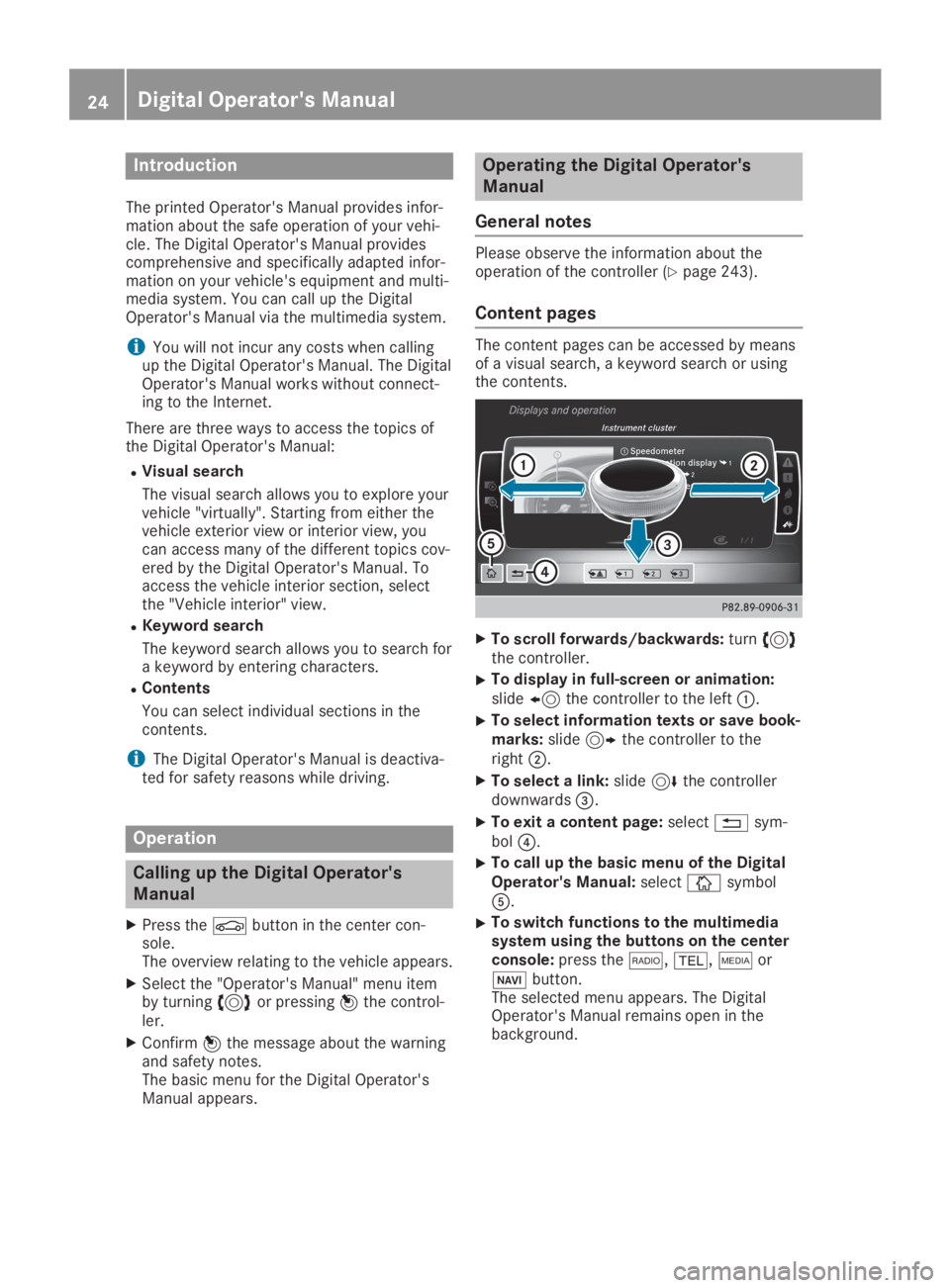
The printed Operator's Manual provides infor-mation about the safe operation of your vehi-cle. The Digital Operator's Manual providescomprehensive and specifically adapted infor-mation on your vehicle's equipment and multi-media system. You can call up the DigitalOperator's Manual via the multimedia system.
iYou will not incur any costs when callingup the Digital Operator's Manual. The DigitalOperator's Manual works without connect-ing to the Internet.
There are three ways to access the topics ofthe Digital Operator's Manual:
RVisual search
The visual search allows you to explore yourvehicle "virtually". Starting from either thevehicle exterior view or interior view, youcan access many of the different topics cov-ered by the Digital Operator's Manual. Toaccess the vehicle interior section, selectthe "Vehicle interior" view.
RKeyword search
The keyword search allows you to search fora keyword by entering characters.
RContents
You can select individual sections in thecontents.
iThe Digital Operator's Manual is deactiva-ted for safety reasons while driving.
Operation
Calling up the Digital Operator's
Manual
XPress the
Page 41 of 346
Panic alarm
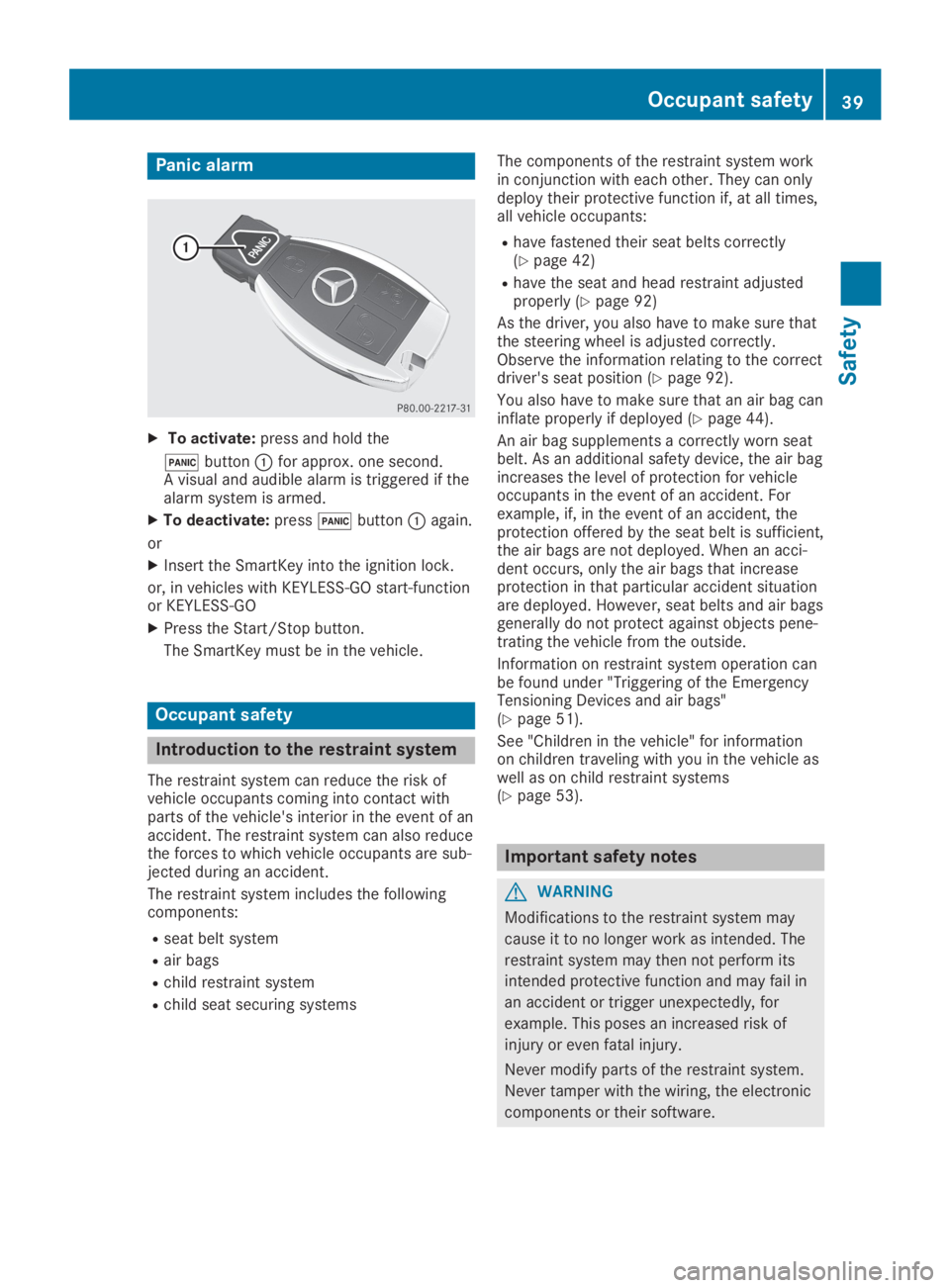
XTo activate:press and hold the
3buttonCfor approx. one second.A visual and audible alarm is triggered if thealarm system is armed.
XTo deactivate:press3buttonCagain.
or
XInsert the SmartKey into the ignition lock.
or, in vehicles with KEYLESS-GO start-functionor KEYLESS‑GO
XPress the Start/Stop button.
The SmartKey must be in the vehicle.
Occupant safety
Introduction to the restraint system
The restraint system can reduce the risk ofvehicle occupants coming into contact withparts of the vehicle's interior in the event of anaccident. The restraint system can also reducethe forces to which vehicle occupants are sub-jected during an accident.
The restraint system includes the followingcomponents:
Rseat belt system
Rair bags
Rchild restraint system
Rchild seat securing systems
The components of the restraint system workin conjunction with each other. They can onlydeploy their protective function if, at all times,all vehicle occupants:
Rhave fastened their seat belts correctly(Ypage 42)
Rhave the seat and head restraint adjustedproperly (Ypage 92)
As the driver, you also have to make sure thatthe steering wheel is adjusted correctly.Observe the information relating to the correctdriver's seat position (Ypage 92).
You also have to make sure that an air bag caninflate properly if deployed (Ypage 44).
An air bag supplements a correctly worn seatbelt. As an additional safety device, the air bagincreases the level of protection for vehicleoccupants in the event of an accident. Forexample, if, in the event of an accident, theprotection offered by the seat belt is sufficient,the air bags are not deployed. When an acci-dent occurs, only the air bags that increaseprotection in that particular accident situationare deployed. However, seat belts and air bagsgenerally do not protect against objects pene-trating the vehicle from the outside.
Information on restraint system operation canbe found under "Triggering of the EmergencyTensioning Devices and air bags"(Ypage 51).
See "Children in the vehicle" for informationon children traveling with you in the vehicle aswell as on child restraint systems(Ypage 53).
Important safety notes
GWARNING
Modifications to the restraint system may
cause it to no longer work as intended. The
restraint system may then not perform its
intended protective function and may fail in
an accident or trigger unexpectedly, for
example. This poses an increased risk of
injury or even fatal injury.
Never modify parts of the restraint system.
Never tamper with the wiring, the electronic
components or their software.
Occupant safety39
Safety
Z
Page 45 of 346
Only then can the forces which occur be dis-tributed over the area of the belt.
Rthe shoulder section of the belt is routedacross the center of your shoulder
The shoulder section of the seat belt shouldnot touch your neck or be routed under yourarm or behind your back. Where possible,adjust the seat belt to the appropriateheight.
Rthe lap belt is taut and passes across yourlap as low down as possible
The lap belt must always be routed acrossyour hip joints and not across your abdo-men. This applies particularly to pregnantwomen. If necessary, push the lap belt downto your hip joint and pull it tight using theshoulder section of the belt.
Rthe seat belt is not routed across sharp,pointed or fragile objects
If you have such items located on or in yourclothing, e.g. pens, keys or eyeglasses,store these in a suitable place.
Ronly one person is using a seat belt
Infants and children must never travel sit-ting on the lap of a vehicle occupant. In theevent of an accident, they could be crushedbetween the vehicle occupant and seat belt.
Robjects are never secured with a seat belt ifthe seat belt is also being used by one ofthe vehicle's occupants
Also ensure that there are never objectsbetween a person and the seat, e.g. cush-ions.
Seat belts are only intended to secure andrestrain vehicle occupants. Always observe the"Loading guidelines" for securing objects, lug-gage or loads (Ypage 250).
Fastening and adjusting the seat belts
Observe the safety notes on the seat belt(Ypage 41) and the notes on correct use ofseat belts (Ypage 42).
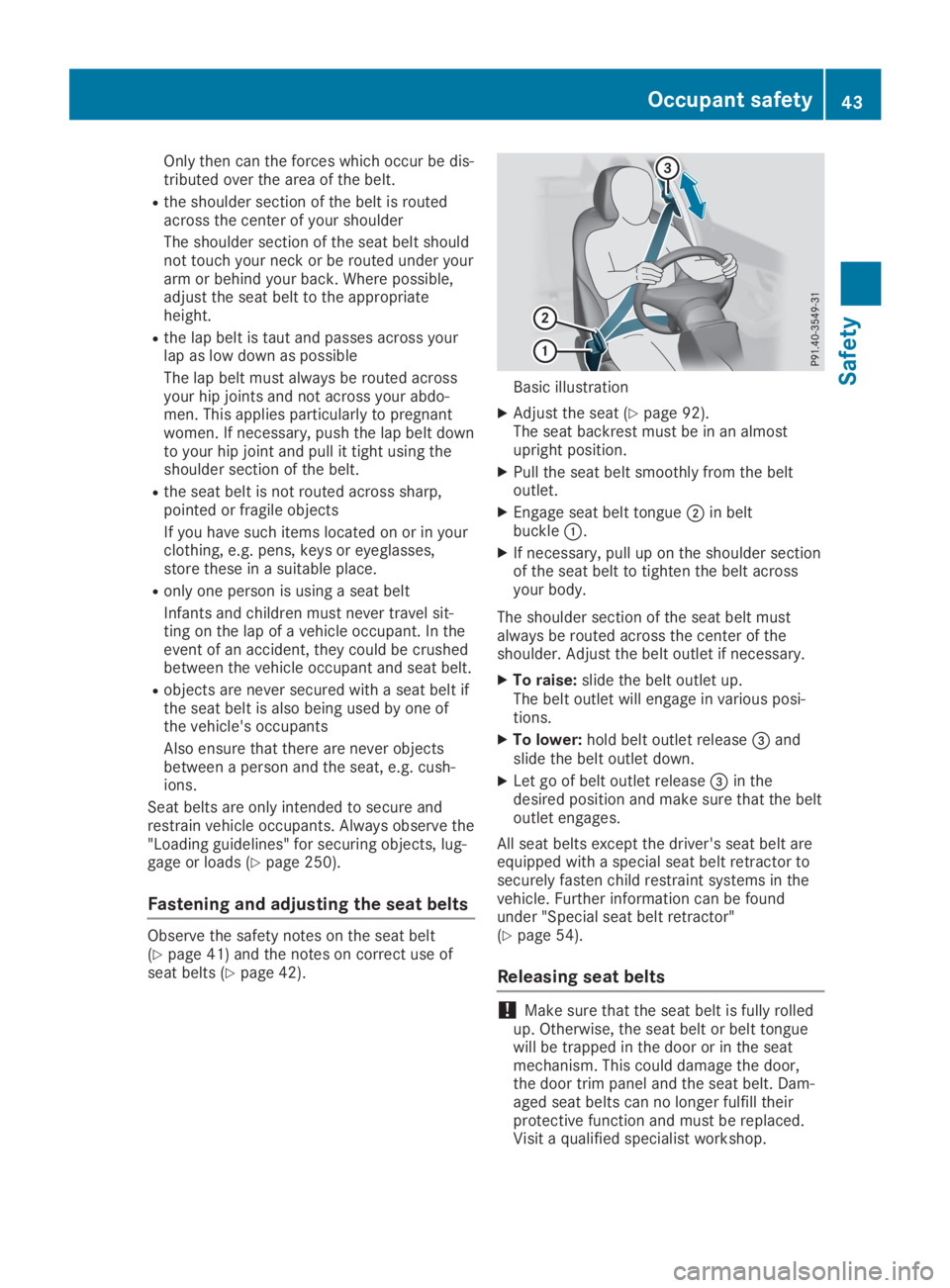
Basic illustration
XAdjust the seat (Ypage 92).The seat backrest must be in an almostupright position.
XPull the seat belt smoothly from the beltoutlet.
XEngage seat belt tongueDin beltbuckleC.
XIf necessary, pull up on the shoulder sectionof the seat belt to tighten the belt acrossyour body.
The shoulder section of the seat belt mustalways be routed across the center of theshoulder. Adjust the belt outlet if necessary.
XTo raise:slide the belt outlet up.The belt outlet will engage in various posi-tions.
XTo lower:hold belt outlet release
Page 50 of 346
The indicator lamps inform you whether thefront-passenger front air bag is deactivated orenabled.
XPress the Start/Stop button once or twice,or turn the SmartKey to positionGorHinthe ignition lock.The system carries out self-diagnostics.
The PASSENGER AIR BAG OFF andPASSENGER AIR BAG ON indicator lamps mustlight up simultaneously for approximately sixseconds.
The indicator lamps display the status of thefront-passenger front air bag.
RPASSENGER AIR BAG ON lights up for60 seconds, subsequently both indicatorlamps are off (PASSENGER AIR BAG ON andOFF): the front-passenger front air bag isable to deploy in the event of an accident.
RPASSENGER AIR BAG OFF lights up: thefront-passenger front air bag is deactivated.It will then not be deployed in the event ofan accident.
If the PASSENGER AIR BAG ON indicator lampis off, only the PASSENGER AIR BAG OFF indi-cator lamp shows the status of the front-passenger front air bag. The PASSENGER AIRBAG OFF indicator lamp may be lit continu-ously or be off.
If the status of the front-passenger front airbag changes while the vehicle is in motion, anair bag display message appears in the instru-ment cluster (Ypage 213). When the front-passenger seat is occupied, always pay atten-tion to the PASSENGER AIR BAG OFF indicatorlamp. Be aware of the status of the front-passenger front air bag both before and duringthe journey.
GWARNING
If the PASSENGER AIR BAG OFF indicator
lamp is lit, the front-passenger front air bag
is disabled. It will not be deployed in the
event of an accident and cannot perform its
intended protective function. A person in the
front-passenger seat could then, for exam-
ple, come into contact with the vehicle's
interior, especially if the person is sitting too
close to the dashboard. This poses an
increased risk of injury or even fatal injury.
When the front-passenger seat is occupied,
always ensure that:
Rthe classification of the person in the
front-passenger seat is correct and the
front-passenger front air bag is enabled or
disabled in accordance with the person in
the front-passenger seat
Rthe front-passenger seat has been moved
back as far back as possible.
Rthe person is seated correctly.
Make sure, both before and during the jour-
ney, that the status of the front-passenger
front air bag is correct.
GWARNING
If you secure a child in a rearward-facing
child restraint system on the front-
passenger seat and the PASSENGER AIR
BAG OFF indicator lamp is off, the front-
passenger front air bag can deploy in the
event of an accident. The child could be
struck by the air bag. This poses an
increased risk of injury or even fatal injury.
Make sure that the front-passenger front air
bag has been deactivated. The PASSENGER
AIR BAG OFF indicator lamp must be lit.
NEVER use a rearward-facing child restraint
on a seat protected by an ACTIVE FRONT
AIRBAG in front of it; DEATH or SERIOUS
INJURY to the child can occur.
If the PASSENGER AIR BAG OFF indicator lampstays off, do not install a rearward-facing childrestraint system on the front-passenger seat.You can find more information on OCS under"Problems with the Occupant ClassificationSystem" (Ypage 51).
48Occupant safety
Safety
Page 56 of 346
child restraint system manufacturer's instal-lation instructions.
Ralways observe the instructions and safetynotes on the "Occupant classification sys-tem (OCS)". (Ypage 47)
GWARNING
If you leave children unsupervised in the
vehicle, they could set it in motion by, for
example:
Rrelease the parking brake.
Rshift the automatic transmission out of
the parking positionP.
Rstart the engine.
In addition, they may operate vehicle equip-
ment and become trapped. There is a risk of
an accident and injury.
When leaving the vehicle, always take the
SmartKey with you and lock the vehicle.
Never leave children unsupervised in the
vehicle.
GWARNING
If persons, particularly children are subjec-
ted to prolonged exposure to extreme heat
or cold, there is a risk of injury, possibly
even fatal. Never leave children unattended
in the vehicle.
GWARNING
If the child restraint system is subjected to
direct sunlight, parts may get very hot. Chil-
dren may burn themselves on these parts,
particularly on the metal parts of the child
restraint system. There is a risk of injury.
If you leave the vehicle, taking the child with
you, always ensure that the child restraint
system is not exposed to direct sunlight.
Protect it with a blanket, for example. If the
child restraint system has been exposed to
direct sunlight, let it cool down before secur-
ing the child in it. Never leave children unat-
tended in the vehicle.
Always ensure that all vehicle occupants havetheir seat belts fastened correctly and are sit-ting properly. Particular attention must be paidto children.
Observe the safety notes on the seat belt(Ypage 41) and the notes on correct use ofseat belts (Ypage 42).
A booster seat may be necessary to achieveproper seat belt positioning for children over40 lbs (18 kg) until they reach a height wherea three-point seat belt can be properly fas-tened without a booster seat.
Special seatbelt retractor
GWARNING
If the seat belt is released while driving, the
child restraint system will no longer be
secured properly. The special seat belt
retractor is disabled and the inertia real
draws in a portion of the seat belt. The seat
belt cannot be immediately refastened.
There is an increased risk of injury, possibly
even fatal.
Stop the vehicle immediately, paying atten-
tion to road and traffic conditions. Reacti-
vate the special seat belt retractor and
secure the child restraint system properly.
All seat belts in the vehicle, except the driver'sseat belt, are equipped with a special seat beltretractor. When activated, the special seat beltretractor ensures that the seat belt cannotslacken once the child seat is secured.
Installing a child restraint system:
XMake sure you observe the child restraintsystem manufacturer's installation instruc-tions.
XPull the seat belt smoothly from the beltoutlet.
XEngage seat belt tongue in belt buckle.
Activating the special seat belt retractor:
XPull the seat belt out fully and let the inertiareel retract it again.While the seat belt is retracting, you shouldhear a ratcheting sound. The special seatbelt retractor is enabled.
XPush the child restraint system down so thatthe seat belt is tight and does not loosen.
54Children in the vehicle
Safety
Page 60 of 346
you install the child restraint system on a rearseat.
If it is absolutely necessary to install a childrestraint system on the front-passenger seat,always observe the instructions and safetynotes on the "Occupant Classification System(OCS)" (Ypage 47).
You can thus avoid the risks that could ariseas a result of:
Ran incorrectly categorized person in thefront-passenger seat
Rdeactivating the front passenger front airbag unintentionally
Rthe unsuitable positioning of the childrestraint system, e.g. too close to the dash-board
Rearward-facing child restraint system
If circumstances require you to secure a childin a rearward-facing child restraint system onthe front-passenger seat, always make surethat the front passenger front air bag is deacti-vated. Only if the PASSENGER AIR BAG OFFindicator lamp is lit continuously (Ypage 40),is the front passenger front air bag deactiva-ted.
Always observe the child restraint systemmanufacturer's installation and operatinginstructions.
Forward-facing child restraint system
If it is absolutely necessary to install aforward-facing child restraint system on thefront-passenger seat, always move the front-passenger seat as far back as possible. Fullyretract the seat cushion length. The entirebase of the child restraint system must alwaysrest on the seat cushion of the front-passenger seat. The backrest of the childrestraint system must lie as flat as possibleagainst the backrest of the front-passengerseat. The child restraint system must nottouch the roof or be subjected to a load by thehead restraint. Adjust the angle of the seatbackrest and the head restraint positionaccordingly. Always make sure that the shoul-der belt strap is correctly routed from the vehi-cle belt outlet to the shoulder belt guide onthe child restraint system. The shoulder beltstrap must be routed forward and down fromthe vehicle belt outlet. If necessary, adjust the
vehicle belt outlet and the front-passengerseat accordingly.
Always observe the child restraint systemmanufacturer's installation and operatinginstructions.
Child-proof locks
Important safety notes
GWARNING
If children are traveling in the vehicle, they
could:
Ropen doors, thus endangering other peo-
ple or road users
Rexit the vehicle and be caught by oncom-
ing traffic
Roperate vehicle equipment and become
trapped
There is a risk of an accident and injury.
Always activate the child-proof locks and
override feature if children are traveling in
the vehicle. When leaving the vehicle,
always take the key with you and lock the
vehicle. Never leave children unattended in
the vehicle.
Override feature for:
Rthe rear doors (Ypage 59)
Rthe rear side windows (Ypage 59)
GWARNING
If you leave children unsupervised in the
vehicle, they could set it in motion by, for
example:
Rrelease the parking brake.
Rshift the automatic transmission out of
the parking positionP.
Rstart the engine.
In addition, they may operate vehicle equip-
ment and become trapped. There is a risk of
an accident and injury.
When leaving the vehicle, always take the
SmartKey with you and lock the vehicle.
Never leave children unsupervised in the
vehicle.
58Children in the vehicle
Safety
Page 69 of 346
swerving. Trailers with a high center of grav-
ity can tip over before ESP®can detect this.
There is a risk of an accident.
Always adapt your driving style to the pre-
vailing road and weather conditions.
If your vehicle with trailer (vehicle/trailer com-bination) begins to lurch, you can only stabilizethe vehicle/trailer combination by depressingthe brake firmly.
ESP®trailer stabilization is active abovespeeds of about 65 km/h.
ESP®trailer stabilization does not work if
ESP®is deactivated or disabled because of amalfunction.
EBD (electronic brake force distribu-
tion)
General information
EBD monitors and controls the brake pressureon the rear wheels to improve driving stabilitywhile braking.
Important safety notes
iObserve the "Important safety notes" sec-tion (Ypage 60).
GWARNING
If EBD is malfunctioning, the rear wheels can
lock, e.g. under full braking. This increases
the risk of skidding and an accident.
You should therefore adapt your driving
style to the different handling characteris-
tics. Have the brake system checked at a
qualified specialist workshop.
Please observe the information on warningand indicator lamps (Ypage 233)
(Ypage 233) as well as on display messages(Ypage 206).
ADAPTIVE BRAKE
ADAPTIVE BRAKE enhances braking safety andoffers increased braking comfort. In additionto the braking function, ADAPTIVE BRAKE also
has the HOLD function (Ypage 165) and hillstart assist (Ypage 128).
STEER CONTROL
General information
STEER CONTROL helps you by transmitting anoticeable steering force to the steering wheelin the direction required for vehicle stabiliza-tion.
This steering assistance is provided in particu-lar if:
Rboth right wheels or both left wheels are ona wet or slippery road surface when youbrake
Rthe vehicle begins to skid
Important safety notes
iObserve the "Important safety notes" sec-tion (Ypage 60).
No steering assistance is provided from STEERCONTROL, if:
RESP®is malfunctioning
Rthe steering is malfunctioning
If ESP®is malfunctioning, you will be assistedfurther by the electrical power steering.
Protection against theft
Immobilizer
The immobilizer prevents your vehicle frombeing started without the correct SmartKey.
XTo activate with the SmartKey:removethe SmartKey from the ignition lock.
XTo activate with KEYLESS-GO start-func-tion or KEYLESS-GO:switch the ignition offand open the driver's door.
XTo deactivate:switch on the ignition.
When leaving the vehicle, always take theSmartKey with you and lock the vehicle. Any-one can start the engine if a valid SmartKeyhas been left inside the vehicle.
iThe immobilizer is always deactivatedwhen you start the engine.
In the event that the engine cannot be star-ted (yet the vehicle's battery is charged),
Protection against theft67
Safety
Z
Page 70 of 346
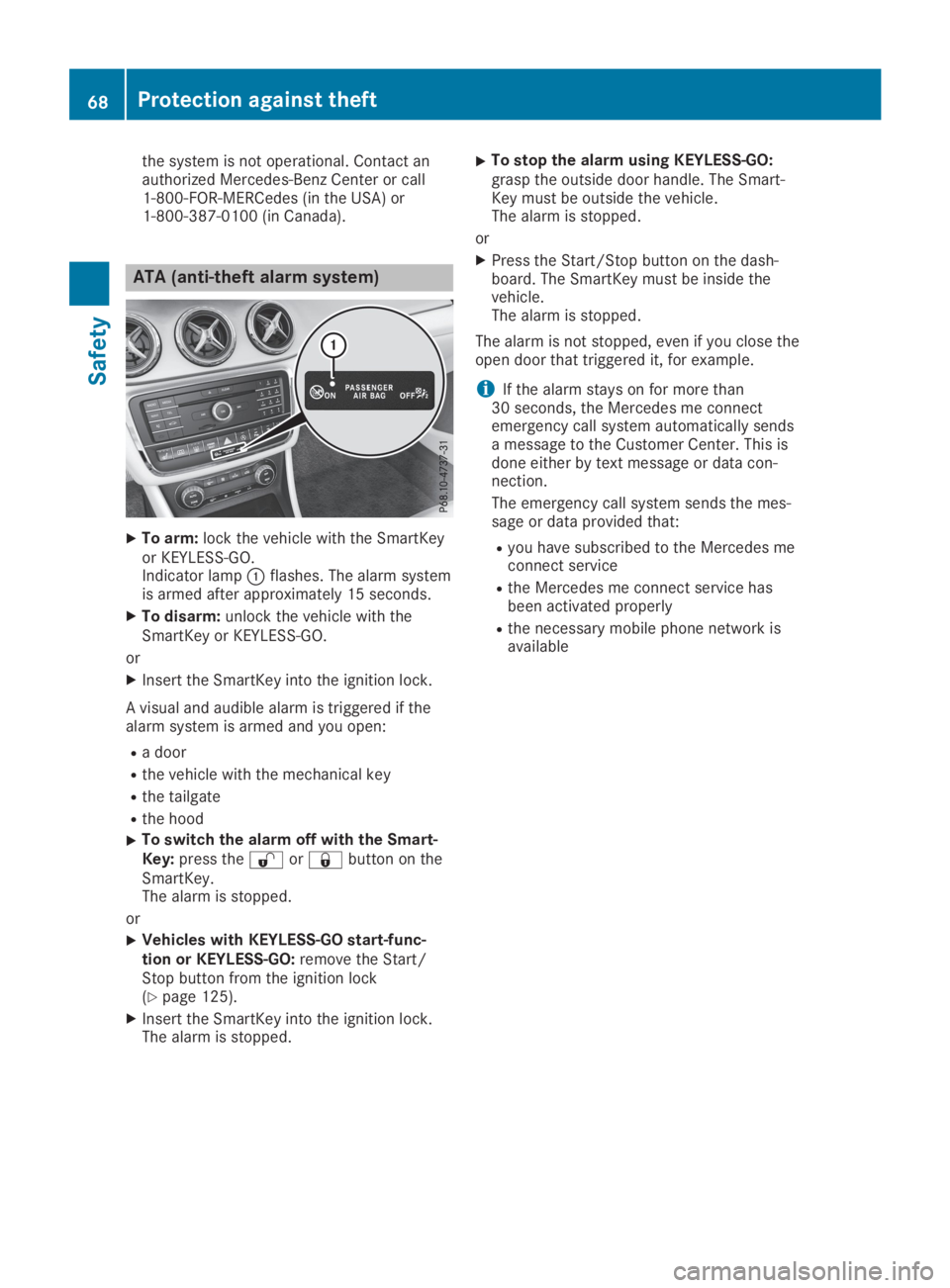
the system is not operational. Contact anauthorized Mercedes-Benz Center or call1-800-FOR-MERCedes (in the USA) or1-800-387-0100 (in Canada).
ATA (anti-theft alarm system)
XTo arm:lock the vehicle with the SmartKeyor KEYLESS-GO.Indicator lampCflashes. The alarm systemis armed after approximately 15 seconds.
XTo disarm:unlock the vehicle with theSmartKey or KEYLESS-GO.
or
XInsert the SmartKey into the ignition lock.
A visual and audible alarm is triggered if thealarm system is armed and you open:
Ra door
Rthe vehicle with the mechanical key
Rthe tailgate
Rthe hood
XTo switch the alarm off with the Smart-Key:press the6or7button on theSmartKey.The alarm is stopped.
or
XVehicles with KEYLESS-GO start-func-tion or KEYLESS-GO:remove the Start/Stop button from the ignition lock(Ypage 125).
XInsert the SmartKey into the ignition lock.The alarm is stopped.
XTo stop the alarm using KEYLESS-GO:grasp the outside door handle. The Smart-Key must be outside the vehicle.The alarm is stopped.
or
XPress the Start/Stop button on the dash-board. The SmartKey must be inside thevehicle.The alarm is stopped.
The alarm is not stopped, even if you close theopen door that triggered it, for example.
iIf the alarm stays on for more than30 seconds, the Mercedes me connectemergency call system automatically sendsa message to the Customer Center. This isdone either by text message or data con-nection.
The emergency call system sends the mes-sage or data provided that:
Ryou have subscribed to the Mercedes meconnect service
Rthe Mercedes me connect service hasbeen activated properly
Rthe necessary mobile phone network isavailable
68Protection against theft
Safety
Page 71 of 346
SmartKey
Important safety notes
GWARNING
If children are left unsupervised in the vehi-
cle, they could:
Roperate the vehicle's equipment
Additionally, children could set the vehicle in
motion if, for example, they:
Rrelease the parking brake
Rshift the automatic transmission out of
park position]
Rstart the engine
There is a risk of an accident and injury.
Never leave children or animals unattended
in the vehicle.
When leaving the vehicle, always take the
SmartKey with you and lock the vehicle. This
also applies for the Digital Vehicle Key if the
"Digital Vehicle Key" function is activated via
Mercedes me connect.
GWARNING
If you attach heavy or large objects to the
SmartKey, the SmartKey could be uninten-
tionally turned in the ignition lock. This
could cause the engine to be switched off.
There is a risk of an accident.
Do not attach any heavy or large objects to
the SmartKey. Remove any bulky key rings
before inserting the SmartKey into the igni-
tion lock.
!Keep the SmartKey away from strong mag-netic fields. Otherwise, the remote controlfunction could be affected.
Strong magnetic fields can occur in thevicinity of powerful electrical installations.
Do not keep the SmartKey:
Rwith electronic devices, e.g. a mobile phoneor another SmartKey
Rwith metallic objects, e.g. coins or metal foil
Rinside metallic objects, e.g. a metal case
Vehicles with KEYLESS-GO start function:do not keep the SmartKey in the cargo com-
partment. Otherwise, the SmartKey may notbe detected, e.g. when starting the engineusing the Start/Stop button.
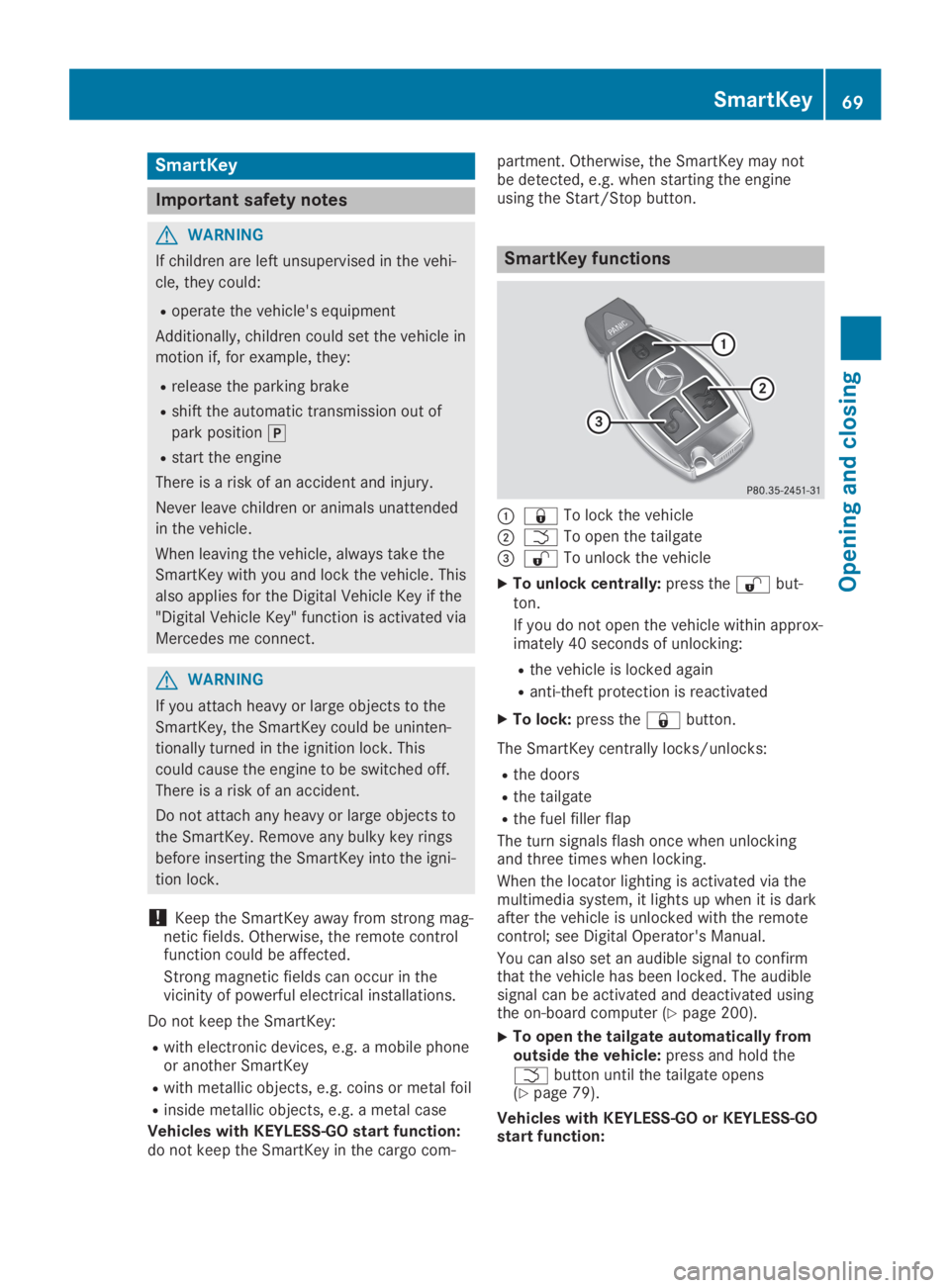
SmartKey functions
C7To lock the vehicle
DTTo open the tailgate