buttons MERCEDES-BENZ GLA 2019 Owners Manual
[x] Cancel search | Manufacturer: MERCEDES-BENZ, Model Year: 2019, Model line: GLA, Model: MERCEDES-BENZ GLA 2019Pages: 346, PDF Size: 16.66 MB
Page 8 of 346
Transmission position display
(DIRECT SELECT lever) ...................134
Transmission positions .................. 137
Automatic transmission emer-
gency mode....................................... 142
B
Back button....................................... 243
Backup lamp
Display message ............................ 215
Bag hook............................................ 255
BAS (Brake Assist System)................. 61
Basic settings
see Settings
Battery (SmartKey)
Checking .......................................... 72
Important safety notes .................... 72
Replacing ......................................... 72
Battery (vehicle)
Charging ........................................ 294
Display message ............................ 218
Important safety notes .................. 292
Jump starting ................................. 295
Replacing ....................................... 295
Belt
see Seat belts
Belt warning......................................... 44
Blind Spot Assist
Activating/deactivating (on-
board computer) ............................ 198
Display message ............................ 220
Notes/function .............................. 185
Blower
see Climate control
Bluetooth®
Searching for a mobile phone ........246
Searching for a mobile phone
(device manager) ........................... 247
see also Digital Operator's Man-
ual ..................................................242
Telephony ...................................... 246
Brake Assist System
see BAS (Brake Assist System)
Brake assistance
see BAS (Brake Assist System)
Brake fluid
Display message ............................ 209
Notes ............................................. 337
Brake force distribution
see EBD (electronic brake force
distribution)
Brake lamp
Replacing bulbs .............................108
Brake lamps
Display message ............................ 215
Brakes
ABS ..................................................60
BAS .................................................. 61
Brake fluid (notes) ......................... 337
Display message............................ 204
EBD .................................................. 67
Hill start assist ............................... 128
HOLD function ............................... 165
Important safety notes .................. 150
Maintenance .................................. 151
Parking brake ................................ 146
Riding tips ...................................... 150
Situation-dependent braking
assistance ........................................ 63
Warning lamp ................................. 232
Breakdown assistance
Where will I find...? ........................ 286
see Flat tire
see Tow-starting
see Towing away
Brightness control (instrument
cluster lighting)................................... 32
Buttons on the steering wheel......... 189
C
Calling up a malfunction
see Display messages
Car
see Vehicle
Care
Car wash ........................................ 279
Carpets .......................................... 285
Display ........................................... 283
Exhaust pipe .................................. 283
Exterior lights ................................ 282
Gear or selector lever .................... 284
Interior ........................................... 283
Matte finish ................................... 280
Notes............................................. 278
6Index
Page 21 of 346
Segments ...................................... 188
Selecting the display unit............... 198
SPORT handling mode
Deactivating/activating
(Mercedes-AMG vehicles) ................ 65
Warning lamp ................................. 236
Standing lamps
Display message ............................ 215
Switching on/off........................... 103
Start-off assist
Activating ....................................... 166
Important safety notes .................. 166
Start/Stop button
Removing ....................................... 126
Starting the engine ........................ 127
Start/stop function
see ECO start/stop function
Starting (engine)................................ 126
STEER CONTROL.................................. 67
Steering
Display message ............................ 228
Steering assistant STEER CON-
TROL
see STEER CONTROL
Steering wheel
Adjusting (manually) ........................ 97
Button overview ............................... 33
Buttons (on-board computer) ......... 189
Cleaning ......................................... 284
Important safety notes .................... 97
Paddle shifters ............................... 140
Steering wheel paddle shifters........ 140
Stopwatch (RACETIMER)................... 201
Stowage compartments
Armrest (front) ............................... 251
Armrest (under) ............................. 252
Center console .............................. 251
Center console (rear) ..................... 252
Cup holders ................................... 257
Eyeglasses compartment ............... 251
Glove box ....................................... 251
Important safety information ......... 250
Map pockets .................................. 252
Stowage net ................................... 252
Stowage net....................................... 252
Summer opening
see Convenience opening feature
Summer tires..................................... 306
Sun visor............................................ 258
Suspension setting
AMG adaptive sport suspension
system ........................................... 168
SVHC (Substances of Very High
Concern)............................................... 28
Switching air-recirculation mode
on/off................................................. 122
Switching on media mode
Via the device list .......................... 248
T
Tachometer........................................ 188
Tail lamps
see Lights
Tailgate
Display message ............................ 227
Emergency unlocking ....................... 82
Important safety notes .................... 77
Limiting the opening angle ............... 82
Obstruction detection...................... 78
Opening dimensions ...................... 339
Opening/closing (from outside) ....... 78
Opening/closing automatically
from inside ....................................... 81
Opening/closing automatically
from outside .................................... 79
Tank
see Fuel tank
Tank content
Fuel gauge ....................................... 32
Technical data
Capacities ...................................... 334
Information .................................... 332
Tires/wheels ................................. 329
Vehicle data ................................... 339
Telephone
Accepting a call (multifunction
steering wheel) .............................. 196
Authorizing a mobile phone (con-
necting) ......................................... 246
Authorizing a mobile phone via
the device manager (connecting) ... 247
Connecting a mobile phone
(device manager) ........................... 247
Index19
Page 61 of 346
GWARNING
If persons, particularly children are subjec-
ted to prolonged exposure to extreme heat
or cold, there is a risk of injury, possibly
even fatal. Never leave children unattended
in the vehicle.
GWARNING
If the child restraint system is subjected to
direct sunlight, parts may get very hot. Chil-
dren may burn themselves on these parts,
particularly on the metal parts of the child
restraint system. There is a risk of injury.
If you leave the vehicle, taking the child with
you, always ensure that the child restraint
system is not exposed to direct sunlight.
Protect it with a blanket, for example. If the
child restraint system has been exposed to
direct sunlight, let it cool down before secur-
ing the child in it. Never leave children unat-
tended in the vehicle.
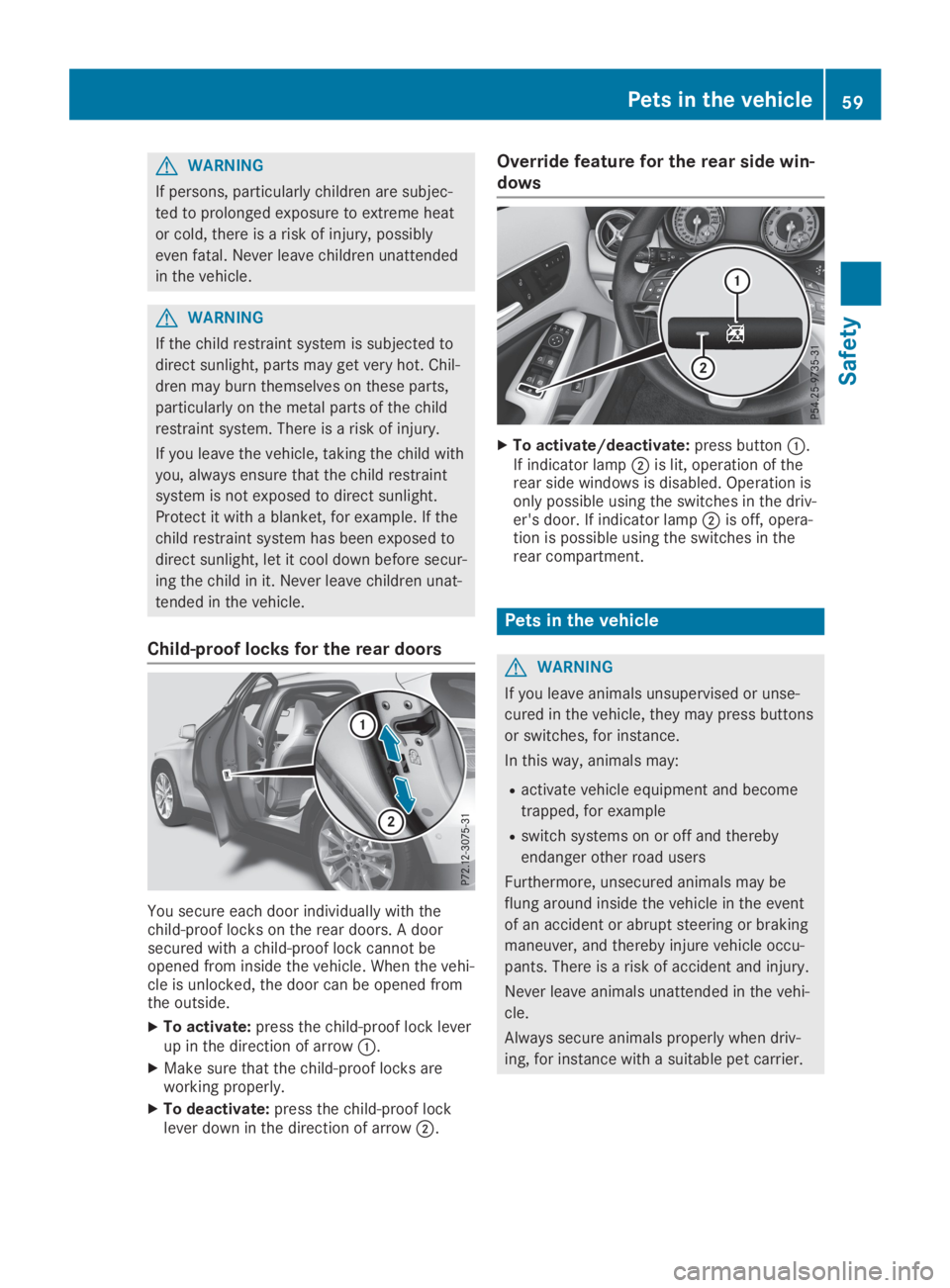
Child-proof locks for the rear doors
You secure each door individually with thechild-proof locks on the rear doors. A doorsecured with a child-proof lock cannot beopened from inside the vehicle. When the vehi-cle is unlocked, the door can be opened fromthe outside.
XTo activate:press the child-proof lock leverup in the direction of arrowC.
XMake sure that the child-proof locks areworking properly.
XTo deactivate:press the child-proof locklever down in the direction of arrowD.
Override feature for the rear side win-
dows
XTo activate/deactivate:press buttonC.If indicator lampDis lit, operation of therear side windows is disabled. Operation isonly possible using the switches in the driv-er's door. If indicator lampDis off, opera-tion is possible using the switches in therear compartment.
Pets in the vehicle
GWARNING
If you leave animals unsupervised or unse-
cured in the vehicle, they may press buttons
or switches, for instance.
In this way, animals may:
Ractivate vehicle equipment and become
trapped, for example
Rswitch systems on or off and thereby
endanger other road users
Furthermore, unsecured animals may be
flung around inside the vehicle in the event
of an accident or abrupt steering or braking
maneuver, and thereby injure vehicle occu-
pants. There is a risk of accident and injury.
Never leave animals unattended in the vehi-
cle.
Always secure animals properly when driv-
ing, for instance with a suitable pet carrier.
Pets in the vehicle59
Safety
Z
Page 73 of 346
KEYLESS-GO start function
General notes
Bear in mind that the engine can be started byany of the vehicle occupants if there is aSmartKey in the vehicle.
Changing the settings of the locking
system
You can change the settings of the lockingsystem. This means that only the driver's doorand the fuel filler flap are unlocked when thevehicle is unlocked. This is useful if you fre-quently travel on your own.
XTo change the setting:press and hold the6and7buttons simultaneously forapproximately six seconds until the batteryindicator lamp flashes twice (Ypage 72).
If the setting of the locking system is changedwithin the signal range of the vehicle, pressingthe7or6button:
Rlocks or
Runlocks the vehicle
The SmartKey now functions as follows:
XTo unlock:press the6button once.
XTo unlock centrally:press the6buttontwice.
XTo lock centrally:press the7button.
The KEYLESS-GO function is changed as fol-lows:
XTo unlock the driver's door:touch theinner surface of the door handle on the driv-er's door.
XTo unlock centrally:touch the inner sur-face of the door handle on the front-passenger door or the rear door.
XTo lock centrally:touch the outer sensorsurface on one of the door handles.
XTo restore the factory settings:press andhold the6and7buttons simultane-ously for approximately six seconds until thebattery check lamp flashes twice(Ypage 72).
Mechanical key
General notes
If the vehicle can no longer be locked orunlocked with the SmartKey or KEYLESS-GO,use the mechanical key.
If you use the mechanical key to unlock andopen the driver's door or the trunk lid, theanti-theft alarm system will be triggered(Ypage 68).
There are several ways to turn off the alarm:
XTo deactivate the alarm with the key:press the6or7button on the key.
or
XInsert the SmartKey into the ignition lock.
or
XTo deactivate the alarm with KEYLESS-GO:press the Start/Stop button in the igni-tion lock. The SmartKey must be in the vehi-cle.
or
XLock or unlock the vehicle using KEYLESS-GO. The SmartKey must be outside the vehi-cle.
If you unlock the vehicle using the mechanicalkey, the fuel filler flap will not be unlockedautomatically.
XTo unlock the fuel filler flap:insert theSmartKey into the ignition lock.
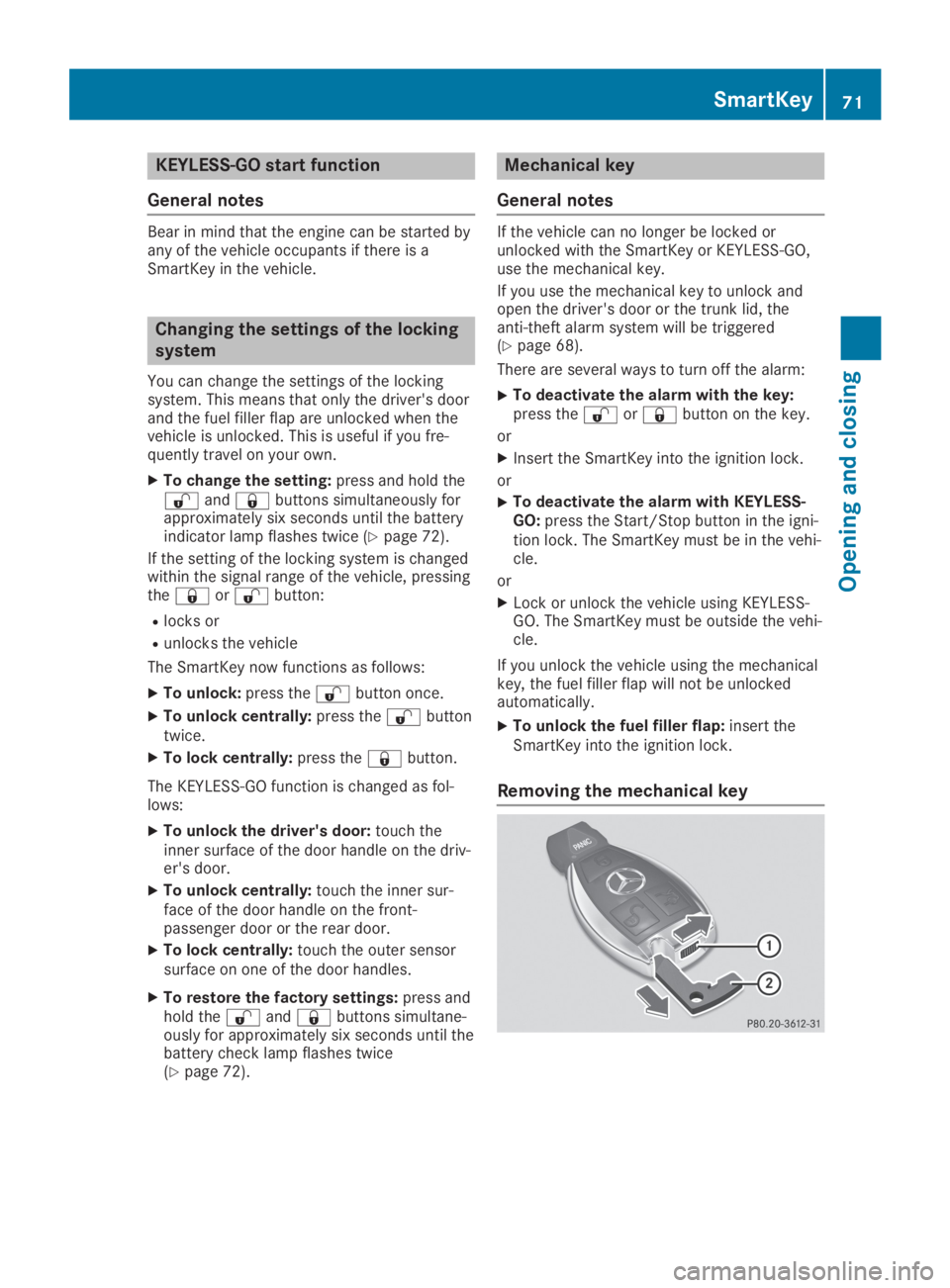
Removing the mechanical key
SmartKey71
Opening and closing
Z
Page 78 of 346
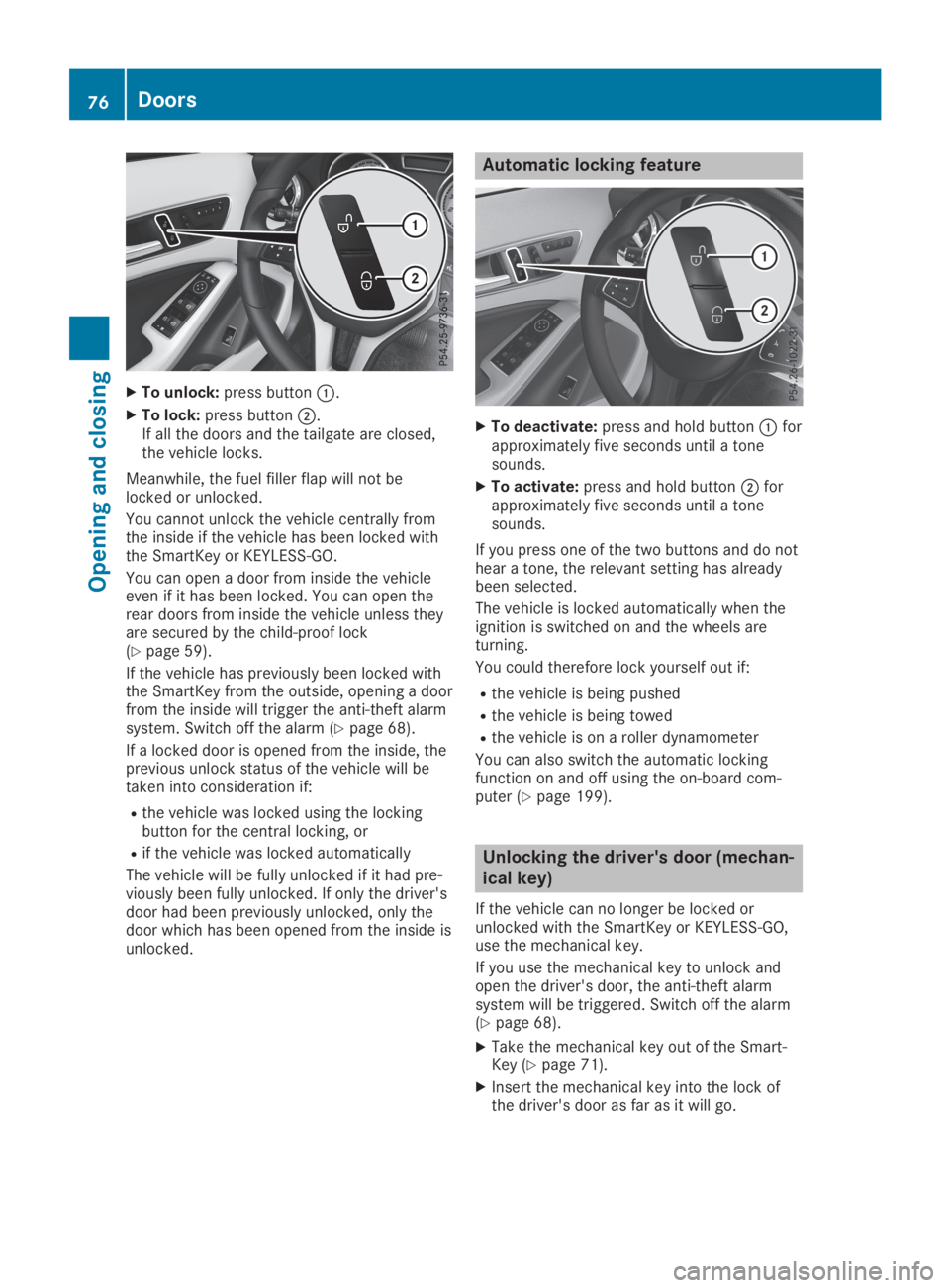
XTo unlock:press buttonC.
XTo lock:press buttonD.If all the doors and the tailgate are closed,the vehicle locks.
Meanwhile, the fuel filler flap will not belocked or unlocked.
You cannot unlock the vehicle centrally fromthe inside if the vehicle has been locked withthe SmartKey or KEYLESS-GO.
You can open a door from inside the vehicleeven if it has been locked. You can open therear doors from inside the vehicle unless theyare secured by the child-proof lock(Ypage 59).
If the vehicle has previously been locked withthe SmartKey from the outside, opening a doorfrom the inside will trigger the anti-theft alarmsystem. Switch off the alarm (Ypage 68).
If a locked door is opened from the inside, theprevious unlock status of the vehicle will betaken into consideration if:
Rthe vehicle was locked using the lockingbutton for the central locking, or
Rif the vehicle was locked automatically
The vehicle will be fully unlocked if it had pre-viously been fully unlocked. If only the driver'sdoor had been previously unlocked, only thedoor which has been opened from the inside isunlocked.
Automatic locking feature
XTo deactivate:press and hold buttonCforapproximately five seconds until a tonesounds.
XTo activate:press and hold buttonDforapproximately five seconds until a tonesounds.
If you press one of the two buttons and do nothear a tone, the relevant setting has alreadybeen selected.
The vehicle is locked automatically when theignition is switched on and the wheels areturning.
You could therefore lock yourself out if:
Rthe vehicle is being pushed
Rthe vehicle is being towed
Rthe vehicle is on a roller dynamometer
You can also switch the automatic lockingfunction on and off using the on-board com-puter (Ypage 199).
Unlocking the driver's door (mechan-
ical key)
If the vehicle can no longer be locked orunlocked with the SmartKey or KEYLESS-GO,use the mechanical key.
If you use the mechanical key to unlock andopen the driver's door, the anti-theft alarmsystem will be triggered. Switch off the alarm(Ypage 68).
XTake the mechanical key out of the Smart-Key (Ypage 71).
XInsert the mechanical key into the lock ofthe driver's door as far as it will go.
76Doors
Opening and closing
Page 95 of 346
GWARNING
If the driver's seat is not engaged, it could
move forwards as far as the next catch dur-
ing movement such as braking or abrupt
changes of direction. As a result, you would
be pushed against your seat belt by the
unsecured driver's seat.
This could cause you to lose control of the
vehicle. The seat belt cannot protect as
intended and could result in additional
injury.
There is a risk of an accident and injury.
Before every journey, make sure that the
driver's seat is fully engaged.
Observe the safety notes on "Air bags"(Ypage 44) and "Children in the vehicle"(Ypage 53).
GWARNING
If the driver's seat is not engaged, it could
move unexpectedly while the vehicle is in
motion. This could cause you to lose control
of the vehicle. There is a risk of an accident.
Always make sure that the driver's seat is
engaged before starting the vehicle.
GWARNING
You could lose control of your vehicle if you
do the following while driving:
Radjust the driver's seat, head restraint,
steering wheel or mirrors
Rfasten the seat belt
There is a risk of an accident.
Adjust the driver's seat, head restraint,
steering wheel and mirror and fasten your
seat belt before starting the engine.
GWARNING
If you adjust the seat height carelessly, you
or other vehicle occupants could be trapped
and thereby injured. Children in particular
could accidentally press the electrical seat
adjustment buttons and become trapped.
There is a risk of injury.
While moving the seats, make sure that your
hands or other body parts do not get under
the lever assembly of the seat adjustment
system.
!To prevent damage to the seats and theseat heating, observe the following notes:
RDo not spill liquids onto the seats. Dry theseats as soon as possible if liquid doesget spilled on the seats.
RIf the seat covers are damp or wet, do notswitch on the seat heating. Also, do notuse the seat heating to dry the seats.
RClean the seat covers as recommended;see the "Interior care" section.
RDo not transport heavy loads on theseats. Do not place pointed objects onthe seat cushions such as knives, nails ortools. Where possible, use the seats onlyfor carrying passengers.
RWhen operating the seat heating, do notcover the seats with insulating materials,e.g. blankets, coats, bags, protective cov-ers, child seats or booster seats.
RWhen the seat heating is switched on, theseat surface can be damaged as a resultof objects being placed on the seats, forexample, seat cushions, child seats andprotective covers not approved byMercedes-Benz.
!Make sure that there are no objects in thefootwell under or behind the seats whenmoving the seats back. There is a risk thatthe seats and/or the objects could be dam-aged.
iFurther related subjects:
RCargo compartment enlargement (foldingdown the rear seats) (Ypage 253)
Seats93
Seats, steering wheel and mirrors
Z
Page 270 of 346
You can specify up to ten areas simultane-ously. Different settings are possible for eacharea.
USA only: these settings can be called upunder "Owners Online" at http://www.mbusa.com.
Alternatively, you can trigger an MB Info calland inform the customer service representa-tive that you wish to activate geo fencing.
Currently inactive areas can be activated bytext message.
Triggering the vehicle alarm
With this function, you can trigger the vehicle'spanic alarm via text message. An alarmsounds and the exterior lighting flashes.Depending on the setting, the panic alarmlasts five or ten seconds. Afterwards, thealarm switches off.
Garage door opener
General notes
The HomeLink®garage door opener integratedin the rear-view mirror allows you to operateup to three different door and gate systems.
Use the integrated garage door opener only ongarage doors that:
Rhave safety stop and reverse features and
Rmeet current U.S. federal safety standards
Once programed, the integrated garage dooropener in the rear-view mirror will assume thefunction of the garage door system's remotecontrol. Please also read the operating instruc-tions for the garage door system.
When programming a garage door opener,park the vehicle outside the garage. Do notleave the engine running while programming.
Certain garage door drives are incompatiblewith the integrated garage door opener. If youhave difficulty programing the integratedgarage door opener, contact a Mercedes-BenzService Center.
Alternatively, you can call the following tele-phone assistance services:
RUSA:Mercedes-Benz Customer AssistanceCenter at 1-800-FOR-MERCedes
RCanada:Customer Service at1-800-387-0100
RHomeLink®hotline 1-800-355-3515 (free ofcharge)
More information on HomeLink®and/or com-patible products is also available online athttp://www.homelink.com.
Notes on the declaration of conformity(Ypage 27).
USA: FCC ID: CB2HMIHL4
Canada: IC: 279B-HMIHL4
Important safety notes
GWARNING
When you operate or program the door with
the integrated garage door opener, persons
in the range of movement of the door may
become trapped or be struck by the door.
There is a risk of injury.
When using the integrated garage door
opener, always make sure that nobody is
within the range of movement of the door.
GDANGER
Combustion engines emit poisonous
exhaust gases such as carbon monoxide.
Inhaling these exhaust gases is hazardous to
health and can result in poisoning. There is a
risk of fatal injury. Therefore, never leave the
engine running an enclosed space without
adequate ventilation.
Programming
Programming the buttons
Pay attention to the "Important safety notes"(Ypage 268).
268Features
Stowage and features
Page 272 of 346
The signal is not detected during program-ming. Comparable with Canadian law, someU.S. garage door openers also feature a"break".
Proceed as follows:
Rif you live in Canada
Rif you have difficulties programming thegarage door opener (regardless of whereyou live) as you follow the programmingsteps.
XPress and hold one of buttonsDto