reset MERCEDES-BENZ GLA 2019 User Guide
[x] Cancel search | Manufacturer: MERCEDES-BENZ, Model Year: 2019, Model line: GLA, Model: MERCEDES-BENZ GLA 2019Pages: 346, PDF Size: 16.66 MB
Page 194 of 346
Trip menu
Standard display
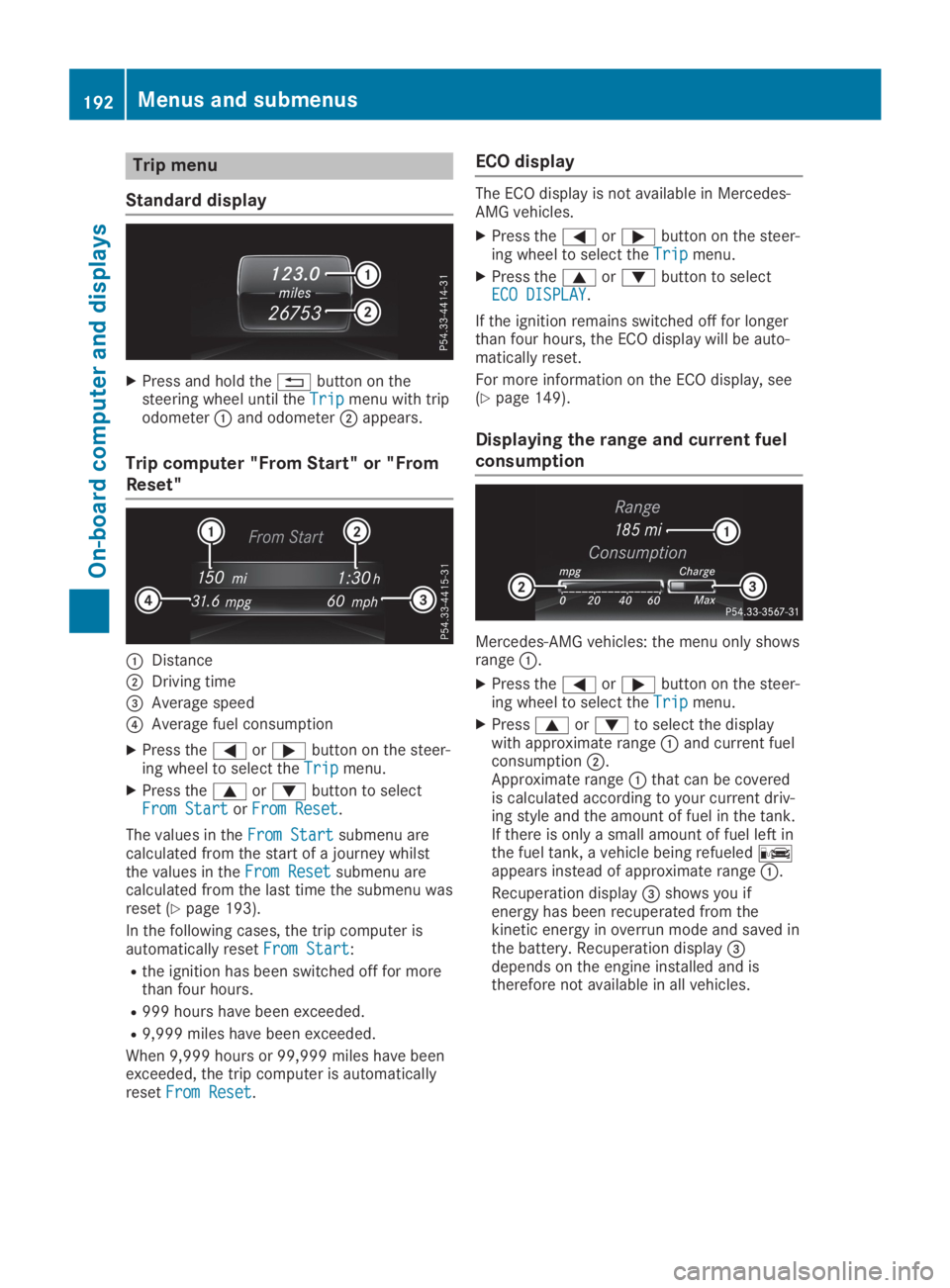
XPress and hold the8button on thesteering wheel until theTripTripmenu with tripodometerCand odometerDappears.
Trip computer "From Start" or "From
Reset"
CDistance
DDriving time
Page 197 of 346
XSwitch on the multimedia system and selectradio (see the Digital Operator's Manual).
XPress theYorebutton on the steer-ing wheel to select theAudioAudiomenu.
XTo select a preset list or station list:press and briefly hold thecordbut-ton until the preset list or station list in thedesired frequency range is shown.
XTo select a station:briefly presscord.
iSIRIUS XM satellite radio functions like anormal radio.
You can find further information on opera-tion in the "Satellite radio" section of theDigital Operator's Manual for the multimediasystem.
Operating an audio player or audio
media
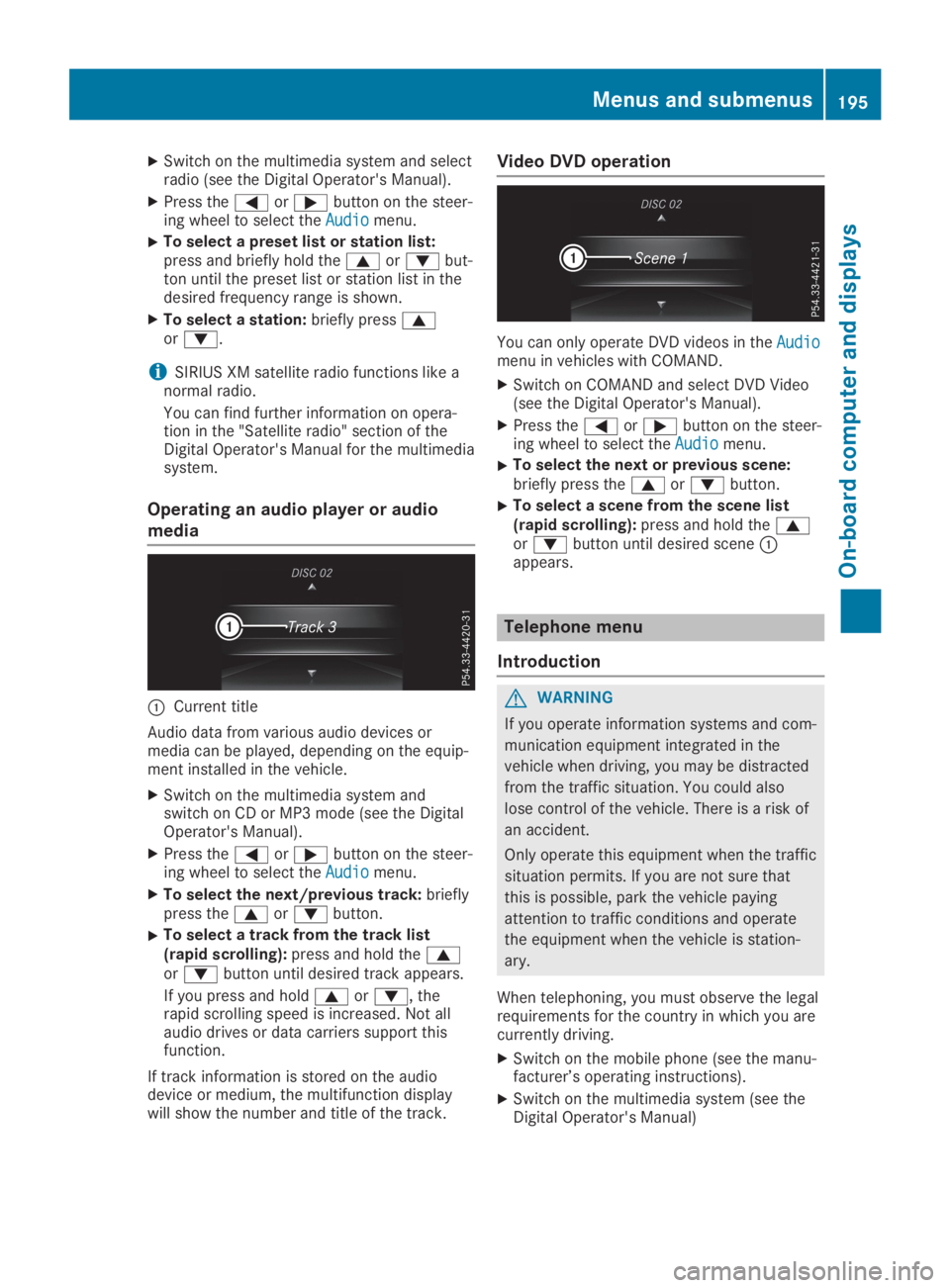
CCurrent title
Audio data from various audio devices ormedia can be played, depending on the equip-ment installed in the vehicle.
XSwitch on the multimedia system andswitch on CD or MP3 mode (see the DigitalOperator's Manual).
XPress theYorebutton on the steer-ing wheel to select theAudioAudiomenu.
XTo select the next/previous track:brieflypress thecordbutton.
XTo select a track from the track list(rapid scrolling):press and hold thecordbutton until desired track appears.
If you press and holdcord, therapid scrolling speed is increased. Not allaudio drives or data carriers support thisfunction.
If track information is stored on the audiodevice or medium, the multifunction displaywill show the number and title of the track.
Video DVD operation
You can only operate DVD videos in theAudioAudiomenu in vehicles with COMAND.
XSwitch on COMAND and select DVD Video(see the Digital Operator's Manual).
XPress theYorebutton on the steer-ing wheel to select theAudioAudiomenu.
XTo select the next or previous scene:briefly press thecordbutton.
XTo select a scene from the scene list(rapid scrolling):press and hold thecordbutton until desired sceneCappears.
Telephone menu
Introduction
GWARNING
If you operate information systems and com-
munication equipment integrated in the
vehicle when driving, you may be distracted
from the traffic situation. You could also
lose control of the vehicle. There is a risk of
an accident.
Only operate this equipment when the traffic
situation permits. If you are not sure that
this is possible, park the vehicle paying
attention to traffic conditions and operate
the equipment when the vehicle is station-
ary.
When telephoning, you must observe the legalrequirements for the country in which you arecurrently driving.
XSwitch on the mobile phone (see the manu-facturer’s operating instructions).
XSwitch on the multimedia system (see theDigital Operator's Manual)
Menus and submenus195
On-board computer and displays
Z
Page 202 of 346
XPressvto confirm.
XPress thedorcbutton to select theAutomatic Door LockAutomatic Door Lockfunction.If theAutomatic Door LockAutomatic Door Lockfunction isswitched on, the multifunction displayshows the doors in orange.
XPress thevbutton to save the setting.
If you activate theAutomatic Door LockAutomatic Door Lockfunction, the vehicle is centrally locked abovea speed of around 9 mph (15 km/h).
For further information on the automatic lock-ing feature, see (Ypage 76).
Activating/deactivating the acoustic
locking verification signal
If you switch on theAcoustic LockAcoustic Lockfunction,an acoustic signal sounds when you lock thevehicle.
XPress theYorebutton on the steer-ing wheel to select theSett.Sett.menu.
XPress thedorcbutton to select theVehicleVehiclesubmenu.
XPressvto confirm.
XPress thedorcbutton to select theAcoustic LockAcoustic Lockfunction.If theAcoustic LockAcoustic Lockfunction is activated,the multifunction display shows the7symbol in orange.
XPress thevbutton to save the setting.
Comfort
Switching the fold-in mirrors when lock-
ing feature on/off
This function is only available in Canada.
This function is only available when the vehicleis equipped with the electrical fold-in function.
When you activate theAuto. Mirror Fold‐Auto. Mirror Fold‐ingingfunction, the exterior mirrors are folded inwhen the vehicle is locked. If you unlock thevehicle and then open the driver's or front-passenger door, the exterior mirrors fold outagain.
If you have switched on theAuto. MirrorAuto. MirrorFoldingFoldingfunction and you fold in the exteriormirrors using the button on the door(Ypage 99), they will not fold out automati-cally. The exterior mirrors can then only be fol-ded out using the button on the door.
XPress theYorebutton on the steer-ing wheel to select theSett.Sett.menu.
XPress thedorcbutton to select theConvenienceConveniencesubmenu.
XPressvto confirm.
XPress thedorcbutton to select theAuto. Mirror FoldingAuto. Mirror Foldingfunction.If theAuto. Mirror FoldingAuto. Mirror Foldingfunction isswitched on, the multifunction displayshows the exterior mirror in orange.
XPress thevbutton to save the setting.
Restoring the factory settings
XPress theYorebutton on the steer-ing wheel to select theSett.Sett.menu.
XPress thedorcbutton to select theFactory SettingFactory Settingsubmenu.
XPressvto confirm.TheReset All Settings?Reset All Settings?functionappears.
XPress thedorcbutton to selectNoNoorYesYes.
XPress thevbutton to confirm the selec-tion.If you have selectedYesYes, the multifunctiondisplay shows a confirmation message.
For safety reasons, theDaytime RunningDaytime RunningLightsLightsfunction in theLightLightsubmenu is onlyreset if the vehicle is stationary.
AMG menu (Mercedes-AMG vehicles)
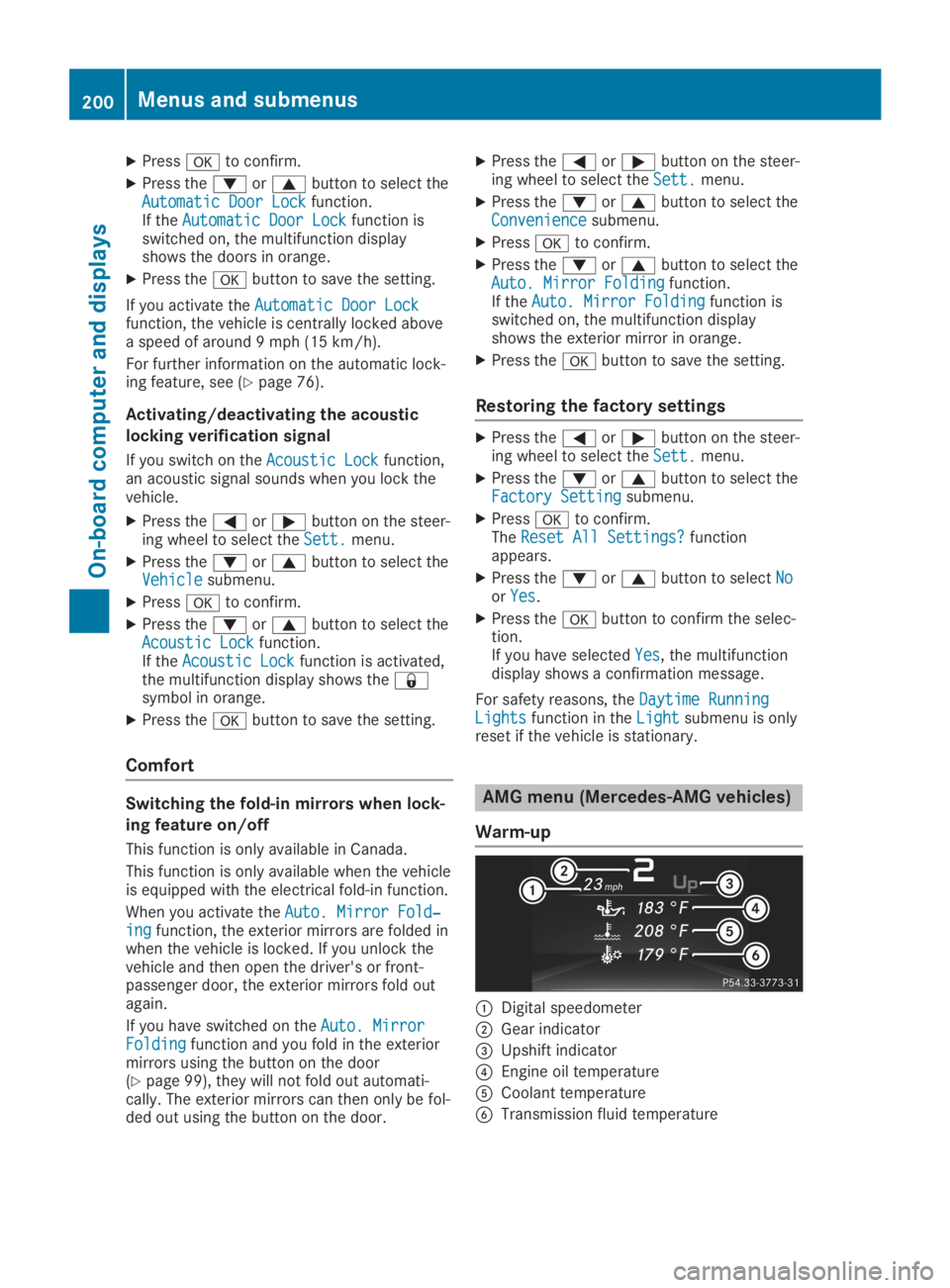
Warm-up
CDigital speedometer
DGear indicator
Page 280 of 346
Displaying service messages
XSwitch on the ignition.
XPress theYorebutton to select theServ.Serv.menu.
XPress thecordbutton to select theASSYST PLUSASSYST PLUSsubmenu and confirm bypressing thevbutton.The service due date appears in the multi-function display.
Information about Service
Resetting the ASSYST PLUS service
interval display
!If the ASSYST PLUS service interval dis-play has been inadvertently reset, this set-ting can be corrected at a qualified special-ist workshop.
Have service work carried out as describedin the Maintenance Booklet. This may other-wise lead to increased wear and damage tothe major assemblies or the vehicle.
A qualified specialist workshop, e.g. an author-ized Mercedes-Benz Center, will reset theASSYST PLUS service interval display after theservice work has been carried out. You canalso obtain further information on mainte-nance work, for example.
Special service requirements
The specified maintenance interval takes onlythe normal operation of the vehicle intoaccount. Under arduous operating conditionsor increased load on the vehicle, maintenancework must be carried out more frequently, forexample:
Rregular city driving with frequent intermedi-ate stops
Rif the vehicle is primarily used to travel shortdistances
Ruse in mountainous terrain or on poor roadsurfaces
Rif the engine is often left idling for long peri-ods
Rin particularly dusty conditions, or if air-recirculation mode is frequently used
In these or similar operating conditions, havethe interior filter, engine air cleaner, engine oil
and oil filter, for example, changed more fre-quently. Under arduous operating conditions,the tires must be checked more often. Furtherinformation can be obtained at a qualified spe-cialist workshop, e.g. an authorized Mercedes-Benz Center.
Driving abroad
An extensive Mercedes-Benz Service networkis also available in other countries. You canobtain further information from any authorizedMercedes-Benz Center.
Care
General notes
HEnvironmental note
Dispose of empty packaging and cleaning
cloths in an environmentally responsible
manner.
!When cleaning your car, do not use:
Rdry, coarse or hard cloths
Rabrasive cleaning agents
Rsolvents
Rcleaning agents containing solvents
Do not scrub.
Do not touch the surfaces and films withhard objects, e.g. rings or ice scrapers. Oth-erwise, you may scratch or damage the sur-faces and films.
!Do not park your vehicle for a long periodof time directly after cleaning, particularlyafter cleaning the wheel rim with wheelcleaner. Wheel cleaner can lead to theincreased corrosion of the brake discs andpads. Therefore, drive for a few minutesafter cleaning. By heating up the brakes, thebrake discs and pads dry. The vehicle canthen be parked for a long period of time.
Regular care of your vehicle is a condition forretaining the quality in the long term.
Use care products and cleaning agents recom-mended and approved by Mercedes-Benz.
278Care
Maintenance and care
Page 296 of 346
Wear eye protection.
Keep children away.
Observe this Operator's Manual.
For safety reasons, Mercedes-Benz recom-mends that you only use batteries which havebeen tested and approved for your vehicle byMercedes-Benz. These batteries provideincreased impact protection to prevent vehicleoccupants from suffering acid burns shouldthe battery be damaged in the event of anaccident.
In order for the battery to achieve the maxi-mum possible service life, it must always besufficiently charged.
Like other batteries, the vehicle battery maydischarge over time if you do not use the vehi-cle. In this case, have the battery disconnec-ted at a qualified specialist workshop. You canalso charge the battery with a charger recom-mended by Mercedes-Benz. Contact a quali-fied specialist workshop for further informa-tion.
Have the battery condition of charge checkedmore frequently if you use the vehicle mainlyfor short trips or if you leave it standing idlefor a lengthy period. Consult a qualified spe-cialist workshop if you wish to leave your vehi-cle parked for a long period of time.
Only replace a battery with a battery that hasbeen recommended by Mercedes-Benz.
Remove the SmartKey if you park the vehicleand do not require any electrical consumers.The vehicle will then use very little energy,thus conserving battery power.
If the power supply has been interrupted, e.g.if you reconnect the battery, you will have to:
Rset the clock using the multimedia system(see the Digital Operator's Manual)
Rreset the function for folding the exteriormirrors in/out automatically, by folding themirrors out once (Ypage 99)
Charging the battery
GWARNING
During charging and jump-starting, explosive
gases can escape from the battery. There is
a risk of an explosion.
Particularly avoid fire, open flames, creating
sparks and smoking. Ensure there is suffi-
cient ventilation while charging and jump-
starting. Do not lean over a battery.
GWARNING
Battery acid is caustic. There is a risk of
injury.
Avoid contact with skin, eyes or clothing. Do
not inhale any battery gases. Do not lean
over the battery. Keep children away from
batteries. Wash away battery acid immedi-
ately with plenty of clean water and seek
medical attention.
GWARNING
A discharged battery can freeze at tempera-
tures below freezing point. When jump-start-
ing the vehicle or charging the battery,
gases can escape from the battery. There is
a risk of an explosion.
Allow the frozen battery to thaw out before
charging it or jump-starting.
!Only use battery chargers with a maximumcharging voltage of 14.8 V.
!Only charge the battery using the jump-starting connection point.
The jump-starting connection point is in theengine compartment (Ypage 295).
XOpen the hood.
XConnect the battery charger to the positiveterminal and ground point in the same orderas when connecting the donor battery in thejump-starting procedure (Ypage 295).
If the indicator/warning lamps do not light upin the instrument cluster at low temperatures,it is very likely that the discharged battery hasfrozen. In this case you may neither jump-startthe vehicle nor charge the battery. The servicelife of a thawed-out battery may be shorter.The starting characteristics can be impaired,
294Battery (vehicle)
Roadside Assistance
Page 302 of 346
![MERCEDES-BENZ GLA 2019 User Guide XWhen the vehicle is stationary, depress thebrake pedal and keep it depressed.
XShift the automatic transmission to position].
XRelease the brake pedal.
XRelease the electric parking brake.
XSwitch o](/img/4/59079/w960_59079-301.png "MERCEDES-BENZ GLA 2019 User Guide XWhen the vehicle is stationary, depress thebrake pedal and keep it depressed.
XShift the automatic transmission to position].
XRelease the brake pedal.
XRelease the electric parking brake.
XSwitch o")
XWhen the vehicle is stationary, depress thebrake pedal and keep it depressed.
XShift the automatic transmission to position].
XRelease the brake pedal.
XRelease the electric parking brake.
XSwitch off the automatic locking(Ypage 199).
XSwitch on the hazard warning lamps(Ypage 104).
XTurn the SmartKey in the ignition lock topositionZand leave the SmartKey in theignition lock.
Towing a vehicle with both axles on
the ground
It is important that you observe the safetyinstructions when towing away your vehicle(Ypage 298).
XOn vehicles with KEYLESS-GO or theKEYLESS-GO start function:you must usethe SmartKey instead of the Start/Stop but-ton (Ypage 126).
The automatic transmission automaticallyshifts to position]when you open the driv-er's or front-passenger door or when youremove the SmartKey from the ignition lock. Inorder to ensure that the automatic transmis-sion stays in position\\when towing awaythe vehicle, you must observe the followingpoints:
XMake sure that the vehicle is stationary.
XTurn the SmartKey to positionHin the igni-tion lock.
XDepress and hold the brake pedal.
XShift the automatic transmission to position\\.
XLeave the SmartKey in positionHin theignition lock.
XRelease the brake pedal.
XRelease the electric parking brake.
XSwitch on the hazard warning lamps(Ypage 104).
iIn order to signal a change of directionwhen towing the vehicle with the hazardwarning lamps switched on, use the combi-nation switch as usual. In this case, only theindicator lamps for the direction of travel
flash. After resetting the combinationswitch, the hazard warning lamp startsflashing again.
Permitted towing methods
Mercedes-Benz recommends transporting yourvehicle in the case of a breakdown, rather thantowing it away.
When towing away, use a towing rope or atowing bar with both axles on the ground. Donot use any tow bar systems.
Transporting the vehicle
Vehicles with automatic transmission
!When the vehicle is loaded for transport,the front and rear axles must be stationaryand on the same transportation vehicle.Positioning over the connection point of thetransport vehicle is not permitted. The drivetrain may otherwise be damaged.
All vehicles
!You may only secure the vehicle by thewheels, not by parts of the vehicle such asaxle or steering components. Otherwise, thevehicle could be damaged.
XTurn the SmartKey to positionHin the igni-tion lock (Ypage 125).
XShift the transmission to position\\.
As soon as the vehicle has been loaded:
XPrevent the vehicle from rolling away byapplying the electric parking brake.
XShift the transmission to position].
300Towing and tow-starting
Roadside Assistance
Page 311 of 346
If the tire pressures have been set to the lowervalues for lighter loads and/or lower roadspeeds, the pressures should be reset to thehigher values:
Rif you want to drive with an increased loadand/or
Rif you want to drive at higher speeds
iThe tire pressures for increased loadsand/or higher road speeds, shown in thetire pressure table, may have a negativeeffect on driving comfort.
If the tire pressure is not set correctly, this canlead to an excessive build-up of heat and asudden loss of pressure.
For more information, contact a qualified spe-cialist workshop.
Important notes on tire pressure
GWARNING
If the tire pressure drops repeatedly, the
wheel, valve or tire may be damaged. Tire
pressure that is too low may result in a tire
blow-out. There is a risk of an accident.
RCheck the tire for foreign objects.
RCheck whether the wheel is losing air or
the valve is leaking.
If you are unable to rectify the damage, con-
tact a qualified specialist workshop.
GWARNING
If you fit unsuitable accessories onto tire
valves, the tire valves may be overloaded
and malfunction, which can cause tire pres-
sure loss. Due to their design, retrofitted tire
pressure monitors keep the tire valve open.
This can also result in tire pressure loss.
There is a risk of an accident.
Only screw the standard valve cap or other
valve caps approved by Mercedes-Benz for
your vehicle onto the tire valve.
Use a suitable pressure gauge to check thetire pressure. The outer appearance of a tiredoes not permit any reliable conclusion aboutthe tire pressure. On vehicles equipped withthe electronic tire pressure monitor, the tire
pressure can be checked in the on-board com-puter.
The tire temperature and pressure increasewhen the vehicle is in motion. This is depend-ent on the driving speed and the load.
Therefore, you should only correct tire pres-sures when the tires are cold.
The tires are cold:
Rif the vehicle has been parked with the tiresout of direct sunlight for at least three hoursand
Rif the vehicle has been driven less than1 mile (1.6 km)
The tire temperature changes depending onthe outside temperature, the vehicle speedand the tire load. If the tire temperaturechanges by 18 ‡ (10 †), the tire pressurechanges by approximately 10 kPa (0.1 bar/1.5 psi). Take this into account when checkingthe pressure of warm tires. Only correct thetire pressure if it is too low for the currentoperating conditions. If you check the tirepressure when the tires are warm, the result-ing value will be higher than if the tires werecold. This is normal. Do not reduce the tirepressure to the value specified for cold tires.The tire pressure would otherwise be too low.
Observe the recommended tire pressures forcold tires:
Ron the Tire and Loading Information placardon the B-pillar on the driver's side
Rin the tire pressure table in the fuel filler flap(Ypage 144)
Underinflated or overinflated tires
Underinflated tires
GWARNING
Tires with pressure that is too low can over-
heat and burst as a consequence. In addi-
tion, they also suffer from excessive and/or
irregular wear, which can severely impair the
braking properties and the driving character-
istics. There is a risk of an accident.
Avoid tire pressures that are too low in all
the tires, including the spare wheel.
Tire pressure309
Wheels and tires
Z