ignition MERCEDES-BENZ GLA 2019 Owner's Manual
[x] Cancel search | Manufacturer: MERCEDES-BENZ, Model Year: 2019, Model line: GLA, Model: MERCEDES-BENZ GLA 2019Pages: 346, PDF Size: 16.66 MB
Page 114 of 346
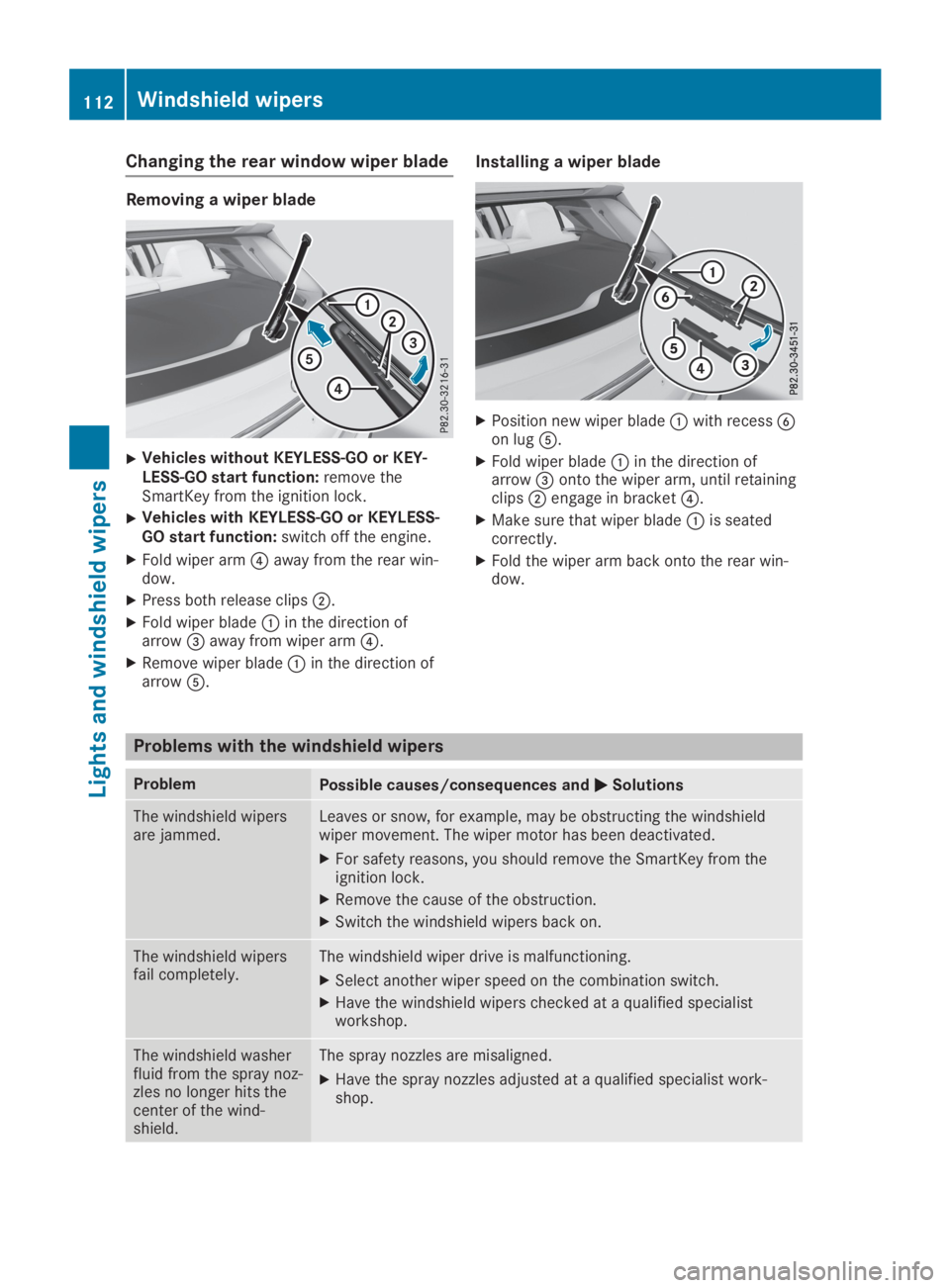
Changing the rear window wiper blade
Removing a wiper blade
XVehicles without KEYLESS-GO or KEY-LESS-GO start function:remove theSmartKey from the ignition lock.
XVehicles with KEYLESS-GO or KEYLESS-GO start function:switch off the engine.
XFold wiper arm
Page 115 of 346
Overview of climate control systems
General notes
Observe the settings recommended on the fol-lowing pages. The windows could otherwisefog up.
To prevent the windows from fogging up:
Rswitch off climate control only briefly
Rswitch on air-recirculation mode only briefly
Rswitch on the cooling with air dehumidifica-tion function
Rswitch on the defrost windshield functionbriefly, if required
The air-conditioning system or dual-zone auto-matic climate control regulates the tempera-ture and the humidity of the vehicle interiorand filters undesirable substances from theair.
The air-conditioning system or dual-zone auto-matic climate control can only be operatedwhen the engine is running. Optimum opera-tion is only achieved with the side windowsand panorama roof with power tilt/slidingpanel closed.
If you start the engine using your smartphone,the last selected climate control setting isreactivated (Ypage 84).
The residual heat function can only be activa-ted or deactivated with the ignition switchedoff (Ypage 122).
Always keep the ventilation flaps behind theside trim panel in the cargo compartmentclear (Ypage 108). Otherwise the vehicle willnot be ventilated correctly.
iVentilate the vehicle for a brief period dur-ing warm weather, e.g. using the conveni-ence opening feature (Ypage 84). This willspeed up the cooling process and thedesired interior temperature will be reachedmore quickly.
iThe integrated filter filters out most parti-cles of dust and soot and completely filtersout pollen. It also reduces gaseous pollu-tants and odors. A clogged filter reduces theamount of air supplied to the vehicle inte-rior. For this reason, you should alwaysobserve the interval for replacing the filter,which is specified in the Maintenance Book-let. As it depends on environmental condi-tions, e.g. heavy air pollution, the intervalmay be shorter than stated in the Mainte-nance Booklet.
iIt is possible that under certain circum-stances the residual heat function may beactivated automatically an hour after theSmartKey has been removed in order to drythe automatic climate control. The vehicle isthen ventilated for 30 minutes.
Overview of climate control systems113
Climate control
Page 125 of 346
It is possible to make use of the residual heatof the engine to continue heating the vehiclefor approximately 30 minutes after the enginehas been switched off. The heating timedepends on the set interior temperature.
iThe blower will run at a low speed regard-less of the airflow setting.
iIf you activate the residual heat function athigh temperatures, only the ventilation willbe activated. The blower runs at mediumspeed.
iYou cannot use the ventilation to cool thevehicle interior to a temperature lower thanthe outside temperature.
Activating/deactivating
XTurn the SmartKey to positionZin the igni-tion lock or remove it (Ypage 125).
XPress theKbutton.The indicator lamp in theKbutton lightsup or goes out.
The indicator lamp in the button indicatesthat the respective function is activated.
iResidual heat is deactivated automatically:
Rafter approximately 30 minutes
Rwhen the ignition is switched on
Rif the battery voltage drops
Air vents
Important safety notes
GWARNING
Very hot or very cold air can flow from the
air vents. This could result in burns or frost-
bite in the immediate vicinity of the air
vents. There is a risk of injury.
Make sure that all vehicle occupants always
maintain a sufficient distance to the air out-
lets. If necessary, redirect the airflow to
another area of the vehicle interior.
In order to ensure the direct flow of fresh airthrough the air vents into the vehicle interior,please observe the following notes:
Rkeep the air inlet between the windshieldand the hood free of blockages, such as ice,snow or leaves.
Rnever cover the air vents or air intake grillesin the vehicle interior.
iFor optimal climate control in the vehicle,open the air vents completely and set theadjusters to the central position.
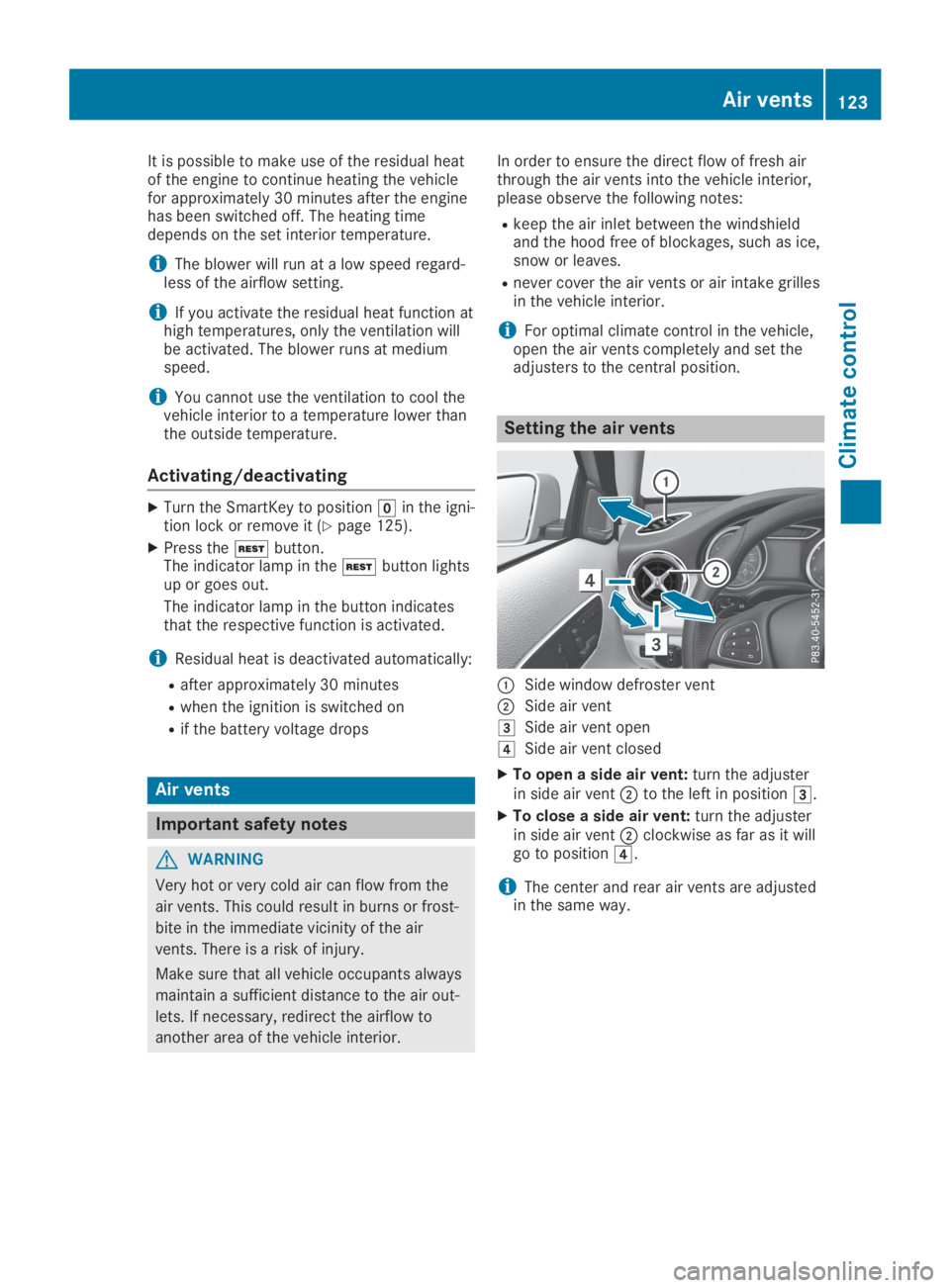
Setting the air vents
CSide window defroster vent
DSide air vent
ISide air vent open
JSide air vent closed
XTo open a side air vent:turn the adjusterin side air ventDto the left in positionI.
XTo close a side air vent:turn the adjusterin side air ventDclockwise as far as it willgo to positionJ.
iThe center and rear air vents are adjustedin the same way.
Air vents123
Climate control
Z
Page 127 of 346
There is a risk of fire and an accident.
Release the parking brake fully before driv-
ing off.
!Do not warm up the engine while station-ary. Pull away immediately. Avoid highengine speeds and full throttle until theengine has reached its operating tempera-ture.
In vehicles with automatic transmission,engage positions P and R only when thevehicle is stationary.
Where possible, avoid spinning the drivewheels when pulling away on slippery roads.You could otherwise damage the drive train.
!Mercedes-AMG vehicles:avoid full-loadoperation and engine speeds greater than5000 rpm when the engine is cold. Thishelps to protect the engine and avoidsuncomfortable driving.
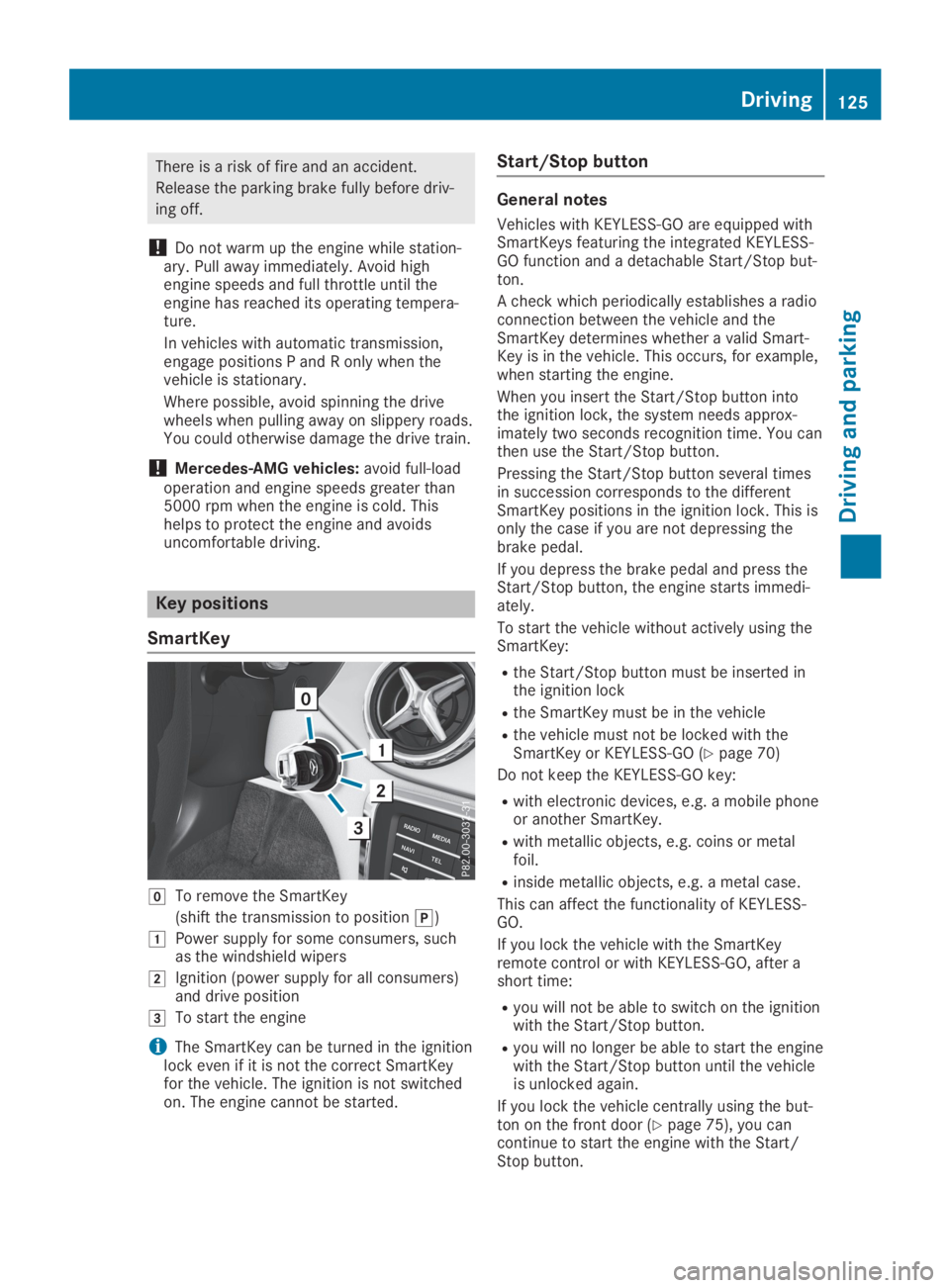
Key positions
SmartKey
ZTo remove the SmartKey
(shift the transmission to position])
GPower supply for some consumers, suchas the windshield wipers
HIgnition (power supply for all consumers)and drive position
ITo start the engine
iThe SmartKey can be turned in the ignitionlock even if it is not the correct SmartKeyfor the vehicle. The ignition is not switchedon. The engine cannot be started.
Start/Stop button
General notes
Vehicles with KEYLESS-GO are equipped withSmartKeys featuring the integrated KEYLESS-GO function and a detachable Start/Stop but-ton.
A check which periodically establishes a radioconnection between the vehicle and theSmartKey determines whether a valid Smart-Key is in the vehicle. This occurs, for example,when starting the engine.
When you insert the Start/Stop button intothe ignition lock, the system needs approx-imately two seconds recognition time. You canthen use the Start/Stop button.
Pressing the Start/Stop button several timesin succession corresponds to the differentSmartKey positions in the ignition lock. This isonly the case if you are not depressing thebrake pedal.
If you depress the brake pedal and press theStart/Stop button, the engine starts immedi-ately.
To start the vehicle without actively using theSmartKey:
Rthe Start/Stop button must be inserted inthe ignition lock
Rthe SmartKey must be in the vehicle
Rthe vehicle must not be locked with theSmartKey or KEYLESS-GO (Ypage 70)
Do not keep the KEYLESS-GO key:
Rwith electronic devices, e.g. a mobile phoneor another SmartKey.
Rwith metallic objects, e.g. coins or metalfoil.
Rinside metallic objects, e.g. a metal case.
This can affect the functionality of KEYLESS-GO.
If you lock the vehicle with the SmartKeyremote control or with KEYLESS-GO, after ashort time:
Ryou will not be able to switch on the ignitionwith the Start/Stop button.
Ryou will no longer be able to start the enginewith the Start/Stop button until the vehicleis unlocked again.
If you lock the vehicle centrally using the but-ton on the front door (Ypage 75), you cancontinue to start the engine with the Start/Stop button.
Driving125
Driving and parking
Z
Page 128 of 346
The engine can be switched off while the vehi-cle is in motion by pressing and holding theStart/Stop button for three seconds. Thisfunction operates independently of the ECOstart/stop automatic engine switch-off func-tion.
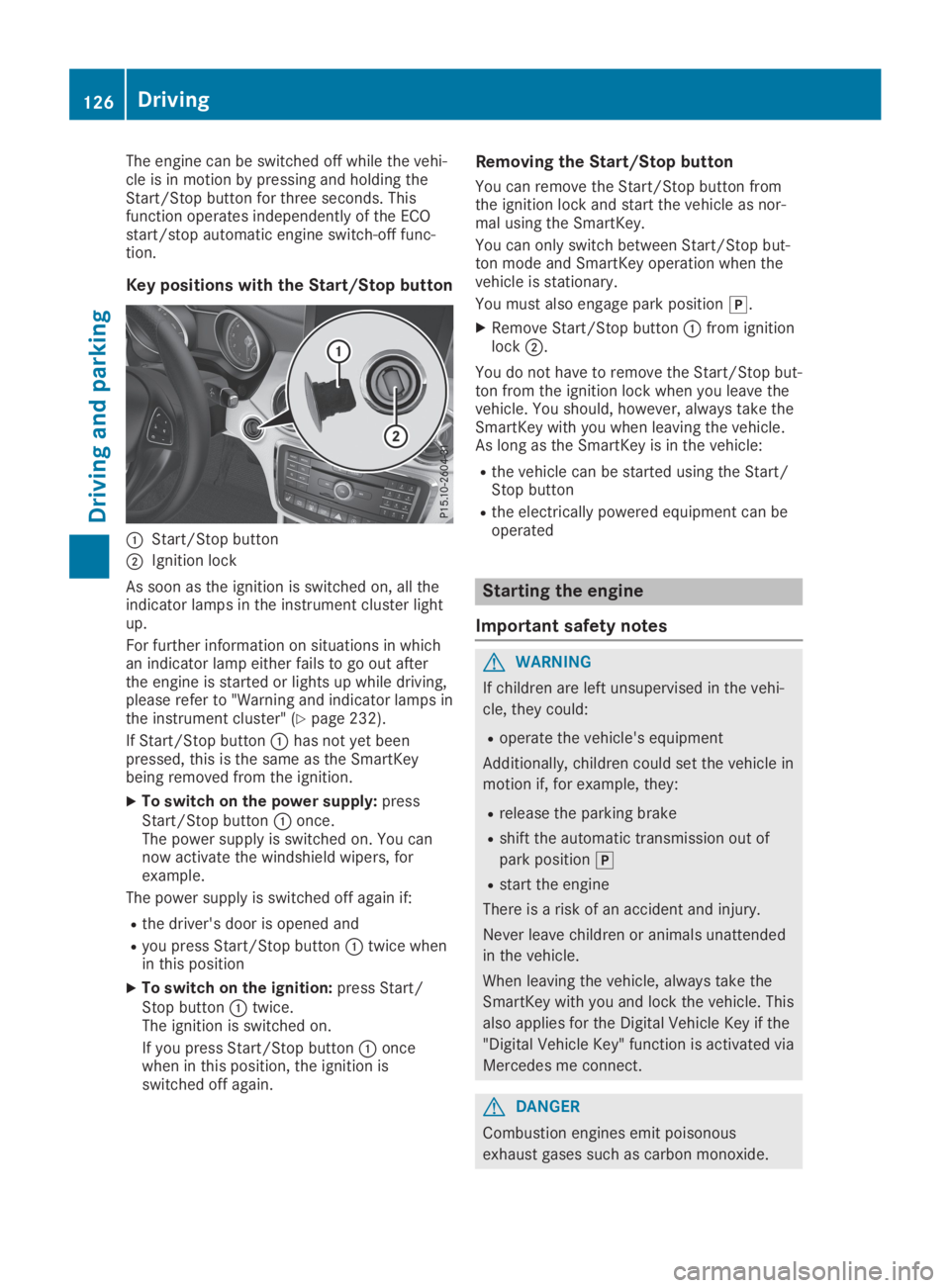
Key positions with the Start/Stop button
CStart/Stop button
DIgnition lock
As soon as the ignition is switched on, all theindicator lamps in the instrument cluster lightup.
For further information on situations in whichan indicator lamp either fails to go out afterthe engine is started or lights up while driving,please refer to "Warning and indicator lamps inthe instrument cluster" (Ypage 232).
If Start/Stop buttonChas not yet beenpressed, this is the same as the SmartKeybeing removed from the ignition.
XTo switch on the power supply:pressStart/Stop buttonConce.The power supply is switched on. You cannow activate the windshield wipers, forexample.
The power supply is switched off again if:
Rthe driver's door is opened and
Ryou press Start/Stop buttonCtwice whenin this position
XTo switch on the ignition:press Start/Stop buttonCtwice.The ignition is switched on.
If you press Start/Stop buttonConcewhen in this position, the ignition isswitched off again.
Removing the Start/Stop button
You can remove the Start/Stop button fromthe ignition lock and start the vehicle as nor-mal using the SmartKey.
You can only switch between Start/Stop but-ton mode and SmartKey operation when thevehicle is stationary.
You must also engage park position].
XRemove Start/Stop buttonCfrom ignitionlockD.
You do not have to remove the Start/Stop but-ton from the ignition lock when you leave thevehicle. You should, however, always take theSmartKey with you when leaving the vehicle.As long as the SmartKey is in the vehicle:
Rthe vehicle can be started using the Start/Stop button
Rthe electrically powered equipment can beoperated
Starting the engine
Important safety notes
GWARNING
If children are left unsupervised in the vehi-
cle, they could:
Roperate the vehicle's equipment
Additionally, children could set the vehicle in
motion if, for example, they:
Rrelease the parking brake
Rshift the automatic transmission out of
park position]
Rstart the engine
There is a risk of an accident and injury.
Never leave children or animals unattended
in the vehicle.
When leaving the vehicle, always take the
SmartKey with you and lock the vehicle. This
also applies for the Digital Vehicle Key if the
"Digital Vehicle Key" function is activated via
Mercedes me connect.
GDANGER
Combustion engines emit poisonous
exhaust gases such as carbon monoxide.
126Driving
Driving and parking
Page 129 of 346
Inhaling these exhaust gases is hazardous to
health and can result in poisoning. There is a
risk of fatal injury. Therefore, never leave the
engine running an enclosed space without
adequate ventilation.
GWARNING
Flammable materials introduced through
environmental influence or by animals can
ignite if in contact with the exhaust system
or parts of the engine that heat up. There is
a risk of fire.
Carry out regular checks to make sure that
there are no flammable foreign materials in
the engine compartment or in the exhaust
system.
General notes
During a cold start, the engine runs at higherspeeds to enable the catalytic converter toreach its operating temperature. The sound ofthe engine may change during this time.
Automatic transmission
XShift the transmission to position](Ypage 134).The transmission position indicator on themultifunction display shows](Ypage 134).
iYou can start the engine in transmissionpositions]and\\.
Starting procedure with the SmartKey
To start the engine using the SmartKey insteadof the Start/Stop button, pull the Start/Stopbutton out of the ignition lock.
XTurn the SmartKey to positionIin the igni-tion lock (Ypage 125) and release it assoon as the engine is running.
Starting procedure with the Start/
Stop button
The Start/Stop button can be used to start thevehicle manually without inserting the Smart-Key into the ignition lock. The Start/Stop but-ton must be inserted in the ignition lock and
the SmartKey must be in the vehicle. Thismode for starting the engine operates inde-pendently of the ECO start/stop automaticengine start function.
You can start the engine if a valid SmartKey isin the vehicle. Switch off the engine andalways take the SmartKey with you when leav-ing the vehicle, even if you only leave it for ashort time. Pay attention to the importantsafety notes.
XDepress the brake pedal and keep itdepressed.
XPress the Start/Stop button once(Ypage 125).The engine starts.
Starting procedure via smartphone
Observe the important safety notes on startingthe engine (Ypage 126).
You can also start your engine via your smart-phone from outside the vehicle. In this case,the previously selected climate control settingis activated. In this way you can cool or heatthe interior of the vehicle before starting thejourney.
Only start the engine via your smartphone if itis safe to start and run the engine where yourvehicle is parked.
Observe the legal stipulations in the areawhere your vehicle is parked. Engine start viasmartphone may be limited to certain coun-tries or regions.
You can execute a maximum of two consecu-tive starting attempts via your smartphone. Ifyou insert the SmartKey into the ignition lock,you can carry out two more starting attempts.
Once you have started the engine, you canswitch the engine off via your smartphone atany time.
You can only start the engine via your smart-phone if:
Rthe SmartKey is in the ignition lock
Rpark position]is selected
Rthe accelerator pedal is not depressed
Rthe alarm for the anti-theft alarm system isnot set
Rthe panic alarm is not activated
Rthe hazard warning lamps are switched off
Rthe hood is closed
Driving127
Driving and parking
Z
Page 131 of 346
ECO start/stop function
Introduction
The ECO start/stop function switches theengine off automatically if the vehicle is stop-ped under certain conditions.
The engine starts automatically when thedriver wants to pull away again. The ECOstart/stop function thereby helps you toreduce the fuel consumption and emissions ofyour vehicle.
Important safety notes
GWARNING
If the engine is switched off automatically
and you exit the vehicle, the engine is
restarted automatically. The vehicle may
begin moving. There is a risk of accident and
injury.
If you wish to exit the vehicle, always turn
off the ignition and secure the vehicle
against rolling away.
General notes
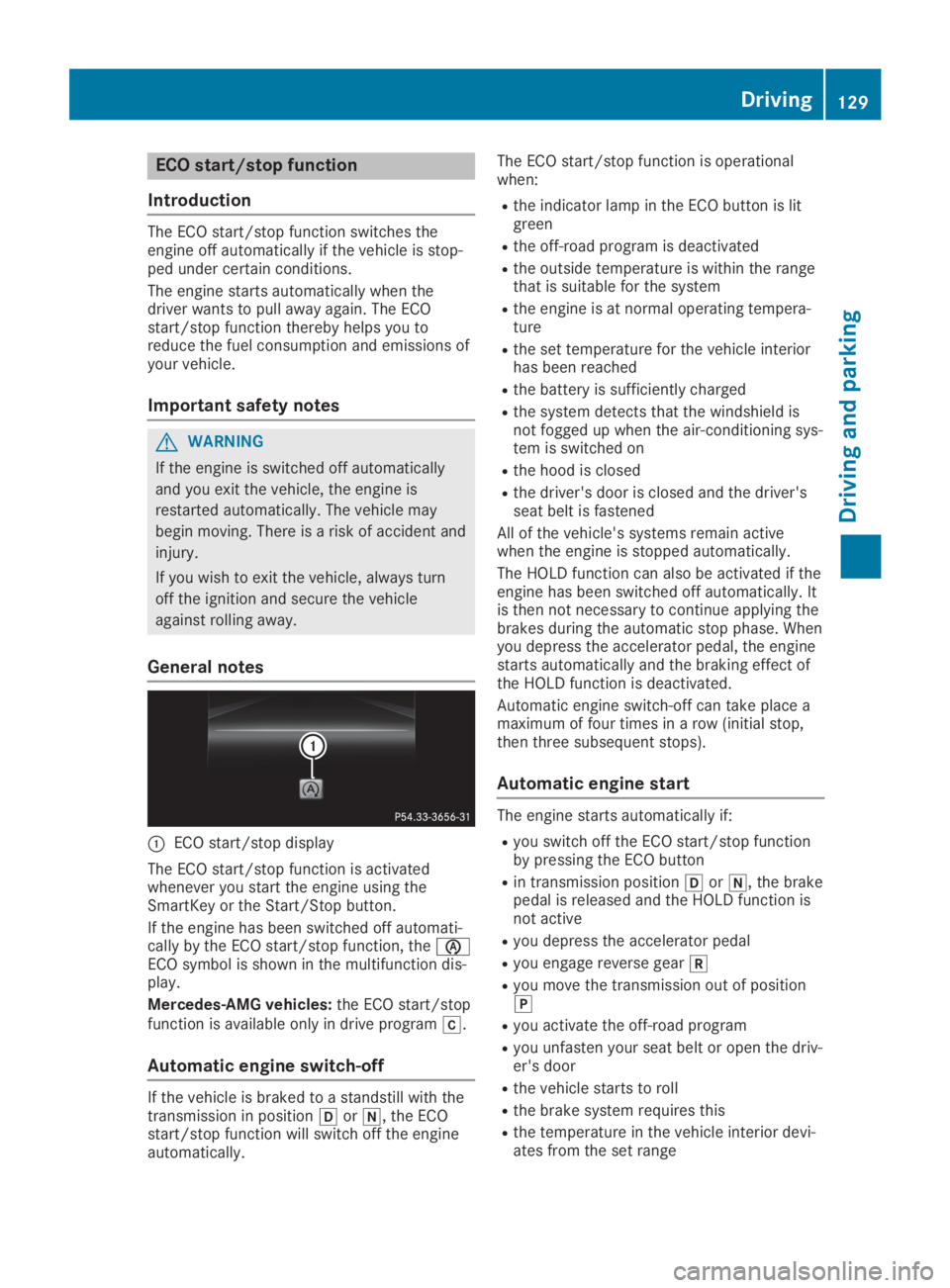
CECO start/stop display
The ECO start/stop function is activatedwhenever you start the engine using theSmartKey or the Start/Stop button.
If the engine has been switched off automati-cally by the ECO start/stop function, the
Page 133 of 346
Problems with the engine
ProblemPossible causes/consequences andPPSolutions
The engine does notstart.The HOLD function or Active Distance Assist DISTRONIC is activa-ted.
XDeactivate the HOLD function (Ypage 166) or Active DistanceAssist DISTRONIC (Ypage 163).
XTry to start the engine again.
The engine does notstart. The starter motorcan be heard.
RThere is a malfunction in the engine electronics.
RThere is a malfunction in the fuel supply.
Before attempting to start the engine again:
XTurn the SmartKey back to positionZin the ignition lock.
or
XPress the Start/Stop button repeatedly until all indicator lamps inthe instrument cluster go out.
XTry to start the engine again. Avoid excessively long and frequentattempts to start the engine as these will drain the battery.
If the engine does not start after several attempts:
XConsult a qualified specialist workshop.
The engine does notstart. You cannot hearthe starter motor.
The on-board voltage is too low because the battery is too weak ordischarged.
XJump-start the vehicle (Ypage 295).
If the engine does not start despite attempts to jump-start it:
XConsult a qualified specialist workshop.
The starter motor was exposed to a thermal load that was too high.
XAllow the starter motor to cool down for approximately twominutes.
XTry to start the engine again.
If the engine still does not start:
XConsult a qualified specialist workshop.
Driving131
Driving and parking
Z
Page 138 of 346
XAll vehicles:switch the ignition on.
XDepress the brake pedal and keep itdepressed.
XEngage neutral\\.
XRelease the brake pedal.
XRelease the electric parking brake.
XSwitch off the ignition and leave the Smart-Key in the ignition lock.
Engaging drive position D
XIf the transmission is in position^or\\:push the DIRECT SELECT lever down pastthe first point of resistance.
XIf the transmission is in position]:depress the brake pedal and push theDIRECT SELECT lever down past the firstpoint of resistance.
Selector lever (Mercedes-AMG vehi-
cles)
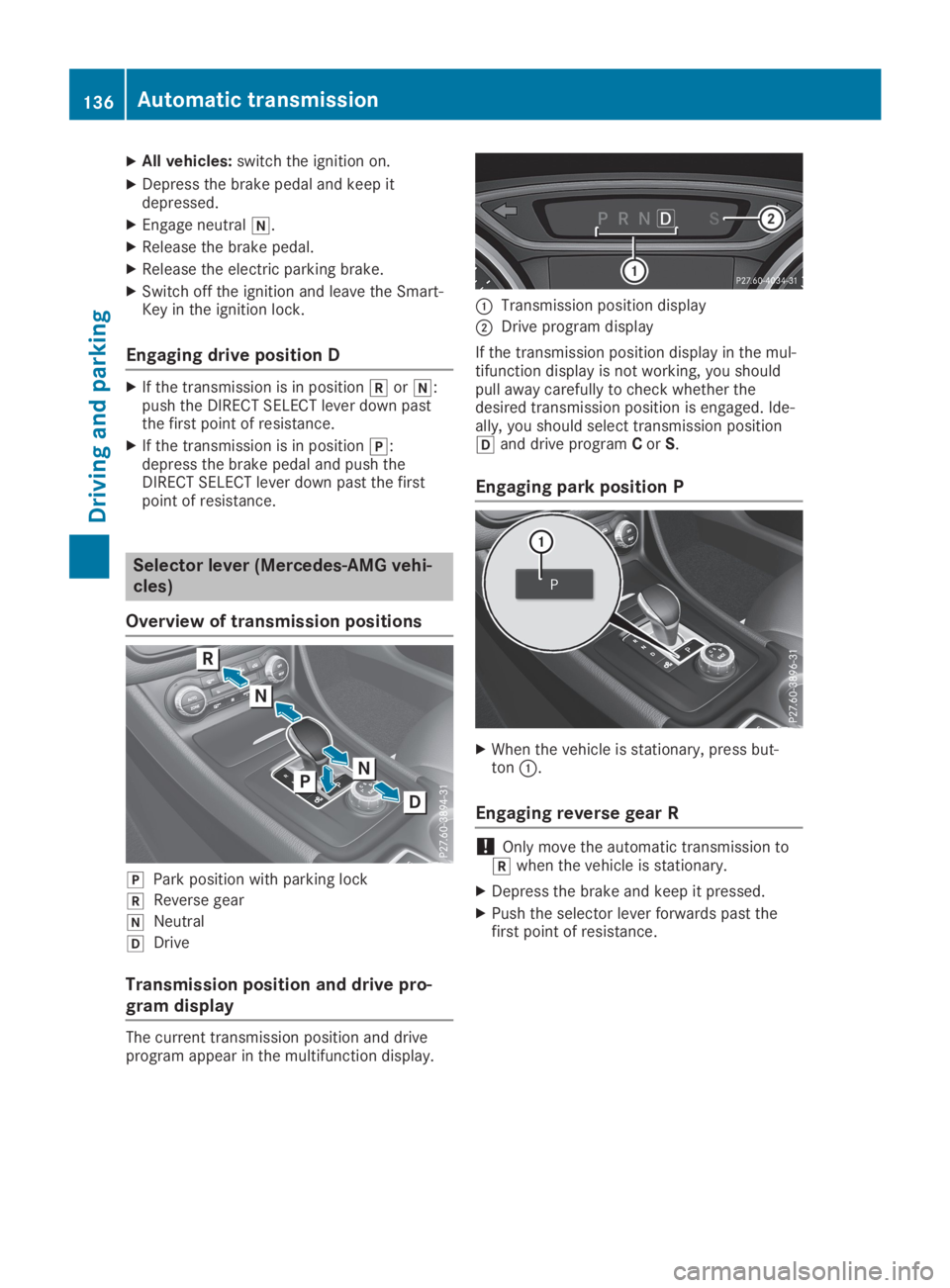
Overview of transmission positions
]Park position with parking lock
^Reverse gear
\\Neutral
[Drive
Transmission position and drive pro-
gram display
The current transmission position and driveprogram appear in the multifunction display.
CTransmission position display
DDrive program display
If the transmission position display in the mul-tifunction display is not working, you shouldpull away carefully to check whether thedesired transmission position is engaged. Ide-ally, you should select transmission position[and drive programCorS.
Engaging park position P
XWhen the vehicle is stationary, press but-tonC.
Engaging reverse gear R
!Only move the automatic transmission to^when the vehicle is stationary.
XDepress the brake and keep it pressed.
XPush the selector lever forwards past thefirst point of resistance.
136Automatic transmission
Driving and parking
Page 144 of 346
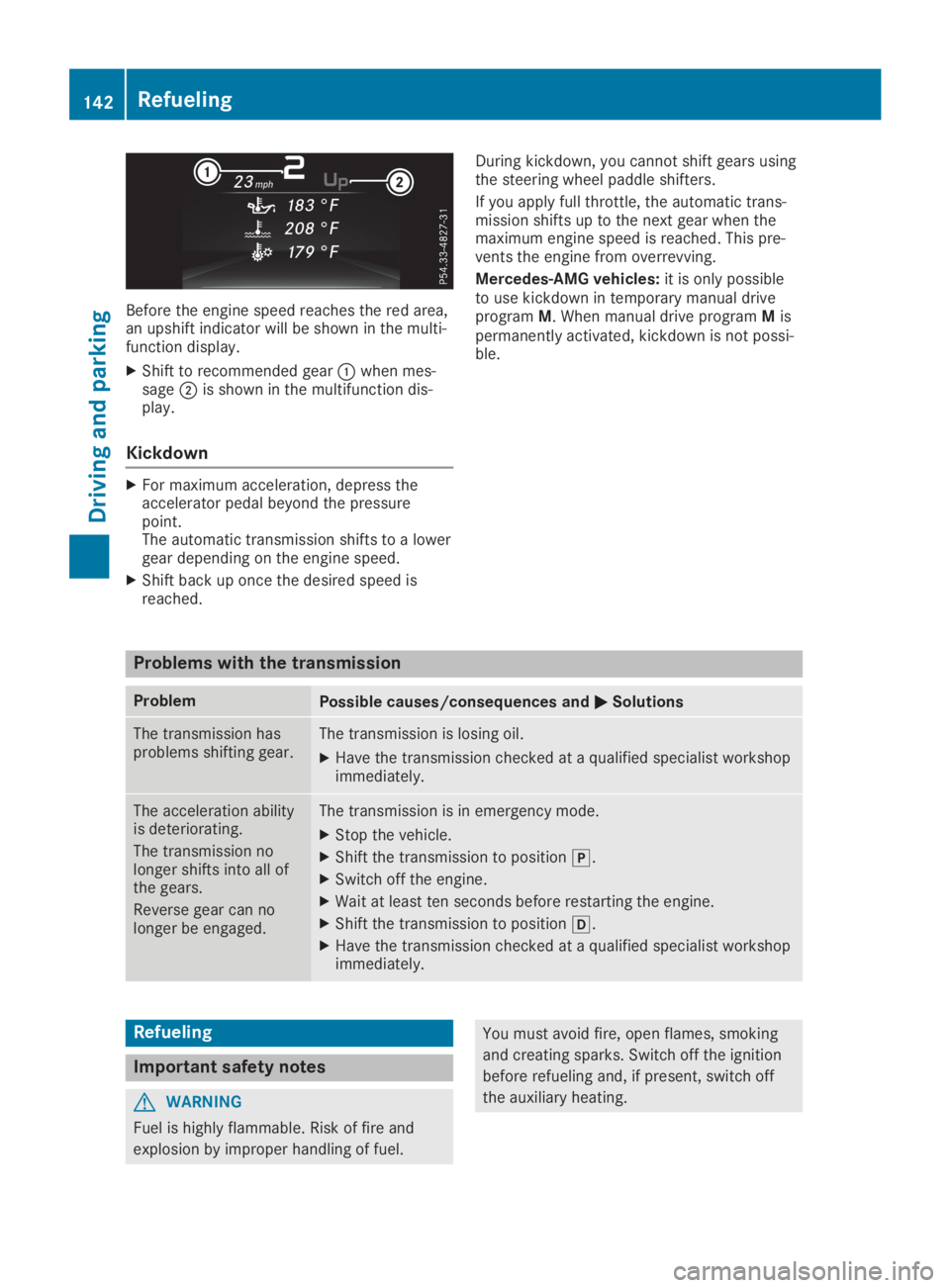
Before the engine speed reaches the red area,an upshift indicator will be shown in the multi-function display.
XShift to recommended gearCwhen mes-sageDis shown in the multifunction dis-play.
Kickdown
XFor maximum acceleration, depress theaccelerator pedal beyond the pressurepoint.The automatic transmission shifts to a lowergear depending on the engine speed.
XShift back up once the desired speed isreached.
During kickdown, you cannot shift gears usingthe steering wheel paddle shifters.
If you apply full throttle, the automatic trans-mission shifts up to the next gear when themaximum engine speed is reached. This pre-vents the engine from overrevving.
Mercedes-AMG vehicles:it is only possibleto use kickdown in temporary manual driveprogramM. When manual drive programMispermanently activated, kickdown is not possi-ble.
Problems with the transmission
ProblemPossible causes/consequences andPPSolutions
The transmission hasproblems shifting gear.The transmission is losing oil.
XHave the transmission checked at a qualified specialist workshopimmediately.
The acceleration abilityis deteriorating.
The transmission nolonger shifts into all ofthe gears.
Reverse gear can nolonger be engaged.
The transmission is in emergency mode.
XStop the vehicle.
XShift the transmission to position].
XSwitch off the engine.
XWait at least ten seconds before restarting the engine.
XShift the transmission to position[.
XHave the transmission checked at a qualified specialist workshopimmediately.
Refueling
Important safety notes
GWARNING
Fuel is highly flammable. Risk of fire and
explosion by improper handling of fuel.
You must avoid fire, open flames, smoking
and creating sparks. Switch off the ignition
before refueling and, if present, switch off
the auxiliary heating.
142Refueling
Driving and parking