steering MERCEDES-BENZ GLA 2019 Owner's Manual
[x] Cancel search | Manufacturer: MERCEDES-BENZ, Model Year: 2019, Model line: GLA, Model: MERCEDES-BENZ GLA 2019Pages: 346, PDF Size: 16.66 MB
Page 103 of 346
Memory function
Important safety notes
GWARNING
If you use the memory function on the driv-
er's side while driving, you could lose con-
trol of the vehicle as a result of the adjust-
ments being made. There is a risk of an acci-
dent.
Only use the memory function on the driv-
er's side when the vehicle is stationary.
GWARNING
When the memory function adjusts the seat,
you and other vehicle occupants – particu-
larly children – could become trapped. There
is a risk of injury.
While the memory function is making adjust-
ments, make sure that no one has any body
parts in the sweep of the seat. If somebody
becomes trapped, immediately release the
memory function position button. The
adjustment process is stopped.
GWARNING
Children could become trapped if they acti-
vate the memory function, particularly when
unattended. There is a risk of injury.
Never leave children unsupervised in the
vehicle.
When leaving the vehicle, always take the
SmartKey with you and lock the vehicle. This
also applies for the Digital Vehicle Key if the
"Digital Vehicle Key" function is activated via
Mercedes me connect.
The memory function can be used at any time,e.g. even when the SmartKey is not in the igni-tion lock.
Storing settings
With the memory function, you can store up tothree different settings, e.g. for three differentpeople.
The following settings are stored as a singlememory preset:
RSeat and backrest position
RDriver's side: position of the exterior mirrorson the driver's and front-passenger sides
XAdjust the seat (Ypage 94).
XAdjust the exterior mirror on the driver'sside (Ypage 98).
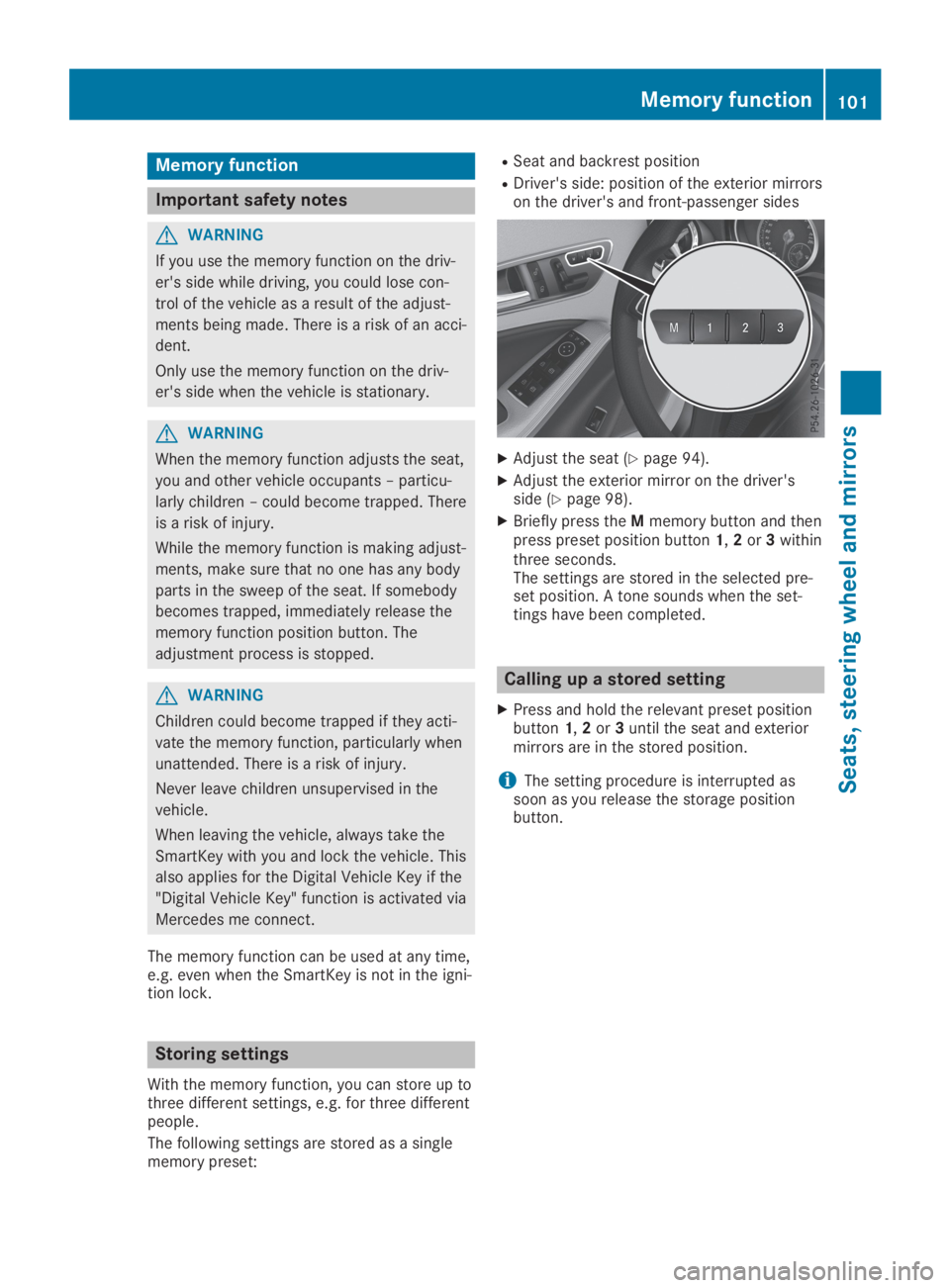
XBriefly press theMmemory button and thenpress preset position button1,2or3withinthree seconds.The settings are stored in the selected pre-set position. A tone sounds when the set-tings have been completed.
Calling up a stored setting
XPress and hold the relevant preset positionbutton1,2or3until the seat and exteriormirrors are in the stored position.
iThe setting procedure is interrupted assoon as you release the storage positionbutton.
Memory function101
Seats, steering wheel and mirrors
Z
Page 107 of 346
direction you are turning, enabling better visi-bility in tight bends, for example. It can only beactivated when the low-beam headlamps areswitched on.
Active:
Rif you are driving at speeds below 25 mph(40 km/h) and switch on the turn signal orturn the steering wheel
Rif you are driving at speeds between 25 mph(40 km/h) and 45 mph (70 km/h) and turnthe steering wheel
The cornering lamp may remain lit for a shorttime, but is automatically switched off after nomore than three minutes.
Headlamps fogged up on the inside
Certain climatic and physical conditions maycause moisture to form in the headlamp. Thismoisture does not affect the functionality ofthe headlamp.
Interior lighting
Overview of interior lighting
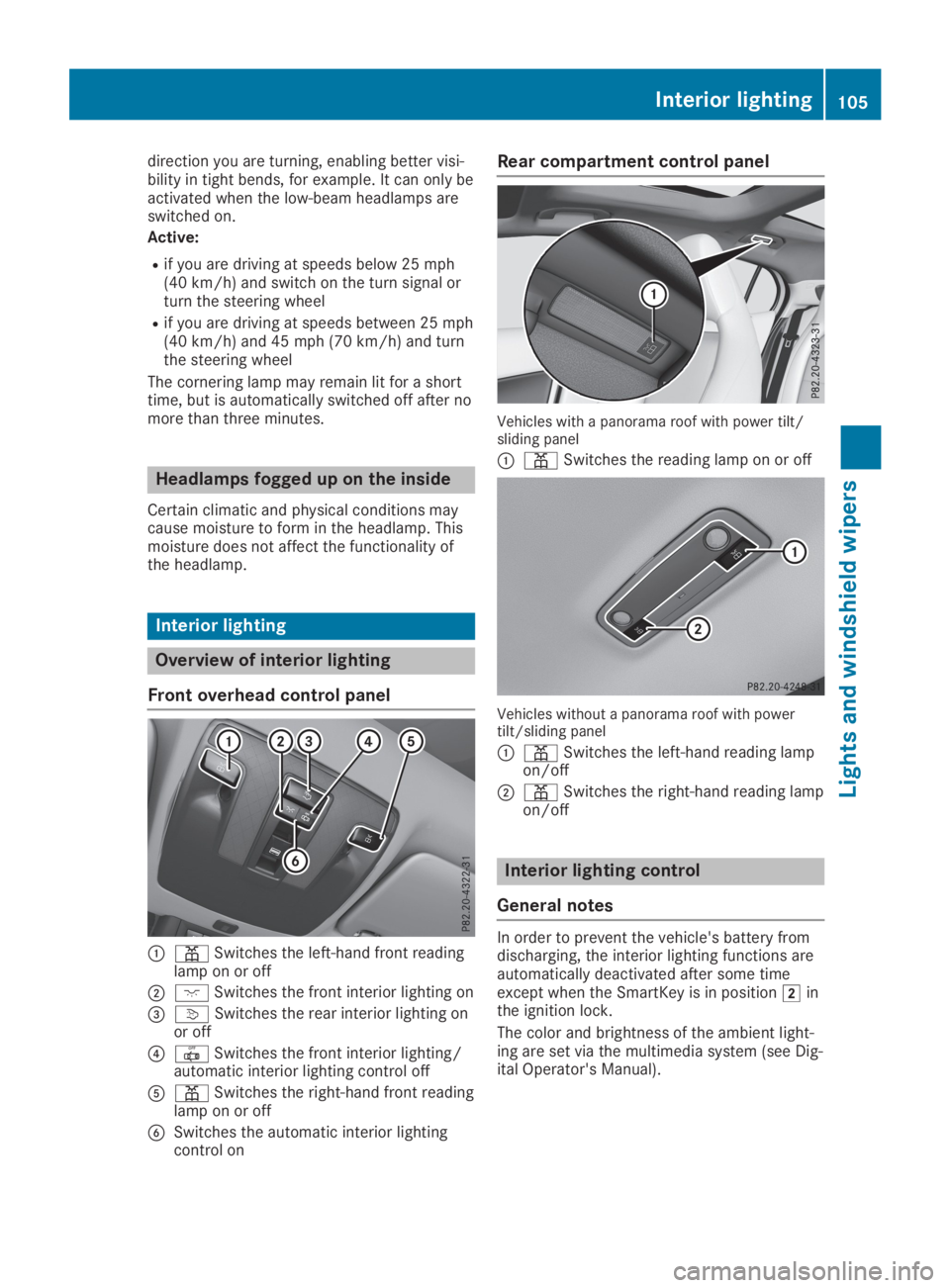
Front overhead control panel
C=Switches the left-hand front readinglamp on or off
DJSwitches the front interior lighting on
Page 134 of 346
ProblemPossible causes/consequences andPPSolutions
The engine is not run-ning smoothly and ismisfiring.
There is a malfunction in the engine electronics or in a mechanicalcomponent of the engine management system.
XOnly depress the accelerator pedal slightly.Otherwise, non-combusted fuel may get into the catalytic con-verter and damage it.
XHave the cause rectified immediately at a qualified specialistworkshop.
The coolant tempera-ture gauge shows avalue above 248 ‡(120 †). The warninglamp may also be onand a warning tone maysound.
The coolant level is too low. The coolant is too hot and the engine isno longer being cooled sufficiently.
XStop as soon as possible and allow the engine and the coolant tocool down.
XCheck the coolant level (Ypage 276). Observe the warning notesas you do so and add coolant if necessary.
Notes on towing vehicles
The vehicle is not suitable for attaching towbar systems, such as those used for flat tow-ing or dinghy towing.
Attaching or using tow bar systems may resultin damage to the vehicle.
When towing a vehicle with tow bar systems,safe driving characteristics cannot be guaran-teed for the towing vehicle or the towed vehi-cle.
The vehicle/trailer combination may swerve.
Observe the permissible towing methods(Ypage 300) and the notes on towing withboth axles on the ground (Ypage 300).
DYNAMIC SELECT button (all vehi-
cles except Mercedes-AMG vehicles)
Use the DYNAMIC SELECT button to changethe drive program. Depending on the drive pro-gram selected the following vehicle character-istics will change:
Rthe drive (engine and transmission manage-ment)
Rthe sound of the exhaust system (vehicleswith sports exhaust system)
Rthe steering
Rthe availability of the ECO start/stop func-tion
Rthe climate control
Each time you start the engine with the Smart-Key or the Start/Stop button, drive programCis activated. For further information aboutstarting the engine, see (Ypage 126).
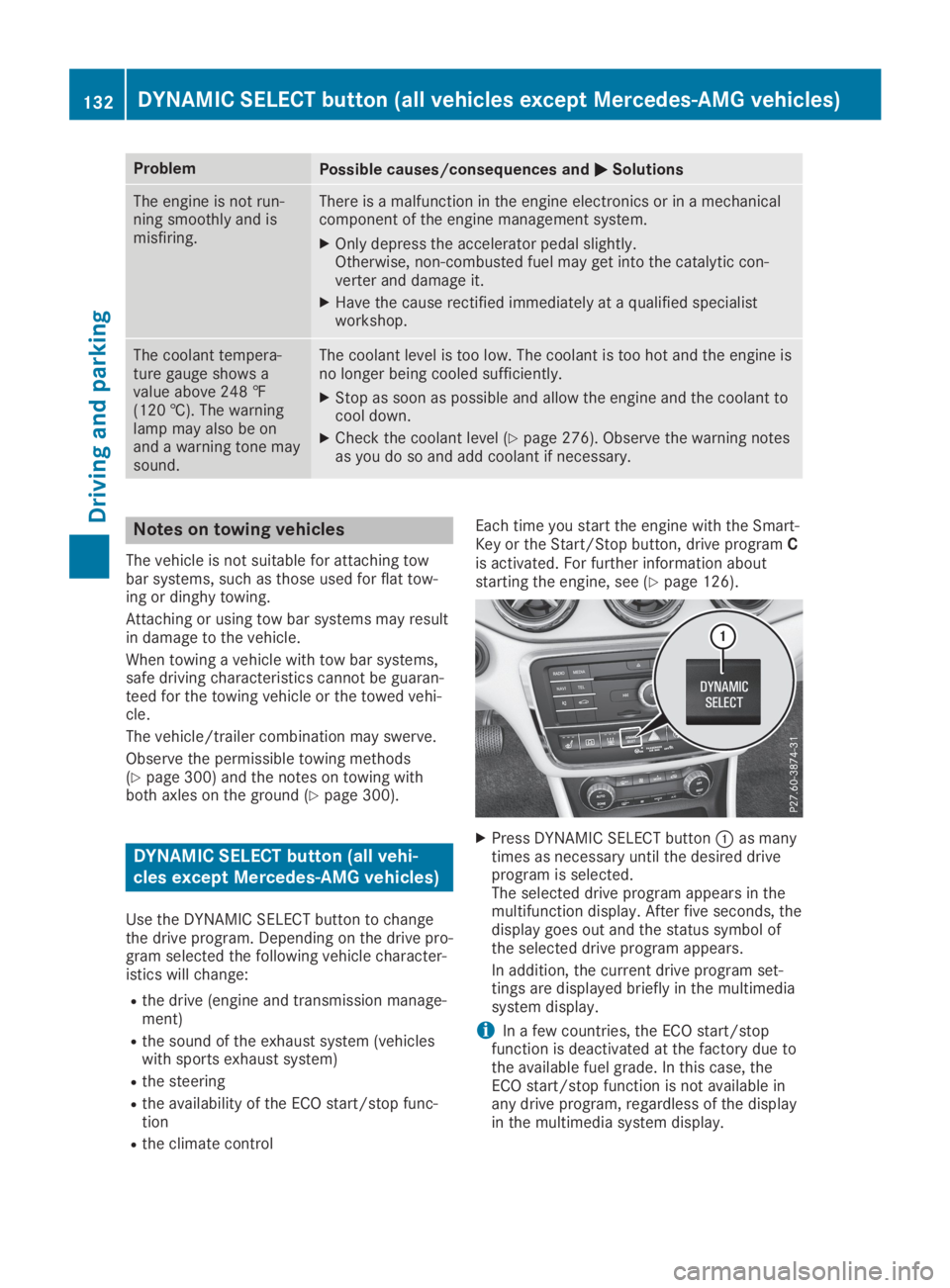
XPress DYNAMIC SELECT buttonCas manytimes as necessary until the desired driveprogram is selected.The selected drive program appears in themultifunction display. After five seconds, thedisplay goes out and the status symbol ofthe selected drive program appears.
In addition, the current drive program set-tings are displayed briefly in the multimediasystem display.
iIn a few countries, the ECO start/stopfunction is deactivated at the factory due tothe available fuel grade. In this case, theECO start/stop function is not available inany drive program, regardless of the displayin the multimedia system display.
132DYNAMIC SELECT button (all vehicles except Mercedes-AMG vehicles)
Driving and parking
Page 135 of 346
Available drive programs:
CComfortComfortable and economi-cal driving characteristics
SSportSporty driving characteris-tics
IIndividualIndividual settings
Off-roadOptimal driving character-istics for easily negotiableoff-road terrain
EEconomyParticularly economicaldriving characteristics
Additional information for drive programs(Ypage 138).
You can also change gear yourself using thesteering wheel paddle shifters. For furtherinformation on the manual drive program(Ypage 140).
DYNAMIC SELECT controller
(Mercedes-AMG vehicles)
Use the DYNAMIC SELECT controller tochange the drive program. Depending on thedrive program selected the following vehiclecharacteristics will change:
Rthe drive
Rthe transmission management
RESP®
Rthe suspension (vehicles with AMG adaptivesport suspension system)
Rthe sound of the exhaust system
Rthe availability of the ECO start/stop func-tion
Rthe availability of gliding mode
Each time you start the engine with the Smart-Key or the Start/Stop button, drive programCis activated. For further information aboutstarting the engine, see (Ypage 126).
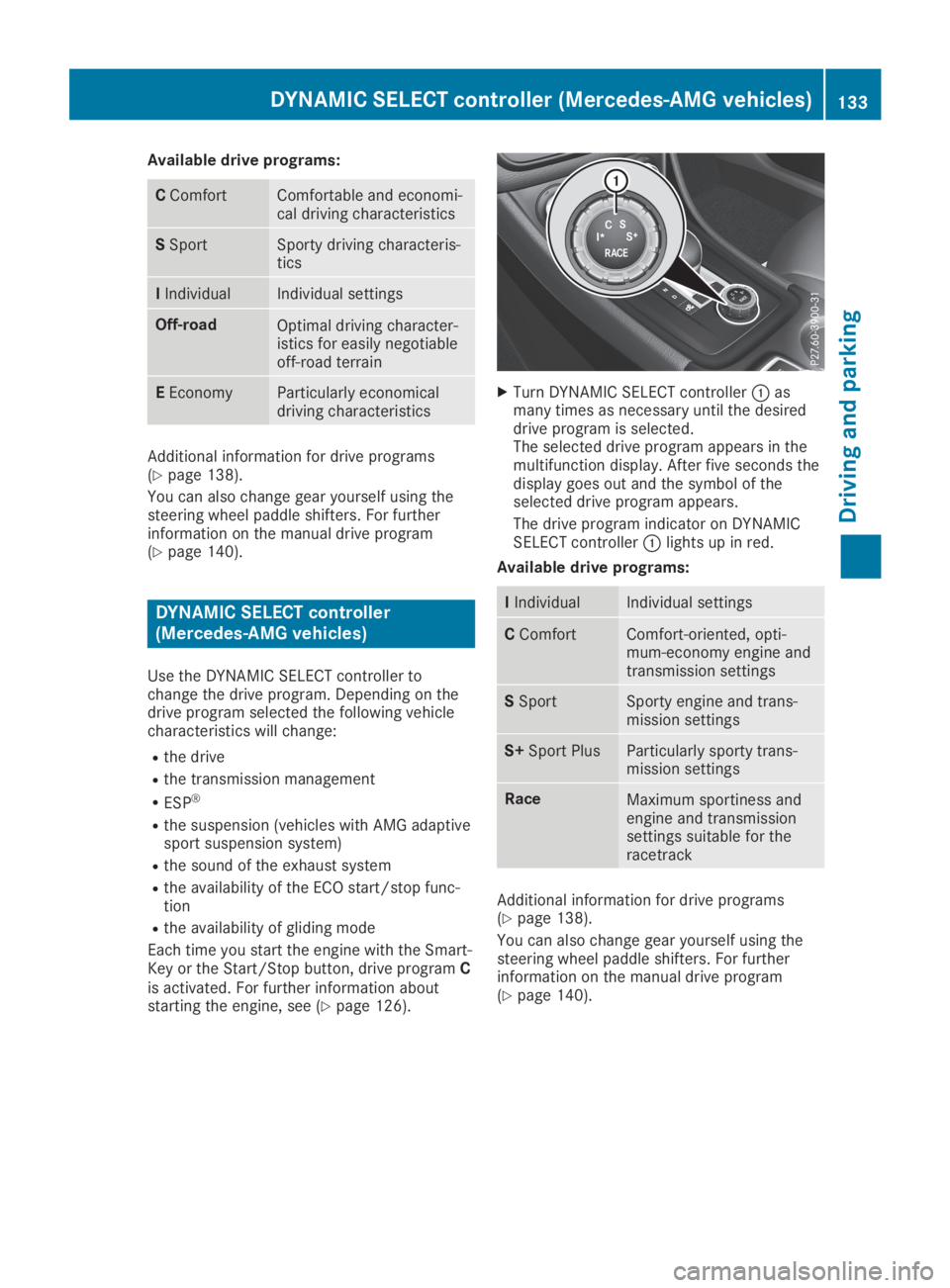
XTurn DYNAMIC SELECT controllerCasmany times as necessary until the desireddrive program is selected.The selected drive program appears in themultifunction display. After five seconds thedisplay goes out and the symbol of theselected drive program appears.
The drive program indicator on DYNAMICSELECT controllerClights up in red.
Available drive programs:
IIndividualIndividual settings
CComfortComfort-oriented, opti-mum-economy engine andtransmission settings
SSportSporty engine and trans-mission settings
S+Sport PlusParticularly sporty trans-mission settings
RaceMaximum sportiness andengine and transmissionsettings suitable for theracetrack
Additional information for drive programs(Ypage 138).
You can also change gear yourself using thesteering wheel paddle shifters. For furtherinformation on the manual drive program(Ypage 140).
DYNAMIC SELECT controller (Mercedes-AMG vehicles)133
Driving and parking
Z
Page 136 of 346
Automatic transmission
Important safety notes
GWARNING
If the engine speed is above the idling speed
and you engage transmission position:
orF, the vehicle could pull away sud-
denly. There is a risk of an accident.
When engaging transmission position:
orF, always firmly depress the brake
pedal and do not simultaneously accelerate.
GWARNING
The automatic transmission switches to neu-
tral positionNwhen you switch off the
engine. The vehicle may roll away. There is a
risk of an accident.
After switching off the engine, always switch
to parking positionP. Prevent the parked
vehicle from rolling away by applying the
parking brake.
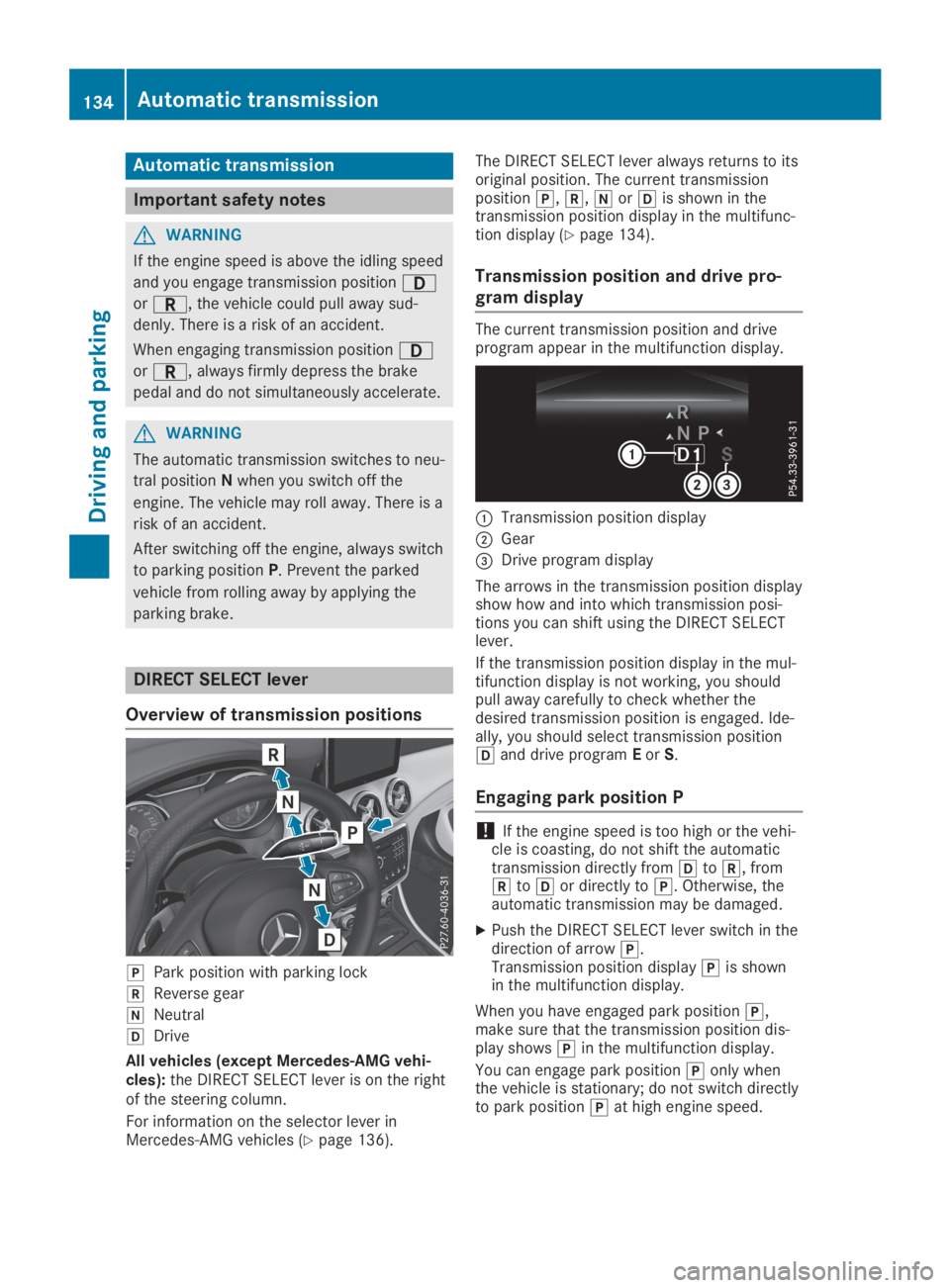
DIRECT SELECT lever
Overview of transmission positions
]Park position with parking lock
^Reverse gear
\\Neutral
[Drive
All vehicles (except Mercedes-AMG vehi-cles):the DIRECT SELECT lever is on the rightof the steering column.
For information on the selector lever inMercedes-AMG vehicles (Ypage 136).
The DIRECT SELECT lever always returns to itsoriginal position. The current transmissionposition],^,\\or[is shown in thetransmission position display in the multifunc-tion display (Ypage 134).
Transmission position and drive pro-
gram display
The current transmission position and driveprogram appear in the multifunction display.
CTransmission position display
DGear
Page 140 of 346
Holding the vehicle stationary on
uphill gradients
GWARNING
If the clutch overheats, the electronic man-
agement system is automatically deactiva-
ted. This interrupts the power transmission.
The vehicle may, for example, roll back-
wards on gradients. There is a risk of an
accident.
Never hold the vehicle stationary on uphill
gradients by depressing the accelerator.
The clutch may overheat if you hold the vehi-cle stationary on uphill gradients by depress-ing the accelerator pedal. If the clutch over-heats, a warning tone sounds.
All vehicles (except Mercedes-AMG vehi-
cles):theStop Vehicle Shift to 'P'Stop Vehicle Shift to 'P'
Leave Engine RunningLeave Engine Runningdisplay messageappears in the multifunction display. You willonly be able to continue your journey once theclutch has cooled down and the display mes-sage in the multifunction display has disap-peared.
Mercedes-AMG vehicles:theTrans. OilTrans. Oil
Overheated Drive on with CareOverheated Drive on with Caredisplaymessage appears in the multifunction display.
Do not hold the vehicle stationary on uphillgradients by depressing the accelerator pedal.Instead, only ever hold the vehicle stationaryon uphill gradients by:
Rdepressing the brake pedal
Ractivating the HOLD function
Rengaging the electric parking brake
Kickdown
Use kickdown for maximum acceleration.
XDepress the accelerator pedal beyond thepressure point.The automatic transmission shifts to a lowergear depending on the engine speed.
XEase off the accelerator pedal once thedesired speed is reached.The automatic transmission shifts back up.
Mercedes-AMG vehicles:it is only possibleto use kickdown in the automatic drive pro-gram and the temporary manual drive programM. When manual drive programMis perma-nently activated, kickdown is not possible.
For further information on kickdown in manualdrive programM(Ypage 142).
Rocking the vehicle free
Shifting back and forth between transmissionpositions[and^can help to free up thevehicle if it gets stuck in mud or snow. Thevehicle's engine management system limitsthe speed to a maximum of 5 mph (9 km/h)when shifting back and forth. To shift repeat-edly between transmission positions[and^, move the DIRECT SELECT lever up anddown past the point of resistance.
Drive programs
All vehicles (except Mercedes-AMG
vehicles)
Drive program C (Comfort)
Drive programCis characterized by the follow-ing:
Rthe vehicle delivers comfortable, economicalhandling characteristics.
Rthe vehicle pulls away more gently inforward and reverse gears, unless the accel-erator pedal is depressed fully.
Rthe vehicle has improved driving stability,for example on slippery road surfaces.
Roptimal fuel consumption resulting from theautomatic transmission shifting up sooner.The vehicle is driven in the low engine speedrange and the wheels are less likely to spin.
Drive program S (Sport)
Drive programSis characterized by the follow-ing:
Rsporty engine settings.
Rthe automatic transmission shifts up later.The fuel consumption possibly being higheras a result of the later automatic transmis-sion shift points.
Drive program I (Individual)
In drive programIthe following properties ofthe drive program can be selected:
Rthe drive (engine and transmission manage-ment)
Rthe steering
138Automatic transmission
Driving and parking
Page 141 of 346
Rthe availability of the ECO start/stop func-tion
Rthe climate control
Information about configuring drive programIwith the multimedia system can be found inthe Digital Operator's Manual.
iTo permanently select the gears in driveprogramIusing the steering wheel paddleshifters, select theM(manual) setting forthe drive.
Offroad drive program
TheOff-roaddrive program is characterizedby the following:
Rthe vehicle exhibits optimal driving charac-teristics on easily negotiable off-road ter-rain.
Drive program E (Economy)
Drive programEis characterized by the follow-ing:
Rcomfort-oriented engine settings.
Roptimal fuel consumption resulting from theautomatic transmission shifting up sooner.
Rthe vehicle pulls away more gently inforward and reverse gears, unless the accel-erator pedal is depressed fully.
Rthe vehicle has improved driving stability,for example on slippery road surfaces.
Rthe automatic transmission shifting upsooner. This results in the vehicle beingdriven at lower engine speeds and thewheels being less likely to spin.
Rgliding mode is activated automaticallywhen engine-internal conditions are fulfilledand the accelerator is not depressed. At thesame time the transmission’s clutch opensand the vehicle rolls freely using its kineticenergy. As a result great distances can becompleted without the engine brake andfuel consumption reduced.
iThe availability of gliding mode depends onvarious factors, including the following:
Rthe engine and transmission temperature
Rthe downhill gradient
Rthe vehicle speed
Rperforming regular adaptation functions
When you depress the brake pedal, glidingmode is deactivated, depending on pedalpressure.
When you activate cruise control or ActiveDistance Assist DISTRONIC, gliding mode isnot available.
Mercedes-AMG vehicles
Drive program I (Individual)
In drive programIthe following properties ofthe drive program can be selected:
Rthe drive (engine management)
Rthe transmission management
Rthe suspension (vehicles with AMG adaptivesport suspension system)
RESP®
Information about configuring drive programIwith the multimedia system can be found inthe Digital Operator's Manual.
Drive program C (Comfort)
Drive programCis characterized by the follow-ing:
Rthe vehicle delivers comfortable, economicalhandling characteristics.
Rthe vehicle pulls away more gently inforward and reverse gears, unless the accel-erator pedal is depressed fully.
Rthe vehicle has improved driving stability,for example on slippery road surfaces.
Roptimal fuel consumption resulting from theautomatic transmission shifting up sooner.The vehicle is driven in the low engine speedrange and the wheels are less likely to spin.
Rgliding mode is available.
Rthe ECO start/stop function is available.
Drive program S (Sport)
Drive programSis characterized by the follow-ing:
Rthe vehicle exhibits sporty driving character-istics.
Rthe automatic transmission shifts up later.The fuel consumption possibly being higheras a result of the later automatic transmis-sion shift points.
Rthe suspension exhibits stiff springing anddamping settings (vehicles with AIR adaptivesport suspension system).
Rgliding mode is not available.
Rthe ECO start/stop function is not available.
Automatic transmission139
Driving an d parking
Z
Page 142 of 346
Drive program S+ (Sport Plus)
Drive programS+is characterized by the fol-lowing:
Rthe vehicle exhibits particularly sporty driv-ing characteristics.
Rthe automatic transmission shifts up later.
Rthe fuel consumption possibly being higheras a result of the later automatic transmis-sion shift points.
Rthe suspension exhibits particularly stiffspringing and damping settings (vehicleswith AMG adaptive sport suspension sys-tem).
Rgliding mode is not available.
Rthe ECO start/stop function is not available.
Drive program RACE (vehicles with AMG
adaptive sport suspension system)
iThe RACE drive program may not be usedon normal roads. RACE must only be activa-ted and used on dedicated race circuits, noton public roads.
TheRACEdrive program is characterized bythe following:
Rthe vehicle exhibits driving characteristicssuitable for the racetrack.
Rall vehicle systems are set for maximumsportiness.
Rthe automatic transmission shifts up later.
Rthe fuel consumption possibly being higheras a result of the later automatic transmis-sion shift points.
Rthe suspension exhibits particularly stiffspringing and damping settings.
Rgliding mode is not available.
Rthe ECO start/stop function is not available.
Manual gearshifting
General notes
You can change gear yourself using the steer-ing wheel paddle shifters. The transmissionmust be in position[to do this.
Depending on which steering wheel paddleshifter is pulled, the automatic transmissionimmediately shifts into the next gear down orup, if permitted.
Mercedes-AMG vehicles:to use manual shift-ing, you have two options:
Rtemporary setting
Rpermanent setting
If you activate manual gearshifting, the multi-function display will show the current gearinstead of transmission position[.
If manual gearshifting is deactivated, the gearswill be selected automatically.
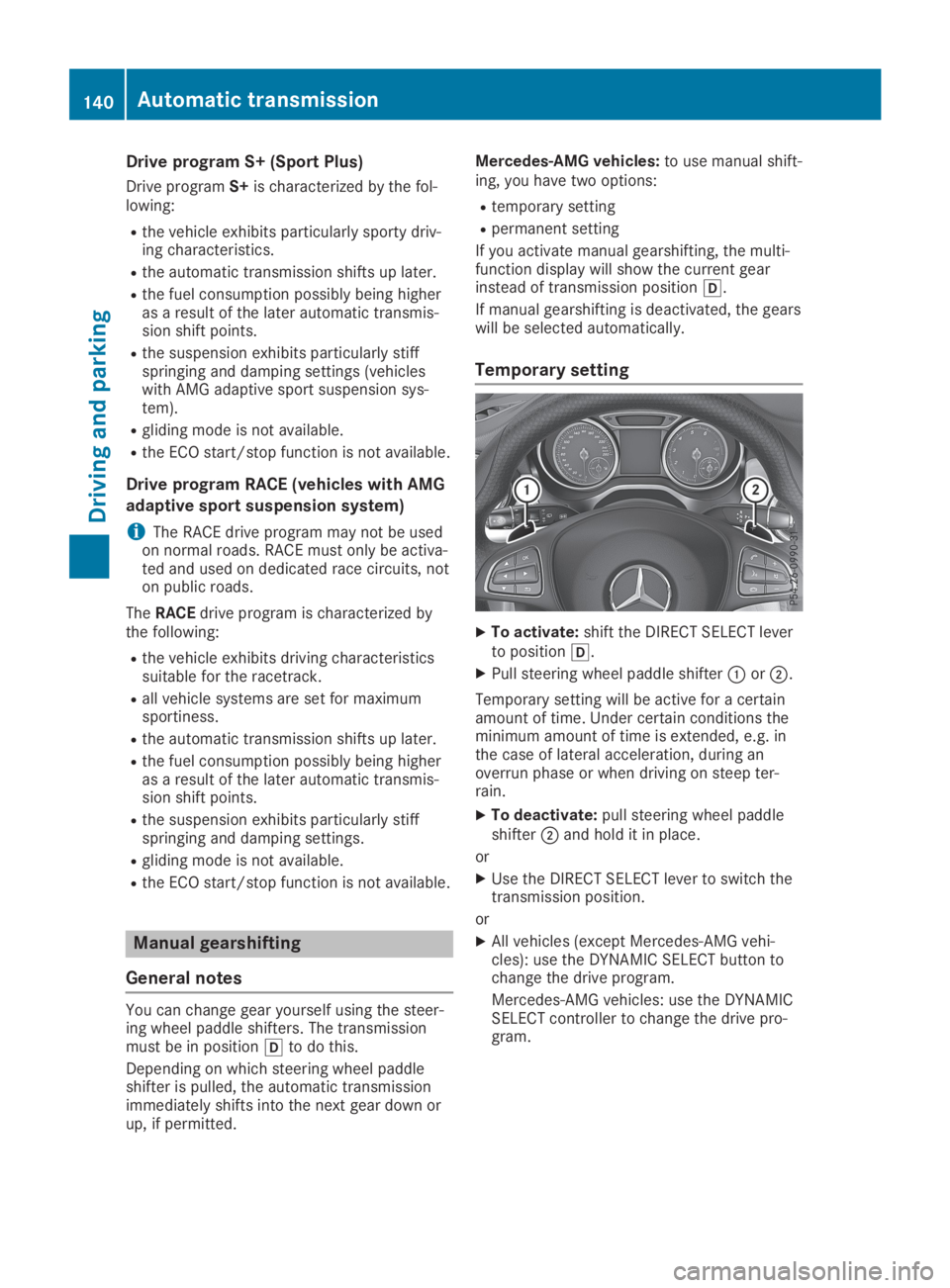
Temporary setting
XTo activate:shift the DIRECT SELECT leverto position[.
XPull steering wheel paddle shifterCorD.
Temporary setting will be active for a certainamount of time. Under certain conditions theminimum amount of time is extended, e.g. inthe case of lateral acceleration, during anoverrun phase or when driving on steep ter-rain.
XTo deactivate:pull steering wheel paddleshifterDand hold it in place.
or
XUse the DIRECT SELECT lever to switch thetransmission position.
or
XAll vehicles (except Mercedes-AMG vehi-cles): use the DYNAMIC SELECT button tochange the drive program.
Mercedes-AMG vehicles: use the DYNAMICSELECT controller to change the drive pro-gram.
140Automatic transmission
Driving and pa rking
Page 143 of 346
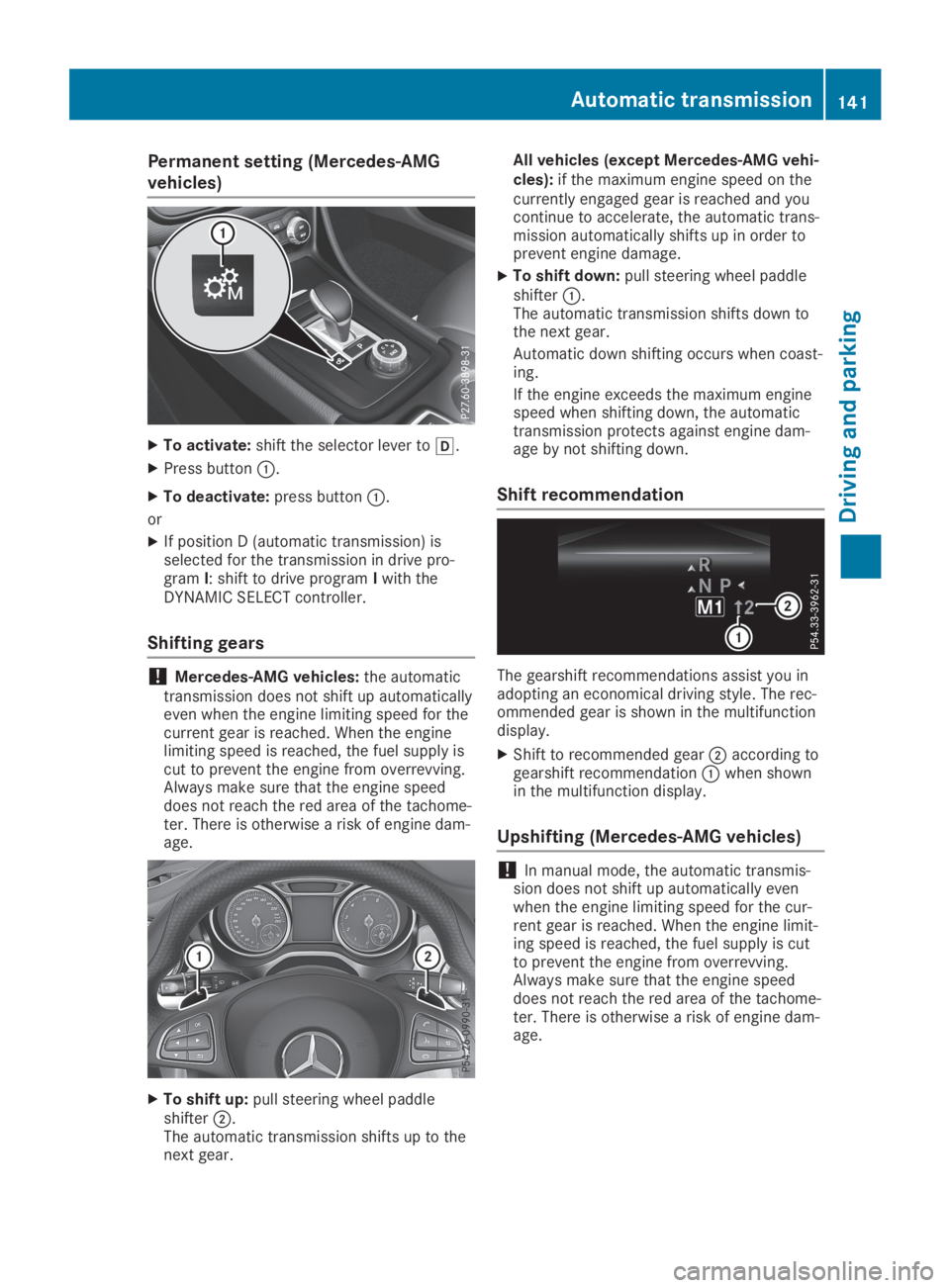
Permanent setting (Mercedes-AMG
vehicles)
XTo activate:shift the selector lever to[.
XPress buttonC.
XTo deactivate:press buttonC.
or
XIf position D (automatic transmission) isselected for the transmission in drive pro-gramI: shift to drive programIwith theDYNAMIC SELECT controller.
Shifting gears
!Mercedes-AMG vehicles:the automatictransmission does not shift up automaticallyeven when the engine limiting speed for thecurrent gear is reached. When the enginelimiting speed is reached, the fuel supply iscut to prevent the engine from overrevving.Always make sure that the engine speeddoes not reach the red area of the tachome-ter. There is otherwise a risk of engine dam-age.
XTo shift up:pull steering wheel paddleshifterD.The automatic transmission shifts up to thenext gear.
All vehicles (except Mercedes-AMG vehi-cles):if the maximum engine speed on thecurrently engaged gear is reached and youcontinue to accelerate, the automatic trans-mission automatically shifts up in order toprevent engine damage.
XTo shift down:pull steering wheel paddleshifterC.The automatic transmission shifts down tothe next gear.
Automatic down shifting occurs when coast-ing.
If the engine exceeds the maximum enginespeed when shifting down, the automatictransmission protects against engine dam-age by not shifting down.
Shift recommendation
The gearshift recommendations assist you inadopting an economical driving style. The rec-ommended gear is shown in the multifunctiondisplay.
XShift to recommended gearDaccording togearshift recommendationCwhen shownin the multifunction display.
Upshifting (Mercedes-AMG vehicles)
!In manual mode, the automatic transmis-sion does not shift up automatically evenwhen the engine limiting speed for the cur-rent gear is reached. When the engine limit-ing speed is reached, the fuel supply is cutto prevent the engine from overrevving.Always make sure that the engine speeddoes not reach the red area of the tachome-ter. There is otherwise a risk of engine dam-age.
Automatic transmission141
Driving and parking
Z
Page 144 of 346
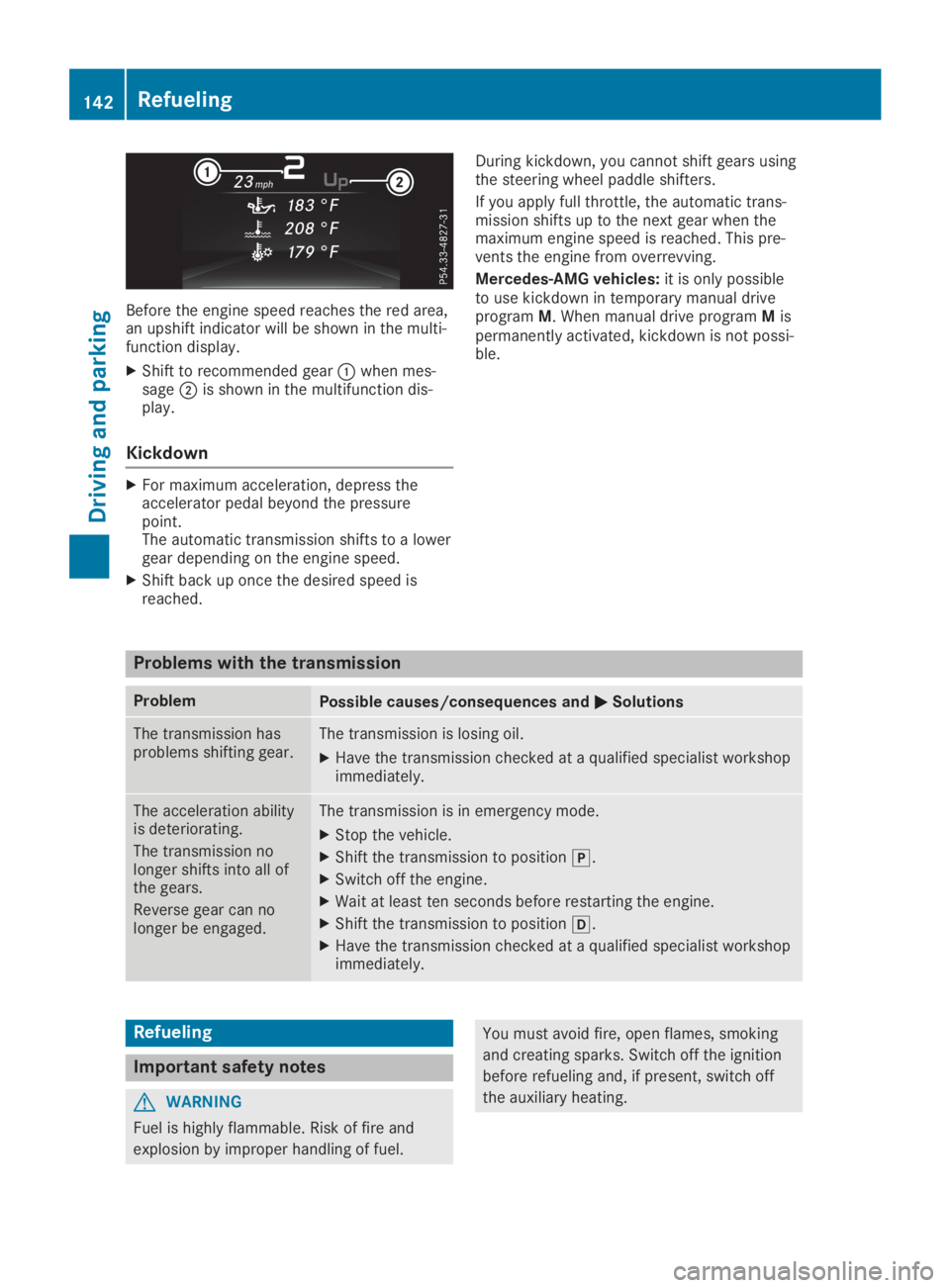
Before the engine speed reaches the red area,an upshift indicator will be shown in the multi-function display.
XShift to recommended gearCwhen mes-sageDis shown in the multifunction dis-play.
Kickdown
XFor maximum acceleration, depress theaccelerator pedal beyond the pressurepoint.The automatic transmission shifts to a lowergear depending on the engine speed.
XShift back up once the desired speed isreached.
During kickdown, you cannot shift gears usingthe steering wheel paddle shifters.
If you apply full throttle, the automatic trans-mission shifts up to the next gear when themaximum engine speed is reached. This pre-vents the engine from overrevving.
Mercedes-AMG vehicles:it is only possibleto use kickdown in temporary manual driveprogramM. When manual drive programMispermanently activated, kickdown is not possi-ble.
Problems with the transmission
ProblemPossible causes/consequences andPPSolutions
The transmission hasproblems shifting gear.The transmission is losing oil.
XHave the transmission checked at a qualified specialist workshopimmediately.
The acceleration abilityis deteriorating.
The transmission nolonger shifts into all ofthe gears.
Reverse gear can nolonger be engaged.
The transmission is in emergency mode.
XStop the vehicle.
XShift the transmission to position].
XSwitch off the engine.
XWait at least ten seconds before restarting the engine.
XShift the transmission to position[.
XHave the transmission checked at a qualified specialist workshopimmediately.
Refueling
Important safety notes
GWARNING
Fuel is highly flammable. Risk of fire and
explosion by improper handling of fuel.
You must avoid fire, open flames, smoking
and creating sparks. Switch off the ignition
before refueling and, if present, switch off
the auxiliary heating.
142Refueling
Driving and parking