light MERCEDES-BENZ GLA 2019 Repair Manual
[x] Cancel search | Manufacturer: MERCEDES-BENZ, Model Year: 2019, Model line: GLA, Model: MERCEDES-BENZ GLA 2019Pages: 346, PDF Size: 16.66 MB
Page 161 of 346
sound and the distance warning lamp will lightup in the instrument cluster. Brake immedi-ately in order to increase the distance to thevehicle in front or take evasive action providedit is safe to do so.
Active Distance Assist DISTRONIC operates inthe speed range between 0 mph (0 km/h) and120 mph (200 km/h).
Change into a lower gear in good time on longand steep downhill gradients. This is especiallyimportant if the vehicle is laden. By doing so,you will make use of the braking effect of theengine. This relieves the load on the brake sys-tem and prevents the brakes from overheatingand wearing too quickly.
Do not use Active Distance Assist DISTRONICon roads with steep gradients.
For Active Distance Assist DISTRONIC toassist you when driving, the radar sensor sys-tem must be operational.
As Active Distance Assist DISTRONIC trans-mits radar waves, it can resemble the radardetectors of the responsible authorities. Youcan refer to the relevant chapter in the Opera-tor's Manual if questions are asked about this.
iUSA only: This device has been approvedby the FCC as a "Vehicular Radar System".The radar sensor is intended for use in anautomotive radar system only. Removal,tampering, or altering of the device will voidany warranties, and is not permitted by theFCC. Do not tamper with, alter, or use in anynon-approved way.
Any unauthorized modification to this devicecould void the user's authority to operatethe equipment.
iCanada only: This device complies withRSS-210 of Industry Canada. Operation issubject to the following two conditions:
1. This device may not cause interference,and
2. This device must accept any interferencereceived, including interference that maycause undesired operation of the device.
Removal, tampering, or altering of thedevice will void any warranties, and is notpermitted. Do not tamper with, alter, or usein any non-approved way.
Any unauthorized modification to this devicecould void the user's authority to operatethe equipment.
Important safety notes
GWARNING
Active Distance Assist DISTRONIC does not
react to:
Rpeople or animals
Rstationary objects in the road, e.g. stop-
ped or parked vehicles
Roncoming vehicles and crossing traffic
As a result, Active Distance Assist
DISTRONIC may neither give warnings nor
intervene in such situations. There is a risk
of an accident.
Always pay careful attention to the traffic
situation and be ready to brake.
GWARNING
Active Distance Assist DISTRONIC cannot
always clearly identify other road users and
complex traffic situations.
In such cases, Active Distance Assist
DISTRONIC can:
Rgive an unnecessary warning and then
brake the vehicle
Rneither give a warning nor intervene
Raccelerate or brake unexpectedly
There is a risk of an accident.
Continue to drive carefully and be ready to
brake, especially if Active Distance Assist
DISTRONIC warns you.
GWARNING
Active Distance Assist DISTRONIC brakes
your vehicle with up to 50% of the maximum
possible deceleration. If this deceleration is
not sufficient, Active Distance Assist
DISTRONIC alerts you with a visual and
acoustic warning. There is a risk of an acci-
dent.
Adjust your speed in these cases and main-
tain sufficient distance.
Apply the brakes yourself and/or take eva-
sive action.
Driving systems159
Driving and parking
Z
Page 166 of 346
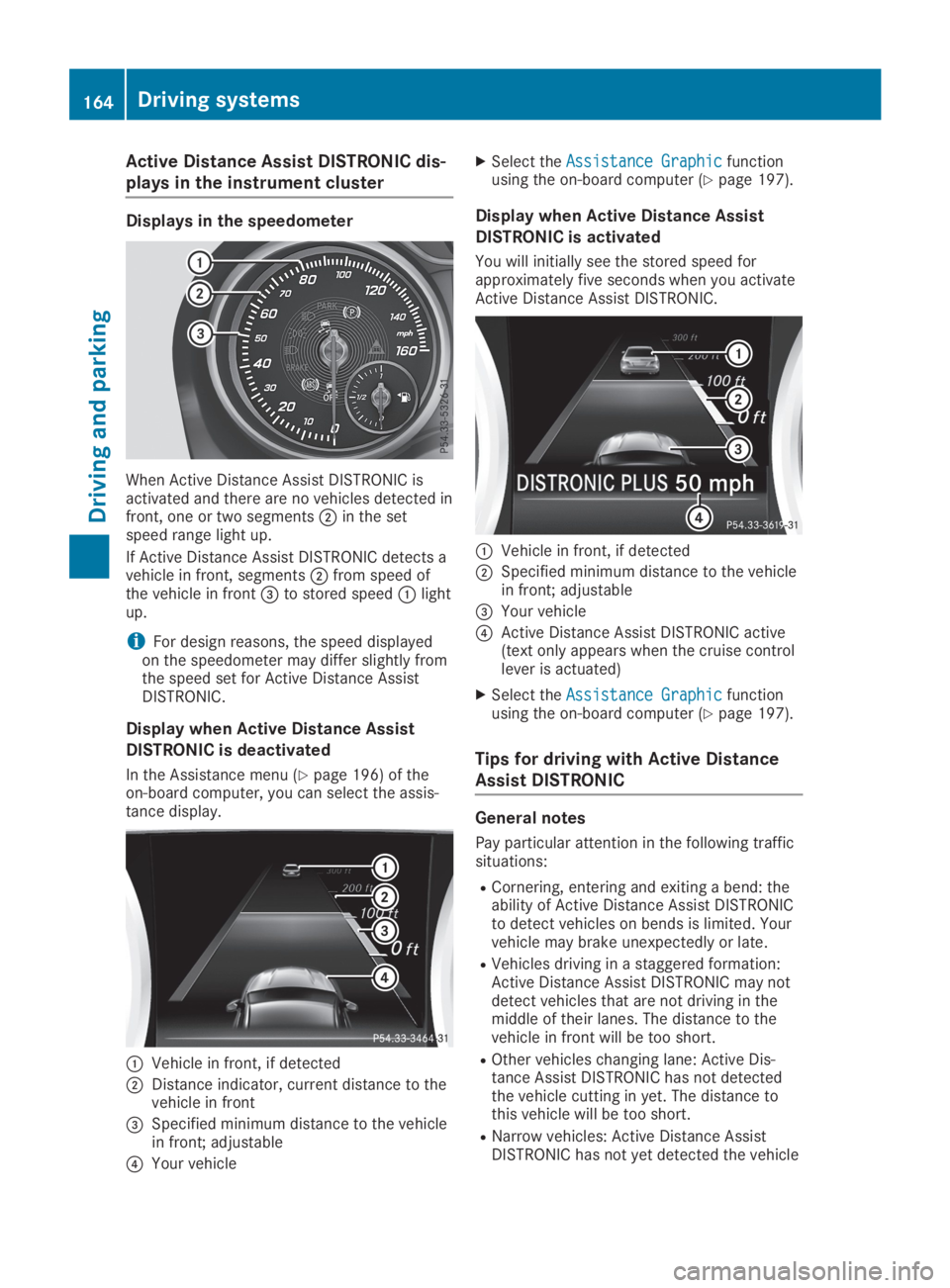
Active Distance Assist DISTRONIC dis-
plays in the instrument cluster
Displays in the speedometer
When Active Distance Assist DISTRONIC isactivated and there are no vehicles detected infront, one or two segmentsDin the setspeed range light up.
If Active Distance Assist DISTRONIC detects avehicle in front, segmentsDfrom speed ofthe vehicle in front
Page 167 of 346
in front on the edge of the road because ofits narrow width. The distance to the vehiclein front will be too short.
RObstacles and stationary vehicles: ActiveDistance Assist DISTRONIC does not brakefor obstacles or stationary vehicles. If, forexample, the detected vehicle turns a cor-ner and an obstacle or stationary vehicle isrevealed, Active Distance Assist DISTRONICwill not brake for them.
RActive Distance Assist DISTRONIC may mis-takenly detect vehicles that are crossingyour lane. If you activate Active DistanceAssist DISTRONIC under the following condi-tions, the vehicle could pull away uninten-tionally:
-at traffic lights with crossing traffic, forexample
-if there is a vehicle in front, after a cross-ing, with the HOLD function activated
In such situations, brake if necessary. ActiveDistance Assist DISTRONIC will then be deacti-vated.
HOLD function
General notes
The HOLD function can assist the driver in thefollowing situations:
RWhen pulling away, especially on steepslopes
RWhen maneuvering on steep slopes
RWhen waiting in traffic
The vehicle is kept stationary without thedriver having to depress the brake pedal.
The braking effect is canceled and the HOLDfunction deactivated when you depress theaccelerator pedal to pull away.
Important safety notes
GWARNING
If the vehicle is only braked using the HOLD
function, the vehicle may roll away in the fol-
lowing situations when you leave the vehi-
cle:
Rif there is a malfunction in the system or
in the voltage supply
Rif the HOLD function is deactivated by
depressing the accelerator pedal or brake
pedal, e.g. by a vehicle occupant
There is a risk of an accident.
Always deactivate the HOLD function and
secure the vehicle against rolling away
before you leave it.
!When Active Distance Assist DISTRONICor the HOLD function is activated, the vehi-cle brakes automatically in certain situa-tions.
To avoid damage to the vehicle, deactivateActive Distance Assist DISTRONIC and theHOLD function in the following or similar sit-uations:
Rwhen towing the vehicle
Rin the car wash
Deactivate the HOLD function (Ypage 166).
Activation conditions
You can activate the HOLD function if:
Rthe vehicle is stationary
Rthe engine is running or if it has been auto-matically switched off by the ECO start/stop function
Rthe driver's door is closed or your seat beltis fastened
Rthe electric parking brake is released
RActive Distance Assist DISTRONIC is deacti-vated
Rthe transmission is in position[,^or\\on vehicles with automatic transmission
Driving systems165
Driving and parking
Z
Page 170 of 346
iIf RACE START is used repeatedly within ashort period of time, it is only availableagain after the vehicle has been driven acertain distance.
AMG adaptive sport suspension sys-
tem
General notes
The electronically controlled damping systemworks continuously. This improves drivingsafety and ride comfort.
The damping is tuned individually to eachwheel and depends on:
Ryour driving style, e.g. sporty
Rthe road surface condition, e.g. bumps
Ryour individual selection ofSportorCom-fort
The suspension setting is adjusted using thecorresponding button in the center console.
iThe mode can also be set using the AMGDYNAMIC SELECT controller (Ypage 133).
Each time you start the engine with the Smart-Key or the Start/Stop button,Comfortmodeis activated. For further information aboutstarting the engine, see (Ypage 125).
Sport mode
The firmer setting of the suspension tuning inSportmode ensures even better contact withthe road. Select this mode when employing asporty driving style, e.g. on winding countryroads.
XPress buttonC.Indicator lampDlights up. You have selec-tedSportmode.
TheAMG Suspension System SPORTAMG Suspension System SPORTmes-sage appears in the multifunction display.
Comfort mode
InComfortmode, the driving characteristicsof your vehicle are more comfortable. Selectthis mode if you favor a more comfortable driv-ing style, but also when driving fast on straightroads, e.g. highways.
XPress buttonCagain so that indicatorlampDgoes out.You have selectedComfortmode.
TheAMG Suspension System COMFORTAMG Suspension System COMFORTmessage appears in the multifunction dis-play.
4MATIC
!Never tow the vehicle with one axle raised.This may damage the differential. Damageof this sort is not covered by the Mercedes-Benz Limited Warranty. All wheels mustremain either on the ground or be fullyraised. Observe the instructions for towingthe vehicle with all wheels in full contactwith the ground.
4MATIC, together with ESP®, improves thetraction of your vehicle whenever a drivewheel spins due to insufficient grip.
If you fail to adapt your driving style, 4MATICcan neither reduce the risk of accident noroverride the laws of physics. 4MATIC cannottake account of road, weather and traffic con-ditions. 4MATIC is only an aid. You are respon-sible for the distance to the vehicle in front, forvehicle speed, for braking in good time and forstaying in your lane.
If a drive wheel spins due to insufficient grip:
ROnly depress the accelerator pedal as far asnecessary when pulling away.
RAccelerate less when driving.
iIn wintry driving conditions, the maximumeffect of 4MATIC can only be achieved if youuse winter tires (M+S tires), with snowchains if necessary.
168Driving systems
Driving and parking
Page 171 of 346
DSR
General notes
iDSR (Downhill Speed Regulation) is onlyavailable for vehicles with the ON&OFF-ROAD package.
DSR is an aid to assist you when driving down-hill. It keeps the speed of travel at the speedselected on the on-board computer. Thesteeper the downhill gradient, the greater theDSR braking effect on the vehicle. When driv-ing on flat stretches of road or on an uphillgradient, the DSR braking effect is minimal ornonexistent.
DSR controls the vehicle’s speed when it isactivated and the transmission is in position[,^or\\. You can drive at a higher or alower speed than that set on the on-boardcomputer at any time by accelerating or brak-ing.
Important safety notes
GWARNING
If the speed driven and the set speed devi-
ate and you activate DSR on a slippery road
surface, the wheels may lose traction. There
is an increased danger of skidding and acci-
dents.
Before switching DSR on, please take into
consideration the road surface and the dif-
ference between driving speed and the set
speed.
If you fail to adapt your driving style, DSR canneither reduce the risk of accident nor over-ride the laws of physics. DSR cannot takeaccount of road, weather and traffic condi-tions. DSR is only an aid. You are responsiblefor the distance to the vehicle in front, forvehicle speed, for braking in good time and forstaying in your lane.
You are always responsible for keeping controlof the vehicle and for assessing whether thedownhill gradient can be managed. DSR maynot always be able to keep to the set speed,depending on road surface and tire conditions.Select a set speed suitable for the prevailingconditions and when necessary, apply thebrakes manually.
Further information about "Driving off-road"(Ypage 153).
Activating/deactivating DSR
If you activate DSR and no speed has beenset, the vehicle decelerates to 4 mph (Canada:6 km/h).
You can only activate DSR when driving atspeeds below 19 mph (Canada: 30 km/h).
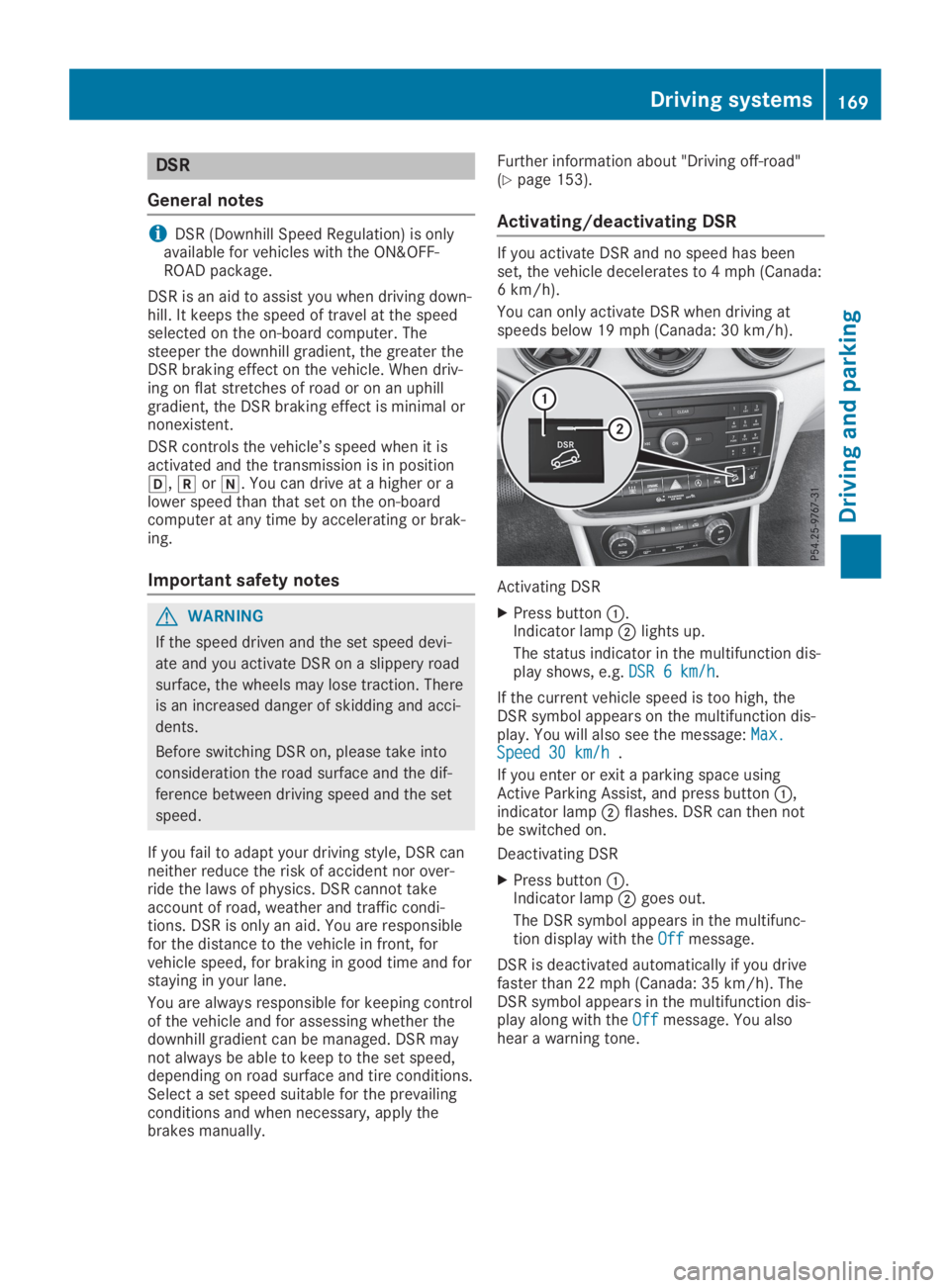
Activating DSR
XPress buttonC.Indicator lampDlights up.
The status indicator in the multifunction dis-play shows, e.g.DSR 6 km/hDSR 6 km/h.
If the current vehicle speed is too high, theDSR symbol appears on the multifunction dis-play. You will also see the message:Max.Max.Speed 30 km/hSpeed 30 km/h.
If you enter or exit a parking space usingActive Parking Assist, and press buttonC,indicator lampDflashes. DSR can then notbe switched on.
Deactivating DSR
XPress buttonC.Indicator lampDgoes out.
The DSR symbol appears in the multifunc-tion display with theOffOffmessage.
DSR is deactivated automatically if you drivefaster than 22 mph (Canada: 35 km/h). TheDSR symbol appears in the multifunction dis-play along with theOffOffmessage. You alsohear a warning tone.
Driving systems169
Driving an d parking
Z
Page 174 of 346
objects when they are in the immediatevicinity of the vehicle. You could damage thevehicle or the objects.
The sensors may not detect snow and otherobjects that absorb ultrasonic waves.
Ultrasonic sources such as an automatic carwash, the compressed-air brakes of a truckor a pneumatic drill could cause ParkingAssist PARKTRONIC to malfunction.
Parking Assist PARKTRONIC may not func-tion correctly on uneven terrain.
Parking Assist PARKTRONIC is activated auto-matically when you:
Rswitch on the ignition
Rshift the transmission to position[,^or\\
Parking Assist PARKTRONIC is deactivated atspeeds above 11 mph (18 km/h). It is reacti-vated at lower speeds.
Range of the sensors
General notes
Parking Assist PARKTRONIC does not take intoaccount obstacles located:
Rbelow the detection range, such as persons,animals or objects
Rabove the detection range, e.g. overhangingloads, tail sections or loading ramps oftrucks
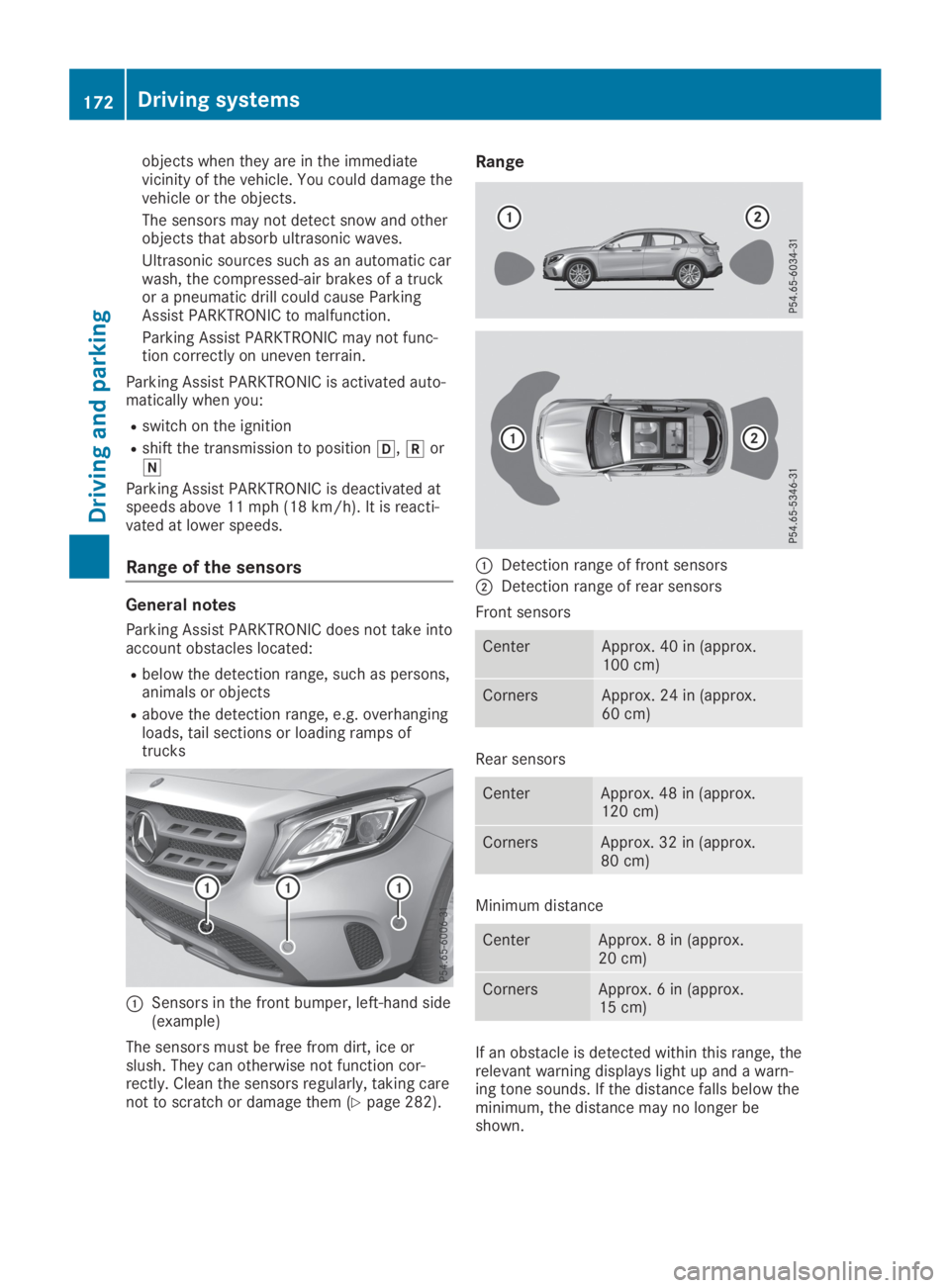
CSensors in the front bumper, left-hand side(example)
The sensors must be free from dirt, ice orslush. They can otherwise not function cor-rectly. Clean the sensors regularly, taking carenot to scratch or damage them (Ypage 282).
Range
CDetection range of front sensors
DDetection range of rear sensors
Front sensors
CenterApprox. 40 in (approx.100 cm)
CornersApprox. 24 in (approx.60 cm)
Rear sensors
CenterApprox. 48 in (approx.120 cm)
CornersApprox. 32 in (approx.80 cm)
Minimum distance
CenterApprox. 8 in (approx.20 cm)
CornersApprox. 6 in (approx.15 cm)
If an obstacle is detected within this range, therelevant warning displays light up and a warn-ing tone sounds. If the distance falls below theminimum, the distance may no longer beshown.
172Driving systems
Driving and parking
Page 176 of 346
Problems with Parking Assist PARKTRONIC
ProblemPossible causes/consequences andPPSolutions
Only the red segmentsin the Parking AssistPARKTRONIC warningdisplays are lit. You alsohear a warning tone forapproximately two sec-onds.
Parking AssistPARKTRONIC is thendeactivated and theindicator lamp on thePARKTRONIC buttonlights up.
Parking Assist PARKTRONIC has malfunctioned and has been deac-tivated.
XIf problems persist, have Parking Assist PARKTRONIC checked ata qualified specialist workshop.
Only the red segmentsin the Parking AssistPARKTRONIC warningdisplays are lit. ParkingAssist PARKTRONIC isthen deactivated.
The Parking Assist PARKTRONIC sensors are dirty or there is inter-ference.
XClean the Parking Assist PARKTRONIC sensors (Ypage 282).
XSwitch the ignition back on.
The problem may be caused by an external source of radio or ultra-sound waves.
XCheck to see if Parking Assist PARKTRONIC works at a differentlocation.
Active Parking Assist
General notes
Active Parking Assist is an electronic parkingaid with ultrasound. It measures the road onboth sides of the vehicle. A parking symbolindicates a suitable parking space. Activesteering intervention and brake applicationcan assist you during parking and when exitinga parking space. You can also still use ParkingAssist PARKTRONIC (Ypage 171).
Important safety notes
Active Parking Assist is merely an aid. It is nota replacement for your attention to your imme-diate surroundings. You are always responsi-ble for safe maneuvering, parking and exiting aparking space. Make sure that there are nopersons, animals or objects in the maneuver-ing area when you are maneuvering or parking.
When Parking Assist PARKTRONIC is deactiva-ted, Active Parking Assist is also unavailable.
GWARNING
While parking or pulling out of a parking
space, the vehicle swings out and can drive
onto areas of the oncoming lane. This could
cause you to collide with other road users or
objects. There is a risk of an accident.
Pay attention to other road users or objects.
Stop the vehicle if necessary or cancel the
Active Parking Assist parking procedure.
!If they cannot be avoided, drive overobstacles such as curbs slowly and at anobtuse angle. Otherwise, you may damagethe wheels or tires.
Active Parking Assist may possibly indicateparking spaces which are not suitable for park-ing, for example:
Rwhere parking or stopping is prohibited
Rin front of driveways or entrances and exits
Ron unsuitable surfaces
174Driving systems
Driving and parking
Page 181 of 346
Rif the camera lens is dirty or obstructed.Observe the notes on cleaning(Ypage 283)
Rif the rear of your vehicle is damaged. In thiscase, have the camera position and settingchecked at a qualified specialist workshop.
The field of vision and other functions of therear view camera may be restricted due toadditional accessories on the rear of the vehi-cle (e.g. license plate holder, rear bicyclerack).
iThe contrast of the display may be affec-ted by the sudden presence of sunlight orother light sources, e.g. when exiting agarage. Pay particular attention in this situa-tion.
iIf usability is severely restricted, e.g. dueto pixel errors, have the display repaired orreplaced.
Activating/deactivating the rear view
camera
XTo activate:make sure that the SmartKeyis in positionHin the ignition lock.
XMake sure that theActivation by R gearActivation by R gearfunction is selected in the multimedia sys-tem; see the Digital Operator's Manual.
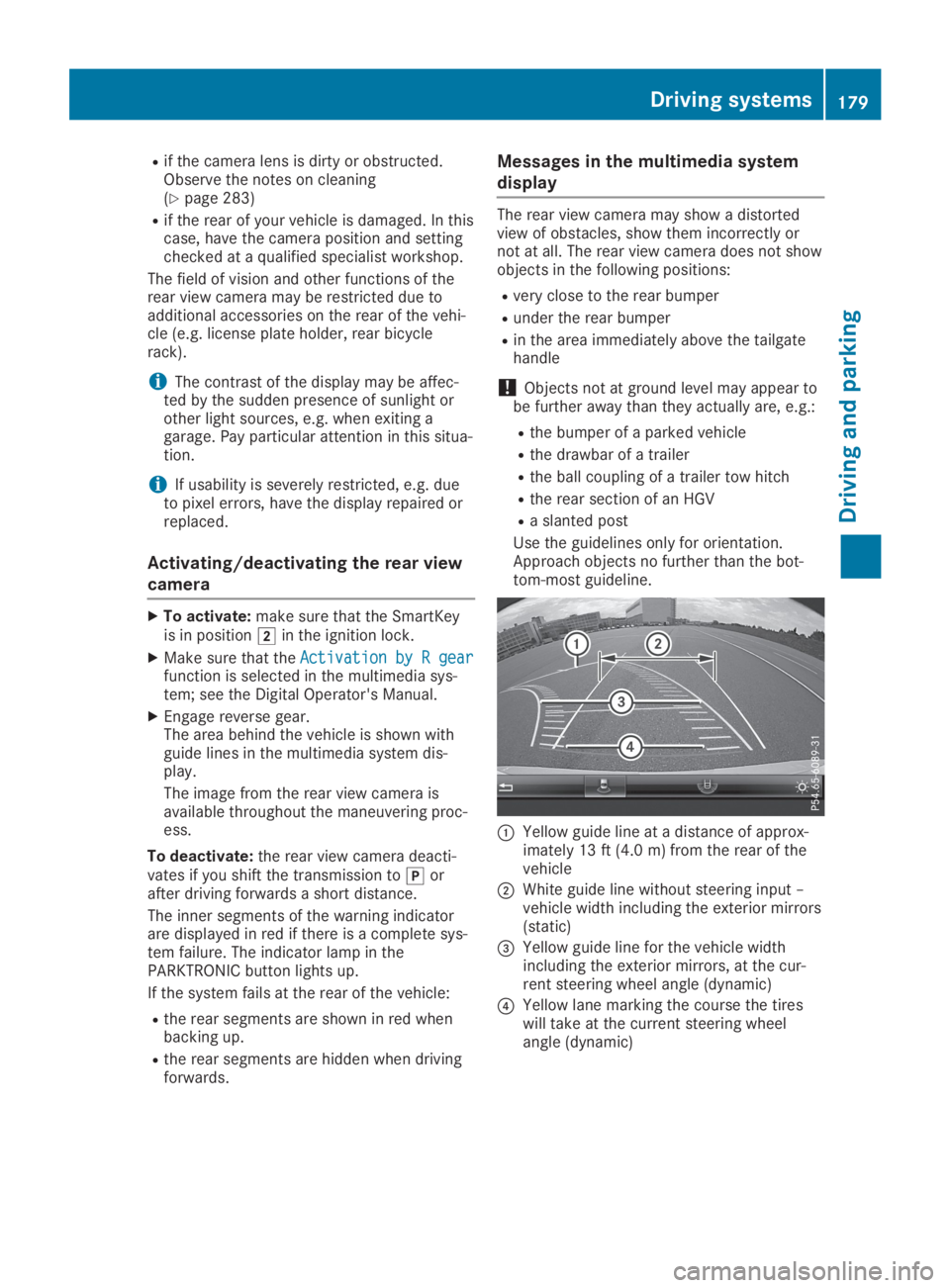
XEngage reverse gear.The area behind the vehicle is shown withguide lines in the multimedia system dis-play.
The image from the rear view camera isavailable throughout the maneuvering proc-ess.
To deactivate:the rear view camera deacti-vates if you shift the transmission to]orafter driving forwards a short distance.
The inner segments of the warning indicatorare displayed in red if there is a complete sys-tem failure. The indicator lamp in thePARKTRONIC button lights up.
If the system fails at the rear of the vehicle:
Rthe rear segments are shown in red whenbacking up.
Rthe rear segments are hidden when drivingforwards.
Messages in the multimedia system
display
The rear view camera may show a distortedview of obstacles, show them incorrectly ornot at all. The rear view camera does not showobjects in the following positions:
Rvery close to the rear bumper
Runder the rear bumper
Rin the area immediately above the tailgatehandle
!Objects not at ground level may appear tobe further away than they actually are, e.g.:
Rthe bumper of a parked vehicle
Rthe drawbar of a trailer
Rthe ball coupling of a trailer tow hitch
Rthe rear section of an HGV
Ra slanted post
Use the guidelines only for orientation.Approach objects no further than the bot-tom-most guideline.
CYellow guide line at a distance of approx-imately 13 ft (4.0 m) from the rear of thevehicle
DWhite guide line without steering input –vehicle width including the exterior mirrors(static)
Page 188 of 346
If the lanes are narrow, vehicles driving in thelane beyond the lane next to your vehicle maybe indicated, especially if the vehicles are notdriving in the middle of their lane. This may bethe case if the vehicles are driving on the innerside of their lane.
Due to the nature of the system:
Rwarnings may be issued in error when driv-ing close to crash barriers or similar solidlane borders.
Rwarnings may be interrupted when you aredriving alongside particularly long vehicles,such as trucks, for a prolonged time.
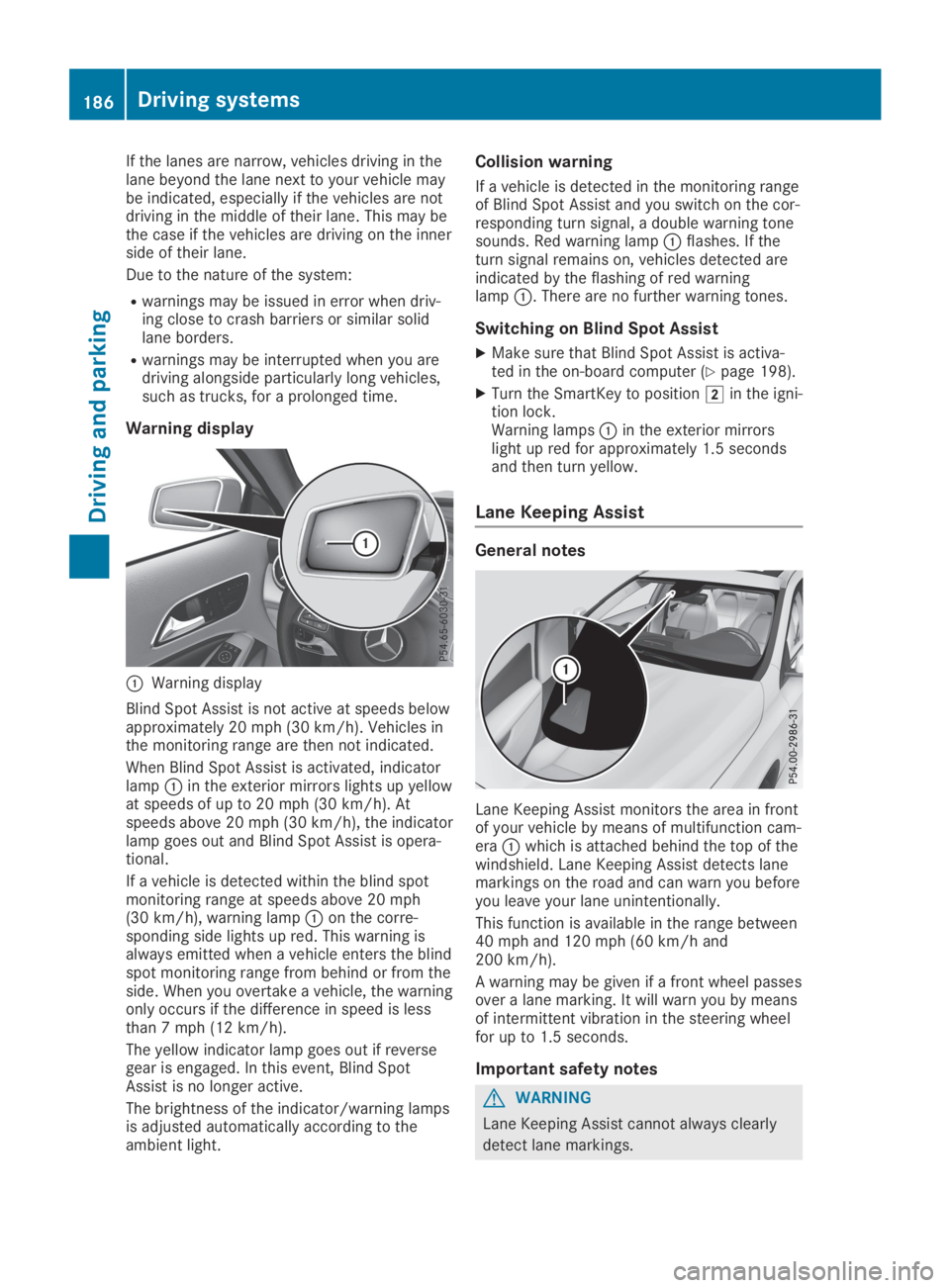
Warning display
CWarning display
Blind Spot Assist is not active at speeds belowapproximately 20 mph (30 km/h). Vehicles inthe monitoring range are then not indicated.
When Blind Spot Assist is activated, indicatorlampCin the exterior mirrors lights up yellowat speeds of up to 20 mph (30 km/h). Atspeeds above 20 mph (30 km/h), the indicatorlamp goes out and Blind Spot Assist is opera-tional.
If a vehicle is detected within the blind spotmonitoring range at speeds above 20 mph(30 km/h), warning lampCon the corre-sponding side lights up red. This warning isalways emitted when a vehicle enters the blindspot monitoring range from behind or from theside. When you overtake a vehicle, the warningonly occurs if the difference in speed is lessthan 7 mph (12 km/h).
The yellow indicator lamp goes out if reversegear is engaged. In this event, Blind SpotAssist is no longer active.
The brightness of the indicator/warning lampsis adjusted automatically according to theambient light.
Collision warning
If a vehicle is detected in the monitoring rangeof Blind Spot Assist and you switch on the cor-responding turn signal, a double warning tonesounds. Red warning lampCflashes. If theturn signal remains on, vehicles detected areindicated by the flashing of red warninglampC. There are no further warning tones.
Switching on Blind Spot Assist
XMake sure that Blind Spot Assist is activa-ted in the on-board computer (Ypage 198).
XTurn the SmartKey to positionHin the igni-tion lock.Warning lampsCin the exterior mirrorslight up red for approximately 1.5 secondsand then turn yellow.
Lane Keeping Assist
General notes
Lane Keeping Assist monitors the area in frontof your vehicle by means of multifunction cam-eraCwhich is attached behind the top of thewindshield. Lane Keeping Assist detects lanemarkings on the road and can warn you beforeyou leave your lane unintentionally.
This function is available in the range between40 mph and 120 mph (60 km/h and200 km/h).
A warning may be given if a front wheel passesover a lane marking. It will warn you by meansof intermittent vibration in the steering wheelfor up to 1.5 seconds.
Important safety notes
GWARNING
Lane Keeping Assist cannot always clearly
detect lane markings.
186Driving systems
Driving and parking
Page 190 of 346
Important safety notes
GWARNING
If you operate information systems and com-
munication equipment integrated in the
vehicle when driving, you may be distracted
from the traffic situation. You could also
lose control of the vehicle. There is a risk of
an accident.
Only operate this equipment when the traffic
situation permits. If you are not sure that
this is possible, park the vehicle paying
attention to traffic conditions and operate
the equipment when the vehicle is station-
ary.
You must observe the legal requirements forthe country in which you are currently drivingwhen operating the on-board computer.
GWARNING
If the instrument cluster has failed or mal-
functioned, you may not recognize function
restrictions in systems relevant to safety.
The operating safety of your vehicle may be
impaired. There is a risk of an accident.
Drive on carefully. Have the vehicle checked
at a qualified specialist workshop immedi-
ately.
The on-board computer only shows messagesor warnings from certain systems in the multi-function display. You should therefore makesure your vehicle is operating safely at alltimes.
If the operating safety of your vehicle isimpaired, pull over as soon as it is safe to doso. Contact a qualified specialist workshop.
For an overview, see the instrument panelillustration (Ypage 32).
Displays and operation
Instrument cluster lighting
The light sensor in the instrument cluster auto-matically controls the brightness of the multi-function display. In daylight, the displays in theinstrument cluster are not illuminated.
The lighting in the instrument cluster, in thedisplays and the controls in the vehicle interiorcan be adjusted using the brightness controlknob.
The brightness control knob is located on thebottom left of the instrument cluster(Ypage 32).
XTurn the brightness control knob clockwiseor counter-clockwise.If the light switch is set to theX,`orXposition, the brightness is dependentupon the brightness of the ambient light.
Speedometer with segments
The speedometer is only divided into seg-ments in vehicles with Active Distance AssistDISTRONIC.
The segments in the speedometer indicatewhich speed range is available.
RActive Distance Assist DISTRONIC activated(Ypage 158):
One or two segments in the set speed rangelight up.
RActive Distance Assist DISTRONIC detects avehicle in front moving more slowly than thestored speed:
The segments between the speed of thevehicle in front and the stored speed lightup.
Tachometer
!Do not drive in the overrevving range, asthis could damage the engine.
The red band in the tachometer indicates theengine's overrevving range.
The engine is limited within a range to protectthe engine when the red band is reached.
Outside temperature display
You should pay special attention to road con-ditions when temperatures are around freezingpoint.
Bear in mind that the outside temperature dis-play indicates the temperature measured anddoes not record the road temperature.
188Displays and operation
On-board computer and displays