remote control MERCEDES-BENZ GLA 2019 Owners Manual
[x] Cancel search | Manufacturer: MERCEDES-BENZ, Model Year: 2019, Model line: GLA, Model: MERCEDES-BENZ GLA 2019Pages: 346, PDF Size: 16.66 MB
Page 19 of 346
Remote control
Garage door opener ....................... 268
Programming (garage door
opener) .......................................... 268
Replacing bulbs
Brake lamp .................................... 108
High-beam headlamps................... 107
Important safety notes .................. 106
Installing/removing the cover
(front wheel arch) .......................... 107
Low-beam headlamps.................... 107
Overview of bulb types .................. 106
Rear fog lamp ................................ 108
Turn signals (front) ......................... 108
Turn signals (rear) .......................... 108
Rescue card......................................... 28
Reserve (fuel tank)
see Fuel
Reserve fuel
Display message ............................ 218
Warning lamp ................................. 238
see Fuel
Residual heat (climate control)........ 122
Restraint system
Display message ............................ 211
Introduction ..................................... 39
Warning lamp ................................. 237
Warning lamp (function) ................... 40
Reverse gear (selector lever)........... 136
Reversing feature
Roller sunblind ................................. 89
Side windows ................................... 83
Tailgate ............................................ 78
Roadside Assistance (breakdown).... 26
Roller sunblind
Panorama roof with power tilt/
sliding panel ..................................... 89
Roof carrier........................................ 256
Roof lining and carpets (cleaning
guidelines)......................................... 285
Roof load (maximum)........................ 339
Route guidance
see also Digital Operator's Man-
ual .................................................. 242
S
Safety
Children in the vehicle ..................... 53
see Occupant safety
Safety system
see Driving safety systems
SD card
Inserting ........................................ 249
Inserting/removing ........................ 248
Removing ....................................... 249
SD memory card
see also Digital Operator's Man-
ual .................................................. 242
Search & Send
see also Digital Operator's Man-
ual .................................................. 242
Seat
Correct driver's seat position ........... 92
Seat belts
Adjusting the height ......................... 43
Cleaning ......................................... 285
Correct usage .................................. 42
Fastening ......................................... 43
Important safety guidelines ............. 41
Introduction ..................................... 41
Releasing ......................................... 43
Warning lamp ................................. 230
Warning lamp (function) ................... 44
Seats
Adjusting (electrically) ..................... 94
Adjusting (manually) ........................ 94
Adjusting (Performance Seat) .......... 96
Adjusting the 4-way lumbar sup-
port .................................................. 96
Adjusting the head restraint ............ 95
Cleaning the cover ......................... 284
Folding the backrest (rear com-
partment) forwards/back .............. 254
Important safety notes .................... 92
Seat heating problem ...................... 97
Storing settings (memory func-
tion) ............................................... 101
Switching seat heating on/off......... 96
Section
Cargo compartment ......................... 77
Securing a load
see Securing cargo
Index17
Page 71 of 346
SmartKey
Important safety notes
GWARNING
If children are left unsupervised in the vehi-
cle, they could:
Roperate the vehicle's equipment
Additionally, children could set the vehicle in
motion if, for example, they:
Rrelease the parking brake
Rshift the automatic transmission out of
park position]
Rstart the engine
There is a risk of an accident and injury.
Never leave children or animals unattended
in the vehicle.
When leaving the vehicle, always take the
SmartKey with you and lock the vehicle. This
also applies for the Digital Vehicle Key if the
"Digital Vehicle Key" function is activated via
Mercedes me connect.
GWARNING
If you attach heavy or large objects to the
SmartKey, the SmartKey could be uninten-
tionally turned in the ignition lock. This
could cause the engine to be switched off.
There is a risk of an accident.
Do not attach any heavy or large objects to
the SmartKey. Remove any bulky key rings
before inserting the SmartKey into the igni-
tion lock.
!Keep the SmartKey away from strong mag-netic fields. Otherwise, the remote controlfunction could be affected.
Strong magnetic fields can occur in thevicinity of powerful electrical installations.
Do not keep the SmartKey:
Rwith electronic devices, e.g. a mobile phoneor another SmartKey
Rwith metallic objects, e.g. coins or metal foil
Rinside metallic objects, e.g. a metal case
Vehicles with KEYLESS-GO start function:do not keep the SmartKey in the cargo com-
partment. Otherwise, the SmartKey may notbe detected, e.g. when starting the engineusing the Start/Stop button.
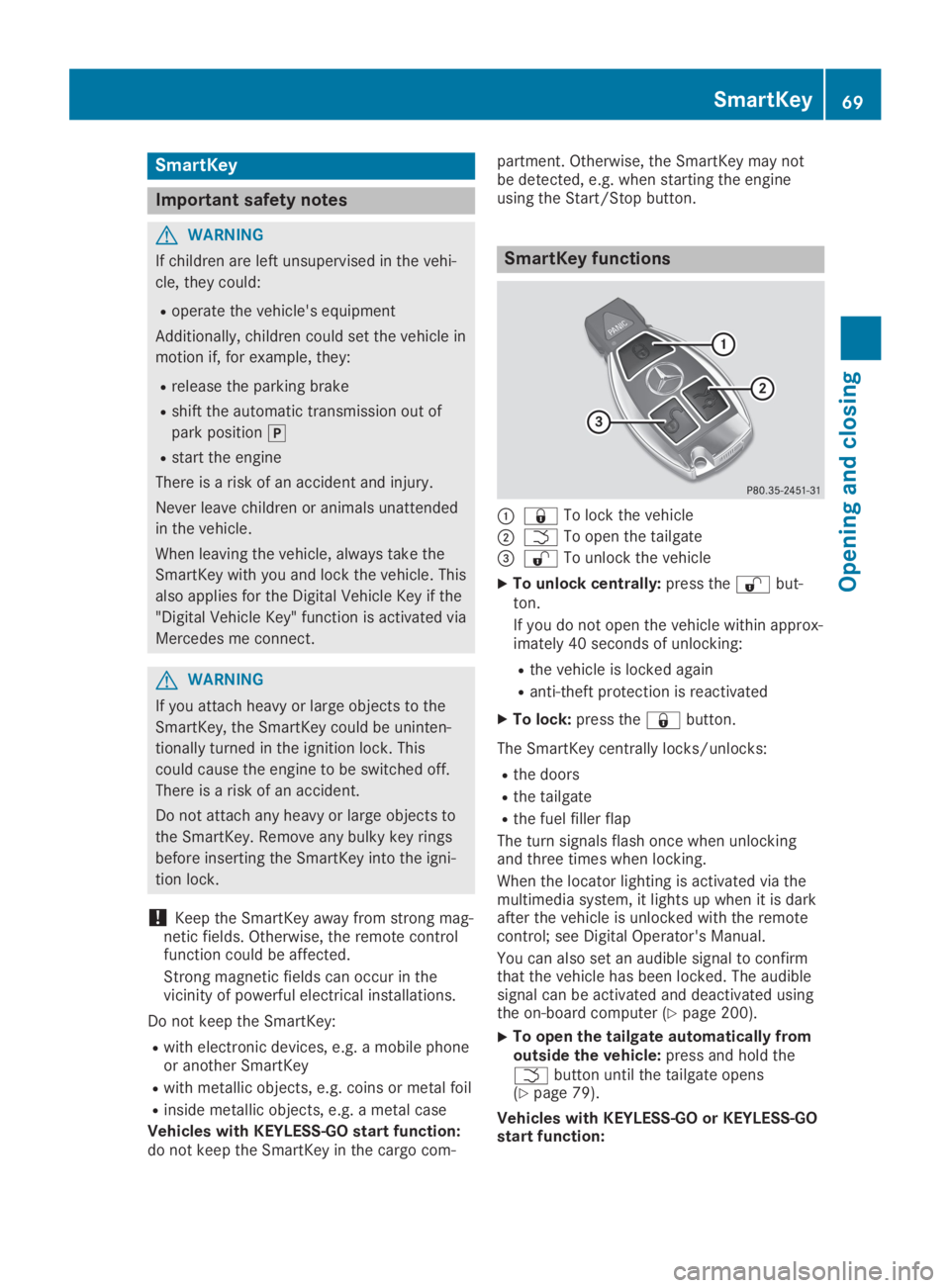
SmartKey functions
C7To lock the vehicle
DTTo open the tailgate
Page 76 of 346
ProblemPossible causes/consequences andPPSolutions
You can no longer lockor unlock the vehicleusing KEYLESS-GO.
The SmartKey battery is discharged or nearly discharged.
XCheck the SmartKey battery (Ypage 72) and replace it if neces-sary (Ypage 72).
If this does not work:
XUnlock (Ypage 76) or lock (Ypage 77) the vehicle using themechanical key.
There is interference from a powerful source of radio waves.
XUnlock (Ypage 76) or lock (Ypage 77) the vehicle using themechanical key.
KEYLESS-GO is malfunctioning.
XLock/unlock the vehicle using the remote control function of theSmartKey.
XHave the vehicle and SmartKey checked at a qualified specialistworkshop.
If the vehicle can also not be locked/unlocked using the remotecontrol function:
XUnlock (Ypage 76) or lock (Ypage 77) the vehicle using themechanical key.
XHave the vehicle and SmartKey checked at a qualified specialistworkshop.
The engine cannot bestarted using the Smart-Key.
The on-board voltage is too low
XSwitch off non-essential consumers, e.g. seat heating or interiorlighting, and try to start the engine again.
If this does not work:
XCheck the starter battery and charge it if necessary(Ypage 294).
or
XJump-start the vehicle (Ypage 295).
or
XConsult a qualified specialist workshop.
The engine cannot bestarted using the Start/Stop button. The Smart-Key is in the vehicle.
The vehicle is locked.
XUnlock the vehicle and try to start the vehicle again.
The SmartKey battery is discharged or nearly discharged.
XCheck the SmartKey battery (Ypage 72) and replace it if neces-sary (Ypage 72).
If this does not work:
XStart your vehicle with the SmartKey in the ignition lock.
There is interference from a powerful source of radio waves.
XStart your vehicle with the SmartKey in the ignition lock.
74SmartKey
Opening and closing
Page 84 of 346
The opening dimensions of the tailgate can befound in the "Vehicle data" section(Ypage 339).
Opening and closing automatically
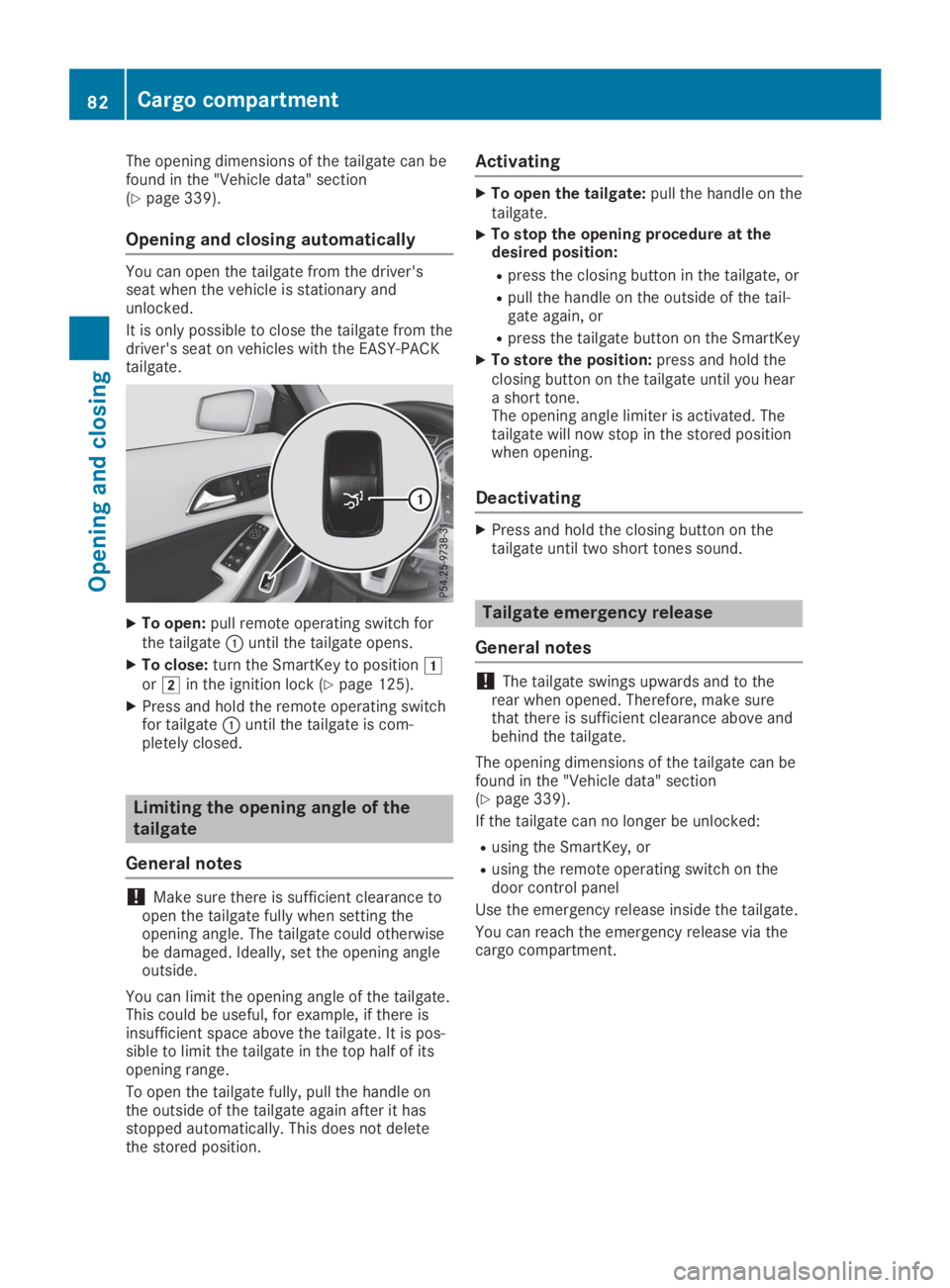
You can open the tailgate from the driver'sseat when the vehicle is stationary andunlocked.
It is only possible to close the tailgate from thedriver's seat on vehicles with the EASY-PACKtailgate.
XTo open:pull remote operating switch forthe tailgateCuntil the tailgate opens.
XTo close:turn the SmartKey to positionGorHin the ignition lock (Ypage 125).
XPress and hold the remote operating switchfor tailgateCuntil the tailgate is com-pletely closed.
Limiting the opening angle of the
tailgate
General notes
!Make sure there is sufficient clearance toopen the tailgate fully when setting theopening angle. The tailgate could otherwisebe damaged. Ideally, set the opening angleoutside.
You can limit the opening angle of the tailgate.This could be useful, for example, if there isinsufficient space above the tailgate. It is pos-sible to limit the tailgate in the top half of itsopening range.
To open the tailgate fully, pull the handle onthe outside of the tailgate again after it hasstopped automatically. This does not deletethe stored position.
Activating
XTo open the tailgate:pull the handle on thetailgate.
XTo stop the opening procedure at thedesired position:
Rpress the closing button in the tailgate, or
Rpull the handle on the outside of the tail-gate again, or
Rpress the tailgate button on the SmartKey
XTo store the position:press and hold theclosing button on the tailgate until you heara short tone.The opening angle limiter is activated. Thetailgate will now stop in the stored positionwhen opening.
Deactivating
XPress and hold the closing button on thetailgate until two short tones sound.
Tailgate emergency release
General notes
!The tailgate swings upwards and to therear when opened. Therefore, make surethat there is sufficient clearance above andbehind the tailgate.
The opening dimensions of the tailgate can befound in the "Vehicle data" section(Ypage 339).
If the tailgate can no longer be unlocked:
Rusing the SmartKey, or
Rusing the remote operating switch on thedoor control panel
Use the emergency release inside the tailgate.
You can reach the emergency release via thecargo compartment.
82Cargo compartment
Opening and closing
Page 127 of 346
There is a risk of fire and an accident.
Release the parking brake fully before driv-
ing off.
!Do not warm up the engine while station-ary. Pull away immediately. Avoid highengine speeds and full throttle until theengine has reached its operating tempera-ture.
In vehicles with automatic transmission,engage positions P and R only when thevehicle is stationary.
Where possible, avoid spinning the drivewheels when pulling away on slippery roads.You could otherwise damage the drive train.
!Mercedes-AMG vehicles:avoid full-loadoperation and engine speeds greater than5000 rpm when the engine is cold. Thishelps to protect the engine and avoidsuncomfortable driving.
Key positions
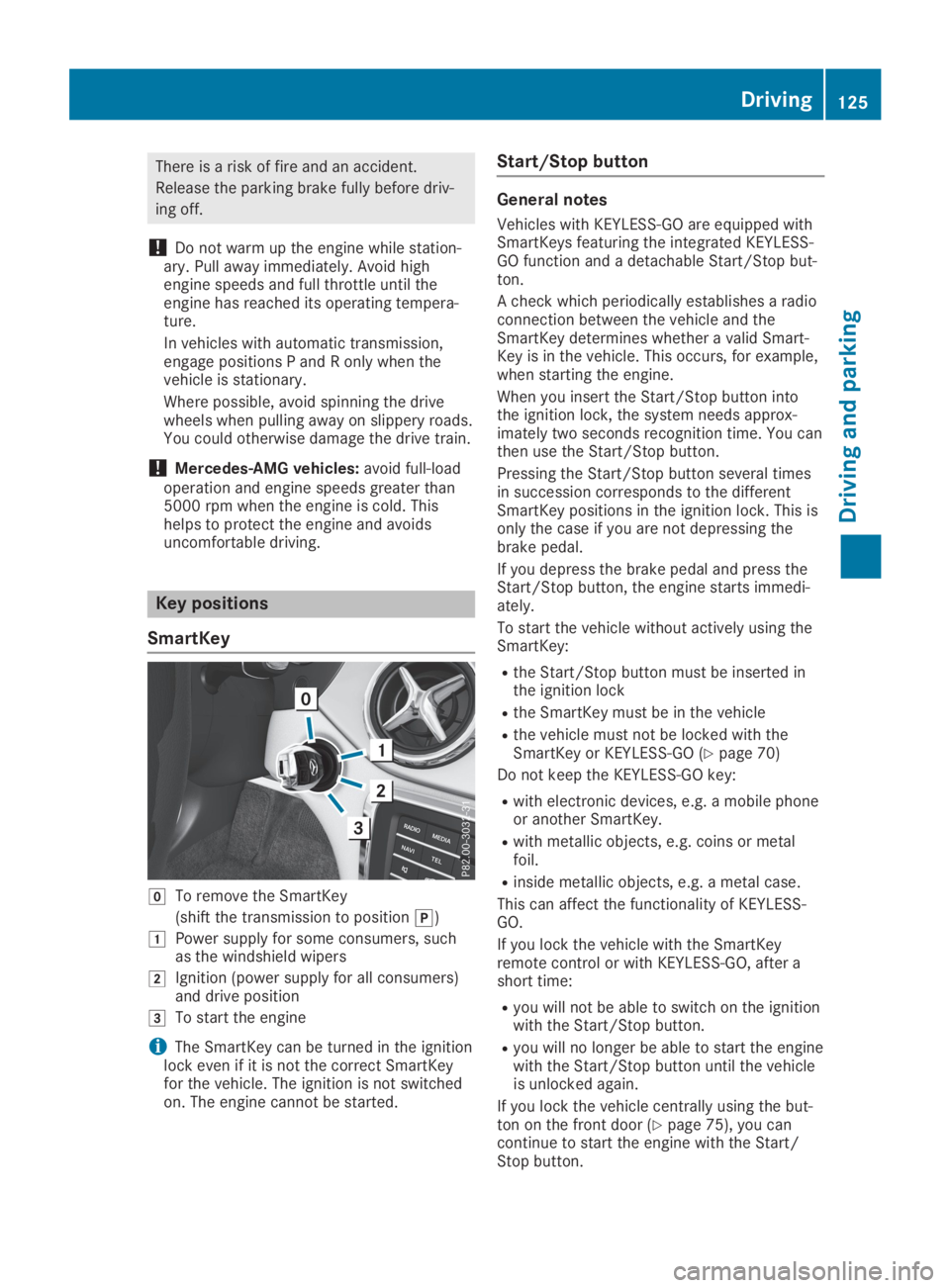
SmartKey
ZTo remove the SmartKey
(shift the transmission to position])
GPower supply for some consumers, suchas the windshield wipers
HIgnition (power supply for all consumers)and drive position
ITo start the engine
iThe SmartKey can be turned in the ignitionlock even if it is not the correct SmartKeyfor the vehicle. The ignition is not switchedon. The engine cannot be started.
Start/Stop button
General notes
Vehicles with KEYLESS-GO are equipped withSmartKeys featuring the integrated KEYLESS-GO function and a detachable Start/Stop but-ton.
A check which periodically establishes a radioconnection between the vehicle and theSmartKey determines whether a valid Smart-Key is in the vehicle. This occurs, for example,when starting the engine.
When you insert the Start/Stop button intothe ignition lock, the system needs approx-imately two seconds recognition time. You canthen use the Start/Stop button.
Pressing the Start/Stop button several timesin succession corresponds to the differentSmartKey positions in the ignition lock. This isonly the case if you are not depressing thebrake pedal.
If you depress the brake pedal and press theStart/Stop button, the engine starts immedi-ately.
To start the vehicle without actively using theSmartKey:
Rthe Start/Stop button must be inserted inthe ignition lock
Rthe SmartKey must be in the vehicle
Rthe vehicle must not be locked with theSmartKey or KEYLESS-GO (Ypage 70)
Do not keep the KEYLESS-GO key:
Rwith electronic devices, e.g. a mobile phoneor another SmartKey.
Rwith metallic objects, e.g. coins or metalfoil.
Rinside metallic objects, e.g. a metal case.
This can affect the functionality of KEYLESS-GO.
If you lock the vehicle with the SmartKeyremote control or with KEYLESS-GO, after ashort time:
Ryou will not be able to switch on the ignitionwith the Start/Stop button.
Ryou will no longer be able to start the enginewith the Start/Stop button until the vehicleis unlocked again.
If you lock the vehicle centrally using the but-ton on the front door (Ypage 75), you cancontinue to start the engine with the Start/Stop button.
Driving125
Driving and parking
Z
Page 270 of 346
You can specify up to ten areas simultane-ously. Different settings are possible for eacharea.
USA only: these settings can be called upunder "Owners Online" at http://www.mbusa.com.
Alternatively, you can trigger an MB Info calland inform the customer service representa-tive that you wish to activate geo fencing.
Currently inactive areas can be activated bytext message.
Triggering the vehicle alarm
With this function, you can trigger the vehicle'spanic alarm via text message. An alarmsounds and the exterior lighting flashes.Depending on the setting, the panic alarmlasts five or ten seconds. Afterwards, thealarm switches off.
Garage door opener
General notes
The HomeLink®garage door opener integratedin the rear-view mirror allows you to operateup to three different door and gate systems.
Use the integrated garage door opener only ongarage doors that:
Rhave safety stop and reverse features and
Rmeet current U.S. federal safety standards
Once programed, the integrated garage dooropener in the rear-view mirror will assume thefunction of the garage door system's remotecontrol. Please also read the operating instruc-tions for the garage door system.
When programming a garage door opener,park the vehicle outside the garage. Do notleave the engine running while programming.
Certain garage door drives are incompatiblewith the integrated garage door opener. If youhave difficulty programing the integratedgarage door opener, contact a Mercedes-BenzService Center.
Alternatively, you can call the following tele-phone assistance services:
RUSA:Mercedes-Benz Customer AssistanceCenter at 1-800-FOR-MERCedes
RCanada:Customer Service at1-800-387-0100
RHomeLink®hotline 1-800-355-3515 (free ofcharge)
More information on HomeLink®and/or com-patible products is also available online athttp://www.homelink.com.
Notes on the declaration of conformity(Ypage 27).
USA: FCC ID: CB2HMIHL4
Canada: IC: 279B-HMIHL4
Important safety notes
GWARNING
When you operate or program the door with
the integrated garage door opener, persons
in the range of movement of the door may
become trapped or be struck by the door.
There is a risk of injury.
When using the integrated garage door
opener, always make sure that nobody is
within the range of movement of the door.
GDANGER
Combustion engines emit poisonous
exhaust gases such as carbon monoxide.
Inhaling these exhaust gases is hazardous to
health and can result in poisoning. There is a
risk of fatal injury. Therefore, never leave the
engine running an enclosed space without
adequate ventilation.
Programming
Programming the buttons
Pay attention to the "Important safety notes"(Ypage 268).
268Features
Stowage and features
Page 271 of 346
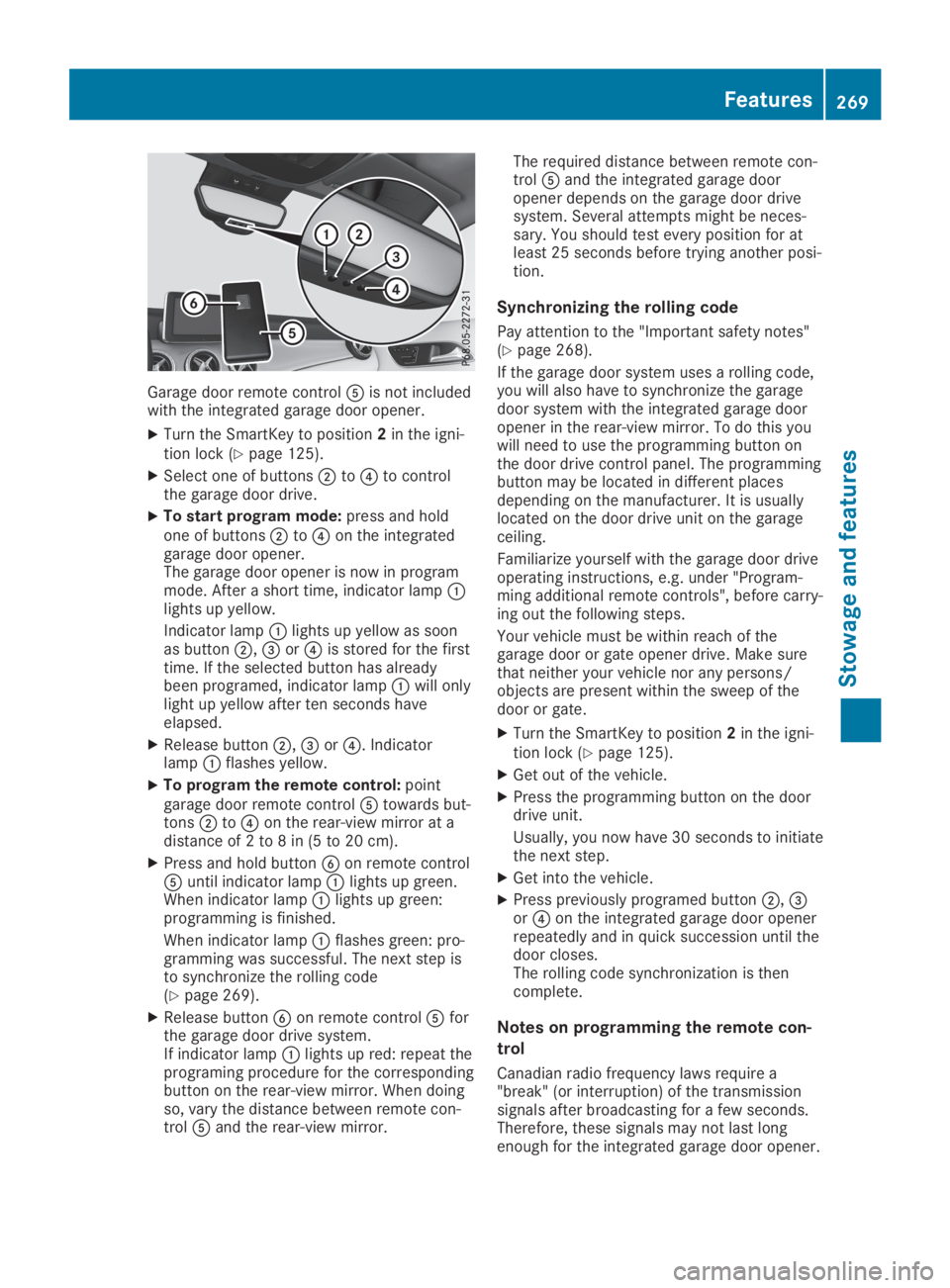
Garage door remote control