key battery MERCEDES-BENZ GLA 2019 Owners Manual
[x] Cancel search | Manufacturer: MERCEDES-BENZ, Model Year: 2019, Model line: GLA, Model: MERCEDES-BENZ GLA 2019Pages: 346, PDF Size: 16.66 MB
Page 8 of 346
Transmission position display
(DIRECT SELECT lever) ...................134
Transmission positions .................. 137
Automatic transmission emer-
gency mode....................................... 142
B
Back button....................................... 243
Backup lamp
Display message ............................ 215
Bag hook............................................ 255
BAS (Brake Assist System)................. 61
Basic settings
see Settings
Battery (SmartKey)
Checking .......................................... 72
Important safety notes .................... 72
Replacing ......................................... 72
Battery (vehicle)
Charging ........................................ 294
Display message ............................ 218
Important safety notes .................. 292
Jump starting ................................. 295
Replacing ....................................... 295
Belt
see Seat belts
Belt warning......................................... 44
Blind Spot Assist
Activating/deactivating (on-
board computer) ............................ 198
Display message ............................ 220
Notes/function .............................. 185
Blower
see Climate control
Bluetooth®
Searching for a mobile phone ........246
Searching for a mobile phone
(device manager) ........................... 247
see also Digital Operator's Man-
ual ..................................................242
Telephony ...................................... 246
Brake Assist System
see BAS (Brake Assist System)
Brake assistance
see BAS (Brake Assist System)
Brake fluid
Display message ............................ 209
Notes ............................................. 337
Brake force distribution
see EBD (electronic brake force
distribution)
Brake lamp
Replacing bulbs .............................108
Brake lamps
Display message ............................ 215
Brakes
ABS ..................................................60
BAS .................................................. 61
Brake fluid (notes) ......................... 337
Display message............................ 204
EBD .................................................. 67
Hill start assist ............................... 128
HOLD function ............................... 165
Important safety notes .................. 150
Maintenance .................................. 151
Parking brake ................................ 146
Riding tips ...................................... 150
Situation-dependent braking
assistance ........................................ 63
Warning lamp ................................. 232
Breakdown assistance
Where will I find...? ........................ 286
see Flat tire
see Tow-starting
see Towing away
Brightness control (instrument
cluster lighting)................................... 32
Buttons on the steering wheel......... 189
C
Calling up a malfunction
see Display messages
Car
see Vehicle
Care
Car wash ........................................ 279
Carpets .......................................... 285
Display ........................................... 283
Exhaust pipe .................................. 283
Exterior lights ................................ 282
Gear or selector lever .................... 284
Interior ........................................... 283
Matte finish ................................... 280
Notes............................................. 278
6Index
Page 20 of 346
Securing cargo..................................255
Selecting a gear
see Automatic transmission
Selector lever
Cleaning ......................................... 284
Sensors (cleaning instructions)....... 282
Service menu (on-board com-
puter)..................................................198
Service message
see ASSYST PLUS
Service products
Brake fluid ..................................... 337
Coolant (engine) ............................ 337
Engine oil ....................................... 336
Fuel ................................................ 334
Important safety notes .................. 334
Refrigerant (air-conditioning sys-
tem) ............................................... 338
Washer fluid ................................... 338
Setting a speed
see Cruise control
Setting the air distribution...............120
Setting the airflow............................ 120
Setting the date/time format
see also Digital Operator's Man-
ual ..................................................242
Setting the language
see also Digital Operator's Man-
ual ..................................................242
Setting the time
see also Digital Operator's Man-
ual ..................................................242
Settings
Factory (on-board computer) ......... 200
On-board computer ....................... 198
SETUP (on-board computer,
Mercedes-AMG vehicles).................. 201
Side impact air bag.............................46
Side marker lamp (display mes-
sage)................................................... 216
Side windows
Cleaning ......................................... 281
Convenience closing feature ............ 85
Convenience opening feature ..........84
Important safety information ........... 83
Opening/closing .............................. 84
Problem (malfunction) .....................86
Resetting .........................................86
Reversing feature .............................83
SIRIUS services
see also Digital Operator's Man-
ual .................................................. 242
Situation-dependent braking
assistance
Function/notes ................................ 63
Sliding sunroof
see Panorama roof with power
tilt/sliding panel
SmartKey
Changing the battery ....................... 72
Changing the programming .............71
Checking the battery .......................72
Convenience closing feature ............ 85
Convenience opening feature .......... 84
Display message ............................ 229
Door central locking/unlocking .......69
Important safety notes .................... 69
KEYLESS-GO start function .............. 71
Loss .................................................73
Mechanical key ................................ 71
Positions (ignition lock) ................. 125
Problem (malfunction) ..................... 73
Starting the engine ........................ 127
SmartKey positions (ignition
lock)....................................................125
SMS
see also Digital Operator's Man-
ual ..................................................242
Snow chains...................................... 307
Sockets
Center console .............................. 260
General notes ................................ 260
Luggage compartment ................... 260
Rear compartment ......................... 260
Sound
Switching on/off ........................... 243
Special seat belt retractor.................. 54
Specialist workshop............................ 27
Speed, controlling
see Cruise control
Speedometer
Activating/deactivating the addi-
tional speedometer ........................ 199
Digital ............................................ 193
In the Instrument cluster ................. 32
18Index
Page 24 of 346
Type identification plate
see Vehicle identification plate
U
Unlocking
Emergency unlocking ....................... 76
From inside the vehicle (central
unlocking button) ............................. 75
Upshift indicator (on-board com-
puter, Mercedes-AMG vehicles)....... 200
USB devices
Connecting to the Media Inter-
face ...............................................249
V
Vanity mirror (in the sun visor)........259
Vehicle
Correct use ...................................... 27
Data acquisition ............................... 28
Display message ............................ 225
Equipment ....................................... 26
Individual settings .......................... 198
Limited Warranty .............................28
Loading .......................................... 316
Locking (in an emergency) ............... 77
Locking (SmartKey) .......................... 69
Lowering ........................................ 329
Maintenance .................................... 26
Parking for a long period ................ 148
Pulling away................................... 128
Raising ........................................... 327
REACH Regulation ........................... 28
Reporting problems ......................... 28
Securing from rolling away ............ 326
Transporting .................................. 300
Unlocking (in an emergency) ........... 76
Unlocking (SmartKey)...................... 69
Vehicle data ................................... 339
Vehicle battery
see Battery (vehicle)
Vehicle data
Roof load (maximum) ..................... 339
Vehicle data (off-road driving)
Approach/departure angle ............ 340
Maximum gradient climbing abil-
ity .................................................. 340
Vehicle dimensions........................... 339
Vehicle emergency locking................ 77
Vehicle identification number
see VIN
Vehicle identification plate.............. 333
Vehicle tool kit.................................. 287
Ventilation
Setting the vents ........................... 123
Video
Operating the DVD ......................... 195
see also Digital Operator's Man-
ual .................................................. 242
VIN
Seat ............................................... 334
Type plate ...................................... 333
W
Warning and indicator lamps
ABS ................................................ 233
Active Brake Assist ........................ 240
Brakes ........................................... 232
Check Engine ................................. 238
Coolant .......................................... 238
Distance warning ........................... 240
ESP®.............................................. 235
ESP®OFF ....................................... 236
Fuel tank ........................................ 238
Overview .......................................... 32
Reserve fuel................................... 238
Restraint system ............................ 237
Seat belt ........................................ 230
SPORT handling mode................... 236
Tire pressure monitor .................... 241
Washer fluid
Display message ............................ 228
Weather display (COMAND)
see also Digital Operator's Man-
ual.................................................. 242
Wheel and tire combinations
Tires ............................................... 329
Wheel bolt tightening torque........... 329
Wheel chock...................................... 326
Wheels
Changing a wheel.......................... 325
Checking ........................................ 304
Cleaning ......................................... 281
Emergency spare wheel ................. 330
22Index
Page 69 of 346
swerving. Trailers with a high center of grav-
ity can tip over before ESP®can detect this.
There is a risk of an accident.
Always adapt your driving style to the pre-
vailing road and weather conditions.
If your vehicle with trailer (vehicle/trailer com-bination) begins to lurch, you can only stabilizethe vehicle/trailer combination by depressingthe brake firmly.
ESP®trailer stabilization is active abovespeeds of about 65 km/h.
ESP®trailer stabilization does not work if
ESP®is deactivated or disabled because of amalfunction.
EBD (electronic brake force distribu-
tion)
General information
EBD monitors and controls the brake pressureon the rear wheels to improve driving stabilitywhile braking.
Important safety notes
iObserve the "Important safety notes" sec-tion (Ypage 60).
GWARNING
If EBD is malfunctioning, the rear wheels can
lock, e.g. under full braking. This increases
the risk of skidding and an accident.
You should therefore adapt your driving
style to the different handling characteris-
tics. Have the brake system checked at a
qualified specialist workshop.
Please observe the information on warningand indicator lamps (Ypage 233)
(Ypage 233) as well as on display messages(Ypage 206).
ADAPTIVE BRAKE
ADAPTIVE BRAKE enhances braking safety andoffers increased braking comfort. In additionto the braking function, ADAPTIVE BRAKE also
has the HOLD function (Ypage 165) and hillstart assist (Ypage 128).
STEER CONTROL
General information
STEER CONTROL helps you by transmitting anoticeable steering force to the steering wheelin the direction required for vehicle stabiliza-tion.
This steering assistance is provided in particu-lar if:
Rboth right wheels or both left wheels are ona wet or slippery road surface when youbrake
Rthe vehicle begins to skid
Important safety notes
iObserve the "Important safety notes" sec-tion (Ypage 60).
No steering assistance is provided from STEERCONTROL, if:
RESP®is malfunctioning
Rthe steering is malfunctioning
If ESP®is malfunctioning, you will be assistedfurther by the electrical power steering.
Protection against theft
Immobilizer
The immobilizer prevents your vehicle frombeing started without the correct SmartKey.
XTo activate with the SmartKey:removethe SmartKey from the ignition lock.
XTo activate with KEYLESS-GO start-func-tion or KEYLESS-GO:switch the ignition offand open the driver's door.
XTo deactivate:switch on the ignition.
When leaving the vehicle, always take theSmartKey with you and lock the vehicle. Any-one can start the engine if a valid SmartKeyhas been left inside the vehicle.
iThe immobilizer is always deactivatedwhen you start the engine.
In the event that the engine cannot be star-ted (yet the vehicle's battery is charged),
Protection against theft67
Safety
Z
Page 72 of 346
XTo close the tailgate automatically fromoutside the vehicle:if the SmartKey islocated in the immediate vicinity of the vehi-cle, press theTbutton on the SmartKey(Ypage 79).When the tailgate closes you can thenrelease the button.
KEYLESS-GO
General notes
Bear in mind that the engine can be started byany of the vehicle occupants if there is aSmartKey in the vehicle.
Locking and unlocking
You can start, lock or unlock the vehicle usingKEYLESS-GO. To do this, you only need carrythe SmartKey with you. You can combine thefunctions of KEYLESS-GO with those of a con-ventional SmartKey. Unlock the vehicle byusing KEYLESS-GO, for instance, and lock itusing the7button on the SmartKey.
The driver's door and the door at which thehandle is used, must both be closed. TheSmartKey must be outside the vehicle. Whenlocking or unlocking with KEYLESS-GO, thedistance between the SmartKey and the corre-sponding door handle must not be greaterthan three feet (one meter).
A check which periodically establishes a radioconnection between the vehicle and theSmartKey determines whether a valid Smart-Key is in the vehicle. This occurs, for example:
Rwhen starting the engine
Rwhile driving
Rwhen the external door handles are touched
Rduring convenience closing
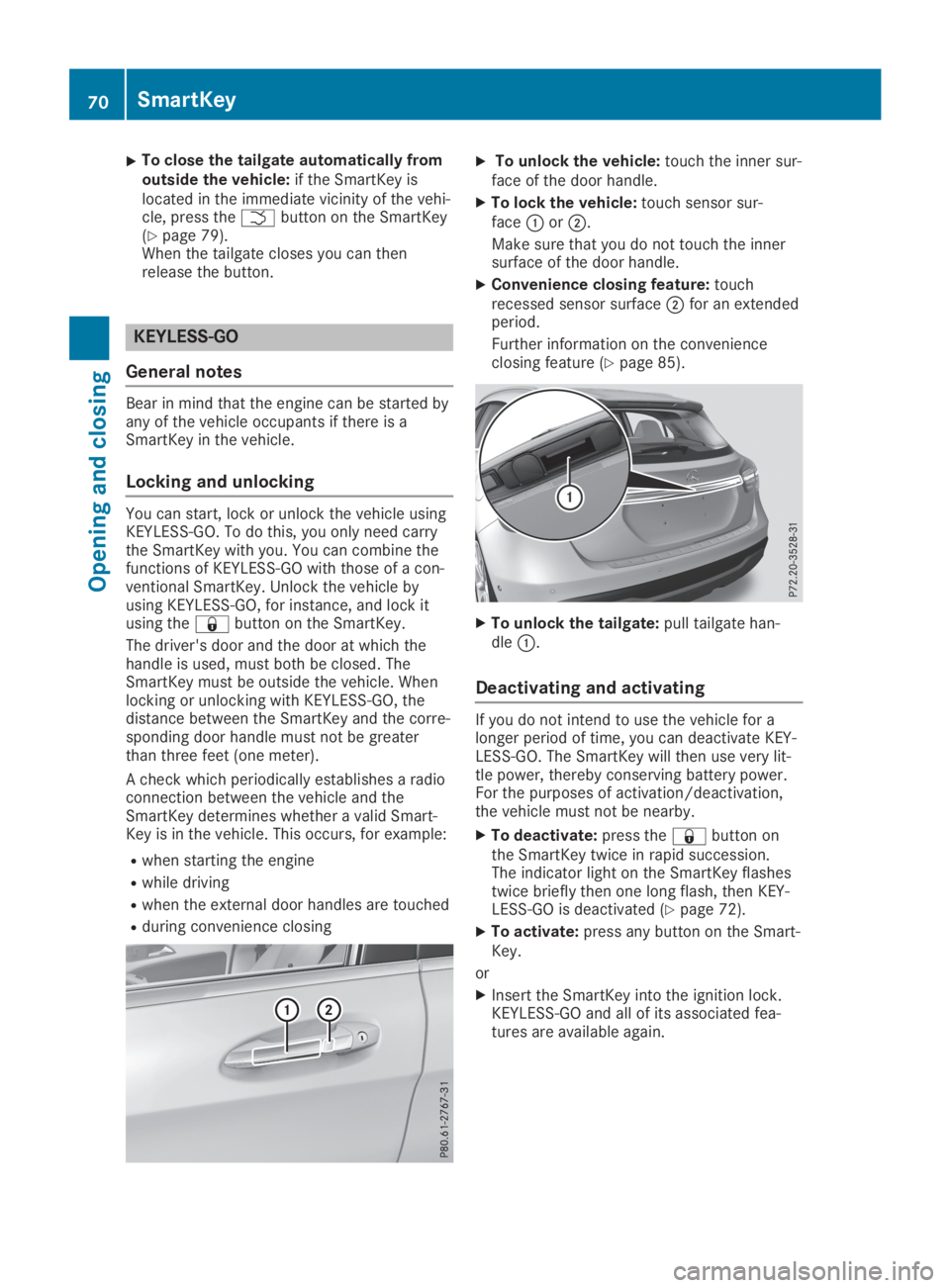
XTo unlock the vehicle:touch the inner sur-face of the door handle.
XTo lock the vehicle:touch sensor sur-faceCorD.
Make sure that you do not touch the innersurface of the door handle.
XConvenience closing feature:touchrecessed sensor surfaceDfor an extendedperiod.
Further information on the convenienceclosing feature (Ypage 85).
XTo unlock the tailgate:pull tailgate han-dleC.
Deactivating and activating
If you do not intend to use the vehicle for alonger period of time, you can deactivate KEY-LESS-GO. The SmartKey will then use very lit-tle power, thereby conserving battery power.For the purposes of activation/deactivation,the vehicle must not be nearby.
XTo deactivate:press the7button onthe SmartKey twice in rapid succession.The indicator light on the SmartKey flashestwice briefly then one long flash, then KEY-LESS-GO is deactivated (Ypage 72).
XTo activate:press any button on the Smart-Key.
or
XInsert the SmartKey into the ignition lock.KEYLESS-GO and all of its associated fea-tures are available again.
70SmartKey
Opening and closing
Page 73 of 346
KEYLESS-GO start function
General notes
Bear in mind that the engine can be started byany of the vehicle occupants if there is aSmartKey in the vehicle.
Changing the settings of the locking
system
You can change the settings of the lockingsystem. This means that only the driver's doorand the fuel filler flap are unlocked when thevehicle is unlocked. This is useful if you fre-quently travel on your own.
XTo change the setting:press and hold the6and7buttons simultaneously forapproximately six seconds until the batteryindicator lamp flashes twice (Ypage 72).
If the setting of the locking system is changedwithin the signal range of the vehicle, pressingthe7or6button:
Rlocks or
Runlocks the vehicle
The SmartKey now functions as follows:
XTo unlock:press the6button once.
XTo unlock centrally:press the6buttontwice.
XTo lock centrally:press the7button.
The KEYLESS-GO function is changed as fol-lows:
XTo unlock the driver's door:touch theinner surface of the door handle on the driv-er's door.
XTo unlock centrally:touch the inner sur-face of the door handle on the front-passenger door or the rear door.
XTo lock centrally:touch the outer sensorsurface on one of the door handles.
XTo restore the factory settings:press andhold the6and7buttons simultane-ously for approximately six seconds until thebattery check lamp flashes twice(Ypage 72).
Mechanical key
General notes
If the vehicle can no longer be locked orunlocked with the SmartKey or KEYLESS-GO,use the mechanical key.
If you use the mechanical key to unlock andopen the driver's door or the trunk lid, theanti-theft alarm system will be triggered(Ypage 68).
There are several ways to turn off the alarm:
XTo deactivate the alarm with the key:press the6or7button on the key.
or
XInsert the SmartKey into the ignition lock.
or
XTo deactivate the alarm with KEYLESS-GO:press the Start/Stop button in the igni-tion lock. The SmartKey must be in the vehi-cle.
or
XLock or unlock the vehicle using KEYLESS-GO. The SmartKey must be outside the vehi-cle.
If you unlock the vehicle using the mechanicalkey, the fuel filler flap will not be unlockedautomatically.
XTo unlock the fuel filler flap:insert theSmartKey into the ignition lock.
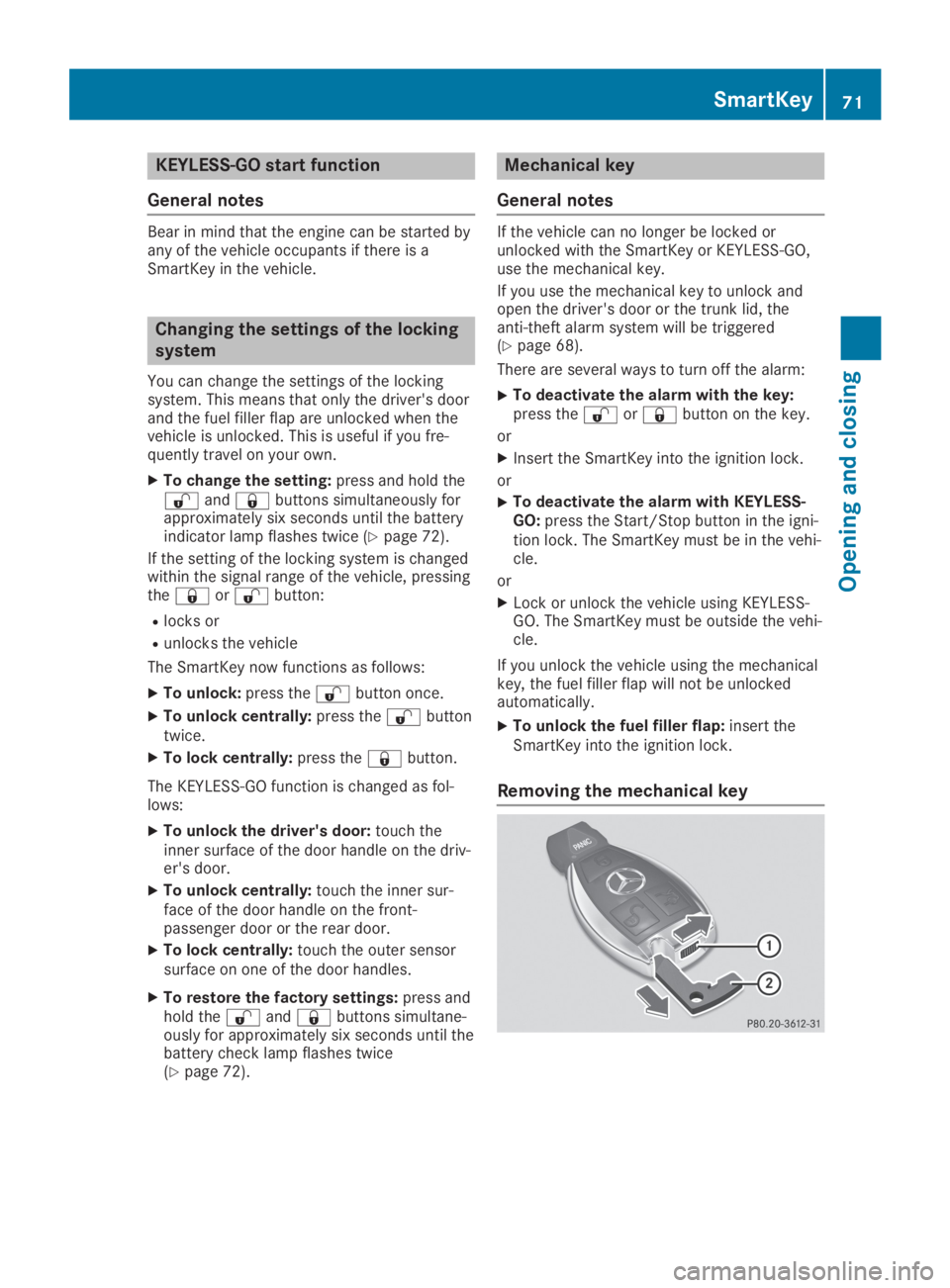
Removing the mechanical key
SmartKey71
Opening and closing
Z
Page 74 of 346
XPush release catchCin the direction of thearrow and at the same time removemechanical keyDfrom the SmartKey.
For further information about:
RUnlocking the driver's door (Ypage 76)
RUnlocking the cargo compartment(Ypage 82)
RLocking the vehicle (Ypage 77)
Inserting the mechanical key
XPush mechanical keyDcompletely into theSmartKey until it engages and releasecatchCis back in its basic position.
SmartKey battery
Important safety notes
GWARNING
Batteries contain toxic and corrosive sub-
stances. If batteries are swallowed, it can
result in severe health problems. There is a
risk of fatal injury.
Keep batteries out of the reach of children.
If a battery is swallowed, seek medical
attention immediately.
The SmartKey batteries contain perchloratematerial, which may require special handlingand regard for the environment. Nationalguidelines must be observed during disposal.In California, seewww.dtsc.ca.gov/HazardousWaste/Perchlorate/index.cfm.
Mercedes-Benz recommends that you havethe battery replaced at a qualified specialistworkshop.
Checking the battery
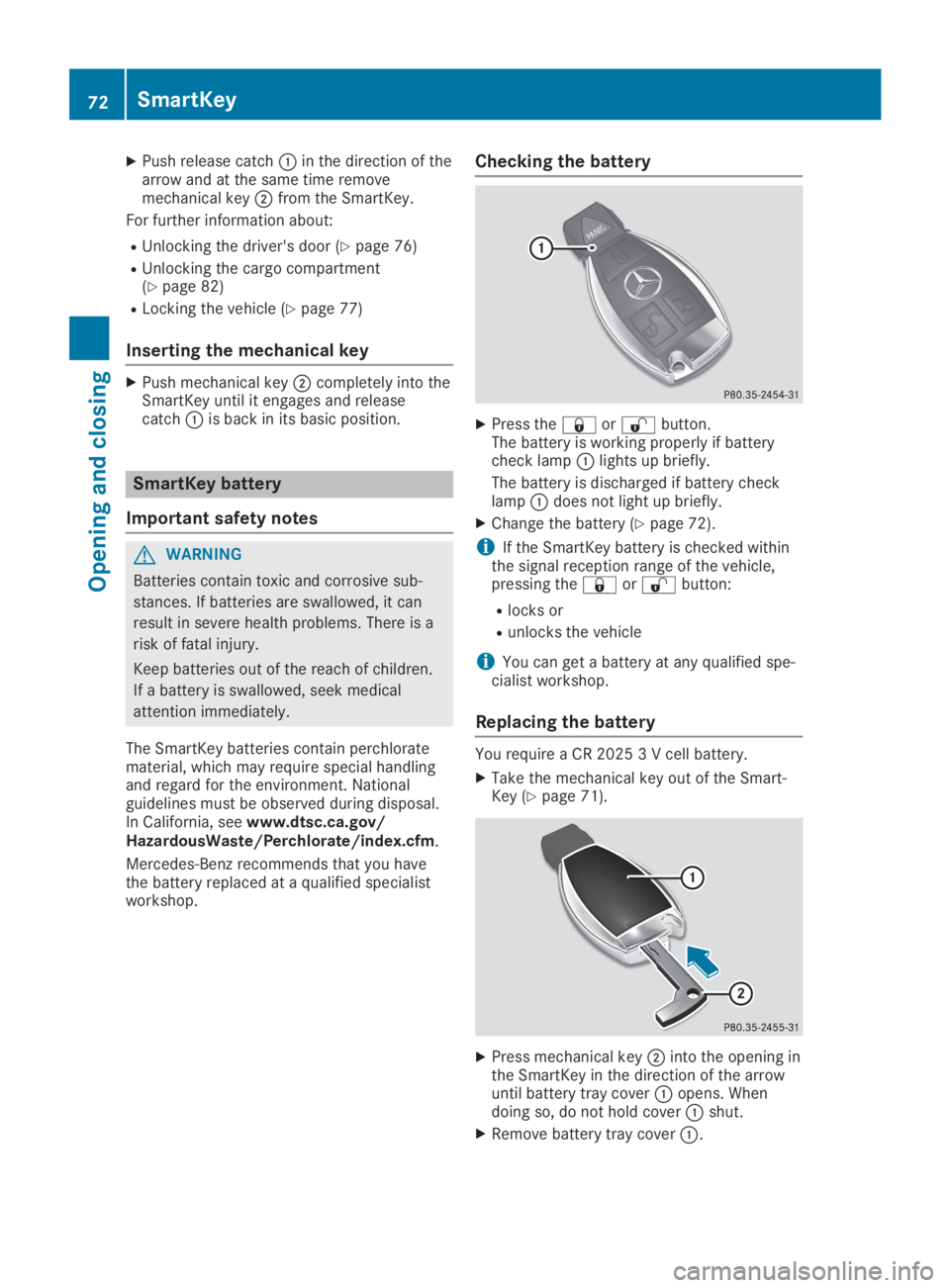
XPress the7or6button.The battery is working properly if batterycheck lampClights up briefly.
The battery is discharged if battery checklampCdoes not light up briefly.
XChange the battery (Ypage 72).
iIf the SmartKey battery is checked withinthe signal reception range of the vehicle,pressing the7or6button:
Rlocks or
Runlocks the vehicle
iYou can get a battery at any qualified spe-cialist workshop.
Replacing the battery
You require a CR 2025 3 V cell battery.
XTake the mechanical key out of the Smart-Key (Ypage 71).
XPress mechanical keyDinto the opening inthe SmartKey in the direction of the arrowuntil battery tray coverCopens. Whendoing so, do not hold coverCshut.
XRemove battery tray coverC.
72SmartKey
Opening and closing
Page 75 of 346
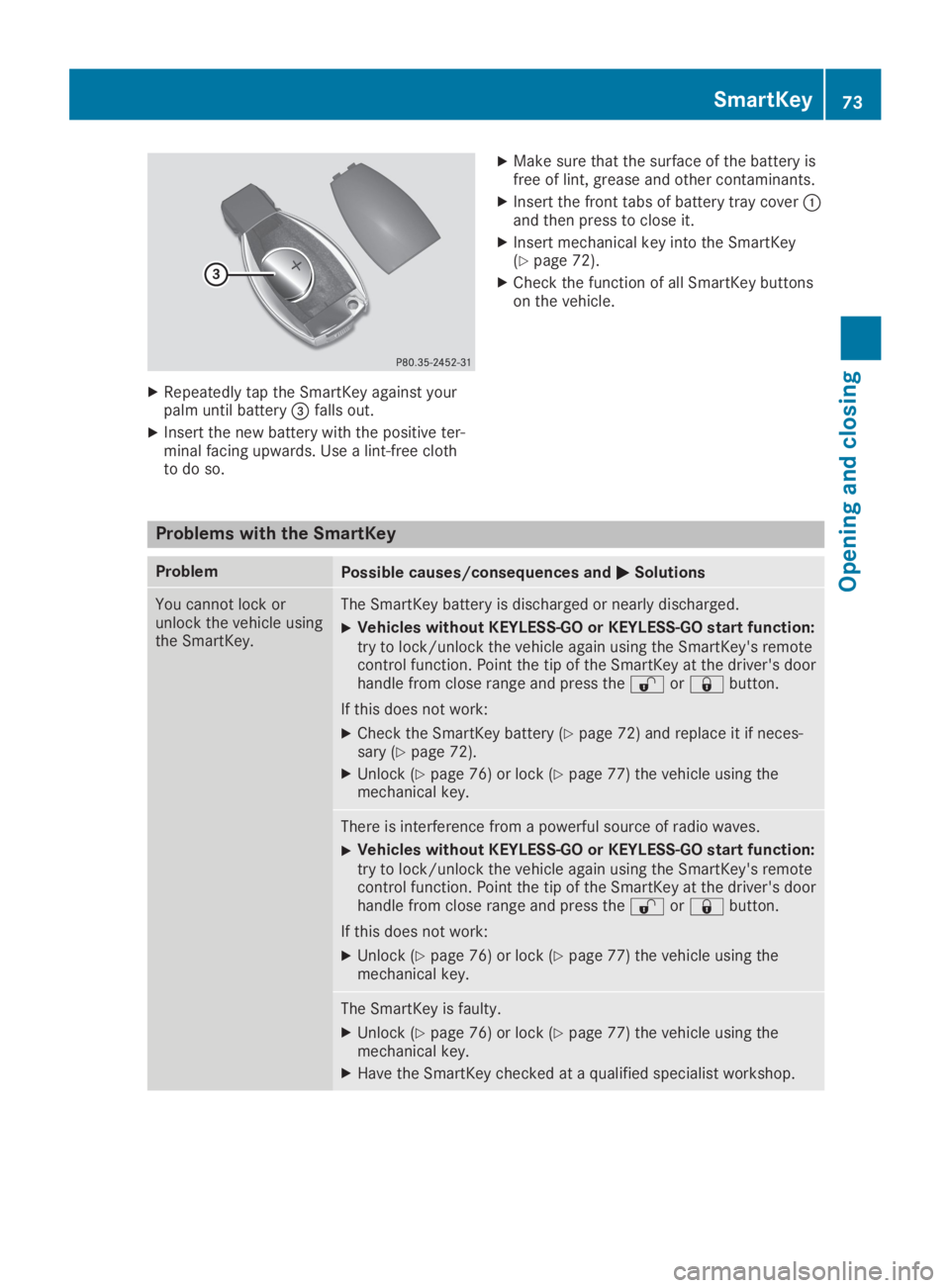
XRepeatedly tap the SmartKey against yourpalm until battery
Page 76 of 346
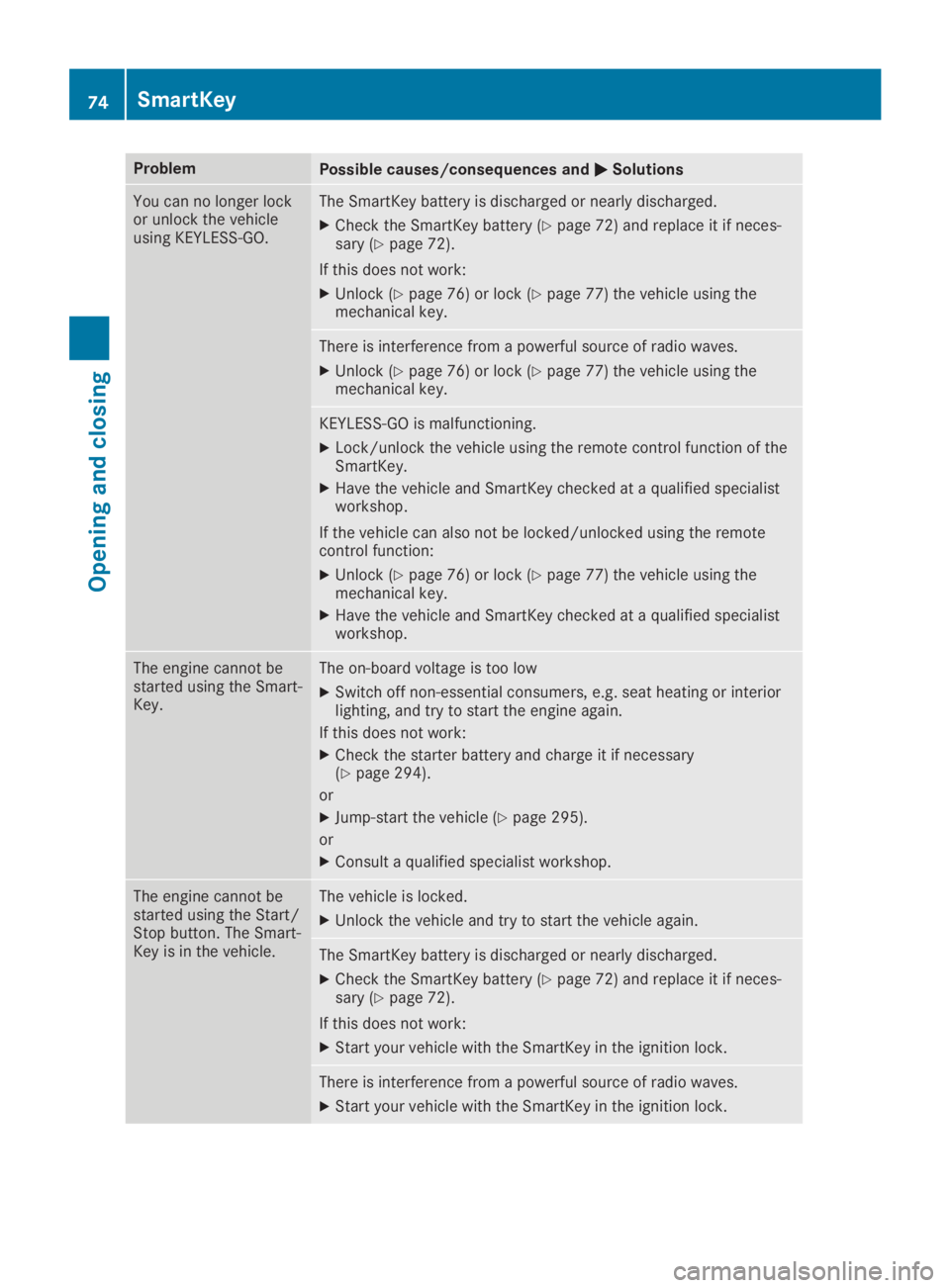
ProblemPossible causes/consequences andPPSolutions
You can no longer lockor unlock the vehicleusing KEYLESS-GO.
The SmartKey battery is discharged or nearly discharged.
XCheck the SmartKey battery (Ypage 72) and replace it if neces-sary (Ypage 72).
If this does not work:
XUnlock (Ypage 76) or lock (Ypage 77) the vehicle using themechanical key.
There is interference from a powerful source of radio waves.
XUnlock (Ypage 76) or lock (Ypage 77) the vehicle using themechanical key.
KEYLESS-GO is malfunctioning.
XLock/unlock the vehicle using the remote control function of theSmartKey.
XHave the vehicle and SmartKey checked at a qualified specialistworkshop.
If the vehicle can also not be locked/unlocked using the remotecontrol function:
XUnlock (Ypage 76) or lock (Ypage 77) the vehicle using themechanical key.
XHave the vehicle and SmartKey checked at a qualified specialistworkshop.
The engine cannot bestarted using the Smart-Key.
The on-board voltage is too low
XSwitch off non-essential consumers, e.g. seat heating or interiorlighting, and try to start the engine again.
If this does not work:
XCheck the starter battery and charge it if necessary(Ypage 294).
or
XJump-start the vehicle (Ypage 295).
or
XConsult a qualified specialist workshop.
The engine cannot bestarted using the Start/Stop button. The Smart-Key is in the vehicle.
The vehicle is locked.
XUnlock the vehicle and try to start the vehicle again.
The SmartKey battery is discharged or nearly discharged.
XCheck the SmartKey battery (Ypage 72) and replace it if neces-sary (Ypage 72).
If this does not work:
XStart your vehicle with the SmartKey in the ignition lock.
There is interference from a powerful source of radio waves.
XStart your vehicle with the SmartKey in the ignition lock.
74SmartKey
Opening and closing
Page 85 of 346
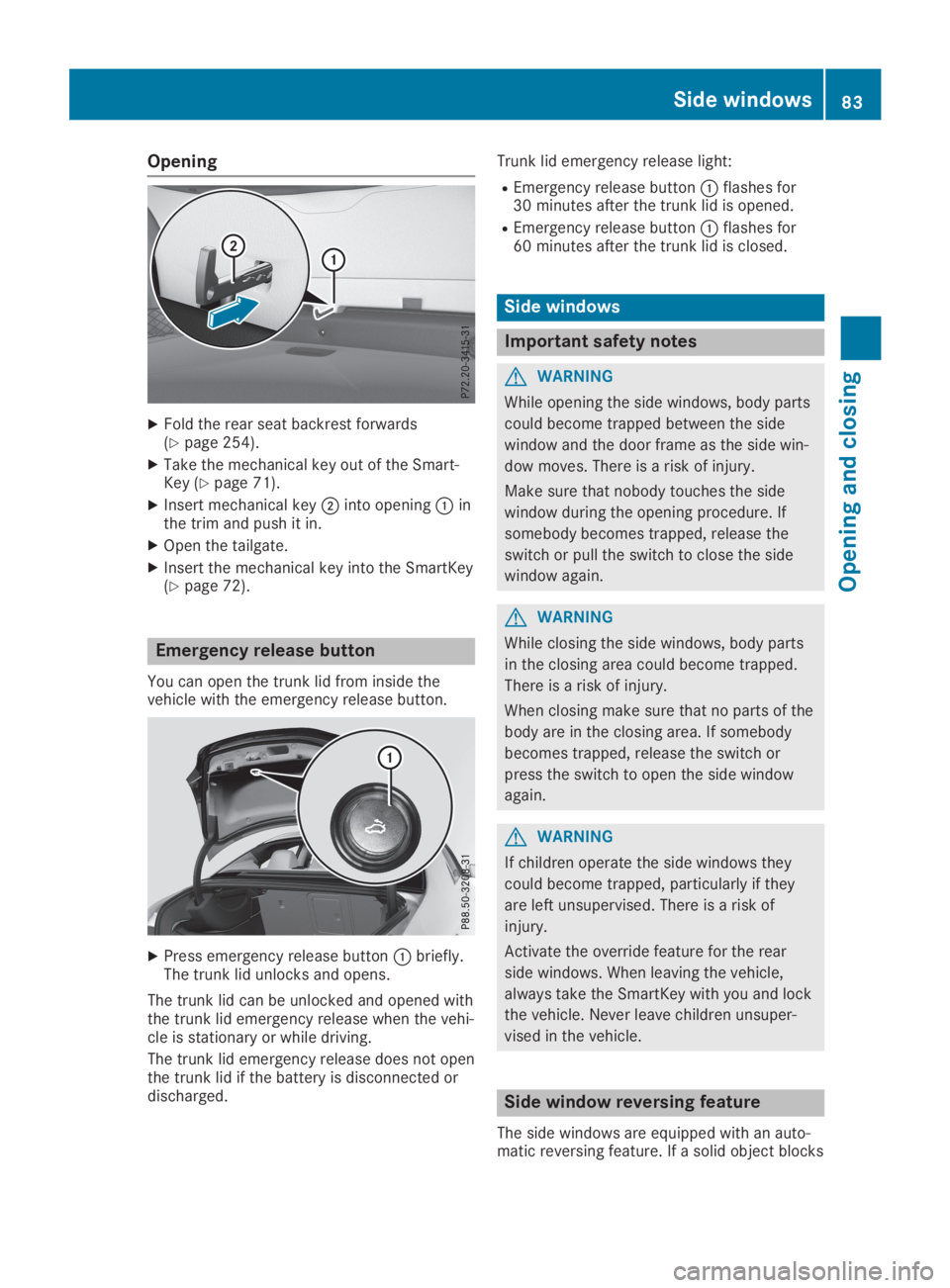
Opening
XFold the rear seat backrest forwards(Ypage 254).
XTake the mechanical key out of the Smart-Key (Ypage 71).
XInsert mechanical keyDinto openingCinthe trim and push it in.
XOpen the tailgate.
XInsert the mechanical key into the SmartKey(Ypage 72).
Emergency release button
You can open the trunk lid from inside thevehicle with the emergency release button.
XPress emergency release buttonCbriefly.The trunk lid unlocks and opens.
The trunk lid can be unlocked and opened withthe trunk lid emergency release when the vehi-cle is stationary or while driving.
The trunk lid emergency release does not openthe trunk lid if the battery is disconnected ordischarged.
Trunk lid emergency release light:
REmergency release buttonCflashes for30 minutes after the trunk lid is opened.
REmergency release buttonCflashes for60 minutes after the trunk lid is closed.
Side windows
Important safety notes
GWARNING
While opening the side windows, body parts
could become trapped between the side
window and the door frame as the side win-
dow moves. There is a risk of injury.
Make sure that nobody touches the side
window during the opening procedure. If
somebody becomes trapped, release the
switch or pull the switch to close the side
window again.
GWARNING
While closing the side windows, body parts
in the closing area could become trapped.
There is a risk of injury.
When closing make sure that no parts of the
body are in the closing area. If somebody
becomes trapped, release the switch or
press the switch to open the side window
again.
GWARNING
If children operate the side windows they
could become trapped, particularly if they
are left unsupervised. There is a risk of
injury.
Activate the override feature for the rear
side windows. When leaving the vehicle,
always take the SmartKey with you and lock
the vehicle. Never leave children unsuper-
vised in the vehicle.
Side window reversing feature
The side windows are equipped with an auto-matic reversing feature. If a solid object blocks
Side windows83
Opening and closing
Z