key MERCEDES-BENZ GLA 2020 Manual PDF
[x] Cancel search | Manufacturer: MERCEDES-BENZ, Model Year: 2020, Model line: GLA, Model: MERCEDES-BENZ GLA 2020Pages: 346, PDF Size: 17.58 MB
Page 175 of 346
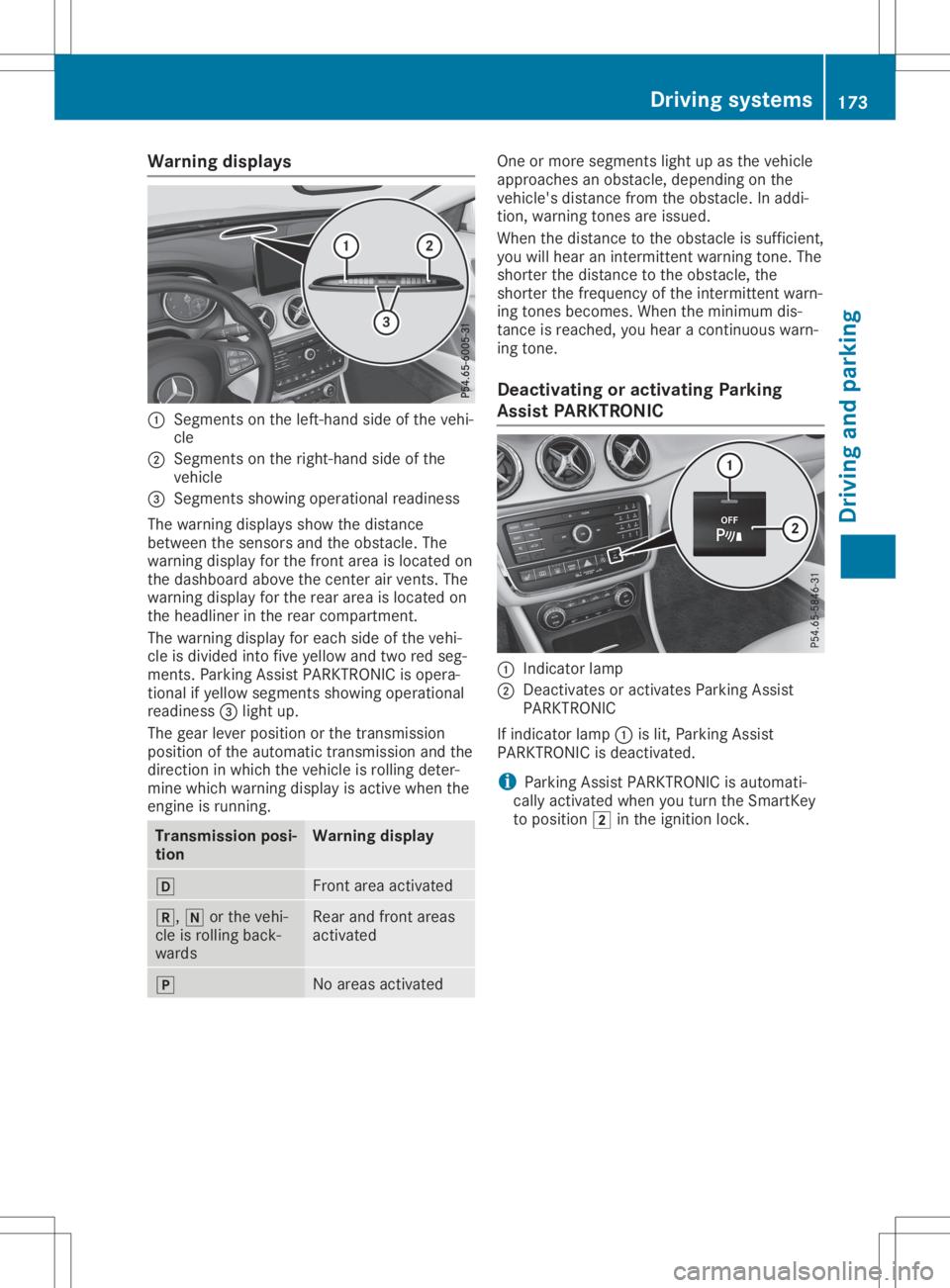
Warning
displays 0043
Segments onthe left-ha ndside ofthe vehi-
cle
0044 Segments onthe right-ha ndside ofthe
vehicl e
0087 Segments showingopera tional readiness
The warning displaysshow thedista nce
betwe enthe sensors andtheobsta cle.The
wa rning displayforthe front areaisloca tedon
the dashboa rdabo vethe center airvents. The
wa rning displayforthe rear area isloca tedon
the headliner inthe rear compa rtment.
The warning displayforeach sideofthe vehi-
cle isdivi ded into fiveyellow and tworedseg-
ments. ParkingAssist PARKTR ONICisopera -
tional ifyel low segme ntsshow ingopera tional
read iness 0087light up.
The gearleve rposi tion orthe transmiss ion
posi tion ofthe automatic transmiss ionand the
dire ction inwhi chthe vehicl eis roll ing deter-
mine whichwarning displayisactive whenthe
engine isrunning. Transmissi
onposi -
tion Warning
display 005B
Front
areaactiva ted 005E,
005Corthe vehi-
cle isroll ing back-
wa rds Rea
rand front areas
activa ted 005D
No
area sactiva ted One
ormore segme ntslight up asthe vehicl e
app roache san obsta cle,depe nding onthe
vehicl e'sdista ncefrom theobsta cle.Inadd i-
tion, warning tones areissu ed.
When thedista ncetothe obsta cleissuffi cient,
you willhea ran intermittent warning tone. The
shorter thedista ncetothe obsta cle,the
shorter thefrequ ency ofthe intermittent warn-
ing tones become s.When theminimu mdis-
tance isreache d,you heara continuou swa rn-
ing tone.
De activati ngoractivati ngParking
Ass istPARK TRONIC 0043
Indica torlam p
0044 Deactiva tesoractiva tesParki ngAssist
PARKTR ONIC
If indica torlam p0043 islit, Parki ngAssist
PARKTR ONICisdea ctivated.
i Parki
ngAssist PARKTR ONICisau tomati-
call yactiva tedwhe nyou turn theSmartKey
to posi tion 0048inthe igniti onlock. Driv
ingsyste ms
173Drivingand parking Z
Page 181 of 346
R
ifthe camer alens isdirt yor obst ructed.
Obser vethe noteson clean ing
(Y page 284)
R ifthe rear ofyour vehic leisdamaged. Inthis
case, havethecamer aposit ionand setting
chec kedataqualified specialist workshop.
The field ofvision andotherfunc tionsof the
rear view camer amay berest ricteddue to
addition alacc essor iesonthe rear ofthe vehi-
cle (e.g. licenseplate holder ,rear bicyc le
rack ).
i The
contrast ofthe display maybeaffec -
ted bythe sudden presenceof sunligh tor
oth erlight sourc es,e.g. when exitinga
garage. Payparticular attent ion inthis situa-
tion .
i If
usability issever elyrest ricted, e.g. due
to pixel errors,have thedisplay repairedor
replac ed.
Activa ting/d eactivating therea rview
cam era X
To acti vate:make surethattheSmar tKey
is in posit ion0048inthe ignit ionlock .
X Make surethattheActi vationbyRgear Acti
vationbyRgear
func tion isselec tedinthe multim ediasys-
tem ;see theDigit alOperat or'sManual.
X En gage reversegear.
The area behin dthe vehic leisshown with
guide linesinthe multim ediasystemdis-
play.
The image fromthe rear view camer ais
available throughout themane uverin gproc -
ess.
To deact ivate:the rear view camer adeact i-
vate sif you shift thetransm ission to005D or
aft erdrivin gfor wards ashor tdist ance.
The innersegme ntsof the warnin gindic ator
are displayed inred ifthe reisacom plete sys-
tem failure. Theindic atorlamp inthe
PARK TRONIC buttonlight sup.
If the syst emfails atthe rear ofthe vehic le:
R the rear segme ntsare shown inred when
back ingup.
R the rear segme ntsare hidden whendriving
for wards. Messa
gesinthemu ltim edia system
disp lay The
rear view camer amay show adist orted
view ofobst acles, showtheminc orre ctly or
not atall. The rear view camer adoes notshow
obje ctsin the followin gposit ions:
R very closeto the rear bumper
R under therear bumper
R in the area immed iatelyabove thetailgat e
handle
! Obj
ectsnot atgroun dlevel mayappear to
be furt her away thantheyact ually are,e.g.:
R the bumper ofapark edvehic le
R the drawbar ofatrailer
R the ball couplin gof atrailer towhitch
R the rear sectionofan HGV
R aslant edpost
Use theguideline sonly fororien tation.
Appr oach objectsno furt her than thebot-
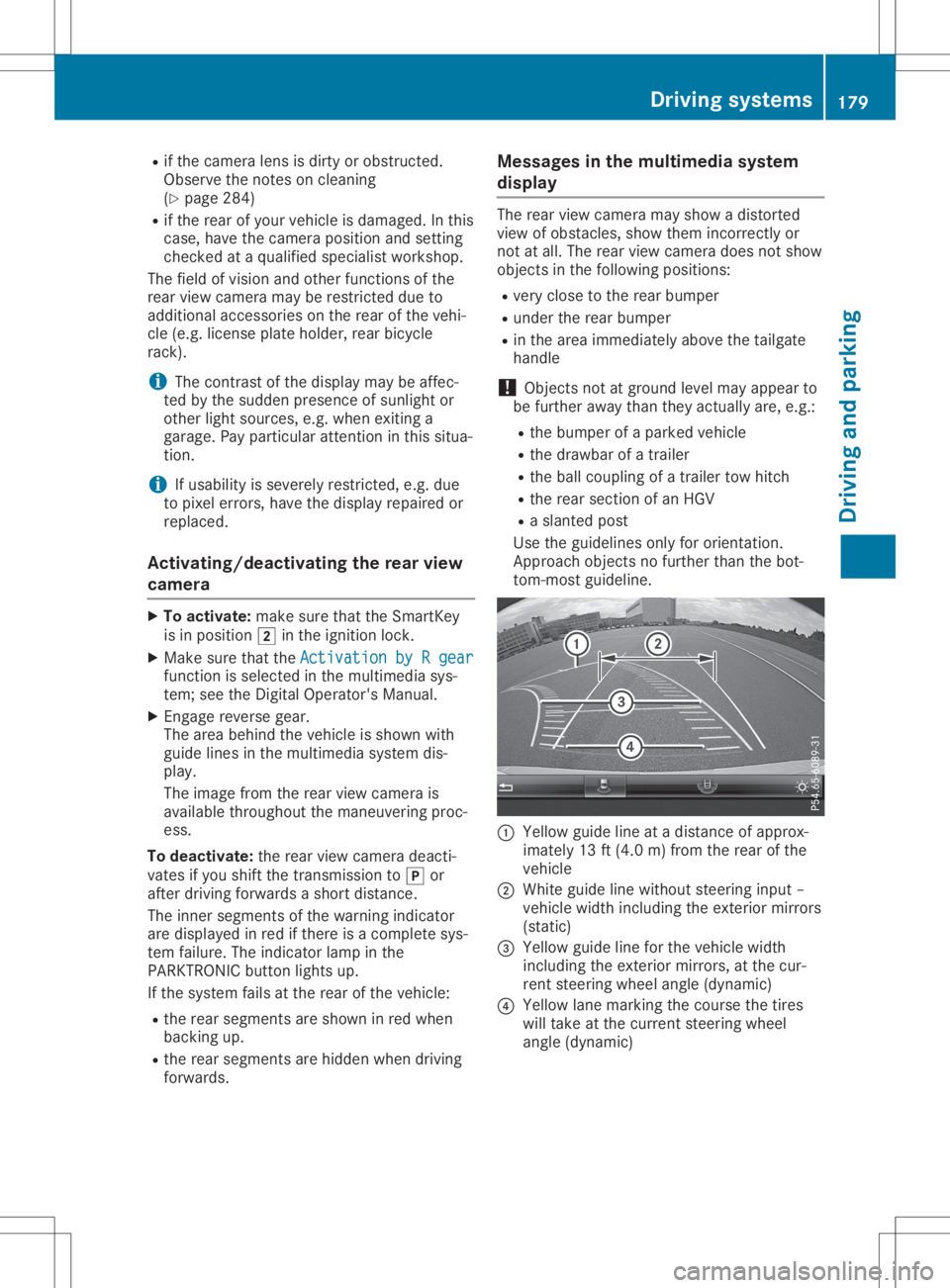
tom -most guideline . 0043
Yellow guidelineatadist anceof approx -
imate ly13 ft(4. 0m) fromthe rear ofthe
vehic le
0044 Whit eguide linewitho utste erin ginput –
vehic lewidth including theexterior mirrors
(st atic )
0087 Yellow guidelineforthe vehic lewidth
inc luding theexterior mirrors, atthe cur-
ren tste erin gwheel angle(dynamic )
0085 Yellow lanemark ingthe cour sethe tires
will takeat the curr entsteerin gwheel
angle (dynamic ) Driving
systems
179Driving andparking Z
Page 185 of 346
R
ifthe reisasudden changeintem perat ure,
e.g. when drivingint oaheate dgarage in
wint er
R ifthe camer alens esare dirtyor cov ered
R ifthe vehic lecom pone ntsare damaged in
which thecamer asare fitted. Inthis even t,
have thecamer aposit ionand setting
chec kedataqualified specialist workshop
Do not use the360 °camer ain this case. You
can otherwise injure others orcause damage
to obje ctsor the vehic le.
Activa tioncondit ions The
360°camer aimage canbedisplayed if:
R your vehic leisequipped witha360 °cam-
era
R COMA NDisswitc hedon;see thedigital
COMA NDoperat inginst ruct ions
R the 360° Camera 360°
Camerafunc tion isact ivate d
Switchin gon the360° camera X
Press andhold the00D4 buttononthe cen-
ter con sole forlong erthan twoseco nds; see
the digital COMANDoperat inginst ruct ions .
The followin gappears dependingon
wheth ergear 005Bor005E isselec ted:
R full screen display withtheimage from
the frontcamer a
R full screen display withtheimage from
the rear view camer a
Activa tingthe360° camerawith
COMAND X
Press the00D4 button;see thedigital
COMA NDoperat inginst ruct ions .
X Selec tSyst em Syst
embyturn ing00790052007A the
COMA NDcontroller andpress 0098tocon -
firm .
X Selec t360° Camera 360°
Cameraand press 0098tocon -
firm .
The followin gappears dependingon
wheth ergear 005Bor005E isselec ted:
R asplit screen with topview andtheimage
fro mthe frontcamer aor
R asplit screen with topview andtheimage
fro mthe rear view camer a
For further informat iononthe COMA NDcon-
tr oller; seethedigital COMANDoperat ing
inst ruct ions . Activa
tingthe360° camerausing
rever segear The
360°camer aimages canbeautom atically
displayed byengag ingreve rsegear.
X Make surethattheSmar tKey isin posit ion
0048 inthe ignit ionlock .
X Make surethattheActi vationbyRgear Acti
vationbyRgear
func tion isselec tedinCOMA ND(see Digital
Operat or'sManual).
X To show the360° cameraimage:engag e
reve rsegear.
The COMA NDdisplay showsthearea behin d
the vehic lein split screen:
R vehic lewith guide lines
R top view ofthe vehic le
Infor mation intheDigita lOper ator's
Man ual In
the Digit alOperat or'sManual youwillfind
inf ormat iononthe followin gtopic s:
R Disp lays inthe COMA NDdisplay
R Disp laywith thePARK TRONIC display
Exiting 360°cameradisp laymod e As
soon asyour vehic leexc eeds aspeed of
10 mph (16km/h) with thefunc tion activat ed,
the func tion switc hesoff.The COMA NDdis-
play switc hesback tothe prev iously selected
view. Youcanalso switc hthe display by
selec tingthe 0039 symbol inthe display and
press ing0098the COMA NDcontroller tocon -
firm . ATT
ENT ION ASSIST
Gener alnotes ATTE
NTIO NAS SIS Thelps youdurin glong ,
mon otonous journeys, suchason highways. It
is act ive inthe 37mph (60km/h) to125 mph
(200 km/h) rang e.IfATTE NTIO NAS SIS T
dete ctstypic alindic atorsof fat igue orinc reas-
ing lapses incon centration onthe part ofthe
drive r,itsuggest stak ing abreak . Driving
systems
183Driving andparking Z
Page 188 of 346
If
the lanes arenarrow, vehiclesdriving inthe
lane beyond thelane next toyou rvehicle may
be indicated ,especia llyifthe vehicle sare not
driving inthe middl eof their lane. Thismay be
the case ifthe vehicle sare driving onthe inner
side oftheir lane.
Due tothe nature ofthe system:
R warnings maybeissu edinerror when driv-
ing close tocrash barriersor simil arsolid
lane borders.
R warnings maybeinterrupted whenyouare
driving alongsideparticul arlylong vehicle s,
such astrucks, foraprolonged time.
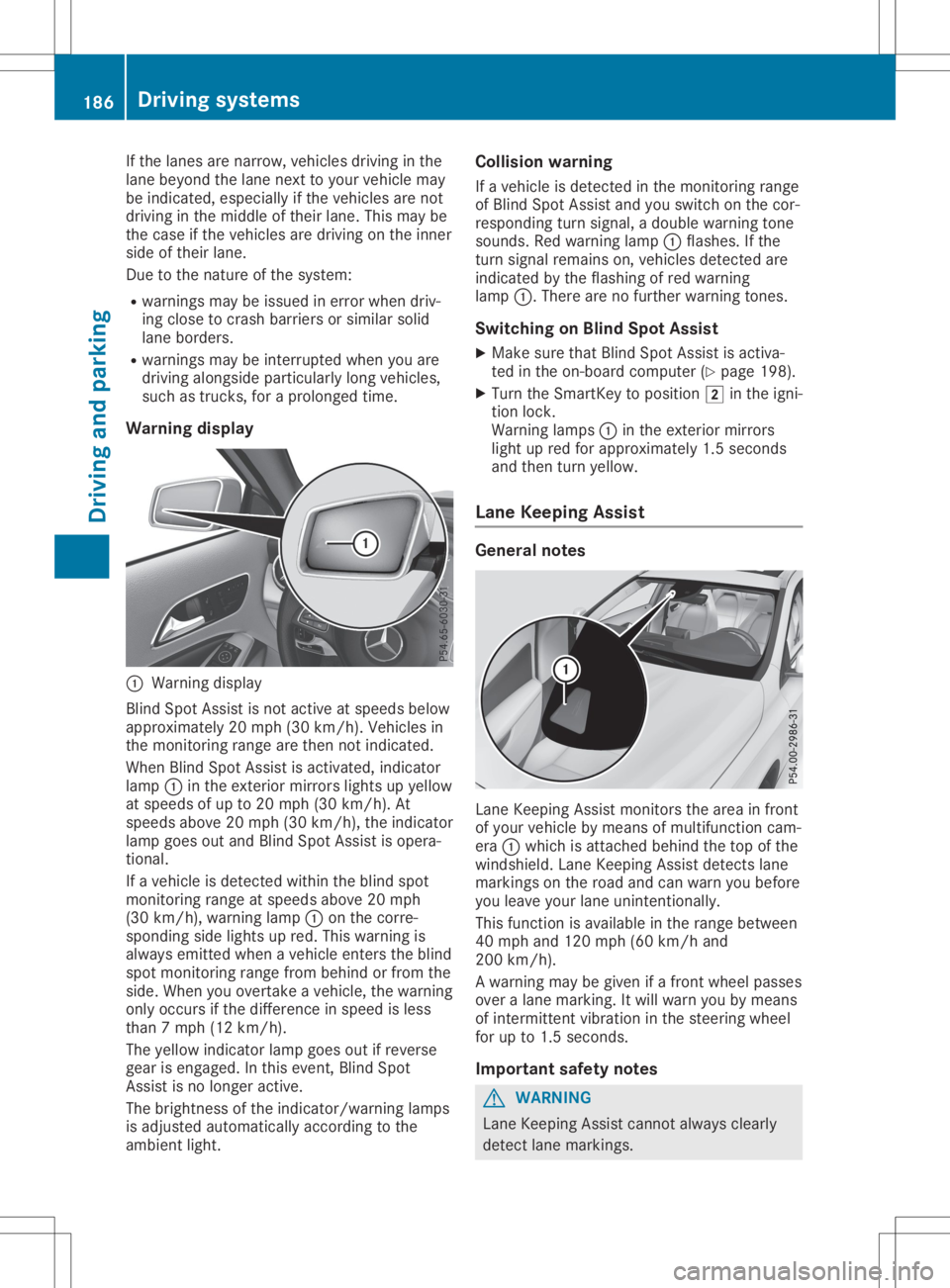
Warning display 0043
Warning display
Blind SpotAssist isnot active atspeed sbelow
appro ximately 20mph (30km/h). Vehiclesin
the monitoring rangearethen notindicated .
When BlindSpotAssist isactivated, indicator
lamp 0043inthe exterior mirrorslightsupyellow
at speed sof up to20 mph (30km/h ).At
speed sabove 20mph (30km/h), theindicator
lamp goesoutand Blind SpotAssist isopera -
tional.
If avehicle isdetected withintheblind spot
monitoring rangeatspeed sabove 20mph
(30 km/h), warning lamp0043onthe corre-
sponding sidelights upred. This warning is
alw ays emitted whenavehicle enterstheblind
spot monitoring rangefrombehind orfrom the
side. When youovertake avehicle ,the warning
only occurs ifthe difference inspeed isless
than 7mph (12km/h ).
The yellow indicator lampgoesoutifreverse
gear isengaged .In this event, BlindSpot
Assist isno longer active.
The brightness ofthe indicator/wa rninglamps
is adjusted automaticallyaccording tothe
ambi entlight. Col
lision warning
If avehicle isdetected inthe monitoring range
of Blind SpotAssist andyouswitch onthe cor-
respondi ngturn signal ,a doub lewarning tone
sounds. Redwarning lamp0043flashe s.Ifthe
turn signal remains on,vehicle sdetected are
indicated bythe flashi ngofred warning
lamp 0043.There arenofurther warning tones.
Swi tching onBlind SpotAssist
X Make surethatBlind SpotAssist isactiva-
ted inthe on-board computer (Ypage 198).
X Turn theSmartKey topositio n0048 inthe igni-
tion lock.
Warning lamps0043 inthe exterior mirrors
light upred forappro ximately 1.5seconds
and then turnyellow.
Lane Keeping Assist Gene
ralnotes Lane
Keepi ngAssist monitors thearea infront
of you rvehicle bymeans ofmultifu nctioncam-
era 0043which isattached behindthetop ofthe
windshi eld.Lane Keepi ngAssist detects lane
markings onthe road andcanwarn youbefore
you leaveyou rlane unintentionally .
This function isavai lablein the range betwee n
40 mph and120 mph (60km/h and
200 km/h).
A warning maybegiven ifafront wheel passes
over alane marking. Itwil lwarn youbymeans
of intermittent vibrationin the steering wheel
for upto1.5 seconds .
Important safetynotes G
WARNING
Lane Keepi ngAssist cannot always clearl y
detect lanemarkings. 186
Drivi
ngsystemsDrivi ngand parking
Page 191 of 346
The
outside temperat uredisplay isin the mul-
tifunc tiondisplay (Ypage 191).
There isashort delay before achange inout-
side temperat ureappears inthe multifunct ion
display . Coolant
temperaturegauge G
WARNIN
G
Opening thehood when theengine isover-
heated orwhen thereisafire inthe engine
compart mentcould expose youtohot gases
or other service products. Thereisarisk of
injury.
Let anoverheated enginecooldown before
opening thehood. Ifthere isafire inthe engine
compart ment,keep thehood closed
and cont actthe fire department .
! A
display message isshown ifthe coolant
temperat ureistoo high.
If the coolant temperat ureisover 248‡
(120 †),donot cont inue driving. The
engine willotherwise bedamaged.
The coolant temperat uregage isin the instr u-
ment cluster onthe right- hand side
(Y page 32).
The Hmarking inthe coolant temperat ure
gauge correspon dstoacoolant temperat ure
of approximately 248‡(120 †).
Under normal operating conditionsandatthe
correc tcoolant level,thecoolant temperat ure
gauge mayrisetothe Hmarking. Opera
tingtheon-board computer
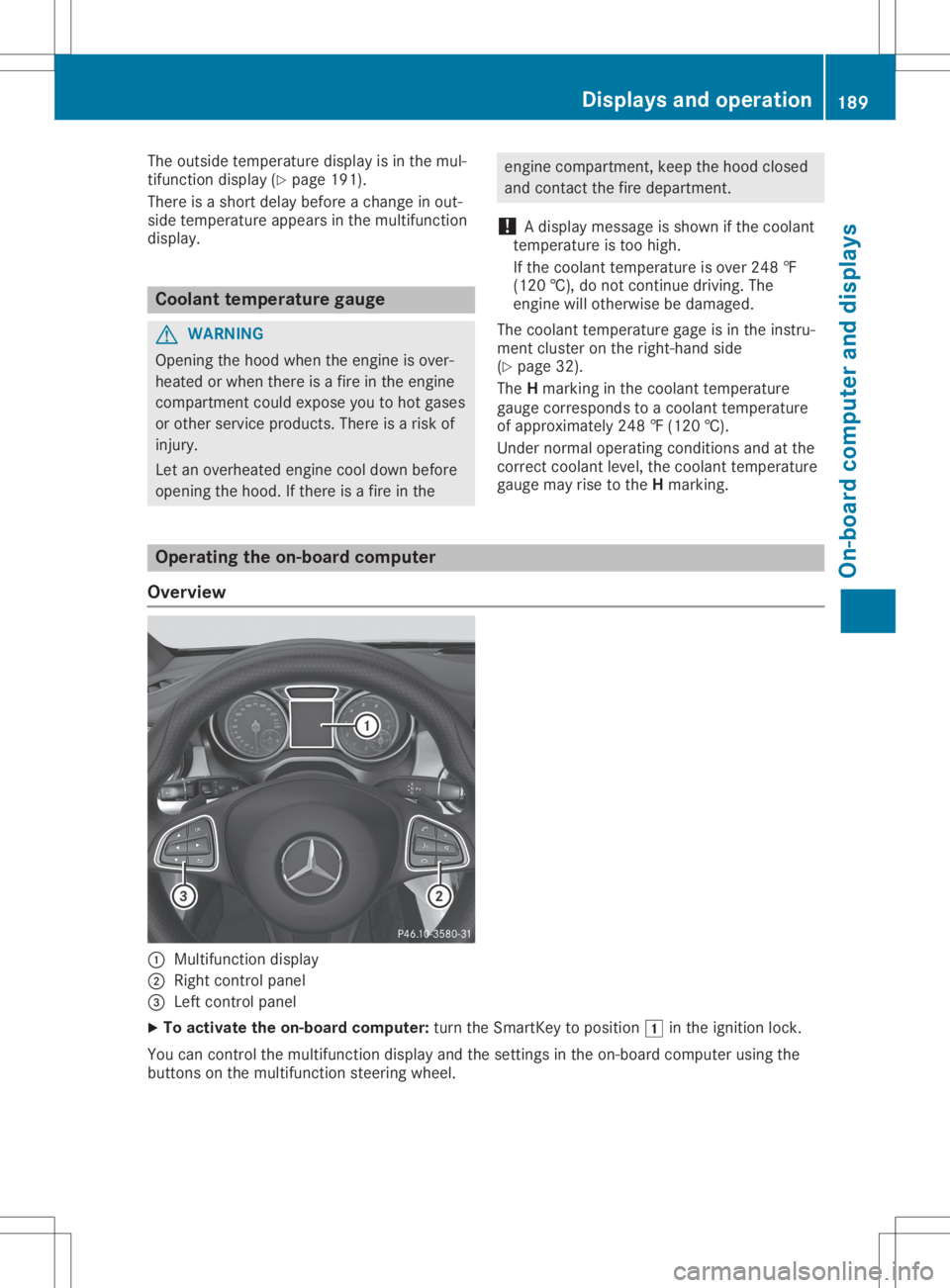
Overview 0043
Multifunct iondisplay
0044 Right controlpanel
0087 Left controlpanel
X To activat ethe on-board computer:turn theSmart Keytoposition 0047inthe ignition lock.
You cancont rolthe multifunct iondisplay andthesettings inthe on-board computer usingthe
button son the multifunct ionsteerin gwheel. Displays
andoperat ion
189On-board computerand display s Z
Page 204 of 346
RAC
ETIME R Di
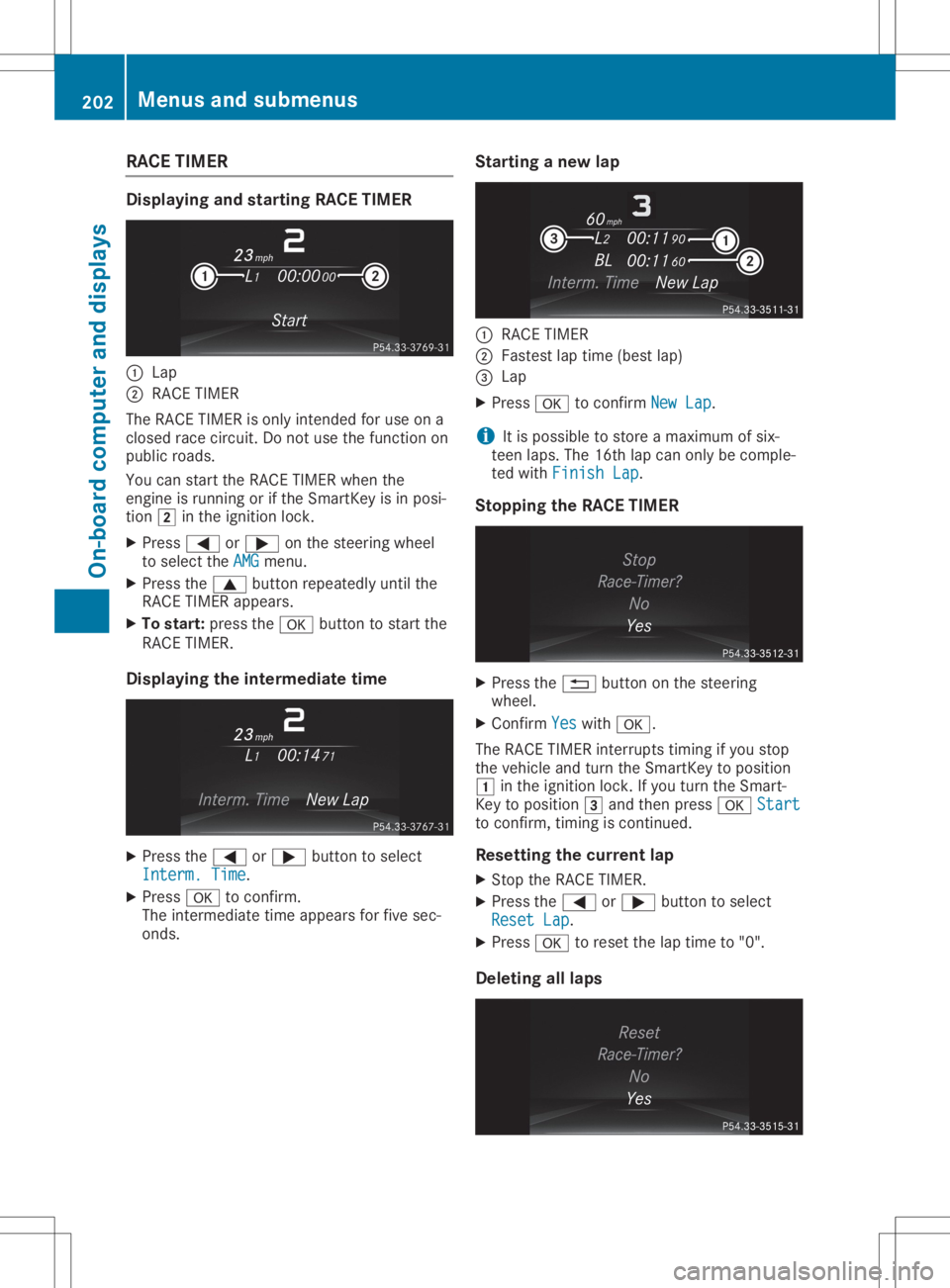
spl aying and startin gRAC ETIME R 0043
Lap
0044 RAC ETIM ER
The RAC ETIM ERisonly intend edfor useon a
clo sed race circuit.Do not usethe functi onon
pu blic roa ds.
Yo ucan startthe RAC ETIM ERwhen the
engi neisrunni ngorifthe Smar tKeyisin pos i-
tion 0048inthe igniti onlock.
X Pre ss0059 or0065 onthe stee ring wheel
to sel ect the AMG AMG
menu .
X Pre ssthe 0063 button repeatedl yunti lthe
RAC ETIM ERappea rs.
X To start: pressthe 0076 button tostar tthe
RAC ETIM ER.
Di spl aying the interme diatetime X
Pre ssthe 0059 or0065 button tosel ect
Inte rm.Time Inte
rm.Time.
X Pre ss0076 toconfi rm.
The inter mediate time appea rsfor five sec-
onds . Startin
gane wlap 0043
RAC ETIM ER
0044 Fastest lap time (best lap)
0087 Lap
X Pre ss0076 toconfi rmNew Lap New
Lap.
i It
is pos sibleto store amaxi mum ofsix-
teen laps. The 16th lap can only becomp le-
ted with Fini shLap Fini
shLap.
Stopp ingthe RAC ETIME R X
Pre ssthe 0038 button onthe stee ring
wh eel .
X Co nfirm Yes Yes
with 0076.
The RAC ETIM ERinter ruptstimi ngifyo ustop
the vehicleand turn theSmar tKeytopos ition
0047 inthe igniti onlock. Ifyo uturn theSmar t-
Key topos ition 0049 and then press0076 Start Star
t
to confi rm,timingiscontinu ed.
Res ettingthe curre ntlap
X Stop theRAC ETIM ER.
X Pre ssthe 0059 or0065 button tosel ect
Rese tLap Rese
tLap.
X Pre ss0076 tores etthe lap time to"0" .
De leting alllaps 20
2 Men
usand submen usOn-bo ard computer anddisplays
Page 209 of 346
Disp
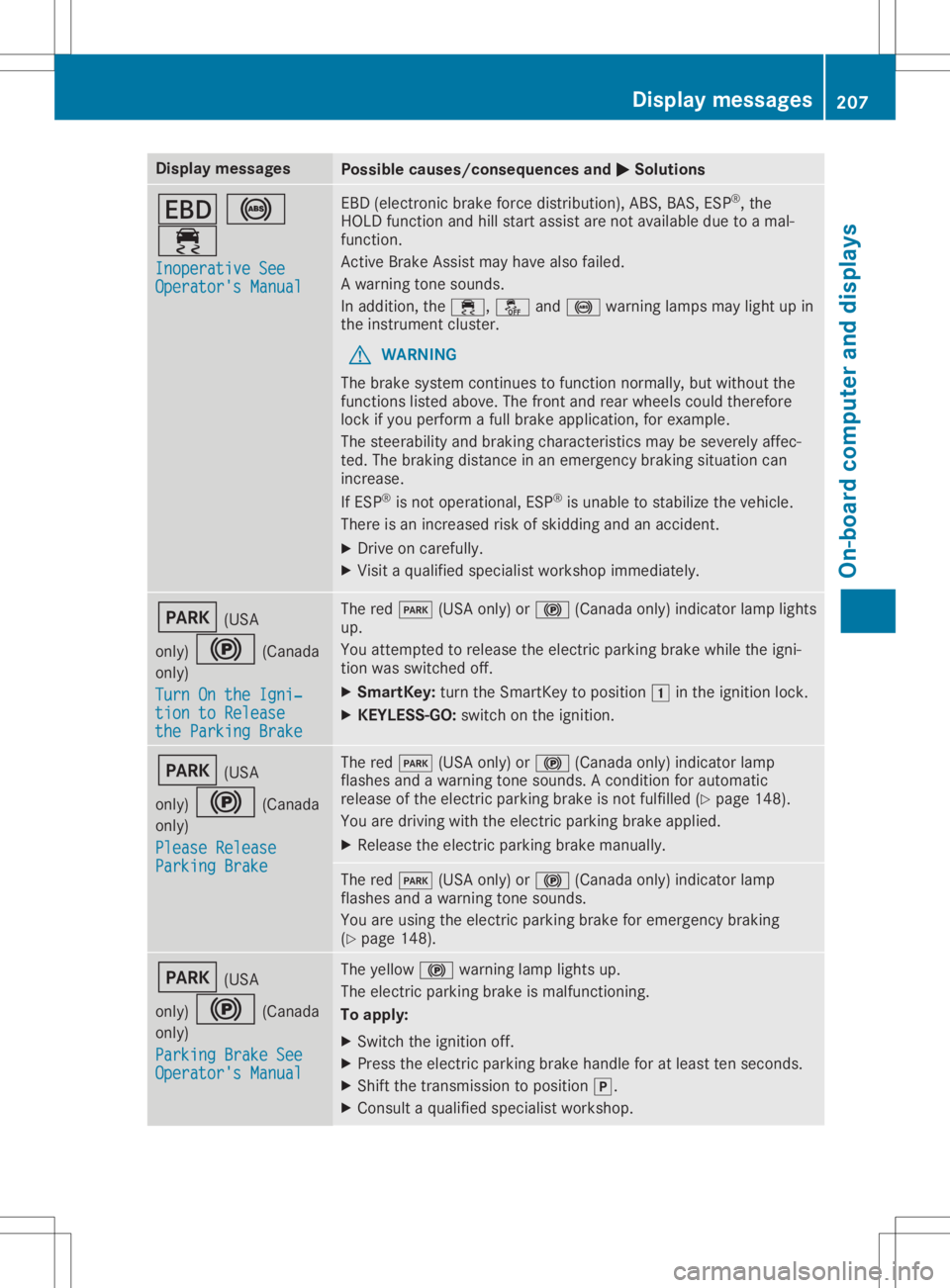
laymes sages Poss
iblecauses/co nsequences and 0050 0050
Solu tions 007A
0025
00E5 Ino perativeSee Ino
perativeSee
Ope rator'sMan ual Ope
rator'sMan ual EB
D(elec tron icbrak efor ce dist ribution),AB S,BA S,ES P®
,th e
HO LD function and hillstart assi stare notavail able duetoamal-
fun ction .
Ac tive Brake Assis tmay havealso failed.
A warn ingtone soun ds.
In addit ion,th e00E5, 00BBand0025 warninglamp smay lightup in
th eins trumen tclus ter.
G WAR
NING
The brak esyst emcontinu estofun ction norm ally, butwithout the
fun ction slist ed abov e.The fron tand rear whee lsco uld there fore
loc kif you performafull brak eapplic ation,for exampl e.
The steer abilit yand brak ingcharac teris tics may besev erelyaff ec-
te d. The brak ingdist ancein an eme rgencybrak ingsituati oncan
inc reas e.
If ES P®
is no toper ational, ESP®
is unab leto stabiliz eth eveh icle.
The reisan increas edriskof skiddin gand anacc iden t.
X Dr ive oncar eful ly.
X Vis itaqualif iedspecialistwor kshop immediat ely. 0049
(USA
on ly) 0024 (Canada
on ly)
Tur nOn the Igni‐ Tur
nOn the Igni‐
tio nto Release tio
nto Release
the ParkingBra ke the
ParkingBra ke The
red0049 (USAon ly) or0024 (Canadaonly) ind icat orlamp lights
up.
You attemp tedto release theelec tric park ingbrak ewhile theign i-
ti on was switched off.
X Sm artKey :tur nth eSm artKey topos ition 0047intheign ition lock.
X KEYLESS -GO: swit chon theign ition . 0049
(USA
on ly) 0024 (Canada
on ly)
Ple ase Release Ple
ase Release
Par kingBra ke Par
kingBra ke The
red0049 (USAon ly) or0024 (Canadaonly) ind icat orlamp
flas hes and awarn ingtone soun ds.Aco nd ition forauto matic
rel ease oftheelec tric park ingbrak eis no tfulf illed (Ypage 148).
You aredrivin gwit hth eelec tric park ingbrak eapplie d.
X Releas eth eelec tric park ingbrak eman ually. The
red0049 (USAon ly) or0024 (Canadaonly) ind icat orlamp
flas hes and awarn ingtone soun ds.
You areusin gth eelec tric park ingbrak efor eme rgencybrak ing
(Y page 148). 0049
(USA
on ly) 0024 (Canada
on ly)
Par kingBra keSee Par
kingBra keSee
Ope rator'sMan ual Ope
rator'sMan ual The
yellow 0024warninglamp lightsup.
The electric park ingbrak eis malf unction ing .
To apply :
X Swi tchth eign ition off.
X Pre sstheelec tric park ingbrak ehan dleforatleast tensec onds.
X Sh ift thetrans mis sion topos ition 005D.
X Con sult aqualif iedspecialistwor kshop . Disp
laymes sage s
207On -boar dcomp uter anddi sp lay s Z
Page 232 of 346
Smar
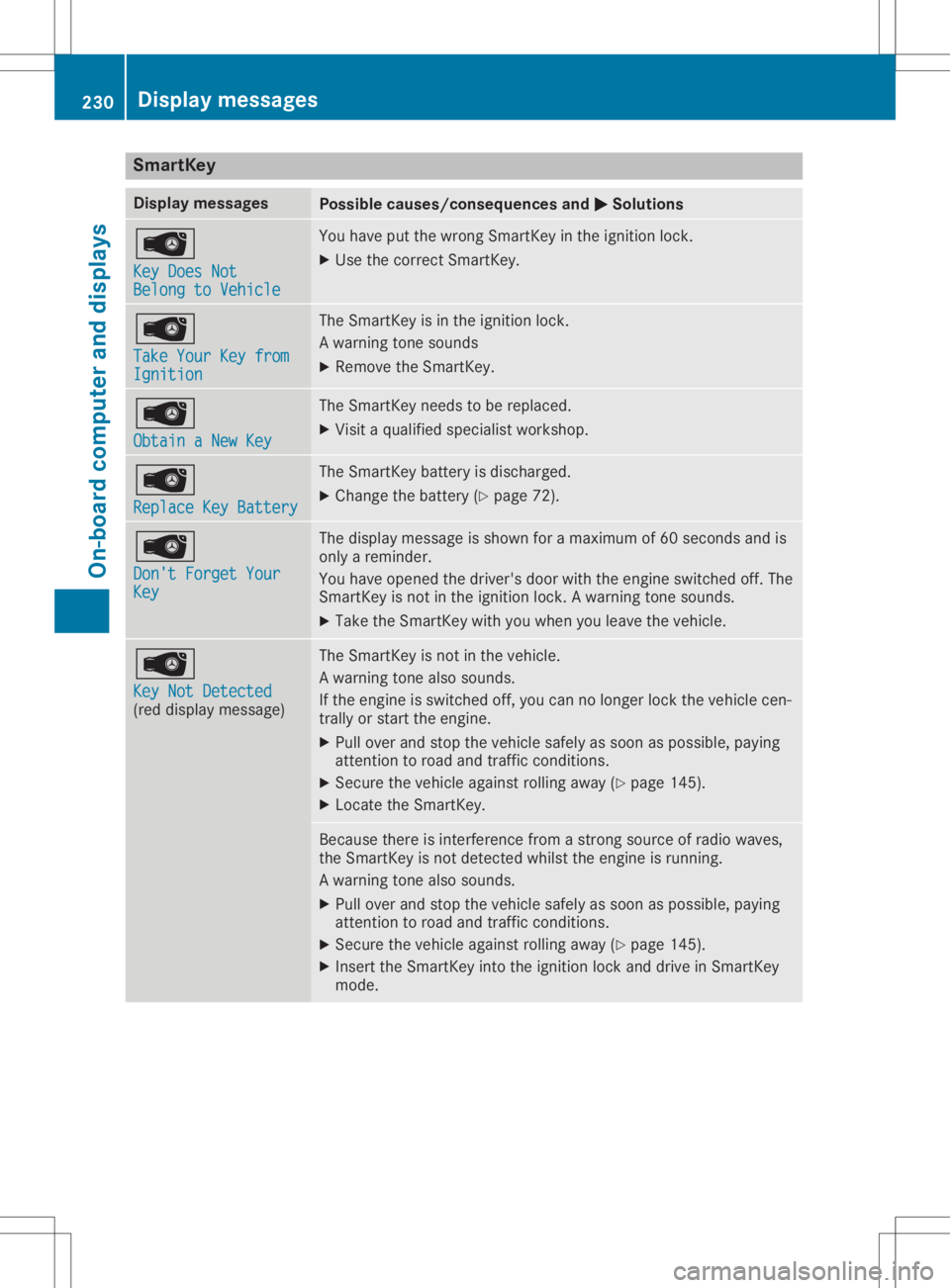
tKey Display
messages Possible
causes/co nsequences and0050 0050
Solutions 00AF
Key Does Not Key
Does Not
Belong toVehicle Belong
toVehicle You
have putthewrong SmartK eyinthe ignition lock.
X Use thecorrect SmartKey. 00AF
Take YourKeyfrom Take
YourKeyfrom
Ignition Ignition The
SmartK eyisin the ignition lock.
A warning tonesounds
X Remove theSmartK ey. 00AF
Obtain aNew Key Obtain
aNew Key The
SmartK eyneeds tobe replaced.
X Visit aquali fiedspecialist workshop. 00AF
Replace KeyBattery Replace
KeyBattery The
SmartK eybattery isdischarged.
X Change thebattery (Ypage 72). 00AF
Don't Forget Your Don't
Forget Your
Key Key The
display message isshown foramaximum of60 seconds andis
only areminder.
You have opened thedriver's doorwiththeengine switched off.The
SmartK eyisnot inthe ignition lock.Awarning tonesounds.
X Take theSmartK eywith youwhen youleave thevehicle. 00AF
Key NotDetected Key
NotDetected
(red display message) The
SmartK eyisnot inthe vehicle.
A warning tonealsosounds.
If the engine isswitched off,you can nolonger lockthevehicle cen-
trally orstart theengine.
X Pull over andstop thevehicle safelyassoon aspossible, paying
atten tiontoroad andtraffic condition s.
X Secure thevehicle against rollingaway(Ypage 145).
X Locate theSmartK ey. Because
thereisinterf erence fromastron gsource ofradio waves,
the SmartK eyisnot detect edwhilst theengine isrunning.
A warning tonealsosounds.
X Pull over andstop thevehicle safelyassoon aspossible, paying
atten tiontoroad andtraffic condition s.
X Secure thevehicle against rollingaway(Ypage 145).
X Insert theSmartK eyinto theignition lockanddrive inSmartK ey
mode. 230
Display
messagesOn-board computerand displays
Page 233 of 346
Disp
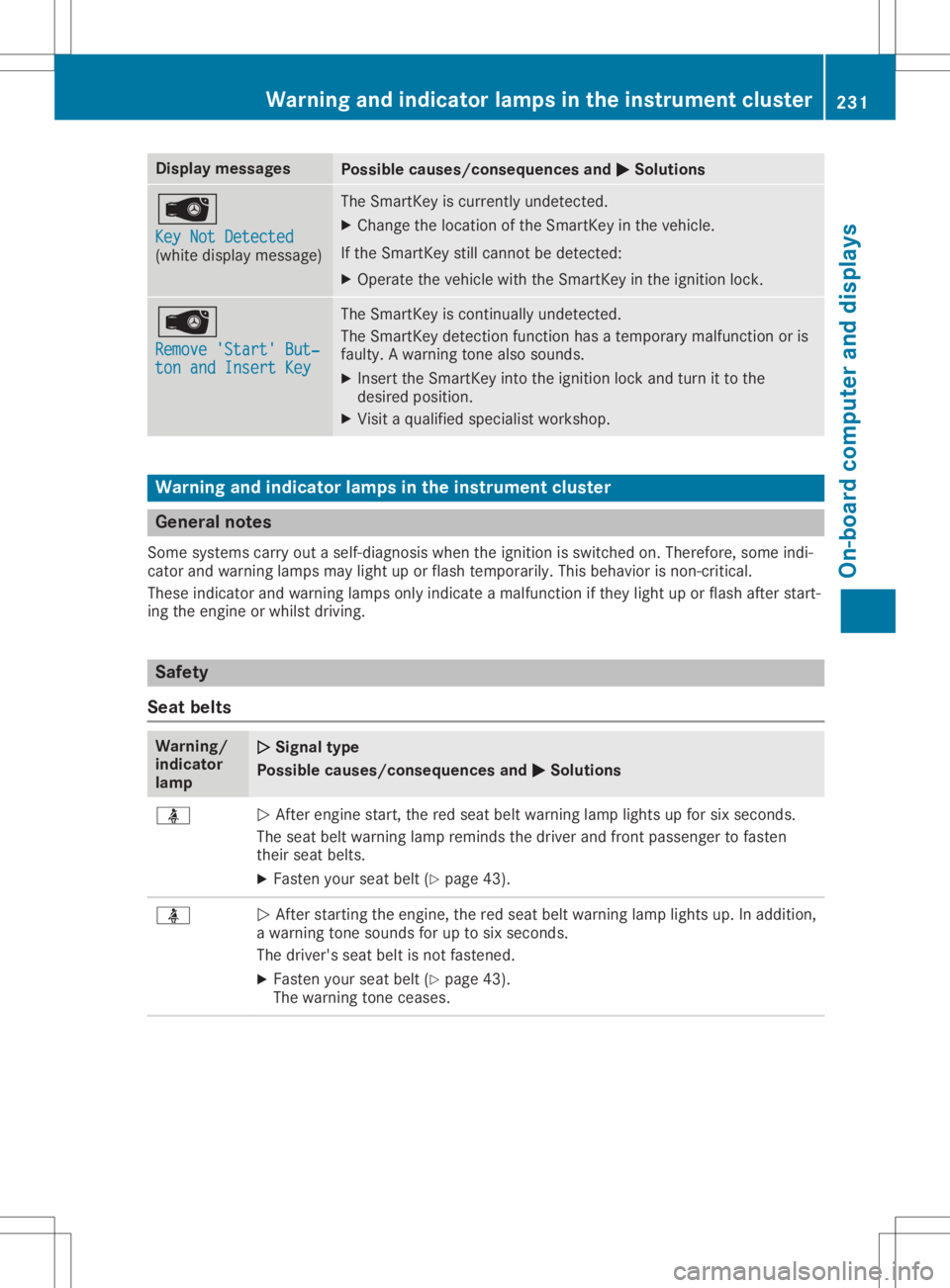
laymes sages Poss
iblecauses/co nsequences and 0050 0050
Solu tions 00AF
Key NotDetect ed Key
NotDetect ed
(whit edisp laymes sage ) The
SmartKey iscur ren tly und etec ted.
X Chan getheloc ation oftheSm artKey intheveh icle.
If th eSm artKey still can notbe det ected:
X Ope rateth eveh iclewit hth eSm artKey intheign ition lock. 00AF
Rem ove 'Start'But ‐ Rem
ove 'Start'But ‐
ton andInsert Key ton
andInsert Key The
SmartKey isco ntinu ally undetec ted.
The SmartKey detection fun ction has ate mpo rarymalf unction oris
fault y.Awarn ingtone also soun ds.
X Inser tth eSm artKey intoth eign ition lockand turnit to the
des iredpos ition .
X Vis itaqualif iedspecialistwor kshop . Wa
rning and indicat orlam psintheinst rume ntclus ter Gene
ralnot es
So me syst ems carryout aself -diagn osis when theign ition isswit ched on.The refore ,som eind i-
cat orand warn inglamp smay lightup orflas hte mpo rarily. This beha vioris no n-cr itical .
The seind icat orand warn inglamp son lyind icat eamalf unction ifth ey ligh tup orflas haft erstart -
ing theen gin eor whils tdri vin g. Sa
fet y
Sea tbelt s Wa
rning/
ind icat or
lam p 00510051
Sign altype
Poss iblecauses/co nsequences and 0050 0050
Solu tions 00E9
0051
Afteren gin est art ,th ered seat beltwarn inglamp lightsup for sixsec onds.
The seat beltwarn inglamp remindsth edri ver and fron tpass enger tofas ten
th eir seat belts.
X Fas tenyour seatbelt(Ypage 43). 00E9
0051
Afterst art ing theen gin e,thered seat beltwarn inglamp lightsup. Inaddit ion,
a warn ingtone soun dsfor uptosix sec onds.
The driver 'sseat beltisno tfas tene d.
X Fas tenyour seatbelt(Ypage 43).
The warn ingtone ceases . Wa
rning andin dicat orlam psinthe instrume ntclus ter
231On -bo ard com puteran ddis pla ys Z
Page 248 of 346
Notes
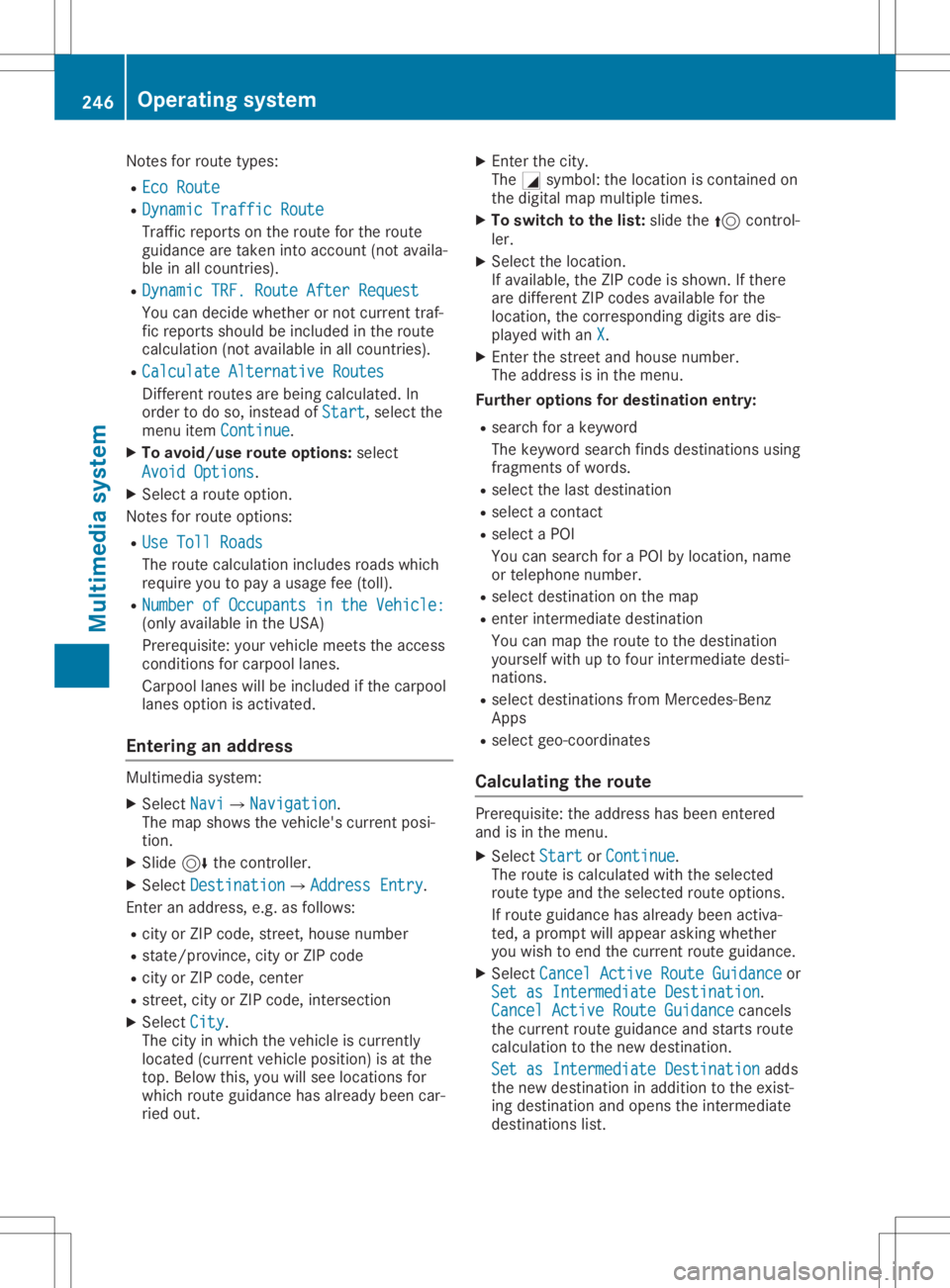
forroute types:
R Eco Route Eco
Route
R Dynamic Traffic Route Dynamic
Traffic Route
Traffic reports onthe route forthe route
guid ance aretaken intoaccount (notavaila-
ble inall countries).
R Dynamic TRF.Route AfterRequest Dynamic
TRF.Route AfterRequest
You candecide whether ornot current traf-
fic reports shouldbe included inthe route
calcul ation(notavailablein all countries).
R Calculate Alternative Routes Calculate
Alternative Routes
Different routesarebeing calculated.In
order todo so, instead ofStart Start,
selectthe
menu itemContinue Continue.
X To avoid/use routeoptions: select
Avoid Options Avoid
Options.
X Select aroute option.
Notes forroute options:
R Use Toll Roads Use
Toll Roads
The route calculationincludes roadswhich
requi reyou topay ausag efee (toll).
R Number ofOccupants inthe Vehicle: Number
ofOccupants inthe Vehicle:
(only availablein the USA)
Prerequ isite:yourvehicle meetstheaccess
conditions forcarpool lanes.
Carp oollanes willbe included ifthe carpool
lanes option isactivated.
Entering anaddr ess Multimed
iasystem:
X Select Navi Navi007BNavigation Navigation.
The map shows thevehicle's currentposi-
tion.
X Slide 6thecontroller.
X Select Destination Destination007BAddre
ssEntry Address
Entry.
Ent eran addre ss,e.g. asfollow s:
R city orZIP code, street, housenumber
R state/province, cityorZIP code
R city orZIP code, center
R street, cityorZIP code, intersection
X Select City City.
The cityinwhich thevehicle iscurrently
located (current vehicleposition) isat the
top. Below this,youwillsee locations for
which routeguidance hasalrea dybeen car-
ried out. X
Ent erthe city.
The 0043symbol :the location iscontained on
the digitalmap multipl etimes.
X To switc hto the list: slide the5 control-
ler.
X Select thelocation.
If avai lable,the ZIPcode isshown. Ifthere
are different ZIPcodes availablefor the
location, thecorresponding digitsare dis-
play edwith anX X.
X Ent erthe street andhouse number.
The addre ssisin the menu.
Further options fordestination entry:
R search forakeyword
The keyword searchfindsdestinations using
fragments ofwords.
R select thelast destination
R select acontact
R select aPOI
You cansearch foraPOI bylocation, name
or telephone number.
R select destination onthe map
R enter intermediate destination
You canmap theroute tothe destination
you rself withuptofour intermediate desti-
nations.
R select destinations fromMercedes-Benz
Apps
R select geo-coordinates
Calc ulating theroute Prerequ
isite:theaddre sshas been entered
and isin the menu.
X Select Start Start
orContinue Continue.
The route iscalcul atedwiththeselected
route typeandtheselected routeoptions.
If route guidance hasalrea dybeen activa-
ted, aprompt willappe arasking whether
you wish toend thecurrent routeguidance.
X Select Cancel ActiveRouteGuidance Cancel
ActiveRouteGuidance or
Set asIntermediate Destination Set
asIntermediate Destination.
Cancel Active RouteGuidance Cancel
Active RouteGuidance cancels
the current routeguidance andstarts route
calcul ationtothe new destination.
Set asIntermediate Destination Set
asIntermediate Destinationadds
the new destination inaddi tion tothe exist-
ing destination andopens theintermediate
destinations list.246
Operating
systemMultimedia system