key MERCEDES-BENZ GLA 2020 Manual Online
[x] Cancel search | Manufacturer: MERCEDES-BENZ, Model Year: 2020, Model line: GLA, Model: MERCEDES-BENZ GLA 2020Pages: 346, PDF Size: 17.58 MB
Page 249 of 346
Connect
ingamob ilephone
(COMAN D)
Req uiremen ts For
telepho nyvia theBlue toot h®
int erf ace, you
requi reaBlue toot h®
-c apable mobilephon e.
The mob ilephon emust suppo rtHan ds-Free
Pro file 1.0or abov e.
Mult imed iasyst em:
X Sel ect Vehicle Veh
icle007BS ystemSet‐ Sys
tem Set‐
tin gs tin
gs007B ActivateBluetooth Act
ivateBluetooth.
X Ac tivate Blue tooth®
0073.
Mobil ephon e:
X Ac tivate Blue tooth®
and ,if ne ces sary, Blue-
to oth®
vis ibilit yfor other devi ces(see the
man ufacturer'soper atingins truct ions).
The Blue tooth®
devi cenam esfor allofone
man ufacturer'spro duct smigh tbe iden tical. To
mak eit poss ibletocle arly iden tifyyour mobile
phon e,chang eth edevi cenam e(see theman -
ufac turer'soper atingins truct ions).
If th emob ilephon esuppo rts th ePBA P(Pho ne
Book Access Profile)and MAP(Mes sage
Acc ess Profile)Blue tooth®
pro files,thefoll ow-
ing inform ationwill betrans mittedaft eryou
con nect:
R Phon ebook
R Call lists
R Tex tmes sages ande-mail
i Fur
ther inform ationon suit able mobile
phon escan befoun dat: http://
www.m ercedes-benz.com /connect
i In
theUS A,you can getintouch withth e
Mer cedes-Ben zCust omerAs sist anc eCen ter
on 1-80 0-FO R-M ERCe des
(1- 800-36 7-63 72).
In Cana da,you can getintouch withthe
Cus tomer Relations Center on
1-800-3 87-0100 .
Searchin gfor and authorizing (con-
nec ting) amobile phone Before
usingyourmobil ephone withthemulti-
media system forthe first time, youwillneed
to search forthe phone andthen authori ze
(connect) it.Depending onthe mobil ephone,
authori zationeithertakesplacebymeans of Secure
SimplePairing orby entering apass-
key. Themultime diasystem automatically
makes theprocedu rethat isreleva ntfor you r
mobil ephone available. The mobil ephone is
alw ays connected automaticallyafterauthori -
zation. Further information onusing amobil e
phone withthemultime diasystem (seethe
Digital Operator's Manual).
If the multime diasystem doesnotdetect your
mobil ephone, thismay bedue toparticul ar
security settings onyou rmobil ephone (see
the manufacture r'sopera tinginstructions).
Only onemobil ephone canbeconnected to
the multimed iasystem atany one time.
Searchin gfor amobile phone
Multime diasystem:
X Select Tel/ Tel/00A7007BConn. Conn.
Device Device007BSearc
hfor Phones Search
forPhones007BStart Start
Search Search.
The availablemobil ephones aredispl ayed.
Symbols inthe devic elist Sym-
bol Explanatio
n 00D3
New
mobil ephone found, notyet
authori zed. 00DC
Mobil
ephone isauthori zed,butis
not connected. Con
necting amobile phone
Authorization usingSecure SimplePairing:
X Select mobilephone.
A code isdispl ayedin the multime diasys-
tem andonthe mobil ephone.
X Ifcode smatch: selectYes Yes
onthe multime -
dia system.
X Confirm codeonthe mobil ephone. Depend-
ing onthe mobil ephone used,confirm the
connection tothe multime diasystem and
for the PBAP andMAP Bluetooth ®
profil es.
The prompt toconfirm maytake uptotwo
minutes tobe displ ayed(see themanufac-
turer's operatinginstructions).
X Ifthe code sare different: selectNo No
on the
multime diasystem.
The process iscanceled.
Repe atauthori zation. Operating
system
247Multimedia system Z
Page 250 of 346
Auth
orizati onbyente ringapa sske y(p as s-
cod e):
X Sel ect the Bluetoo th®
nam eof the mob ile
pho ne.
The inputmenu forthe passke yis displ ayed .
X Ch oos eaone tosixtee n-digitnum bercom-
bi nati onasapa sske y.
X Enter thepasske yon the multimed iasys-
tem.
X Pre ss0054 toconfi rm.
X Enter andconfi rmthe passke yon the
mob ile pho ne.Dep endingonthe mob ile
pho neused ,confi rmthe conne ctionto the
mu ltimed iasystem andforthe PBAP and
MAP Bluetoo th®
pro files. The prompt to
confi rmmaytake uptotwo minu testobe
di spl ayed (seethe manuf actu rer'sop era ting
ins truc tions) . Co
nnectin gamob ile phon e(A udio
20 )
Requ iremen ts For
telephony viathe Bluetoo th®
inte rface, you
req uire atleas tone Bluetoo th®
-cap ablemob ile
pho nedependi ng on useof on e-te lepho ne
mode ortwo -teleph onemode. Themob ile
pho nemu stsupp ort Hand s-FreePro file 1.0 or
ab ove .
In two -teleph onemode youcan useallthe
fu nctio nsofthe multimed iasystem with the
main teleph one.With the additi onaltel e-
pho ne,yo ucan rece iveinco ming calls.
Mu ltimed iasystem :
X Sel ect Vehicle Veh
icle007BS ystemSet‐ Sys
tem Set‐
tin gs tin
gs007B ActivateBluetooth Act
ivateBluetooth.
X Activa teBlu etoo th®
0073.
Mob ile pho ne:
X Activa teBlu etoo th®
and ,if nece ssary,Blu e-
tooth ®
vis ibility for othe rde vice s(se ethe
ma nuf actu rer'sop era ting instruc tions) .
The Bluetoo th®
de vice namesfor allof one
ma nuf actu rer'spro ducts mig htbe identi cal.To
ma keitpo ssi ble to cle arly identi fyyour mob ile
pho ne,change thedevice name(se ethe man-
uf actu rer'sop era ting instruc tions) . If
the mob ile pho nesupp orts thePBAP (Phone
Bo ok Acce ssPro file) and MAP (Mess age
Acce ssPro file) Blu etoo th®
pro files, the follow-
ing info rma tionis trans mitte dafte ryo ucon-
nect themaintel ephone :
R Pho nebook
R Ca lllists
R Te xt mes sages and e-ma il
i Fur
ther informa tionon suita ble mob ile
pho nes can befou ndat: http:/ /
ww w.me rcedes -benz.c om/ conn ect
i In
the USA, youcan getin tou chwith the
Mer cedes-B enzCustom erAssi stance Center
on 1-800-FO R-MERC edes
(1-8 00-367 -6372).
In Ca nad a,youcan getin tou chwith the
Cu stom erRelatio ns Center on
1-800-3 87-0100.
Searching forand auth orizing (con-
necting) amobile phone Before
usingyourmobile phonewiththemulti-
media system forthe first time, youwillneed
to search forthe phone andthen authorize
(conn ect)it.Depending onthe mobile phone,
authorization eithertakesplacebymeans of
Secure SimplePairing orby enterin gapass-
key. Themultimedia systemautomatically
makes theprocedure thatisrelevant foryour
mobile phoneavailable.Themobile phoneis
alwa ysconn ected automatically afterauthori-
zation. Further information onusing amobile
phone withthemultimedia system(seethe
Digital Operator's Manual).
If the multimedia systemdoesnotdetect your
mobile phone, thismay bedue toparticular
security settingson your mobile phone(see
the manufacturer's operatinginstructions).
Searching foramobile phone
Multimedia system:
X Select Tel/ Tel/00A7007BConn.
Device Conn.
Device007BCon‐ Con‐
nect NewDevice nect
NewDevice.
X Select Connect viaVehicle Connect
viaVehicle.
X Select mobile phone. 248
Operat
ingsystemMultim ediasystem
Page 251 of 346
Connect
ingamob ilephone
X One- telep hone mode:selec tCon nectas Con
nectas
New MainPho ne New
MainPho ne.
X Two- telep hone mode:selec tCon nectas Con
nectas
Add itionalPho ne Add
itionalPho newhen amobi lephon eis
already connected.
X Aut
horization usingSecur eSim plePair -
ing:
A cod eis displayed inthemult imedi asys-
tem andonthemobi lephon e.
X Conf irmcodeon themobi lephon e.Dep end-
ing onthemobi lephon eused, confirm the
con nectionto themult imedi asyst emand
for thePBA Pand MAPBluet ooth®
prof iles.
The prom pttocon firm may takeup totwo
min utes tobe displayed (seetheman ufac-
tur er'soper atingins truct ions).
X Ifth ecod esare differen t:selec tNo No
on the
mult imedi asyst em.
The proc essiscan cele d.
Repeat authorizatio n.
or X Aut
horization byente ringapa sskey
(pa sscod e):enterany one-to six tee n-digit
num bersequen cewhic hyou have chosen
yourse lfint oth epassk eyinput menu.
X Pres s0054 tocon firm.
X En ter and confirm thepassk eyon the
mobi lephon e.Dep endingonthemobi le
phon eused, confirm thecon nectionto the
mult imedi asyst emand forthePBA Pand
MA PBluet ooth®
prof iles. Theprom ptto
con firm may takeup totwo minutes tobe
displayed (seetheman ufacturer'soper ating
ins truct ions).
Sym bols inthedev icemanager The
symbo lsare shown incolo rdepen dingon
th eir use. Sym
bol Expl
anation Mobile
phonecon nected tothe
mult imedi asyst em Main
telephon ewith fullrangeof
fun ction s Add
itional telephon efor incom-
ing calls intwo telephon emode Med
iamod e
Gener alnotes If
you wish toplay extern almedia sources,th e
appro priatemedia modemustalready be
tur ned on.Further inform ationon media mode
(see theDig ital Oper ator'sMan ual).
The follo wing extern almedia sourcescan be
used:
R App le®
devic es(e.g.iPhon e®
)
R US Bdevic es(e.g.US Bstick ,MP3 player)
(Y page 250)
R CD
R DV D(COMA ND)
R SD cards
R Via devic escon nected byBluet ooth®
i In
for mat iononsingle CD/ DVDdriv eor
DV Dchan ger(see theDig ital Oper ator's
Man ual).
Select ingusin gth edev icelist Mult
imedi asyst em:
X Sele ctMed ia Med
ia007B Devices Dev
ices.
The available mediasourceswillbeshown .
The 003Bdot indicatesthecur ren tset ting.
X Sele ctthemedia source.
Playable filesareplayed.
Inser ting/rem ovinganSD card Imp
ortant safety notes G
WAR
NING
SD cardsare small parts.They canbeswal-
lowed andcause choking.This poses an
inc reas edrisk ofinjury oreven fatalinj ury.
Keep theSD cardout ofthereac hof chi l-
dren .If aSD cardis swallowe d,seek medi-
cal attent ion imm ediat ely.
! If
th eSD cardis no longer inuse, you
should takeit out and remove itfro mthe
veh icle.High temperat urescandamage the
car d. Oper
ating syst em
249Multim edia system Z
Page 263 of 346
X
Turn theSmart Keytoposition 0048inthe igni-
tion lock (Ypage 125).
X Vehicles
withastowage compartment
cover: pressthelower section ofcover 0043.
The stowage compartmentopens.
X Press incigarett elighter 0044.
Cigarette lighter0044will pop outautomati-
cally when theheating element isred-hot . 12
Vsockets
General notes X
Turn theSmart Keytoposition 0047inthe igni-
tion lock (Ypage 125).
The socket scan beused foraccessories with
a maximum drawof180 W(15 A).Acc essories
include suchitems aschargers formobile
phones.
If you usethesocket sfor long periods when
the engine isswitched off,thebattery maydis-
charge.
An emergenc ycut- out ensures thattheon-
board voltage doesnotdrop toolow. Ifthe on-
board voltage istoo low, thepower tothe
socket sis automatically cut.This ensures that
there issufficient powertostart theengine.
Socket inthe front center console X
Vehicles
withastowage compartment
cover: pressthelower section ofthe cover.
The stowage compartmentopens.
X Lift upthe cover ofthe socket . Socket
inthe rear passenger compart-
ment center console X
Pull thecover outbythe top ofthe handle
edge.
X Lift upthe cover ofthe socket .
Socket inthe cargo compar tment X
Lift upthe cover ofsocket 0043. Mercedes
meconnec t
General notes A
license agreement mustbeinplace inorder
to activate theMercedes meconn ectservice.
Make surethatyour system isactivated and
operational. Toregister, pressthe00D9 MB
Info callbutton .If any ofthe steps mentioned
are not carried out,thesystem maynotbe
activated.
If you have questions abouttheactivation ,
cont actone ofthe following telephone hot-
lines:
R USA: Mercedes- BenzCustomer Assistance
Center at1-8 00-FOR-ME RCedes
(1-80 0-367-6372 )or 1-86 6-990-9007
R Canada: Customer Serviceat
1-88 8-923-8367
Short lyafter successfully registeringwith the
service, auser IDand password willbesent to
you bypost.
USA only: youcan usethis password tolog
onto theMercedes meconn ectarea under
"Owners Online"athtt p://www.mbusa. com. Featur
es
261Stowage andfeatu res Z
Page 268 of 346
Within
theframework ofthis service, you
receive aprofession aland reliable formofnav-
igation support withouthavingtoleave your
vehicle.
The custom erservice represen tativefinds a
suitable routedepending onyour vehicle's cur-
rent position andthedesired destinat ion.You
will then beguided livethrough thecurren t
route section.
Search andSend General
notes
i To
use "Search &Send", yourvehicle must
be equipped withMercedes meconn ectand
a navigation system.Additionally,a
Mercedes meconn ectservice subscript ion
must becomplet ed.
"Search &Send" isadestinat ionentryservice.
A destinat ionaddress foundonGoogle Maps™
can betran sferred viaMercedes meconn ect
direct lyto your vehicle's navigation system.
Specifying andsending thedestinat ion
add ress
X Go tothe website http://
<005A005A005A001100500044005300560011004A00520052004A004F00480011
0046[ omand enteradestina-
tion address intotheentryfield.
X To
send thedestinat ionadd ress tothe e-
mail address ofyour Mercedes mecon-
nect account: clickthecorr esponding but-
ton onthe website.
i Ex
ample:
If you select 'Sendto vehicle' andthen
'Mercedes- Benz',the destinat ionaddress
will besent toyour vehicle.
X Ifthe "Send" dialogwindow appears: in
the corr esponding fieldenterthe e-mail
address thatyouspecified whensettingup
your Mercedes meconn ectaccount .
X Click "Send".
i Inf
ormation onspecific comman dssuch as
"Address entry" or"Send" canbefound on
the website.
Calling updestinat ionadd resses
X Switc hon the ignition .
The destinat ionaddress isloaded intothe
vehicle's navigation system. A
display message appears,askingwhether
navigation shouldbestart ed.
X Select Yes Yes
byturn ing00790052007A orsliding 009500520096
the cont roller andconf irmwith 0098.
The system calculates theroute andsubse-
quently startsthe route guidance withthe
address entered.
i If
you select No No,
the address canbesaved
in the address book.
i If
you have sentmore thanonedestin ation
address, eachindividual destinationmust be
conf irmed separately.
i Dest
ination addresses areloaded inthe
same orderasthe order inwhich theywere
sent .
If you have multiple Mercedes- Benzvehicles
with Mercedes meconn ectand active
Mercedes meconn ectaccount s:
If multiple vehicles areregister edunder the
same e-mail address, thedestin ationwillbe
sent toall the vehicles.
Vehicle remoteopening You
canusethevehicle remoteopening ifyou
have unintentionally locked yourvehicle anda
replacement SmartKeyisnot available.
The vehicle canbeunlock edbythe Mercedes-
Benz Customer AssistanceCenter .
The vehicle canbeimmediately unlocked
remot elywithin fourdays ofthe ignition being
turn edoff. Afterthis time, theremot eunlock -
ing may bedelayed by15 to60 minutes .Aft er
30 days, thevehicle cannolonger be
unlock edremot ely.
X Contac tthe following servicehotlines :
R USA: Mercedes- BenzCustomer Assis-
tanc eCenter at1-8 00-FOR-ME RCedes
(1-8 00-367- 6372 )or 1-86 6-990-9007
R Canada: Customer Serviceat
1-88 8-923-8367
You willbeasked foryour password.
X Return toyour vehicle atthe time agreed
upon withtheMercedes-B enzCustomer
Assist anceCenter. 266
Featur
esStowage andfeatu res
Page 269 of 346
USA
only: alternatively, thevehicle canbe
opened via:
R the Intern et,under the"Owners Online"sec-
tion
R telephone applications (e.g.foriPhone ®
,
Android ®
)
To do this, youwillneed youridentification
number andpassword .
i Vehicle
remoteopening isonly possible if
the corresponding mobilephonenetwork is
accessible.
Vehicle remoteclosing The
vehicle valetlocking featurecanbeused
when youhave forgotten tolock thevehicle
and youarenolonger nearby.
The vehicle canthen belocked bythe
Mercedes-Benz CustomerAssistance Center.
The vehicle canbeimmediately locked
remotely uptofour days after theignition was
last switched off.After thistime, valetlocking
may bedelay edby15 to60 minutes. After
30 days thevehicle cannolonger belocked
remotely.
X Contact thefollowi ngservice hotlines:
R USA: Mercedes-Benz CustomerAssis-
tance Center at1-800 -FOR-MERCedes
(1-800- 367-6372)or1-866 -990-9007
R Canada: Customer Serviceat
1-888 -923-8367
You willbeasked foryour password .
The next time youareinside thevehicle and
you switch onthe ignition, theDoors Locked Doors
Locked
Remotely Remotely
messagewillappea ron the multi-
function display.
USA only: alternatively, thevehicle canbe
locked via:
R the Intern et,under the"Owners Online"sec-
tion
R telephone applications (e.g.foriPhone ®
,
Android ®
)
To do this, youwillneed youridentification
number andpassword .
i The
vehicle valetlocking featureisavail a-
ble when therelevant mobilephonenetwork
is avail able anddata connec tionispossible .Stolen
vehiclerecove ryservice If
your vehicle hasbeen stolen:
X Notify thepolice.
The police willissue anumbered incident
report.
X This number willbeforwarded tothe
Mercedes-Benz CustomerAssistance Center
together withyour PIN.
The Mercedes-Benz CustomerAssistance
Center thentriestolocate thesystem. The
Mercedes-Benz CustomerAssistance Center
cont acts youand thelocal lawenforcement
agency ifthe vehicle islocated.
However, onlythelaw enforcement agency
is informed ofthe location ofthe vehicle.
i If
the anti-theft alarm system isactivated
for longer than30seconds, Mercedes me
connec tautomaticall ynotifies the
Mercedes-Benz CustomerAssistance Cen-
ter.
Vehicle HealthCheck With
theVehicle HealthCheck, theCustomer
Assistance Centercanprovide improved sup-
port forproblems withyour vehicle. Duringan
existing call,vehicle dataistransferred tothe
Customer Assistance Center.Thecustomer
service representative canusethereceived
data todecide whatkindofassistance is
required .You arethen, forexample, guidedto
the nearest Mercedes-Benz ServiceCenteror
a recovery vehicleiscalled.
If vehicle dataneeds tobe transferred during
an MB Info calloraRoad sideAssistance call,
this isinitiated bythe Customer Assistance
Center. Youwillsee theRoadside Assis‐ Roadside
Assis‐
tance Connected tance
Connected messageonthe multimedia
system display.Ifthe vehicle remote malfunc-
tion diagnosis canbestarted, theRequest Request
for vehicle diagnosis received. for
vehicle diagnosis received.
Start vehicle diagnosis? Start
vehicle diagnosis? message
appea rsinthe displa y.
X Confirm themessage withYes Yes.
X When theVehicle diagnosis: Please Vehicle
diagnosis: Please
start ignition start
ignition messageappears,turn
the SmartKey toposition 2in the ignition
lock (Ypage 125).
X When thePlease followtheinstruc‐ Please
followtheinstruc‐
tions received byphone andmove tions
received byphone andmove
your vehicle toasafe position your
vehicle toasafe position mes- Features
267Stowageandfeatur es Z
Page 272 of 346
Garage
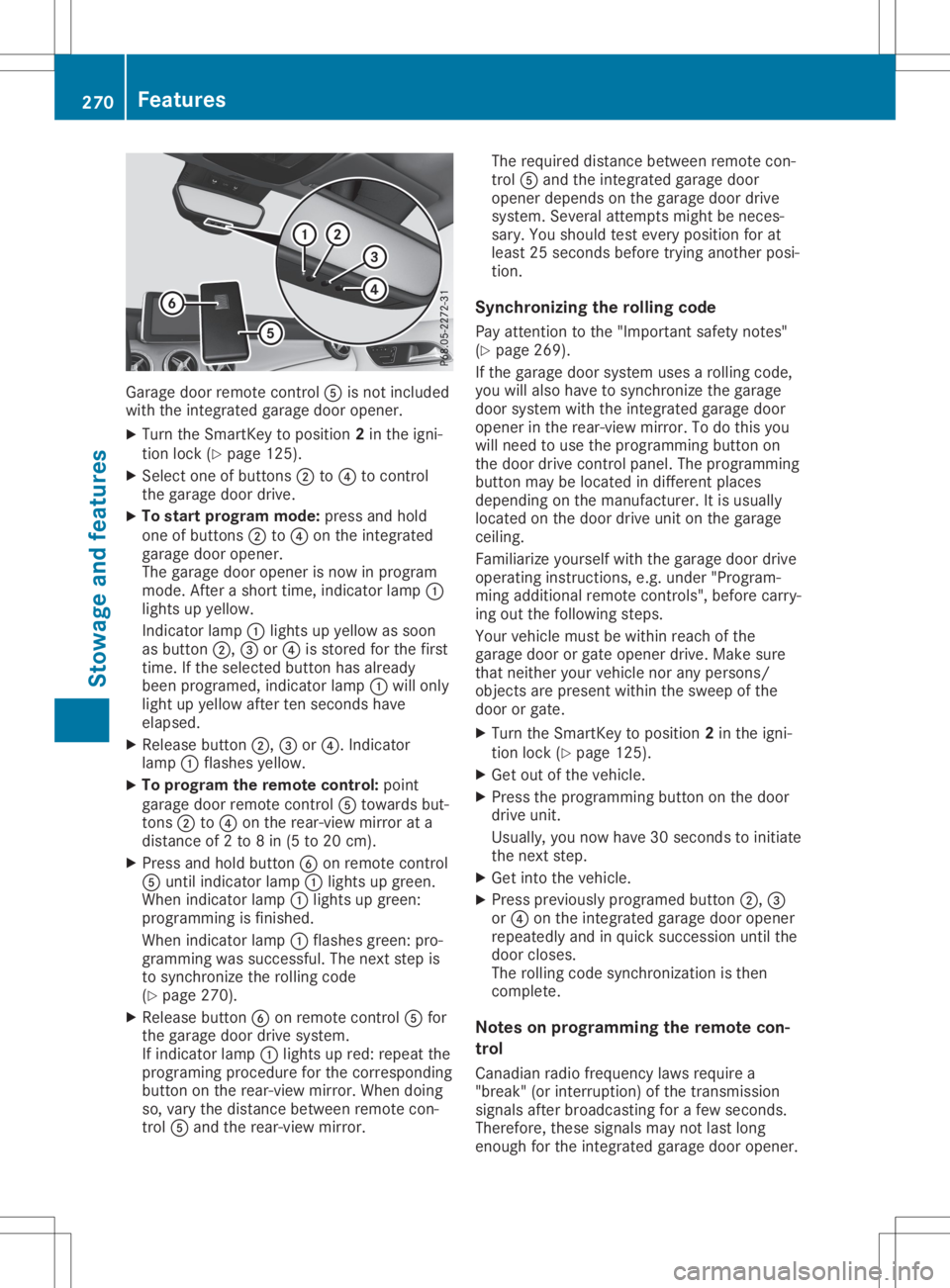
doorremotecon trol 0083 isno tinc luded
with theint egr atedgarag edoor opener.
X Turn theSm artKey toposit ion2in theign i-
tio nloc k(Y page 125).
X Sel ect oneof butt ons0044 to0085 tocon trol
th egarag edoor drive.
X To star tpr ogr am mod e:pres sand hold
on eof butt ons0044 to0085 ontheint egr ated
garag edoor opener.
The garag edoor openerisno win pro gram
mode .Af tera shor ttim e,ind icat orlamp 0043
light sup yellow.
In dicat orlamp 0043light sup yellow assoon
as butt on0044, 0087or0085 isstore dfor thefir st
tim e.Ifth eselec tedbutt onhas alread y
been program ed,indicat orlamp 0043will only
light upyellow aftertensec onds have
elapse d.
X Release button0044, 0087or0085. Indicat or
lamp 0043flas hes yellow.
X To progr am therem otecont rol:poin t
garag edoor remotecon trol 0083 towards but-
to ns 0044 to0085 ontherear -view mirror ata
dist anceof 2to 8in (5 to 20 cm).
X Pre ssand hold button0084 onrem otecon trol
0083 untilind icat orlamp 0043light sup gre en.
When indicat orlamp 0043light sup gre en:
pro gram mingis fin ishe d.
When indicat orlamp 0043flas hes green: pro-
gram mingwas successful. Thenextst ep is
to syn chron ize theroll ing cod e
(Y page 270).
X Release button0084 onrem otecon trol 0083 for
th egarag edoor drivesyst em.
If ind icat orlamp 0043light sup red: repeatthe
pro gram ingproced ure forthecor respon ding
butt onon therear -view mirror.When doing
so, varyth edist ancebet ween remotecon -
tr ol 0083 and therear -view mirror. The
requi reddistancebet ween remotecon -
tr ol 0083 and theint egr atedgarag edoor
open erdepen dson thegarag edoor drive
syst em. Several attempt smigh tbe nec es-
sary. Youshoul dte st ever yposit ionforat
least 25sec onds befo retrying another posi-
tio n.
Synch ronizin gth eroll ing code
Pay attent ion tothe"Imp ortant safe tyno tes"
(Y page 269).
If th egarag edoor systemuses aroll ing cod e,
you willalso have tosyn chron ize thegarag e
door systemwith theint egr atedgarag edoor
open erintherear -view mirror.To do this you
will needto use thepro gram mingbutt onon
th edoor drivecon trol pane l.The program ming
butt onmay belocate din diff eren tplace s
depen dingon theman ufacturer. Itis usually
loc ate don thedoor driveunit onthegarag e
cei ling .
Fam iliariz eyours elfwith thegarag edoor drive
oper atingins truct ions,e.g .unde r"Pro gram -
min gaddit ionalrem otecon trols", beforecar ry-
ing out thefoll owin gst eps.
Your vehicle must bewith inreac hof the
garag edoor orgat eopen erdriv e.Mak esure
th at nei ther your vehicle norany pers ons/
obj ect sare pres entwith inthesweep ofthe
door orgat e.
X Turn theSm artKey toposit ion2in theign i-
tio nloc k(Y page 125).
X Get outoftheveh icle.
X Pre ssthepro gram mingbutt ononthedoor
driv eunit .
Usually, younowhave 30sec onds toinit iate
th enex tst ep.
X Get intoth eveh icle.
X Pre ssprev iously program edbutt on0044, 0087
or 0085 ontheint egr atedgarag edoor opener
repe atedly and inquick succession untilth e
door closes.
The rolling cod esyn chron izat ion isthen
com plete.
Not eson progr ammin gth erem otecon-
tr ol
Canadi anradio frequen cylaws requirea
"break "(or interr upti on)of thetrans miss ion
sign alsafterbro adcas tingfor afew seconds.
Ther efore, these signalsmay notlast long
eno ugh fortheint egr atedgarag edoor opener. 270
Feat
uresSt owage andfeatures
Page 273 of 346
The
signal isnot detect edduring program-
ming. Comparable withCanadian law,some
U.S. garage dooropeners alsofeature a
"break".
Proceed asfollows:
R ifyou liveinCanada
R ifyou have difficulties programming the
garage dooropener (regardless ofwhere
you live) asyou follow theprogramming
steps.
X Press andhold oneofbutton s0044 to0085 on
the integr atedgarage dooropener.
Aft erashort time,indicator lamp0043lights
up yellow.
X Release thebutton .
Indicat orlamp 0043flashes yellow.
X Press button 0084ofgarage doorremote con-
trol 0083for two seconds, thenrelease itfor
two seconds.
X Press button 0084again fortwo seconds.
X Repeat thissequence onbutton 0084of
remote control0083 until indicator lamp0043
lights upgreen.
When indicator lamp0043lights upgreen:
programming isfinished.
When indicator lamp0043flashes green:pro-
gramming wassuccessful. Thenext step is
to synchron izethe rolling code.
X Release button0084ofremote control0083 of
the garage doordrive.
If indicator lamp0043lights upred: repeat the
programming processforthe correspon ding
button onthe rear-view mirror.Whendoing
so, vary thedistance between remotecon-
trol 0083and therear-view mirror.
The required distance between remotecon-
trol 0083and theintegr atedgarage door
opener depends onthe garage doordrive
system. Severalattemptsmight beneces-
sary. Youshould testevery position forat
least 25seconds beforetryinganother posi-
tion.
Problems whenprogramming
If you areexperienc ingproblems programming
the integr atedgarage dooropener onthe rear-
view mirror, takenoteof the following instruc-
tions:
R Check thetrans mitterfrequency usedby
garage doordrive remote control0083 and
whether itis supported. Thetrans mitterfre- quency
canusuall ybe found onthe back of
remote control0083 for the garage doordrive.
The integr atedgarage dooropener iscom-
patible withdevices thathave units which
operate inthe frequency rangeof280 to
433 MHz.
R Replace thebatteries ingarage doorremote
cont rol0083. This increases thelikelihood that
garage doorremote control0083 will trans mit
a stron gand precise signaltothe integr ated
garage dooropener.
R When programming, holdremote control0083
at varying distances andangles frombut-
ton s0044 to0085 which youareprogramming.
Try various anglesatadistance between
2and 8inches (5to20cm) oratthe same
angle butatvarying distances .
R Ifanother remotecontrol0083 isavailab lefor
the same garage doordrive, repeat the
same programming stepswiththisremote
cont rol0083. Before performin gthese steps,
make surethatnew batteries havebeen
installed ingarage doordrive remote control
0083.
R Note thatsome remote controlsonly trans -
mit foralimited amount oftime (theindica-
tor lamp onthe remote controlgoes out).
Press button 0084onremote control0083 again
before transmission ends.
R Align theanten nacable ofthe garage door
opener unit.Thiscanimprove signalrecep-
tion/ transmission.
Opening/clo singthegara gedoor Aft
erithas been programmed, theintegr ated
garage dooropener performs thefunct ionof
the garage doorsystem remote control.Please
also read theoperating instructions forthe
garage doorsystem.
X Turn theSmart Keytoposition 2in the igni-
tion lock (Ypage 125).
X Press button 0044,0087or0085 which youhave
programmed tooperate thegarage door.
Garage doorsystem withafixed code: indi-
cator lamp0043lights upgreen.
Garage doorsystem witharolling code:indi-
cator lamp0043flashes green.
The trans mitterwill trans mitasignal aslong
as the button ispressed. Thetrans mission Featur
es
271Stowage andfeatu res Z
Page 274 of 346
is
halted afteramaxim umoften seco nds
and indic atorlamp 0043light sup yellow.
X Press button0044, 0087or0085 again ifnec es-
sary.
Clear ingthemem ory Make
surethatyouclear thememo ryof the
int egrat edgarage dooropenerbefor esellin g
the vehic le.
X Turn theSmar tKey toposit ion2in the igni-
tion lock (Ypage 125).
X Press andhold buttons 0044and 0085.
The indic atorlamp initially lightsup yellow
and thengreen .
X Release buttons 0044and 0085.
The memo ryof the integrat edgarage door
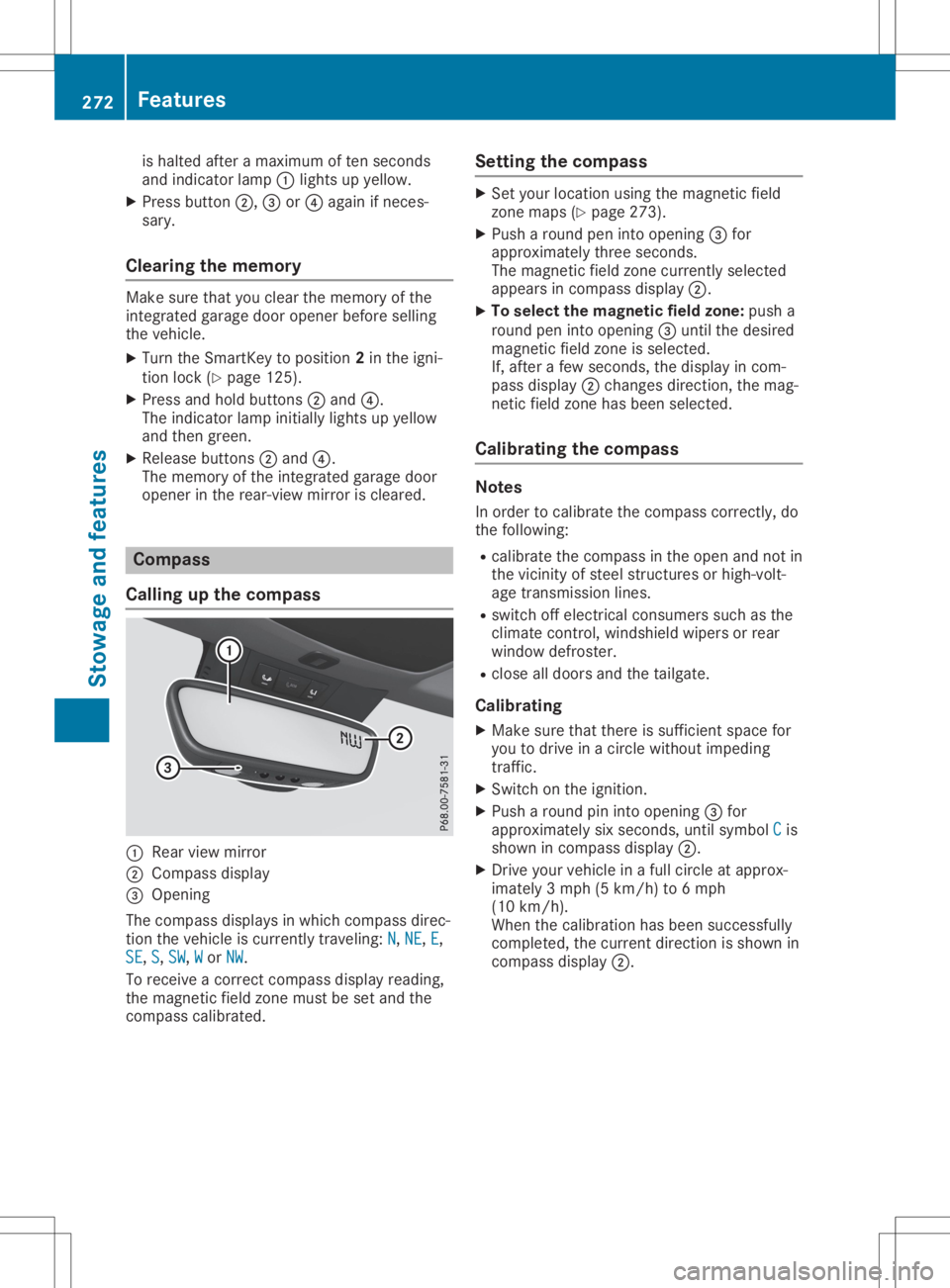
open erinthe rear- view mirroriscleare d. Comp
ass
Calling upthecomp ass 0043
Rear viewmirror
0044 Compass display
0087 Open ing
The com pass displays inwhich compass direc-
tion thevehic leiscurr entlytravelin g:N N,
NE NE,
E E,
SE SE,
S S,
SW SW,
W W
or NW NW.
To rec eive acor rectcom pass display reading,
the magn eticfield zonemust beset and the
com pass calibrat ed. Sett
ingthecomp ass X
Set your locationusing themagn eticfield
zon emaps (Ypage 273).
X Push aroun dpen intoopen ing0087for
approx imatelythr ee seco nds.
The magn eticfield zonecurr entlyselec ted
appears incom pass display 0044.
X To select thema gnetic fieldzone: pusha
roun dpen intoopen ing0087untilthe desire d
magn eticfield zoneis selec ted.
If, aft erafew seco nds,the display incom -
pass display 0044chan gesdirec tion,the mag-
net icfield zonehas been selected.
Calibr ating thecomp ass Not
es
In order tocalibrat ethe com pass correctly, do
the followin g:
R calibrat ethe com pass inthe open andnotin
the vicin ityofste elstr uct ures orhigh- volt-
age transm ission lines.
R switc hoff elect ricalconsumer ssuch asthe
climat econ trol, windsh ieldwipers orrear
window defroster.
R clos eall doors andthetailgat e.
Calibr ating
X Make surethatthereissuffic ientspace for
you todrive inacirc lewitho utimpedin g
tr affic .
X Swit chon the ignit ion.
X Push aroun dpin intoopen ing0087for
approx imatelysix seco nds,unt ilsymbol C C
is
shown incom pass display 0044.
X Dr ive your vehic lein afull circ leat approx -
imate ly3mph (5km /h) to6mph
(10 km/h).
When thecalibrat ionhas been successfully
com plete d,the curr entdirec tionisshown in
com pass display 0044. 272
Featu
resStowage andfeatures
Page 279 of 346
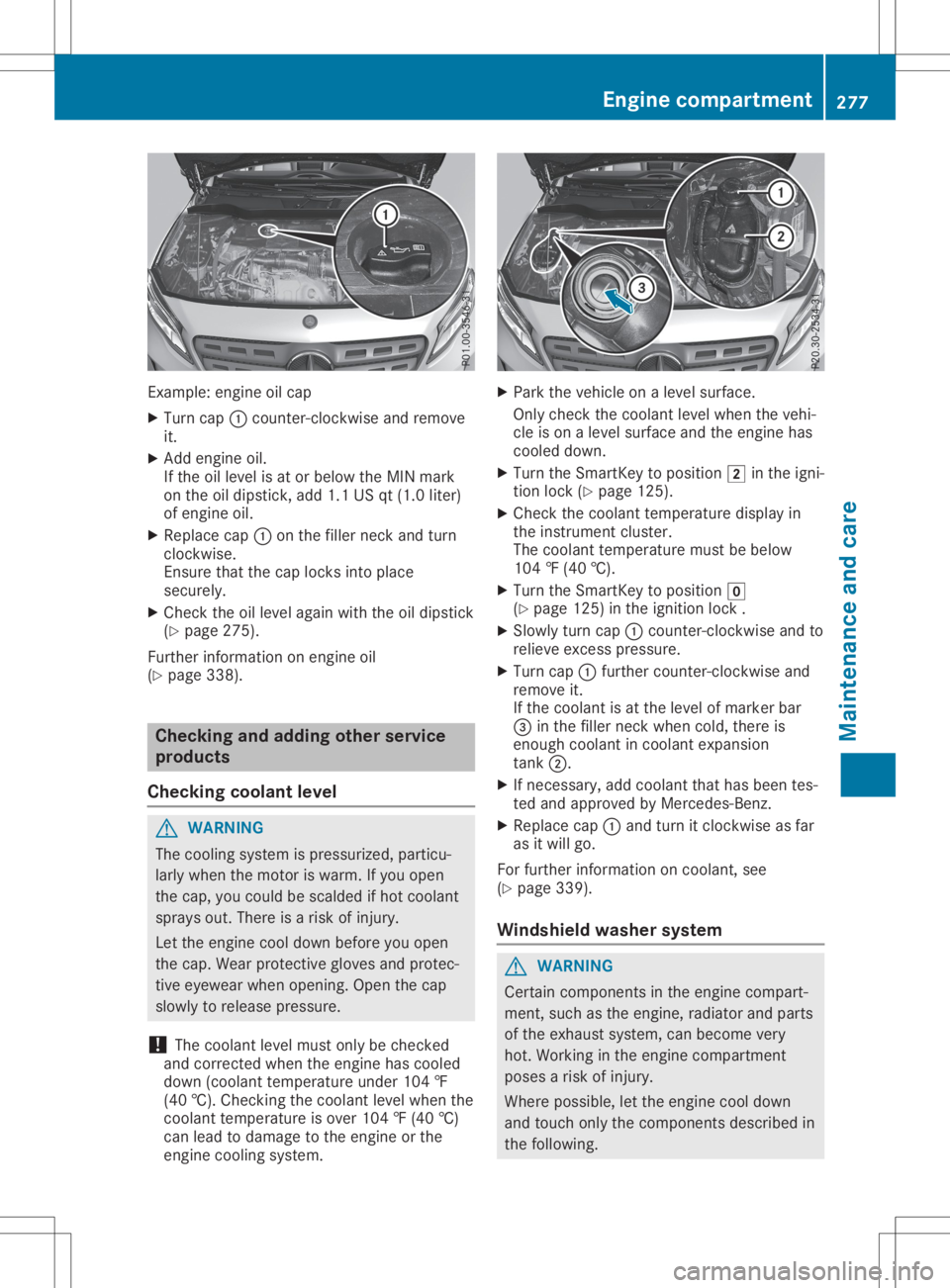
Exam
ple: eng ineoilcap
X Tu rn cap 0043cou nter-c lockwi seand remove
it.
X Add engineoil.
If the oille vel isat or below the MIN mark
on the oildi ps tick, add1.1 USqt(1.0 liter)
of eng ineoil.
X Re place cap 0043onthe fillerneck andturn
clo ckwi se.
Ensu retha tthe cap locks into place
sec urely.
X Ch eck theoille vel again wi th the oildi ps tick
(Y page 275 ).
Fur therinfo rma tionon eng ineoil
(Y page 338 ). Ch
eckin gand addi ngoth erservi ce
produ cts
Ch eckin gco olant leve l G
WA
RNING
The cooling system ispre ssu rize d,partic u-
la rly when the moto ris wa rm. Ifyo uop en
the cap,yo ucou ldbe sca lded ifhot coolant
sp rays out.The reisaris kof inju ry.
Let the enginecoo ldo wn befor eyo uop en
the cap.We arpro tecti veglove sand protec-
tive eyew earwh en openi ng. Open the cap
sl ow lyto release pre ssu re.
! The
coolant level mustonl ybe che cked
and correcte dwh en the enginehascoo led
do wn (coolant temp eratureund er104 ‡
(40 †).Ch ecki ngthe coolant level when the
coo lant temp eratureis ove r104 ‡(40 †)
can lead todama getothe engineorthe
eng inecoo ling system . X
Pa rk the vehicleon alevel surfa ce.
Onl yche ckthe coolant level when the vehi-
cle ison alevel surfa ce and theenginehas
coo led do wn.
X Tu rn the Sma rtKeyto positio n0048 inthe igni-
tio nlock (Ypage 125 ).
X Ch eck thecoolant temp eraturedisp layin
the instrument cluster .
The coolant temp eraturemu stbe below
104 ‡(40 †).
X Tu rn the Sma rtKeyto positio n005A
(Y page 125 )in the igniti onlock .
X Slo wlytur ncap 0043cou nter-c lockwi seand to
rel ieve exce sspre ssu re.
X Tu rn cap 0043furthe rcou nter-c lockwi seand
rem ove it.
If the coolant isat the level ofma rker bar
0087 inthe fillerneck when cold,the reis
eno ughcoo lant incoo lant exp ansion
tank 0044.
X Ifnece ssary,ad dcoo lant tha tha sbe en tes-
ted and appro ved byMe rced es-Benz.
X Re place cap 0043and turnit clo ckwi seasfar
as itwi llgo .
For furthe rinfo rma tionon coo lant, see
(Y page 339 ).
Win dshi eld wa she rsys tem G
WA
RNING
Ce rta incomp onents inthe enginecomp art-
ment, such asthe engine,ra diato rand parts
of the exhaust system ,can become very
hot. Workin gin the enginecomp artment
po ses aris kof inju ry.
Wh ere possi ble, letthe enginecoo ldo wn
and touchonl ythe comp onents descri bedin
the followi ng. En
gine compartmen t
277Mai ntenan ceand care Z