sensor MERCEDES-BENZ GLA-Class 2015 X156 Owner's Guide
[x] Cancel search | Manufacturer: MERCEDES-BENZ, Model Year: 2015, Model line: GLA-Class, Model: MERCEDES-BENZ GLA-Class 2015 X156Pages: 374, PDF Size: 6.85 MB
Page 190 of 374
If there is an obstacle within this range, the
relevant warning displays light up and a warn- ing tone sounds. If the distance falls below
the minimum, the distance may no longer be
shown.
Warning displays The warning displays show the distance
between the sensors and the obstacle. The
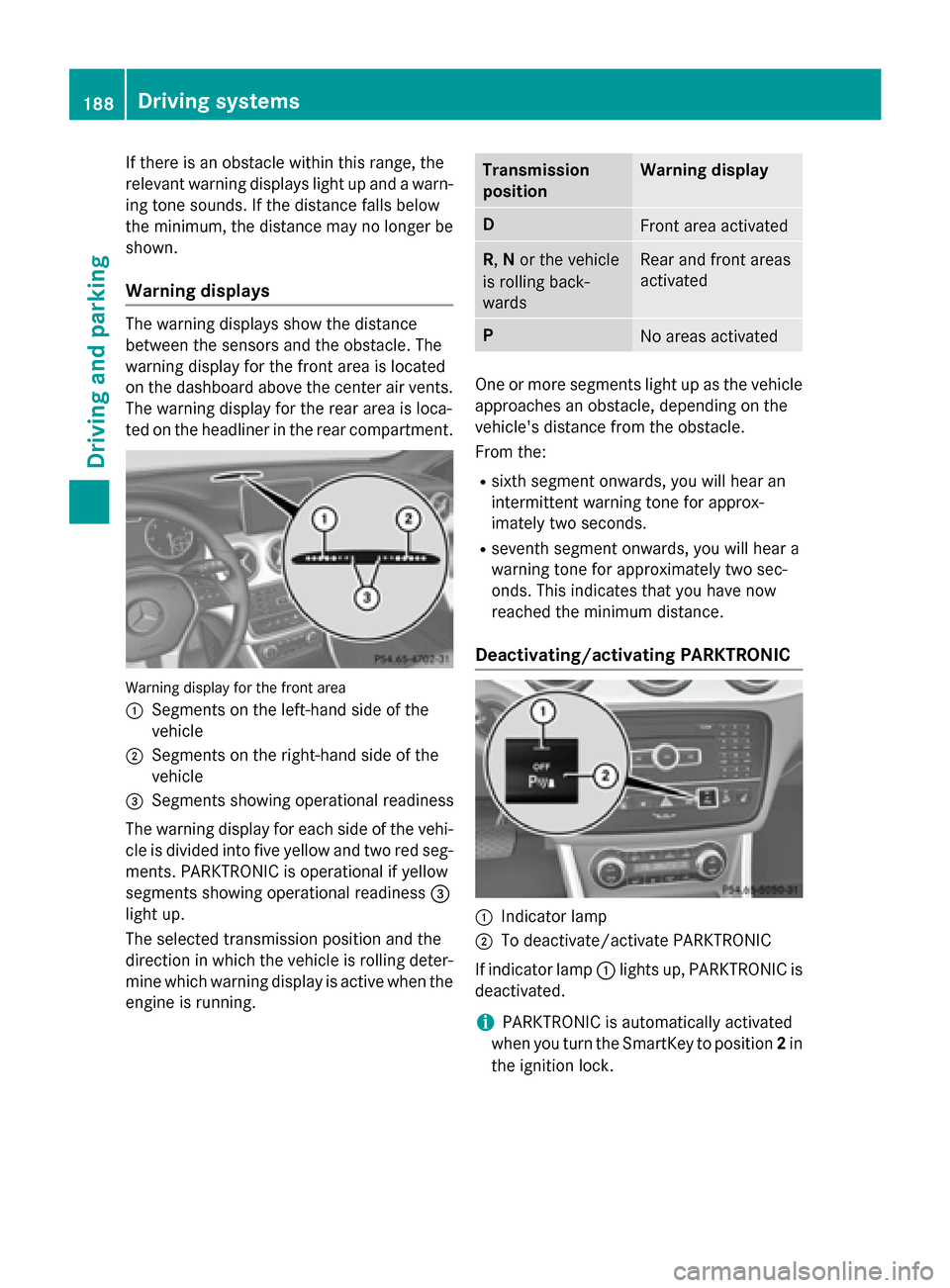
warning display for the front area is located
on the dashboard above the center air vents.
The warning display for the rear area is loca-
ted on the headliner in the rear compartment. Warning display for the front area
0043
Segments on the left-hand side of the
vehicle
0044 Segments on the right-hand side of the
vehicle
0087 Segments showing operational readiness
The warning display for each side of the vehi-
cle is divided into five yellow and two red seg- ments. PARKTRONIC is operational if yellow
segments showing operational readiness 0087
light up.
The selected transmission position and the
direction in which the vehicle is rolling deter-
mine which warning display is active when the engine is running. Transmission
position Warning display
D
Front area activated
R,
Nor the vehicle
is rolling back-
wards Rear and front areas
activated
P
No areas activated
One or more segments light up as the vehicle
approaches an obstacle, depending on the
vehicle's distance from the obstacle.
From the:
R sixth segment onwards, you will hear an
intermittent warning tone for approx-
imately two seconds.
R seventh segment onwards, you will hear a
warning tone for approximately two sec-
onds. This indicates that you have now
reached the minimum distance.
Deactivating/activating PARKTRONIC 0043
Indicator lamp
0044 To deactivate/activate PARKTRONIC
If indicator lamp 0043lights up, PARKTRONIC is
deactivated.
i PARKTRONIC is automatically activated
when you turn the SmartKey to position 2in
the ignition lock. 188
Driving systemsDriving and parking
Page 191 of 374
Problems with PARKTRONIC
Problem
Possible causes/consequences and
0050
0050Solutions Only the red segments
in the PARKTRONIC
warning displays are lit.
You also hear a warning
tone for approximately
two seconds.
PARKTRONIC is then
deactivated and the
indicator lamp on the
PARKTRONIC button
lights up. PARKTRONIC has malfunctioned and has switched off.
X If problems persist, have PARKTRONIC checked at a qualified
specialist workshop. Only the red segments
in the PARKTRONIC
warning displays are lit.
PARKTRONIC is then
deactivated. The PARKTRONIC sensors are dirty or there is interference.
X Clean the PARKTRONIC sensors (Y page 301).
X Switch the ignition back on. The problem may be caused by an external source of radio or
ultrasound waves.
X See if PARKTRONIC functions in a different location. Active Parking Assist
General notes Active Parking Assist is an electronic parking
aid with ultrasound. It measures the road on
both sides of the vehicle. A parking symbol
indicates a suitable parking space. Active
steering intervention and brake application
can assist you during parking and when exit-
ing a parking space. You may also use PARK- TRONIC (Y page 186).
Important safety notes Active Parking Assist is merely an aid. It is not
a replacement for your attention to your
immediate surroundings. You are always
responsible for safe maneuvering, parking
and exiting a parking space. Make sure that
no persons, animals or objects are in the
maneuvering range.
When PARKTRONIC is switched off, Active
Parking Assist is also unavailable. G
WARNING
While parking or pulling out of a parking
space, the vehicle swings out and can drive
onto areas of the oncoming lane. This could
result in a collision with another road user.
There is a risk of an accident.
Pay attention to other road users. Stop the
vehicle if necessary or cancel the Active Park- ing Assist parking procedure.
! If unavoidable, you should drive over
obstacles such as curbs slowly and not at a sharp angle. Otherwise, you may damage
the wheels or tires.
Active Parking Assist may possibly indicate
parking spaces which are not suitable for
parking, for example:
R where parking or stopping is prohibited
R in front of driveways or entrances and exits
R on unsuitable surfaces Driving systems
189Driving and parking Z
Page 200 of 374
Warning and display messages in the
multifunction display X
Activate ATTENTION ASSIST using the on-
board computer (Y page 214).
If ATTENTION ASSIST is active, you will be
warned no sooner than 20 minutes after
your journey has begun. You then hear an
intermittent warning tone twice and the
Attention Assist: Take a Break!
Attention Assist: Take a Break!
message appears in the multifunction dis-
play.
X If necessary, take a break.
X Press the 0076or0038 button to confirm
the message.
On long journeys, take regular breaks in good time to allow yourself to rest properly. If you
do not take a break, you will be warned again
after 15 minutes at the earliest. The precon-
dition for this is that ATTENTION ASSIST still
detects typical indicators of fatigue or
increasing lapses in concentration.
ATTENTION ASSIST is reset when you con-
tinue your journey and starts assessing your
tiredness again if:
R you switch off the engine.
R you take off your seat belt and open the
driver's door, e.g. for a change of drivers or
to take a break
When ATTENTION ASSIST is deactivated, the 00D7 symbol appears in the multifunction
display in the assistance graphic display. Lane Tracking package
General notes The Lane Tracking package consists of Blind
Spot Assist (Y page 198) and Lane Keeping
Assist (Y page 200). Blind Spot Assist General notes
Blind Spot Assist uses a radar sensor system
to monitor the areas on both sides of your
vehicle. It supports you from a speed of
approximately 20 mph (30 km/h). A warning
display in the exterior mirrors draws your
attention to vehicles detected in the moni-
tored area. If you then switch on the corre-
sponding turn signal to change lanes, you will
also receive a visual and audible collision
warning. For this purpose, Blind Spot Assist
uses sensors in the rear bumper.
Important safety notes G
WARNING
Blind Spot Assist does not react to:
R vehicles overtaken too closely on the side,
placing them in the blind spot area
R vehicles which approach with a large speed
differential and overtake your vehicle
As a result, Blind Spot Assist may not give
warnings in such situations. There is a risk of an accident.
Always observe the traffic conditions care-
fully, and maintain a safe lateral distance.
Blind Spot Assist is only an aid. It may fail to
detect some vehicles and is no substitute for
attentive driving.
i USA only:
This device has been approved by the FCC as a "Vehicular Radar System". The radar
sensor is intended for use in an automotiveradar system only. Removing, tampering
with, or altering the device will void any
warranties, and is not permitted by the
FCC. Do not tamper with, alter, or use in
any non-approved way.
Any unauthorized modification to this
device could void the user’s authority to
operate the equipment. 198
Driving systemsDriving and parking
Page 201 of 374
Monitoring range of the sensors
In particular, the detection of obstacles can
be impaired if:
R dirt on the sensors or anything else cover-
ing the sensors
R there is poor visibility, e.g. due to fog, heavy
rain or snow
R a narrow vehicle traveling in front, e.g. a
motorbike or bicycle
R the road has very wide lanes
R the road has narrow lanes
R you are not driving in the middle of the lane
R there are barriers or similar lane borders
Vehicles in the monitoring range are then not
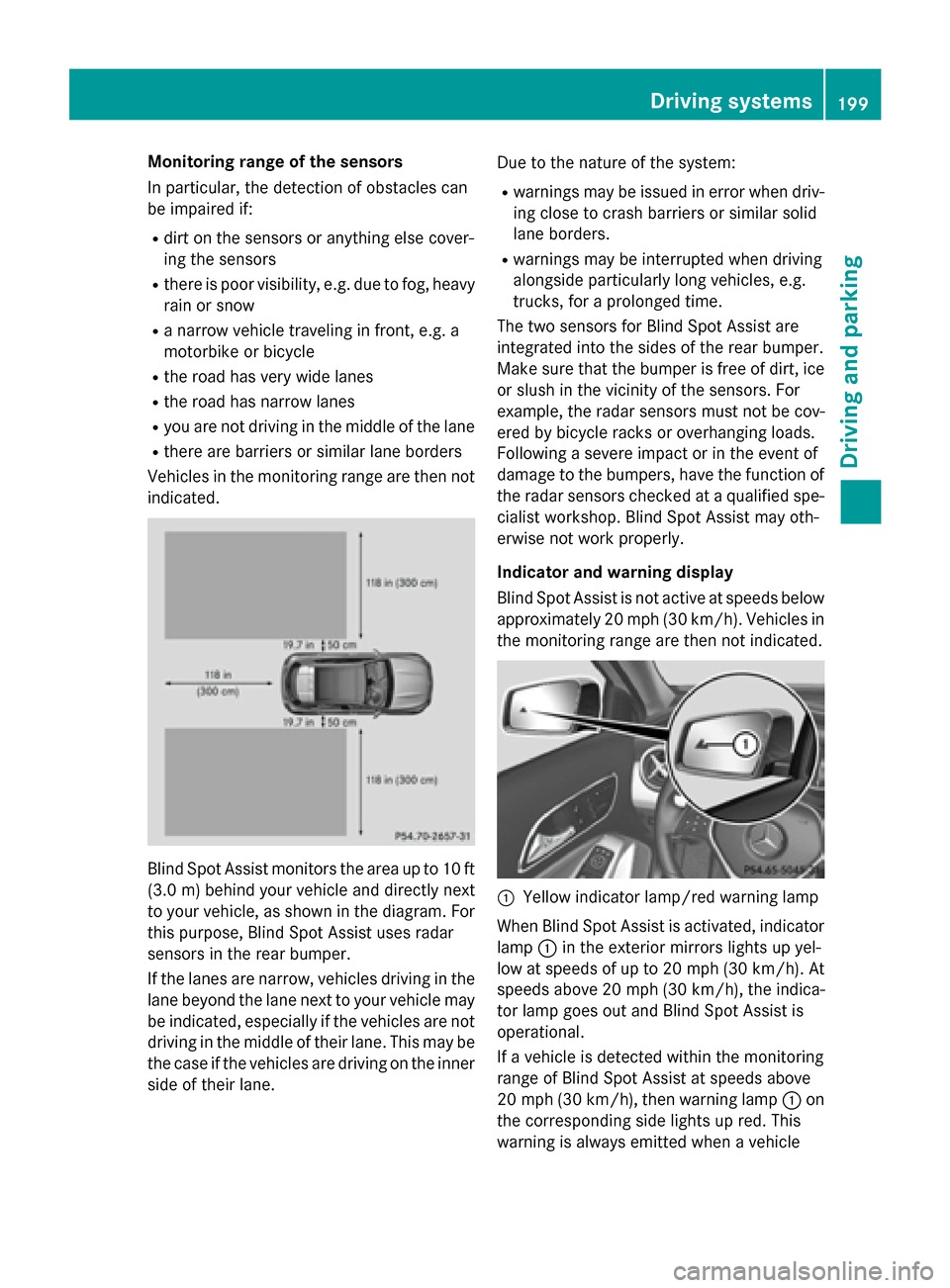
indicated. Blind Spot Assist monitors the area up to 10 ft
(3.0 m) behind your vehicle and directly next
to your vehicle, as shown in the diagram. For
this purpose, Blind Spot Assist uses radar
sensors in the rear bumper.
If the lanes are narrow, vehicles driving in the
lane beyond the lane next to your vehicle may
be indicated, especially if the vehicles are not
driving in the middle of their lane. This may be the case if the vehicles are driving on the inner
side of their lane. Due to the nature of the system:
R warnings may be issued in error when driv-
ing close to crash barriers or similar solid
lane borders.
R warnings may be interrupted when driving
alongside particularly long vehicles, e.g.
trucks, for a prolonged time.
The two sensors for Blind Spot Assist are
integrated into the sides of the rear bumper.
Make sure that the bumper is free of dirt, ice
or slush in the vicinity of the sensors. For
example, the radar sensors must not be cov-
ered by bicycle racks or overhanging loads.
Following a severe impact or in the event of
damage to the bumpers, have the function of
the radar sensors checked at a qualified spe-
cialist workshop. Blind Spot Assist may oth-
erwise not work properly.
Indicator and warning display
Blind Spot Assist is not active at speeds below approximately 20 mph (30 km/h). Vehicles in the monitoring range are then not indicated. 0043
Yellow indicator lamp/red warning lamp
When Blind Spot Assist is activated, indicator
lamp 0043in the exterior mirrors lights up yel-
low at speeds of up to 20 mph (30 km/h). At speeds above 20 mph (30 km/h), the indica-
tor lamp goes out and Blind Spot Assist is
operational.
If a vehicle is detected within the monitoring
range of Blind Spot Assist at speeds above
20 mph (30 km/h), then warning lamp 0043on
the corresponding side lights up red. This
warning is always emitted when a vehicle Driving systems
199Driving and parking Z
Page 206 of 374
Useful information
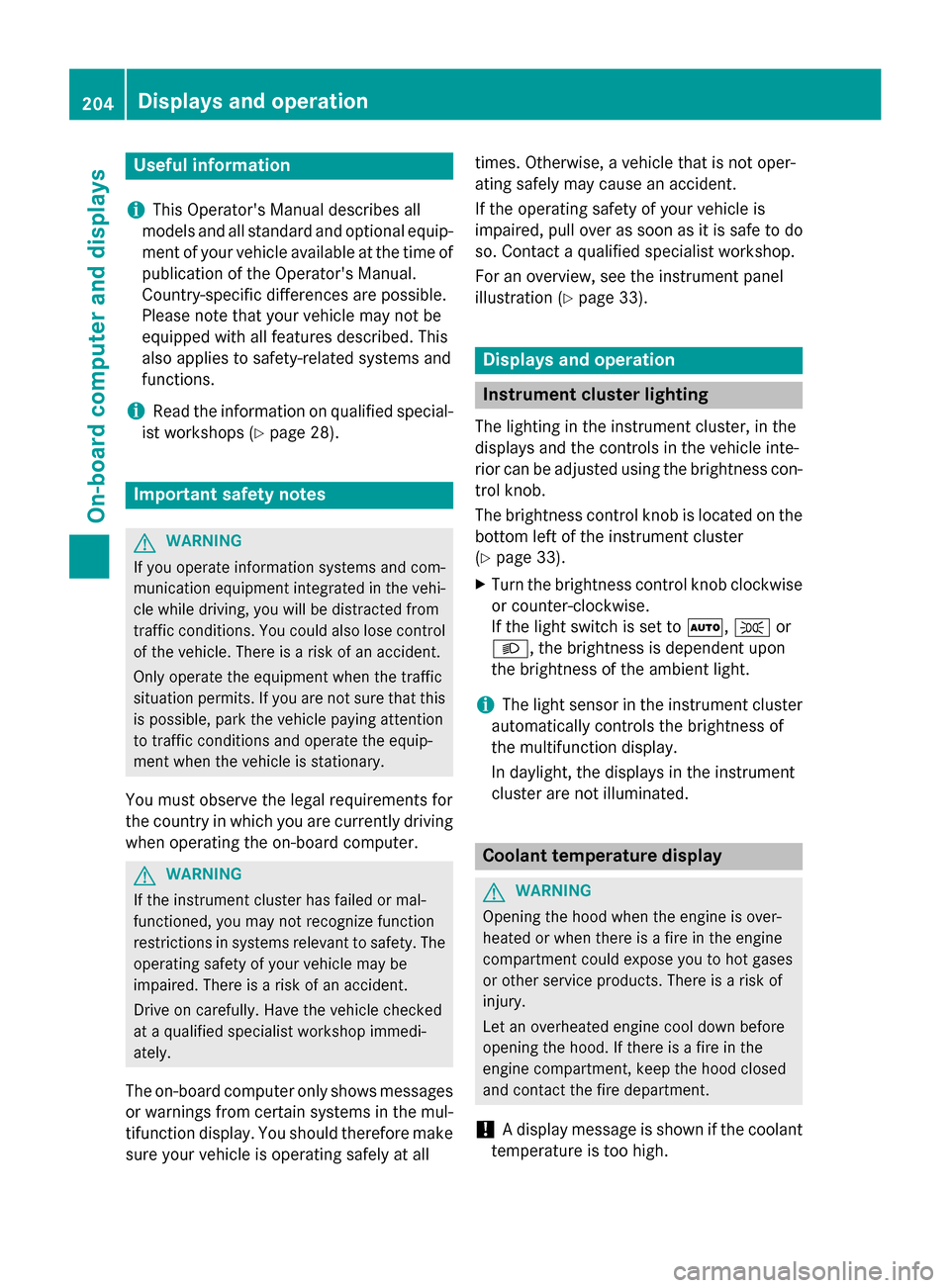
i This Operator's Manual describes all
models and all standard and optional equip- ment of your vehicle available at the time of
publication of the Operator's Manual.
Country-specific differences are possible.
Please note that your vehicle may not be
equipped with all features described. This
also applies to safety-related systems and
functions.
i Read the information on qualified special-
ist workshops (Y page 28). Important safety notes
G
WARNING
If you operate information systems and com-
munication equipment integrated in the vehi- cle while driving, you will be distracted from
traffic conditions. You could also lose control of the vehicle. There is a risk of an accident.
Only operate the equipment when the traffic
situation permits. If you are not sure that this
is possible, park the vehicle paying attention
to traffic conditions and operate the equip-
ment when the vehicle is stationary.
You must observe the legal requirements for
the country in which you are currently driving when operating the on-board computer. G
WARNING
If the instrument cluster has failed or mal-
functioned, you may not recognize function
restrictions in systems relevant to safety. The operating safety of your vehicle may be
impaired. There is a risk of an accident.
Drive on carefully. Have the vehicle checked
at a qualified specialist workshop immedi-
ately.
The on-board computer only shows messages
or warnings from certain systems in the mul- tifunction display. You should therefore make
sure your vehicle is operating safely at all times. Otherwise, a vehicle that is not oper-
ating safely may cause an accident.
If the operating safety of your vehicle is
impaired, pull over as soon as it is safe to do
so. Contact a qualified specialist workshop.
For an overview, see the instrument panel
illustration (Y
page 33). Displays and operation
Instrument cluster lighting
The lighting in the instrument cluster, in the
displays and the controls in the vehicle inte-
rior can be adjusted using the brightness con-
trol knob.
The brightness control knob is located on the bottom left of the instrument cluster
(Y page 33).
X Turn the brightness control knob clockwise
or counter-clockwise.
If the light switch is set to 0058,0060or
0058, the brightness is dependent upon
the brightness of the ambient light.
i The light sensor in the instrument cluster
automatically controls the brightness of
the multifunction display.
In daylight, the displays in the instrument
cluster are not illuminated. Coolant temperature display
G
WARNING
Opening the hood when the engine is over-
heated or when there is a fire in the engine
compartment could expose you to hot gases
or other service products. There is a risk of
injury.
Let an overheated engine cool down before
opening the hood. If there is a fire in the
engine compartment, keep the hood closed
and contact the fire department.
! A display message is shown if the coolant
temperature is too high. 204
Displays and operationOn-board computer and displays
Page 231 of 374
Display messages
Possible causes/consequences and
0050
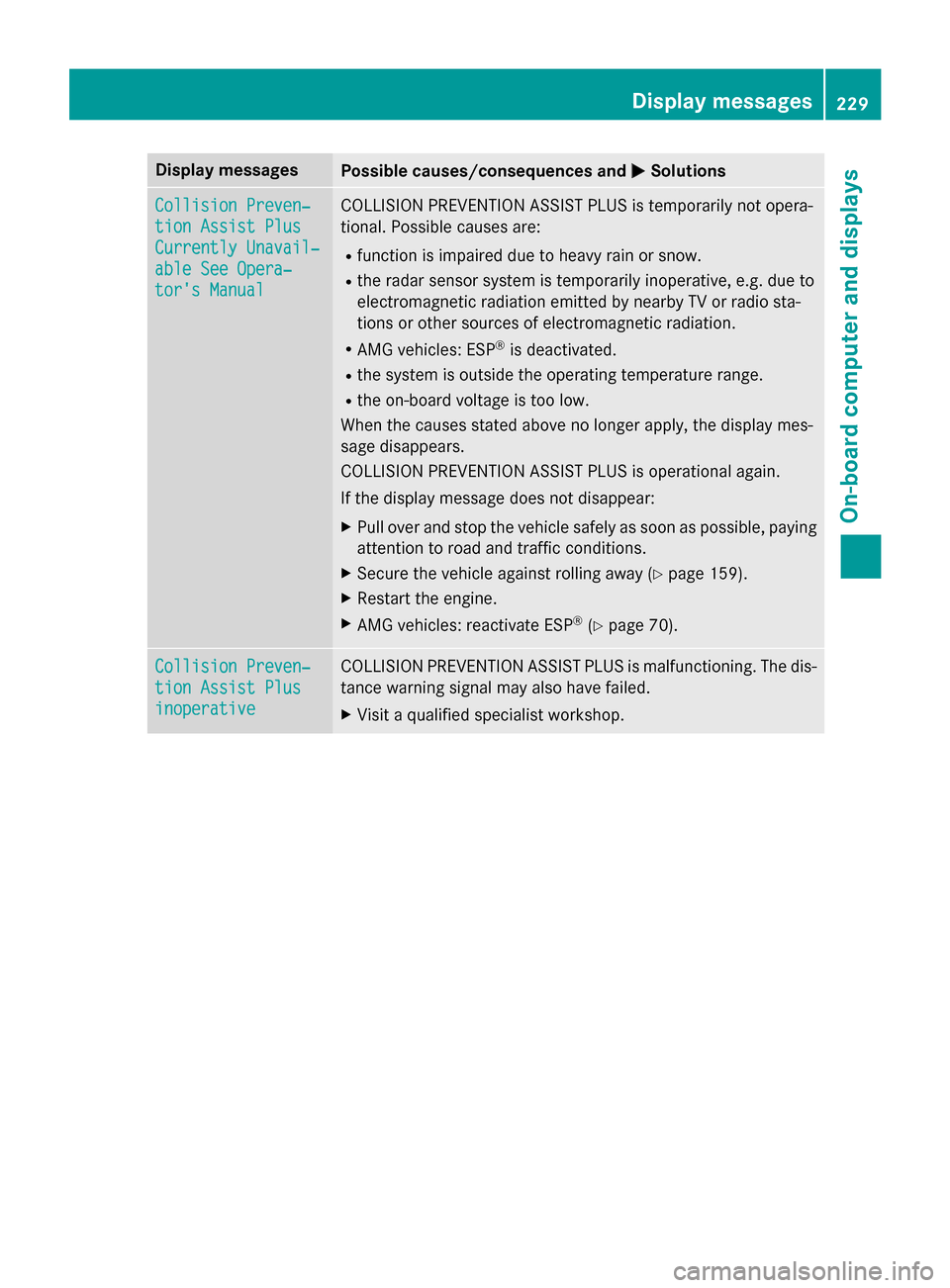
0050Solutions Collision Preven‐
Collision Preven‐
tion Assist Plus tion Assist Plus
Currently Unavail‐ Currently Unavail‐
able See Opera‐ able See Opera‐
tor's Manual tor's Manual COLLISION PREVENTION ASSIST PLUS is temporarily not opera-
tional. Possible causes are:
R function is impaired due to heavy rain or snow.
R the radar sensor system is temporarily inoperative, e.g. due to
electromagnetic radiation emitted by nearby TV or radio sta-
tions or other sources of electromagnetic radiation.
R AMG vehicles: ESP ®
is deactivated.
R the system is outside the operating temperature range.
R the on-board voltage is too low.
When the causes stated above no longer apply, the display mes-
sage disappears.
COLLISION PREVENTION ASSIST PLUS is operational again.
If the display message does not disappear:
X Pull over and stop the vehicle safely as soon as possible, paying
attention to road and traffic conditions.
X Secure the vehicle against rolling away (Y page 159).
X Restart the engine.
X AMG vehicles: reactivate ESP ®
(Y page 70). Collision Preven‐ Collision Preven‐
tion Assist Plus tion Assist Plus
inoperative inoperative COLLISION PREVENTION ASSIST PLUS is malfunctioning. The dis-
tance warning signal may also have failed.
X Visit a qualified specialist workshop. Display
messages
229On-board computer and displays Z
Page 232 of 374
Display messages
Possible causes/consequences and
0050
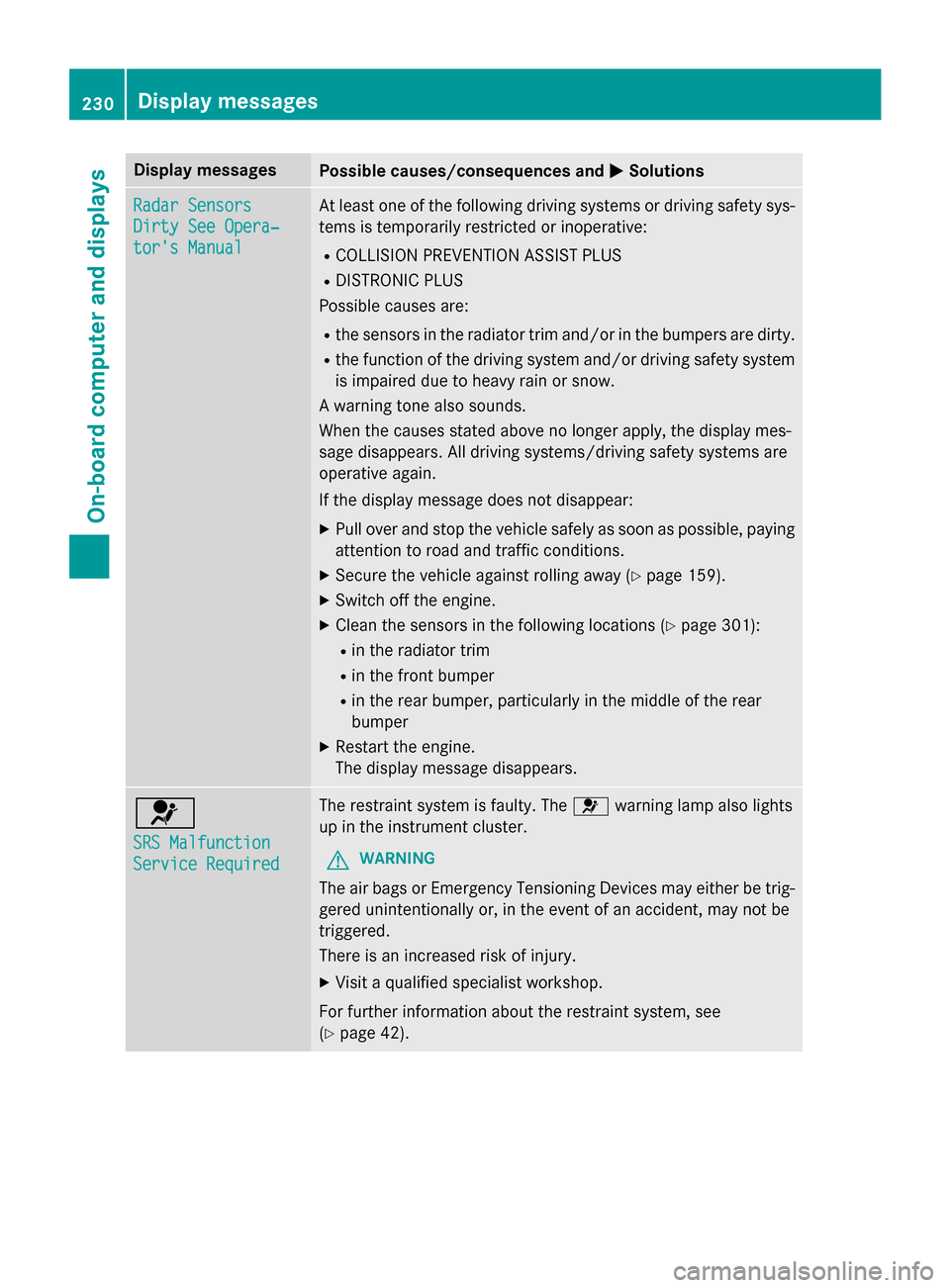
0050Solutions Radar Sensors
Radar Sensors
Dirty See Opera‐ Dirty See Opera‐
tor's Manual tor's Manual At least one of the following driving systems or driving safety sys-
tems is temporarily restricted or inoperative:
R COLLISION PREVENTION ASSIST PLUS
R DISTRONIC PLUS
Possible causes are:
R the sensors in the radiator trim and/or in the bumpers are dirty.
R the function of the driving system and/or driving safety system
is impaired due to heavy rain or snow.
A warning tone also sounds.
When the causes stated above no longer apply, the display mes-
sage disappears. All driving systems/driving safety systems are
operative again.
If the display message does not disappear:
X Pull over and stop the vehicle safely as soon as possible, paying
attention to road and traffic conditions.
X Secure the vehicle against rolling away (Y page 159).
X Switch off the engine.
X Clean the sensors in the following locations (Y page 301):
R in the radiator trim
R in the front bumper
R in the rear bumper, particularly in the middle of the rear
bumper
X Restart the engine.
The display message disappears. 0075
SRS Malfunction SRS Malfunction
Service Required Service Required The restraint system is faulty. The
0075warning lamp also lights
up in the instrument cluster.
G WARNING
The air bags or Emergency Tensioning Devices may either be trig- gered unintentionally or, in the event of an accident, may not be
triggered.
There is an increased risk of injury.
X Visit a qualified specialist workshop.
For further information about the restraint system, see
(Y page 42). 230
Display
messagesOn-board computer and displays
Page 239 of 374

Display messages
Possible causes/consequences and
0050
0050Solutions 0049
Check Rear Left Check Rear Left
Sidemarker Lamp Sidemarker Lamp
or
Check Rear Right
Check Rear Right
Sidemarker Lamp Sidemarker Lamp The rear left or right side marker lamp is defective.
X Visit a qualified specialist workshop. 0049
Check Check
Left
LeftDaytime
Daytime
Running Light
Running Light or
Check Right Day‐
Check Right Day‐
time Running Light time Running Light The left-hand or right-hand daytime running lamp is faulty.
X Check whether you are permitted to replace the bulb yourself
(Y page 117).
or
X Visit a qualified specialist workshop. 0049
Active Headlamps Active Headlamps
Inoperative Inoperative The active light function is defective.
X Visit a qualified specialist workshop. 0049
Malfunction See Malfunction See
Operator's Manual Operator's Manual The exterior lighting is defective.
X Visit a qualified specialist workshop. 0049
Auto Auto
Lamp
LampFunction
Function
Inoperative
Inoperative The light sensor is defective.
X Visit a qualified specialist workshop. 0049
Switch Off Lights Switch Off Lights The lights are still switched on when you leave the vehicle. A
warning tone also sounds.
X Turn the light switch to 0058.Adaptive Highbeam Adaptive Highbeam
Assist Inoperative Assist Inoperative Adaptive Highbeam Assist is faulty.
X
Visit a qualified specialist workshop. Adaptive Highbeam Adaptive Highbeam
Assist Currently Assist Currently
Unavailable See Unavailable See
Operator's Manual Operator's Manual Adaptive Highbeam Assist is deactivated and temporarily inoper-
ative. Possible causes are:
R the windshield in the camera's field of vision is dirty.
R visibility is impaired due to heavy rain, snow or fog.
X Clean the windshield.
If the system detects that the camera is fully operational again, the
Adaptive Highbeam Assist Now Available
Adaptive Highbeam Assist Now Available message is dis-
played.
Adaptive Highbeam Assist is operational again. Display
messages
237On-board computer and displays Z
Page 244 of 374

Display messages
Possible causes/consequences and
0050
0050Solutions Lane Keeping
Lane Keeping
Assist Currently Assist Currently
Unavailable See Unavailable See
Operator's Manual Operator's Manual Lane Keeping Assist is deactivated and temporarily inoperative.
Possible causes are:
R the windshield in the camera's field of vision is dirty.
R visibility is impaired due to heavy rain, snow or fog.
R there are no lane markings for a longer period.
R the lane markings are worn, dark or covered, e.g. by dirt or snow.
When the causes stated above no longer apply, the display mes-
sage disappears.
Lane Keeping Assist is operational again.
If the display message does not disappear:
X Pull over and stop the vehicle safely as soon as possible, paying
attention to road and traffic conditions.
X Secure the vehicle against rolling away (Y page 159).
X Clean the windshield. Lane Keeping Lane Keeping
Assist Inoperative Assist Inoperative Lane Keeping Assist is faulty.
X Visit a qualified specialist workshop. Blind Spot Assist
Blind Spot Assist
Currently Unavail‐ Currently Unavail‐
able See Opera‐ able See Opera‐
tor's Manual tor's Manual Blind Spot Assist is temporarily inoperative. Possible causes are:
R the sensors are dirty.
R function is impaired due to heavy rain or snow.
R the radar sensor system is outside the operating temperature
range.
R the radar sensor system is temporarily inoperative, e.g. due to
electromagnetic radiation emitted by nearby TV or radio sta-
tions or other sources of electromagnetic radiation.
The yellow 0063indicator lamps also light up in the exterior mir-
rors.
When the causes stated above no longer apply, the display mes-
sage disappears.
Blind Spot Assist is operational again.
If the display message does not disappear:
X Pull over and stop the vehicle safely as soon as possible, paying
attention to road and traffic conditions.
X Secure the vehicle against rolling away (Y page 159).
X Clean the sensors (Y page 301).
X Restart the engine. 242
Display
messagesOn-board computer and displays
Page 246 of 374
Display messages
Possible causes/consequences and
0050
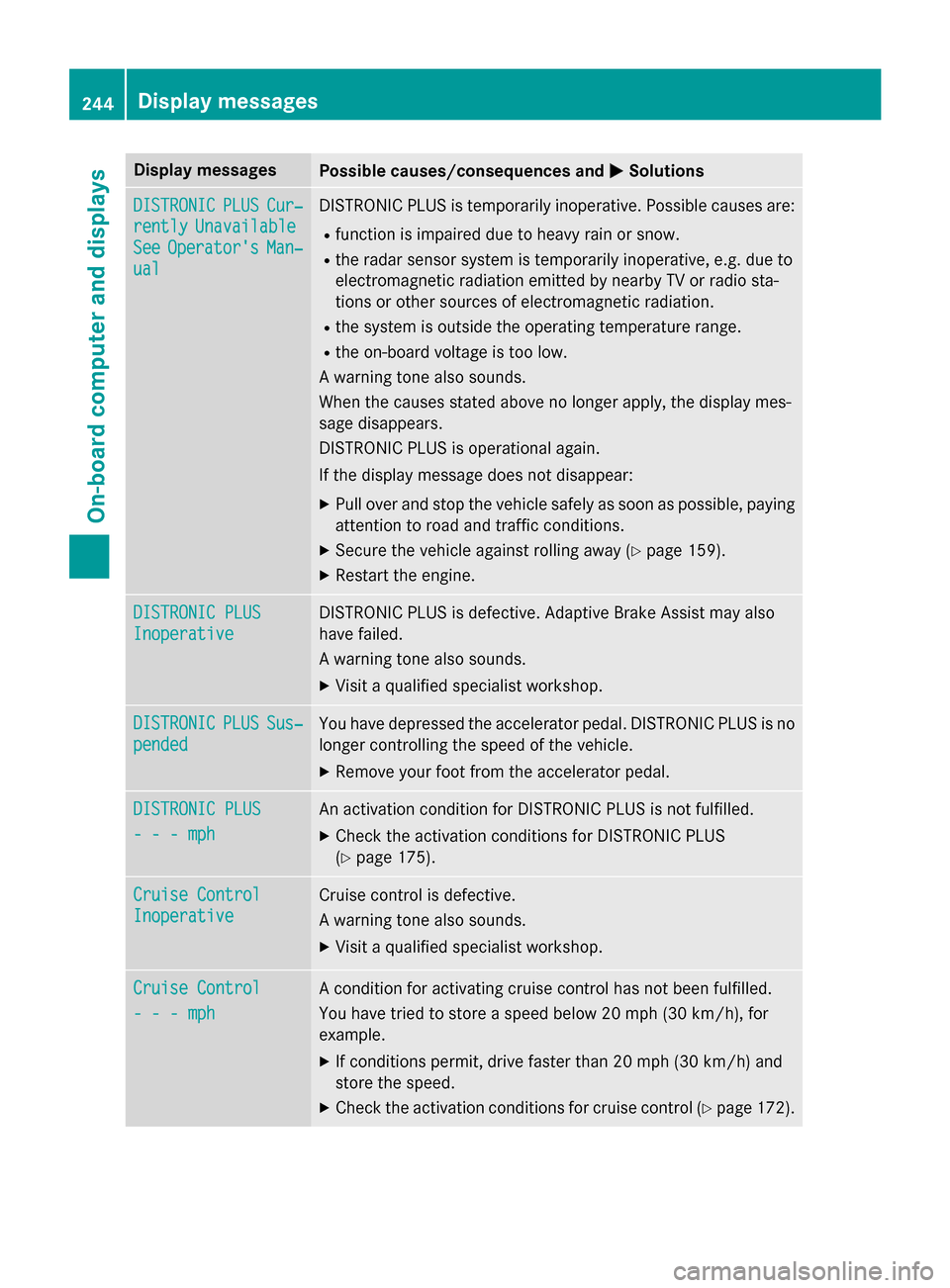
0050Solutions DISTRONIC
DISTRONIC
PLUS
PLUSCur‐
Cur‐
rently
rently Unavailable
Unavailable
See
See Operator's
Operator's Man‐
Man‐
ual
ual DISTRONIC PLUS is temporarily inoperative. Possible causes are:
R function is impaired due to heavy rain or snow.
R the radar sensor system is temporarily inoperative, e.g. due to
electromagnetic radiation emitted by nearby TV or radio sta-
tions or other sources of electromagnetic radiation.
R the system is outside the operating temperature range.
R the on-board voltage is too low.
A warning tone also sounds.
When the causes stated above no longer apply, the display mes-
sage disappears.
DISTRONIC PLUS is operational again.
If the display message does not disappear:
X Pull over and stop the vehicle safely as soon as possible, paying
attention to road and traffic conditions.
X Secure the vehicle against rolling away (Y page 159).
X Restart the engine. DISTRONIC PLUS DISTRONIC PLUS
Inoperative Inoperative DISTRONIC PLUS is defective. Adaptive Brake Assist may also
have failed.
A warning tone also sounds.
X Visit a qualified specialist workshop. DISTRONIC DISTRONIC
PLUS
PLUSSus‐
Sus‐
pended
pended You have depressed the accelerator pedal. DISTRONIC PLUS is no
longer controlling the speed of the vehicle.
X Remove your foot from the accelerator pedal. DISTRONIC PLUS
DISTRONIC PLUS
- - - mph - - - mph An activation condition for DISTRONIC PLUS is not fulfilled.
X Check the activation conditions for DISTRONIC PLUS
(Y page 175). Cruise Control
Cruise Control
Inoperative Inoperative Cruise control is defective.
A warning tone also sounds.
X Visit a qualified specialist workshop. Cruise Control Cruise Control
- - - mph - - - mph A condition for activating cruise control has not been fulfilled.
You have tried to store a speed below 20 mph
(30 km/h), for
example.
X If conditions permit, drive faster than 20 mph (30 km/ h)and
store the speed.
X Check the activation conditions for cruise control (Y page 172).244
Display messagesOn-board computer and displays