door MERCEDES-BENZ GLA-Class 2016 X156 Service Manual
[x] Cancel search | Manufacturer: MERCEDES-BENZ, Model Year: 2016, Model line: GLA-Class, Model: MERCEDES-BENZ GLA-Class 2016 X156Pages: 390, PDF Size: 8.37 MB
Page 122 of 390
Interior lighting
Overview of interior lighting
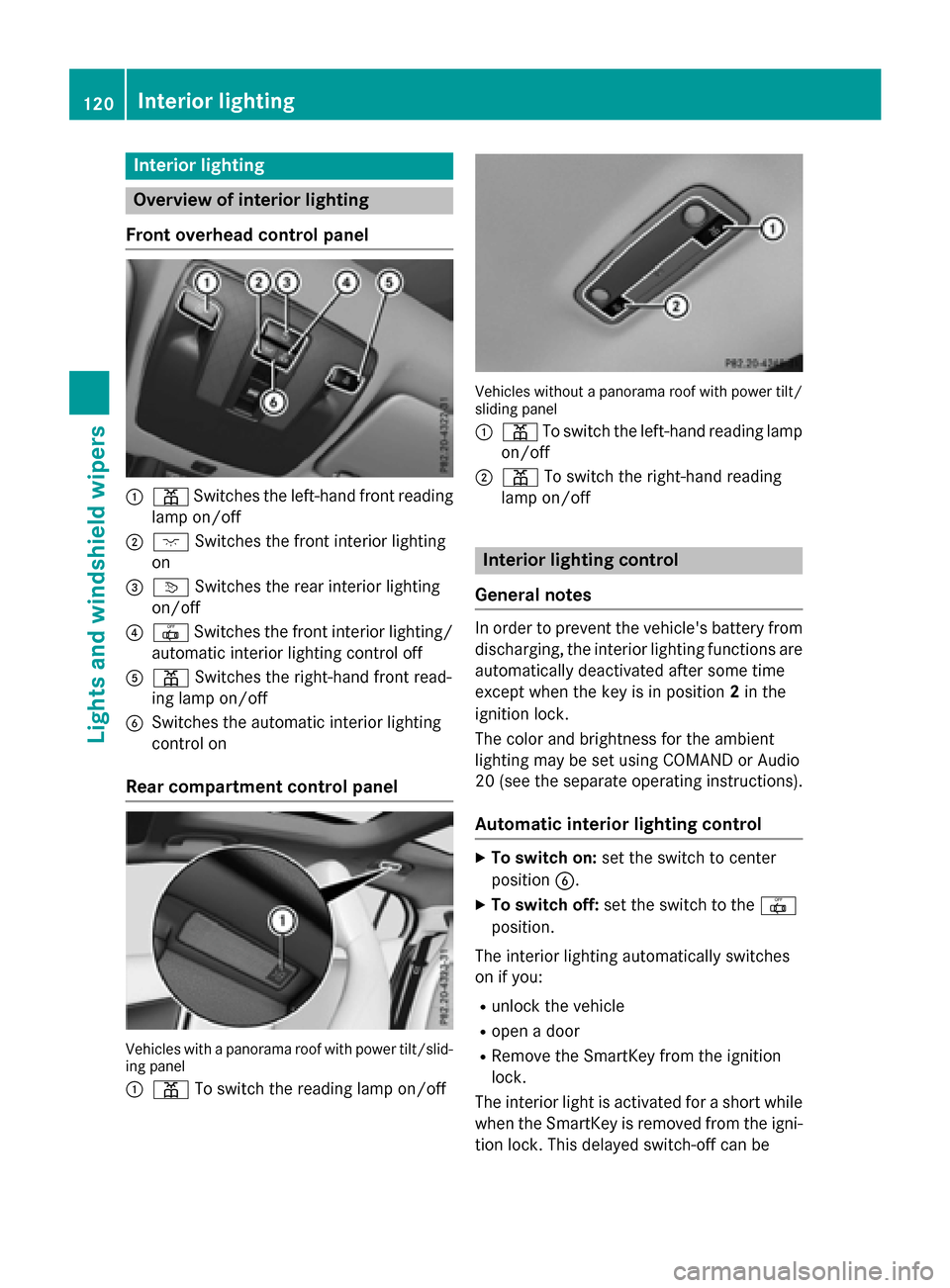
Front overhead control panel
:p Switches the left-hand front reading
lamp on/o ff
;cSwitches the front interior lighting
on
=v Switches the rear interior lighting
on/o ff
?| Switches the front interior lighting/
automat icinterior lighting control off
Ap Switches the right-hand front read-
ing lamp on/o ff
BSwitches the automat icinterior lighting
control on
Rear compartment control panel
Vehicles wit h apanoram aroo fwit hpowe rtilt/slid-
ing panel
:
p Toswit ch the reading lamp on/o ff
Vehicles withoutapanoram aroo fwit hpowe rtilt /
sliding panel
:
p To switch the left-hand reading lamp
on/o ff
;p To switch the right-hand reading
lamp on/o ff
Interior lighting control
General notes
In order to prevent the vehicle's battery from
discharging, the interior lighting functions are
automatical lydeactivated after some time
exce ptwhen the key is inposit ion2in the
ignit ion lock.
The color and brightness for the ambient
lighting may beset using COMAND or Aud io
20 (see the separate operating instructions).
Automatic interior lighting control
XTo switch on: set the switch to center
posit ionB.
XTo switch off: set the switch to the |
posit ion.
The interior lighting automatical lyswitches
on ifyou:
Runlock the vehicle
Ropen a door
RRemo vethe SmartKey from the ignit ion
lock.
The interior lightis act ivat ed for a short while
when the SmartKey isremoved from the igni-
tion lock. This delayed switch-off can be
120Interior lighting
Lights and windshield wipers
Page 123 of 390
adjusted using COMAND or Audio 20 (see the
separate Operator's Manual).
Manual interior lighting control
XTo switch the front interior lighting on:
set the switch to thecposition.
XTo switch the front interior lighting off:
set the switch to the |position or (if the
door is closed) to the center position.
XTo switch the rear interior lighting on or
off: press the ubutton.
XTo switch the reading lamp on or off:
press the pbutton.
Crash-responsive emergency lighting
The interior lighting is activated automatically
if the vehicle is involved in an accident.
XTo switch off the crash-responsive
emergency lighting: press the hazard
warning lamp button.
or
XLock and then unlock the vehicle using the SmartKey.
Replacing bulbs
Important safety notes
Xenon bulbs
GDANGER
Xenon bulbscarry a high voltage. You can get
an electr icshock ifyou remove the cover of
the Xenon bulband touch the electrical con-
tacts. There isa risk of fatal injury.
Never touch the parts or the electrical con-
tacts of the Xenon bulb. Always have work on
the Xenon bulbscarried out at a qualified spe-
cialist workshop.
If your vehicle is equipped with Xenon bulbs,
you can recognize this by the following: the
cone of light from the Xenon bulbs moves
from the top to the bottom and back again when you start the engine. For this to be
observed, the lights must be switched on
before starting the engine.
Bulbs and lamps are an important aspect of
vehicle safety. You must therefore make sure
that these function correctly at all times.
Have the headlamp setting checked regularly.
Other bulbs
GWARNING
Bulbs, lamps and connectors can get very hot
when operating. Ifyou change a bulb, you
could burn yourself on these components.
There is a risk of injury.
Allow these components to cool down before
changing a bulb.
Do not use a bulb that has been dropped or if
its glass tube has been scratched.
The bulb may explode if:
Ryou touch it
Rit is hot
Ryou drop it
Ryou scratch it
Only operate bulbs in enclosed lamps
designed for that purpose. Only install spare
bulbs of the same type and the specified volt- age.
Marks on the glass tube reduce the service
life of the bulbs. Do not touch the glass tube
with your bare hands. If necessary, clean the
glass tube when cold with alcohol or spirit and
rub it off with a lint-free cloth.
Protect bulbs from moisture during opera-
tion. Do not allow bulbs to come into contact
with liquids.
There are bulbs other than the Xenon bulbs
that you cannot replace. Only replace the
bulbs listed (
Ypage 122). Have the bulbs that
you cannot replace yourself changed at a
qualified specialist workshop.
If you require assistance replacing bulbs, con- sult a qualified specialist workshop.
If the new bulb still does not light up, consult
a qualified specialist workshop.
Replacing bulbs121
Lights and windshield wipers
Z
Page 152 of 390
Pressing the Start/Stop button several times
in succession corresponds to the different
key positions in the ignition lock. This is only
the case if you are not depressing the brake
pedal.
If you depress the brake pedal and press the
Start/Stop button, the engine starts immedi-
ately.
To start the vehicle without actively using the
SmartKey:
Rthe Start/Stop button must be inserted in
the ignition lock.
Rthe SmartKey must be in the vehicle.
Rthe vehicle must not be locked with the
SmartKey or KEYLESS-GO (
Ypage 77).
Do not keep the KEYLESS-GO key:
Rwith electronic devices, e.g. a mobile
phone or another SmartKey.
Rwith metallic objects, e.g. coins or metal
foil.
Rinside metallic objects, e.g. a metal case.
This can affect the functionality of KEYLESS-
GO.
If you lock the vehicle with the SmartKey's
remote control or with KEYLESS-GO, after a
short time:
Ryou will not be able to switch on the ignition
with the Start/Stop button.
Ryou will not be able to start the engine with the Start/Stop button until the vehicle is
unlocked again.
If you lock the vehicle centrally using the but- ton on the front door (
Ypage 84), you can
continue to start the engine with the Start/
Stop button.
The engine can be switched off while the vehi-
cle is in motion by pressing and holding the
Start/Stop button for three seconds. This
function operates independently of the ECO
start/stop automatic engine switch-off func-
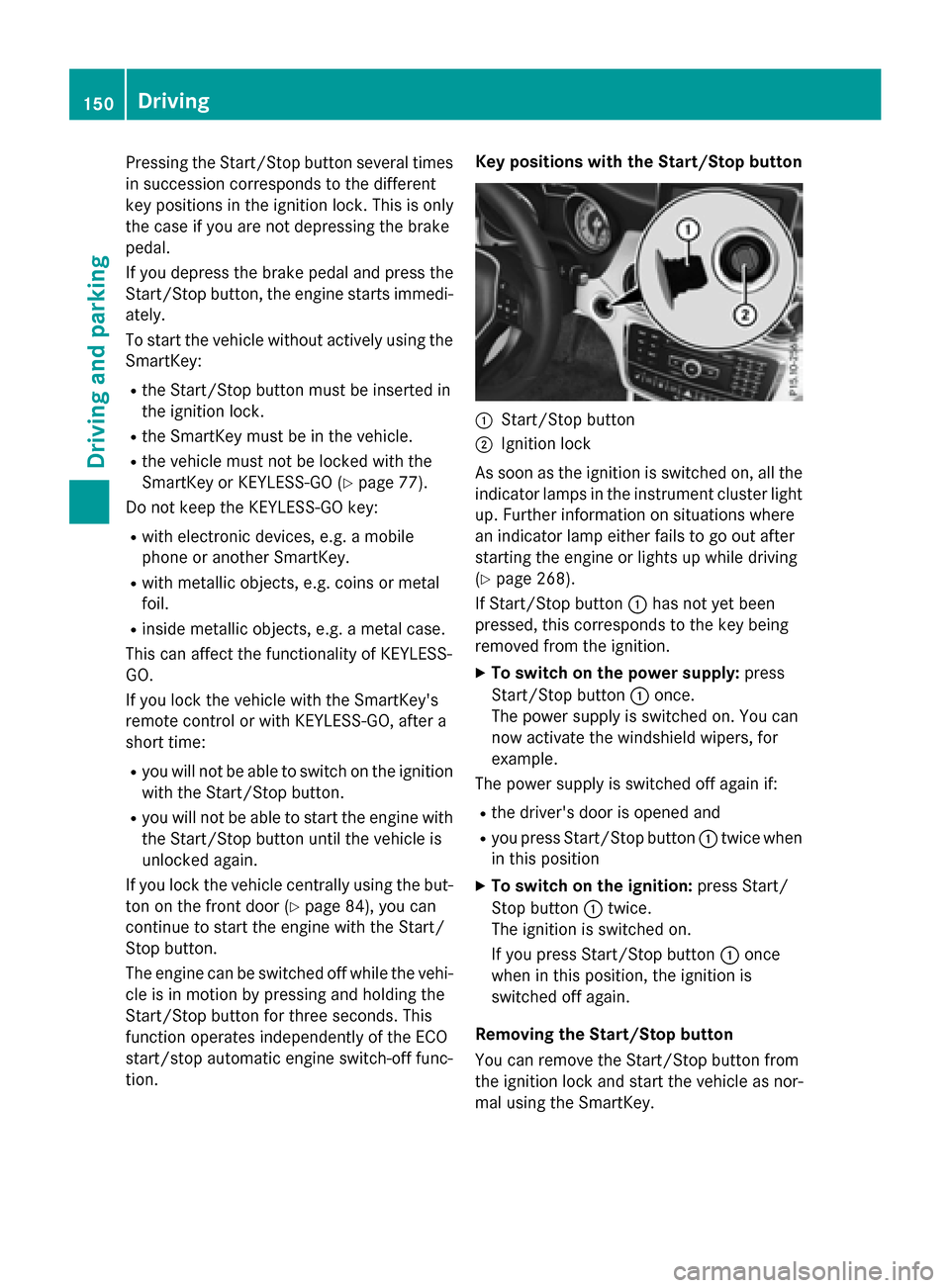
tion. Key positions with the Start/Stop button
:Start/Stop button
;Ignition lock
As soon as the ignition is switched on, all the
indicator lamps in the instrument cluster light
up. Further information on situations where
an indicator lamp either fails to go out after
starting the engine or lights up while driving
(
Ypage 268).
If Start/Stop button :has not yet been
pressed, this corresponds to the key being
removed from the ignition.
XTo switch on the power supply: press
Start/Stop button :once.
The power supply is switched on. You can
now activate the windshield wipers, for
example.
The power supply is switched off again if:
Rthe driver's door is opened and
Ryou press Start/Stop button :twice when
in this position
XTo switch on the ignition: press Start/
Stop button :twice.
The ignition is switched on.
If you press Start/Stop button :once
when in this position, the ignition is
switched off again.
Removing the Start/Stop button
You can remove the Start/Stop button from
the ignition lock and start the vehicle as nor-
mal using the SmartKey.
150Driving
Driving and parking
Page 153 of 390
You can only switch between Start/Stop but-
ton mode and SmartKey operation when the
vehicle is stationary.
You must also engage park positionP.
XRemove Start/Stop button:from ignition
lock ;.
You do not have to remove the Start/Stop
button from the ignition lock when you leave
the vehicle. You should, however, always take
the SmartKey with you when leaving the vehi-
cle. As long as the SmartKey is in the vehicle:
Rthe vehicle can be started using the Start/ Stop button
Rthe electrically powered equipment can be
operated
Starting the engine
Important safety notes
GWARNING
If children are left unsupervised in the vehicle,
they could:
Ropen the doors, thus endangering other
people or road users.
Rget out and disrupt traffic.
Roperate the vehicle's equipment.
Additionally, children could set the vehicle in
motion if, for example, they:
Rrelease the parking brake.
Rshifting the automatic transmission out of
park position P
RStart the engine.
There is a risk of an accident and injury.
When leaving the vehicle, always take the
SmartKey with you and lock the vehicle. Never
leave children or animals unattended in the
vehicle. Always keep the SmartKey out of
reach of children.
GWARNING
Combustion engines emit poisonous exhaust
gases such as carbon monoxide. Inhaling
these exhaust gases leads to poisoning. There
is a risk of fatal injury. Therefore never leave
the engine running in enclosed spaces with-
out sufficient ventilation.
GWARNING
Flammable materials introduced through
environmental influence or by animals can
ignite if in contact with the exhaust system or
parts of the engine that heat up. There is a risk
of fire.
Carry out regular checks to make sure that
there are no flammable foreign materials in
the engine compartment or in the exhaust
system.
!Do not depress the accelerator when
starting the engine.
General notes
During a cold start, the engine runs at higher
speeds to enable the catalytic converter to
reach its operating temperature. The sound of
the engine may change during this time.
Automatic transmission
XShift the transmission to position P
(
Ypage 159).
The transmission position display in the
multifunction display shows
P (
Ypage 159).
iYou can start the engine in transmission
position Pand N.
Starting procedure with the SmartKey
To start the engine using the SmartKey
instead of the Start/Stop button, pull the
Start/Stop button out of the ignition lock.
XTurn the SmartKey to position 3in the igni-
tion lock and release it as soon as the
engine is running (
Ypage 149).
Driving151
Driving and parking
Z
Page 154 of 390
Starting procedure with the Start/Stop
button
The Start/Stop button can be used to start
the vehicle manually without inserting the
SmartKey into the ignition lock. The Start/
Stop button must be inserted in the ignition
lock and the SmartKey must be in the vehicle.
This mode for starting the engine operates
independently of the ECO start/stop auto-
matic engine start function.
You can start the engine if a valid SmartKey is
in the vehicle. Switch off the engine and
always take the SmartKey with you when
leaving the vehicle, even if you only leave it for
a short time. Pay attention to the important
safety notes.
XDepress the brake pedal and keep it
depressed.
XPress the Start/Stop button once
(
Ypage 149).
The engine starts.
Starting procedure via smartphone
Observe the important safety notes on start-
ing the engine (
Ypage 151).
You can also start your engine via your smart-
phone from outside the vehicle. In this case,
the previously selected climate control set-
ting is activated. In this way you can cool or
heat the interior of the vehicle before starting
the journey.
Only start the engine via your smartphone if it
is safe to start and run the engine where your
vehicle is parked.
Observe the legal stipulations in the area
where your vehicle is parked. Engine start via
smartphone may be limited to certain coun-
tries or regions.
You can execute a maximum of two consec-
utive starting attempts via your smartphone.
If you insert the key into the ignition lock, you
can carry out two more starting attempts.
Once you have started the engine, you can
switch the engine off via your smartphone at
any time. You can only start the engine via your smart-
phone if:
Rthe key is in the ignition lock
Rpark position Pis selected
Rthe accelerator pedal is not depressed
Rthe anti-theft alarm system is not activated
Rthe panic alarm is not activated
Rthe hazard warning lamps are switched off
Rthe hood is closed.
Rthe doors are closed and locked
Rthe windows and sliding sunroof are closed
Also make sure that:
Rthe fuel tank is sufficiently filled
Rthe starter battery is sufficiently charged
GWARNING
Limbs could be crushed or trapped if the
engine is started unintentionally during ser-
vice or maintenance work. There is a risk of
injury.
Always secure the engine against uninten-
tional starting before carrying out mainte-
nance or repair work.
Make sure that the engine cannot be started
via your smartphone before carrying out
maintenance or repairs. You can prevent an
engine start via your smartphone, for exam-
ple, if you:
Rswitch on the hazard warning lamps
Rdo not lock the doors
Ropen the hood.
Pulling away
General notes
GWARNING
If the engine speed is above the idling speed
and you engage transmission position Dor R,
the vehicle could pull away suddenly. There is
a risk of an accident.
152Driving
Driving and parking
Page 155 of 390
When engaging transmission positionDor R,
always firmly depress the brake pedal and do
not simultaneously accelerate.
Depress the accelerator carefully when pull-
ing away.
The vehicle locks centrally once you have
pulled away. The locking knobs in the doors
drop down.
You can open the doors from the inside at any time.
You can also deactivate the automatic locking
feature (
Ypage 230).
It is only possible to shift the transmission
from position Pto the desired position if you
depress the brake pedal. Only then can the
parking lock be deactivated.
All vehicles (except Mercedes-AMG vehi-
cles): if you do not depress the brake pedal,
the DIRECT SELECT lever can still be moved
but the parking lock remains engaged.
Mercedes-AMG vehicles: if you do not
depress the brake pedal, the selector lever
can still be moved but the parking lock
remains engaged.
At transmission fluid temperatures below
Ò4 ‡ (Ò20 †), you can only shift out of park
position Pinto another transmission position
when the engine is running.
iUpshifts take place at higher engine
speeds after a cold start. This helps the
catalytic converter to reach its operating
temperature more quickly.
Information on the automatic release of the
electric parking brake (
Ypage 173).
Hill start assist
Hill start assist helps you when pulling away
forwards or in reverse on an uphill gradient. It
holds the vehicle for a short time after you
have removed your foot from the brake pedal.
This gives you enough time to move your foot
from the brake pedal to the accelerator pedal
and to depress it before the vehicle begins to
roll.
GWARNING
After a short time, hill start assist will no lon-
ger brake your vehicle and it could roll away.
There is a risk of an accident and injury.
Therefore, quickly move your foot from the
brake pedal to the accelerator pedal. Never
leave the vehicle when it is held by hill start
assist.
Hill start assist is not active if:
Ryou are pulling away on a level road or on a downhill gradient.
Rthe transmission is in position N.
Rthe electric parking brake is applied.
RESP®is malfunctioning.
Further information on holding the vehicle
stationary on uphill gradients (
Ypage 163).
ECO start/stop function
Introduction
The ECO start/stop function switches the
engine off automatically if the vehicle is stop-
ped under certain conditions.
The engine starts automatically when the
driver wants to pull away again. The ECO
start/stop function thereby helps you to
reduce the fuel consumption and emissions
of your vehicle.
Important safety notes
GWARNING
If the engine is switched off automatically and
you exit the vehicle, the engine is restarted
automatically. The vehicle may begin moving.
There is a risk of accident and injury.
If you wish to exit the vehicle, always turn off
the ignition and secure the vehicle against
rolling away.
Driving153
Driving and parking
Z
Page 156 of 390
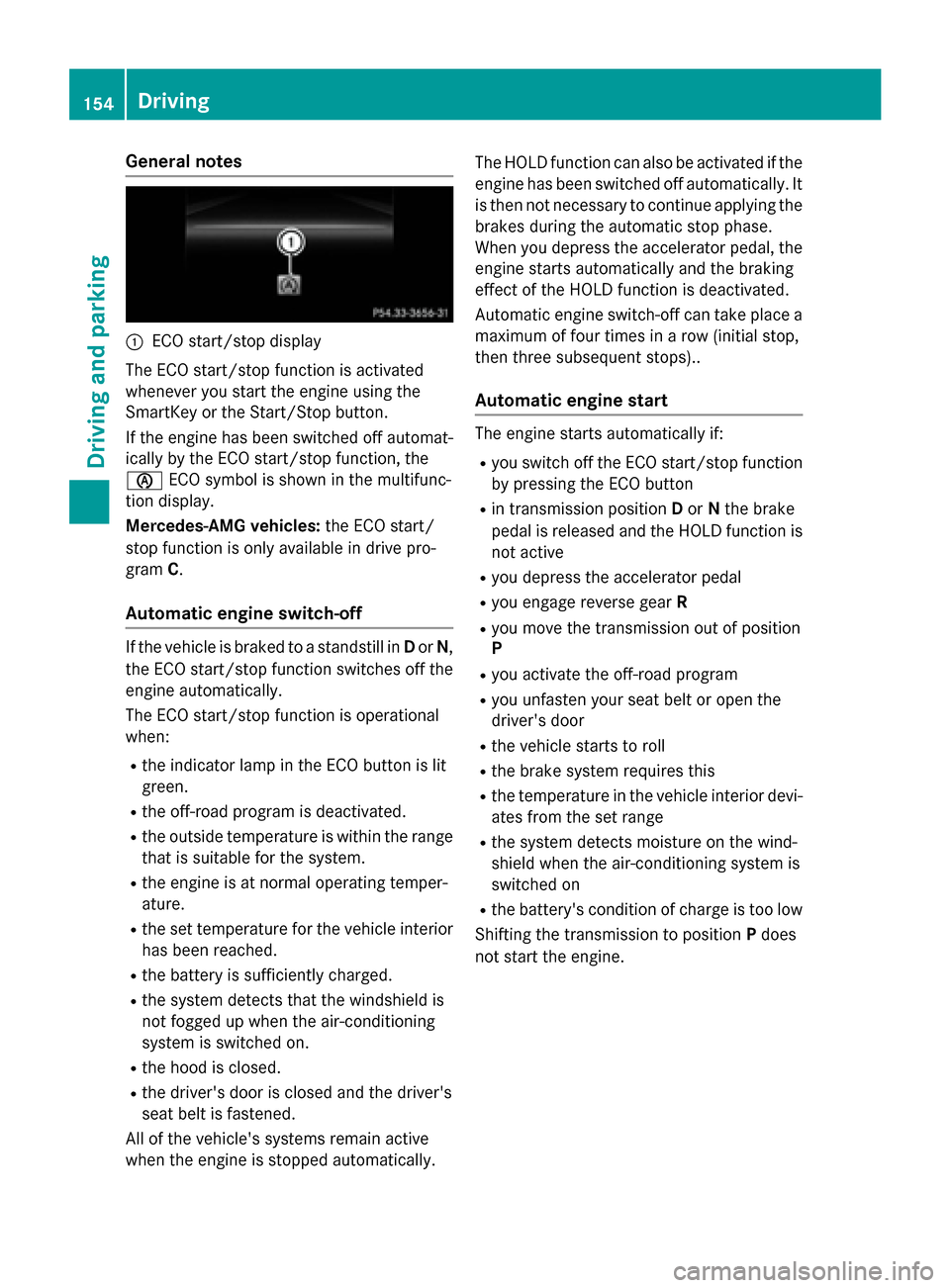
General notes
:ECO start/stop display
The ECO start/stop function is activated
whenever you start the engine using the
SmartKey or the Start/Stop button.
If the engine has been switched off automat-
ically by the ECO start/stop function, the
è ECO symbol is shown in the multifunc-
tion display.
Mercedes-AMG vehicles: the ECO start/
stop function is only available in drive pro-
gram C.
Automatic engine switch-off
If the vehicle is braked to a standstill in Dor N,
the ECO start/stop function switches off the
engine automatically.
The ECO start/stop function is operational
when:
Rthe indicator lamp in the ECO button is lit
green.
Rthe off-road program is deactivated.
Rthe outside temperature is within the range that is suitable for the system.
Rthe engine is at normal operating temper-
ature.
Rthe set temperature for the vehicle interior
has been reached.
Rthe battery is sufficiently charged.
Rthe system detects that the windshield is
not fogged up when the air-conditioning
system is switched on.
Rthe hood is closed.
Rthe driver's door is closed and the driver's
seat belt is fastened.
All of the vehicle's systems remain active
when the engine is stopped automatically. The HOLD function can also be activated if the
engine has been switched off automatically. It
is then not necessary to continue applying the
brakes during the automatic stop phase.
When you depress the accelerator pedal, the
engine starts automatically and the braking
effect of the HOLD function is deactivated.
Automatic engine switch-off can take place a
maximum of four times in a row (initial stop,
then three subsequent stops)..
Automatic engine start
The engine starts automatically if:
Ryou switch off the ECO start/stop function
by pressing the ECO button
Rin transmission position Dor Nthe brake
pedal is released and the HOLD function is
not active
Ryou depress the accelerator pedal
Ryou engage reverse gear R
Ryou move the transmission out of position
P
Ryou activate the off-road program
Ryou unfasten your seat belt or open the
driver's door
Rthe vehicle starts to roll
Rthe brake system requires this
Rthe temperature in the vehicle interior devi-
ates from the set range
Rthe system detects moisture on the wind-
shield when the air-conditioning system is
switched on
Rthe battery's condition of charge is too low
Shifting the transmission to position Pdoes
not start the engine.
154Driving
Driving and parking
Page 162 of 390
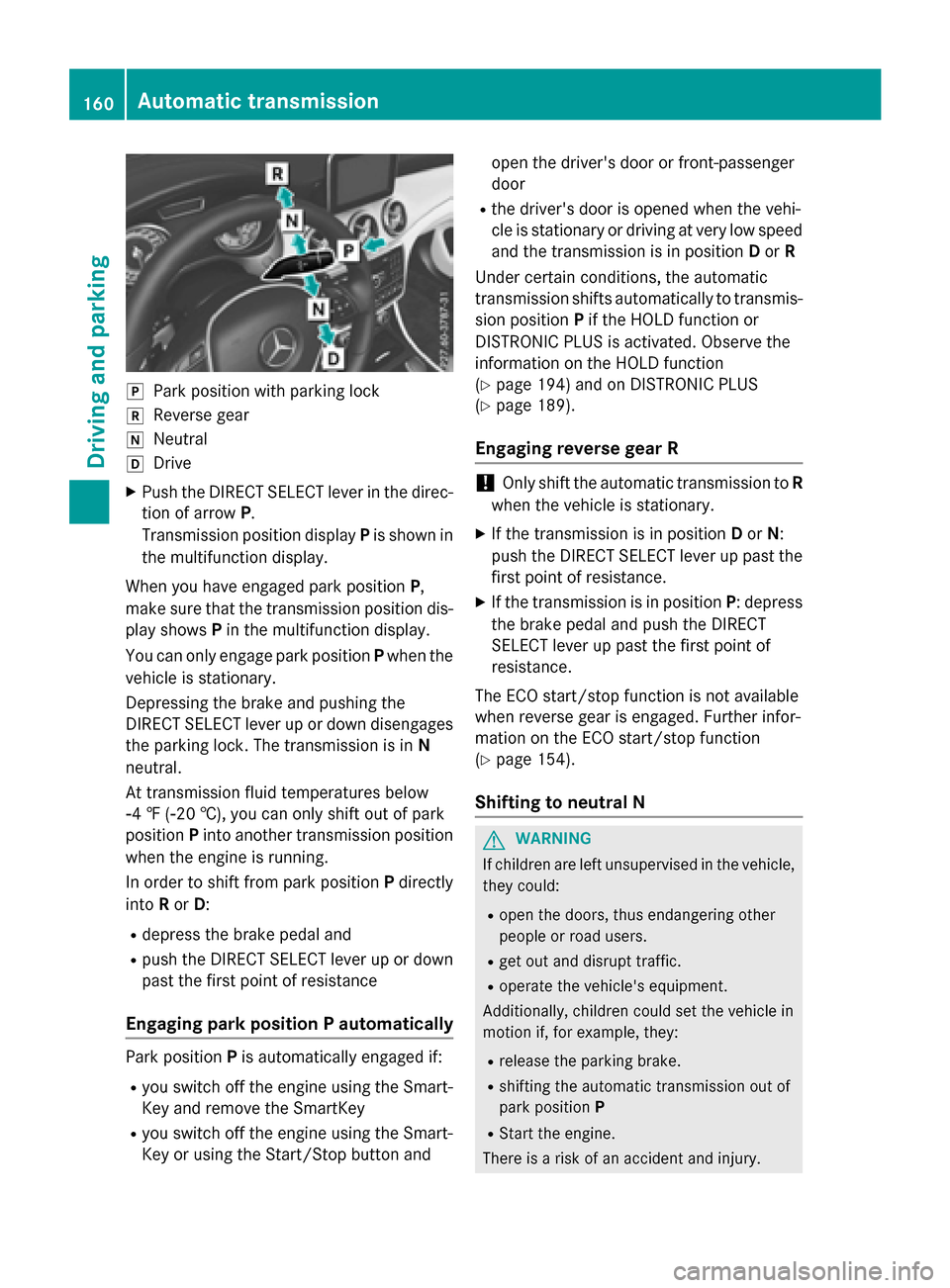
jPark position with parking lock
kReverse gear
iNeutral
hDrive
XPush the DIRECT SELECT lever in the direc-
tion of arrowP.
Transmission position display Pis shown in
the multifunction display.
When you have engaged park position P,
make sure that the transmission position dis-
play shows Pin the multifunction display.
You can only engage park position Pwhen the
vehicle is stationary.
Depressing the brake and pushing the
DIRECT SELECT lever up or down disengages
the parking lock. The transmission is in N
neutral.
At transmission fluid temperatures below
Ò4 ‡ (Ò20 †), you can only shift out of park
position Pinto another transmission position
when the engine is running.
In order to shift from park position Pdirectly
into Ror D:
Rdepress the brake pedal and
Rpush the DIRECT SELECT lever up or down
past the first point of resistance
Engaging park position P automatically
Park position Pis automatically engaged if:
Ryou switch off the engine using the Smart-
Key and remove the SmartKey
Ryou switch off the engine using the Smart-
Key or using the Start/Stop button and open the driver's door or front-passenger
door
Rthe driver's door is opened when the vehi-
cle is stationary or driving at very low speed
and the transmission is in position Dor R
Under certain conditions, the automatic
transmission shifts automatically to transmis-
sion position Pif the HOLD function or
DISTRONIC PLUS is activated. Observe the
information on the HOLD function
(
Ypage 194) and on DISTRONIC PLUS
(
Ypage 189).
Engaging reverse gear R
!Only shift the automatic transmission to R
when the vehicle is stationary.
XIf the transmission is in position Dor N:
push the DIRECT SELECT lever up past the
first point of resistance.
XIf the transmission is in position P: depress
the brake pedal and push the DIRECT
SELECT lever up past the first point of
resistance.
The ECO start/stop function is not available
when reverse gear is engaged. Further infor-
mation on the ECO start/stop function
(
Ypage 154).
Shifting to neutral N
GWARNING
If children are left unsupervised in the vehicle,
they could:
Ropen the doors, thus endangering other
people or road users.
Rget out and disrupt traffic.
Roperate the vehicle's equipment.
Additionally, children could set the vehicle in
motion if, for example, they:
Rrelease the parking brake.
Rshifting the automatic transmission out of
park position P
RStart the engine.
There is a risk of an accident and injury.
160Automatic transmission
Driving and parking
Page 163 of 390
When leaving the vehicle, always take the
SmartKey with you and lock the vehicle. Never
leave children or animals unattended in the
vehicle. Always keep the SmartKey out of
reach of children.
XIf the transmission is in positionDor R:
push the DIRECT SELECT lever up or down
to the first point of resistance.
XIf the transmission is in position P: depress
the brake pedal and push the DIRECT
SELECT lever up or down to the first point of
resistance.
If you switch the engine off with the trans-
mission in position Ror D, the automatic
transmission shifts to Nautomatically.
With the SmartKey: if you then open the
driver's door or the front-passenger door or
remove the SmartKey from the ignition, the
automatic transmission shifts to Pautomati-
cally.
With the Start/Stop button: if you then
open the driver's door or the front-passenger
door, the automatic transmission shifts to P
automatically.
If you want the automatic transmission to
remain in neutral N, e.g. when having the
vehicle cleaned in an automatic car wash with
a towing system:
Using the SmartKey:
XSwitch on the ignition.
XDepress the brake pedal and keep it
depressed.
XShift to neutral N.
XRelease the brake pedal.
XRelease the electric parking brake.
XSwitch off the ignition and leave the Smart-
Key in the ignition lock.
With the Start/Stop button:
XRemove the Start/Stop button from the
ignition lock.
XInsert the SmartKey into the ignition lock.
XSwitch on the ignition.
XDepress the brake pedal and keep it
depressed.
XShift to neutral N.
XRelease the brake pedal.
XRelease the electric parking brake.
XSwitch off the ignition and leave the Smart-
Key in the ignition lock.
Engaging drive position D
XIf the transmission is in position Ror N:
push the DIRECT SELECT lever down past
the first point of resistance.
XIf the transmission is in position P: depress
the brake pedal and push the DIRECT
SELECT lever down past the first point of
resistance.
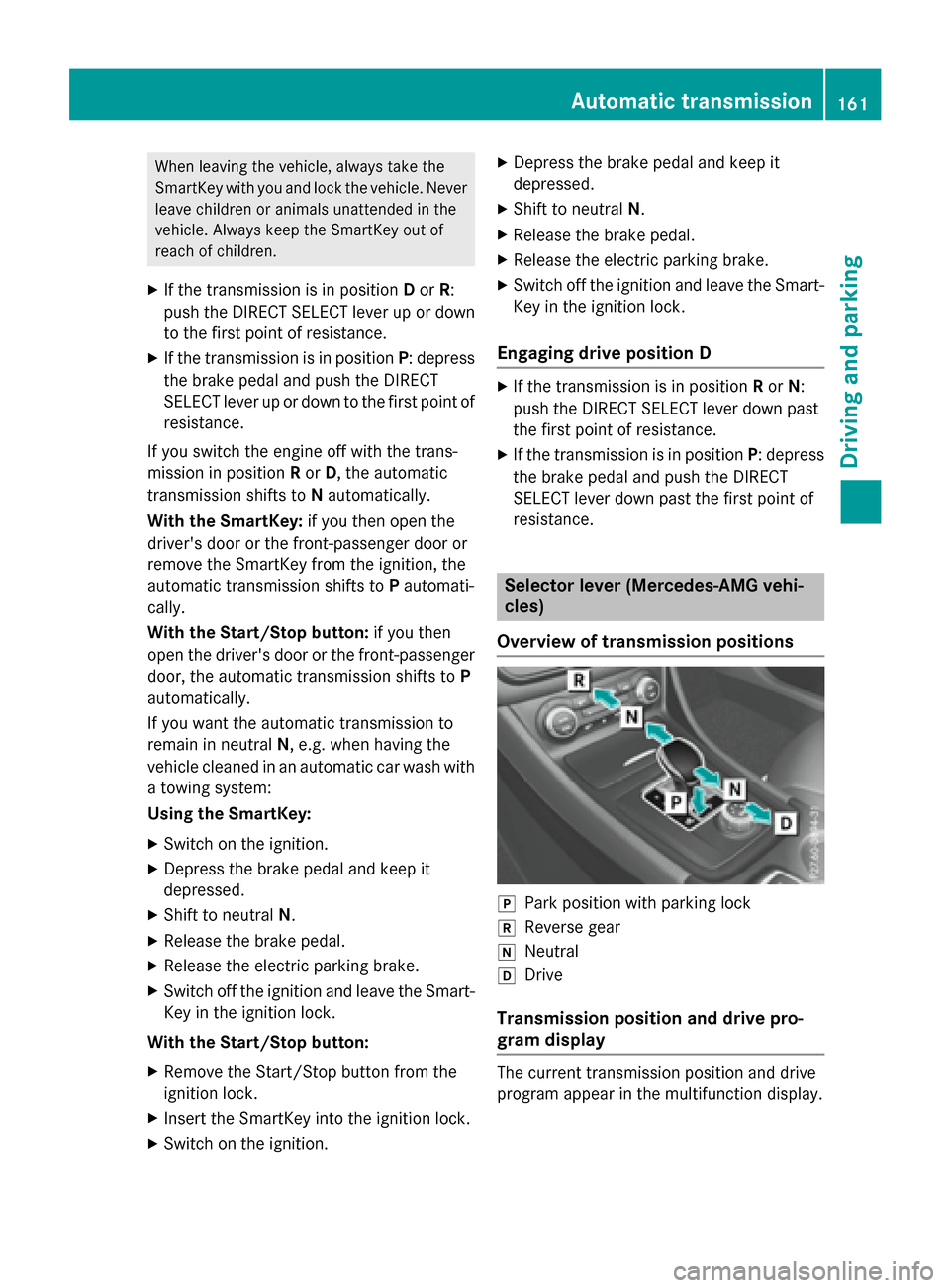
Selector lever (Mercedes-AMG vehi-
cles)
Overview of transmission positions
jPark position with parking lock
kReverse gear
iNeutral
hDrive
Transmission position and drive pro-
gram display
The current transmission position and drive
program appear in the multifunction display.
Automatic transmission161
Driving and parking
Z
Page 164 of 390
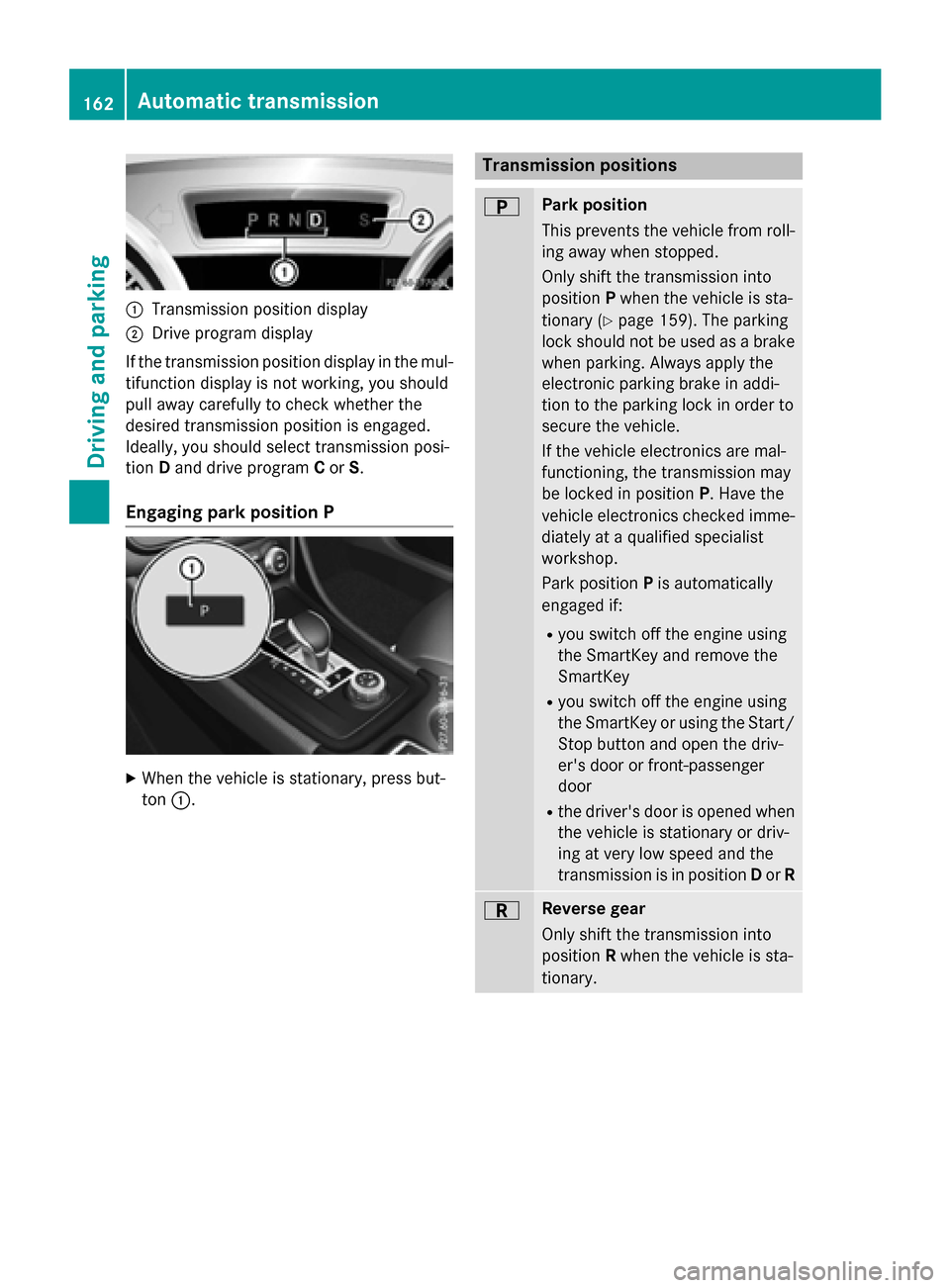
:Transmission position display
;Drive program display
If the transmission position display in the mul-
tifunction display is not working, you should
pull away carefully to check whether the
desired transmission position is engaged.
Ideally, you should select transmission posi-
tion Dand drive program Cor S.
Engaging park position P
XWhen the vehicle is stationary, press but-
ton :.
Transmission positions
BPark position
This prevents the vehicle from roll-
ing away when stopped.
Only shift the transmission into
position Pwhen the vehicle is sta-
tionary (
Ypage 159). The parking
lock should not be used as a brake
when parking. Always apply the
electronic parking brake in addi-
tion to the parking lock in order to
secure the vehicle.
If the vehicle electronics are mal-
functioning, the transmission may
be locked in position P. Have the
vehicle electronics checked imme-
diately at a qualified specialist
workshop.
Park position Pis automatically
engaged if:
Ryou switch off the engine using
the SmartKey and remove the
SmartKey
Ryou switch off the engine using
the SmartKey or using the Start/ Stop button and open the driv-
er's door or front-passenger
door
Rthe driver's door is opened when
the vehicle is stationary or driv-
ing at very low speed and the
transmission is in position Dor R
CReverse gear
Only shift the transmission into
position Rwhen the vehicle is sta-
tionary.
162Automatic transmission
Driving and parking