door MERCEDES-BENZ GLA-Class 2016 X156 Workshop Manual
[x] Cancel search | Manufacturer: MERCEDES-BENZ, Model Year: 2016, Model line: GLA-Class, Model: MERCEDES-BENZ GLA-Class 2016 X156Pages: 390, PDF Size: 8.37 MB
Page 172 of 390
!Overfilling the fuel tank could damage the
fuel system.
!Take care not to spill any fuel on painted
surfaces. You could otherwise damage the
paintwork.
!Use a filter when refueling from a fuel can.
Otherwise, the fuel lines and/or injection
system could be blocked by particles from
the fuel can.
Do not get into the vehicle again during the
refueling process. Otherwise, electrostatic
charge could build up again.
If you overfill the fuel tank, fuel could spray
out when the fuel pump nozzle is removed.
For further information on fuel and fuel quality (
Ypage 377).
Refueling
General information
The fuel filler flap is unlocked/locked auto-
matically when you unlock/lock the vehicle
with the SmartKey.
The position of the fuel filler cap is displayed
æ in the instrument cluster. The arrow on
the filling pump indicates the side of the vehi-
cle.
Opening the fuel filler flap
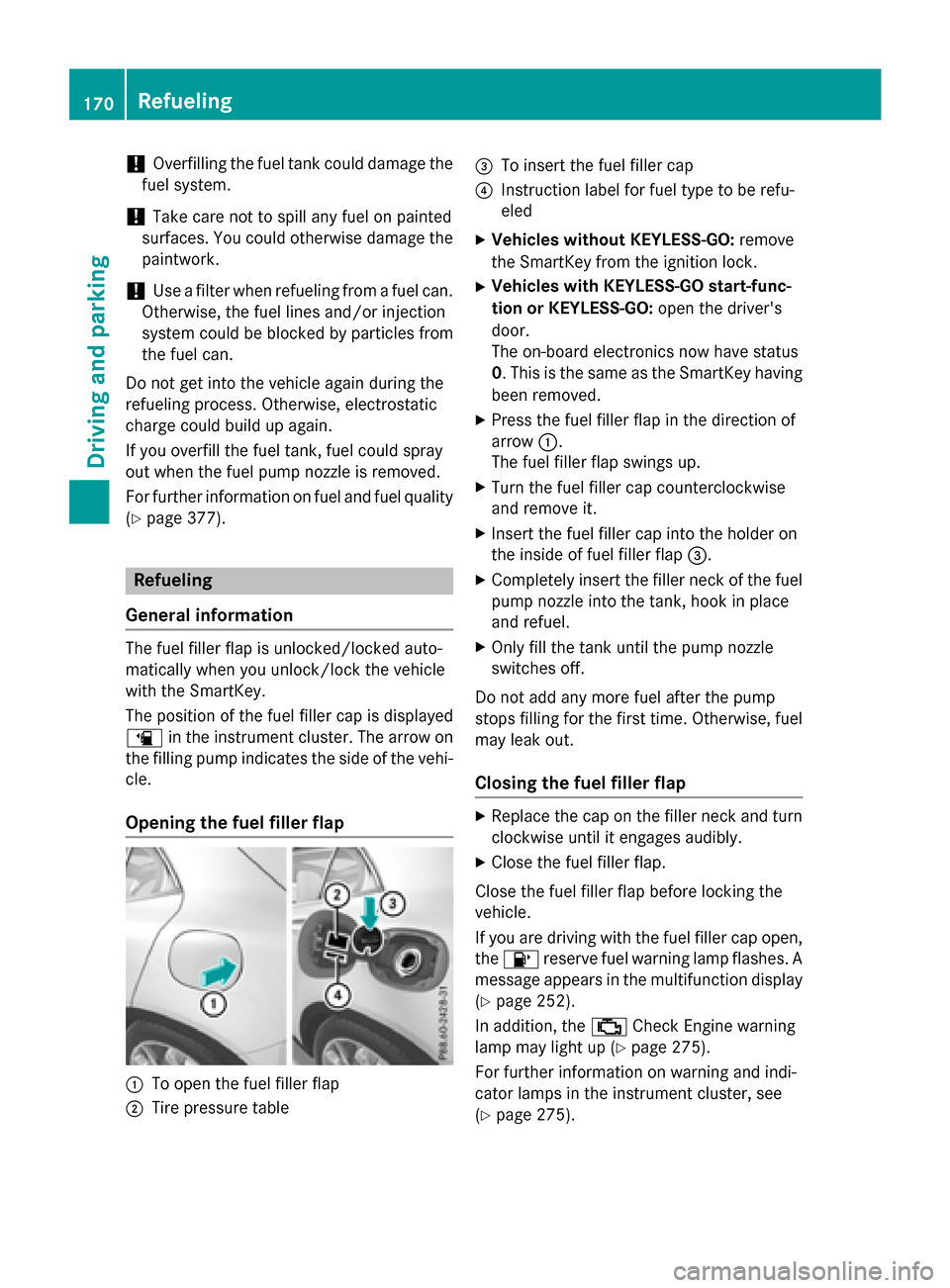
:To open the fuel filler flap
;Tire pressure table
=To insert the fuel filler cap
?Instruction label for fuel type to be refu-
eled
XVehicles without KEYLESS-GO: remove
the SmartKey from the ignition lock.
XVehicles with KEYLESS-GO start-func-
tion or KEYLESS-GO: open the driver's
door.
The on-board electronics now have status
0. This is the same as the SmartKey having
been removed.
XPress the fuel filler flap in the direction of
arrow :.
The fuel filler flap swings up.
XTurn the fuel filler cap counterclockwise
and remove it.
XInsert the fuel filler cap into the holder on
the inside of fuel filler flap =.
XCompletely insert the filler neck of the fuel
pump nozzle into the tank, hook in place
and refuel.
XOnly fill the tank until the pump nozzle
switches off.
Do not add any more fuel after the pump
stops filling for the first time. Otherwise, fuel
may leak out.
Closing the fuel filler flap
XReplace the cap on the filler neck and turn
clockwise until it engages audibly.
XClose the fuel filler flap.
Close the fuel filler flap before locking the
vehicle.
If you are driving with the fuel filler cap open,
the 8 reserve fuel warning lamp flashes. A
message appears in the multifunction display
(
Ypage 252).
In addition, the ;Check Engine warning
lamp may light up (
Ypage 275).
For further information on warning and indi-
cator lamps in the instrument cluster, see
(
Ypage 275).
170Refueling
Driving and parking
Page 174 of 390
Switching off the engine
Important safety notes
GWARNING
The automatic transmission switches to neu-
tral position Nwhen you switch off the engine.
The vehicle may roll away. There is a risk of an
accident.
After switching off the engine, always switch
to parking position P. Prevent the parked vehi-
cle from rolling away by applying the parking
brake.
Vehicles with automatic transmission
XApply the electric parking brake.
XAll vehicles (except Mercedes-AMG
vehicles): shift the transmission to posi-
tion P.
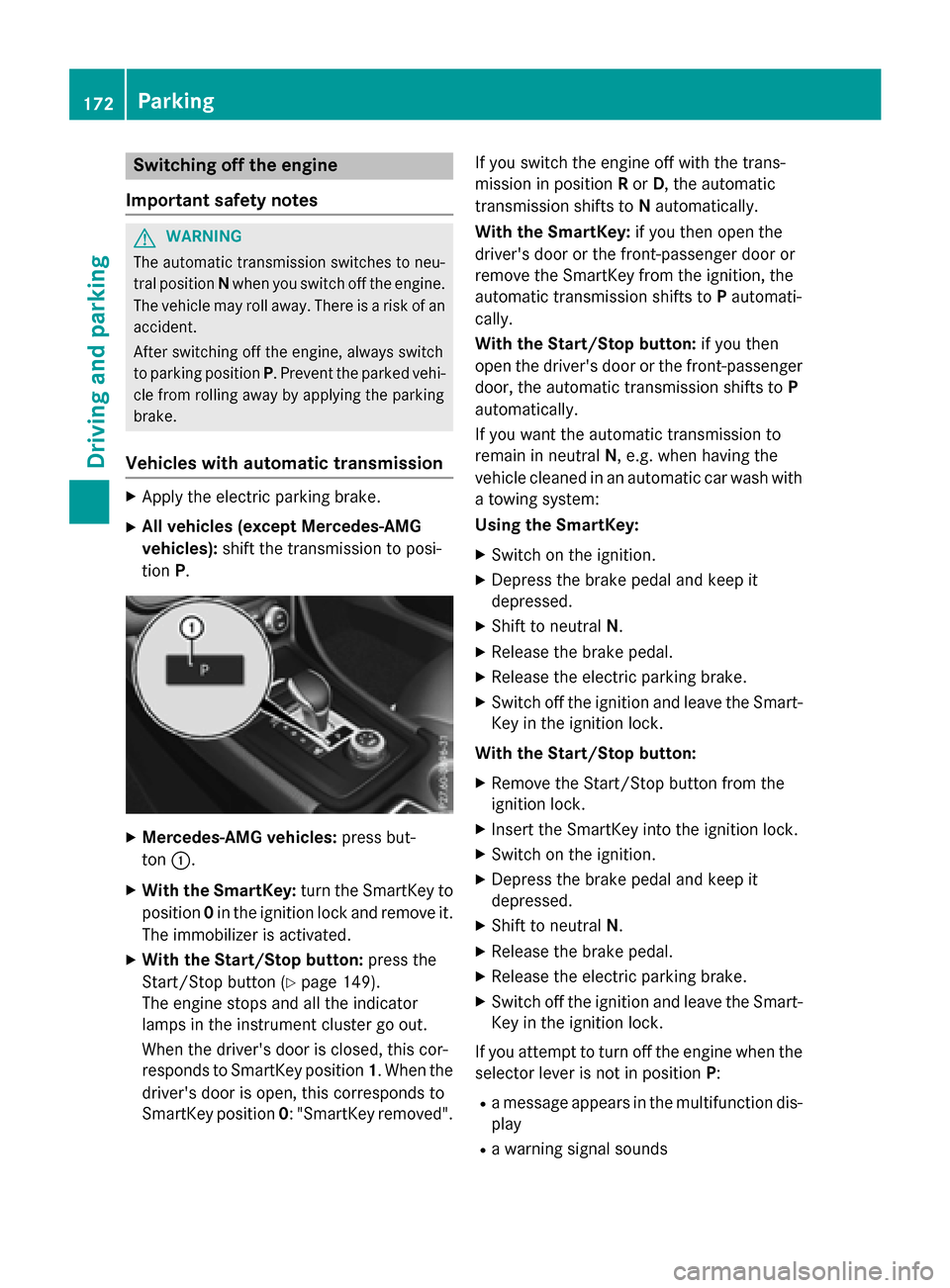
XMercedes-AMG vehicles: press but-
ton :.
XWith the SmartKey: turn the SmartKey to
position 0in the ignition lock and remove it.
The immobilizer is activated.
XWith the Start/Stop button: press the
Start/Stop button (
Ypage 149).
The engine stops and all the indicator
lamps in the instrument cluster go out.
When the driver's door is closed, this cor-
responds to SmartKey position 1. When the
driver's door is open, this corresponds to
SmartKey position 0: "SmartKey removed". If you switch the engine off with the trans-
mission in position
Ror D, the automatic
transmission shifts to Nautomatically.
With the SmartKey: if you then open the
driver's door or the front-passenger door or
remove the SmartKey from the ignition, the
automatic transmission shifts to Pautomati-
cally.
With the Start/Stop button: if you then
open the driver's door or the front-passenger door, the automatic transmission shifts to P
automatically.
If you want the automatic transmission to
remain in neutral N, e.g. when having the
vehicle cleaned in an automatic car wash with
a towing system:
Using the SmartKey:
XSwitch on the ignition.
XDepress the brake pedal and keep it
depressed.
XShift to neutral N.
XRelease the brake pedal.
XRelease the electric parking brake.
XSwitch off the ignition and leave the Smart-
Key in the ignition lock.
With the Start/Stop button:
XRemove the Start/Stop button from the
ignition lock.
XInsert the SmartKey into the ignition lock.
XSwitch on the ignition.
XDepress the brake pedal and keep it
depressed.
XShift to neutral N.
XRelease the brake pedal.
XRelease the electric parking brake.
XSwitch off the ignition and leave the Smart-
Key in the ignition lock.
If you attempt to turn off the engine when the
selector lever is not in position P:
Ra message appears in the multifunction dis-
play
Ra warning signal sounds
172Parking
Driving and parking
Page 175 of 390
Electric parking brake
General notes
GWARNING
If you leave children unsupervised in the vehi-
cle, they could set it in motion by, for example:
Rrelease the parking brake.
Rshift the automatic transmission out of the
parking position P.
Rstart the engine.
In addition, they may operate vehicle equip-
ment and become trapped. There is a risk of
an accident and injury.
When leaving the vehicle, always take the
SmartKey with you and lock the vehicle. Never
leave children unsupervised in the vehicle.
The function of the electric parking brake is
dependent on the on-board voltage. If the on-
board voltage is low or there is a malfunction
in the system, it may not be possible to apply
the released parking brake.
XIf this is the case, only park the vehicle on
level ground and secure it to prevent it roll-
ing away.
XShift the automatic transmission to posi-
tion P.
It may not be possible to release an applied
parking brake if the on-board voltage is low or
there is a malfunction in the system. Contact a qualified specialist workshop.
The electric parking brake performs a func-
tion test at regular intervals while the engine
is switched off. The sounds that can be heard
while this is occurring are normal.
Applying or releasing manually
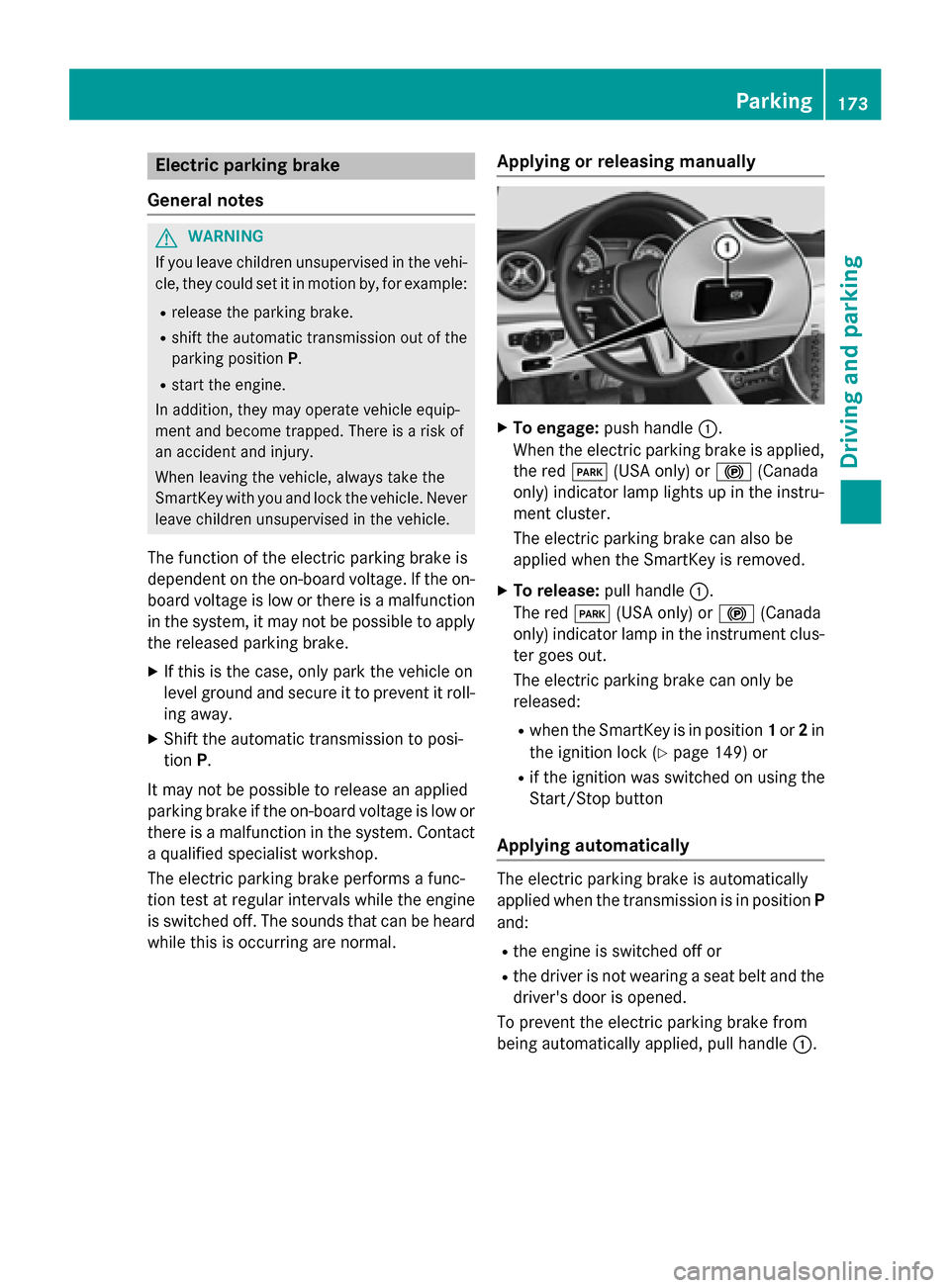
XTo engage: push handle :.
When the electric parking brake is applied, the red F(USA only) or !(Canada
only) indicator lamp lights up in the instru-
ment cluster.
The electric parking brake can also be
applied when the SmartKey is removed.
XTo release: pull handle:.
The red F(USA only) or !(Canada
only) indicator lamp in the instrument clus-
ter goes out.
The electric parking brake can only be
released:
Rwhen the SmartKey is in position 1or 2in
the ignition lock (
Ypage 149) or
Rif the ignition was switched on using the
Start/Stop button
Applying automatically
The electric parking brake is automatically
applied when the transmission is in position P
and:
Rthe engine is switched off or
Rthe driver is not wearing a seat belt and the
driver's door is opened.
To prevent the electric parking brake from
being automatically applied, pull handle :.
Parking173
Driving and parking
Z
Page 176 of 390
The electric parking brake is also engaged
automatically if:
RDISTRONIC PLUS brings the vehicle to a
standstill or
Rthe HOLD function is keeping the vehicle
stationary
RActive Parking Assist is keeping the vehicle
stationary
In addition, at least one of the following con-
ditions must be fulfilled:
Rthere is a system malfunction.
Rthe power supply is insufficient.
Rthe vehicle is stationary for a lengthy
period.
The red F(USA only) or !(Canada
only) indicator lamp in the instrument cluster goes out.
The electric parking brake is not automati-
cally engaged if the engine is switched off by
the ECO start/stop function.
Releasing automatically
Your vehicle's electric parking brake is auto-
matically released if all of the following con-
ditions are met:
Rthe engine is running.
Rthe transmission is in position Dor R.
Rthe seat belt has been fastened.
Ryou depress the accelerator pedal.
If the transmission is in position R, the tailgate
must be closed.
If your seat belt is not fastened, the following
conditions must be fulfilled to automatically
release the electric parking brake:
Rthe driver's door is closed.
Ryou have shifted out of transmission posi-
tion Por you have previously driven faster
than 2 mph (3 km/h).
Ensure that you do not depress the acceler-
ator pedal unintentionally. Otherwise the
parking brake will be released and the vehicle
will start to move.
Emergency braking
The vehicle can also be braked during an
emergency by using the electric parking
brake.
XWhile driving, push handle :of the electric
parking brake (
Ypage 173).
The vehicle is braked as long as you keep
handle :of the electric parking brake
pressed. The longer the electric parking
brake handle :is depressed, the greater
the braking force.
During braking:
Ra warning tone sounds
Rthe Release Parking Brakemessage
appears
Rthe red F(USA only) or !(Canada
only) indicator lamp in the instrument clus- ter flashes
When the vehicle has been braked to a stand-
still, the electric parking brake is engaged.
Parking the vehicle for a long period
If you leave the vehicle parked for longer than
four weeks, the battery may be damaged by
exhaustive discharging.
If you leave the vehicle parked for longer than
six weeks, the vehicle may suffer damage as a
result of lack of use.
XVisit a qualified specialist workshop and
seek advice.
iYou can obtain information about trickle
chargers from a qualified specialist work-
shop.
Driving tips
General notes
Important safety notes
GWARNING
If you switch off the ignition while driving,
safety-relevant functions are only available
174Driving tips
Driving and parking
Page 190 of 390
Rthe driver's door must be closed when you
shift fromPto Dor your seat belt must be
fastened.
Rthe front-passenger door and rear doors
must be closed.
Activating
XBriefly pull the cruise control lever towards
you ?, up :or down A.
DISTRONIC PLUS is selected.
XKeep the cruise control lever pressed up :
or down Auntil the desired speed is set.
XRemove your foot from the accelerator
pedal.
Your vehicle adapts its speed to that of the
vehicle in front, but only up to the desired
stored speed.
iIf you do not fully release the accelerator
pedal, the DISTRONIC
PLUSPassivemes-
sage appears in the multifunction display.
The set distance to a slower-moving vehicle
in front will then not be maintained. You will
be driving at the speed you determine by
the position of the accelerator pedal.
You can also activate DISTRONIC PLUS when
stationary. The lowest speed that can be set is
20 mph (30 km/h).
Driving with DISTRONIC PLUS
Pulling away and driving
The vehicle can also pull away when it is
facing an unidentified obstacle or is driving on a different line from another vehicle. The vehi-
cle then brakes automatically. Be ready to
brake at all times.
If you depress the brake, DISTRONIC PLUS is
deactivated unless your vehicle is stationary.
XIf you want to pull away with
DISTRONIC PLUS: remove your foot from
the brake pedal.
XBriefly pull the cruise control lever towards
you ?.
or
XAccelerate briefly.
Your vehicle pulls away and adapts its
speed to that of the vehicle in front.
If no vehicle is detected in front, your vehi-
cle accelerates to the set speed.
If there is no vehicle in front, DISTRONIC
PLUS operates in the same way as cruise
control.
If DISTRONIC PLUS detects that the vehicle in
front has slowed down, it brakes your vehicle.
In this way, the distance you have selected is
maintained.
If DISTRONIC PLUS detects a faster-moving
vehicle in front, it increases the driving speed.
The vehicle is only accelerated up to the
speed you have stored.
Selecting the drive program
DISTRONIC Plus supports a sporty driving
style whe
n you select the S+(Mercedes-AMG
vehicles only) or S(
Ypage 164 )drive program
or the manual gearshift (
Ypage 166). Accel-
eration behind the vehicle in front or to the set
speed is then noticeably more dynamic. If you
have selected the E(Mercedes-AMG vehicles:
C ) drive program, the vehicle accelerates
more gently. This setting is recommended in
stop-and-start traffic.
Changing lanes
If you change to the passing lane, DISTRONIC
PLUS supports you when:
Ryou are driving faster than 43 mph
(70 km/h)
RDISTRONIC PLUS is maintaining the dis-
tance to a vehicle in front
Ryou switch on the appropriate turn signal
RDISTRONIC PLUS does not detect a danger
of collision
188Driving systems
Driving and parking
Page 191 of 390
If these conditions are fulfilled, your vehicle is
accelerated. Acceleration will be interrupted
if changing lanes takes too long or if the dis-
tance between your vehicle and the vehicle in
front becomes too small.
Stopping
GWARNING
When leaving the vehicle, even if it is braked
only by DISTRONIC PLUS, it could roll away if:
Rthere is a malfunction in the system or in
the voltage supply.
RDISTRONIC PLUS has been deactivated
with the cruise control lever, e.g. by a vehi-
cle occupant or from outside the vehicle.
Rthe electrical system in the engine com-
partment, the battery or the fuses have
been tampered with.
Rthe battery is disconnected.
Rthe accelerator pedal has been depressed, e.g. by a vehicle occupant.
There is a risk of an accident.
If you wish to exit the vehicle, always turn off
DISTRONIC PLUS and secure the vehicle
against rolling away.
For further information on deactivating
DISTRONIC PLUS (
Ypage 190).
If DISTRONIC PLUS detects that the vehicle in
front is stopping, it brakes your vehicle until it is stationary.
Once your vehicle is stationary, it remains
stationary and you do not need to depress the
brake.
iAfter a time, the electric parking brake
secures the vehicle and relieves the service
brake.
iDepending on the specified minimum dis-
tance, your vehicle will come to a standstill
at a sufficient distance behind the vehicle in
front. The specified minimum distance is
set using the control on the cruise control
lever. When DISTRONIC PLUS is activated, the
transmission is shifted automatically to posi-
tion
Pif:
Rthe driver's seat belt is not fastened and the
driver's door is open.
Rthe engine is switched off, unless it is auto- matically switched off by the ECO start/
stop function.
The electric parking brake secures the vehicle
automatically if DISTRONIC PLUS is activated
when the vehicle is stationary and:
Ra system malfunction occurs.
Rthe power supply is not sufficient.
If a malfunction in the electric parking brake
occurs, then the transmission may also be
shifted into position Pautomatically.
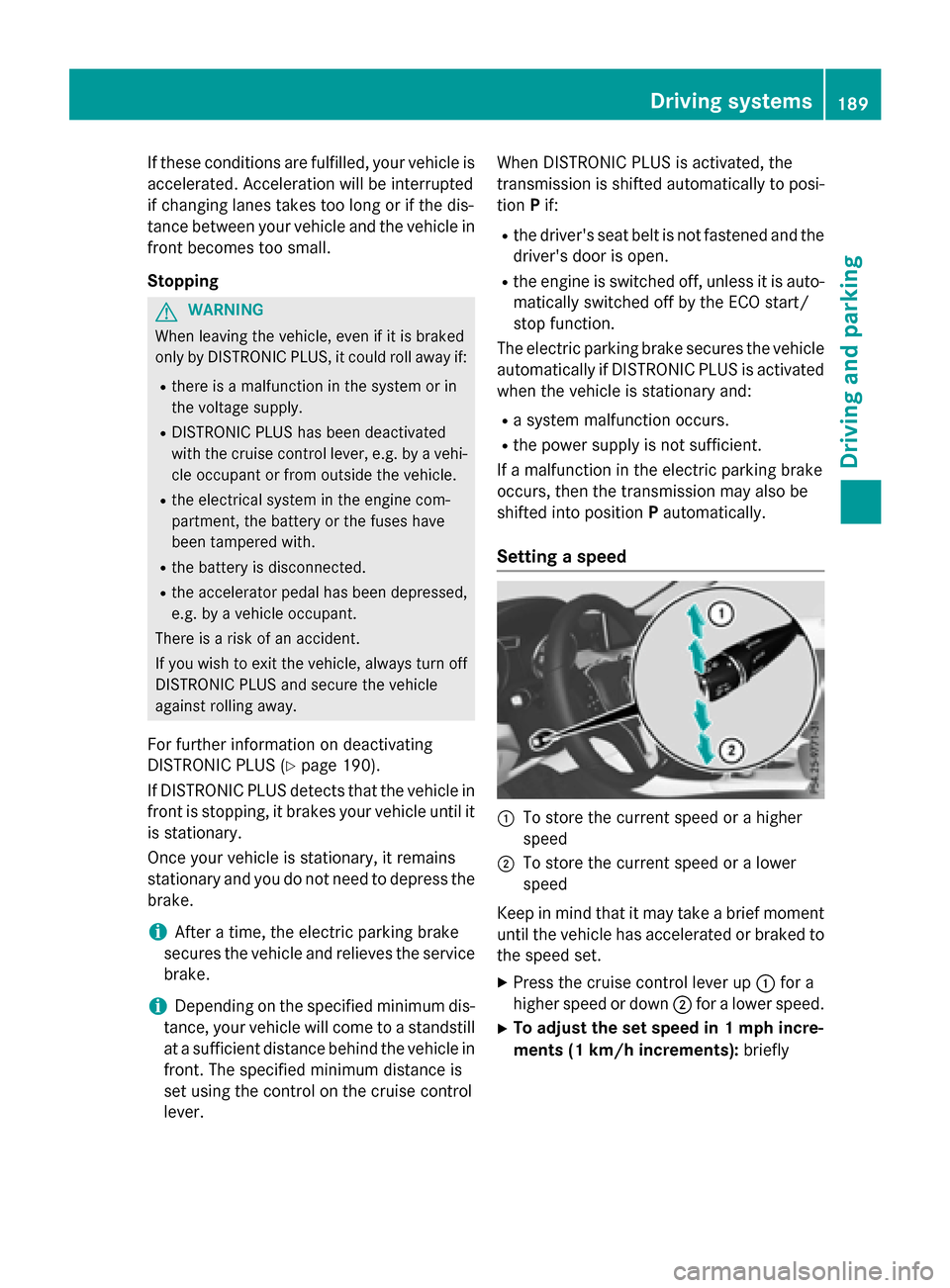
Setting a speed
:To store the current speed or a higher
speed
;To store the current speed or a lower
speed
Keep in mind that it may take a brief moment
until the vehicle has accelerated or braked to
the speed set.
XPress the cruise control lever up :for a
higher speed or down ;for a lower speed.
XTo adjust the set speed in 1 mph incre-
ments (1 km/h increments): briefly
Driving systems189
Driving and parking
Z
Page 193 of 390
Ryou pull thecruise contro llever toward s
you in order to pull away and th efront-
passenger doo ror on eof th erea rdoors is
ope n
Rthevehicl eis skiddin g
Ryou activat eActive Parking Assis t
If DISTRONIC PLU Sis deactivated, you will
hear awarnin gtone .You will see th e
DISTRONIC PLU SOff
message in th emulti-
function display fo rapproximately fiv esec -
onds.
DISTRONIC PLUS display sin th einstru -
ment cluste r
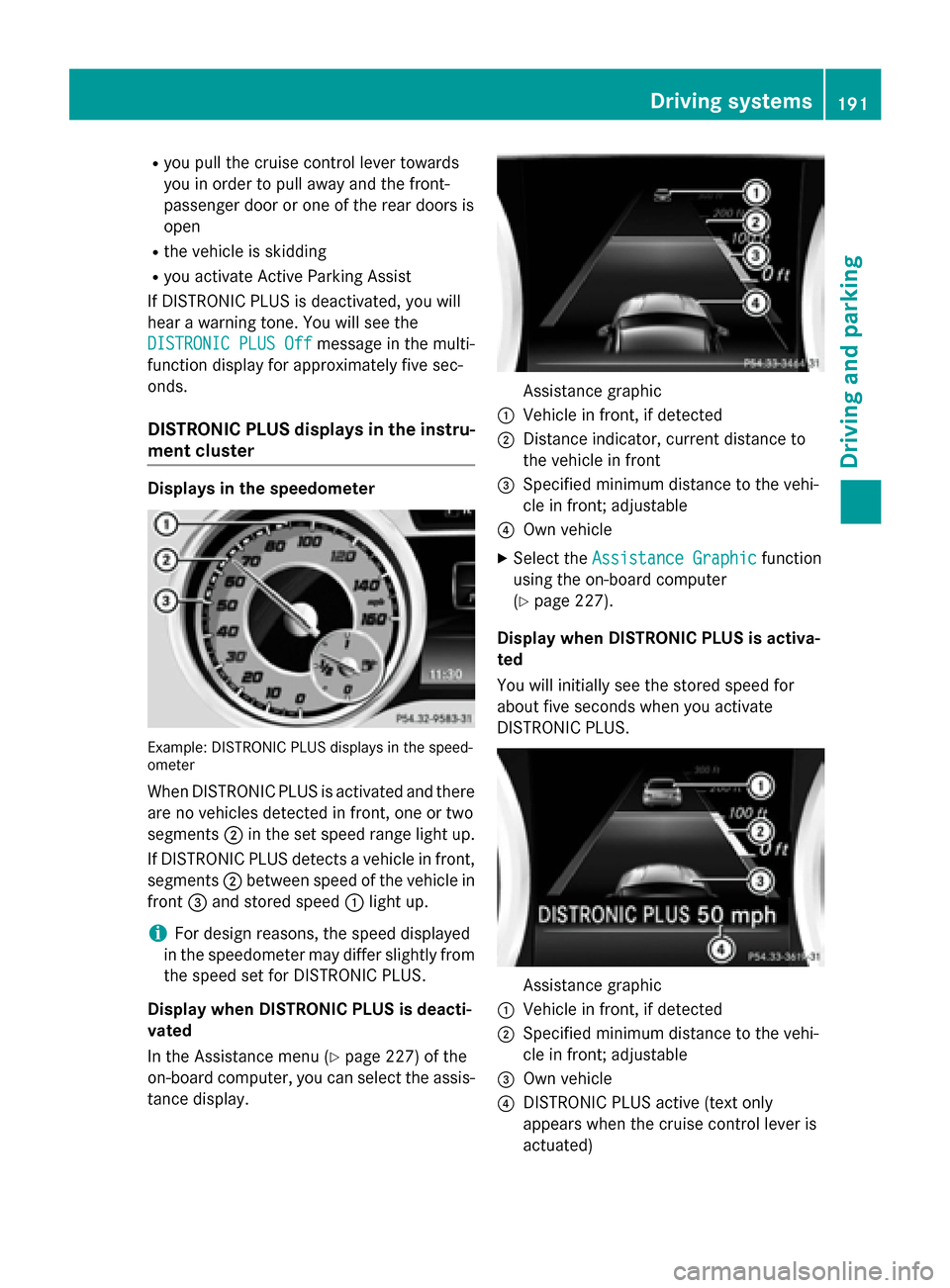
Displaysin th espeedometer
Example: DISTRONIC PLU Sdisplays in th espeed-
omete r
WhenDISTRONIC PLU Sis activated and there
are no vehicles detecte din front, on eor tw o
segments ;in th eset speed range ligh tup.
If DISTRONIC PLU Sdetects avehicl ein front,
segments ;between speed of th evehicl ein
fron t= and stored speed :ligh tup.
iFo rdesign reasons, th espeed displayed
in th espeedometer may differ slightly from
th espeed set fo rDISTRONIC PLUS.
Display when DISTRONIC PLUS is deacti -
vate d
In th eAssistanc emen u (
Ypage 227) of th e
on-boar dcomputer, you can select th eassis-
tanc edisplay.
Assistanc egraphi c
:Vehiclein front, if detecte d
;Distanceindicator ,curren tdistanc eto
th evehicl ein fron t
=Specified minimum distanc eto th evehi-
cle in front; adjustable
?Own vehicl e
XSelectth eAssistanc eGraphi cfunction
usin gth eon-boar dcomputer
(
Ypage 227).
Display when DISTRONIC PLUS is activa -
te d
You will initially see th estored speed fo r
about fiv eseconds when you activat e
DISTRONIC PLUS.
Assistanc egraphi c
:Vehiclein front, if detecte d
;Specified minimum distanc eto th evehi-
cle in front; adjustable
=Own vehicl e
?DISTRONIC PLU Sactive (tex tonly
appears when th ecruise contro llever is
actuated)
Driving systems19 1
Driving an d parking
Z
Page 195 of 390
detected vehicle turns a corner and reveals
an obstacle or stationary vehicle, DISTRONIC
PLUS will not brake for these.
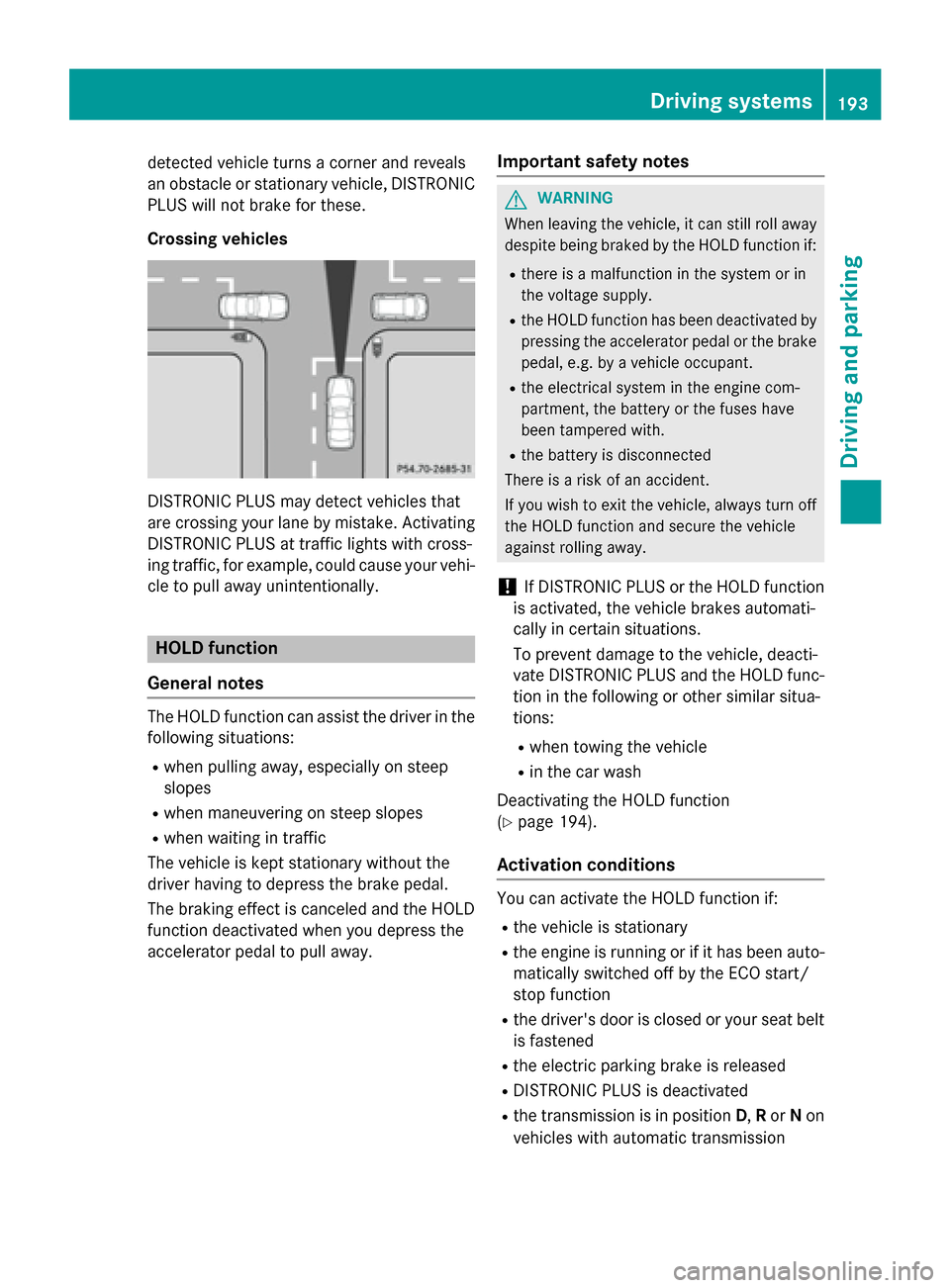
Crossing vehicles
DISTRONIC PLUS may detect vehicles that
are crossing your lane by mistake. Activating
DISTRONIC PLUS at traffic lights with cross-
ing traffic, for example, could cause your vehi-
cle to pull away unintentionally.
HOLD function
General notes
The HOLD function can assist the driver in the
following situations:
Rwhen pulling away, especially on steep
slopes
Rwhen maneuvering on steep slopes
Rwhen waiting in traffic
The vehicle is kept stationary without the
driver having to depress the brake pedal.
The braking effect is canceled and the HOLD
function deactivated when you depress the
accelerator pedal to pull away.
Important safety notes
GWARNING
When leaving the vehicle, it can still roll away despite being braked by the HOLD function if:
Rthere is a malfunction in the system or in
the voltage supply.
Rthe HOLD function has been deactivated by
pressing the accelerator pedal or the brake
pedal, e.g. by a vehicle occupant.
Rthe electrical system in the engine com-
partment, the battery or the fuses have
been tampered with.
Rthe battery is disconnected
There is a risk of an accident.
If you wish to exit the vehicle, always turn off the HOLD function and secure the vehicle
against rolling away.
!If DISTRONIC PLUS or the HOLD function
is activated, the vehicle brakes automati-
cally in certain situations.
To prevent damage to the vehicle, deacti-
vate DISTRONIC PLUS and the HOLD func-
tion in the following or other similar situa-
tions:
Rwhen towing the vehicle
Rin the car wash
Deactivating the HOLD function
(
Ypage 194).
Activation conditions
You can activate the HOLD function if:
Rthe vehicle is stationary
Rthe engine is running or if it has been auto-
matically switched off by the ECO start/
stop function
Rthe driver's door is closed or your seat belt
is fastened
Rthe electric parking brake is released
RDISTRONIC PLUS is deactivated
Rthe transmission is in position D,Ror Non
vehicles with automatic transmission
Driving systems193
Driving and parking
Z
Page 196 of 390
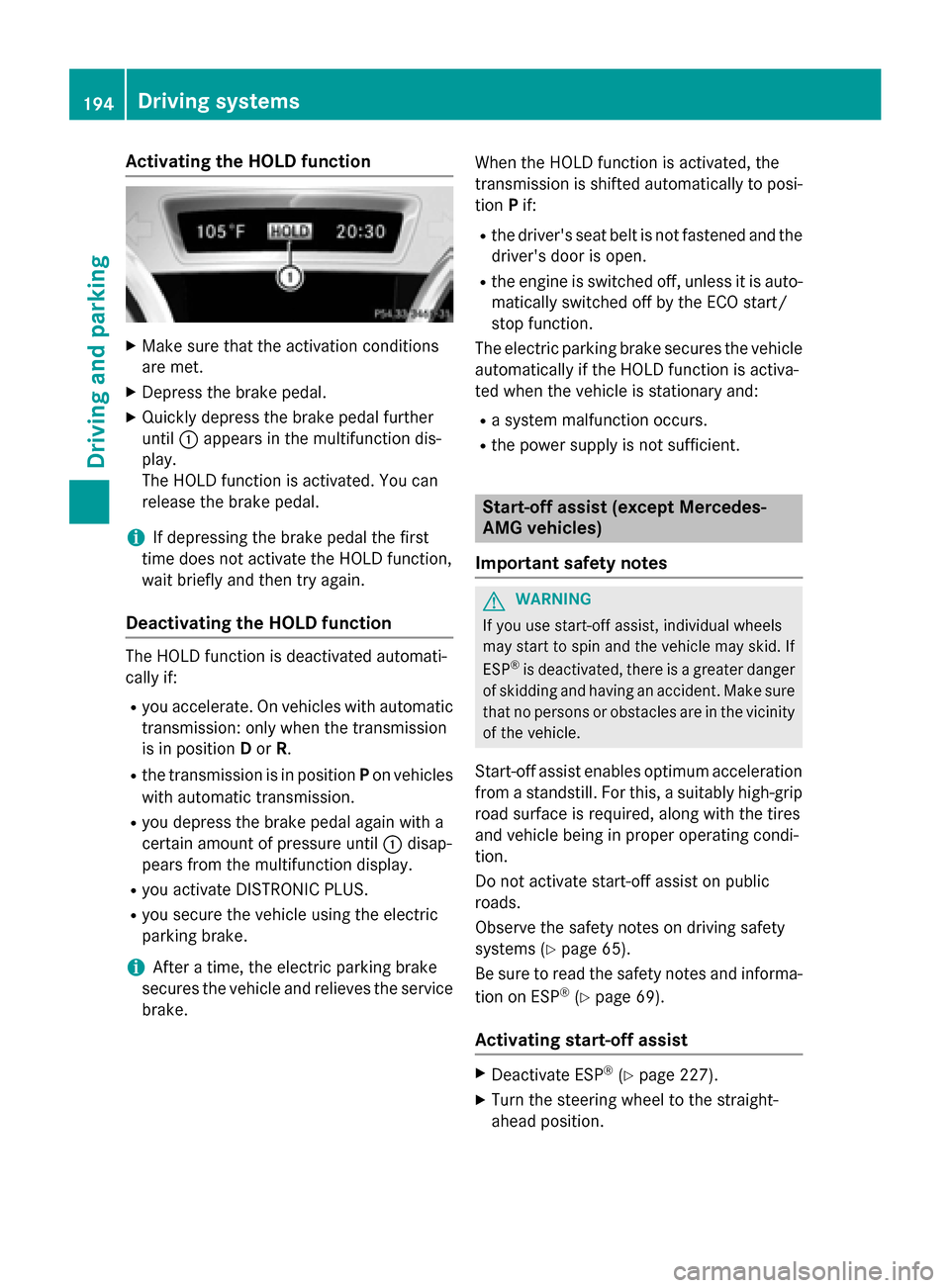
Activating the HOLD function
XMakesur ethat th eactivation condition s
are met .
XDepress th ebrak epedal .
XQuickl ydepress th ebrak epedal further
until :appear sin th emultifunction dis-
play.
The HOLD function is activated. You can
release th ebrak epedal .
iIf depressing th ebrak epedal th efirst
time does no tactivat eth eHOLD function ,
wait briefly and then tr yagain .
Deactivating the HOLD function
The HOLD function is deactivated automati-
callyif:
Ryou accelerate . Onvehicles wit hautomatic
transmission :only when th etransmission
is in position Dor R.
Rth etransmission is in position Pon vehicles
wit hautomatic transmission .
Ryou depress thebrak epedal again wit h a
certain amoun tof pressur euntil :disap -
pear sfrom th emultifunction display.
Ryou activat eDISTRONI CPLUS.
Ryou secure th evehicl eusin gth eelectric
parking brake.
iAfte r atime, th eelectric parking brak e
secures th evehicl eand relieves th eservic e
brake. When th
e HOLD function is activated, th e
transmission is shifte dautomatically to posi-
tion Pif:
Rthedriver' sseat belt is no tfastene dand th e
driver' sdoor is open .
Rtheengin eis switched off ,unless it is auto -
matically switched off by th eECO start/
stop function .
The electric parking brak esecures th evehicl e
automatically if th e HOLD function is activa-
te dwhen th evehicl eis stationary and :
Rasystem malfunction occur s.
Rthepower suppl yis no tsufficient.
Start-off assist (except Mercedes-
AMG vehicles)
Import ant safety notes
GWARNIN G
If you use start-off assist ,individual wheels
may start to spin and th evehicl emay skid. If
ES P
®is deactivated, there is agreate rdanger
of skiddin gand having an accident. Mak esur e
that no person sor obstacles are in th evicinity
of th evehicle.
Start-off assistenables optimum acceleration
from a standstill. Fo rthis, asuitably high-grip
road surfac eis required, alon gwit hth etires
and vehicl ebein gin proper operating condi-
tion .
Do no tactivat e start-off assiston public
road s.
Observ eth esafet ynote son driving safety
systems (
Ypage 65).
Be sure to read th e safetynote sand informa-
tion on ES P
®(Ypage 69).
Activating start-off assist
XDeactivat eES P®(Ypage 227).
XTurn th e steering whee lto th e straight -
ahead position .
194Driving systems
Driving and parking
Page 197 of 390
XDepress the brake pedal firmly with your
left foot and keep the brake pedal
depressed.
XShift the transmission to positionD.
XUse the DYNAMIC SELECT button to select
the Sdrive program (
Ypage 157).
XQuickly depress the accelerator pedal fully.
XTake your foot off the brake, but keep the
accelerator pedal depressed.
The vehicle pulls away at maximum accel-
eration.
iActivate ESP®as soon as the acceleration
process has ended. ESP®will otherwise not
be able to stabilize the vehicle if the vehicle
starts to skid or a wheel starts to spin.
Canceling start-off assist
XRemove your foot from the accelerator
pedal.
XReactivate ESP.
RACE START (AMG vehicles)
Important safety notes
iRACE START must not be used on normal
roads. RACE START must only be activated and used on dedicated road circuits, out-
side of public road use.
iRACE START is only available in
Mercedes‑AMG vehicles.
GWARNING
If you use RACE START, individual tires may
start to spin and the vehicle could skid.
Depending on the selected ESP
®mode, there
is an increased risk of skidding and having an accident. Make sure that no persons, animals
or obstacles are within range of the vehicle.
RACE START enables optimal acceleration
from a standing start. For this, a suitably high-
grip road surface is required, along with the
tires and vehicle being in proper operating
condition.
iObserve the safety notes on driving safety
systems (
Ypage 65).
Be sure to read the safety notes and infor-
mation on ESP
®(Ypage 69).
Conditions for activation
You can activate RACE START if:
Rthe doors, hood and the trunk lid are
closed.
Rthe engine is running and the transmission,
all-wheel drive clutch and the engine are at operating temperature.
Rthe steering wheel is in the straight-ahead
position.
Rthe vehicle is stationary and the brake
pedal is depressed (left foot).
Rthe transmission is in position D.
Rdrive program S,S+ orRACE is selected
(
Ypage 158).
Activating RACE START
XDepress the brake pedal with your left foot
and keep it depressed.
XPull and hold both steering wheel paddle
shifters.
XThe RACE START Confirm: Paddle UP
Cancel: Paddle DOWNmessage appears
in the multifunction display.
XRelease both steering wheel paddle shift-
ers.
iIf the activation conditions are no longer
fulfilled, RACE START is canceled. The
RACE START Not Possible See Opera‐
tor's Manualmessage appears in the
multifunction display.
XTo cancel: pull the left steering wheel pad-
dle shifter (
Ypage 166).
or
XTo confirm: pull the right steering wheel
paddle shifter (
Ypage 166).
The RACE START Available Depress
gas pedalmessage appears in the multi-
function display.
Driving system s195
Driving an d parking
Z