audio MERCEDES-BENZ GLA SUV 2013 Owners Manual
[x] Cancel search | Manufacturer: MERCEDES-BENZ, Model Year: 2013, Model line: GLA SUV, Model: MERCEDES-BENZ GLA SUV 2013Pages: 401, PDF Size: 11.9 MB
Page 8 of 401
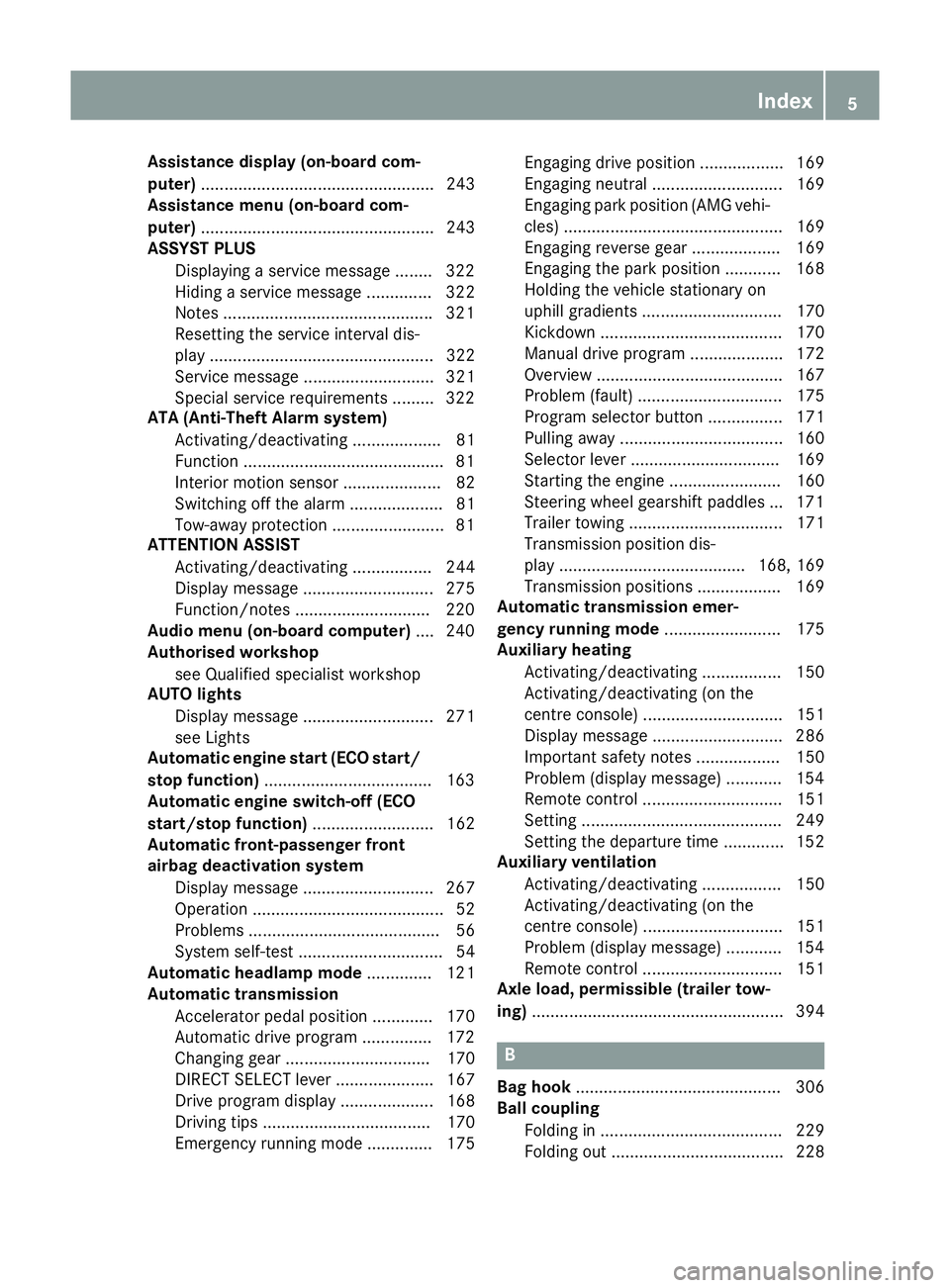
Assistance display (on-board com-
puter)
.................................................. 243
Assistance menu (on-board com-
puter) .................................................. 243
ASSYST PLUS
Displaying a service message ........ 322
Hiding a service message .............. 322
Notes ............................................ .321
Resetting the service interval dis-
play ................................................ 322
Service message ............................ 321
Special service requirements ......... 322
ATA (Anti-Theft Alarm system)
Activating/deactivating ................... 81
Function .......................................... .81
Interior motion sensor .....................82
Switching off the alarm .................... 81
Tow-away protectio n ........................81
ATTENTION ASSIST
Activating/deactivating ................. 244
Display message ............................ 275
Function/notes ............................ .220
Audio menu (on-board computer) .... 240
Authorised workshop
see Qualified specialist workshop
AUTO lights
Display message ............................ 271
see Lights
Automatic engine start (ECO start/
stop function) ................................... .163
Automatic engine switch-off (ECO
start/stop function) .......................... 162
Automatic front-passenger front
airbag deactivation system
Display message ............................ 267
Operation ......................................... 52
Problems ......................................... 56
System self-test ............................... 54
Automatic headlamp mode .............. 121
Automatic transmission
Accelerator pedal position ............. 170
Automatic drive program .............. .172
Changing gear ............................... 170
DIRECT SELECT lever ..................... 167
Drive program displa y.................... 168
Driving tips .................................... 170
Emergency running mode .............. 175 Engaging drive position .................. 169
Engaging neutral ............................ 169
Engaging park position (AMG vehi-
cles) ............................................... 169
Engaging reverse gear ................... 169
Engaging the park position ............ 168
Holding the vehicle stationary on
uphill gradients .............................. 170
Kickdown ....................................... 170
Manual drive progra m.................... 172
Overview ........................................ 167
Problem (fault) ............................... 175
Program selector button ................ 171
Pulling away ................................... 160
Selector lever ................................ 169
Starting the engine ........................ 160
Steering wheel gearshift paddle s... 171
Trailer towing ................................. 171
Transmission position dis-
play ........................................ 168, 169
Transmission positions .................. 169
Automatic transmission emer-
gency running mode ......................... 175
Auxiliary heating
Activating/deactivating ................. 150
Activating/deactivating (on the
centre console ).............................. 151
Display message ............................ 286
Important safety notes .................. 150
Problem (display message) ............ 154
Remote control .............................. 151
Setting ........................................... 249
Setting the departure time ............. 152
Auxiliary ventilation
Activating/deactivating ................. 150
Activating/deactivating (on the
centre console ).............................. 151
Problem (display message) ............ 154
Remote control .............................. 151
Axle load, permissible (trailer tow-
ing) ...................................................... 394 B
Bag hook ............................................ 306
Ball coupling
Folding in ....................................... 229
Folding out ..................................... 228 Index
5
Page 12 of 401
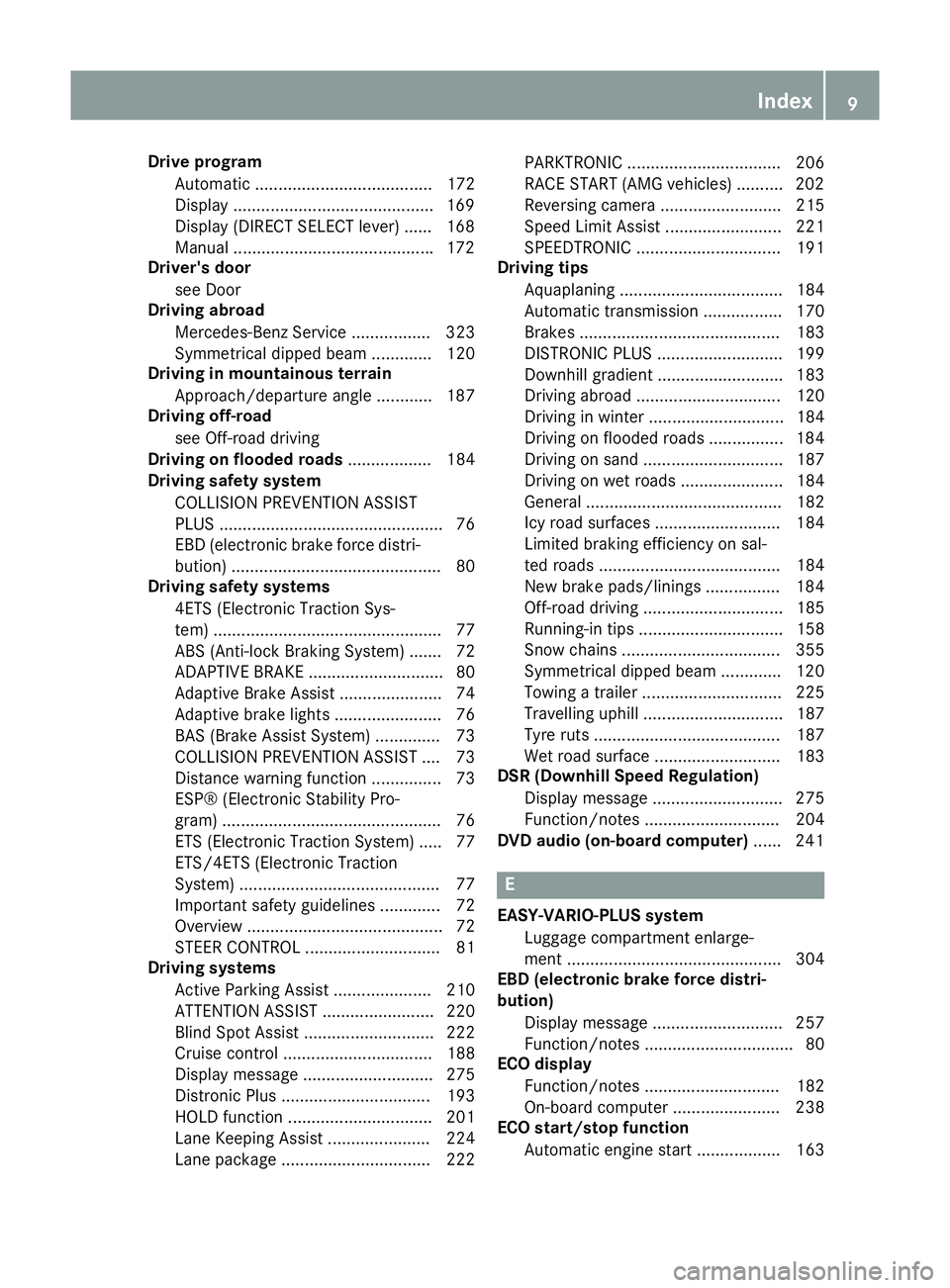
Drive program
Automatic ...................................... 172
Display .......................................... .169
Display (DIRECT SELECT lever) ...... 168
Manual .......................................... .172
Driver's door
see Door
Driving abroad
Mercedes-Benz Service ................. 323
Symmetrical dipped bea m............. 120
Driving in mountainous terrain
Approach/departure angle ............ 187
Driving off-road
see Off-road driving
Driving on flooded roads .................. 184
Driving safety system
COLLISION PREVENTION ASSIST
PLUS ................................................ 76
EBD (electronic brake force distri- bution) ............................................. 80
Driving safety systems
4ETS (Electronic Traction Sys-
tem) ................................................. 77
ABS (Anti-lock Braking System) ....... 72
ADAPTIVE BRAK E............................. 80
Adaptive Brake Assist ...................... 74
Adaptive brake lights ....................... 76
BAS (Brake Assist System) .............. 73
COLLISION PREVENTION ASSIST .... 73
Distance warning function ............... 73
ESP® (Electronic Stability Pro-
gram) ............................................... 76
ETS (Electronic Traction System) ..... 77
ETS/4ETS (Electronic Traction
System) ........................................... 77
Important safety guidelines ............. 72
Overview .......................................... 72
STEER CONTROL ............................. 81
Driving systems
Active Parking Assist ..................... 210
ATTENTION ASSIST ........................ 220
Blind Spot Assist ............................ 222
Cruise control ................................ 188
Display message ............................ 275
Distronic Plus ................................ 193
HOLD function ............................... 201
Lane Keeping Assist ...................... 224
Lane package ................................ 222 PARKTRONIC ................................. 206
RACE START (AMG vehicles) .......... 202
Reversing camera .......................... 215
Speed Limit Assist ......................... 221
SPEEDTRONIC ............................... 191
Driving tips
Aquaplaning ................................... 184
Automatic transmission ................. 170
Brakes ........................................... 183
DISTRONIC PLUS ........................... 199
Downhill gradient ........................... 183
Driving abroad ............................... 120
Driving in winter ............................. 184
Driving on flooded roads ................ 184
Driving on sand .............................. 187
Driving on wet roads ...................... 184
General .......................................... 182
Icy road surfaces ........................... 184
Limited braking efficiency on sal-
ted roads ....................................... 184
New brake pads/linings ................ 184
Off-road driving .............................. 185
Running-in tips ............................... 158
Snow chains .................................. 355
Symmetrical dipped beam ............. 120
Towing a traile r.............................. 225
Travelling uphill .............................. 187
Tyre ruts ........................................ 187
Wet road surface ........................... 183
DSR (Downhill Speed Regulation)
Display message ............................ 275
Function/note s............................. 204
DVD audio (on-board computer) ...... 241 E
EASY-VARIO-PLUS system Luggage compartment enlarge-
ment .............................................. 304
EBD (electronic brake force distri-
bution)
Display message ............................ 257
Function/note s................................ 80
ECO display
Function/note s............................. 182
On-board computer ....................... 238
ECO start/stop function
Automatic engine start .................. 163 Index
9
Page 17 of 401
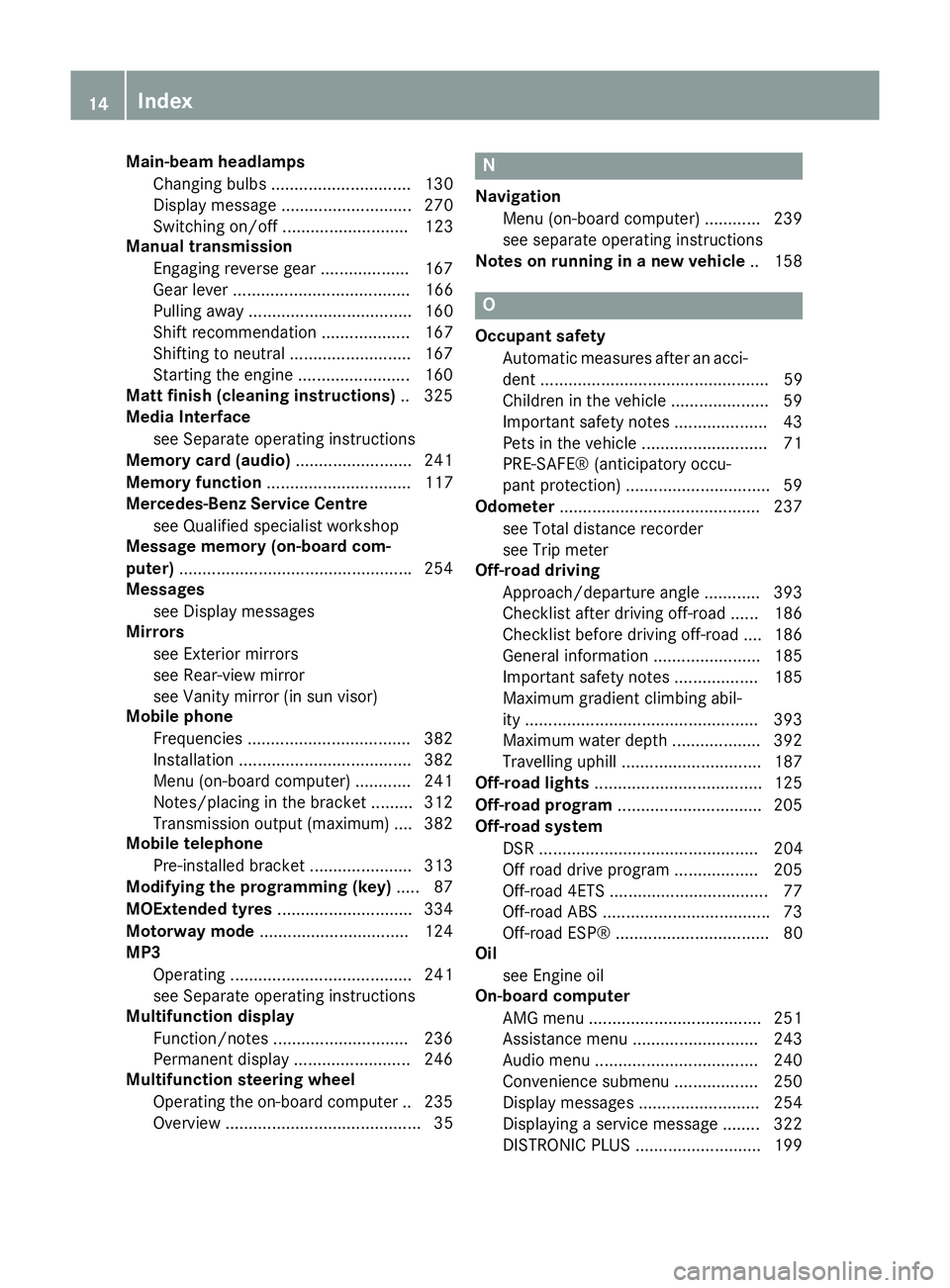
Main-beam headlamps
Changing bulbs .............................. 130
Display message ............................ 270
Switching on/off ........................... 123
Manual transmission
Engaging reverse gear ................... 167
Gear lever ...................................... 166
Pulling away ................................... 160
Shift recommendation ................... 167
Shifting to neutral ......................... .167
Starting the engine ........................ 160
Matt finish (cleaning instructions) .. 325
Media Interface
see Separate operating instructions
Memory card (audio) ......................... 241
Memory function ............................... 117
Mercedes-Benz Service Centre
see Qualified specialist workshop
Message memory (on-board com-
puter) ................................................. .254
Messages
see Display messages
Mirrors
see Exterior mirrors
see Rear-view mirror
see Vanity mirror (in sun visor)
Mobile phone
Frequencies ................................... 382
Installation ..................................... 382
Menu (on-board computer) ............ 241
Notes/placing in the bracket ......... 312
Transmission output (maximum) .... 382
Mobile telephone
Pre-installed bracket ..................... .313
Modifying the programming (key) ..... 87
MOExtended tyres .............................334
Motorway mode ................................ 124
MP3
Operating ....................................... 241
see Separate operating instructions
Multifunction display
Function/notes ............................ .236
Permanent display ......................... 246
Multifunction steering wheel
Operating the on-board computer .. 235
Overview .......................................... 35 N
Navigation Menu (on-board computer) ............ 239
see separate operating instructions
Notes on running in a new vehicle .. 158 O
Occupant safety Automatic measures after an acci-
dent ................................................. 59
Children in the vehicle ..................... 59
Important safety notes .................... 43
Pets in the vehicle ........................... 71
PRE-SAFE® (anticipatory occu-
pant protection) ............................... 59
Odometer .......................................... .237
see Total distance recorder
see Trip meter
Off-road driving
Approach/departure angle ............ 393
Checklist after driving off-road ...... 186
Checklist before driving off-road .... 186
General information ....................... 185
Important safety notes .................. 185
Maximum gradient climbing abil-
ity ................................................. .393
Maximum water depth ................... 392
Travelling uphill .............................. 187
Off-road lights ................................... .125
Off-road program ............................... 205
Off-road system
DSR ............................................... 204
Off road drive program .................. 205
Off-road 4ETS .................................. 77
Off-road ABS ................................... .73
Off-road ESP® ................................. 80
Oil
see Engine oil
On-board computer
AMG menu .....................................2 51
Assistance menu ........................... 243
Audio menu ................................... 240
Convenience submenu .................. 250
Display messages .......................... 254
Displaying a service message ....... .322
DISTRONIC PLUS ........................... 199 14
Index
Page 26 of 401
Do not install accessories such as audio
systems in these areas. Do not carry out
repairs or welding. You could impair the
operating efficiency of the restraint sys-
tems.
Have accessories retrofitted at a qualified
specialist workshop.
You could jeopardise the operating safety of
your vehicle if you use parts, tyres and wheels
as well as accessories relevant to safety
which have not been approved by Mercedes. This could lead to malfunctions in safety-rel-
evant systems, e.g. the brake system. Use
only genuine Mercedes-Benz parts or parts of
equal quality. Only use tyres, wheels and
accessories that have been specifically
approved for your vehicle.
Mercedes-Benz tests genuine parts and con-
version parts and accessories that have been specifically approved for your vehicle for their
reliability, safety and suitability. Despite
ongoing market research, Mercedes-Benz is
unable to assess other parts. Mercedes-Benz therefore accepts no responsibility for the
use of such parts in Mercedes-Benz vehicles,even if they have been officially approved or
independently approved by a testing centre.
In Germany, certain parts are only officially
approved for installation or modification if
they comply with legal requirements. This
also applies to some other countries. All gen-
uine Mercedes-Benz parts meet the approval
requirements. The use of non-approved parts may invalidate the vehicle's general operating
permit.
This is the case:
R if they cause a change of the vehicle type
from that for which the vehicle's general
operating permit was granted
R if other road users could be endangered
R if the emission or noise levels are adversely
affected
Always specify the vehicle identification num- ber (VIN) when ordering genuine Mercedes-
Benz parts (Y page 384). Owner's Manual
Vehicle equipment
This Owner's Manual describes all models
and all standard and optional equipment
available for your vehicle at the time of pub-
lication of the Owner's Manual. Country-spe- cific differences are possible. Note that your
vehicle may not be fitted with all features
described. This is also the case for systems
and functions relevant to safety. Therefore,
the equipment on your vehicle may differ from
that in the descriptions and illustrations.
The original purchase contract documenta-
tion for your vehicle contains a list of all of the
systems in your vehicle.
Should you have any questions concerning
equipment and operation, please consult a
Mercedes-Benz Service Centre.
The Owner's Manual and Service Booklet are important documents and should kept in the
vehicle. Operating safety
Important safety notes
G
WARNING
If you do not have the prescribed service/
maintenance work or necessary repairs car-
ried out, this could result in malfunctions or
system failures. There is a risk of an accident. Always have the prescribed service/mainte-
nance work as well as necessary repairs car-
ried out at a qualified specialist workshop. G
WARNING
If you switch off the ignition while driving,
safety-relevant functions are only available
with limitations, or not at all. This could affect, for example, the power steering and the brake
boosting effect. You will require considerably
more effort to steer and brake. There is a risk of an accident.
Do not switch off the ignition while driving. Introduction
23 Z
Page 38 of 401
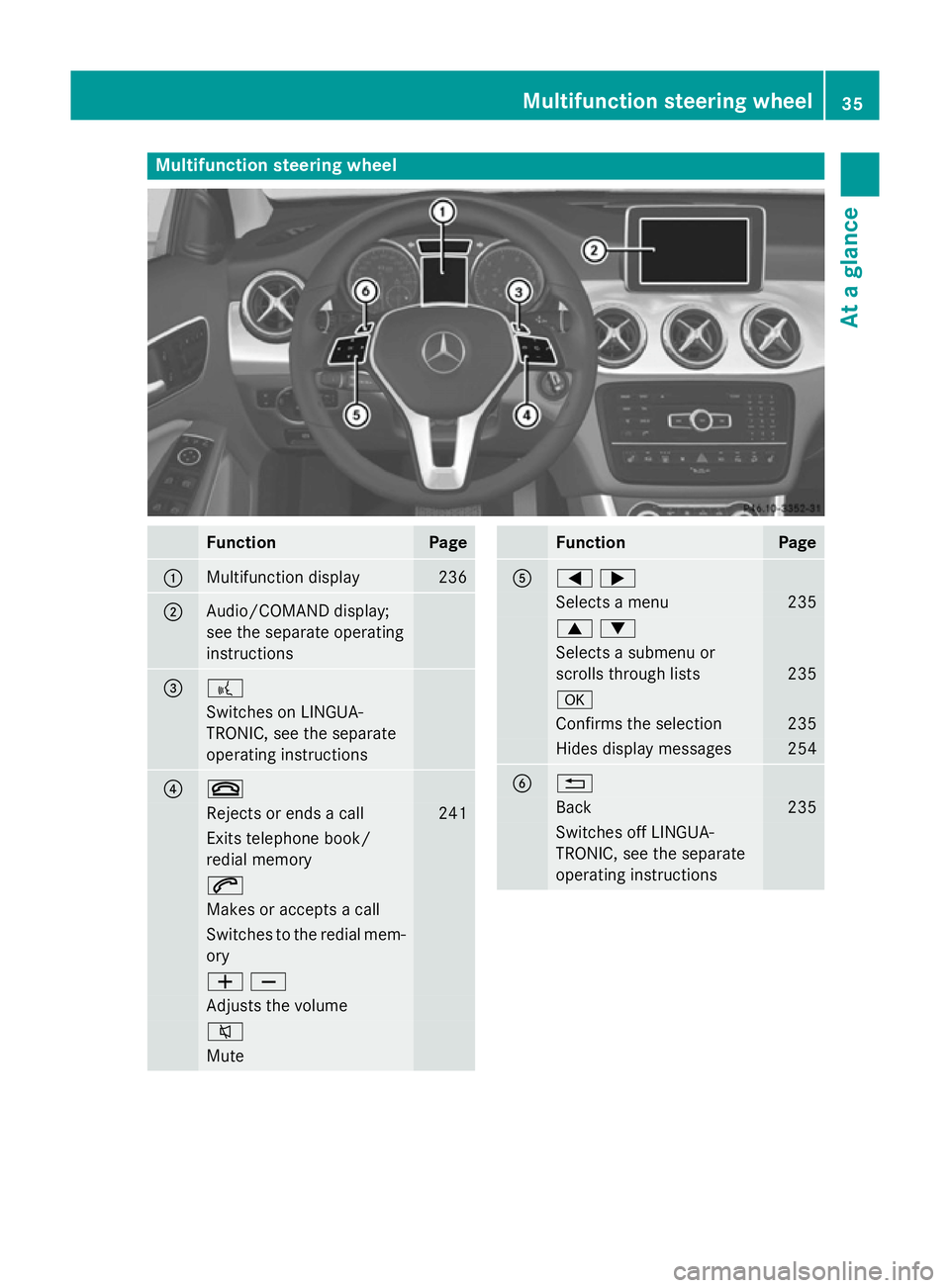
Multifunction steering wheel
Function Page
:
Multifunction display 236
;
Audio/COMAND display;
see the separate operating
instructions = ?
Switches on LINGUA-
TRONIC, see the separate
operating instructions ? ~
Rejects or ends a call 241
Exits telephone book/
redial memory
6
Makes or accepts a call
Switches to the redial mem-
ory WX
Adjusts the volume
8
Mute Function Page
A
=;
Selects a menu 235
9:
Selects a submenu or
scrolls through lists
235
a
Confirms the selection 235
Hides display messages 254
B %
Back 235
Switches off LINGUA-
TRONIC, see the separate
operating instructions Multifunction steering wheel
35At a glance
Page 39 of 401
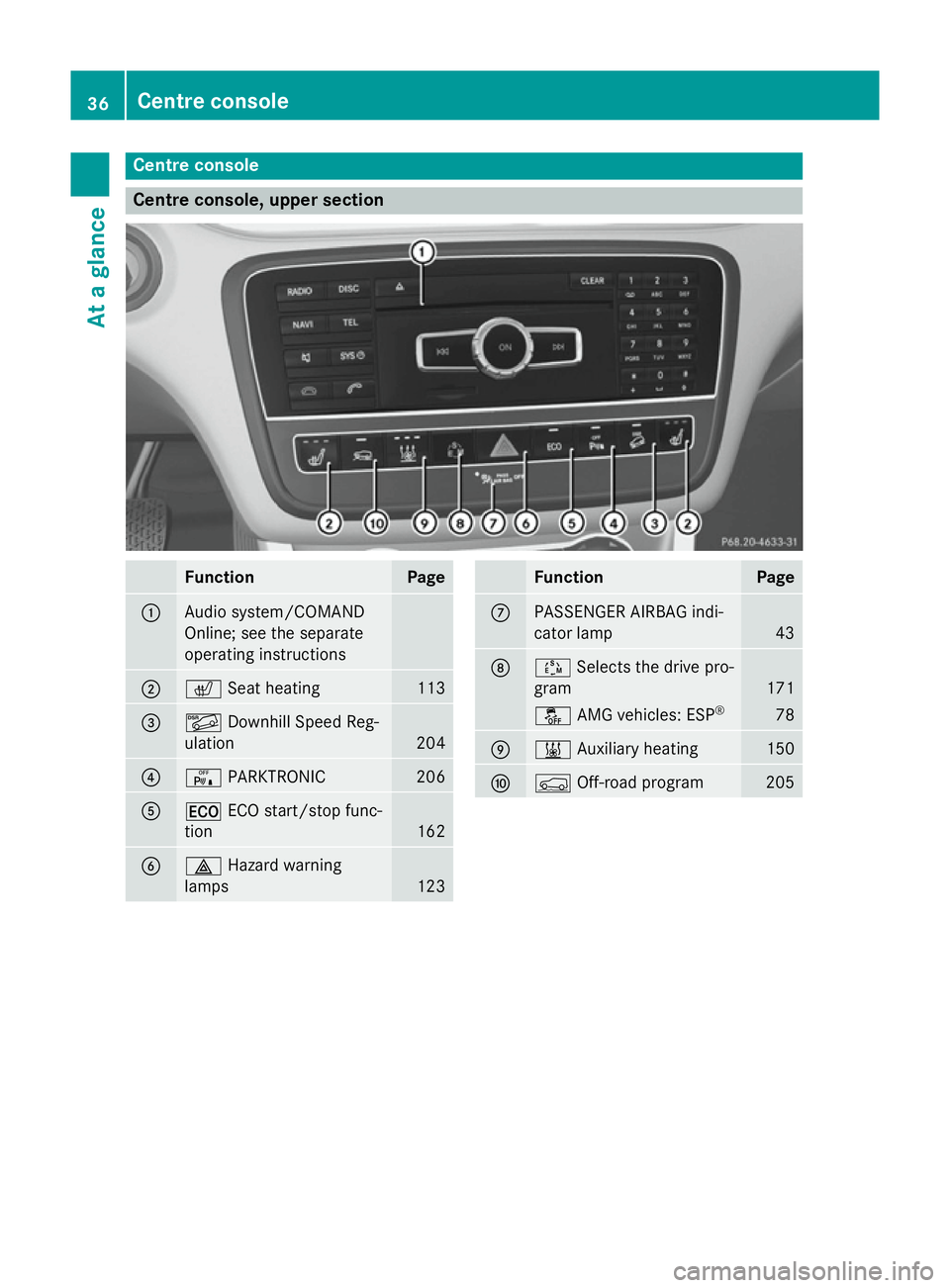
Centre console
Centre console, upper section
Function Page
:
Audio system/COMAND
Online; see the separate
operating instructions
;
c
Seat heating 113
=
Ã
Downhill Speed Reg-
ulation 204
?
c
PARKTRONIC 206
A
¤
ECO start/stop func-
tion 162
B
£
Hazard warning
lamps 123 Function Page
C
PASSENGER AIRBAG indi-
cator lamp
43
D
Ú
Selects the drive pro-
gram 171
å
AMG vehicles: ESP ® 78
E
&
Auxiliary heating 150
F
Ç
Off-road program 20536
Centre consoleAt a glance
Page 40 of 401
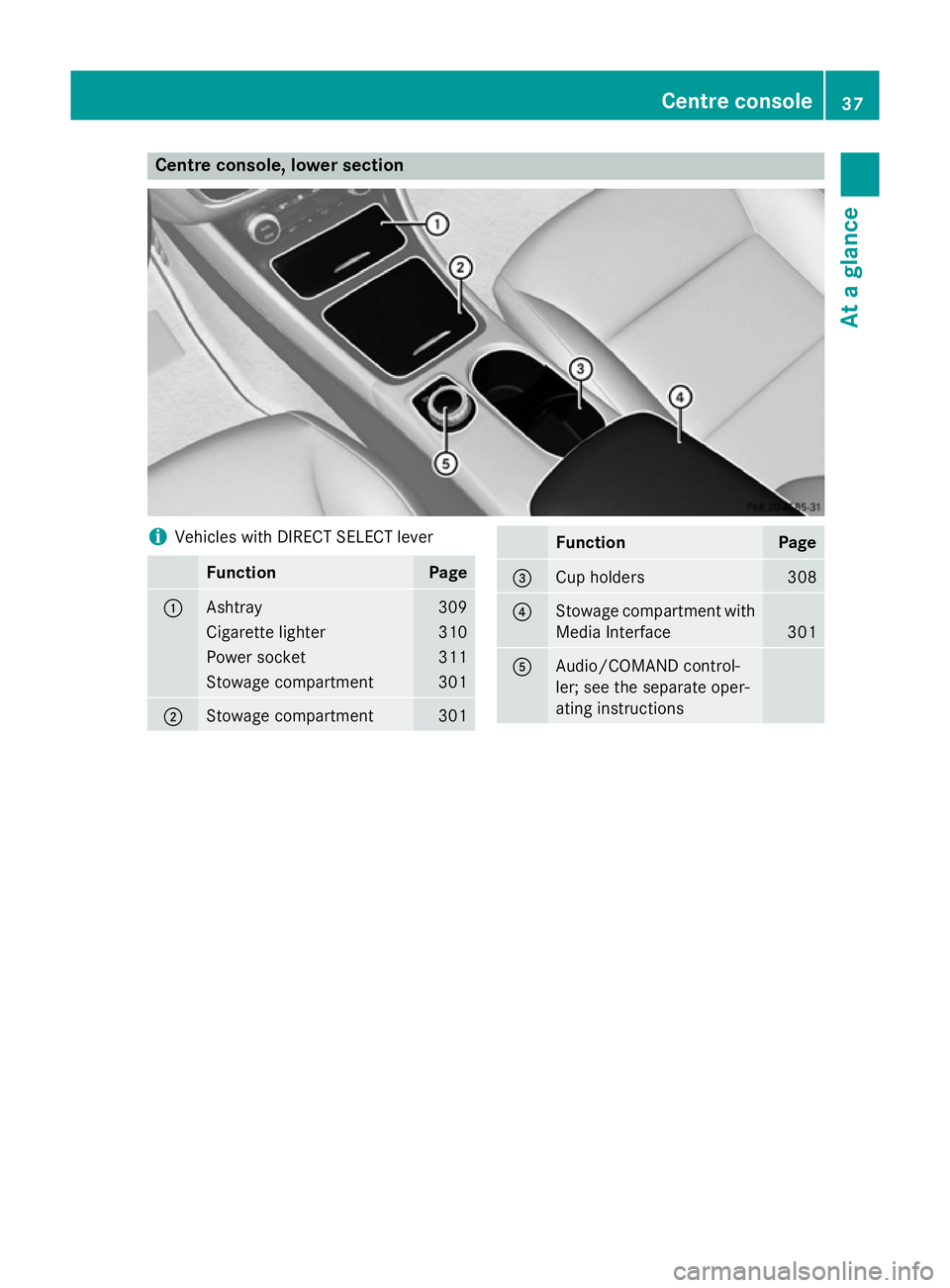
Centre console, lower section
i
Vehicles with DIRECT SELECT lever Function Page
:
Ashtray 309
Cigarette lighter 310
Power socket 311
Stowage compartment 301
;
Stowage compartment 301 Function Page
=
Cup holders 308
?
Stowage compartment with
Media Interface 301
A
Audio/COMAND control-
ler; see the separate oper-
ating instructions Centre console
37At a glance
Page 155 of 401
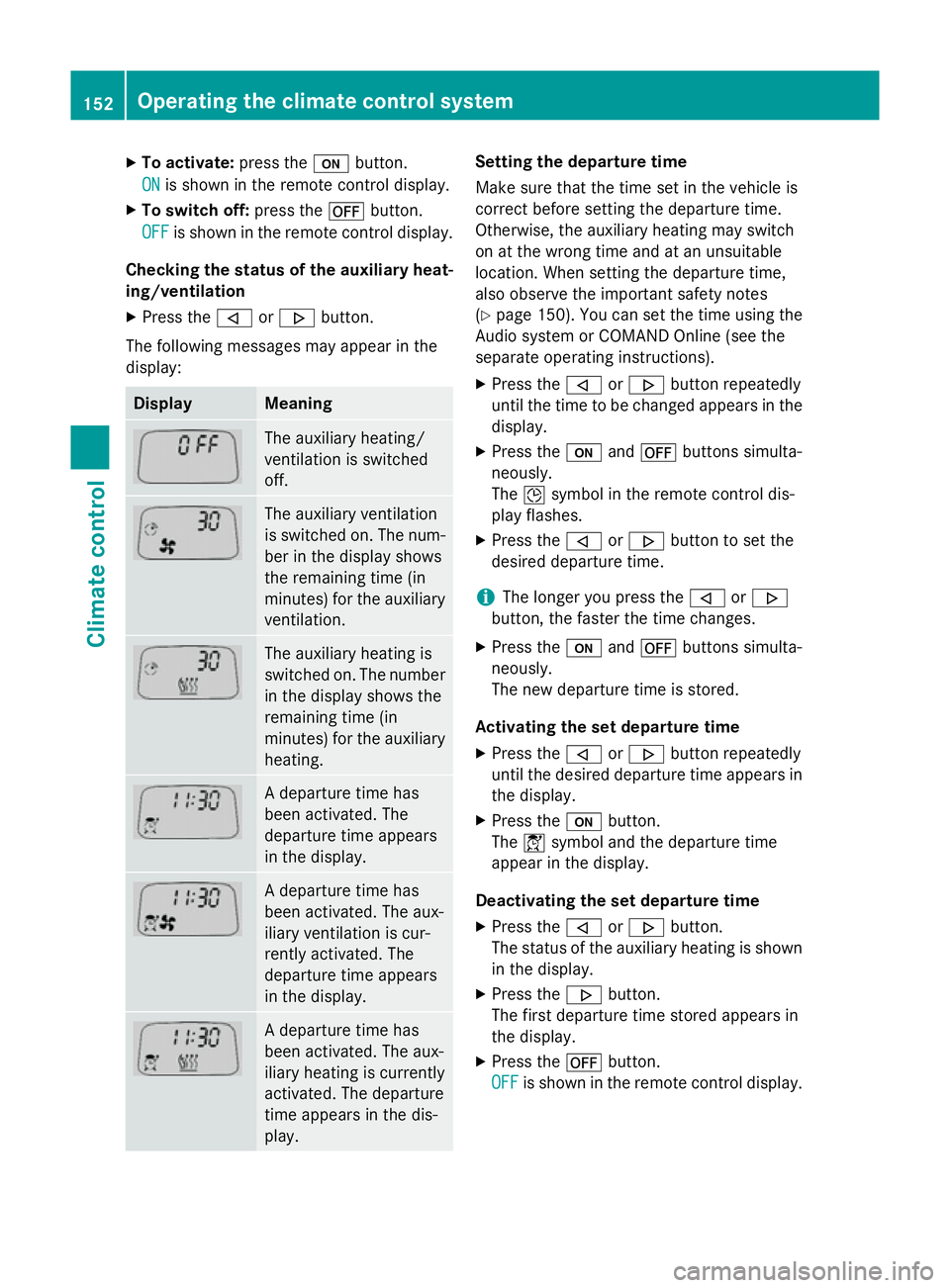
X
To activate: press theubutton.
ON
ON is shown in the remote control display.
X To switch off: press the^button.
OFF
OFF is shown in the remote control display.
Checking the status of the auxiliary heat- ing/ventilation
X Press the ,or. button.
The following messages may appear in the
display: Display Meaning
The auxiliary heating/
ventilation is switched
off.
The auxiliary ventilation
is switched on. The num-
ber in the display shows
the remaining time (in
minutes) for the auxiliary
ventilation. The auxiliary heating is
switched on. The number
in the display shows the
remaining time (in
minutes) for the auxiliary heating. A departure time has
been activated. The
departure time appears
in the display.
A departure time has
been activated. The aux-
iliary ventilation is cur-
rently activated. The
departure time appears
in the display.
A departure time has
been activated. The aux-
iliary heating is currently
activated. The departure
time appears in the dis-
play. Setting the departure time
Make sure that the time set in the vehicle is
correct before setting the departure time.
Otherwise, the auxiliary heating may switch
on at the wrong time and at an unsuitable
location. When setting the departure time,
also observe the important safety notes
(Y
page 150). You can set the time using the
Audio system or COMAND Online (see the
separate operating instructions).
X Press the ,or. button repeatedly
until the time to be changed appears in the
display.
X Press the uand^ buttons simulta-
neously.
The Îsymbol in the remote control dis-
play flashes.
X Press the ,or. button to set the
desired departure time.
i The longer you press the
,or.
button, the faster the time changes.
X Press the uand^ buttons simulta-
neously.
The new departure time is stored.
Activating the set departure time X Press the ,or. button repeatedly
until the desired departure time appears in
the display.
X Press the ubutton.
The Ísymbol and the departure time
appear in the display.
Deactivating the set departure time
X Press the ,or. button.
The status of the auxiliary heating is shown in the display.
X Press the .button.
The first departure time stored appears in
the display.
X Press the ^button.
OFF OFF is shown in the remote control display. 152
Operating the climate control systemClimate control
Page 218 of 401
X
Drive forwards and reverse as prompted by
the PARKTRONIC warning displays, several
times if necessary.
X Vehicles with manual transmission:
stop, at the latest when PARKTRONIC
sounds the continuous warning tone.
Once you have exited the parking space com- pletely, the steering wheel is moved to the
straight-ahead position. You hear a tone and
the Park Assist switched off Park Assist switched off message
appears in the multifunction display. You will
then have to steer and merge into traffic on
your own. PARKTRONIC is still available. You
can take over the steering before the vehicle has exited the parking space completely. This
is useful, for example when you recognise
that it is already possible to pull out of the
parking space.
Cancelling Active Parking Assist You can cancel Active Parking Assist at any
time.
X Stop the movement of the multifunction
steering wheel or steer yourself.
Active Parking Assist will be cancelled at
once. The Park Assist cancelled Park Assist cancelled mes-
sage appears in the multifunction display.
or
X Press the PARKTRONIC button on the
centre console (Y page 208).
PARKTRONIC is switched off and Active
Parking Assist is immediately cancelled.
The Park Assist cancelled
Park Assist cancelled message
appears in the multifunction display.
Active Parking Assist is cancelled automati-
cally if:
R the electric parking brake is applied
R transmission position Pis selected
R parking using Active Parking Assist is no
longer possible
R you are driving faster than 10 km/h
R a wheel spins and ESP ®
intervenes or fails.
The ÷ warning lamp lights up in the
instrument cluster. A warning tone sounds. The parking symbol
disappears and the multifunction display
shows the Park Assist cancelled
Park Assist cancelled mes-
sage.
When Active Parking Assist is cancelled, you
must steer again yourself.
Vehicles with automatic transmission: if a
system malfunction occurs, the vehicle is
braked to a standstill. To drive on, depress the
accelerator again.
Towing a trailer For vehicles with a trailer tow hitch, the min-
imum required length for parking spaces is
slightly increased.
If you have attached a trailer to your vehicle,
you should not use Active Parking Assist.
Once the electrical connection is established between your vehicle and the trailer, Active
Parking Assist is no longer available. PARK-
TRONIC is deactivated for the rear area. Reversing camera
General notes Reversing camera
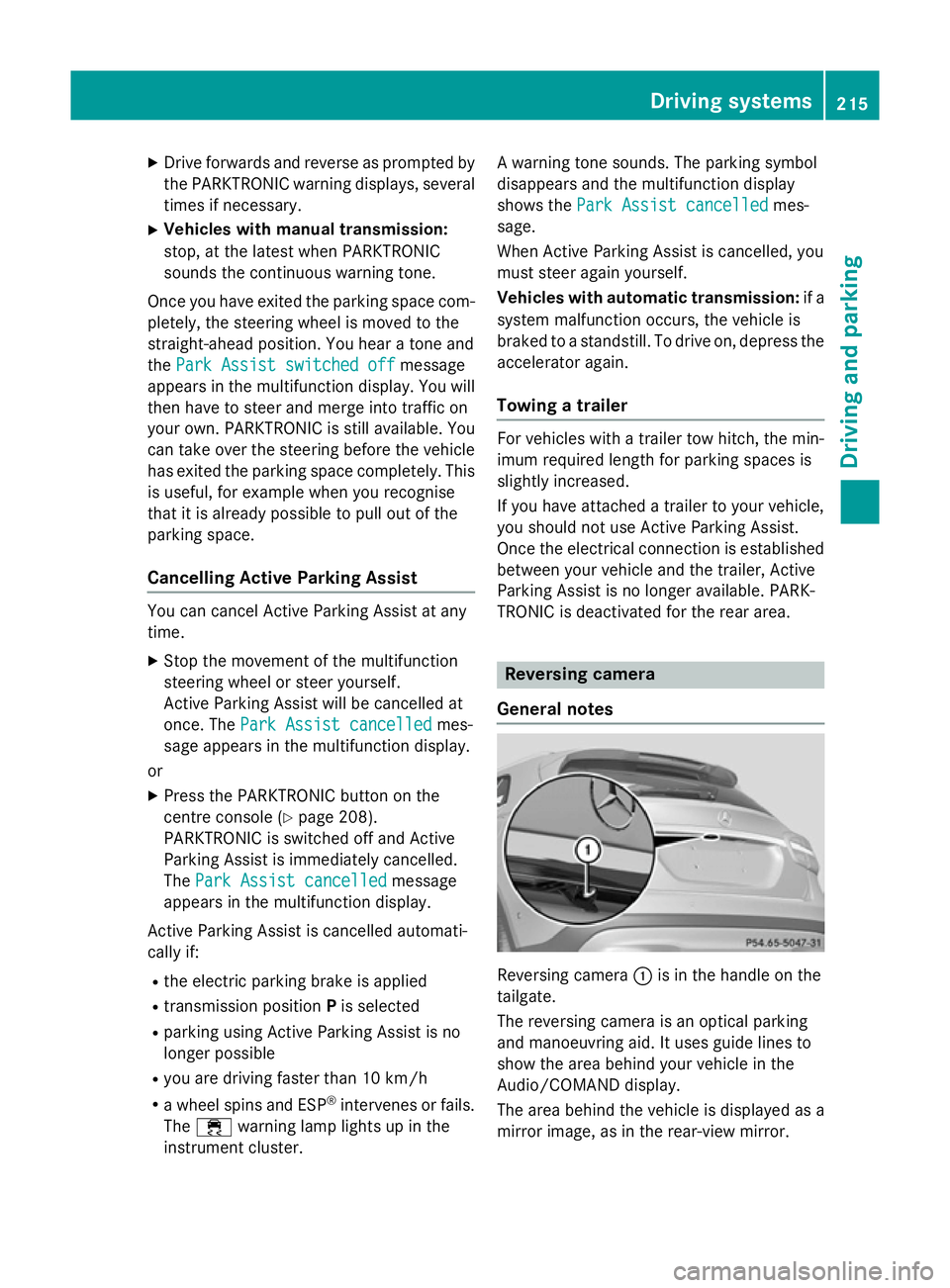
:is in the handle on the
tailgate.
The reversing camera is an optical parking
and manoeuvring aid. It uses guide lines to
show the area behind your vehicle in the
Audio/COMAND display.
The area behind the vehicle is displayed as a
mirror image, as in the rear-view mirror. Driving systems
215Driving and parking Z
Page 219 of 401
The reversing camera is protected from rain-
drops and dust by means of a flap. When the
reversing camera is activated, this flap opens. Only once the manoeuvring process has been completed and the reversing camera has
switched off does the flap close again. For
technical reasons, the flap may remain open
briefly after the reversing camera has been
deactivated. If you switch off the engine, the
flap will also close.
i The text of messages shown in the
COMAND display depends on the language
setting. The following are examples of
reversing camera messages in the
COMAND display.
Observe the notes on cleaning (Y page 327).
Important safety notes The reversing camera is only an aid. It is not a
substitute for your attention to the immediate
surroundings. The responsibility for safe
manoeuvring and parking remains with you.
Make sure that there are no persons, animals
or objects in range while manoeuvring and
parking.
Under the following circumstances, the
reversing camera will not function, or will
function in a limited manner:
R if the tailgate is open
R in heavy rain, snow or fog
R at night or in very dark places
R if the camera is exposed to very bright light
R if the area is lit by fluorescent light or LED
lighting (the display may flicker)
R if there is a sudden change in temperature,
e.g. when driving into a heated garage in
winter
R if the camera lens is dirty or obstructed
R if the rear of your vehicle is damaged. In this
case, have the camera position and setting checked at a qualified specialist workshop.
The field of vision and other functions of the
reversing camera may be restricted due to additional accessories on the rear of the vehi-
cle (e.g. licence plate holder, bicycle rack).
Activating/deactivating the reversing
camera X
To activate: make sure that the key is in
position 2in the ignition lock.
X Make sure that the "Activation by R gear"
function is selected in the Audio system/
COMAND Online; see the separate operat-
ing instructions.
X Engage reverse gear.
Guide lines are used to show the area
behind the vehicle in the Audio/COMAND
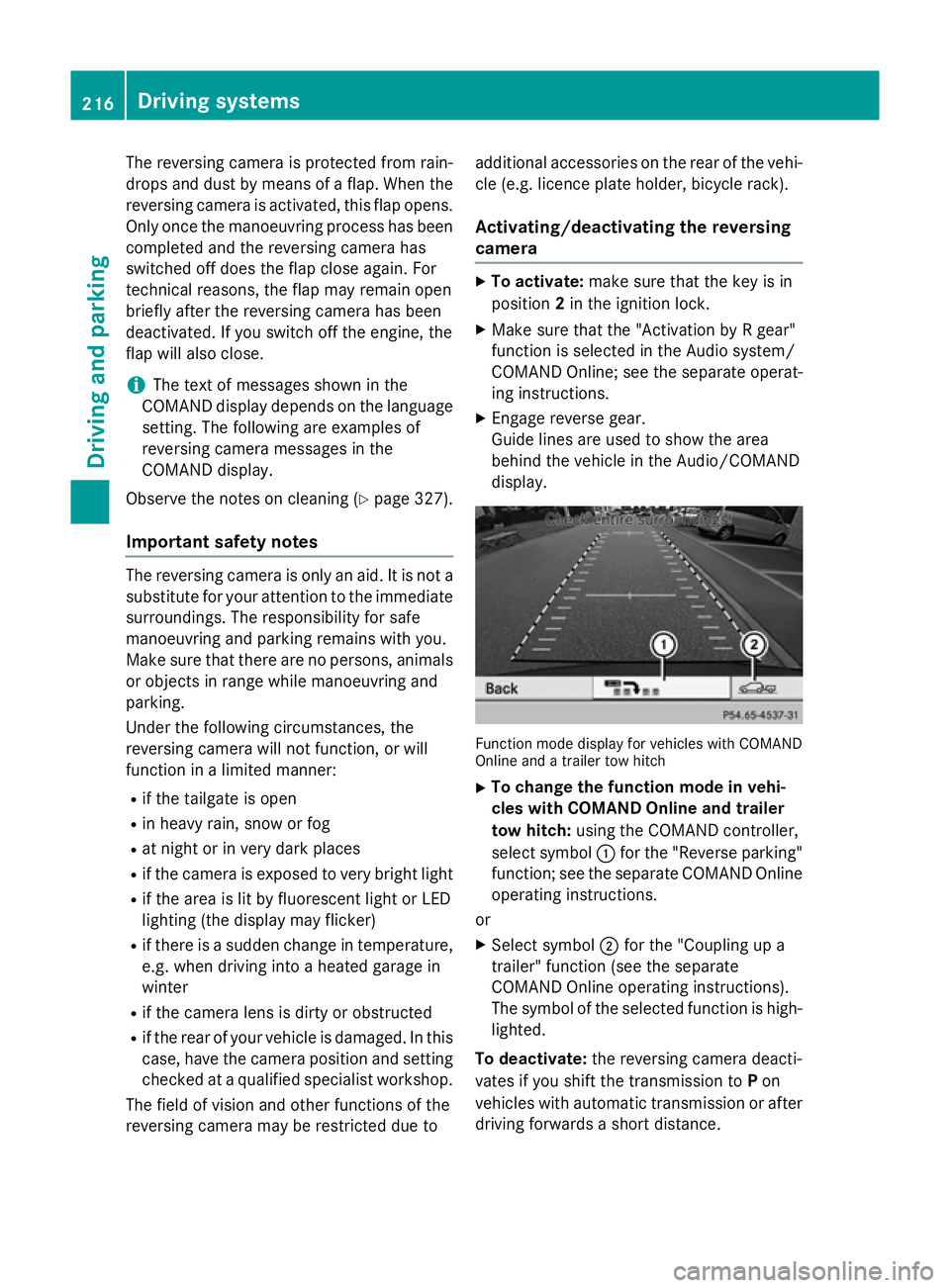
display. Function mode display for vehicles with COMAND
Online and a trailer tow hitch
X To change the function mode in vehi-
cles with COMAND Online and trailer
tow hitch: using the COMAND controller,
select symbol :for the "Reverse parking"
function; see the separate COMAND Online
operating instructions.
or
X Select symbol ;for the "Coupling up a
trailer" function (see the separate
COMAND Online operating instructions).
The symbol of the selected function is high-
lighted.
To deactivate: the reversing camera deacti-
vates if you shift the transmission to Pon
vehicles with automatic transmission or after driving forwards a short distance. 216
Driving systemsDriving and parking