brake MERCEDES-BENZ GLA SUV 2020 Workshop Manual
[x] Cancel search | Manufacturer: MERCEDES-BENZ, Model Year: 2020, Model line: GLA SUV, Model: MERCEDES-BENZ GLA SUV 2020Pages: 346, PDF Size: 51.22 MB
Page 176 of 346
Problems
withParking AssistPARKTRONIC Problem
Possible
causes/co nsequences and0050 0050
Solutions Only
thered segments
in the Parking Assist
PARKTRONIC warning
display sare lit.You also
hear awarning tonefor
approximately twosec-
onds.
Parking Assist
PARKTRONIC isthen
deactivated andthe
indicator lamponthe
PARKTRONIC button
lights up. Parking
AssistPARKTRONIC hasmalfunction edand hasbeen deac-
tivated.
X Ifproblems persist,haveParking AssistPARKTRONIC checkedat
a quali fiedspecialist workshop. Only
thered segments
in the Parking Assist
PARKTRONIC warning
display sare lit.Parking
Assist PARKTRONIC is
then deactivated. The
Parking AssistPARKTRONIC sensorsaredirty orthere isinter-
ferenc e.
X Clean theParking AssistPARKTRONIC sensors(Ypage 283).
X Switch theignition backon. The
problem maybecaused byan extern alsource ofradio orultra-
sound waves.
X Check tosee ifParking AssistPARKTRONIC worksatadifferent
location. Active
Parking Assist
General notes Act
ive Parking Assistisan electron icparking
aid with ultrasound. Itmeasures theroad on
both sides ofthe vehicle. Aparking symbol
indicates asuitable parkingspace.Active
steering intervention andbrake application
can assist youduring parking andwhen exiting
a parking space.Youcanalso stilluse Parking
Assist PARKTRONIC (Ypage 171).
Import antsafety notes Act
ive Parking Assistismerely anaid. Itis not
a replacement foryour atten tiontoyour imme-
diate surroundings. Youarealwa ysresponsi-
ble forsafe maneuvering, parkingandexiting a
parking space.Makesurethatthere areno
persons, animalsorobject sin the maneuver-
ing area when youaremaneuvering orparking.
When Parking AssistPARKTRONIC isdeactiva-
ted, Active Parking Assistisalso unavaila ble. G
WARNING
While parking orpulli ngout ofaparking
space, thevehicle swingsoutand candrive
onto areas ofthe oncomin glane. Thiscould
cause youtocollide withother roadusers or
object s.There isarisk ofan accident.
Pay atten tiontoother roadusers orobject s.
Stop thevehicle ifnecessary orcancel the
Act ive Parking Assistparking procedure.
! If
they cannot beavoided, driveover
obstacles suchascurbs slowly andatan
obtuse angle.Otherwise, youmay damage
the wheels ortires.
Act ive Parking Assistmaypossibly indicate
parking spaceswhicharenot suitable forpark-
ing, forexample:
R where parking orstopping isprohibited
R in front ofdriveways orentr ances andexits
R on unsuitable surfaces 174
Driving
systemsDriving andparking
Page 178 of 346
R
tha tar epa rallel to the directi onoftra vel
and atleas t39.5 in(1.0 m)longer thanyo ur
veh icle
R at right ang lesto the directi onoftrav eland
at leas t39.5 in(1.0 m)wid ertha nyo ur veh i-
cle
Wh endrivin gat spee ds below 19 mph
(30 km/h ),yo uwi llse epa rki ng symbo l0044 as
a sta tus indicator inthe instrument cluste r.
Wh enapa rki ng space hasbe en detecte d,an
ar row towards the right or the left also
ap pe ars. By default, Activ ePa rki ng Assi stonl y
di sp lays parki ng space son the front-
pa sse nge rsi de .Pa rki ng space son the driver 's
si de aredisp laye das soo nas the turnsigna l
on the driver 'sside isacti vated .Wh enparki ng
on the driver 'sside ,thi smu strem ain acti vated
unti lyo uconfi rmthe useof Activ ePa rki ng
Assi stby pre ssing the 0076 button onthe mul-
tifu nctio nste ering wheel.The syste mautoma t-
ica lly de term ineswh eth erthe parki ng space is
pa rallel or atright-a nglestothe directi onof
tra vel .
A pa rki ng space isdisp laye dwh ile yo uar e
dri vin gpa st it, and untilyo uar eap pro xim ately
50 ft(15 m)awa yfrom it.
Pa rki ng G
WA
RNI NG
If yo uleav ethe driver 'sseat wh en the vehi-
cle isonl ybe ing braked bythe Parki ng Pack-
ag ewi th rea rvi ew camer a,itcou ldrol l
aw ay:
R ifthe reisama lfunc tionin the syste mor
in the voltag esu pp ly
R ifthe electr icalsy ste minthe enginecom -
pa rtme nt,the batter yor the fuse sar e
tam pered with
R ifthe batter yis disco nnecte d
R ifthe vehicleis ac cel era ted ,e.g .by aveh i-
cle occu pant
Th ere isarisk ofan accid ent.
Bef ore leav ing the vehicle, alwa yssecu re it
ag ainst rolling away.
i If
Acti veParki ng Ass istde tects obsta cles,
Acti veParki ng Ass istbra kes automa tically
wh ile the vehicleis pa rki ng. Youar eres pon-
si bl e for braking ingo od tim e. X
Stop thevehiclewh en the parki ng space
sy mbo lsho wsthe desired parki ng spacein
the instrumen tclu ste r.
X Shi ftthe transmi ssion topositio n005E.
Th eSta rtParkingAss ist? Sta
rtParkingAss ist?Yes :OK Yes
:OK No: No:
0038 message appe arson the multifu ncti on
di sp lay.
X To canc elthe proc edure:pressthe 0038
bu tton onthe multifu ncti onsteering wheel
or pullaw ay.
or X To
park using Activ ePark ingAs sist:
pre ssthe 0076 button onthe multifu ncti on
ste ering wheel.
Th ePar kingAss ist Active Acceler‐ Par
kingAss ist Active Acceler‐
ate andBrake ate
andBrakeObs erveSur roundings Obs
erveSur roundings
mes sage appe arson the multifu ncti ondis-
pl ay .
X Let goofthe multifu ncti onsteering wheel.
X Ba ck up the vehicle, be ing readytobra keat
al ltim es.Wh enbackin gup ,dri ve atasp ee d
be low ap pro xim ately6mph (10km/h ).Oth -
erw ise, Acti veParki ng Ass istwi llbe can-
cel ed.
Acti veParki ng Ass istbra kes thevehicleto a
sta nds tillwh en the vehicleap pro ache sthe
rea rbo rde rof the parki ng space.
Ma neu vering maybe req uired intig ht park-
ing spaces.
Th ePar kingAss ist Active Select Par
kingAss ist Active Select
DOb serveSurroundings DOb
serveSurroundings message appe ars
on the multifu ncti ondisp lay.
X Shi ftthe transmi ssion topositio n005B while
the vehicleis sta tionar y.
Acti veParki ng Ass istim med iatel yste ers in
the otherdirec tion.
Th ePar kingAss ist Active Acceler‐ Par
kingAss ist Active Acceler‐
ate andBrake ate
andBrakeObs erveSur roundings Obs
erveSur roundings
mes sage appe arson the multifu ncti ondis-
pl ay .
i Yo
uwi llac hieve thebest res ults by waiting
for the steering pro ced ureto com plete
be for epu lling away.
X Dri veforwa rds and berea dytobra keatall
tim es.
Acti veParki ng Ass istbra kes thevehicleto a
sta nds tillwh en the vehicleap pro ache sthe
fro ntborde rof the parki ng space.
Ma neu vering maybe req uired intig ht park-
ing spaces. 17
6 Dr
ivi ng system sDrivi ng andparki ng
Page 179 of 346
The
Parking AssistActiveSelectR Parking
AssistActiveSelectR
Observe Surrounding s Observe
Surrounding smessage appearson
the multifunct iondisplay .
As soon asthe parking procedure iscomplete,
the Active Parking AssistFinished Active
Parking AssistFinished mes-
sage appears andawarning tonesounds. The
vehicle isnow parked.
The vehicle iskept station arywithout the
driver having todepress thebrake pedal. The
braking effectiscanceled whenyoudepress
the accelerator pedal.
Act ive Parking Assistnolonger supports you
with steerin ginter ventions andbrake applica-
tions. When Active Parking Assistisfinished,
you must steer andbrake againyourself.
Act ive Parking Assistisstill availabl e.
Parking tips:
R The way your vehicle ispositioned inthe
parking spaceafterparking isdependent on
various factors.These include theposition
and shape ofthe vehicles parkedinfront
and behind itand thecondit ionsofthe loca-
tion. Itmay bethe case thatActive Parking
Assist guides youtoofarinto aparking
space, ornot farenough intoit.Insome
cases, itmay alsolead youacross oront o
the curb. Ifnecessary, canceltheparking
procedure withActive Parking Assist.
R You canalso preselect transmission position
005B. The vehicle redirect sand does notdrive
as far into theparking space.Should the
trans mission changetakeplace tooearly,
the parking procedure iscanceled. Asensi-
ble parking position cannolonger beach-
ieved fromthisposition.
Exiting apar king space In
order thatActive Parking Assistcansupport
you when exitingthe parking space:
R you need tohave parked usingActive Park-
ing Assist .
R the border ofthe parking spacemustbe
high enough atthe front andtherear. A
curb stoneis too small, forexample.
R the border ofthe parking spacemustnotbe
too wide, asthe position ofthe vehicle must
not exceed anangle of45° tothe start ing
position asitis maneuvered intotheparking
space.
R amaneuvering distanceofat least 3.3ft
(1.0 m)must beavailabl e. Act
ive Parking Assistcanonly assist youwith
exitin gaparking spaceifyou have parked the
vehicle parallel tothe direction oftravel using
Act ive Parking Assist.
i If
Act ive Parking Assistdetectsobstacles,
Act ive Parking Assistbrakes automatically
while thevehicle isexitin gthe parking
space. Youareresponsible forbraking in
good time.
X Start theengine.
X Release theelectric parking brake.
X Switch onthe turn signal inthe direction
you willdrive outofthe parking space.
X Shift thetrans mission toposition 005Bor005E.
The Start Parking Assist? Start
Parking Assist?Yes:OK Yes:
OKNo: No:
0038 message appearsonthe multifunct ion
display .
X To cancel theprocedur e:press the0038
button onthe multifunct ionsteerin gwheel
or pull away .
or X To
exit apar king space usingActive
Park ingAssist: pressthe0076 button on
the multifunct ionsteerin gwheel.
The Parking AssistActiveAcceler‐ Parking
AssistActiveAcceler‐
ate andBrake ate
andBrake Observe Surrounding s Observe
Surrounding s
message appearsonthe multifunct iondis-
play.
X Let goofthe multifunct ionsteerin gwheel.
X Pull away ,being ready tobrake atall times.
Do not exceed amaximum speedofapprox-
imately 6mph (10km/ h)when exitinga
park ingspac e.Otherwis e,Ac tivePark ing
As sist willbecan cele d.
X Dep endingonthemess ageoras requir ed,
shif tth etransm ission toposit ion005Bor005E.
Ac tivePark ingAssist imme diatelysteers in
th eoth erdirec tion.The Park ingAssist Park
ingAssist
Acti veAcce lerateand Brake Acti
veAcce lerateand BrakeObse rve Obse
rve
Surr oundings Surr
oundings messageappears onthe
mult ifunction display.
i You
willachie vethebest result sby waitin g
for thest eerin gproc edure tocom plete
befo repulling away.
If you back upafteract ivat ion, thest eerin g
wheel ismov edtothest raight -aheadposi-
tio n.
X Dr ive forwards andreverse asprom ptedby
th eAc tivePark ingAssist warn ingdisplays,
seve raltim esifnec essar y. Drivin
gsyst ems
177Driving andparking Z
Page 180 of 346
Once
youhave exited theparking spacecom-
pletely, thesteering wheelismoved tothe
straight-ahead position.Youhear atone and
the Active Parking AssistFinished Active
Parking AssistFinished mes-
sage appea rson the multifunction display.You
will then have tosteer andmerge intotraffic
on your own. Active Parking Assistisstill avail -
able. Youcantake overthesteering beforethe
vehicle hasexited theparking spacecom-
pletely. Thisisuseful ,for example whenyou
recognize thatitis alrea dypossible topull out
of the parking space.
Cance lingActive Parking Assist X
Stop themovement ofthe multifunction
steering wheelorsteer yoursel f.
Act ive Parking Assistwillbecanceled at
once. TheActive Parking AssistCan‐ Active
Parking AssistCan‐
celed celed
message appearsinthe multifunction
displa y.
or X Press thePARKTRONIC button
(Y page 173).
Act ive Parking Assistisswitched offand
Act ive Parking Assistisimmediately can-
celed. TheActive Parking AssistCan‐ Active
Parking AssistCan‐
celed celed
message appearsinthe multifunction
displa y.
Act ive Parking Assistiscanceled automaticall y
if:
R the electric parking brakeisengaged
R transmission position005Disselected
R parking usingActive Parking Assistisno
longer possible
R you aredriving fasterthan6mph (10km/h )
R awheel spins,ESP®
intervenes orfails. In
such cases the00E5 warning lamplights up
in the instrument cluster
A warning tonesounds. Theparking symbol
disapp earsandthemultifunction display
shows theActive Parking AssistCan‐ Active
Parking AssistCan‐
celed celed
message.
When Active Parking Assistiscanceled, you
must steer andbrake againyoursel f.
If asystem malfunction occurs,thevehicle is
braked toastandstill. Todrive on,depress the
accelerator again. Rear
view camera
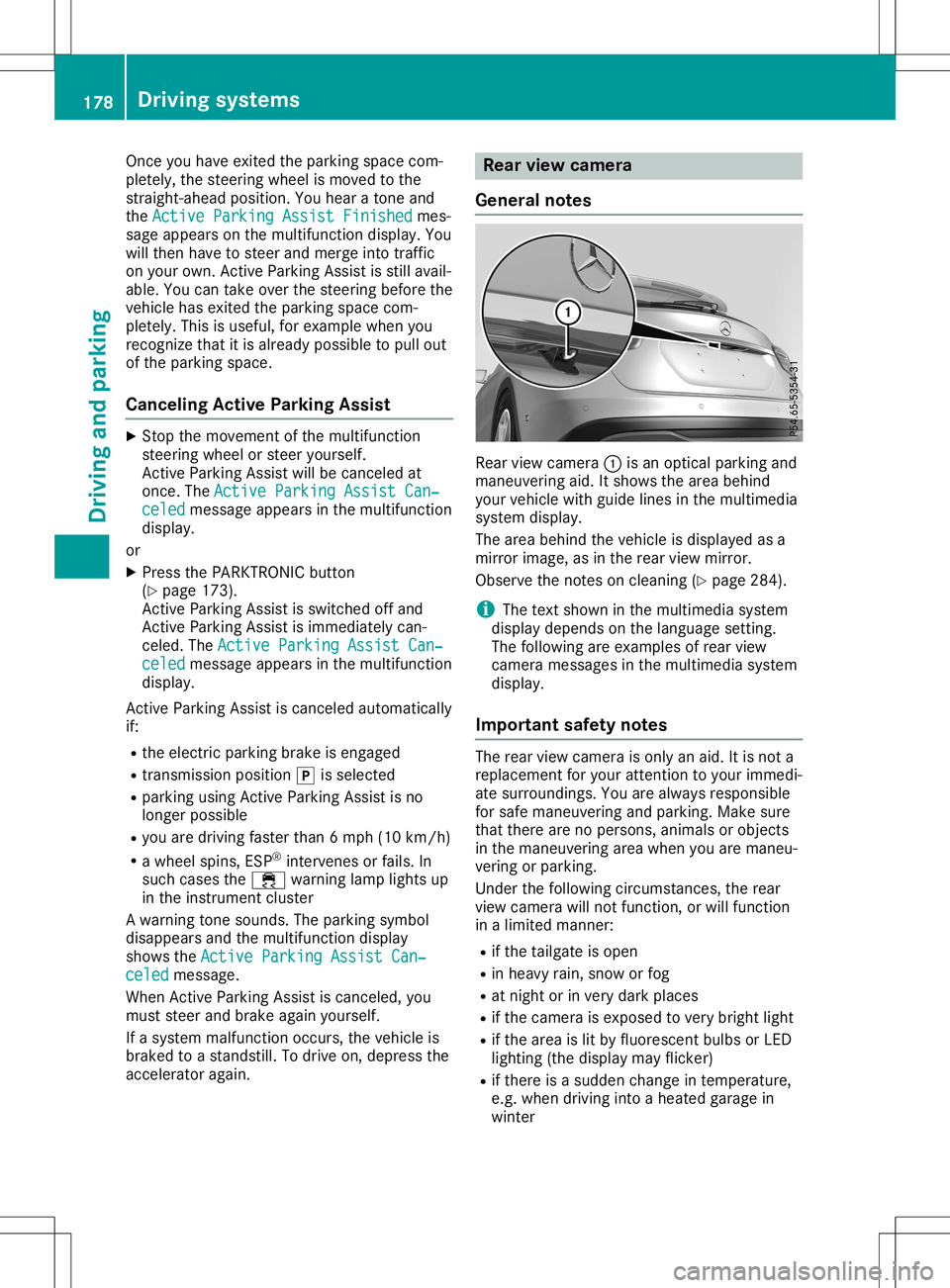
General notes Rear
viewcamera 0043isan optical parking and
maneuvering aid.Itshows thearea behind
your vehicle withguide linesinthe multimedia
system display.
The area behind thevehicle isdispla yedasa
mirror image, asinthe rear view mirror.
Observe thenotes oncleaning (Ypage 284).
i The
text shown inthe multimedia system
displa ydepends onthe langua gesetting.
The followi ngare examples ofrear view
camera messages inthe multimedia system
displa y.
Importa ntsafety notes The
rear view camera isonly anaid. Itis not a
replacement foryour attent iontoyour immedi-
ate surroundings. Youarealwa ysresponsible
for safe maneuvering andparking. Makesure
that there arenopersons, animalsorobjects
in the maneuvering areawhen youaremaneu-
vering orparking.
Under thefollowi ngcircumstances, therear
view camera willnotfunction, orwill function
in alimited manner:
R ifthe tailgate isopen
R in heavy rain,snow orfog
R at night orinvery dark places
R ifthe camera isexposed tovery bright light
R ifthe area islit by fluorescent bulbsorLED
lighting (thedispla ymay flicker)
R ifthere isasudden changeintemperature,
e.g. when driving intoaheated garagein
winter 178
Driving
systemsDriving andparking
Page 189 of 346
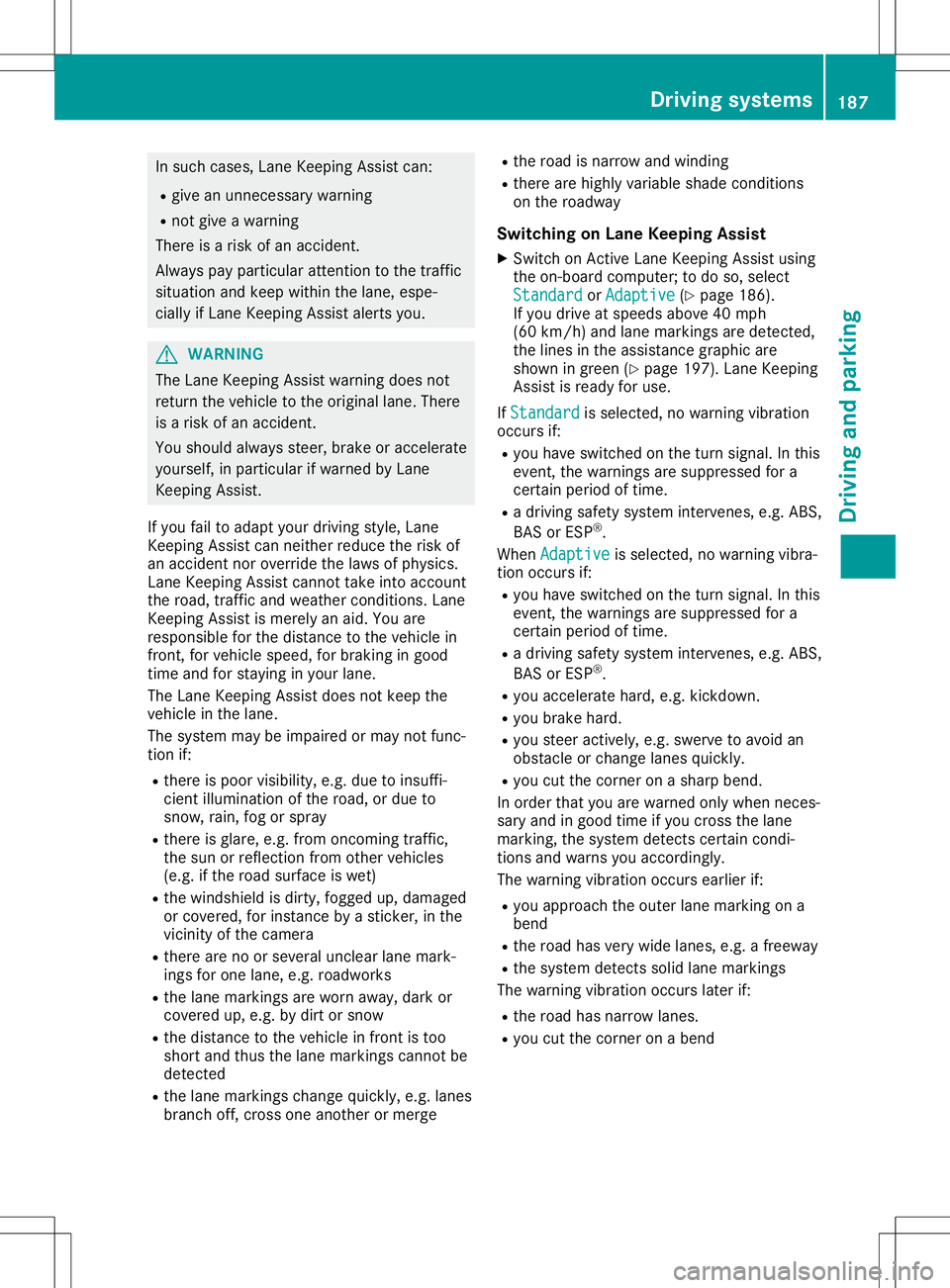
In
such cases, LaneKeepi ngAssist can:
R give anunnecessary warning
R not give awarning
There isarisk ofan accident.
Alway spay particul arattention tothe traffic
situa tionandkeep within thelane, espe-
ciall yif Lane Keepi ngAssist alerts you . G
WARNING
The Lane Keepi ngAssist warning doesnot
return thevehicle tothe origina llane. There
is arisk ofan accident.
You shoul dalw ays steer, brakeoraccelera te
you rself, inparticul arifwarned byLane
Keepi ngAssist.
If you failtoada ptyou rdriving style,Lane
Keepi ngAssist canneither reducetherisk of
an accident noroverride thelawsof phys ics.
Lane Keepi ngAssist cannot takeintoaccount
the road, traffic andweather conditions. Lane
Keepi ngAssist ismerely anaid.You are
responsib lefor the distance tothe vehicle in
front, forvehicle speed,for braking ingood
time andforstayi nginyou rlane.
The Lane Keepi ngAssist doesnotkeep the
vehicle inthe lane.
The system maybeimpa iredormay notfunc-
tion if:
R there ispoor visibility,e.g. due toinsuffi-
cient illuminatio nof the road, ordue to
snow, rain,fogorspray
R there isglare ,e.g. from oncoming traffic,
the sun orreflection fromother vehicle s
(e.g. ifthe road surface iswet)
R the windshi eldisdirty, fogged up,dama ged
or covered, forinstance byasticker, inthe
vicinity ofthe camera
R there arenoorseveral unclearlane mark-
ings forone lane, e.g.roadw orks
R the lane markings areworn away,dark or
covered up,e.g. bydirt orsnow
R the distance tothe vehicle infront istoo
short andthus thelane markings cannotbe
detected
R the lane markings changequickly, e.g.lanes
branch off,cross oneanother ormerge R
the road isnarrow andwindi ng
R there arehighl yvaria bleshade conditions
on the roadw ay
Swi tching onLane Keeping Assist
X Switch onActive LaneKeepi ngAssist using
the on-board computer; todo so, select
Standard Standard
orAdaptive Adaptive
(Ypage 186).
If you drive atspeed sabove 40mph
(60 km/h) andlane markings aredetected,
the lines inthe assis tance graphi care
shown ingreen (Ypage 197). LaneKeepi ng
Assist isready foruse.
If Standard Standard
isselected, nowarning vibration
occurs if:
R you have switched onthe turn signal .In this
event, thewarnings aresupp ressed fora
certain periodoftime.
R adriving safetysystem intervenes, e.g.ABS,
BAS orESP ®
.
When Adaptive Adaptive
isselected, nowarning vibra-
tion occurs if:
R you have switched onthe turn signal .In this
event, thewarnings aresupp ressed fora
certain periodoftime.
R adriving safetysystem intervenes, e.g.ABS,
BAS orESP ®
.
R you accelera tehard, e.g.kickdown.
R you brake hard.
R you steer actively ,e.g. swerve toavoid an
obstacle orchange lanesquickly.
R you cutthe corner onasharp bend.
In order thatyouarewarned onlywhen neces-
sary andingood timeifyou cross thelane
marking, thesystem detects certaincondi-
tions andwarns youaccordingly .
The warning vibrationoccurs earlierif:
R you appro achtheouter lanemarking ona
bend
R the road hasvery widelanes, e.g.afreewa y
R the system detects solidlanemarkings
The warning vibrationoccurs laterif:
R the road hasnarrow lanes.
R you cutthe corner onabend Drivi
ngsystems
187Drivingand parking Z
Page 207 of 346
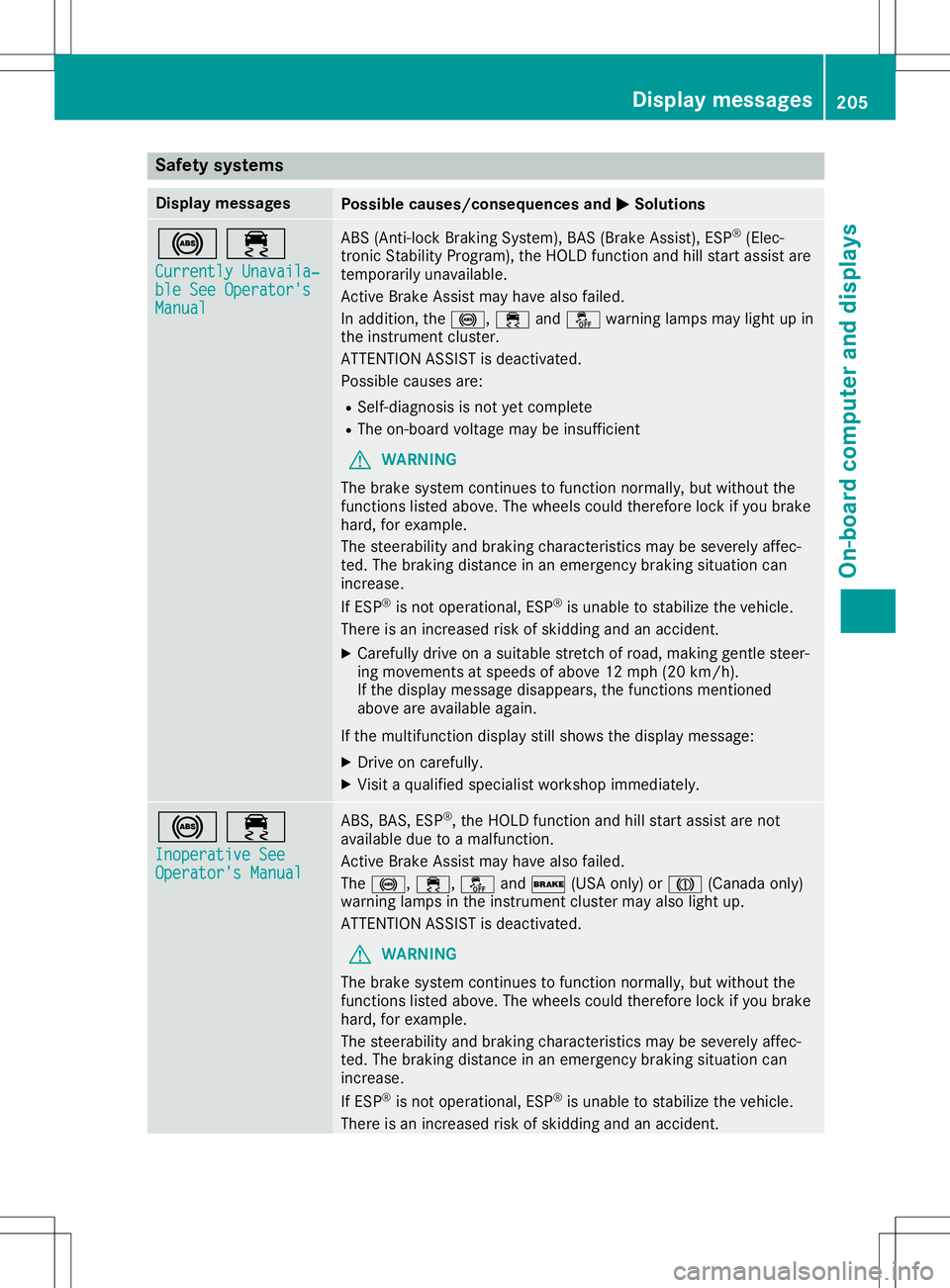
Safety
systems Display
messages Possible
causes/co nsequences and0050 0050
Solutions 002500E5
Currently Unavaila‐ Currently
Unavaila‐
ble SeeOperator's ble
SeeOperator's
Manual Manual ABS
(Anti- lockBraking System), BAS(Brake Assist), ESP®
(Elec-
tronic Stability Program), theHOLD function andhillstart assist are
temporarily unavailable.
Act ive Brake Assist mayhave alsofailed .
In addition, the0025, 00E5and00BB warning lampsmaylight upin
the instrument cluster.
ATTENTION ASSISTisdeactivated.
Possible causesare:
R Self-diagnosis isnot yetcomplete
R The on-board voltagemaybeinsufficient
G WARNING
The brake system continues tofunction normally, butwithout the
functions listedabove. Thewheels couldtherefore lockifyou brake
hard, forexample.
The steerabili tyand braking characteristics maybeseverely affec-
ted. Thebraking distance inan emergency brakingsituation can
increase.
If ESP ®
is not operational, ESP®
is unable tostabilize thevehicle.
There isan increased riskofskidding andanaccident.
X Carefu llydrive onasuitabl estretc hof road, making gentlesteer-
ing movements atspeeds ofabove 12mph (20km/h).
If the displa ymessage disappears,thefunctions mentioned
above areavail able again.
If the multifunction displaystill shows thedispla ymessage:
X Drive oncarefully .
X Visit aqual ified speciali stworkshop immediately . 002500E5
Inoperative See Inoperative
See
Operator's Manual Operator's
Manual ABS,
BAS,ESP®
,the HOLD function andhillstart assist arenot
avail able duetoamalfunction.
Act ive Brake Assist mayhave alsofailed .
The 0025, 00E5,00BBand0027 (USAonly)or004D (Canad aonly)
warning lampsinthe instrument clustermayalsolight up.
ATTENTION ASSISTisdeactivated.
G WARNING
The brake system continues tofunction normally, butwithout the
functions listedabove. Thewheels couldtherefore lockifyou brake
hard, forexample.
The steerabili tyand braking characteristics maybeseverely affec-
ted. Thebraking distance inan emergency brakingsituation can
increase.
If ESP ®
is not operational, ESP®
is unable tostabilize thevehicle.
There isan increased riskofskidding andanaccident. Dis
play messages
205On-boardcomp uter anddisplays Z
Page 208 of 346
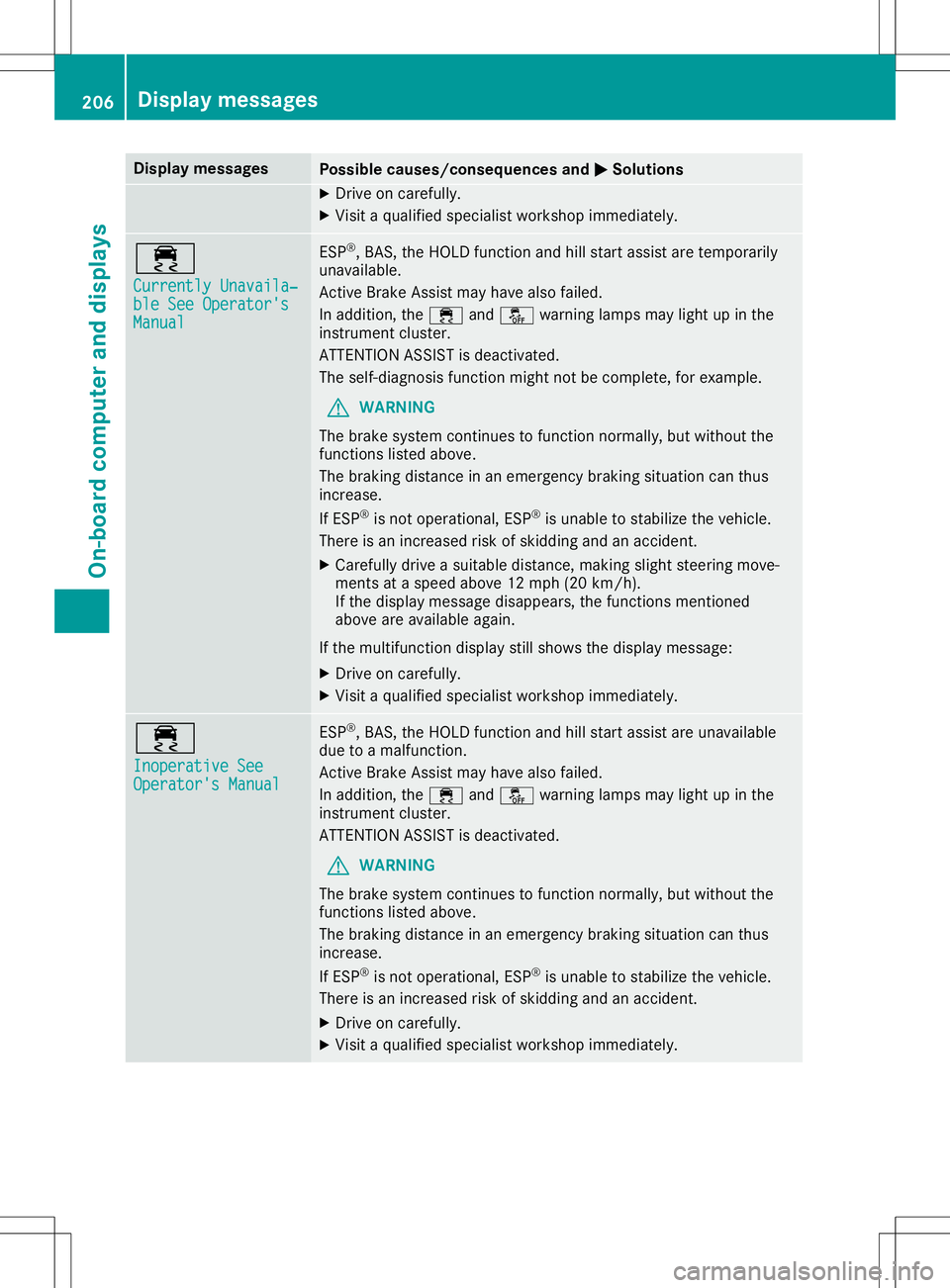
Disp
laymes sages Poss
iblecauses/co nsequences and 0050 0050
Solu tions X
Dr ive oncar eful ly.
X Vis itaqualif iedspecialistwor kshop immediat ely. 00E5
Cur rently Unavaila‐ Cur
rently Unavaila‐
ble SeeOperator' s ble
SeeOperator' s
Man ual Man
ual ES
P®
,BA S,theHO LD function and hillstart assi stare tempo rarily
unav ailable .
Ac tive Brake Assis tmay havealso failed.
In addit ion,th e00E5 and00BB warninglamp smay lightup inthe
ins trumen tclus ter.
AT TENTI ON ASSIST isdeac tivat ed.
The self-diagn osis function mightnotbe compl ete, for exampl e.
G WAR
NING
The brak esyst emcontinu estofun ction norm ally, butwithout the
fun ction slist ed abov e.
The brak ingdist ancein an eme rgencybrak ingsituati oncan thus
inc reas e.
If ES P®
is no toper ational, ESP®
is unab leto stabiliz eth eveh icle.
The reisan increas edriskof skiddin gand anacc iden t.
X Caref ullydrive asuit able distance,mak ingslightsteer ing mov e-
men tsat aspe edabov e12 mph (20km/ h).
If the displ aymessage disappea rs,the functions mentioned
above areavai lableaga in.
If the multifu nctiondisplaystill shows thedispl aymessag e:
X Drive oncareful ly.
X Visit aqua lifiedspecia listworkshop immediately. 00E5
Inoperative See Inoperative
See
Operator's Manual Operator's
Manual ESP
®
,BAS, theHOLD function andhillstart assistare unava ilable
due toamalfu nction.
Active BrakeAssist mayhave alsofailed.
In addi tion, the00E5 and00BB warning lampsmay lightup inthe
instrument cluster.
ATTENTION ASSISTis deactiva ted.
G WARNING
The brake system continues tofunction normally,but withou tthe
functions listedabove.
The braking distance inan emergency brakingsituationcanthus
increase.
If ESP ®
is not opera tional, ESP®
is unabl eto stabil izethe vehicle .
There isan increased riskofskidding andanaccident.
X Drive oncareful ly.
X Visit aqua lifiedspecia listworkshop immediately. 206
Di
splay message sOn-boardcompu terand displays
Page 209 of 346
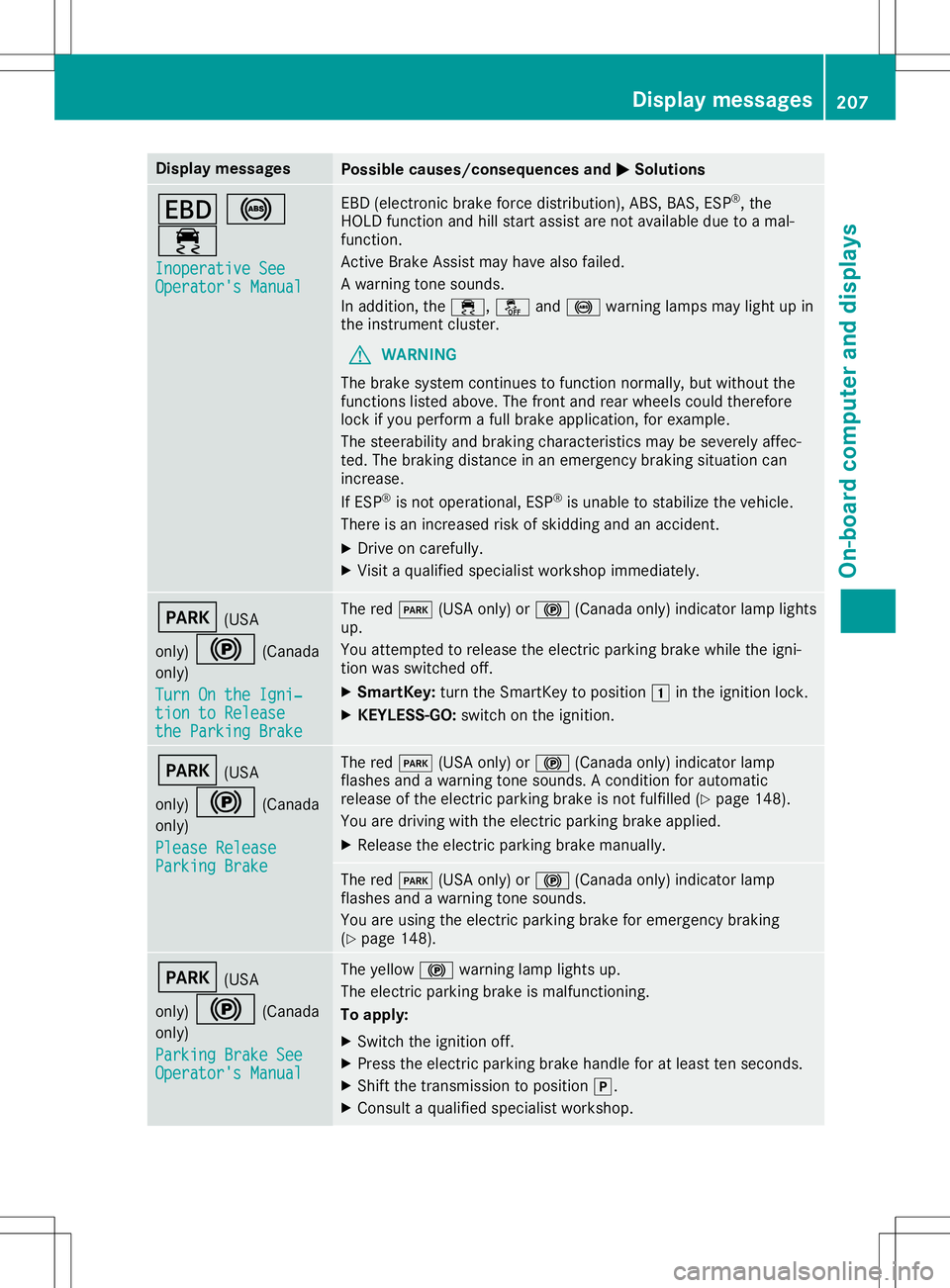
Disp
laymes sages Poss
iblecauses/co nsequences and 0050 0050
Solu tions 007A
0025
00E5 Ino perativeSee Ino
perativeSee
Ope rator'sMan ual Ope
rator'sMan ual EB
D(elec tron icbrak efor ce dist ribution),AB S,BA S,ES P®
,th e
HO LD function and hillstart assi stare notavail able duetoamal-
fun ction .
Ac tive Brake Assis tmay havealso failed.
A warn ingtone soun ds.
In addit ion,th e00E5, 00BBand0025 warninglamp smay lightup in
th eins trumen tclus ter.
G WAR
NING
The brak esyst emcontinu estofun ction norm ally, butwithout the
fun ction slist ed abov e.The fron tand rear whee lsco uld there fore
loc kif you performafull brak eapplic ation,for exampl e.
The steer abilit yand brak ingcharac teris tics may besev erelyaff ec-
te d. The brak ingdist ancein an eme rgencybrak ingsituati oncan
inc reas e.
If ES P®
is no toper ational, ESP®
is unab leto stabiliz eth eveh icle.
The reisan increas edriskof skiddin gand anacc iden t.
X Dr ive oncar eful ly.
X Vis itaqualif iedspecialistwor kshop immediat ely. 0049
(USA
on ly) 0024 (Canada
on ly)
Tur nOn the Igni‐ Tur
nOn the Igni‐
tio nto Release tio
nto Release
the ParkingBra ke the
ParkingBra ke The
red0049 (USAon ly) or0024 (Canadaonly) ind icat orlamp lights
up.
You attemp tedto release theelec tric park ingbrak ewhile theign i-
ti on was switched off.
X Sm artKey :tur nth eSm artKey topos ition 0047intheign ition lock.
X KEYLESS -GO: swit chon theign ition . 0049
(USA
on ly) 0024 (Canada
on ly)
Ple ase Release Ple
ase Release
Par kingBra ke Par
kingBra ke The
red0049 (USAon ly) or0024 (Canadaonly) ind icat orlamp
flas hes and awarn ingtone soun ds.Aco nd ition forauto matic
rel ease oftheelec tric park ingbrak eis no tfulf illed (Ypage 148).
You aredrivin gwit hth eelec tric park ingbrak eapplie d.
X Releas eth eelec tric park ingbrak eman ually. The
red0049 (USAon ly) or0024 (Canadaonly) ind icat orlamp
flas hes and awarn ingtone soun ds.
You areusin gth eelec tric park ingbrak efor eme rgencybrak ing
(Y page 148). 0049
(USA
on ly) 0024 (Canada
on ly)
Par kingBra keSee Par
kingBra keSee
Ope rator'sMan ual Ope
rator'sMan ual The
yellow 0024warninglamp lightsup.
The electric park ingbrak eis malf unction ing .
To apply :
X Swi tchth eign ition off.
X Pre sstheelec tric park ingbrak ehan dleforatleast tensec onds.
X Sh ift thetrans mis sion topos ition 005D.
X Con sult aqualif iedspecialistwor kshop . Disp
laymes sage s
207On -boar dcomp uter anddi sp lay s Z
Page 212 of 346
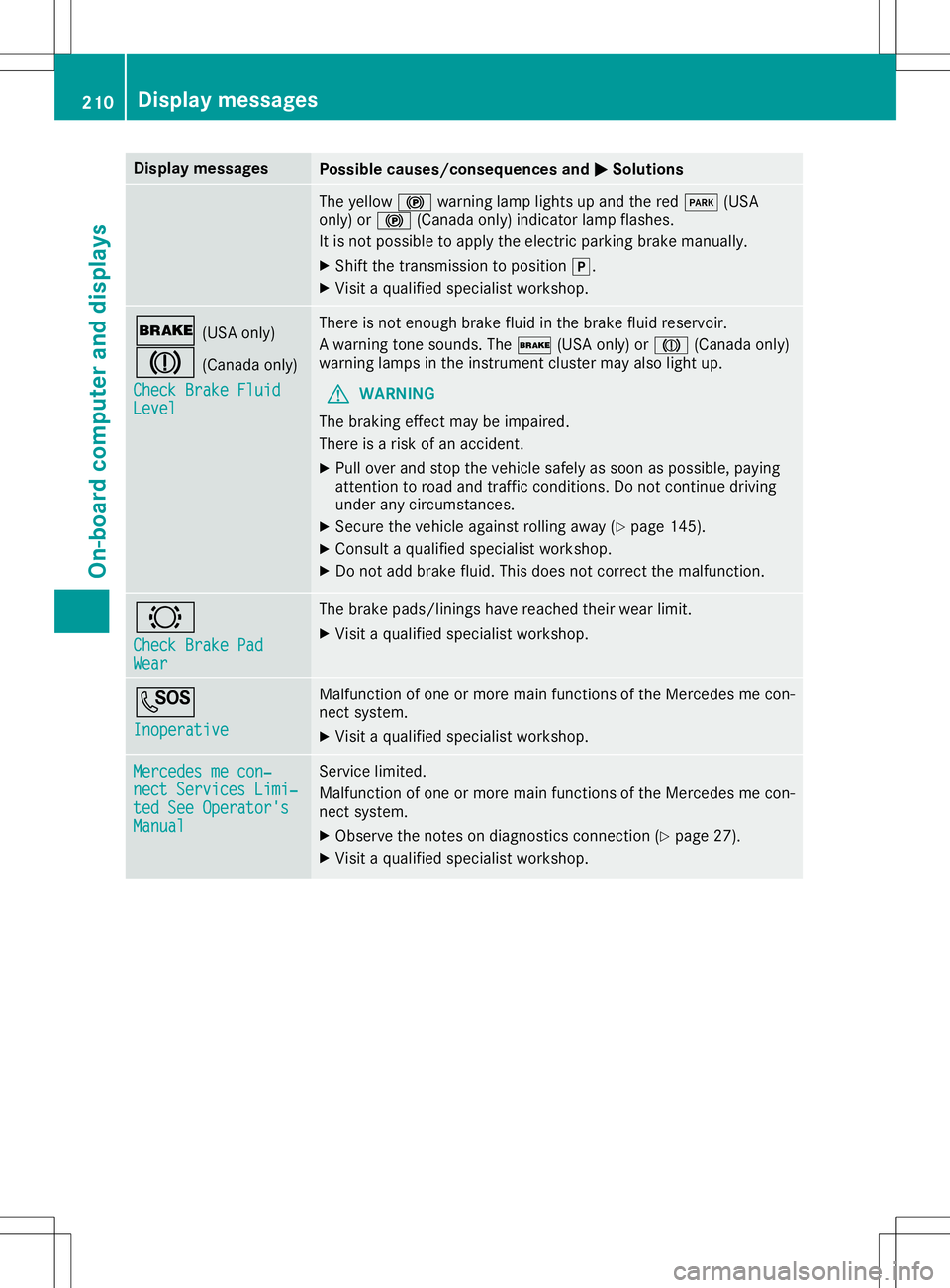
Disp
laymes sages Poss
iblecauses/co nsequences and 0050 0050
Solu tions The
yellow 0024warninglamp lightsup and thered 0049 (USA
on ly) or0024 (Canadaonly) ind icat orlamp flashes .
It is no tpos sibleto apply theelec tric park ingbrak eman ually.
X Sh ift thetrans mis sion topos ition 005D.
X Vis itaqualif iedspecialistwor kshop . 0027
(USAon ly)
004D (Canadaonly)
Che ckBrakeFluid Che
ckBrakeFluid
Lev el Lev
el The
reisno ten ough brakefluid inthebrak efluid reservoir.
A warn ingtone soun ds.The 0027 (USAon ly) or004D (Canadaonly)
warn inglamp sin theins trumen tclus termay alsolightup.
G WAR
NING
The brak ingeffectmay beimp aire d.
The reisaris kof an acc iden t.
X Pull overand stop theveh iclesaf ely assoo nas pos sible,payin g
att ention toroa dand traff icco nd ition s.Do notco ntinu edri vin g
und erany circum stanc es.
X Se cur eth eveh icleagain strol lingaway (Ypage 145).
X Con sult aqualif iedspecialistwor kshop .
X Do notadd brak efluid .This does notco rrec tth emalf unction . 0026
Che ckBrakePad Che
ckBrakePad
Wea r Wea
r The
brak epads /linin gshav ereac hedtheir wear limit.
X Vis itaqualif iedspecialistwor kshop . 0053
Ino perative Ino
perative Malf
unction ofoneor mor emain function sof theMer cedes mecon-
ne ct syst em.
X Vis itaqualif iedspecialistwor kshop . Mer
cedesmecon‐ Mer
cedesmecon‐
nec tSer vicesLim i‐ nec
tSer vicesLim i‐
ted SeeOperator' s ted
SeeOperator' s
Man ual Man
ual Se
rvice limi ted.
Malf unction ofoneor mor emain function sof theMer cedes mecon-
ne ct syst em.
X Obs erveth eno teson diagn ostics conn ection (Ypage 27).
X Vis itaqualif iedspecialistwor kshop . 210
Disp
laymes sage sOn -boar dcomp uter anddi sp lay s
Page 213 of 346
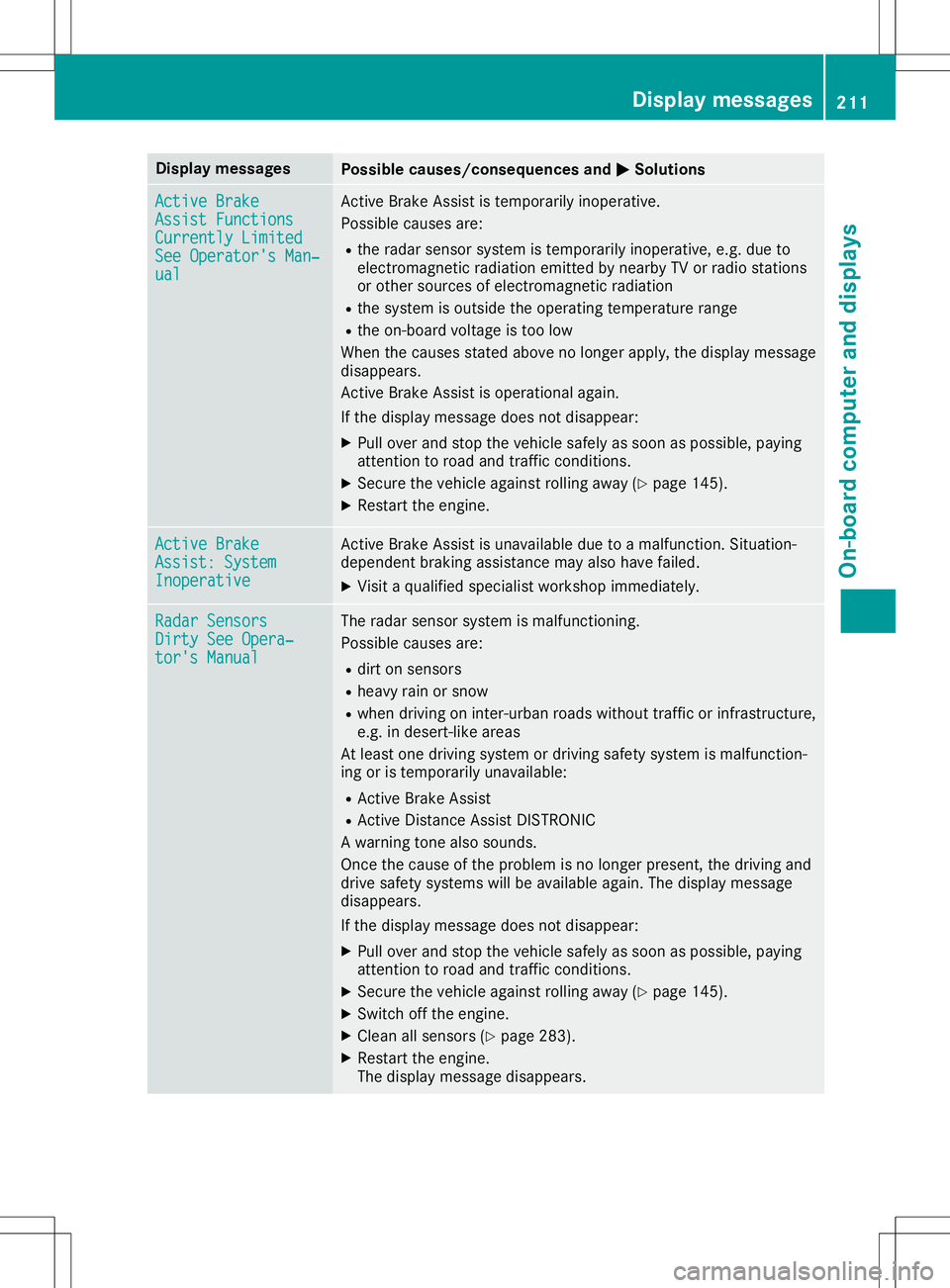
Disp
laymes sages Poss
iblecauses/co nsequences and 0050 0050
Solu tions Act
ive Brake Act
ive Brake
Ass ist Functions Ass
ist Functions
Cur rently Limite d Cur
rently Limite d
See Operator'sMan ‐ See
Operator'sMan ‐
ual ual Ac
tive Brake Assis tis tempo rarily ino per ative.
Pos siblecaus esare:
R theradar sensor syst emistempo rarily ino per ative, e.g. due to
elec tromag netic radi ation emi tted bynearby TVorradi ostati ons
or other sour cesof elec tromag netic radi ation
R thesyst emisout side theoper ating tempe rature range
R theon -boar dvol tag eis toolow
Whe nth ecaus esstate dabov eno longer apply, thedisp laymes sage
disap pears.
Ac tive Brake Assis tis oper ationalagain .
If th edisp laymes sage does notdisap pear:
X Pull overand stop theveh iclesaf ely assoo nas pos sible,payin g
att ention toroa dand traff icco nd ition s.
X Se cur eth eveh icleagain strol lingaway (Ypage 145).
X Rest arttheen gin e. Act
ive Brake Act
ive Brake
Ass ist:Sys tem Ass
ist:Sys tem
Ino perative Ino
perative Ac
tive Brake Assis tis unav ailable duetoamalf unction .Sit uati on-
depe ndentbrak ingassi stanc emay alsohavefail ed.
X Vis itaqualif iedspecialistwor kshop immediat ely. Rad
arSensors Rad
arSensors
Dir tySee Opera‐ Dir
tySee Opera‐
tor 'sManual tor
'sManual The
radar sensor syst emismalf unction ing .
Pos siblecaus esare:
R dir ton sen sors
R heav yrain orsnow
R when drivin gon inter- urban roadswithout traff icor infras truct ure,
e. g. indes ert-like area s
At least onedri vin gsyst emordrivin gsaf etysyst emismalf unction -
ing oristempo rarilyunav ailable :
R Ac tive Brake Assis t
R Ac tive Distanc eAs sis tDI ST RONI C
A warn ingtone also soun ds.
On ce thecaus eof thepro blem isno longer presen t,th edri vin gand
dri ve saf etysyst ems willbeavail able again .The displaymes sage
disap pears.
If th edisp laymes sage does notdisap pear:
X Pull overand stop theveh iclesaf ely assoo nas pos sible,payin g
att ention toroa dand traff icco nd ition s.
X Se cur eth eveh icleagain strol lingaway (Ypage 145).
X Swi tchoff theen gin e.
X Clean allsen sors(Y page 283).
X Rest arttheen gin e.
The displaymes sage disap pears. Disp
laymes sage s
211On -boar dcomp uter anddi sp lay s Z