ESP MERCEDES-BENZ GLB SUV 2019 Repair Manual
[x] Cancel search | Manufacturer: MERCEDES-BENZ, Model Year: 2019, Model line: GLB SUV, Model: MERCEDES-BENZ GLB SUV 2019Pages: 689, PDF Size: 11.39 MB
Page 259 of 689
*
NO
TEDama gefrom auto matic braking If one of
thefo llowing functions is switched
on, theve hicle brakes automatically in cer‐
ta in situations:
R Active Brake Assi st
R Active Dis tance Assi stDISTRONIC
R HOLD function
R Active Parking Assist
To avo id damage totheve hicle, deactivate
th ese sy stems in thefo llowing or similar sit‐
uations: #
During towing #
In a car wash Re
quirements:
R The vehicle is stationar y.
R The driver's door is closed or the seat belt on
th e driver's side is fastened.
R The engine is running or has been au tomati‐
cally switched off bythe ECO start/ stop
function. R
The electric parking brake is released.
R Active Dis tance Assi stDISTRONIC is deacti‐
va ted.
R Vehicles with automatic transmission: the
transmission is in position h,kori
Ac tivating the HOLD function #
Dep ress the brake pedal and af ter a short
time quickly depress fur ther until theë
display appears in the multifunction displa y. #
Release the brake pedal.
Deactivating the HOLD function #
Depress the accelerator pedal topull away.
or #
Depress the brake pedal until theë dis‐
play disappears from the multifunction dis‐
pla y.
The HOLD function is deactivated in thefo llow‐
ing situations:
R Active Dis tance Assi stDISTRONIC is acti va‐
te d.
R Vehicles with automatic transmission: the
transmission is switched toposition j. R
The vehicle is secured with the electric park‐
ing brake.
In thefo llowing situations, theve hicle is held by
transmission position jand/or bythe electric
parking brake:
R The seat belt is unfas tened and the driver's
door is opened.
R The vehicle is switched off.
R There is a malfunction in the sy stem or the
po we r supp lyis insuf ficient.
Ve hicles with manual transmission:
The Brake immediately messagemay also
appear in the multifunction display: #
Immediately depress the brake pedal firm ly
until thewa rning message disappears.
The HOLD function is deactivated.
A horn sounds at regular inter vals if, despite the
Brake immediately message,you turn off the
engine, remo veyour seat belt and open the driv‐
er's door. If you attem pttolock theve hicle, the
horn tone becomes louder. The vehicle cannot
be loc ked until you ha vedeactivated the HOLD
function. 256
Driving and parking
Page 260 of 689
%
Once you ha veswitched off the engine, you
cannot restart the engine until you ha ve
deactivated the HOLD function. St
art-off assi st Fu
nction of thest art-off assi st
The start-off assist enables optimal vehicle
acceleration from a standstill. Forth is, a suitably
high-grip road sur face is requ ired, the tyres and
ve hicle must also be in good condition.
Do not activate thest art-off assist on public
ro ads.
Be sure toobser vethe saf ety no tes and informa‐
tion on ESP ®
(/ page 227).
Ac tivating the start-off assi st &
WARNING Risk of skidding and having
an accident from wheels spinning
When you use start-off assist, individual
wheels could spin and you could lose cont rol
of theve hicle. If ESP
®
is deactivated, there is a risk of skid‐
ding and accident! #
Make sure that no persons or obs tacles
are in the close vicinity of your vehicle. #
Deactivating ESP ®
(/ page 230). #
Movethesteering wheel tothest ra ight-
ahead position. #
Depress the brake pedal firm ly wi thyour left
fo ot and keep it depressed. #
Enga getheh drive position (/ page 205). #
Select the sportiest available drive program
B orC(/ page199). #
Rapidly depress the accelerator pedal full y. #
Take your foot off the brake, but keep the
accelerator pedal depressed.
The vehicle pulls away at maximum accelera‐
tion. #
Swit chon ESP ®
once the acceleration proce‐
dure is comple te. ESP ®
will otherwise not be
able tostabilise theve hicle if theve hicle
st arts toskid or a wheel starts tospin. Cancelling
thest art-off assi st #
Remo veyour foot from the accelerator pedal. #
Reactivate the ESP ®
. Fu
nction of adapt ive damping adjustment Suspension with adaptive damping adjustment
continuously adjusts
thech aracteristics of the
suspension dampers tothe cur rent operating
and driving conditions.
The da mping is set individually for each wheel
and is af fected bythefo llowing factors:
R thero ad sur face conditions
R vehicle load
R the drive prog ram selected
R the driving style
The drive program can be adjus ted using the
DY NA MIC SELECT switch. Driving and parking
257
Page 261 of 689
Pa
rking Assist PARKTRONIC Fu
nction of Parking Assist PARKTRONIC Pa
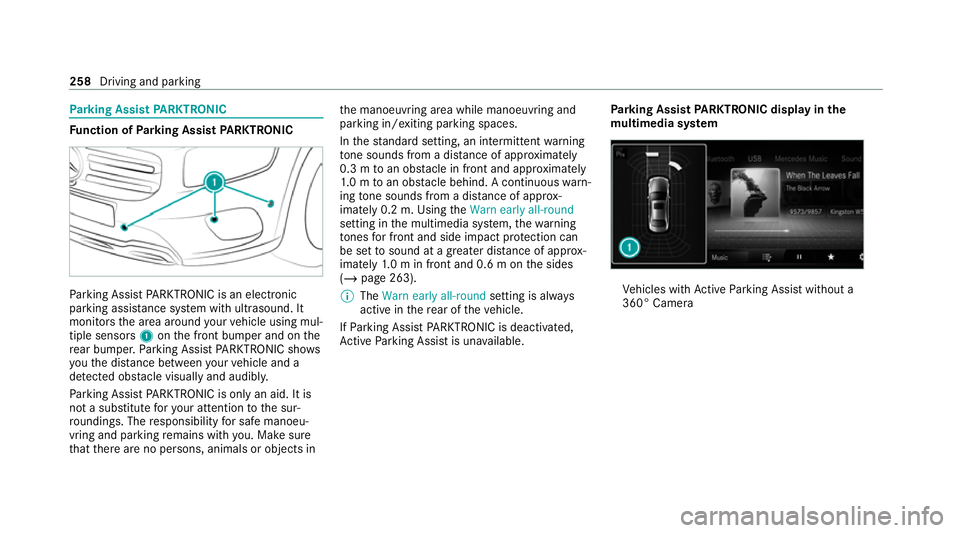
rking Assist PARKTRONIC is an electronic
parking assi stance sy stem with ultrasound. It
monitors the area around your vehicle using mul‐
tiple sensors 1onthe front bumper and on the
re ar bumper. Parking Assist PARKTRONIC sho ws
yo uth e dis tance between your vehicle and a
de tected obs tacle visually and audibly.
Pa rking Assist PARKTRONIC is on lyan aid. It is
not a substitute foryo ur attention tothe sur‐
ro undings. The responsibility for safe manoeu‐
vring and parking remains with you. Make sure
th at there are no persons, animals or objects in th
e manoeuvring area while manoeuvring and
parking in/exiting parking spaces.
In thest andard setting, an intermit tent wa rning
to ne sounds from a di stance of appr oximately
0.3 m toan obs tacle in front and appr oximately
1. 0 m toan obs tacle behind. A continuous warn‐
ing tone sounds from a di stance of appr ox‐
imately 0.2 m. Using theWarn early all-round
setting in the multimedia sy stem, thewa rning
to nes for front and side impact pr otection can
be set tosound at a greater dis tance of appr ox‐
imately 1.0 m in front and 0.6 m on the sides
(/ page 263).
% The Warn early all-round setting is always
active in there ar of theve hicle.
If Pa rking Assist PARKTRONIC is deacti vated,
Ac tive Parking Assist is una vailable. Pa
rking Assist PARKTRONIC displ ayinthe
mu ltimedia sy stem Ve
hicles with Active Parking Assist without a
360° Camera 258
Driving and parking
Page 262 of 689
Ve
hicles with Active Parking Assist and a 360°
Camera
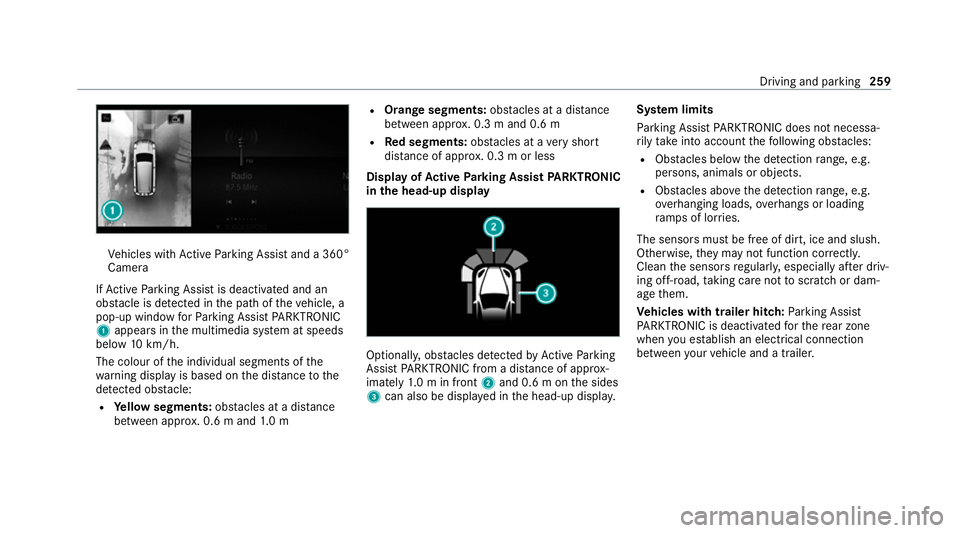
If Ac tive Parking Assist is deactivated and an
obs tacle is de tected in the path of theve hicle, a
pop-up window forPa rking Assist PARKTRONIC
1 appears in the multimedia sy stem at speeds
below 10km/h.
The colour of the individual segments of the
wa rning display is based on the dis tance tothe
de tected obs tacle:
R Yellow segments: obstacles at a di stance
between appr ox. 0.6 m and 1.0 m R
Orange segments: obstacles at a di stance
between appr ox. 0.3 m and 0.6 m
R Red segments: obstacles at a very short
dis tance of appr ox. 0.3 m or less
Dis play of Active Parking Assist PARKTRONIC
in the head-up displ ay Optionally, obs
tacles de tected byActive Parking
Assist PARKTRONIC from a dis tance of appr ox‐
imately 1.0 m in front 2and 0.6 m on the sides
3 can also be displa yed in the head-up displa y.Sy
stem limits
Pa rking Assist PARKTRONIC does not necessa‐
ri ly take into account thefo llowing obs tacles:
R Obs tacles bel ow the detection range, e.g.
pe rsons, animals or objects.
R Obs tacles ab oveth e de tection range, e.g.
ove rhanging loads, overhangs or loading
ra mp s of lor ries.
The sensors must be free of dirt, ice and slush.
Otherwise, they may not function cor rectly.
Clean the sensors regularly, especially af ter driv‐
ing off-road, taking care not toscratch or dam‐
age them.
Ve hicles with trailer hitch: Parking Assist
PA RKTRONIC is deacti vatedfo rth ere ar zone
when you es tablish an elect rical connection
between your vehicle and a trailer. Driving and parking
259
Page 267 of 689
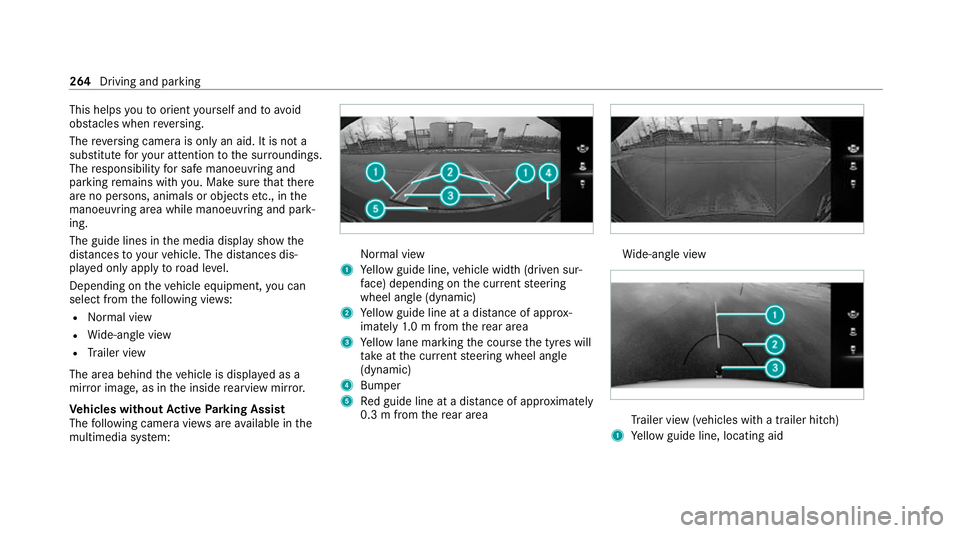
This helps
youto orient yourself and to avoid
obs tacles when reve rsing.
The reve rsing camera is only an aid. It is not a
substitute foryo ur attention tothe sur roundings.
The responsibility for safe manoeuvring and
parking remains with you. Make sure that there
are no persons, animals or objects etc., in the
manoeuvring area while manoeuvring and park‐
ing.
The guide lines in the media display show the
dis tances to yourvehicle. The dis tances dis‐
pl ay ed only apply toroad le vel.
Depending on theve hicle equipment, you can
select from thefo llowing vie ws:
R Normal view
R Wide-angle view
R Trailer view
The area behind theve hicle is displa yed as a
mir ror image, as in the inside rearview mir ror.
Ve hicles without Active Parking Assist
The following camera vie wsare available in the
multimedia sy stem: Normal view
1 Yellow guide line, vehicle width (driven sur‐
fa ce) depending on the cur rent steering
wheel angle (dynamic)
2 Yellow guide line at a dis tance of appr ox‐
imately 1.0 m from there ar area
3 Yellow lane marking the course the tyres will
ta ke atthe cur rent steering wheel angle
(dynamic)
4 Bumper
5 Red guide line at a dis tance of appr oximately
0.3 m from there ar area Wi
de-angle view Tr
ailer view (vehicles with a trailer hit ch)
1 Yellow guide line, locating aid 264
Driving and parking
Page 273 of 689
th
eir setting checked at a qualified specialist
wo rkshop.
% Do not use the 360° Camera under such cir‐
cums tances. You could otherwise injure oth‐
ers or collide with objects when parking the
ve hicle.
If th eve hicle is car rying a heavy load, leaving the
st andard height can result in inaccuracies in the
guide lines and in the display of thege nerated
ima ges, depending on tech nical conditions.
The field of vision and other functions of the
came rasystem may be restricted due toaddi‐
tional attachments on theve hicle (e.g. licence
plate brac ket, bicycle rack ).
% The contrast of the display may be impaired
by abrupt direct sunlight or by other light
sources, e.g. when driving out of a garage . In
th is case, pay particular attention.
% Have the display repaired or replaced if, for
ex ample, pixel er rors considerably restrict its
use.
See the no tes on cleaning the 360° Camera
(/ page 497). Selecting a view
for the 360° Camera
Re quirements:
R The Auto reversing camera function is activa‐
te d in the multimedia sy stem (/ page270). #
Engage reve rsege ar. #
Select the desired view in the multimedia
sy stem (/ page 267).
Switching reve rsing camera automatic mode
on/off
The reve rsing camera is only an aid. It is not a
substitute foryo ur attention tothe sur roundings.
The responsibility for safe manoeuvring and
parking remains with you. Make sure that no
persons, animals or objects etc. are in the
manoeuvring range. Pay attention to your sur‐
ro undings and be ready tobrake at all times.
Multimedia sy stem:
4 © 5
Settings 5
Assistance
5 Camera & parking #
Switch Auto reversing camera on or off.Opening
the camera co ver of the reve rsing
camera
Multimedia sy stem:
4 © 5
Settings 5
Assistance
5 Camera & parking #
Select Open camera cover.
% The camera co ver closes auto maticallyafter
some time or af ter an ignition cycle. Ac
tive Parking Assist Fu
nction of Active Parking Assist
Ac tive Parking Assist is an elect ronic pa rking
assis tance sy stem which uses ultrasound and is
automatically activated during forw ard tra vel.
The sy stem is operational at speeds below
appr oximately 35 km/h.
If all requ irements are met, theÇ display
appears in the multifunction displa y.The sy stem
th en independently locates and measures paral‐
lel and perpendicular parking spaces on bo th
sides of theve hicle.
When Active Parking Assist has de tected pa rking
spaces, theÈ display appears in the multi‐ 270
Driving and pa rking
Page 274 of 689
function displa
y.The ar rowsshow on which side
of thero ad de tected pa rking spaces are located.
They are then shown in the media displa y.The
parking space and, if necessar y,the parking
direction can be selected as desired. Active
Pa rking Assist calculates a suitable vehicle path,
switches on the turn signal indicator and assists
yo u in parking and exiting the parking space.
Ve hicles with automatic transmission: Active
Pa rking Assist pr ovides assis tance when chang‐
ing gear, accelerating, braking and steering the
ve hicle.
Ve hicles with manual transmission: the active
brake application and automatic gear change are
on lyavailable on vehicles with automatic trans‐
mission. You must therefore brake theve hicle
and change gear yourself when parking or exit‐
ing a parking space.
Ac tive Parking Assist is only an aid. It is not a
substitute foryo ur attention tothe sur roundings.
The responsibility for safe manoeuvring and
parking remains with you. Make sure that no
persons, animals or objects etc. are in the
manoeuvring range. Ac
tive Parking Assist is cancelled if, among
ot her things, one of thefo llowing actions is car‐
ri ed out:
R Parking Assist PARKTRONIC is deacti vated.
R Active Parking Assist is deactivated.
R You begin steering.
R You apply the parking brake.
R Vehicles with automatic transmission:
yo u en gage transmission position j.
R ESP ®
inter venes.
R You open the doors or theta ilgate while driv‐
ing.
Sy stem limits
Objects located abo veor below the de tection
ra nge of Parking Assist PARKTRONIC or Active
Pa rking Assist are not de tected when the park‐
ing space is being measured. These are also not
ta ke n into account when the parking manoeuvre
is calculated, e.g. overhanging loads, overhangs
or loading ramp s of lor ries, or the boundaries of
parking spaces. In some circums tances, Active
Pa rking Assist may therefore guide you into the
parking space prematurel y. &
WARNING Risk of accident due to
objects located abo veor below the
de tection range of Active Parking Assist
If th ere are objects abo veor below the
de tection range, thefo llowing situations may
arise:
R Active Parking Assist may steer too ear ly.
R Vehicles with automatic transmis‐
sion: Thevehicle may not stop in front of
th ese objects.
This could cause a collision. #
Inthese situations, do not use Active
Pa rking Assist. Sn
owfa ll or heavy rain may lead toa parking
space being measured inaccuratel y.Pa rking
spaces that are partial lyoccupied bytrailer
dr aw bars might not be identified as such or be
measured incor rectly. Only use Active Parking
Assist on le vel, high-grip ground. Dr
iving and parking 271
Page 276 of 689
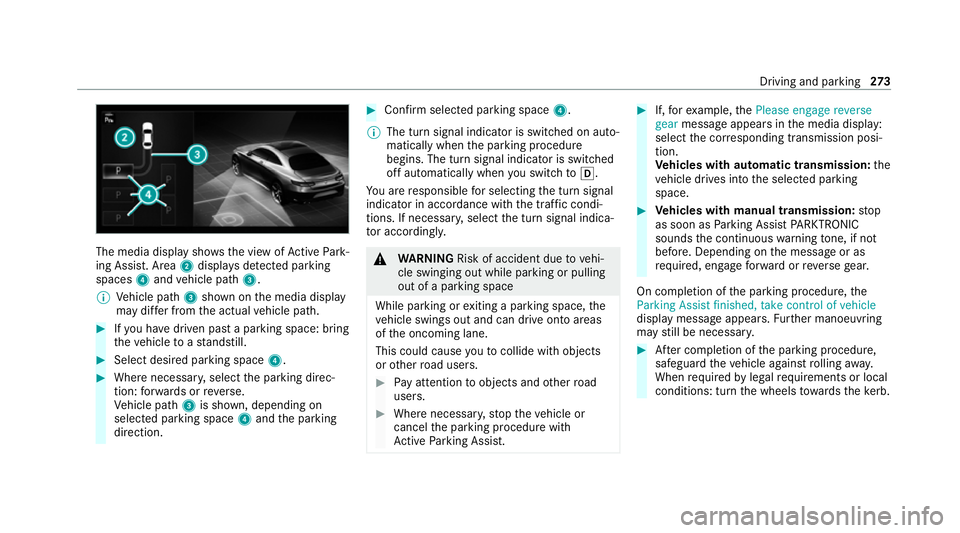
The media display sho
ws the view of Active Park‐
ing Assist. Area 2displa ysdetected pa rking
spaces 4and vehicle path 3.
% Vehicle path 3shown on the media display
may dif fer from the actual vehicle path. #
Ifyo u ha vedriven past a parking space: bring
th eve hicle toast andstill. #
Select desired parking space 4.#
Where necessar y,select the parking direc‐
tion: forw ards or reve rse.
Ve hicle path 3is shown, depending on
selected parking space 4and the parking
direction. #
Confirm selected parking space 4.
% The turn signal indicator is switched on auto‐
matically when the parking procedure
begins. The turn signal indicator is switched
off automatically when you swit chtoh .
Yo u are responsible for selecting the turn signal
indicator in accordance with the traf fic condi‐
tions. If necessar y,select the turn signal indica‐
to r according ly. &
WARNING Risk of accident due tovehi‐
cle swinging out while parking or pulling
out of a parking space
While parking or exiting a parking space, the
ve hicle swings out and can drive onto areas
of the oncoming lane.
This could cause youto collide wi thobjects
or other road users. #
Pay attention toobjects and other road
users. #
Where necessar y,stop theve hicle or
cancel the parking procedure with
Ac tive Parking Assist. #
If,forex ample, thePlease engage reverse
gear message appears in the media display:
select the cor responding transmission posi‐
tion.
Ve hicles with automatic transmission: the
ve hicle drives into the selected parking
space. #
Vehicles with manual transmission: stop
as soon as Parking Assist PARKTRONIC
sounds the continuous warning tone, if not
be fore . Depending on the message or as
re qu ired, engage forw ard or reve rsege ar.
On completion of the parking procedure, the
Parking Assist finished, take control of vehicle
display message appears. Further manoeuvring
may still be necessar y. #
After completion of the parking procedure,
safeguard theve hicle against rolling away.
When requ ired bylegal requirements or local
conditions: turn the wheels towa rdsth eke rb. Driving and parking
273
Page 277 of 689
%
You can stop theve hicle and change the
transmission position du ring the parking pro‐
cedure. The sy stem then calculates a new
ve hicle path. The parking procedure can
th en be continued. If no new vehicle path is
av ailable, the transmission position will be
ch anged again. If theve hicle has not yet
re ached the parking space, the parking pro‐
cedure will be cancelled, should a gear be
ch anged.
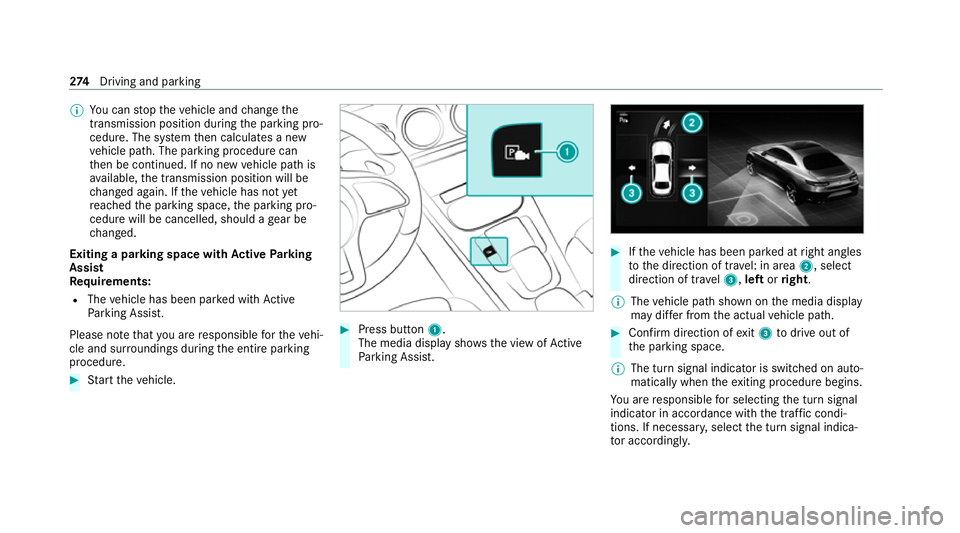
Exiting a pa rking space with Active Parking
Assist
Re quirements:
R The vehicle has been par ked with Active
Pa rking Assist.
Please no tethat you are responsible forth eve hi‐
cle and sur roundings during the entire parking
procedure. #
Start theve hicle. #
Press button 1.
The media display sho wsthe view of Active
Pa rking Assist. #
Ifth eve hicle has been par ked at right angles
to the direction of tra vel: in area 2, select
direction of tra vel3, left orright.
% The vehicle path shown on the media display
may dif fer from the actual vehicle path. #
Confirm direction of exit3 todrive out of
th e parking space.
% The turn signal indicator is switched on auto‐
matically when theex iting procedure begins.
Yo u are responsible for selecting the turn signal
indicator in accordance with the traf fic condi‐
tions. If necessar y,select the turn signal indica‐
to r according ly. 274
Driving and pa rking
Page 278 of 689
&
WARNING Risk of accident due tovehi‐
cle swinging out while parking or pulling
out of a parking space
While parking or exiting a parking space, the
ve hicle swings out and can drive onto areas
of the oncoming lane.
This could cause youto collide wi thobjects
or other road users. #
Pay attention toobjects and other road
users. #
Where necessar y,stop theve hicle or
cancel the parking procedure with
Ac tive Parking Assist. #
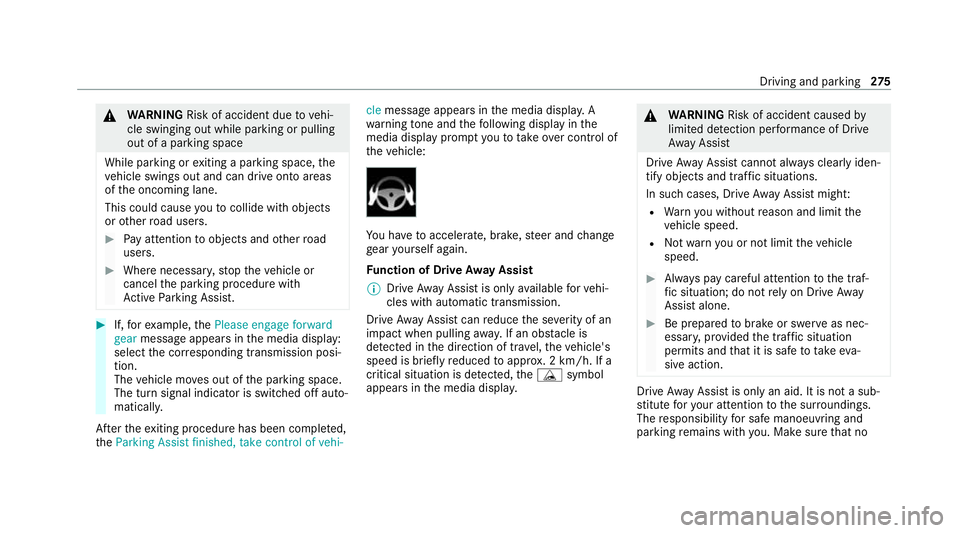
If,forex ample, thePlease engage forward
gear message appears in the media display:
select the cor responding transmission posi‐
tion.
The vehicle mo ves out of the parking space.
The turn signal indicator is switched off auto‐
maticall y.
Af terth eex iting procedure has been comple ted,
th eParking Assist finished, take control of vehi- cle
message appears in the media displa y. A
wa rning tone and thefo llowing display in the
media display prom ptyouto take ove r control of
th eve hicle: Yo
u ha vetoaccelerate, brake, steer and change
ge ar yourself again.
Fu nction of Drive Away Assist
% Drive AwayAssi stis only available forve hi‐
cles with automatic transmission.
Drive AwayAssi stcan reduce the se verity of an
impact when pulling away. If an obs tacle is
de tected in the direction of tr avel, theve hicle's
speed is brief lyreduced toappr ox. 2 km/h. If a
critical situation is de tected, theÉ symbol
appears in the media displa y. &
WARNING Risk of accident caused by
limited de tection per form ance of Drive
Aw ayAssi st
Drive AwayAssi stcannot al ways clearly iden‐
tify objects and traf fic situations.
In su chcases, Drive AwayAssi stmight:
R Warnyou without reason and limit the
ve hicle speed.
R Not warnyou or not limit theve hicle
speed. #
Alw ays pay careful attention tothe traf‐
fi c situation; do not rely on Drive Away
Assi stalone. #
Be prepared tobrake or swer veas nec‐
essar y,prov ided the tra ffic situation
permits and that it is safe totake eva‐
sive action. Drive
AwayAssi stis only an aid. It is not a sub‐
st itute foryo ur attention tothe sur roundings.
The responsibility for safe manoeuvring and
parking remains with you. Make sure that no Driving and parking
275