battery MERCEDES-BENZ GLC 2019 User Guide
[x] Cancel search | Manufacturer: MERCEDES-BENZ, Model Year: 2019, Model line: GLC, Model: MERCEDES-BENZ GLC 2019Pages: 370, PDF Size: 19.55 MB
Page 103 of 370
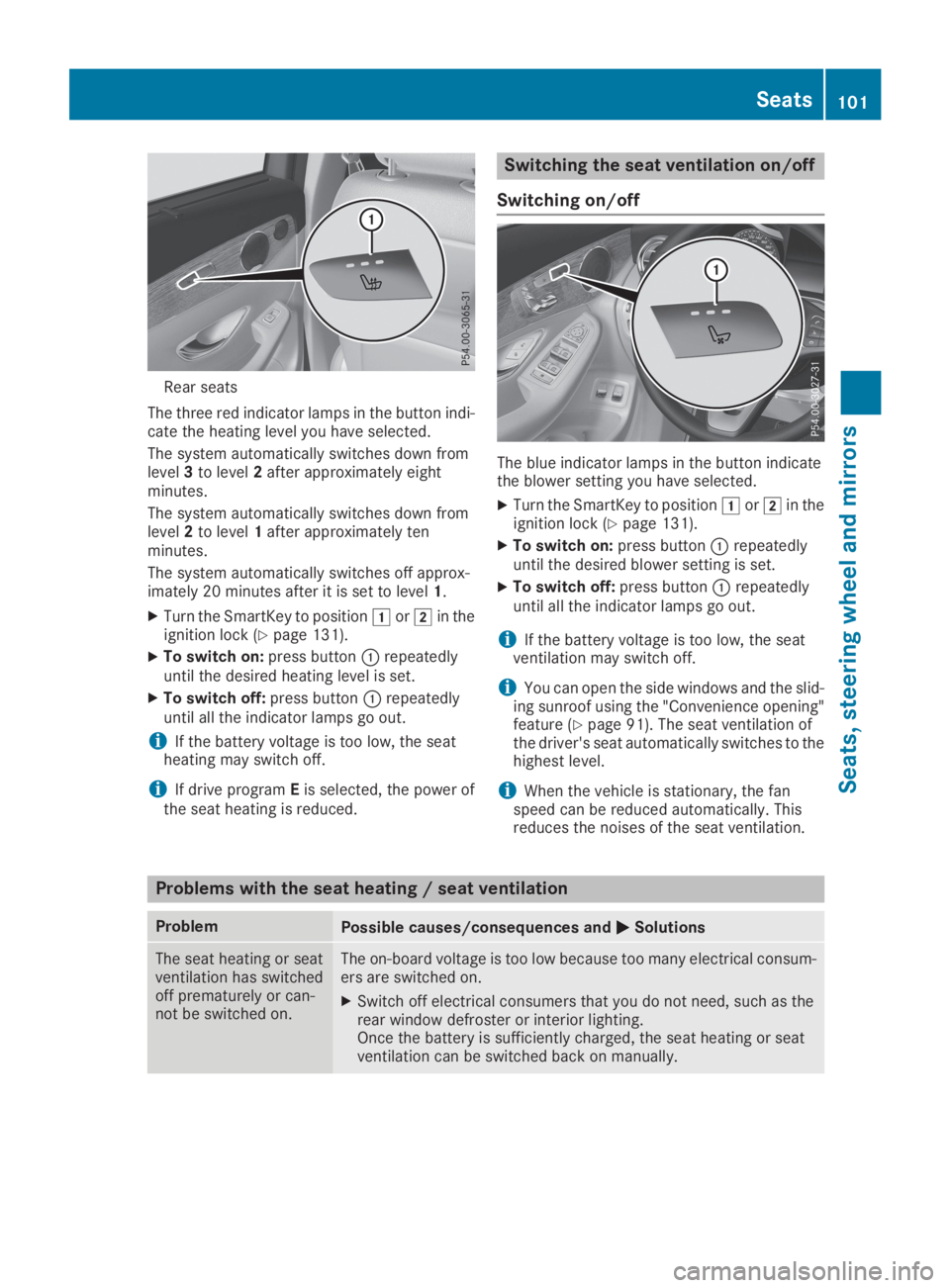
Rear seats
The three red indicator lamps in the button indi-cate the heating level you have selected.
The system automatically switches down fromlevel3to level2after approximately eightminutes.
The system automatically switches down fromlevel2to level1after approximately tenminutes.
The system automatically switches off approx-imately 20 minutes after it is set to level1.
XTurn the SmartKey to positionGorHin theignition lock (Ypage 131).
XTo switch on:press buttonCrepeatedlyuntil the desired heating level is set.
XTo switch off:press buttonCrepeatedlyuntil all the indicator lamps go out.
iIf the battery voltage is too low, the seatheating may switch off.
iIf drive programEis selected, the power ofthe seat heating is reduced.
Switching the seat ventilation on/off
Switching on/off
The blue indicator lamps in the button indicatethe blower setting you have selected.
XTurn the SmartKey to positionGorHin theignition lock (Ypage 131).
XTo switch on:press buttonCrepeatedlyuntil the desired blower setting is set.
XTo switch off:press buttonCrepeatedlyuntil all the indicator lamps go out.
iIf the battery voltage is too low, the seatventilation may switch off.
iYou can open the side windows and the slid-ing sunroof using the "Convenience opening"feature (Ypage 91). The seat ventilation ofthe driver's seat automatically switches to thehighest level.
iWhen the vehicle is stationary, the fanspeed can be reduced automatically. Thisreduces the noises of the seat ventilation.
Problems with the seat heating / seat ventilation
ProblemPossible causes/consequences andPPSolutions
The seat heating or seatventilation has switchedoff prematurely or can-not be switched on.
The on-board voltage is too low because too many electrical consum-ers are switched on.
XSwitch off electrical consumers that you do not need, such as therear window defroster or interior lighting.Once the battery is sufficiently charged, the seat heating or seatventilation can be switched back on manually.
Seats101
Seats , ste ering wheel and mirrors
Z
Page 112 of 370
![MERCEDES-BENZ GLC 2019 User Guide When the engine is running and the vehicle isstationary: if you move the selector lever from adriving position to], the daytime driving lightsand low-beam headlamps go out after threeminutes.
When th](/img/4/59088/w960_59088-111.png "MERCEDES-BENZ GLC 2019 User Guide When the engine is running and the vehicle isstationary: if you move the selector lever from adriving position to], the daytime driving lightsand low-beam headlamps go out after threeminutes.
When th")
When the engine is running and the vehicle isstationary: if you move the selector lever from adriving position to], the daytime driving lightsand low-beam headlamps go out after threeminutes.
When the engine is running, the vehicle is sta-tionary and in bright ambient light: if you turn thelight switch to the`position, the daytimerunning lamps and parking lamps switch on.
If the engine is running and you turn the lightswitch to theXposition, the manual settingstake precedence over the daytime runninglamps.
Low-beam headlamps
GWARNING
When the light switch is set toX, the low-
beam headlamps may not be switched on
automatically if there is fog, snow or other
causes of poor visibility due to the weather
conditions such as spray. There is a risk of an
accident.
In such situations, turn the light switch to
X.
Even if the light sensor does not detect that it isdark, the parking lamps and low-beam head-lamps switch on when the ignition is switched onand the light switch is set to theXposition.This is a particularly useful function in the eventof rain and fog.
XTo switch on the low-beam headlamps:turn the SmartKey to positionHin the igni-tion lock or start the engine.
XTurn the light switch to theXposition.The greenXindicator lamp in the instru-ment cluster lights up.
Rear fog lamp
The rear fog lamp improves visibility of yourvehicle for the traffic behind in the event of thickfog. You must observe the legal requirementsfor the country in which you are currently drivingwhen operating the rear fog lamp.
XTo switch on the rear fog lamp:turn theSmartKey in the ignition lock to positionHorstart the engine.
XTurn the light switch to theXorXposition.
XPress the^button.The yellow^indicator lamp on the instru-ment cluster lights up.
Parking lamps
!If the battery charge is very low, the parkinglamps or standing lamps are automaticallyswitched off to enable the next engine start.Always park your vehicle safely and in a well litarea, in accordance with the relevant legalstipulations. Avoid using the`parkinglamps over a period of several hours. If pos-sible, switch on the right-handdor left-handcstanding lamps.
XTo switch on the parking lamps:turn thelight switch to the`position.The green`indicator lamp on the instru-ment cluster lights up.
Standing lamps
Switching on the standing lamps ensures thecorresponding side of the vehicle is illuminated.
XTo switch on the parking lamp:turn theSmartKey to positionZin the ignition lock orremove the SmartKey.
XTurn the light switch to thec(left-handside of the vehicle) ord(right-hand side ofthe vehicle) position.
Combination switch
CHigh-beam headlamps
DTurn signal, right
110Exterior lighting
Lights and windshield wipers
Page 127 of 370

3-zone automatic climate control
XActivate or deactivate the "Synchronization"function using the multimedia system(Ypage 273).
The synchronization function is deactivated:
Rif the settings for the front-passenger side arechanged
Rthe settings for the rear compartment arechanged
Defrosting the windshield
General notes
You can use this function to defrost the wind-shield or to clear a fogged up windshield or frontside windows on the inside.
Switch off the "Windshield defrosting" functionas soon as the windshield is clear again.
Switching the "Windshield defrosting"
function on or off
XTurn the SmartKey to positionHin the igni-tion lock (Ypage 131).
XTo switch on:press rocker switchdonthe front control unit up or down.The indicator lamp above thedrockerswitch lights up. The current climate controlsettings are deactivated.
The climate control system switches to thefollowing functions:
Rhigh airflow
Rhigh temperature
Rair distribution to the windshield and frontside windows
Rair-recirculation mode off
iIf necessary, the "Cooling with air dehumid-ification" function is activated. In this case,the indicator lamp above theZrockerswitch remains switched off.
XTo switch off:press rocker switchdup ordown.The indicator lamp above thedrockerswitch goes out. The previously selected set-
tings are restored. Air-recirculation moderemains deactivated.
Removing condensation from the win-
dows
Windows fogged up on the inside
XActivate the "Cooling with air dehumidifica-tion" function with theZrocker switch.
XSwitch on automatic mode using theXrocker switch.
XIf the windows continue to fog up, activate the"Windshield defrosting" function using thedrocker switch.
iYou should only select this setting until thewindshield is clear again.
Windows fogged up on the outside
XActivate the windshield wipers.
XSwitch on automatic mode using theXrocker switch.
iIf you clean the windows regularly, they donot fog up so quickly.
Rear window defroster
General notes
The rear window defroster has a high currentdraw. You should therefore switch it off as soonas the rear window is clear. Otherwise, the rearwindow defroster switches off automaticallyafter several minutes.
If the battery voltage is too low, the rear windowdefroster may switch off.
Activating/deactivating
XTurn the SmartKey to positionHin the igni-tion lock (Ypage 131).
XPress rocker switchlup or down.The indicator lamp above rocker switchllights up or goes out.
Operating the climate control systems125
Climate control
Page 128 of 370
Problems with the rear window defroster
ProblemPossible causes/consequences andPPSolutions
The rear windowdefroster has deactiva-ted prematurely or can-not be activated.
The battery has not been sufficiently charged.
XSwitch off any consumers that are not required, e.g. reading lamps,interior lighting or the seat heating.When the battery is sufficiently charged, the rear window defrostercan be activated again.
Switching air-recirculation mode
on/off
General notes
You can also temporarily deactivate the flow offresh air manually if unpleasant odors are enter-ing the vehicle from outside. The air alreadyinside the vehicle will then be recirculated.
If you switch on air-recirculation mode, the win-dows can fog up more quickly, in particular atlow temperatures. Only use air-recirculationmode briefly to prevent the windows from fog-ging up.
Activating/deactivating
XTurn the SmartKey to positionHin the igni-tion lock (Ypage 131).
XTo activate:press therrocker switch upor down.The indicator lamp above therrockerswitch lights up.
Air-recirculation mode switches on automati-cally:
Rat high outside temperatures
Rat high levels of pollution (3-zone automaticclimate control only)
Rin a tunnel (vehicles with a navigation systemonly)
The indicator lamp above therrockerswitch is not lit when automatic air-recirculationmode is activated. Outside air is added afterabout 30 minutes.
XTo deactivate:press therrocker switchup or down.The indicator lamp above therrockerswitch goes out.
Air-recirculation mode deactivates automati-cally:
Rafter approximately five minutes at outsidetemperatures below approximately 41 ‡(5 †)
Rafter approximately five minutes if coolingwith air dehumidification is deactivated
Rafter approximately 30 minutes at outsidetemperatures above approximately 41 ‡(5 †) if the "Cooling with dehumidification"function is activated
Switching the residual heat on or off
General notes
The residual heat function is only available with3-zone automatic climate control.
Once the engine is switched off, it is possible tomake use of the residual heat of the engine tocontinue heating or ventilating the front com-partment of the vehicle for approximately30 minutes. The heating or ventilation timedepends on the interior temperature that hasbeen set.
Activating/deactivating
XTurn the SmartKey to position
Page 129 of 370
XTo deactivate:press the!rocker switchup or down.The indicator lamp above the!rockerswitch goes out.
Residual heat is deactivated automatically:
Rafter approximately 30 minutes
Rwhen the ignition is switched on
Rif the battery voltage drops
Perfume atomizer
Operating the perfume atomizer
GWARNING
If children open the vial, they could drink the
perfume or it could come into contact with
their eyes. There is a risk of injury. Therefore,
do not leave children unsupervised in the vehi-
cle.
If the perfume liquid has been drunk, consult
a doctor. If perfume comes into contact with
your eyes or skin, rinse the eyes with clean
water. If you continue to experience difficul-
ties, consult a doctor.
HEnvironmental note
Full vials must not be dis-
posed of with household
waste. They must be collec-
ted separately and recycled
to protect the environment.
Dispose of full vials in an
environmentally responsible
manner and take them to a
harmful substance collec-
tion point.
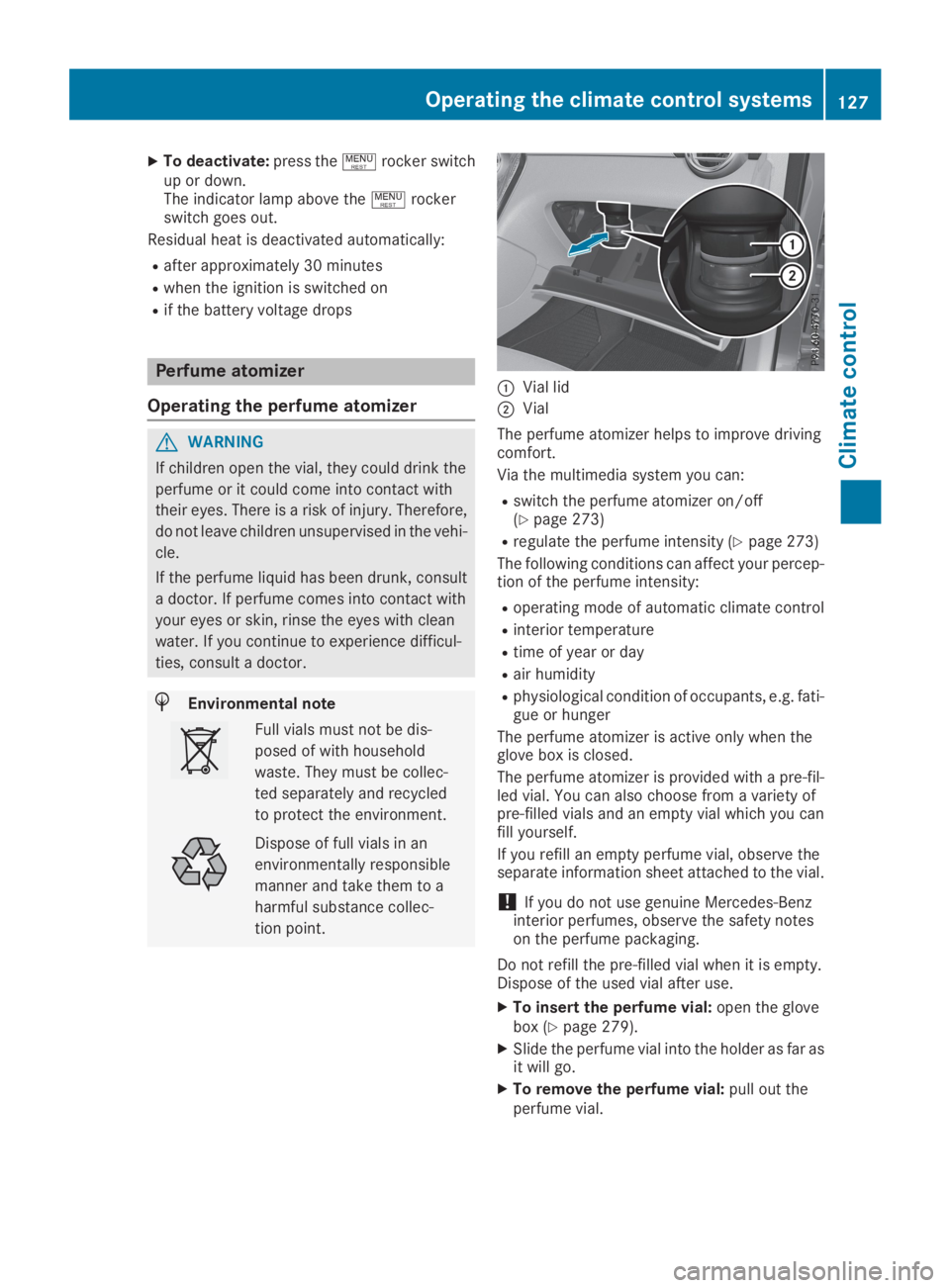
CVial lid
DVial
The perfume atomizer helps to improve drivingcomfort.
Via the multimedia system you can:
Rswitch the perfume atomizer on/off(Ypage 273)
Rregulate the perfume intensity (Ypage 273)
The following conditions can affect your percep-tion of the perfume intensity:
Roperating mode of automatic climate control
Rinterior temperature
Rtime of year or day
Rair humidity
Rphysiological condition of occupants, e.g. fati-gue or hunger
The perfume atomizer is active only when theglove box is closed.
The perfume atomizer is provided with a pre-fil-led vial. You can also choose from a variety ofpre-filled vials and an empty vial which you canfill yourself.
If you refill an empty perfume vial, observe theseparate information sheet attached to the vial.
!If you do not use genuine Mercedes-Benzinterior perfumes, observe the safety noteson the perfume packaging.
Do not refill the pre-filled vial when it is empty.Dispose of the used vial after use.
XTo insert the perfume vial:open the glovebox (Ypage 279).
XSlide the perfume vial into the holder as far asit will go.
XTo remove the perfume vial:pull out theperfume vial.
Operating the climate control systems127
Climate control
Z
Page 136 of 370
take the SmartKey with you when leaving thevehicle, even if you only leave it for a short time.Pay attention to the important safety notes.
XDepress the brake pedal and keep itdepressed.
XPress the Start/Stop button once(Ypage 132).The engine starts.
Starting procedure via smartphone
Observe the important safety notes on startingthe engine (Ypage 133).
You can also start your engine via your smart-phone from outside the vehicle. In this case, thepreviously selected climate control setting isactivated. In this way you can cool or heat theinterior of the vehicle before starting the jour-ney.
Only start the engine via your smartphone if it issafe to start and run the engine where your vehi-cle is parked.
Observe the legal stipulations in the area whereyour vehicle is parked. Engine start via smart-phone may be limited to certain countries orregions.
You can execute a maximum of two consecutivestarting attempts via your smartphone. If youpress the start/stop button or insert the Smart-Key into the ignition lock, you can carry out twomore starting attempts with your smartphone.
The engine runs for ten minutes when startingwith the smartphone.
Once you have started the engine, you canswitch the engine off via your smartphone at anytime.
You can only start the engine via your smart-phone if:
Rthe SmartKey is in the ignition lock
Rpark position]is selected
Rthe accelerator pedal is not depressed
Rthe anti-theft alarm system is not activated
Rthe panic alarm is not activated
Rthe hazard warning lamps are switched off
Rthe hood is closed
Rthe doors are closed and locked
Rthe windows and sliding sunroof are closed
Also make sure that:
Rthe fuel tank is sufficiently filled
Rthe starter battery has been sufficientlycharged
GWARNING
Limbs could be crushed or trapped if the
engine is started unintentionally during ser-
vice or maintenance work. There is a risk of
injury.
Always secure the engine against uninten-
tional starting before carrying out mainte-
nance or repair work.
Make sure that the engine cannot be started viayour smartphone before carrying out mainte-nance or repairs. You can prevent an enginestart via your smartphone, for example, if you:
Rswitch on the hazard warning lamps
Rdo not lock the doors
Ropen a side window
Pulling away
General notes
GWARNING
If the engine speed is above the idling speed
and you engage transmission positionDorR,
the vehicle could pull away suddenly. There is
a risk of an accident.
When engaging transmission positionDorR,
always firmly depress the brake pedal and do
not simultaneously accelerate.
Depress the accelerator carefully when pullingaway.
The vehicle locks centrally once you have pulledaway. The locking knobs in the doors drop down.
You can open the doors from the inside at anytime.
You can also deactivate the automatic lockingfeature, see the Digital Operator's Manual.
It is possible to shift the transmission from posi-tion]to the desired position only if youdepress the brake pedal. Only then is the park-ing lock released. If you do not depress thebrake pedal, the DIRECT SELECT lever can still
134Driving
Driving an d parking
Page 157 of 370
Releasing automatically
Your vehicle's electric parking brake is auto-matically released if all of the following condi-tions are met:
Rthe seat belt has been fastened
Rthe engine is running
Rthe transmission is in position[or^andyou accelerate
or
you shift from transmission position]toposition[or^. On steeper uphill gradi-ents, you must also depress the acceleratorpedal.
If the transmission is in position^, the tailgatemust be closed.
If your seat belt is not fastened, the followingconditions must be fulfilled to automaticallyrelease the electric parking brake:
RThe driver's door is closed.
RYou have shifted out of transmission position]or you have previously driven faster than2 mph (3 km/h).
Ensure that you do not depress the acceleratorpedal unintentionally. Otherwise, the parkingbrake will be released and the vehicle will startto move.
Emergency braking
The vehicle can also be braked during an emer-gency by using the electric parking brake.
XWhile driving, push handleCof the electricparking brake (Ypage 154).The vehicle is braked as long as you keephandleCof the electric parking brakedepressed. The longer electric parking brakehandleCis depressed, the greater the brak-ing force.
During braking:
Ra warning tone sounds
RthePlease Release Parking BrakePlease Release Parking Brakemes-sage appears
Rthe redI(USA only) or$(Canadaonly) indicator lamp in the instrument clusterflashes
When the vehicle has been braked to a stand-still, the electric parking brake is applied.
Parking the vehicle for a long period
If you leave the vehicle parked for longer thanfour weeks, the battery may be damaged byexhaustive discharging.
If you leave the vehicle parked for longer than sixweeks, the vehicle may suffer damage as aresult of lack of use.
XVisit a qualified specialist workshop and seekadvice.
iYou can obtain information about tricklechargers from a qualified specialist work-shop.
Driving tips
General driving tips
Important safety notes
GWARNING
If you switch off the ignition while driving,
safety-relevant functions are only available
with limitations, or not at all. This could affect,
for example, the power steering and the brake
boosting effect. You will require considerably
more effort to steer and brake. There is a risk
of an accident.
Do not switch off the ignition while driving.
GWARNING
If you operate mobile communication equip-
ment when driving, you may be distracted
from the traffic situation. You could also lose
control of the vehicle. There is a risk of an
accident.
Only operate this equipment when the vehicle
is stationary.
Observe the legal requirements for the countryin which you are driving. Some jurisdictions pro-hibit the driver from using a mobile phone whiledriving a vehicle.
If you make a call while driving, always usehands-free mode. Only operate the telephonewhen the traffic situation permits. If you areunsure, pull over to a safe location and stopbefore operating the telephone.
Driving tips155
Driving and parking
Z
Page 167 of 370
If Active Distance Assist DISTRONIC detects afaster-moving vehicle in front, it increases thedriving speed to the set speed.
Selecting the drive program
Active Distance Assist DISTRONIC supports asporty driving style when you have selected theSorS+, drive program (Ypage 145). Accelera-tion behind the vehicle in front or to the setspeed is then noticeably more dynamic. If youhave selected theCorEdriving program, thevehicle accelerates more gently. This setting isrecommended in stop-and-start traffic.
Changing lanes
If you change to the overtaking lane Active Dis-tance Assist DISTRONIC supports you if:
Ryou are driving faster than 45 mph (70 km/h)
Ryou switch on the appropriate turn signal
RActive Distance Assist DISTRONIC does notcurrently detect a danger of collision
If these conditions are fulfilled, your vehicle isaccelerated. Acceleration will be interrupted ifchanging lanes takes too long or if the distancebetween your vehicle and the vehicle in frontbecomes too small.
When you change lanes, Active Distance AssistDISTRONIC monitors the left lane on left-hand-drive vehicles or the right lane on right-hand-drive vehicles.
Stopping
GWARNING
If you leave the driver's seat when the vehicle
is only being braked by Active Distance Assist
DISTRONIC, it could roll away:
Rif there is a malfunction in the system or in
the voltage supply
Rif Active Distance Assist DISTRONIC is
deactivated using the cruise control lever,
for example by a vehicle occupant or from
outside the vehicle
Rif the electrical system in the engine com-
partment, the battery or the fuses are tam-
pered with
Rif the battery is disconnected
Rif the vehicle is accelerated, e.g. by a vehi-
cle occupant
There is a risk of an accident.
Always deactivate Active Distance Assist
DISTRONIC and secure the vehicle against
rolling away before you leave it.
Further information on deactivating Active Dis-tance Assist DISTRONIC (Ypage 167).
If Active Distance Assist DISTRONIC detectsthat the vehicle in front is stopping, it brakesyour vehicle until it is stationary.
Once your vehicle is stationary, it remains sta-tionary and you do not need to depress thebrake.
After a time, the electric parking brake securesthe vehicle and relieves the service brake.
Depending on the specified minimum distance,your vehicle will come to a standstill at a suffi-cient distance behind the vehicle in front. Thespecified minimum distance is set using thecontrol on the cruise control lever.
When Active Distance Assist DISTRONIC is acti-vated, the transmission is shifted automaticallyto position]if:
Rthe driver's seat belt is not fastened and thedriver's door is open
Rthe engine is switched off, unless it is auto-matically switched off by the ECO start/stopfunction
The electric parking brake is applied automati-cally if Active Distance Assist DISTRONIC isactive when the vehicle is stationary and:
Ra system malfunction occurs
Rthe power supply is insufficient
If a malfunction occurs, the transmission mayalso be shifted to position]automatically.
Setting a speed
XPush the cruise control lever upCfor ahigher speed or downDfor a lower speed.
XTo adjust the set speed in 1 mph incre-ments (1 km/h increments):briefly pushthe cruise control lever upCor downDtothe pressure point.Every time the cruise control lever is pressedupCor downDthe last speed stored isincreased or reduced.
XTo adjust the set speed in 5 mph incre-ments (10 km/h increments):briefly push
Driving systems165
Driving and parking
Z
Page 172 of 370
HOLD function
General notes
The HOLD function can assist the driver in thefollowing situations:
Rwhen pulling away, especially on steep slopes
Rwhen maneuvering on steep slopes
Rwhen waiting in traffic
The vehicle is kept stationary without the driverhaving to depress the brake pedal.
The braking effect is canceled and the HOLDfunction deactivated when you depress theaccelerator pedal to pull away.
Important safety notes
GWARNING
If the vehicle is only braked using the HOLD
function, the vehicle may roll away in the fol-
lowing situations when you leave the vehicle:
Rif there is a malfunction in the system or in
the voltage supply
Rif the HOLD function is deactivated by
depressing the accelerator pedal or brake
pedal, e.g. by a vehicle occupant
Rif the electrical system in the engine com-
partment, the battery or the fuses are tam-
pered with or the battery is disconnected
There is a risk of an accident.
Always deactivate the HOLD function and
secure the vehicle against rolling away before
you leave it.
!When DISTRONIC PLUS or the HOLD func-tion is activated, the vehicle brakes automat-ically in certain situations.
To avoid damage to the vehicle, deactivateDISTRONIC PLUS and the HOLD function inthe following or similar situations:
Rwhen towing the vehicle
Rin the car wash
Deactivating the HOLD function (Ypage 170).
Activation conditions
You can activate the HOLD function if all of thefollowing conditions are fulfilled:
Rthe vehicle is stationary.
Rthe engine is running or if it has been auto-matically switched off by the ECO start/stopfunction.
Rthe driver's door is closed or your seat belt isfastened.
Rthe electric parking brake is released.
Rthe transmission is in position[,^or\\.
RDISTRONIC PLUS is deactivated.
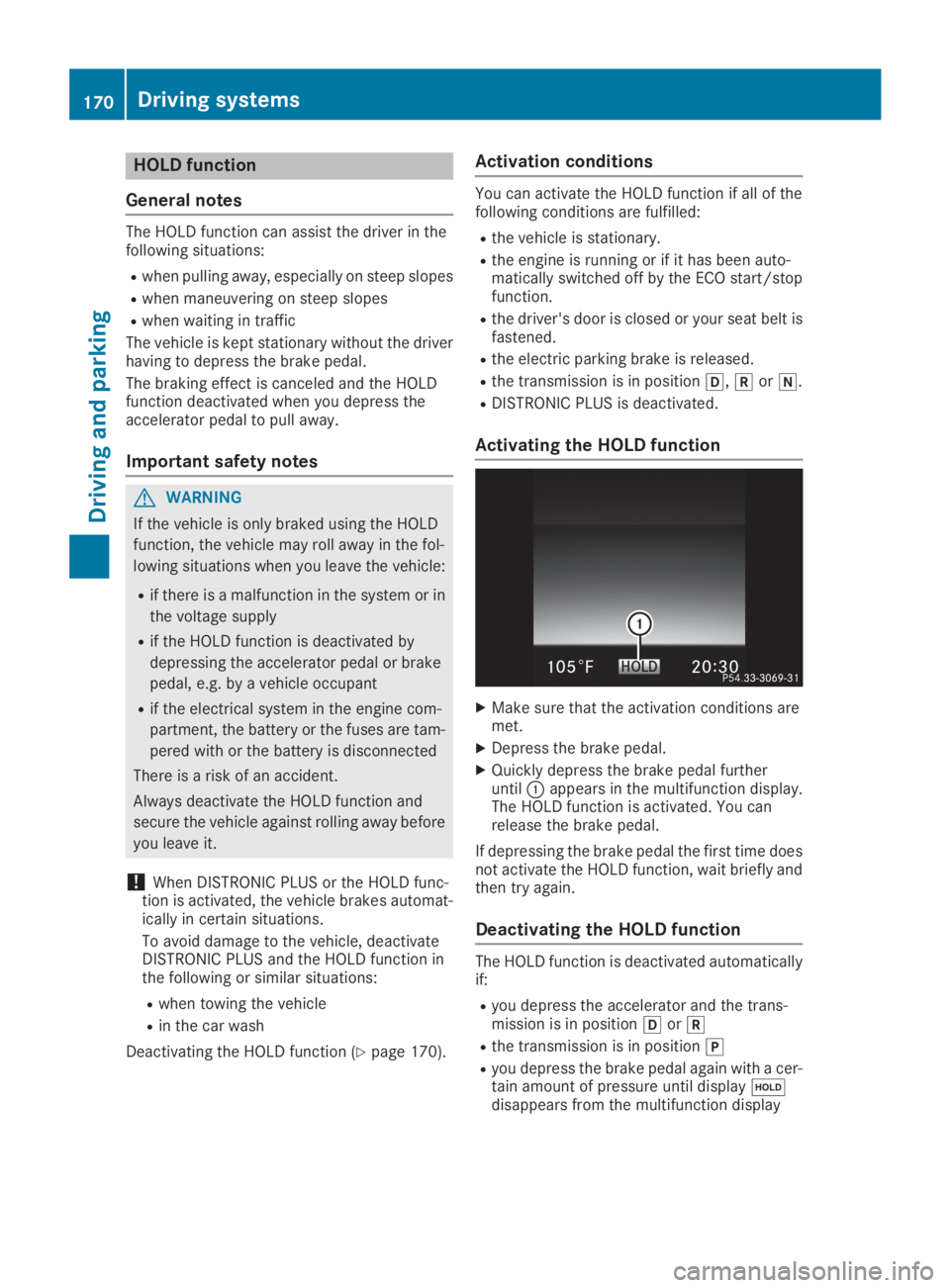
Activating the HOLD function
XMake sure that the activation conditions aremet.
XDepress the brake pedal.
XQuickly depress the brake pedal furtheruntilCappears in the multifunction display.The HOLD function is activated. You canrelease the brake pedal.
If depressing the brake pedal the first time doesnot activate the HOLD function, wait briefly andthen try again.
Deactivating the HOLD function
The HOLD function is deactivated automaticallyif:
Ryou depress the accelerator and the trans-mission is in position[or^
Rthe transmission is in position]
Ryou depress the brake pedal again with a cer-tain amount of pressure until display
Page 208 of 370
When overtaking, pay particular attention to theextended length of your vehicle/trailer combi-nation.
Due to the length of the vehicle/trailer combi-nation, you require additional road space whenovertaking before you can change back to theoriginal lane.
If the automatic transmission repeatedly shiftsbetween gears on uphill or downhill gradients,shift to a lower gear.
Driving in a lower gear and at a reduced speeddecreases the risk of engine damage.
If the coolant temperature increases signifi-cantly when climate control is switched on,switch climate control off.
Coolant heat can also be dissipated by openingthe windows and switching the ventilationblower and the interior temperature to the high-est level.
Decoupling a trailer
GWARNING
If you uncouple a trailer with the overrun
brake engaged, you could trap your hand
between the vehicle and the trailer drawbar.
There is a risk of injury.
Do not uncouple a trailer if the overrun brake
is engaged.
GWARNING
Vehicles with level control:
The vehicle is lowered as soon as you discon-
nect the trailer cable. This could result in your
limbs or those of other people that are
between the vehicle body and tires or under-
neath the vehicle being trapped. There is a
risk of injury.
Make sure that nobody is in the immediate
vicinity of the wheel housings or under the
vehicle when you disconnect the trailer cable.
!Do not disconnect a trailer with an engagedoverrun brake. Otherwise, your vehicle couldbe damaged by the rebounding of the overrunbrake.
XApply the vehicle's parking brake manually.
XShift the transmission to position].
XClose all doors and the tailgate.
XSwitch off the engine.
XSecure the vehicle and trailer against rollingaway.
XRemove the trailer cable.
XRemove the safety chains, if there are any.
XUncouple the trailer.
Removing the ball coupling
XObserve the manufacturer's installationinstructions.
XPress the protective cap into the ball couplingrecess.
XMake sure that the protective cap is firmly inplace.
Observe the loading guidelines (Ypage 278)and the safety notes regarding stowage spaces(Ypage 278).
Information on cleaning and care of the trailertow hitch (Ypage 310).
Trailer power supply
!Accessories with a maximum power con-sumption of 180 W can be connected to thepermanent power supply.
You must not charge a trailer battery using thepower supply.
The trailer socket of your vehicle is equipped atthe factory with a permanent power supply.
The permanent power supply is supplied viatrailer socket pin 4.
The trailer's permanent power supply isswitched off in the event of low vehicle supplyvoltage and after six hours at the latest.
A qualified specialist workshop can providemore information about installing the trailerelectrics.
Permissible trailer loads and trailer
drawbar noseweights
Weight specifications
The gross trailer weight is calculated as theweight of the trailer plus the weight of the loadand the trailer's equipment.
206Towing a trailer
Driving and parking