phone MERCEDES-BENZ GLC 2019 User Guide
[x] Cancel search | Manufacturer: MERCEDES-BENZ, Model Year: 2019, Model line: GLC, Model: MERCEDES-BENZ GLC 2019Pages: 370, PDF Size: 19.55 MB
Page 134 of 370
To start the vehicle without actively using theSmartKey:
Rthe Start/Stop button must be inserted in theignition lock.
Rthe SmartKey must be in the vehicle.
Rthe vehicle must not be locked with theSmartKey or KEYLESS-GO. (Ypage 78)
Do not keep the SmartKey:
Rwith electronic devices, e.g. a mobile phoneor another SmartKey.
Rwith metallic objects, e.g. coins or metal foil.
Rinside metallic objects, e.g. a metal case.
This can affect the functionality of the Smart-Key.
If you lock the vehicle with the SmartKey remotecontrol or with KEYLESS-GO, after a short time:
Ryou will not be able to switch on the ignitionwith the Start/Stop button.
Ryou will no longer be able to start the enginewith the Start/Stop button until the vehicle isunlocked again.
If you lock the vehicle centrally using the buttonon the front door (Ypage 83), you can continueto start the engine with the Start/Stop button.
The engine can be switched off while the vehicleis in motion by pressing and holding the Start/Stop button for three seconds. This functionoperates independently of the ECO start/stopautomatic engine switch-off function.
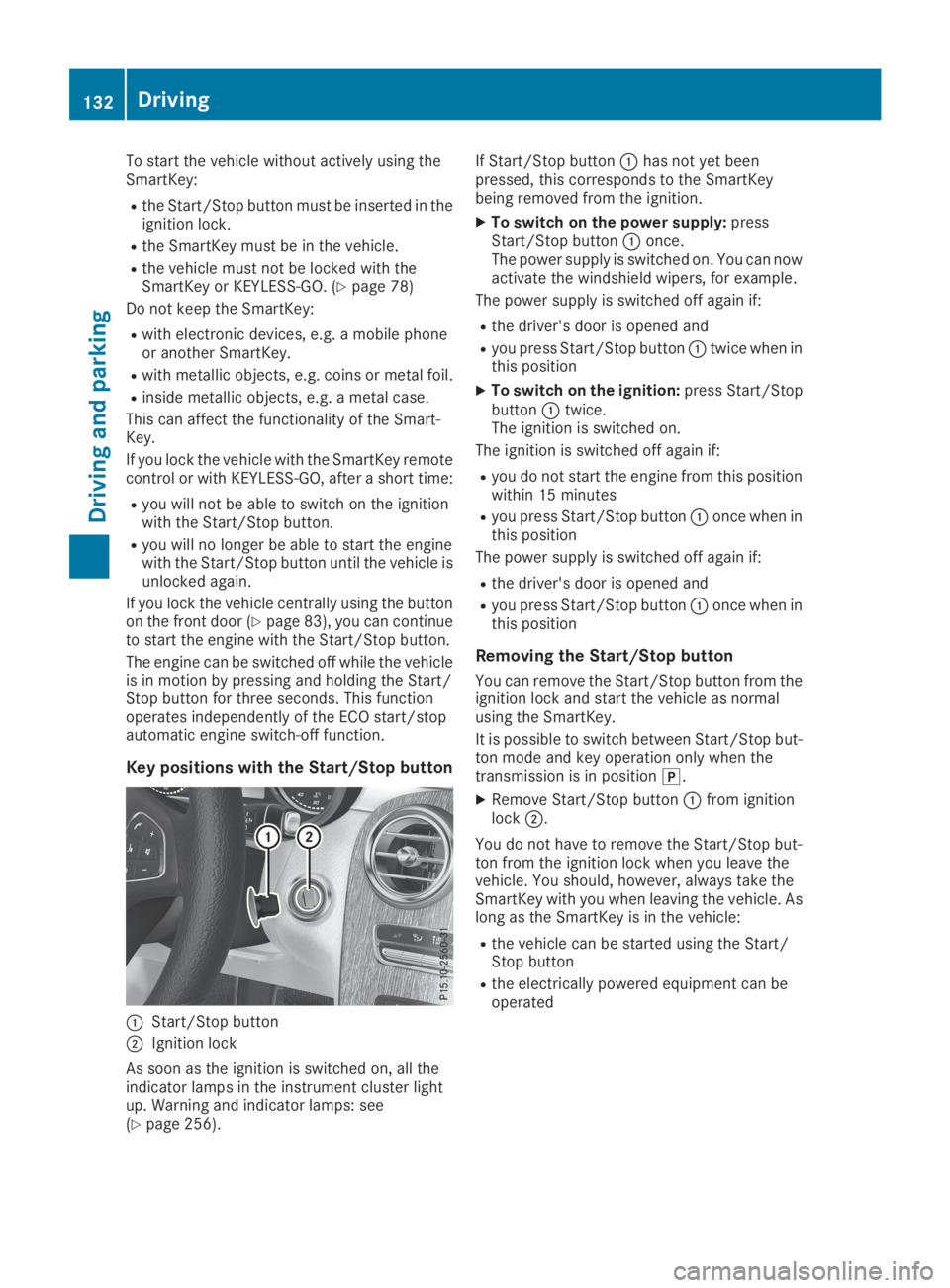
Key positions with the Start/Stop button
CStart/Stop button
DIgnition lock
As soon as the ignition is switched on, all theindicator lamps in the instrument cluster lightup. Warning and indicator lamps: see(Ypage 256).
If Start/Stop buttonChas not yet beenpressed, this corresponds to the SmartKeybeing removed from the ignition.
XTo switch on the power supply:pressStart/Stop buttonConce.The power supply is switched on. You can nowactivate the windshield wipers, for example.
The power supply is switched off again if:
Rthe driver's door is opened and
Ryou press Start/Stop buttonCtwice when inthis position
XTo switch on the ignition:press Start/StopbuttonCtwice.The ignition is switched on.
The ignition is switched off again if:
Ryou do not start the engine from this positionwithin 15 minutes
Ryou press Start/Stop buttonConce when inthis position
The power supply is switched off again if:
Rthe driver's door is opened and
Ryou press Start/Stop buttonConce when inthis position
Removing the Start/Stop button
You can remove the Start/Stop button from theignition lock and start the vehicle as normalusing the SmartKey.
It is possible to switch between Start/Stop but-ton mode and key operation only when thetransmission is in position].
XRemove Start/Stop buttonCfrom ignitionlockD.
You do not have to remove the Start/Stop but-ton from the ignition lock when you leave thevehicle. You should, however, always take theSmartKey with you when leaving the vehicle. Aslong as the SmartKey is in the vehicle:
Rthe vehicle can be started using the Start/Stop button
Rthe electrically powered equipment can beoperated
132Driving
Driving and parking
Page 136 of 370
take the SmartKey with you when leaving thevehicle, even if you only leave it for a short time.Pay attention to the important safety notes.
XDepress the brake pedal and keep itdepressed.
XPress the Start/Stop button once(Ypage 132).The engine starts.
Starting procedure via smartphone
Observe the important safety notes on startingthe engine (Ypage 133).
You can also start your engine via your smart-phone from outside the vehicle. In this case, thepreviously selected climate control setting isactivated. In this way you can cool or heat theinterior of the vehicle before starting the jour-ney.
Only start the engine via your smartphone if it issafe to start and run the engine where your vehi-cle is parked.
Observe the legal stipulations in the area whereyour vehicle is parked. Engine start via smart-phone may be limited to certain countries orregions.
You can execute a maximum of two consecutivestarting attempts via your smartphone. If youpress the start/stop button or insert the Smart-Key into the ignition lock, you can carry out twomore starting attempts with your smartphone.
The engine runs for ten minutes when startingwith the smartphone.
Once you have started the engine, you canswitch the engine off via your smartphone at anytime.
You can only start the engine via your smart-phone if:
Rthe SmartKey is in the ignition lock
Rpark position]is selected
Rthe accelerator pedal is not depressed
Rthe anti-theft alarm system is not activated
Rthe panic alarm is not activated
Rthe hazard warning lamps are switched off
Rthe hood is closed
Rthe doors are closed and locked
Rthe windows and sliding sunroof are closed
Also make sure that:
Rthe fuel tank is sufficiently filled
Rthe starter battery has been sufficientlycharged
GWARNING
Limbs could be crushed or trapped if the
engine is started unintentionally during ser-
vice or maintenance work. There is a risk of
injury.
Always secure the engine against uninten-
tional starting before carrying out mainte-
nance or repair work.
Make sure that the engine cannot be started viayour smartphone before carrying out mainte-nance or repairs. You can prevent an enginestart via your smartphone, for example, if you:
Rswitch on the hazard warning lamps
Rdo not lock the doors
Ropen a side window
Pulling away
General notes
GWARNING
If the engine speed is above the idling speed
and you engage transmission positionDorR,
the vehicle could pull away suddenly. There is
a risk of an accident.
When engaging transmission positionDorR,
always firmly depress the brake pedal and do
not simultaneously accelerate.
Depress the accelerator carefully when pullingaway.
The vehicle locks centrally once you have pulledaway. The locking knobs in the doors drop down.
You can open the doors from the inside at anytime.
You can also deactivate the automatic lockingfeature, see the Digital Operator's Manual.
It is possible to shift the transmission from posi-tion]to the desired position only if youdepress the brake pedal. Only then is the park-ing lock released. If you do not depress thebrake pedal, the DIRECT SELECT lever can still
134Driving
Driving an d parking
Page 157 of 370
Releasing automatically
Your vehicle's electric parking brake is auto-matically released if all of the following condi-tions are met:
Rthe seat belt has been fastened
Rthe engine is running
Rthe transmission is in position[or^andyou accelerate
or
you shift from transmission position]toposition[or^. On steeper uphill gradi-ents, you must also depress the acceleratorpedal.
If the transmission is in position^, the tailgatemust be closed.
If your seat belt is not fastened, the followingconditions must be fulfilled to automaticallyrelease the electric parking brake:
RThe driver's door is closed.
RYou have shifted out of transmission position]or you have previously driven faster than2 mph (3 km/h).
Ensure that you do not depress the acceleratorpedal unintentionally. Otherwise, the parkingbrake will be released and the vehicle will startto move.
Emergency braking
The vehicle can also be braked during an emer-gency by using the electric parking brake.
XWhile driving, push handleCof the electricparking brake (Ypage 154).The vehicle is braked as long as you keephandleCof the electric parking brakedepressed. The longer electric parking brakehandleCis depressed, the greater the brak-ing force.
During braking:
Ra warning tone sounds
RthePlease Release Parking BrakePlease Release Parking Brakemes-sage appears
Rthe redI(USA only) or$(Canadaonly) indicator lamp in the instrument clusterflashes
When the vehicle has been braked to a stand-still, the electric parking brake is applied.
Parking the vehicle for a long period
If you leave the vehicle parked for longer thanfour weeks, the battery may be damaged byexhaustive discharging.
If you leave the vehicle parked for longer than sixweeks, the vehicle may suffer damage as aresult of lack of use.
XVisit a qualified specialist workshop and seekadvice.
iYou can obtain information about tricklechargers from a qualified specialist work-shop.
Driving tips
General driving tips
Important safety notes
GWARNING
If you switch off the ignition while driving,
safety-relevant functions are only available
with limitations, or not at all. This could affect,
for example, the power steering and the brake
boosting effect. You will require considerably
more effort to steer and brake. There is a risk
of an accident.
Do not switch off the ignition while driving.
GWARNING
If you operate mobile communication equip-
ment when driving, you may be distracted
from the traffic situation. You could also lose
control of the vehicle. There is a risk of an
accident.
Only operate this equipment when the vehicle
is stationary.
Observe the legal requirements for the countryin which you are driving. Some jurisdictions pro-hibit the driver from using a mobile phone whiledriving a vehicle.
If you make a call while driving, always usehands-free mode. Only operate the telephonewhen the traffic situation permits. If you areunsure, pull over to a safe location and stopbefore operating the telephone.
Driving tips155
Driving and parking
Z
Page 212 of 370
vRIn all menus: confirms the selectedentry in the list
RIn theRadioRadioorMediaMediamenu:opens the list of available radiosources or media
RIn theTelephoneTelephonemenu: switchesto the phone book and starts dial-ing the selected number
Page 220 of 370
XTo select a DVD drive or DVD media:pressvbriefly. The list containing the mediasources appears.
XPressdorcto select the correspond-ing DVD single drive or disc.
XPressvto confirm.
XTo open the scene list:press thedorcbutton briefly.
XTo select the next or previous scene in thescene list:press thedorcbuttonbriefly.
XTo select a scene from the scene list usingrapid scrolling:press and holddorcuntil desired sceneCis reached.
XPressvto confirm your selection.
Telephone menu
Introduction
GWARNING
If you operate information systems and com-
munication equipment integrated in the vehi-
cle when driving, you may be distracted from
the traffic situation. You could also lose con-
trol of the vehicle. There is a risk of an acci-
dent.
Only operate this equipment when the traffic
situation permits. If you are not sure that this
is possible, park the vehicle paying attention
to traffic conditions and operate the equip-
ment when the vehicle is stationary.
When telephoning, you must observe the legalrequirements for the country in which you arecurrently driving.
XSwitch on the mobile phone (see the manu-facturer’s operating instructions).
XSwitch on the multimedia system.
XEstablish a Bluetooth®connection to the mul-timedia system (see the Digital Operator'sManual).
XPress the
Page 221 of 370
XIf there is more than one number for aparticular name:press theaorvbutton to display the numbers.
XPress thedorcbutton to select thenumber you want to dial.
XPress theaorvbutton to start dialing.
or
XTo exit the telephone book:press thevor8button briefly.
Redialing
The on-board computer saves the last names ornumbers dialed in the redial memory.
XPress the
Page 277 of 370
You can use additional options for enteringthe destination:
RFree destination search
The free destination search finds destinationsusing fragments of words.
RSelect the last destination
RSelect a contact
RSelect a POI
You can search for a POI by location, name ortelephone number.
RSelect destination on the map
REnter intermediate destination
You can map the route to the destinationyourself with up to four intermediate destina-tions.
RSelect destinations from Mercedes-BenzApps
RSelect geo-coordinates
Calculating the route
Prerequisite: the address has been entered andis in the menu.
XSelectStartStartorContinueContinue.The route is calculated with the selected routetype and the selected route options.
If route guidance has already been activated,a prompt will appear asking whether you wishto end the current route guidance.
XSelectYesYesorSet as Intermediate Des‐Set as Intermediate Des‐tinationtination.YesYescancels the current route guidance andstarts route calculation to the new destina-tion.
Set as Intermediate DestinationSet as Intermediate Destinationaddsthe new destination in addition to the existingdestination and opens the intermediate des-tinations list.
Connecting a mobile phone
Requirements
For telephony via the Bluetooth®interface, you
require at least one Bluetooth®-capable mobilephone depending on use ofone-telephonemodeortwo-telephone mode. The mobilephone must support Hands-Free Profile 1.0 orabove.
Intwo-telephone modeyou can use all thefunctions of the multimedia system with themain telephone. With theadditional tele-phone, you can receive incoming calls.
Multimedia system:
XSelectVehicleVehicle{System Set‐System Set‐tingstings{Activate BluetoothActivate Bluetooth.
XActivate Bluetooth®s.
Mobile phone:
XActivate Bluetooth®and, if necessary, Blue-
tooth®visibility for other devices (see themanufacturer's operating instructions).
The Bluetooth®device names for all of one man-ufacturer's products might be identical. Tomake it possible to clearly identify your mobilephone, change the device name (see the man-ufacturer's operating instructions).
If the mobile phone supports the PBAP (PhoneBookAccessProfile) and MAP (Message
AccessProfile) Bluetooth®profiles, the follow-ing information will be transmitted after youconnect:
RPhone book
RCall lists
RMessages
iFurther information on suitable mobilephones can be obtained on the Internet at:http://www.mercedes-benz.com/connect
iIn the USA, you can get in touch with theMercedes-Benz Customer Assistance Centeron 1-800-FOR-MERCedes (1-800-367-6372).
In Canada, you can get in touch with the Cus-tomer Relations Center on 1-800-387-0100.
Searching for and authorizing a mobile
phone
Before using your mobile phone with the multi-media system for the first time, you will need tosearch for the phone and then authorize (con-nect) it. Depending on the mobile phone, author-ization either takes place by means of SecureSimple Pairing or by entering a passkey. Themultimedia system automatically makes theprocedure that is relevant for your mobile phoneavailable. The mobile phone is always connec-ted automatically after authorization. Furtherinformation on using a mobile phone with the
Operating system275
Multimedia system
Z
Page 278 of 370
multimedia system (see the Digital Operator'sManual).
If the multimedia system does not detect yourmobile phone, this may be due to particularsecurity settings on your mobile phone (see themanufacturer's operating instructions).
Only one mobile phone can be connected to themultimedia system at any one time.
Searching for a mobile phone
COMAND:
XSelectPhonePhone{Connect DeviceConnect Device{Con‐Con‐nect Another Devicenect Another Device.
XOne-telephone mode:selectMain PhoneMain Phone.
XTwo-telephone mode:selectAdditionalAdditional
Phone (Incoming Calls Only)Phone (Incoming Calls Only)when amobile phone is already connected.
XSelectStart SearchStart Search.
XSelect mobile phone.
Audio 20:
XSelectTel/Tel/
Page 280 of 370
Stowage areas
Loading guidelines
GDANGER
Combustion engines emit poisonous exhaust
gases such as carbon monoxide. Exhaust
gases can enter the vehicle interior if the tail-
gate is open while the engine is running, espe-
cially if the vehicle is in motion. There is a risk
of poisoning.
Always switch off the engine before opening
the tailgate. Never drive with the tailgate
open.
GWARNING
If objects, luggage or loads are not secured or
not secured sufficiently, they could slip, tip
over or be flung around and thereby hit vehicle
occupants. There is a risk of injury, particu-
larly in the event of sudden braking or a sud-
den change in direction.
Always store objects so that they cannot be
flung around. Secure objects, luggage or
loads against slipping or tipping before the
journey.
GWARNING
The exhaust tail pipe and tail pipe trim can
become very hot. If you come into contact
with these parts of the vehicle, you could burn
yourself. There is a risk of injury.
Always be particularly careful around the
exhaust tail pipe and the tail pipe trim. Allow
these components to cool down before touch-
ing them.
The handling characteristics of a laden vehicleare dependent on the distribution of the loadwithin the vehicle. For this reason, you shouldobserve the following notes when transporting aload:
RNever exceed the maximum permissiblegross vehicle mass or the gross axle weightrating for the vehicle (including occupants).The values are specified on the vehicle iden-
tification plate on the B-pillar of the driver'sdoor.
RThe cargo compartment is the preferred placeto carry objects.
RPosition heavy loads as far forward as possi-ble and as low down in the cargo compart-ment as possible.
RThe load must not protrude above the upperedge of the seat backrests.
RAlways place the load behind unoccupiedseats if possible.
RHook in the cargo net when loading.
RSecure the load with sufficiently strong andwear-resistant tie-downs. Pad sharp edges forprotection.
Stowage spaces
Important safety notes
GWARNING
If you transport objects in the vehicle interior
and these are not adequately secured, they
could slip or be flung around and thereby
strike vehicle occupants. In addition, cup
holders, open stowage spaces and mobile
phone brackets may not always be able to
hold the objects placed in them in the event of
an accident. There is a risk of injury, particu-
larly in the event of sharp braking or sudden
changes of direction.
RAlways stow objects in such a way that they
cannot be tossed about in these or similar
situations.
RAlways make sure that objects do not pro-
trude out of the stowage spaces, luggage
nets or stowage nets.
REnsure that closable stowage spaces are
shut before beginning your journey.
RAlways stow and secure heavy, hard, poin-
ted, sharp-edged, fragile or large objects in
the cargo compartment.
Observe the loading guidelines (Ypage 278).
278Stowage areas
Stowage and features
Page 282 of 370
Depending on the vehicle's equipment, the fol-lowing may be in the stowage space:
Ran SD card slot
Ra multimedia connector unit with two USB
ports, e.g. for iPod®, iPhone®or MP3 player(see the Digital Operator's Manual)
Ra mobile phone bracket
Ra small stowage space in the upper front sec-tion
Stowage compartment in the doors
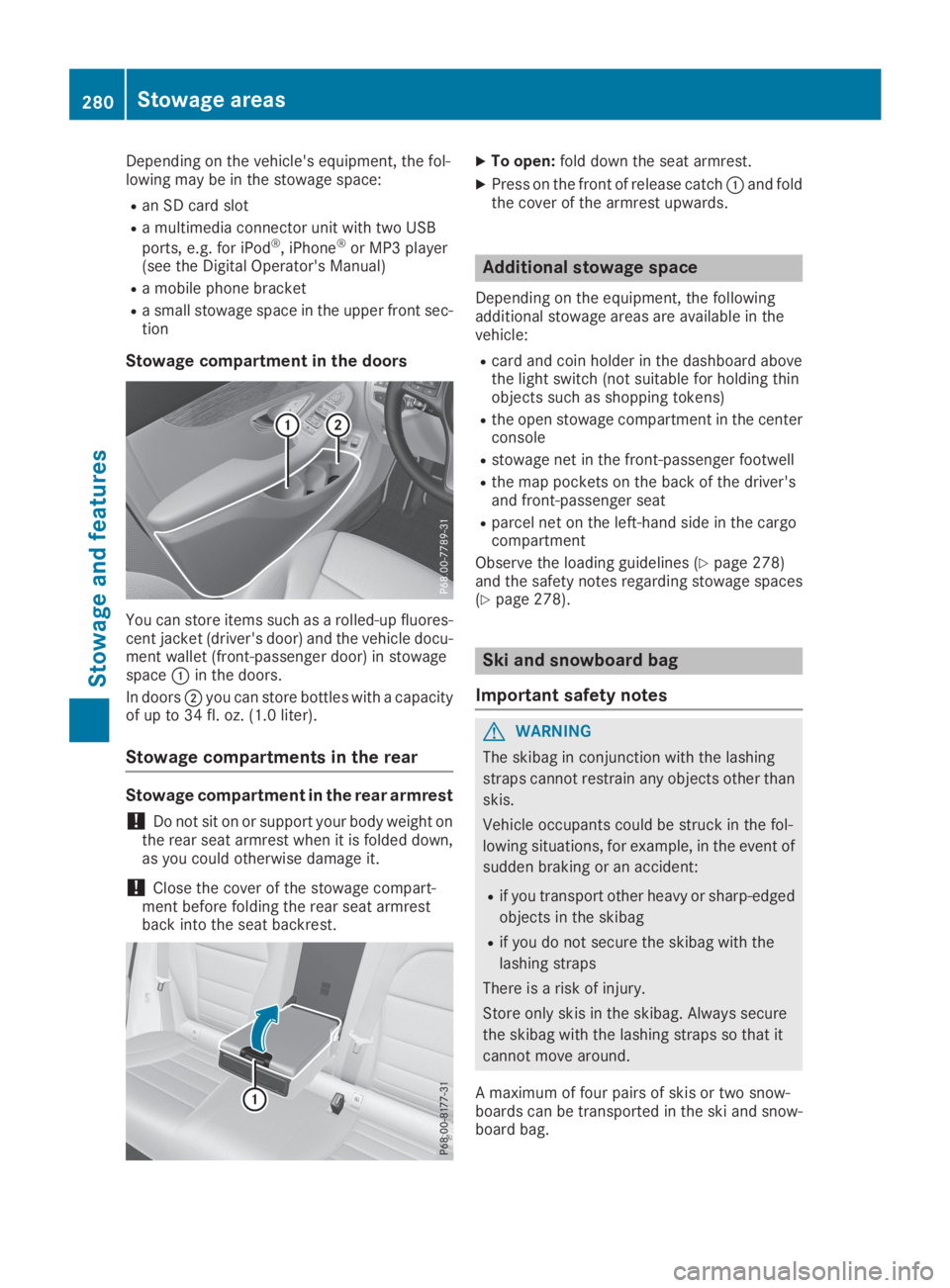
You can store items such as a rolled-up fluores-cent jacket (driver's door) and the vehicle docu-ment wallet (front-passenger door) in stowagespaceCin the doors.
In doorsDyou can store bottles with a capacityof up to 34 fl. oz. (1.0 liter).
Stowage compartments in the rear
Stowage compartment in the rear armrest
!Do not sit on or support your body weight onthe rear seat armrest when it is folded down,as you could otherwise damage it.
!Close the cover of the stowage compart-ment before folding the rear seat armrestback into the seat backrest.
XTo open:fold down the seat armrest.
XPress on the front of release catchCand foldthe cover of the armrest upwards.
Additional stowage space
Depending on the equipment, the followingadditional stowage areas are available in thevehicle:
Rcard and coin holder in the dashboard abovethe light switch (not suitable for holding thinobjects such as shopping tokens)
Rthe open stowage compartment in the centerconsole
Rstowage net in the front-passenger footwell
Rthe map pockets on the back of the driver'sand front-passenger seat
Rparcel net on the left-hand side in the cargocompartment
Observe the loading guidelines (Ypage 278)and the safety notes regarding stowage spaces(Ypage 278).
Ski and snowboard bag
Important safety notes
GWARNING
The skibag in conjunction with the lashing
straps cannot restrain any objects other than
skis.
Vehicle occupants could be struck in the fol-
lowing situations, for example, in the event of
sudden braking or an accident:
Rif you transport other heavy or sharp-edged
objects in the skibag
Rif you do not secure the skibag with the
lashing straps
There is a risk of injury.
Store only skis in the skibag. Always secure
the skibag with the lashing straps so that it
cannot move around.
A maximum of four pairs of skis or two snow-boards can be transported in the ski and snow-board bag.
280Stowage areas
Stowage an d features