wheel MERCEDES-BENZ GLC 2019 Repair Manual
[x] Cancel search | Manufacturer: MERCEDES-BENZ, Model Year: 2019, Model line: GLC, Model: MERCEDES-BENZ GLC 2019Pages: 370, PDF Size: 19.55 MB
Page 198 of 370
This function is available in the range between40 mph and 120 mph (60 km/hand 200 km/h).
A warning may be given if a front wheel passesover a lane marking. It will warn you by means ofintermittent vibration in the steering wheel forup to 1.5 seconds.
Important safety notes
GWARNING
Lane Keeping Assist cannot always clearly
detect lane markings.
In such cases, Lane Keeping Assist can:
Rgive an unnecessary warning
Rnot give a warning
There is a risk of an accident.
Always pay particular attention to the traffic
situation and keep within the lane, especially
if Lane Keeping Assist alerts you.
GWARNING
The Lane Keeping Assist warning does not
return the vehicle to the original lane. There is
a risk of an accident.
You should always steer, brake or accelerate
yourself, in particular if warned by Lane Keep-
ing Assist.
Lane Keeping Assist can neither reduce the riskof an accident if you fail to adapt your drivingstyle nor override the laws of physics. LaneKeeping Assist cannot take into account theroad, traffic and weather conditions. Lane Keep-ing Assist is merely an aid. You are responsiblefor the distance to the vehicle in front, for vehi-cle speed, for braking in good time and for stay-ing in your lane.
The Lane Keeping Assist does not keep the vehi-cle in the lane.
The system may be impaired or may not functionif:
Rthere is poor visibility, e.g. due to insufficientillumination of the road, or due to snow, rain,fog or heavy spray
Rthere is glare, e.g. from oncoming traffic, thesun or reflection from other vehicles (e.g. ifthe road surface is wet)
Rthe windshield is dirty, fogged up, damaged orcovered, for instance by a sticker, in the vicin-ity of the camera
Rthere are no or several unclear lane markingsfor one lane, e.g. roadworks
Rthe lane markings are worn away, dark or cov-ered up, e.g. by dirt or snow
Rthe distance to the vehicle in front is too shortand thus the lane markings cannot be detec-ted
Rthe lane markings change quickly, e.g. lanesbranch off, cross one another or merge
Rthe road is narrow and winding
Rthere are highly variable shade conditions onthe roadway
Activating/deactivating Lane Keeping
Assist
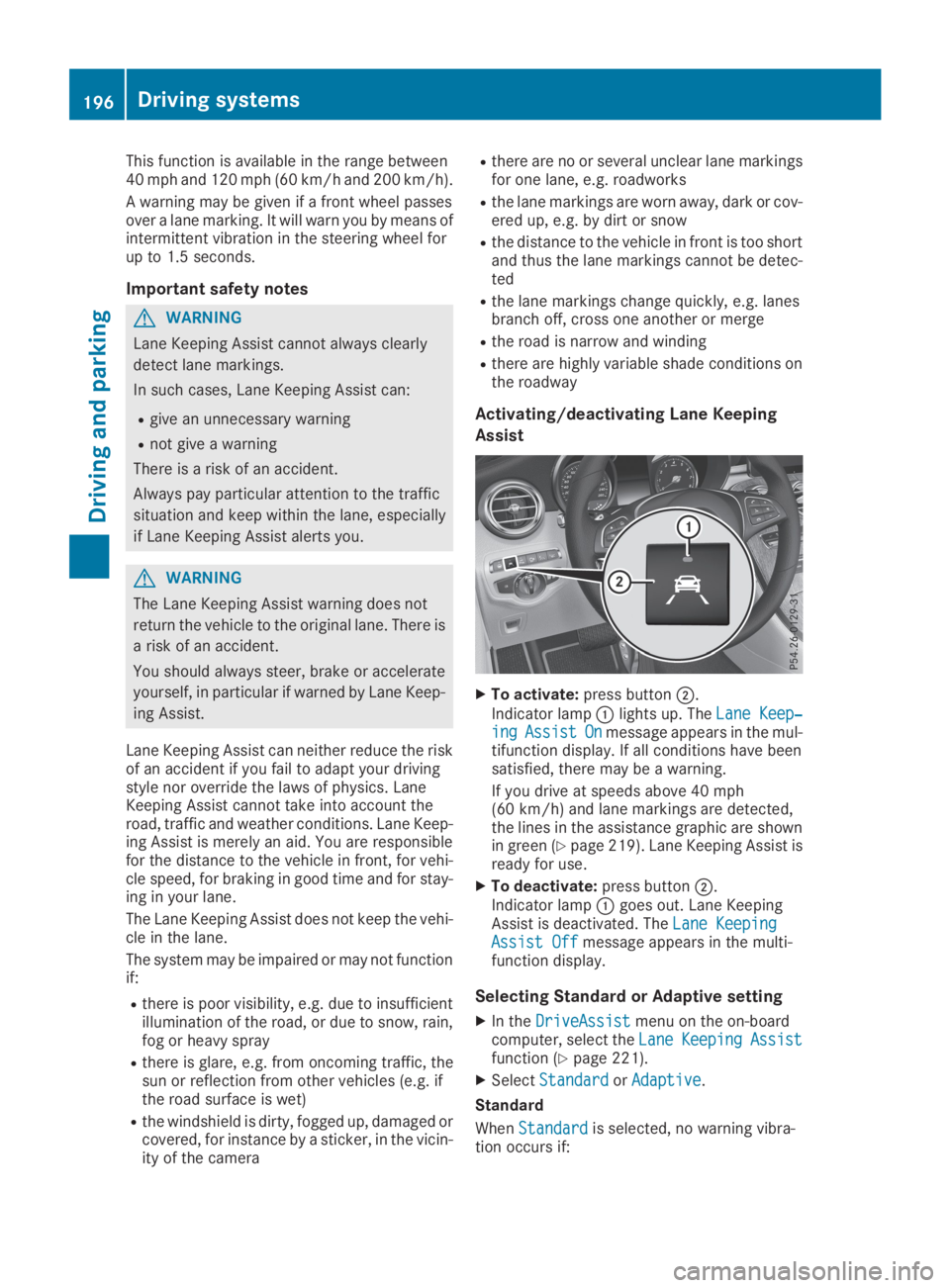
XTo activate:press buttonD.
Indicator lampClights up. TheLane Keep‐Lane Keep‐ingingAssistAssistOnOnmessage appears in the mul-tifunction display. If all conditions have beensatisfied, there may be a warning.
If you drive at speeds above 40 mph(60 km/h) and lane markings are detected,the lines in the assistance graphic are shownin green (Ypage 219). Lane Keeping Assist isready for use.
XTo deactivate:press buttonD.Indicator lampCgoes out. Lane KeepingAssist is deactivated. TheLane KeepingLane KeepingAssist OffAssist Offmessage appears in the multi-function display.
Selecting Standard or Adaptive setting
XIn theDriveAssistDriveAssistmenu on the on-boardcomputer, select theLaneLaneKeepingKeepingAssistAssistfunction (Ypage 221).
XSelectStandardStandardorAdaptiveAdaptive.
Standard
WhenStandardStandardis selected, no warning vibra-tion occurs if:
196Driving systems
Driving an d parking
Page 202 of 370
TowingTowingaaTrailerTrailerSeeSeeOperator'sOperator'sManualManualmessage appears in the multifunction display.
Active Lane Keeping Assist
General notes
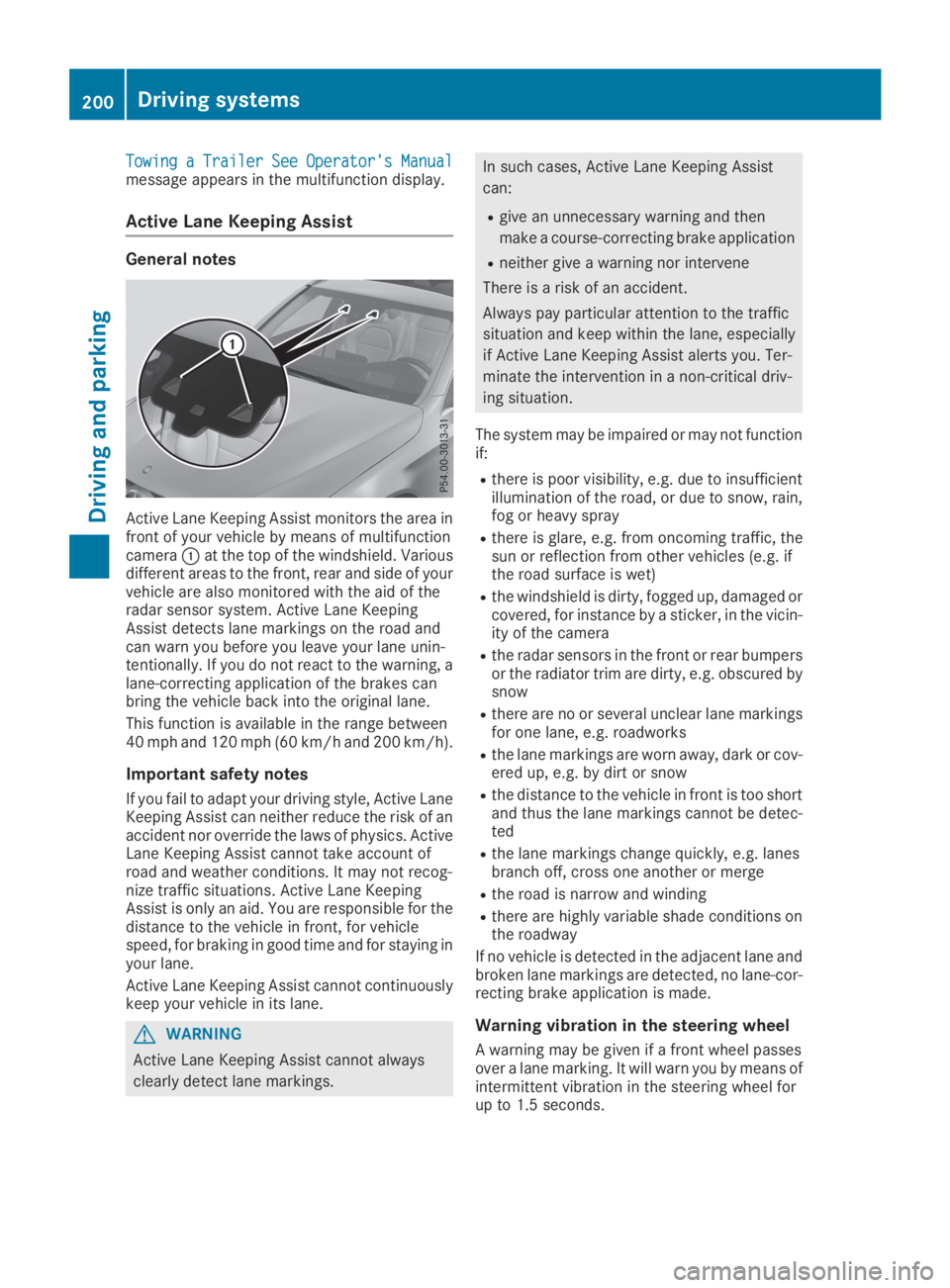
Active Lane Keeping Assist monitors the area infront of your vehicle by means of multifunctioncameraCat the top of the windshield. Variousdifferent areas to the front, rear and side of yourvehicle are also monitored with the aid of theradar sensor system. Active Lane KeepingAssist detects lane markings on the road andcan warn you before you leave your lane unin-tentionally. If you do not react to the warning, alane-correcting application of the brakes canbring the vehicle back into the original lane.
This function is available in the range between40 mph and 120 mph (60 km/h and 200 km/h).
Important safety notes
If you fail to adapt your driving style, Active LaneKeeping Assist can neither reduce the risk of anaccident nor override the laws of physics. ActiveLane Keeping Assist cannot take account ofroad and weather conditions. It may not recog-nize traffic situations. Active Lane KeepingAssist is only an aid. You are responsible for thedistance to the vehicle in front, for vehiclespeed, for braking in good time and for staying inyour lane.
Active Lane Keeping Assist cannot continuouslykeep your vehicle in its lane.
GWARNING
Active Lane Keeping Assist cannot always
clearly detect lane markings.
In such cases, Active Lane Keeping Assist
can:
Rgive an unnecessary warning and then
make a course-correcting brake application
Rneither give a warning nor intervene
There is a risk of an accident.
Always pay particular attention to the traffic
situation and keep within the lane, especially
if Active Lane Keeping Assist alerts you. Ter-
minate the intervention in a non-critical driv-
ing situation.
The system may be impaired or may not functionif:
Rthere is poor visibility, e.g. due to insufficientillumination of the road, or due to snow, rain,fog or heavy spray
Rthere is glare, e.g. from oncoming traffic, thesun or reflection from other vehicles (e.g. ifthe road surface is wet)
Rthe windshield is dirty, fogged up, damaged orcovered, for instance by a sticker, in the vicin-ity of the camera
Rthe radar sensors in the front or rear bumpersor the radiator trim are dirty, e.g. obscured bysnow
Rthere are no or several unclear lane markingsfor one lane, e.g. roadworks
Rthe lane markings are worn away, dark or cov-ered up, e.g. by dirt or snow
Rthe distance to the vehicle in front is too shortand thus the lane markings cannot be detec-ted
Rthe lane markings change quickly, e.g. lanesbranch off, cross one another or merge
Rthe road is narrow and winding
Rthere are highly variable shade conditions onthe roadway
If no vehicle is detected in the adjacent lane andbroken lane markings are detected, no lane-cor-recting brake application is made.
Warning vibration in the steering wheel
A warning may be given if a front wheel passesover a lane marking. It will warn you by means ofintermittent vibration in the steering wheel forup to 1.5 seconds.
200Driving systems
Driving and parking
Page 203 of 370
Lane-correcting brake application
If you leave your lane, under certain circumstan-ces the vehicle will brake briefly on one side.This is meant to assist you in bringing the vehicleback to the original lane.
GWARNING
A lane-correcting brake application cannot
always bring the vehicle back into the original
lane. There is a risk of an accident.
Always steer, brake or accelerate yourself,
especially if Active Lane Keeping Assist warns
you or makes a lane-correcting brake appli-
cation.
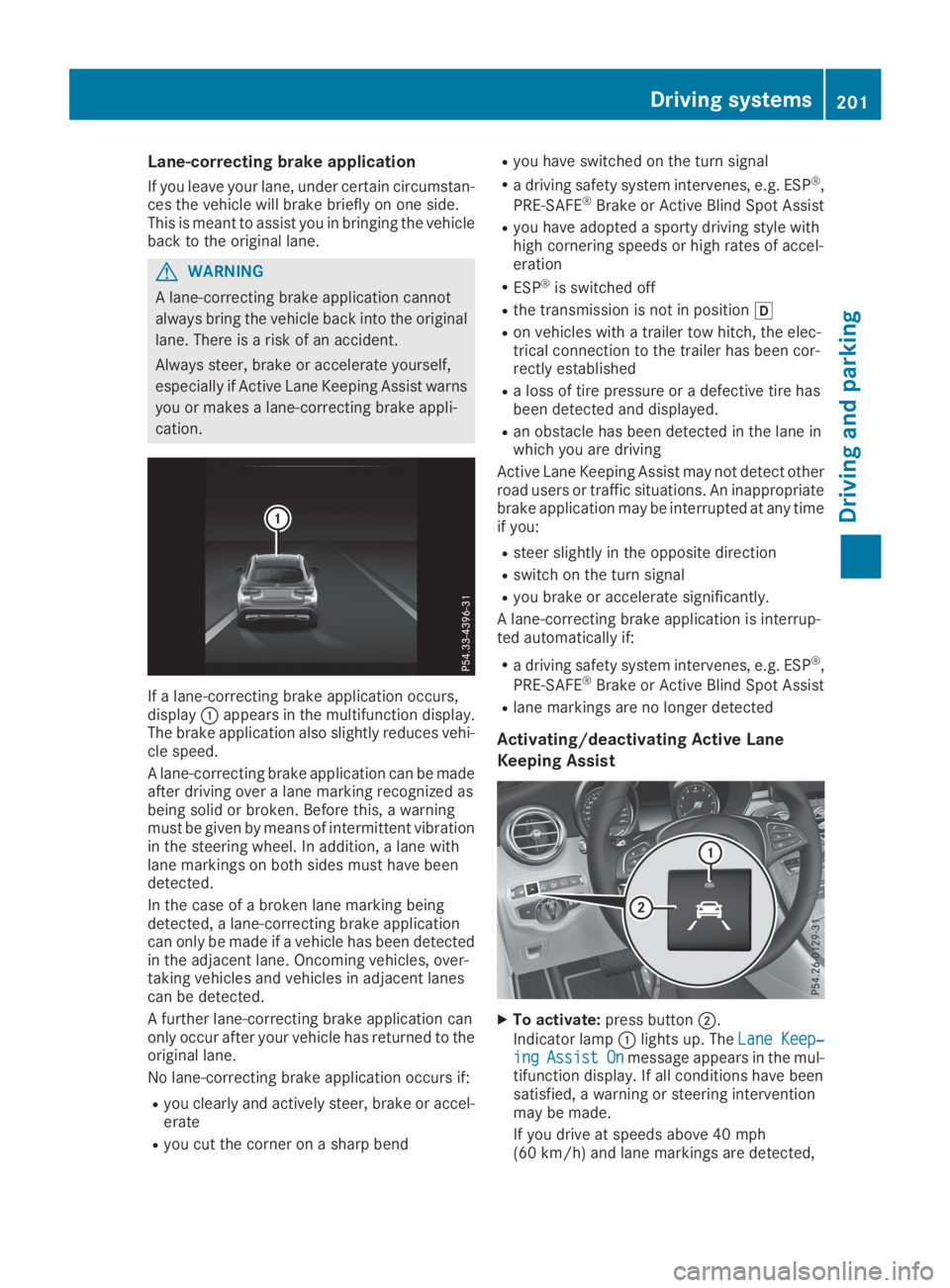
If a lane-correcting brake application occurs,displayCappears in the multifunction display.The brake application also slightly reduces vehi-cle speed.
A lane-correcting brake application can be madeafter driving over a lane marking recognized asbeing solid or broken. Before this, a warningmust be given by means of intermittent vibrationin the steering wheel. In addition, a lane withlane markings on both sides must have beendetected.
In the case of a broken lane marking beingdetected, a lane-correcting brake applicationcan only be made if a vehicle has been detectedin the adjacent lane. Oncoming vehicles, over-taking vehicles and vehicles in adjacent lanescan be detected.
A further lane-correcting brake application canonly occur after your vehicle has returned to theoriginal lane.
No lane-correcting brake application occurs if:
Ryou clearly and actively steer, brake or accel-erate
Ryou cut the corner on a sharp bend
Ryou have switched on the turn signal
Ra driving safety system intervenes, e.g. ESP®,
PRE-SAFE®Brake or Active Blind Spot Assist
Ryou have adopted a sporty driving style withhigh cornering speeds or high rates of accel-eration
RESP®is switched off
Rthe transmission is not in position[
Ron vehicles with a trailer tow hitch, the elec-trical connection to the trailer has been cor-rectly established
Ra loss of tire pressure or a defective tire hasbeen detected and displayed.
Ran obstacle has been detected in the lane inwhich you are driving
Active Lane Keeping Assist may not detect otherroad users or traffic situations. An inappropriatebrake application may be interrupted at any timeif you:
Rsteer slightly in the opposite direction
Rswitch on the turn signal
Ryou brake or accelerate significantly.
A lane-correcting brake application is interrup-ted automatically if:
Ra driving safety system intervenes, e.g. ESP®,
PRE-SAFE®Brake or Active Blind Spot Assist
Rlane markings are no longer detected
Activating/deactivating Active Lane
Keeping Assist
XTo activate:press buttonD.
Indicator lampClights up. TheLane Keep‐Lane Keep‐ingingAssistAssistOnOnmessage appears in the mul-tifunction display. If all conditions have beensatisfied, a warning or steering interventionmay be made.
If you drive at speeds above 40 mph(60 km/h) and lane markings are detected,
Driving systems201
Driving and parking
Z
Page 207 of 370
XSwitch off the engine.
XClose the doors and tailgate.
XCouple up the trailer.
XEstablish the electrical connection betweenthe vehicle and the trailer.
XCheck that the trailer lighting system is work-ing.
XPush the combination switch upwards/down-wards and check whether the correspondingturn signal on the trailer flashes.
A trailer that is connected is recognized onlywhen the electrical connection is establishedcorrectly and when the lighting system is work-ing properly. The function of other systems alsodepends on this, for example:
RESP®
RPARKTRONIC
RActive Parking Assist
RActive Blind Spot Assist
RActive Lane Keeping Assist
Vehicles with AIR BODY CONTROL: if you coupleup a trailer, the vehicle always remains at high-way level. Observe the following note when cou-pling up a trailer:
RUnless highway level has been set manually,the vehicle is automatically lowered to high-way level. If a speed of 5 mph (8 km/h) hasbeen reached, this may be the case.
These restrictions apply to accessories that aresupplied with power via the trailer socket in yourvehicle, e.g. a rear bicycle rack.
Observe the maximum permissible trailerdimensions (width and length).
Most U.S. states and all Canadian provincesrequire by law:
RSafety chains between the towing vehicle andthe trailer. The chains should be cross-woundunder the trailer drawbar. They must be fas-tened to the vehicle's trailer coupling, not tothe bumper or the axle.
Leave enough play in the chains to make tightcornering possible.
RA separate brake system for certain types oftrailer.
RSafety switch for braked trailers. Check thespecific legal requirements applicable to yourstate.
If the trailer becomes detached from the tow-ing vehicle, the safety feature applies thetrailer brakes.
Towing a trailer
There are several legal requirements for towinga trailer, e.g. the maximum permissible speed.Make sure that your car/trailer combinationcomplies with the local regulations:
Rin your place of residence
Rat your destination
The police and local authorities can provide reli-able information.
To accumulate driving experience and accustomyourself to the new handling characteristics,practice the following at a location where thereis no traffic:
RCornering
RStopping
RBacking up
Check the following before the journey:
RTrailer tow hitch
RSafety switch for braked trailers
RSafety chains
RElectrical connections
RLighting system
RWheels and tires
RLoad securing
Adjust the exterior mirrors so that you have aclear view of the rear section of the trailer.
If the trailer is equipped with electronically con-trolled brakes, pull away carefully in the car/trailer combination. Brake manually using thebrake controller and check whether the brakesfunction correctly.
Regularly check that the load is secure.
When towing a trailer, your vehicle's handlingcharacteristics will be different in comparisonwith when driving without a trailer.
The vehicle/trailer combination:
Ris heavier
Ris restricted in its acceleration and gradient-climbing capability
Rhas an increased braking distance
Ris affected more by strong crosswinds
Rdemands more sensitive steering
Rhas a larger turning circle
Avoid sudden steering movements.
Avoid braking abruptly. If possible, brake gentlyat first to allow the trailer to run on. Then,increase the braking force rapidly.
Towing a trailer205
Driving and parking
Z
Page 208 of 370
When overtaking, pay particular attention to theextended length of your vehicle/trailer combi-nation.
Due to the length of the vehicle/trailer combi-nation, you require additional road space whenovertaking before you can change back to theoriginal lane.
If the automatic transmission repeatedly shiftsbetween gears on uphill or downhill gradients,shift to a lower gear.
Driving in a lower gear and at a reduced speeddecreases the risk of engine damage.
If the coolant temperature increases signifi-cantly when climate control is switched on,switch climate control off.
Coolant heat can also be dissipated by openingthe windows and switching the ventilationblower and the interior temperature to the high-est level.
Decoupling a trailer
GWARNING
If you uncouple a trailer with the overrun
brake engaged, you could trap your hand
between the vehicle and the trailer drawbar.
There is a risk of injury.
Do not uncouple a trailer if the overrun brake
is engaged.
GWARNING
Vehicles with level control:
The vehicle is lowered as soon as you discon-
nect the trailer cable. This could result in your
limbs or those of other people that are
between the vehicle body and tires or under-
neath the vehicle being trapped. There is a
risk of injury.
Make sure that nobody is in the immediate
vicinity of the wheel housings or under the
vehicle when you disconnect the trailer cable.
!Do not disconnect a trailer with an engagedoverrun brake. Otherwise, your vehicle couldbe damaged by the rebounding of the overrunbrake.
XApply the vehicle's parking brake manually.
XShift the transmission to position].
XClose all doors and the tailgate.
XSwitch off the engine.
XSecure the vehicle and trailer against rollingaway.
XRemove the trailer cable.
XRemove the safety chains, if there are any.
XUncouple the trailer.
Removing the ball coupling
XObserve the manufacturer's installationinstructions.
XPress the protective cap into the ball couplingrecess.
XMake sure that the protective cap is firmly inplace.
Observe the loading guidelines (Ypage 278)and the safety notes regarding stowage spaces(Ypage 278).
Information on cleaning and care of the trailertow hitch (Ypage 310).
Trailer power supply
!Accessories with a maximum power con-sumption of 180 W can be connected to thepermanent power supply.
You must not charge a trailer battery using thepower supply.
The trailer socket of your vehicle is equipped atthe factory with a permanent power supply.
The permanent power supply is supplied viatrailer socket pin 4.
The trailer's permanent power supply isswitched off in the event of low vehicle supplyvoltage and after six hours at the latest.
A qualified specialist workshop can providemore information about installing the trailerelectrics.
Permissible trailer loads and trailer
drawbar noseweights
Weight specifications
The gross trailer weight is calculated as theweight of the trailer plus the weight of the loadand the trailer's equipment.
206Towing a trailer
Driving and parking
Page 216 of 370
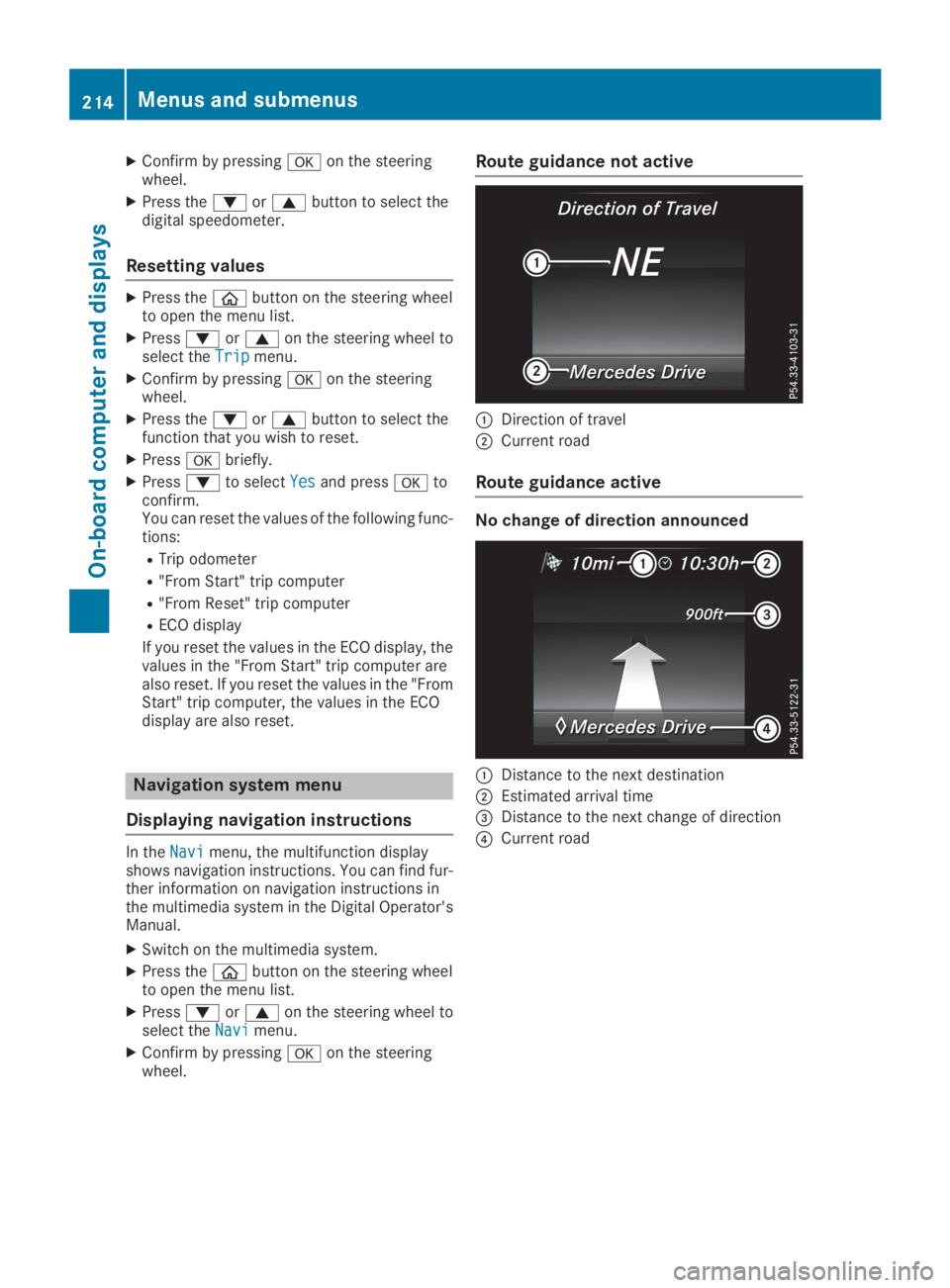
XConfirm by pressingvon the steeringwheel.
XPress thedorcbutton to select thedigital speedometer.
Resetting values
XPress the
Page 219 of 370
XConfirm by pressingvon the steeringwheel.
XTo open the media sources list:pressvbriefly.The list shows the following media sources,for example:
RCD or DVD (DVD only in the COMAND mul-timedia system)
RSD card
RMedia Register (only in the COMAND mul-timedia system)
RUSB storage device
RBluetooth®capable audio device
Please observe further information on mediasupport and media operation in the multimediasystem (see the Digital Operator's Manual).
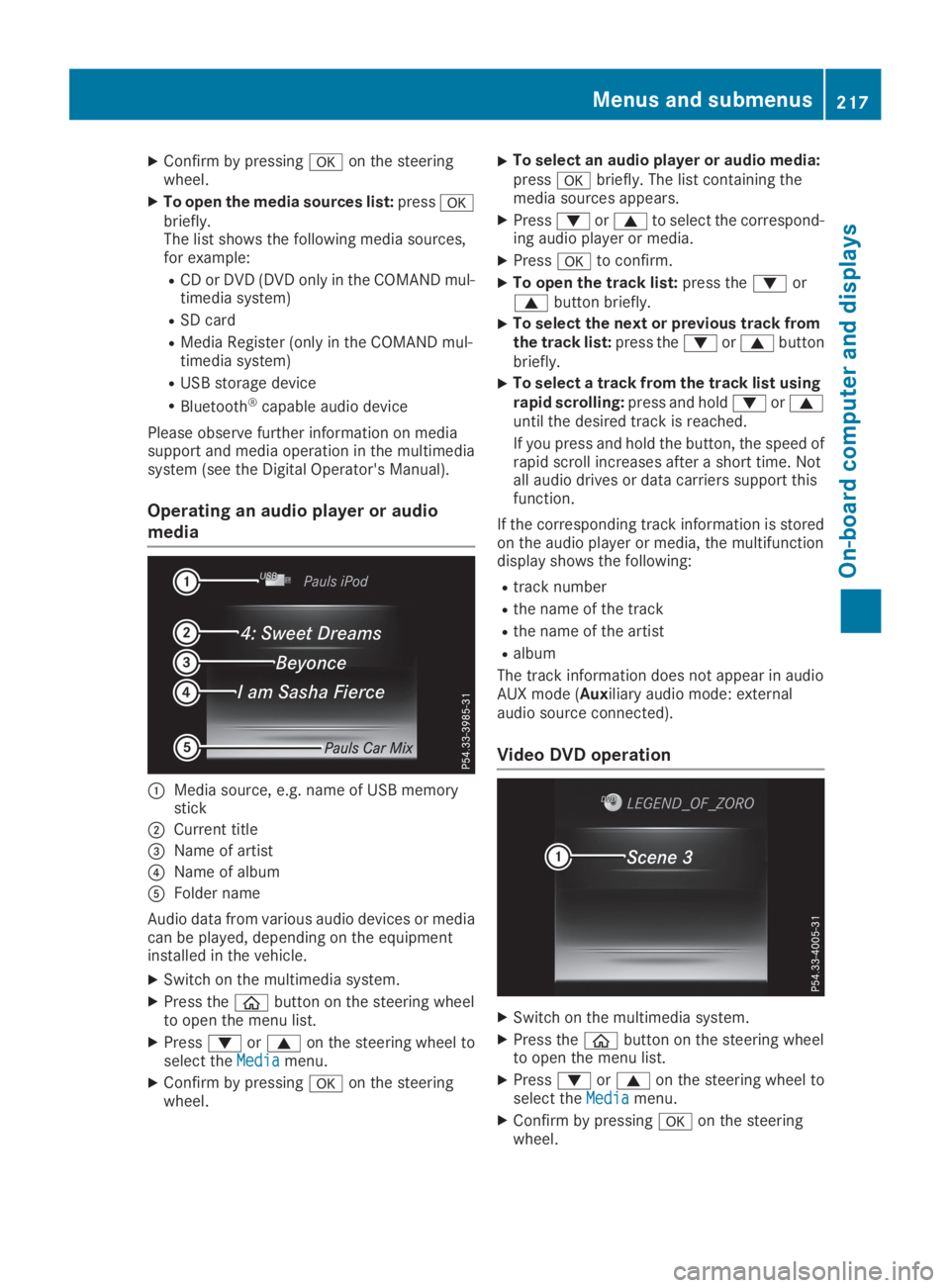
Operating an audio player or audio
media
CMedia source, e.g. name of USB memorystick
DCurrent title
Page 229 of 370
Display messages
Introduction
General notes
Display messages appear in the multifunction display.
Display messages with graphic displays may be shown in simplified form in the Operator's Manualand may therefore differ from the multifunction display.
Please respond in accordance with the display messages and follow the additional notes in thisOperator's Manual.
With certain display messages, you will also hear a warning tone.
You can hide the display messages. The display messages are then stored in the message memory.Rectify the cause of a display message as soon as possible.
When you stop and park the vehicle, please observe the notes on:
RHOLD function (Ypage 170)
RParking (Ypage 152)
Hiding display messages
XPress thevor8button on the steering wheel.The multifunction display hides the display message.
High-priority display messages are shown in red in the multifunction display. Some high-prioritydisplay messages cannot be hidden.
The multifunction display shows these messages continuously until the causes for the messageshave been remedied.
Message memory
The on-board computer saves certain display messages in themessage memory. You can call upthe display messages:
XPress the
Page 233 of 370
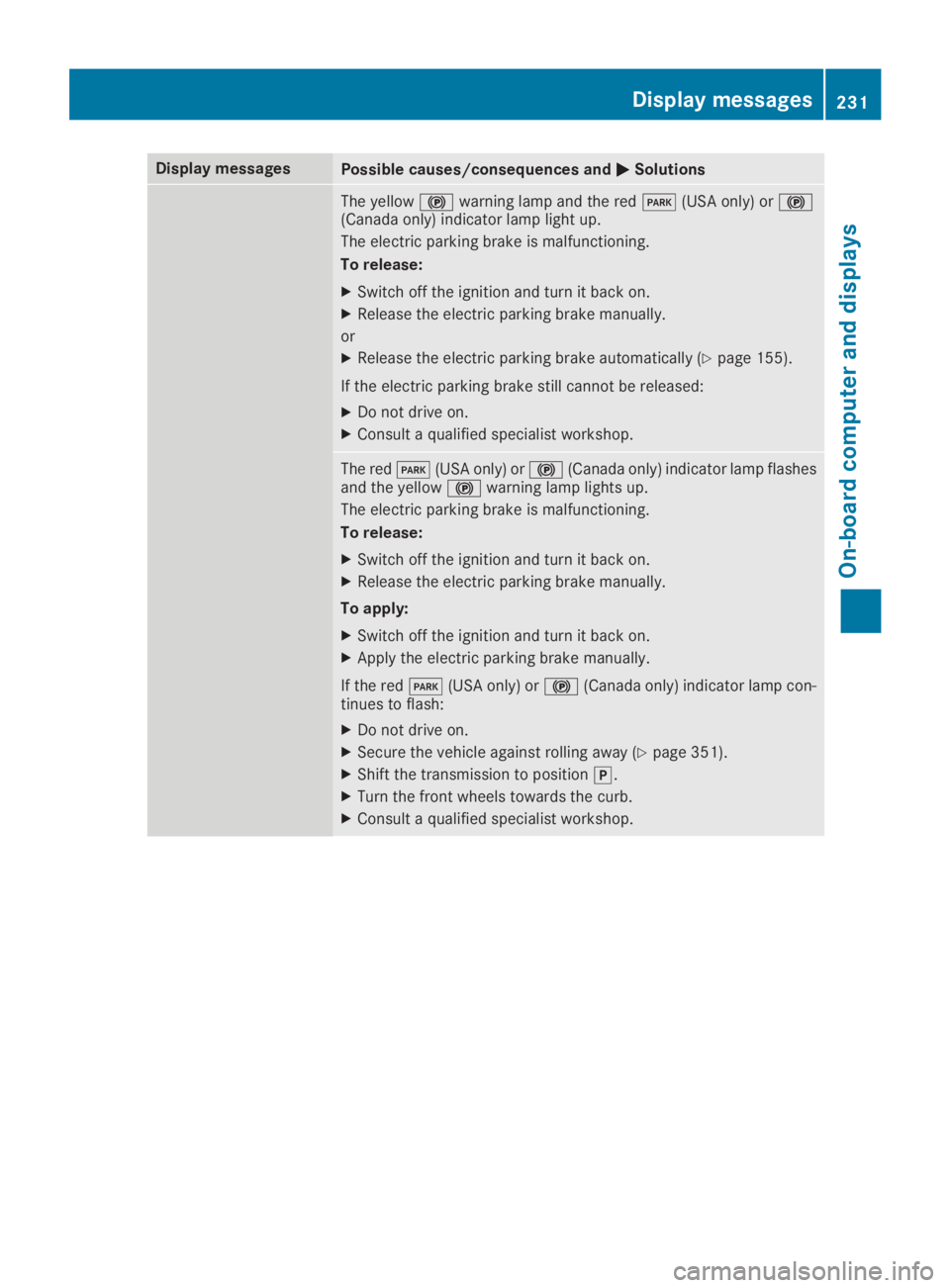
Display messagesPossible causes/consequences andPPSolutions
The yellow$warning lamp and the redI(USA only) or$(Canada only) indicator lamp light up.
The electric parking brake is malfunctioning.
To release:
XSwitch off the ignition and turn it back on.
XRelease the electric parking brake manually.
or
XRelease the electric parking brake automatically (Ypage 155).
If the electric parking brake still cannot be released:
XDo not drive on.
XConsult a qualified specialist workshop.
The redI(USA only) or$(Canada only) indicator lamp flashesand the yellow$warning lamp lights up.
The electric parking brake is malfunctioning.
To release:
XSwitch off the ignition and turn it back on.
XRelease the electric parking brake manually.
To apply:
XSwitch off the ignition and turn it back on.
XApply the electric parking brake manually.
If the redI(USA only) or$(Canada only) indicator lamp con-tinues to flash:
XDo not drive on.
XSecure the vehicle against rolling away (Ypage 351).
XShift the transmission to position].
XTurn the front wheels towards the curb.
XConsult a qualified specialist workshop.
Displaymessages231
On-b oard computer and displays
Z
Page 248 of 370
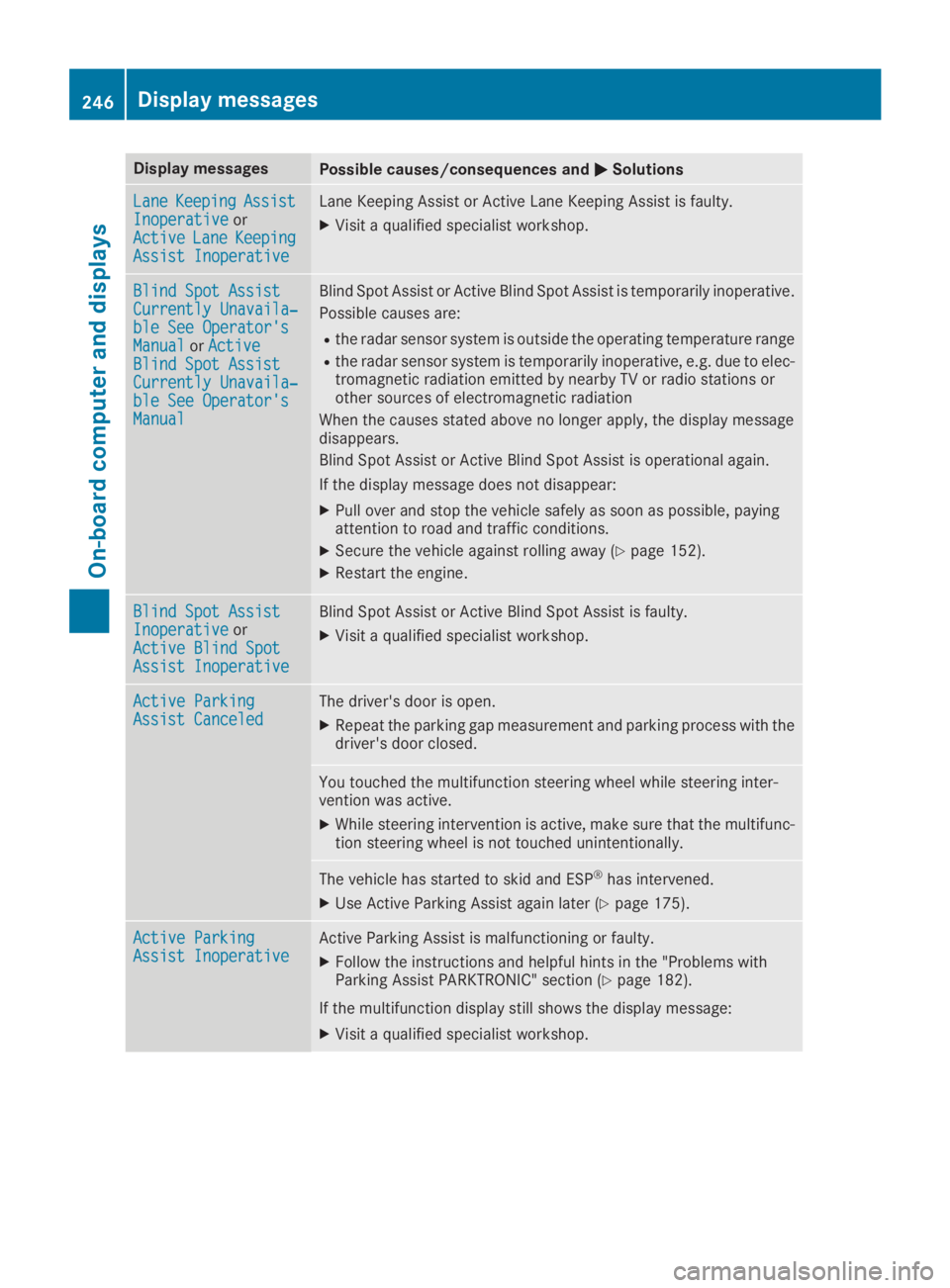
Display messagesPossible causes/consequences andPPSolutions
LaneLaneKeepingKeepingAssistAssistInoperativeInoperativeorActiveActiveLaneLaneKeepingKeepingAssist InoperativeAssist Inoperative
Lane Keeping Assist or Active Lane Keeping Assist is faulty.
XVisit a qualified specialist workshop.
Blind Spot AssistBlind Spot AssistCurrently Unavaila‐Currently Unavaila‐ble See Operator'sble See Operator'sManualManualorActiveActiveBlind Spot AssistBlind Spot AssistCurrently Unavaila‐Currently Unavaila‐ble See Operator'sble See Operator'sManualManual
Blind Spot Assist or Active Blind Spot Assist is temporarily inoperative.
Possible causes are:
Rthe radar sensor system is outside the operating temperature range
Rthe radar sensor system is temporarily inoperative, e.g. due to elec-tromagnetic radiation emitted by nearby TV or radio stations orother sources of electromagnetic radiation
When the causes stated above no longer apply, the display messagedisappears.
Blind Spot Assist or Active Blind Spot Assist is operational again.
If the display message does not disappear:
XPull over and stop the vehicle safely as soon as possible, payingattention to road and traffic conditions.
XSecure the vehicle against rolling away (Ypage 152).
XRestart the engine.
Blind Spot AssistBlind Spot AssistInoperativeInoperativeorActive Blind SpotActive Blind SpotAssist InoperativeAssist Inoperative
Blind Spot Assist or Active Blind Spot Assist is faulty.
XVisit a qualified specialist workshop.
Active ParkingActive ParkingAssist CanceledAssist CanceledThe driver's door is open.
XRepeat the parking gap measurement and parking process with thedriver's door closed.
You touched the multifunction steering wheel while steering inter-vention was active.
XWhile steering intervention is active, make sure that the multifunc-tion steering wheel is not touched unintentionally.
The vehicle has started to skid and ESP®has intervened.
XUse Active Parking Assist again later (Ypage 175).
Active ParkingActive ParkingAssist InoperativeAssist InoperativeActive Parking Assist is malfunctioning or faulty.
XFollow the instructions and helpful hints in the "Problems withParking Assist PARKTRONIC" section (Ypage 182).
If the multifunction display still shows the display message:
XVisit a qualified specialist workshop.
246Displaymessages
On-b oard computer and displays