light MERCEDES-BENZ GLC 2019 Manual PDF
[x] Cancel search | Manufacturer: MERCEDES-BENZ, Model Year: 2019, Model line: GLC, Model: MERCEDES-BENZ GLC 2019Pages: 370, PDF Size: 19.55 MB
Page 201 of 370
If you select the reverse gear, Active Blind SpotAssist is not operational.
The brightness of the warning lamps is auto-matically adapted to the brightness of the sur-roundings.
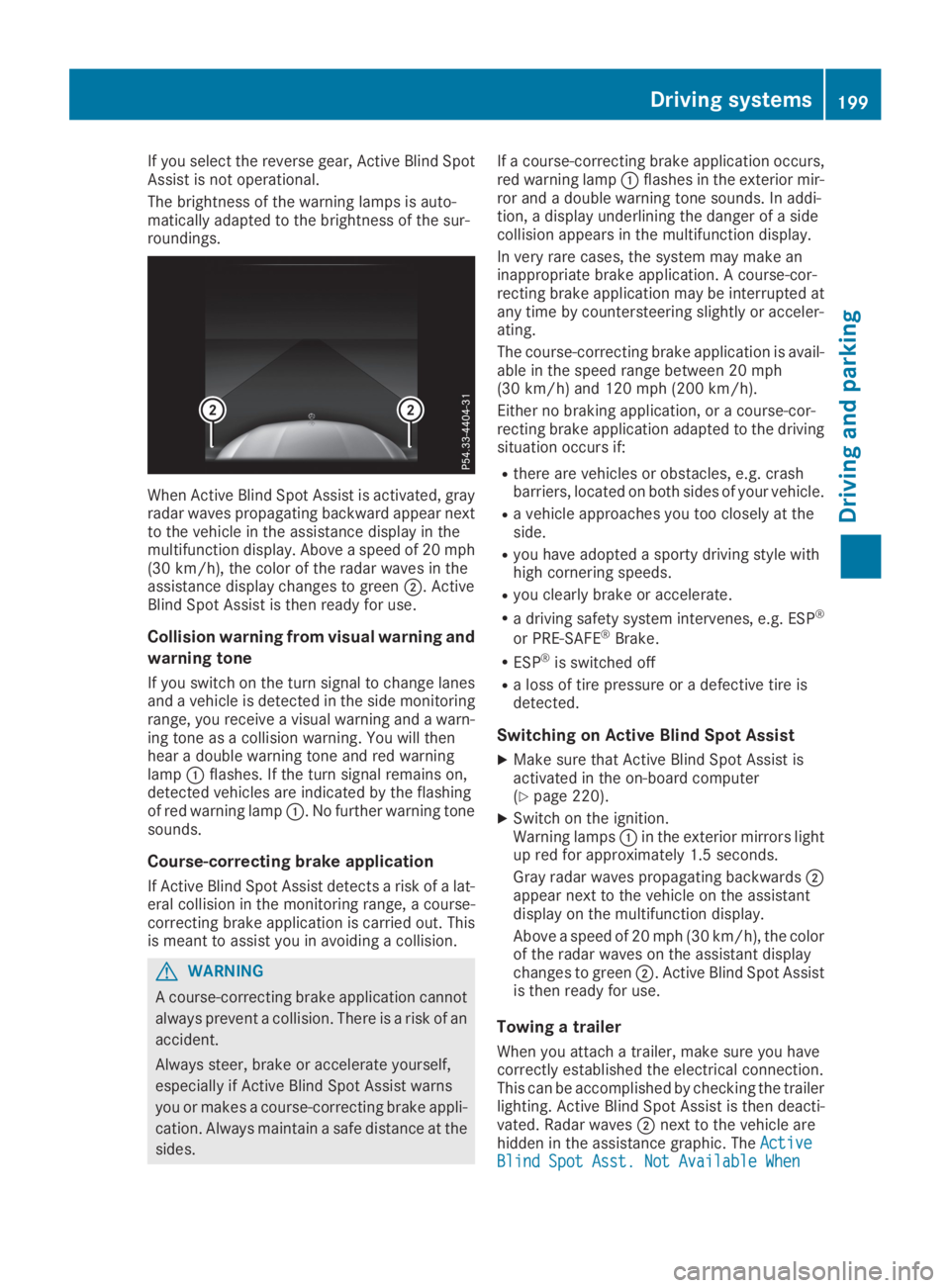
When Active Blind Spot Assist is activated, grayradar waves propagating backward appear nextto the vehicle in the assistance display in themultifunction display. Above a speed of 20 mph(30 km/h), the color of the radar waves in theassistance display changes to greenD. ActiveBlind Spot Assist is then ready for use.
Collision warning from visual warning and
warning tone
If you switch on the turn signal to change lanesand a vehicle is detected in the side monitoringrange, you receive a visual warning and a warn-ing tone as a collision warning. You will thenhear a double warning tone and red warninglampCflashes. If the turn signal remains on,detected vehicles are indicated by the flashingof red warning lampC. No further warning tonesounds.
Course-correcting brake application
If Active Blind Spot Assist detects a risk of a lat-eral collision in the monitoring range, a course-correcting brake application is carried out. Thisis meant to assist you in avoiding a collision.
GWARNING
A course-correcting brake application cannot
always prevent a collision. There is a risk of an
accident.
Always steer, brake or accelerate yourself,
especially if Active Blind Spot Assist warns
you or makes a course-correcting brake appli-
cation. Always maintain a safe distance at the
sides.
If a course-correcting brake application occurs,red warning lampCflashes in the exterior mir-ror and a double warning tone sounds. In addi-tion, a display underlining the danger of a sidecollision appears in the multifunction display.
In very rare cases, the system may make aninappropriate brake application. A course-cor-recting brake application may be interrupted atany time by countersteering slightly or acceler-ating.
The course-correcting brake application is avail-able in the speed range between 20 mph(30 km/h) and 120 mph (200 km/h).
Either no braking application, or a course-cor-recting brake application adapted to the drivingsituation occurs if:
Rthere are vehicles or obstacles, e.g. crashbarriers, located on both sides of your vehicle.
Ra vehicle approaches you too closely at theside.
Ryou have adopted a sporty driving style withhigh cornering speeds.
Ryou clearly brake or accelerate.
Ra driving safety system intervenes, e.g. ESP®
or PRE-SAFE®Brake.
RESP®is switched off
Ra loss of tire pressure or a defective tire isdetected.
Switching on Active Blind Spot Assist
XMake sure that Active Blind Spot Assist isactivated in the on-board computer(Ypage 220).
XSwitch on the ignition.Warning lampsCin the exterior mirrors lightup red for approximately 1.5 seconds.
Gray radar waves propagating backwardsDappear next to the vehicle on the assistantdisplay on the multifunction display.
Above a speed of 20 mph (30 km/h), the colorof the radar waves on the assistant displaychanges to greenD. Active Blind Spot Assistis then ready for use.
Towing a trailer
When you attach a trailer, make sure you havecorrectly established the electrical connection.This can be accomplished by checking the trailerlighting. Active Blind Spot Assist is then deacti-vated. Radar wavesDnext to the vehicle arehidden in the assistance graphic. TheActiveActiveBlind Spot Asst. Not Available WhenBlind Spot Asst. Not Available When
Driving systems199
Driving and parking
Z
Page 203 of 370
Lane-correcting brake application
If you leave your lane, under certain circumstan-ces the vehicle will brake briefly on one side.This is meant to assist you in bringing the vehicleback to the original lane.
GWARNING
A lane-correcting brake application cannot
always bring the vehicle back into the original
lane. There is a risk of an accident.
Always steer, brake or accelerate yourself,
especially if Active Lane Keeping Assist warns
you or makes a lane-correcting brake appli-
cation.
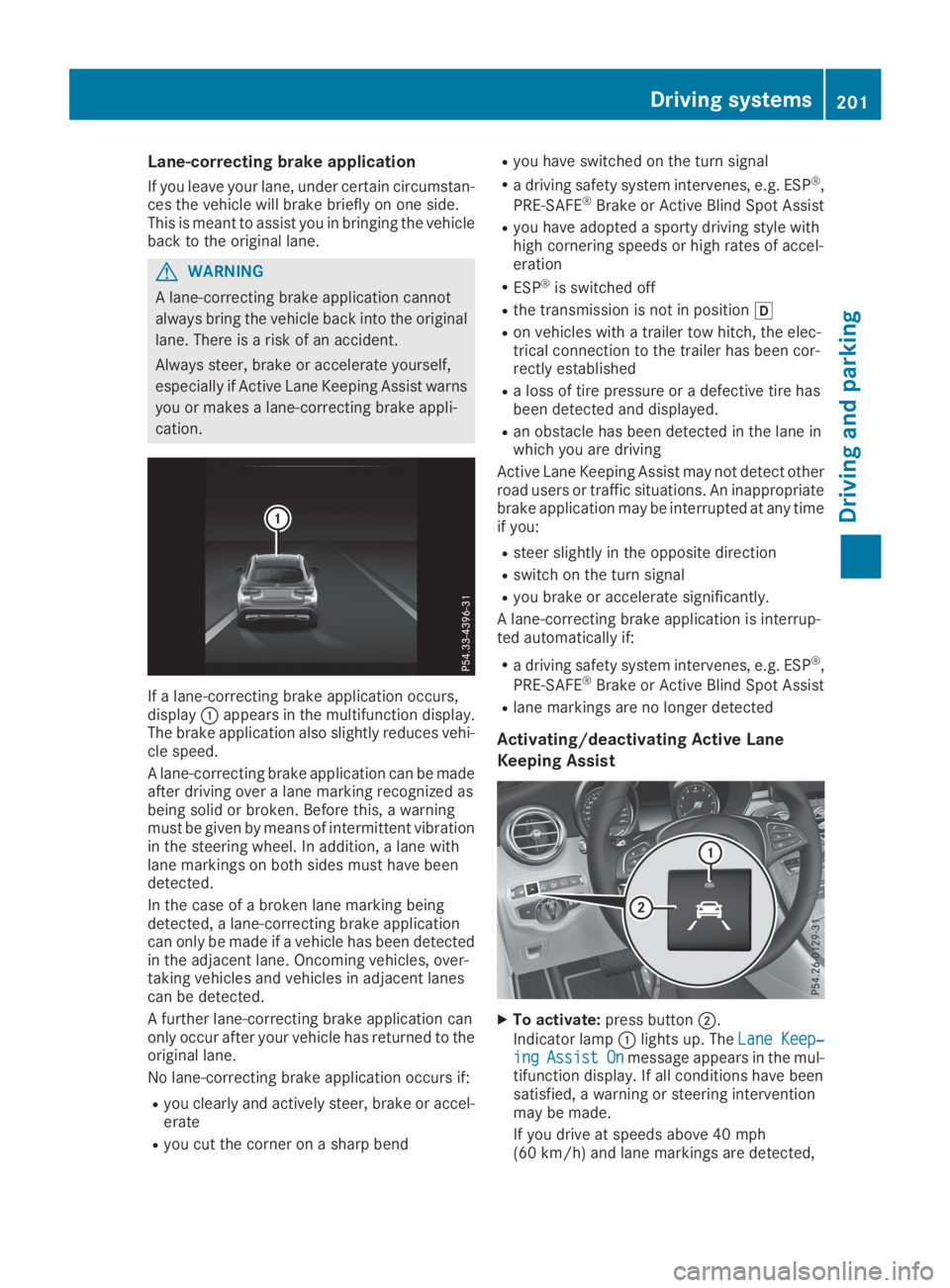
If a lane-correcting brake application occurs,displayCappears in the multifunction display.The brake application also slightly reduces vehi-cle speed.
A lane-correcting brake application can be madeafter driving over a lane marking recognized asbeing solid or broken. Before this, a warningmust be given by means of intermittent vibrationin the steering wheel. In addition, a lane withlane markings on both sides must have beendetected.
In the case of a broken lane marking beingdetected, a lane-correcting brake applicationcan only be made if a vehicle has been detectedin the adjacent lane. Oncoming vehicles, over-taking vehicles and vehicles in adjacent lanescan be detected.
A further lane-correcting brake application canonly occur after your vehicle has returned to theoriginal lane.
No lane-correcting brake application occurs if:
Ryou clearly and actively steer, brake or accel-erate
Ryou cut the corner on a sharp bend
Ryou have switched on the turn signal
Ra driving safety system intervenes, e.g. ESP®,
PRE-SAFE®Brake or Active Blind Spot Assist
Ryou have adopted a sporty driving style withhigh cornering speeds or high rates of accel-eration
RESP®is switched off
Rthe transmission is not in position[
Ron vehicles with a trailer tow hitch, the elec-trical connection to the trailer has been cor-rectly established
Ra loss of tire pressure or a defective tire hasbeen detected and displayed.
Ran obstacle has been detected in the lane inwhich you are driving
Active Lane Keeping Assist may not detect otherroad users or traffic situations. An inappropriatebrake application may be interrupted at any timeif you:
Rsteer slightly in the opposite direction
Rswitch on the turn signal
Ryou brake or accelerate significantly.
A lane-correcting brake application is interrup-ted automatically if:
Ra driving safety system intervenes, e.g. ESP®,
PRE-SAFE®Brake or Active Blind Spot Assist
Rlane markings are no longer detected
Activating/deactivating Active Lane
Keeping Assist
XTo activate:press buttonD.
Indicator lampClights up. TheLane Keep‐Lane Keep‐ingingAssistAssistOnOnmessage appears in the mul-tifunction display. If all conditions have beensatisfied, a warning or steering interventionmay be made.
If you drive at speeds above 40 mph(60 km/h) and lane markings are detected,
Driving systems201
Driving and parking
Z
Page 204 of 370
the lines on the assistance graphic display areshown in green (Ypage 219). Active LaneKeeping Assist is ready for use.
XTo deactivate:press buttonD.Indicator lampCgoes out. The Active LaneKeeping Assist is deactivated. TheLaneLaneKeeping Assist OffKeeping Assist Offmessage appears inthe multifunction display.
Selecting Standard or Adaptive setting
XIn theDriveAssistDriveAssistmenu on the on-boardcomputer, select theActive Lane Keep‐Active Lane Keep‐ing Assisting Assistfunction (Ypage 221).
XSelect settingStandardStandardorAdaptiveAdaptive.WhenStandardStandardis selected, no warning vibra-tion occurs if:
Ryou switch on the turn signals. In this event,the warnings are suppressed for a certainperiod of time.
Ra driving safety system intervenes, such as
ABS, BAS or ESP®.
WhenAdaptiveAdaptiveis selected, no warning vibra-tion occurs if:
Ryou switch on the turn signals. In this event,the warnings are suppressed for a certainperiod of time.
Ra driving safety system intervenes, e.g.
ABS, BAS or ESP®.
Ryou accelerate hard, e.g. kickdown.
Ryou brake hard.
Ryou steer actively, e.g. swerve to avoid anobstacle or change lanes quickly.
Ryou cut the corner on a sharp bend.
To ensure that you are warned only when nec-essary and in good time if you cross the lanemarkings, the system detects certain conditionsand warns you accordingly.
The warning vibration occurs earlier if:
Ryou approach the outer lane marking on abend
Rthe road has very wide lanes, e.g. a freeway
Rthe system detects solid lane markings
The warning vibration occurs later if:
Rthe road has narrow lanes
Ryou cut the corner on a bend
Towing a trailer
When you attach a trailer, make sure you havecorrectly established the electrical connection.
This can be accomplished by checking the trailerlighting.
Towing a trailer
Important safety notes
GWARNING
Installing an unsuitable ball coupling may
result in overloading of the trailer tow hitch
and the rear axle. This applies especially if the
ball coupling in question is longer or angled
differently. This could seriously impair the
driving characteristics and the trailer can
come loose. There is a risk of an accident.
You should only ever install a ball coupling
that has the permissible dimensions and that
is designed to meet your trailer-towing
requirements. Do not modify the ball coupling
or the trailer tow hitch.
You will find the values approved by the manu-facturer on the vehicle identification plates andthose for the towing vehicle under "Technicaldata" (Ypage 364).
GWARNING
When the vehicle/trailer combination begins
to lurch, you could lose control of it. The vehi-
cle/trailer combination could even rollover.
There is a risk of an accident.
On no account should you attempt to
straighten up the vehicle/trailer combination
by increasing the speed. Reduce vehicle
speed and do not countersteer. Apply the
brake as necessary.
!If you have a trailer tow hitch retrofitted,changes to the engine cooling system may benecessary, depending on the vehicle type.
If you have a trailer tow hitch retrofitted,observe the anchorage points on the chassisframe.
The installation of a trailer tow hitch is only per-missible if a towing weight is specified in yourvehicle documents. If this is not the case, thenthe vehicle is not approved for the towing of atrailer.
202Towing a trailer
Driving an d parking
Page 207 of 370
XSwitch off the engine.
XClose the doors and tailgate.
XCouple up the trailer.
XEstablish the electrical connection betweenthe vehicle and the trailer.
XCheck that the trailer lighting system is work-ing.
XPush the combination switch upwards/down-wards and check whether the correspondingturn signal on the trailer flashes.
A trailer that is connected is recognized onlywhen the electrical connection is establishedcorrectly and when the lighting system is work-ing properly. The function of other systems alsodepends on this, for example:
RESP®
RPARKTRONIC
RActive Parking Assist
RActive Blind Spot Assist
RActive Lane Keeping Assist
Vehicles with AIR BODY CONTROL: if you coupleup a trailer, the vehicle always remains at high-way level. Observe the following note when cou-pling up a trailer:
RUnless highway level has been set manually,the vehicle is automatically lowered to high-way level. If a speed of 5 mph (8 km/h) hasbeen reached, this may be the case.
These restrictions apply to accessories that aresupplied with power via the trailer socket in yourvehicle, e.g. a rear bicycle rack.
Observe the maximum permissible trailerdimensions (width and length).
Most U.S. states and all Canadian provincesrequire by law:
RSafety chains between the towing vehicle andthe trailer. The chains should be cross-woundunder the trailer drawbar. They must be fas-tened to the vehicle's trailer coupling, not tothe bumper or the axle.
Leave enough play in the chains to make tightcornering possible.
RA separate brake system for certain types oftrailer.
RSafety switch for braked trailers. Check thespecific legal requirements applicable to yourstate.
If the trailer becomes detached from the tow-ing vehicle, the safety feature applies thetrailer brakes.
Towing a trailer
There are several legal requirements for towinga trailer, e.g. the maximum permissible speed.Make sure that your car/trailer combinationcomplies with the local regulations:
Rin your place of residence
Rat your destination
The police and local authorities can provide reli-able information.
To accumulate driving experience and accustomyourself to the new handling characteristics,practice the following at a location where thereis no traffic:
RCornering
RStopping
RBacking up
Check the following before the journey:
RTrailer tow hitch
RSafety switch for braked trailers
RSafety chains
RElectrical connections
RLighting system
RWheels and tires
RLoad securing
Adjust the exterior mirrors so that you have aclear view of the rear section of the trailer.
If the trailer is equipped with electronically con-trolled brakes, pull away carefully in the car/trailer combination. Brake manually using thebrake controller and check whether the brakesfunction correctly.
Regularly check that the load is secure.
When towing a trailer, your vehicle's handlingcharacteristics will be different in comparisonwith when driving without a trailer.
The vehicle/trailer combination:
Ris heavier
Ris restricted in its acceleration and gradient-climbing capability
Rhas an increased braking distance
Ris affected more by strong crosswinds
Rdemands more sensitive steering
Rhas a larger turning circle
Avoid sudden steering movements.
Avoid braking abruptly. If possible, brake gentlyat first to allow the trailer to run on. Then,increase the braking force rapidly.
Towing a trailer205
Driving and parking
Z
Page 210 of 370
Important safety notes
GWARNING
If you operate information systems and com-
munication equipment integrated in the vehi-
cle when driving, you may be distracted from
the traffic situation. You could also lose con-
trol of the vehicle. There is a risk of an acci-
dent.
Only operate this equipment when the traffic
situation permits. If you are not sure that this
is possible, park the vehicle paying attention
to traffic conditions and operate the equip-
ment when the vehicle is stationary.
You must observe the legal requirements for thecountry in which you are currently driving whenoperating the on-board computer.
GWARNING
If the instrument cluster has failed or mal-
functioned, you may not recognize function
restrictions in systems relevant to safety. The
operating safety of your vehicle may be
impaired. There is a risk of an accident.
Drive on carefully. Have the vehicle checked
at a qualified specialist workshop immedi-
ately.
If the operating safety of your vehicle isimpaired, pull over as soon as it is safe to do so.Contact a qualified specialist workshop.
The on-board computer only shows messages orwarnings from certain systems in the multifunc-tion display. You should therefore make sureyour vehicle is operating safely at all times.
For an overview, see the instrument panel illus-tration (Ypage 36).
Displays and operation
Instrument cluster lighting
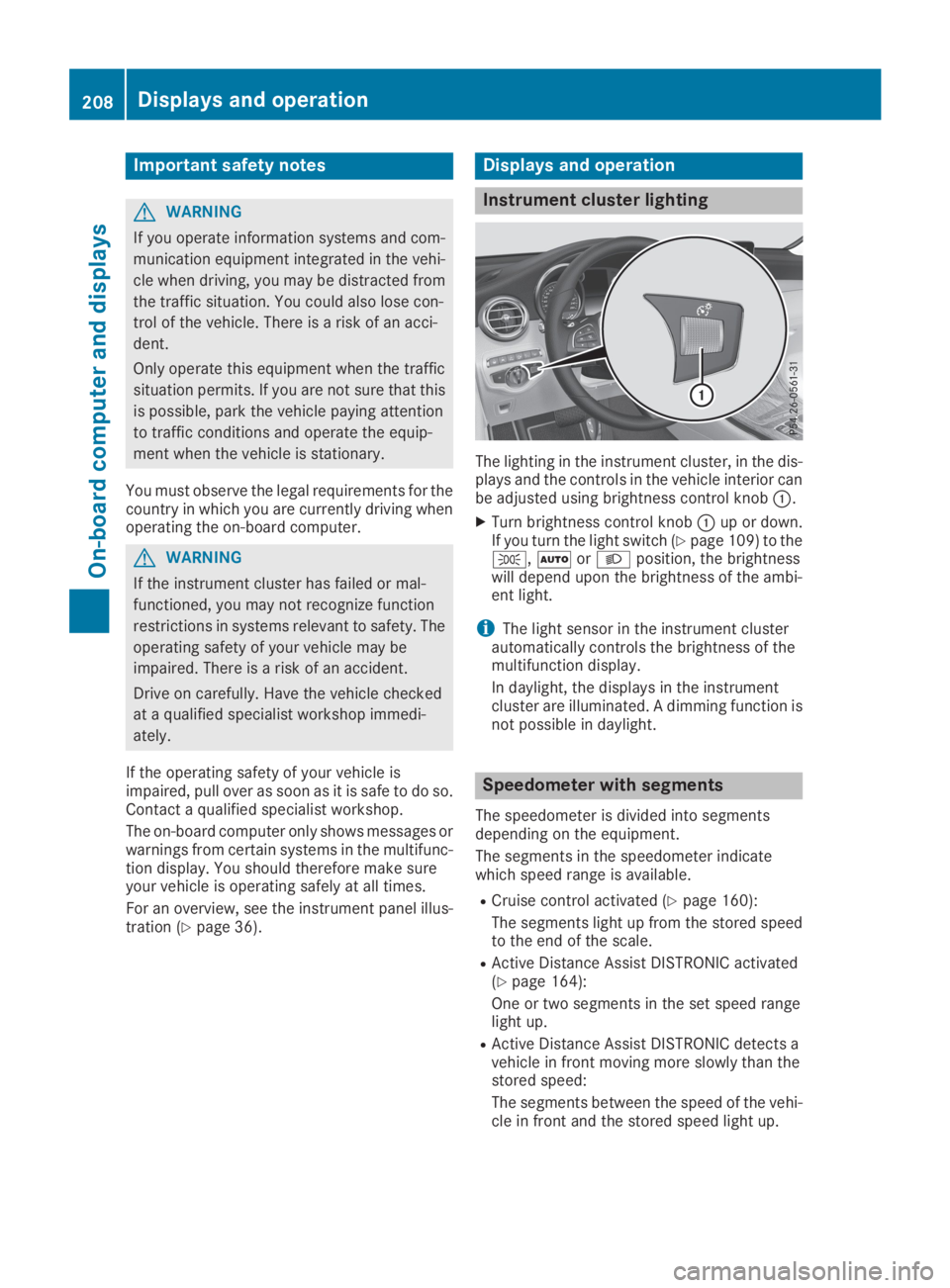
The lighting in the instrument cluster, in the dis-plays and the controls in the vehicle interior canbe adjusted using brightness control knobC.
XTurn brightness control knobCup or down.If you turn the light switch (Ypage 109) to the`,XorXposition, the brightnesswill depend upon the brightness of the ambi-ent light.
iThe light sensor in the instrument clusterautomatically controls the brightness of themultifunction display.
In daylight, the displays in the instrumentcluster are illuminated. A dimming function isnot possible in daylight.
Speedometer with segments
The speedometer is divided into segmentsdepending on the equipment.
The segments in the speedometer indicatewhich speed range is available.
RCruise control activated (Ypage 160):
The segments light up from the stored speedto the end of the scale.
RActive Distance Assist DISTRONIC activated(Ypage 164):
One or two segments in the set speed rangelight up.
RActive Distance Assist DISTRONIC detects avehicle in front moving more slowly than thestored speed:
The segments between the speed of the vehi-cle in front and the stored speed light up.
208Displays and operation
On-board computer and displays
Page 233 of 370
Display messagesPossible causes/consequences andPPSolutions
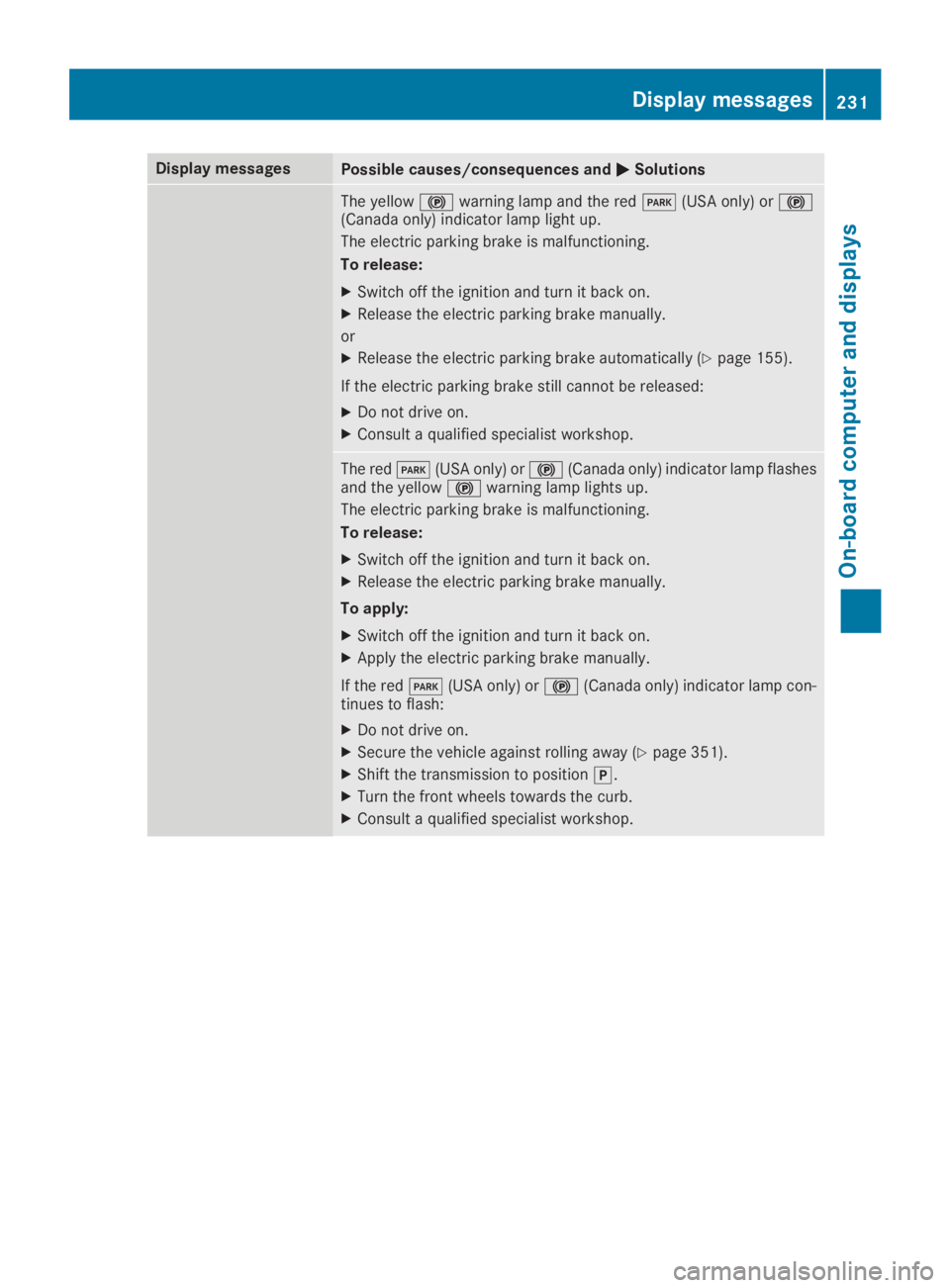
The yellow$warning lamp and the redI(USA only) or$(Canada only) indicator lamp light up.
The electric parking brake is malfunctioning.
To release:
XSwitch off the ignition and turn it back on.
XRelease the electric parking brake manually.
or
XRelease the electric parking brake automatically (Ypage 155).
If the electric parking brake still cannot be released:
XDo not drive on.
XConsult a qualified specialist workshop.
The redI(USA only) or$(Canada only) indicator lamp flashesand the yellow$warning lamp lights up.
The electric parking brake is malfunctioning.
To release:
XSwitch off the ignition and turn it back on.
XRelease the electric parking brake manually.
To apply:
XSwitch off the ignition and turn it back on.
XApply the electric parking brake manually.
If the redI(USA only) or$(Canada only) indicator lamp con-tinues to flash:
XDo not drive on.
XSecure the vehicle against rolling away (Ypage 351).
XShift the transmission to position].
XTurn the front wheels towards the curb.
XConsult a qualified specialist workshop.
Displaymessages231
On-b oard computer and displays
Z
Page 234 of 370
Display messagesPossible causes/consequences andPPSolutions
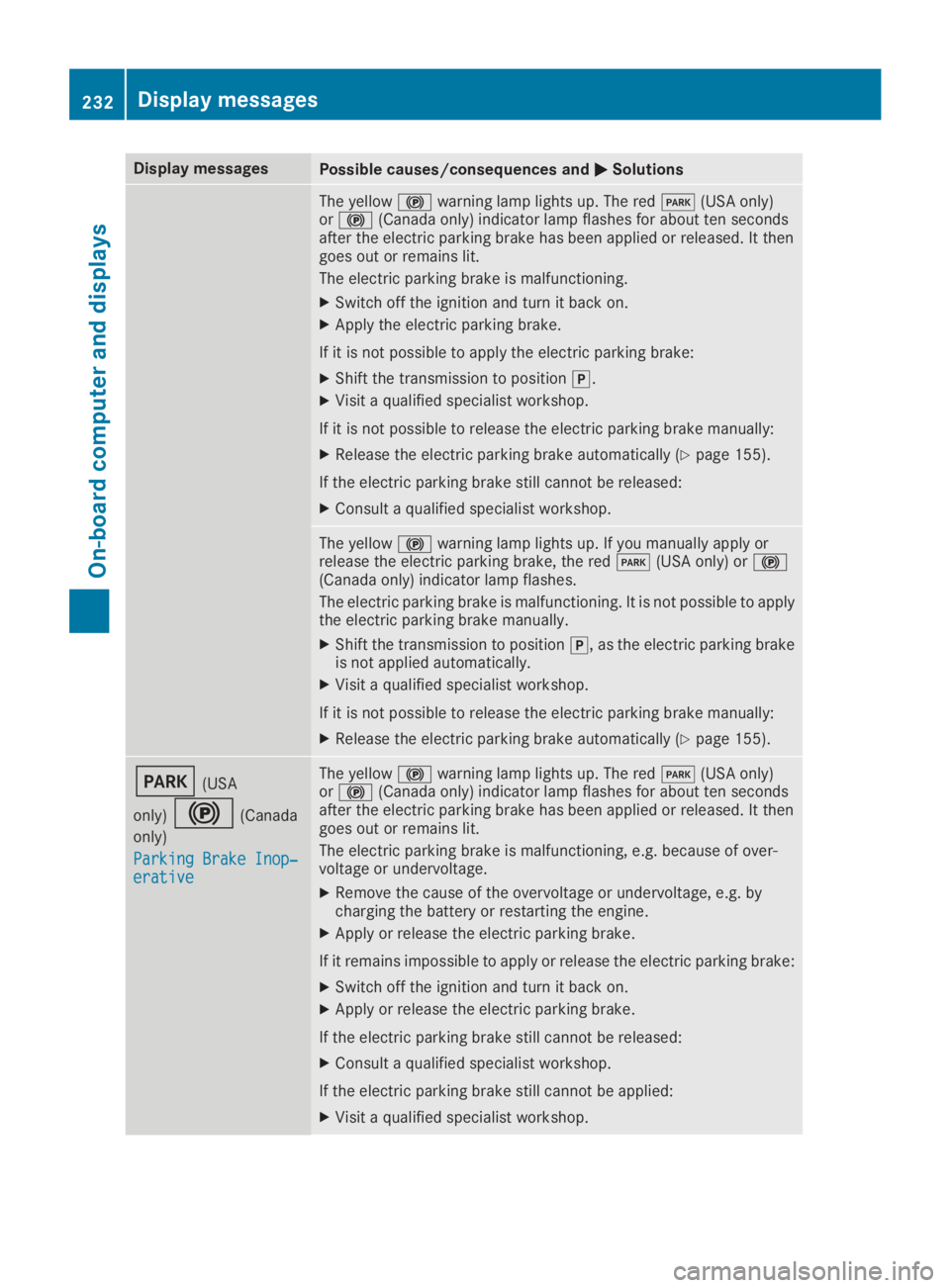
The yellow$warning lamp lights up. The redI(USA only)or$(Canada only) indicator lamp flashes for about ten secondsafter the electric parking brake has been applied or released. It thengoes out or remains lit.
The electric parking brake is malfunctioning.
XSwitch off the ignition and turn it back on.
XApply the electric parking brake.
If it is not possible to apply the electric parking brake:
XShift the transmission to position].
XVisit a qualified specialist workshop.
If it is not possible to release the electric parking brake manually:
XRelease the electric parking brake automatically (Ypage 155).
If the electric parking brake still cannot be released:
XConsult a qualified specialist workshop.
The yellow$warning lamp lights up. If you manually apply orrelease the electric parking brake, the redI(USA only) or$(Canada only) indicator lamp flashes.
The electric parking brake is malfunctioning. It is not possible to applythe electric parking brake manually.
XShift the transmission to position], as the electric parking brakeis not applied automatically.
XVisit a qualified specialist workshop.
If it is not possible to release the electric parking brake manually:
XRelease the electric parking brake automatically (Ypage 155).
I(USA
only)$(Canada
only)
Parking Brake Inop‐Parking Brake Inop‐erativeerative
The yellow$warning lamp lights up. The redI(USA only)or$(Canada only) indicator lamp flashes for about ten secondsafter the electric parking brake has been applied or released. It thengoes out or remains lit.
The electric parking brake is malfunctioning, e.g. because of over-voltage or undervoltage.
XRemove the cause of the overvoltage or undervoltage, e.g. bycharging the battery or restarting the engine.
XApply or release the electric parking brake.
If it remains impossible to apply or release the electric parking brake:
XSwitch off the ignition and turn it back on.
XApply or release the electric parking brake.
If the electric parking brake still cannot be released:
XConsult a qualified specialist workshop.
If the electric parking brake still cannot be applied:
XVisit a qualified specialist workshop.
232Displaymessages
On-b oard computer and displays
Page 235 of 370
Display messagesPossible causes/consequences andPPSolutions
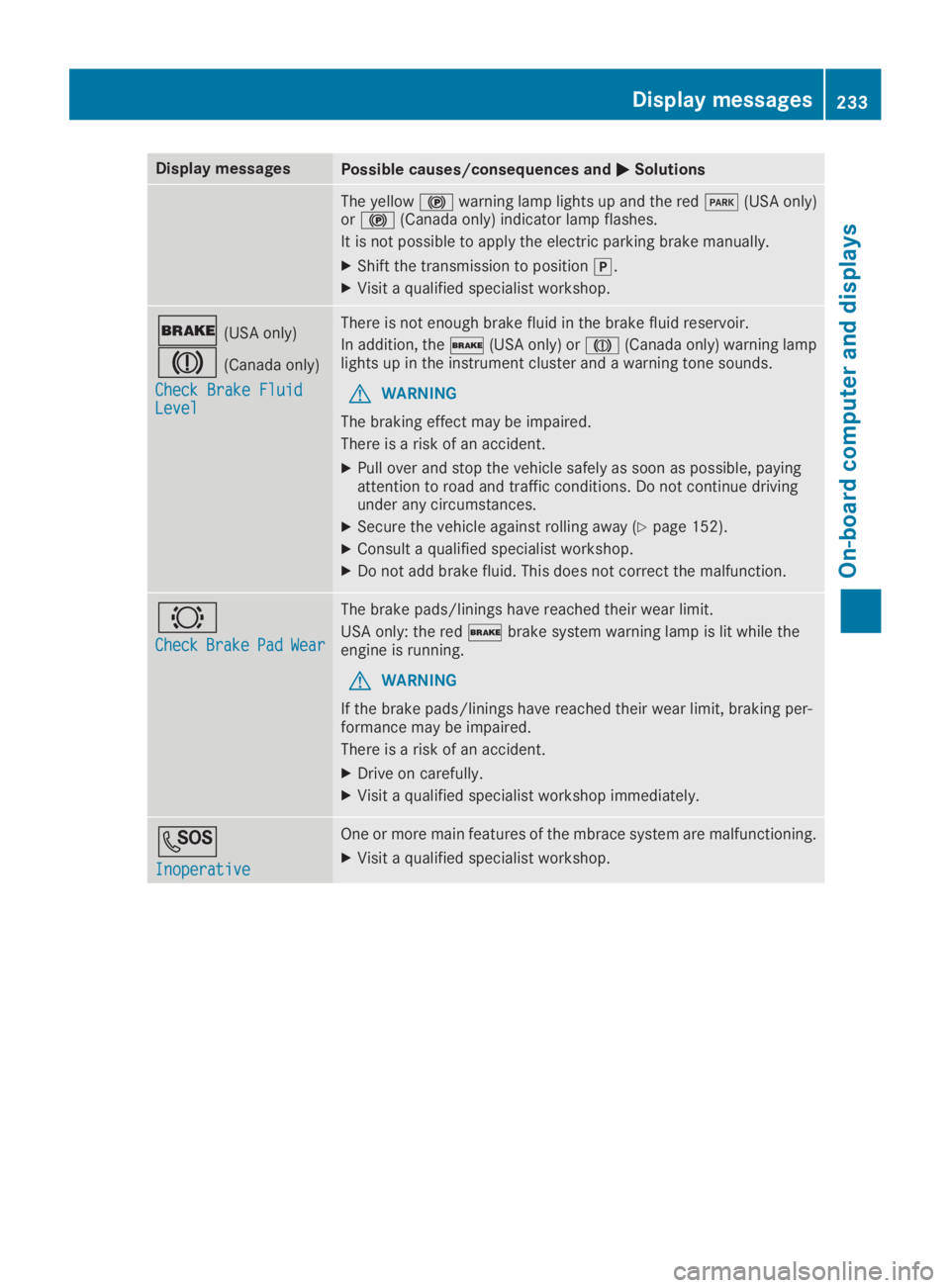
The yellow$warning lamp lights up and the redI(USA only)or$(Canada only) indicator lamp flashes.
It is not possible to apply the electric parking brake manually.
XShift the transmission to position].
XVisit a qualified specialist workshop.
'(USA only)
M(Canada only)
Check Brake FluidCheck Brake FluidLevelLevel
There is not enough brake fluid in the brake fluid reservoir.
In addition, the'(USA only) orM(Canada only) warning lamplights up in the instrument cluster and a warning tone sounds.
GWARNING
The braking effect may be impaired.
There is a risk of an accident.
XPull over and stop the vehicle safely as soon as possible, payingattention to road and traffic conditions. Do not continue drivingunder any circumstances.
XSecure the vehicle against rolling away (Ypage 152).
XConsult a qualified specialist workshop.
XDo not add brake fluid. This does not correct the malfunction.
&
CheckCheckBrakeBrakePadPadWearWear
The brake pads/linings have reached their wear limit.
USA only: the red'brake system warning lamp is lit while theengine is running.
GWARNING
If the brake pads/linings have reached their wear limit, braking per-formance may be impaired.
There is a risk of an accident.
XDrive on carefully.
XVisit a qualified specialist workshop immediately.
S
InoperativeInoperative
One or more main features of the mbrace system are malfunctioning.
XVisit a qualified specialist workshop.
Displaymessages233
On-b oard computer and displays
Z
Page 237 of 370
Display messagesPossible causes/consequences andPPSolutions
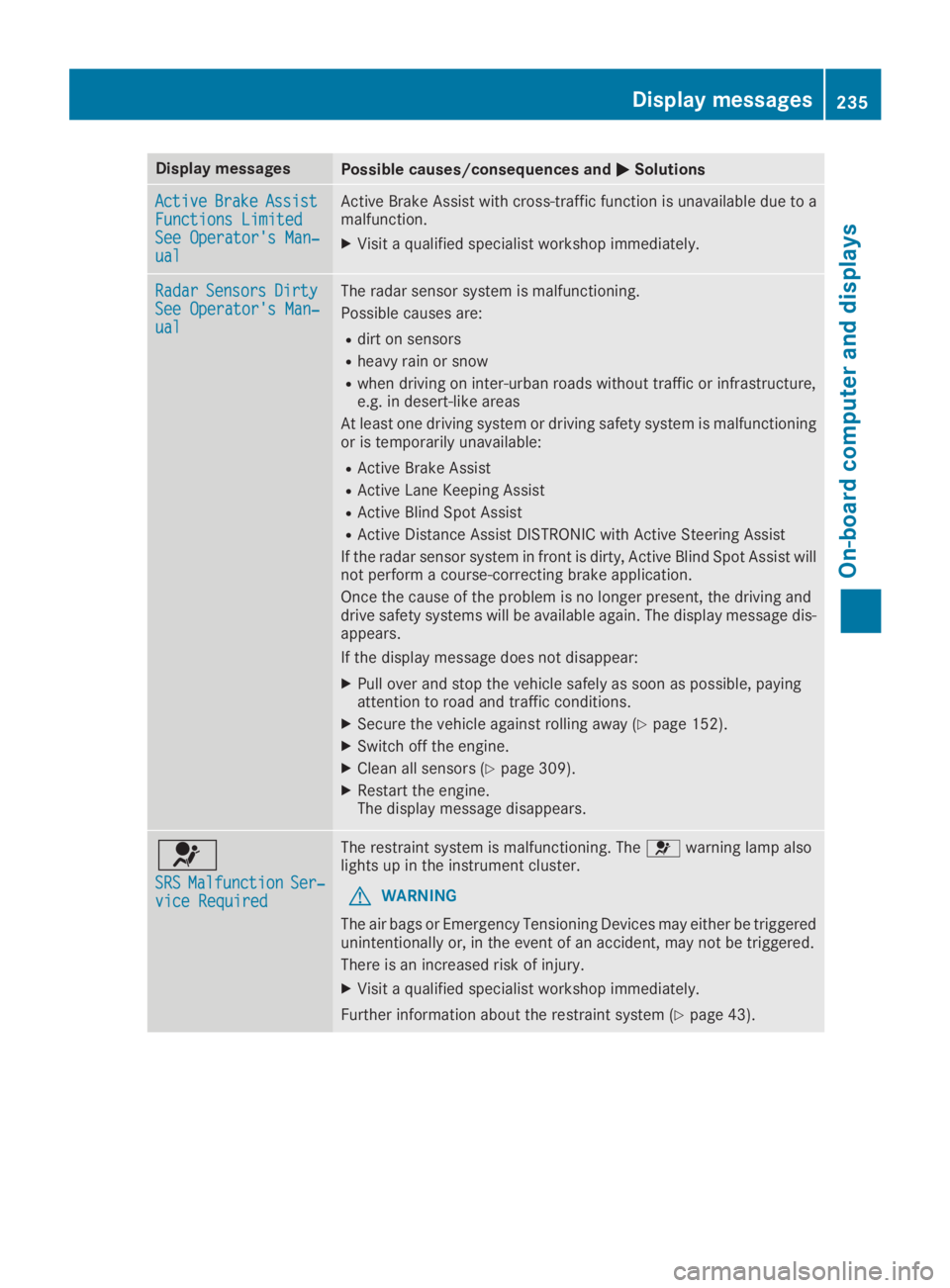
ActiveActiveBrakeBrakeAssistAssistFunctions LimitedFunctions LimitedSee Operator's Man‐See Operator's Man‐ualual
Active Brake Assist with cross-traffic function is unavailable due to amalfunction.
XVisit a qualified specialist workshop immediately.
RadarRadarSensorsSensorsDirtyDirtySee Operator's Man‐See Operator's Man‐ualual
The radar sensor system is malfunctioning.
Possible causes are:
Rdirt on sensors
Rheavy rain or snow
Rwhen driving on inter-urban roads without traffic or infrastructure,e.g. in desert-like areas
At least one driving system or driving safety system is malfunctioningor is temporarily unavailable:
RActive Brake Assist
RActive Lane Keeping Assist
RActive Blind Spot Assist
RActive Distance Assist DISTRONIC with Active Steering Assist
If the radar sensor system in front is dirty, Active Blind Spot Assist willnot perform a course-correcting brake application.
Once the cause of the problem is no longer present, the driving anddrive safety systems will be available again. The display message dis-appears.
If the display message does not disappear:
XPull over and stop the vehicle safely as soon as possible, payingattention to road and traffic conditions.
XSecure the vehicle against rolling away (Ypage 152).
XSwitch off the engine.
XClean all sensors (Ypage 309).
XRestart the engine.The display message disappears.
u
SRSSRSMalfunctionMalfunctionSer‐Ser‐vice Requiredvice Required
The restraint system is malfunctioning. Theuwarning lamp alsolights up in the instrument cluster.
GWARNING
The air bags or Emergency Tensioning Devices may either be triggeredunintentionally or, in the event of an accident, may not be triggered.
There is an increased risk of injury.
XVisit a qualified specialist workshop immediately.
Further information about the restraint system (Ypage 43).
Displaymessages235
On-b oard computer and displays
Z
Page 238 of 370
Display messagesPossible causes/consequences andPPSolutions
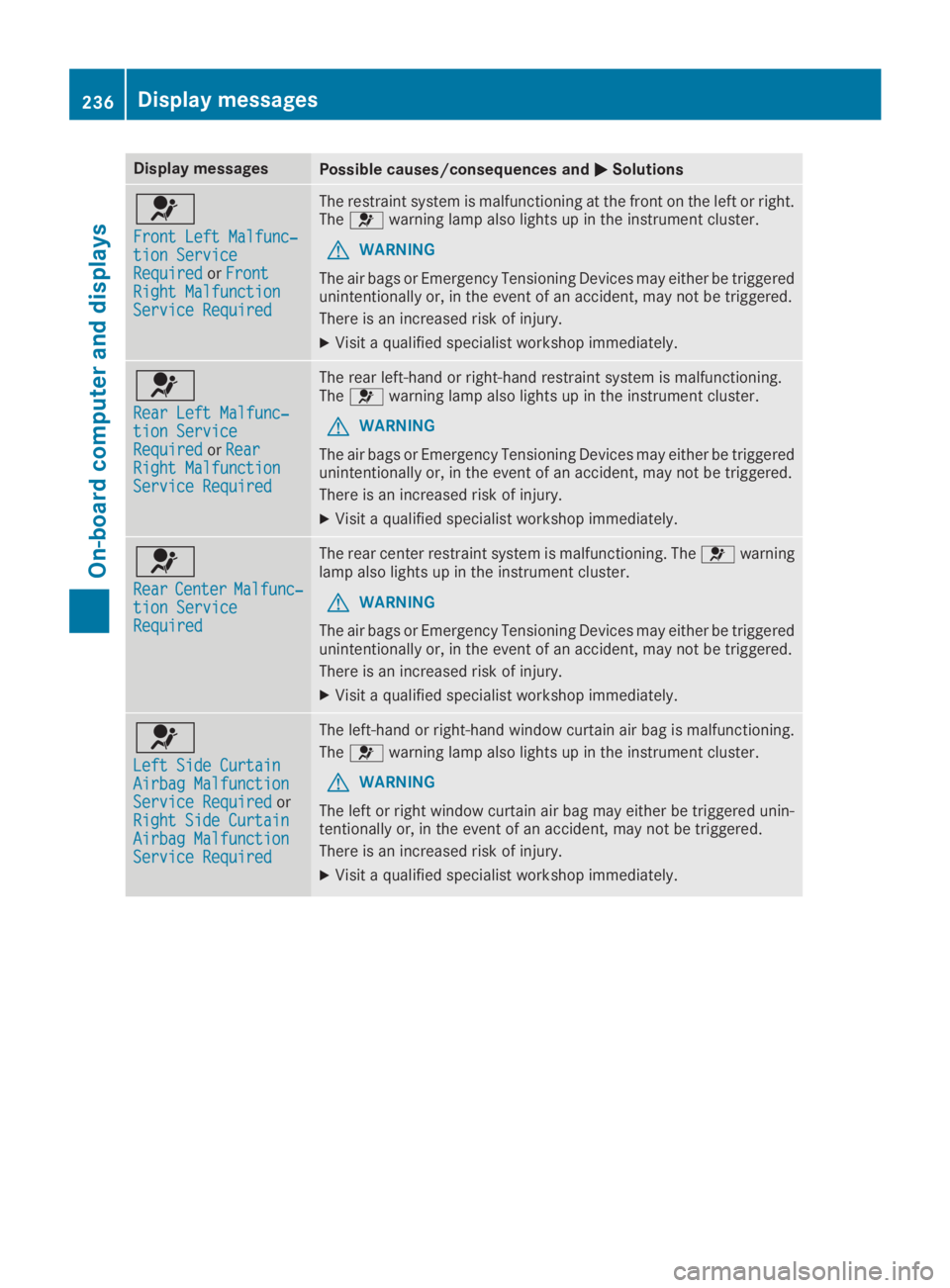
u
Front Left Malfunc‐Front Left Malfunc‐tion Servicetion ServiceRequiredRequiredorFrontFrontRight MalfunctionRight MalfunctionService RequiredService Required
The restraint system is malfunctioning at the front on the left or right.Theuwarning lamp also lights up in the instrument cluster.
GWARNING
The air bags or Emergency Tensioning Devices may either be triggeredunintentionally or, in the event of an accident, may not be triggered.
There is an increased risk of injury.
XVisit a qualified specialist workshop immediately.
u
Rear Left Malfunc‐Rear Left Malfunc‐tion Servicetion ServiceRequiredRequiredorRearRearRight MalfunctionRight MalfunctionService RequiredService Required
The rear left-hand or right-hand restraint system is malfunctioning.Theuwarning lamp also lights up in the instrument cluster.
GWARNING
The air bags or Emergency Tensioning Devices may either be triggeredunintentionally or, in the event of an accident, may not be triggered.
There is an increased risk of injury.
XVisit a qualified specialist workshop immediately.
u
RearRearCenterCenterMalfunc‐Malfunc‐tion Servicetion ServiceRequiredRequired
The rear center restraint system is malfunctioning. Theuwarninglamp also lights up in the instrument cluster.
GWARNING
The air bags or Emergency Tensioning Devices may either be triggeredunintentionally or, in the event of an accident, may not be triggered.
There is an increased risk of injury.
XVisit a qualified specialist workshop immediately.
u
Left Side CurtainLeft Side CurtainAirbag MalfunctionAirbag MalfunctionService RequiredService RequiredorRight Side CurtainRight Side CurtainAirbag MalfunctionAirbag MalfunctionService RequiredService Required
The left-hand or right-hand window curtain air bag is malfunctioning.
Theuwarning lamp also lights up in the instrument cluster.
GWARNING
The left or right window curtain air bag may either be triggered unin-tentionally or, in the event of an accident, may not be triggered.
There is an increased risk of injury.
XVisit a qualified specialist workshop immediately.
236Displaymessages
On-b oard computer and displays