light MERCEDES-BENZ GLC 2019 Repair Manual
[x] Cancel search | Manufacturer: MERCEDES-BENZ, Model Year: 2019, Model line: GLC, Model: MERCEDES-BENZ GLC 2019Pages: 370, PDF Size: 19.55 MB
Page 175 of 370
S(Sport)Rthe suspension setting ismore taut
Rthe vehicle is set to low level
RMercedes-AMG GLC 634MATIC+/GLC 63 S4MATIC+:the 4MATIC+ issynchronised more dynami-cally
S+(SportPlus)
Mercedes-AMG GLC63 4MATIC+/GLC63 S4MATIC+:RACE
Rthe suspension setting iseven more taut
Rthe vehicle is set to low level
RMercedes-AMG GLC 634MATIC+/GLC 63 S4MATIC+:the 4MATIC+ issynchronised more dynami-cally
Important safety notes
GWARNING
When the vehicle is being lowered, people
could become trapped if their limbs are
between the vehicle body and the wheels or
underneath the vehicle. There is a risk of
injury.
Make sure no one is underneath the vehicle or
in the immediate vicinity of the wheel arches
when the vehicle is being lowered.
iIf one of the doors is open, the vehicle is notlowered.
Vehicle level
Setting the raised vehicle level
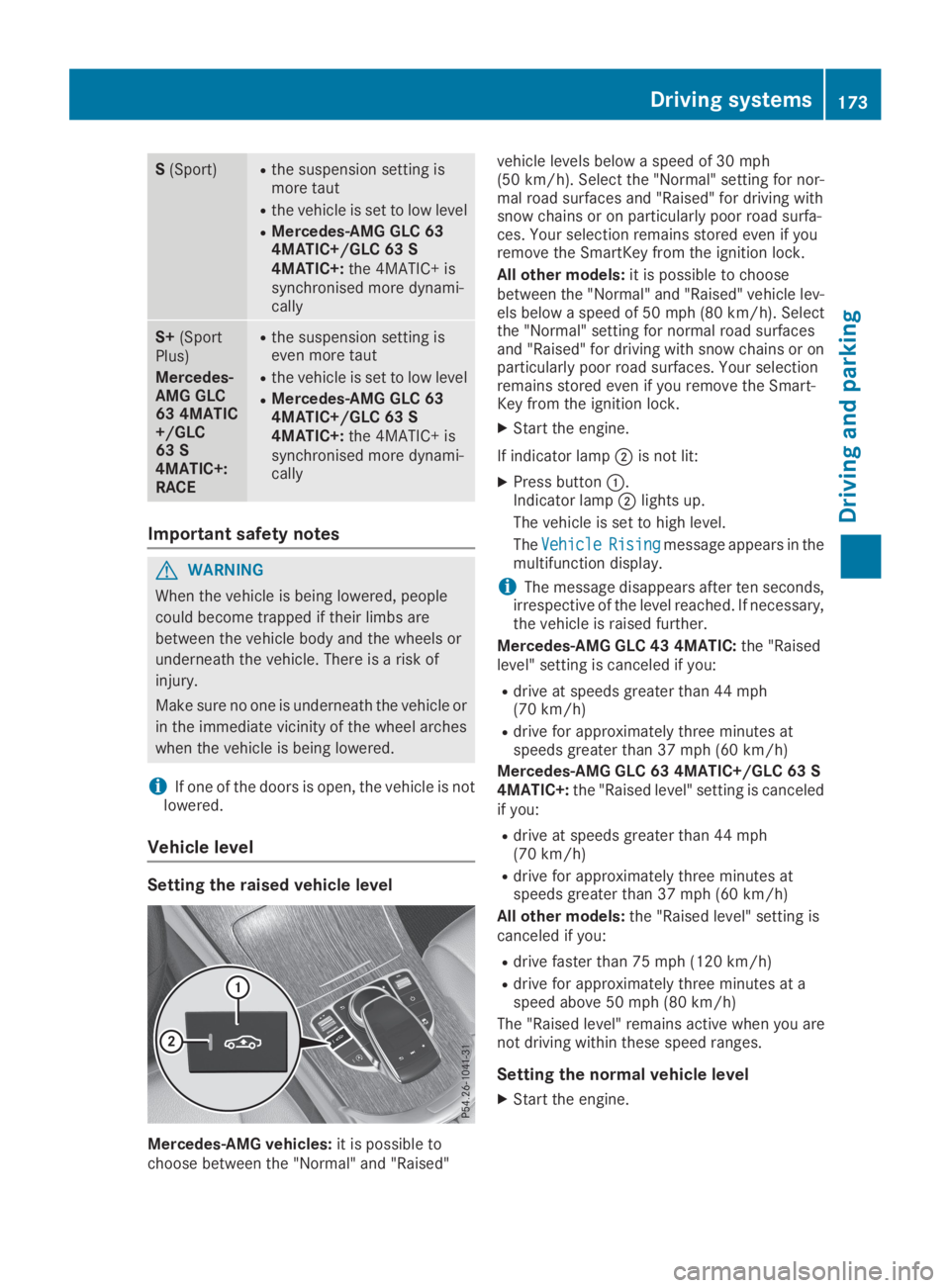
Mercedes-AMG vehicles:it is possible tochoose between the "Normal" and "Raised"
vehicle levels below a speed of 30 mph(50 km/h). Select the "Normal" setting for nor-mal road surfaces and "Raised" for driving withsnow chains or on particularly poor road surfa-ces. Your selection remains stored even if youremove the SmartKey from the ignition lock.
All other models:it is possible to choosebetween the "Normal" and "Raised" vehicle lev-els below a speed of 50 mph (80 km/h). Selectthe "Normal" setting for normal road surfacesand "Raised" for driving with snow chains or onparticularly poor road surfaces. Your selectionremains stored even if you remove the Smart-Key from the ignition lock.
XStart the engine.
If indicator lampDis not lit:
XPress buttonC.Indicator lampDlights up.
The vehicle is set to high level.
TheVehicleVehicleRisingRisingmessage appears in themultifunction display.
iThe message disappears after ten seconds,irrespective of the level reached. If necessary,the vehicle is raised further.
Mercedes-AMG GLC 43 4MATIC:the "Raisedlevel" setting is canceled if you:
Rdrive at speeds greater than 44 mph(70 km/h)
Rdrive for approximately three minutes atspeeds greater than 37 mph (60 km/h)
Mercedes-AMG GLC 63 4MATIC+/GLC 63 S4MATIC+:the "Raised level" setting is canceledif you:
Rdrive at speeds greater than 44 mph(70 km/h)
Rdrive for approximately three minutes atspeeds greater than 37 mph (60 km/h)
All other models:the "Raised level" setting iscanceled if you:
Rdrive faster than 75 mph (120 km/h)
Rdrive for approximately three minutes at aspeed above 50 mph (80 km/h)
The "Raised level" remains active when you arenot driving within these speed ranges.
Setting the normal vehicle level
XStart the engine.
Driving systems173
Driving and parking
Z
Page 178 of 370
for safe maneuvering, parking and exiting aparking space. Make sure that no persons, ani-mals or objects are in the path of your vehicle.
When Parking Assist PARKTRONIC is deactiva-ted, Active Parking Assist is also unavailable.
For vehicles with a trailer tow hitch installed, theminimum length for parking spaces is slightlylonger.
If you have attached a trailer to your vehicle, youshould not use Active Parking Assist. Once theelectrical connection is established betweenyour vehicle and the trailer, Active ParkingAssist is no longer available. Parking AssistPARKTRONIC is deactivated for the rear area.
GWARNING
While parking or pulling out of a parking
space, the vehicle swings out and can drive
onto areas of the oncoming lane. This could
result in a collision with another road user.
There is a risk of an accident.
Pay attention to other road users. Stop the
vehicle if necessary or cancel the Active Park-
ing Assist parking procedure.
!If they cannot be avoided, drive over obsta-cles such as curbs slowly and at an obtuseangle. Otherwise, you may damage thewheels or tires.
Active Parking Assist may possibly indicateparking spaces which are not suitable for park-ing, for example:
Rwhere parking or stopping is prohibited
Rin front of driveways or entrances and exits
Ron unsuitable surfaces
Parking tips:
ROn narrow roads, drive as close to the parkingspace as possible
RParking spaces that are littered or overgrownmight be identified or measured incorrectly
RParking spaces that are partially occupied bytrailer drawbars might not be identified assuch or be measured incorrectly
RSnowfall or heavy rain may lead to a parkingspace being measured inaccurately
RPay attention to the warning messages ofParking Assist PARKTRONIC during the park-ing procedure (Ypage 181).
RYou can intervene in the steering procedureto correct it at any time. Active Parking Assistis then deactivated
RWhen transporting a load which protrudesfrom your vehicle, you should not use ActiveParking Assist
Rnever use Active Parking Assist when snowchains are installed
RAlways pay attention to the specified tirepressure for your vehicle. This has a directinfluence on the parking characteristics of thevehicle.
Use Active Parking Assist for parking spaces:
Rparallel or at right angles to the direction oftravel
Ron straight roads, not bends
Ron the same level as the road, e.g. not on thepavement
Detecting parking spaces
Objects located above the detection range ofActive Parking Assist will not be detected whenthe parking space is measured. These are nottaken into account when the parking procedureis calculated, e.g. overhanging loads, tail sec-tions or loading ramps of trucks. Active ParkingAssist may therefore guide you into the parkingspace too early.
GWARNING
If there are objects above the detection range:
RActive Parking Assist may steer too early
Rthe vehicle may not stop in front of these
objects
This could cause a collision. There is a risk of
an accident.
If objects are located above the detection
range, stop and deactivate Active Parking
Assist.
Further information about the detection range(Ypage 180).
176Driving systems
Driving and parking
Page 183 of 370
If there is an obstacle within this range, the rel-evant warning displays light up and a warningtone sounds. If the distance falls below the min-imum, the distance may no longer be shown.
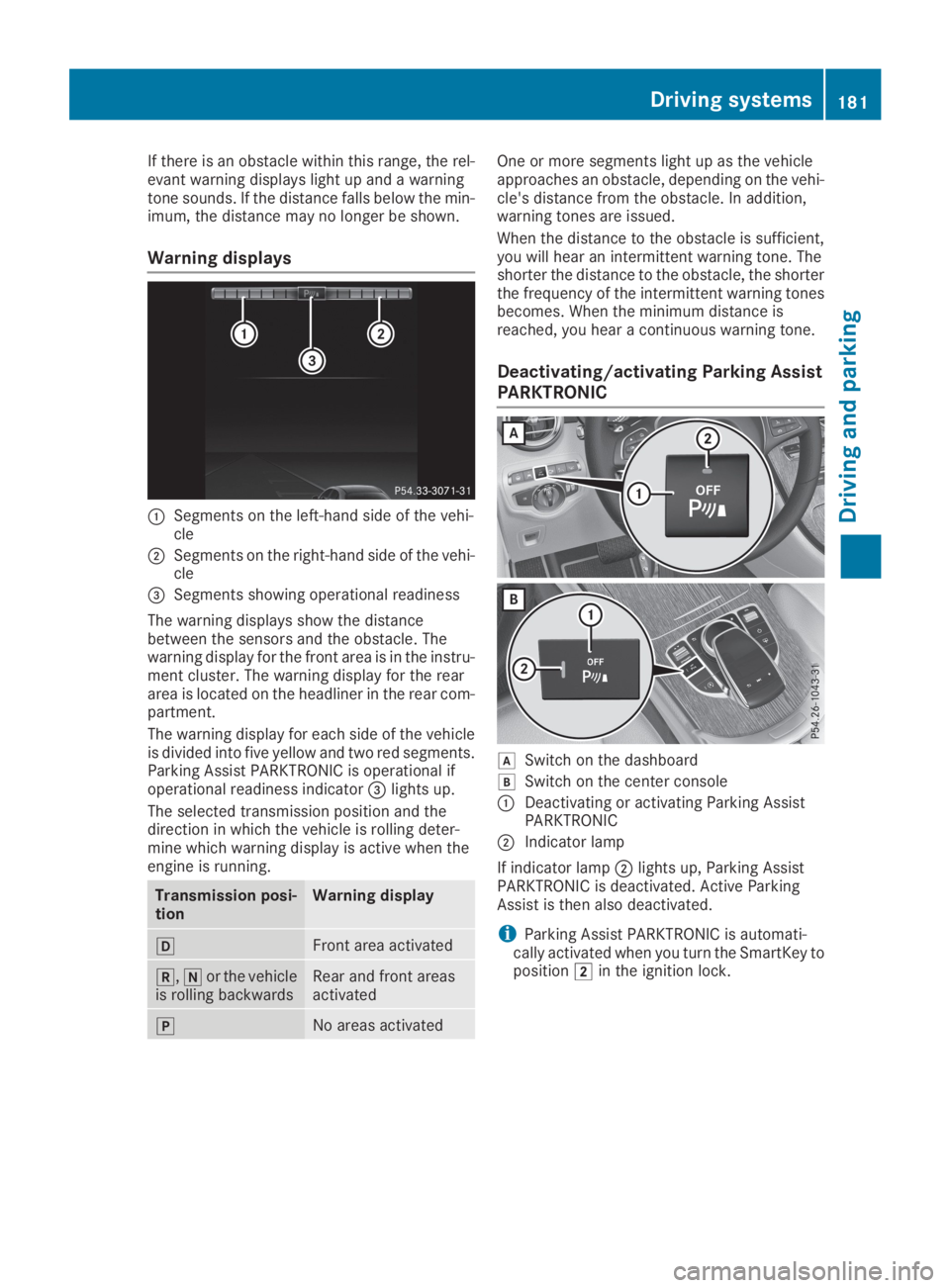
Warning displays
CSegments on the left-hand side of the vehi-cle
DSegments on the right-hand side of the vehi-cle
Page 184 of 370
Problems with Parking Assist PARKTRONIC
ProblemPossible causes/consequences andPPSolutions
Only the red segments inthe Parking AssistPARKTRONIC warningdisplays are lit. You alsohear a warning tone forapproximately two sec-onds.
Parking AssistPARKTRONIC is thendeactivated and the indi-cator lamp on thePARKTRONIC buttonlights up.
Parking Assist PARKTRONIC has malfunctioned and has been deacti-vated.
XIf problems persist, have Parking Assist PARKTRONIC checked at aqualified specialist workshop.
Only the red segments inthe Parking AssistPARKTRONIC warningdisplays are lit. ParkingAssist PARKTRONIC isthen deactivated.
The Parking Assist PARKTRONIC sensors are dirty or there is inter-ference.
XClean the Parking Assist PARKTRONIC sensors (Ypage 309).
XSwitch the ignition back on.
The problem may be caused by an external source of radio or ultra-sound waves.
XCheck to see if Parking Assist PARKTRONIC works at a differentlocation.
Rear view camera
General notes
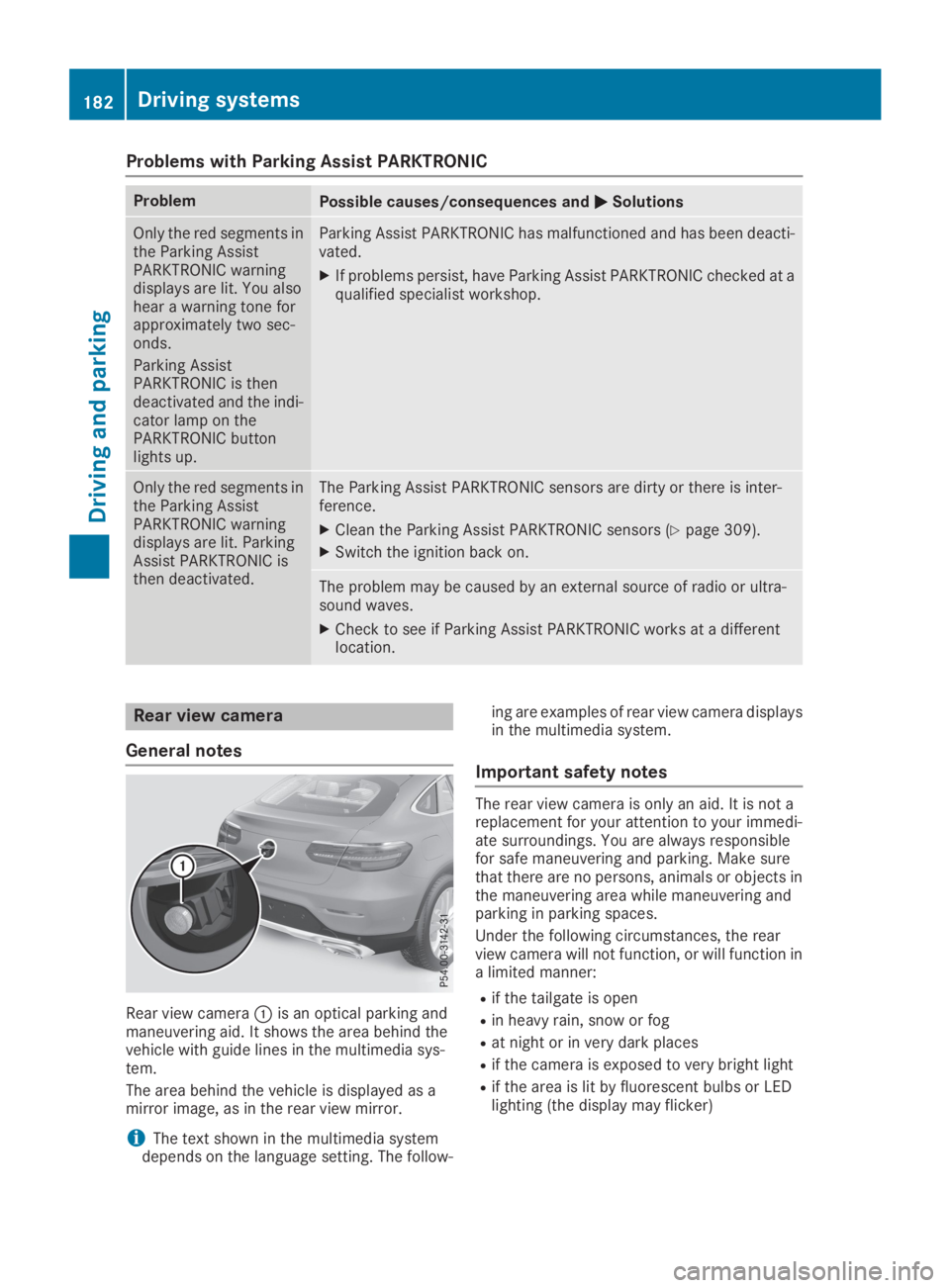
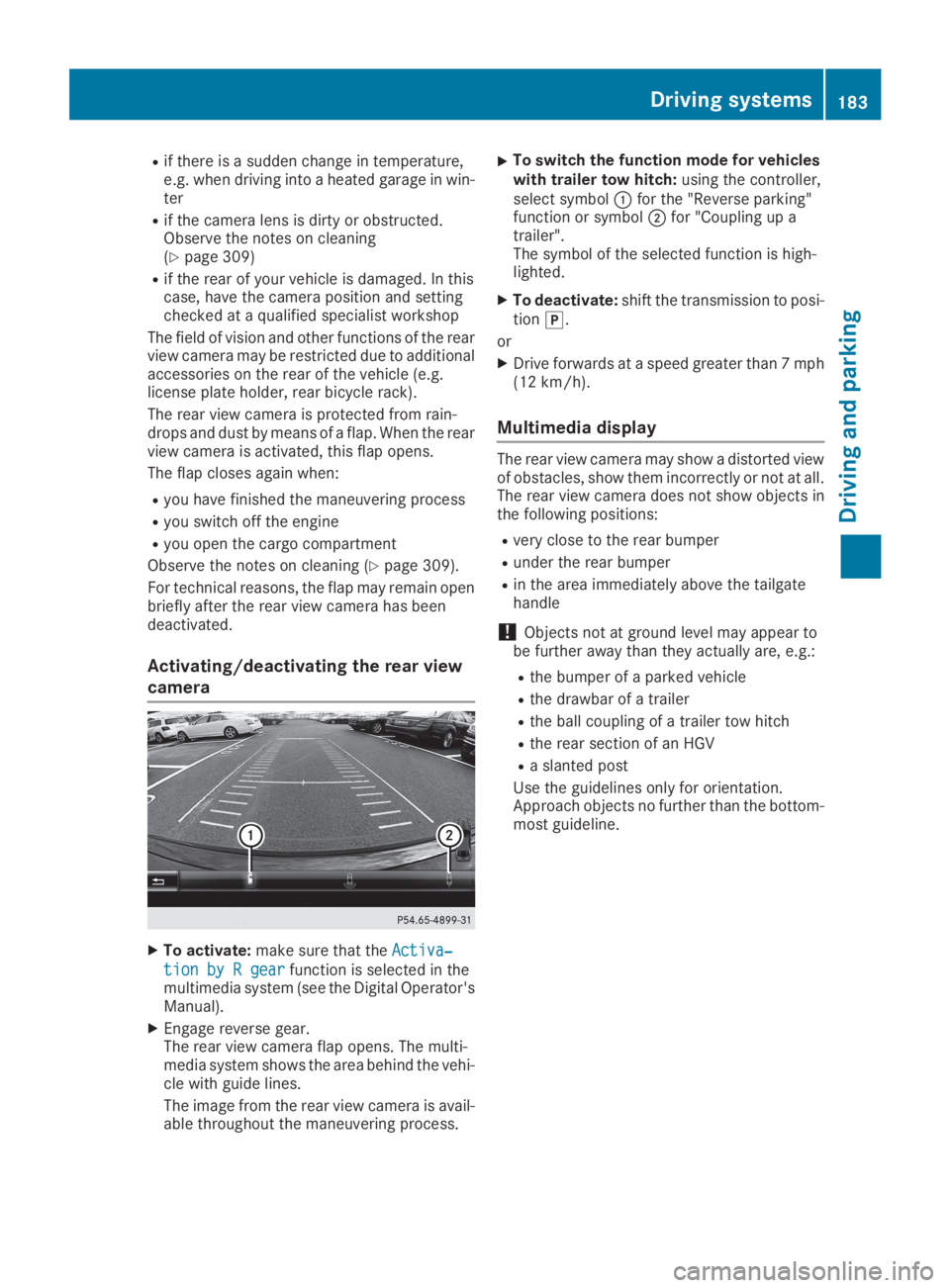
Rear view cameraCis an optical parking andmaneuvering aid. It shows the area behind thevehicle with guide lines in the multimedia sys-tem.
The area behind the vehicle is displayed as amirror image, as in the rear view mirror.
iThe text shown in the multimedia systemdepends on the language setting. The follow-
ing are examples of rear view camera displaysin the multimedia system.
Important safety notes
The rear view camera is only an aid. It is not areplacement for your attention to your immedi-ate surroundings. You are always responsiblefor safe maneuvering and parking. Make surethat there are no persons, animals or objects inthe maneuvering area while maneuvering andparking in parking spaces.
Under the following circumstances, the rearview camera will not function, or will function ina limited manner:
Rif the tailgate is open
Rin heavy rain, snow or fog
Rat night or in very dark places
Rif the camera is exposed to very bright light
Rif the area is lit by fluorescent bulbs or LEDlighting (the display may flicker)
182Driving systems
Driving and parking
Page 185 of 370
Rif there is a sudden change in temperature,e.g. when driving into a heated garage in win-ter
Rif the camera lens is dirty or obstructed.Observe the notes on cleaning(Ypage 309)
Rif the rear of your vehicle is damaged. In thiscase, have the camera position and settingchecked at a qualified specialist workshop
The field of vision and other functions of the rearview camera may be restricted due to additionalaccessories on the rear of the vehicle (e.g.license plate holder, rear bicycle rack).
The rear view camera is protected from rain-drops and dust by means of a flap. When the rearview camera is activated, this flap opens.
The flap closes again when:
Ryou have finished the maneuvering process
Ryou switch off the engine
Ryou open the cargo compartment
Observe the notes on cleaning (Ypage 309).
For technical reasons, the flap may remain openbriefly after the rear view camera has beendeactivated.
Activating/deactivating the rear view
camera
XTo activate:make sure that theActiva‐Activa‐
tion by R geartion by R gearfunction is selected in themultimedia system (see the Digital Operator'sManual).
XEngage reverse gear.The rear view camera flap opens. The multi-media system shows the area behind the vehi-cle with guide lines.
The image from the rear view camera is avail-able throughout the maneuvering process.
XTo switch the function mode for vehicleswith trailer tow hitch:using the controller,select symbolCfor the "Reverse parking"function or symbolDfor "Coupling up atrailer".The symbol of the selected function is high-lighted.
XTo deactivate:shift the transmission to posi-tion].
or
XDrive forwards at a speed greater than 7 mph(12 km/h).
Multimedia display
The rear view camera may show a distorted viewof obstacles, show them incorrectly or not at all.The rear view camera does not show objects inthe following positions:
Rvery close to the rear bumper
Runder the rear bumper
Rin the area immediately above the tailgatehandle
!Objects not at ground level may appear tobe further away than they actually are, e.g.:
Rthe bumper of a parked vehicle
Rthe drawbar of a trailer
Rthe ball coupling of a trailer tow hitch
Rthe rear section of an HGV
Ra slanted post
Use the guidelines only for orientation.Approach objects no further than the bottom-most guideline.
Driving systems183
Driving and parking
Z
Page 189 of 370
Object detection only works in wide-angle view.
To ensure that you can use the function, it mustbe switched on in the multimedia system (seethe Digital Operator's Manual).
360° Camera
General notes
The 360° camera is a system consisting of fourcameras.
The system processes images from the follow-ing cameras:
RRear view camera
RFront camera
RTwo side cameras in the exterior mirrors
The cameras cover the immediate surroundingsof the vehicle. The system supports you, forexample when parking or if vision is restricted atan exit.
You can show images from the 360° camera infull-screen mode or in seven different split-screen views on the multimedia system. A split-screen view also includes a top view of the vehi-cle. This view is calculated from the data sup-plied by the installed cameras (virtual camera).
The seven split-screen views are:
RTop view and picture from the rear view cam-era (130° viewing angle)
RTop view and image from the front camera(130° viewing angle without displaying themaximum steering wheel angle)
RTop view and enlarged rear view
RTop view and enlarged front view
RTop view and trailer view (vehicles with trailertow hitch)
RTop view and images from the rear-facing sidecameras (rear wheel view)
RTop view and images from the forward-facingside cameras (front wheel view)
When the function is active and you shift thetransmission from[or^to\\, the guidelines on the multimedia system are hidden.
When you shift between transmission positions[and^, you see the previously selected frontor rear view.
Distances measured by Parking AssistPARKTRONIC will also be optically displayed:
Rin split screen view as red or yellow bracketsaround the vehicle icon in the top view, or
Rat the bottom right as red or yellow bracketsaround the vehicle symbol in full-screen mode
The line thickness and color of the bracketsshow how far the vehicle is from an object.
Ryellow brackets with thin lines: Parking AssistPARKTRONIC is active
Ryellow brackets with normal lines: an object ispresent in close range of the vehicle
Rred line: an object is present in the immediateclose range of the vehicle
Important safety notes
The 360°camera is only an aid and may show adistorted view of obstacles, show them incor-rectly or not at all. The 360°camera is not asubstitute for attentive driving.
You are always responsible for safe maneuver-ing and parking. Make sure that there are nopersons, animals or objects in the maneuveringarea while maneuvering and parking in parkingspaces.
You are always responsible for safety, and mustalways pay attention to your surroundings whenparking and maneuvering. This applies to theareas behind, in front of and beside the vehicle.You could otherwise endanger yourself and oth-ers.
The 360° camera will not function or will func-tion in a limited manner:
Rif the doors are open
Rif the exterior mirrors are folded in
Rif the tailgate is open
Rin heavy rain, snow or fog
Rat night or in very dark places
Rif the cameras are exposed to very bright light
Rif the area is lit by fluorescent bulbs or LEDlighting (the display may flicker)
Rif the camera lenses fog up, e.g. when drivinginto a heated garage in winter, causing a rapidchange in temperature
Rif the camera lenses are dirty or covered
Rif the vehicle components in which the cam-eras are installed are damaged. In this case,have the camera position and setting checkedat a qualified specialist workshop
Driving systems187
Driving and parking
Z
Page 196 of 370
sors. A warning lamp lights up in the exteriormirrors and draws your attention to vehiclesdetected in the monitored area. If you thenswitch on the corresponding turn signal tochange lanes, you will also receive a visual warn-ing and a warning tone.
Blind Spot Assist supports you from a speed ofapproximately 20 mph (30 km/h).
Important safety notes
GWARNING
Blind Spot Assist does not react to:
Rvehicles overtaken too closely on the side,
placing them in the blind spot area
Rvehicles which approach with a large speed
differential and overtake your vehicle
As a result, Blind Spot Assist may not give
warnings in such situations. There is a risk of
an accident.
Always observe the traffic conditions care-
fully, and maintain a safe lateral distance.
Blind Spot Assist is only an aid. It may fail todetect some vehicles and is no substitute forattentive driving. Always ensure that there issufficient distance to the side for other roadusers and obstacles.
iUSA only:
This device has been approved by the FCC asa "Vehicular Radar System". The radar sensoris intended for use in an automotive radarsystem only. Removing, tampering with, oraltering the device will void any warranties,and is not permitted by the FCC. Do not tam-per with, alter, or use in any non-approvedway.
Any unauthorized modification to this devicecould void the user's authority to operate theequipment.
Radar sensors
The radar sensors for Blind Spot Assist are inte-grated into the rear bumper. Make sure that thebumpers are free from dirt, ice or slush. Thesensors must not be covered, for example bycycle racks or overhanging loads. Following asevere impact or in the event of damage to thebumpers, have the function of the radar sensorschecked at a qualified specialist workshop.Blind Spot Assist may no longer work properly.
Monitoring area
In particular, the detection of obstacles can beimpaired if:
RThere is dirt on the sensors or anything elsecovering the sensors
Rthere is poor visibility, e.g. due to fog, heavyrain, snow or spray
Rthere are narrow vehicles, e.g. motorcycles orbicycles
Rthe road has very wide lanes
Rthe road has narrow lanes
Ryou are not driving in the middle of the lane
Rthere are barriers or other road boundaries
Vehicles in the monitoring range are then notindicated.
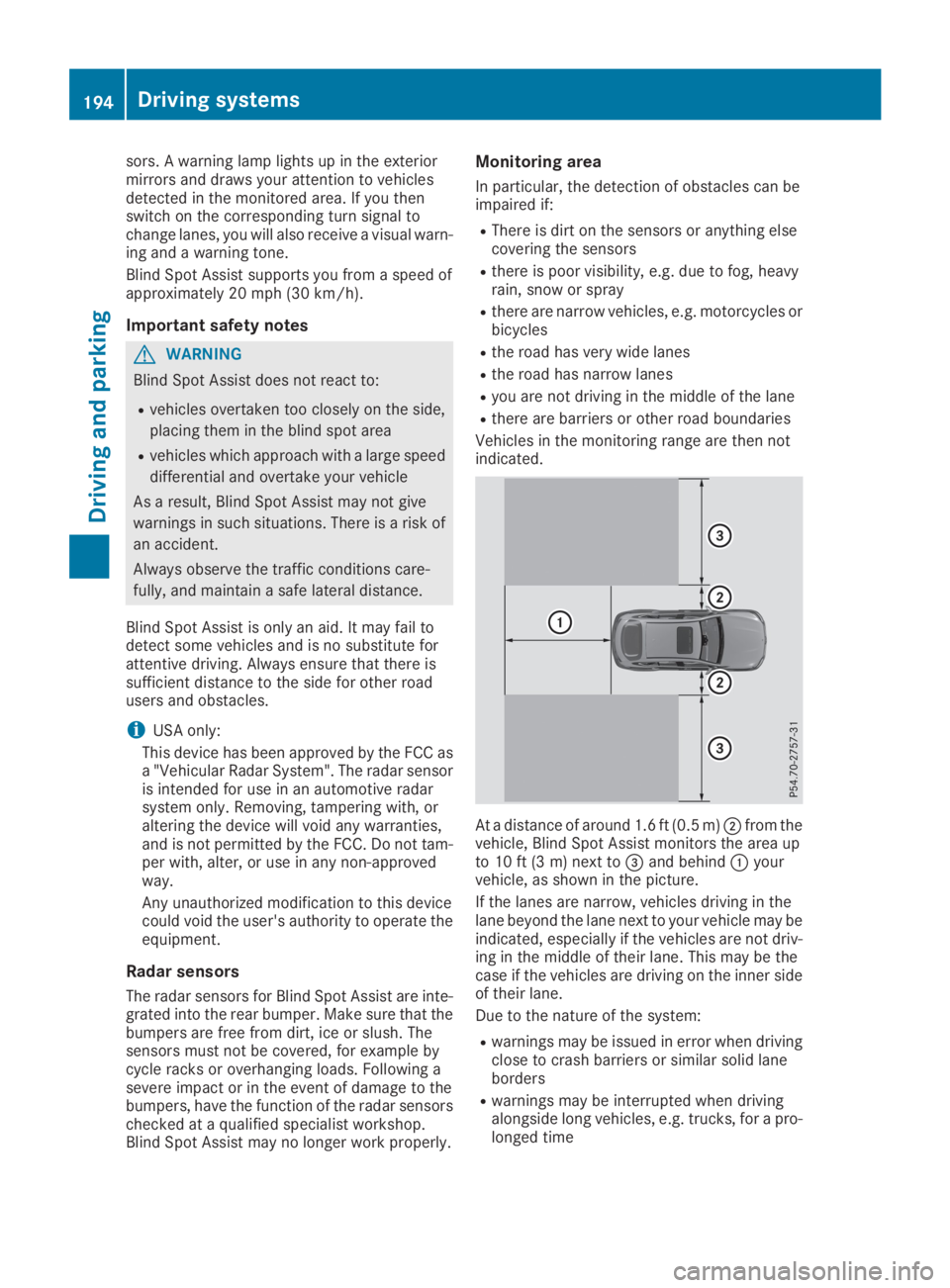
At a distance of around 1.6 ft (0.5 m)Dfrom thevehicle, Blind Spot Assist monitors the area upto 10 ft (3 m) next to
Page 197 of 370
Warning lamp
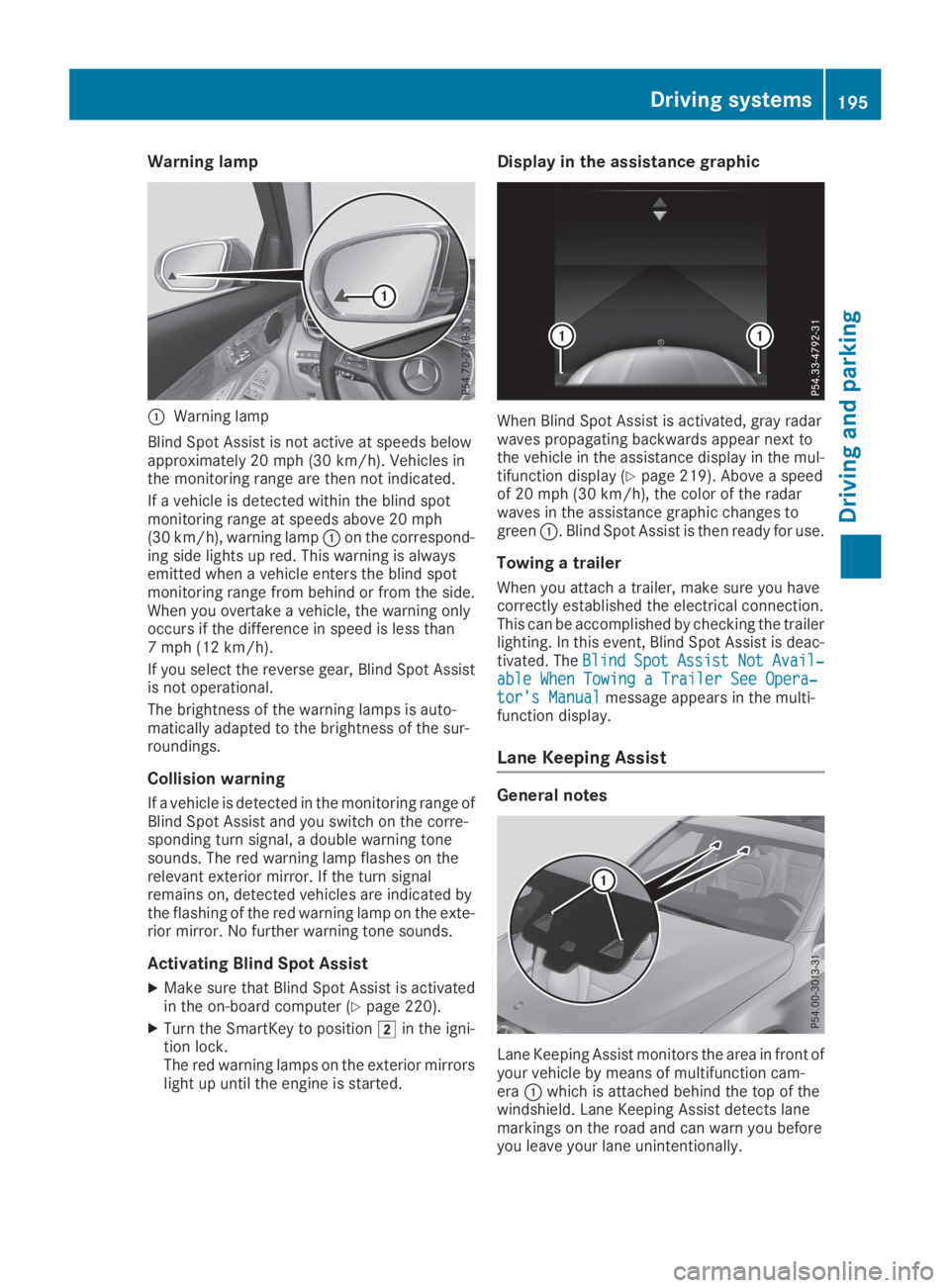
CWarning lamp
Blind Spot Assist is not active at speeds belowapproximately 20 mph (30 km/h). Vehicles inthe monitoring range are then not indicated.
If a vehicle is detected within the blind spotmonitoring range at speeds above 20 mph(30 km/h), warning lampCon the correspond-ing side lights up red. This warning is alwaysemitted when a vehicle enters the blind spotmonitoring range from behind or from the side.When you overtake a vehicle, the warning onlyoccurs if the difference in speed is less than7 mph (12 km/h).
If you select the reverse gear, Blind Spot Assistis not operational.
The brightness of the warning lamps is auto-matically adapted to the brightness of the sur-roundings.
Collision warning
If a vehicle is detected in the monitoring range ofBlind Spot Assist and you switch on the corre-sponding turn signal, a double warning tonesounds. The red warning lamp flashes on therelevant exterior mirror. If the turn signalremains on, detected vehicles are indicated bythe flashing of the red warning lamp on the exte-rior mirror. No further warning tone sounds.
Activating Blind Spot Assist
XMake sure that Blind Spot Assist is activatedin the on-board computer (Ypage 220).
XTurn the SmartKey to positionHin the igni-tion lock.The red warning lamps on the exterior mirrorslight up until the engine is started.
Display in the assistance graphic
When Blind Spot Assist is activated, gray radarwaves propagating backwards appear next tothe vehicle in the assistance display in the mul-tifunction display (Ypage 219). Above a speedof 20 mph (30 km/h), the color of the radarwaves in the assistance graphic changes togreenC. Blind Spot Assist is then ready for use.
Towing a trailer
When you attach a trailer, make sure you havecorrectly established the electrical connection.This can be accomplished by checking the trailerlighting. In this event, Blind Spot Assist is deac-tivated. TheBlindBlindSpotSpotAssistAssistNotNotAvail‐Avail‐able When Towing a Trailer See Opera‐able When Towing a Trailer See Opera‐tor's Manualtor's Manualmessage appears in the multi-function display.
Lane Keeping Assist
General notes
Lane Keeping Assist monitors the area in front ofyour vehicle by means of multifunction cam-eraCwhich is attached behind the top of thewindshield. Lane Keeping Assist detects lanemarkings on the road and can warn you beforeyou leave your lane unintentionally.
Driving systems195
Driving and parking
Z
Page 198 of 370
This function is available in the range between40 mph and 120 mph (60 km/hand 200 km/h).
A warning may be given if a front wheel passesover a lane marking. It will warn you by means ofintermittent vibration in the steering wheel forup to 1.5 seconds.
Important safety notes
GWARNING
Lane Keeping Assist cannot always clearly
detect lane markings.
In such cases, Lane Keeping Assist can:
Rgive an unnecessary warning
Rnot give a warning
There is a risk of an accident.
Always pay particular attention to the traffic
situation and keep within the lane, especially
if Lane Keeping Assist alerts you.
GWARNING
The Lane Keeping Assist warning does not
return the vehicle to the original lane. There is
a risk of an accident.
You should always steer, brake or accelerate
yourself, in particular if warned by Lane Keep-
ing Assist.
Lane Keeping Assist can neither reduce the riskof an accident if you fail to adapt your drivingstyle nor override the laws of physics. LaneKeeping Assist cannot take into account theroad, traffic and weather conditions. Lane Keep-ing Assist is merely an aid. You are responsiblefor the distance to the vehicle in front, for vehi-cle speed, for braking in good time and for stay-ing in your lane.
The Lane Keeping Assist does not keep the vehi-cle in the lane.
The system may be impaired or may not functionif:
Rthere is poor visibility, e.g. due to insufficientillumination of the road, or due to snow, rain,fog or heavy spray
Rthere is glare, e.g. from oncoming traffic, thesun or reflection from other vehicles (e.g. ifthe road surface is wet)
Rthe windshield is dirty, fogged up, damaged orcovered, for instance by a sticker, in the vicin-ity of the camera
Rthere are no or several unclear lane markingsfor one lane, e.g. roadworks
Rthe lane markings are worn away, dark or cov-ered up, e.g. by dirt or snow
Rthe distance to the vehicle in front is too shortand thus the lane markings cannot be detec-ted
Rthe lane markings change quickly, e.g. lanesbranch off, cross one another or merge
Rthe road is narrow and winding
Rthere are highly variable shade conditions onthe roadway
Activating/deactivating Lane Keeping
Assist
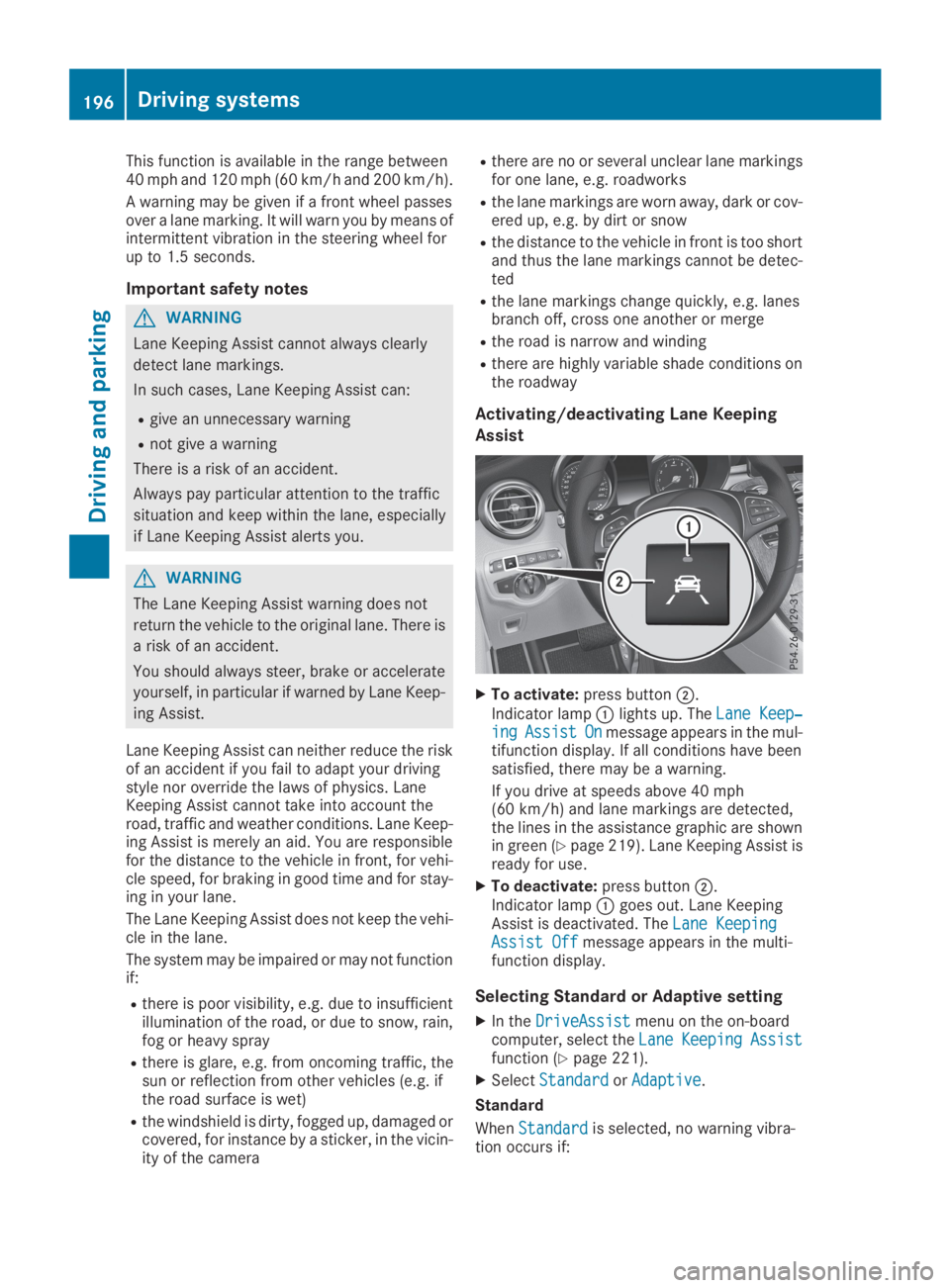
XTo activate:press buttonD.
Indicator lampClights up. TheLane Keep‐Lane Keep‐ingingAssistAssistOnOnmessage appears in the mul-tifunction display. If all conditions have beensatisfied, there may be a warning.
If you drive at speeds above 40 mph(60 km/h) and lane markings are detected,the lines in the assistance graphic are shownin green (Ypage 219). Lane Keeping Assist isready for use.
XTo deactivate:press buttonD.Indicator lampCgoes out. Lane KeepingAssist is deactivated. TheLane KeepingLane KeepingAssist OffAssist Offmessage appears in the multi-function display.
Selecting Standard or Adaptive setting
XIn theDriveAssistDriveAssistmenu on the on-boardcomputer, select theLaneLaneKeepingKeepingAssistAssistfunction (Ypage 221).
XSelectStandardStandardorAdaptiveAdaptive.
Standard
WhenStandardStandardis selected, no warning vibra-tion occurs if:
196Driving systems
Driving an d parking
Page 199 of 370
Ryou switch on the turn signals. In this event,the warnings are suppressed for a certainperiod of time.
Ra driving safety system intervenes, e.g. ABS,
BAS or ESP®.
Adaptive
WhenAdaptiveAdaptiveis selected, no warning vibra-tion occurs if:
Ryou switch on the turn signals. In this event,the warnings are suppressed for a certainperiod of time.
Ra driving safety system intervenes, e.g. ABS,
BAS or ESP®.
Ryou accelerate hard, e.g. kickdown.
Ryou brake hard.
Ryou steer actively, e.g. swerve to avoid anobstacle or change lanes quickly.
Ryou cut the corner on a sharp bend.
In order that you are warned only when neces-sary and in good time if you cross the lane mark-ing, the system detects certain conditions andwarns you accordingly.
The warning vibration occurs earlier if:
Ryou approach the outer lane marking on abend
Rthe road has very wide lanes, e.g. a freeway
Rthe system detects solid lane markings
The warning vibration occurs later if:
Rthe road has narrow lanes
Ryou cut the corner on a bend
Driving Assistance Plus package
General notes
The Driving Assistance Plus Package consists ofActive Distance Assist DISTRONIC(Ypage 162), Active Blind Spot Assist(Ypage 197) and Active Lane Keeping Assist(Ypage 200).
Active Blind Spot Assist
General notes
Active Blind Spot Assist monitors the areas oneither side of the vehicle that are not visible tothe driver with two lateral, rear-facing radar sen-sors. A warning lamp lights up in the exteriormirrors and draws your attention to vehicles
detected in the monitored area. If you thenswitch on the corresponding turn signal tochange lanes, you will also receive a visual warn-ing and hear a warning tone. If a risk of lateralcollision is detected, corrective braking mayhelp you avoid a collision. Before a course-cor-recting brake application, Active Blind SpotAssist evaluates the space in the direction oftravel and at the sides of the vehicle. For this,Active Blind Spot Assist uses the forward-facingradar sensors.
Active Blind Spot Assist supports you from aspeed of approximately 20 mph(30 km/h).
Important safety notes
Active Blind Spot Assist is only an aid and is nota substitute for attentive driving.
GWARNING
Active Blind Spot Assist does not react to:
Rvehicles overtaken too closely on the side,
placing them in the blind spot area
Rvehicles which approach with a large speed
differential and overtake your vehicle
As a result, Active Blind Spot Assist may nei-
ther give warnings nor intervene in such sit-
uations. There is a risk of an accident.
Always observe the traffic conditions care-
fully, and maintain a safe lateral distance.
iUSA only: This device has been approved bythe FCC as a "Vehicular Radar System". Theradar sensor is intended for use in an auto-motive radar system only. Removal, tamper-ing, or altering of the device will void any war-ranties, and is not permitted by the FCC. Donot tamper with, alter, or use in any non-approved way.
Any unauthorized modification to this devicecould void the user's authority to operate theequipment.
iCanada only: This device complies withRSS-210 of Industry Canada. Operation issubject to the following two conditions:
1. This device may not cause interference,and
2. This device must accept any interferencereceived, including interference that maycause undesired operation of the device.
Removal, tampering, or altering of the devicewill void any warranties, and is not permitted.
Driving systems197
Driving and pa rking
Z