ECO mode MERCEDES-BENZ GLC 2019 Owners Manual
[x] Cancel search | Manufacturer: MERCEDES-BENZ, Model Year: 2019, Model line: GLC, Model: MERCEDES-BENZ GLC 2019Pages: 370, PDF Size: 19.55 MB
Page 8 of 370
Automatic car wash (care)...............305
Automatic engine start (ECO start/
stop function)....................................136
Automatic engine switch-off (ECO
start/stop function).......................... 136
Automatic headlamp mode.............. 109
Automatic transmission
Accelerator pedal position ............. 144
Changing gear ............................... 144
DIRECT SELECT lever ..................... 141
Display message ............................ 252
Double-clutch function .................. 144
Drive program ................................ 145
Drive program display.................... 142
Driving tips .................................... 144
DYNAMIC SELECT switch .............. 139
Emergency running mode .............. 150
Engaging drive position .................. 142
Engaging neutral ............................ 142
Engaging park position automati-
cally ............................................... 141
Engaging reverse gear ................... 142
Engaging the park position ............ 141
Gearshift recommendation ............ 149
Gliding mode................................. 144
Kickdown ....................................... 144
Manual shifting .............................. 147
Oil temperature (on-board com-
puter, Mercedes-AMG vehicles) ..... 223
Overview ........................................ 141
Permanent setting ......................... 147
Problem (malfunction) ................... 150
Pulling away ................................... 134
Starting the engine ........................ 133
Steering wheel paddle shifters ...... 147
Trailer towing ................................. 145
Transmission position display
(DIRECT SELECT lever) ................... 142
Transmission positions .................. 143
Automatic transmission emer-
gency mode....................................... 150
Axle load, permissible (trailer tow-
ing)...................................................... 365
B
Back button....................................... 269
Backup lamp
Display message ............................ 239
Bag hook............................................ 283
Ball coupling
Installing ........................................ 204
Removing ....................................... 206
BAS (Brake Assist System)................. 66
Battery (SmartKey)
Checking .......................................... 80
Important safety notes .................... 80
Replacing ......................................... 80
Battery (vehicle)
Charging ........................................ 321
Display message ............................ 241
Important safety notes .................. 319
Jump starting ................................. 322
Belt warning......................................... 48
Blind Spot Assist
Activating/deactivating (on-
board computer) ............................ 220
Display message ............................ 246
Notes/function .............................. 193
see Active Blind Spot Assist
Blower
see Climate control
Bluetooth®
Searching for a mobile phone ........ 275
see also Digital Operator's Man-
ual .................................................. 268
Brake
Active Brake Assist with cross-
traffic function ................................. 72
Brake Assist
see BAS (Brake Assist System)
Brake assistance
see BAS (Brake Assist System)
Brake fluid
Display message ............................ 233
Notes ............................................. 361
Brake force distribution
see EBD (electronic brake force
distribution)
Brake linings
Display message ............................ 233
Brakes
ABS .................................................. 65
Adaptive Brake Assist ...................... 67
6Index
Page 10 of 370
Charge-air pressure (on-board
computer, Mercedes-AMG vehi-
cles).................................................... 223
Child
Restraint system .............................. 60
Child seat
Forward-facing restraint system ...... 63
LATCH-type (ISOFIX) child seat
anchors ............................................ 61
On the front-passenger seat ............ 62
Rearward-facing restraint system .... 63
Top Tether .......................................61
Child-proof locks
Important safety notes .................... 63
Rear doors .......................................64
Children
Special seat belt retractor ...............59
Children in the vehicle
Important safety notes .................... 59
Cigarette lighter................................ 291
Cleaning
Mirror turn signal ...........................309
Trailer tow hitch .............................310
Climate control
Control panel for 3-zone auto-
matic climate control ..................... 120
Control panel for dual-zone auto-
matic climate control ..................... 119
Controlling automatically ...............123
Cooling with air dehumidification .. 122
Cooling with air dehumidification
(multimedia system) ......................273
Defrosting the windows ................. 125
Defrosting the windshield .............. 125
ECO start/stop function ................ 122
General notes ................................ 119
Indicator lamp ................................ 123
Ionization ....................................... 128
Ionization (multimedia system) ...... 273
Notes on using the automatic cli-
mate control .................................. 121
Overview ........................................ 272
Overview of systems ......................119
Perfume atomizer .......................... 127
Perfume atomizer (multimedia
system) .......................................... 273
Problem with the rear window
defroster ........................................ 126
Problems with cooling with air
dehumidification ............................ 123
Rear control panel ......................... 120
Refrigerant ..................................... 362
Refrigerant filling capacity ............. 363
Setting the air distribution ............. 124
Setting the air vents ......................128
Setting the airflow ......................... 124
Setting the climate mode ...............123
Setting the climate mode (multi-
media system) ............................... 273
Setting the temperature ................ 123
Switching air-recirculation mode
on/off ............................................ 126
Switching on/off ........................... 122
Switching residual heat on/off ...... 126
Switching the rear window
defroster on/off ............................ 125
Switching the synchronization
function on and off ........................ 124
Synchronization function (multi-
media system) ............................... 273
Climate control settings
Multimedia system ........................ 272
Climate control system
Climate control .............................. 122
Coat hooks......................................... 286
Cockpit
Overview .......................................... 35
Code for Apps
see QR code
COMAND display
Cleaning ......................................... 310
Combination switch.......................... 110
Connecting a USB device
see also Digital Operator's Man-
ual ..................................................268
Consumption statistics (on-board
computer).......................................... 213
Controller...........................................269
Controlling a speed
see Active Distance Assist DISTRONIC
Convenience closing feature.............. 91
Convenience opening feature............ 91
Coolant (engine)
Checking the level ......................... 303
Display message ............................ 240
8Index
Page 15 of 370
Handwriting recognition
Switching text reader function
on/off ............................................ 271
Touchpad ....................................... 270
Hazard warning lamps...................... 111
Head restraints
Adjusting (electrically) .....................99
Adjusting (manually) ........................ 99
Adjusting (rear) ................................ 99
Adjusting the fore-and-aft posi-
tion manually ................................... 99
Important safety notes.................... 98
Head-up display
Adjusting the brightness ................ 222
Displays and operating .................. 211
Function/notes............................. 211
Important safety notes .................. 211
Selecting displays .......................... 221
Setting the position ....................... 222
Storing settings (memory func-
tion) ............................................... 107
Switching on or off ......................... 211
Headlamps
Display message ............................ 239
Fogging up ..................................... 112
see Automatic headlamp mode
Heating
see Climate control
High beam flasher............................. 110
High-beam headlamps
Adaptive Highbeam Assist ............. 111
Display message ............................ 239
Replacing bulbs............................. 114
Switching on/off........................... 110
Hill start assist.................................. 135
HOLD function
Activating ....................................... 170
Activation conditions ..................... 170
Deactivating ................................... 170
Display message ............................ 247
Function/notes............................. 170
General notes ................................ 170
Home address
see also Digital Operator's Man-
ual .................................................. 268
Hood
Closing ........................................... 300
Display message ............................ 254
Important safety notes .................. 299
Opening ......................................... 299
Horn...................................................... 35
HUD
see Head-up display
Hydroplaning..................................... 159
I
Ignition lock
see Key positions
Immobilizer.......................................... 75
Indicator lamps
see Warning and indicator lamps
Indicators
see Turn signals
Insect protection on the radiator.... 300
Inspection
see ASSYST PLUS
Instrument cluster
Overview .......................................... 36
Warning and indicator lamps ........... 36
Instrument cluster lighting.............. 208
Interior lighting
Automatic control .......................... 113
Control ........................................... 113
Overview ........................................ 113
Reading lamp ................................. 113
iPod®
see also Digital Operator's Man-
ual .................................................. 268
J
Jack
Using ............................................. 351
Jump starting (engine)...................... 322
K
Key positions
SmartKey ....................................... 131
Start/Stop button .......................... 132
KEYLESS-GO
Activating ......................................... 78
Convenience closing feature ............ 91
Deactivation ..................................... 78
Locking ............................................ 78
Removing the Start/Stop button ... 132
Index13
Page 22 of 370
SmartKey
Changing the battery ....................... 80
Changing the programming .............79
Checking the battery .......................80
Convenience closing feature ............ 91
Convenience opening feature .......... 91
Display message ............................ 255
Door central locking/unlocking .......77
Important safety notes .................... 77
KEYLESS-GO start function .............. 79
Loss .................................................81
Mechanical key ................................ 79
Overview .......................................... 77
Positions (ignition lock) ................. 131
Problem (malfunction) ..................... 81
Starting the engine ........................ 133
Smartphone
Starting the engine ........................ 134
SMS
see also Digital Operator's Man-
ual .................................................. 268
Snow chains...................................... 332
Socket (12 V)
Cargo compartment ....................... 292
Center console .............................. 292
General notes ................................ 292
Rear compartment .........................292
Sound
Switching on/off ........................... 269
Special seat belt retractor.................. 59
Specialist workshop............................ 31
Speed, controlling
see Cruise control
Speedometer
Activating/deactivating the addi-
tional speedometer ........................ 223
Digital ............................................ 213
In the Instrument cluster ................. 36
Segments ...................................... 208
Selecting the display unit ...............222
SPORT handling mode
Deactivating/activating
(Mercedes-AMG vehicles) ................ 70
Warning lamp ................................. 261
Sports exhaust system
AMG ............................................... 137
Standing lamps
Display message ............................ 239
Switching on/off ........................... 110
Start button
Display message ............................ 256
Start/Stop button
Key positions ................................. 132
Starting the engine ........................ 133
Start/stop function
see ECO start/stop function
Starting (engine)................................ 133
Starting the engine
see Starting (engine)
STEER CONTROL.................................. 75
Steering
Display message ............................ 255
Warning lamps ............................... 267
Steering assistant STEER CON-
TROL
see STEER CONTROL
Steering wheel
Adjusting (electrically) ................... 102
Adjusting (manually)...................... 102
Button overview ............................... 37
Buttons (on-board computer) ......... 209
Cleaning ......................................... 311
EASY ENTRY/EXIT feature ............. 103
Important safety notes .................. 102
Storing settings (memory func-
tion) ............................................... 107
Steering wheel heating
Problem (malfunction) ................... 103
Switching on/off........................... 102
Steering wheel paddle shifters........ 147
Stopwatch (RACETIMER)................... 225
Stowage areas................................... 278
Stowage compartments
Armrest (under) ............................. 279
Center console .............................. 279
Cup holders ................................... 289
Door ............................................... 280
Eyeglasses compartment ............... 279
Glove box ....................................... 279
Important safety information ......... 278
Map pockets .................................. 280
Rear ............................................... 280
Stowage net ................................... 280
see Stowage areas
Stowage net....................................... 280
20Index
Page 23 of 370
Summer tires
In winter ........................................332
Sun visor............................................ 290
Suspension settings
AIR BODY CONTROL ......................172
Suspension tuning
AMG sports suspension based on
AIR BODY CONTROL ......................174
SETUP (on-board computer,
Mercedes-AMG vehicles) ...............224
Switching air-recirculation mode
on/off................................................. 126
Switching on media mode
Via the device list.......................... 276
T
Tachometer........................................ 209
Tail lamps
Display message ............................ 239
Tailgate
Display message ............................ 254
Emergency unlocking ....................... 89
HANDS-FREE ACCESS ..................... 87
Important safety notes .................... 84
Limiting the opening angle ............... 89
object detection............................... 85
Opening dimensions ...................... 363
Opening/closing (automatically
from inside) ...................................... 88
Opening/closing (automatically
from outside) ................................... 85
Reversing feature ............................. 85
Tank content
Fuel gauge ....................................... 36
Technical data
Capacities ...................................... 358
Drawbar load (maximum) ............... 364
Information .................................... 356
Trailer loads................................... 364
Vehicle data ................................... 363
Telephone
Accepting a call (multifunction
steering wheel) .............................. 218
Authorizing a mobile phone (con-
necting) ......................................... 275
Connecting a mobile phone
(device manager) ........................... 275
Display message ............................ 255
Introduction ................................... 218
Menu (on-board computer) ............ 218
Number from the phone book ........ 218
Redialing ........................................ 219
Rejecting/ending a call ................. 218
see also Digital Operator's Man-
ual .................................................. 268
see Mobile phone
Temperature
Coolant (display in the instrument
cluster) .......................................... 209
Engine oil (on-board computer,
Mercedes-AMG vehicles) ............... 223
Outside temperature ...................... 209
Setting (climate control)................ 123
Transmission oil (on-board com-
puter, Mercedes-AMG vehicles) ..... 223
Timing (RACETIMER)......................... 225
Tire pressure
Calling up (on-board computer) ..... 337
Checking manually ........................ 336
Display message ............................ 250
Maximum ....................................... 336
Not reached (TIREFIT) .................... 318
Notes ............................................. 334
Reached (TIREFIT) .......................... 318
Recommended ............................... 333
Using the TIREFIT kit ...................... 317
Tire pressure loss warning system
General notes ................................ 336
Important safety notes .................. 336
Restarting ...................................... 337
Tire pressure monitor
Checking the tire pressure elec-
tronically ........................................ 339
Function/notes............................. 337
General notes ................................ 337
Important safety notes .................. 338
Radio type approval for the tire
pressure monitor ........................... 340
Restarting ...................................... 339
Warning lamp ................................. 266
Warning message .......................... 339
Tire pressure sensors
Display message ............................ 251
Tire-change tool kit........................... 314
Index21
Page 30 of 370
systems, e.g. the brake system. Use only genu-ine Mercedes-Benz parts or parts of equal qual-ity. Only use tires, wheels and accessories thathave been specifically approved for your vehi-cle.
Genuine Mercedes-Benz parts are subject tostrict quality control. Every part has been spe-cifically developed, manufactured or selectedfor and adapted to Mercedes-Benz vehicles.Therefore, only genuine Mercedes-Benz partsshould be used.
More than 300,000 different genuineMercedes-Benz parts are available forMercedes-Benz models.
All authorized Mercedes-Benz Centers maintaina supply of genuine Mercedes-Benz parts fornecessary service and repair work. In addition,strategically located parts delivery centers pro-vide quick and reliable parts service.
Always specify the vehicle identification number(VIN) when ordering genuine Mercedes-Benzparts (Ypage 357).
Operator's Manual
Vehicle equipment
iThis Operator's Manual describes all modelsand all standard and optional equipment ofyour vehicle available at the time of publica-tion of the Operator's Manual. Country-spe-cific differences are possible. Bear in mindthat your vehicle may not feature all functionsdescribed here. This also applies to safety-relevant systems and functions. The equip-ment in your vehicle may therefore differ fromthat shown in the descriptions and illustra-tions.
The original purchase agreement lists all sys-tems installed in your vehicle.
Should you have any questions concerningequipment and operation, please consult anauthorized Mercedes-Benz Center.
The Operator's Manual and Maintenance Book-let are important documents and should be keptin the vehicle.
Service and vehicle operation
Warranty
The Limited Warranty for your vehicle applies inaccordance with the warranty terms and condi-tions in the Service and Warranty Informationbooklet.
Your authorized Mercedes-Benz Center willreplace and repair all factory-installed parts inaccordance with the following warranty termsand conditions:
RNew Vehicle Limited Warranty
REmission System Warranty
REmission Performance Warranty
RCalifornia, Connecticut, Maine, Massachu-setts, New York, Pennsylvania, Rhode Islandand Vermont Emission Control System War-ranty
RState warranty enforcement laws (lemonlaws)
Replacement parts and accessories are coveredby the Mercedes-Benz Parts and Accessorieswarranties. These are available at any author-ized Mercedes-Benz Center.
iShould you lose your Service and WarrantyInformation booklet, have an authorizedMercedes-Benz Center arrange for a replace-ment. The new Service and Warranty Infor-mation booklet will be posted to you.
Information for customers in Califor-
nia
Under California law you may be entitled to areplacement of your vehicle or a refund of thepurchase price or lease price, if after a reason-able number of repair attempts Mercedes-BenzUSA, LLC and/or its authorized repair or servicefacilities fail to fix one or more substantialdefects or malfunctions in the vehicle that arecovered by its express warranty.
During the period of 18 months from originaldelivery of the vehicle or the accumulation of18,000 miles (approximately 29,000 km) on theodometer of the vehicle, whichever occurs first,a reasonable number of repair attempts is pre-sumed for a retail buyer or lessee if one or moreof the following occurs:
(1) the substantial defect or malfunction canresult in death or serious injuries for the
28Service and vehicle operation
Introduction
Page 121 of 370
Overview of climate control systems
General notes
Observe the settings recommended on the fol-lowing pages. The windows could otherwise fogup.
To prevent the windows from fogging up:
Rswitch off climate control only briefly
Rswitch on air-recirculation mode only briefly
Rswitch on the cooling with air dehumidifica-tion function
Ractivate the "Windshield defrosting" functionbriefly, if required
Climate control regulates the temperature andair humidity in the vehicle interior. The interiorfilter cleans the air, thus improving the interiorclimate.
The "Cooling with air dehumidification" functionis only available when the engine is running.Optimum climate control is only achieved withthe side windows and roof closed.
If you start the engine using your smartphone,the last selected climate control setting is reac-tivated (Ypage 134).
The integrated filter filters out most particles ofdust and soot and completely filters out pollen.It also reduces gaseous pollutants and odors. Aclogged filter reduces the amount of air suppliedto the vehicle interior. For this reason, youshould always observe the interval for replacingthe filter, which is specified in the MaintenanceBooklet. As it depends on environmental condi-tions, e.g. heavy air pollution, the interval maybe shorter than stated in the Maintenance Book-let.
iVentilate the vehicle for a brief period duringwarm weather, e.g. using the convenienceopening feature (Ypage 91). This will speedup the cooling process and the desired inte-rior temperature will be reached morequickly.
iIt is possible that the blower may be activa-ted automatically 60 minutes after the Smart-Key has been removed depending on variousfactors, e.g. the outside temperature. Thevehicle is then ventilated for 30 minutes to drythe automatic climate control.
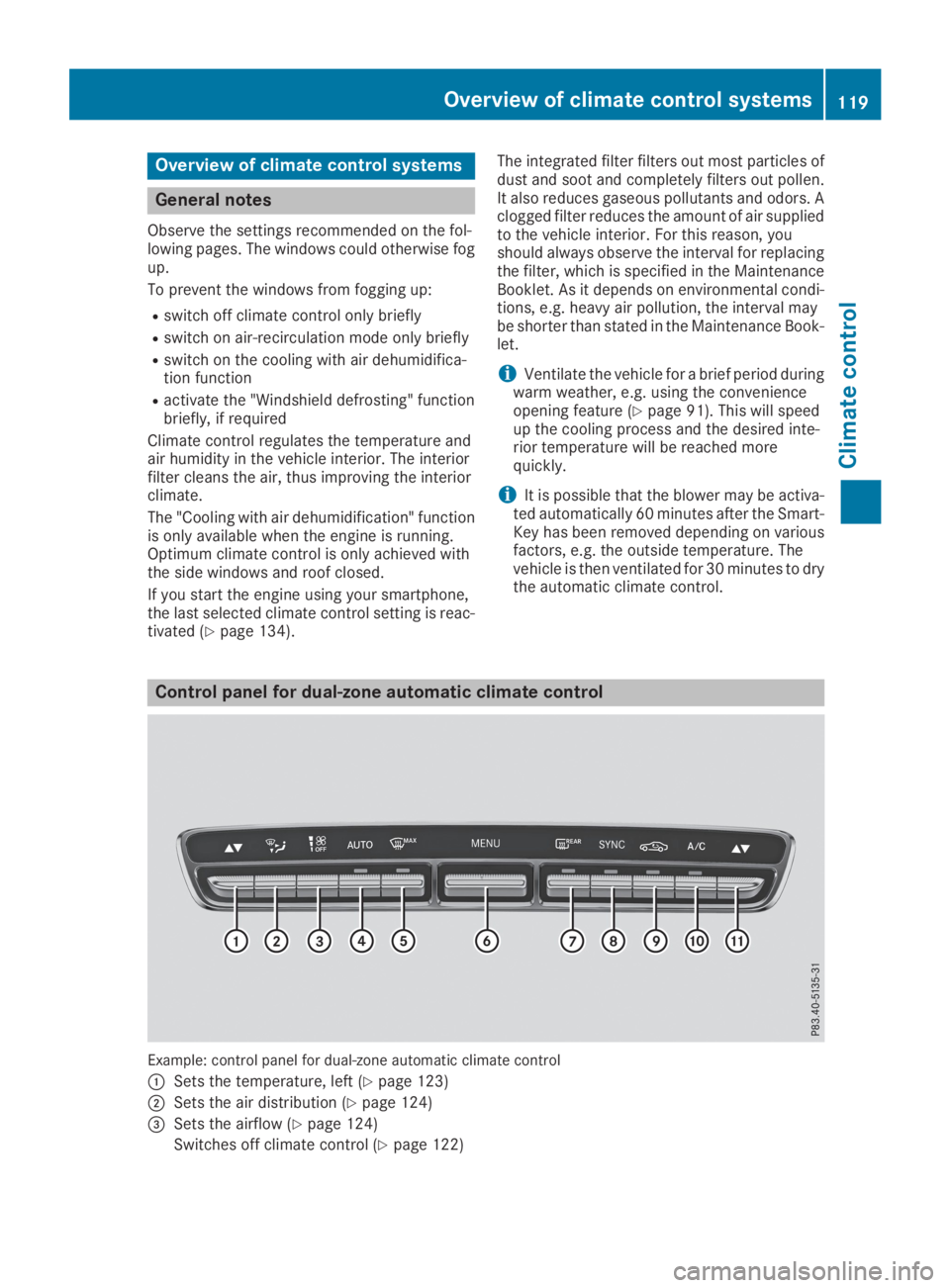
Control panel for dual-zone automatic climate control
Example: control panel for dual-zone automatic climate control
CSets the temperature, left (Ypage 123)
DSets the air distribution (Ypage 124)
Page 124 of 370
Vehicles with 3-zone automatic climate control:use the "Residual heat" function if you want toheat or ventilate the vehicle interior when theignition is switched off. The residual heat func-tion can only be activated or deactivated withthe ignition switched off. The residual heat func-tion is deactivated when the ignition is switchedon.
DYNAMIC SELECT switch (except
Mercedes-AMG GLC 63 4MATIC/
GLC 63 S 4MATIC)
You can choose between various drive programswith the DYNAMIC SELECT switch(Ypage 139).
If you have selected drive programE:
Rwhen heating, the electrical heater booster isdeactivated and heat output is reduced as aresult
Rthe rear window defroster running time isreduced
If you have selected drive programC,SorS+,the current climate settings are maintained.
ECO start/stop function
During automatic engine switch-off, the climatecontrol system only operates at a reduced capa-city. If you require the full climate control output,you can switch off the ECO start/stop functionby pressing the ECO button (Ypage 137).
Operating the climate control sys-
tems
Activating/deactivating climate con-
trol
General notes
When the climate control is switched off, the airsupply and air circulation are also switched off.The windows could fog up. Therefore, switch offclimate control only briefly
Switch on climate control primarily using theXrocker switch (Ypage 123).
Activating/deactivating
XTurn the SmartKey to positionHin the igni-tion lock (Ypage 131).
XTo switch on:set the airflow to level1orhigher using theHrocker switch.
XTo switch off:set the airflow to level0usingtheHrocker switch.
i3-zone automatic climate control: when cli-mate control is switched off, "OFF" appears inthe rear-compartment display.
Switching cooling with air dehumidification on/off
General notes
If you deactivate the "Cooling with air-dehumidification" function, the air inside the vehicle will notbe cooled. The air inside the vehicle will also not be dehumidified. The windows can fog up morequickly. Therefore, only deactivate the "Cooling with air-dehumidification" function briefly.
The "Cooling with air dehumidification" function is only available when the engine is running. The airinside the vehicle is cooled and dehumidified according to the temperature selected.
Condensation may drip from the underside of the vehicle when it is in cooling mode. This is normaland not a sign that there is a malfunction.
Activating/deactivating
XPress theZrocker switch up or down.The indicator lamp above the rocker switch lights up or goes out.
122Operating the climate control systems
Climate control
Page 134 of 370
To start the vehicle without actively using theSmartKey:
Rthe Start/Stop button must be inserted in theignition lock.
Rthe SmartKey must be in the vehicle.
Rthe vehicle must not be locked with theSmartKey or KEYLESS-GO. (Ypage 78)
Do not keep the SmartKey:
Rwith electronic devices, e.g. a mobile phoneor another SmartKey.
Rwith metallic objects, e.g. coins or metal foil.
Rinside metallic objects, e.g. a metal case.
This can affect the functionality of the Smart-Key.
If you lock the vehicle with the SmartKey remotecontrol or with KEYLESS-GO, after a short time:
Ryou will not be able to switch on the ignitionwith the Start/Stop button.
Ryou will no longer be able to start the enginewith the Start/Stop button until the vehicle isunlocked again.
If you lock the vehicle centrally using the buttonon the front door (Ypage 83), you can continueto start the engine with the Start/Stop button.
The engine can be switched off while the vehicleis in motion by pressing and holding the Start/Stop button for three seconds. This functionoperates independently of the ECO start/stopautomatic engine switch-off function.
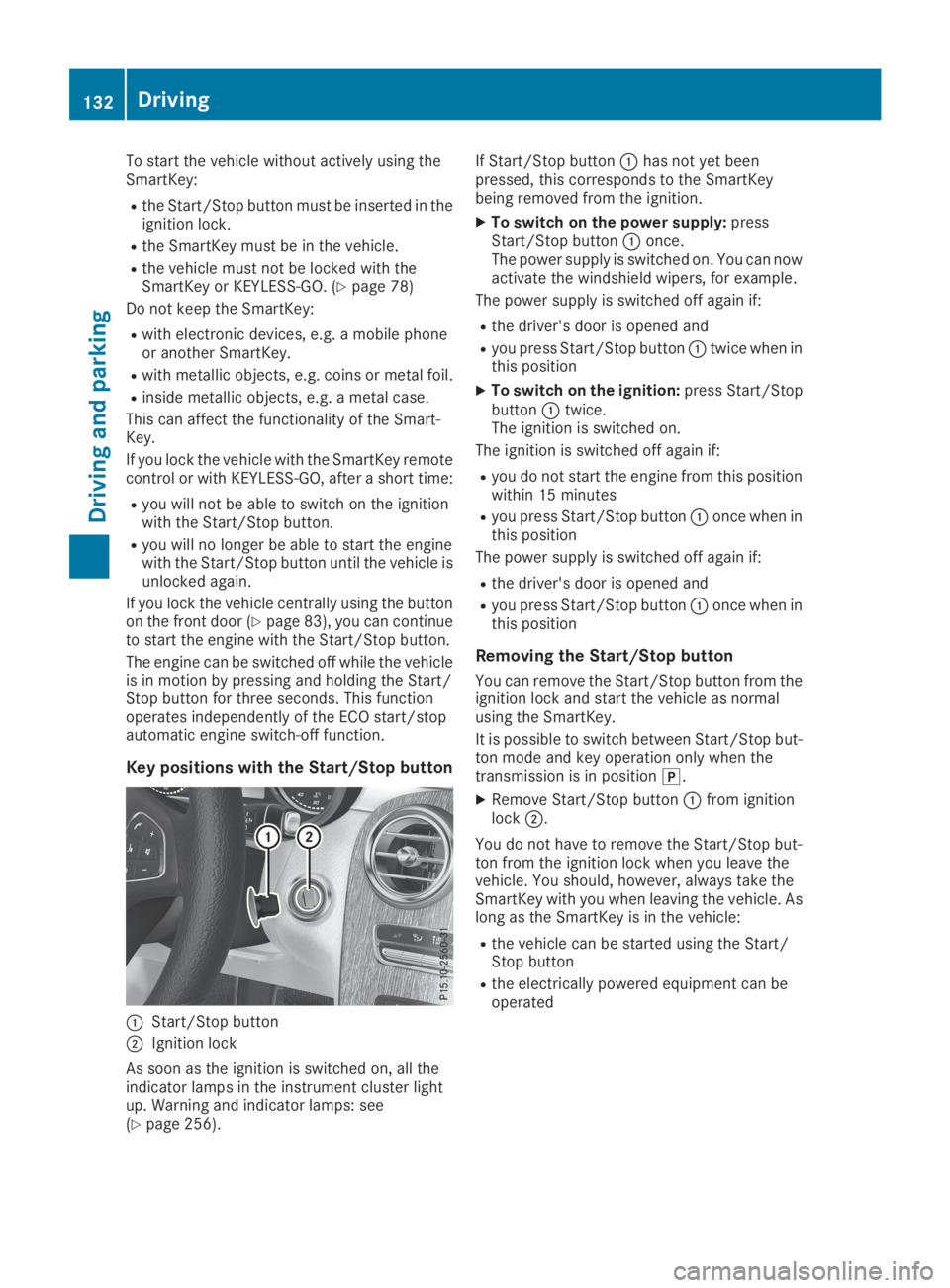
Key positions with the Start/Stop button
CStart/Stop button
DIgnition lock
As soon as the ignition is switched on, all theindicator lamps in the instrument cluster lightup. Warning and indicator lamps: see(Ypage 256).
If Start/Stop buttonChas not yet beenpressed, this corresponds to the SmartKeybeing removed from the ignition.
XTo switch on the power supply:pressStart/Stop buttonConce.The power supply is switched on. You can nowactivate the windshield wipers, for example.
The power supply is switched off again if:
Rthe driver's door is opened and
Ryou press Start/Stop buttonCtwice when inthis position
XTo switch on the ignition:press Start/StopbuttonCtwice.The ignition is switched on.
The ignition is switched off again if:
Ryou do not start the engine from this positionwithin 15 minutes
Ryou press Start/Stop buttonConce when inthis position
The power supply is switched off again if:
Rthe driver's door is opened and
Ryou press Start/Stop buttonConce when inthis position
Removing the Start/Stop button
You can remove the Start/Stop button from theignition lock and start the vehicle as normalusing the SmartKey.
It is possible to switch between Start/Stop but-ton mode and key operation only when thetransmission is in position].
XRemove Start/Stop buttonCfrom ignitionlockD.
You do not have to remove the Start/Stop but-ton from the ignition lock when you leave thevehicle. You should, however, always take theSmartKey with you when leaving the vehicle. Aslong as the SmartKey is in the vehicle:
Rthe vehicle can be started using the Start/Stop button
Rthe electrically powered equipment can beoperated
132Driving
Driving and parking
Page 135 of 370
Starting the engine
Important safety notes
GWARNING
If children are left unsupervised in the vehicle,
they could:
Ropen the doors, thus endangering other
people or road users.
Rget out and disrupt traffic.
Roperate the vehicle's equipment.
Additionally, children could set the vehicle in
motion if, for example, they:
Rrelease the parking brake.
Rshifting the automatic transmission out of
park positionP
RStart the engine.
There is a risk of an accident and injury.
When leaving the vehicle, always take the
SmartKey with you and lock the vehicle. Never
leave children or animals unattended in the
vehicle. Always keep the SmartKey out of
reach of children.
GDANGER
Combustion engines emit poisonous exhaust
gases such as carbon monoxide. Inhaling
these exhaust gases is hazardous to health
and can result in poisoning. There is a risk of
fatal injury. Therefore, never leave the engine
running an enclosed space without adequate
ventilation.
GWARNING
Flammable materials introduced through
environmental influence or by animals can
ignite if in contact with the exhaust system or
parts of the engine that heat up. There is a risk
of fire.
Carry out regular checks to make sure that
there are no flammable foreign materials in
the engine compartment or in the exhaust
system.
General notes
The catalytic converter is preheated for up to30 seconds after a cold start. The sound of theengine may change during this time.
Automatic transmission
XShift the transmission to position](Ypage 141).The transmission position indicator on themultifunction display shows](Ypage 142).
iYou can start the engine in transmissionposition]and\\.
Starting procedure with the SmartKey
To start the engine using the SmartKey insteadof the Start/Stop button, pull the Start/Stopbutton out of the ignition lock.
XTurn the SmartKey to positionIin the igni-tion lock and release it as soon as the engineis running.
If the engine will not start:
XRemove the SmartKey from the ignition lock.
XReinsert the SmartKey into the ignition lockafter a short waiting period.
XTurn the SmartKey to positionHin the igni-tion lock (Ypage 131).The indicator lamps in the instrument clusterlight up (Ypage 256).
XTurn the SmartKey to positionIin the igni-tion lock (Ypage 131) and release it as soonas the engine is running.
Starting procedure with the Start/Stop
button
The Start/Stop button is only available on vehi-cles with KEYLESS-GO or the KEYLESS-GO startfunction.
The Start/Stop button can be used to start thevehicle manually without inserting the SmartKeyinto the ignition lock. The Start/Stop buttonmust be inserted in the ignition lock and theSmartKey must be in the vehicle. This mode forstarting the engine operates independently ofthe ECO start/stop automatic engine start func-tion.
You can start the engine if a valid SmartKey is inthe vehicle. Switch off the engine and always
Driving133
Driving and parking
Z