heating MERCEDES-BENZ GLC COUPE 2016 User Guide
[x] Cancel search | Manufacturer: MERCEDES-BENZ, Model Year: 2016, Model line: GLC COUPE, Model: MERCEDES-BENZ GLC COUPE 2016Pages: 389, PDF Size: 7.34 MB
Page 105 of 389
G
WARNING
The head restraints cannot provide the inten-
ded protection unless they are fitted and
adjusted correctly. There is an increased risk of injury to the head and neck in the event of
an accident or sudden braking, for example.
Always drive with the head restraints fitted.
Ensure that the centre of the head restraints
support the back of each vehicle occupant's
head at eye level before driving off.
Do not interchange the head restraints of the
front and rear seats. Otherwise, you cannot
adjust the height and angle of the head
restraints correctly.
Adjust the head restraint fore-and-aft position
so that it is as close as possible to the back of
your head. G
WARNING
If the driver's seat is not correctly engaged, it could unexpectedly move while driving. This
could cause you to lose control of the vehicle. There is a risk of an accident.
Always ensure that the driver's seat is
engaged before starting the vehicle. G
WARNING
You could lose control of the vehicle while
driving if you:
R adjust the driver's seat, steering wheel or
mirrors
R fasten the seat belt
There is a risk of an accident.
Adjust the driver's seat, head restraint, steer-
ing wheel and mirrors and fasten your seat
belt before starting the engine. G
WARNING
If you adjust the seat height carelessly, you or other vehicle occupants could be trapped andthereby injured. Children in particular could
accidentally press the electrical seat adjust-
ment buttons and become trapped. There is a
risk of injury.
While moving the seats, make sure that your
hands or other body parts do not get under the lever assembly of the seat adjustment sys-
tem.
G
WARNING
The seat belt does not offer the intended level of protection if you have not moved the back-
rest to an almost vertical position. When brak-
ing or in the event of an accident, you could
slide underneath the seat belt and sustain
abdomen or neck injuries, for example. This
poses an increased risk of injury or even fatal injury.
Adjust the seat properly before beginning
your journey. Always ensure that the backrest
is in an almost vertical position and that the
shoulder section of your seatbelt is routed
across the centre of your shoulder.
! To avoid damage to the seats and the seat
heating, observe the following information:
R do not spill any liquids on the seats. If liquid
is spilled on the seats, dry them as soon as possible.
R if the seat covers are damp or wet, do not
switch on the seat heating. The seat heat-
ing should also not be used to dry the seats.
R clean the seat covers as recommended;
see "Interior care".
R do not transport heavy loads on the seats.
Do not place sharp objects on the seat
cushions, e.g. knives, nails or tools. The
seats should only be occupied by passen-
gers, if possible.
R when the seat heating is in operation, do
not cover the seats with insulating materi-
als, e.g. blankets, coats, bags, seat covers,
child seats or booster seats.
! Make sure that there are no objects in the
footwell under or behind the seats when mov- ing the seats back. There is a risk that the
seats and/or the objects could be damaged.
i The rear-compartment head restraints can
be removed (Y page 105).
For more information, contact a qualified spe-
cialist workshop.
i Related topic:
R EASY-PACK quickfold rear bench seat
(Y page 308) 102
SeatsSeats, steering wheel and mirrors
Page 109 of 389
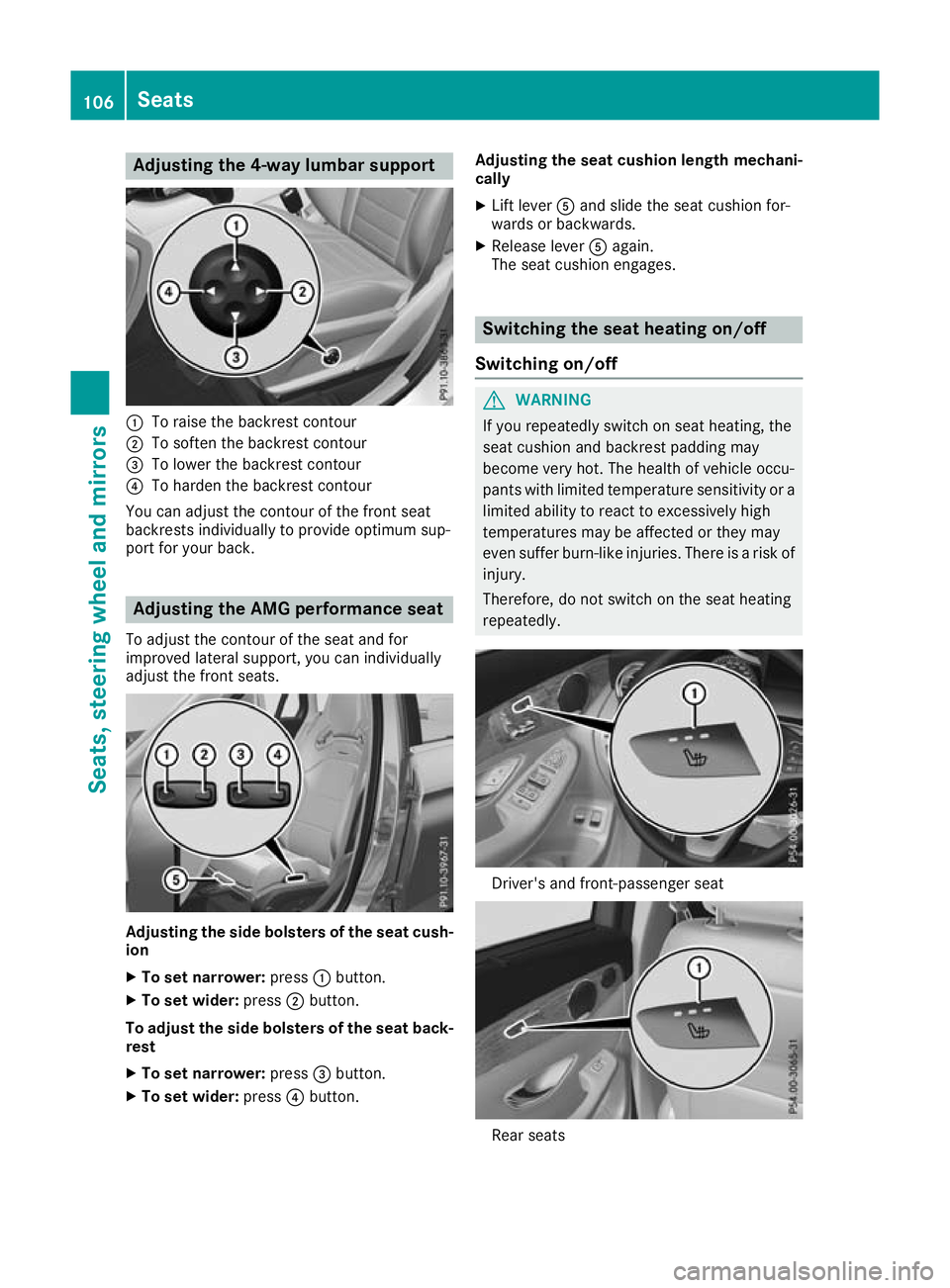
Adjusting the 4-way lumbar support
:
To raise the backrest contour
; To soften the backrest contour
= To lower the backrest contour
? To harden the backrest contour
You can adjust the contour of the front seat
backrests individually to provide optimum sup-
port for your back. Adjusting the AMG performance seat
To adjust the contour of the seat and for
improved lateral support, you can individually
adjust the front seats. Adjusting the side bolsters of the seat cush-
ion
X To set narrower: press:button.
X To set wider: press;button.
To adjust the side bolsters of the seat back- rest
X To set narrower: press=button.
X To set wider: press?button. Adjusting the seat cushion length mechani-
cally
X Lift lever Aand slide the seat cushion for-
wards or backwards.
X Release lever Aagain.
The seat cushion engages. Switching the seat heating on/off
Switching on/off G
WARNING
If you repeatedly switch on seat heating, the
seat cushion and backrest padding may
become very hot. The health of vehicle occu-
pants with limited temperature sensitivity or a limited ability to react to excessively high
temperatures may be affected or they may
even suffer burn-like injuries. There is a risk of
injury.
Therefore, do not switch on the seat heating
repeatedly. Driver's and front-passenger seat
Rear seats106
SeatsSeats
, steering wheel and mirrors
Page 110 of 389
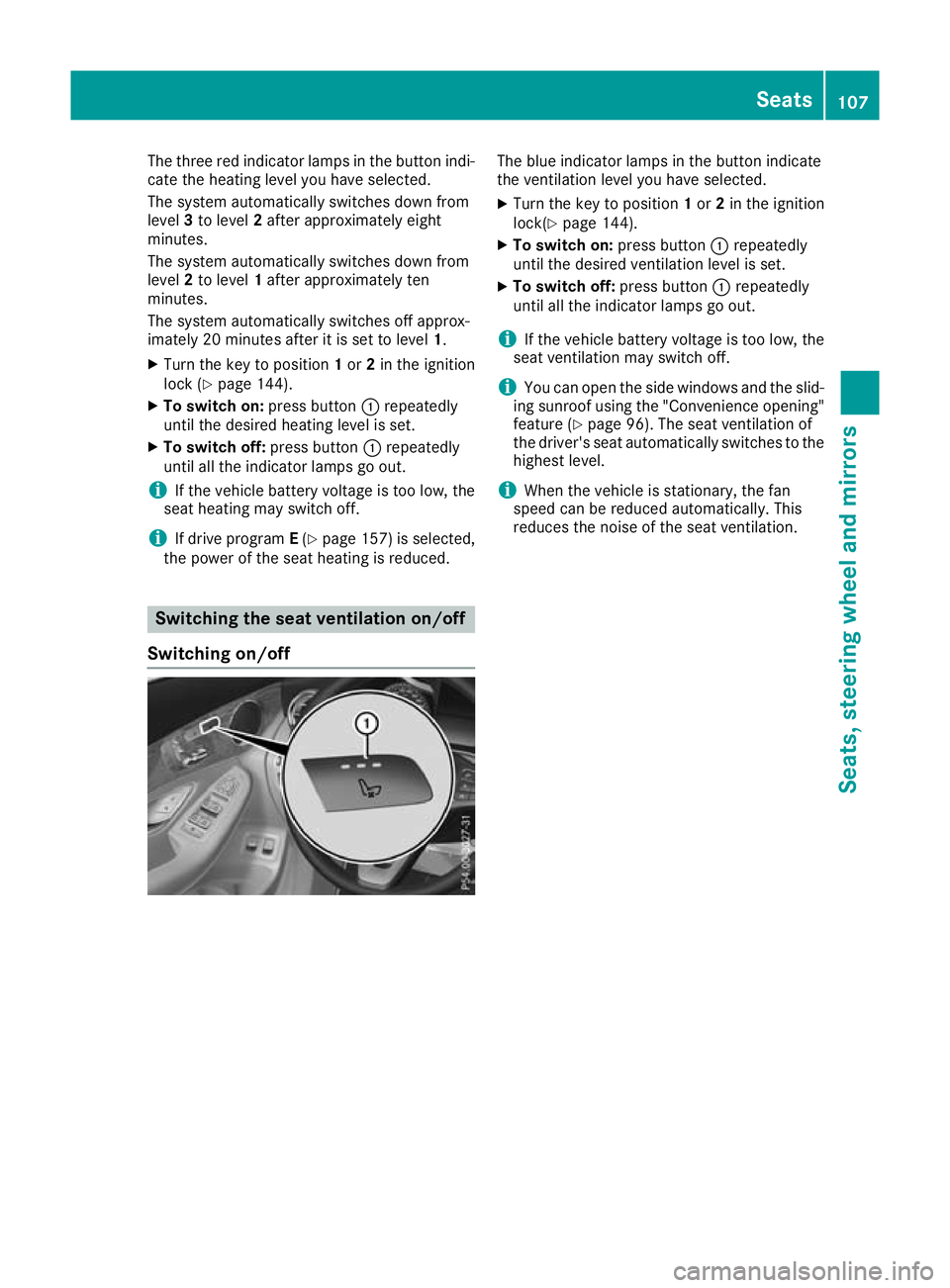
The three red indicator lamps in the button indi-
cate the heating level you have selected.
The system automatically switches down from
level 3to level 2after approximately eight
minutes.
The system automatically switches down from
level 2to level 1after approximately ten
minutes.
The system automatically switches off approx-
imately 20 minutes after it is set to level 1.
X Turn the key to position 1or 2in the ignition
lock (Y page 144).
X To switch on: press button:repeatedly
until the desired heating level is set.
X To switch off: press button:repeatedly
until all the indicator lamps go out.
i If the vehicle battery voltage is too low, the
seat heating may switch off.
i If drive program
E(Y page 157) is selected,
the power of the seat heating is reduced. Switching the seat ventilation on/off
Switching on/off The blue indicator lamps in the button indicate
the ventilation level you have selected.
X Turn the key to position 1or 2in the ignition
lock(Y page 144).
X To switch on: press button:repeatedly
until the desired ventilation level is set.
X To switch off: press button:repeatedly
until all the indicator lamps go out.
i If the vehicle battery voltage is too low, the
seat ventilation may switch off.
i You can open the side windows and the slid-
ing sunroof using the "Convenience opening" feature (Y page 96). The seat ventilation of
the driver's seat automatically switches to the
highest level.
i When the vehicle is stationary, the fan
speed can be reduced automatically. This
reduces the noise of the seat ventilation. Seats
107Seats, steering wheel and mirrors Z
Page 111 of 389
Problems with the seat heating / seat ventilation
Problem
Possible causes/consequences and
M
MSolutions The seat heating or seat
ventilation has switched
off prematurely or can-
not be switched on. The on-board voltage is too low because too many electrical consum-
ers are switched on.
X Switch off electrical consumers that you do not need, such as the
rear window heating or interior lighting.
Once the battery is sufficiently charged, the seat heating or seat
ventilation can be switched back on manually. Steering wheel
Important safety notes
G
WARNING
You could lose control of the vehicle while
driving if you:
R adjust the driver's seat, steering wheel or
mirrors
R fasten the seat belt
There is a risk of an accident.
Adjust the driver's seat, head restraint, steer-
ing wheel and mirrors and fasten your seat
belt before starting the engine. G
WARNING
Children could become trapped by the steer-
ing wheel if they adjust it. There is a risk of
injury.
When leaving the vehicle, always take the key with you and lock the vehicle. Never leave
children unattended in the vehicle.
The electrically adjustable steering wheel can
still be adjusted when there is no key in the igni-
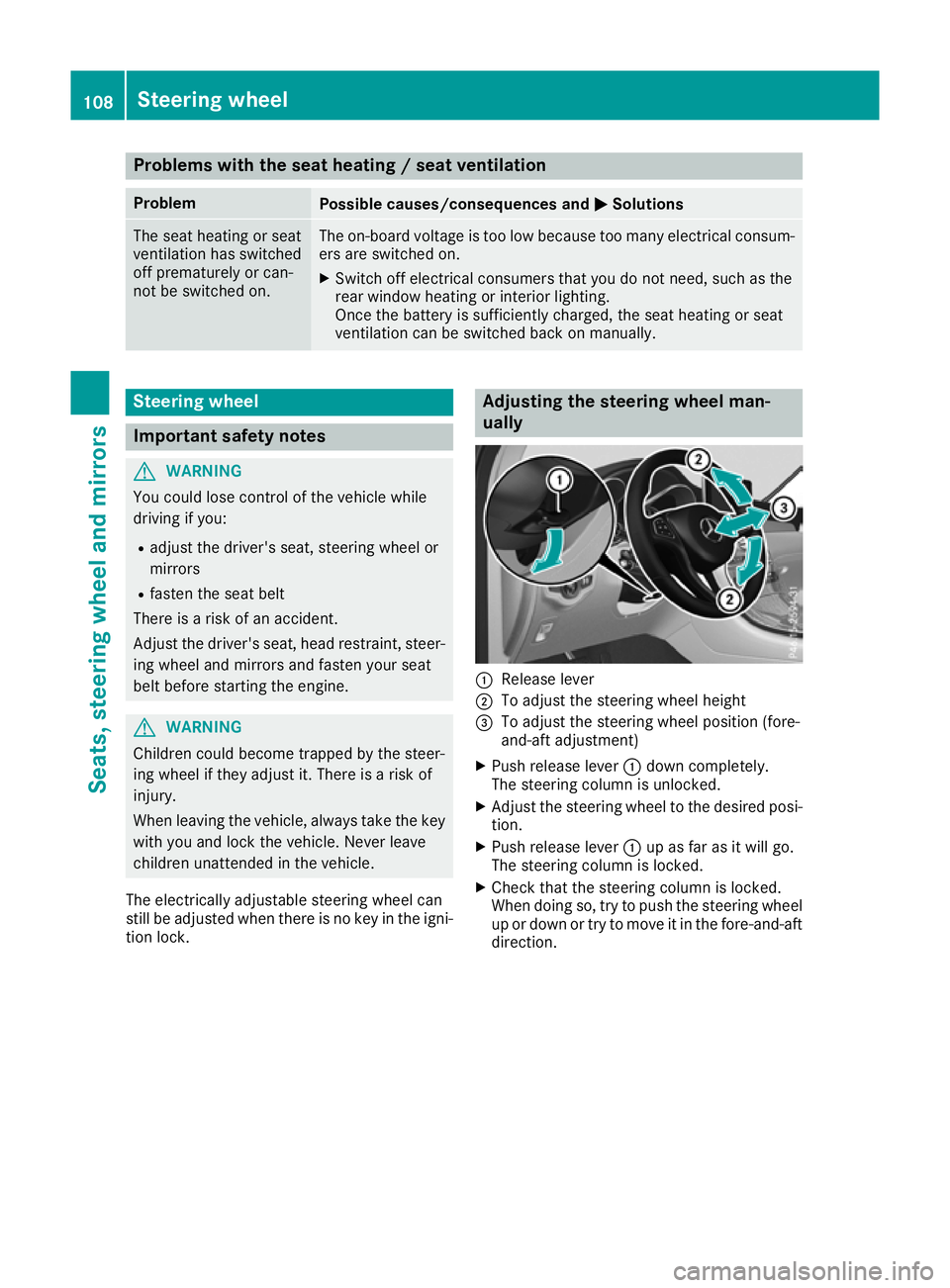
tion lock. Adjusting the steering wheel man-
ually
:
Release lever
; To adjust the steering wheel height
= To adjust the steering wheel position (fore-
and-aft adjustment)
X Push release lever :down completely.
The steering column is unlocked.
X Adjust the steering wheel to the desired posi-
tion.
X Push release lever :up as far as it will go.
The steering column is locked.
X Check that the steering column is locked.
When doing so, try to push the steering wheel
up or down or try to move it in the fore-and-aft
direction. 108
Steering wheelSeats, steering wheel and mirrors
Page 112 of 389
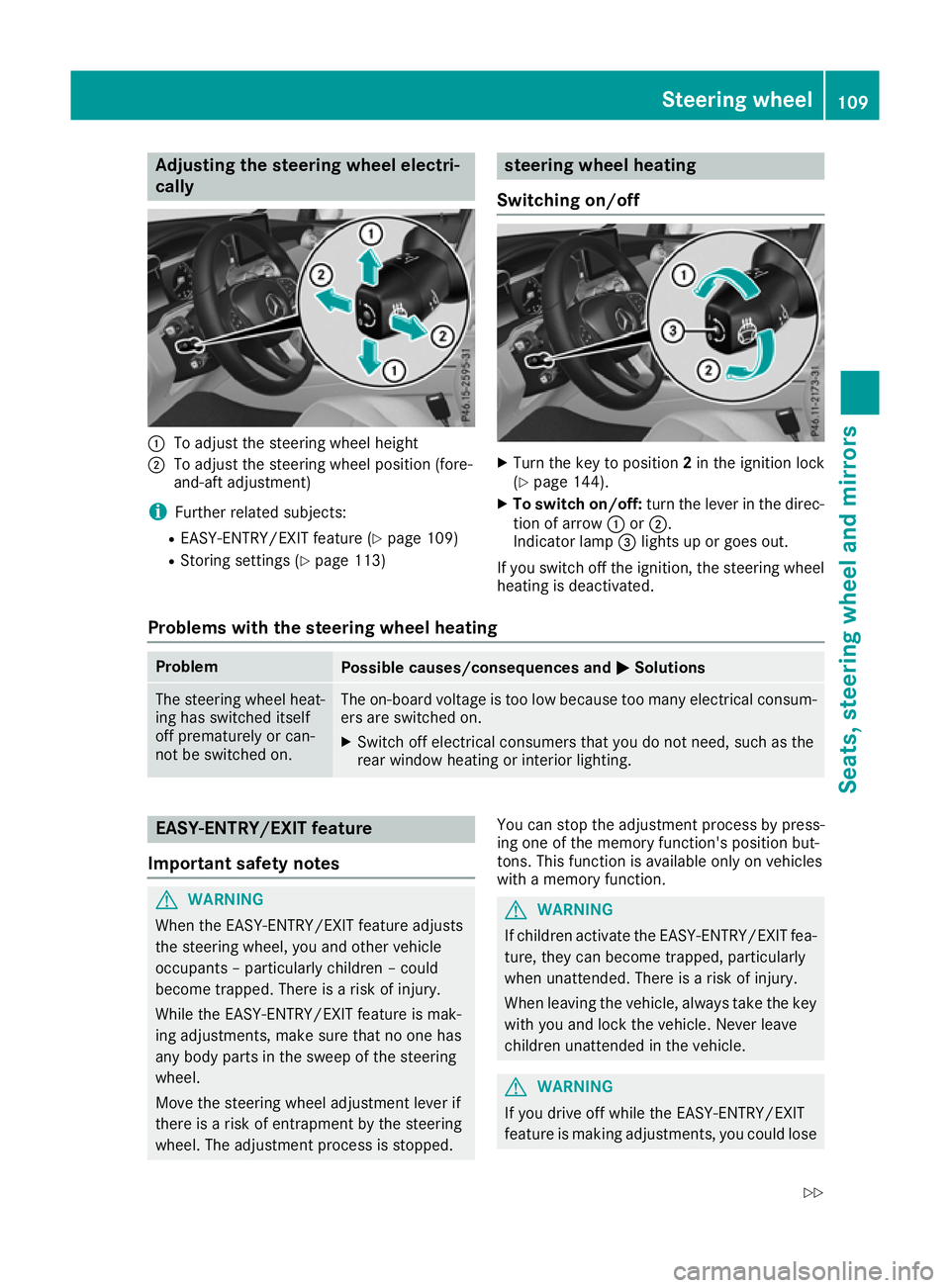
Adjusting the steering wheel electri-
cally :
To adjust the steering wheel height
; To adjust the steering wheel position (fore-
and-aft adjustment)
i Further related subjects:
R EASY-ENTRY/EXIT feature (Y page 109)
R Storing settings (Y page 113) steering wheel heating
Switching on/off X
Turn the key to position 2in the ignition lock
(Y page 144).
X To switch on/off: turn the lever in the direc-
tion of arrow :or;.
Indicator lamp =lights up or goes out.
If you switch off the ignition, the steering wheel heating is deactivated.
Problems with the steering wheel heating Problem
Possible causes/consequences and
M
MSolutions The steering wheel heat-
ing has switched itself
off prematurely or can-
not be switched on. The on-board voltage is too low because too many electrical consum-
ers are switched on.
X Switch off electrical consumers that you do not need, such as the
rear window heating or interior lighting. EASY-ENTRY/EXIT feature
Important safety notes G
WARNING
When the EASY-ENTRY/EXIT feature adjusts
the steering wheel, you and other vehicle
occupants – particularly children – could
become trapped. There is a risk of injury.
While the EASY-ENTRY/EXIT feature is mak-
ing adjustments, make sure that no one has
any body parts in the sweep of the steering
wheel.
Move the steering wheel adjustment lever if
there is a risk of entrapment by the steering
wheel. The adjustment process is stopped. You can stop the adjustment process by press-
ing one of the memory function's position but-
tons. This function is available only on vehicles
with a memory function. G
WARNING
If children activate the EASY-ENTRY/EXIT fea- ture, they can become trapped, particularly
when unattended. There is a risk of injury.
When leaving the vehicle, always take the key with you and lock the vehicle. Never leave
children unattended in the vehicle. G
WARNING
If you drive off while the EASY-ENTRY/EXIT
feature is making adjustments, you could lose Steering wheel
109Seats, steering wheel and mirrors
Z
Page 114 of 389
Exterior mirrors
Important safety notes G
WARNING
You could lose control of the vehicle while
driving if you:
R adjust the driver's seat, steering wheel or
mirrors
R fasten the seat belt
There is a risk of an accident.
Adjust the driver's seat, head restraint, steer-
ing wheel and mirrors and fasten your seat
belt before starting the engine. G
WARNING
The exterior mirrors reduce the size of the
image. Objects visible in the mirrors are
closer than they appear. You could misjudge
the distance from road users driving behind
you when changing lanes, for instance. There is a risk of an accident.
You should therefore always look over your
shoulder to determine the actual distance
from road users driving behind you.
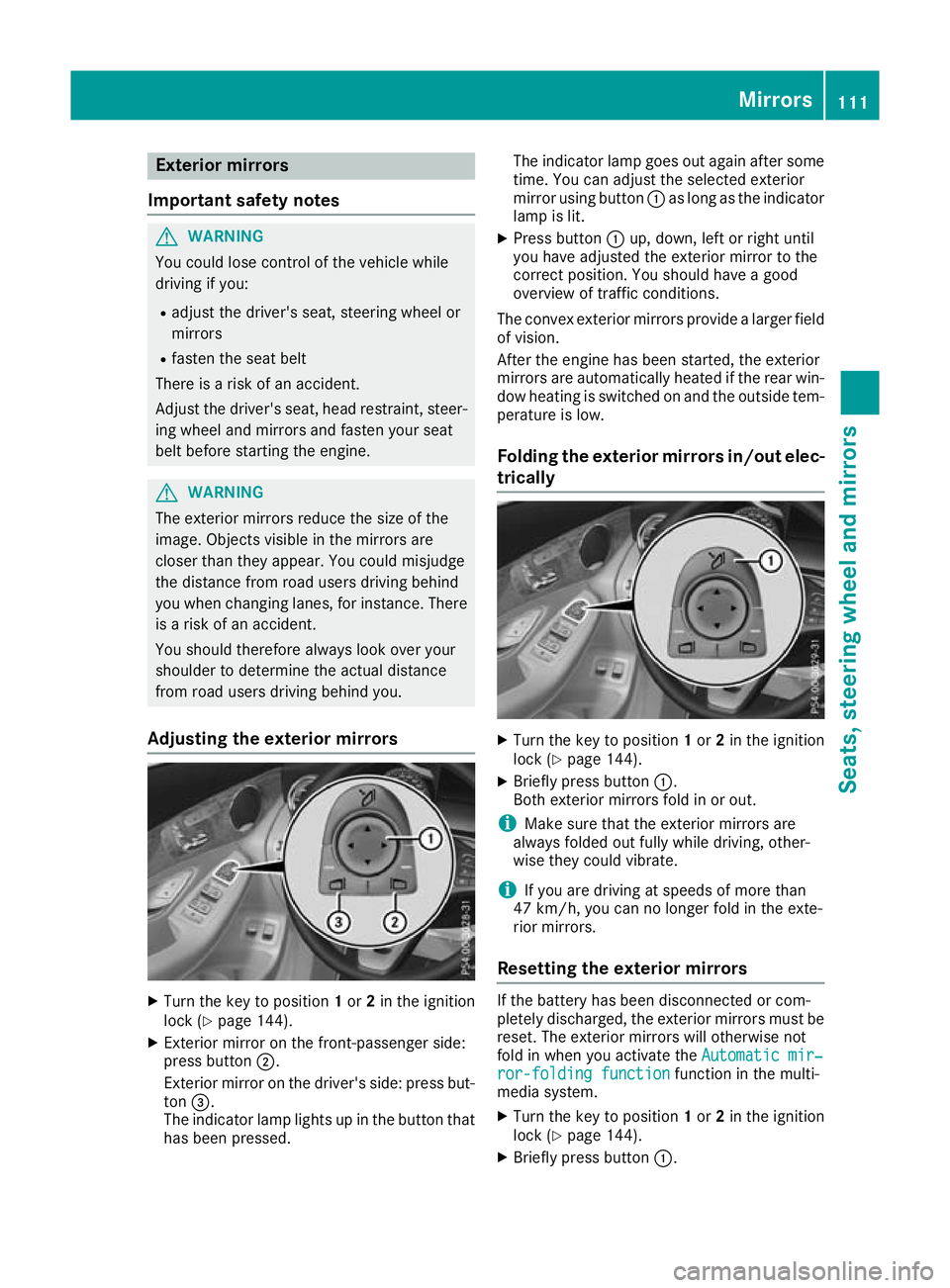
Adjusting the exterior mirrors X
Turn the key to position 1or 2in the ignition
lock (Y page 144).
X Exterior mirror on the front-passenger side:
press button ;.
Exterior mirror on the driver's side: press but-
ton =.
The indicator lamp lights up in the button that has been pressed. The indicator lamp goes out again after some
time. You can adjust the selected exterior
mirror using button :as long as the indicator
lamp is lit.
X Press button :up, down, left or right until
you have adjusted the exterior mirror to the
correct position. You should have a good
overview of traffic conditions.
The convex exterior mirrors provide a larger field of vision.
After the engine has been started, the exterior
mirrors are automatically heated if the rear win-
dow heating is switched on and the outside tem- perature is low.
Folding the exterior mirrors in/out elec- trically X
Turn the key to position 1or 2in the ignition
lock (Y page 144).
X Briefly press button :.
Both exterior mirrors fold in or out.
i Make sure that the exterior mirrors are
always folded out fully while driving, other-
wise they could vibrate.
i If you are driving at speeds of more than
47 km/h, you can no longer fold in the exte-
rior mirrors.
Resetting the exterior mirrors If the battery has been disconnected or com-
pletely discharged, the exterior mirrors must be reset. The exterior mirrors will otherwise not
fold in when you activate the Automatic mir‐ Automatic mir‐
ror-folding function
ror-folding function function in the multi-
media system.
X Turn the key to position 1or 2in the ignition
lock (Y page 144).
X Briefly press button :. Mirrors
111Seats, steering wheel and mirrors Z
Page 130 of 389
Overview of climate control systems
General notes
Observe the settings recommended on the fol-
lowing pages. Otherwise, the windows could
mist up.
To prevent the windows from misting up:
R switch off climate control only briefly
R activate air-recirculation mode only briefly
R switch on "Cooling with air dehumidification"
R activate the "Windscreen demisting" function
briefly, if required
Climate control regulates the temperature and
air humidity in the vehicle interior. The interior
filter cleans the air, thus improving the interior
climate.
The "Cooling with dehumidification" function is
available only when the engine is running. Opti-
mum climate control is achieved only with the
side windows and roof closed.
The residual heat function can be activated or
deactivated only with the ignition switched off
(Y page 135). The integrated filter filters out most particles of
dust and soot and completely filters out pollen.
It also reduces gaseous pollutants and odours. A
clogged filter reduces the amount of air supplied to the vehicle interior. For this reason, you
should always observe the interval for replacing
the filter, which is specified in the Service Book-
let. As this depends on environmental condi-
tions, e.g. heavy air pollution, the interval may
be shorter than stated in the Service Booklet.
i Ventilate the vehicle for a brief period during
warm weather, e.g. using the convenience
opening feature (Y page 96). This will speed
up the cooling process and the desired inte-
rior temperature will be reached more
quickly.
i It is possible that the blower may be activa-
ted automatically 60 minutes after the key
has been removed depending on various fac-
tors, e.g. the outside temperature. The vehi-
cle is then ventilated for 30 minutes to dry the
automatic climate control.
i Hybrid vehicles:
observe the notes on cli-
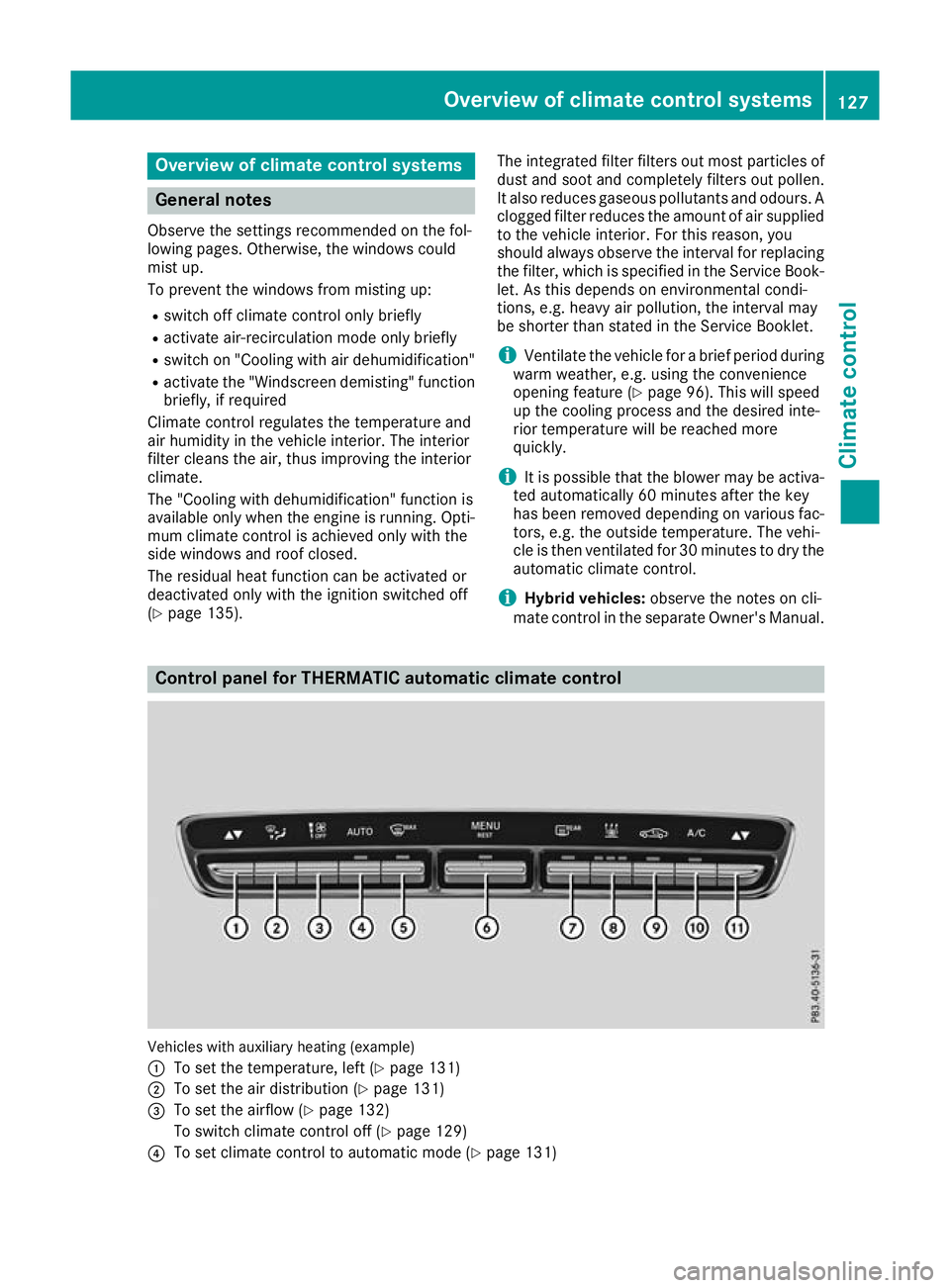
mate control in the separate Owner's Manual. Control panel for THERMATIC automatic climate control
Vehicles with auxiliary heating (example)
:
To set the temperature, left (Y page 131)
; To set the air distribution (Y page 131)
= To set the airflow (Y page 132)
To switch climate control off (Y page 129)
? To set climate control to automatic mode (Y page 131) Overview of climate control systems
127Climate control
Page 131 of 389
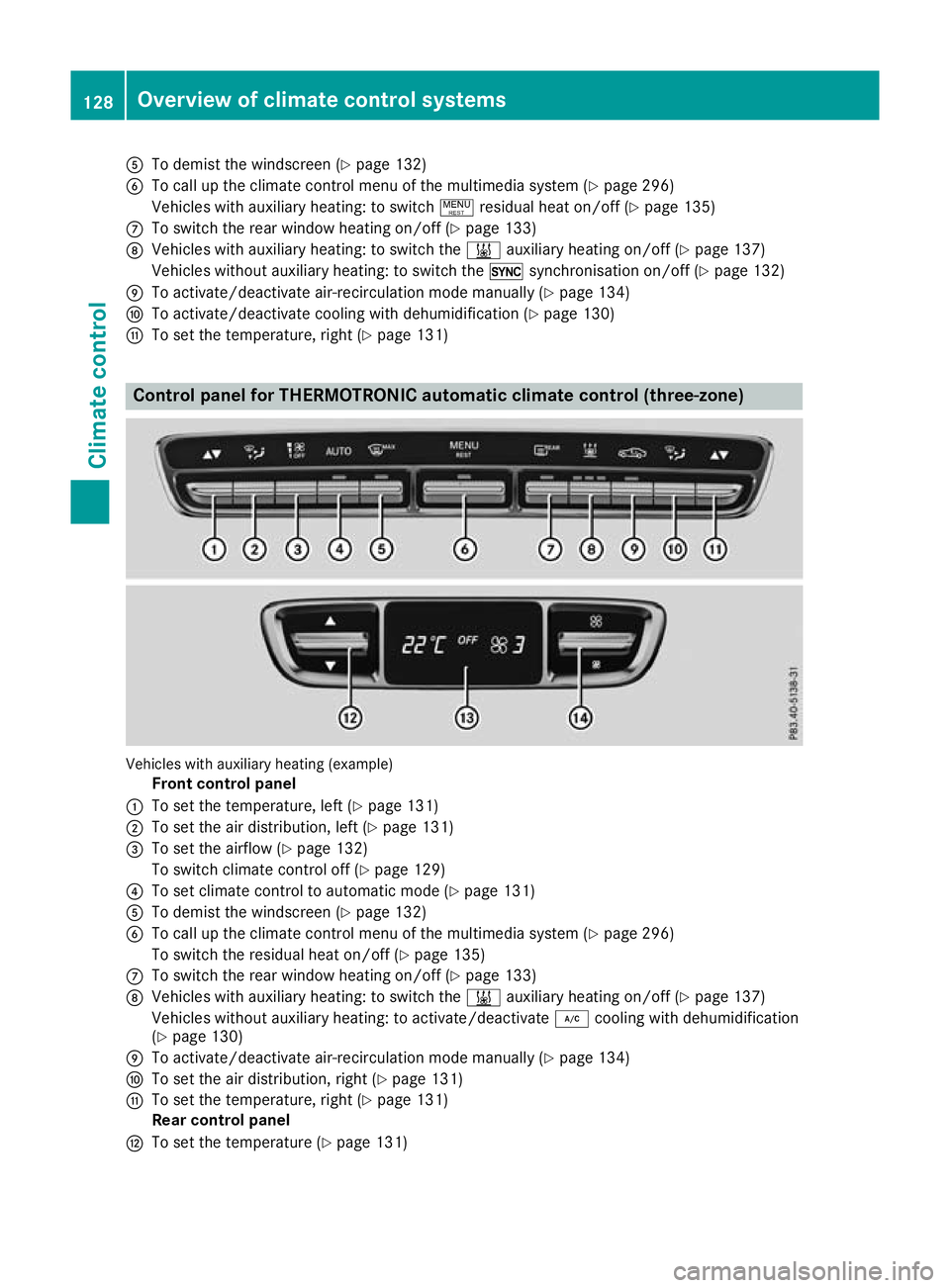
A
To demist the windscreen (Y page 132)
B To call up the climate control menu of the multimedia system (Y page 296)
Vehicles with auxiliary heating: to switch !residual heat on/off (Y page 135)
C To switch the rear window heating on/off (Y page 133)
D Vehicles with auxiliary heating: to switch the &auxiliary heating on/off (Y page 137)
Vehicles without auxiliary heating: to switch the 0synchronisation on/off (Y page 132)
E To activate/deactivate air-recirculation mode manually (Y page 134)
F To activate/deactivate cooling with dehumidification (Y page 130)
G To set the temperature, right (Y page 131)Control panel for THERMOTRONIC automatic climate control (three-zone)
Vehicles with auxiliary heating (example)
Front control panel
: To set the temperature, left (Y page 131)
; To set the air distribution, left (Y page 131)
= To set the airflow (Y page 132)
To switch climate control off (Y page 129)
? To set climate control to automatic mode (Y page 131)
A To demist the windscreen (Y page 132)
B To call up the climate control menu of the multimedia system (Y page 296)
To switch the residual heat on/off (Y page 135)
C To switch the rear window heating on/off (Y page 133)
D Vehicles with auxiliary heating: to switch the &auxiliary heating on/off (Y page 137)
Vehicles without auxiliary heating: to activate/deactivate ¿cooling with dehumidification
(Y page 130)
E To activate/deactivate air-recirculation mode manually (Y page 134)
F To set the air distribution, right (Y page 131)
G To set the temperature, right (Y page 131)
Rear control panel
H To set the temperature (Y page 131)128
Overview of climate control systemsClimate control
Page 132 of 389
I
Display
J To set the airflow (Y page 132) Notes on using automatic climate
control
Optimum use of automatic climate con-
trol The following contains notes and recommenda-
tions on how best to use THERMATIC automatic
climate control or THERMOTRONIC.
R Activate climate control using the Ã
rocker switch. The indicator lamp above the
à rocker switch lights up. The "Cooling
with dehumidification" function is activated in
automatic mode.
R Set the temperature to 22 †.
R Use the "Windscreen demisting" function only
briefly until the windscreen is clear again.
R Use the "Air-recirculation mode" function only
briefly, e.g. if there are unpleasant outside
odours or when in a tunnel. The windows
could otherwise mist up as no fresh air is
drawn into the vehicle in air-recirculation
mode.
R Vehicles with THERMATIC with auxiliary heat-
ing or THERMOTRONIC: use the "Residual
heat" function if you want to heat or ventilate
the vehicle interior when the ignition is
switched off. The "Residual heat" function can
be switched on or off only with the ignition
switched off. The "Residual heat" function is
switched off when the ignition is switched on.
DYNAMIC SELECT switch (except
Mercedes-AMG vehicles) You can choose between various drive programs
with the DYNAMIC SELECT switch
(Y page 152).
If you have selected drive program E:
R during heating, the electrical heater booster
is deactivated and heat output is reduced as a
result
R the rear window heating running time is
reduced If you have selected drive program
C,Sor S+ ,
the current climate settings are maintained.
ECO start/stop function During automatic engine switch-off, the climate
control operates only at a reduced capacity. If
you require the full climate control output, you
can switch off the ECO start/stop function by
pressing the ECO button (Y page 149). Operating the climate control system
Switching the climate control on/off
General notes When climate control is switched off, the air
supply and air circulation are also switched off.
The windows could mist up. Therefore, switch
off climate control only briefly.
Switch on climate control primarily using the
à rocker switch (Y page 131).
Activating/deactivating X
Turn the key to position 2in the ignition lock
(Y page 144).
X To switch on: set the airflow to level 1 or
higher using the Hrocker switch.
X To switch off:set the airflow to level 0 using
the H rocker switch.
i THERMOTRONIC automatic climate control:
when climate control is switched off, "OFF"
appears in the rear-compartment display. Operating the climate control system
129Climate control
Page 133 of 389
Activating/deactivating cooling with air dehumidification
General notes If you deactivate the "Cooling with dehumidification" function, the air inside the vehicle will not be
cooled during warm weather. The air inside the vehicle will also not be dehumidified. The windows
can mist up more quickly. Therefore, deactivate the "Cooling with dehumidification" function only
briefly.
The "Cooling with dehumidification" function is available only when the engine is running. The air
inside the vehicle is cooled and dehumidified according to the temperature selected.
Condensation may drip from the underside of the vehicle when cooling mode is active. This is normal
and not a sign that there is a malfunction.
Activating/deactivating THERMOTRONIC automatic climate control without auxiliary heating and THERMATIC
automatic climate control
X Press rocker switch ¿up or down.
The indicator lamp above the rocker switch lights up or goes out.
THERMOTRONIC automatic climate control with auxiliary heating
You can activate or deactivate the "Cooling with dehumidification" function via the multimedia
system (Y page 297).
Problems with the "Cooling with dehumidification" function Problem
Possible causes/consequences and
M MSolutions THERMATIC or
THERMOTRONIC with-
out auxiliary heating:
the indicator lamp above
rocker switch
¿ remains off. The
"Cooling with dehumidi-
fication" function can no
longer be activated via
the multimedia system
(Y page 297). The cooling with dehumidification function has been deactivated due
to a malfunction.
X Consult a qualified specialist workshop. THERMOTRONIC auto-
matic climate control
with auxiliary heat-
ing:
the "Cooling with
dehumidification" func-
tion can no longer be
activated via the multi-
media system
(Y page 297). The cooling with dehumidification function has been deactivated due
to a malfunction.
X Consult a qualified specialist workshop. 130
Operating the climate control systemClimate cont
rol