reset MERCEDES-BENZ GLC COUPE 2021 Owners Manual
[x] Cancel search | Manufacturer: MERCEDES-BENZ, Model Year: 2021, Model line: GLC COUPE, Model: MERCEDES-BENZ GLC COUPE 2021Pages: 481, PDF Size: 9 MB
Page 34 of 481
&
WARNING Risk of accident due to
objects in the driver's foot we ll
Objects in the driver's foot we ll may impede
pedal tr avel or block a depressed pedal.
This jeopardises the operating and road
saf ety of theve hicle. #
Stow all objects in theve hicle securely
so that they cannot getinto the driver's
fo ot we ll. #
Alw aysfit th efloor mats securely and
as prescribed in order toensure that
th ere is alw ays suf ficient room forthe
pedals. #
Do not use loose floor mats and do not
place floor mats on top of one ano ther. *
NO
TEBattery discharging from using
devices connected tothe diagnostics
connection Using devices at
the diagnostics connection
drains the batter y. #
Check thech arge leve l of the batter y. #
Ifth ech arge leve l is lo w,charge the
batter y,e.g. bydriving a considerable
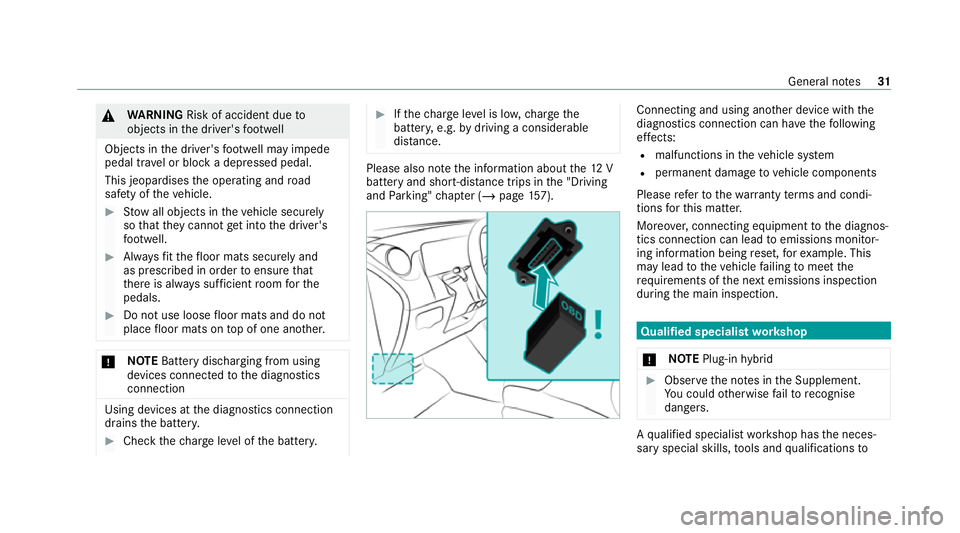
dis tance. Please also no
tethe information about the12 V
battery and short-dis tance trips in the "Driving
and Parking" chap ter (/ page157). Connecting and using ano
ther device with the
diagnostics connection can ha vethefo llowing
ef fects:
R malfunctions in theve hicle sy stem
R permanent damage tovehicle components
Please referto thewa rranty term s and condi‐
tions forth is matter.
Moreo ver,connecting equipment tothe diagnos‐
tics connection can lead toemissions monitor‐
ing information being reset, forex ample. This
may lead totheve hicle failing tomeet the
re qu irements of the next emissions inspection
during the main inspection. Qualified specialist
workshop
* NO
TEPlug-in hybrid #
Obser vethe no tes in the Supplement.
Yo u could otherwise failto recognise
dangers. A
qu alified specialist workshop has the neces‐
sary special skills, tools and qualifications to Gene
ral no tes 31
Page 38 of 481
ve
hicle itself. Control units of ten contain da ta
memories forve hicle keys,fo rex ample. Their
use permits thete mp orary or permanent docu‐
mentation of tech nical information about the
ve hicle's operating state, component loads,
main tenance requirements and tech nical events
or faults.
Depending on theve hicle equipment, thefo llow‐
ing data are stored:
R operating status of sy stem components,
such as fill le vels, tyre pressure or battery
st atus
R malfunctions or faults in impor tant sy stem
components, such as lights or brakes
R system reactions in special driving situations,
such as airbag deployment or the inter ven‐
tion of stability control sy stems
R information on events leading tovehicle
damage
In cer tain cases, it may be requiredtostore data
th at wo uld ha veotherwise been used only tem‐
porarily. This may be the case if theve hicle has
de tected a malfunction, forex ample. If
yo u use services, such as repair services and
maintenance work,st ored operational data as
we ll as theve hicle identification number can be
re ad out and used. They can be read out by
service network emplo yees, such as workshops
and manufacturers or third parties, such as
breakdown services. The same is true in the
case of warranty claims and quality assurance
measures.
In general, there adout is per form ed via the
legally prescribed port forth e diagnostics con‐
nection in theve hicle. The operational data that
are read out document tech nical states of the
ve hicle or of individual components and assist in
th e diagnosis of malfunctions, compliance with
wa rranty obligations and quality impr ovement.
To that end, these data, in particular information
about component loads, tech nical events, mal‐
functions and other faults may be transmit ted
along with theve hicle identification number to
th e manufacturer. Furthermore, the manufac‐
turer is subject toproduct liability. Forth is rea‐
son the manufacturer also uses operational data
from theve hicle, forex ample, forre calls. These da
ta can also be used toexamine the cus tom‐
er's warranty and guarantee claims.
Fa ult memories in theve hicle can be reset by a
service outlet or at your requ est as part of repair
or maintenance work.
Con venience and inf otainment functions
Yo u can store con venience settings and individ‐
ual settings in theve hicle and change or reset
th em at any time.
Depending on theve hicle equipment, this
includes thefo llowing settings, forex ample:
R seat and steering wheel positions
R suspension and climate control settings
R individual settings, such as interior lighting
Depending on the selected equipment, you can
import data into vehicle inf otainment functions
yo urself.
Depending on theve hicle equipment, this
includes thefo llowing data, forex ample:
R multimedia data, such as music, films or pho‐
to sfo r playback in an integrated multimedia
sy stem General no
tes35
Page 90 of 481
Re
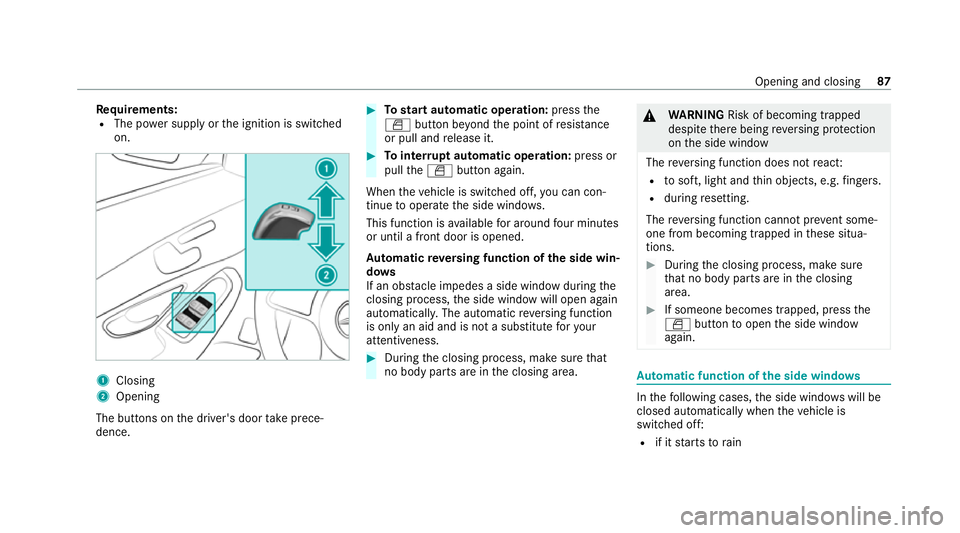
quirements:
R The po wer supply or the ignition is switched
on. 1
Closing
2 Opening
The buttons on the driver's door take prece‐
dence. #
Tostart automatic operation: pressthe
W button be yond the point of resis tance
or pull and release it. #
Tointer rupt automatic operation: press or
pull theW button again.
When theve hicle is switched off, you can con‐
tinue tooperate the side windo ws.
This function is available for around four minutes
or until a front door is opened.
Au tomatic reve rsing function of the side win‐
do ws
If an obs tacle impedes a side window du ring the
closing process, the side window will open again
automaticall y.The automatic reve rsing function
is only an aid and is not a substitute foryo ur
attentiveness. #
During the closing process, make sure that
no body parts are in the closing area. &
WARNING Risk of becoming trapped
despi tethere being reve rsing pr otection
on the side window
The reve rsing function does not react:
R tosoft, light and thin objects, e.g. fingers.
R during resetting.
The reve rsing function cannot pr event some‐
one from becoming trapped in these situa‐
tions. #
During the closing process, make sure
th at no body parts are in the closing
area. #
If someone becomes trapped, press the
W button toopen the side window
again. Au
tomatic function of the side windo ws In
thefo llowing cases, the side windo wswill be
closed automatically when theve hicle is
switched off:
R if it starts torain Opening and closing
87
Page 94 of 481
#
Check whe ther the sliding sunroof can be
ra ised or opened when a roof luggage rack is
fi tted. #
Tostart automatic operation: pressthe
3 button be yond the point of resis tance
or pull and release it. #
Tointer rupt automatic operation: briefly
press the3 button in any direction.
The opening/closing process will be stop‐
ped.
Au tomatic reve rsing function of the sliding
sunroof
If an obs tacle obstructs the sliding sunroof dur‐
ing the closing process, the sliding sunroof will
open again automaticall y.The automatic reve rs‐
ing function is only an aid and is not a substitute
fo ryo ur attentiveness. #
During the closing process, make sure that
no body parts are in the closing area. &
WARNING Risk of becoming trapped
despi tethere ve rsing function being
active
In particular, there ve rsing function does not
re act:
R tosoft, light and thin objects, e.g. fingers.
R towa rdsth e end of the closing procedure.
R during resetting. #
During the closing process, make sure
th at no body parts are in the closing
area. #
Release the button immediately if
somebody becomes trapped.
or #
Brief lypress the button in any direction
during automatic operation.
The closing process will be stopped. Au
tomatic functions of the sliding sun roof The sliding sunroof will be closed automatically
when
theve hicle has been switched off in the
fo llowing situations:
R if it starts torain
Ra in is de tected byara in sensor on the
windscreen.
R inextreme temp eratures
R afte r a cer tain time (depending on the on-
board electrical sy stem voltage)
R ifth ere is a malfunction in the po wer supp ly
The sliding sunroof will rise at there ar in order
to continue ventilating theve hicle interior.
If th e sliding sunroof is obstructed during an
automatic closing procedure, thero of will be
opened again slightly. The automatic function for
th e sliding sunroof and the side windo wswill
th en be deactivated. Opening and closing
91
Page 95 of 481
Re
ctifying problems with the sliding sunroof &
WARNING Risk of becoming trapped or
fa tal injuries when the sliding sunroof is
closed again
If th e sliding sunroof is closed again immedi‐
ately af ter it has been bloc ked or reset, it will
close with increased forc e. #
Make sure that no parts of the body are
in the closing area. #
Release the button immediately if
somebody becomes trapped.
or #
Brief lypress the button in any direction
during the automatic closing process.
The closing process will be stopped. The sliding sunroof cannot be closed and
you
cann otsee the cause.
If th e sliding sunroof is obstructed during closing
and reopens again slightly: #
Immediately af ter auto matic reve rsing, pull
and hold the3 button down again tothe point of
resis tance until the sliding sunroof is
closed.
The sliding sunroof will be closed with
increased forc e.
If th e sliding sunroof is obstructed again and
opens again slightly: #
Repeat the pr evious step.
The sliding sunroof will be closed again with
increased forc e.
Ve hicles without a panorama sliding sun‐
ro of: the sliding sunroof is not operating
smoo thly. #
Reset the sliding sunroof.
Re setting the sliding sunroof #
Push the3 button up tothe point of
re sis tance repeatedly until the sliding sun‐
ro of is fully open. #
Press the3 button for ano ther second. #
Close the sliding sunroof. Ro
ller sunblinds Extending
there ar side window roller sun‐
blinds *
NO
TEDama getothe inertia reel due to
it snapping back If suddenly snapped bac
k,the inertia reel
may be damaged. #
Alw ays mo vethero ller sun blind man‐
uall y. #
Do not drive wi th thero ller sun blind
hooked in and one or more side win‐
do ws open at the same time. 92
Opening and closing
Page 111 of 481
R
Steering wheel
R Outside mir rors
R Head-up display Operating
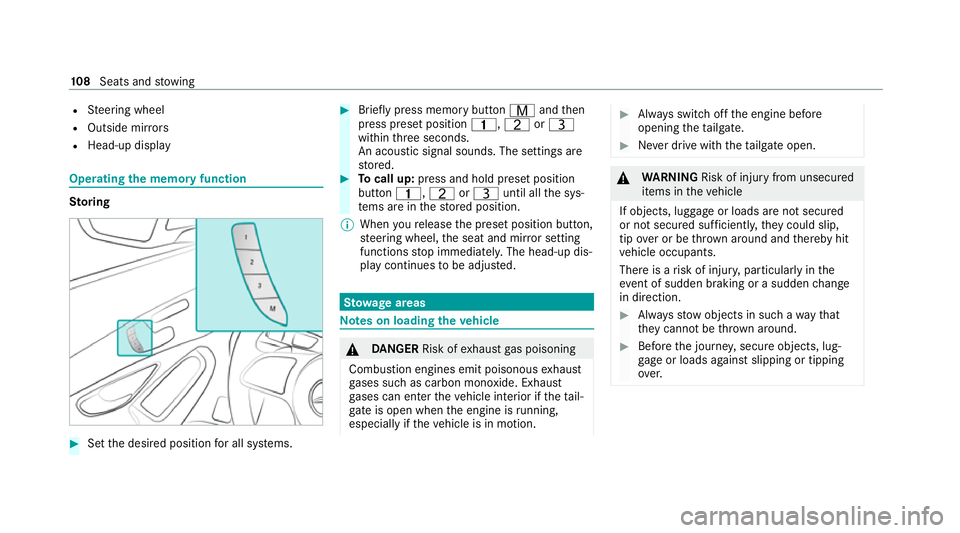
the memory function St
oring #
Set the desired position for all sy stems. #
Brief lypress memory button Vandthen
press preset position 4,TorU
within thre e seconds.
An acoustic signal sounds. The settings are
st ored. #
Tocall up: press and hold preset position
button 4,TorU until all the sys‐
te ms are in thestored position.
% When youre lease the preset position button,
st eering wheel, the seat and mir ror setting
functions stop immediatel y.The head-up dis‐
play continues tobe adjus ted. St
ow age areas Note
s on loading theve hicle &
DANG ER Risk of exhaust gas poisoning
Combustion engines emit poisonous exhaust
ga ses such as carbon monoxide. Exhaust
ga ses can enter theve hicle interior if theta il‐
gate is open when the engine is running,
especially if theve hicle is in motion. #
Alw ays switch off the engine before
opening theta ilgate. #
Never drive with theta ilgate open. &
WARNING Risk of injury from unsecured
items in theve hicle
If objects, luggage or loads are not secured
or not secured suf ficientl y,they could slip,
tip ove r or be throw n around and thereby hit
ve hicle occupants.
There is a risk of injur y,particularly in the
ev ent of sudden braking or a sudden change
in direction. #
Alw aysstow objects in such a wayth at
th ey cannot be thro wn around. #
Before the journe y,secure objects, lug‐
ga ge or loads against slipping or tipping
ove r. 108
Seats and stowing
Page 115 of 481
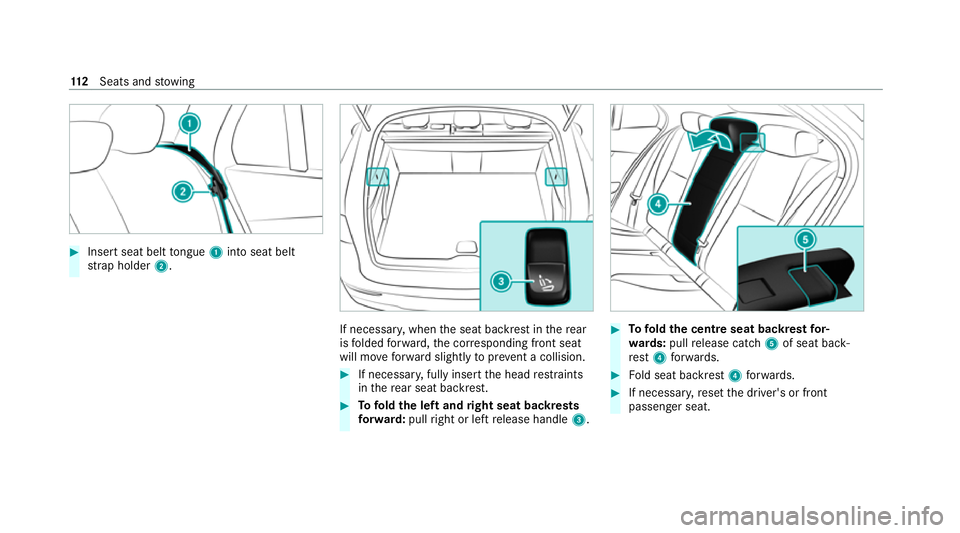
#
Insert seat belt tongue 1into seat belt
st ra p holder 2. If necessar
y,when the seat backrest in there ar
is folded forw ard, the cor responding front seat
will mo veforw ard slightly toprev ent a collision. #
If necessar y,fully insert the head restra ints
in there ar seat backrest. #
Tofold the left and right seat backrests
fo rw ard: pullright or left release handle 3. #
Tofold the centre seat backrest for‐
wa rds: pull release cat ch5 of seat back‐
re st 4 forw ards. #
Fold seat backrest 4forw ards. #
If necessar y,reset the driver's or front
passenger seat. 11 2
Seats and stowing
Page 142 of 481
%
The duration until the colour changes varies
depending on the usage conditions. Mir
rors Operating
the outside mir rors &
WARNING Risk of injury ifve hicle set‐
tings are adjus ted while theve hicle is in
motion
Yo u could lose cont rol of theve hicle in par‐
ticular in thefo llowing situations:
R Ifyo u adjust the driver's seat, the head
re stra ints, thesteering wheel or the mir‐
ro r while theve hicle is in motion.
R Ifyo ufast enyour seat belt while theve hi‐
cle is in motion. #
Before starting the engine: adjust the
driver's seat, head restra ints, steering
wheel and mir ror in particular and fas‐
te nyo ur seat belt. &
WARNING Risk of accident due tomis‐
judgement of dis tance when using the
outside mir ror
The outside mir rors reflect objects on a
smaller scale. The objects in view are in fact
closer than they appear. #
Therefore, alw ays look over your shoul‐
der in order toensure that you are
aw are of the actual dis tance between
yo u and thero ad users driving behind
yo u. Fo
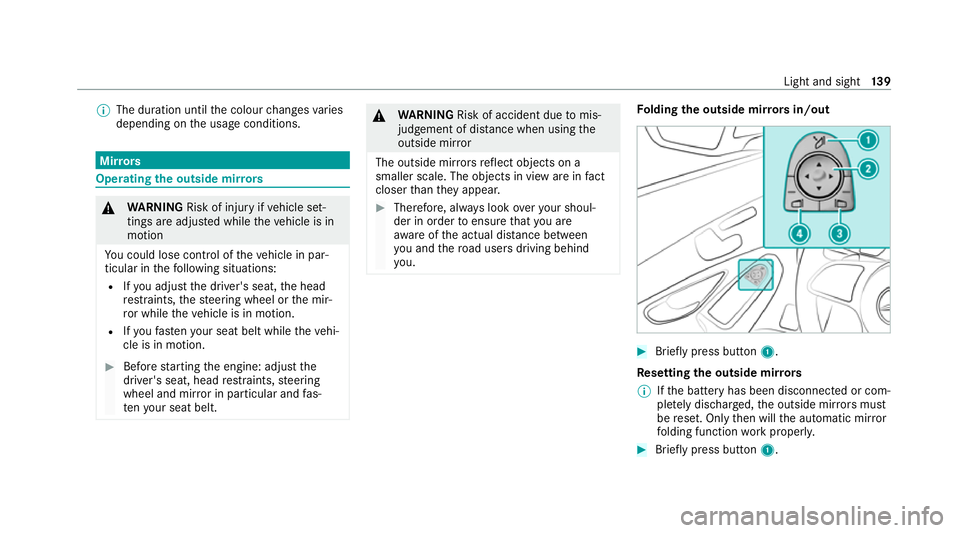
lding the outside mir rors in/out #
Brief lypress button 1.
Re setting the outside mir rors
% Ifth e battery has been disconnected or com‐
ple tely discharged, the outside mir rors must
be reset. Only then will the automatic mir ror
fo lding function workproperly. #
Brief lypress button 1. Light and sight
13 9
Page 195 of 481
R
Sensitive: higher system sensitivity. The
driver is warned earlier and the attention
le ve l de tected byATTENTION ASSIST is adap‐
te d according ly.
If dr owsiness or increasing lapses in concentra‐
tion are de tected, theATTENTION ASSIST: Take
a break! warning appears in the Instrument Dis‐
pla y.Yo u can ackn owledge the message and
ta ke a break where necessar y.Ifyo u do not take
a break and ATTENTION ASSIST continues to
de tect increasing lapses in concentration, you
will be warned again af ter a minimum of
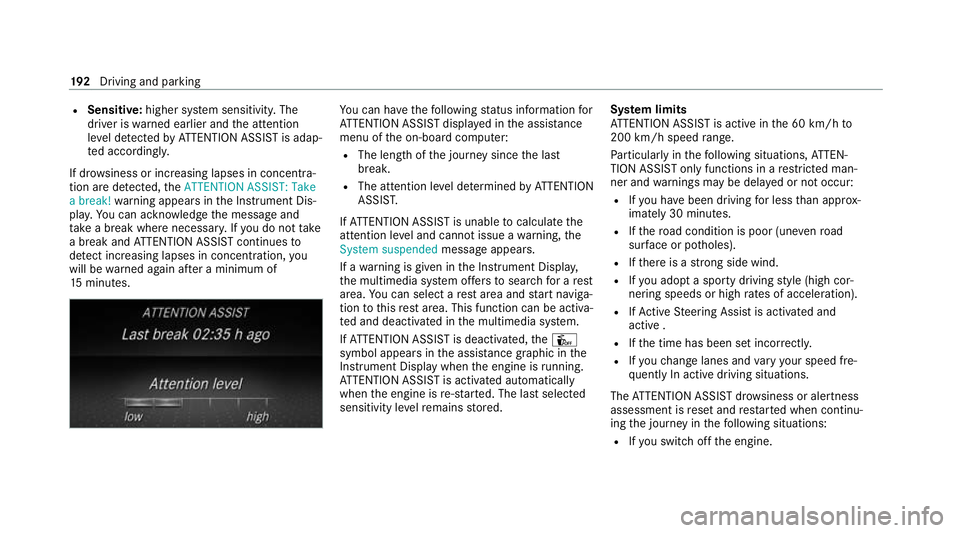
15 minutes. Yo
u can ha vethefo llowing status information for
AT TENTION ASSIST displa yed in the assis tance
menu of the on-board computer:
R The length of the journey since the last
break.
R The attention le vel de term ined byATTENTION
ASSIS T.
If AT TENTION ASSIST is unable tocalculate the
attention le vel and cannot issue a warning, the
System suspended messageappears.
If a warning is given in the Instrument Displa y,
th e multimedia sy stem of fers to sear chfor a rest
area. You can select a rest area and start naviga‐
tion tothis rest area. This function can be activa‐
te d and deactivated in the multimedia sy stem.
If AT TENTION ASSIST is deactivated, theÛ
symbol appears in the assis tance graphic in the
Instrument Display when the engine is running.
AT TENTION ASSIST is activated automatically
when the engine is re-sta rted. The last selected
sensitivity le velre mains stored. Sy
stem limits
AT TENTION ASSIST is active in the 60 km/h to
200 km/h speed range.
Pa rticularly in thefo llowing situations, ATTEN‐
TION ASSIST only functions in a restricted man‐
ner and warnings may be dela yed or not occur:
R Ifyo u ha vebeen driving for less than appr ox‐
imately 30 minutes.
R Ifth ero ad condition is poor (une venro ad
sur face or po tholes).
R Ifth ere is a strong side wind.
R Ifyo u adopt a sporty driving style (high cor‐
nering speeds or high rates of acceleration).
R IfAc tive Steering Assist is activated and
active .
R Ifth e time has been set incor rectly.
R Ifyo uch ange lanes and vary your speed fre‐
qu ently In active driving situations.
The ATTENTION ASSIST dr owsiness or alertness
assessment is reset and restar ted when continu‐
ing the journey in thefo llowing situations:
R Ifyo u swit choff the engine. 19 2
Driving and pa rking
Page 265 of 481
Configuring profiles,
themes and sugges‐
tions Multimedia sy
stem:
4 © 5
f Profiles
Creating a new profile #
Select WCreate profile .#
Select an avatar. #
Enterth e name and confi rmwith a. #
Select Continue r. #
Select Current settings. #
Select Save. #
Activate Blu etoo th®
and select Connect
phone, toconnect a mobile phone wi th the
user profile . #
Select Finished.
Selecting profile options #
Select Äfor a profile.
The following functions are available:
R Editing, resetting or deleting a profile
R Resetting themes or favo urites R
Con figuring suggestions
Configuring suggestions #
Select Äfor a profile. #
Select Suggestions settings . #
Switch Allow destination suggestions, Allow
music suggestions andAllow contact sugges-
tions on or off. #
Todeactivate the learning function for
one da y:activate Deact. learn. for 24h .
Fo r24 hours no new actions will be trained
and no data recorded forth e active profile.
Suggestions will continue tobe shown.
Example: if the option is switched on and a
ro ute toa new destination has been calcula‐
te d, this destination would not be take n into
account forth e learning function.
Creating new themes #
Select ©. #
Select THEMES . #
Select WSet theme.
The settings which are sa ved in theth eme
are shown. #
Select Continue r. #
Select AudioandNavigation (Navigation) and
st ore the active settings in theth eme. #
Select Continue r. #
Select an entry screen. #
Select Continue r. #
Select an image. #
Enter the names into the entry field and con‐
fi rm with a. #
Select Save. Sy
stem settings Overview of
the sy stem settings menu In
the sy stem settings menu, you can make set‐
tings in thefo llowing menus and control ele‐
ments:
R Display
- Styles
- Instrument lighting
- Display brightness 262
MBUX multimedia sy stem