warning MERCEDES-BENZ GLC SUV 2015 Owners Manual
[x] Cancel search | Manufacturer: MERCEDES-BENZ, Model Year: 2015, Model line: GLC SUV, Model: MERCEDES-BENZ GLC SUV 2015Pages: 497, PDF Size: 15.27 MB
Page 367 of 497
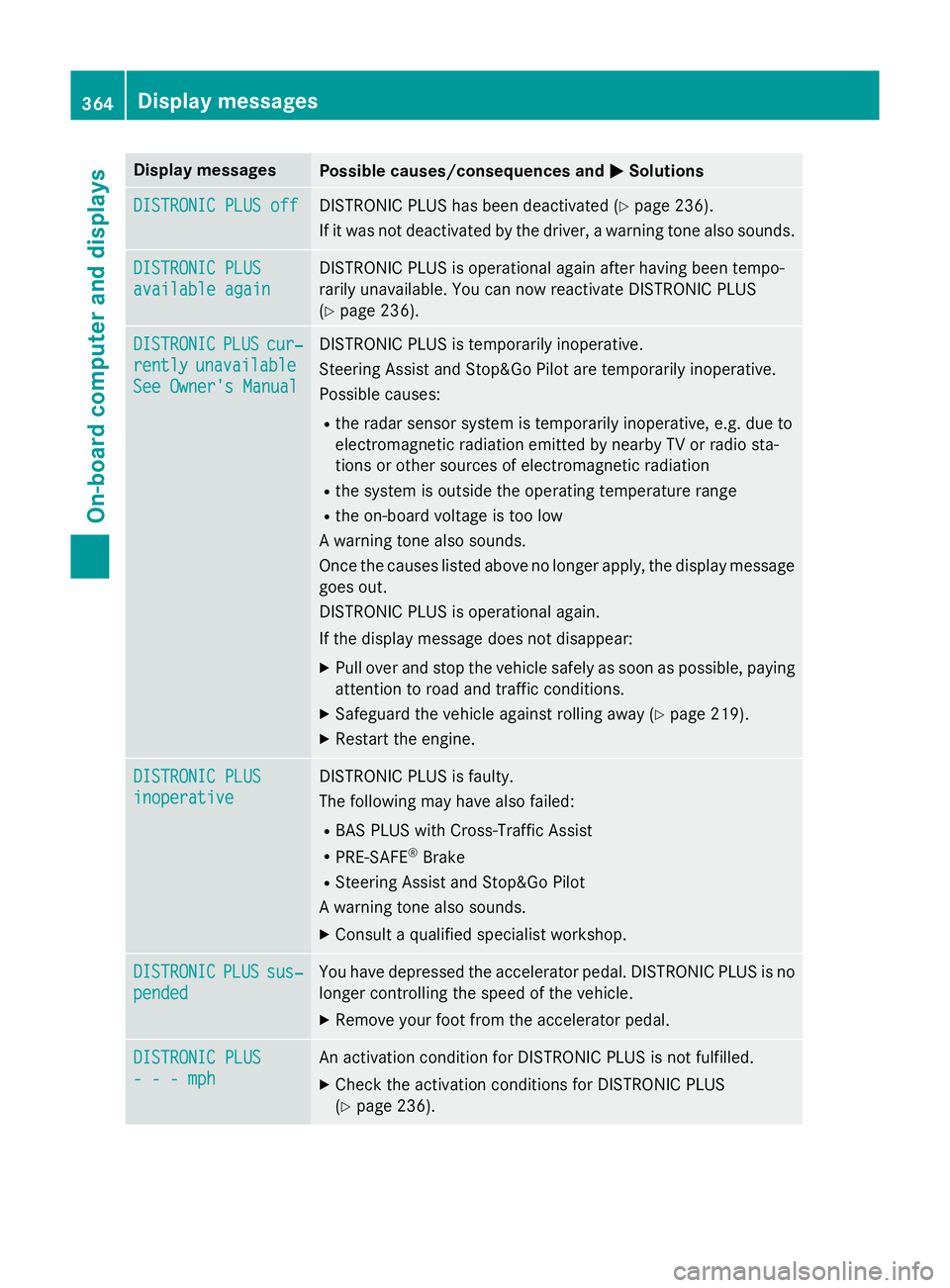
Display messages
Possible causes/consequences and
M
MSolutions DISTRONIC PLUS off
DISTRONIC PLUS off DISTRONIC PLUS has been deactivated (Y
page 236).
If it was not deactivated by the driver, a warning tone also sounds. DISTRONIC PLUS
DISTRONIC PLUS
available again available again DISTRONIC PLUS is operational again after having been tempo-
rarily unavailable. You can now reactivate DISTRONIC PLUS
(Y
page 236). DISTRONIC DISTRONIC
PLUS
PLUScur‐
cur‐
rently
rently unavailable
unavailable
See Owner's Manual
See Owner's Manual DISTRONIC PLUS is temporarily inoperative.
Steering Assist and Stop&Go Pilot are temporarily inoperative.
Possible causes:
R the radar sensor system is temporarily inoperative, e.g. due to
electromagnetic radiation emitted by nearby TV or radio sta-
tions or other sources of electromagnetic radiation
R the system is outside the operating temperature range
R the on-board voltage is too low
A warning tone also sounds.
Once the causes listed above no longer apply, the display message goes out.
DISTRONIC PLUS is operational again.
If the display message does not disappear:
X Pull over and stop the vehicle safely as soon as possible, paying
attention to road and traffic conditions.
X Safeguard the vehicle against rolling away (Y page 219).
X Restart the engine. DISTRONIC PLUS DISTRONIC PLUS
inoperative inoperative DISTRONIC PLUS is faulty.
The following may have also failed:
R BAS PLUS with Cross-Traffic Assist
R PRE-SAFE ®
Brake
R Steering Assist and Stop&Go Pilot
A warning tone also sounds.
X Consult a qualified specialist workshop. DISTRONIC DISTRONIC
PLUS
PLUSsus‐
sus‐
pended
pended You have depressed the accelerator pedal. DISTRONIC PLUS is no
longer controlling the speed of the vehicle.
X Remove your foot from the accelerator pedal. DISTRONIC PLUS
DISTRONIC PLUS
- - - mph - - - mph An activation condition for DISTRONIC PLUS is not fulfilled.
X Check the activation conditions for DISTRONIC PLUS
(Y page 236). 364
Display
messagesOn-board computer and displays
Page 368 of 497
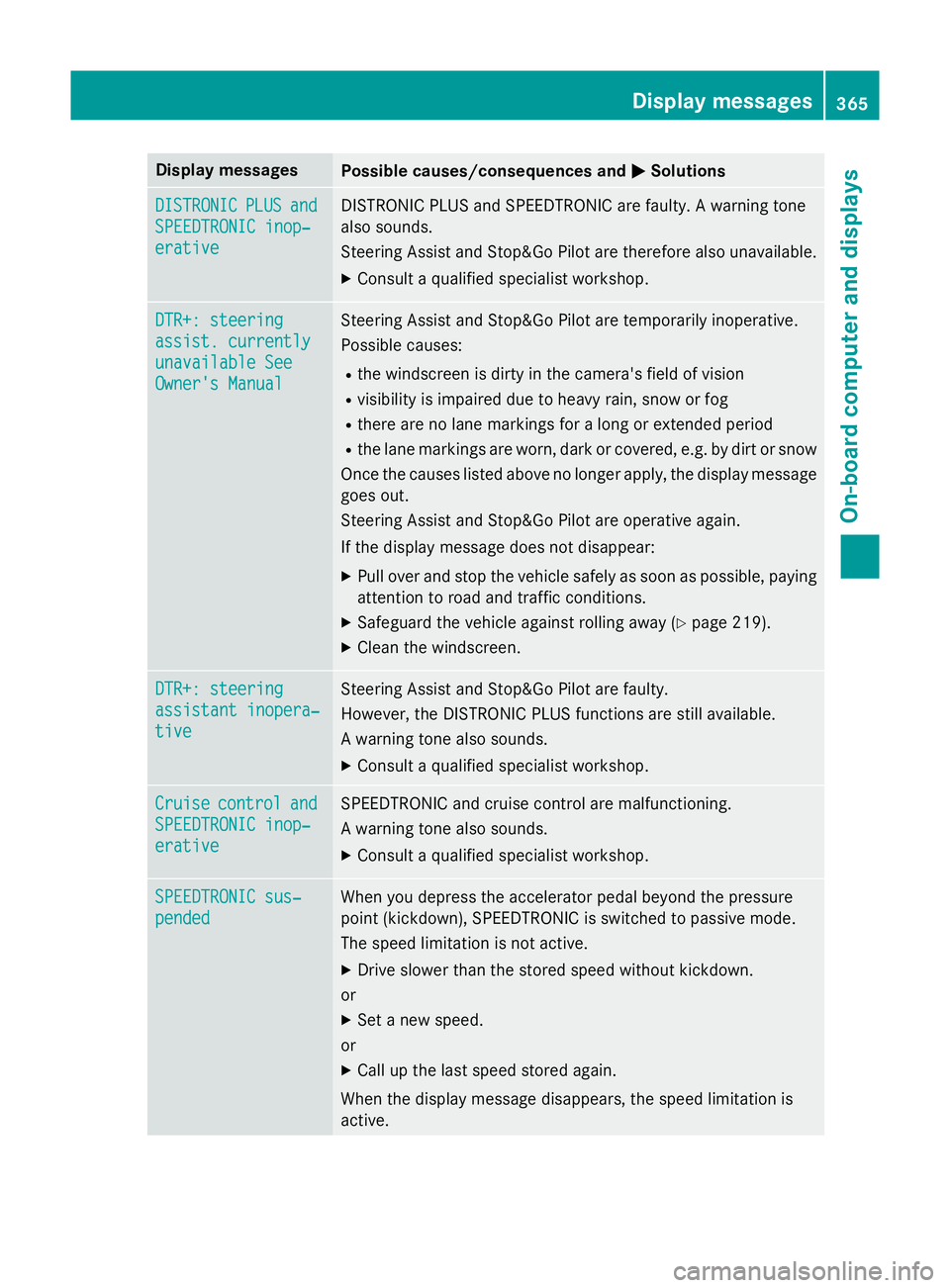
Display messages
Possible causes/consequences and
M
MSolutions DISTRONIC
DISTRONIC
PLUS
PLUSand
and
SPEEDTRONIC inop‐
SPEEDTRONIC inop‐
erative erative DISTRONIC PLUS and SPEEDTRONIC are faulty. A warning tone
also sounds.
Steering Assist and Stop&Go Pilot are therefore also unavailable.
X Consult a qualified specialist workshop. DTR+: steering DTR+: steering
assist. currently assist. currently
unavailable See unavailable See
Owner's Manual Owner's Manual Steering Assist and Stop&Go Pilot are temporarily inoperative.
Possible causes:
R the windscreen is dirty in the camera's field of vision
R visibility is impaired due to heavy rain, snow or fog
R there are no lane markings for a long or extended period
R the lane markings are worn, dark or covered, e.g. by dirt or snow
Once the causes listed above no longer apply, the display message goes out.
Steering Assist and Stop&Go Pilot are operative again.
If the display message does not disappear:
X Pull over and stop the vehicle safely as soon as possible, paying
attention to road and traffic conditions.
X Safeguard the vehicle against rolling away (Y page 219).
X Clean the windscreen. DTR+: steering DTR+: steering
assistant inopera‐ assistant inopera‐
tive tive Steering Assist and Stop&Go Pilot are faulty.
However, the DISTRONIC PLUS functions are still available.
A warning tone also sounds.
X Consult a qualified specialist workshop. Cruise Cruise
control
control and
and
SPEEDTRONIC inop‐
SPEEDTRONIC inop‐
erative erative SPEEDTRONIC and cruise control are malfunctioning.
A warning tone also sounds.
X Consult a qualified specialist workshop. SPEEDTRONIC sus‐
SPEEDTRONIC sus‐
pended pended When you depress the accelerator pedal beyond the pressure
point (kickdown), SPEEDTRONIC is switched to passive mode.
The speed limitation is not active.
X Drive slower than the stored speed without kickdown.
or
X Set a new speed.
or
X Call up the last speed stored again.
When the display message disappears, the speed limitation is
active. Display
messages
365On-board computer and displays Z
Page 369 of 497
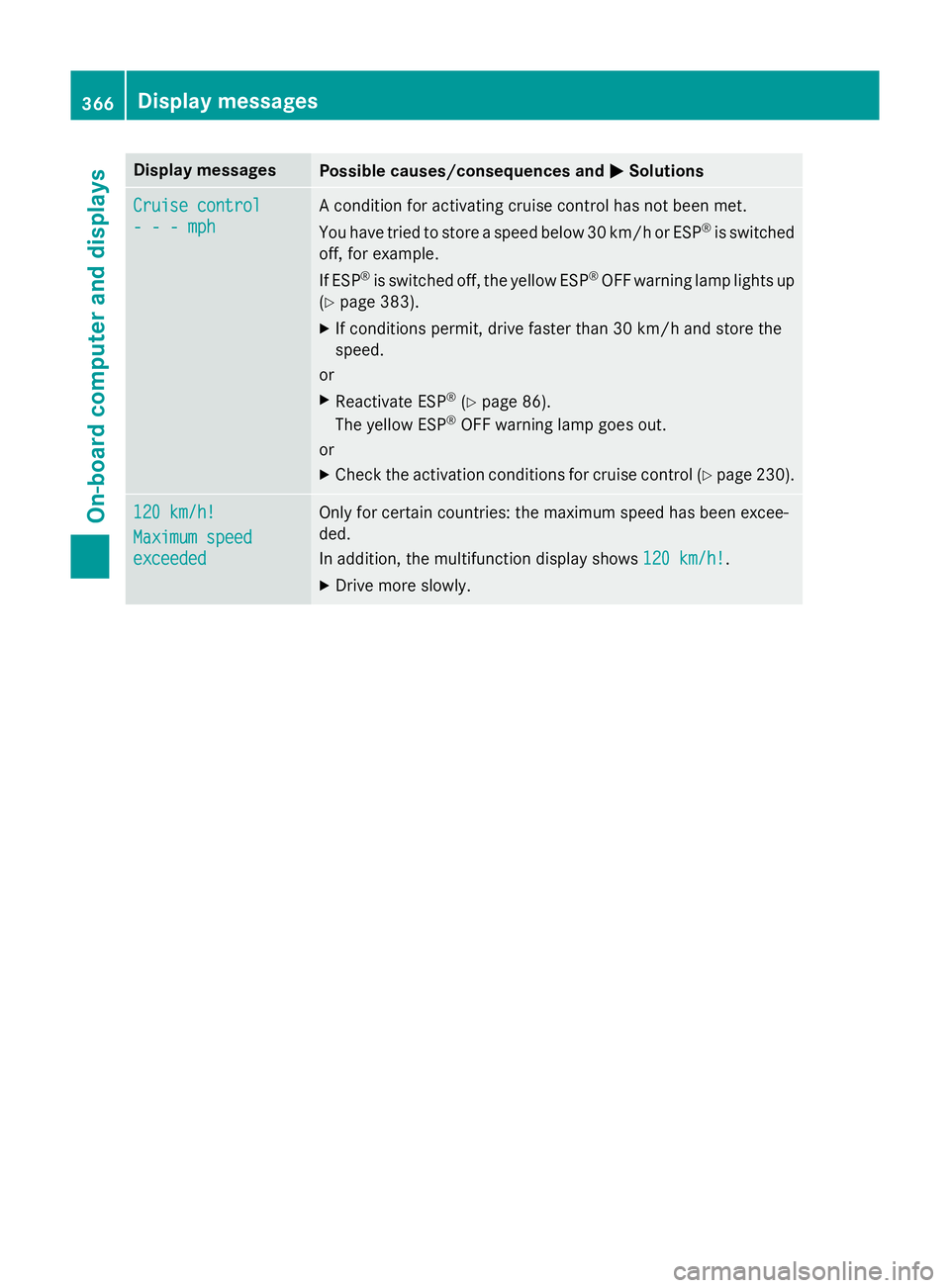
Display messages
Possible causes/consequences and
M
MSolutions Cruise control
Cruise control
- - - mph - - - mph A condition for activating cruise control has not been met.
You have tried to store a speed below 30 km/h or ESP
®
is switched
off, for example.
If ESP ®
is switched off, the yellow ESP ®
OFF warning lamp lights up
(Y page 383).
X If conditions permit, drive faster than 30 km/h and store the
speed.
or
X Reactivate ESP ®
(Y page 86).
The yellow ESP ®
OFF warning lamp goes out.
or X Check the activation conditions for cruise control (Y page 230).120 km/h! 120 km/h!
Maximum speed Maximum speed
exceeded exceeded Only for certain countries: the maximum speed has been excee-
ded.
In addition, the multifunction display shows
120 km/h! 120 km/h!.
X Drive more slowly. 366
Display
messagesOn-board computer and displays
Page 370 of 497
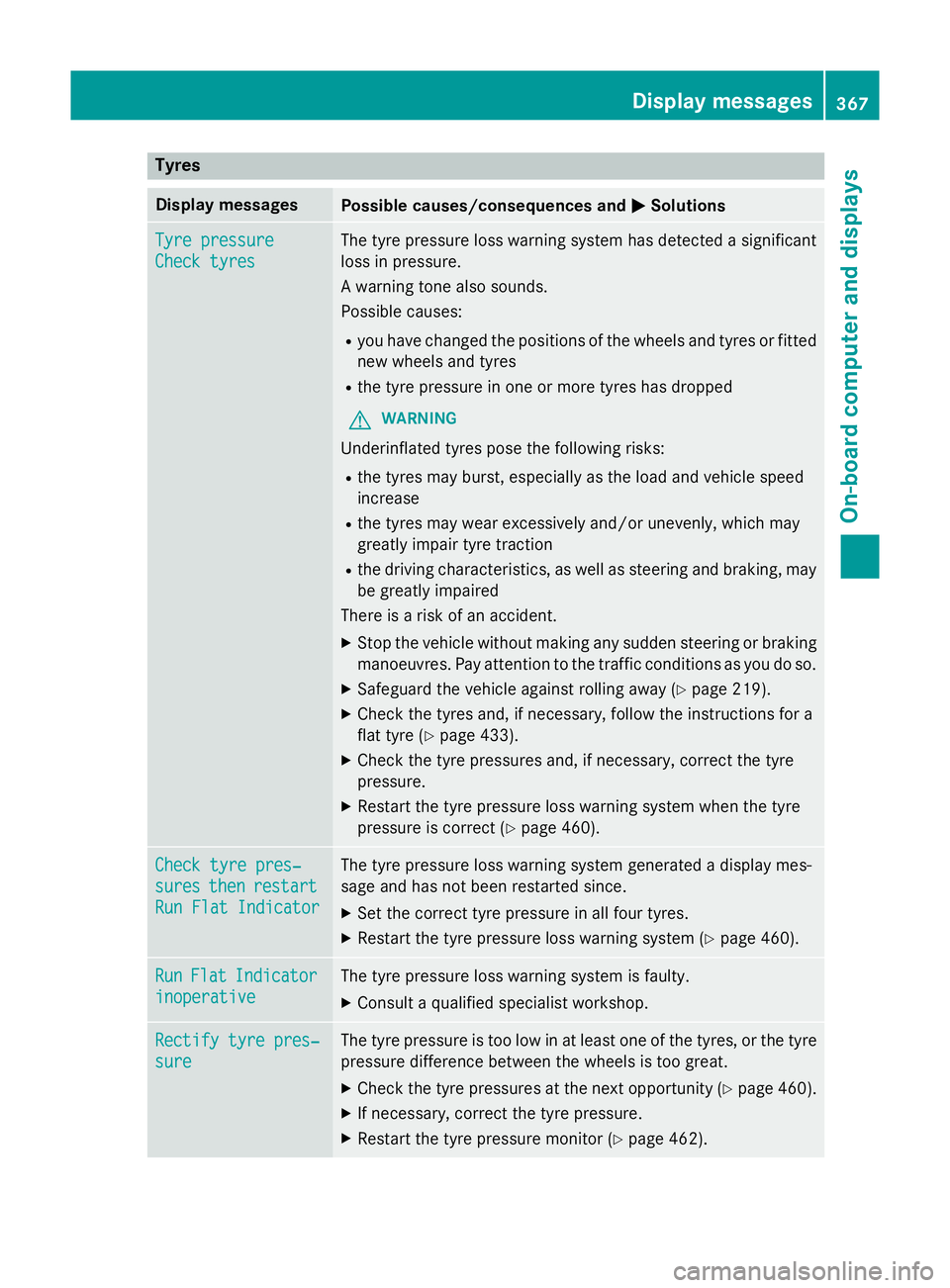
Tyres
Display messages
Possible causes/consequences and
M
MSolutions Tyre pressure
Tyre pressure
Check tyres Check tyres The tyre pressure loss warning system has detected a significant
loss in pressure.
A warning tone also sounds.
Possible causes:
R you have changed the positions of the wheels and tyres or fitted
new wheels and tyres
R the tyre pressure in one or more tyres has dropped
G WARNING
Underinflated tyres pose the following risks:
R the tyres may burst, especially as the load and vehicle speed
increase
R the tyres may wear excessively and/or unevenly, which may
greatly impair tyre traction
R the driving characteristics, as well as steering and braking, may
be greatly impaired
There is a risk of an accident.
X Stop the vehicle without making any sudden steering or braking
manoeuvres. Pay attention to the traffic conditions as you do so.
X Safeguard the vehicle against rolling away (Y page 219).
X Check the tyres and, if necessary, follow the instructions for a
flat tyre (Y page 433).
X Check the tyre pressures and, if necessary, correct the tyre
pressure.
X Restart the tyre pressure loss warning system when the tyre
pressure is correct (Y page 460).Check tyre pres‐ Check tyre pres‐
sures sures
then
thenrestart
restart
Run Flat Indicator
Run Flat Indicator The tyre pressure loss warning system generated a display mes-
sage and has not been restarted since.
X Set the correct tyre pressure in all four tyres.
X Restart the tyre pressure loss warning system (Y page 460).Run Run
Flat
Flat Indicator
Indicator
inoperative
inoperative The tyre pressure loss warning system is faulty.
X Consult a qualified specialist workshop. Rectify tyre pres‐
Rectify tyre pres‐
sure sure The tyre pressure is too low in at least one of the tyres, or the tyre
pressure difference between the wheels is too great.
X Check the tyre pressures at the next opportunity (Y page 460).
X If necessary, correct the tyre pressure.
X Restart the tyre pressure monitor (Y page 462). Display
messages
367On-board computer and displays Z
Page 371 of 497
Display messages
Possible causes/consequences and
M
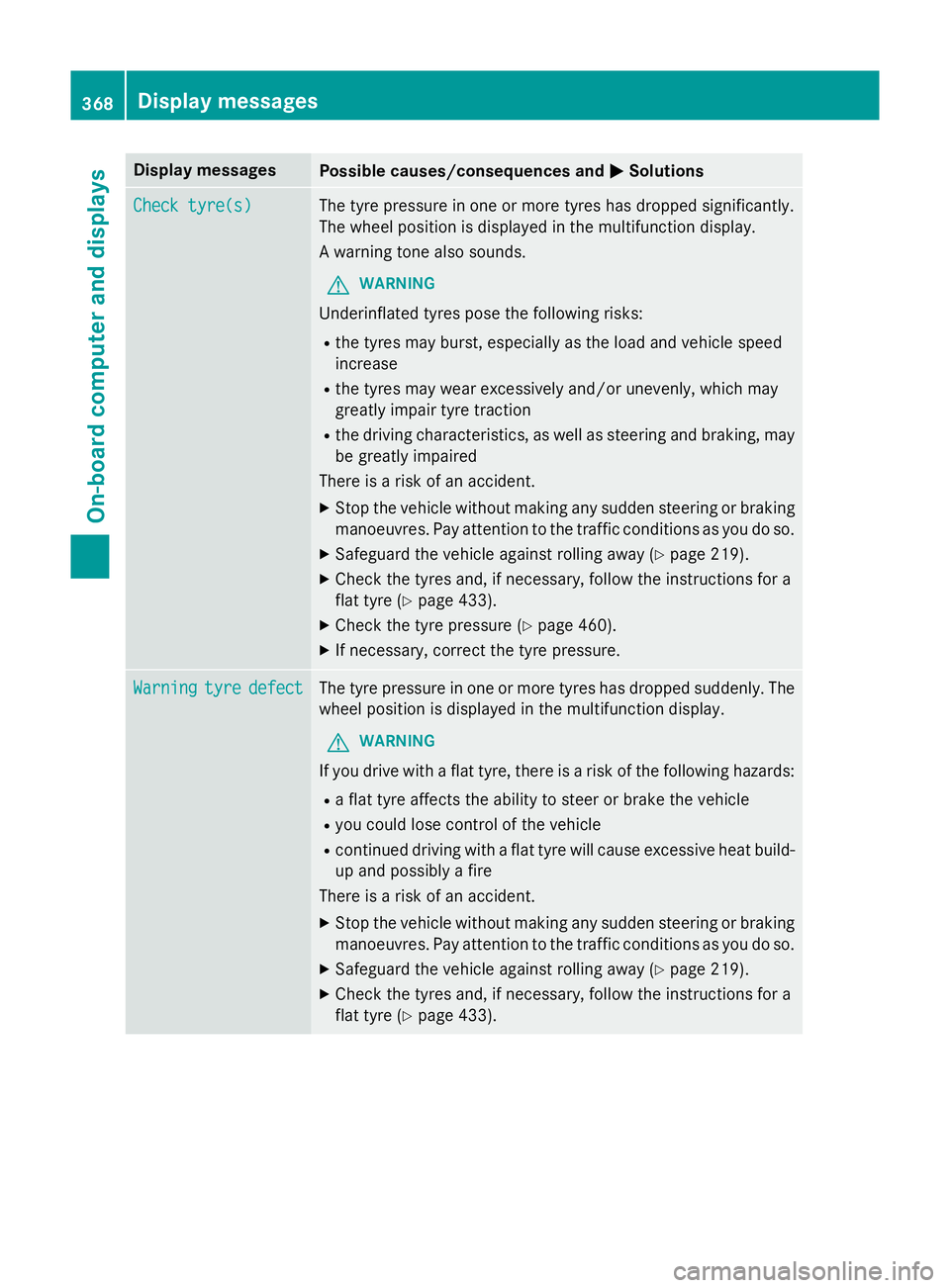
MSolutions Check tyre(s)
Check tyre(s) The tyre pressure in one or more tyres has dropped significantly.
The wheel position is displayed in the multifunction display.
A warning tone also sounds.
G WARNING
Underinflated tyres pose the following risks:
R the tyres may burst, especially as the load and vehicle speed
increase
R the tyres may wear excessively and/or unevenly, which may
greatly impair tyre traction
R the driving characteristics, as well as steering and braking, may
be greatly impaired
There is a risk of an accident.
X Stop the vehicle without making any sudden steering or braking
manoeuvres. Pay attention to the traffic conditions as you do so.
X Safeguard the vehicle against rolling away (Y page 219).
X Check the tyres and, if necessary, follow the instructions for a
flat tyre (Y page 433).
X Check the tyre pressure (Y page 460).
X If necessary, correct the tyre pressure. Warning Warning
tyre
tyredefect
defect The tyre pressure in one or more tyres has dropped suddenly. The
wheel position is displayed in the multifunction display.
G WARNING
If you drive with a flat tyre, there is a risk of the following hazards:
R a flat tyre affects the ability to steer or brake the vehicle
R you could lose control of the vehicle
R continued driving with a flat tyre will cause excessive heat build-
up and possibly a fire
There is a risk of an accident.
X Stop the vehicle without making any sudden steering or braking
manoeuvres. Pay attention to the traffic conditions as you do so.
X Safeguard the vehicle against rolling away (Y page 219).
X Check the tyres and, if necessary, follow the instructions for a
flat tyre (Y page 433).368
Display
messagesOn-board computer and displays
Page 373 of 497
Display messages
Possible causes/consequences and
M
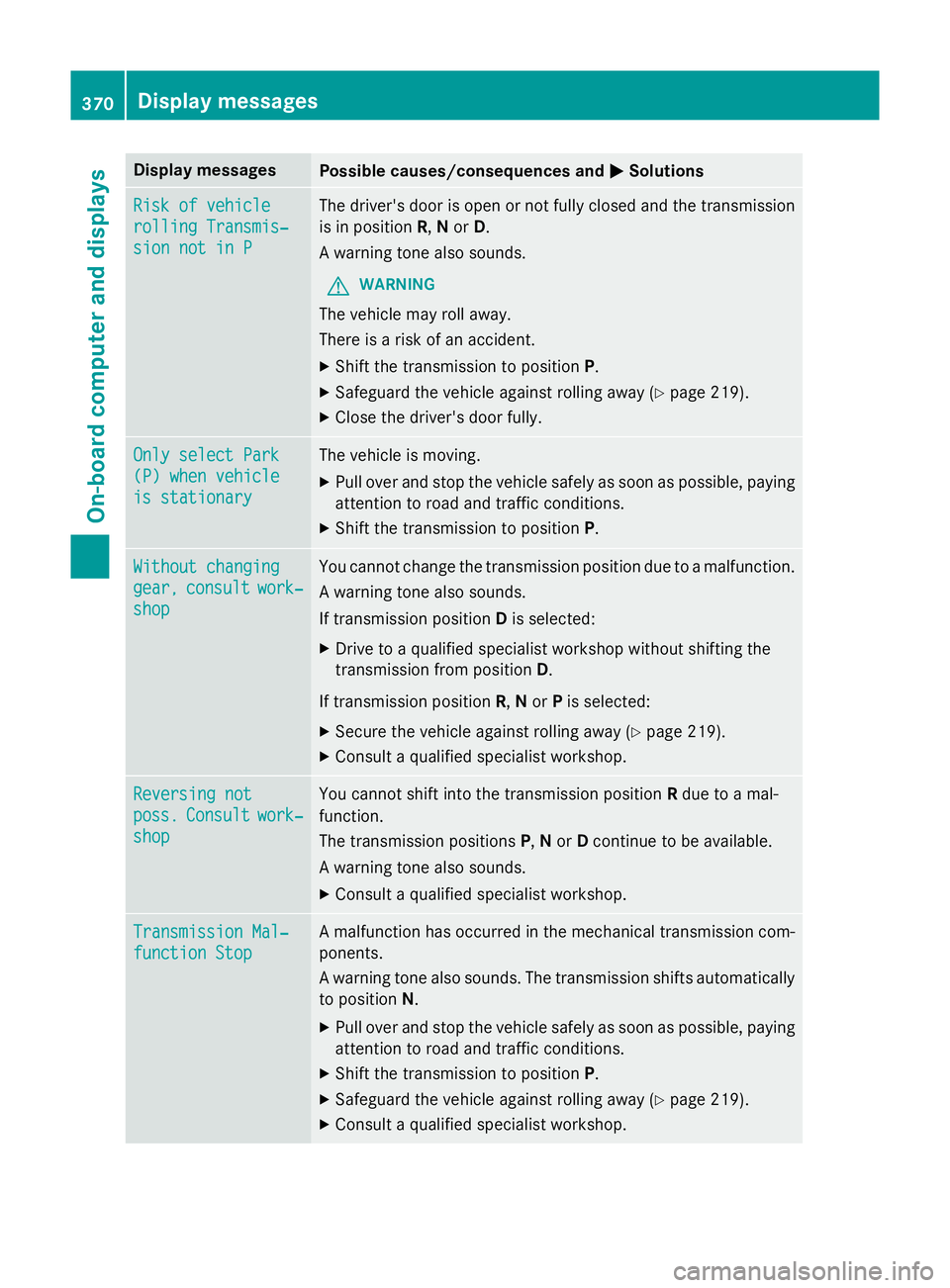
MSolutions Risk of vehicle
Risk of vehicle
rolling Transmis‐ rolling Transmis‐
sion not in P sion not in P The driver's door is open or not fully closed and the transmission
is in position R,Nor D.
A warning tone also sounds.
G WARNING
The vehicle may roll away.
There is a risk of an accident. X Shift the transmission to position P.
X Safeguard the vehicle against rolling away (Y page 219).
X Close the driver's door fully. Only select Park Only select Park
(P) when vehicle (P) when vehicle
is stationary is stationary The vehicle is moving.
X
Pull over and stop the vehicle safely as soon as possible, paying
attention to road and traffic conditions.
X Shift the transmission to position P.Without changing Without changing
gear, gear,
consult
consult work‐
work‐
shop
shop You cannot change the transmission position due to a malfunction.
A warning tone also sounds.
If transmission position Dis selected:
X Drive to a qualified specialist workshop without shifting the
transmission from position D.
If transmission position R,Nor Pis selected:
X Secure the vehicle against rolling away (Y page 219).
X Consult a qualified specialist workshop. Reversing not Reversing not
poss. poss.
Consult
Consult work‐
work‐
shop
shop You cannot shift into the transmission position
Rdue to a mal-
function.
The transmission positions P,Nor Dcontinue to be available.
A warning tone also sounds.
X Consult a qualified specialist workshop. Transmission Mal‐ Transmission Mal‐
function Stop function Stop A malfunction has occurred in the mechanical transmission com-
ponents.
A warning tone also sounds. The transmission shifts automatically to position N.
X Pull over and stop the vehicle safely as soon as possible, paying
attention to road and traffic conditions.
X Shift the transmission to position P.
X Safeguard the vehicle against rolling away (Y page 219).
X Consult a qualified specialist workshop. 370
Display
messagesOn-board computer and displays
Page 374 of 497
Display messages
Possible causes/consequences and
M
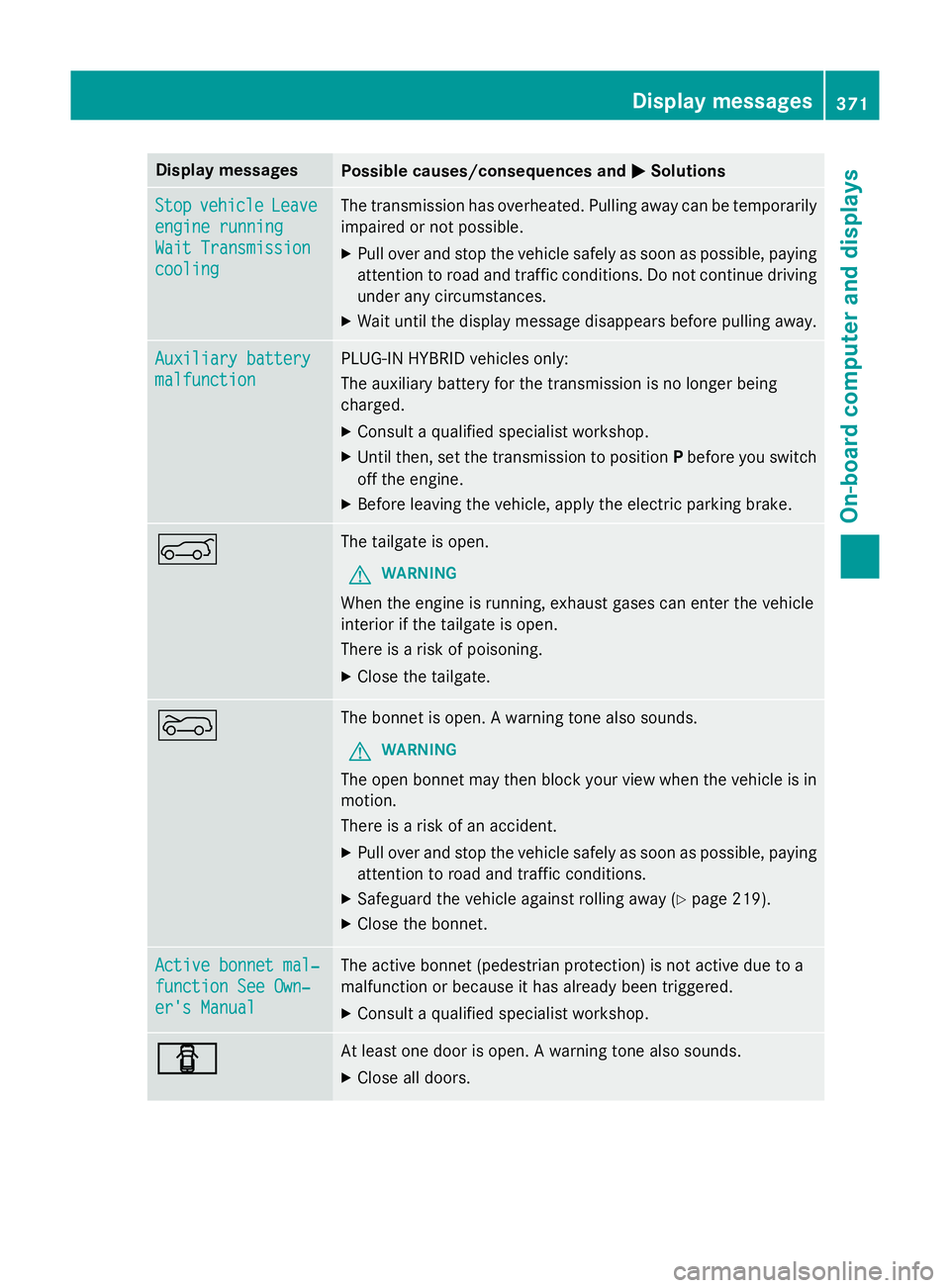
MSolutions Stop
Stop
vehicle
vehicle Leave
Leave
engine running
engine running
Wait Transmission Wait Transmission
cooling cooling The transmission has overheated. Pulling away can be temporarily
impaired or not possible.
X Pull over and stop the vehicle safely as soon as possible, paying
attention to road and traffic conditions. Do not continue driving
under any circumstances.
X Wait until the display message disappears before pulling away. Auxiliary battery
Auxiliary battery
malfunction malfunction PLUG-IN HYBRID vehicles only:
The auxiliary battery for the transmission is no longer being
charged.
X Consult a qualified specialist workshop.
X Until then, set the transmission to position Pbefore you switch
off the engine.
X Before leaving the vehicle, apply the electric parking brake. A The tailgate is open.
G WARNING
When the engine is running, exhaust gases can enter the vehicle
interior if the tailgate is open.
There is a risk of poisoning.
X Close the tailgate. ? The bonnet is open. A warning tone also sounds.
G WARNING
The open bonnet may then block your view when the vehicle is in
motion.
There is a risk of an accident.
X Pull over and stop the vehicle safely as soon as possible, paying
attention to road and traffic conditions.
X Safeguard the vehicle against rolling away (Y page 219).
X Close the bonnet. Active bonnet mal‐ Active bonnet mal‐
function See Own‐ function See Own‐
er's Manual er's Manual The active bonnet (pedestrian protection) is not active due to a
malfunction or because it has already been triggered.
X Consult a qualified specialist workshop. C C At least one door is open. A warning tone also sounds.
X Close all doors. Display
messages
371On-board computer and displays Z
Page 375 of 497
Display messages
Possible causes/consequences and
M
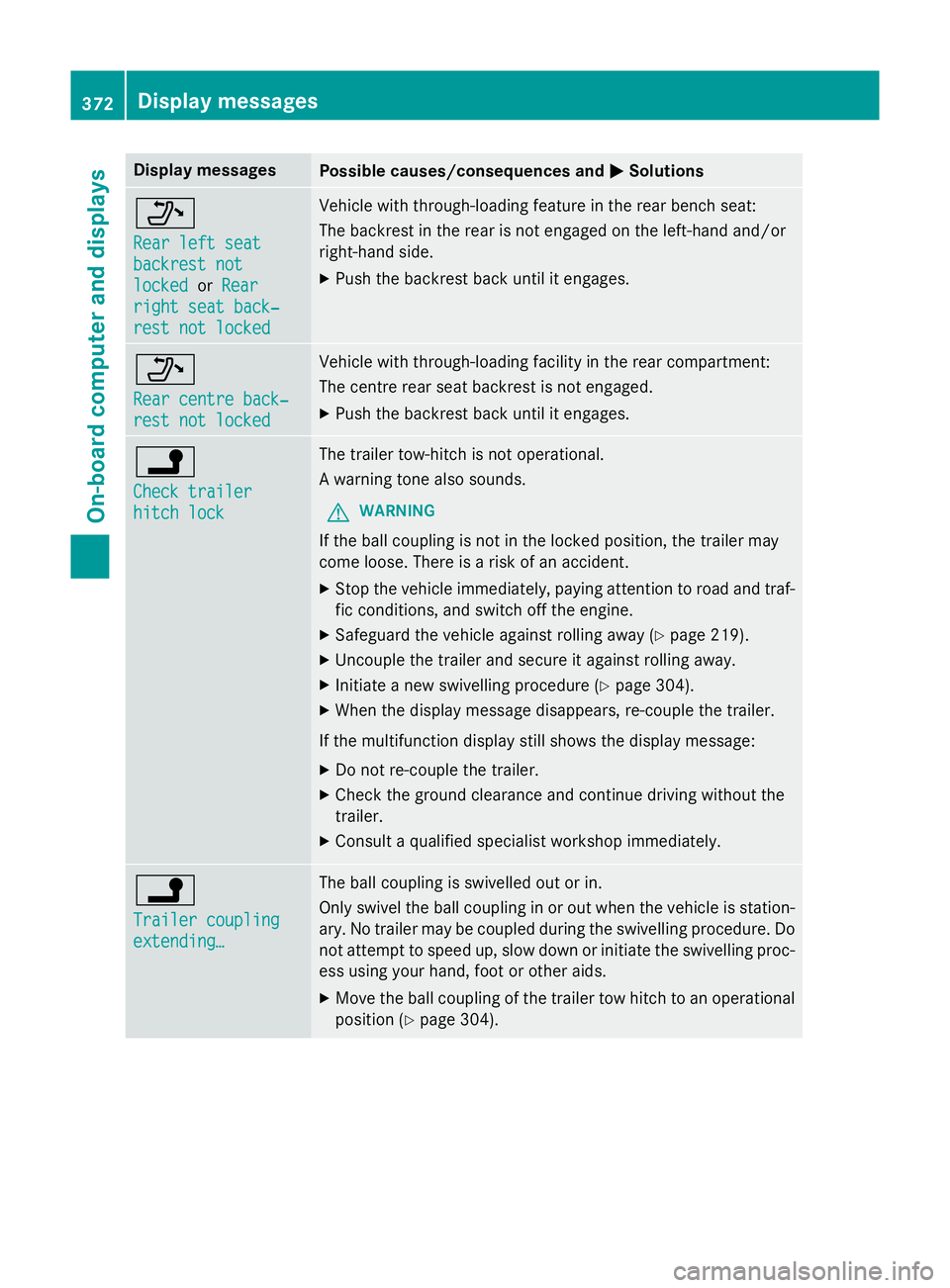
MSolutions _
Rear left seat Rear left seat
backrest not backrest not
locked locked
orRear
Rear
right seat back‐
right seat back‐
rest not locked rest not locked Vehicle with through-loading feature in the rear bench seat:
The backrest in the rear is not engaged on the left-hand and/or
right-hand side.
X Push the backrest back until it engages. _
Rear centre back‐ Rear centre back‐
rest not locked rest not locked Vehicle with through-loading facility in the rear compartment:
The centre rear seat backrest is not engaged.
X Push the backrest back until it engages. j
Check trailer Check trailer
hitch lock hitch lock The trailer tow-hitch is not operational.
A warning tone also sounds.
G WARNING
If the ball coupling is not in the locked position, the trailer may
come loose. There is a risk of an accident.
X Stop the vehicle immediately, paying attention to road and traf-
fic conditions, and switch off the engine.
X Safeguard the vehicle against rolling away (Y page 219).
X Uncouple the trailer and secure it against rolling away.
X Initiate a new swivelling procedure (Y page 304).
X When the display message disappears, re-couple the trailer.
If the multifunction display still shows the display message: X Do not re-couple the trailer.
X Check the ground clearance and continue driving without the
trailer.
X Consult a qualified specialist workshop immediately. j
Trailer coupling Trailer coupling
extending… extending… The ball coupling is swivelled out or in.
Only swivel the ball coupling in or out when the vehicle is station-
ary. No trailer may be coupled during the swivelling procedure. Do
not attempt to speed up, slow down or initiate the swivelling proc- ess using your hand, foot or other aids.
X Move the ball coupling of the trailer tow hitch to an operational
position (Y page 304).372
Display
messagesOn-board computer and displays
Page 377 of 497
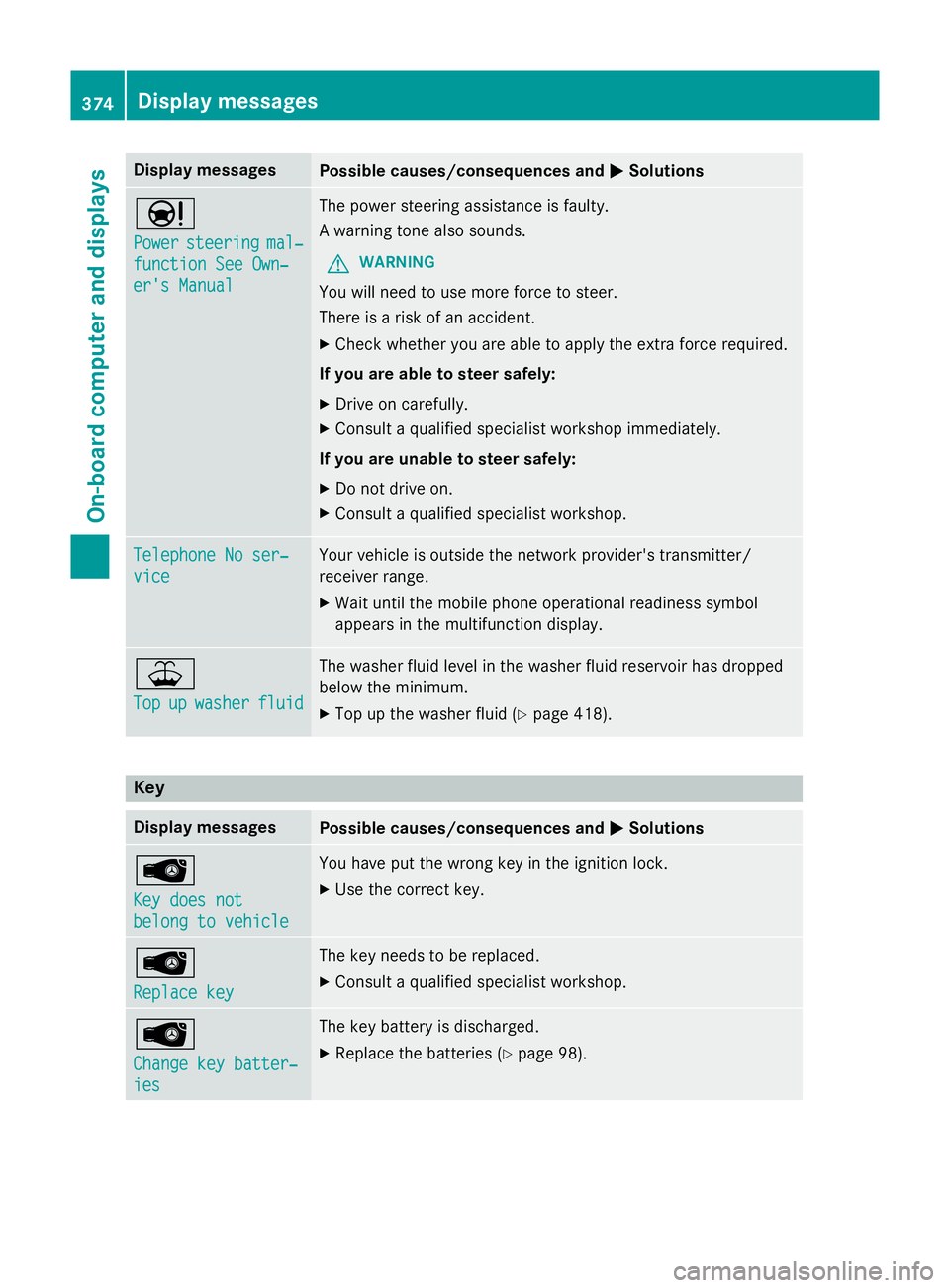
Display messages
Possible causes/consequences and
M
MSolutions Ð
Power Power
steering
steering mal‐
mal‐
function See Own‐
function See Own‐
er's Manual er's Manual The power steering assistance is faulty.
A warning tone also sounds.
G WARNING
You will need to use more force to steer.
There is a risk of an accident. X Check whether you are able to apply the extra force required.
If you are able to steer safely: X Drive on carefully.
X Consult a qualified specialist workshop immediately.
If you are unable to steer safely:
X Do not drive on.
X Consult a qualified specialist workshop. Telephone No ser‐ Telephone No ser‐
vice vice Your vehicle is outside the network provider's transmitter/
receiver range.
X Wait until the mobile phone operational readiness symbol
appears in the multifunction display. ¥
Top Top
up
upwasher
washer fluid
fluid The washer fluid level in the washer fluid reservoir has dropped
below the minimum.
X Top up the washer fluid (Y page 418).Key
Display messages
Possible causes/consequences and
M MSolutions Â
Key does not Key does not
belong to vehicle belong to vehicle You have put the wrong key in the ignition lock.
X Use the correct key. Â
Replace key Replace key The key needs to be replaced.
X Consult a qualified specialist workshop. Â
Change key batter‐ Change key batter‐
ies ies The key battery is discharged.
X Replace the batteries (Y page 98).374
Display
messagesOn-board computer and displays
Page 378 of 497
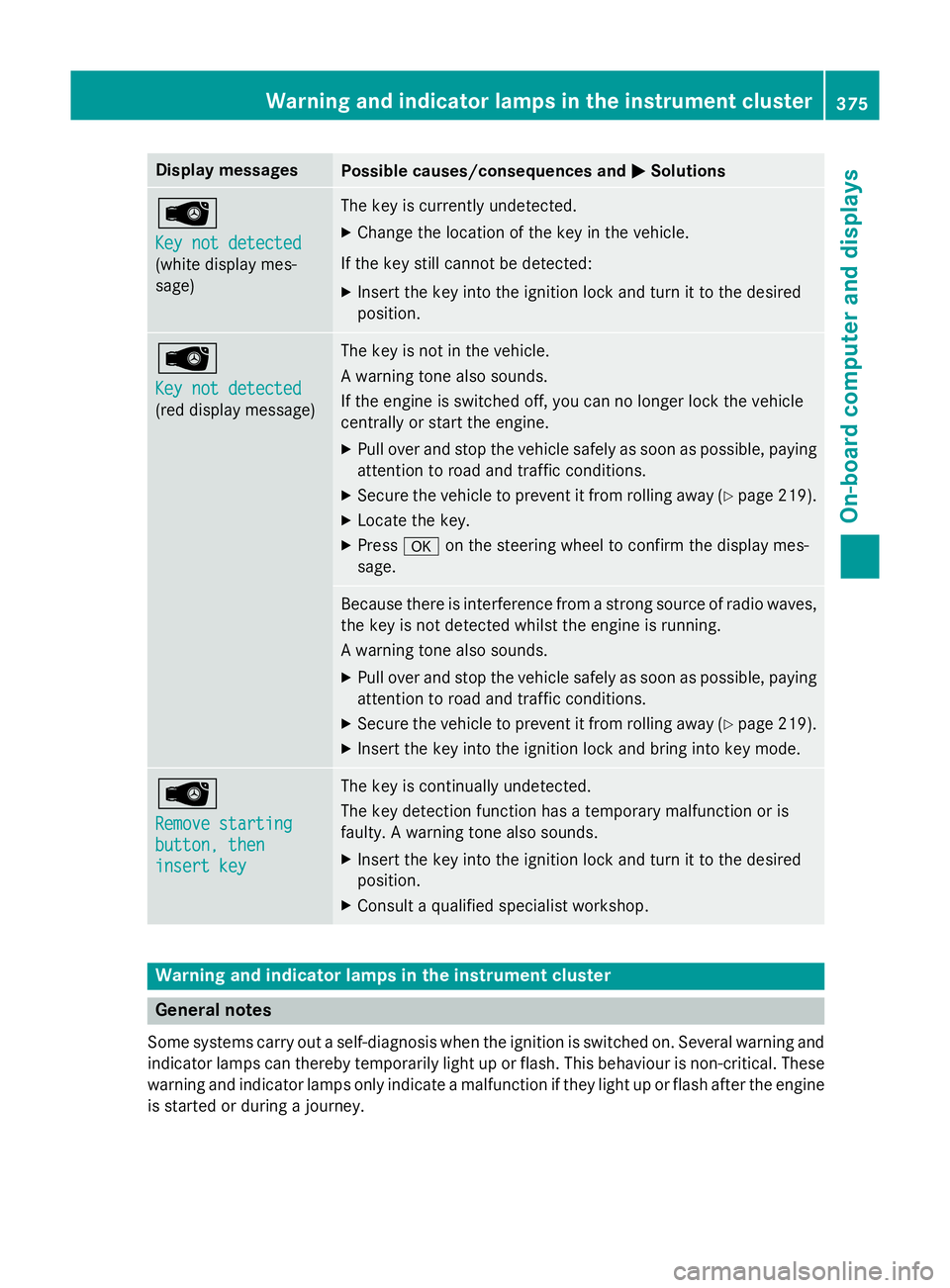
Display messages
Possible causes/consequences and
M
MSolutions Â
Key not detected Key not detected
(white display mes-
sage) The key is currently undetected.
X Change the location of the key in the vehicle.
If the key still cannot be detected: X Insert the key into the ignition lock and turn it to the desired
position. Â
Key not detected Key not detected
(red display message) The key is not in the vehicle.
A warning tone also sounds.
If the engine is switched off, you can no longer lock the vehicle
centrally or start the engine.
X Pull over and stop the vehicle safely as soon as possible, paying
attention to road and traffic conditions.
X Secure the vehicle to prevent it from rolling away (Y page 219).
X Locate the key.
X Press aon the steering wheel to confirm the display mes-
sage. Because there is interference from a strong source of radio waves,
the key is not detected whilst the engine is running.
A warning tone also sounds.
X Pull over and stop the vehicle safely as soon as possible, paying
attention to road and traffic conditions.
X Secure the vehicle to prevent it from rolling away (Y page 219).
X Insert the key into the ignition lock and bring into key mode. Â
Remove starting Remove starting
button, then button, then
insert key insert key The key is continually undetected.
The key detection function has a temporary malfunction or is
faulty. A warning tone also sounds.
X Insert the key into the ignition lock and turn it to the desired
position.
X Consult a qualified specialist workshop. Warning and indicator lamps in the instrument cluster
General notes
Some systems carry out a self-diagnosis when the ignition is switched on. Several warning and indicator lamps can thereby temporarily light up or flash. This behaviour is non-critical. These
warning and indicator lamps only indicate a malfunction if they light up or flash after the engine is started or during a journey. Wa
rning and indi cator lamps in the instrument cluster
375On-board computer and displays Z