light MERCEDES-BENZ GLC SUV 2015 Manual Online
[x] Cancel search | Manufacturer: MERCEDES-BENZ, Model Year: 2015, Model line: GLC SUV, Model: MERCEDES-BENZ GLC SUV 2015Pages: 497, PDF Size: 15.27 MB
Page 155 of 497
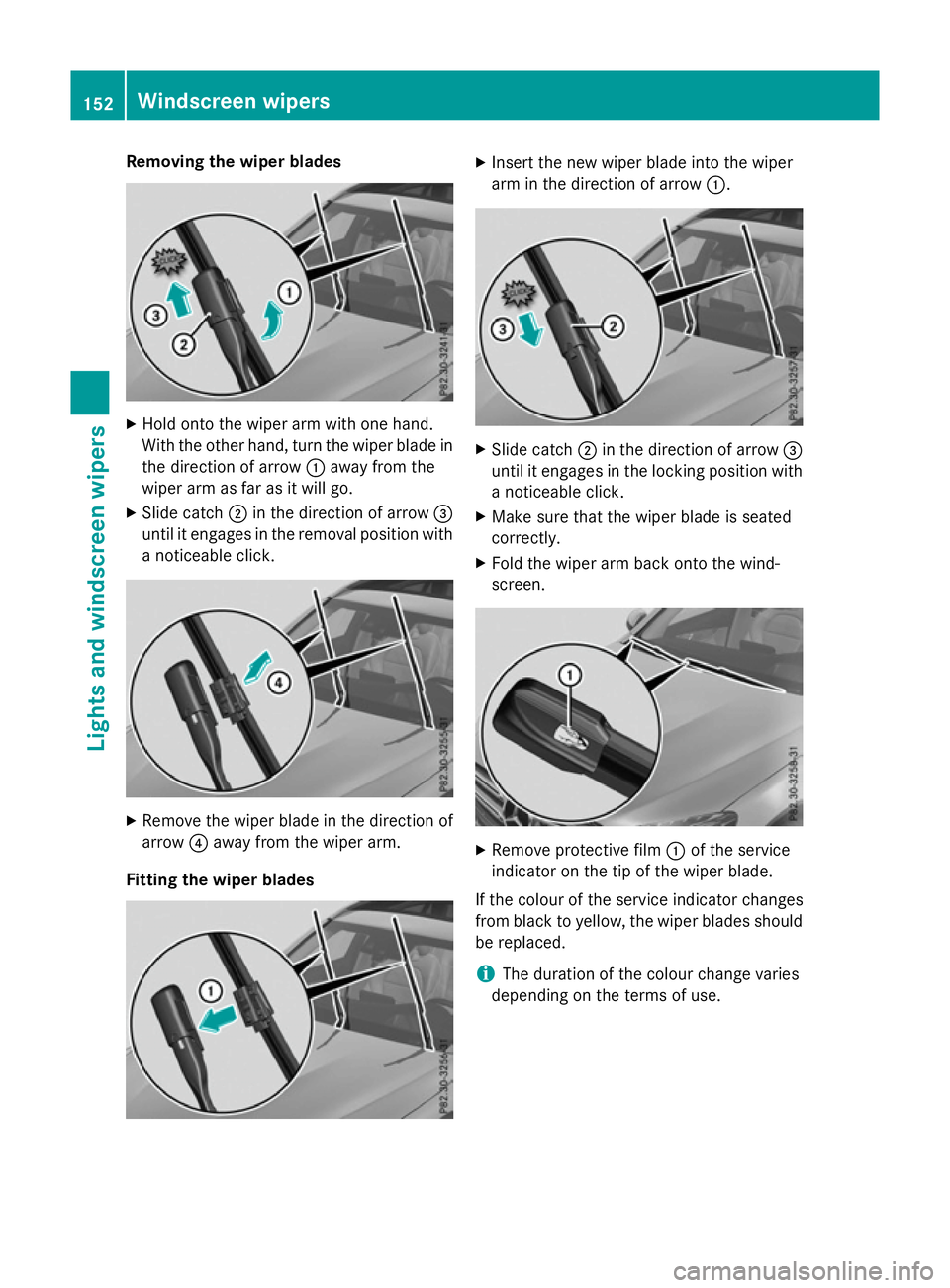
Removing the wiper blades
X
Hold onto the wiper arm with one hand.
With the other hand, turn the wiper blade in
the direction of arrow :away from the
wiper arm as far as it will go.
X Slide catch ;in the direction of arrow =
until it engages in the removal position with
a noticeable click. X
Remove the wiper blade in the direction of
arrow ?away from the wiper arm.
Fitting the wiper blades X
Insert the new wiper blade into the wiper
arm in the direction of arrow :. X
Slide catch ;in the direction of arrow =
until it engages in the locking position with a noticeable click.
X Make sure that the wiper blade is seated
correctly.
X Fold the wiper arm back onto the wind-
screen. X
Remove protective film :of the service
indicator on the tip of the wiper blade.
If the colour of the service indicator changes
from black to yellow, the wiper blades should be replaced.
i The duration of the colour change varies
depending on the terms of use. 152
Windscreen wipersLights and windscreen wipers
Page 156 of 497
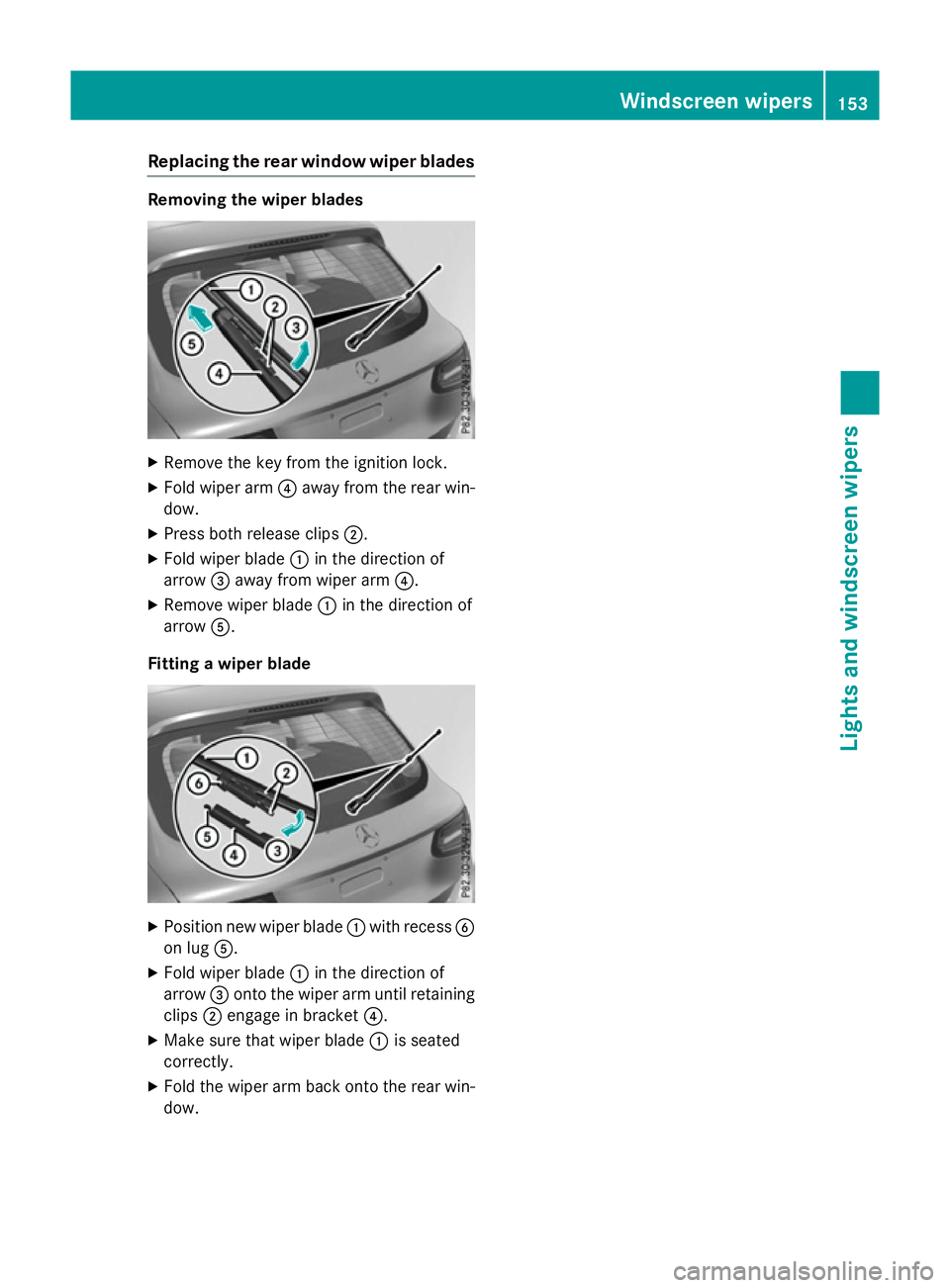
Replacing the rear window wiper blades
Removing the wiper blades
X
Remove the key from the ignition lock.
X Fold wiper arm ?away from the rear win-
dow.
X Press both release clips ;.
X Fold wiper blade :in the direction of
arrow =away from wiper arm ?.
X Remove wiper blade :in the direction of
arrow A.
Fitting a wiper blade X
Position new wiper blade :with recess B
on lug A.
X Fold wiper blade :in the direction of
arrow =onto the wiper arm until retaining
clips ;engage in bracket ?.
X Make sure that wiper blade :is seated
correctly.
X Fold the wiper arm back onto the rear win-
dow. Windscreen wipers
153Lights and windscreen wipers Z
Page 157 of 497
Problems with the windscreen wipers
Problem
Possible causes/consequences and
M
MSolutions The windscreen wipers
are jammed. Leaves or snow, for example, may be obstructing the windscreen
wiper movement. The wiper motor has been deactivated.
X For safety reasons, you should remove the key from the ignition
lock.
or
X Switch off the engine using the Start/Stop button and open the
driver's door.
X Remove the cause of the obstruction.
X Switch the windscreen wipers back on. The windscreen wipers
fail completely. The windscreen wiper drive is malfunctioning.
X Select another wiper speed on the combination switch.
X Have the windscreen wipers checked at a qualified specialist
workshop. The windscreen washer
fluid from the spray
nozzles no longer hits
the centre of the wind-
screen. The spray nozzles are misaligned.
X Have the spray nozzles adjusted at a qualified specialist work-
shop. 154
Windscreen wipersLights and windscreen wipers
Page 161 of 497
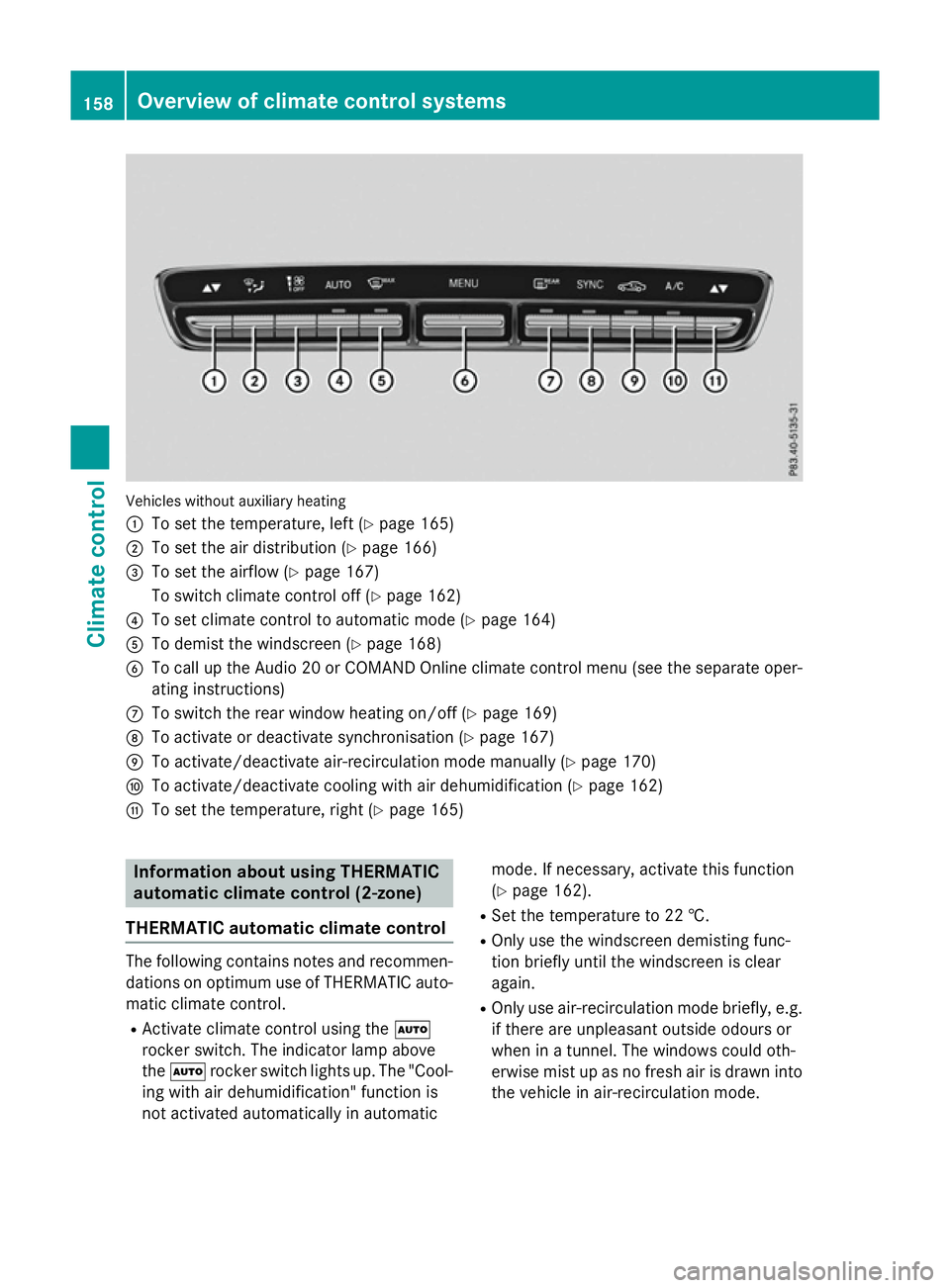
Vehicles without auxiliary heating
:
To set the temperature, left (Y page 165)
; To set the air distribution (Y page 166)
= To set the airflow (Y page 167)
To switch climate control off (Y page 162)
? To set climate control to automatic mode (Y page 164)
A To demist the windscreen (Y page 168)
B To call up the Audio 20 or COMAND Online climate control menu (see the separate oper-
ating instructions)
C To switch the rear window heating on/off (Y page 169)
D To activate or deactivate synchronisation (Y page 167)
E To activate/deactivate air-recirculation mode manually (Y page 170)
F To activate/deactivate cooling with air dehumidification (Y page 162)
G To set the temperature, right (Y page 165)Information about using THERMATIC
automatic climate control (2‑zone)
THERMATIC automatic climate control The following contains notes and recommen-
dations on optimum use of THERMATIC auto-
matic climate control.
R Activate climate control using the Ã
rocker switch. The indicator lamp above
the à rocker switch lights up. The "Cool-
ing with air dehumidification" function is
not activated automatically in automatic mode. If necessary, activate this function
(Y page 162).
R Set the temperature to 22 †.
R Only use the windscreen demisting func-
tion briefly until the windscreen is clear
again.
R Only use air-recirculation mode briefly, e.g.
if there are unpleasant outside odours or
when in a tunnel. The windows could oth-
erwise mist up as no fresh air is drawn into
the vehicle in air-recirculation mode. 158
Overview of climate control systemsClimate control
Page 164 of 497
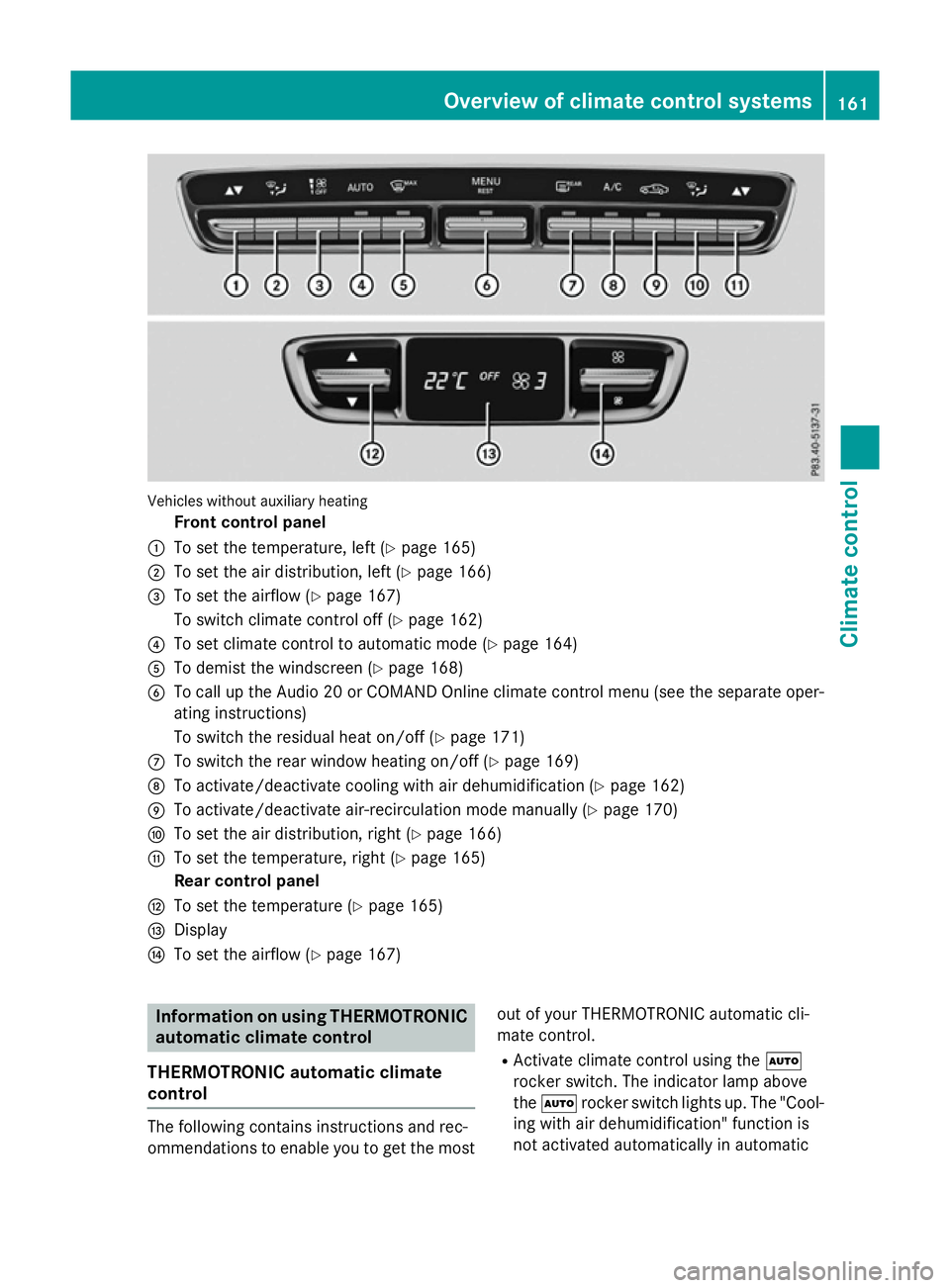
Vehicles without auxiliary heating
Front control panel
: To set the temperature, left (Y page 165)
; To set the air distribution, left (Y page 166)
= To set the airflow (Y page 167)
To switch climate control off (Y page 162)
? To set climate control to automatic mode (Y page 164)
A To demist the windscreen (Y page 168)
B To call up the Audio 20 or COMAND Online climate control menu (see the separate oper-
ating instructions)
To switch the residual heat on/off (Y page 171)
C To switch the rear window heating on/off (Y page 169)
D To activate/deactivate cooling with air dehumidification (Y page 162)
E To activate/deactivate air-recirculation mode manually (Y page 170)
F To set the air distribution, right (Y page 166)
G To set the temperature, right (Y page 165)
Rear control panel
H To set the temperature (Y page 165)
I Display
J To set the airflow (Y page 167) Information on using THERMOTRONIC
automatic climate control
THERMOTRONIC automatic climate
control The following contains instructions and rec-
ommendations to enable you to get the most
out of your THERMOTRONIC automatic cli-
mate control.
R Activate climate control using the Ã
rocker switch. The indicator lamp above
the à rocker switch lights up. The "Cool-
ing with air dehumidification" function is
not activated automatically in automatic Overview of climate control systems
161Climate control
Page 166 of 497
cle will also not be dehumidified. The win-
dows can mist up more quickly. Therefore,
deactivate the "Cooling with air dehumidifi-
cation" function only briefly.
The "Cooling with air dehumidification" func-
tion is only available when the engine is run-
ning. The air inside the vehicle is cooled and
dehumidified according to the temperature
selected.
Condensation may drip from the underside of the vehicle when cooling mode is active. This
is normal and not a sign that there is a mal-
function.
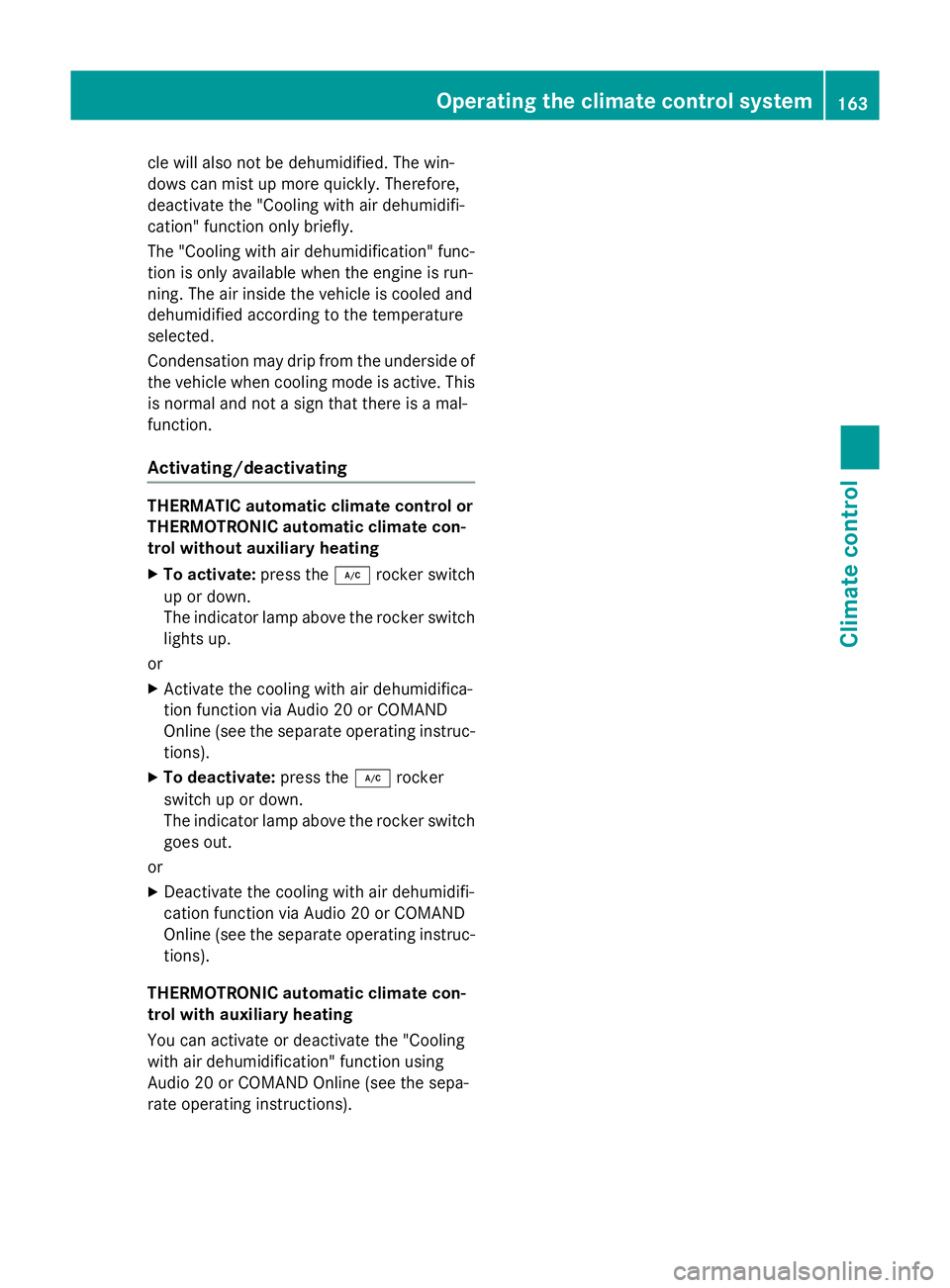
Activating/deactivating THERMATIC automatic climate control or
THERMOTRONIC automatic climate con-
trol without auxiliary heating
X To activate: press the¿rocker switch
up or down.
The indicator lamp above the rocker switch
lights up.
or X Activate the cooling with air dehumidifica-
tion function via Audio 20 or COMAND
Online (see the separate operating instruc-
tions).
X To deactivate: press the¿rocker
switch up or down.
The indicator lamp above the rocker switch
goes out.
or X Deactivate the cooling with air dehumidifi-
cation function via Audio 20 or COMAND
Online (see the separate operating instruc-
tions).
THERMOTRONIC automatic climate con-
trol with auxiliary heating
You can activate or deactivate the "Cooling
with air dehumidification" function using
Audio 20 or COMAND Online (see the sepa-
rate operating instructions). Operating the climate control system
163Climate control
Page 168 of 497
Automatic control
X
Turn the key to position 2in the ignition
lock (Y page 187).
X Set the desired temperature using the
w rocker switch on the front control
unit.
or X Set the desired temperature using
Audio 20 or COMAND Online (see the sep-
arate operating instructions).
X To activate: press theÃrocker switch
up or down.
The indicator lamp above the Ãrocker
switch lights up.
X To switch to manual operation: press the
H rocker switch up or down.
or X Set the airflow using Audio 20 or COMAND
Online (see the separate operating instruc-
tions).
or
X Press the upper or lower section of the
_ rocker switch.
or
X Set the air distribution using Audio 20 or
COMAND Online (see the separate operat- ing instructions).
The indicator lamp above the Ãrocker
switch goes out.
In automatic mode, if you adjust the airflow or air distribution manually, the indicator lamp
above the Ãrocker switch goes out. The
function which has not been changed man-
ually, however, continues to be controlled
automatically. When the manually set func-
tion switches back to automatic mode, the
indicator lamp above the Ãrocker switch
lights up again. Setting the climate mode
This function is only available with
THERMOTRONIC automatic climate control. In automatic mode you can select the follow-
ing airflow settings for the driver's and front-
passenger areas:
FOCUS high airflow, slightly cooler setting
MEDIUM medium airflow, standard setting
DIFFUS Elow airflow, slightly warmer and
draught-free setting
X To set: set the climate mode using Audio
20 or COMAND Online (see the separate
operating instructions). Setting the temperature
THERMATIC automatic climate control Different temperatures can be set for the
driver's and front-passenger sides.
X Turn the key to position 2in the ignition
lock (Y page 187).
X To increase or reduce: press thew
rocker switch up or down.
or
X Set the temperature using Audio 20 or
COMAND Online (see the separate operat-
ing instructions).
Only change the temperature setting in
small increments. Start at 22 †.
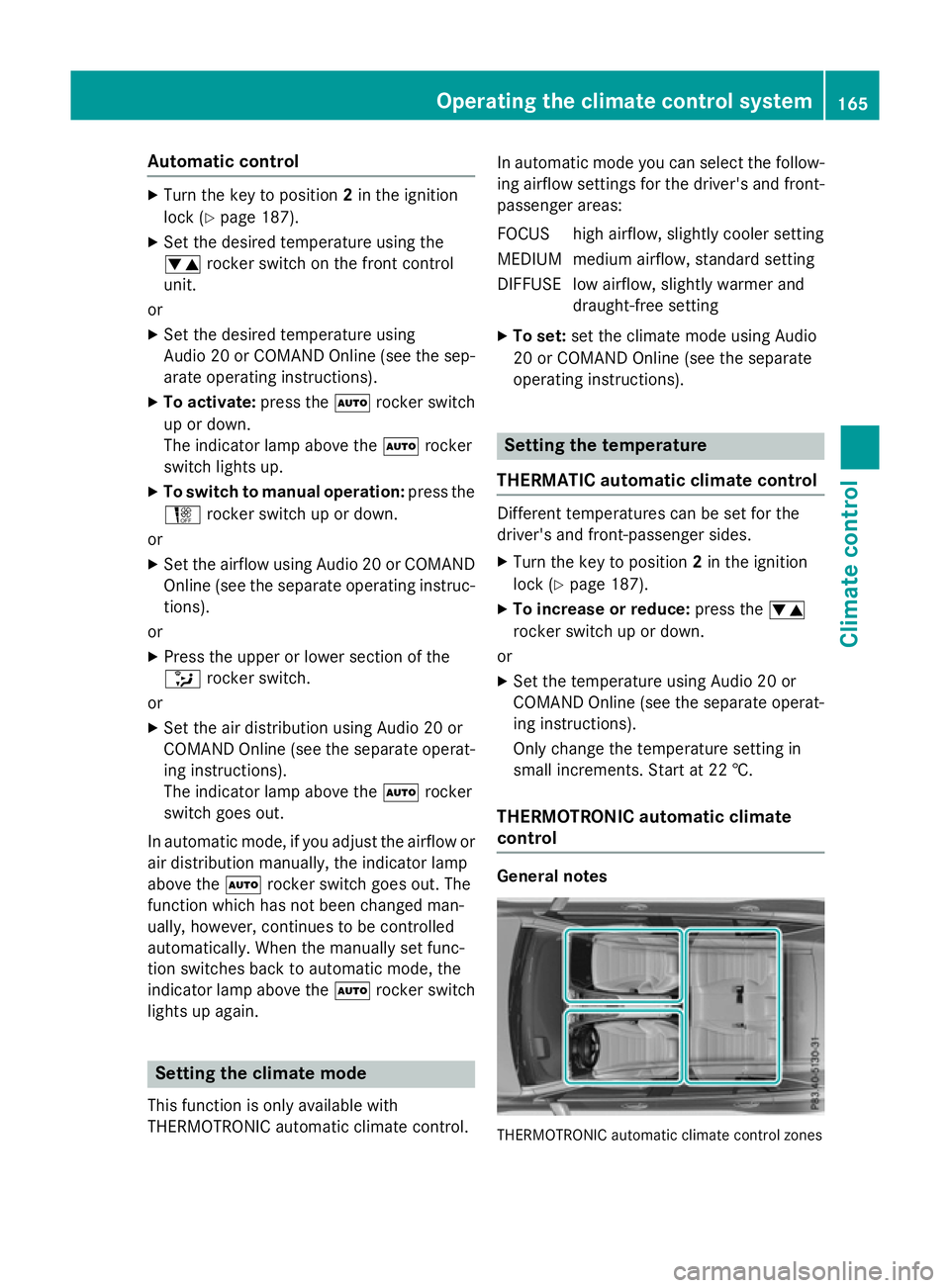
THERMOTRONIC automatic climate
control General notes
THERMOTRONIC automatic climate control zonesOperating the climate control system
165Climate control
Page 170 of 497
Setting the airflow
THERMATIC automatic climate control X
Turn the key to position 2in the ignition
lock (Y page 187).
X To increase or reduce: press theH
rocker switch up or down.
or
X Set the airflow using Audio 20 or COMAND
Online (see the separate operating instruc-
tions).
THERMOTRONIC automatic climate
control Setting the front-compartment airflow
You can set the airflow separately for the
front and rear compartment.
X Turn the key to position 2in the ignition
lock (Y page 187).
X To increase or reduce: press theH
rocker switch up or down.
or
X Set the airflow using Audio 20 or COMAND
Online (see the separate operating instruc-
tions).
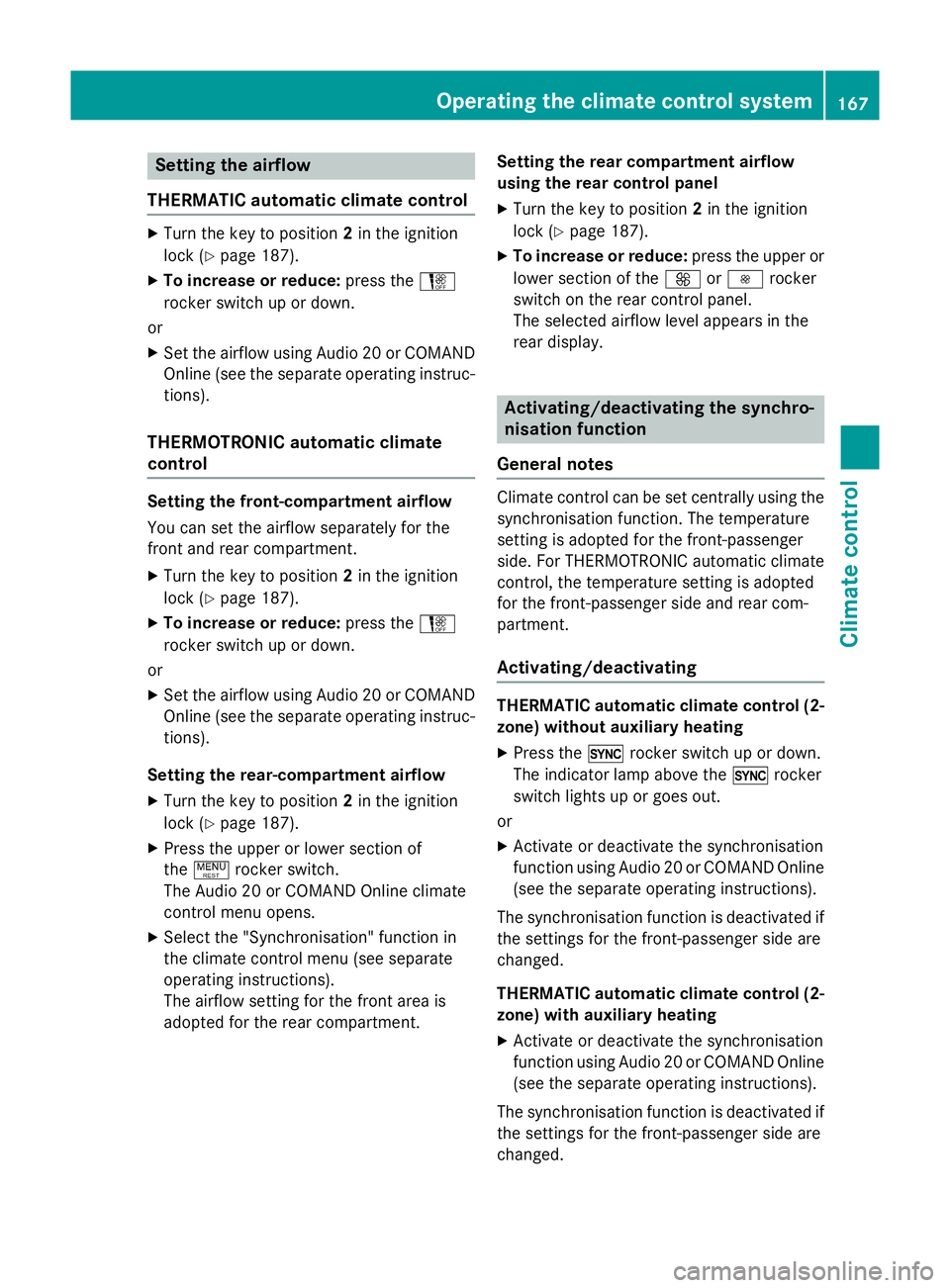
Setting the rear-compartment airflow X Turn the key to position 2in the ignition
lock (Y page 187).
X Press the upper or lower section of
the ! rocker switch.
The Audio 20 or COMAND Online climate
control menu opens.
X Select the "Synchronisation" function in
the climate control menu (see separate
operating instructions).
The airflow setting for the front area is
adopted for the rear compartment. Setting the rear compartment airflow
using the rear control panel
X Turn the key to position 2in the ignition
lock (Y page 187).
X To increase or reduce: press the upper or
lower section of the KorI rocker
switch on the rear control panel.
The selected airflow level appears in the
rear display. Activating/deactivating the synchro-
nisation function
General notes Climate control can be set centrally using the
synchronisation function. The temperature
setting is adopted for the front-passenger
side. For THERMOTRONIC automatic climatecontrol, the temperature setting is adopted
for the front-passenger side and rear com-
partment.
Activating/deactivating THERMATIC automatic climate control (2-
zone) without auxiliary heating
X Press the 0rocker switch up or down.
The indicator lamp above the 0rocker
switch lights up or goes out.
or X Activate or deactivate the synchronisation
function using Audio 20 or COMAND Online
(see the separate operating instructions).
The synchronisation function is deactivated if the settings for the front-passenger side are
changed.
THERMATIC automatic climate control (2-
zone) with auxiliary heating
X Activate or deactivate the synchronisation
function using Audio 20 or COMAND Online
(see the separate operating instructions).
The synchronisation function is deactivated if
the settings for the front-passenger side are
changed. Operating the climate control system
167Climate control
Page 171 of 497
THERMOTRONIC automatic climate con-
trol
X Activate or deactivate the synchronisation
function using Audio 20 or COMAND Online
(see the separate operating instructions).
The synchronisation function is deactivated: R if the settings for the front-passenger side
are changed
R if the settings for the rear compartment are
changed Demisting the windscreen
General notes You can use this function to defrost the wind-
screen or to demist the inside of the wind-
screen and the front side windows.
Switch off the windscreen demisting function as soon as the windscreen is clear again.
Switching the "Windscreen demisting"
function on or off X
Turn the key to position 2in the ignition
lock (Y page 187).
X To switch on: press the¬rocker
switch on the front control unit up or down.
The indicator lamp above the ¬rocker
switch lights up. The current climate con-
trol settings are deactivated.
The climate control system switches to the
following functions:
R high airflow
R high temperature
R air distribution to the windscreen and
front side windows
R air-recirculation mode off
i If necessary, the "Cooling with air dehu-
midification" function is activated. In this
case, the indicator lamp above the
¿ rocker switch remains switched off. X
To switch off: press the¬rocker
switch up or down.
The indicator lamp above the ¬rocker
switch goes out. The previous settings are
reactivated. Air-recirculation mode
remains deactivated.
or X Press the upper or lower section of the
à rocker switch. Demisting the windows
Windows misted up on the inside X
Activate the "Cooling with air dehumidifi-
cation" function with the ¿rocker
switch.
or
X Activate the cooling with air dehumidifica-
tion function via Audio 20 or COMAND
Online (see the separate operating instruc-
tions).
For THERMOTRONIC automatic climate
control with auxiliary heating, the "Cooling
with air dehumidification" function can only be activated using Audio 20 or COMAND
Online.
X Switch on automatic mode using the Ã
rocker switch.
X If the windows continue to mist up, activate
the windscreen demisting function using
the ¬ rocker switch.
i You should only select this setting until
the windscreen is clear again.
Windows misted up on the outside X
Activate the windscreen wipers.
X Switch on automatic mode using the Ã
rocker switch.
i If you clean the windows regularly, they
do not mist up so quickly. 168
Operating the climate control systemClimate control
Page 172 of 497
Rear window heating
General notes The rear window heating has a high current
draw. You should therefore switch it off as
soon as the window is clear. It otherwise
switches off automatically after several
minutes.
If the battery voltage is too low, the rear win-
dow heating may switch off.
Switching the sound on/off X
Turn the key to position 2in the ignition
lock (Y page 187).
X Press the ¤rocker switch up or down.
The indicator lamp above the ¤rocker
switch lights up or goes out. Operating the climate control system
169Climate control