light MERCEDES-BENZ GLC SUV 2015 Owners Manual
[x] Cancel search | Manufacturer: MERCEDES-BENZ, Model Year: 2015, Model line: GLC SUV, Model: MERCEDES-BENZ GLC SUV 2015Pages: 497, PDF Size: 15.27 MB
Page 173 of 497
Problems with the rear window heating
Problem
Possible causes/consequences and
M
MSolutions The rear window heat-
ing has switched off
prematurely or cannot
be activated. The battery has not been sufficiently charged.
X Switch off any consumers that are not required, e.g. reading
lamps, interior lighting or the seat heating.
When the battery is sufficiently charged, the rear window heat- ing can be activated again. Switching air-recirculation mode
on/off
General notes You can also temporarily deactivate the flow
of fresh air manually if unpleasant odours are
entering the vehicle from outside. The air
already inside the vehicle will then be recir-
culated.
If you activate air-recirculation mode, the win-
dows can mist up more quickly, in particular
at low temperatures. Only use air-recircula-
tion mode briefly to prevent the windows
misting up.
Activating/deactivating X
Turn the key to position 2in the ignition
lock (Y page 187).
X To activate: press thegrocker switch
up or down.
The indicator lamp above the grocker
switch lights up.
Air-recirculation mode is activated automati-
cally: R at high outside temperatures
R at high levels of pollution (THERMOTRONIC
automatic climate control only)
R in a tunnel (vehicles with a navigation sys-
tem only)
The indicator lamp above the grocker
switch is not lit when automatic air-recircula- tion mode is activated. Outside air is added
after approximately 30 minutes. X
To deactivate: press thegrocker
switch up or down.
The indicator lamp above the grocker
switch goes out.
Air-recirculation mode is deactivated auto-
matically:
R after approximately five minutes at outside
temperatures below approximately 5 †
R after approximately five minutes if "Cooling
with air dehumidification" is deactivated
R after approximately 30 minutes at outside
temperatures above approximately 5 † if
the "Cooling with air dehumidification"
function is activated Convenience opening or closing using
the air-recirculation button G
WARNING
When the convenience closing feature is oper- ating, parts of the body could become trapped
in the closing area of the side window and the
sliding sunroof. There is a risk of injury.
Observe the complete closing procedure
when the convenience closing feature is oper-
ating. When closing make sure that no parts of the body are in the closing area. G
WARNING
During convenience opening parts of the body could be drawn in or become trapped
between the side window and window frame.
There is a risk of injury. 170
Operating the climate control systemClimate control
Page 174 of 497
When opening, make sure that nobody is
touching the side window. If someone
becomes trapped, immediately press
the W switch in the door to stop the move-
ment of the side windows. To continue closing
the side window, pull on the Wswitch.
X Convenience closing feature (vehicles
with a panorama sliding sunroof): press
and hold the grocker switch up or
down until the side windows and the pan-
orama sliding sunroof start to close auto-
matically.
The indicator lamp above the grocker
switch lights up. Air-recirculation mode is
activated.
X Convenience closing feature (vehicles
without a sliding sunroof/panorama
sliding sunroof): press and hold the g
rocker switch up or down until the side win- dows start to close automatically.
The indicator lamp above the grocker
switch lights up. Air-recirculation mode is
activated.
If you open the side windows or the pano-
rama sliding sunroof manually after closing
with the convenience closing feature, they
will remain in this position when opened
using the convenience opening feature.
If parts of the body are in the closing area
during convenience closing, proceed as fol-
lows:
X Press the Wbutton to stop the side win-
dows.
The side windows stop.
X To then open the side windows, press the
W button again.
X Only vehicles with panorama sliding
sunroof: press the 3button to stop the
panorama sliding sunroof.
The panorama sliding sunroof stops.
X To then open the panorama sliding sunroof,
pull back on the 3button. Notes on the automatic reversing feature for:
R the side windows (Y page 110)
R the panorama sliding sunroof
(Y page 114)
X Convenience opening feature (vehicles
with a panorama sliding sunroof): press
and hold the grocker switch up or
down until the side windows and the pan-
orama sliding sunroof start to open auto-
matically.
The indicator lamp above the grocker
switch goes out. Air-recirculation mode is
deactivated.
X Convenience opening feature (vehicles
without a panorama sliding sunroof):
press and hold the grocker switch up
or down until the side windows start to
open automatically.
The indicator lamp above the grocker
switch goes out. Air-recirculation mode is
deactivated. Switching the residual heat on/off
General notes The residual heat function is only available
with THERMOTRONIC automatic climate con- trol and THERMATIC automatic climate con-
trol with auxiliary heating.
When the engine is switched off, it is possible
to make use of the residual heat of the engine to continue heating or ventilating the front
compartment of the vehicle for approximately
30 minutes. The heating or ventilation time
depends on the set interior temperature.
Switching on/off X
Turn the key to position 0in the ignition
lock or remove it (Y page 187).
X To switch on: press the!rocker
switch up or down.
The indicator lamp above the !rocker
switch lights up. Operating the climate control system
171Climate control Z
Page 181 of 497
X
To activate or deactivate "Immediate
pre-entry climate control": press rocker
switch :up or down.
The blue or red indicator lamp above the
rocker switch lights up or goes out.
The colours of the indicator lamps in rocker
switch :have the following meanings:
R blue: cooling activated
R red: heating activated
R yellow: departure time is preselected Auxiliary heating
Important safety notes G
DANGER
If the exhaust pipe is blocked or sufficient
ventilation is not possible, toxic exhaust
fumes can enter the vehicle, especially car-
bon monoxide. This is the case, e.g. in
enclosed spaces, or if the vehicle is stuck in
snow. There is a risk of fatal injuries.
You should switch off the auxiliary heating in
enclosed spaces which do not have an extrac- tion system, e.g. a garage. If the vehicle is
stuck in snow and you must leave the auxiliary
heating running, keep the exhaust pipe and
the area around the vehicle clear of snow. To guarantee a sufficient supply of fresh air, open
a window on the side of the vehicle away from the wind. G
WARNING
When the auxiliary heating is switched on,
parts of the vehicle can become very hot.
Flammable materials such as leaves, grass or twigs may ignite if they come into contact
with:
R hot parts of the exhaust system
R the exhaust gas itself
There is a risk of fire. When the auxiliary heating is switched on,
make sure that:
R no flammable materials come into contact
with hot vehicle components
R the exhaust gas can escape from the
exhaust pipe unhindered
R the exhaust gas does not come into contact
with flammable materials.
The auxiliary heating is fitted under the front
wing on the right-hand side of the vehicle. The emissions outlet is found behind the front
wheel on the right-hand side of the vehicle.
! Operating the auxiliary heating/ventila-
tion draws on the vehicle battery. After you have heated or ventilated the vehicle a
maximum of two times, drive for a longer
distance.
Switch the auxiliary heating on regularly once a month for about ten minutes.
The auxiliary heating heats the air in the vehi-
cle interior to the set temperature. This
occurs without using the heat of the running
engine. The auxiliary heating is operated
directly using the vehicle's fuel. For this rea-
son, the tank content must be at least at
reserve fuel level to ensure that the auxiliary
heating functions.
The auxiliary heating or auxiliary ventilation
automatically adjusts to changes in temper-
ature and weather conditions. For this rea-
son, the auxiliary heating could switch from
ventilation mode to heating mode or from
heating mode to ventilation mode.
The auxiliary heating switches off when the
engine is switched off. The auxiliary ventila-
tion is not active if the engine is running.
The auxiliary heating or auxiliary ventilation
switches off automatically after 50 minutes.
This time limit can be altered. To do this, visit a qualified specialist workshop.
You cannot use the auxiliary ventilation to
cool the vehicle interior to a temperature
lower than the outside temperature. 178
Operating the climate control systemClimate control
Page 182 of 497
Before switching on
X
Turn the key to position 2in the ignition
lock (Y page 187).
X Set the desired temperature using the
w rocker switch on the front control
unit.
or
X Set the desired temperature using
Audio 20 or COMAND Online (see the sep-
arate operating instructions).
If you do not alter the temperature before
switching on the auxiliary heating or auxiliary ventilation, the last temperature setting will
be adopted.
Auxiliary heating or auxiliary ventilation can
also be switched on if the manually set cli-
mate control is activated. Optimum comfort
can be attained when the system is set to
automatic mode. Set the temperature to
22 †.
You can switch the auxiliary heating or auxil-
iary ventilation on or off:
R using the rocker switch on the centre con-
sole (Y page 179)
R using the remote control (Y page 180)
The on-board computer can be used to spec- ify up to three departure times, one of which
may be preselected:
R using the remote control (Y page 180)
R using Audio 20 or COMAND Online (see the
separate operating instructions) Switching the auxiliary heating/venti-
lation on/off using the centre console
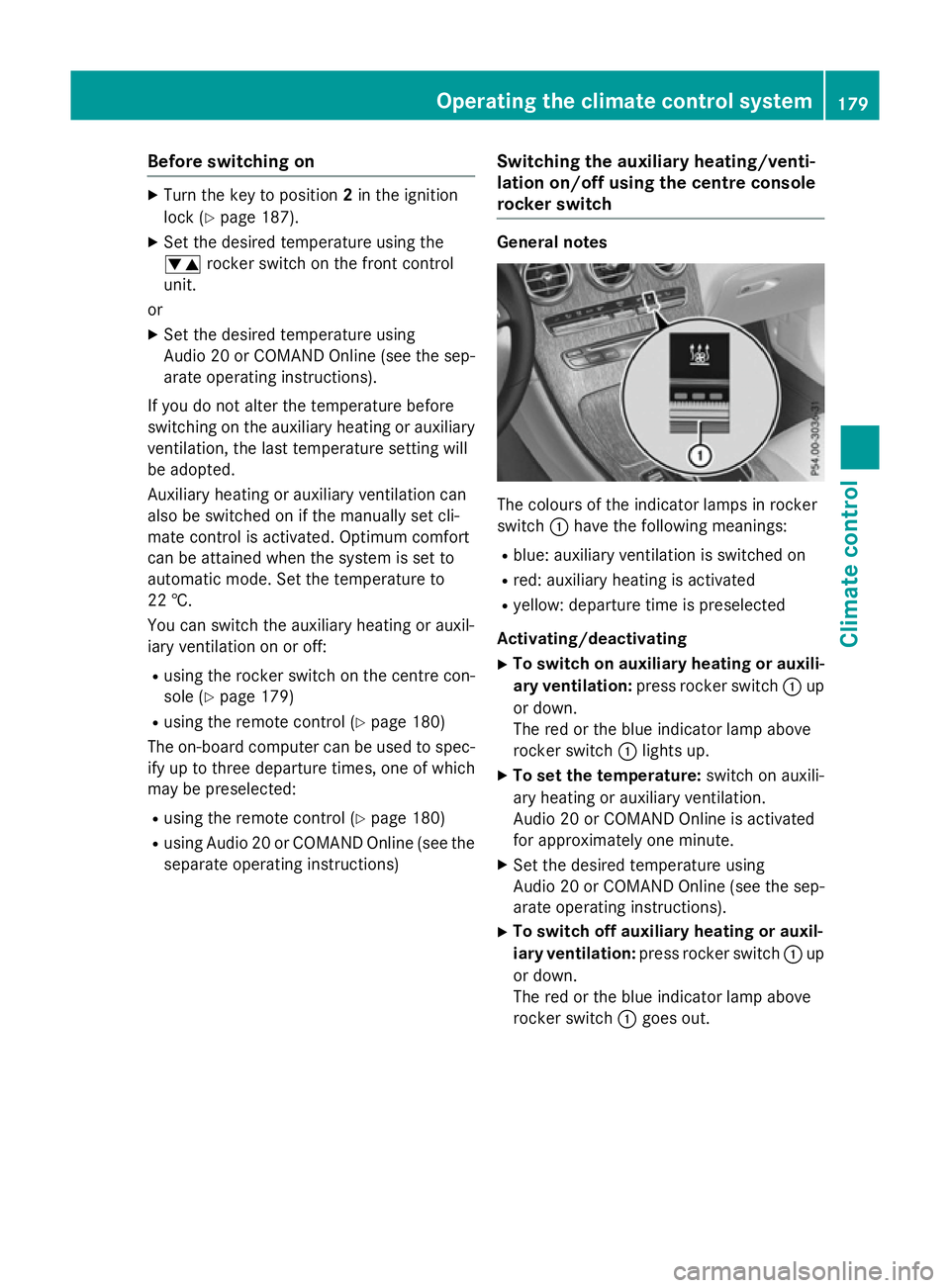
rocker switch General notes
The colours of the indicator lamps in rocker
switch
:have the following meanings:
R blue: auxiliary ventilation is switched on
R red: auxiliary heating is activated
R yellow: departure time is preselected
Activating/deactivating
X To switch on auxiliary heating or auxili-
ary ventilation: press rocker switch :up
or down.
The red or the blue indicator lamp above
rocker switch :lights up.
X To set the temperature: switch on auxili-
ary heating or auxiliary ventilation.
Audio 20 or COMAND Online is activated
for approximately one minute.
X Set the desired temperature using
Audio 20 or COMAND Online (see the sep-
arate operating instructions).
X To switch off auxiliary heating or auxil-
iary ventilation: press rocker switch :up
or down.
The red or the blue indicator lamp above
rocker switch :goes out. Operating the climate control system
179Climate control Z
Page 191 of 497
To start the vehicle without actively using the
key:
R the Start/Stop button must be inserted in
the ignition lock
R the key must be in the vehicle
R the vehicle must not be locked with the key
or KEYLESS-GO (Y page 95)
Do not keep the key:
R with electronic devices, e.g. a mobile
phone or another key
R with metallic objects, e.g. coins or metal
film
R inside metallic objects, e.g. a metal case
This can affect the key's functionality.
If you lock the vehicle with the key's remote
control or with KEYLESS-GO, after a short
time:
R you will not be able to switch on the ignition
with the Start/Stop button
R you will not be able to start the engine with
the Start/Stop button until the vehicle is
unlocked again
If you lock the vehicle centrally using the but- ton on the front door (Y page 101), you can
continue to start the engine with the Start/
Stop button.
The engine can be switched off while the vehi-
cle is in motion by pressing and holding the
Start/Stop button for three seconds. This
function operates independently of the ECO
start/stop automatic engine switch-off func-
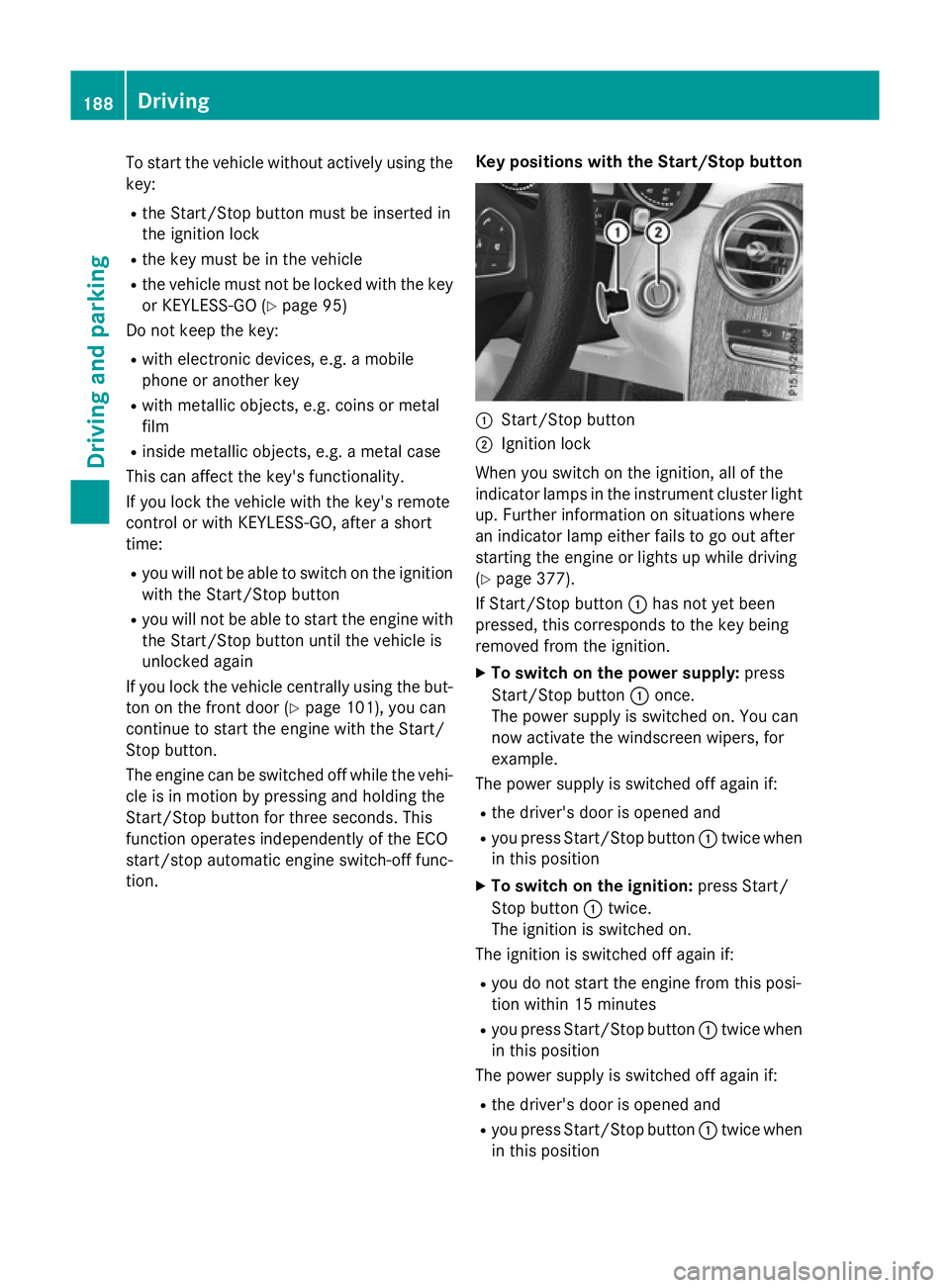
tion. Key positions with the Start/Stop button :
Start/Stop button
; Ignition lock
When you switch on the ignition, all of the
indicator lamps in the instrument cluster light up. Further information on situations where
an indicator lamp either fails to go out after
starting the engine or lights up while driving
(Y page 377).
If Start/Stop button :has not yet been
pressed, this corresponds to the key being
removed from the ignition.
X To switch on the power supply: press
Start/Stop button :once.
The power supply is switched on. You can
now activate the windscreen wipers, for
example.
The power supply is switched off again if:
R the driver's door is opened and
R you press Start/Stop button :twice when
in this position
X To switch on the ignition: press Start/
Stop button :twice.
The ignition is switched on.
The ignition is switched off again if:
R you do not start the engine from this posi-
tion within 15 minutes
R you press Start/Stop button :twice when
in this position
The power supply is switched off again if:
R the driver's door is opened and
R you press Start/Stop button :twice when
in this position 188
DrivingDriving and parking
Page 193 of 497
X
To start a diesel engine : turn the key to
position 2in the ignition lock (Y page 187).
The % preglow indicator lamp in the
instrument cluster lights up.
X Turn the key to position 3in the ignition
lock and release it as soon as the engine is running (Y page 187).
i Vehicles with a diesel engine:
you can
start the engine without preglow if the
engine is warm.
If the engine will not start:
X Remove the key from the ignition lock.
X Reinsert the key into the ignition lock after
waiting for a short period.
X Turn the key to position 2in the ignition
lock (Y page 187).
The indicator lamps in the instrument clus- ter light up (Y page 375).
X Turn the key to position 3in the ignition
lock (Y page 187 )and release it as soon as
the engine is running.
Starting procedure using the Start/
Stop button The Start/Stop button is only available on
vehicles with KEYLESS-GO or the KEYLESS-
GO start function.
The Start/Stop button can be used to start
the vehicle manually without inserting the key
into the ignition lock. The key must be in the
vehicle and the Start/Stop button must be
inserted in the ignition lock. This mode for
starting the engine operates independently of
the ECO start/stop automatic engine start
function.
You can start the engine if a valid key is in the vehicle. Switch off the engine and always take
the key with you when leaving the vehicle,
even if you only leave it for a short time. Pay
attention to the important safety notes. X
Depress the brake pedal and keep it
depressed.
X Press the Start/Stop button once
(Y page 187).
Vehicles with a petrol engine: the engine
starts.
Vehicles with a diesel engine: preglow is
activated and the engine starts. Pulling away
General notes G
WARNING
If the engine speed is above the idling speed
and you engage transmission position Dor R,
the vehicle could pull away suddenly. There is a risk of an accident.
When engaging transmission position Dor R,
always firmly depress the brake pedal and do not simultaneously accelerate.
Depress the accelerator carefully when pull-
ing away.
The vehicle locks centrally once you have
pulled away. The locking knobs in the doors
drop down.
You can open the doors from the inside at any
time.
You can also deactivate the automatic locking feature, see the Digital Owner's Manual.
It is only possible to shift the transmission
from position Pto the desired position if you
depress the brake pedal. Only then is the
parking lock released. If you do not depress
the brake pedal, the DIRECT SELECT lever can still be moved but the parking lock remains
engaged.
i Upshifts take place at higher engine
speeds after a cold start. This helps the
catalytic converter to reach its operating
temperature more quickly.
Information on automatically releasing the
electrical parking brake (Y page 220).190
DrivingDriving an
d parking
Page 196 of 497
R
the system detects moisture on the wind-
screen when the air-conditioning system is
switched on
R the battery's charge status is too low
Shifting the transmission to position Pdoes
not start the engine.
If you shift the transmission from Rto D, the
ECO start/stop function is available again
once the èECO symbol reappears in
green in the multifunction display.
Switching the ECO start/stop function
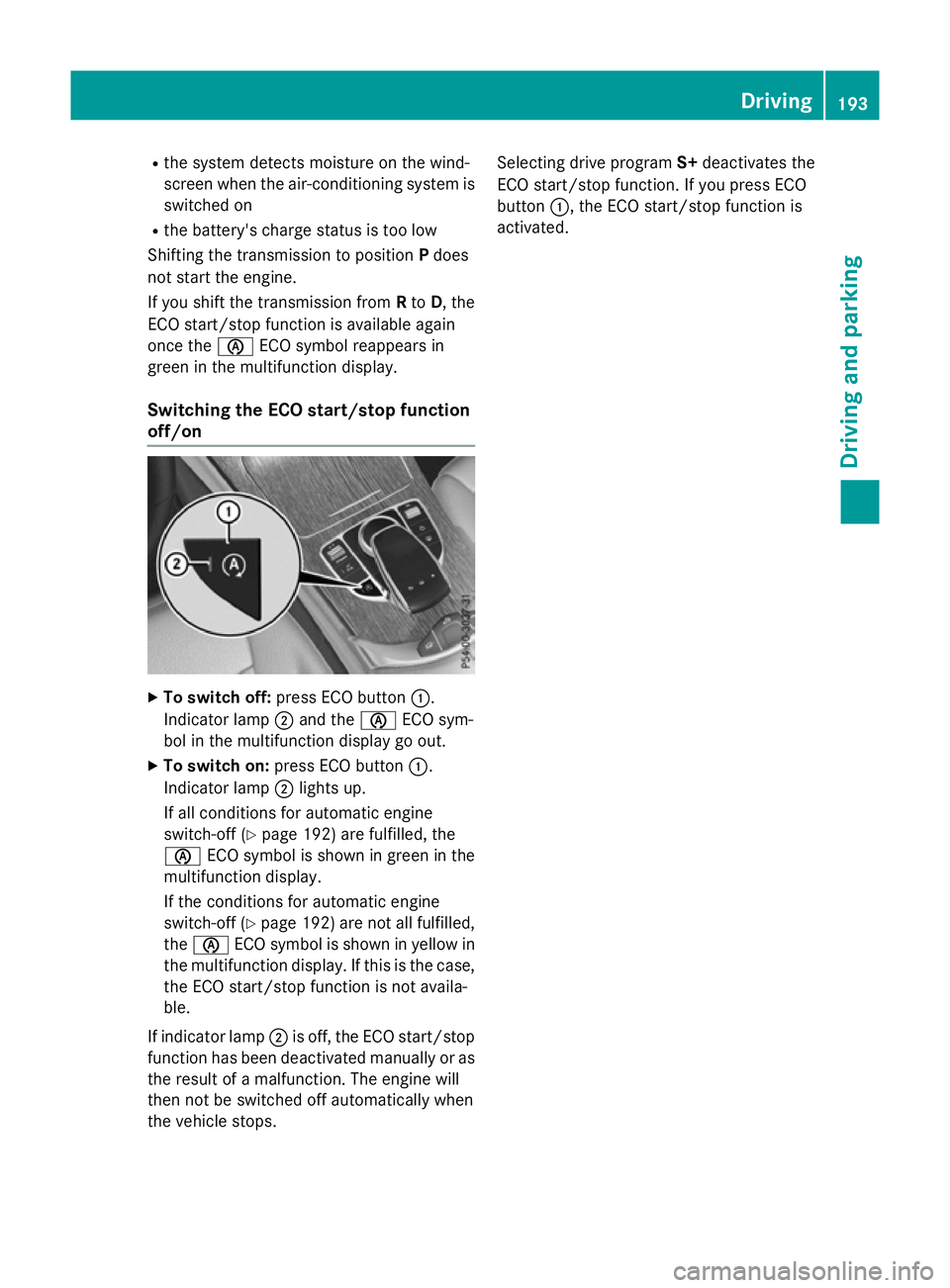
off/on X
To switch off: press ECO button :.
Indicator lamp ;and the èECO sym-
bol in the multifunction display go out.
X To switch on: press ECO button :.
Indicator lamp ;lights up.
If all conditions for automatic engine
switch-off (Y page 192) are fulfilled, the
è ECO symbol is shown in green in the
multifunction display.
If the conditions for automatic engine
switch-off (Y page 192) are not all fulfilled,
the è ECO symbol is shown in yellow in
the multifunction display. If this is the case,
the ECO start/stop function is not availa-
ble.
If indicator lamp ;is off, the ECO start/stop
function has been deactivated manually or as the result of a malfunction. The engine will
then not be switched off automatically when
the vehicle stops. Selecting drive program
S+deactivates the
ECO start/stop function. If you press ECO
button :, the ECO start/stop function is
activated. Driving
193Driving an d parking Z
Page 198 of 497
Problem
Possible causes/consequences and
M
MSolutions Vehicles with a petrol
engine:
The engine is not run-
ning smoothly and is
misfiring. There is a malfunction in the engine electronics or in a mechanical
component of the engine management system.
X Only depress the accelerator pedal slightly.
Otherwise, non-combusted fuel may get into the catalytic con-
verter and damage it.
X Have the cause rectified immediately at a qualified specialist
workshop. The coolant tempera-
ture display is showing
more than 120 †. A
display message may
also appear in the mul-
tifunction display and a
warning tone may
sound. The coolant level is too low. The coolant is too hot and the engine
is no longer being cooled sufficiently.
X Stop as soon as possible and allow the engine and the coolant to
cool down.
X Check the coolant level (Y page 417). Observe the warning
notes as you do so and top up the coolant if necessary. If the coolant level is correct, the engine radiator fan may be faulty.
The coolant is too hot and the engine is no longer being cooled
sufficiently.
X If the coolant temperature is below 120 †, you can continue
driving to the nearest qualified specialist workshop.
X Avoid heavy loads on the engine as you do so, e.g. driving in
mountainous terrain and stop-start traffic. DYNAMIC SELECT switch
This section describes the DYNAMIC SELECT
switch for all vehicles, except PLUG-IN
HYBRID vehicles. Information on the
DYNAMIC SELECT switch on PLUG ‑IN
HYBRID vehicles (Y page 295).
Use the DYNAMIC SELECT switch to change
the drive program. Depending on the drive
program selected, the following vehicle char- acteristics will change:
R the drive (engine and transmission man-
agement)
R the suspension
R the steering R
the availability of the ECO start/stop func-
tion
R the climate control
- the climate control settings
- the rear window heating operation period
- the performance of the seat heating
If the ignition is switched off for less than four
hours, the previously selected drive program
is activated when the engine is next started. If the ignition is switched off for more than fourhours, drive program Cis activated when the
engine is next started. DYNAMIC SELECT switch
195Driving and parking Z
Page 216 of 497
Reset the building's circuit breaker. Other-
wise, the charging process cannot be contin- ued.
General information on the charging
process Observe the "Important safety notes"
(Y page 210).
The vehicle socket is located in the rear
bumper on the right below the tail lamp.
The charge socket flap and the vehicle are
centrally locked or unlocked simultaneously. Charging the high-voltage battery via
the mains socket
Charging cable for mains sockets Important safety notes
! Only use the charging cable to charge the
high-voltage battery. Do not use the charg-
ing cable for other purposes. It may other-
wise be damaged.
The vehicle is supplied with a charging cable
for connection to a mains socket. Only use
the charging cable supplied with the vehicle
or a charging cable approved for the vehicle.
i The charging process can vary depending
on the mains power supply. Therefore,
always observe the local information.
i For short charge times (charging with 16
A), connect the fast-charging cable to the
wallbox or charging station. You can also
use the optionally available charging cable
with the CE plug.
Information about charging from a wallbox
can be found at (Y page 216).
Information about charging at a charging sta-
tion can be found at (Y page 217).
Stowing the charging cable
The charging cable can be stowed in the bag
supplied in the luggage compartment of the vehicle and held in place with the Velcro fas-
tener.
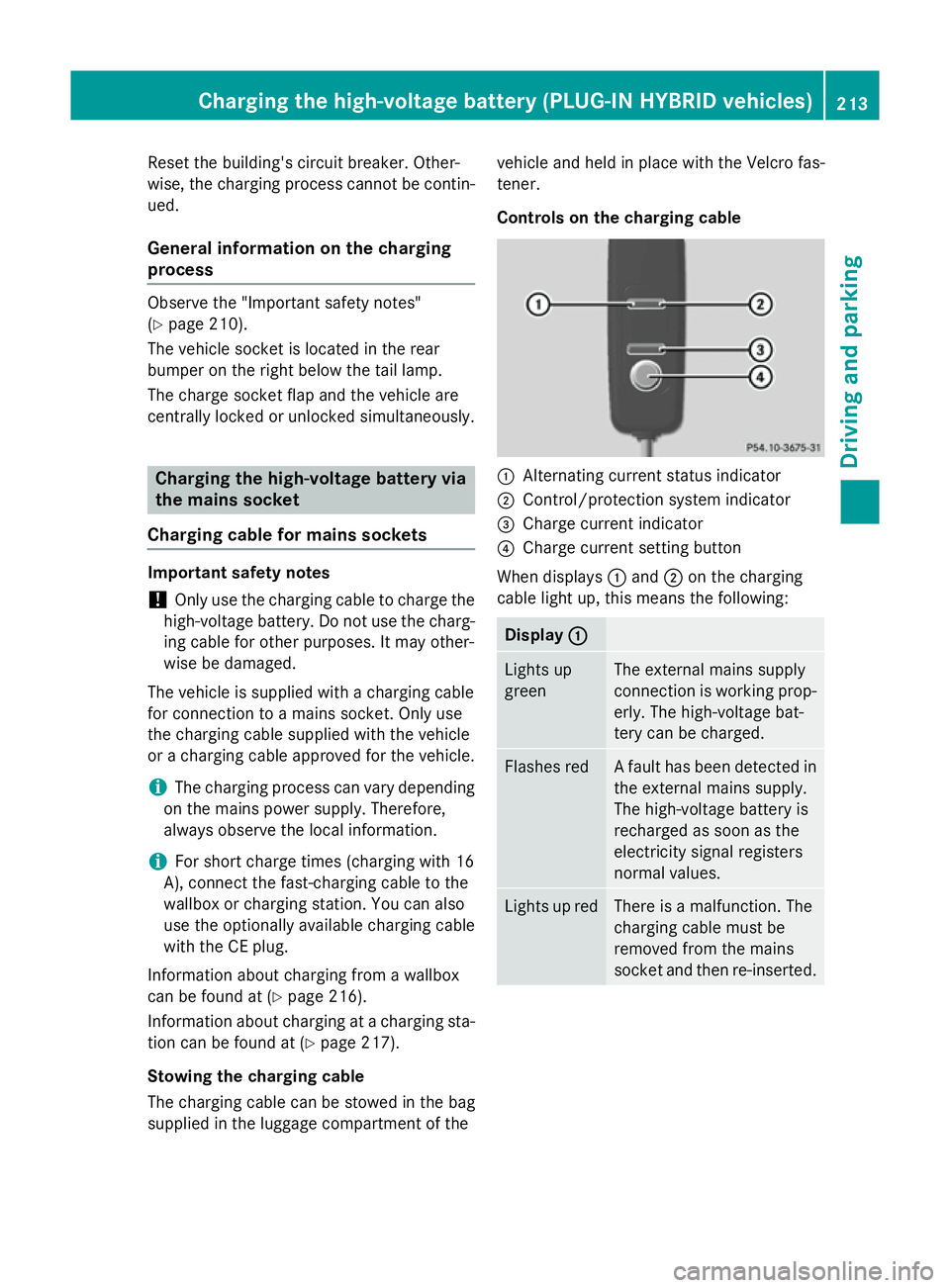
Controls on the charging cable
:
Alternating current status indicator
; Control/protection system indicator
= Charge current indicator
? Charge current setting button
When displays :and ;on the charging
cable light up, this means the following: Display
:
: Lights up
green The external mains supply
connection is working prop-
erly. The high-voltage bat-
tery can be charged. Flashes red A fault has been detected in
the external mains supply.
The high-voltage battery is
recharged as soon as the
electricity signal registers
normal values. Lights up red There is a malfunction. The
charging cable must be
removed from the mains
socket and then re-inserted.Cha
rging the high-voltage battery (PLUG-IN HYBRI D vehicles)
213Driving and parking Z
Page 217 of 497
Display
;
; Lights up
green There are no faults. The
high-voltage battery can be
charged.
Lights up red An impermissible current is
being supplied to the con-
trol unit. The high-voltage
battery cannot be charged.
i
Information on problems relating to the
charging process (Y page 218).
Setting the maximum charge current G
WARNING
If the charge current draw via a mains socket is too high during the charging process, the
external mains supply may overheat. There is a risk of fire.
Before charging, check the maximum permis-
sible charge current available at the location.
If necessary, contact a qualified specialist
company for assistance.
Adjust your vehicle's settings, if necessary.
! If the charge current is too high, the fuse
could be tripped or the external mains sup-
ply could overheat. Check if the external
mains supply is equipped to handle the pro- grammed charge current. If necessary,
reduce the programmed charge current or
use a different mains socket.
You can set a limit for the values of the charge
current used in charging the high-voltage bat- tery. This acts as a means of preventing the
mains supply from overloading. You can set
this limit by using the controls on the charging
cable or in the on-board computer's menu.
Only set the maximum charge current in the
on-board computer menu if there are no
charge current settings on the charging
cable.
The default value in the vehicle corresponds
to the maximum charge value.
The default value on the charging cable is the
minimum setting. This corresponds to the minimum available charge current from the
mains supply. The value on the charging cable
can be increased and is described below.
i The value of the maximum setting and the
adjustment value may vary depending on
the country.
Before charging the high-voltage battery,
check the maximum permissible charge cur-
rent for the relevant power socket.
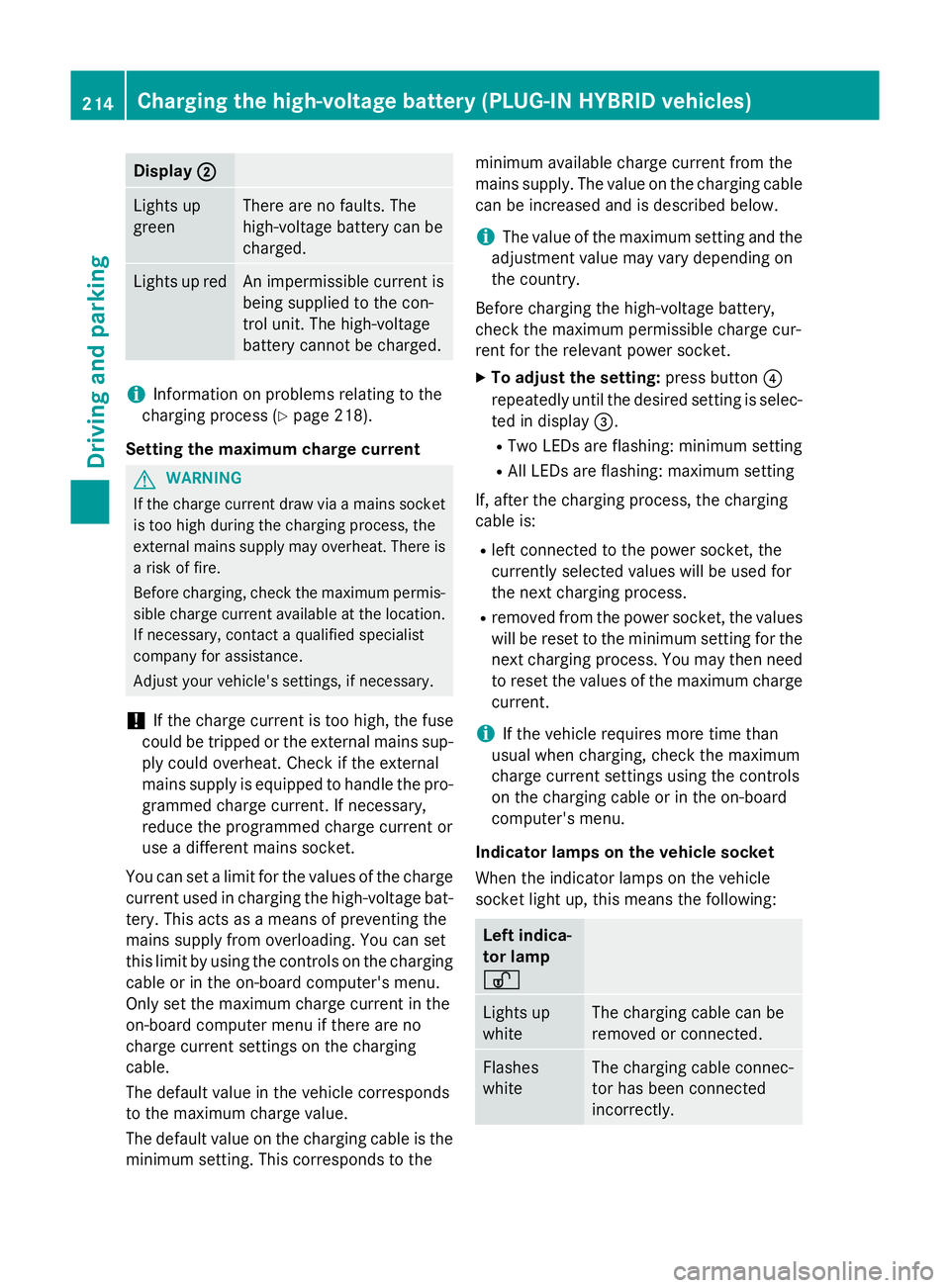
X To adjust the setting: press button?
repeatedly until the desired setting is selec- ted in display =.
R Two LEDs are flashing: minimum setting
R All LEDs are flashing: maximum setting
If, after the charging process, the charging
cable is:
R left connected to the power socket, the
currently selected values will be used for
the next charging process.
R removed from the power socket, the values
will be reset to the minimum setting for the next charging process. You may then need
to reset the values of the maximum charge current.
i If the vehicle requires more time than
usual when charging, check the maximum
charge current settings using the controls
on the charging cable or in the on-board
computer's menu.
Indicator lamps on the vehicle socket
When the indicator lamps on the vehicle
socket light up, this means the following: Left indica-
tor lamp
Ì Ì
Lights up
white The charging cable can be
removed or connected.
Flashes
white The charging cable connec-
tor has been connected
incorrectly. 214
Cha
rging the high-voltage battery (PLUG-IN HYBRI D vehicles)Driving and parking