light MERCEDES-BENZ GLC SUV 2015 Owners Manual
[x] Cancel search | Manufacturer: MERCEDES-BENZ, Model Year: 2015, Model line: GLC SUV, Model: MERCEDES-BENZ GLC SUV 2015Pages: 497, PDF Size: 15.27 MB
Page 218 of 497
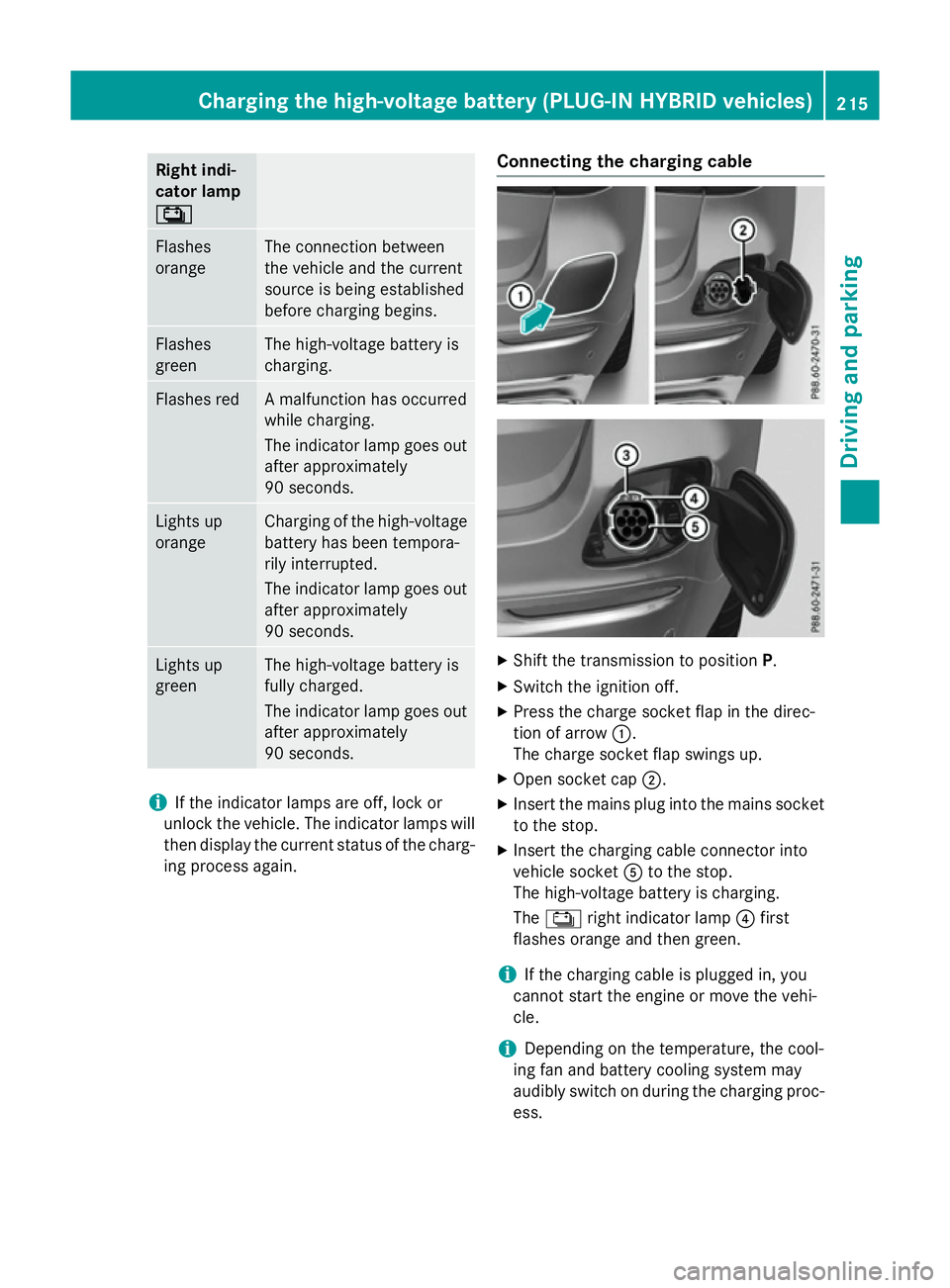
Right indi-
cator lamp
Ý Ý
Flashes
orange The connection between
the vehicle and the current
source is being established
before charging begins.
Flashes
green The high-voltage battery is
charging.
Flashes red A malfunction has occurred
while charging.
The indicator lamp goes out
after approximately
90 seconds. Lights up
orange Charging of the high-voltage
battery has been tempora-
rily interrupted.
The indicator lamp goes out
after approximately
90 seconds. Lights up
green The high-voltage battery is
fully charged.
The indicator lamp goes out
after approximately
90 seconds. i
If the indicator lamps are off, lock or
unlock the vehicle. The indicator lamps will then display the current status of the charg-ing process again. Connecting the charging cable
X
Shift the transmission to position P.
X Switch the ignition off.
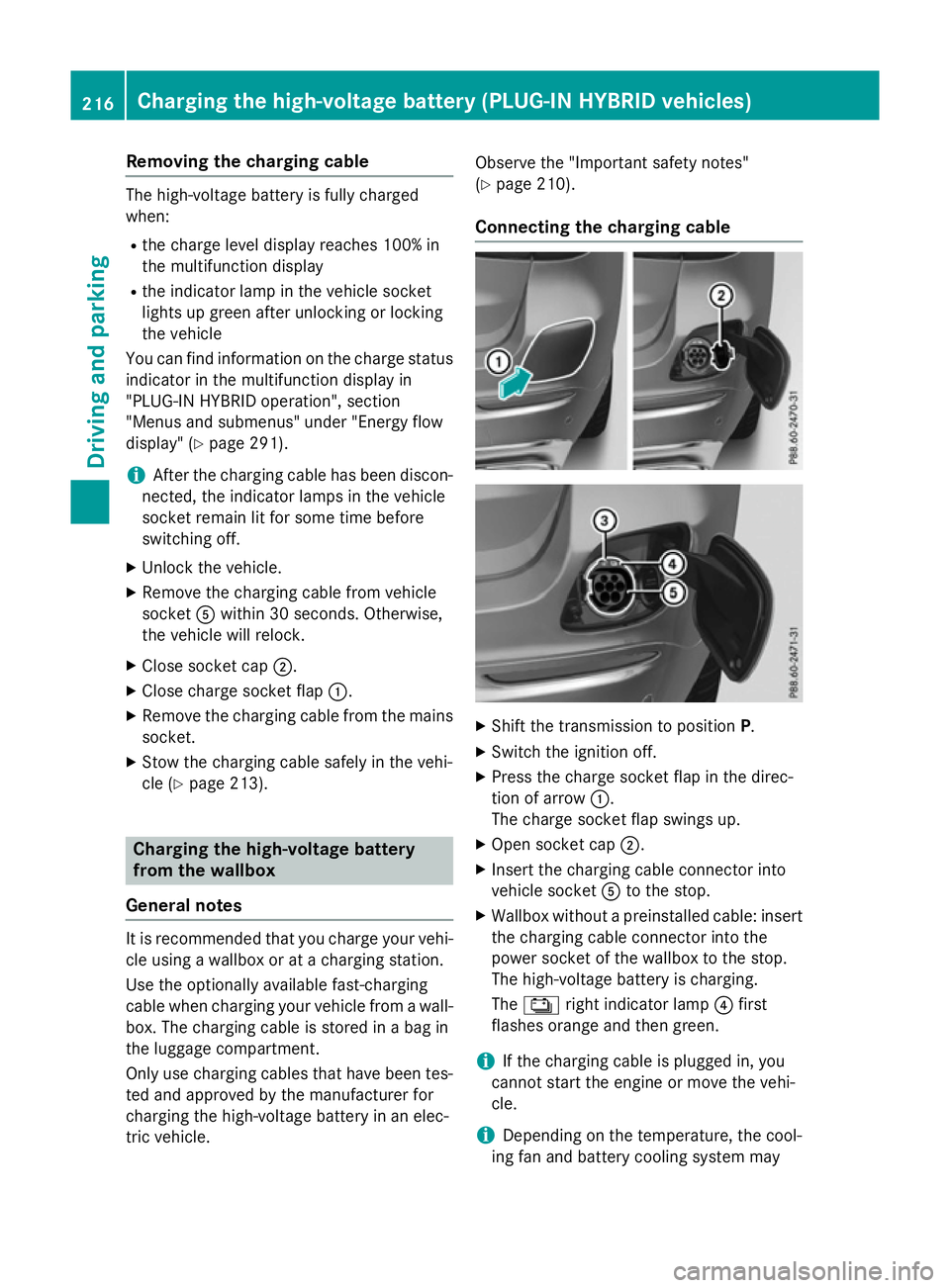
X Press the charge socket flap in the direc-
tion of arrow :.
The charge socket flap swings up.
X Open socket cap ;.
X Insert the mains plug into the mains socket
to the stop.
X Insert the charging cable connector into
vehicle socket Ato the stop.
The high-voltage battery is charging.
The Ý right indicator lamp ?first
flashes orange and then green.
i If the charging cable is plugged in, you
cannot start the engine or move the vehi-
cle.
i Depending on the temperature, the cool-
ing fan and battery cooling system may
audibly switch on during the charging proc- ess. Charging the high-voltage battery (PLUG-IN HYBRID vehicles)
215Driving and parking Z
Page 219 of 497
Removing the charging cable
The high-voltage battery is fully charged
when:
R the charge level display reaches 100% in
the multifunction display
R the indicator lamp in the vehicle socket
lights up green after unlocking or locking
the vehicle
You can find information on the charge status indicator in the multifunction display in
"PLUG-IN HYBRID operation", section
"Menus and submenus" under "Energy flow
display" (Y page 291).
i After the charging cable has been discon-
nected, the indicator lamps in the vehicle
socket remain lit for some time before
switching off.
X Unlock the vehicle.
X Remove the charging cable from vehicle
socket Awithin 30 seconds. Otherwise,
the vehicle will relock.
X Close socket cap ;.
X Close charge socket flap :.
X Remove the charging cable from the mains
socket.
X Stow the charging cable safely in the vehi-
cle (Y page 213). Charging the high-voltage battery
from the wallbox
General notes It is recommended that you charge your vehi-
cle using a wallbox or at a charging station.
Use the optionally available fast-charging
cable when charging your vehicle from a wall- box. The charging cable is stored in a bag in
the luggage compartment.
Only use charging cables that have been tes-ted and approved by the manufacturer for
charging the high-voltage battery in an elec-
tric vehicle. Observe the "Important safety notes"
(Y
page 210).
Connecting the charging cable X
Shift the transmission to position P.
X Switch the ignition off.
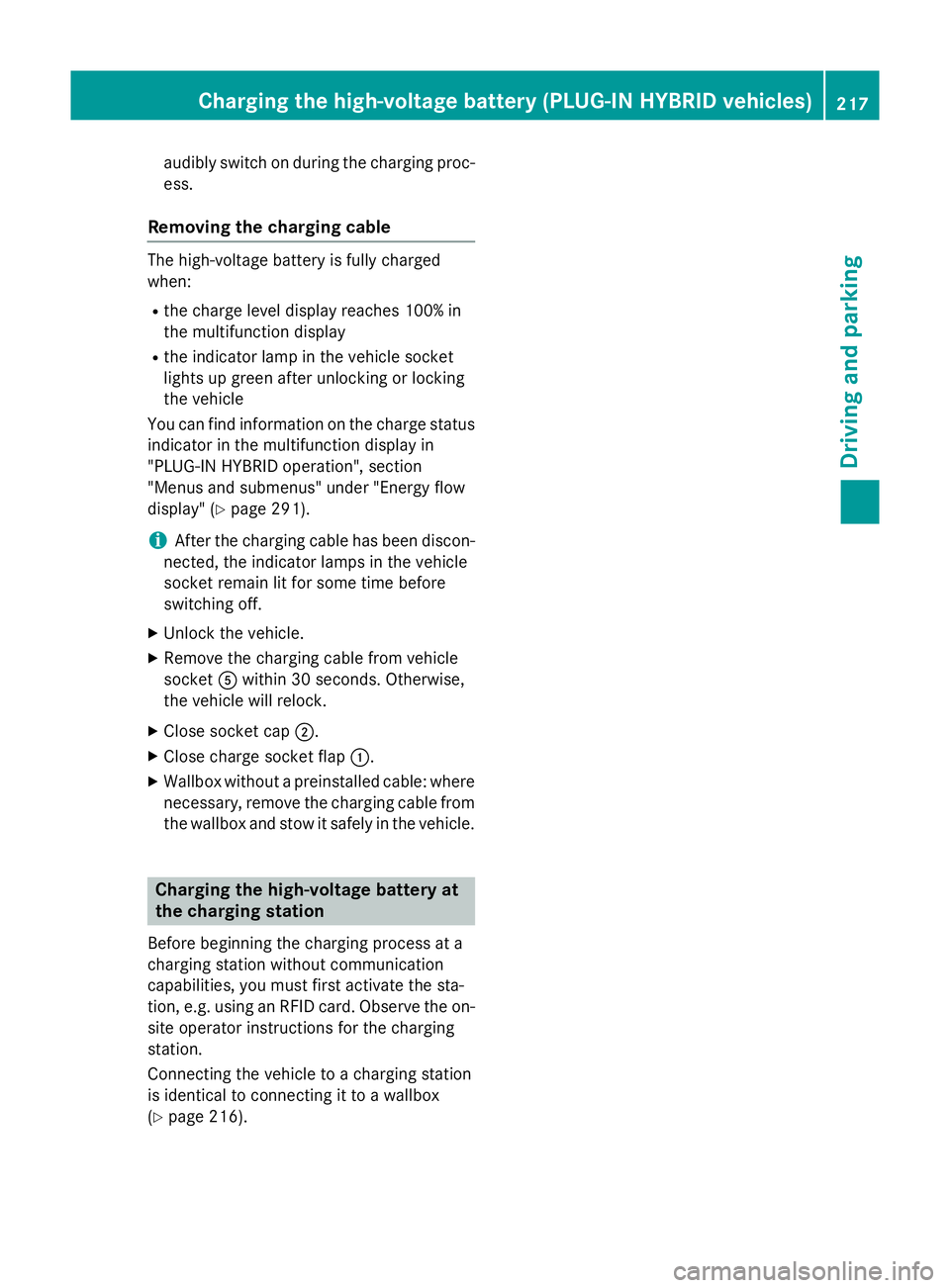
X Press the charge socket flap in the direc-
tion of arrow :.
The charge socket flap swings up.
X Open socket cap ;.
X Insert the charging cable connector into
vehicle socket Ato the stop.
X Wallbox without a preinstalled cable: insert
the charging cable connector into the
power socket of the wallbox to the stop.
The high-voltage battery is charging.
The Ý right indicator lamp ?first
flashes orange and then green.
i If the charging cable is plugged in, you
cannot start the engine or move the vehi-
cle.
i Depending on the temperature, the cool-
ing fan and battery cooling system may 216
Charging the high-voltage battery (PLUG-IN HYBRID vehicles)Driving and parking
Page 220 of 497
audibly switch on during the charging proc-
ess.
Removing the charging cable The high-voltage battery is fully charged
when:
R the charge level display reaches 100% in
the multifunction display
R the indicator lamp in the vehicle socket
lights up green after unlocking or locking
the vehicle
You can find information on the charge status indicator in the multifunction display in
"PLUG-IN HYBRID operation", section
"Menus and submenus" under "Energy flow
display" (Y page 291).
i After the charging cable has been discon-
nected, the indicator lamps in the vehicle
socket remain lit for some time before
switching off.
X Unlock the vehicle.
X Remove the charging cable from vehicle
socket Awithin 30 seconds. Otherwise,
the vehicle will relock.
X Close socket cap ;.
X Close charge socket flap :.
X Wallbox without a preinstalled cable: where
necessary, remove the charging cable from the wallbox and stow it safely in the vehicle. Charging the high-voltage battery at
the charging station
Before beginning the charging process at a
charging station without communication
capabilities, you must first activate the sta-
tion, e.g. using an RFID card. Observe the on- site operator instructions for the charging
station.
Connecting the vehicle to a charging station
is identical to connecting it to a wallbox
(Y page 216). Charging the high-voltage battery (PLUG-IN HYBRID vehicles)
217Driving and parking Z
Page 221 of 497
Problems with the charging process
Problem
Possible causes/consequences and
M
MSolutions The charge socket flap
cannot be opened. The charge socket flap is not unlocked.
X Unlock the vehicle (Y page 95).
If the key battery is discharged:
X Unlock the driver's door using the emergency key element
(Y page 97).
or
X Unlock the vehicle centrally from the inside (Y page 101).The charge socket flap is unlocked, but the opening mechanism is
jammed.
X Lock the vehicle and unlock it again.
If, after that, the opening mechanism is still jammed:
X Consult a qualified specialist workshop. The charging cable can-
not be inserted into the
vehicle socket. The vehicle socket is locked.
X Unlock the vehicle (Y page 95).
X Shift the transmission to position P.The high-voltage bat-
tery is not being
charged. The
Ý indicator lamp on the vehicle socket does not light up or
flashes red.
A malfunction has occurred during the initialisation of the charging
process or during charging.
X Remove the charging cable connector from the vehicle socket
and re-insert it into the vehicle socket.
If the problem persists:
X Use a different charging station.
or
X Consult a qualified specialist workshop. The high-voltage bat-
tery is not charged dur-
ing the charging proc-
ess when connected to
a mains socket. The
Ý indicator lamp on
the vehicle socket does not light up after the
charging cable connec-
tor has been inserted
into the vehicle socket. The mains socket is faulty.
X Have the mains socket checked to test if it is functioning prop-
erly.
or
X Use a different mains socket. 218
Charging the high-voltage battery (PLUG-IN HYBRID vehicles)Driving and parking
Page 224 of 497
In addition, they may operate vehicle equip-
ment and become trapped. There is a risk of
an accident and injury.
When leaving the vehicle, always take the key with you and lock the vehicle. Never leave
children unattended in the vehicle.
The function of the electric parking brake is
dependent on the on-board voltage. If the on-
board voltage is low or if there is a malfunc-
tion in the system, it may not be possible to
apply the released parking brake.
X If this is the case, only park the vehicle on
level ground and secure it to prevent it from
rolling away.
X Shift the automatic transmission to posi-
tion P.
It may not be possible to release an applied
parking brake if the on-board voltage is low or if there is a malfunction in the system. Con-
tact a qualified specialist workshop.
The electric parking brake carries out a func-
tion check at regular intervals when the
engine is switched off. Noises that occur are
normal.
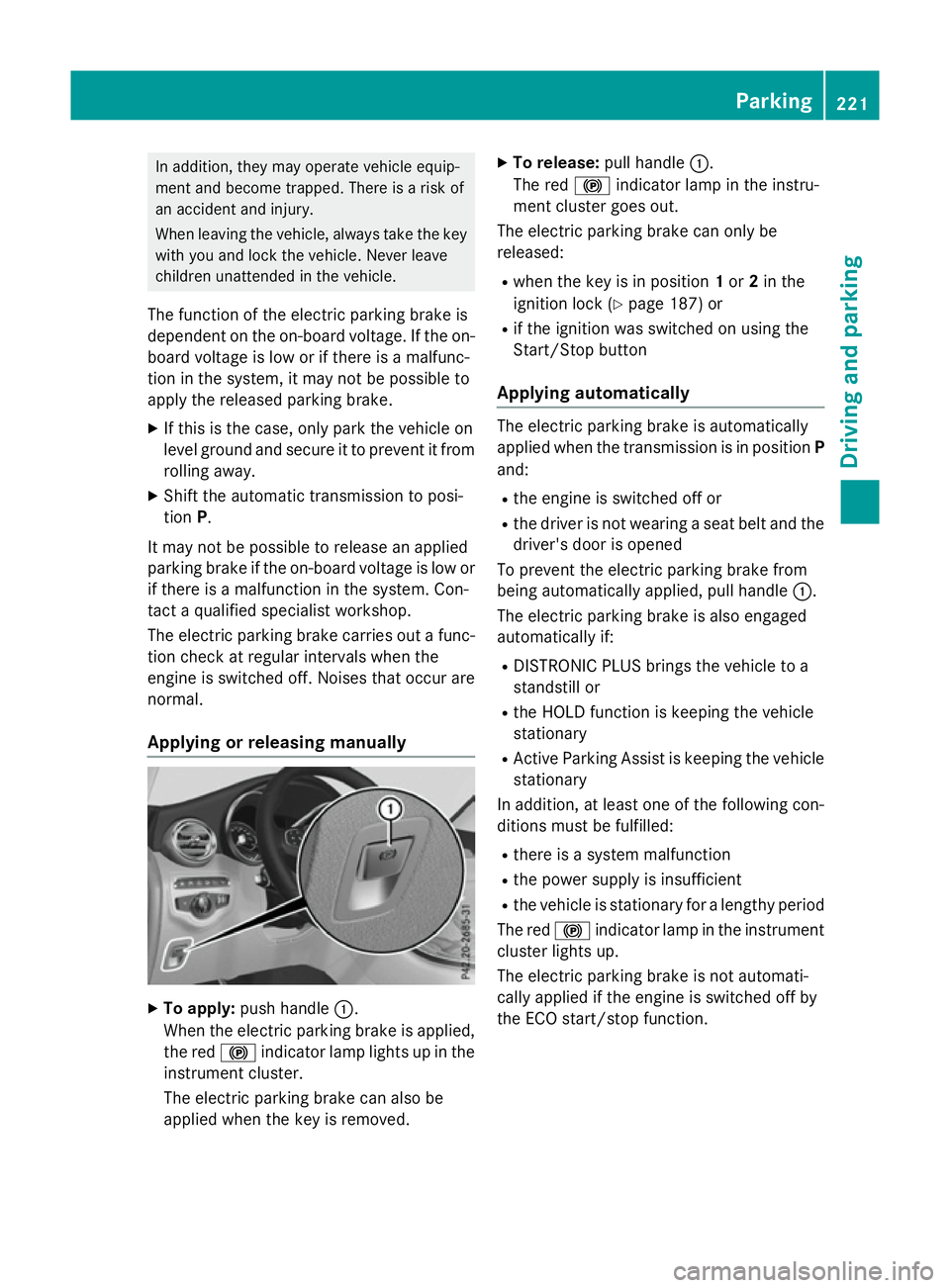
Applying or releasing manually X
To apply: push handle :.
When the electric parking brake is applied, the red !indicator lamp lights up in the
instrument cluster.
The electric parking brake can also be
applied when the key is removed. X
To release: pull handle:.
The red !indicator lamp in the instru-
ment cluster goes out.
The electric parking brake can only be
released:
R when the key is in position 1or 2in the
ignition lock (Y page 187) or
R if the ignition was switched on using the
Start/Stop button
Applying automatically The electric parking brake is automatically
applied when the transmission is in position
P
and:
R the engine is switched off or
R the driver is not wearing a seat belt and the
driver's door is opened
To prevent the electric parking brake from
being automatically applied, pull handle :.
The electric parking brake is also engaged
automatically if:
R DISTRONIC PLUS brings the vehicle to a
standstill or
R the HOLD function is keeping the vehicle
stationary
R Active Parking Assist is keeping the vehicle
stationary
In addition, at least one of the following con-
ditions must be fulfilled:
R there is a system malfunction
R the power supply is insufficient
R the vehicle is stationary for a lengthy period
The red !indicator lamp in the instrument
cluster lights up.
The electric parking brake is not automati-
cally applied if the engine is switched off by
the ECO start/stop function. Parking
221Driving and parking Z
Page 226 of 497
Service Booklet or by the service interval
display.
Fuel consumption also increases when driv-
ing in cold weather, in stop-start traffic, on
short journeys and in hilly terrain. ECO display
The ECO display shows you how economical
your driving style is. The ECO display assists
you in achieving the most economical driving
style for the selected settings and prevailing
conditions. Consumption can be significantly
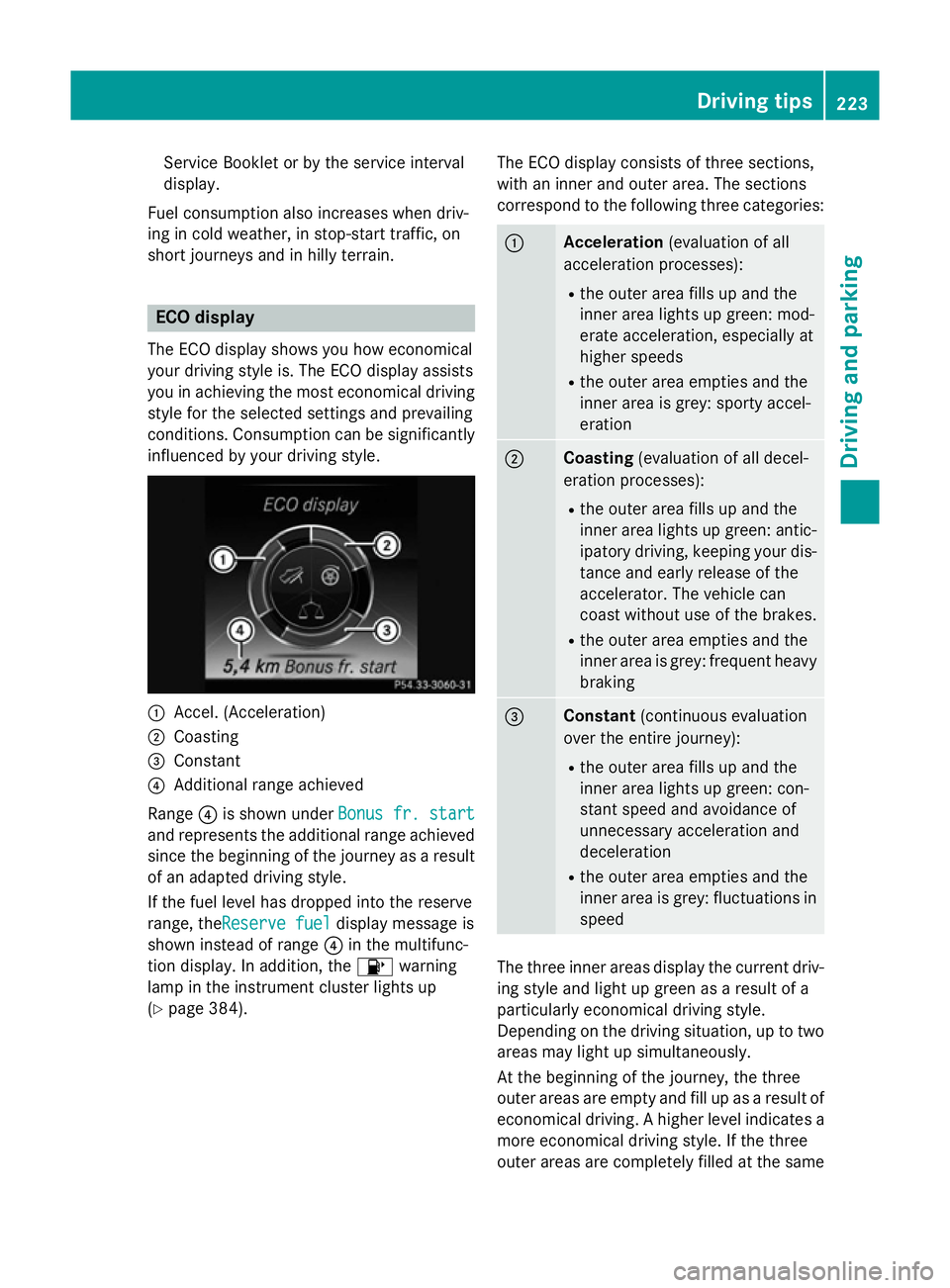
influenced by your driving style. :
Accel. (Acceleration)
; Coasting
= Constant
? Additional range achieved
Range ?is shown under Bonus fr. start Bonus fr. start
and represents the additional range achieved since the beginning of the journey as a resultof an adapted driving style.
If the fuel level has dropped into the reserve
range, theReserve fuel Reserve fuel display message is
shown instead of range ?in the multifunc-
tion display. In addition, the 8warning
lamp in the instrument cluster lights up
(Y page 384). The ECO display consists of three sections,
with an inner and outer area. The sections
correspond to the following three categories: :
Acceleration
(evaluation of all
acceleration processes):
R the outer area fills up and the
inner area lights up green: mod-
erate acceleration, especially at
higher speeds
R the outer area empties and the
inner area is grey: sporty accel-
eration ;
Coasting
(evaluation of all decel-
eration processes):
R the outer area fills up and the
inner area lights up green: antic-
ipatory driving, keeping your dis- tance and early release of the
accelerator. The vehicle can
coast without use of the brakes.
R the outer area empties and the
inner area is grey: frequent heavy
braking =
Constant
(continuous evaluation
over the entire journey):
R the outer area fills up and the
inner area lights up green: con-
stant speed and avoidance of
unnecessary acceleration and
deceleration
R the outer area empties and the
inner area is grey: fluctuations in
speed The three inner areas display the current driv-
ing style and light up green as a result of a
particularly economical driving style.
Depending on the driving situation, up to two
areas may light up simultaneously.
At the beginning of the journey, the three
outer areas are empty and fill up as a result of economical driving. A higher level indicates a more economical driving style. If the three
outer areas are completely filled at the same Driving tips
223Driving and parking Z
Page 227 of 497
time, the driver has adopted the most eco-
nomical driving style for the selected settings
and prevailing conditions. The ECO display
border lights up.
The ECO display does not indicate the actual fuel consumption. The additionally achieved
range displayed under Bonus fr. start
Bonus fr. start
does not indicate a fixed consumption reduc-
tion.
In addition to driving style, the actual con-
sumption is affected by other factors, such
as:
R load
R tyre pressure
R cold start
R choice of route
R the use of electrical consumers
These factors are not included in the ECO dis-
play.
An economical driving style involves driving at a moderate engine speed.
To achieve a higher value in the categories
"acceleration" and "smooth driving":
R observe the gearshift recommendation
R drive the vehicle in drive program E
On long journeys at a constant speed, e.g. on the motorway, only the outer area for "con-
stant" will change.
The ECO display summarises the driving style
from the start of the journey to its completion. Therefore, there are more marked changes in
the outer areas at the start of a journey. Dur- ing a prolonged driving time, these changes
are smaller. For more marked changes, per-
form a manual reset (Y page 319).
Further information on the ECO display
(Y page 318). Brakes
Important safety notes G
WARNING
If you shift down on a slippery road surface in an attempt to increase the engine's braking
effect, the drive wheels could lose their grip.
This increases the risk of skidding and having
an accident.
Do not shift down for additional engine brak-
ing on a slippery road surface.
Downhill gradients Change into a lower gear in good time on long
and steep downhill gradients. Take particular note of this when driving a laden vehicle and
when towing a trailer.
This also applies if cruise control, DISTRONIC
PLUS or SPEEDTRONIC are activated.
This will use the braking effect of the engine,
so less braking will be required to maintain
vehicle speed. This relieves the load on the
brake system and prevents the brakes from
overheating and wearing too quickly.
Heavy and light loads G
WARNING
The braking system can overheat if you leave your foot on the brake pedal while driving.
This increases the braking distance and could
even cause the braking system to fail. There is
a risk of an accident.
Never use the brake pedal as a footrest. Do
not simultaneously depress both the brake
pedal and the accelerator pedal while driving.
! Depressing the brake pedal constantly
results in excessive and premature wear to
the brake pads.
If heavy demands are made on the brakes, do not park the vehicle immediately. Drive on for
a short while. This allows the airflow to cool
the brakes more quickly. 224
Driving
tipsDriving an d parking
Page 228 of 497
If the brakes have been used only moderately,
you should occasionally test their effective-
ness. To do this, brake more firmly from a
higher speed while paying attention to the
traffic conditions. This improves the grip of
the brakes.
Wet road surfaces If you have driven for a long time in heavy rain
without braking, there may be a delayed reac-
tion from the brakes when braking for the first time. This may also occur after a car wash orafter driving through deep water.
You will have to depress the brake pedal more
firmly. Maintain a greater distance to the vehi-
cle in front.
After driving on a wet road or having the vehi- cle washed, brake firmly while paying atten-
tion to the traffic conditions. This will warm up
the brake discs, thereby drying them more
quickly and protecting them against corro-
sion.
Limited braking performance on salt-
treated roads If you drive on salt-treated roads, a layer of
salt may form on the brake discs and pads.
This can increase the braking distance con-
siderably.
R In order to prevent a layer of salt forming,
apply the brakes occasionally while paying
attention to the traffic conditions.
R Carefully depress the brake pedal at the
end of the journey and when starting the
next journey.
R Maintain a much greater distance to the
vehicle in front.
New brake discs and brake pads/
linings Brake pads/linings and discs that are either
new or have been replaced only achieve opti-
mum braking effect after several hundred kil-
ometres of driving. Compensate for the reduced braking effect by applying greater
force to the brake pedal.
For safety reasons, Mercedes-Benz recom-
mends only fitting the following brake discs
and brake pads/linings:
R brake discs that have been approved by
Mercedes-Benz
R brake pads/linings that have been
approved by Mercedes-Benz or that are of
an equivalent standard of quality
Other brake discs or brake pads/linings can
compromise the safety of your vehicle.
Always replace all brake discs and brake
pads/linings on an axle at the same time.
Always fit new brake pads/linings when
replacing brake discs.
The vehicle is equipped with lightweight
brake discs to which the wheel assembly with
rim and threaded connection is matched.
The use of brake discs other than those
approved by Mercedes-Benz may alter track
width and is subject to approval, if applicable.
Shock-type loads when handling the brake
discs, such as when changing wheels, can
lead to a reduction in comfort when driving
with lightweight brake discs. Avoid shock-
type loads on the lightweight brake discs,
particularly on the brake plate. Driving on wet roads
Aquaplaning If water has accumulated to a certain depth
on the road surface, there is a danger of aqua-
planing occurring, even if:
R you are driving at low speeds
R the tyres have adequate tread depth
For this reason, drive in the following manner in the event of heavy rain or in conditions in
which aquaplaning can occur:
R lower your speed
R avoid tyre ruts Driving tips
225Driving and parking Z
Page 231 of 497
The following driving systems are specially
adapted for driving over easily negotiable off-
road terrain:
R Off-road program (Y page 250)
R Off-road ABS (Y page 79)
R Off-road 4ETS (Y page 85)
R Off-road ESP ®
(Y page 85)
R DSR (Downhill Speed Regulation)
(Y page 248)
Observe the following notes:
R Stop the vehicle before driving off-road. If
necessary, activate the off-road program
(Y page 250).
R To avoid damaging the vehicle, make sure
there is always sufficient ground clearance.
R Make sure that items of luggage and loads
are stowed safely and are well secured
(Y page 396).
R Always keep the engine running and in gear
when driving on a downhill gradient. Acti-
vate DSR (Y page 248).
R Drive slowly and evenly, if necessary at
walking pace.
R Ensure that the wheels are in contact with
the ground at all times.
R Drive with extreme care on unknown off-
road routes where visibility is poor. For
safety reasons, get out of the vehicle first
and survey the off-road route.
R Check the depth of water before fording
rivers and streams.
R Watch out for obstacles.
R Take care when turning on an uphill or
downhill slope or when driving across a
slope. The vehicle could otherwise tip over.
R Always keep the side windows and the pan-
orama sliding sunroof closed during the
journey.
R Do not deviate from marked routes.
Do not use the HOLD function when driving
off-road, on steep uphill or downhill gradients or on slippery or loose surfaces. The HOLD
function cannot hold the vehicle on such sur-
faces. Checklist before driving off-road X
Engine oil level: check the engine oil and
top it up if necessary.
When driving on steep gradients, the oil
level must be sufficiently high to ensure a
correct oil supply in the vehicle.
X Wheels and tyres: check the tyre tread
depth and tyre pressure.
X Check for damage and remove any foreign
objects, e.g. small stones, from the
wheels/tyres.
X Replace any missing valve caps.
X Replace dented or damaged wheels.
X Wheels: dented or bent wheels can lead to
a loss of tyre pressure and damage to the
tyre bead. Before driving off-road, check
the wheels and replace them if necessary.
Checklist after driving off-road !
If you detect damage to the vehicle after
driving off-road, have the vehicle checked
immediately at a qualified specialist work-
shop.
X Deactivate the off-road program
(Y page 250).
X Deactivate DSR (Y page 248).
X Clean the headlamps and rear lights and
check for damage.
X Clean the front and rear licence plates.
X Clean the wheels/tyres with a water jet and
remove any foreign objects.
X Clean the wheels, wheel arches and the
vehicle underside with a water jet; check
for any foreign objects and damage.
X Check whether twigs or other parts of
plants have become trapped. These
increase the risk of fire and can damage
fuel pipes, brake hoses or the rubber bel-
lows of the axle joints and propeller shafts.
X After the trip, examine without fail the
entire undercarriage, wheels, tyres, brakes,
bodywork structure, steering, chassis and
exhaust system for damage. 228
Driving tipsDriving and parking
Page 233 of 497
Hill start assist will aid you when pulling away
on a hill. For further information about hill
start assist, see (Y page 191).
Do not shift into transmission position N
when driving off-road. You could lose control
of the vehicle if you attempt to brake the
vehicle using the service brake. If the gradient
is too steep for your vehicle, back up in
reverse gear.
Always observe the approach/departure
angle values (Y page 489).
Maximum gradient-climbing capability Always observe the maximum gradient climb-
ing ability values (Y page 489).
Hilltops When driving up an uphill gradient, slightly
reduce pressure on the accelerator immedi-
ately before reaching the brow of the hill.
Make use of the vehicle's own impetus to
travel over the brow.
This style of driving prevents:
R the vehicle from lifting off the ground on the
brow of a hill
R the vehicle from travelling too quickly down
the other side
Driving downhill R
Drive slowly.
R Do not drive at an angle down steep
inclines. Steer into the line of fall and drive with the front wheels aligned straight. Oth-erwise, the vehicle could slip sideways, tip
and overturn.
R Before tackling steep downhill gradients,
use the left-hand steering wheel gearshift
paddle to shift to a lower gear.
R Activate DSR. If this is not sufficient, brake
gently. When doing so, make sure that the
vehicle is facing in the direction of the line
of fall.
R Check that the brakes are working normally
after a long downhill stretch. Off-road ABS is activated when the off-road
program is selected.
At speeds below 30 km/h the front wheels
lock cyclically during braking. The digging-in
effect achieved in the process reduces the
stopping distance when driving off-road. The
steerability of the vehicle is considerably
reduced if the wheels lock.
Driving systems
Mercedes-Benz Intelligent Drive
Mercedes-Benz Intelligent Drive stands for
innovative driver assistance and safety sys-
tems which enhance comfort and support the
driver in critical situations. With these intelli-
gent co-ordinated systems Mercedes-Benz
has set a milestone on the path towards
autonomous driving.
Mercedes-Benz Intelligent Drive embraces all elements of active and passive safety in one
well thought-out system – for the safety of the vehicle occupants and that of other road
users.
Further information on driving safety systems (Y page 78). Cruise control
General notes Cruise control maintains a constant road
speed for you. It brakes automatically in order to avoid exceeding the set speed. Change into
a lower gear in good time on long and steep
downhill gradients. Take particular note of
this when driving a laden vehicle and when
towing a trailer. By doing so, you will make
use of the braking effect of the engine. This
relieves the load on the brake system and
prevents the brakes from overheating and
wearing too quickly.
Use cruise control only if road and traffic con- ditions are appropriate for maintaining a
steady speed for a prolonged period. You canstore any road speed above 30 km/h. 230
Driving systemsDriving and parking