brake light MERCEDES-BENZ GLC SUV 2018 Owner's Guide
[x] Cancel search | Manufacturer: MERCEDES-BENZ, Model Year: 2018, Model line: GLC SUV, Model: MERCEDES-BENZ GLC SUV 2018Pages: 390, PDF Size: 6.54 MB
Page 171 of 390
Drivingsystems
Mercedes-Benz Intelligent Drive
Mercedes-Ben zIntelligen tDrive stand sfo rinno -
vative driver assistanc eand safet ysystems
whic henhance comfor tand suppor tth edriver in
critical situations. Wit hthese intelligen tcoordi-
nated systems Mercedes-Ben zhas set amile-
ston eon th epat htoward sautonomous driving.
Mercedes-Ben zIntelligen tDrive embraces all
elements of active and passive safet yin on ewell
though tout syste m –forth esafet yof th evehi-
cl e occupant sand that of other road users.
Further information on drivin gsafet ysystems
(
Ypage 66).
Cruis econtro l
General notes
Cruise contro lmaintain s aconstant road speed
fo ryou. It brake sautomatically in order to avoid
exceedin gth eset speed. Change into alowe r
gear in goo dtime on lon gand steep downhill
gradients. Thi sis especially important if th e
vehicle is lade nor towin g atrailer .By doin gso,
you will mak euse of th ebraking effect of th e
engine. Thi srelieves th eload on th ebrake sys -
te m and prevents th ebrake sfrom overheatin g
and wearin gto oquickly.
Use cruise contro lonly if road and traffic con-
dition smak eit appropriat eto maintain asteady
speed fo r aprolonged period. You can stor eany
road speed abov e20 mph (30 km/h).
Important safet ynotes
Cruise contro lcan neither reduce th eris kof an
acciden tif you fai lto adapt your drivin gstyle no r
override th elaws of physics. Cruise contro lcan -
no ttake into accoun tth eroad, traffic and
weather conditions. Cruise contro lis only an
aid. You are responsible fo rmaintainin g asafe
distanc eto th evehicle in front, fo rvehicle
speed, fo rbraking in goo dtime and fo rstayin gin
lane. Do no
tuse cruise control:
Rin road and traffic condition swhic hdo no t
allow you to maintain aconstant speed, e.g. in
heav ytraffic or on windin groads
Ron slipper yroad surfaces. Brakin gor accel-
erating could cause th edrive wheels to los e
traction and th evehicle could then skid
Rwhen there is poo rvisibility, e.g. due to fog,
heav yrain or snow
If there is achang eof drivers, advise th ene w
driver of th espeed stored.
iThe speed indicated in th espeedometer
may diffe rslightly from th espeed stored.
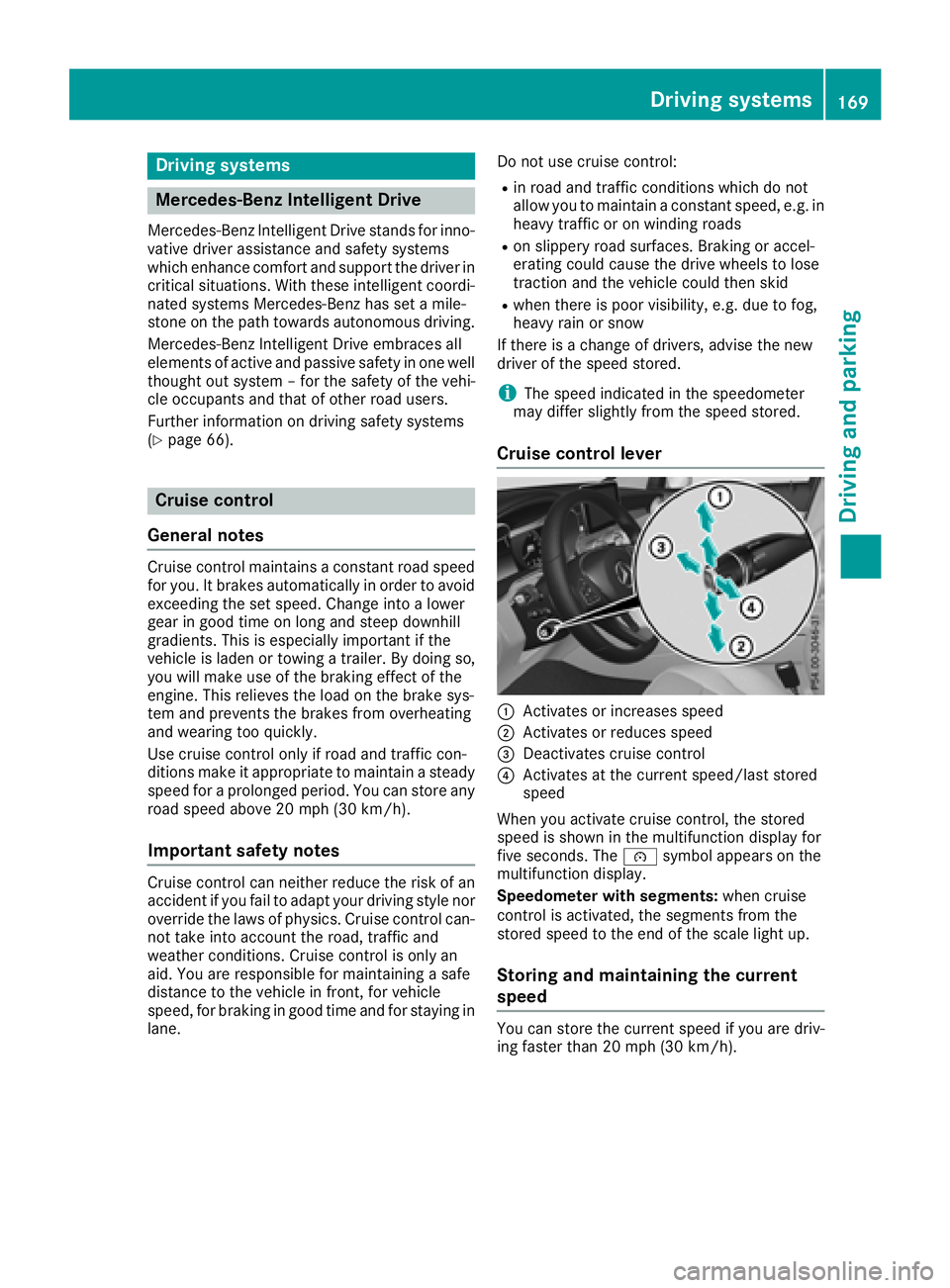
Cruis econtro llever
:Activates or increase sspeed
;Activates or reduce sspeed
=Deactivates cruise contro l
?Activates at thecurren tspeed/last stored
speed
Whe nyou activat ecruise control, th estored
speed is shown in th emultifunction display fo r
fiv eseconds. The ésymbol appears on th e
multifunction display.
Speedometer wit hsegments: when cruise
contro lis activated, th esegments from th e
stored speed to th een dof th escale ligh tup.
Storing an dmaintaining th ecurrent
speed
You can stor eth ecurren tspeed if you are driv-
in g faste rthan 20 mph (30 km/h).
Driving systems16 9
Driving an d parking
Z
Page 173 of 390
Change into a lower gearingood time on long
and steep downhillgradients. This isespecially
impo rtant ifthe veh icle isladen. By doing so, you
will make use of the braking effect of the engine.
This relieves the load on the brake system and
prevents the brakes from overheating and wear-
ing too quickly.
If Distance Pilot DI STRONIC detects that there is
a risk of a co llision, you will be warned visually
and acoustically. Without your intervention, Dis-
tance Pilot DISTRONIC cannot prevent a co lli-
sion. An intermittent warning tone willthen
sound and the distance warning lamp willlight
up inthe instrument cluster. Brake immediately
in order to increase the distance to the veh icle in
front or take evasive action pro videdit is safe to
do so.
Distance Pilot DI STRONIC operates inthe range
between 0 mph (0 km/h) and 120 mph
(200 km/h).
Do not use Distance Pilot DI STRONIC while driv -
ing on roads with steep gradients.
Sin ce Distance Pilot DI STRONIC transmits radar
waves, itcan resemble the radar detectors of
the responsible authorities. You can refer to the
relevant chapter inthe Operator's Manual if
questions are asked about this.
iUSA only: This device has been approved by
the FCC as a "Vehicular Radar System". The
radar sensor isintended for use in
an aut
o-
motive radar system only. Removal, tamper-
ing, or altering of the device willvoid any war-
ranties, and isnot permitted bythe FCC. Do
not tamper with, alter, or use inany non-
approved way.
Any unauthorized mod ification to th isdevice
could void the user's authority to operate the
equipm ent.
iCanada only: This device co mplieswit h
RSS -210 of Industry Canada. Operation is
subject to the foll owing two conditions:
1. This device may not cause interference,
and
2. This device must accept any interference
receive d,inc ludin g interference that may
cause undesired operation of the device.
Removal, tampering, or altering of the device
will void any warranties, and isnot permitte d.
Do not tamper with, alter, or use inany non-
approved way. Any unauthorized modification to this device
could void the user's authority to operate the
equipment.
Important safety notes
GWARNING
Distance Pilot DI STRONIC does not react to:
Rpeople or animals
Rstationary objects on the road, e.g. stoppe d
or parked vehicles
Roncoming vehicles and crossing traffic
As a result, Distance Pilot DI STRONIC may
neither givewarnings nor intervene insuch
situations. There isa risk of an accident.
Alwa ys pay careful attention to the traff icsit-
uation and be ready to brake.
GWARNING
Distance Pilot DI STRONIC cannot always
clearly identify other road users and co mplex
traff icsituations.
In such cases, Distance Pilot DI STRONIC may:
Rgive an unnecessary warning and then
brake the vehicle
Rneither givea warning nor intervene
Raccelerate or brake unexpect edly
There isa risk of an accident.
Continue to drive carefully and be ready to
brake, especially if Distance Pilot DISTRONIC
warns you.
GWARNING
Distance Pilot DI STRONIC brakes your vehicle
with up to 50% of the maximum possible
deceleration. If this deceleration isnot suffi-
cient, Distance Pilot DI STRONIC alerts you
wit h a visual and acoustic warning. There is a
risk of an accident.
Apply the brakes yourself inthese situations
and try to take evasive action.
!When Distance Pilot DI STRONIC or the
HOLD function are activated, the vehicle
brakes automatically in certain situations.
Driving systems171
Driving and parking
Z
Page 174 of 390
To avoid damage to the vehicle, deactivate
these systems in the following or similar sit-
uations:
Rwhen towing the vehicle
Rin the car wash
Distance Pilot DISTRONIC can neither reduce
the risk of an accident if you fail to adapt your
driving style nor override the laws of physics.
Distance Pilot DISTRONIC cannot take into
account road, weather or traffic conditions. Dis-
tance Pilot DISTRONIC is only an aid. You are
responsible for maintaining a safe distance to
the vehicle in front, for vehicle speed, for brak-
ing in good time and for staying in lane.
Do not use Distance Pilot DISTRONIC:
Rin road and traffic conditions which do not
allow you to maintain a constant speed, e.g. in
heavy traffic or on winding roads
Ron slippery road surfaces. Braking or accel-
erating could cause the drive wheels to lose
traction and the vehicle could then skid
Rin poor visibility, e.g. due to fog, heavy rain or
snow
Distance Pilot DISTRONIC may not detect nar-
row vehicles driving in front, e.g. motorcycles, or
vehicles driving on a different line.
In particular, the detection of obstacles can be
impaired if:
Rthere is dirt on the sensors or anything else
covering the sensors
Rthere is snow or heavy rain
Rthere is interference by other radar sources
Rthere are strong radar reflections, for exam-
ple in parking garages
If Distance Pilot DISTRONIC no longer detects a
vehicle in front, it may unexpectedly accelerate
to the speed stored.
This speed may:
Rbe too high if you are driving in a turning lane
or an exit lane
Rbe so high in the right lane that you pass vehi- cles driving on the left (in countries where
they drive on the right)
Rbe so high in the left lane that you pass vehi-
cles driving on the right (in countries where
they drive on the left)
If there is a change of drivers, advise the new
driver of the speed stored.
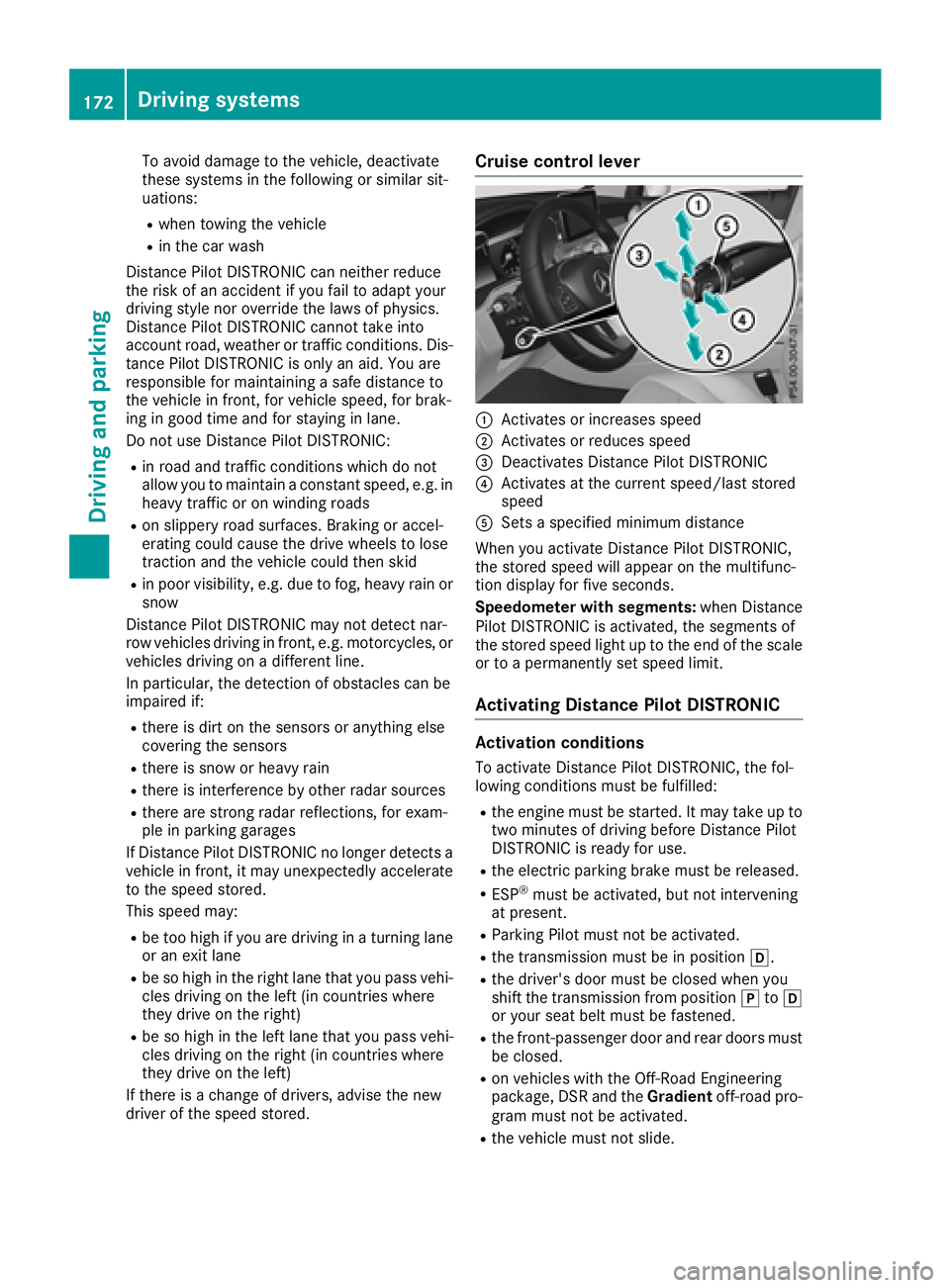
Cruise control lever
:Activates or increases speed
;Activates or reduces speed
=Deactivates Distance Pilot DISTRONIC
?Activates at the current speed/last stored
speed
ASets a specified minimum distance
When you activate Distance Pilot DISTRONIC,
the stored speed will appear on the multifunc-
tion display for five seconds.
Speedometer with segments: when Distance
Pilot DISTRONIC is activated, the segments of
the stored speed light up to the end of the scale
or to a permanently set speed limit.
Activating Distance Pilot DISTRONIC
Activation conditions
To activate Distance Pilot DISTRONIC, the fol-
lowing conditions must be fulfilled:
Rthe engine must be started. It may take up to
two minutes of driving before Distance Pilot
DISTRONIC is ready for use.
Rthe electric parking brake must be released.
RESP®must be activated, but not intervening
at present.
RParking Pilot must not be activated.
Rthe transmission must be in position h.
Rthe driver's door must be closed when you
shift the transmission from positionjtoh
or your seat belt must be fastened.
Rthe front-passenger door and rear doors must
be closed.
Ron vehicles with the Off-Road Engineering
package, DSR and the Gradientoff-road pro-
gram must not be activated.
Rthe vehicle must not slide.
172Driving systems
Driving and parking
Page 180 of 390
Steering Pilot cannot provide assistance:
Ron very sharp corners
Rwhen towing a trailer
Rwhen a loss of tire pressure or a defective tire
has been detected and displayed
Pay attention also to the important safety notes on Distance Pilot DISTRONIC (
Ypage 171).
The steering interventions are carried out with a
limited steering moment. The system requires
the driver to keep his hands on the steering
wheel and to steer himself.
If you do not steer yourself or if you take your
hands off the steering wheel for a prolonged
period of time, the system will first alert you with
a visual warning. A steering wheel symbol
appears in the multifunction display. If you have
still not started to steer and have not taken hold
of the steering wheel, a warning tone also
sounds to remind you to take control of the
vehicle after five seconds at the latest. Steering
Pilot is then switched to passive. Distance Pilot
DISTRONIC remains active.
Activating Steering Pilot
XPress button ;.
Indicator lamp :lights up. The Steering
PilotOnmessage appears on the multifunc-
tion display. Steering Pilot is activated.
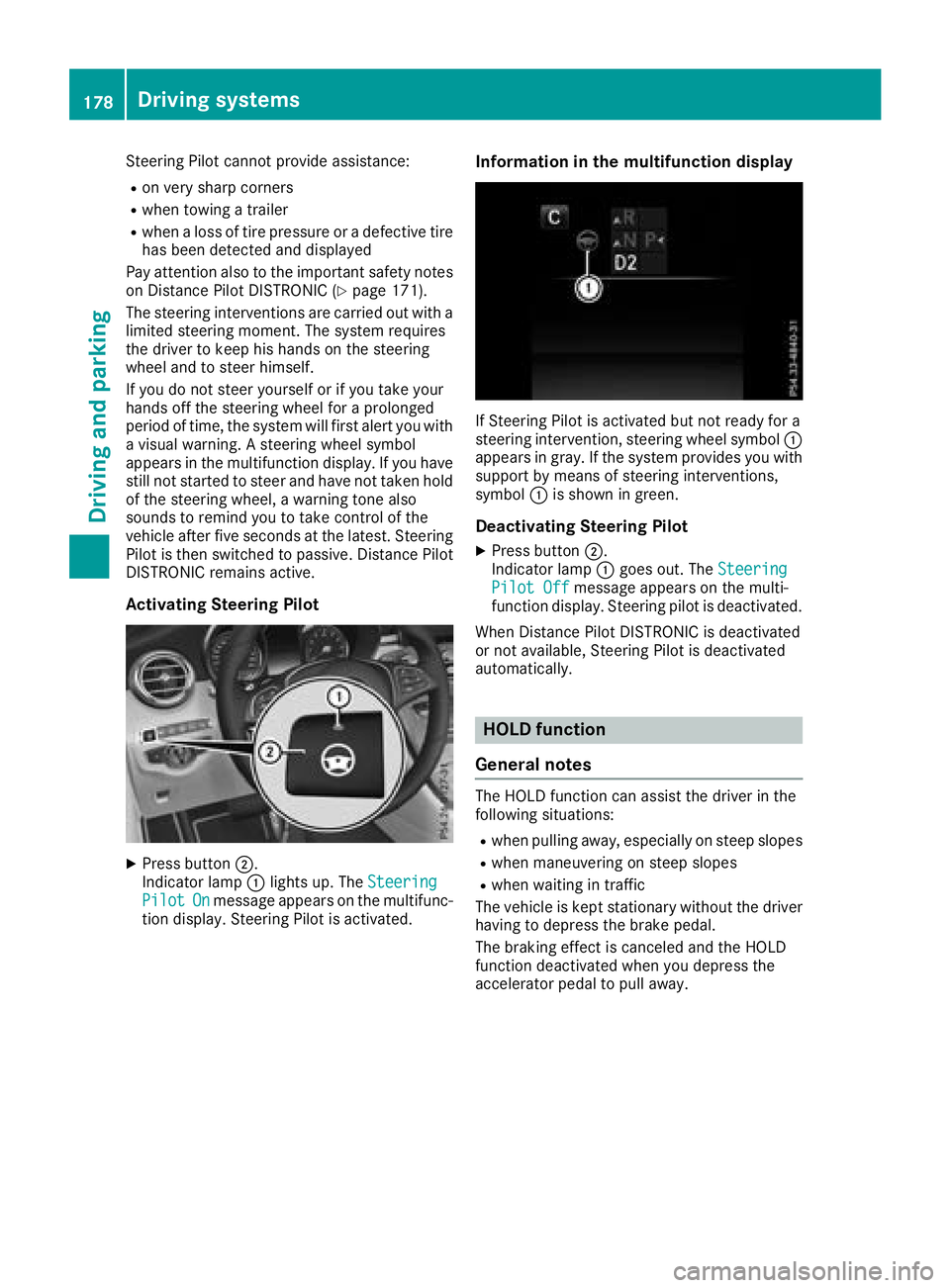
Information in the multifunction display
If Steering Pilot is activated but not ready for a
steering intervention, steering wheel symbol :
appears in gray. If the system provides you with support by means of steering interventions,
symbol :is shown in green.
Deactivating Steering Pilot
XPress button ;.
Indicator lamp :goes out. The Steering
Pilot Offmessage appears on the multi-
function display. Steering pilot is deactivated.
When Distance Pilot DISTRONIC is deactivated
or not available, Steering Pilot is deactivated
automatically.
HOLD function
General notes
The HOLD function can assist the driver in the
following situations:
Rwhen pulling away, especially on steep slopes
Rwhen maneuvering on steep slopes
Rwhen waiting in traffic
The vehicle is kept stationary without the driver having to depress the brake pedal.
The braking effect is canceled and the HOLD
function deactivated when you depress the
accelerator pedal to pull away.
178Driving systems
Driving and parking
Page 182 of 390
The electric parking brake secures the vehicle
automatically if the HOLD function is activated
when the vehicle is stationary and:
Ra system malfunction occurs
Rthe power supply is insufficient
If a malfunction occurs, the transmission may
also be shifted to position jautomatically.
DSR
General notes
DSR (Downhill Speed Regulation) is an aid to
assist you when driving downhill that is available only in vehicles with the Off-Road Engineering
package.
It keeps the speed of travel at the speed selec-
ted on the on-board computer. The steeper the
downhill gradient, the greater the DSR braking
effect on the vehicle. When driving on flat
stretches of road or on an uphill gradient, the
DSR braking effect is minimal or nonexistent.
DSR controls the vehicle’s speed when it is acti-
vated and the transmission is in position h,k
or i. You can drive at a higher or a lower speed
than that set on the on-board computer at any
time by accelerating or braking.
Important safety notes
GWARNING
If the speed driven and the set speed deviate and you activate DSR on a slippery road sur-
face, the wheels may lose traction. There is an
increased danger of skidding and accidents.
Before switching DSR on, please take into
consideration the road surface and the differ- ence between driving speed and the set
speed.
DSR can neither reduce the risk of accident if
you fail to adapt your driving style nor override
the laws of physics. DSR cannot take account of
road, weather and traffic conditions. DSR is only
an aid. You are responsible for maintaining a
safe distance to the vehicle in front, for vehicle
speed, for braking in good time and for staying in
lane.
You are always responsible for keeping control
of the vehicle and for assessing whether the
downhill gradient can be managed. DSR may not always be able to keep to the set speed, depend-
ing on road surface and tire conditions. Select a
set speed suitable for the prevailing conditions
and when necessary, apply the brakes manually.
Further information about "Driving off-road"
(
Ypage 165).
Activating/deactivating DSR
If you activate DSR and no speed has been set,
the vehicle decelerates to 4 mph (6 km/h).
You can activate DSR only when driving at
speeds below 25 mph (40 km/h).
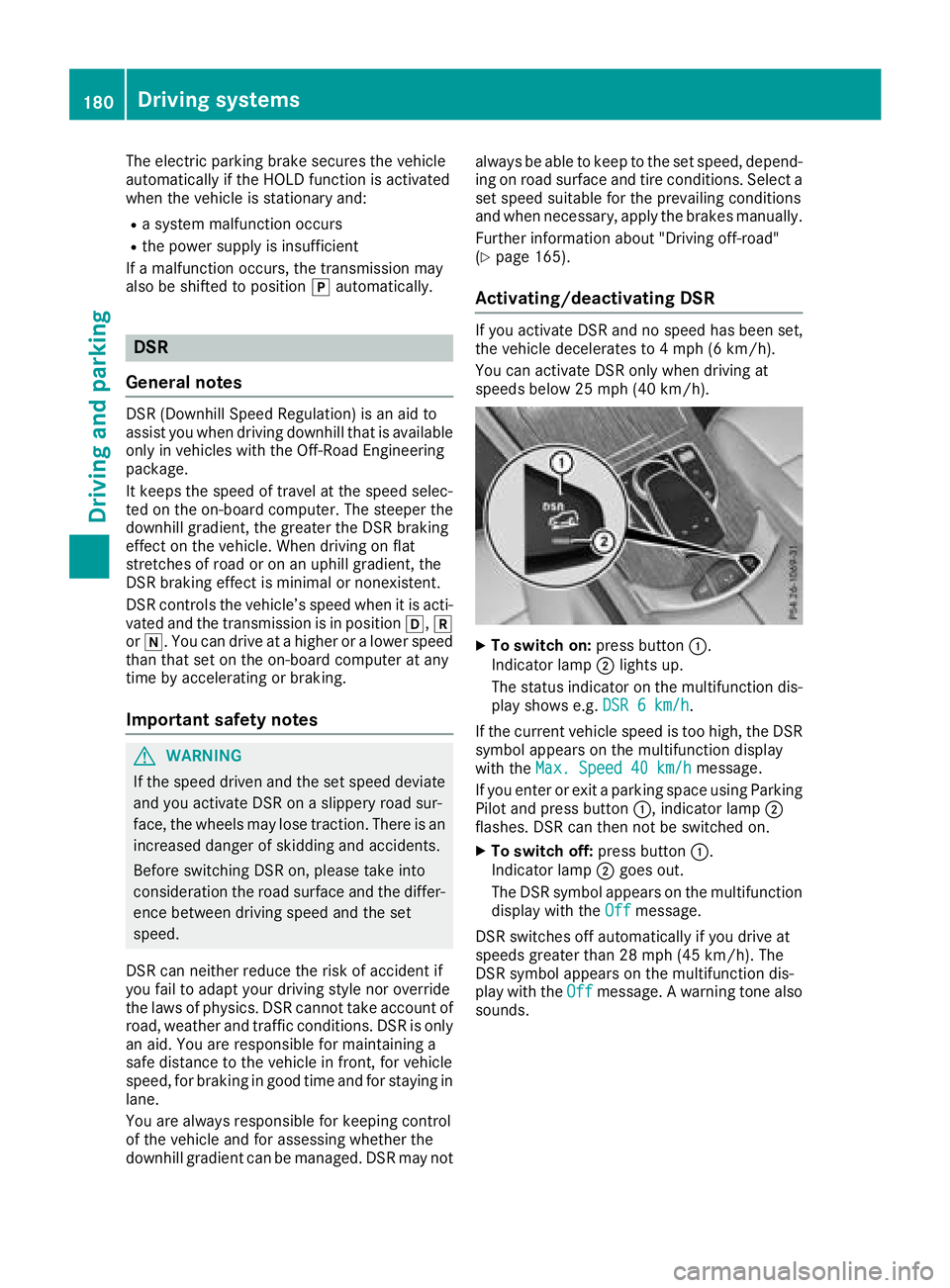
XTo switch on: press button:.
Indicator lamp ;lights up.
The status indicator on the multifunction dis- play shows e.g. DSR 6 km/h
.
If the current vehicle speed is too high, the DSR
symbol appears on the multifunction display
with the Max. Speed 40 km/h
message.
If you enter or exit a parking space using Parking
Pilot and press button :, indicator lamp;
flashes. DSR can then not be switched on.
XTo switch off: press button:.
Indicator lamp ;goes out.
The DSR symbol appears on the multifunction
display with the Off
message.
DSR switches off automatically if you drive at
speeds greater than 28 mph (45 km/h). The
DSR symbol appears on the multifunction dis-
play with the Off
message. A warning tone also
sounds.
180Driving systems
Driving and parking
Page 190 of 390
Parking Pilot
General notes
Parking Pilot is an electronic parking aid with
ultrasound. It measures the road on both sides
of the vehicle. A parking symbol indicates a suit-
able parking space. Active steering intervention
and brake application can assist you during
parking and when exiting a parking space. You
can also still use Parking Assist PARKTRONIC
(
Ypage 191).
Important safety notes
Parking Pilot is only an aid. It is not a replace-
ment for your attention to your immediate sur-
roundings. You are always responsible for safe
maneuvering, parking and exiting a parking
space. Make sure that no persons, animals or
objects are in the path of your vehicle.
When Parking Assist PARKTRONIC is deactiva-
ted, Parking Pilot is also unavailable.
For vehicles with a trailer tow hitch installed, the
minimum length for parking spaces is slightly
longer.
If you have attached a trailer to your vehicle, you
should not use Parking Pilot. Once the electrical
connection is established between your vehicle
and the trailer, Parking Pilot is no longer availa-
ble. Parking Assist PARKTRONIC is deactivated
for the rear area.
GWARNING
While parking or pulling out of a parking
space, the vehicle swings out and can drive
onto areas of the oncoming lane. This could
result in a collision with another road user.
There is a risk of an accident.
Pay attention to other road users. Stop the
vehicle if necessary or cancel the Parking Pilot
parking procedure.
!If they cannot be avoided, drive over obsta-
cles such as curbs slowly and at an obtuse
angle. Otherwise, you may damage the
wheels or tires.
Parking Pilot may also display spaces not suita-
ble for parking, e.g.:
Rwhere parking or stopping is prohibited
Rin front of driveways or entrances and exits
Ron unsuitable surfaces Parking tips:
ROn narrow roads, drive as close to the parking
space as possible.
RParking spaces that are littered or overgrown
might be identified or measured incorrectly.
RParking spaces that are partially occupied by
trailer drawbars might not be identified as
such or be measured incorrectly.
RSnowfall or heavy rain may lead to a parking
space being measured inaccurately.
RPay attention to the warning messages of
Parking Assist PARKTRONIC during the park-
ing procedure (
Ypage 193).
RYou can intervene in the steering procedure
to correct it at any time. Parking Pilot is then
canceled-
RWhen transporting a load that protrudes from
your vehicle, you should not use Parking Pilot-
RNever use Parking Pilot when snow chains are
mounted.
RAlways pay attention to the specified tire
pressure for your vehicle. This has a direct
influence on the parking characteristics of the
vehicle.
Use Parking Pilot for parking spaces that are:
Rparallel or at right angles to the direction of
travel
Ron straight roads, not bends
Ron the same level as the road, e.g. not on the
pavement
Detecting parking spaces
Objects located above the detection range of
Parking Pilot will not be detected when the park-
ing space is measured. These are not taken into
account when the parking procedure is calcula- ted, e.g. overhanging loads, tail sections or load-
ing ramps of trucks. Parking Pilot may therefore
guide you into the parking space too early.
GWARNING
If there are objects above the detection range:
RParking Pilot may steer in too early
Rthe vehicle may not stop in front of these
objects
You may cause a collision as a result. There is
a risk of an accident.
If objects are located above the detection
range, stop and deactivate Parking Pilot.
188Driving systems
Driving and parking
Page 193 of 390
while the vehicle is exiting the parking space.
You are responsible for braking in good time.
XStart the engine.
XRelease the electric parking brake.
XSwitch on the turn signal in the direction you
are pulling away.
XShift the transmission to positionhork.
The Start Parking Pilot?Yes: OKNo:% message appears in the multifunction
display.
XTo cancel the procedure: press the%
button on the multifunction steering wheel or
pull away.
or
XTo exit a parking space using Parking
Pilot: press the abutton on the multi-
function steering wheel.
The Parking Pilot Active Accelerate
and BrakeObserve Surroundingsmes-
sage appears in the multifunction display.
XLet go of the multifunction steering wheel.
XPull away, being ready to brake at all times. Do
not exceed a maximum speed of approx-
imately 6 mph (10 km/h) when exiting a park-
ing space. Otherwise, Parking Pilot is can-
celed immediately.
XDepending on the message or as required,
shift the transmission to position hork.
Parking Pilot immediately steers in the other
direction. The Parking Pilot Active
Accelerate and BrakeObserve Sur‐roundingsmessage appears in the multi-
function display.
iYou will achieve the best results by waiting
for the steering procedure to complete before
pulling away.
If you back up after activation, the steering
wheel is moved to the straight-ahead posi-
tion.
XDrive forwards and reverse as prompted by
Parking Assist PARKTRONIC warning dis-
plays, several times if necessary.
Once you have exited the parking space com-
pletely, the steering wheel is moved to the
straight-ahead position. You hear a tone and the
Parking
PilotFinishedmessage appears in
the multifunction display. You will then have to
steer and merge into traffic on your own. Park-
ing Assist PARKTRONIC is still available. You can
take over the steering before the vehicle has
exited the parking space completely. This is useful if you recognize that it is already possible
to pull out of the parking space.
Canceling Active Parking Pilot
XStop the movement of the multifunction
steering wheel or steer yourself.
Parking Pilot is canceled immediately. The
Parking
PilotCanceledmessage appears
on the multifunction display.
or
XPress the Parking Assist PARKTRONIC button
(Ypage 193).
Parking Assist PARKTRONIC is switched off
and Parking Pilot is immediately canceled.
The Parking Pilot Canceled
message
appears on the multifunction display.
Parking Pilot is canceled automatically when:
Rthe electric parking brake is engaged
Rtransmission position jis selected
Rparking using Parking Pilot is no longer pos-
sible
Ryou are driving faster than 6 mph (10 km/h)
Ra wheel spins, ESP®intervenes or fails. In
such cases the ÷warning lamp lights up in
the instrument cluster
A warning tone sounds. The parking symbol dis-
appears and the multifunction display shows the
Parking Pilot Canceled
message.
When Parking Pilot is canceled, you must steer
and brake again yourself.
If a system malfunction occurs, the vehicle is
braked to a standstill. To drive on, depress the
accelerator again.
Parking Assist PARKTRONIC
Important safety notes
Parking Assist PARKTRONIC is an electronic
parking aid with ultrasound. It monitors the area
around your vehicle using six sensors in the
front bumper and six sensors in the rear
bumper. Parking Assist PARKTRONIC visually
and audibly indicates the distance between your
vehicle and an object.
Parking Assist PARKTRONIC is only an aid. It is
not a replacement for your attention to your
immediate surroundings. You are always
responsible for safe maneuvering, parking and
exiting a parking space. Make sure that there
Driving systems191
Driving and parking
Z
Page 210 of 390
This function is available in the range between
40 mph and 120 mph (60 km/hand 200 km/h).
A warning may be given if a front wheel passes
over a lane marking. It will warn you by means of
intermittent vibration in the steering wheel for
up to 1.5 seconds.
Important safety notes
GWARNING
Lane Keeping Assist cannot always clearly
detect lane markings.
In such cases, Lane Keeping Assist can:
Rgive an unnecessary warning
Rnot give a warning
There is a risk of an accident.
Always pay particular attention to the traffic
situation and keep within the lane, especially
if Lane Keeping Assist alerts you.
GWARNING
The Lane Keeping Assist warning does not
return the vehicle to the original lane. There is
a risk of an accident.
You should always steer, brake or accelerate
yourself, in particular if warned by Lane Keep-
ing Assist.
Lane Keeping Assist can neither reduce the risk of an accident if you fail to adapt your driving
style nor override the laws of physics. Lane
Keeping Assist cannot take into account the
road, traffic and weather conditions. Lane Keep-
ing Assist is merely an aid. You are responsible
for the distance to the vehicle in front, for vehi-
cle speed, for braking in good time and for stay-
ing in your lane.
The Lane Keeping Assist does not keep the vehi-
cle in the lane.
The system may be impaired or may not function
if:
Rthere is poor visibility, e.g. due to insufficient
illumination of the road, or due to snow, rain,
fog or spray
Rthere is glare, e.g. from oncoming traffic, the
sun or reflection from other vehicles (e.g. if
the road surface is wet)
Rthe windshield is dirty, fogged up, damaged or
covered, for instance by a sticker, in the vicin-
ity of the camera
Rthere are no, several or unclear lane markings
for a lane, e.g. in areas with road construction
work
Rthe lane markings are worn away, dark or cov-
ered up, e.g. by dirt or snow
Rthe distance to the vehicle in front is too small
and the lane markings thus cannot be detec-
ted
Rthe lane markings change quickly, e.g. lanes
branch off, cross one another or merge
Rthe road is narrow and winding
Rthere are highly variable shade conditions on the roadway
Activating/deactivating Lane Keeping
Assist
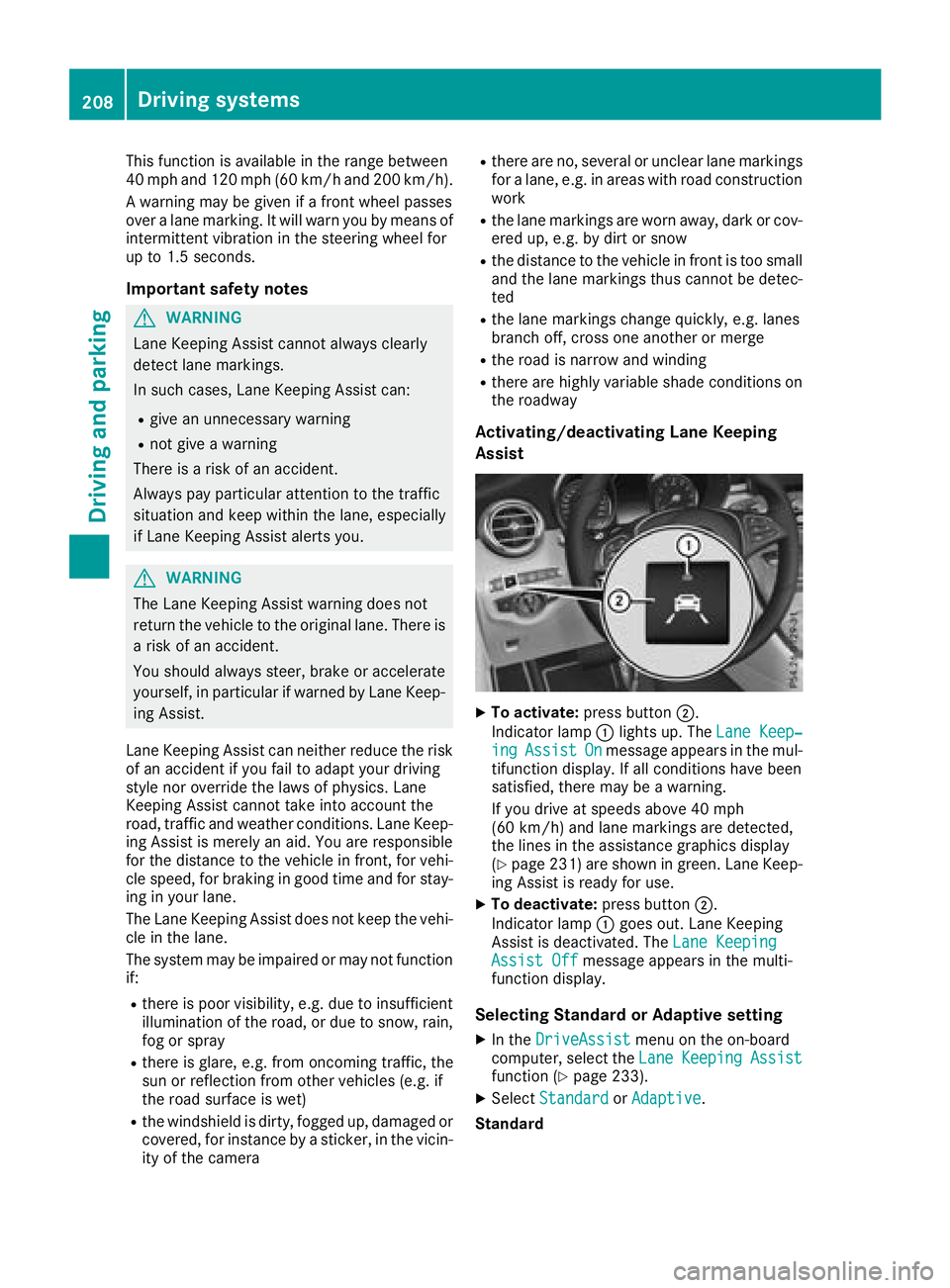
XTo activate: press button ;.
Indicator lamp :lights up. The Lane Keep‐
ingAssistOnmessage appears in the mul-
tifunction display. If all conditions have been
satisfied, there may be a warning.
If you drive at speeds above 40 mph
(60 km/h) and lane markings are detected,
the lines in the assistance graphics display
(
Ypage 231) are shown in green. Lane Keep-
ing Assist is ready for use.
XTo deactivate: press button;.
Indicator lamp :goes out. Lane Keeping
Assist is deactivated. The Lane Keeping
Assist Offmessage appears in the multi-
function display.
Selecting Standard or Adaptive setting
XIn the DriveAssistmenu on the on-board
computer, select the LaneKeepingAssistfunction (Ypage 233).
XSelectStandardorAdaptive.
Standard
208Driving systems
Driving an d parking
Page 211 of 390
WhenStandardis selected, no warning vibra-
tion occurs if:
Ryou switch on the turn signals. In this event,
the warnings are suppressed for a certain
period of time.
Ra driving safety system intervenes, e.g. ABS,
BAS or ESP®.
Adaptive
When Adaptive
is selected, no warning vibra-
tion occurs if:
Ryou switch on the turn signals. In this event,
the warnings are suppressed for a certain
period of time.
Ra driving safety system intervenes, e.g. ABS,
BAS or ESP®.
Ryou accelerate hard, e.g. kickdown.
Ryou brake hard.
Ryou steer actively, e.g. swerve to avoid an
obstacle or change lanes quickly.
Ryou cut the corner on a sharp bend.
In order that you are warned only when neces-
sary and in good time if you cross the lane mark-
ing, the system recognizes certain conditions
and warns you accordingly.
The warning vibration occurs earlier if:
Ryou approach the outer lane marking on a
bend.
Rthe road has very wide lanes, e.g. a freeway.
Rthe system detects solid lane markings.
The warning vibration occurs later if:
Rthe road has narrow lanes
Ryou cut the corner on a bend
Driving Assistance Plus package
General notes
The Driving Assistance Plus package consists of
Distance Pilot DISTRONIC (Ypage 170), Active
Blind Spot Assist (Ypage 209) and Active Lane
Keeping Assist (Ypage 212).
Active Blind Spot Assist
General notes
Active Blind Spot Assist uses a radar sensor
system, pointed toward the rear of the vehicle,
to monitor the area to the sides of the vehicle
which the driver is unable to see. A warning lamp lights up in the exterior mirrors and draws your
attention to vehicles detected in the monitored
area. If you then switch on the corresponding
turn signal to change lane, you will also receive
an optical and audible warning. If a risk of lateral
collision is detected, corrective braking may
help you avoid a collision. Before a course-cor-
recting brake application, Active Blind Spot
Assist evaluates the space in the direction of
travel and at the sides of the vehicle. For this,
Active Blind Spot Assist uses the forward-facing
radar sensors.
Active Blind Spot Assist supports you from a
speed of approximately 20 mph (30 km/
h).
Important safety notes
Active Blind Spot Assist is only an aid and is not
a substitute for attentive driving.
GWARNING
Active Blind Spot Assist does not react to:
Rvehicles overtaken too closely on the side,
placing them in the blind spot area
Rvehicles which approach with a large speed
differential and overtake your vehicle
As a result, Active Blind Spot Assist may ne i-
ther give warnings nor intervene insuch sit-
uations. There is a risk of an accident.
Always observe the traffic conditions care-
fully, and maintain a safe lateral distance.
iUSA only: This device has been approved by
the FCC as a "Vehicular Radar System". The
radar sensor is intended for use inan auto-
motive radar system only. Removal, tamper-
ing, or altering of the device will void any war-
ranties, and is not permitted by the FCC. Do
not tamper with, alter, or use inany non-
appr oved way.
Any unauthorized modification to this device
could void the user's authority to operate the
equipment.
iCanada only: This device complies with
RSS-210 of Industry Canada. Operation is
subject to the following two conditions:
1. This device may not cause interference,
and
2. This device must accept any interference
rec eived, including interference that may
cause undesired operation of the device.
Driving systems209
Driving and parking
Z
Page 213 of 390
If you select the reverse gear, Active Blind Spot
Assist is not operational.
The brightness of the warning lamps is auto-
matically adapted to the brightness of the sur-
roundings.
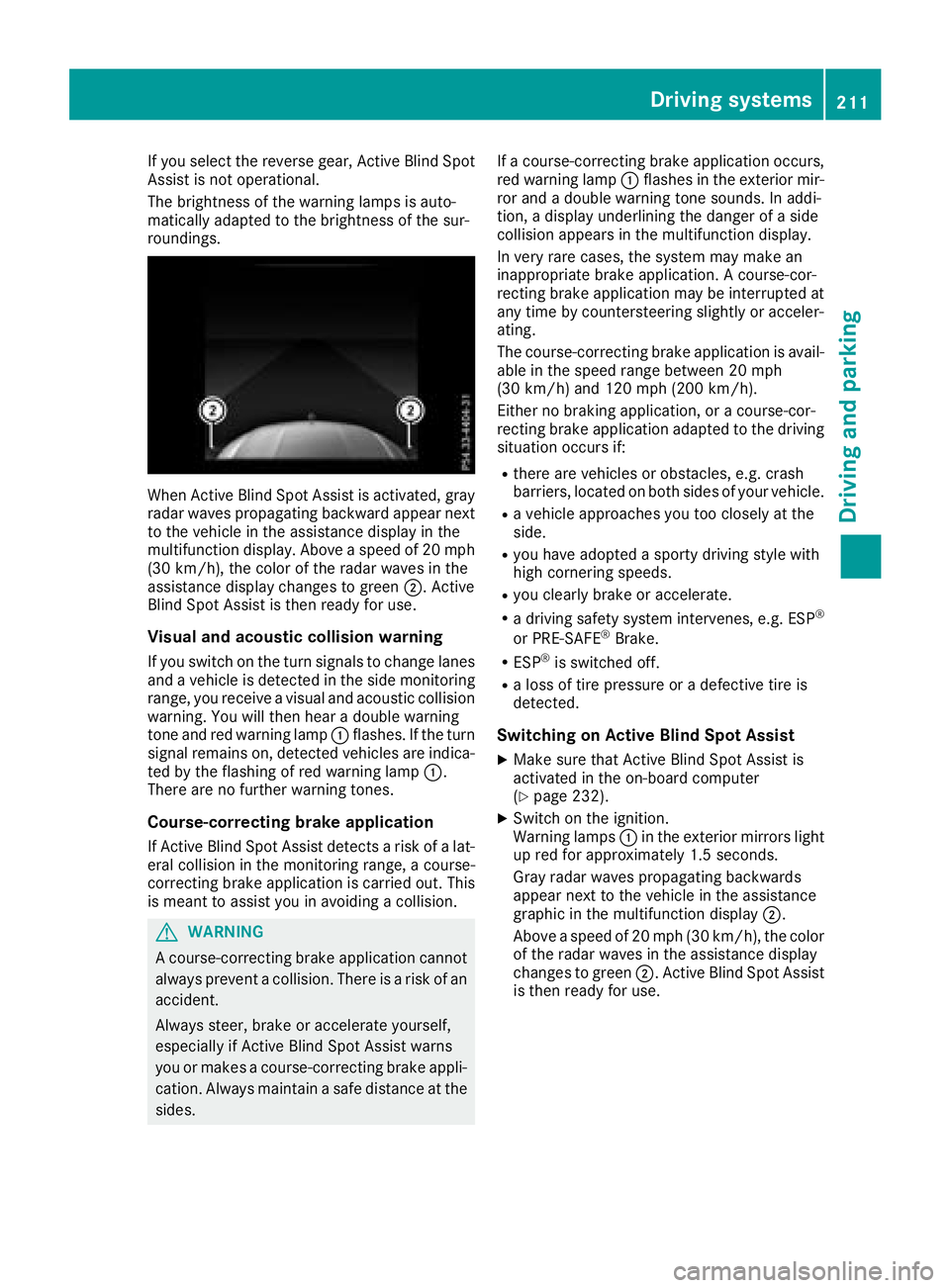
When Active Blind Spot Assist is activated, gray
radar waves propagating backward appear next
to the vehicle in the assistance display in the
multifunction display. Above a speed of 20 mph
(30 km/h), the color of the radar waves in the
assistance display changes to green;. Active
Blind Spot Assist is then ready for use.
Visual and acoustic collision warning
If you switch on the turn signals to change lanes
and a vehicle is detected in the side monitoring
range, you receive a visual and acoustic collision
warning. You will then hear a double warning
tone and red warning lamp :flashes. If the turn
signal remains on, detected vehicles are indica-
ted by the flashing of red warning lamp :.
There are no further warning tones.
Course-correcting brake application
If Active Blind Spot Assist detects a risk of a lat-
eral collision in the monitoring range, a course-
correcting brake application is carried out. This
is meant to assist you in avoiding a collision.
GWARNING
A course-correcting brake application cannot always prevent a collision. There is a risk of an
accident.
Always steer, brake or accelerate yourself,
especially if Active Blind Spot Assist warns
you or makes a course-correcting brake appli-
cation. Always maintain a safe distance at the
sides. If a course-correcting brake application occurs,
red warning lamp
:flashes in the exterior mir-
ror and a double warning tone sounds. In addi-
tion, a display underlining the danger of a side
collision appears in the multifunction display.
In very rare cases, the system may make an
inappropriate brake application. A course-cor-
recting brake application may be interrupted at
any time by countersteering slightly or acceler-
ating.
The course-correcting brake application is avail-
able in the speed range between 20 mph
(30 km/h) and 120 mph (200 km/h).
Either no braking application, or a course-cor-
recting brake application adapted to the driving situation occurs if:
Rthere are vehicles or obstacles, e.g. crash
barriers, located on both sides of your vehicle.
Ra vehicle approaches you too closely at the
side.
Ryou have adopted a sporty driving style with
high cornering speeds.
Ryou clearly brake or accelerate.
Ra driving safety system intervenes, e.g. ESP®
or PRE-SAFE®Brake.
RESP®is switched off.
Ra loss of tire pressure or a defective tire is
detected.
Switching on Active Blind Spot Assist
XMake sure that Active Blind Spot Assist is
activated in the on-board computer
(
Ypage 232).
XSwitch on the ignition.
Warning lamps :in the exterior mirrors light
up red for approximately 1.5 seconds.
Gray radar waves propagating backwards
appear next to the vehicle in the assistance
graphic in the multifunction display ;.
Above a speed of 20 mph (30 km/h), the color
of the radar waves in the assistance display
changes to green ;. Active Blind Spot Assist
is then ready for use.
Driving systems211
Driving and parking
Z