alarm MERCEDES-BENZ GLC SUV 2018 Owner's Manual
[x] Cancel search | Manufacturer: MERCEDES-BENZ, Model Year: 2018, Model line: GLC SUV, Model: MERCEDES-BENZ GLC SUV 2018Pages: 390, PDF Size: 6.54 MB
Page 4 of 390
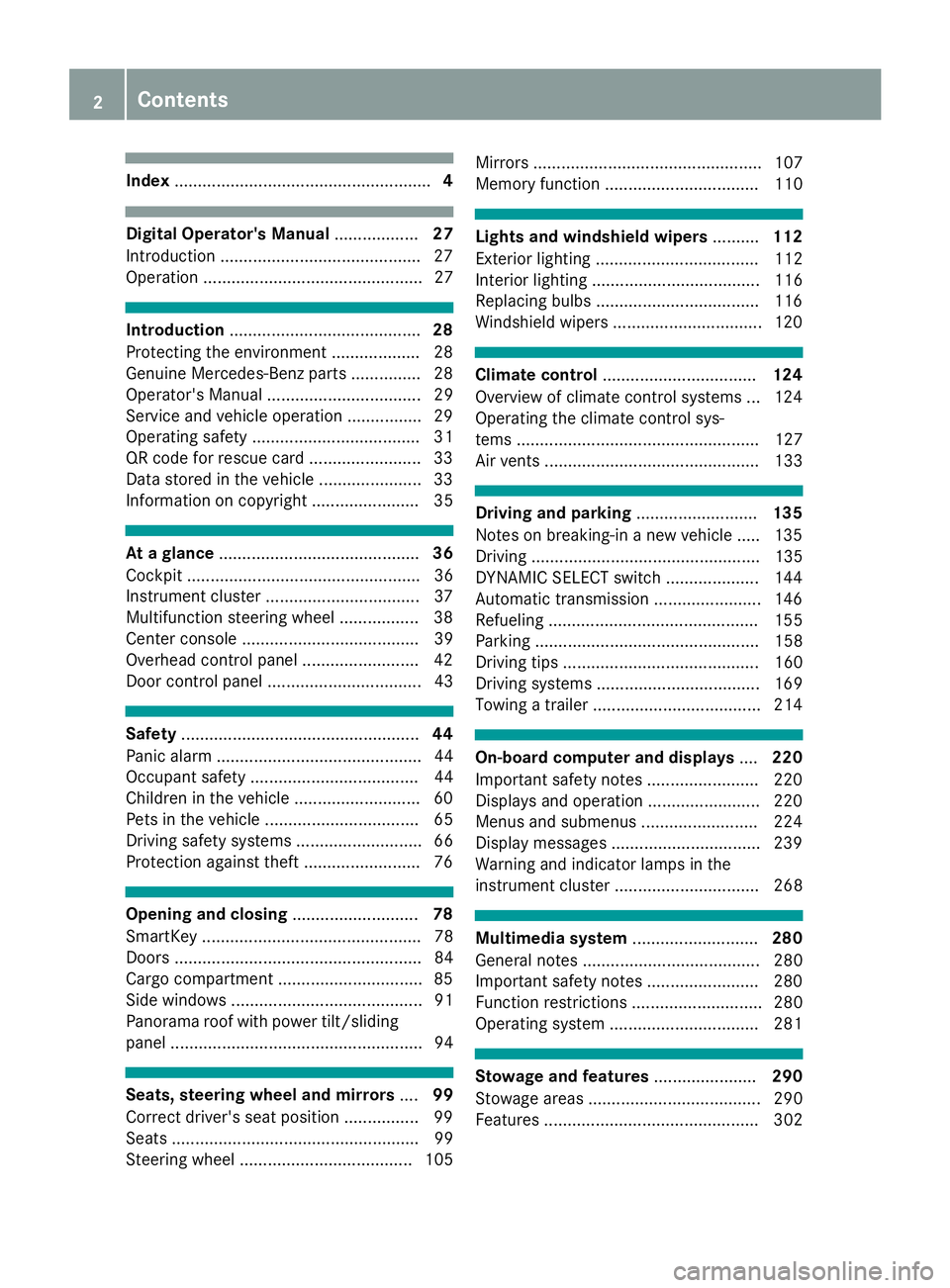
Index....................................................... 4
Digital Operator's Manual..................27
Introduction .......................................... .27
Operation ............................................... 27
Introduction ......................................... 28
Protecting the environment ...................2 8
Genuine Mercedes-Benz parts .............. .28
Operator's Manual ................................. 29
Service and vehicle operation ................2 9
Operating safety .................................... 31
QR code for rescue card ........................ 33
Data stored in the vehicle ......................3 3
Information on copyright ....................... 35
At a glance ........................................... 36
Cockpit .................................................. 36
Instrument cluster .................................3 7
Multifunction steering wheel ................. 38
Center console ...................................... 39
Overhead control panel .........................4 2
Door control panel ................................. 43
Safety ................................................... 44
Panic alarm ............................................ 44
Occupant safety .................................... 44
Children in the vehicle ........................... 60
Pets in the vehicle ................................. 65
Driving safety systems ........................... 66
Protection against theft .........................7 6
Opening and closing...........................78
SmartKey ............................................... 78
Doors ..................................................... 84
Cargo compartment .............................. .85
Side windows ......................................... 91
Panorama roof with power tilt/sliding
panel ...................................................... 94
Seats, steering wheel and mirrors ....99
Correct driver's seat position ................ 99
Seats ..................................................... 99
Steering wheel ..................................... 105 Mirrors ................................................. 107
Memory function ................................. 110
Lights and windshield wipers
..........112
Exterior lighting ................................... 112
Interior lighting .................................... 116
Replacing bulbs ................................... 116
Windshield wipers ................................ 120
Climate control ................................. 124
Overview of climate control systems ... 124
Operating the climate control sys-
tems .................................................... 127
Air vents .............................................. 133
Driving and parking ..........................135
Notes on breaking-in a new vehicle ..... 135
Driving ................................................. 135
DYNAMIC SELECT switch .................... 144
Automatic transmission ....................... 146
Refueling ............................................. 155
Parking ................................................ 158
Driving tips .......................................... 160
Driving systems ................................... 169
Towing a trailer .................................... 214
On-board computer and displays ....220
Important safety notes ........................ 220
Displays and operation ........................ 220
Menus and submenus ......................... 224
Display messages ................................ 239
Warning and indicator lamps in the
instrument cluster ............................... 268
Multimedia system ...........................280
General notes ...................................... 280
Important safety notes ........................ 280
Function restrictions ............................ 280
Operating system ................................ 281
Stowage and features ......................290
Stowage areas ..................................... 290
Features .............................................. 302
2Contents
Page 7 of 390
Air suspensionsee AIR BODY CONTROL
Air vents
Important safety notes .................. 133
Rear .............................................. .134
Setting ...........................................1 33
Setting the center air vents ........... 134
Setting the side air vents ...............1 34
Air-conditioning system
see Climate control
Airbag
Warning lamp ................................. 274
Alarm
ATA (Anti-Theft Alarm system) ......... 77
Switching off (ATA) .......................... 77
Switching the function on/off
(ATA) ................................................ 77
Alarm system
see ATA (Anti-Theft Alarm system)
All-wheel drive
see 4MATIC (permanent four-
wheel drive)
AMG
Switchable performance exhaust
system ...........................................1 42
AMG menu (on-board computer) ..... 235
Anti-lock braking system
see ABS (Anti-lock Braking System)
Anti-Theft Alarm system
see ATA (Anti-Theft Alarm system)
AppCode
see QR code
Approach/departure angle .............. 168
Armrest
Stowage compartment .................. 291
Ashtray ............................................... 304
Assistance display (on-board com-
puter) ..................................................2 31
Assistance menu (on-board com-
puter) ..................................................2 32
ASSYST PLUS
Displaying a service message ........3 23
Driving abroad ............................... 323
Hiding a service message .............. 323
Resetting the service interval dis-
play ................................................ 323
Service message ............................ 322 Special service requirements ......... 323
ATA (Anti-Theft Alarm system)
Activating/deactivating ................... 77
Function ...........................................7 7
Switching off the alarm .................... 77
ATTENTION ASSIST
Activating/deactiva ting ................. 233
Di
splay message ............................ 256
Displaying level .............................. 204
Function/notes ............................. 203
Authorized Mercedes-Benz Center
see Qualified specialist workshop
Authorized workshop
see Qualified specialist workshop
AUTO lights
Display message ............................ 251
see Lights
Automatic car wash (care) ............... 324
Automatic engine start (ECO start/
stop function) .................................... 141
Automatic engine switch-off (ECO
start/stop function) .......................... 141
Automatic headlamp mode .............. 112
Automatic transmission
Accelerator pedal position ............. 149
Changing gear ............................... 149
DIRECT SELECT lever ..................... 146
Display message ............................ 264
Double-clutch function .................. 149
Drive program ................................ 150
Drive program display .................... 148
Driving tips .................................... 149
DYNAMIC SELECT switch .............. 144
Emergency running mode .............. 155
Engaging drive position .................. 147
Engaging neutral ............................ 147
Engaging park position automati-
cally ............................................... 147
Engaging reverse gear ................... 147
Engaging the park position ............ 146
Gearshift recommendation ............ 154
Gliding mode ................................. 149
Kickdown ....................................... 149
Manual shifting .............................. 152
Oil temperature (on-board com-
puter, Mercedes-AMG vehicles) ..... 235
Overview ........................................ 146
Permanent setting ......................... 152
Index5
Page 17 of 390
Self-test ......................................... 308
Speed alert .................................... 313
System .......................................... 307
Triggering the vehicle alarm ........... 314
Vehicle remote unlocking .............. 312
Mechanical key
Function/notes ................................ 80
General notes .................................. 80
Inserting .......................................... 80
Locking vehicle ................................ 85
Removing ......................................... 80
Unlocking the driver's door .............. 85
Media Interface
see Digital Operator's Manual
Memory card (audio) ......................... 229
Memory function
Seats, steering wheel, exterior
mirrors ........................................... 110
Mercedes-Benz Intelligent Drive
360°camera .................................. 199
Active Blind Spot Assist ................. 209
Active Lane Keeping Assist ............ 212
ATTENTION ASSIST ........................ 203
Blind Spot Assist ............................ 205
Distance Pilot DISTRONIC ............. 170
Distance Pilot DISTRONIC with
Steering Pilot ................................. 177
General notes ................................ 169
Lane Keeping Assist ...................... 207
Parking Assist PARKTRONIC .......... 191
Parking Pilot .................................. 188
PRE-SAFE
®(anticipatory occu-
pant protection) ............................... 58
PRE-SAFE
®PLUS (anticipatory
occupant protection PLUS) .............. 59
Rear view camera .......................... 194
Traffic Sign Assist .......................... 205
Message memory (on-board com-
puter) .................................................. 239
Messages
see Display messages
see Warning and indicator lamps
Mirror turn signal
Cleaning ......................................... 327
Mirrors
see Exterior mirrors
see Vanity mirror (in the sun visor) Mobile phone
Connecting (device manager) ........ 287
Frequencies ................................... 375
Installation ..................................... 375
Menu (on-board computer) ............ 230
Transmission output (maximum) .... 375
Modifying the programming
(SmartKey) ........................................... 80
MOExtended tires .............................. 334
Mou nting w
heels
Lowering the vehicle ...................... 373
Mounting a new wheel ................... 372
Preparing the vehicle ..................... 370
Raising the vehicle ......................... 370
Removing a wheel .......................... 372
Securing the vehicle against roll-
ing away ........................................ 370
MP3
Operation ....................................... 229
see also Digital Operator's Man-
ual .................................................. 280
Multifunction display
Function/notes ............................. 222
Multifunction steering wheel
Operating the on-board compute r..2 21
Overview .......................................... 38
Multimedia system
Switching on and off ......................2 81
Music files
see also Digital Operator's Man-
ual ..................................................2 80
N
Navigation
Displaying (on-board computer) ..... 226
Menu (on-board computer) ............ 226
see also Digital Operator's Man-
ual ..................................................2 80
Notes on breaking-in a new vehi-
cle ....................................................... 135
O
Occupant Classification System
(OCS)
Conditions ....................................... 52
Faults ............................................... 55
Index15
Page 19 of 390
P
Paddle shifterssee Steering wheel paddle shifters
Paint code number ............................376
Paintwork (cleaning instructions) ... 326
Panic alarm .......................................... 44
Panorama roof with power tilt/
sliding panel
Important safety notes .................... 94
Operating ......................................... 95
Operating the roller sunblinds for
the sliding sunroof ........................... 96
Problem (malfunction) ..................... 97
Rain closing feature ......................... 96
Reversing feature .............................9 5
Parcel net ...........................................2 98
Parking
Important safety notes .................. 158
Parking brake ................................ 159
Parking position for the exterior
mirror on the front-passenger
side ................................................ 109
Rear view camera .......................... 194
Switching off the engine ................ 158
see Parking Assist PARKTRONIC
Parking aid
see 360° camera
see Exterior mirrors
see Parking Assist PARKTRONIC
see Parking Pilot
see Rear view camera
Parking Assist
Display message ............................ 258
Parking Assist PARKTRONIC
Deactivating/activating ................. 193
Driving system ............................... 191
Function/notes .............................1 91
Important safety notes .................. 191
Problems (malfunctions) ................ 194
Sensor range ................................. 192
Warning display ............................. 193
Parking assistance
see Parking Assist PARKTRONIC
Parking brake
Applying automatically ................... 159
Applying or releasing manually ...... 159
Display message ............................ 242 Electric parking brake .................... 159
Emergency braking ........................ 160
General notes ................................ 159
Releasing automatically ................. 160
Warning lamp ................................. 274
Parking lamps
Switching on/off ........................... 113
Parki ng Pi
lot
Canceling ....................................... 191
Detecting parking spaces .............. 188
Exiting a parking space .................. 190
Function/notes ............................. 188
Important safety notes .................. 188
Parking .......................................... 189
PASSENGER AIR BAG
Display message ............................ 249
Indicator lamps ................................ 45
Problems (malfunction) .................. 249
Perfume atomizer
Operating ....................................... 132
Problem (malfunction) ................... 133
Setting the perfume intensity
(multimedia system) ...................... 285
Vial ................................................ 132
Permanent all-wheel drive
see 4MATIC (permanent four-
wheel drive)
Pets in the vehicle ............................... 65
Phone book
see also Digital Operator's Man-
ual .................................................. 280
Plastic trim (cleaning instruc-
tions) .................................................. 329
Power washers .................................. 325
Power windows
see Side windows
PRE-SAFE
®(anticipatory occupant
protection)
Display message ............................ 246
Operation ......................................... 58
PRE-SAFE
®PLUS (anticipatory
occupant protection PLUS)
Operation ......................................... 59
Program
see Drive programs
Protection against theft
ATA (Anti-Theft Alarm system) ......... 77
Index17
Page 46 of 390
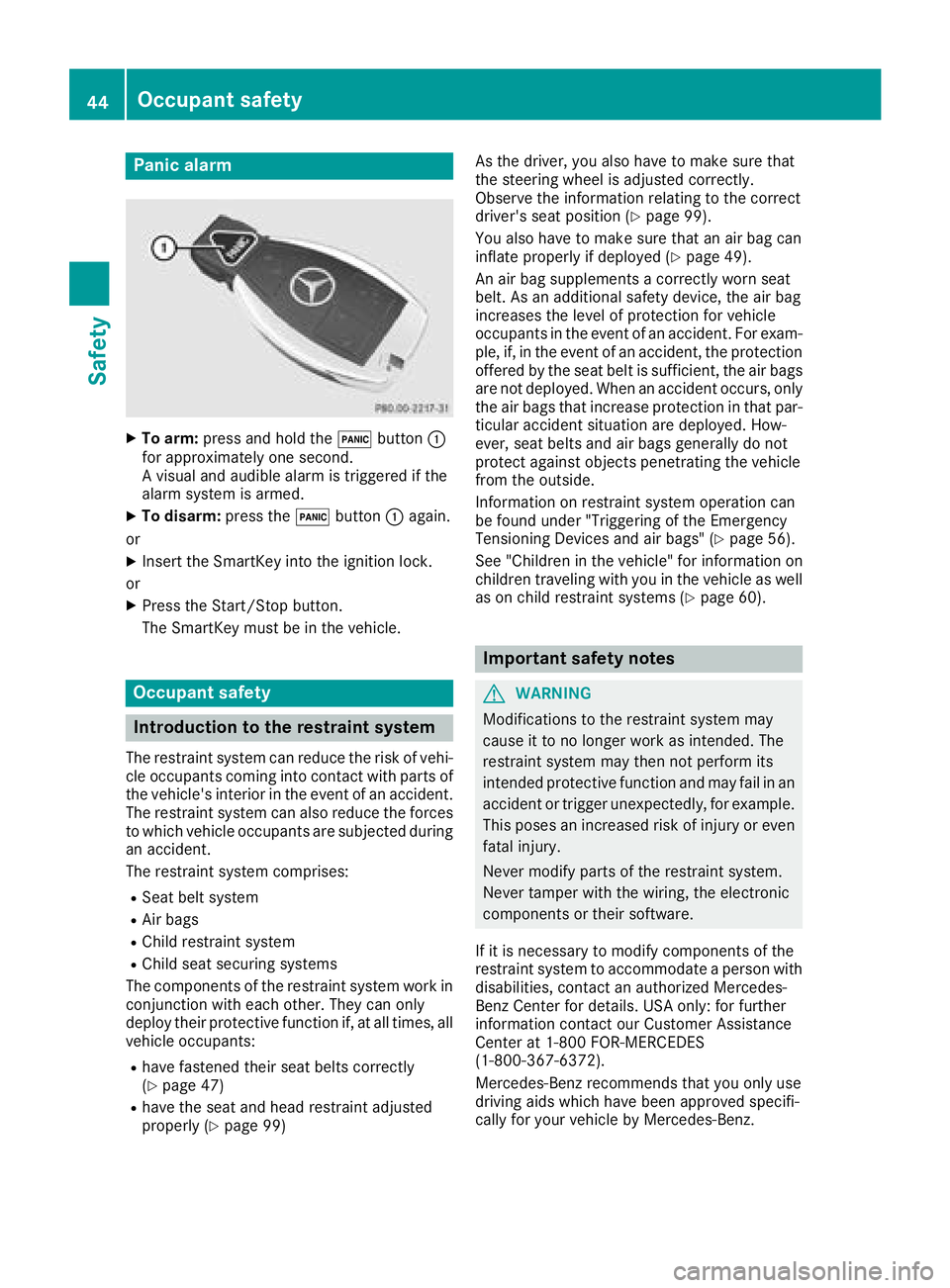
Panic alarm
XTo arm:press and hold the !button :
for approximately one second.
A visual and audible alarm is triggered if the
alarm system is armed.
XTo disarm: press the!button :again.
or
XInsert the SmartKey into the ignition lock.
or
XPress the Start/Stop button.
The SmartKey must be in the vehicle.
Occupant safety
Introduction to the restraint system
The restraint system can reduce the risk of vehi- cle occupants coming into contact with parts of
the vehicle's interior in the event of an accident.
The restraint system can also reduce the forces to which vehicle occupants are subjected during
an accident.
The restraint system comprises:
RSeat belt system
RAir bags
RChild restraint system
RChild seat securing systems
The components of the restraint system work in
conjunction with each other. They can only
deploy their protective function if, at all times, all
vehicle occupants:
Rhave fastened their seat belts correctly
(Ypage 47)
Rhave the seat and head restraint adjusted
properly (Ypage 99) As the driver, you also have to make sure that
the steering wheel is adjusted correctly.
Observe the information relating to the correct
driver's seat position (
Ypage 99).
You also have to make sure that an air bag can
inflate properly if deployed (
Ypage 49).
An air bag supplements a correctly worn seat
belt. As an additional safety device, the air bag
increases the level of protection for vehicle
occupants in the event of an accident. For exam-
ple, if, in the event of an accident, the protection
offered by the seat belt is sufficient, the air bags
are not deployed. When an accident occurs, only
the air bags that increase protection in that par- ticular accident situation are deployed. How-
ever, seat belts and air bags generally do not
protect against objects penetrating the vehicle
from the outside.
Information on restraint system operation can
be found under "Triggering of the Emergency
Tensioning Devices and air bags" (
Ypage 56).
See "Children in the vehicle" for information on
children traveling with you in the vehicle as well
as on child restraint systems (
Ypage 60).
Important safety notes
GWARNING
Modifications to the restraint system may
cause it to no longer work as intended. The
restraint system may then not perform its
intended protective function and may fail in an
accident or trigger unexpectedly, for example.
This poses an increased risk of injury or even fatal injury.
Never modify parts of the restraint system.
Never tamper with the wiring, the electronic
components or their software.
If it is necessary to modify components of the
restraint system to accommodate a person with
disabilities, contact an authorized Mercedes-
Benz Center for details. USA only: for further
information contact our Customer Assistance
Center at 1-800 FOR-MERCEDES
(1‑800‑367‑6372).
Mercedes-Benz recommends that you only use
driving aids which have been approved specifi-
cally for your vehicle by Mercedes-Benz.
44Occupant safety
Safety
Page 79 of 390
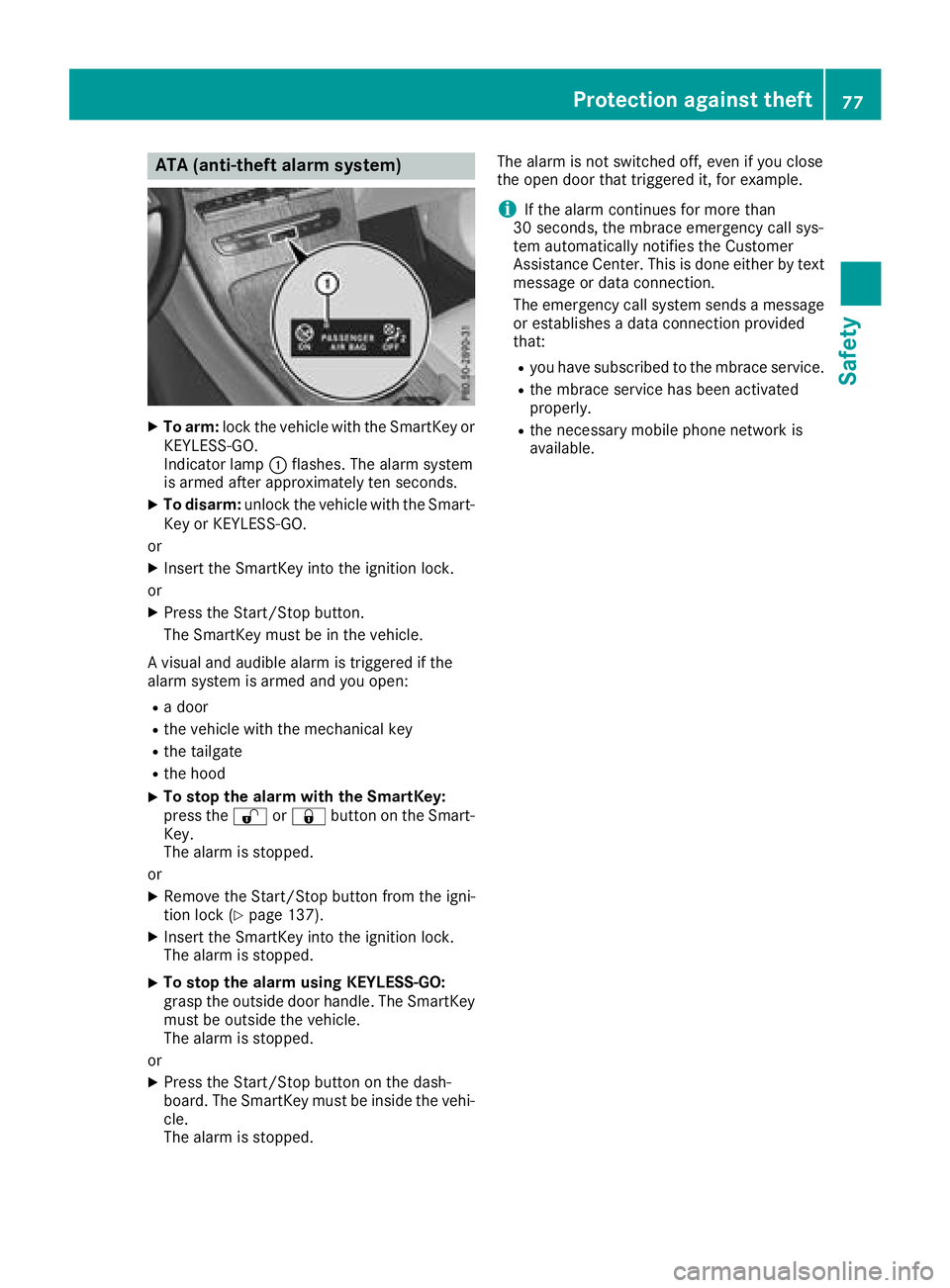
ATA (anti-theft alarmsystem)
XTo arm: lockth evehicl ewit hth eSmartKey or
KEYLESS-GO .
Indicato rlamp :flashes .The alarm system
is armed after approximately te nseconds.
XTo disarm: unlockth evehicl ewit hth eSmart -
Key or KEYLESS-GO .
or
XInser tth eSmartKey int oth eignition lock.
or
XPress th eStart/Sto pbutton.
The SmartKey mus tbe in th evehicle.
A visual and audible alarm is triggered if th e
alarm system is armed and you open :
Radoor
Rth evehicl ewit hth emechanical ke y
Rthetailgat e
Rthehoo d
XTo stop th ealarm wit hth eSmartKey :
press th e% or& buttonon th eSmart -
Key.
The alarm is stopped.
or
XRemove th eStart/Sto pbutto nfrom th eigni-
tion loc k (Ypage 137).
XInsertth eSmartKey int oth eignition lock.
The alarm is stopped.
XTo stop th ealarm using KEYLESS-GO:
gras pth eoutside door handle. The SmartKey
mus tbe outside th evehicle.
The alarm is stopped.
or
XPress th eStart/Sto pbutto non th edash -
board. The SmartKey mus tbe inside th evehi-
cle .
The alarm is stopped. The alarm is no
tswitched off ,eve nif you close
th eopen door that triggered it ,for example.
iIf th ealarm continues for mor ethan
30 secon ds, thembrace emergenc ycall sys-
te m automatically notifie sth eCustome r
Assistance Center. This is don eeither by text
message or dat aconnection .
The emergenc ycall system sends amessage
or establishes adat aconnection provided
that:
Ryou hav esubscribed to th embrace service.
Rth embrace servic ehas been activated
properly.
Rth enecessar ymobile phone network is
available.
Protection against theft77
Safety
Z
Page 82 of 390
KEYLESS-GOstart function
Gene ral notes
Bear in min dthat th eengin ecan be started by
any of th evehicl eoccupant sif there is aSmart -
Key in th evehicl e (
Ypage 138).
Changing the settings ofthe locking
system
You can chang eth esetting sof th elocking sys-
tem. This mean sthat only th edriver's door and
th efuel filler flap are unlocke dwhen th evehicl e
is unlocked. This is useful if you frequentl ytravel
alone.
XTo change th esetting: press and hold down
th e% and& buttons simultaneousl y
for approximately six seconds until th ebat -
tery chec klamp (
Ypage 81) flashes twice .
If th esetting of th elocking system is changed
within th esignal range of th evehicle, pressing
th e& or% button:
Rlocks or
Runlocks th evehicl e
The SmartKey no wfunction sas follows :
XTo unlock: press the% buttononce .
XTo unlock centrally: press the% button
twice .
XTo lock: press the& button.
XTo restor eth efactory settings: press and
hold th e% and& buttons simultane -
ousl yfor approximately six seconds until th e
battery chec klamp (
Ypage 81) flashes
twice .
The KEYLESS-GO function scan be changed as
follows :
XTo unlock th edriver's door :touch th einner
surfac eof th edoor handle on th edriver's
door .
XTo unlock centrally: touch theinner surfac e
of th edoor handle on th efront-passenger
door or there
ar door .
XTo lock centrally: touch theouter sensor
surfac eon on eof th edoor handles .
Mechanical key
Gene ral notes
If th evehicl ecan no longer be locke dor
unlocke dwit hth eSmartKey or KEYLESS-GO ,
use th emechanical key.
If you use th emechanical ke yto unloc kand
open th edriver's door ,th eanti-thef talarm sys-
te m will be triggered .Switc hoff th ealarm
(
Ypage 77) .
If you unloc kth evehicl eusin gth emechanical
key, th efuel filler flap will no tbe unlocke dauto -
matically.
XTo unlock th efuel filler flap: insert the
SmartKey int oth eignition lock.
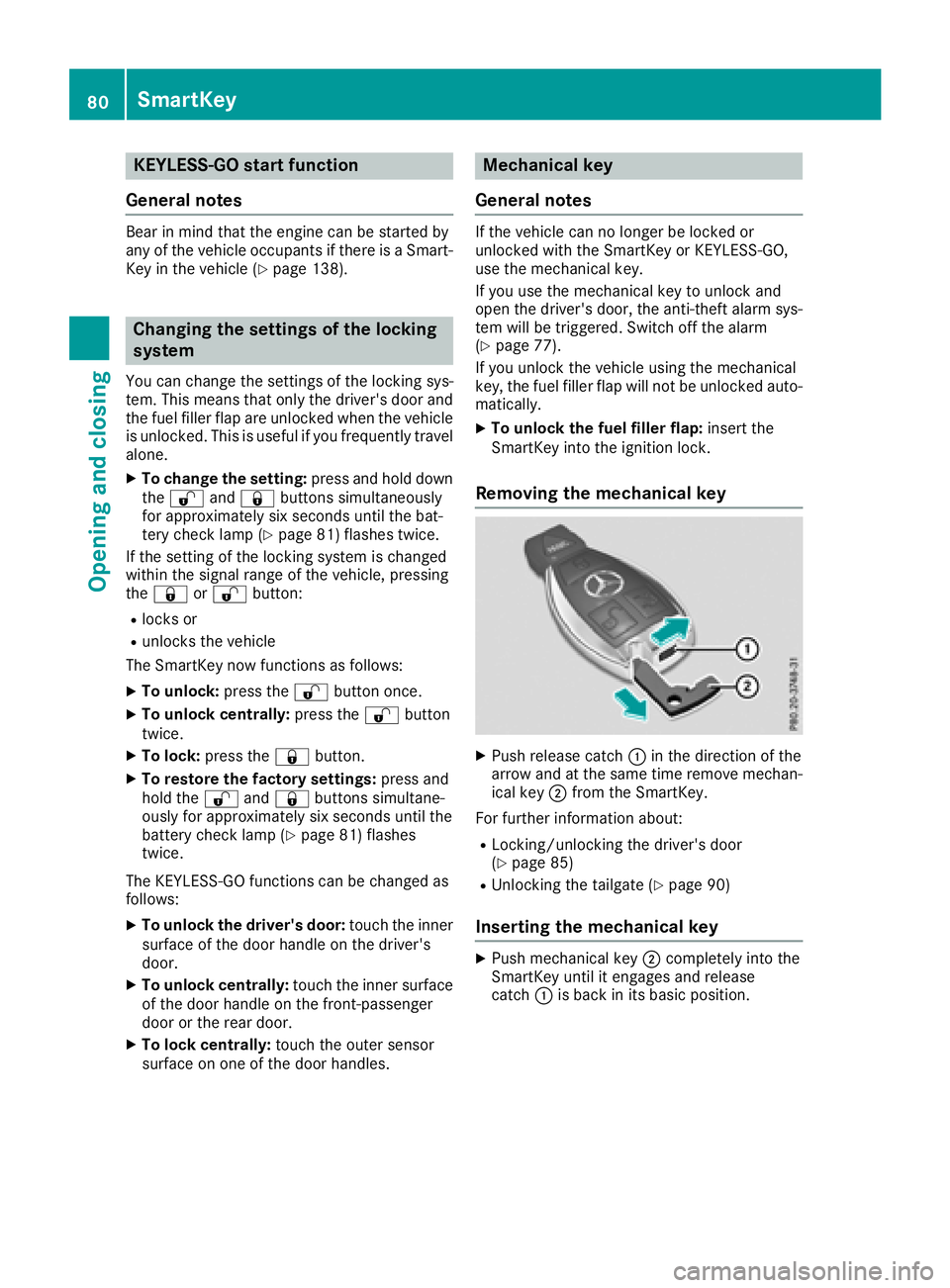
Removing the mechanical key
XPush release catch :in th edirection of th e
arrow and at th esam etime remove mechan -
ical ke y; from th eSmartKey.
Fo rfurther information about :
RLocking/unlocking thedriver's door
(Ypage 85 )
RUnlocking th etailgat e (Ypage 90 )
Inserting the mechanical key
XPush mechanical ke y; completely int oth e
SmartKey until it engage sand release
catch :is bac kin it sbasic position .
80SmartKey
Opening and closing
Page 87 of 390
The vehicle will be fully unlocked if it had previ-
ously been fully unlocked. If only the driver's
door had been previously unlocked, only the
door which has been opened from the inside is
unlocked.
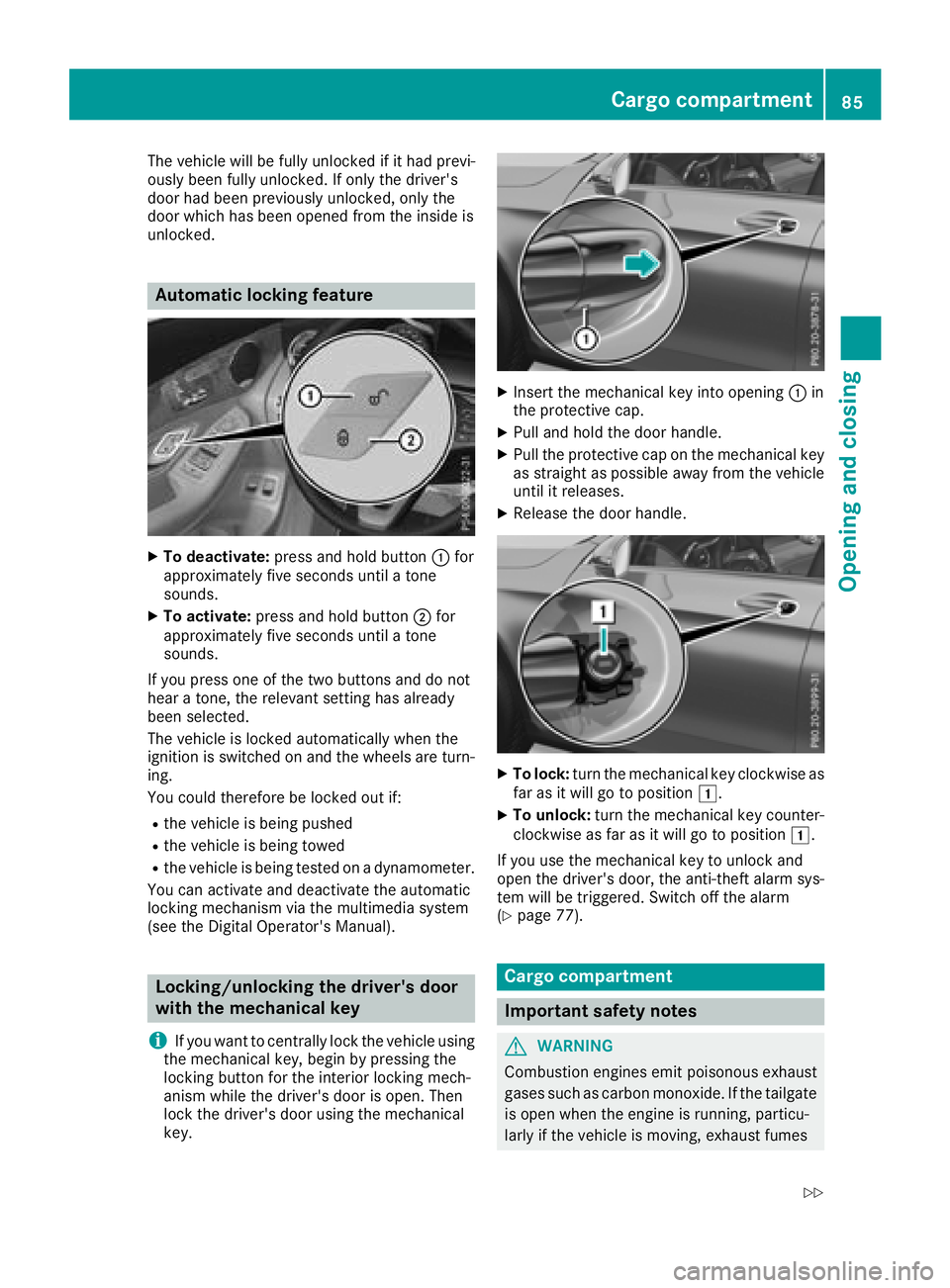
Automatic locking feature
XTo deactivate:press and hold button :for
approximately five seconds until a tone
sounds.
XTo activate: press and hold button ;for
approximately five seconds until a tone
sounds.
If you press one of the two buttons and do not
hear a tone, the relevant setting has already
been selected.
The vehicle is locked automatically when the
ignition is switched on and the wheels are turn-
ing.
You could therefore be locked out if:
Rthe vehicle is being pushed
Rthe vehicle is being towed
Rthe vehicle is being tested on a dynamometer.
You can activate and deactivate the automatic
locking mechanism via the multimedia system
(see the Digital Operator's Manual).
Locking/unlocking the driver's door
with the mechanical key
i
If you want to centrally lock the vehicle using
the mechanical key, begin by pressing the
locking button for the interior locking mech-
anism while the driver's door is open. Then
lock the driver's door using the mechanical
key.
XInsert the mechanical key into opening :in
the protective cap.
XPull and hold the door handle.
XPull the protective cap on the mechanical key
as straight as possible away from the vehicle
until it releases.
XRelease the door handle.
XTo lock: turn the mechanical key clockwise as
far as it will go to position 1.
XTo unlock:turn the mechanical key counter-
clockwise as far as it will go to position 1.
If you use the mechanical key to unlock and
open the driver's door, the anti-theft alarm sys-
tem will be triggered. Switch off the alarm
(
Ypage 77).
Cargo compartment
Important safety notes
GWARNING
Combustion engines emit poisonous exhaust
gases such as carbon monoxide. If the tailgate
is open when the engine is running, particu-
larly if the vehicle is moving, exhaust fumes
Cargo compartment85
Opening and closing
Z
Page 141 of 390
take the SmartKey with you when leaving the
vehicle, even if you only leave it for a short time.
Pay attention to the important safety notes.
XDepress the brake pedal and keep it
depressed.
XPress the Start/Stop button once
(Ypage 137).
The engine starts.
Starting procedure via smartphone
Observe the important safety notes on starting
the engine (Ypage 138).
You can also start your engine via your smart-
phone from outside the vehicle. In this case, the
previously selected climate control setting is
activated. In this way you can cool or heat the
interior of the vehicle before starting the jour-
ney.
Only start the engine via your smartphone if it is
safe to start and run the engine where your vehi-
cle is parked.
Observe the legal stipulations in the area where your vehicle is parked. Engine start via smart-
phone may be limited to certain countries or
regions.
You can execute a maximum of two consecutive
starting attempts via your smartphone. If you
press the start/stop button or insert the Smart-
Key into the ignition lock, you can carry out two
more starting attempts with your smartphone.
The engine runs for ten minutes when starting
with the smartphone.
Once you have started the engine, you can
switch the engine off via your smartphone at any
time.
You can only start the engine via your smart-
phone if:
Rthe SmartKey is in the ignition lock
Rpark position jis selected
Rthe accelerator pedal is not depressed
Rthe anti-theft alarm system is not activated
Rthe panic alarm is not activated
Rthe hazard warning lamps are switched off
Rthe hood is closed
Rthe doors are closed and locked
Rthe windows and sliding sunroof are closed Also make sure that:
Rthe fuel tank is sufficiently filled
Rthe starter battery has been sufficiently
charged
GWARNING
Limbs could be crushed or trapped if the
engine is started unintentionally during ser-
vice or maintenance work. There is a risk of
injury.
Always secure the engine against uninten-
tional starting before carrying out mainte-
nance or repair work.
Make sure that the engine cannot be started via
your smartphone before carrying out mainte-
nance or repairs. You can prevent an engine
start via your smartphone, for example, if you:
Rswitch on the hazard warning lamps
Rdo not lock the doors
Ropen a side window
Ropen the sliding sunroof
Pulling away
General notes
GWARNING
If the engine speed is above the idling speed
and you engage transmission position Dor R,
the vehicle could pull away suddenly. There is
a risk of an accident.
When engaging transmission position Dor R,
always firmly depress the brake pedal and do not simultaneously accelerate.
Depress the accelerator carefully when pulling
away.
The vehicle locks centrally once you have pulled
away. The locking knobs in the doors drop down.
You can open the doors from the inside at any
time.
You can also deactivate the automatic locking
feature, see the Digital Operator's Manual.
It is possible to shift the transmission from posi-
tion jto the desired position only if you
depress the brake pedal. Only then is the park-
ing lock released. If you do not depress the
brake pedal, the DIRECT SELECT lever can still
Driving139
Dr iving an d parking
Z
Page 314 of 390
If you have sent more than one destination
address, each individual destination must be
confirmed separately.
Destination addresses are loaded in the same
order as the order in which they were sent.
If you own multiple Mercedes-Benz vehicles with
mbrace and activated mbrace accounts:
If multiple vehicles are registered under the
same e-mail address, the destination will be
sent to all the vehicles.
Vehicle remote opening
You can use the vehicle remote opening if you
have unintentionally locked your vehicle and a
replacement SmartKey is not available.
The vehicle can be opened by the Mercedes-
Benz Customer Assistance Center.
The vehicle can be immediately opened
remotely within four days of the ignition being
turned off. After this time, the remote unlocking
may be delayed by 15 to 60 minutes. After
30 days, the vehicle can no longer be opened
remotely.
The vehicle remote unlocking feature is availa-
ble if the relevant mobile phone network is avail-
able and a data connection is possible.
XContact the following service hotlines:
Mercedes-Benz Customer Assistance Center
at 1-800-FOR-MERCedes (1-800-367-6372)
or 1-866-990-9007
You will be asked for your password.
XReturn to your vehicle at the time agreed upon
with the Mercedes-Benz Customer Assis-
tance Center.
Alternatively, the vehicle can be opened via:
Rthe Internet, under the "Owners Online" sec-
tion
Rtelephone applications (e.g. for iPhone®,
Android™)
To do this, you will need your identification num- ber and password.
Vehicle remote closing
The vehicle remote closing feature can be used
when you have forgotten to lock the vehicle and you are no longer nearby.
The vehicle can then be locked by the Mercedes-
Benz Customer Assistance Center. The vehicle can be immediately remotely locked
within four days of the ignition being turned off. After this time, remote closing may be delayed
by 15 to 60 minutes. After 30 days the vehicle
can no longer be locked remotely.
The vehicle remote closing feature is available if
the relevant mobile phone network is available
and a data connection is possible.
XContact the following service hotlines:
Mercedes-Benz Customer Assistance Center
at 1-800-FOR-MERCedes (1-800-367-6372)
or 1-866-990-9007
You will be asked for your password.
The next time you are inside the vehicle and you
switch on the ignition, the Doors Locked
Remotelymessage appears in the multifunction
display.
Alternatively, the vehicle can be locked via:
Rthe Internet, under the "Owners Online" sec-
tion
Rtelephone applications (e.g. for iPhone®,
Android™)
To do this, you will need your identification num-
ber and password.
Stolen vehicle recovery service
If your vehicle has been stolen:
XNotify the police.
The police will issue a numbered incident
report.
XThis number will be forwarded to the
Mercedes-Benz Customer Assistance Center
together with your PIN.
The Mercedes-Benz Customer Assistance
Center then tries to locate the system. The
Mercedes-Benz Customer Assistance Center
contacts you and the local law enforcement
agency if the vehicle is located.
However, only the law enforcement agency is
informed of the location of the vehicle.
If the anti-theft alarm system is activated for
longer than 30 seconds, the Mercedes-Benz
Customer Assistance Center is automatically
notified.
Vehicle Health Check
With the Vehicle Health Check, the Customer
Assistance Center can provide improved sup-
port for problems with your vehicle. During an
312Features
Stowage and features