language MERCEDES-BENZ GLC SUV 2019 Owner's Manual
[x] Cancel search | Manufacturer: MERCEDES-BENZ, Model Year: 2019, Model line: GLC SUV, Model: MERCEDES-BENZ GLC SUV 2019Pages: 673, PDF Size: 11.51 MB
Page 439 of 673
#
Select Yes.
Re leva nt identi fication da tais transmitted
automaticall y.
More information on Mercedes me: http://
www.mercedes.me
Tr ansfer red data during a Mercedes me call
The da tatrans ferred during a Mercedes me call
depends on which service is selected in the
vo ice control sy stem and whe ther Mercedes me
connect services are activated.
If no Mercedes me connect services are activa‐
te d and the data pr otection prom pthas been
confirmed thefo llowing data is transmitted:
R Vehicle identification number
R Mercedes me cus tomer identification num‐
ber
R Reason forth e initiation of the call
R Language set in the multimedia sy stem
R Confirmation of the data pr otection prom ptIf a call is made
for a service appointment via
th e service reminder, thefo llowing data may be
transmitted:
R Cur rent milea geand main tenance da ta
Tr ans fer is possible assuming therequ ired
data transfer tech nology is suppor tedby the
mobile service operator and thequ ality of
th e mobile connection is suf ficient.
If accident and breakdown mana gement is called
via thevo ice control sy stem and no service has
been activated, but the data pr otection query
has been confi rmed, thefo llowing data can also
be called up from theve hicle bythe Mercedes-
Benz Cus tomer Centre:
R Curr entvehicle location
% Atthe time of going topress, this function is
te ch nically not yetav ailable but can be sup‐
por ted in the future.
If th e data pr otection prom pthas been rejected
th efo llowing data is transmitted:
R Reason forth e initiation of the call
R Rejection of the data pr otection prom pt Mercedes me connect
Note
s on Mercedes me connect
% Mercedes me connect is not available in
eve rycountr y.Find out at a Mercedes-Benz
service centre if these functions are availa‐
ble in your count ry.
Mercedes me connect consists of multiple serv‐
ices.
Depending on whe ther the services are activated
and on theve hicle equipment, you can use the
fo llowing services via the multimedia sy stem and
th eove rhead control panel, forex ample:
R Accident and breakdown mana gement (me
button)
R Ifth e service is activated: Concier geService
(me button)
R Mercedes-Benz eme rgency call sy stem (auto‐
matic emer gency call or SOS button)
Mercedes me connect accident and breakdown
management, the Mercedes me connect Con‐
cier geService (if service is acti vated) and the
Mercedes-Benz emer gency call centre are availa‐
ble foryo u around the cloc k. 436
MBUX multimedia sy stem
Page 444 of 673
#
Dial the emer gency number 11 2onyour
mobile phone.
Ending an unin tentionally triggered manual
Mercedes-Benz emer gency call #
On the multifunction steering wheel:
select ~.
Data transfer of the Mercedes-Benz emer‐
ge ncy call sy stem
In theeve nt of an au tomatic or manual emer‐
ge ncy call thefo llowing data is transmitte d,for
ex ample:
R Vehicle's GPS position data
R GPS position data on thero ute (a few hun‐
dred metres before the incident)
R Direction of tra vel
R Vehicle identification number
R Vehicle drive type
R Number of people de term ined tobe in the
ve hicle
R Whe ther Mercedes me connect is available
or not R
Whe ther the emer gency call was initiated
manually or automatically
R Time of the accident
R Language setting on the multimedia sy stem
Fo r accident clarification purposes, thefo llowing
measures can be take n up toan hour af terthe
emer gency call has been initia ted:
R The cur rent vehicle position can be called up.
R Avo ice connection totheve hicle occupants
can be es tablished
% ForRu ssia: various functions, e.g. receiving
traf fic information, cannot be per form ed for
up totwo hou rsafte r sending an emer gency
call.
Fu nction of the emer gency call sy stem self-
diagnosis (Russia)
Yo ur car verifies the operability of the emer‐
ge ncy call sy stem each time the ignition is ON.
In case of sy stem failure, you will be informed
with text messa geon the instrument clus ter and
with red indicator SOS NOT READY onthe media
displa y. Please, make sure,
that during 30 seconds af ter
switching ignition ON there d indicator SOS
NOT READY inthe upper right corner of the
media display is switched OFF, this means the
emer gency call sy stem passed diagnostics suc‐
cessfully. If necessar y,switch ON the media dis‐
pla y,if it was switched OFF before.
St arting/ending ERA-GLONASS test mode
(Russia)
Re quirements:
R The star ter battery is suf ficiently charge d.
R The ignition is switched on.
R The vehicle has been stationary for at least
one minute. #
Tostart thete st mode: press and hold the
~ button on the multifunction steering
wheel for at least five seconds.
The test mode is star ted and automatically
ends af terth e language test has been per‐
fo rm ed. #
Toend thete st mode manuall y:switch off
th e ignition.
The test mode is ended. MBUX multimedia sy
stem 441
Page 468 of 673
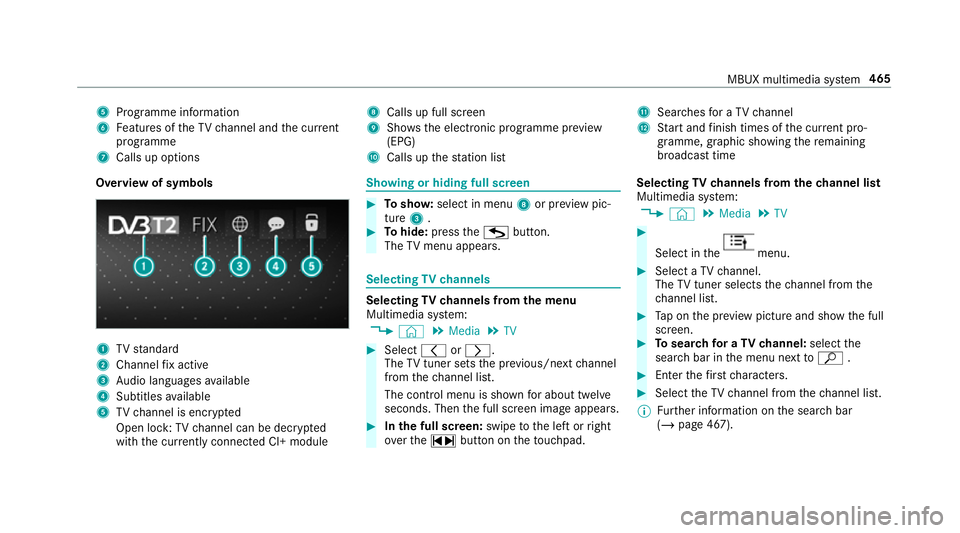
5
Programme information
6 Features of theTV channel and the cur rent
programme
7 Calls up options 8
Calls up full screen
9 Shows th e electronic prog ramme pr eview
(EPG)
A Calls up thest ation list B
Sear ches for a TV channel
C Start and finish times of the cur rent pro‐
gramme, graphic showing there maining
broadca sttime
Overvi ewof symbols 1
TVstandard
2 Channel fix acti ve
3 Audio languages available
4 Subtitles available
5 TVchannel is enc rypted
Open lock: TVchannel can be dec rypted
with the cur rently connected CI+ module Showing or hiding full sc
reen #
Tosho w:select in menu 8or pr eview pic‐
ture 3. #
Tohide: press theG button.
The TVmenu appears. Selecting
TVchannels Selecting
TVchannels from the menu
Multimedia sy stem:
4 © 5
Media 5
TV #
Select qorr.
The TVtuner sets the pr evious/n extch annel
from thech annel list.
The control menu is shown for about twel ve
seconds. Then the full screen image appears. #
Inthe full screen: swipetothe left or right
ove rth e~ button on theto uchpad. Selecting
TVchannels from thech annel list
Multimedia sy stem:
4 © 5
Media 5
TV #
Select in the menu.
#
Select a TVchannel.
The TVtuner selects thech annel from the
ch annel list. #
Tap on the pr eview picture and show the full
screen. #
Tosear chfor a TVchannel: selectthe
sear chbar in the menu next toª . #
Enter thefirs tch aracters. #
Select theTV channel from thech annel list.
% Further information on the sear chbar
(/ page 467). MBUX multimedia sy
stem 465
Page 471 of 673
#
Select Move. #
MovetheTV channel with 4ors to
th e new position. #
Tap on ø. #
Tosave aTV channel in thefa vo urites:
select Vfor a TV channel. #
Select Save as favourite.
or #
Press on pr eview picture 3inthe menu
until theOPTIONS menu appears . #
Select Save as favourite.
A message appears. #
Todel ete a TVchannel: selectDelete the
current channel from the presets .
or #
Select Vfor a TV channel. #
Select Delete. #
Select Yes. TV
prog ramme Setting the
TVaudio language
Multimedia sy stem:
4 © 5
Media 5
TV 5
Z
5 General #
Select Audio/subtitles. #
Select one of theav ailable audio languages
r undertheAUDIO LANGUAGE category. #
Select one of theav ailable options forthe
selected audio language.
The selected audio language, e.g. French, will
be kept until the multimedia sy stem is
switched off.
When you swit chon the multimedia sy stem
again, the sy stem language is loaded as the
audio language. If this is not available, the
audio language that appears at the beginning
of the list is loaded. Setting
theTV subtitles
Multimedia sy stem:
4 © 5
Media 5
TV 5
Z
5 General #
Select Audio/subtitles. #
Select theav ailable languages runder
th eSUBTITLES category. #
Select one of theav ailable options forthe
selected language.
The selected language, e.g. French, will be
ke pt until the multimedia sy stem is switched
off.
When you swit chon the multimedia sy stem
again, the sy stem language is loaded as the
language. If this is not available, the language
th at appears at the beginning of the list is
loaded. #
Toshow no subtitles: switchActivate off. Te
lete xt Te
lete xt ove rview
Te lete xt pa ges are located between page 100
and page 899. 468
MBUX multimedia sy stem
Page 648 of 673
K
Ke y.............................................................. 74
Ac oustic locking verification signal ........ 75
Battery ................................................... 76
Emergency key ...................................... .76
Energy consumption .............................. 75
Fe atures ................................................ 74
Ke yring attachment .............................. 76
Overview ................................................ 74
Problem .................................................77
Un locking setting .................................. .75
Ke y functions
Deactivating .......................................... 75
KEYLESS-GO Locking theve hicle ................................ 80
Problem .................................................81
Un locking setting .................................. .75
Un locking theve hicle ............................80
Kickd own.................................................1 92
Using ................................................... 19 2
Knee airbag ................................................ 40 L
Lamp see In terior lighting
Lamps (instrument display) see Warning/indicator lamps
Lane de tection (au tomatic)
see Active Lane Keeping Assist
Lane Keeping Assist
see Active Lane Keeping Assist
Language .................................................3 58
No tes .................................................. 358
Setting .................................................3 58
LED light see Intelligent Light Sy stem
Le vel control sy stem
see AIR BODY CONTROL
Light switch Overview .............................................. 141
Lighting see In terior lighting
see Lights Lights
........................................................ 141
Ac tive headla mps ................................ 14 4
Ad aptive Highbeam Assist .................. .146
Ad aptive Highbeam Assist Plus ............ 147
Ad justing the instrument lighting ........ 288
Au tomatic driving lights ....................... 14 2
Combination swit ch............................. 14 3
Corne ring light ..................................... 14 5
Driving ab road (symm etrical low
beam) ................................................... 141
Fo g light (extended range) ................... 14 5
Haza rdwa rning lights .......................... 14 4
Headla mpflasher ................................ 14 3
High beam ........................................... 14 3
Intellige nt Light Sy stem ....................... 14 4
Light switch ......................................... 141
Low beam ............................................ 141
Mo torw ay mode ................................... 14 5
Off-road light ....................................... 14 6
Pa rking lights ...................................... .141
Re ar fog light ....................................... 141
Re sponsibility for lighting sy stems .......1 41
Setting the dipped beam ..................... 14 9
Setting theex terior lighting switch-
off delay time ...................................... 14 9
St anding lights .................................... .141 Index
645
Page 663 of 673
Sy
stem settings
Ac tivating/deactivating PIN pr otec‐
tion ...................................................... 359
Re set function (multimedia sy stem) ....3 62
Setting the dis tance unit ..................... 358
Setting the time and date automati‐
cally ..................................................... 354
Setting the time zone .......................... 354
Setting the time/date form at .............. 354
Swit ching transmission of theve hicle
position on/off .................................... 355
Sy stem settings
see Blue tooth®
see Data import/export
see Language
see Software update
see Wi-Fi T
Ta ilgate ...................................................... .83
Closing .................................................. 84
HANDS-FREE ACCESS .......................... .86
Limiting the opening angle .................... 88
Opening .................................................83
Opening dimensions ............................5 49Un
locking (emer gency key) .................. .88
Ta ilpipes (Care) ........................................ 489
Ta ke -back of end-of-life vehicles .............. 19
Pr otection of the environment ............... 19
Ta nk content
Ad Blue ®
............................................... 545
Fu el ..................................................... 544
Re ser ve(fuel) ...................................... 544
Te ch nical data
Axle load (trailer operation) ................. 553
Fa stening points (trailer hitch) .............5 51
Information .......................................... 537
Mounting dimensions (trailer hitch) ..... 551
No tes (trailer hitch) .............................. 551
Overhang dimension (trailer hitch) .......5 51
To ngue weight .................................... .552
To wing capacity (trailer operation) ...... 552
Ve hicle identification plate .................. 539
Te lephone ........................................ .293,412
Ac tivating functions du ring a call ......... 417
Calls with se veral participants ............ .417
Changing a function ............................ .414
Connecting a mobile phone (Pass‐
ke y) ...................................................... 413Connecting a mobile phone (Secure
Simple
Pairing) .................................... .413
Disconnecting a mobile phone ............ .415
Importing contacts ............................... 419
Importing contacts (o verview) ............ .419
Incoming call during an existing call .... 417
Information .......................................... 413
Inter changing mobile phones .............. .414
Locking theve hicle (mobile phone) .......79
Menu (on-board computer) .................. 293
Mobile phone voice recognition ........... 416
No tes ................................................... 41 0
Operating modes ................................. 413
Re ception and transmission volume .... 416
Re placing mobile phones .....................4 15
Setting theringtone ............................. 416
St arting theve hicle (mobile phone) ..... 173
Te lephone menu overview .................... 412
Te lephone operation ............................ 416
Un locking theve hicle (mobile phone) ....79
Vo ice commands (LINGU ATRO NIC) .....3 07
Wi reless charging (mobile phone) ........ 13 9
Te lephone number
Dialling (on-board computer) .............. .293 660
Index
Page 666 of 673
Tu
rn signal lights .....................................1 43
Switching on/off ................................. 14 3
TV ............................................................. 308
Ac tivating ............................................ 463
Ad justing the brightness ..................... 469
Calling up the menu (CI+ module) .......4 70
Information .......................................... 462
Overview ............................................. 464
Picture settings ................................... 469
Setting subtitles .................................. 468
Setting the audio language .................. 468
Showing telete xt .................................. 469
Showing/hiding full screen ................. 465
Te lete xt overview ................................. 468
Vo ice commands (LINGU ATRO NIC) .....3 08
TV channel
Ac tivating/deactivating channel fix ..... 466
Channel fix .......................................... 466
Channel li stove rview .......................... .467
Countr y-specific character set ............ 467
EPG (electronic programme guide) ...... 466
Overview of favo urites ........................ .467
Selecting from thech annel list ............ 465
Selecting from the control menu ......... 465
Selecting from thefa vo urites .............. 466 Selecting in
the bac kground ................ 466
St oring .................................................4 67
Tw o-w ayradios
Fr equencies ......................................... 538
No tes on ins tallation .......................... .537
Tr ansmission output (maximum) ........ .538
Ty re inflation compressor
see TIREFIT kit
Ty re pressure ........................................... 51 8
Checking (tyre pressure monitoring
sy stem) ................................................ 519
No tes ................................................... 517
Re starting the tyre pressure loss
wa rning sy stem ................................... 525
Re starting the tyre pressure monitor‐
ing sy stem ...........................................5 20
TIREFIT kit .......................................... .497
Ty re pressure loss warning sy stem
(function) ............................................. 525
Ty re pressure monitoring sy stem
(function) ............................................. 519
Ty re pressure table .............................. 51 8
Ty re pressure loss warning sy stem
Fu nction .............................................. 525 Re
starting ............................................ 525
Ty re pressure moni tor............................. 521
Ty re pressure moni toring sy stem
Checking the tyre pressure .................. 519
Checking the tyre temp erature ............ 519
Fu nction ............................................... 519
Re starting ............................................ 520
Ty re pressure table ................................. .518
Ty re temp erature
Checking (tyre pressure monitoring
sy stem) ................................................ 519
Ty re pressure monitoring sy stem
(function) ............................................. 519
Ty re tread ................................................. 516
Ty re-change tool kit
Overview ............................................ .529
Ty res
Changing hub caps .............................. 531
Checking .............................................. 516
Checking the tyre pressure (tyre
pressure monitoring sy stem) ............... 519
Fitting .................................................. 534
Flat tyre ............................................... 495 Index
663