ESP MERCEDES-BENZ GLE 2021 Repair Manual
[x] Cancel search | Manufacturer: MERCEDES-BENZ, Model Year: 2021, Model line: GLE, Model: MERCEDES-BENZ GLE 2021Pages: 490, PDF Size: 17.58 MB
Page 205 of 490
R
ActiveDis tance AssistDIS TRONI Cis acti va‐
te d.
Multimedia system:
4 © 5
Set ting s5
Assist ance
5 Route-based Speed #
Activateor deacti vate thefunc tion.
When thefunc tion isactiv e,theve hicle
speed isadjus teddependin gon thero ute
eve nts ahead.
% Further information onthero ute-based
spee dadap tatio n(/ page 201). Ac
tiv eSte ering Assis t Fu
nction ofActiv eSte ering Assis t
Ac tiveSt eer ing Assis tis onl yav ailable uptoa
speed of130mp h(210 km/h) .The system helps
yo uto stay inthecent erofthelane bymeans of
moder atesteer ing interve ntio ns.Dep endingon
th espeed driven, ActiveSt eer ing Assis tuses the
ve hicles ahead andlane markings asare fer‐
ence.
% Dependi ngon thecount ry,in thelowe r
speed rang eAc tiveSt eer ing Assis tcan use th
esur round ingtraf fic as are fere nce. Ifnec‐
ess ary, Ac tiveSt eer ing Assis tcan then also
pr ov ide assis tance when drivi ng outsid eth e
cent erofthelane, forex am ple toform are s‐
cue lane.
If th ede tection oflane mar kings andvehicles
ahead isim pair ed,ActiveSt eer ing Assis t
switc hestopassiv emode. Thesystem prov ides
no suppor tin this case.
St atus displa yof Activ eSte ering Assis tin
th emu ltifunct iondisp lay
R Ø (gra y): act ivat ed and pass ive
R Ø (green ):act ivat ed and active
R Ø (red): system limits detected
R Ø (whit e,redhands): "handsonthesteer‐
ing wheel" prom pt
% During thetransition from activ eto passiv e
st atus ,th eØ symbol issho wnas
enlar gedand flashin g.On ce thesy stem is
passiv e,theØ symbol issho wnasgray in
th emultifunc tiondispla y.
% Dep endingontheselect edvehicle settin gs,
Ac tiveSt eer ing Assis tma ybe una vailable. Ste
ering and touc hde tection
The driver isrequ ired tokeep their hands onthe
st eer ing wheel atall times andbeable tointer‐
ve ne atanytime tocor rect thecour seofthe
ve hicle andkeep itin lane. Thedriver mus t
ex pect ach ang efrom active to passiv emode or
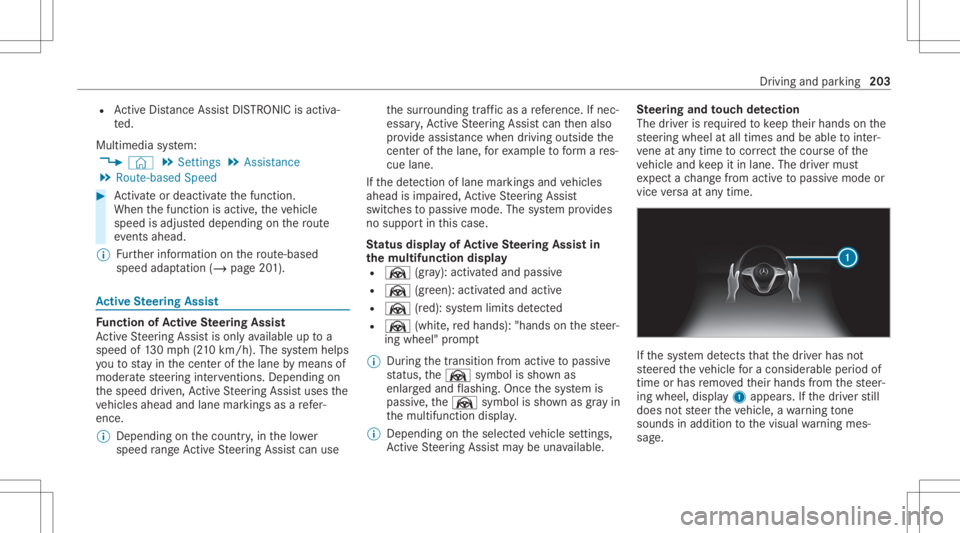
vice versaat anytim e. If
th esy stem detects that thedr iver has not
st eer edtheve hicle fora consider ableper iod of
time orhas remo vedth eir hands from thesteer‐
ing wheel, display1 appear s.Ifth edr iver still
does notst eer theve hicle, awa rning tone
sou nds inad ditio nto thevisual warning mes‐
sag e. Dr
ivin gand parking203
Page 207 of 490
&
WARNIN GRisk ofacci dent ifAc tive
St eer ing Assis tune xpect edlyinterve nes
The detection oflane mar kings andobje cts
ma ymal functi onand causeune xpect ed
st eer ing interve ntio ns. #
Steer accor dingtotraf fic condi tions. Ac
tiv atin g/deac tivatin gAc tiv eSte ering
Assis t
Re quirement s:
R ESP®
is act ivat ed, but isno tint erve ning .
R ActiveDis tance AssistDIS TRONI Cis acti va‐
te d.
Multimedia system:
4 © 5
Set ting s5
Quick Access #
Select 004FSteering Assist. Fu
nction ofActiv eLan eCha ngeAs sist Ac
tiveLa ne Chang eAssi stsuppor tsthedr iver
when chang inglane sby appl ying steer ing torq ue
if th edr iver oper ates atur nsignal indicat or. Obser
vetheno teson driving systems andyour
re sponsibili ty;yo uma yot her wise failto recog‐
nize dangers(/ page 181).
Assis tance when chang inglane sis prov ided ifall
th efo llo wing condition sar eme t:
R Youar edr ivin gon afree wa yor road with
mult iplelanesin thedir ect ion oftrav el.
R The neighbor inglane issepar ated byabr o‐
ke nlane ma rking.
R Novehicle isde tected intheadjacen tlane.
R The driven speed isbe tween 50mph
(80 km/ h)and 110mp h(1 80 km/h) .
R ActiveLa ne Chang eAssi stisswitc hedonin
th emultimedia system.
R ActiveSt eer ing Assis tis activ ated and activ e.
If no vehicle isde tected intheadjacen tlane and
a lane chang eis per mitted, thelane chang e
begin saf te rth edr iver has activ ated thetur nsig‐
nal indicat or.This issho wntothedr iver wit ha
gr een arro w ne xt to the± steer ing wheel
symbol. TheLane Change tothe Leftmessag e,
fo rex am ple, also appear s.IfAc tiveLa ne Chang e
Assi sthas been activated withth etur nsignal indicat
orbut alane chang eis no timm ediat ely
poss ible, agr ay arrow appear sne xt to the±
st eer ing wheel symbol, whichre mains green.
When thelane chang eassis tance star ts,th etur n
signal indicat orisaut omatic allyactiv ated along
wit hth edispla yin themultifunc tiondispla y.
If th eassis tance grap hicis sho wnwhen chang ‐
ing lane s,thelane chang edispla yappear swit h
an addit ionalarrow point ingtowa rdsth eadja‐
cent lane(/page19 6)
If alan ech ang eis no tposs ible, thear row is
fa ded outafte ra fe w sec ond sand ane wlane
ch ang emus tbe init iated. Animm ediat elane
ch ang eis on lypossible onfree wa ysec tion s
wit hout speedlimi ts.
If th esy stem isim pair ed,ActiveLa ne Chang e
Assi stma ybe canceled .The Lane Change Can-
celed messa geappear sin themultifunc tiondis‐
pla y.
In addi tion, awa rning tone maysou nd. Dr
iving and parking 205
Page 209 of 490
ve
hicle, orgiv es no conf irmation tothesy stem,
a wa rning tone sou nds inad ditio nto thevisual
wa rning mess age.
If th edr iver still does notre spond tothewa rn‐
ing, theBeginn ingEmer gencySt op messag e
appear sin themultifunc tiondispla y.Ifth edr iver
st ill does notre spond, ActiveDis tance Assist
DIS TRONI Creduces thespeed. Thevehicle is
deceler ated instag es toast ands till.
De pen dingon thecount ry,at speeds below
40 mph(60 km/h) thehazar dwa rning light s
switc hon aut omat ically.
When theve hicle isstatio nary,thefo llo wing
act ions arecar ried out :
R The vehicle issecur edwithth eelectr icpar k‐
ing brak e.
R ActiveDis tance AssistDIS TRONI Cis end ed
R The vehicle isunloc ked.
R Ifpossible, anemer gency callis place dto
th eMer cedes- Benzemergency callcent er
The driver can cance lth edeceler ationatany
time byper form ing one ofthefo llo wing actions :
R Steer ing R
Braking oracceler ating
R Deact ivating ActiveDis tance Assist
DIS TRONI C Fu
nction ofActiv eTr af fic Jam Assis t Ac
tiveTr af fic Ja m Assi sthelps youwhen intraf‐
fi c jams onmul ti-la neroads withsepar atero ad‐
wa ys by aut omat icallypullin gaw ay wit hin upto
60 seconds andwithmode rate steer ing maneu‐
ve rs.It or ients itselfus ing theve hicle infront
and lane markings. ActiveTr af fic Ja m Assi st
aut omat icallymain tains asaf edis tance from the
ve hicle infront and vehicles cuttingin.
Ac tiveTr af fic Ja m Assi strequ ires you, as the
dr iver ,to keep your han dson thesteer ing wheel
at all times sothat youar eable tointerve ne at
an ytime tocor rect thecour seoftheve hicle and
ke ep itin lane.
Obser vetheno teson driving systems andyour
re sponsibili ty;yo uma yot her wise failto recog‐
nize dangers(/ page 181). Ac
tiveTr af fic Ja m Assi stact ivat es aut omat ically
when allofthefo llo wing condition sar eme t:
R Youar ein atraf fic jam onafree wa yor high -
spe edmajorro ad.
R ActiveDis tance AssistDIS TRONI Cis acti va‐
te dand activ e(/ page19 9).
R ActiveBr ak eAssi stisavailable
(/ page18 7).
R ActiveSt eer ing Assis tis activ ated and activ e
(/ page205).
R ActiveTr af fic Ja m Assi stisact ivat ed
(/ page208).
R Youar etra veling nofaster than 35 mph
(60 km/ h).
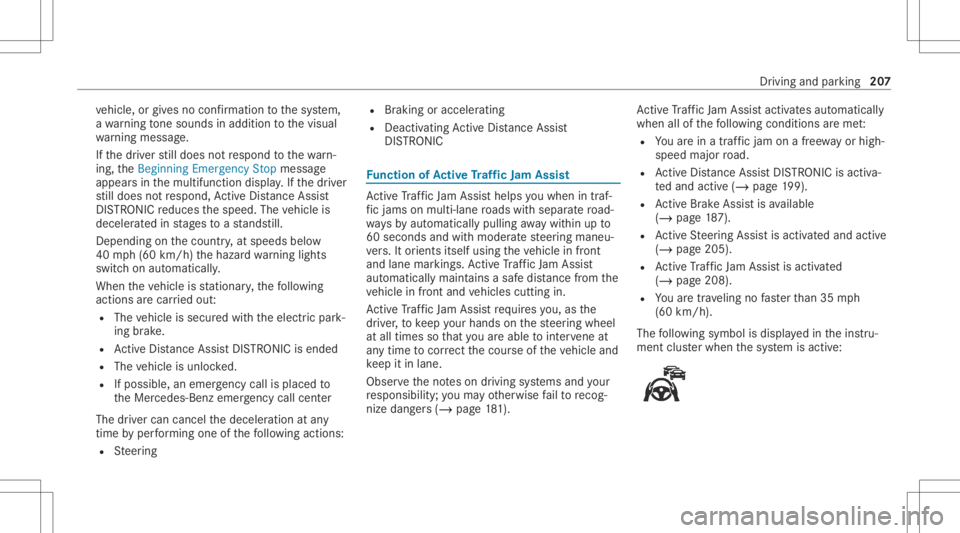
The follo wing symbol isdispla yedin theins tru‐
ment clusterwhen thesy stem isactiv e: Dr
iving andparking 20
7
Page 210 of 490
Sy
stem limit s
The system limit ations ofActiveDis tance Assist
DIS TRONI Cand ActiveSt eer ing Assis tapply to
Ac tiveTr af fic Ja m Assi st(/ pag e203 ). Ac
tiv atin g/deac tivatin gAc tiv eTr af fic Jam
Assis t Mult
imed iasystem:
4 © 5
Set ting s5
Quick Access #
Select .
Fu
nction ofHill StartAss ist Hill
StartAs sis tholds theve hicle fora shor t
time when pulling away on ahill under thefo l‐
lo wing condition s:
R The transmissio nis in posit ion005Bor005E.
R The elect ric pa rking brak eis released.
This gives youen ough timeto mo veyour foot
fr om thebr ak epedal totheaccelera torpeda l and
depr essitbef oreth eve hicle begins toroll
aw ay. &
WARNIN GRisk ofacci dent andinjury
due totheve hicle rolling away
Af tera shor ttime, HillStartAs sis tno longer
holds theve hicle. #
Swif tly mo veyour foot from thebr ak e
pedal totheaccelera torpeda l.Do not
lea vetheve hicle when itis being held
by HillSt artAs sis t. HOLD
functi on HOLD
functi on
The HOL Dfun ction holds theve hicle atast and‐
st ill wit hout requ iring youto depr essthebr ak e
pedal, e.g.while waitin gin traf fic.
The HOLD functionisonly anaid. The responsi‐
bility forth eve hicle safely standi ngstill remains
wit hth edr iver .
Sy stem limit s
The HOL Dfun ction isonl yint end edtoprov ide
assis tance when drivi ng and isno ta su fficien t mean
sof saf eguar dingtheve hicle agains tro lling
aw ay when statio nary.
R The incline mustno tbe great erthan 30%.
Ac tiv atin g/deac tivatin gthe HOL Dfun ction &
WARNIN GRisk ofan acci dent dueto the
HOLD functio nbei ng activ ated whe nyo u
lea vetheve hicle
If th eve hicle isonl ybr ak ed withth eHOLD
func tion itcould, inthefo llo wing situat ions,
ro llaw ay:
R Ifth er eis amalfunct ioninthesy stem or
in thepo we rsupp ly.
R Ifth eHOLD function isdeactiv ated by
depr essing theaccelera torpeda lor brak e
peda l,e.g. byave hicle occupant. #
Alw ayssecur eth eve hicle agains tro ll‐
ing away bef oreyo ulea veit. Re
quirement s:
R The vehicle isstatio nary. 208
Driving andparking
Page 213 of 490
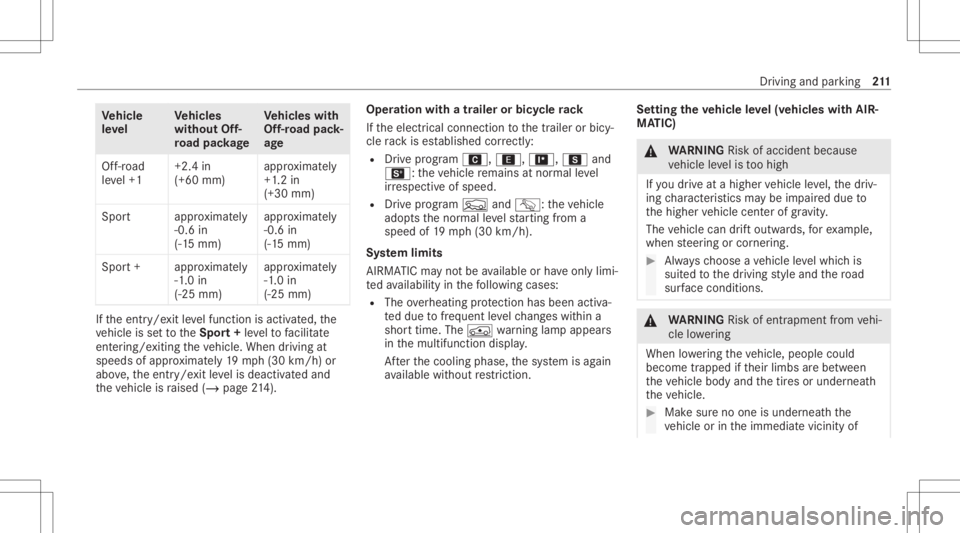
Ve
hicl e
le ve l Ve
hicl es
without Off-
ro ad pac kage Ve
hicl eswith
Of f-road pack‐
ag e
Of f-road
le ve l+1 +2.
4in
(+60 mm) appr
oximat ely
+1 .2 in
(+30 mm)
Spor ta pproximat ely
-0 .6 in
(-1 5mm) appr
oximat ely
-0 .6 in
(-1 5mm)
Spor t+a pproximat ely
-1 .0 in
(-2 5mm) appr
oximat ely
-1 .0 in
(-2 5mm) If
th eent ry/e xit leve lfunc tion isact ivat ed, the
ve hicle issetto theSpor t+ leve lto facil itat e
ent ering/e xiting theve hicle. When driving at
speeds ofappr oximat ely19 mp h(3 0km/h) or
abo ve,th eent ry/e xit leve lis deact ivat ed and
th eve hicle israised (/page21 4). Op
eration withatrail er or bicy cle ra ck
If th eelectr icalconnect iontothetra iler orbicy‐
cle rack ises tablished correctl y:
R Drive pr ogr am A, ;,=,Cand
B: theve hicle remains atnor mal leve l
ir re spectiv eof speed.
R Drive pr ogra mF andG: theve hicle
adop tsthenor mal leve lst ar tin gfrom a
spee dof 19 mp h(30 km/h).
Sy stem limit s
AI RMA TICmayno tbe available orhave onl ylimi‐
te dav ailabilit yin thefo llo wing cases :
R The overheating protect ion has been activa‐
te ddue tofreq uent leve lch ang eswit hin a
shor ttim e.The 00C4 warning lam pappear s
in themultifunc tiondispla y.
Af terth ecooling phase,thesy stem isag ain
av ailable without restriction. Se
tting thevehicl eleve l(v ehicles withAIR‐
MA TIC) &
WARNIN GRisk ofacci dent because
ve hicle leve lis toohigh
If yo udr ive at ahigh ervehicle leve l,th edr iv‐
ing charact eristic sma ybe impair eddue to
th ehigher vehicle centerofgrav ity .
The vehicle candrift outw ards, forex am ple,
when steer ing orcor ner ing. #
Alw aysch oose ave hicle leve lwhic his
suit edtothedr iving style and thero ad
sur face condi tions. &
WARNIN GRisk ofentr apment from vehi‐
cle lowe ring
Whe nlowe ring theve hicle, people could
become trapped ifth eir limbs arebe tween
th eve hicle body andthetir es orunder neath
th eve hicle. #
Mak esur eno one isunder neathth e
ve hicle orintheimmediat evicin ityof Dr
iving andparking 21
1
Page 226 of 490
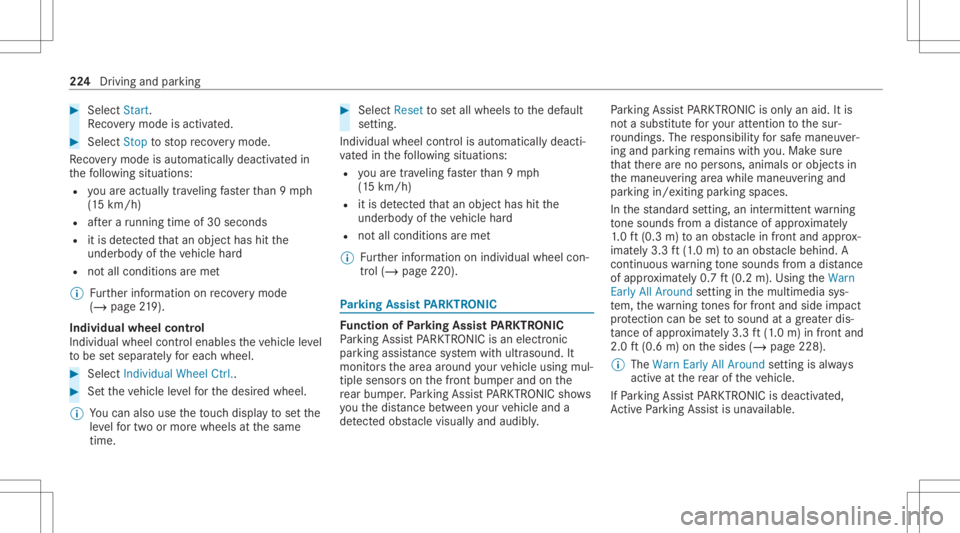
#
Select Start .
Re covery mode isactiv ated. #
Select Stoptostop reco very mode.
Re covery mode isau tomatical lydeactiv ated in
th efo llo wing situat ions:
R youar eact uall ytrave ling faster than 9mp h
(1 5 km/ h)
R afte ra ru nning timeof30 seco nds
R itis de tected that an obj ect has hitthe
und erbody oftheve hicle hard
R notall conditions areme t
% Further information onreco very mode
(/ page21 9).
Ind ivid ua lwh eel con trol
Indi vidualwh eelcontr olena bles theve hicle leve l
to be setsepar ately foreac hwhee l. #
Select IndividualWheel Ctrl.. #
Setth eve hicle leve lfo rth edesir edwheel.
% Youcan also usetheto uc hdispl aytosetth e
le ve lfo rtw oor mor ewhee lsat thesame
time. #
Select Resettosetall wheels tothedef ault
se tting.
Individual wheelcontrol isaut omaticall ydeacti‐
va tedin thefo llo wing situat ions:
R youar etra veling faster than 9mp h
(1 5 km/ h)
R itis de tected that an obj ect has hitthe
und erbody oftheve hicle hard
R notall conditions areme t
% Further information onindividua lwheel con‐
tr ol (/ page220). Pa
rking Assis tPA RK TRONI C Fu
nction ofParking Assis tPA RK TRONI C
Pa rking AssistPA RK TRONI Cis an elec tron ic
par kingassi stanc esy stem withultr asound. It
monit orsth ear ea around your vehicle using mul‐
tiple sensor son thefront bum perand onthe
re ar bum per.Pa rking AssistPA RK TRONI Csho ws
yo uth edis tance betwee nyo ur vehicle anda
de tected obs tacle visually and audibly . Pa
rking AssistPA RK TRONI Cis on lyan aid. Itis
no ta subs titutefo ryo ur att entio nto thesur‐
ro und ings.The responsibili tyforsaf emaneu ver‐
ing and parking remains withyo u. Mak esur e
th at ther ear eno per sons, animals orobjec tsin
th emaneuv ering area while maneuv ering and
par king in/exitingpar king spaces.
In thest andar dse tting ,an intermit tent wa rning
to ne sou nds from adi st anc eof appr oximat ely
1. 0 ft (0.3 m)toan obs tacle infront and approx ‐
imat ely3. 3ft (1.0 m) toan obs tacle beh ind. A
continu ouswa rning tone sou nds from adi st anc e
of appr oximat ely0. 7ft (0.2 m).Using theWarn
Early AllAroun dse tting inthemultimedia sys‐
te m, thewa rning tones forfr ont and side impact
pr otect ion can besetto sound atagr eat erdis‐
ta nce ofapprox imat ely3. 3ft (1.0 m) infront and
2.0 ft(0.6 m)onthesides (/page228).
% The Warn EarlyAllAroun dse tting isalw ays
act ive at there ar oftheve hicle.
If Pa rking AssistPA RK TRONI Cis deac tiva ted,
Ac tivePa rking Assistis una vailable. 22
4
Drivin gand parking
Page 228 of 490
Sy
stem limit s
Pa rking AssistPA RK TRONI Cdoes notne cessa‐
ri ly take intoacc ount thefo llo wing obstacle s:
R Obs tacle sbel ow thede tection rang e, e.g .
pe rsons, animals orobject s.
R Obs tacle sab oveth ede tection rang e, e.g .
ove rhang ingloads, overhang sor loadin g
ra mp sof truc ks.
The sensor smus tbe free ofdir t,ice and slush.
Ot her wise, they ma yno tfunction correctly .
Cl ea nth esensor sre gular ly,especially afte rdr iv‐
ing off-r oad ,ta king careno tto scr atc hor dam‐
ag eth em.
Ve hicl eswith traile rhitc h:Parking Assist
PA RK TRONI Cis deac tiva tedfo rth ere ar zone
when youes tablish anelect rical connecti on
be tween your vehicle andatrailer . Pr
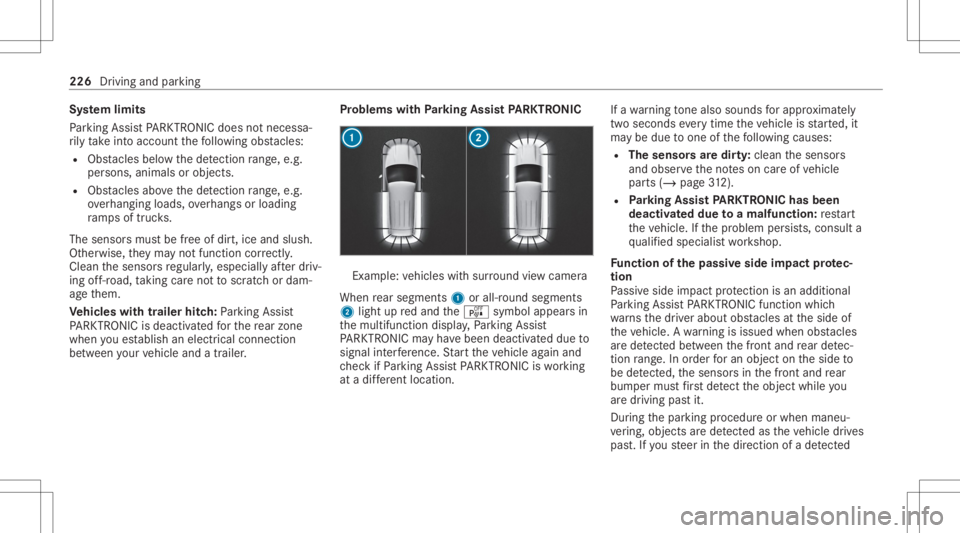
oblems withParking Assis tPA RK TRONI C Ex
am ple: vehicles withsur round viewcam era
When rear segm ents1 orall-r oundsegm ents
2 light upredand theé symbol appearsin
th emultifunc tiondispla y,Pa rking Assist
PA RK TRONI Cma yha ve been deactiv ated due to
signal interfere nce. Startth eve hicle again and
ch eckif Pa rking AssistPA RK TRONI Cis wo rking
at adif fere nt locati on. If
awa rning tone also sou nds forapp roxima tely
tw ose co nd seve rytim eth eve hicle isstar ted, it
ma ybe due toone ofthefo llo wing causes:
R Thesensor sar edir ty:clean thesensor s
and obser vetheno teson car eof vehicle
par ts(/ page31 2).
R Parking Assis tPA RK TRONI Chas been
deac tivated due toamalfunc tion:re star t
th eve hicle. Ifth epr oblem persists, con sult a
qu alif ied spec ialistwo rkshop.
Fu nction ofthepa ssiv eside impact protec‐
tion
Pa ssiv eside impact protect ion isan additional
Pa rking AssistPA RK TRONI Cfun ction whic h
wa rnsth edr iver about obstacle sat theside of
th eve hicle. Awa rning isissued whenobstacles
ar ede tected between thefront and rear detec‐
tion rang e. In orde rfo ran object ontheside to
be detected, thesensor sin thefront and rear
bum permus tfirs tde tect theobjec twhile you
ar edr ivin gpas tit.
Dur ing thepar king procedur eor when maneu‐
ve ring, objects arede tected astheve hicle drives
pas t.Ifyo usteer inthedir ect ion ofade tected 226
Driving and parking
Page 231 of 490
Ac
tiv atin g/deac tivatin gaudi ofa deo ut
Yo ucan spec ifywhe ther thevo lume ofamedia
sour ceinthemultimedia system isto be
re duced whenParking AssistPA RK TRONI C
soun dsawa rning tone. #
Select Aud ioFad eou tDuri ngWa rning Tones. #
Activateor deacti vate thefunc tion. Re
versing camer a Fu
nction ofthere ar vie wcamer a
When youen gage reve rsege ar,th eimag efrom
th ere ar vie wcam erais sho wninthemedia dis‐
pla y.Dyna micguide lines showthepat hth e
ve hicle willtake wit hth ecur rent steer ing ang le.
This helps youto orient yourself and toavoid
obs tacle swhe nba cking up.
The rear vie wcam erais on lyan aid. Itis no ta
subs titutefo ryo ur att entio nto thesur round ings.
The responsibili tyforsaf emaneu vering and
pa rking remains withyo u. Mak esur eth at ther e
ar eno per sons, animals orobjec tsetc., inthe
maneu vering area while ma neu vering and park‐
ing. %
Youcan open theco verof there ar vie wcam ‐
er aman ually(/ page23 5).
The guide linesin themedia displaysho wthe
dis tances toyour vehicle. Thedistances dis‐
pl aye donl yapply toroad leve l.
Depe ndingon theve hicle equipment, youcan
sele ctfrom thefo llo wing views:
R Normalvie w
R Wide-ang levie w
R Trailer view
The area behin dth eve hicle isdispla yedas a
mir rorimag e,as intheinside rear vie wmir ror.
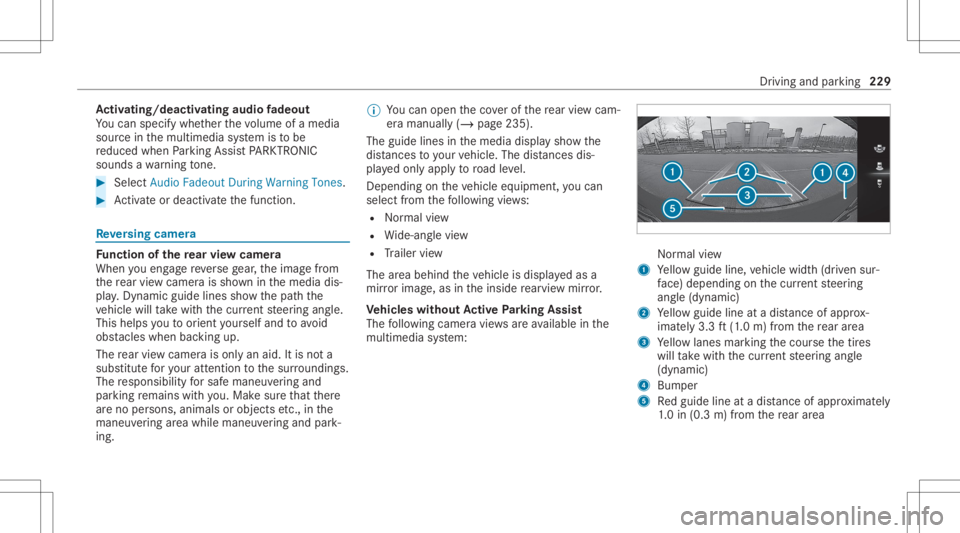
Ve hicl eswithout Activ ePa rking Assis t
The follo wing camer avie ws areav ailable inthe
multime diasystem: Nor
mal view
1 Yello wguide line,vehicle width(dr iven sur‐
fa ce) dep endi ngon thecur rent steer ing
ang le(dynamic)
2 Yello wguide lineatadis tance ofapprox ‐
imat ely3. 3ft (1.0 m) from there ar area
3 Yello wlanes markingth ecour sethetir es
will take wit hth ecur rent steer ing ang le
(dynamic)
4 Bum per
5 Redguide lineatadis tance ofapprox imat ely
1. 0 in (0.3 m)from there ar area Dr
ivin gand parking229
Page 234 of 490
immed
iateve hicle surround ings.The system
assis tsyou, e.g .when parkingor atexits with
re duced visibility .
The views ofthesur round viewcam eraar e
alw aysav ailable whendrivin gfo rw ards up toa
speed ofappr ox.10 mph(1 6 km/h) andwhen
bac king up.
The surround viewcam erais on lyan aid and
ma ysho wadis torted viewof obs tacle s,sho w
th em incor rectly ornotsho wthem atall. Itis no t
a subs titutefo ryo ur att entio nto thesur round‐
ing s.The responsibili tyforsaf emaneu vering and
pa rking remains withyo u. Mak esur eth at ther e
ar eno per sons, animals orobjec tsetc., inthe
maneu vering area while ma neu vering and park‐
ing.
The system evaluat esimag esfrom thefo llo wing
cameras:
R Rear vie wcam era
R Front camer a
R Twoside camer asintheoutside mirrors
% Youcan open theco verof there ar vie wcam ‐
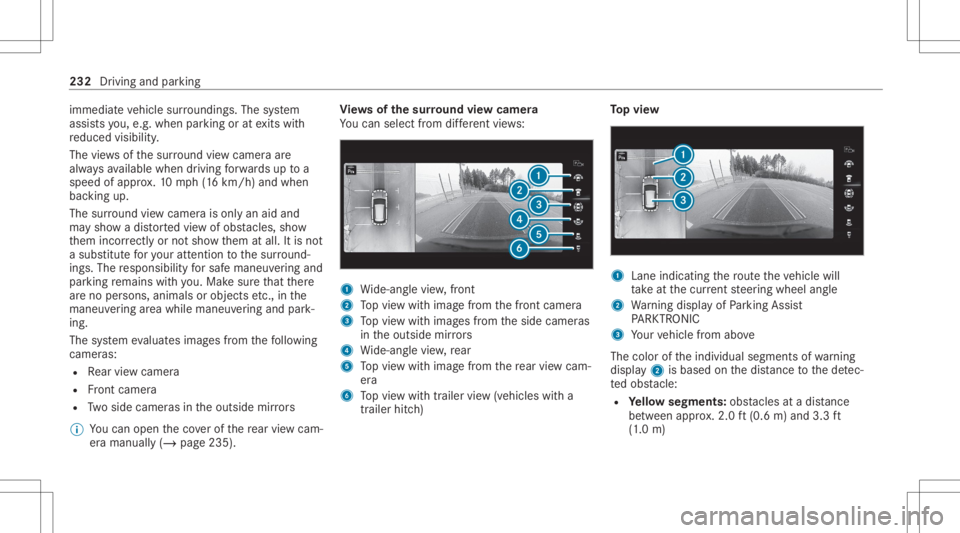
er aman ually(/ page23 5). Vi
ew sof thesur round viewcamer a
Yo ucan selectfrom differe nt vie ws: 1
Wide-ang levie w, front
2 Topvie wwit himag efrom thefront camer a
3 Topvie wwit himag esfrom theside camer as
in theoutside mirrors
4 Wide-ang levie w, rear
5 Topvie wwit himag efrom there ar vie wcam ‐
er a
6 Topvie wwit htrailer view(vehicles witha
tra iler hitch) To
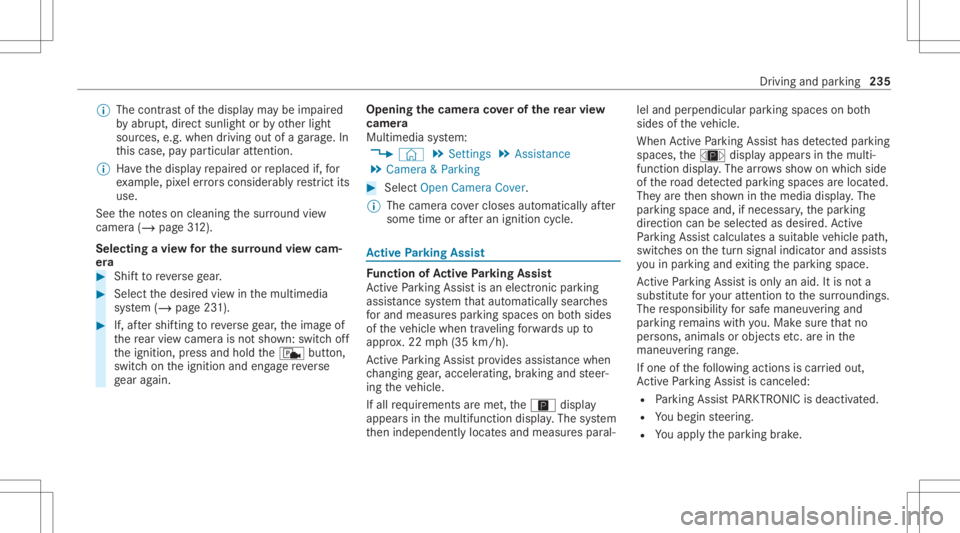
pvie w 1
Lane indicati ngthero uteth eve hicle will
ta ke atthecur rent steer ing wheel angle
2 Warning displa yof Parking Assist
PA RK TRONI C
3 Your vehicle from above
The color oftheindividual segmentsof wa rning
displa y2 isbased onthedis tance tothede tec‐
te dobs tacle :
R Yello wsegment s:obs tacle sat adi st anc e
be tween appr ox.2.0 ft(0.6 m)and 3.3ft
(1 .0 m) 232
Driving andparking
Page 237 of 490
%
The cont rast of thedispla yma ybe impair ed
by abr upt,dir ect sunlight orby other light
sour ces, e.g.when driving outofaga rage .In
th is case, paypar ticular attent ion.
% Have thedispla yre pair edorreplaced if,for
ex am ple, pixelerro rs consi derablyrestrict its
us e.
See theno teson cleaning thesur round view
cam era(/ page31 2).
Se lec tingaview forthe surround viewcam‐
er a #
Shif tto reve rsege ar. #
Select thedesir edviewin themultimedia
sy stem (/ page23 1). #
If,afte rshif ting toreve rsege ar,th eimag eof
th ere ar vie wcam erais no tsho wn: switchoff
th eignition ,pr ess and hold thec button,
switc hon theignition andengagere ve rse
ge ar again. Open
ingthecam eraco verof the rear vie w
camer a
Mul timedi asy stem:
4 © 5
Set ting s5
Assist ance
5 Camera &Parkin g #
Select OpenCamera Cover.
% The camer aco vercloses automatical lyafte r
some timeorafte ran ignitio ncy cle. Ac
tiv ePa rking Assis t Fu
nction ofActiv ePa rking Assis t
Ac tivePa rking Assistis an elect ronic parking
assis tance system that aut omat icallysear ches
fo rand measu respar king spaces onboth sides
of theve hicle when trave ling forw ards up to
appr ox.22 mph(35 km/h).
Ac tivePa rking Assistpr ov ides assis tance when
ch ang inggear,acc eler ating,brakin gand steer‐
ing theve hicle.
If all requ iremen tsareme t,th eÇ displa y
appear sin themultifunc tiondispla y.The system
th en independen tly locat esand measur espar al‐ lel
and perpendicular parking spaces onboth
sides oftheve hicle.
When ActivePa rking Assisthas detected parking
spaces ,th eÈ displa yappear sin themulti‐
func tion displa y.The arro ws sho won whic hside
of thero ad detected parking spaces arelocat ed.
The yar eth en sho wninthemedia display.The
par king space and,ifnecessar y,thepar king
dir ect ion can beselect edasdesir ed.Active
Pa rking Assistcalc ulatesasuit able vehicle path,
switc hesonthetur nsignal indicat orand assis ts
yo uin par kingand exitin gth epar king space.
Ac tivePa rking Assistis onl yan aid. Itis no ta
subs titutefo ryo ur att entio nto thesur round ings.
The responsibili tyforsaf emaneu vering and
pa rking remains withyo u. Mak esur eth at no
per son s,anim alsorobj ect set c. arein the
maneu vering rang e.
If one ofthefo llo wing actions iscar ried out,
Ac tivePa rking Assistis can celed:
R Parking AssistPA RK TRONI Cis deac tiva ted.
R Youbegin steer ing.
R Youappl yth epar king brak e. Dr
iving andparking 235