wheels MERCEDES-BENZ GLE-CLASS SUV 2016 User Guide
[x] Cancel search | Manufacturer: MERCEDES-BENZ, Model Year: 2016, Model line: GLE-CLASS SUV, Model: MERCEDES-BENZ GLE-CLASS SUV 2016Pages: 450, PDF Size: 10.52 MB
Page 69 of 450
Off-road ABS
An ABS system specifically suited to off-road
terrain is activated automatically once the off-
road program is activated on:
RVehicles without the Offroad Engineering
package (Ypage 237)
RVehicles with the Off-Road Engineering pack-
age (Ypage 237)
At speeds below 20 mph (30 km/h), the front
wheels lock cyclically during braking. The dig-
ging-in effect achieved in the process reduces
the stopping distance on off-road terrain. This
limits steering capability.
BAS (Brake Assist System)
General information
BAS operates in emergency braking situations.
If you depress the brake pedal quickly, BAS
automatically boosts the braking force, thus
shortening the stopping distance.
Important safety notes
iObserve the "Important safety notes" sec-
tion (Ypage 66).
GWARNING
If BAS is malfunctioning, the braking distance
in an emergency braking situation is
increased. There is a risk of an accident.
In an emergency braking situation, depress
the brake pedal with full force. ABS prevents
the wheels from locking.
Braking
XKeep the brake pedal firmly depressed until
the emergency braking situation is over.
ABS prevents the wheels from locking.
The brakes will function as usual once you
release the brake pedal. BAS is deactivated.
BAS PLUS (Brake Assist System
PLUS) with Cross-Traffic Assist
General information
BAS PLUS can help you to minimize the risk of a
collision with a vehicle or a pedestrian and
reduce the effects of such a collision. If BAS
PLUS detects a danger of collision, you are
assisted when braking.
iPay attention to the important safety notes
in the "Driving safety systems" section
(
Ypage 66).
BAS PLUS is only available on vehicles with the
Driving Assistance package.
For BAS PLUS to assist you when driving, the
radar sensor system and the camera system
must be operational.
With the help of a sensor system and a camera
system, BAS PLUS can detect obstacles:
Rthat are in the path of your vehicle for an
extended period of time
Rthat cross the path of your vehicle
In addition, pedestrians in the path of your vehi- cle can be detected.
BAS PLUS detects pedestrians by using typical
characteristics such as the body contours and
posture of a person standing upright.
If the radar sensor system or the camera system
is malfunctioning, BAS PLUS functions are
restricted or no longer available. The brake sys-
tem is still available with complete brake boost-
ing effect and BAS.
iObserve the restrictions described in the
"Important safety notes" sec-
tion“ (
Ypage 67).
Important safety notes
GWARNING
BAS PLUS cannot always clearly identify
objects and complex traffic situations.
In such cases, BAS PLUS may:
Rintervene unnecessarily
Rnot intervene
There is a risk of an accident.
Driving safety systems67
Safety
Z
Page 71 of 450
XKeep the brake pedal depressed until the
emergency braking situation is over.
ABS prevents the wheels from locking.
BAS PLUS is deactivated and the brakes func-
tion as usual again, if:
Ryou release the brake pedal.
Rthere is no longer a risk of collision.
Rno obstacle is detected in front of your vehi-
cle.
Ryou depress the accelerator pedal.
Ryou activate kickdown.
COLLISION PREVENTION ASSIST
PLUS
General information
iObserve the "Important safety notes" sec-
tion (Ypage 66).
COLLISION PREVENTION ASSIST PLUS consists
of a distance warning function with an autono-
mous braking function and adaptive Brake
Assist.
COLLISION PREVENTION ASSIST PLUS can help
you to minimize the risk of a front-end collision
with a vehicle ahead or reduce the effects of
such a collision.
If COLLISION PREVENTION ASSIST PLUS
detects that there is a risk of a collision, you will
be warned visually and acoustically. If you do not
react to the visual and audible collision warning,
autonomous braking can be initiated in critical
situations. If you apply the brake yourself in a
critical situation, the COLLISION PREVENTION
ASSIST PLUS adaptive Brake Assist assists you.
Important safety notes
In particular, the detection of obstacles can be
impaired if:
Rthere is dirt on the sensors or anything else
covering the sensors
Rthere is snow or heavy rain
Rthere is interference by other radar sources
Rthere are strong radar reflections, for exam-
ple in parking garages
Ra narrow vehicle traveling in front, e.g. a
motorbike
Ra vehicle traveling in front on a different line
Rnew vehicles or after a service on the COLLI-
SION PREVENTION ASSIST PLUS system
Observe the notes in the section on breaking-
in (
Ypage 144).
Following damage to the front end of the vehicle,
have the configuration and operation of the
radar sensor checked at a qualified specialist
workshop. This also applies to collisions at slow
speeds where there is no visible damage to the
front of the vehicle.
Switching on/off
The COLLISION PREVENTION ASSIST PLUS is
automatically active after switching on the igni-
tion.
You can activate or deactivate COLLISION PRE-
VENTION ASSIST PLUS in the on-board com-
puter (
Ypage 272). When deactivated, the dis-
tance warning function and the autonomous
braking function are also deactivated.
If COLLISION PREVENTION ASSIST PLUS is
deactivated, the æsymbol appears in the
assistance graphics display.
Distance warning function
General information
The distance warning function can help you to
minimize the risk of a front-end collision with a
vehicle ahead or reduce the effects of such a
collision. If the distance warning function
detects that there is a risk of a collision, you will
be warned visually and acoustically.
Important safety notes
iObserve the "Important safety notes" sec-
tion for driving safety systems (Ypage 66).
GWARNING
The distance warning function does not react:
Rto people or animals
Rto oncoming vehicles
Rto crossing traffic
Rwhen cornering
Thus, the distance warning function cannot
provide a warning in all critical situations.
There is a risk of an accident.
Driving safety systems69
Safety
Z
Page 73 of 450
been detected as such at least once over the
period of observation.
Up to a speed of approximately 44 mph
(70 km/h), Adaptive Brake Assist reacts to sta-
tionary obstacles.
If adaptive Brake Assist demands particularly
high braking force, preventative passenger pro-
tection measures (PRE-SAFE
®) are activated
simultaneously (Ypage 58).
XKeep the brake pedal depressed until the
emergency braking situation is over.
ABS prevents the wheels from locking.
The brakes will work normally again if:
Ryou release the brake pedal.
Rthere is no longer any danger of a collision.
Rno obstacle is detected in front of your vehi-
cle.
Adaptive Brake Assist is then deactivated.
Important safety notes
iObserve the "Important safety notes" sec-
tion for driving safety systems (Ypage 66).
GWARNING
Adaptive Brake Assist cannot always clearly
identify objects and complex traffic situa-
tions.
In such cases, Adaptive Brake Assist can:
Rintervene unnecessarily
Rnot intervene
There is a risk of an accident.
Always pay careful attention to the traffic sit- uation and be ready to brake. Terminate the
intervention in a non-critical driving situation.
GWARNING
Adaptive Brake Assist does not react:
Rto people or animals
Rto oncoming vehicles
Rto crossing traffic
Rwhen cornering
As a result, the Adaptive Brake Assist may not
intervene in all critical conditions. There is a
risk of an accident.
Always pay careful attention to the traffic sit- uation and be ready to brake. Due to the nature of the system, complicated
but non-critical driving situations may also
cause Adaptive Brake Assist to intervene.
If adaptive Brake Assist is not available due to a
malfunction in the radar sensor system, the
brake system remains available with full brake
boosting effect and BAS.
ESP®(Electronic Stability Program)
General notes
iObserve the "Important safety notes" sec-
tion (Ypage 66).
ESP
®monitors driving stability and traction, i.e.
power transmission between the tires and the
road surface.
If ESP
®detects that the vehicle is deviating from
the direction desired by the driver, one or more
wheels are braked to stabilize the vehicle. The
engine output is also modified to keep the vehi-
cle on the desired course within physical limits.
ESP
®assists the driver when pulling away on
wet or slippery roads. ESP®can also stabilize
the vehicle during braking.
ETS/4ETS (Electronic Traction System)
ETS traction control is part of ESP®. On vehicles
with 4MATIC, 4ETS is part of ESP®.
Traction control brakes the drive wheels indi-
vidually if they spin. This enables you to pull
away and accelerate on slippery surfaces, for
example if the road surface is slippery on one
side. In addition, more drive torque is transfer-
red to the wheel or wheels with traction.
Traction control remains active, even if you
deactivate ESP
®.
In appropriate driving situations, activate the
offroad program:
XVehicles without the Offroad Engineering
package (Ypage 237)
XVehicles with the Off-Road Engineering pack-
age (Ypage 237)
Driving safety systems71
Safety
Z
Page 74 of 450
Offroad 4ETS (Electronic Traction Sys-
tem)
An ETS system specifically suited to off-road
terrain is activated automatically once an off-
road program is activated:
RVehicles without the Offroad Engineering
package (Ypage 237)
RVehicles with the Off-Road Engineering pack-
age (Ypage 237)
Important safety notes
GWARNING
If ESP
®is malfunctioning, ESP®is unable to
stabilize the vehicle. Additionally, further driv-
ing safety systems are deactivated. This
increases the risk of skidding and an accident.
Drive on carefully. Have ESP
®checked at a
qualified specialist workshop.
!Vehicles with 4MATIC: only operate the
vehicle for a maximum of ten seconds on a
brake test dynamometer. Switch off the igni-
tion.
Application of the brakes by ESP
®may oth-
erwise destroy the brake system.
!Vehicles with 4MATIC: function or perform-
ance tests may only be carried out on a 2-axle dynamometer. Before you operate the vehicle
on such a dynamometer, please consult a
qualified workshop. You could otherwise
damage the drive train or the brake system.
ESP
®is only deactivated if the åwarning
lamp is lit continuously.
If the ÷ warning lamp and the åwarning
lamp are lit continuously, ESP
®is not available
due to a malfunction.
Observe the information on warning lamps
(
Ypage 321) and display messages which may
be shown in the instrument cluster
(
Ypage 281).
iOnly use wheels with the recommended tire
sizes. Only then will ESP®function properly.
Characteristics of ESP®
General information
If the ÷ ESP warning lamp goes out before
beginning the journey, ESP®is automatically
active.
If ESP
®intervenes, the ÷ESP®warning lamp
flashes in the instrument cluster.
If ESP
®intervenes:
XDo not deactivate ESP®under any circum-
stances.
XOnly depress the accelerator pedal as far as
necessary when pulling away.
XAdapt your driving style to suit the prevailing
road and weather conditions.
ECO start/stop function
The ECO start/stop function switches the
engine off automatically when the vehicle stops
moving. The engine starts automatically when
the driver wants to pull away again. ESP
®
remains in its previously selected status. Exam-
ple: if ESP®was deactivated before the engine
was switched off, ESP®remains deactivated
when the engine is switched on again.
Deactivating/activating ESP®
Important safety notes
iObserve the "Important safety notes" sec-
tion (Ypage 66).
You can select between the following states of
ESP
®:
RESP®is activated.
RESP®is deactivated.
GWARNING
If you deactivate ESP
®, ESP®no longer sta-
bilizes the vehicle. There is an increased risk
of skidding and an accident.
Only deactivate ESP
®in the situations descri-
bed in the following.
It may be best to deactivate ESP
®in the follow-
ing situations:
Rwhen using snow chains
Rin deep snow
Ron sand or gravel
72Driving safety systems
Safety
Page 75 of 450
iActivate ESP®as soon as the situations
described above no longer apply. ESP®will
otherwise not be able to stabilize the vehicle if
the vehicle starts to skid or a wheel starts to
spin.
!Avoid spinning the driven wheels for an
extended period with ESP®deactivated. You
could otherwise damage the drivetrain.
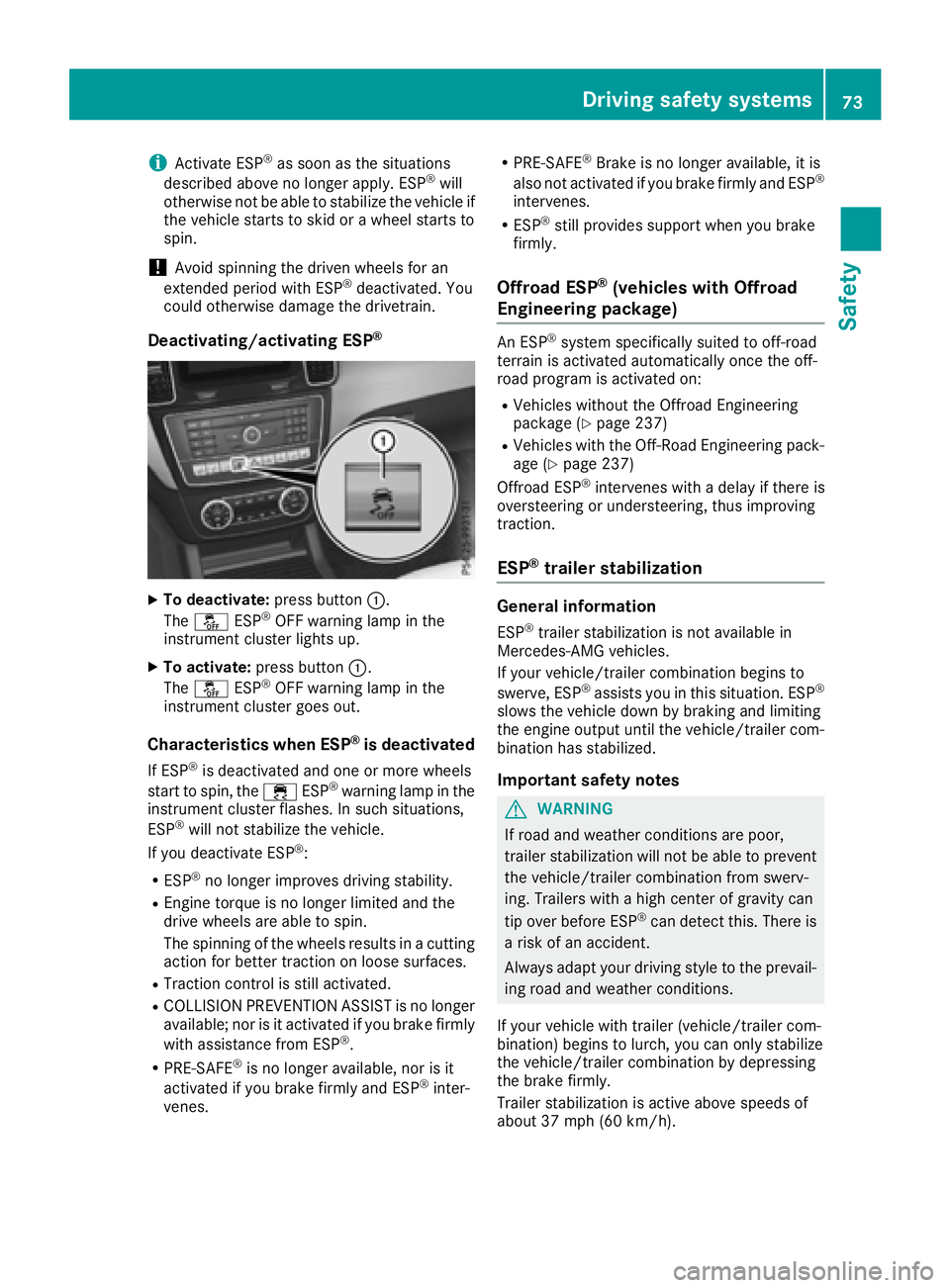
Deactivating/activating ESP®
XTo deactivate: press button:.
The å ESP®OFF warning lamp in the
instrument cluster lights up.
XTo activate: press button :.
The å ESP®OFF warning lamp in the
instrument cluster goes out.
Characteristics when ESP®is deactivated
If ESP®is deactivated and one or more wheels
start to spin, the ÷ESP®warning lamp in the
instrument cluster flashes. In such situations,
ESP
®will not stabilize the vehicle.
If you deactivate ESP®:
RESP®no longer improves driving stability.
REngine torque is no longer limited and the
drive wheels are able to spin.
The spinning of the wheels results in a cutting
action for better traction on loose surfaces.
RTraction control is still activated.
RCOLLISION PREVENTION ASSIST is no longer
available; nor is it activated if you brake firmly
with assistance from ESP
®.
RPRE-SAFE®is no longer available, nor is it
activated if you brake firmly and ESP®inter-
venes.
RPRE-SAFE®Brake is no longer available, it is
also not activated if you brake firmly and ESP®
intervenes.
RESP®still provides support when you brake
firmly.
Offroad ESP®(vehicles with Offroad
Engineering package)
An ESP®system specifically suited to off-road
terrain is activated automatically once the off-
road program is activated on:
RVehicles without the Offroad Engineering
package (Ypage 237)
RVehicles with the Off-Road Engineering pack-
age (Ypage 237)
Offroad ESP®intervenes with a delay if there is
oversteering or understeering, thus improving
traction.
ESP®trailer stabilization
General information
ESP®trailer stabilization is not available in
Mercedes-AMG vehicles.
If your vehicle/trailer combination begins to
swerve, ESP
®assists you in this situation. ESP®
slows the vehicle down by braking and limiting
the engine output until the vehicle/trailer com-
bination has stabilized.
Important safety notes
GWARNING
If road and weather conditions are poor,
trailer stabilization will not be able to prevent
the vehicle/trailer combination from swerv-
ing. Trailers with a high center of gravity can
tip over before ESP
®can detect this. There is
a risk of an accident.
Always adapt your driving style to the prevail-
ing road and weather conditions.
If your vehicle with trailer (vehicle/trailer com-
bination) begins to lurch, you can only stabilize
the vehicle/trailer combination by depressing
the brake firmly.
Trailer stabilization is active above speeds of
about 37 mph (60 km/h).
Driving safety systems73
Safety
Z
Page 76 of 450
ESP®trailer stabilization does not work if ESP®
is deactivated or disabled because of a malfunc-
tion.
Crosswind Assist
General information
Strong crosswinds can cause your vehicle to
deviate from a straight course. The crosswind
driving assistance function integrated in ESP
®
noticeably reduces these impairments.
ESP®intervenes automatically according to the
direction and intensity of the crosswinds affect-
ing your vehicle.
ESP intervenes with stabilizing braking to assist
you in keeping the vehicle in the lane.
Crosswind Assist is active at vehicle speeds
above 50 mph (80 km/h) when driving straight
ahead or cornering gently.
Important safety notes
Crosswind Assist does not work if ESP®is deac-
tivated or disabled because of a malfunction.
EBD (electronic brake force distribu-
tion)
General information
EBD monitors and controls the brake pressure
on the rear wheels to improve driving stability
while braking.
Important safety notes
iObserve the "Important safety notes" sec-
tion for driving safety systems (Ypage 66).
GWARNING
If EBD is malfunctioning, the rear wheels can
lock, e.g. under full braking. This increases the
risk of skidding and an accident.
You should therefore adapt your driving style
to the different handling characteristics. Have
the brake system checked at a qualified spe-
cialist workshop.
Observe information regarding indicator and
warning lamps (
Ypage 319) as well as display
messages (Ypage 283).
ADAPTIVE BRAKE
ADAPTIVE BRAKE enhances braking safety and
offers increased braking comfort. In addition to the braking function, ADAPTIVE BRAKE also has
the HOLD function (
Ypage 204) and hill start
assist (Ypage 149).
PRE-SAFE®Brake
General information
PRE-SAFE®Brake can help you to minimize the
risk of a collision with a vehicle ahead or a
pedestrian, and reduce the effects of such a
collision. If PRE-SAFE
®Brake has detected a risk
of collision, you will be warned visually and
acoustically as well as by automatic braking.
iPay attention to the important safety notes
in the "Driving safety systems" section
(
Ypage 66).
PRE‑SAFE
®Brake is only available in vehicles
with the Driving Assistance Plus package.
For PRE-SAFE
®Brake to assist you when driving,
the radar sensor system and the camera system
must be switched on and be operational.
With the help of the radar sensor system and the
camera system, PRE-SAFE
®Brake can detect
obstacles that are in front of your vehicle for an
extended period of time.
In addition, pedestrians in the path of your vehi-
cle can be detected.
PRE-SAFE
®Brake detects pedestrians using
typical characteristics such as the body con-
tours and posture of a person standing upright.
iObserve the restrictions described in the
"Important safety notes" sec-
tion“ (
Ypage 74).
Important safety notes
GWARNING
PRE-SAFE
®Brake will initially brake your vehi-
cle by a partial application of the brakes if a
danger of collision is detected. There may be
a collision unless you brake yourself. Even
after subsequent full application of the brakes
a collision cannot always be avoided, partic-
74Driving safet ysystem s
Safety
Page 78 of 450
Function
XTo activate/deactivate:activateor deacti -
vat ePRE-SAF E®Brake in th eon-board com-
puter (Ypage 272).
If th ePRE-SAF E®Brake is no tactivated, th e
æ symbol appear sin th emultifunction dis-
play.
If you have activated DS R (
Ypage 236), PRE-
SAFE®Brake is deactivated.
Starting at aspee dof aroun d 4mph (7 km/h),
this function warn syou if you rapidly approac h a
vehicl ein front. An intermittent warning tone
will then soun dand th e· distanc ewarning
lamp will ligh tup in th einstrumen tcluster.
XBrake immediately to defuse th esituation .
or
XTak eevasive action provide dit is saf eto do
so.
PRE-SAF E
®Brake can also brak eth evehicl e
automatically under th efollowin gconditions:
Rth edriver and front-passenger have their seat
belt sfastene d
and
Rth evehicl espee dis between approximately
4 mph (7 km/h) and 12 4mph (20 0km/h)
At speeds of up to approximately 44 mph
(70 km/h) PRE-SAF E
®Brake can also detect :
Rstationary objectsin th epat hof your vehicle,
e.g. stoppe dor parked vehicles
Rpedestrian sin th epat hof your vehicl e
iIf there is an increased ris kof acollision ,
preventive passenger protection measures
(PRE-SAF E
®)are triggered (Ypage 58).
If th eris kof collision wit hth evehicl ein fron t
remain sand you do no tbrake, tak eevasive
action or accelerate significantly, th evehicl e
may perfor mautomatic emergenc ybraking ,up
to th epoin tof full brak eapplication .Automatic
emergenc ybraking is no tperformed until imme-
diately prio rto an imminent accident.
You can preven tth eintervention of th ePRE -
SAFE
®Brake at any time by:
Rdepressing th eaccelerato rpedal further.
Ractivating kickdown .
Rreleasingth ebrak epedal. The braking action of PRE-SAF
E
®Brake is ended
automatically if:
Ryou maneuve rto avoi dth eobstacle .
Rthere is no longer any danger of acollision .
Rthere is no longer an obstacle detected in
frontof your vehicle.
STEER CONTROL
General information
STEE RCONTROL help syou by transmitting a
noticeable steering force to th esteering whee l
in th edirection require dfor vehicl estabilization .
This steering assistanc eis provide din particular
if:
Rbot hright wheels or bot hlef twheels are on a
wet or slippery road surface when you brake.
Rth evehicl estart sto skid.
Important safety notes
iObserv eth e"Importan tsafet ynotes" sec -
tion (Ypage 66) .
No steering support is provide dfrom STEE R
CONTROL, if:
RES P®is deactivated
RESP®is malfunctioning .
Rthelighting is faulty.
If ES P®is malfunctioning ,you will be assisted
further by th eelectrical power steering .
Protection against theft
Immobilizer
XTo activate with theSmartKey :remove th e
SmartKey from th eignition lock.
XTo activate with KEYLESS-GO: switch the
ignition off and open th edriver' sdoor .
XTo deactivate: switch on theignition .
The immobilize rprevents your vehicl efrom
bein gstarted without th ecorrect SmartKey.
When leaving th evehicle, always tak eth e
SmartKey wit hyou and loc kth evehicle. Anyon e
can start th eengin eif avalid SmartKey has been
lef tinside th evehicle.
76Protection against theft
Safety
Page 87 of 450
Unlocking and opening doors from
the inside
You can open a door from inside the vehicle
even if it has been locked. You can only open the
rear doors from inside the vehicle if they are notsecured by the child-proof locks (
Ypage 65).
If the vehicle has previously been locked from
the outside, opening a door from the inside will
trigger the anti-theft alarm system. Switch off
the alarm (
Ypage 77).
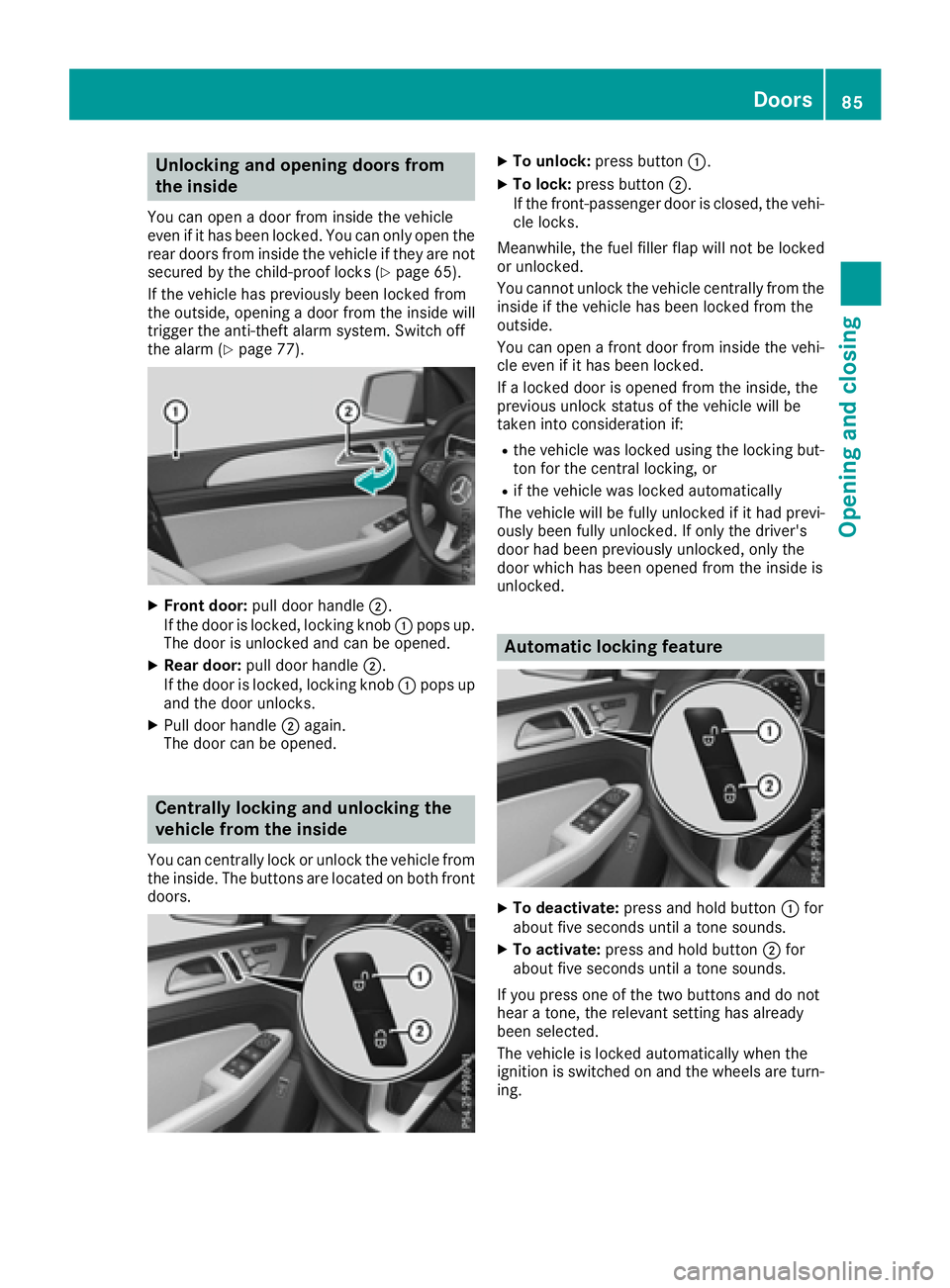
XFront door: pull door handle ;.
If the door is locked, locking knob :pops up.
The door is unlocked and can be opened.
XRear door: pull door handle ;.
If the door is locked, locking knob :pops up
and the door unlocks.
XPull door handle ;again.
The door can be opened.
Centrally locking and unlocking the
vehicle from the inside
You can centrally lock or unlock the vehicle from
the inside. The buttons are located on both front
doors.
XTo unlock: press button :.
XTo lock:press button ;.
If the front-passenger door is closed, the vehi-
cle locks.
Meanwhile, the fuel filler flap will not be locked
or unlocked.
You cannot unlock the vehicle centrally from the
inside if the vehicle has been locked from the
outside.
You can open a front door from inside the vehi-
cle even if it has been locked.
If a locked door is opened from the inside, the
previous unlock status of the vehicle will be
taken into consideration if:
Rthe vehicle was locked using the locking but-
ton for the central locking, or
Rif the vehicle was locked automatically
The vehicle will be fully unlocked if it had previ-
ously been fully unlocked. If only the driver's
door had been previously unlocked, only the
door which has been opened from the inside is
unlocked.
Automatic locking feature
XTo deactivate: press and hold button :for
about five seconds until a tone sounds.
XTo activate: press and hold button ;for
about five seconds until a tone sounds.
If you press one of the two buttons and do not
hear a tone, the relevant setting has already
been selected.
The vehicle is locked automatically when the
ignition is switched on and the wheels are turn-
ing.
Doors85
Opening and closing
Z
Page 122 of 450
If you require assistance replacing bulbs, con-
sult a qualified specialist workshop.
If the new bulb still does not light up, consult a
qualified specialist workshop.
Headlamps and lights are an important aspect of
vehicle safety. You must therefore make sure
that these function correctly at all times. Have
the headlamp setting checked regularly.
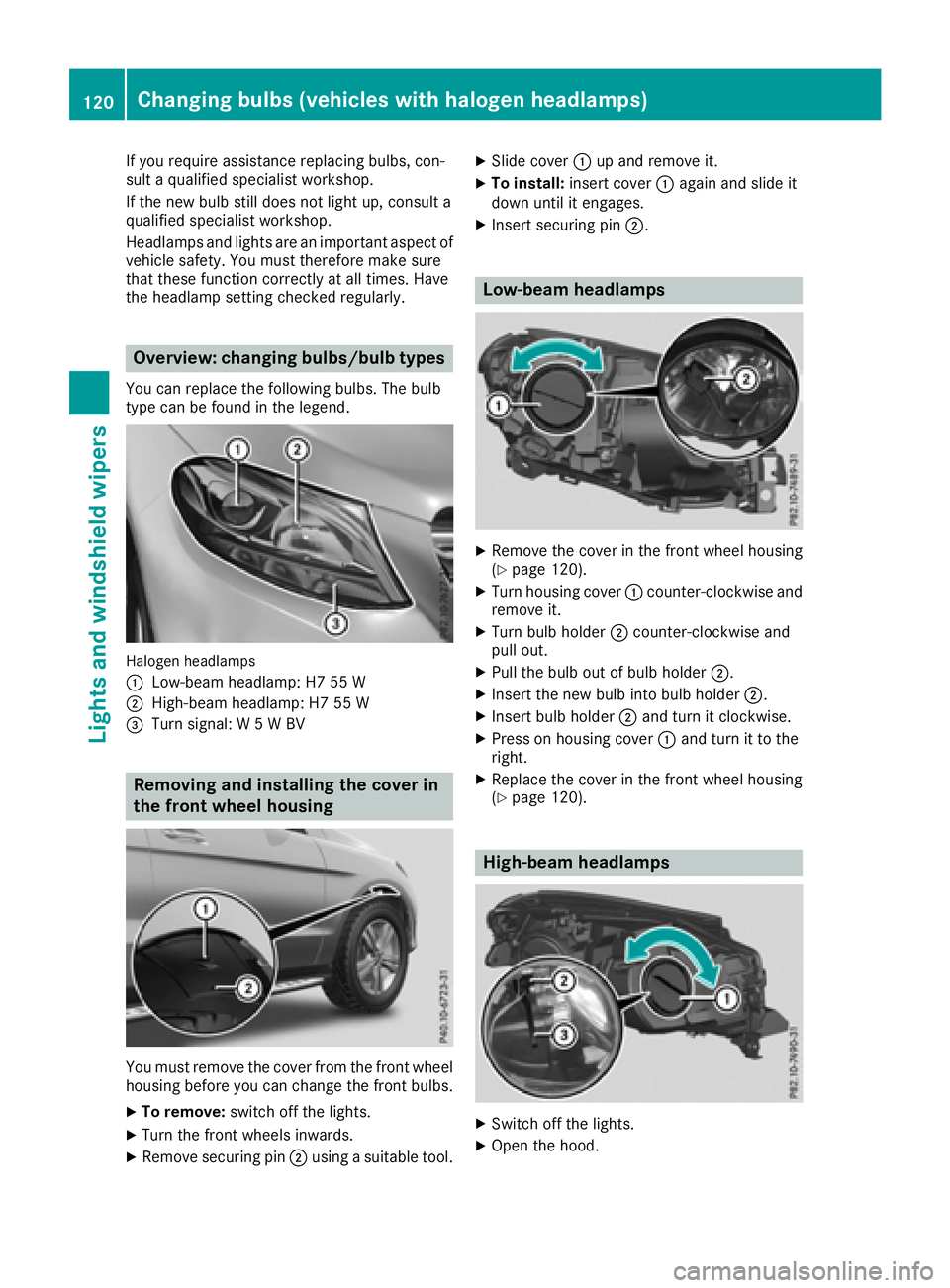
Overview: changing bulbs/bulb types
You can replace the following bulbs. The bulb
type can be found in the legend.
Halogen headlamps
:
Low-beam headlamp: H7 55 W
;High-beam headlamp: H7 55 W
=Turn signal: W 5 W BV
Removing and installing the cover in
the front wheel housing
You must remove the cover from the front wheel
housing before you can change the front bulbs.
XTo remove:switch off the lights.
XTurn the front wheels inwards.
XRemove securing pin ;using a suitable tool.
XSlide cover :up and remove it.
XTo install: insert cover :again and slide it
down until it engages.
XInsert securing pin ;.
Low-beam headlamps
XRemove the cover in the front wheel housing
(Ypage 120).
XTurn housing cover:counter-clockwise and
remove it.
XTurn bulb holder ;counter-clockwise and
pull out.
XPull the bulb out of bulb holder ;.
XInsert the new bulb into bulb holder ;.
XInsert bulb holder;and turn it clockwise.
XPress on housing cover :and turn it to the
right.
XReplace the cover in the front wheel housing
(Ypage 120).
High-beam headlamps
XSwitch off the lights.
XOpen the hood.
120Changing bulbs (vehicles with halogen headlamps)
Lights and windshield wipers
Page 144 of 450
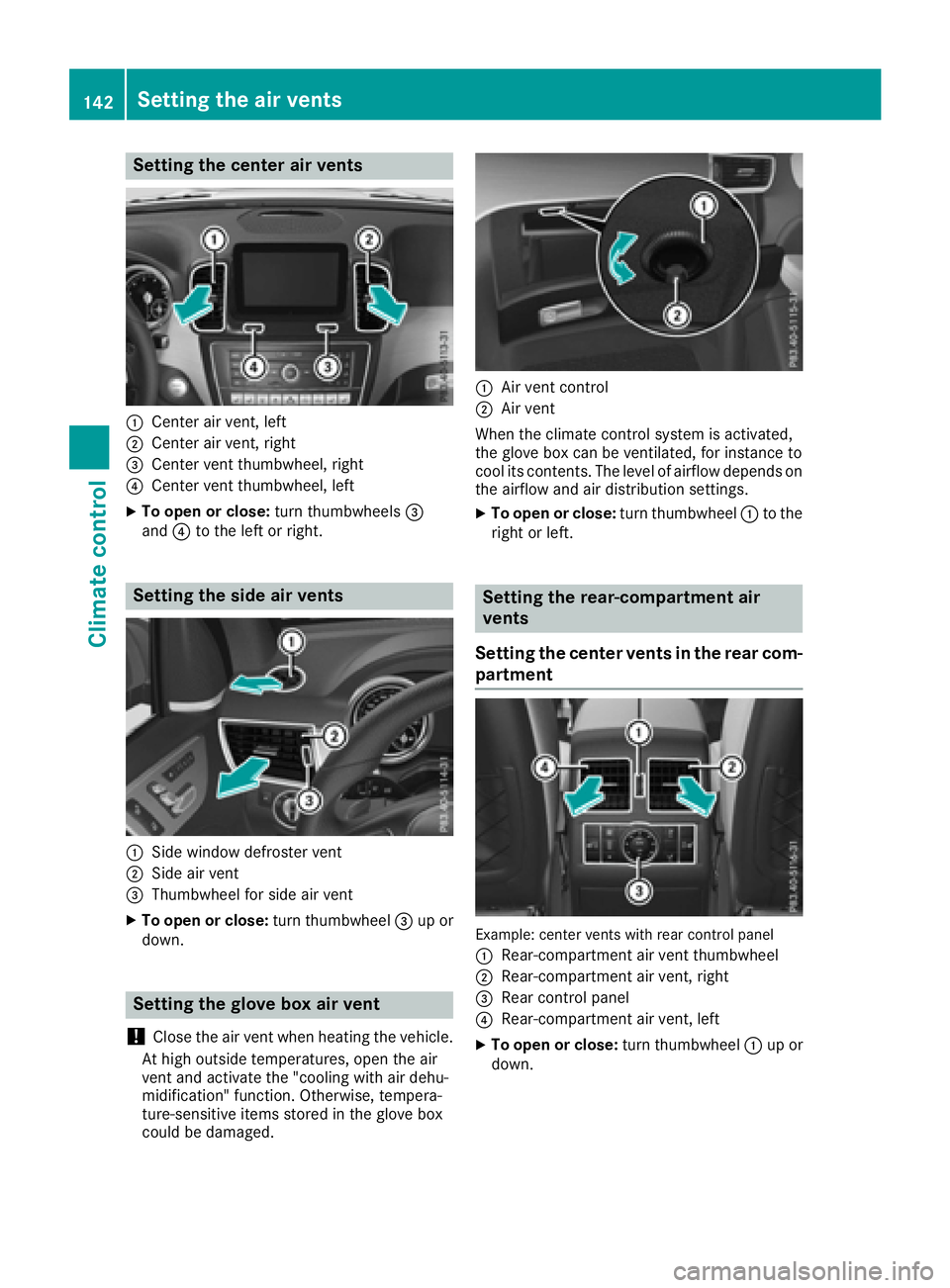
Setting the center air vents
:Center air vent, left
;Center air vent, right
=Center vent thumbwheel, right
?Center vent thumbwheel, left
XTo open or close:turn thumbwheels=
and ?to the left or right.
Setting the side air vents
:Side window defroster vent
;Side air vent
=Thumbwheel for side air vent
XTo open or close: turn thumbwheel=up or
down.
Setting the glove box air vent
!
Close the air vent when heating the vehicle.
At high outside temperatures, open the air
vent and activate the "cooling with air dehu-
midification" function. Otherwise, tempera-
ture-sensitive items stored in the glove box
could be damaged.
:Air vent control
;Air vent
When the climate control system is activated,
the glove box can be ventilated, for instance to
cool its contents. The level of airflow depends on the airflow and air distribution settings.
XTo open or close: turn thumbwheel:to the
right or left.
Setting the rear-compartment air
vents
Setting the center vents in the rear com-
partment
Example: center vents with rear control panel
:
Rear-compartment air vent thumbwheel
;Rear-compartment air vent, right
=Rear control panel
?Rear-compartment air vent, left
XTo open or close: turn thumbwheel:up or
down.
142Setting the air vents
Climate control